




Anleitung Zigbee2MQTT Einrichtung im ioBroker
-
@dp20eic
zu 1) richtig . ich war Deutschlandsaufen. als ich nach hause gekommen bin, habe ich bemerkt, dass das Badezimmerlicht nicht mehr auf Steuerung reagierte. Ich habe es dann erneut angemeldet. Dann erst ist mir aufgefallen, dass der Zigbee nicht mehr angemeldet war.zu 2) Tasmota zu aktualisieren ist mit zwei Klicks erledigt:
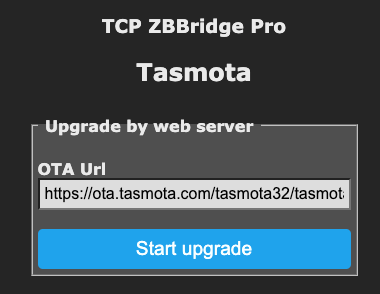
zu 3) ich habe einen Raspberry 4b mit 4GB, der ausschließlich für ioBroker benutzt wird. kein PC, kein NUC, kein Proxmox oder Docker, aktuelles RaspiOS mit aktuellem NODE.JS 18.18.0, ich kann halt schlecht einschätzen, welche Informationen relevant sind.
Aber aus dem Debug-Log ist vielleicht was hilfreich?
zigbee.0 2023-10-03 19:20:06.947 info Installed Version: iobroker.zigbee@1.8.24 zigbee.0 2023-10-03 19:20:06.938 debug Starting zigbee-herdsman... zigbee.0 2023-10-03 19:20:06.928 info Starting Zigbee npm ... zigbee.0 2023-10-03 19:20:06.926 info Try to reconnect. zigbee.0 2023-10-03 19:19:56.923 error Error herdsman start zigbee.0 2023-10-03 19:19:56.922 error Failed to start Zigbee zigbee.0 2023-10-03 19:19:56.920 error Starting zigbee-herdsman problem : "Failed to initialize NV memory item (id=3, name=STARTUP_OPTION, len=1, status=0)" zigbee.0 2023-10-03 19:19:10.200 debug Backup /opt/iobroker/iobroker-data/zigbee_0/backup_2023_10_03-19_19_09.tar.gz success zigbee.0 2023-10-03 19:19:09.885 info Installed Version: iobroker.zigbee@1.8.24 zigbee.0 2023-10-03 19:19:09.601 debug Starting zigbee-herdsman... zigbee.0 2023-10-03 19:19:09.556 info Starting Zigbee npm ... zigbee.0 2023-10-03 19:19:09.553 info delete old Backup files. keep only last 10 zigbee.0 2023-10-03 19:19:09.477 debug Using zigbee-herdsman with settings: {"network":{"panID":6754,"channelList":[11],"networkKey":[1,3,5,7,9,11,13,15,0,2,4,6,8,10,12,13],"extenedPanID":[221,221,221,221,221,221,221,221]},"databasePath":"/opt/iobroker/iobroker-data/zigbee_0/shepherd.db","backupPath":"/opt/iobroker/iobroker-data/zigbee_0/nvbackup.json","serialPort":{"baudRate":115200,"rtscts":false,"path":"tcp://zigbee-gateway.weinbrecht.lan:8888","adapter":"zstack"},"adapter":{"forceStartWithInconsistentAdapterConfiguration":true}} zigbee.0 2023-10-03 19:19:09.421 info starting. Version 1.8.24 in /opt/iobroker/node_modules/iobroker.zigbee, node: v18.18.0, js-controller: 5.0.12 zigbee.0 2023-10-03 19:19:08.871 debug Plugin sentry Initialize Plugin (enabled=true)@papa_aus_rastatt sagte in Anleitung Zigbee2MQTT Einrichtung im ioBroker:
Starting zigbee-herdsman problem : "Failed to initialize NV memory item (id=3, name=STARTUP_OPTION, len=1, status=0)"
der kann den Spcicher nicht initialisieren .. warum auch immer
-
@papa_aus_rastatt sagte in Anleitung Zigbee2MQTT Einrichtung im ioBroker:
Starting zigbee-herdsman problem : "Failed to initialize NV memory item (id=3, name=STARTUP_OPTION, len=1, status=0)"
der kann den Spcicher nicht initialisieren .. warum auch immer
@arteck Guten morgen,
ich hab den Debug gerade mal ausgeschnitten:
2023-10-04 07:08:26.755	info	Try to reconnect.
2023-10-04 07:08:16.750	error	Error herdsman start
2023-10-04 07:08:16.749	error	Failed to start Zigbee
2023-10-04 07:08:16.748	error	Starting zigbee-herdsman problem : "Failed to connect to the adapter (Error: SRSP - SYS - ping after 6000ms)"
2023-10-04 07:08:10.595	debug	zigbee-herdsman:adapter:zStack:unpi:writer --> frame [254,0,33,1,32]
2023-10-04 07:08:10.594	debug	zigbee-herdsman:adapter:zStack:znp:SREQ --> SYS - ping - {"capabilities":1}
2023-10-04 07:08:04.592	debug	zigbee-herdsman:adapter:zStack:unpi:writer --> frame [254,0,33,1,32]
2023-10-04 07:08:04.591	debug	zigbee-herdsman:adapter:zStack:znp:SREQ --> SYS - ping - {"capabilities":1}
2023-10-04 07:07:58.588	debug	zigbee-herdsman:adapter:zStack:unpi:writer --> frame [254,0,33,1,32]
2023-10-04 07:07:58.586	debug	zigbee-herdsman:adapter:zStack:znp:SREQ --> SYS - ping - {"capabilities":1}
2023-10-04 07:07:58.584	debug	zigbee-herdsman:adapter:zStack:znp:log Skip bootloader for CC2652/CC1352
2023-10-04 07:07:57.579	debug	zigbee-herdsman:adapter:zStack:unpi:writer --> buffer [239]
2023-10-04 07:07:57.578	debug	zigbee-herdsman:adapter:zStack:znp:log Writing CC2530/CC2531 skip bootloader payload
2023-10-04 07:07:57.576	debug	zigbee-herdsman:adapter:zStack:znp:log Socket ready
2023-10-04 07:07:57.575	debug	zigbee-herdsman:adapter:zStack:znp:log Socket connected
2023-10-04 07:07:57.572	debug	Backup /opt/iobroker/iobroker-data/zigbee_0/backup_2023_10_04-07_07_56.tar.gz success
2023-10-04 07:07:57.092	info	Installed Version: iobroker.zigbee@1.8.24
2023-10-04 07:07:57.086	debug	zigbee-herdsman:adapter:zStack:znp:log Opening TCP socket with 192.168.174.73:8888
2023-10-04 07:07:57.084	debug	zigbee-herdsman:controller:log Starting with options '{"network":{"networkKeyDistribute":false,"networkKey":[1,3,5,7,9,11,13,15,0,2,4,6,8,10,12,13],"panID":6754,"extendedPanID":[221,221,221,221,221,221,221,221],"channelList":[11]},"serialPort":{"baudRate":115200,"rtscts":false,"path":"tcp://192.168.174.73:8888","adapter":"zstack"},"databasePath":"/opt/iobroker/iobroker-data/zigbee_0/shepherd.db","databaseBackupPath":null,"backupPath":"/opt/iobroker/iobroker-data/zigbee_0/nvbackup.json","adapter":{"disableLED":false,"forceStartWithInconsistentAdapterConfiguration":true},"acceptJoiningDeviceHandler":null}'
2023-10-04 07:07:56.769	debug	Starting zigbee-herdsman...
2023-10-04 07:07:56.727	info	Starting Zigbee npm ...
2023-10-04 07:07:56.724	info	delete old Backup files. keep only last 10
2023-10-04 07:07:56.637	debug	Using zigbee-herdsman with settings: {"network":{"panID":6754,"extendedPanID":[221,221,221,221,221,221,221,221],"channelList":[11],"networkKey":[1,3,5,7,9,11,13,15,0,2,4,6,8,10,12,13]},"databasePath":"/opt/iobroker/iobroker-data/zigbee_0/shepherd.db","backupPath":"/opt/iobroker/iobroker-data/zigbee_0/nvbackup.json","serialPort":{"baudRate":115200,"rtscts":false,"path":"tcp://192.168.174.73:8888","adapter":"zstack"},"adapter":{"forceStartWithInconsistentAdapterConfiguration":true}}
2023-10-04 07:07:56.580	info	starting. Version 1.8.24 in /opt/iobroker/node_modules/iobroker.zigbee, node: v18.18.0, js-controller: 5.0.12
2023-10-04 07:07:56.041	debug	Plugin sentry Initialize Plugin (enabled=true)
bin für Vorschläge dankbar.
-
@papa_aus_rastatt sagte in Anleitung Zigbee2MQTT Einrichtung im ioBroker:
bin für Vorschläge dankbar.
Moin,
kannst Du auch noch den langen Output posten, von
iob diagVG
Bernd -
@papa_aus_rastatt sagte in Anleitung Zigbee2MQTT Einrichtung im ioBroker:
bin für Vorschläge dankbar.
Moin,
kannst Du auch noch den langen Output posten, von
iob diagVG
Bernd@dp20eic ja natürlich, kannst etwas spezifieren, was dich genau interressiert?
-
tue uns beiden den gefallen und mach nur das was wir dir sagen egal obs plausiebel für dich ist oder nicht (von debug war nie die Rede)
wenn @dp20eic langen Output will dann zeigmal ALLES was das iob diag liefert
ich will die Adapter Einstellungen als screensot sehen..ja alles
hast den umgestellt ??
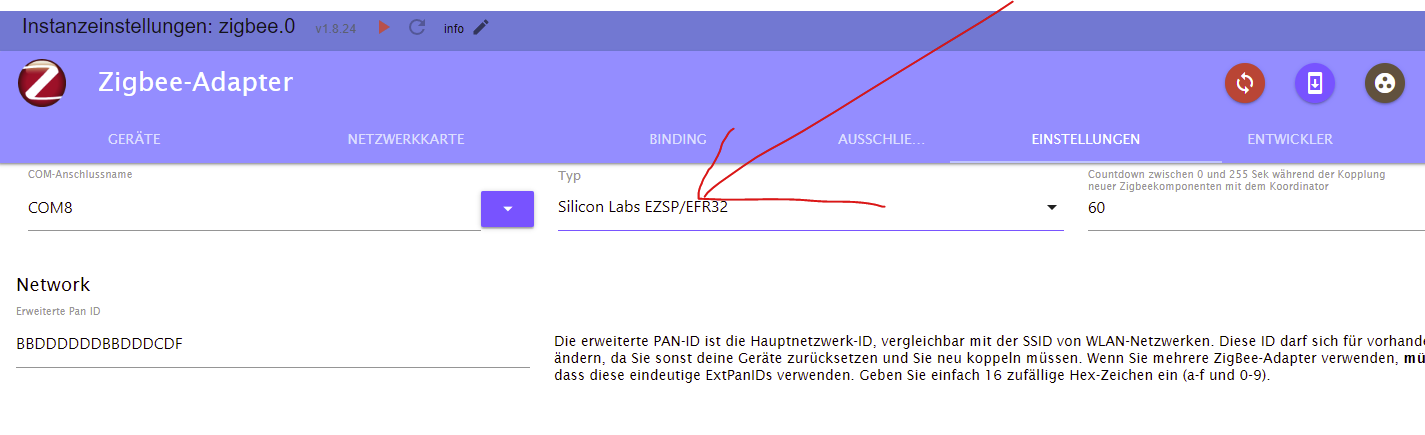
-
tue uns beiden den gefallen und mach nur das was wir dir sagen egal obs plausiebel für dich ist oder nicht (von debug war nie die Rede)
wenn @dp20eic langen Output will dann zeigmal ALLES was das iob diag liefert
ich will die Adapter Einstellungen als screensot sehen..ja alles
hast den umgestellt ??
@arteck du meinst so?
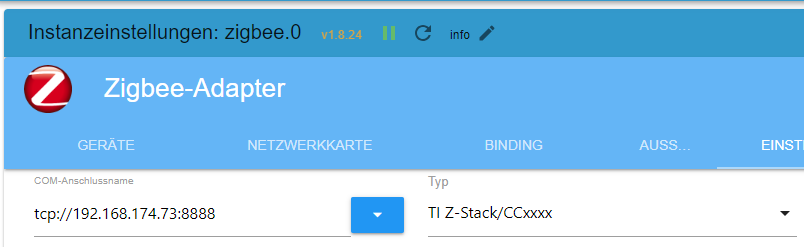
iob diag
*** ioBroker Diagnosis *** Please stretch the window of your terminal programm (puTTY) as wide as possible or switch to full screen The following checks may give hints to potential malconfigurations or errors, please post them in our forum: https://forum.iobroker.net Just copy and paste the Summary Page, including the characters at start and end. It helps us to help you! Press any key to continue ======== Start marking the full check here ========= Skript v.2023-06-20 *** BASE SYSTEM *** Static hostname: app-server1.weinbrecht.lan Icon name: computer Machine ID: f699c63377c1419dbac4c0c664f4b780 Boot ID: 2dad0456cb654f80b695eb65355ad96e Operating System: Debian GNU/Linux 11 (bullseye) Kernel: Linux 6.1.54-v8+ Architecture: arm64 Model : Raspberry Pi 4 Model B Rev 1.5 Docker : false Virtualization : none Kernel : aarch64 Userland : arm64 Systemuptime and Load: 08:53:22 up 14:16, 1 user, load average: 0.36, 0.46, 0.50 CPU threads: 4 Raspberry only: throttled=0x0 Other values than 0x0 hint to temperature/voltage problems temp=32.6'C volt=0.9360V *** Time and Time Zones *** Local time: Wed 2023-10-04 08:53:22 CEST Universal time: Wed 2023-10-04 06:53:22 UTC RTC time: n/a Time zone: Europe/Berlin (CEST, +0200) System clock synchronized: yes NTP service: active RTC in local TZ: no *** User and Groups *** root /root root *** X-Server-Setup *** X-Server: false Desktop: Terminal: tty Boot Target: multi-user.target *** MEMORY *** total used free shared buff/cache available Mem: 3.8G 2.0G 534M 114M 1.3G 1.7G Swap: 0B 0B 0B Total: 3.8G 2.0G 534M 3843 M total memory 2010 M used memory 2643 M active memory 476 M inactive memory 534 M free memory 74 M buffer memory 1223 M swap cache 0 M total swap 0 M used swap 0 M free swap Raspberry only: oom events: 0 lifetime oom required: 0 Mbytes total time in oom handler: 0 ms max time spent in oom handler: 0 ms *** FILESYSTEM *** Filesystem Type Size Used Avail Use% Mounted on /dev/root ext4 220G 6.6G 204G 4% / devtmpfs devtmpfs 1.9G 0 1.9G 0% /dev tmpfs tmpfs 1.9G 0 1.9G 0% /dev/shm tmpfs tmpfs 769M 9.0M 760M 2% /run tmpfs tmpfs 5.0M 4.0K 5.0M 1% /run/lock none tmpfs 1.9G 2.2M 1.9G 1% /tmp tmpfs tmpfs 1.9G 104M 1.8G 6% /var/cache tmpfs tmpfs 1.9G 200K 1.9G 1% /var/log tmpfs tmpfs 1.9G 0 1.9G 0% /var/tmp /dev/sda1 vfat 255M 53M 203M 21% /boot tmpfs tmpfs 385M 0 385M 0% /run/user/0 Messages concerning ext4 filesystem in dmesg: [Tue Oct 3 18:37:12 2023] Kernel command line: coherent_pool=1M 8250.nr_uarts=1 snd_bcm2835.enable_headphones=0 snd_bcm2835.enable_headphones=1 snd_bcm2835.enable_hdmi=1 bcm2708_fb.fbwidth=1920 bcm2708_fb.fbheight=1080 bcm2708_fb.fbdepth=16 bcm2708_fb.fbswap=1 smsc95xx.macaddr=D8:3A:DD:37:E1:5F vc_mem.mem_base=0x3f000000 vc_mem.mem_size=0x3f600000 console=ttyAMA0,115200 console=tty1 root=PARTUUID=66aa2880-02 rootfstype=ext4 fsck.repair=yes rootwait [Tue Oct 3 18:37:15 2023] EXT4-fs (sda2): mounted filesystem with writeback data mode. Quota mode: none. [Tue Oct 3 18:37:15 2023] VFS: Mounted root (ext4 filesystem) readonly on device 8:2. [Tue Oct 3 18:37:17 2023] EXT4-fs (sda2): re-mounted. Quota mode: none. Show mounted filesystems (real ones only): TARGET SOURCE FSTYPE OPTIONS / /dev/sda2 ext4 rw,noatime,nodiratime,discard,nobarrier,stripe=8191 `-/boot /dev/sda1 vfat rw,relatime,fmask=0022,dmask=0022,codepage=437,iocharset=ascii,shortname=mixed,flush,errors=remount-ro Files in neuralgic directories: /var: 421M /var/ 316M /var/lib 158M /var/lib/influxdb/engine 158M /var/lib/influxdb 154M /var/lib/influxdb/engine/data/a9866606e533e3f8/autogen Archived and active journals take up 8.0M in the file system. /opt/iobroker/backups: 29M /opt/iobroker/backups/ /opt/iobroker/iobroker-data: 439M /opt/iobroker/iobroker-data/ 316M /opt/iobroker/iobroker-data/files 147M /opt/iobroker/iobroker-data/files/vis-2 75M /opt/iobroker/iobroker-data/files/vis-2/static 74M /opt/iobroker/iobroker-data/files/vis-2/static/js The five largest files in iobroker-data are: 46M /opt/iobroker/iobroker-data/objects.jsonl 33M /opt/iobroker/iobroker-data/files/iot.admin/static/js/main.1797d034.js.map 21M /opt/iobroker/iobroker-data/files/web.admin/static/js/main.9aab3e1f.js.map 19M /opt/iobroker/iobroker-data/files/vis-2/static/js/main.d3c12542.js.map 17M /opt/iobroker/iobroker-data/files/vis-2/static/js/main.b6e16d06.js.map *** NodeJS-Installation *** /usr/bin/nodejs v18.18.0 /usr/bin/node v18.18.0 /usr/bin/npm 10.1.0 /usr/bin/npx 10.1.0 nodejs: Installed: 18.18.0-1nodesource1 Candidate: 18.18.0-1nodesource1 Version table: *** 18.18.0-1nodesource1 500 500 https://deb.nodesource.com/node_18.x nodistro/main arm64 Packages 100 /var/lib/dpkg/status 18.17.1-1nodesource1 500 500 https://deb.nodesource.com/node_18.x nodistro/main arm64 Packages 18.17.0-1nodesource1 500 500 https://deb.nodesource.com/node_18.x nodistro/main arm64 Packages 18.16.1-1nodesource1 500 500 https://deb.nodesource.com/node_18.x nodistro/main arm64 Packages 18.16.0-1nodesource1 500 500 https://deb.nodesource.com/node_18.x nodistro/main arm64 Packages 18.15.0-1nodesource1 500 500 https://deb.nodesource.com/node_18.x nodistro/main arm64 Packages 18.14.2-1nodesource1 500 500 https://deb.nodesource.com/node_18.x nodistro/main arm64 Packages 18.14.1-1nodesource1 500 500 https://deb.nodesource.com/node_18.x nodistro/main arm64 Packages 18.14.0-1nodesource1 500 500 https://deb.nodesource.com/node_18.x nodistro/main arm64 Packages 18.13.0-1nodesource1 500 500 https://deb.nodesource.com/node_18.x nodistro/main arm64 Packages 18.12.0-1nodesource1 500 500 https://deb.nodesource.com/node_18.x nodistro/main arm64 Packages 18.11.0-1nodesource1 500 500 https://deb.nodesource.com/node_18.x nodistro/main arm64 Packages 18.10.0-1nodesource1 500 500 https://deb.nodesource.com/node_18.x nodistro/main arm64 Packages 18.9.1-1nodesource1 500 500 https://deb.nodesource.com/node_18.x nodistro/main arm64 Packages 18.9.0-1nodesource1 500 500 https://deb.nodesource.com/node_18.x nodistro/main arm64 Packages 18.8.0-1nodesource1 500 500 https://deb.nodesource.com/node_18.x nodistro/main arm64 Packages 18.7.0-1nodesource1 500 500 https://deb.nodesource.com/node_18.x nodistro/main arm64 Packages 18.6.0-1nodesource1 500 500 https://deb.nodesource.com/node_18.x nodistro/main arm64 Packages 18.5.0-1nodesource1 500 500 https://deb.nodesource.com/node_18.x nodistro/main arm64 Packages 18.4.0-1nodesource1 500 500 https://deb.nodesource.com/node_18.x nodistro/main arm64 Packages 18.3.0-1nodesource1 500 500 https://deb.nodesource.com/node_18.x nodistro/main arm64 Packages 18.2.0-1nodesource1 500 500 https://deb.nodesource.com/node_18.x nodistro/main arm64 Packages 18.1.0-1nodesource1 500 500 https://deb.nodesource.com/node_18.x nodistro/main arm64 Packages 18.0.0-1nodesource1 500 500 https://deb.nodesource.com/node_18.x nodistro/main arm64 Packages 12.22.12~dfsg-1~deb11u4 500 500 http://security.debian.org/debian-security bullseye-security/main arm64 Packages 12.22.12~dfsg-1~deb11u3 500 500 http://deb.debian.org/debian bullseye/main arm64 Packages Temp directories causing npm8 problem: 0 No problems detected Errors in npm tree: 0 *** ioBroker-Installation *** ioBroker Status iobroker is running on this host. Objects type: jsonl States type: jsonl No configuration change needed. Multihost discovery server: disabled Discovery authentication: enabled Persistent activation: disabled Objects: jsonl on 127.0.0.1 States: jsonl on 127.0.0.1 Core adapters versions js-controller: 5.0.12 admin: 6.10.4 javascript: 7.1.4 Adapters from github: 1 Adapter State + system.adapter.accuweather.0 : accuweather : app-server1.weinbrecht.lan - enabled + system.adapter.admin.0 : admin : app-server1.weinbrecht.lan - enabled, port: 8081, bind: 0.0.0.0, run as: admin + system.adapter.alexa2.0 : alexa2 : app-server1.weinbrecht.lan - enabled + system.adapter.apsystems-ecu.0 : apsystems-ecu : app-server1.weinbrecht.lan - enabled + system.adapter.backitup.0 : backitup : app-server1.weinbrecht.lan - enabled system.adapter.cloud.0 : cloud : app-server1.weinbrecht.lan - disabled system.adapter.feiertage.0 : feiertage : app-server1.weinbrecht.lan - enabled + system.adapter.fritzdect.0 : fritzdect : app-server1.weinbrecht.lan - enabled + system.adapter.influxdb.0 : influxdb : app-server1.weinbrecht.lan - enabled, port: 8086 + system.adapter.info.0 : info : app-server1.weinbrecht.lan - enabled system.adapter.iot.0 : iot : app-server1.weinbrecht.lan - disabled + system.adapter.javascript.0 : javascript : app-server1.weinbrecht.lan - enabled + system.adapter.mihome-vacuum.0 : mihome-vacuum : app-server1.weinbrecht.lan - enabled, port: 54321 + system.adapter.modbus.0 : modbus : app-server1.weinbrecht.lan - enabled + system.adapter.sonoff.0 : sonoff : app-server1.weinbrecht.lan - enabled, port: 1883, bind: 192.168.174.12 + system.adapter.telegram.0 : telegram : app-server1.weinbrecht.lan - enabled, port: 8443, bind: 0.0.0.0 + system.adapter.tr-064.0 : tr-064 : app-server1.weinbrecht.lan - enabled + system.adapter.tuya.0 : tuya : app-server1.weinbrecht.lan - enabled + system.adapter.vaillant.0 : vaillant : app-server1.weinbrecht.lan - enabled system.adapter.vis-2-widgets-energy.0 : vis-2-widgets-energy : app-server1.weinbrecht.lan - disabled system.adapter.vis-2-widgets-gauges.0 : vis-2-widgets-gauges : app-server1.weinbrecht.lan - disabled system.adapter.vis-2-widgets-material.0 : vis-2-widgets-material: app-server1.weinbrecht.lan - disabled + system.adapter.vis-2.0 : vis-2 : app-server1.weinbrecht.lan - enabled + system.adapter.web.0 : web : app-server1.weinbrecht.lan - enabled, port: 8082, bind: 0.0.0.0, run as: admin + system.adapter.wifilight.0 : wifilight : app-server1.weinbrecht.lan - enabled + system.adapter.zigbee.0 : zigbee : app-server1.weinbrecht.lan - enabled, port: tcp://192.168.174.73:8888 + instance is alive Enabled adapters with bindings + system.adapter.admin.0 : admin : app-server1.weinbrecht.lan - enabled, port: 8081, bind: 0.0.0.0, run as: admin + system.adapter.influxdb.0 : influxdb : app-server1.weinbrecht.lan - enabled, port: 8086 + system.adapter.mihome-vacuum.0 : mihome-vacuum : app-server1.weinbrecht.lan - enabled, port: 54321 + system.adapter.sonoff.0 : sonoff : app-server1.weinbrecht.lan - enabled, port: 1883, bind: 192.168.174.12 + system.adapter.telegram.0 : telegram : app-server1.weinbrecht.lan - enabled, port: 8443, bind: 0.0.0.0 + system.adapter.web.0 : web : app-server1.weinbrecht.lan - enabled, port: 8082, bind: 0.0.0.0, run as: admin + system.adapter.zigbee.0 : zigbee : app-server1.weinbrecht.lan - enabled, port: tcp://192.168.174.73:8888 ioBroker-Repositories stable : http://download.iobroker.net/sources-dist.json beta : http://download.iobroker.net/sources-dist-latest.json Active repo(s): beta Installed ioBroker-Instances Used repository: beta Adapter "accuweather" : 1.3.1 , installed 1.3.1 Adapter "admin" : 6.10.4 , installed 6.10.4 Adapter "alexa2" : 3.25.2 , installed 3.25.2 Adapter "backitup" : 2.8.2 , installed 2.8.2 Adapter "cloud" : 4.4.1 , installed 4.4.1 Adapter "feiertage" : 1.1.4 , installed 1.1.4 Adapter "fritzdect" : 2.4.1 , installed 2.4.1 Adapter "influxdb" : 3.2.0 , installed 3.2.0 Adapter "info" : 2.0.0 , installed 2.0.0 Adapter "iot" : 2.0.11 , installed 2.0.11 Adapter "javascript" : 7.1.4 , installed 7.1.4 Controller "js-controller": 5.0.12 , installed 5.0.12 Adapter "mihome-vacuum": 4.0.0 , installed 4.0.0 Adapter "modbus" : 5.0.11 , installed 5.0.11 Adapter "simple-api" : 2.7.2 , installed 2.7.2 Adapter "socketio" : 6.5.6 , installed 6.5.6 Adapter "sonoff" : 3.0.3 , installed 3.0.3 Adapter "telegram" : 1.16.0 , installed 1.16.0 Adapter "tr-064" : 4.2.18 , installed 4.2.18 Adapter "tuya" : 3.14.2 , installed 3.14.2 Adapter "vaillant" : 0.2.0 , installed 0.2.0 Adapter "vis-2" : 2.3.0 , installed 2.3.0 Adapter "vis-2-widgets-energy": 0.3.8, installed 0.3.8 Adapter "vis-2-widgets-gauges": 0.2.0, installed 0.2.0 Adapter "vis-2-widgets-material": 1.2.1, installed 1.2.1 Adapter "web" : 6.1.3 , installed 6.1.3 Adapter "wifilight" : 1.1.4 , installed 1.1.4 Adapter "ws" : 2.5.6 , installed 2.5.6 Adapter "zigbee" : 1.8.24 , installed 1.8.24 Objects and States Please stand by - This may take a while Objects: 6543 States: 6142 *** OS-Repositories and Updates *** Reading package lists... Pending Updates: 0 *** Listening Ports *** Active Internet connections (only servers) Proto Recv-Q Send-Q Local Address Foreign Address State User Inode PID/Program name tcp 0 0 192.168.174.12:1883 0.0.0.0:* LISTEN 1001 87078 8050/io.sonoff.0 tcp 0 0 0.0.0.0:5355 0.0.0.0:* LISTEN 102 944 320/systemd-resolve tcp 0 0 127.0.0.53:53 0.0.0.0:* LISTEN 102 950 320/systemd-resolve tcp 0 0 127.0.0.1:9000 0.0.0.0:* LISTEN 1001 62525 4511/iobroker.js-co tcp 0 0 127.0.0.1:9001 0.0.0.0:* LISTEN 1001 61674 4511/iobroker.js-co tcp 0 0 192.168.178.12:22 0.0.0.0:* LISTEN 0 998 394/sshd: /usr/sbin tcp 0 0 192.168.178.12:80 0.0.0.0:* LISTEN 0 13414 493/nginx: master p tcp 0 0 192.168.174.12:22 0.0.0.0:* LISTEN 0 996 394/sshd: /usr/sbin tcp 0 0 192.168.178.12:443 0.0.0.0:* LISTEN 0 13412 493/nginx: master p tcp6 0 0 :::3000 :::* LISTEN 111 13546 525/grafana tcp6 0 0 :::5355 :::* LISTEN 102 947 320/systemd-resolve tcp6 0 0 fd00::da3a:ddff:fe3:443 :::* LISTEN 0 13413 493/nginx: master p tcp6 0 0 fd00::da3a:ddff:fe37:80 :::* LISTEN 0 13415 493/nginx: master p tcp6 0 0 :::8081 :::* LISTEN 1001 62602 4550/io.admin.0 tcp6 0 0 :::8082 :::* LISTEN 1001 88461 8156/io.web.0 tcp6 0 0 :::8086 :::* LISTEN 110 13436 466/influxd udp 0 0 127.0.0.53:53 0.0.0.0:* 102 949 320/systemd-resolve udp 0 0 0.0.0.0:53421 0.0.0.0:* 1001 78573 8014/io.mihome-vacu udp 0 0 0.0.0.0:6666 0.0.0.0:* 1001 88475 8084/io.tuya.0 udp 0 0 0.0.0.0:6667 0.0.0.0:* 1001 88476 8084/io.tuya.0 udp 0 0 0.0.0.0:5355 0.0.0.0:* 102 943 320/systemd-resolve udp6 0 0 fe80::da3a:ddff:fe3:546 :::* 101 481293 179/systemd-network udp6 0 0 :::5355 :::* 102 946 320/systemd-resolve *** Log File - Last 25 Lines *** 2023-10-04 08:47:37.093 - info: zigbee.0 (49242) Installed Version: iobroker.zigbee@1.8.24 2023-10-04 08:49:07.681 - error: zigbee.0 (49242) Starting zigbee-herdsman problem : "Cannot read properties of undefined (reading 'payload')" 2023-10-04 08:49:07.682 - error: zigbee.0 (49242) Failed to start Zigbee 2023-10-04 08:49:07.683 - error: zigbee.0 (49242) Error herdsman start 2023-10-04 08:49:17.685 - info: zigbee.0 (49242) Try to reconnect. 2023-10-04 08:49:17.686 - info: zigbee.0 (49242) Starting Zigbee npm ... 2023-10-04 08:49:17.693 - info: zigbee.0 (49242) Installed Version: iobroker.zigbee@1.8.24 2023-10-04 08:51:42.121 - error: zigbee.0 (49242) Starting zigbee-herdsman problem : "network commissioning timed out - most likely network with the same panId or extendedPanId already exists nearby" 2023-10-04 08:51:42.123 - error: zigbee.0 (49242) Failed to start Zigbee 2023-10-04 08:51:42.124 - error: zigbee.0 (49242) Error herdsman start 2023-10-04 08:51:52.129 - info: zigbee.0 (49242) Try to reconnect. 2023-10-04 08:51:52.131 - info: zigbee.0 (49242) Starting Zigbee npm ... 2023-10-04 08:51:52.138 - info: zigbee.0 (49242) Installed Version: iobroker.zigbee@1.8.24 2023-10-04 08:53:13.428 - error: zigbee.0 (49242) Starting zigbee-herdsman problem : "Cannot read properties of undefined (reading 'payload')" 2023-10-04 08:53:13.429 - error: zigbee.0 (49242) Failed to start Zigbee 2023-10-04 08:53:13.430 - error: zigbee.0 (49242) Error herdsman start 2023-10-04 08:53:23.432 - info: zigbee.0 (49242) Try to reconnect. 2023-10-04 08:53:23.433 - info: zigbee.0 (49242) Starting Zigbee npm ... 2023-10-04 08:53:23.442 - info: zigbee.0 (49242) Installed Version: iobroker.zigbee@1.8.24 2023-10-04 08:53:48.737 - error: zigbee.0 (49242) Starting zigbee-herdsman problem : "Cannot read properties of undefined (reading 'payload')" 2023-10-04 08:53:48.755 - error: zigbee.0 (49242) Failed to start Zigbee 2023-10-04 08:53:48.756 - error: zigbee.0 (49242) Error herdsman start 2023-10-04 08:53:58.759 - info: zigbee.0 (49242) Try to reconnect. 2023-10-04 08:53:58.760 - info: zigbee.0 (49242) Starting Zigbee npm ... 2023-10-04 08:53:58.777 - info: zigbee.0 (49242) Installed Version: iobroker.zigbee@1.8.24 ============ Mark until here for C&P ============= iob diag has finished. Press any key for a summary Copy text starting here: ======================= SUMMARY ======================= v.2023-06-20 Static hostname: app-server1.weinbrecht.lan Icon name: computer Machine ID: f699c63377c1419dbac4c0c664f4b780 Boot ID: 2dad0456cb654f80b695eb65355ad96e Operating System: Debian GNU/Linux 11 (bullseye) Kernel: Linux 6.1.54-v8+ Architecture: arm64 Installation: native Kernel: aarch64 Userland: arm64 Timezone: Europe/Berlin (CEST, +0200) User-ID: 0 X-Server: false Boot Target: multi-user.target Pending OS-Updates: 0 Pending iob updates: 0 Nodejs-Installation: /usr/bin/nodejs v18.18.0 /usr/bin/node v18.18.0 /usr/bin/npm 10.1.0 /usr/bin/npx 10.1.0 Recommended versions are nodejs 18.x.y and npm 9.x.y Your nodejs installation is correct MEMORY: total used free shared buff/cache available Mem: 3.8G 2.1G 456M 114M 1.3G 1.6G Swap: 0B 0B 0B Total: 3.8G 2.1G 456M Active iob-Instances: 21 Active repo(s): beta ioBroker Core: js-controller 5.0.12 admin 6.10.4 ioBroker Status: iobroker is running on this host. Objects type: jsonl States type: jsonl Status admin and web instance: + system.adapter.admin.0 : admin : app-server1.weinbrecht.lan - enabled, port: 8081, bind: 0.0.0.0, run as: admin + system.adapter.web.0 : web : app-server1.weinbrecht.lan - enabled, port: 8082, bind: 0.0.0.0, run as: admin Objects: 6543 States: 6142 Size of iob-Database: 46M /opt/iobroker/iobroker-data/objects.jsonl 9.6M /opt/iobroker/iobroker-data/states.jsonl =================== END OF SUMMARY ==================== === Mark text until here for copying === -
@arteck du meinst so?
iob diag
*** ioBroker Diagnosis *** Please stretch the window of your terminal programm (puTTY) as wide as possible or switch to full screen The following checks may give hints to potential malconfigurations or errors, please post them in our forum: https://forum.iobroker.net Just copy and paste the Summary Page, including the characters at start and end. It helps us to help you! Press any key to continue ======== Start marking the full check here ========= Skript v.2023-06-20 *** BASE SYSTEM *** Static hostname: app-server1.weinbrecht.lan Icon name: computer Machine ID: f699c63377c1419dbac4c0c664f4b780 Boot ID: 2dad0456cb654f80b695eb65355ad96e Operating System: Debian GNU/Linux 11 (bullseye) Kernel: Linux 6.1.54-v8+ Architecture: arm64 Model : Raspberry Pi 4 Model B Rev 1.5 Docker : false Virtualization : none Kernel : aarch64 Userland : arm64 Systemuptime and Load: 08:53:22 up 14:16, 1 user, load average: 0.36, 0.46, 0.50 CPU threads: 4 Raspberry only: throttled=0x0 Other values than 0x0 hint to temperature/voltage problems temp=32.6'C volt=0.9360V *** Time and Time Zones *** Local time: Wed 2023-10-04 08:53:22 CEST Universal time: Wed 2023-10-04 06:53:22 UTC RTC time: n/a Time zone: Europe/Berlin (CEST, +0200) System clock synchronized: yes NTP service: active RTC in local TZ: no *** User and Groups *** root /root root *** X-Server-Setup *** X-Server: false Desktop: Terminal: tty Boot Target: multi-user.target *** MEMORY *** total used free shared buff/cache available Mem: 3.8G 2.0G 534M 114M 1.3G 1.7G Swap: 0B 0B 0B Total: 3.8G 2.0G 534M 3843 M total memory 2010 M used memory 2643 M active memory 476 M inactive memory 534 M free memory 74 M buffer memory 1223 M swap cache 0 M total swap 0 M used swap 0 M free swap Raspberry only: oom events: 0 lifetime oom required: 0 Mbytes total time in oom handler: 0 ms max time spent in oom handler: 0 ms *** FILESYSTEM *** Filesystem Type Size Used Avail Use% Mounted on /dev/root ext4 220G 6.6G 204G 4% / devtmpfs devtmpfs 1.9G 0 1.9G 0% /dev tmpfs tmpfs 1.9G 0 1.9G 0% /dev/shm tmpfs tmpfs 769M 9.0M 760M 2% /run tmpfs tmpfs 5.0M 4.0K 5.0M 1% /run/lock none tmpfs 1.9G 2.2M 1.9G 1% /tmp tmpfs tmpfs 1.9G 104M 1.8G 6% /var/cache tmpfs tmpfs 1.9G 200K 1.9G 1% /var/log tmpfs tmpfs 1.9G 0 1.9G 0% /var/tmp /dev/sda1 vfat 255M 53M 203M 21% /boot tmpfs tmpfs 385M 0 385M 0% /run/user/0 Messages concerning ext4 filesystem in dmesg: [Tue Oct 3 18:37:12 2023] Kernel command line: coherent_pool=1M 8250.nr_uarts=1 snd_bcm2835.enable_headphones=0 snd_bcm2835.enable_headphones=1 snd_bcm2835.enable_hdmi=1 bcm2708_fb.fbwidth=1920 bcm2708_fb.fbheight=1080 bcm2708_fb.fbdepth=16 bcm2708_fb.fbswap=1 smsc95xx.macaddr=D8:3A:DD:37:E1:5F vc_mem.mem_base=0x3f000000 vc_mem.mem_size=0x3f600000 console=ttyAMA0,115200 console=tty1 root=PARTUUID=66aa2880-02 rootfstype=ext4 fsck.repair=yes rootwait [Tue Oct 3 18:37:15 2023] EXT4-fs (sda2): mounted filesystem with writeback data mode. Quota mode: none. [Tue Oct 3 18:37:15 2023] VFS: Mounted root (ext4 filesystem) readonly on device 8:2. [Tue Oct 3 18:37:17 2023] EXT4-fs (sda2): re-mounted. Quota mode: none. Show mounted filesystems (real ones only): TARGET SOURCE FSTYPE OPTIONS / /dev/sda2 ext4 rw,noatime,nodiratime,discard,nobarrier,stripe=8191 `-/boot /dev/sda1 vfat rw,relatime,fmask=0022,dmask=0022,codepage=437,iocharset=ascii,shortname=mixed,flush,errors=remount-ro Files in neuralgic directories: /var: 421M /var/ 316M /var/lib 158M /var/lib/influxdb/engine 158M /var/lib/influxdb 154M /var/lib/influxdb/engine/data/a9866606e533e3f8/autogen Archived and active journals take up 8.0M in the file system. /opt/iobroker/backups: 29M /opt/iobroker/backups/ /opt/iobroker/iobroker-data: 439M /opt/iobroker/iobroker-data/ 316M /opt/iobroker/iobroker-data/files 147M /opt/iobroker/iobroker-data/files/vis-2 75M /opt/iobroker/iobroker-data/files/vis-2/static 74M /opt/iobroker/iobroker-data/files/vis-2/static/js The five largest files in iobroker-data are: 46M /opt/iobroker/iobroker-data/objects.jsonl 33M /opt/iobroker/iobroker-data/files/iot.admin/static/js/main.1797d034.js.map 21M /opt/iobroker/iobroker-data/files/web.admin/static/js/main.9aab3e1f.js.map 19M /opt/iobroker/iobroker-data/files/vis-2/static/js/main.d3c12542.js.map 17M /opt/iobroker/iobroker-data/files/vis-2/static/js/main.b6e16d06.js.map *** NodeJS-Installation *** /usr/bin/nodejs v18.18.0 /usr/bin/node v18.18.0 /usr/bin/npm 10.1.0 /usr/bin/npx 10.1.0 nodejs: Installed: 18.18.0-1nodesource1 Candidate: 18.18.0-1nodesource1 Version table: *** 18.18.0-1nodesource1 500 500 https://deb.nodesource.com/node_18.x nodistro/main arm64 Packages 100 /var/lib/dpkg/status 18.17.1-1nodesource1 500 500 https://deb.nodesource.com/node_18.x nodistro/main arm64 Packages 18.17.0-1nodesource1 500 500 https://deb.nodesource.com/node_18.x nodistro/main arm64 Packages 18.16.1-1nodesource1 500 500 https://deb.nodesource.com/node_18.x nodistro/main arm64 Packages 18.16.0-1nodesource1 500 500 https://deb.nodesource.com/node_18.x nodistro/main arm64 Packages 18.15.0-1nodesource1 500 500 https://deb.nodesource.com/node_18.x nodistro/main arm64 Packages 18.14.2-1nodesource1 500 500 https://deb.nodesource.com/node_18.x nodistro/main arm64 Packages 18.14.1-1nodesource1 500 500 https://deb.nodesource.com/node_18.x nodistro/main arm64 Packages 18.14.0-1nodesource1 500 500 https://deb.nodesource.com/node_18.x nodistro/main arm64 Packages 18.13.0-1nodesource1 500 500 https://deb.nodesource.com/node_18.x nodistro/main arm64 Packages 18.12.0-1nodesource1 500 500 https://deb.nodesource.com/node_18.x nodistro/main arm64 Packages 18.11.0-1nodesource1 500 500 https://deb.nodesource.com/node_18.x nodistro/main arm64 Packages 18.10.0-1nodesource1 500 500 https://deb.nodesource.com/node_18.x nodistro/main arm64 Packages 18.9.1-1nodesource1 500 500 https://deb.nodesource.com/node_18.x nodistro/main arm64 Packages 18.9.0-1nodesource1 500 500 https://deb.nodesource.com/node_18.x nodistro/main arm64 Packages 18.8.0-1nodesource1 500 500 https://deb.nodesource.com/node_18.x nodistro/main arm64 Packages 18.7.0-1nodesource1 500 500 https://deb.nodesource.com/node_18.x nodistro/main arm64 Packages 18.6.0-1nodesource1 500 500 https://deb.nodesource.com/node_18.x nodistro/main arm64 Packages 18.5.0-1nodesource1 500 500 https://deb.nodesource.com/node_18.x nodistro/main arm64 Packages 18.4.0-1nodesource1 500 500 https://deb.nodesource.com/node_18.x nodistro/main arm64 Packages 18.3.0-1nodesource1 500 500 https://deb.nodesource.com/node_18.x nodistro/main arm64 Packages 18.2.0-1nodesource1 500 500 https://deb.nodesource.com/node_18.x nodistro/main arm64 Packages 18.1.0-1nodesource1 500 500 https://deb.nodesource.com/node_18.x nodistro/main arm64 Packages 18.0.0-1nodesource1 500 500 https://deb.nodesource.com/node_18.x nodistro/main arm64 Packages 12.22.12~dfsg-1~deb11u4 500 500 http://security.debian.org/debian-security bullseye-security/main arm64 Packages 12.22.12~dfsg-1~deb11u3 500 500 http://deb.debian.org/debian bullseye/main arm64 Packages Temp directories causing npm8 problem: 0 No problems detected Errors in npm tree: 0 *** ioBroker-Installation *** ioBroker Status iobroker is running on this host. Objects type: jsonl States type: jsonl No configuration change needed. Multihost discovery server: disabled Discovery authentication: enabled Persistent activation: disabled Objects: jsonl on 127.0.0.1 States: jsonl on 127.0.0.1 Core adapters versions js-controller: 5.0.12 admin: 6.10.4 javascript: 7.1.4 Adapters from github: 1 Adapter State + system.adapter.accuweather.0 : accuweather : app-server1.weinbrecht.lan - enabled + system.adapter.admin.0 : admin : app-server1.weinbrecht.lan - enabled, port: 8081, bind: 0.0.0.0, run as: admin + system.adapter.alexa2.0 : alexa2 : app-server1.weinbrecht.lan - enabled + system.adapter.apsystems-ecu.0 : apsystems-ecu : app-server1.weinbrecht.lan - enabled + system.adapter.backitup.0 : backitup : app-server1.weinbrecht.lan - enabled system.adapter.cloud.0 : cloud : app-server1.weinbrecht.lan - disabled system.adapter.feiertage.0 : feiertage : app-server1.weinbrecht.lan - enabled + system.adapter.fritzdect.0 : fritzdect : app-server1.weinbrecht.lan - enabled + system.adapter.influxdb.0 : influxdb : app-server1.weinbrecht.lan - enabled, port: 8086 + system.adapter.info.0 : info : app-server1.weinbrecht.lan - enabled system.adapter.iot.0 : iot : app-server1.weinbrecht.lan - disabled + system.adapter.javascript.0 : javascript : app-server1.weinbrecht.lan - enabled + system.adapter.mihome-vacuum.0 : mihome-vacuum : app-server1.weinbrecht.lan - enabled, port: 54321 + system.adapter.modbus.0 : modbus : app-server1.weinbrecht.lan - enabled + system.adapter.sonoff.0 : sonoff : app-server1.weinbrecht.lan - enabled, port: 1883, bind: 192.168.174.12 + system.adapter.telegram.0 : telegram : app-server1.weinbrecht.lan - enabled, port: 8443, bind: 0.0.0.0 + system.adapter.tr-064.0 : tr-064 : app-server1.weinbrecht.lan - enabled + system.adapter.tuya.0 : tuya : app-server1.weinbrecht.lan - enabled + system.adapter.vaillant.0 : vaillant : app-server1.weinbrecht.lan - enabled system.adapter.vis-2-widgets-energy.0 : vis-2-widgets-energy : app-server1.weinbrecht.lan - disabled system.adapter.vis-2-widgets-gauges.0 : vis-2-widgets-gauges : app-server1.weinbrecht.lan - disabled system.adapter.vis-2-widgets-material.0 : vis-2-widgets-material: app-server1.weinbrecht.lan - disabled + system.adapter.vis-2.0 : vis-2 : app-server1.weinbrecht.lan - enabled + system.adapter.web.0 : web : app-server1.weinbrecht.lan - enabled, port: 8082, bind: 0.0.0.0, run as: admin + system.adapter.wifilight.0 : wifilight : app-server1.weinbrecht.lan - enabled + system.adapter.zigbee.0 : zigbee : app-server1.weinbrecht.lan - enabled, port: tcp://192.168.174.73:8888 + instance is alive Enabled adapters with bindings + system.adapter.admin.0 : admin : app-server1.weinbrecht.lan - enabled, port: 8081, bind: 0.0.0.0, run as: admin + system.adapter.influxdb.0 : influxdb : app-server1.weinbrecht.lan - enabled, port: 8086 + system.adapter.mihome-vacuum.0 : mihome-vacuum : app-server1.weinbrecht.lan - enabled, port: 54321 + system.adapter.sonoff.0 : sonoff : app-server1.weinbrecht.lan - enabled, port: 1883, bind: 192.168.174.12 + system.adapter.telegram.0 : telegram : app-server1.weinbrecht.lan - enabled, port: 8443, bind: 0.0.0.0 + system.adapter.web.0 : web : app-server1.weinbrecht.lan - enabled, port: 8082, bind: 0.0.0.0, run as: admin + system.adapter.zigbee.0 : zigbee : app-server1.weinbrecht.lan - enabled, port: tcp://192.168.174.73:8888 ioBroker-Repositories stable : http://download.iobroker.net/sources-dist.json beta : http://download.iobroker.net/sources-dist-latest.json Active repo(s): beta Installed ioBroker-Instances Used repository: beta Adapter "accuweather" : 1.3.1 , installed 1.3.1 Adapter "admin" : 6.10.4 , installed 6.10.4 Adapter "alexa2" : 3.25.2 , installed 3.25.2 Adapter "backitup" : 2.8.2 , installed 2.8.2 Adapter "cloud" : 4.4.1 , installed 4.4.1 Adapter "feiertage" : 1.1.4 , installed 1.1.4 Adapter "fritzdect" : 2.4.1 , installed 2.4.1 Adapter "influxdb" : 3.2.0 , installed 3.2.0 Adapter "info" : 2.0.0 , installed 2.0.0 Adapter "iot" : 2.0.11 , installed 2.0.11 Adapter "javascript" : 7.1.4 , installed 7.1.4 Controller "js-controller": 5.0.12 , installed 5.0.12 Adapter "mihome-vacuum": 4.0.0 , installed 4.0.0 Adapter "modbus" : 5.0.11 , installed 5.0.11 Adapter "simple-api" : 2.7.2 , installed 2.7.2 Adapter "socketio" : 6.5.6 , installed 6.5.6 Adapter "sonoff" : 3.0.3 , installed 3.0.3 Adapter "telegram" : 1.16.0 , installed 1.16.0 Adapter "tr-064" : 4.2.18 , installed 4.2.18 Adapter "tuya" : 3.14.2 , installed 3.14.2 Adapter "vaillant" : 0.2.0 , installed 0.2.0 Adapter "vis-2" : 2.3.0 , installed 2.3.0 Adapter "vis-2-widgets-energy": 0.3.8, installed 0.3.8 Adapter "vis-2-widgets-gauges": 0.2.0, installed 0.2.0 Adapter "vis-2-widgets-material": 1.2.1, installed 1.2.1 Adapter "web" : 6.1.3 , installed 6.1.3 Adapter "wifilight" : 1.1.4 , installed 1.1.4 Adapter "ws" : 2.5.6 , installed 2.5.6 Adapter "zigbee" : 1.8.24 , installed 1.8.24 Objects and States Please stand by - This may take a while Objects: 6543 States: 6142 *** OS-Repositories and Updates *** Reading package lists... Pending Updates: 0 *** Listening Ports *** Active Internet connections (only servers) Proto Recv-Q Send-Q Local Address Foreign Address State User Inode PID/Program name tcp 0 0 192.168.174.12:1883 0.0.0.0:* LISTEN 1001 87078 8050/io.sonoff.0 tcp 0 0 0.0.0.0:5355 0.0.0.0:* LISTEN 102 944 320/systemd-resolve tcp 0 0 127.0.0.53:53 0.0.0.0:* LISTEN 102 950 320/systemd-resolve tcp 0 0 127.0.0.1:9000 0.0.0.0:* LISTEN 1001 62525 4511/iobroker.js-co tcp 0 0 127.0.0.1:9001 0.0.0.0:* LISTEN 1001 61674 4511/iobroker.js-co tcp 0 0 192.168.178.12:22 0.0.0.0:* LISTEN 0 998 394/sshd: /usr/sbin tcp 0 0 192.168.178.12:80 0.0.0.0:* LISTEN 0 13414 493/nginx: master p tcp 0 0 192.168.174.12:22 0.0.0.0:* LISTEN 0 996 394/sshd: /usr/sbin tcp 0 0 192.168.178.12:443 0.0.0.0:* LISTEN 0 13412 493/nginx: master p tcp6 0 0 :::3000 :::* LISTEN 111 13546 525/grafana tcp6 0 0 :::5355 :::* LISTEN 102 947 320/systemd-resolve tcp6 0 0 fd00::da3a:ddff:fe3:443 :::* LISTEN 0 13413 493/nginx: master p tcp6 0 0 fd00::da3a:ddff:fe37:80 :::* LISTEN 0 13415 493/nginx: master p tcp6 0 0 :::8081 :::* LISTEN 1001 62602 4550/io.admin.0 tcp6 0 0 :::8082 :::* LISTEN 1001 88461 8156/io.web.0 tcp6 0 0 :::8086 :::* LISTEN 110 13436 466/influxd udp 0 0 127.0.0.53:53 0.0.0.0:* 102 949 320/systemd-resolve udp 0 0 0.0.0.0:53421 0.0.0.0:* 1001 78573 8014/io.mihome-vacu udp 0 0 0.0.0.0:6666 0.0.0.0:* 1001 88475 8084/io.tuya.0 udp 0 0 0.0.0.0:6667 0.0.0.0:* 1001 88476 8084/io.tuya.0 udp 0 0 0.0.0.0:5355 0.0.0.0:* 102 943 320/systemd-resolve udp6 0 0 fe80::da3a:ddff:fe3:546 :::* 101 481293 179/systemd-network udp6 0 0 :::5355 :::* 102 946 320/systemd-resolve *** Log File - Last 25 Lines *** 2023-10-04 08:47:37.093 - info: zigbee.0 (49242) Installed Version: iobroker.zigbee@1.8.24 2023-10-04 08:49:07.681 - error: zigbee.0 (49242) Starting zigbee-herdsman problem : "Cannot read properties of undefined (reading 'payload')" 2023-10-04 08:49:07.682 - error: zigbee.0 (49242) Failed to start Zigbee 2023-10-04 08:49:07.683 - error: zigbee.0 (49242) Error herdsman start 2023-10-04 08:49:17.685 - info: zigbee.0 (49242) Try to reconnect. 2023-10-04 08:49:17.686 - info: zigbee.0 (49242) Starting Zigbee npm ... 2023-10-04 08:49:17.693 - info: zigbee.0 (49242) Installed Version: iobroker.zigbee@1.8.24 2023-10-04 08:51:42.121 - error: zigbee.0 (49242) Starting zigbee-herdsman problem : "network commissioning timed out - most likely network with the same panId or extendedPanId already exists nearby" 2023-10-04 08:51:42.123 - error: zigbee.0 (49242) Failed to start Zigbee 2023-10-04 08:51:42.124 - error: zigbee.0 (49242) Error herdsman start 2023-10-04 08:51:52.129 - info: zigbee.0 (49242) Try to reconnect. 2023-10-04 08:51:52.131 - info: zigbee.0 (49242) Starting Zigbee npm ... 2023-10-04 08:51:52.138 - info: zigbee.0 (49242) Installed Version: iobroker.zigbee@1.8.24 2023-10-04 08:53:13.428 - error: zigbee.0 (49242) Starting zigbee-herdsman problem : "Cannot read properties of undefined (reading 'payload')" 2023-10-04 08:53:13.429 - error: zigbee.0 (49242) Failed to start Zigbee 2023-10-04 08:53:13.430 - error: zigbee.0 (49242) Error herdsman start 2023-10-04 08:53:23.432 - info: zigbee.0 (49242) Try to reconnect. 2023-10-04 08:53:23.433 - info: zigbee.0 (49242) Starting Zigbee npm ... 2023-10-04 08:53:23.442 - info: zigbee.0 (49242) Installed Version: iobroker.zigbee@1.8.24 2023-10-04 08:53:48.737 - error: zigbee.0 (49242) Starting zigbee-herdsman problem : "Cannot read properties of undefined (reading 'payload')" 2023-10-04 08:53:48.755 - error: zigbee.0 (49242) Failed to start Zigbee 2023-10-04 08:53:48.756 - error: zigbee.0 (49242) Error herdsman start 2023-10-04 08:53:58.759 - info: zigbee.0 (49242) Try to reconnect. 2023-10-04 08:53:58.760 - info: zigbee.0 (49242) Starting Zigbee npm ... 2023-10-04 08:53:58.777 - info: zigbee.0 (49242) Installed Version: iobroker.zigbee@1.8.24 ============ Mark until here for C&P ============= iob diag has finished. Press any key for a summary Copy text starting here: ======================= SUMMARY ======================= v.2023-06-20 Static hostname: app-server1.weinbrecht.lan Icon name: computer Machine ID: f699c63377c1419dbac4c0c664f4b780 Boot ID: 2dad0456cb654f80b695eb65355ad96e Operating System: Debian GNU/Linux 11 (bullseye) Kernel: Linux 6.1.54-v8+ Architecture: arm64 Installation: native Kernel: aarch64 Userland: arm64 Timezone: Europe/Berlin (CEST, +0200) User-ID: 0 X-Server: false Boot Target: multi-user.target Pending OS-Updates: 0 Pending iob updates: 0 Nodejs-Installation: /usr/bin/nodejs v18.18.0 /usr/bin/node v18.18.0 /usr/bin/npm 10.1.0 /usr/bin/npx 10.1.0 Recommended versions are nodejs 18.x.y and npm 9.x.y Your nodejs installation is correct MEMORY: total used free shared buff/cache available Mem: 3.8G 2.1G 456M 114M 1.3G 1.6G Swap: 0B 0B 0B Total: 3.8G 2.1G 456M Active iob-Instances: 21 Active repo(s): beta ioBroker Core: js-controller 5.0.12 admin 6.10.4 ioBroker Status: iobroker is running on this host. Objects type: jsonl States type: jsonl Status admin and web instance: + system.adapter.admin.0 : admin : app-server1.weinbrecht.lan - enabled, port: 8081, bind: 0.0.0.0, run as: admin + system.adapter.web.0 : web : app-server1.weinbrecht.lan - enabled, port: 8082, bind: 0.0.0.0, run as: admin Objects: 6543 States: 6142 Size of iob-Database: 46M /opt/iobroker/iobroker-data/objects.jsonl 9.6M /opt/iobroker/iobroker-data/states.jsonl =================== END OF SUMMARY ==================== === Mark text until here for copying === -
@arteck Ich habe scheinbar die Anleitung nicht richtig verstanden. In was müsste das geändert werden?
-
@arteck du meinst so?
iob diag
*** ioBroker Diagnosis *** Please stretch the window of your terminal programm (puTTY) as wide as possible or switch to full screen The following checks may give hints to potential malconfigurations or errors, please post them in our forum: https://forum.iobroker.net Just copy and paste the Summary Page, including the characters at start and end. It helps us to help you! Press any key to continue ======== Start marking the full check here ========= Skript v.2023-06-20 *** BASE SYSTEM *** Static hostname: app-server1.weinbrecht.lan Icon name: computer Machine ID: f699c63377c1419dbac4c0c664f4b780 Boot ID: 2dad0456cb654f80b695eb65355ad96e Operating System: Debian GNU/Linux 11 (bullseye) Kernel: Linux 6.1.54-v8+ Architecture: arm64 Model : Raspberry Pi 4 Model B Rev 1.5 Docker : false Virtualization : none Kernel : aarch64 Userland : arm64 Systemuptime and Load: 08:53:22 up 14:16, 1 user, load average: 0.36, 0.46, 0.50 CPU threads: 4 Raspberry only: throttled=0x0 Other values than 0x0 hint to temperature/voltage problems temp=32.6'C volt=0.9360V *** Time and Time Zones *** Local time: Wed 2023-10-04 08:53:22 CEST Universal time: Wed 2023-10-04 06:53:22 UTC RTC time: n/a Time zone: Europe/Berlin (CEST, +0200) System clock synchronized: yes NTP service: active RTC in local TZ: no *** User and Groups *** root /root root *** X-Server-Setup *** X-Server: false Desktop: Terminal: tty Boot Target: multi-user.target *** MEMORY *** total used free shared buff/cache available Mem: 3.8G 2.0G 534M 114M 1.3G 1.7G Swap: 0B 0B 0B Total: 3.8G 2.0G 534M 3843 M total memory 2010 M used memory 2643 M active memory 476 M inactive memory 534 M free memory 74 M buffer memory 1223 M swap cache 0 M total swap 0 M used swap 0 M free swap Raspberry only: oom events: 0 lifetime oom required: 0 Mbytes total time in oom handler: 0 ms max time spent in oom handler: 0 ms *** FILESYSTEM *** Filesystem Type Size Used Avail Use% Mounted on /dev/root ext4 220G 6.6G 204G 4% / devtmpfs devtmpfs 1.9G 0 1.9G 0% /dev tmpfs tmpfs 1.9G 0 1.9G 0% /dev/shm tmpfs tmpfs 769M 9.0M 760M 2% /run tmpfs tmpfs 5.0M 4.0K 5.0M 1% /run/lock none tmpfs 1.9G 2.2M 1.9G 1% /tmp tmpfs tmpfs 1.9G 104M 1.8G 6% /var/cache tmpfs tmpfs 1.9G 200K 1.9G 1% /var/log tmpfs tmpfs 1.9G 0 1.9G 0% /var/tmp /dev/sda1 vfat 255M 53M 203M 21% /boot tmpfs tmpfs 385M 0 385M 0% /run/user/0 Messages concerning ext4 filesystem in dmesg: [Tue Oct 3 18:37:12 2023] Kernel command line: coherent_pool=1M 8250.nr_uarts=1 snd_bcm2835.enable_headphones=0 snd_bcm2835.enable_headphones=1 snd_bcm2835.enable_hdmi=1 bcm2708_fb.fbwidth=1920 bcm2708_fb.fbheight=1080 bcm2708_fb.fbdepth=16 bcm2708_fb.fbswap=1 smsc95xx.macaddr=D8:3A:DD:37:E1:5F vc_mem.mem_base=0x3f000000 vc_mem.mem_size=0x3f600000 console=ttyAMA0,115200 console=tty1 root=PARTUUID=66aa2880-02 rootfstype=ext4 fsck.repair=yes rootwait [Tue Oct 3 18:37:15 2023] EXT4-fs (sda2): mounted filesystem with writeback data mode. Quota mode: none. [Tue Oct 3 18:37:15 2023] VFS: Mounted root (ext4 filesystem) readonly on device 8:2. [Tue Oct 3 18:37:17 2023] EXT4-fs (sda2): re-mounted. Quota mode: none. Show mounted filesystems (real ones only): TARGET SOURCE FSTYPE OPTIONS / /dev/sda2 ext4 rw,noatime,nodiratime,discard,nobarrier,stripe=8191 `-/boot /dev/sda1 vfat rw,relatime,fmask=0022,dmask=0022,codepage=437,iocharset=ascii,shortname=mixed,flush,errors=remount-ro Files in neuralgic directories: /var: 421M /var/ 316M /var/lib 158M /var/lib/influxdb/engine 158M /var/lib/influxdb 154M /var/lib/influxdb/engine/data/a9866606e533e3f8/autogen Archived and active journals take up 8.0M in the file system. /opt/iobroker/backups: 29M /opt/iobroker/backups/ /opt/iobroker/iobroker-data: 439M /opt/iobroker/iobroker-data/ 316M /opt/iobroker/iobroker-data/files 147M /opt/iobroker/iobroker-data/files/vis-2 75M /opt/iobroker/iobroker-data/files/vis-2/static 74M /opt/iobroker/iobroker-data/files/vis-2/static/js The five largest files in iobroker-data are: 46M /opt/iobroker/iobroker-data/objects.jsonl 33M /opt/iobroker/iobroker-data/files/iot.admin/static/js/main.1797d034.js.map 21M /opt/iobroker/iobroker-data/files/web.admin/static/js/main.9aab3e1f.js.map 19M /opt/iobroker/iobroker-data/files/vis-2/static/js/main.d3c12542.js.map 17M /opt/iobroker/iobroker-data/files/vis-2/static/js/main.b6e16d06.js.map *** NodeJS-Installation *** /usr/bin/nodejs v18.18.0 /usr/bin/node v18.18.0 /usr/bin/npm 10.1.0 /usr/bin/npx 10.1.0 nodejs: Installed: 18.18.0-1nodesource1 Candidate: 18.18.0-1nodesource1 Version table: *** 18.18.0-1nodesource1 500 500 https://deb.nodesource.com/node_18.x nodistro/main arm64 Packages 100 /var/lib/dpkg/status 18.17.1-1nodesource1 500 500 https://deb.nodesource.com/node_18.x nodistro/main arm64 Packages 18.17.0-1nodesource1 500 500 https://deb.nodesource.com/node_18.x nodistro/main arm64 Packages 18.16.1-1nodesource1 500 500 https://deb.nodesource.com/node_18.x nodistro/main arm64 Packages 18.16.0-1nodesource1 500 500 https://deb.nodesource.com/node_18.x nodistro/main arm64 Packages 18.15.0-1nodesource1 500 500 https://deb.nodesource.com/node_18.x nodistro/main arm64 Packages 18.14.2-1nodesource1 500 500 https://deb.nodesource.com/node_18.x nodistro/main arm64 Packages 18.14.1-1nodesource1 500 500 https://deb.nodesource.com/node_18.x nodistro/main arm64 Packages 18.14.0-1nodesource1 500 500 https://deb.nodesource.com/node_18.x nodistro/main arm64 Packages 18.13.0-1nodesource1 500 500 https://deb.nodesource.com/node_18.x nodistro/main arm64 Packages 18.12.0-1nodesource1 500 500 https://deb.nodesource.com/node_18.x nodistro/main arm64 Packages 18.11.0-1nodesource1 500 500 https://deb.nodesource.com/node_18.x nodistro/main arm64 Packages 18.10.0-1nodesource1 500 500 https://deb.nodesource.com/node_18.x nodistro/main arm64 Packages 18.9.1-1nodesource1 500 500 https://deb.nodesource.com/node_18.x nodistro/main arm64 Packages 18.9.0-1nodesource1 500 500 https://deb.nodesource.com/node_18.x nodistro/main arm64 Packages 18.8.0-1nodesource1 500 500 https://deb.nodesource.com/node_18.x nodistro/main arm64 Packages 18.7.0-1nodesource1 500 500 https://deb.nodesource.com/node_18.x nodistro/main arm64 Packages 18.6.0-1nodesource1 500 500 https://deb.nodesource.com/node_18.x nodistro/main arm64 Packages 18.5.0-1nodesource1 500 500 https://deb.nodesource.com/node_18.x nodistro/main arm64 Packages 18.4.0-1nodesource1 500 500 https://deb.nodesource.com/node_18.x nodistro/main arm64 Packages 18.3.0-1nodesource1 500 500 https://deb.nodesource.com/node_18.x nodistro/main arm64 Packages 18.2.0-1nodesource1 500 500 https://deb.nodesource.com/node_18.x nodistro/main arm64 Packages 18.1.0-1nodesource1 500 500 https://deb.nodesource.com/node_18.x nodistro/main arm64 Packages 18.0.0-1nodesource1 500 500 https://deb.nodesource.com/node_18.x nodistro/main arm64 Packages 12.22.12~dfsg-1~deb11u4 500 500 http://security.debian.org/debian-security bullseye-security/main arm64 Packages 12.22.12~dfsg-1~deb11u3 500 500 http://deb.debian.org/debian bullseye/main arm64 Packages Temp directories causing npm8 problem: 0 No problems detected Errors in npm tree: 0 *** ioBroker-Installation *** ioBroker Status iobroker is running on this host. Objects type: jsonl States type: jsonl No configuration change needed. Multihost discovery server: disabled Discovery authentication: enabled Persistent activation: disabled Objects: jsonl on 127.0.0.1 States: jsonl on 127.0.0.1 Core adapters versions js-controller: 5.0.12 admin: 6.10.4 javascript: 7.1.4 Adapters from github: 1 Adapter State + system.adapter.accuweather.0 : accuweather : app-server1.weinbrecht.lan - enabled + system.adapter.admin.0 : admin : app-server1.weinbrecht.lan - enabled, port: 8081, bind: 0.0.0.0, run as: admin + system.adapter.alexa2.0 : alexa2 : app-server1.weinbrecht.lan - enabled + system.adapter.apsystems-ecu.0 : apsystems-ecu : app-server1.weinbrecht.lan - enabled + system.adapter.backitup.0 : backitup : app-server1.weinbrecht.lan - enabled system.adapter.cloud.0 : cloud : app-server1.weinbrecht.lan - disabled system.adapter.feiertage.0 : feiertage : app-server1.weinbrecht.lan - enabled + system.adapter.fritzdect.0 : fritzdect : app-server1.weinbrecht.lan - enabled + system.adapter.influxdb.0 : influxdb : app-server1.weinbrecht.lan - enabled, port: 8086 + system.adapter.info.0 : info : app-server1.weinbrecht.lan - enabled system.adapter.iot.0 : iot : app-server1.weinbrecht.lan - disabled + system.adapter.javascript.0 : javascript : app-server1.weinbrecht.lan - enabled + system.adapter.mihome-vacuum.0 : mihome-vacuum : app-server1.weinbrecht.lan - enabled, port: 54321 + system.adapter.modbus.0 : modbus : app-server1.weinbrecht.lan - enabled + system.adapter.sonoff.0 : sonoff : app-server1.weinbrecht.lan - enabled, port: 1883, bind: 192.168.174.12 + system.adapter.telegram.0 : telegram : app-server1.weinbrecht.lan - enabled, port: 8443, bind: 0.0.0.0 + system.adapter.tr-064.0 : tr-064 : app-server1.weinbrecht.lan - enabled + system.adapter.tuya.0 : tuya : app-server1.weinbrecht.lan - enabled + system.adapter.vaillant.0 : vaillant : app-server1.weinbrecht.lan - enabled system.adapter.vis-2-widgets-energy.0 : vis-2-widgets-energy : app-server1.weinbrecht.lan - disabled system.adapter.vis-2-widgets-gauges.0 : vis-2-widgets-gauges : app-server1.weinbrecht.lan - disabled system.adapter.vis-2-widgets-material.0 : vis-2-widgets-material: app-server1.weinbrecht.lan - disabled + system.adapter.vis-2.0 : vis-2 : app-server1.weinbrecht.lan - enabled + system.adapter.web.0 : web : app-server1.weinbrecht.lan - enabled, port: 8082, bind: 0.0.0.0, run as: admin + system.adapter.wifilight.0 : wifilight : app-server1.weinbrecht.lan - enabled + system.adapter.zigbee.0 : zigbee : app-server1.weinbrecht.lan - enabled, port: tcp://192.168.174.73:8888 + instance is alive Enabled adapters with bindings + system.adapter.admin.0 : admin : app-server1.weinbrecht.lan - enabled, port: 8081, bind: 0.0.0.0, run as: admin + system.adapter.influxdb.0 : influxdb : app-server1.weinbrecht.lan - enabled, port: 8086 + system.adapter.mihome-vacuum.0 : mihome-vacuum : app-server1.weinbrecht.lan - enabled, port: 54321 + system.adapter.sonoff.0 : sonoff : app-server1.weinbrecht.lan - enabled, port: 1883, bind: 192.168.174.12 + system.adapter.telegram.0 : telegram : app-server1.weinbrecht.lan - enabled, port: 8443, bind: 0.0.0.0 + system.adapter.web.0 : web : app-server1.weinbrecht.lan - enabled, port: 8082, bind: 0.0.0.0, run as: admin + system.adapter.zigbee.0 : zigbee : app-server1.weinbrecht.lan - enabled, port: tcp://192.168.174.73:8888 ioBroker-Repositories stable : http://download.iobroker.net/sources-dist.json beta : http://download.iobroker.net/sources-dist-latest.json Active repo(s): beta Installed ioBroker-Instances Used repository: beta Adapter "accuweather" : 1.3.1 , installed 1.3.1 Adapter "admin" : 6.10.4 , installed 6.10.4 Adapter "alexa2" : 3.25.2 , installed 3.25.2 Adapter "backitup" : 2.8.2 , installed 2.8.2 Adapter "cloud" : 4.4.1 , installed 4.4.1 Adapter "feiertage" : 1.1.4 , installed 1.1.4 Adapter "fritzdect" : 2.4.1 , installed 2.4.1 Adapter "influxdb" : 3.2.0 , installed 3.2.0 Adapter "info" : 2.0.0 , installed 2.0.0 Adapter "iot" : 2.0.11 , installed 2.0.11 Adapter "javascript" : 7.1.4 , installed 7.1.4 Controller "js-controller": 5.0.12 , installed 5.0.12 Adapter "mihome-vacuum": 4.0.0 , installed 4.0.0 Adapter "modbus" : 5.0.11 , installed 5.0.11 Adapter "simple-api" : 2.7.2 , installed 2.7.2 Adapter "socketio" : 6.5.6 , installed 6.5.6 Adapter "sonoff" : 3.0.3 , installed 3.0.3 Adapter "telegram" : 1.16.0 , installed 1.16.0 Adapter "tr-064" : 4.2.18 , installed 4.2.18 Adapter "tuya" : 3.14.2 , installed 3.14.2 Adapter "vaillant" : 0.2.0 , installed 0.2.0 Adapter "vis-2" : 2.3.0 , installed 2.3.0 Adapter "vis-2-widgets-energy": 0.3.8, installed 0.3.8 Adapter "vis-2-widgets-gauges": 0.2.0, installed 0.2.0 Adapter "vis-2-widgets-material": 1.2.1, installed 1.2.1 Adapter "web" : 6.1.3 , installed 6.1.3 Adapter "wifilight" : 1.1.4 , installed 1.1.4 Adapter "ws" : 2.5.6 , installed 2.5.6 Adapter "zigbee" : 1.8.24 , installed 1.8.24 Objects and States Please stand by - This may take a while Objects: 6543 States: 6142 *** OS-Repositories and Updates *** Reading package lists... Pending Updates: 0 *** Listening Ports *** Active Internet connections (only servers) Proto Recv-Q Send-Q Local Address Foreign Address State User Inode PID/Program name tcp 0 0 192.168.174.12:1883 0.0.0.0:* LISTEN 1001 87078 8050/io.sonoff.0 tcp 0 0 0.0.0.0:5355 0.0.0.0:* LISTEN 102 944 320/systemd-resolve tcp 0 0 127.0.0.53:53 0.0.0.0:* LISTEN 102 950 320/systemd-resolve tcp 0 0 127.0.0.1:9000 0.0.0.0:* LISTEN 1001 62525 4511/iobroker.js-co tcp 0 0 127.0.0.1:9001 0.0.0.0:* LISTEN 1001 61674 4511/iobroker.js-co tcp 0 0 192.168.178.12:22 0.0.0.0:* LISTEN 0 998 394/sshd: /usr/sbin tcp 0 0 192.168.178.12:80 0.0.0.0:* LISTEN 0 13414 493/nginx: master p tcp 0 0 192.168.174.12:22 0.0.0.0:* LISTEN 0 996 394/sshd: /usr/sbin tcp 0 0 192.168.178.12:443 0.0.0.0:* LISTEN 0 13412 493/nginx: master p tcp6 0 0 :::3000 :::* LISTEN 111 13546 525/grafana tcp6 0 0 :::5355 :::* LISTEN 102 947 320/systemd-resolve tcp6 0 0 fd00::da3a:ddff:fe3:443 :::* LISTEN 0 13413 493/nginx: master p tcp6 0 0 fd00::da3a:ddff:fe37:80 :::* LISTEN 0 13415 493/nginx: master p tcp6 0 0 :::8081 :::* LISTEN 1001 62602 4550/io.admin.0 tcp6 0 0 :::8082 :::* LISTEN 1001 88461 8156/io.web.0 tcp6 0 0 :::8086 :::* LISTEN 110 13436 466/influxd udp 0 0 127.0.0.53:53 0.0.0.0:* 102 949 320/systemd-resolve udp 0 0 0.0.0.0:53421 0.0.0.0:* 1001 78573 8014/io.mihome-vacu udp 0 0 0.0.0.0:6666 0.0.0.0:* 1001 88475 8084/io.tuya.0 udp 0 0 0.0.0.0:6667 0.0.0.0:* 1001 88476 8084/io.tuya.0 udp 0 0 0.0.0.0:5355 0.0.0.0:* 102 943 320/systemd-resolve udp6 0 0 fe80::da3a:ddff:fe3:546 :::* 101 481293 179/systemd-network udp6 0 0 :::5355 :::* 102 946 320/systemd-resolve *** Log File - Last 25 Lines *** 2023-10-04 08:47:37.093 - info: zigbee.0 (49242) Installed Version: iobroker.zigbee@1.8.24 2023-10-04 08:49:07.681 - error: zigbee.0 (49242) Starting zigbee-herdsman problem : "Cannot read properties of undefined (reading 'payload')" 2023-10-04 08:49:07.682 - error: zigbee.0 (49242) Failed to start Zigbee 2023-10-04 08:49:07.683 - error: zigbee.0 (49242) Error herdsman start 2023-10-04 08:49:17.685 - info: zigbee.0 (49242) Try to reconnect. 2023-10-04 08:49:17.686 - info: zigbee.0 (49242) Starting Zigbee npm ... 2023-10-04 08:49:17.693 - info: zigbee.0 (49242) Installed Version: iobroker.zigbee@1.8.24 2023-10-04 08:51:42.121 - error: zigbee.0 (49242) Starting zigbee-herdsman problem : "network commissioning timed out - most likely network with the same panId or extendedPanId already exists nearby" 2023-10-04 08:51:42.123 - error: zigbee.0 (49242) Failed to start Zigbee 2023-10-04 08:51:42.124 - error: zigbee.0 (49242) Error herdsman start 2023-10-04 08:51:52.129 - info: zigbee.0 (49242) Try to reconnect. 2023-10-04 08:51:52.131 - info: zigbee.0 (49242) Starting Zigbee npm ... 2023-10-04 08:51:52.138 - info: zigbee.0 (49242) Installed Version: iobroker.zigbee@1.8.24 2023-10-04 08:53:13.428 - error: zigbee.0 (49242) Starting zigbee-herdsman problem : "Cannot read properties of undefined (reading 'payload')" 2023-10-04 08:53:13.429 - error: zigbee.0 (49242) Failed to start Zigbee 2023-10-04 08:53:13.430 - error: zigbee.0 (49242) Error herdsman start 2023-10-04 08:53:23.432 - info: zigbee.0 (49242) Try to reconnect. 2023-10-04 08:53:23.433 - info: zigbee.0 (49242) Starting Zigbee npm ... 2023-10-04 08:53:23.442 - info: zigbee.0 (49242) Installed Version: iobroker.zigbee@1.8.24 2023-10-04 08:53:48.737 - error: zigbee.0 (49242) Starting zigbee-herdsman problem : "Cannot read properties of undefined (reading 'payload')" 2023-10-04 08:53:48.755 - error: zigbee.0 (49242) Failed to start Zigbee 2023-10-04 08:53:48.756 - error: zigbee.0 (49242) Error herdsman start 2023-10-04 08:53:58.759 - info: zigbee.0 (49242) Try to reconnect. 2023-10-04 08:53:58.760 - info: zigbee.0 (49242) Starting Zigbee npm ... 2023-10-04 08:53:58.777 - info: zigbee.0 (49242) Installed Version: iobroker.zigbee@1.8.24 ============ Mark until here for C&P ============= iob diag has finished. Press any key for a summary Copy text starting here: ======================= SUMMARY ======================= v.2023-06-20 Static hostname: app-server1.weinbrecht.lan Icon name: computer Machine ID: f699c63377c1419dbac4c0c664f4b780 Boot ID: 2dad0456cb654f80b695eb65355ad96e Operating System: Debian GNU/Linux 11 (bullseye) Kernel: Linux 6.1.54-v8+ Architecture: arm64 Installation: native Kernel: aarch64 Userland: arm64 Timezone: Europe/Berlin (CEST, +0200) User-ID: 0 X-Server: false Boot Target: multi-user.target Pending OS-Updates: 0 Pending iob updates: 0 Nodejs-Installation: /usr/bin/nodejs v18.18.0 /usr/bin/node v18.18.0 /usr/bin/npm 10.1.0 /usr/bin/npx 10.1.0 Recommended versions are nodejs 18.x.y and npm 9.x.y Your nodejs installation is correct MEMORY: total used free shared buff/cache available Mem: 3.8G 2.1G 456M 114M 1.3G 1.6G Swap: 0B 0B 0B Total: 3.8G 2.1G 456M Active iob-Instances: 21 Active repo(s): beta ioBroker Core: js-controller 5.0.12 admin 6.10.4 ioBroker Status: iobroker is running on this host. Objects type: jsonl States type: jsonl Status admin and web instance: + system.adapter.admin.0 : admin : app-server1.weinbrecht.lan - enabled, port: 8081, bind: 0.0.0.0, run as: admin + system.adapter.web.0 : web : app-server1.weinbrecht.lan - enabled, port: 8082, bind: 0.0.0.0, run as: admin Objects: 6543 States: 6142 Size of iob-Database: 46M /opt/iobroker/iobroker-data/objects.jsonl 9.6M /opt/iobroker/iobroker-data/states.jsonl =================== END OF SUMMARY ==================== === Mark text until here for copying ===@papa_aus_rastatt sagte in Anleitung Zigbee2MQTT Einrichtung im ioBroker:
*** ioBroker Diagnosis ***
Moin,
da ist einiges, was man verbessern könnte/muss.
Es fehlt ein User, der nicht
rootist, denn wenn Du mitrootarbeitest, dann kann man ganz schnell mal ungewollt etwas zerschießen, also leg Dir einen persönlichen User an, installiersudound gib Deinem persönlichen User, zusätzlich die Gruppensudoundiobroker.*** User and Groups *** root /root rootMemory ist aktuell noch kein Problem, könnte aber zu einem werden, wenn Du Dein System ausbaust.
*** MEMORY ***
               total        used        free      shared  buff/cache   available

Mem:            3.8G        2.0G        534M        114M        1.3G        1.7G
Ansonsten sehe ich da erst einmal nichts, was auf Probleme hinsichtlich
zigbeehindeuten würde.VG
Bernd -
@arteck Ich habe scheinbar die Anleitung nicht richtig verstanden. In was müsste das geändert werden?
@papa_aus_rastatt sagte in Anleitung Zigbee2MQTT Einrichtung im ioBroker:
@arteck Ich habe scheinbar die Anleitung nicht richtig verstanden. In was müsste das geändert werden?
Moin,
wollte ich gestern schon, anmerken, hab es im Trubel aber verpennt.
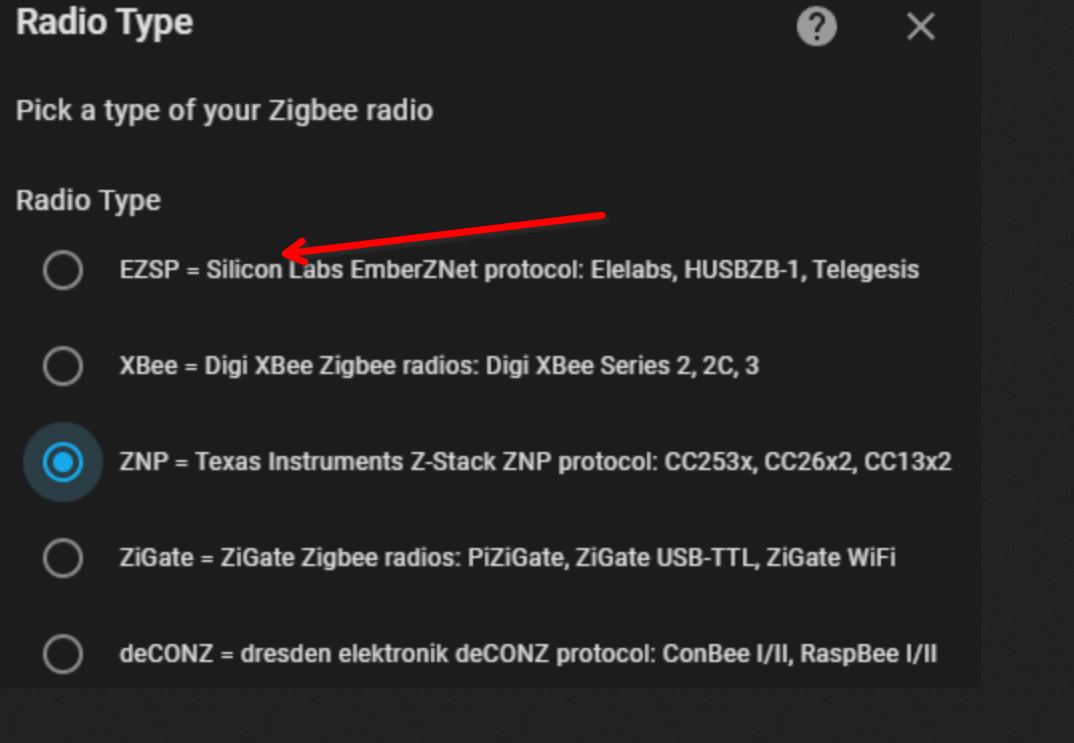
VG
BerndEdit
hatte heute Morgen wohl zittrige Hände, oder den Schlaf noch nicht aus den Augen gerieben, falsches Bild, ersetzt, siehe auch Beitrag https://forum.iobroker.net/topic/68795/anleitung-zigbee2mqtt-einrichtung-im-iobroker/21?_=1696399590830 von @arteck -
@papa_aus_rastatt sagte in Anleitung Zigbee2MQTT Einrichtung im ioBroker:
@arteck Ich habe scheinbar die Anleitung nicht richtig verstanden. In was müsste das geändert werden?
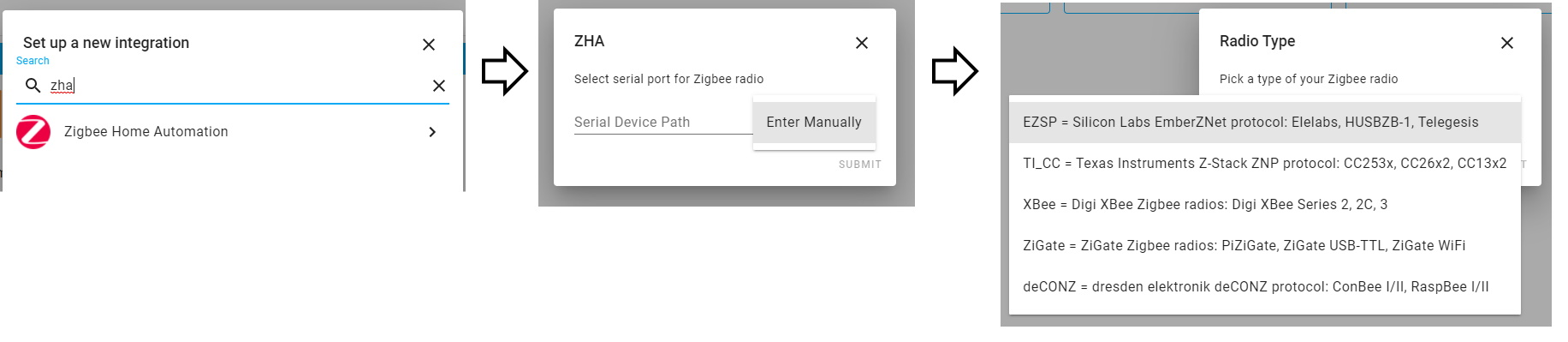
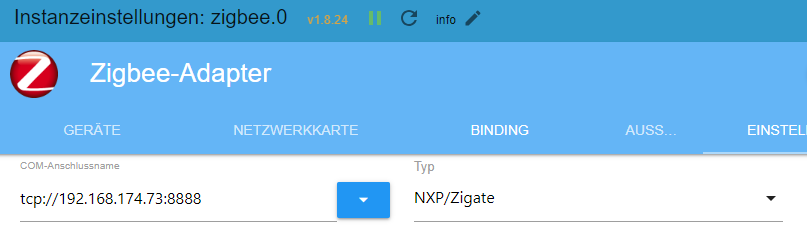
änder das mal nach ezsp und im adapter auch..aus meinem ersten screenshot..
der Sender muss zum adaptereinstellung passen.. da der Coordinator mehrere simulieren kann. musst du schauen..
am besten .. was wir im Adapter haben. und dann im coordinator einstellenzigate würde auch gehen... dann bei uns auch zigate einstellen
-
@papa_aus_rastatt sagte in Anleitung Zigbee2MQTT Einrichtung im ioBroker:
@arteck Ich habe scheinbar die Anleitung nicht richtig verstanden. In was müsste das geändert werden?
änder das mal nach ezsp und im adapter auch..aus meinem ersten screenshot..
der Sender muss zum adaptereinstellung passen.. da der Coordinator mehrere simulieren kann. musst du schauen..
am besten .. was wir im Adapter haben. und dann im coordinator einstellenzigate würde auch gehen... dann bei uns auch zigate einstellen

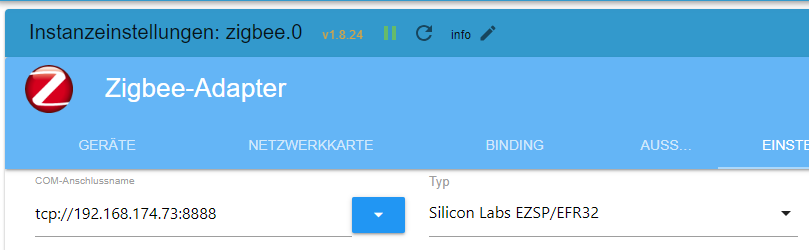
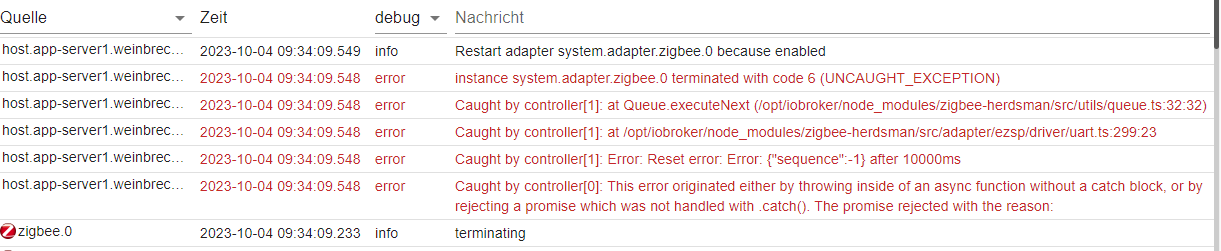
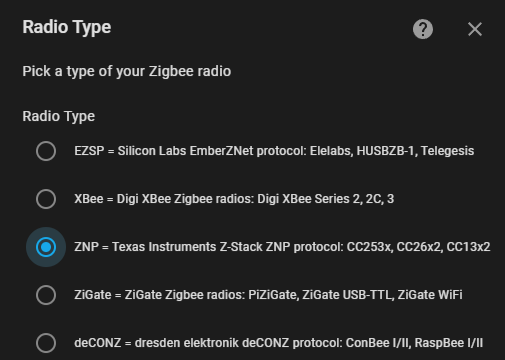
ezsp dürfte auch nicht gehen, ich habe hier ja die PRO-Ausführung, nicht die normale.
https://zigbee.blakadder.com/Sonoff_ZBBridge.html


Hey! Du scheinst an dieser Unterhaltung interessiert zu sein, hast aber noch kein Konto.
Hast du es satt, bei jedem Besuch durch die gleichen Beiträge zu scrollen? Wenn du dich für ein Konto anmeldest, kommst du immer genau dorthin zurück, wo du zuvor warst, und kannst dich über neue Antworten benachrichtigen lassen (entweder per E-Mail oder Push-Benachrichtigung). Du kannst auch Lesezeichen speichern und Beiträge positiv bewerten, um anderen Community-Mitgliedern deine Wertschätzung zu zeigen.
Mit deinem Input könnte dieser Beitrag noch besser werden 💗
Registrieren Anmelden232
Online33.0k
Benutzer83.4k
Themen1.3m
Beiträge