Skip to content
  • Home
  • Aktuell
  • Tags
  • 0 Ungelesen 0
  • Kategorien
  • Unreplied
  • Beliebt
  • GitHub
  • Docu
  • Hilfe
Skins
  • Light
  • Brite
  • Cerulean
  • Cosmo
  • Flatly
  • Journal
  • Litera
  • Lumen
  • Lux
  • Materia
  • Minty
  • Morph
  • Pulse
  • Sandstone
  • Simplex
  • Sketchy
  • Spacelab
  • United
  • Yeti
  • Zephyr
  • Dark
  • Cyborg
  • Darkly
  • Quartz
  • Slate
  • Solar
  • Superhero
  • Vapor

  • Standard: (Kein Skin)
  • Kein Skin
Einklappen
ioBroker Logo

Community Forum

donate donate
  1. ioBroker Community Home
  2. Deutsch
  3. ioBroker Allgemein
  4. Nach Update läuft nichts mehr!

NEWS

  • Jahresrückblick 2025 – unser neuer Blogbeitrag ist online! ✨
    BluefoxB
    Bluefox
    14
    1
    192

  • Neuer Blogbeitrag: Monatsrückblick - Dezember 2025 🎄
    BluefoxB
    Bluefox
    12
    1
    572

  • Weihnachtsangebot 2025! 🎄
    BluefoxB
    Bluefox
    24
    1
    1.8k

Nach Update läuft nichts mehr!

Geplant Angeheftet Gesperrt Verschoben ioBroker Allgemein
iobroker updatenpmjs controller updatejsonhelp wanted
416 Beiträge 18 Kommentatoren 68.3k Aufrufe 9 Watching
  • Älteste zuerst
  • Neuste zuerst
  • Meiste Stimmen
Antworten
  • In einem neuen Thema antworten
Anmelden zum Antworten
Dieses Thema wurde gelöscht. Nur Nutzer mit entsprechenden Rechten können es sehen.
  • S SpeedyBlade

    @thomas-braun sagte in Nach Update läuft nichts mehr!:

    Lass ihn stehen.

    verstehe nicht was du meinst, mit "stehen lassen"

    Thomas BraunT Online
    Thomas BraunT Online
    Thomas Braun
    Most Active
    schrieb am zuletzt editiert von
    #374

    @speedyblade sagte in Nach Update läuft nichts mehr!:

    verstehe nicht was du meinst, mit "stehen lassen"

    Einfach nichts tun.

    Wenn es dich stört:

    sudo rm /usr/lib/node_modules/n
    

    Linux-Werkzeugkasten:
    https://forum.iobroker.net/topic/42952/der-kleine-iobroker-linux-werkzeugkasten
    NodeJS Fixer Skript:
    https://forum.iobroker.net/topic/68035/iob-node-fix-skript
    iob_diag: curl -sLf -o diag.sh https://iobroker.net/diag.sh && bash diag.sh

    S 1 Antwort Letzte Antwort
    0
    • Thomas BraunT Thomas Braun

      @speedyblade sagte in Nach Update läuft nichts mehr!:

      verstehe nicht was du meinst, mit "stehen lassen"

      Einfach nichts tun.

      Wenn es dich stört:

      sudo rm /usr/lib/node_modules/n
      
      S Offline
      S Offline
      SpeedyBlade
      schrieb am zuletzt editiert von
      #375

      @thomas-braun

      pi@RaspberryPi4:/opt/iobroker/node_modules/iobroker.js-controller $ sudo rm /usr/lib/node_modules/n
      rm: das Entfernen von '/usr/lib/node_modules/n' ist nicht möglich: Ist ein Verzeichnis


      lässt sich eh nicht entfernen

      Thomas BraunT 1 Antwort Letzte Antwort
      0
      • S SpeedyBlade

        @thomas-braun

        pi@RaspberryPi4:/opt/iobroker/node_modules/iobroker.js-controller $ sudo rm /usr/lib/node_modules/n
        rm: das Entfernen von '/usr/lib/node_modules/n' ist nicht möglich: Ist ein Verzeichnis


        lässt sich eh nicht entfernen

        Thomas BraunT Online
        Thomas BraunT Online
        Thomas Braun
        Most Active
        schrieb am zuletzt editiert von
        #376

        @speedyblade

        Ich konnte deinem Auszug von oben nicht entnehmen, dass es ein Verzeichnis ist.

        sudo rm -rf /usr/lib/node_modules/n
        

        Linux-Werkzeugkasten:
        https://forum.iobroker.net/topic/42952/der-kleine-iobroker-linux-werkzeugkasten
        NodeJS Fixer Skript:
        https://forum.iobroker.net/topic/68035/iob-node-fix-skript
        iob_diag: curl -sLf -o diag.sh https://iobroker.net/diag.sh && bash diag.sh

        S 1 Antwort Letzte Antwort
        0
        • Thomas BraunT Thomas Braun

          @speedyblade

          Ich konnte deinem Auszug von oben nicht entnehmen, dass es ein Verzeichnis ist.

          sudo rm -rf /usr/lib/node_modules/n
          
          S Offline
          S Offline
          SpeedyBlade
          schrieb am zuletzt editiert von
          #377

          perfekt...läuft nun wieder sauber

          ps.: gibt es ne Möglichkeit die lokale Backupdatei auf nen Windowsrechner zu kopiere (copy-paste)?

          "Backup created: /opt/iobroker/backups/nodered.0_2023_09_29-13_38_48_backupiobroker.tar"
          
          Thomas BraunT CodierknechtC HomoranH 3 Antworten Letzte Antwort
          0
          • S SpeedyBlade

            perfekt...läuft nun wieder sauber

            ps.: gibt es ne Möglichkeit die lokale Backupdatei auf nen Windowsrechner zu kopiere (copy-paste)?

            "Backup created: /opt/iobroker/backups/nodered.0_2023_09_29-13_38_48_backupiobroker.tar"
            
            Thomas BraunT Online
            Thomas BraunT Online
            Thomas Braun
            Most Active
            schrieb am zuletzt editiert von
            #378

            @speedyblade sagte in Nach Update läuft nichts mehr!:

            auf nen Windowsrechner zu kopiere

            Keine Ahnung. Den Anwendungsfall hab ich hier nicht.
            Mit scp oder dessen graphischem Pendant vielleicht.

            Linux-Werkzeugkasten:
            https://forum.iobroker.net/topic/42952/der-kleine-iobroker-linux-werkzeugkasten
            NodeJS Fixer Skript:
            https://forum.iobroker.net/topic/68035/iob-node-fix-skript
            iob_diag: curl -sLf -o diag.sh https://iobroker.net/diag.sh && bash diag.sh

            1 Antwort Letzte Antwort
            0
            • S SpeedyBlade

              perfekt...läuft nun wieder sauber

              ps.: gibt es ne Möglichkeit die lokale Backupdatei auf nen Windowsrechner zu kopiere (copy-paste)?

              "Backup created: /opt/iobroker/backups/nodered.0_2023_09_29-13_38_48_backupiobroker.tar"
              
              CodierknechtC Offline
              CodierknechtC Offline
              Codierknecht
              Developer Most Active
              schrieb am zuletzt editiert von
              #379

              @speedyblade sagte in Nach Update läuft nichts mehr!:

              ps.: gibt es ne Möglichkeit die lokale Backupdatei auf nen Windowsrechner zu kopiere (copy-paste)?

              Man sollte auf der Windows-Kiste eine Freigabe einrichten können, die man in Debian mountet.
              Dann kann man das im Backup-Adapter entsprechend einstellen.

              Oder man hat ein NAS wie z.B. Synology.
              Wenn dort NFS oder CIFS aktiviert ist, kann man auch dort sein Backup ablegen lassen.

              "Any fool can write code that a computer can understand. Good programmers write code that humans can understand." (Martin Fowler, "Refactoring")

              Proxmox 9.1.1 LXC|8 GB|Core i7-6700
              HmIP|ZigBee|Tasmota|Unifi
              Zabbix Certified Specialist
              Konnte ich Dir helfen? Dann benutze bitte das Voting unten rechts im Beitrag

              1 Antwort Letzte Antwort
              0
              • S SpeedyBlade

                perfekt...läuft nun wieder sauber

                ps.: gibt es ne Möglichkeit die lokale Backupdatei auf nen Windowsrechner zu kopiere (copy-paste)?

                "Backup created: /opt/iobroker/backups/nodered.0_2023_09_29-13_38_48_backupiobroker.tar"
                
                HomoranH Nicht stören
                HomoranH Nicht stören
                Homoran
                Global Moderator Administrators
                schrieb am zuletzt editiert von
                #380

                @speedyblade sagte in Nach Update läuft nichts mehr!:

                ne Möglichkeit die lokale Backupdatei auf nen Windowsrechner zu kopiere

                mit winscp oder filezilla

                aber vorsicht mit den Rechten und Dateien nie mit üblichen WIN-Programmen bearbeiten

                kein Support per PN! - Fragen im Forum stellen - es gibt fast nichts, was nicht auch für andere interessant ist.

                Benutzt das Voting rechts unten im Beitrag wenn er euch geholfen hat.

                der Installationsfixer: curl -fsL https://iobroker.net/fix.sh | bash -

                S 1 Antwort Letzte Antwort
                0
                • HomoranH Homoran

                  @speedyblade sagte in Nach Update läuft nichts mehr!:

                  ne Möglichkeit die lokale Backupdatei auf nen Windowsrechner zu kopiere

                  mit winscp oder filezilla

                  aber vorsicht mit den Rechten und Dateien nie mit üblichen WIN-Programmen bearbeiten

                  S Offline
                  S Offline
                  SpeedyBlade
                  schrieb am zuletzt editiert von
                  #381

                  danke...hab sie mir per FileZilla auf nen Windows Rechner kopiert, als Sicherung.

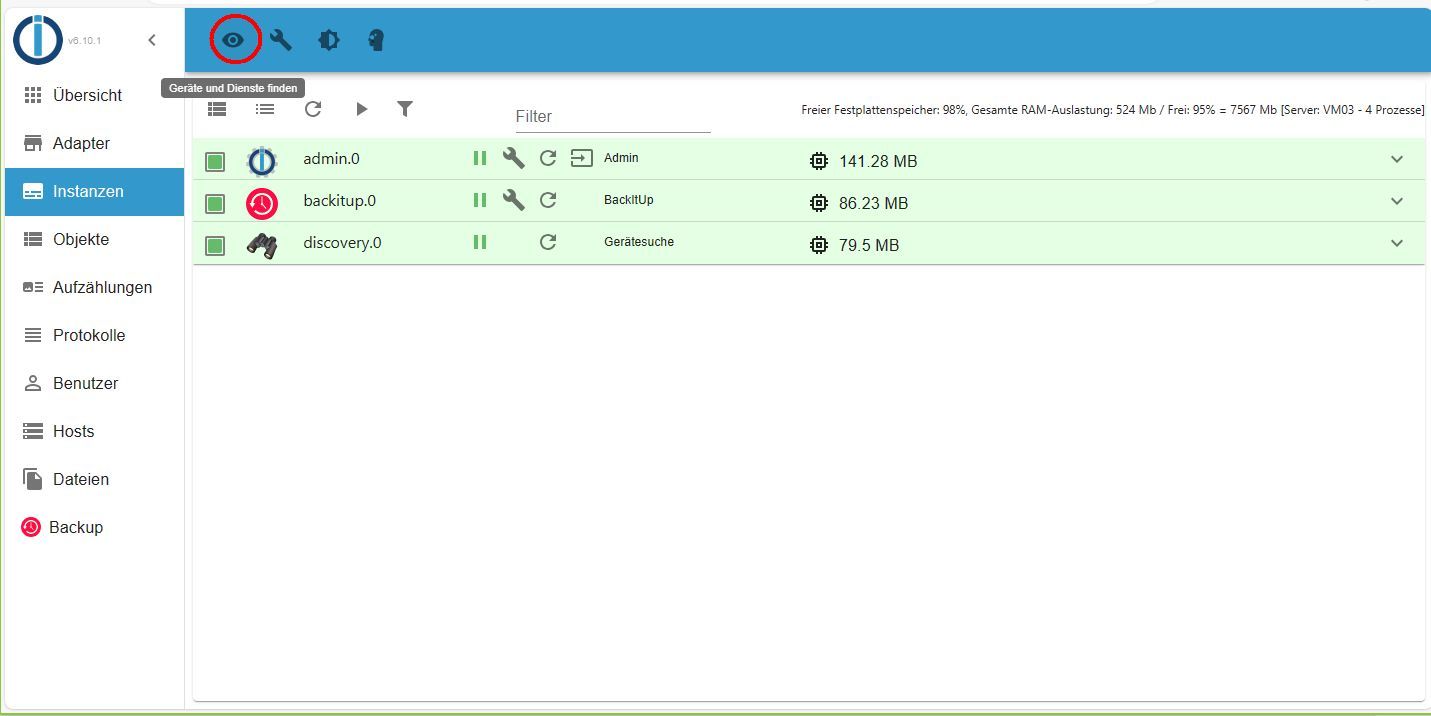
                  discovery.jpg

                  kann es sein, dass Discovery nicht mehr funktioniert?

                  Thomas BraunT 1 Antwort Letzte Antwort
                  0
                  • S SpeedyBlade

                    danke...hab sie mir per FileZilla auf nen Windows Rechner kopiert, als Sicherung.

                    discovery.jpg

                    kann es sein, dass Discovery nicht mehr funktioniert?

                    Thomas BraunT Online
                    Thomas BraunT Online
                    Thomas Braun
                    Most Active
                    schrieb am zuletzt editiert von
                    #382

                    @speedyblade

                    Discovery braucht eh 'keiner' in einer etablierten Installation.

                    Aber das Ding läuft nun wieder?

                    Linux-Werkzeugkasten:
                    https://forum.iobroker.net/topic/42952/der-kleine-iobroker-linux-werkzeugkasten
                    NodeJS Fixer Skript:
                    https://forum.iobroker.net/topic/68035/iob-node-fix-skript
                    iob_diag: curl -sLf -o diag.sh https://iobroker.net/diag.sh && bash diag.sh

                    S 1 Antwort Letzte Antwort
                    0
                    • Thomas BraunT Thomas Braun

                      @speedyblade

                      Discovery braucht eh 'keiner' in einer etablierten Installation.

                      Aber das Ding läuft nun wieder?

                      S Offline
                      S Offline
                      SpeedyBlade
                      schrieb am zuletzt editiert von
                      #383

                      @thomas-braun

                      ioBroker läuft nun wieder ja genau

                      nur beim Discovery Adapter gibt es keine Einstellungen mehr :(

                      HomoranH 1 Antwort Letzte Antwort
                      0
                      • S SpeedyBlade

                        @thomas-braun

                        ioBroker läuft nun wieder ja genau

                        nur beim Discovery Adapter gibt es keine Einstellungen mehr :(

                        HomoranH Nicht stören
                        HomoranH Nicht stören
                        Homoran
                        Global Moderator Administrators
                        schrieb am zuletzt editiert von
                        #384

                        @speedyblade discovery.jpg

                        kein Support per PN! - Fragen im Forum stellen - es gibt fast nichts, was nicht auch für andere interessant ist.

                        Benutzt das Voting rechts unten im Beitrag wenn er euch geholfen hat.

                        der Installationsfixer: curl -fsL https://iobroker.net/fix.sh | bash -

                        1 Antwort Letzte Antwort
                        0
                        • S Offline
                          S Offline
                          SpeedyBlade
                          schrieb am zuletzt editiert von SpeedyBlade
                          #385
                          /usr/bin/nodejs         v18.18.0
                          /usr/local/bin/node             v14.17.5
                          /usr/local/bin/npm              6.14.14
                          /usr/local/bin/npx              6.14.14
                          *** nodejs is NOT correctly installed ***
                          

                          wie kann das passieren...das ist ein anderer Raspi den ich update
                          Debian 11 ist drauf auf dem pi3

                          pi@RaspiPi3Bplus:~ $ cd /opt/iobroker
                          sudo -H -u iobroker npm install iobroker.js-controller
                          npm ERR! code ENOTSUP
                          npm ERR! notsup Unsupported engine for iobroker.js-controller@5.0.12: wanted: {"node":">=16.4.0"} (current: {"node":"14.17.5","npm":"6.14.14"})
                          npm ERR! notsup Not compatible with your version of node/npm: iobroker.js-controller@5.0.12
                          npm ERR! notsup Not compatible with your version of node/npm: iobroker.js-controller@5.0.12
                          npm ERR! notsup Required: {"node":">=16.4.0"}
                          npm ERR! notsup Actual:   {"npm":"6.14.14","node":"14.17.5"}
                          
                          npm ERR! A complete log of this run can be found in:
                          npm ERR!     /home/iobroker/.npm/_logs/2023-09-29T14_18_04_424Z-debug.log
                          
                          
                          HomoranH 1 Antwort Letzte Antwort
                          0
                          • S SpeedyBlade
                            /usr/bin/nodejs         v18.18.0
                            /usr/local/bin/node             v14.17.5
                            /usr/local/bin/npm              6.14.14
                            /usr/local/bin/npx              6.14.14
                            *** nodejs is NOT correctly installed ***
                            

                            wie kann das passieren...das ist ein anderer Raspi den ich update
                            Debian 11 ist drauf auf dem pi3

                            pi@RaspiPi3Bplus:~ $ cd /opt/iobroker
                            sudo -H -u iobroker npm install iobroker.js-controller
                            npm ERR! code ENOTSUP
                            npm ERR! notsup Unsupported engine for iobroker.js-controller@5.0.12: wanted: {"node":">=16.4.0"} (current: {"node":"14.17.5","npm":"6.14.14"})
                            npm ERR! notsup Not compatible with your version of node/npm: iobroker.js-controller@5.0.12
                            npm ERR! notsup Not compatible with your version of node/npm: iobroker.js-controller@5.0.12
                            npm ERR! notsup Required: {"node":">=16.4.0"}
                            npm ERR! notsup Actual:   {"npm":"6.14.14","node":"14.17.5"}
                            
                            npm ERR! A complete log of this run can be found in:
                            npm ERR!     /home/iobroker/.npm/_logs/2023-09-29T14_18_04_424Z-debug.log
                            
                            
                            HomoranH Nicht stören
                            HomoranH Nicht stören
                            Homoran
                            Global Moderator Administrators
                            schrieb am zuletzt editiert von
                            #386

                            @speedyblade sagte in Nach Update läuft nichts mehr!:

                            wie kann das passieren.

                            sag du es uns!

                            auch im falschen Verzeichnis. Ist das auch mit n installiert worden?

                            kein Support per PN! - Fragen im Forum stellen - es gibt fast nichts, was nicht auch für andere interessant ist.

                            Benutzt das Voting rechts unten im Beitrag wenn er euch geholfen hat.

                            der Installationsfixer: curl -fsL https://iobroker.net/fix.sh | bash -

                            S 1 Antwort Letzte Antwort
                            1
                            • HomoranH Homoran

                              @speedyblade sagte in Nach Update läuft nichts mehr!:

                              wie kann das passieren.

                              sag du es uns!

                              auch im falschen Verzeichnis. Ist das auch mit n installiert worden?

                              S Offline
                              S Offline
                              SpeedyBlade
                              schrieb am zuletzt editiert von
                              #387

                              @homoran
                              wo kommt dieses sch.... "n" immer her..

                              HomoranH 1 Antwort Letzte Antwort
                              0
                              • S SpeedyBlade

                                @homoran
                                wo kommt dieses sch.... "n" immer her..

                                HomoranH Nicht stören
                                HomoranH Nicht stören
                                Homoran
                                Global Moderator Administrators
                                schrieb am zuletzt editiert von
                                #388

                                @speedyblade sagte in Nach Update läuft nichts mehr!:

                                @homoran
                                wo kommt dieses sch.... "n" immer her..

                                aus irgendeiner Anleitung, die du anscheinend mal verwendet hattest.

                                mach den node-fix wie beim anderrn Raspi.

                                Vielleicht erst einmal iob diag
                                ich fürchte dass auch da das OS nicht gerade aktuell sein wird, wenn node schon auf v14 hängen geblieben ist

                                kein Support per PN! - Fragen im Forum stellen - es gibt fast nichts, was nicht auch für andere interessant ist.

                                Benutzt das Voting rechts unten im Beitrag wenn er euch geholfen hat.

                                der Installationsfixer: curl -fsL https://iobroker.net/fix.sh | bash -

                                S 1 Antwort Letzte Antwort
                                1
                                • HomoranH Homoran

                                  @speedyblade sagte in Nach Update läuft nichts mehr!:

                                  @homoran
                                  wo kommt dieses sch.... "n" immer her..

                                  aus irgendeiner Anleitung, die du anscheinend mal verwendet hattest.

                                  mach den node-fix wie beim anderrn Raspi.

                                  Vielleicht erst einmal iob diag
                                  ich fürchte dass auch da das OS nicht gerade aktuell sein wird, wenn node schon auf v14 hängen geblieben ist

                                  S Offline
                                  S Offline
                                  SpeedyBlade
                                  schrieb am zuletzt editiert von SpeedyBlade
                                  #389

                                  @homoran

                                  läuft wieder
                                  besten Dank

                                  
                                     Static hostname: RaspiPi3Bplus
                                           Icon name: computer
                                    Operating System: Raspbian GNU/Linux 11 (bullseye)
                                              Kernel: Linux 5.10.103-v7+
                                        Architecture: arm
                                  
                                  Installation:           native
                                  Kernel:                 armv7l
                                  Userland:               armhf
                                  Timezone:               Europe/Berlin (CEST, +0200)
                                  User-ID:                1000
                                  X-Server:               false
                                  Boot Target:            graphical.target
                                  
                                  Pending OS-Updates:     0
                                  Pending iob updates:    0
                                  
                                  Nodejs-Installation:    /usr/bin/nodejs         v18.18.0
                                                          /usr/bin/node           v18.18.0
                                                          /usr/bin/npm            9.8.1
                                  
                                  
                                  S 1 Antwort Letzte Antwort
                                  1
                                  • S SpeedyBlade

                                    @homoran

                                    läuft wieder
                                    besten Dank

                                    
                                       Static hostname: RaspiPi3Bplus
                                             Icon name: computer
                                      Operating System: Raspbian GNU/Linux 11 (bullseye)
                                                Kernel: Linux 5.10.103-v7+
                                          Architecture: arm
                                    
                                    Installation:           native
                                    Kernel:                 armv7l
                                    Userland:               armhf
                                    Timezone:               Europe/Berlin (CEST, +0200)
                                    User-ID:                1000
                                    X-Server:               false
                                    Boot Target:            graphical.target
                                    
                                    Pending OS-Updates:     0
                                    Pending iob updates:    0
                                    
                                    Nodejs-Installation:    /usr/bin/nodejs         v18.18.0
                                                            /usr/bin/node           v18.18.0
                                                            /usr/bin/npm            9.8.1
                                    
                                    
                                    S Offline
                                    S Offline
                                    SpeedyBlade
                                    schrieb am zuletzt editiert von
                                    #390

                                    nachdem ich ein Backup aufgespielt habe und nun den fixer drüber laufen lassen habe, läuft der Pi3 nicht mehr :(

                                    ======================= SUMMARY =======================
                                                         v.2023-06-20
                                    
                                    
                                       Static hostname: RaspberryPi3B1GB
                                             Icon name: computer
                                            Machine ID: 0a3492672676440e91094afe51dc1729
                                               Boot ID: 014394ca8eed41a288a0b89111927ea2
                                      Operating System: Debian GNU/Linux 11 (bullseye)
                                                Kernel: Linux 6.1.21-v8+
                                          Architecture: arm64
                                    
                                    Installation:           native
                                    Kernel:                 aarch64
                                    Userland:               arm64
                                    Timezone:               Europe/Vienna (CEST, +0200)
                                    User-ID:                1000
                                    X-Server:               false
                                    Boot Target:            multi-user.target
                                    
                                    Pending OS-Updates:     0
                                    Pending iob updates:    8
                                    
                                    Nodejs-Installation:    /usr/bin/nodejs         v18.18.0
                                                            /usr/bin/node           v18.18.0
                                                            /usr/bin/npm            9.8.1
                                                            /usr/bin/npx            9.8.1
                                    
                                    Recommended versions are nodejs 18.x.y and npm 9.x.y
                                    Your nodejs installation is correct
                                    
                                    MEMORY:
                                                   total        used        free      shared  buff/cache   available
                                    Mem:            909M        205M        466M        0.0K        237M        639M
                                    Swap:            99M         67M         32M
                                    Total:          1.0G        273M        498M
                                    
                                    Active iob-Instances:   2
                                    Active repo(s): stable
                                    
                                    ioBroker Core:          js-controller           5.0.12
                                                            admin                   5.2.3
                                    
                                    ioBroker Status:        iobroker is running on this host.
                                    
                                    
                                    Objects type: jsonl
                                    States  type: jsonl
                                    
                                    Status admin and web instance:
                                      system.adapter.admin.0                  : admin                 : RaspberryPi3B1GB                         -  enabled, port: 8081, bind: 0.0.0.0, run as: admin
                                      system.adapter.web.0                    : web                   : RaspberryPi3B1GB                         - disabled, port: 8082, bind: 0.0.0.0, run as: admin
                                    
                                    Objects:                360
                                    States:                 230
                                    
                                    Size of iob-Database:
                                    
                                    8.2M    /opt/iobroker/iobroker-data/objects.jsonl
                                    4.4M    /opt/iobroker/iobroker-data/objects.json.migrated
                                    4.4M    /opt/iobroker/iobroker-data/objects.json.bak.migrated
                                    164K    /opt/iobroker/iobroker-data/states.jsonl
                                    68K     /opt/iobroker/iobroker-data/states.json.bak.migrated
                                    64K     /opt/iobroker/iobroker-data/states.json.migrated


                                    =================== END OF SUMMARY ====================
                                    
                                    === Mark text until here for copying ===
                                    piuser@RaspberryPi3B1GB:~ $ npm ERR! code ELSPROBLEMS
                                    Unknown command: "ERR!"
                                    
                                    To see a list of supported npm commands, run:
                                      npm help
                                    piuser@RaspberryPi3B1GB:~ $ npm ERR! extraneous: async-retry@1.3.3 /opt/iobroker/node_modules/async-retry
                                    Unknown command: "ERR!"
                                    
                                    To see a list of supported npm commands, run:
                                      npm help
                                    piuser@RaspberryPi3B1GB:~ $ npm ERR! extraneous: button-events@1.1.0 /opt/iobroker/node_modules/button-events
                                    Unknown command: "ERR!"
                                    
                                    To see a list of supported npm commands, run:
                                      npm help
                                    piuser@RaspberryPi3B1GB:~ $ npm ERR! extraneous: epoll@2.0.10 /opt/iobroker/node_modules/epoll
                                    Unknown command: "ERR!"
                                    
                                    To see a list of supported npm commands, run:
                                      npm help
                                    piuser@RaspberryPi3B1GB:~ $ npm ERR! extraneous: iobroker.rpi2@1.3.1 /opt/iobroker/node_modules/iobroker.rpi2
                                    Unknown command: "ERR!"
                                    
                                    To see a list of supported npm commands, run:
                                      npm help
                                    piuser@RaspberryPi3B1GB:~ $ npm ERR! extraneous: node-addon-api@1.7.2 /opt/iobroker/node_modules/node-addon-api
                                    Unknown command: "ERR!"
                                    
                                    To see a list of supported npm commands, run:
                                      npm help
                                    piuser@RaspberryPi3B1GB:~ $ npm ERR! extraneous: node-dht-sensor@0.4.3 /opt/iobroker/node_modules/node-dht-sensor
                                    Unknown command: "ERR!"
                                    
                                    To see a list of supported npm commands, run:
                                      npm help
                                    piuser@RaspberryPi3B1GB:~ $ npm ERR! extraneous: rpi-gpio-buttons@2.0.1 /opt/iobroker/node_modules/rpi-gpio-buttons
                                    Unknown command: "ERR!"
                                    
                                    To see a list of supported npm commands, run:
                                      npm help
                                    piuser@RaspberryPi3B1GB:~ $ npm ERR! extraneous: rpi-gpio@2.1.7 /opt/iobroker/node_modules/rpi-gpio
                                    Unknown command: "ERR!"
                                    
                                    To see a list of supported npm commands, run:
                                      npm help
                                    piuser@RaspberryPi3B1GB:~ $ npm ERR! extraneous: sync-exec@0.6.2 /opt/iobroker/node_modules/sync-exec
                                    Unknown command: "ERR!"
                                    
                                    To see a list of supported npm commands, run:
                                      npm help
                                    piuser@RaspberryPi3B1GB:~ $ npm ERR! extraneous: retry@0.13.1 /opt/iobroker/node_modules/async-retry/node_modules/retry
                                    Unknown command: "ERR!"
                                    
                                    To see a list of supported npm commands, run:
                                      npm help
                                    piuser@RaspberryPi3B1GB:~ $ npm ERR! extraneous: debug@3.2.7 /opt/iobroker/node_modules/rpi-gpio/node_modules/debug
                                    Unknown command: "ERR!"
                                    
                                    To see a list of supported npm commands, run:
                                      npm help
                                    piuser@RaspberryPi3B1GB:~ $ npm ERR! extraneous: ms@2.1.3 /opt/iobroker/node_modules/rpi-gpio/node_modules/ms
                                    Unknown command: "ERR!"
                                    
                                    To see a list of supported npm commands, run:
                                      npm help
                                    piuser@RaspberryPi3B1GB:~ $ npm ERR! invalid: fsevents@ /opt/iobroker/node_modules/chokidar/node_modules/fsevents
                                    Unknown command: "ERR!"
                                    
                                    To see a list of supported npm commands, run:
                                      npm help
                                    piuser@RaspberryPi3B1GB:~ $
                                    piuser@RaspberryPi3B1GB:~ $ npm ERR! A complete log of this run can be found in: /home/piuser/.npm/_logs/2023-10-01T12_10_00_677Z-debug-0.log
                                    Unknown command: "ERR!"
                                    
                                    To see a list of supported npm commands, run:
                                      npm help
                                    piuser@RaspberryPi3B1GB:~ $ Errors in npm tree: 0
                                    -bash: Errors: command not found
                                    
                                    
                                    Thomas BraunT 1 Antwort Letzte Antwort
                                    0
                                    • S SpeedyBlade

                                      nachdem ich ein Backup aufgespielt habe und nun den fixer drüber laufen lassen habe, läuft der Pi3 nicht mehr :(

                                      ======================= SUMMARY =======================
                                                           v.2023-06-20
                                      
                                      
                                         Static hostname: RaspberryPi3B1GB
                                               Icon name: computer
                                              Machine ID: 0a3492672676440e91094afe51dc1729
                                                 Boot ID: 014394ca8eed41a288a0b89111927ea2
                                        Operating System: Debian GNU/Linux 11 (bullseye)
                                                  Kernel: Linux 6.1.21-v8+
                                            Architecture: arm64
                                      
                                      Installation:           native
                                      Kernel:                 aarch64
                                      Userland:               arm64
                                      Timezone:               Europe/Vienna (CEST, +0200)
                                      User-ID:                1000
                                      X-Server:               false
                                      Boot Target:            multi-user.target
                                      
                                      Pending OS-Updates:     0
                                      Pending iob updates:    8
                                      
                                      Nodejs-Installation:    /usr/bin/nodejs         v18.18.0
                                                              /usr/bin/node           v18.18.0
                                                              /usr/bin/npm            9.8.1
                                                              /usr/bin/npx            9.8.1
                                      
                                      Recommended versions are nodejs 18.x.y and npm 9.x.y
                                      Your nodejs installation is correct
                                      
                                      MEMORY:
                                                     total        used        free      shared  buff/cache   available
                                      Mem:            909M        205M        466M        0.0K        237M        639M
                                      Swap:            99M         67M         32M
                                      Total:          1.0G        273M        498M
                                      
                                      Active iob-Instances:   2
                                      Active repo(s): stable
                                      
                                      ioBroker Core:          js-controller           5.0.12
                                                              admin                   5.2.3
                                      
                                      ioBroker Status:        iobroker is running on this host.
                                      
                                      
                                      Objects type: jsonl
                                      States  type: jsonl
                                      
                                      Status admin and web instance:
                                        system.adapter.admin.0                  : admin                 : RaspberryPi3B1GB                         -  enabled, port: 8081, bind: 0.0.0.0, run as: admin
                                        system.adapter.web.0                    : web                   : RaspberryPi3B1GB                         - disabled, port: 8082, bind: 0.0.0.0, run as: admin
                                      
                                      Objects:                360
                                      States:                 230
                                      
                                      Size of iob-Database:
                                      
                                      8.2M    /opt/iobroker/iobroker-data/objects.jsonl
                                      4.4M    /opt/iobroker/iobroker-data/objects.json.migrated
                                      4.4M    /opt/iobroker/iobroker-data/objects.json.bak.migrated
                                      164K    /opt/iobroker/iobroker-data/states.jsonl
                                      68K     /opt/iobroker/iobroker-data/states.json.bak.migrated
                                      64K     /opt/iobroker/iobroker-data/states.json.migrated


                                      =================== END OF SUMMARY ====================
                                      
                                      === Mark text until here for copying ===
                                      piuser@RaspberryPi3B1GB:~ $ npm ERR! code ELSPROBLEMS
                                      Unknown command: "ERR!"
                                      
                                      To see a list of supported npm commands, run:
                                        npm help
                                      piuser@RaspberryPi3B1GB:~ $ npm ERR! extraneous: async-retry@1.3.3 /opt/iobroker/node_modules/async-retry
                                      Unknown command: "ERR!"
                                      
                                      To see a list of supported npm commands, run:
                                        npm help
                                      piuser@RaspberryPi3B1GB:~ $ npm ERR! extraneous: button-events@1.1.0 /opt/iobroker/node_modules/button-events
                                      Unknown command: "ERR!"
                                      
                                      To see a list of supported npm commands, run:
                                        npm help
                                      piuser@RaspberryPi3B1GB:~ $ npm ERR! extraneous: epoll@2.0.10 /opt/iobroker/node_modules/epoll
                                      Unknown command: "ERR!"
                                      
                                      To see a list of supported npm commands, run:
                                        npm help
                                      piuser@RaspberryPi3B1GB:~ $ npm ERR! extraneous: iobroker.rpi2@1.3.1 /opt/iobroker/node_modules/iobroker.rpi2
                                      Unknown command: "ERR!"
                                      
                                      To see a list of supported npm commands, run:
                                        npm help
                                      piuser@RaspberryPi3B1GB:~ $ npm ERR! extraneous: node-addon-api@1.7.2 /opt/iobroker/node_modules/node-addon-api
                                      Unknown command: "ERR!"
                                      
                                      To see a list of supported npm commands, run:
                                        npm help
                                      piuser@RaspberryPi3B1GB:~ $ npm ERR! extraneous: node-dht-sensor@0.4.3 /opt/iobroker/node_modules/node-dht-sensor
                                      Unknown command: "ERR!"
                                      
                                      To see a list of supported npm commands, run:
                                        npm help
                                      piuser@RaspberryPi3B1GB:~ $ npm ERR! extraneous: rpi-gpio-buttons@2.0.1 /opt/iobroker/node_modules/rpi-gpio-buttons
                                      Unknown command: "ERR!"
                                      
                                      To see a list of supported npm commands, run:
                                        npm help
                                      piuser@RaspberryPi3B1GB:~ $ npm ERR! extraneous: rpi-gpio@2.1.7 /opt/iobroker/node_modules/rpi-gpio
                                      Unknown command: "ERR!"
                                      
                                      To see a list of supported npm commands, run:
                                        npm help
                                      piuser@RaspberryPi3B1GB:~ $ npm ERR! extraneous: sync-exec@0.6.2 /opt/iobroker/node_modules/sync-exec
                                      Unknown command: "ERR!"
                                      
                                      To see a list of supported npm commands, run:
                                        npm help
                                      piuser@RaspberryPi3B1GB:~ $ npm ERR! extraneous: retry@0.13.1 /opt/iobroker/node_modules/async-retry/node_modules/retry
                                      Unknown command: "ERR!"
                                      
                                      To see a list of supported npm commands, run:
                                        npm help
                                      piuser@RaspberryPi3B1GB:~ $ npm ERR! extraneous: debug@3.2.7 /opt/iobroker/node_modules/rpi-gpio/node_modules/debug
                                      Unknown command: "ERR!"
                                      
                                      To see a list of supported npm commands, run:
                                        npm help
                                      piuser@RaspberryPi3B1GB:~ $ npm ERR! extraneous: ms@2.1.3 /opt/iobroker/node_modules/rpi-gpio/node_modules/ms
                                      Unknown command: "ERR!"
                                      
                                      To see a list of supported npm commands, run:
                                        npm help
                                      piuser@RaspberryPi3B1GB:~ $ npm ERR! invalid: fsevents@ /opt/iobroker/node_modules/chokidar/node_modules/fsevents
                                      Unknown command: "ERR!"
                                      
                                      To see a list of supported npm commands, run:
                                        npm help
                                      piuser@RaspberryPi3B1GB:~ $
                                      piuser@RaspberryPi3B1GB:~ $ npm ERR! A complete log of this run can be found in: /home/piuser/.npm/_logs/2023-10-01T12_10_00_677Z-debug-0.log
                                      Unknown command: "ERR!"
                                      
                                      To see a list of supported npm commands, run:
                                        npm help
                                      piuser@RaspberryPi3B1GB:~ $ Errors in npm tree: 0
                                      -bash: Errors: command not found
                                      
                                      
                                      Thomas BraunT Online
                                      Thomas BraunT Online
                                      Thomas Braun
                                      Most Active
                                      schrieb am zuletzt editiert von
                                      #391

                                      @speedyblade

                                      Poste die Langfassung.

                                      Linux-Werkzeugkasten:
                                      https://forum.iobroker.net/topic/42952/der-kleine-iobroker-linux-werkzeugkasten
                                      NodeJS Fixer Skript:
                                      https://forum.iobroker.net/topic/68035/iob-node-fix-skript
                                      iob_diag: curl -sLf -o diag.sh https://iobroker.net/diag.sh && bash diag.sh

                                      S 1 Antwort Letzte Antwort
                                      0
                                      • Thomas BraunT Thomas Braun

                                        @speedyblade

                                        Poste die Langfassung.

                                        S Offline
                                        S Offline
                                        SpeedyBlade
                                        schrieb am zuletzt editiert von
                                        #392
                                        
                                           Static hostname: RaspberryPi3B1GB
                                                 Icon name: computer
                                                Machine ID: 0a3492672676440e91094afe51dc1729
                                                   Boot ID: 014394ca8eed41a288a0b89111927ea2
                                          Operating System: Debian GNU/Linux 11 (bullseye)
                                                    Kernel: Linux 6.1.21-v8+
                                              Architecture: arm64
                                        
                                        Model           : Raspberry Pi 3 Model B Rev 1.2
                                        Docker          : false
                                        Virtualization  : none
                                        Kernel          : aarch64
                                        Userland        : arm64
                                        
                                        Systemuptime and Load:
                                         15:25:26 up  1:24,  1 user,  load average: 1.04, 3.03, 1.99
                                        CPU threads: 4
                                        
                                        Raspberry only:
                                        throttled=0x50000
                                        Other values than 0x0 hint to temperature/voltage problems
                                        temp=63.9'C
                                        volt=1.3062V
                                        
                                        *** Time and Time Zones ***
                                                       Local time: Sun 2023-10-01 15:25:27 CEST
                                                   Universal time: Sun 2023-10-01 13:25:27 UTC
                                                         RTC time: n/a
                                                        Time zone: Europe/Vienna (CEST, +0200)
                                        System clock synchronized: yes
                                                      NTP service: active
                                                  RTC in local TZ: no
                                        
                                        *** User and Groups ***
                                        piuser
                                        /home/piuser
                                        piuser adm dialout cdrom sudo audio video plugdev games users input render netdev gpio i2c spi iobroker
                                        
                                        *** X-Server-Setup ***
                                        X-Server:       false
                                        Desktop:
                                        Terminal:       tty
                                        Boot Target:    multi-user.target
                                        
                                        *** MEMORY ***
                                                       total        used        free      shared  buff/cache   available
                                        Mem:            909M        118M        586M        0.0K        204M        717M
                                        Swap:            99M         65M         34M
                                        Total:          1.0G        184M        620M
                                        
                                                  909 M total memory
                                                  118 M used memory
                                                  154 M active memory
                                                   71 M inactive memory
                                                  586 M free memory
                                                    8 M buffer memory
                                                  195 M swap cache
                                                   99 M total swap
                                                   65 M used swap
                                                   34 M free swap
                                        
                                        Raspberry only:
                                        oom events: 0
                                        lifetime oom required: 0 Mbytes
                                        total time in oom handler: 0 ms
                                        max time spent in oom handler: 0 ms
                                        
                                        *** FILESYSTEM ***
                                        Filesystem     Type      Size  Used Avail Use% Mounted on
                                        /dev/root      ext4      294G  2.8G  279G   1% /
                                        devtmpfs       devtmpfs  325M     0  325M   0% /dev
                                        tmpfs          tmpfs     455M     0  455M   0% /dev/shm
                                        tmpfs          tmpfs     182M  968K  181M   1% /run
                                        tmpfs          tmpfs     5.0M  4.0K  5.0M   1% /run/lock
                                        /dev/sda1      vfat      255M   31M  225M  13% /boot
                                        tmpfs          tmpfs      91M     0   91M   0% /run/user/1000
                                        
                                        Messages concerning ext4 filesystem in dmesg:
                                        [Sun Oct  1 14:00:30 2023] Kernel command line: coherent_pool=1M 8250.nr_uarts=0 snd_bcm2835.enable_headphones=0 snd_bcm2835.enable_headphones=1 snd_bcm2835.enable_hdmi=1 snd_bcm2835.enable_hdmi=0 video=Composite-1:720x480@60i vc_mem.mem_base=0x3ec00000 vc_mem.mem_size=0x40000000  console=ttyS0,115200 console=tty1 root=PARTUUID=86e36461-02 rootfstype=ext4 fsck.repair=yes rootwait
                                        [Sun Oct  1 14:00:35 2023] EXT4-fs (sda2): INFO: recovery required on readonly filesystem
                                        [Sun Oct  1 14:00:35 2023] EXT4-fs (sda2): write access will be enabled during recovery
                                        [Sun Oct  1 14:00:35 2023] EXT4-fs (sda2): recovery complete
                                        [Sun Oct  1 14:00:35 2023] EXT4-fs (sda2): mounted filesystem with ordered data mode. Quota mode: none.
                                        [Sun Oct  1 14:00:35 2023] VFS: Mounted root (ext4 filesystem) readonly on device 8:2.
                                        [Sun Oct  1 14:00:42 2023] EXT4-fs (sda2): re-mounted. Quota mode: none.
                                        
                                        Show mounted filesystems (real ones only):
                                        TARGET  SOURCE    FSTYPE OPTIONS
                                        /       /dev/sda2 ext4   rw,noatime
                                        `-/boot /dev/sda1 vfat   rw,relatime,fmask=0022,dmask=0022,codepage=437,iocharset=ascii,shortname=mixed,errors=remount-ro
                                        
                                        Files in neuralgic directories:
                                        
                                        /var:
                                        570M    /var/
                                        234M    /var/cache
                                        228M    /var/cache/apt
                                        147M    /var/lib
                                        128M    /var/cache/apt/archives
                                        
                                        Archived and active journals take up 88.0M in the file system.
                                        
                                        /opt/iobroker/backups:
                                        1.4M    /opt/iobroker/backups/
                                        
                                        /opt/iobroker/iobroker-data:
                                        45M     /opt/iobroker/iobroker-data/
                                        28M     /opt/iobroker/iobroker-data/files
                                        13M     /opt/iobroker/iobroker-data/files/admin.admin/custom/static/js
                                        13M     /opt/iobroker/iobroker-data/files/admin.admin/custom/static
                                        13M     /opt/iobroker/iobroker-data/files/admin.admin/custom
                                        
                                        The five largest files in iobroker-data are:
                                        6.3M    /opt/iobroker/iobroker-data/files/admin.admin/custom/static/js/vendors-node_modules_iobroker_adapter-react-v5_assets_devices_parseNames_js-node_modules_iobr-99c23e.847b8ad9.chunk.js.map
                                        5.9M    /opt/iobroker/iobroker-data/objects.jsonl
                                        4.4M    /opt/iobroker/iobroker-data/objects.json.migrated
                                        4.4M    /opt/iobroker/iobroker-data/objects.json.bak.migrated
                                        4.4M    /opt/iobroker/iobroker-data/files/web.admin/static/js/2.d0deddb4.chunk.js.map
                                        
                                        *** NodeJS-Installation ***
                                        
                                        /usr/bin/nodejs         v18.18.0
                                        /usr/bin/node           v18.18.0
                                        /usr/bin/npm            9.8.1
                                        /usr/bin/npx            9.8.1
                                        
                                        
                                        nodejs:
                                          Installed: 18.18.0-1nodesource1
                                          Candidate: 18.18.0-1nodesource1
                                          Version table:
                                         *** 18.18.0-1nodesource1 1001
                                                500 https://deb.nodesource.com/node_18.x nodistro/main arm64 Packages
                                                100 /var/lib/dpkg/status
                                             18.17.1-1nodesource1 1001
                                                500 https://deb.nodesource.com/node_18.x nodistro/main arm64 Packages
                                             18.17.0-1nodesource1 1001
                                                500 https://deb.nodesource.com/node_18.x nodistro/main arm64 Packages
                                             18.16.1-1nodesource1 1001
                                                500 https://deb.nodesource.com/node_18.x nodistro/main arm64 Packages
                                             18.16.0-1nodesource1 1001
                                                500 https://deb.nodesource.com/node_18.x nodistro/main arm64 Packages
                                             18.15.0-1nodesource1 1001
                                                500 https://deb.nodesource.com/node_18.x nodistro/main arm64 Packages
                                             18.14.2-1nodesource1 1001
                                                500 https://deb.nodesource.com/node_18.x nodistro/main arm64 Packages
                                             18.14.1-1nodesource1 1001
                                                500 https://deb.nodesource.com/node_18.x nodistro/main arm64 Packages
                                             18.14.0-1nodesource1 1001
                                                500 https://deb.nodesource.com/node_18.x nodistro/main arm64 Packages
                                             18.13.0-1nodesource1 1001
                                                500 https://deb.nodesource.com/node_18.x nodistro/main arm64 Packages
                                             18.12.0-1nodesource1 1001
                                                500 https://deb.nodesource.com/node_18.x nodistro/main arm64 Packages
                                             18.11.0-1nodesource1 1001
                                                500 https://deb.nodesource.com/node_18.x nodistro/main arm64 Packages
                                             18.10.0-1nodesource1 1001
                                                500 https://deb.nodesource.com/node_18.x nodistro/main arm64 Packages
                                             18.9.1-1nodesource1 1001
                                                500 https://deb.nodesource.com/node_18.x nodistro/main arm64 Packages
                                             18.9.0-1nodesource1 1001
                                                500 https://deb.nodesource.com/node_18.x nodistro/main arm64 Packages
                                             18.8.0-1nodesource1 1001
                                                500 https://deb.nodesource.com/node_18.x nodistro/main arm64 Packages
                                             18.7.0-1nodesource1 1001
                                                500 https://deb.nodesource.com/node_18.x nodistro/main arm64 Packages
                                             18.6.0-1nodesource1 1001
                                                500 https://deb.nodesource.com/node_18.x nodistro/main arm64 Packages
                                             18.5.0-1nodesource1 1001
                                                500 https://deb.nodesource.com/node_18.x nodistro/main arm64 Packages
                                             18.4.0-1nodesource1 1001
                                                500 https://deb.nodesource.com/node_18.x nodistro/main arm64 Packages
                                             18.3.0-1nodesource1 1001
                                                500 https://deb.nodesource.com/node_18.x nodistro/main arm64 Packages
                                             18.2.0-1nodesource1 1001
                                                500 https://deb.nodesource.com/node_18.x nodistro/main arm64 Packages
                                             18.1.0-1nodesource1 1001
                                                500 https://deb.nodesource.com/node_18.x nodistro/main arm64 Packages
                                             18.0.0-1nodesource1 1001
                                                500 https://deb.nodesource.com/node_18.x nodistro/main arm64 Packages
                                             12.22.12~dfsg-1~deb11u4 500
                                                500 http://security.debian.org/debian-security bullseye-security/main arm64 Packages
                                             12.22.12~dfsg-1~deb11u3 500
                                                500 http://deb.debian.org/debian bullseye/main arm64 Packages
                                        
                                        Temp directories causing npm8 problem: 0
                                        No problems detected
                                        
                                        Errors in npm tree: 0
                                        
                                        *** ioBroker-Installation ***
                                        
                                        ioBroker Status
                                        iobroker is running on this host.
                                        
                                        
                                        Objects type: jsonl
                                        States  type: jsonl
                                        
                                        No configuration change needed.
                                        
                                        
                                        Multihost discovery server: disabled
                                        Discovery authentication:   enabled
                                        Persistent activation:      disabled
                                        Objects:                    jsonl on 127.0.0.1
                                        States:                     jsonl on 127.0.0.1
                                        
                                        Core adapters versions
                                        js-controller:  5.0.12
                                        admin:          5.2.3
                                        javascript:     "javascript" not found
                                        
                                        Adapters from github:   0
                                        
                                        Adapter State
                                          system.adapter.admin.0                  : admin                 : RaspberryPi3B1GB                         -  enabled, port: 8081, bind: 0.0.0.0, run as: admin
                                        + system.adapter.backitup.0               : backitup              : RaspberryPi3B1GB                         -  enabled
                                          system.adapter.discovery.0              : discovery             : RaspberryPi3B1GB                         - disabled
                                          system.adapter.mqtt.0                   : mqtt                  : RaspberryPi3B1GB                         - disabled, port: 1883, bind: 0.0.0.0
                                          system.adapter.node-red.0               : node-red              : RaspberryPi3B1GB                         - disabled, port: 1885, bind: 0.0.0.0
                                          system.adapter.rpi2.0                   : rpi2                  : RaspberryPi3B1GB                         - disabled
                                          system.adapter.socketio.0               : socketio              : RaspberryPi3B1GB                         - disabled, port: 8084, bind: 0.0.0.0, run as: admin
                                          system.adapter.web.0                    : web                   : RaspberryPi3B1GB                         - disabled, port: 8082, bind: 0.0.0.0, run as: admin
                                        
                                        + instance is alive
                                        
                                        Enabled adapters with bindings
                                          system.adapter.admin.0                  : admin                 : RaspberryPi3B1GB                         -  enabled, port: 8081, bind: 0.0.0.0, run as: admin
                                        
                                        ioBroker-Repositories
                                        stable        : http://download.iobroker.net/sources-dist.json
                                        beta          : http://download.iobroker.net/sources-dist-latest.json
                                        
                                        Active repo(s): stable
                                        
                                        Installed ioBroker-Instances
                                        Used repository: stable
                                        Adapter    "admin"        : 6.10.1   , installed 5.2.3  [Updatable]
                                        Adapter    "backitup"     : 2.8.1    , installed 2.2.3  [Updatable]
                                        Adapter    "discovery"    : 3.1.0    , installed 2.7.3  [Updatable]
                                        Controller "js-controller": 5.0.12   , installed 5.0.12
                                        Adapter    "mqtt"         : 4.1.1    , installed 2.4.0  [Updatable]
                                        Adapter    "node-red"     : 4.0.3    , installed 2.4.1  [Updatable]
                                        Adapter    "rpi2"         : 1.3.2    , installed 1.3.1  [Updatable]
                                        Adapter    "simple-api"   : 2.7.2    , installed 2.7.2
                                        Adapter    "socketio"     : 6.5.5    , installed 3.1.5  [Updatable]
                                        Adapter    "web"          : 6.1.2    , installed 3.4.16 [Updatable]
                                        
                                        Objects and States
                                        Please stand by - This may take a while
                                        Objects:        360
                                        States:         230
                                        
                                        *** OS-Repositories and Updates ***
                                        Hit:1 http://security.debian.org/debian-security bullseye-security InRelease
                                        Hit:2 http://deb.debian.org/debian bullseye InRelease
                                        Hit:3 http://deb.debian.org/debian bullseye-updates InRelease
                                        Hit:4 http://archive.raspberrypi.org/debian bullseye InRelease
                                        Hit:5 https://deb.nodesource.com/node_18.x nodistro InRelease
                                        Reading package lists...
                                        Pending Updates: 0
                                        
                                        *** Listening Ports ***
                                        Active Internet connections (only servers)
                                        Proto Recv-Q Send-Q Local Address           Foreign Address         State       User       Inode      PID/Program name
                                        tcp        0      0 127.0.0.1:9000          0.0.0.0:*               LISTEN      1001       37390      8921/iobroker.js-co
                                        tcp        0      0 127.0.0.1:9001          0.0.0.0:*               LISTEN      1001       37385      8921/iobroker.js-co
                                        tcp        0      0 0.0.0.0:22              0.0.0.0:*               LISTEN      0          14409      517/sshd: /usr/sbin
                                        tcp6       0      0 :::22                   :::*                    LISTEN      0          14411      517/sshd: /usr/sbin
                                        udp        0      0 0.0.0.0:44571           0.0.0.0:*                           108        14352      388/avahi-daemon: r
                                        udp        0      0 0.0.0.0:68              0.0.0.0:*                           0          1767       574/dhcpcd
                                        udp        0      0 0.0.0.0:5353            0.0.0.0:*                           108        14350      388/avahi-daemon: r
                                        udp6       0      0 :::56729                :::*                                108        14353      388/avahi-daemon: r
                                        udp6       0      0 :::5353                 :::*                                108        14351      388/avahi-daemon: r
                                        
                                        *** Log File - Last 25 Lines ***
                                        
                                        2023-10-01 15:22:47.009  - info: host.RaspberryPi3B1GB iobroker npm-rebuild: Rebuilding native modules done
                                        2023-10-01 15:22:48.051  - info: host.RaspberryPi3B1GB iobroker npm-rebuild: exit 0
                                        2023-10-01 15:22:48.278  - info: host.RaspberryPi3B1GB instance system.adapter.admin.0 started with pid 10379
                                        2023-10-01 15:22:56.545  - error: host.RaspberryPi3B1GB Caught by controller[0]: node:internal/modules/cjs/loader:1080
                                        2023-10-01 15:22:56.547  - error: host.RaspberryPi3B1GB Caught by controller[0]:   throw err;
                                        2023-10-01 15:22:56.548  - error: host.RaspberryPi3B1GB Caught by controller[0]:   ^
                                        2023-10-01 15:22:56.549  - error: host.RaspberryPi3B1GB Caught by controller[0]: Error: Cannot find module '/opt/iobroker/node_modules/iobroker.js-controller/lib/tools.js'
                                        2023-10-01 15:22:56.550  - error: host.RaspberryPi3B1GB Caught by controller[0]: Require stack:
                                        2023-10-01 15:22:56.551  - error: host.RaspberryPi3B1GB Caught by controller[0]: - /opt/iobroker/node_modules/iobroker.admin/main.js
                                        2023-10-01 15:22:56.552  - error: host.RaspberryPi3B1GB Caught by controller[0]:     at Module._resolveFilename (node:internal/modules/cjs/loader:1077:15)
                                        2023-10-01 15:22:56.552  - error: host.RaspberryPi3B1GB Caught by controller[0]:     at Module._load (node:internal/modules/cjs/loader:922:27)
                                        2023-10-01 15:22:56.553  - error: host.RaspberryPi3B1GB Caught by controller[0]:     at Module.require (node:internal/modules/cjs/loader:1143:19)
                                        2023-10-01 15:22:56.554  - error: host.RaspberryPi3B1GB Caught by controller[0]:     at require (node:internal/modules/cjs/helpers:119:18)
                                        2023-10-01 15:22:56.555  - error: host.RaspberryPi3B1GB Caught by controller[0]:     at Object.<anonymous> (/opt/iobroker/node_modules/iobroker.admin/main.js:18:18)
                                        2023-10-01 15:22:56.556  - error: host.RaspberryPi3B1GB Caught by controller[0]:     at Module._compile (node:internal/modules/cjs/loader:1256:14)
                                        2023-10-01 15:22:56.557  - error: host.RaspberryPi3B1GB Caught by controller[0]:     at Module._extensions..js (node:internal/modules/cjs/loader:1310:10)
                                        2023-10-01 15:22:56.558  - error: host.RaspberryPi3B1GB Caught by controller[0]:     at Module.load (node:internal/modules/cjs/loader:1119:32)
                                        2023-10-01 15:22:56.560  - error: host.RaspberryPi3B1GB Caught by controller[0]:     at Module._load (node:internal/modules/cjs/loader:960:12)
                                        2023-10-01 15:22:56.563  - error: host.RaspberryPi3B1GB Caught by controller[0]:     at Function.executeUserEntryPoint [as runMain] (node:internal/modules/run_main:86:12) {
                                        2023-10-01 15:22:56.564  - error: host.RaspberryPi3B1GB Caught by controller[0]:   code: 'MODULE_NOT_FOUND',
                                        2023-10-01 15:22:56.564  - error: host.RaspberryPi3B1GB Caught by controller[0]:   requireStack: [ '/opt/iobroker/node_modules/iobroker.admin/main.js' ]
                                        2023-10-01 15:22:56.565  - error: host.RaspberryPi3B1GB Caught by controller[0]: }
                                        2023-10-01 15:22:56.566  - error: host.RaspberryPi3B1GB Caught by controller[0]: Node.js v18.18.0
                                        2023-10-01 15:22:56.568  - error: host.RaspberryPi3B1GB instance system.adapter.admin.0 terminated with code 1 (JS_CONTROLLER_STOPPED)
                                        2023-10-01 15:22:56.569  - info: host.RaspberryPi3B1GB Rebuild for adapter system.adapter.admin.0 not successful in 3 tries. Adapter will not be restarted again. Please execute "npm install --production" in adapter directory manually.


                                        Thomas BraunT 2 Antworten Letzte Antwort
                                        0
                                        • S SpeedyBlade
                                          
                                             Static hostname: RaspberryPi3B1GB
                                                   Icon name: computer
                                                  Machine ID: 0a3492672676440e91094afe51dc1729
                                                     Boot ID: 014394ca8eed41a288a0b89111927ea2
                                            Operating System: Debian GNU/Linux 11 (bullseye)
                                                      Kernel: Linux 6.1.21-v8+
                                                Architecture: arm64
                                          
                                          Model           : Raspberry Pi 3 Model B Rev 1.2
                                          Docker          : false
                                          Virtualization  : none
                                          Kernel          : aarch64
                                          Userland        : arm64
                                          
                                          Systemuptime and Load:
                                           15:25:26 up  1:24,  1 user,  load average: 1.04, 3.03, 1.99
                                          CPU threads: 4
                                          
                                          Raspberry only:
                                          throttled=0x50000
                                          Other values than 0x0 hint to temperature/voltage problems
                                          temp=63.9'C
                                          volt=1.3062V
                                          
                                          *** Time and Time Zones ***
                                                         Local time: Sun 2023-10-01 15:25:27 CEST
                                                     Universal time: Sun 2023-10-01 13:25:27 UTC
                                                           RTC time: n/a
                                                          Time zone: Europe/Vienna (CEST, +0200)
                                          System clock synchronized: yes
                                                        NTP service: active
                                                    RTC in local TZ: no
                                          
                                          *** User and Groups ***
                                          piuser
                                          /home/piuser
                                          piuser adm dialout cdrom sudo audio video plugdev games users input render netdev gpio i2c spi iobroker
                                          
                                          *** X-Server-Setup ***
                                          X-Server:       false
                                          Desktop:
                                          Terminal:       tty
                                          Boot Target:    multi-user.target
                                          
                                          *** MEMORY ***
                                                         total        used        free      shared  buff/cache   available
                                          Mem:            909M        118M        586M        0.0K        204M        717M
                                          Swap:            99M         65M         34M
                                          Total:          1.0G        184M        620M
                                          
                                                    909 M total memory
                                                    118 M used memory
                                                    154 M active memory
                                                     71 M inactive memory
                                                    586 M free memory
                                                      8 M buffer memory
                                                    195 M swap cache
                                                     99 M total swap
                                                     65 M used swap
                                                     34 M free swap
                                          
                                          Raspberry only:
                                          oom events: 0
                                          lifetime oom required: 0 Mbytes
                                          total time in oom handler: 0 ms
                                          max time spent in oom handler: 0 ms
                                          
                                          *** FILESYSTEM ***
                                          Filesystem     Type      Size  Used Avail Use% Mounted on
                                          /dev/root      ext4      294G  2.8G  279G   1% /
                                          devtmpfs       devtmpfs  325M     0  325M   0% /dev
                                          tmpfs          tmpfs     455M     0  455M   0% /dev/shm
                                          tmpfs          tmpfs     182M  968K  181M   1% /run
                                          tmpfs          tmpfs     5.0M  4.0K  5.0M   1% /run/lock
                                          /dev/sda1      vfat      255M   31M  225M  13% /boot
                                          tmpfs          tmpfs      91M     0   91M   0% /run/user/1000
                                          
                                          Messages concerning ext4 filesystem in dmesg:
                                          [Sun Oct  1 14:00:30 2023] Kernel command line: coherent_pool=1M 8250.nr_uarts=0 snd_bcm2835.enable_headphones=0 snd_bcm2835.enable_headphones=1 snd_bcm2835.enable_hdmi=1 snd_bcm2835.enable_hdmi=0 video=Composite-1:720x480@60i vc_mem.mem_base=0x3ec00000 vc_mem.mem_size=0x40000000  console=ttyS0,115200 console=tty1 root=PARTUUID=86e36461-02 rootfstype=ext4 fsck.repair=yes rootwait
                                          [Sun Oct  1 14:00:35 2023] EXT4-fs (sda2): INFO: recovery required on readonly filesystem
                                          [Sun Oct  1 14:00:35 2023] EXT4-fs (sda2): write access will be enabled during recovery
                                          [Sun Oct  1 14:00:35 2023] EXT4-fs (sda2): recovery complete
                                          [Sun Oct  1 14:00:35 2023] EXT4-fs (sda2): mounted filesystem with ordered data mode. Quota mode: none.
                                          [Sun Oct  1 14:00:35 2023] VFS: Mounted root (ext4 filesystem) readonly on device 8:2.
                                          [Sun Oct  1 14:00:42 2023] EXT4-fs (sda2): re-mounted. Quota mode: none.
                                          
                                          Show mounted filesystems (real ones only):
                                          TARGET  SOURCE    FSTYPE OPTIONS
                                          /       /dev/sda2 ext4   rw,noatime
                                          `-/boot /dev/sda1 vfat   rw,relatime,fmask=0022,dmask=0022,codepage=437,iocharset=ascii,shortname=mixed,errors=remount-ro
                                          
                                          Files in neuralgic directories:
                                          
                                          /var:
                                          570M    /var/
                                          234M    /var/cache
                                          228M    /var/cache/apt
                                          147M    /var/lib
                                          128M    /var/cache/apt/archives
                                          
                                          Archived and active journals take up 88.0M in the file system.
                                          
                                          /opt/iobroker/backups:
                                          1.4M    /opt/iobroker/backups/
                                          
                                          /opt/iobroker/iobroker-data:
                                          45M     /opt/iobroker/iobroker-data/
                                          28M     /opt/iobroker/iobroker-data/files
                                          13M     /opt/iobroker/iobroker-data/files/admin.admin/custom/static/js
                                          13M     /opt/iobroker/iobroker-data/files/admin.admin/custom/static
                                          13M     /opt/iobroker/iobroker-data/files/admin.admin/custom
                                          
                                          The five largest files in iobroker-data are:
                                          6.3M    /opt/iobroker/iobroker-data/files/admin.admin/custom/static/js/vendors-node_modules_iobroker_adapter-react-v5_assets_devices_parseNames_js-node_modules_iobr-99c23e.847b8ad9.chunk.js.map
                                          5.9M    /opt/iobroker/iobroker-data/objects.jsonl
                                          4.4M    /opt/iobroker/iobroker-data/objects.json.migrated
                                          4.4M    /opt/iobroker/iobroker-data/objects.json.bak.migrated
                                          4.4M    /opt/iobroker/iobroker-data/files/web.admin/static/js/2.d0deddb4.chunk.js.map
                                          
                                          *** NodeJS-Installation ***
                                          
                                          /usr/bin/nodejs         v18.18.0
                                          /usr/bin/node           v18.18.0
                                          /usr/bin/npm            9.8.1
                                          /usr/bin/npx            9.8.1
                                          
                                          
                                          nodejs:
                                            Installed: 18.18.0-1nodesource1
                                            Candidate: 18.18.0-1nodesource1
                                            Version table:
                                           *** 18.18.0-1nodesource1 1001
                                                  500 https://deb.nodesource.com/node_18.x nodistro/main arm64 Packages
                                                  100 /var/lib/dpkg/status
                                               18.17.1-1nodesource1 1001
                                                  500 https://deb.nodesource.com/node_18.x nodistro/main arm64 Packages
                                               18.17.0-1nodesource1 1001
                                                  500 https://deb.nodesource.com/node_18.x nodistro/main arm64 Packages
                                               18.16.1-1nodesource1 1001
                                                  500 https://deb.nodesource.com/node_18.x nodistro/main arm64 Packages
                                               18.16.0-1nodesource1 1001
                                                  500 https://deb.nodesource.com/node_18.x nodistro/main arm64 Packages
                                               18.15.0-1nodesource1 1001
                                                  500 https://deb.nodesource.com/node_18.x nodistro/main arm64 Packages
                                               18.14.2-1nodesource1 1001
                                                  500 https://deb.nodesource.com/node_18.x nodistro/main arm64 Packages
                                               18.14.1-1nodesource1 1001
                                                  500 https://deb.nodesource.com/node_18.x nodistro/main arm64 Packages
                                               18.14.0-1nodesource1 1001
                                                  500 https://deb.nodesource.com/node_18.x nodistro/main arm64 Packages
                                               18.13.0-1nodesource1 1001
                                                  500 https://deb.nodesource.com/node_18.x nodistro/main arm64 Packages
                                               18.12.0-1nodesource1 1001
                                                  500 https://deb.nodesource.com/node_18.x nodistro/main arm64 Packages
                                               18.11.0-1nodesource1 1001
                                                  500 https://deb.nodesource.com/node_18.x nodistro/main arm64 Packages
                                               18.10.0-1nodesource1 1001
                                                  500 https://deb.nodesource.com/node_18.x nodistro/main arm64 Packages
                                               18.9.1-1nodesource1 1001
                                                  500 https://deb.nodesource.com/node_18.x nodistro/main arm64 Packages
                                               18.9.0-1nodesource1 1001
                                                  500 https://deb.nodesource.com/node_18.x nodistro/main arm64 Packages
                                               18.8.0-1nodesource1 1001
                                                  500 https://deb.nodesource.com/node_18.x nodistro/main arm64 Packages
                                               18.7.0-1nodesource1 1001
                                                  500 https://deb.nodesource.com/node_18.x nodistro/main arm64 Packages
                                               18.6.0-1nodesource1 1001
                                                  500 https://deb.nodesource.com/node_18.x nodistro/main arm64 Packages
                                               18.5.0-1nodesource1 1001
                                                  500 https://deb.nodesource.com/node_18.x nodistro/main arm64 Packages
                                               18.4.0-1nodesource1 1001
                                                  500 https://deb.nodesource.com/node_18.x nodistro/main arm64 Packages
                                               18.3.0-1nodesource1 1001
                                                  500 https://deb.nodesource.com/node_18.x nodistro/main arm64 Packages
                                               18.2.0-1nodesource1 1001
                                                  500 https://deb.nodesource.com/node_18.x nodistro/main arm64 Packages
                                               18.1.0-1nodesource1 1001
                                                  500 https://deb.nodesource.com/node_18.x nodistro/main arm64 Packages
                                               18.0.0-1nodesource1 1001
                                                  500 https://deb.nodesource.com/node_18.x nodistro/main arm64 Packages
                                               12.22.12~dfsg-1~deb11u4 500
                                                  500 http://security.debian.org/debian-security bullseye-security/main arm64 Packages
                                               12.22.12~dfsg-1~deb11u3 500
                                                  500 http://deb.debian.org/debian bullseye/main arm64 Packages
                                          
                                          Temp directories causing npm8 problem: 0
                                          No problems detected
                                          
                                          Errors in npm tree: 0
                                          
                                          *** ioBroker-Installation ***
                                          
                                          ioBroker Status
                                          iobroker is running on this host.
                                          
                                          
                                          Objects type: jsonl
                                          States  type: jsonl
                                          
                                          No configuration change needed.
                                          
                                          
                                          Multihost discovery server: disabled
                                          Discovery authentication:   enabled
                                          Persistent activation:      disabled
                                          Objects:                    jsonl on 127.0.0.1
                                          States:                     jsonl on 127.0.0.1
                                          
                                          Core adapters versions
                                          js-controller:  5.0.12
                                          admin:          5.2.3
                                          javascript:     "javascript" not found
                                          
                                          Adapters from github:   0
                                          
                                          Adapter State
                                            system.adapter.admin.0                  : admin                 : RaspberryPi3B1GB                         -  enabled, port: 8081, bind: 0.0.0.0, run as: admin
                                          + system.adapter.backitup.0               : backitup              : RaspberryPi3B1GB                         -  enabled
                                            system.adapter.discovery.0              : discovery             : RaspberryPi3B1GB                         - disabled
                                            system.adapter.mqtt.0                   : mqtt                  : RaspberryPi3B1GB                         - disabled, port: 1883, bind: 0.0.0.0
                                            system.adapter.node-red.0               : node-red              : RaspberryPi3B1GB                         - disabled, port: 1885, bind: 0.0.0.0
                                            system.adapter.rpi2.0                   : rpi2                  : RaspberryPi3B1GB                         - disabled
                                            system.adapter.socketio.0               : socketio              : RaspberryPi3B1GB                         - disabled, port: 8084, bind: 0.0.0.0, run as: admin
                                            system.adapter.web.0                    : web                   : RaspberryPi3B1GB                         - disabled, port: 8082, bind: 0.0.0.0, run as: admin
                                          
                                          + instance is alive
                                          
                                          Enabled adapters with bindings
                                            system.adapter.admin.0                  : admin                 : RaspberryPi3B1GB                         -  enabled, port: 8081, bind: 0.0.0.0, run as: admin
                                          
                                          ioBroker-Repositories
                                          stable        : http://download.iobroker.net/sources-dist.json
                                          beta          : http://download.iobroker.net/sources-dist-latest.json
                                          
                                          Active repo(s): stable
                                          
                                          Installed ioBroker-Instances
                                          Used repository: stable
                                          Adapter    "admin"        : 6.10.1   , installed 5.2.3  [Updatable]
                                          Adapter    "backitup"     : 2.8.1    , installed 2.2.3  [Updatable]
                                          Adapter    "discovery"    : 3.1.0    , installed 2.7.3  [Updatable]
                                          Controller "js-controller": 5.0.12   , installed 5.0.12
                                          Adapter    "mqtt"         : 4.1.1    , installed 2.4.0  [Updatable]
                                          Adapter    "node-red"     : 4.0.3    , installed 2.4.1  [Updatable]
                                          Adapter    "rpi2"         : 1.3.2    , installed 1.3.1  [Updatable]
                                          Adapter    "simple-api"   : 2.7.2    , installed 2.7.2
                                          Adapter    "socketio"     : 6.5.5    , installed 3.1.5  [Updatable]
                                          Adapter    "web"          : 6.1.2    , installed 3.4.16 [Updatable]
                                          
                                          Objects and States
                                          Please stand by - This may take a while
                                          Objects:        360
                                          States:         230
                                          
                                          *** OS-Repositories and Updates ***
                                          Hit:1 http://security.debian.org/debian-security bullseye-security InRelease
                                          Hit:2 http://deb.debian.org/debian bullseye InRelease
                                          Hit:3 http://deb.debian.org/debian bullseye-updates InRelease
                                          Hit:4 http://archive.raspberrypi.org/debian bullseye InRelease
                                          Hit:5 https://deb.nodesource.com/node_18.x nodistro InRelease
                                          Reading package lists...
                                          Pending Updates: 0
                                          
                                          *** Listening Ports ***
                                          Active Internet connections (only servers)
                                          Proto Recv-Q Send-Q Local Address           Foreign Address         State       User       Inode      PID/Program name
                                          tcp        0      0 127.0.0.1:9000          0.0.0.0:*               LISTEN      1001       37390      8921/iobroker.js-co
                                          tcp        0      0 127.0.0.1:9001          0.0.0.0:*               LISTEN      1001       37385      8921/iobroker.js-co
                                          tcp        0      0 0.0.0.0:22              0.0.0.0:*               LISTEN      0          14409      517/sshd: /usr/sbin
                                          tcp6       0      0 :::22                   :::*                    LISTEN      0          14411      517/sshd: /usr/sbin
                                          udp        0      0 0.0.0.0:44571           0.0.0.0:*                           108        14352      388/avahi-daemon: r
                                          udp        0      0 0.0.0.0:68              0.0.0.0:*                           0          1767       574/dhcpcd
                                          udp        0      0 0.0.0.0:5353            0.0.0.0:*                           108        14350      388/avahi-daemon: r
                                          udp6       0      0 :::56729                :::*                                108        14353      388/avahi-daemon: r
                                          udp6       0      0 :::5353                 :::*                                108        14351      388/avahi-daemon: r
                                          
                                          *** Log File - Last 25 Lines ***
                                          
                                          2023-10-01 15:22:47.009  - info: host.RaspberryPi3B1GB iobroker npm-rebuild: Rebuilding native modules done
                                          2023-10-01 15:22:48.051  - info: host.RaspberryPi3B1GB iobroker npm-rebuild: exit 0
                                          2023-10-01 15:22:48.278  - info: host.RaspberryPi3B1GB instance system.adapter.admin.0 started with pid 10379
                                          2023-10-01 15:22:56.545  - error: host.RaspberryPi3B1GB Caught by controller[0]: node:internal/modules/cjs/loader:1080
                                          2023-10-01 15:22:56.547  - error: host.RaspberryPi3B1GB Caught by controller[0]:   throw err;
                                          2023-10-01 15:22:56.548  - error: host.RaspberryPi3B1GB Caught by controller[0]:   ^
                                          2023-10-01 15:22:56.549  - error: host.RaspberryPi3B1GB Caught by controller[0]: Error: Cannot find module '/opt/iobroker/node_modules/iobroker.js-controller/lib/tools.js'
                                          2023-10-01 15:22:56.550  - error: host.RaspberryPi3B1GB Caught by controller[0]: Require stack:
                                          2023-10-01 15:22:56.551  - error: host.RaspberryPi3B1GB Caught by controller[0]: - /opt/iobroker/node_modules/iobroker.admin/main.js
                                          2023-10-01 15:22:56.552  - error: host.RaspberryPi3B1GB Caught by controller[0]:     at Module._resolveFilename (node:internal/modules/cjs/loader:1077:15)
                                          2023-10-01 15:22:56.552  - error: host.RaspberryPi3B1GB Caught by controller[0]:     at Module._load (node:internal/modules/cjs/loader:922:27)
                                          2023-10-01 15:22:56.553  - error: host.RaspberryPi3B1GB Caught by controller[0]:     at Module.require (node:internal/modules/cjs/loader:1143:19)
                                          2023-10-01 15:22:56.554  - error: host.RaspberryPi3B1GB Caught by controller[0]:     at require (node:internal/modules/cjs/helpers:119:18)
                                          2023-10-01 15:22:56.555  - error: host.RaspberryPi3B1GB Caught by controller[0]:     at Object.<anonymous> (/opt/iobroker/node_modules/iobroker.admin/main.js:18:18)
                                          2023-10-01 15:22:56.556  - error: host.RaspberryPi3B1GB Caught by controller[0]:     at Module._compile (node:internal/modules/cjs/loader:1256:14)
                                          2023-10-01 15:22:56.557  - error: host.RaspberryPi3B1GB Caught by controller[0]:     at Module._extensions..js (node:internal/modules/cjs/loader:1310:10)
                                          2023-10-01 15:22:56.558  - error: host.RaspberryPi3B1GB Caught by controller[0]:     at Module.load (node:internal/modules/cjs/loader:1119:32)
                                          2023-10-01 15:22:56.560  - error: host.RaspberryPi3B1GB Caught by controller[0]:     at Module._load (node:internal/modules/cjs/loader:960:12)
                                          2023-10-01 15:22:56.563  - error: host.RaspberryPi3B1GB Caught by controller[0]:     at Function.executeUserEntryPoint [as runMain] (node:internal/modules/run_main:86:12) {
                                          2023-10-01 15:22:56.564  - error: host.RaspberryPi3B1GB Caught by controller[0]:   code: 'MODULE_NOT_FOUND',
                                          2023-10-01 15:22:56.564  - error: host.RaspberryPi3B1GB Caught by controller[0]:   requireStack: [ '/opt/iobroker/node_modules/iobroker.admin/main.js' ]
                                          2023-10-01 15:22:56.565  - error: host.RaspberryPi3B1GB Caught by controller[0]: }
                                          2023-10-01 15:22:56.566  - error: host.RaspberryPi3B1GB Caught by controller[0]: Node.js v18.18.0
                                          2023-10-01 15:22:56.568  - error: host.RaspberryPi3B1GB instance system.adapter.admin.0 terminated with code 1 (JS_CONTROLLER_STOPPED)
                                          2023-10-01 15:22:56.569  - info: host.RaspberryPi3B1GB Rebuild for adapter system.adapter.admin.0 not successful in 3 tries. Adapter will not be restarted again. Please execute "npm install --production" in adapter directory manually.


                                          Thomas BraunT Online
                                          Thomas BraunT Online
                                          Thomas Braun
                                          Most Active
                                          schrieb am zuletzt editiert von Thomas Braun
                                          #393

                                          @speedyblade sagte in Nach Update läuft nichts mehr!:

                                          throttled=0x50000 Other values than 0x0 hint to temperature/voltage problems temp=63.9'C volt=1.3062V

                                          Der Kiste ist unwohl. Zu warm, zu viel Strom.

                                          INFO: recovery required on readonly filesystem

                                          Das Dateisystem hat 'nen Treffer.

                                          Linux-Werkzeugkasten:
                                          https://forum.iobroker.net/topic/42952/der-kleine-iobroker-linux-werkzeugkasten
                                          NodeJS Fixer Skript:
                                          https://forum.iobroker.net/topic/68035/iob-node-fix-skript
                                          iob_diag: curl -sLf -o diag.sh https://iobroker.net/diag.sh && bash diag.sh

                                          S 1 Antwort Letzte Antwort
                                          0
                                          Antworten
                                          • In einem neuen Thema antworten
                                          Anmelden zum Antworten
                                          • Älteste zuerst
                                          • Neuste zuerst
                                          • Meiste Stimmen


                                          Support us

                                          ioBroker
                                          Community Adapters
                                          Donate
                                          FAQ Cloud / IOT
                                          HowTo: Node.js-Update
                                          HowTo: Backup/Restore
                                          Downloads
                                          BLOG

                                          917

                                          Online

                                          32.5k

                                          Benutzer

                                          81.8k

                                          Themen

                                          1.3m

                                          Beiträge
                                          Community
                                          Impressum | Datenschutz-Bestimmungen | Nutzungsbedingungen | Einwilligungseinstellungen
                                          ioBroker Community 2014-2025
                                          logo
                                          • Anmelden

                                          • Du hast noch kein Konto? Registrieren

                                          • Anmelden oder registrieren, um zu suchen
                                          • Erster Beitrag
                                            Letzter Beitrag
                                          0
                                          • Home
                                          • Aktuell
                                          • Tags
                                          • Ungelesen 0
                                          • Kategorien
                                          • Unreplied
                                          • Beliebt
                                          • GitHub
                                          • Docu
                                          • Hilfe