




Nach Update läuft nichts mehr!
-
danke...hab sie mir per FileZilla auf nen Windows Rechner kopiert, als Sicherung.

kann es sein, dass Discovery nicht mehr funktioniert?
Discovery braucht eh 'keiner' in einer etablierten Installation.
Aber das Ding läuft nun wieder?
-
Discovery braucht eh 'keiner' in einer etablierten Installation.
Aber das Ding läuft nun wieder?
ioBroker läuft nun wieder ja genau
nur beim Discovery Adapter gibt es keine Einstellungen mehr :(
-
ioBroker läuft nun wieder ja genau
nur beim Discovery Adapter gibt es keine Einstellungen mehr :(
-
/usr/bin/nodejs         v18.18.0
/usr/local/bin/node             v14.17.5
/usr/local/bin/npm              6.14.14
/usr/local/bin/npx              6.14.14
*** nodejs is NOT correctly installed ***
wie kann das passieren...das ist ein anderer Raspi den ich update
Debian 11 ist drauf auf dem pi3pi@RaspiPi3Bplus:~ $ cd /opt/iobroker sudo -H -u iobroker npm install iobroker.js-controller npm ERR! code ENOTSUP npm ERR! notsup Unsupported engine for iobroker.js-controller@5.0.12: wanted: {"node":">=16.4.0"} (current: {"node":"14.17.5","npm":"6.14.14"}) npm ERR! notsup Not compatible with your version of node/npm: iobroker.js-controller@5.0.12 npm ERR! notsup Not compatible with your version of node/npm: iobroker.js-controller@5.0.12 npm ERR! notsup Required: {"node":">=16.4.0"} npm ERR! notsup Actual: {"npm":"6.14.14","node":"14.17.5"} npm ERR! A complete log of this run can be found in: npm ERR! /home/iobroker/.npm/_logs/2023-09-29T14_18_04_424Z-debug.log -
/usr/bin/nodejs         v18.18.0
/usr/local/bin/node             v14.17.5
/usr/local/bin/npm              6.14.14
/usr/local/bin/npx              6.14.14
*** nodejs is NOT correctly installed ***
wie kann das passieren...das ist ein anderer Raspi den ich update
Debian 11 ist drauf auf dem pi3pi@RaspiPi3Bplus:~ $ cd /opt/iobroker sudo -H -u iobroker npm install iobroker.js-controller npm ERR! code ENOTSUP npm ERR! notsup Unsupported engine for iobroker.js-controller@5.0.12: wanted: {"node":">=16.4.0"} (current: {"node":"14.17.5","npm":"6.14.14"}) npm ERR! notsup Not compatible with your version of node/npm: iobroker.js-controller@5.0.12 npm ERR! notsup Not compatible with your version of node/npm: iobroker.js-controller@5.0.12 npm ERR! notsup Required: {"node":">=16.4.0"} npm ERR! notsup Actual: {"npm":"6.14.14","node":"14.17.5"} npm ERR! A complete log of this run can be found in: npm ERR! /home/iobroker/.npm/_logs/2023-09-29T14_18_04_424Z-debug.log@speedyblade sagte in Nach Update läuft nichts mehr!:
wie kann das passieren.
sag du es uns!
auch im falschen Verzeichnis. Ist das auch mit
ninstalliert worden? -
@speedyblade sagte in Nach Update läuft nichts mehr!:
wie kann das passieren.
sag du es uns!
auch im falschen Verzeichnis. Ist das auch mit
ninstalliert worden? -
@homoran
wo kommt dieses sch.... "n" immer her..@speedyblade sagte in Nach Update läuft nichts mehr!:
@homoran
wo kommt dieses sch.... "n" immer her..aus irgendeiner Anleitung, die du anscheinend mal verwendet hattest.
mach den node-fix wie beim anderrn Raspi.
Vielleicht erst einmal
iob diag
ich fürchte dass auch da das OS nicht gerade aktuell sein wird, wenn node schon auf v14 hängen geblieben ist -
@speedyblade sagte in Nach Update läuft nichts mehr!:
@homoran
wo kommt dieses sch.... "n" immer her..aus irgendeiner Anleitung, die du anscheinend mal verwendet hattest.
mach den node-fix wie beim anderrn Raspi.
Vielleicht erst einmal
iob diag
ich fürchte dass auch da das OS nicht gerade aktuell sein wird, wenn node schon auf v14 hängen geblieben istläuft wieder
besten DankStatic hostname: RaspiPi3Bplus Icon name: computer Operating System: Raspbian GNU/Linux 11 (bullseye) Kernel: Linux 5.10.103-v7+ Architecture: arm Installation: native Kernel: armv7l Userland: armhf Timezone: Europe/Berlin (CEST, +0200) User-ID: 1000 X-Server: false Boot Target: graphical.target Pending OS-Updates: 0 Pending iob updates: 0 Nodejs-Installation: /usr/bin/nodejs v18.18.0 /usr/bin/node v18.18.0 /usr/bin/npm 9.8.1 -
läuft wieder
besten DankStatic hostname: RaspiPi3Bplus Icon name: computer Operating System: Raspbian GNU/Linux 11 (bullseye) Kernel: Linux 5.10.103-v7+ Architecture: arm Installation: native Kernel: armv7l Userland: armhf Timezone: Europe/Berlin (CEST, +0200) User-ID: 1000 X-Server: false Boot Target: graphical.target Pending OS-Updates: 0 Pending iob updates: 0 Nodejs-Installation: /usr/bin/nodejs v18.18.0 /usr/bin/node v18.18.0 /usr/bin/npm 9.8.1nachdem ich ein Backup aufgespielt habe und nun den fixer drüber laufen lassen habe, läuft der Pi3 nicht mehr :(
======================= SUMMARY ======================= v.2023-06-20 Static hostname: RaspberryPi3B1GB Icon name: computer Machine ID: 0a3492672676440e91094afe51dc1729 Boot ID: 014394ca8eed41a288a0b89111927ea2 Operating System: Debian GNU/Linux 11 (bullseye) Kernel: Linux 6.1.21-v8+ Architecture: arm64 Installation: native Kernel: aarch64 Userland: arm64 Timezone: Europe/Vienna (CEST, +0200) User-ID: 1000 X-Server: false Boot Target: multi-user.target Pending OS-Updates: 0 Pending iob updates: 8 Nodejs-Installation: /usr/bin/nodejs v18.18.0 /usr/bin/node v18.18.0 /usr/bin/npm 9.8.1 /usr/bin/npx 9.8.1 Recommended versions are nodejs 18.x.y and npm 9.x.y Your nodejs installation is correct MEMORY: total used free shared buff/cache available Mem: 909M 205M 466M 0.0K 237M 639M Swap: 99M 67M 32M Total: 1.0G 273M 498M Active iob-Instances: 2 Active repo(s): stable ioBroker Core: js-controller 5.0.12 admin 5.2.3 ioBroker Status: iobroker is running on this host. Objects type: jsonl States type: jsonl Status admin and web instance: system.adapter.admin.0 : admin : RaspberryPi3B1GB - enabled, port: 8081, bind: 0.0.0.0, run as: admin system.adapter.web.0 : web : RaspberryPi3B1GB - disabled, port: 8082, bind: 0.0.0.0, run as: admin Objects: 360 States: 230 Size of iob-Database: 8.2M /opt/iobroker/iobroker-data/objects.jsonl 4.4M /opt/iobroker/iobroker-data/objects.json.migrated 4.4M /opt/iobroker/iobroker-data/objects.json.bak.migrated 164K /opt/iobroker/iobroker-data/states.jsonl 68K /opt/iobroker/iobroker-data/states.json.bak.migrated 64K /opt/iobroker/iobroker-data/states.json.migrated =================== END OF SUMMARY ==================== === Mark text until here for copying === piuser@RaspberryPi3B1GB:~ $ npm ERR! code ELSPROBLEMS Unknown command: "ERR!" To see a list of supported npm commands, run: npm help piuser@RaspberryPi3B1GB:~ $ npm ERR! extraneous: async-retry@1.3.3 /opt/iobroker/node_modules/async-retry Unknown command: "ERR!" To see a list of supported npm commands, run: npm help piuser@RaspberryPi3B1GB:~ $ npm ERR! extraneous: button-events@1.1.0 /opt/iobroker/node_modules/button-events Unknown command: "ERR!" To see a list of supported npm commands, run: npm help piuser@RaspberryPi3B1GB:~ $ npm ERR! extraneous: epoll@2.0.10 /opt/iobroker/node_modules/epoll Unknown command: "ERR!" To see a list of supported npm commands, run: npm help piuser@RaspberryPi3B1GB:~ $ npm ERR! extraneous: iobroker.rpi2@1.3.1 /opt/iobroker/node_modules/iobroker.rpi2 Unknown command: "ERR!" To see a list of supported npm commands, run: npm help piuser@RaspberryPi3B1GB:~ $ npm ERR! extraneous: node-addon-api@1.7.2 /opt/iobroker/node_modules/node-addon-api Unknown command: "ERR!" To see a list of supported npm commands, run: npm help piuser@RaspberryPi3B1GB:~ $ npm ERR! extraneous: node-dht-sensor@0.4.3 /opt/iobroker/node_modules/node-dht-sensor Unknown command: "ERR!" To see a list of supported npm commands, run: npm help piuser@RaspberryPi3B1GB:~ $ npm ERR! extraneous: rpi-gpio-buttons@2.0.1 /opt/iobroker/node_modules/rpi-gpio-buttons Unknown command: "ERR!" To see a list of supported npm commands, run: npm help piuser@RaspberryPi3B1GB:~ $ npm ERR! extraneous: rpi-gpio@2.1.7 /opt/iobroker/node_modules/rpi-gpio Unknown command: "ERR!" To see a list of supported npm commands, run: npm help piuser@RaspberryPi3B1GB:~ $ npm ERR! extraneous: sync-exec@0.6.2 /opt/iobroker/node_modules/sync-exec Unknown command: "ERR!" To see a list of supported npm commands, run: npm help piuser@RaspberryPi3B1GB:~ $ npm ERR! extraneous: retry@0.13.1 /opt/iobroker/node_modules/async-retry/node_modules/retry Unknown command: "ERR!" To see a list of supported npm commands, run: npm help piuser@RaspberryPi3B1GB:~ $ npm ERR! extraneous: debug@3.2.7 /opt/iobroker/node_modules/rpi-gpio/node_modules/debug Unknown command: "ERR!" To see a list of supported npm commands, run: npm help piuser@RaspberryPi3B1GB:~ $ npm ERR! extraneous: ms@2.1.3 /opt/iobroker/node_modules/rpi-gpio/node_modules/ms Unknown command: "ERR!" To see a list of supported npm commands, run: npm help piuser@RaspberryPi3B1GB:~ $ npm ERR! invalid: fsevents@ /opt/iobroker/node_modules/chokidar/node_modules/fsevents Unknown command: "ERR!" To see a list of supported npm commands, run: npm help piuser@RaspberryPi3B1GB:~ $ piuser@RaspberryPi3B1GB:~ $ npm ERR! A complete log of this run can be found in: /home/piuser/.npm/_logs/2023-10-01T12_10_00_677Z-debug-0.log Unknown command: "ERR!" To see a list of supported npm commands, run: npm help piuser@RaspberryPi3B1GB:~ $ Errors in npm tree: 0 -bash: Errors: command not found -
nachdem ich ein Backup aufgespielt habe und nun den fixer drüber laufen lassen habe, läuft der Pi3 nicht mehr :(
======================= SUMMARY ======================= v.2023-06-20 Static hostname: RaspberryPi3B1GB Icon name: computer Machine ID: 0a3492672676440e91094afe51dc1729 Boot ID: 014394ca8eed41a288a0b89111927ea2 Operating System: Debian GNU/Linux 11 (bullseye) Kernel: Linux 6.1.21-v8+ Architecture: arm64 Installation: native Kernel: aarch64 Userland: arm64 Timezone: Europe/Vienna (CEST, +0200) User-ID: 1000 X-Server: false Boot Target: multi-user.target Pending OS-Updates: 0 Pending iob updates: 8 Nodejs-Installation: /usr/bin/nodejs v18.18.0 /usr/bin/node v18.18.0 /usr/bin/npm 9.8.1 /usr/bin/npx 9.8.1 Recommended versions are nodejs 18.x.y and npm 9.x.y Your nodejs installation is correct MEMORY: total used free shared buff/cache available Mem: 909M 205M 466M 0.0K 237M 639M Swap: 99M 67M 32M Total: 1.0G 273M 498M Active iob-Instances: 2 Active repo(s): stable ioBroker Core: js-controller 5.0.12 admin 5.2.3 ioBroker Status: iobroker is running on this host. Objects type: jsonl States type: jsonl Status admin and web instance: system.adapter.admin.0 : admin : RaspberryPi3B1GB - enabled, port: 8081, bind: 0.0.0.0, run as: admin system.adapter.web.0 : web : RaspberryPi3B1GB - disabled, port: 8082, bind: 0.0.0.0, run as: admin Objects: 360 States: 230 Size of iob-Database: 8.2M /opt/iobroker/iobroker-data/objects.jsonl 4.4M /opt/iobroker/iobroker-data/objects.json.migrated 4.4M /opt/iobroker/iobroker-data/objects.json.bak.migrated 164K /opt/iobroker/iobroker-data/states.jsonl 68K /opt/iobroker/iobroker-data/states.json.bak.migrated 64K /opt/iobroker/iobroker-data/states.json.migrated =================== END OF SUMMARY ==================== === Mark text until here for copying === piuser@RaspberryPi3B1GB:~ $ npm ERR! code ELSPROBLEMS Unknown command: "ERR!" To see a list of supported npm commands, run: npm help piuser@RaspberryPi3B1GB:~ $ npm ERR! extraneous: async-retry@1.3.3 /opt/iobroker/node_modules/async-retry Unknown command: "ERR!" To see a list of supported npm commands, run: npm help piuser@RaspberryPi3B1GB:~ $ npm ERR! extraneous: button-events@1.1.0 /opt/iobroker/node_modules/button-events Unknown command: "ERR!" To see a list of supported npm commands, run: npm help piuser@RaspberryPi3B1GB:~ $ npm ERR! extraneous: epoll@2.0.10 /opt/iobroker/node_modules/epoll Unknown command: "ERR!" To see a list of supported npm commands, run: npm help piuser@RaspberryPi3B1GB:~ $ npm ERR! extraneous: iobroker.rpi2@1.3.1 /opt/iobroker/node_modules/iobroker.rpi2 Unknown command: "ERR!" To see a list of supported npm commands, run: npm help piuser@RaspberryPi3B1GB:~ $ npm ERR! extraneous: node-addon-api@1.7.2 /opt/iobroker/node_modules/node-addon-api Unknown command: "ERR!" To see a list of supported npm commands, run: npm help piuser@RaspberryPi3B1GB:~ $ npm ERR! extraneous: node-dht-sensor@0.4.3 /opt/iobroker/node_modules/node-dht-sensor Unknown command: "ERR!" To see a list of supported npm commands, run: npm help piuser@RaspberryPi3B1GB:~ $ npm ERR! extraneous: rpi-gpio-buttons@2.0.1 /opt/iobroker/node_modules/rpi-gpio-buttons Unknown command: "ERR!" To see a list of supported npm commands, run: npm help piuser@RaspberryPi3B1GB:~ $ npm ERR! extraneous: rpi-gpio@2.1.7 /opt/iobroker/node_modules/rpi-gpio Unknown command: "ERR!" To see a list of supported npm commands, run: npm help piuser@RaspberryPi3B1GB:~ $ npm ERR! extraneous: sync-exec@0.6.2 /opt/iobroker/node_modules/sync-exec Unknown command: "ERR!" To see a list of supported npm commands, run: npm help piuser@RaspberryPi3B1GB:~ $ npm ERR! extraneous: retry@0.13.1 /opt/iobroker/node_modules/async-retry/node_modules/retry Unknown command: "ERR!" To see a list of supported npm commands, run: npm help piuser@RaspberryPi3B1GB:~ $ npm ERR! extraneous: debug@3.2.7 /opt/iobroker/node_modules/rpi-gpio/node_modules/debug Unknown command: "ERR!" To see a list of supported npm commands, run: npm help piuser@RaspberryPi3B1GB:~ $ npm ERR! extraneous: ms@2.1.3 /opt/iobroker/node_modules/rpi-gpio/node_modules/ms Unknown command: "ERR!" To see a list of supported npm commands, run: npm help piuser@RaspberryPi3B1GB:~ $ npm ERR! invalid: fsevents@ /opt/iobroker/node_modules/chokidar/node_modules/fsevents Unknown command: "ERR!" To see a list of supported npm commands, run: npm help piuser@RaspberryPi3B1GB:~ $ piuser@RaspberryPi3B1GB:~ $ npm ERR! A complete log of this run can be found in: /home/piuser/.npm/_logs/2023-10-01T12_10_00_677Z-debug-0.log Unknown command: "ERR!" To see a list of supported npm commands, run: npm help piuser@RaspberryPi3B1GB:~ $ Errors in npm tree: 0 -bash: Errors: command not foundPoste die Langfassung.
-
Poste die Langfassung.
Static hostname: RaspberryPi3B1GB Icon name: computer Machine ID: 0a3492672676440e91094afe51dc1729 Boot ID: 014394ca8eed41a288a0b89111927ea2 Operating System: Debian GNU/Linux 11 (bullseye) Kernel: Linux 6.1.21-v8+ Architecture: arm64 Model : Raspberry Pi 3 Model B Rev 1.2 Docker : false Virtualization : none Kernel : aarch64 Userland : arm64 Systemuptime and Load: 15:25:26 up 1:24, 1 user, load average: 1.04, 3.03, 1.99 CPU threads: 4 Raspberry only: throttled=0x50000 Other values than 0x0 hint to temperature/voltage problems temp=63.9'C volt=1.3062V *** Time and Time Zones *** Local time: Sun 2023-10-01 15:25:27 CEST Universal time: Sun 2023-10-01 13:25:27 UTC RTC time: n/a Time zone: Europe/Vienna (CEST, +0200) System clock synchronized: yes NTP service: active RTC in local TZ: no *** User and Groups *** piuser /home/piuser piuser adm dialout cdrom sudo audio video plugdev games users input render netdev gpio i2c spi iobroker *** X-Server-Setup *** X-Server: false Desktop: Terminal: tty Boot Target: multi-user.target *** MEMORY *** total used free shared buff/cache available Mem: 909M 118M 586M 0.0K 204M 717M Swap: 99M 65M 34M Total: 1.0G 184M 620M 909 M total memory 118 M used memory 154 M active memory 71 M inactive memory 586 M free memory 8 M buffer memory 195 M swap cache 99 M total swap 65 M used swap 34 M free swap Raspberry only: oom events: 0 lifetime oom required: 0 Mbytes total time in oom handler: 0 ms max time spent in oom handler: 0 ms *** FILESYSTEM *** Filesystem Type Size Used Avail Use% Mounted on /dev/root ext4 294G 2.8G 279G 1% / devtmpfs devtmpfs 325M 0 325M 0% /dev tmpfs tmpfs 455M 0 455M 0% /dev/shm tmpfs tmpfs 182M 968K 181M 1% /run tmpfs tmpfs 5.0M 4.0K 5.0M 1% /run/lock /dev/sda1 vfat 255M 31M 225M 13% /boot tmpfs tmpfs 91M 0 91M 0% /run/user/1000 Messages concerning ext4 filesystem in dmesg: [Sun Oct 1 14:00:30 2023] Kernel command line: coherent_pool=1M 8250.nr_uarts=0 snd_bcm2835.enable_headphones=0 snd_bcm2835.enable_headphones=1 snd_bcm2835.enable_hdmi=1 snd_bcm2835.enable_hdmi=0 video=Composite-1:720x480@60i vc_mem.mem_base=0x3ec00000 vc_mem.mem_size=0x40000000 console=ttyS0,115200 console=tty1 root=PARTUUID=86e36461-02 rootfstype=ext4 fsck.repair=yes rootwait [Sun Oct 1 14:00:35 2023] EXT4-fs (sda2): INFO: recovery required on readonly filesystem [Sun Oct 1 14:00:35 2023] EXT4-fs (sda2): write access will be enabled during recovery [Sun Oct 1 14:00:35 2023] EXT4-fs (sda2): recovery complete [Sun Oct 1 14:00:35 2023] EXT4-fs (sda2): mounted filesystem with ordered data mode. Quota mode: none. [Sun Oct 1 14:00:35 2023] VFS: Mounted root (ext4 filesystem) readonly on device 8:2. [Sun Oct 1 14:00:42 2023] EXT4-fs (sda2): re-mounted. Quota mode: none. Show mounted filesystems (real ones only): TARGET SOURCE FSTYPE OPTIONS / /dev/sda2 ext4 rw,noatime `-/boot /dev/sda1 vfat rw,relatime,fmask=0022,dmask=0022,codepage=437,iocharset=ascii,shortname=mixed,errors=remount-ro Files in neuralgic directories: /var: 570M /var/ 234M /var/cache 228M /var/cache/apt 147M /var/lib 128M /var/cache/apt/archives Archived and active journals take up 88.0M in the file system. /opt/iobroker/backups: 1.4M /opt/iobroker/backups/ /opt/iobroker/iobroker-data: 45M /opt/iobroker/iobroker-data/ 28M /opt/iobroker/iobroker-data/files 13M /opt/iobroker/iobroker-data/files/admin.admin/custom/static/js 13M /opt/iobroker/iobroker-data/files/admin.admin/custom/static 13M /opt/iobroker/iobroker-data/files/admin.admin/custom The five largest files in iobroker-data are: 6.3M /opt/iobroker/iobroker-data/files/admin.admin/custom/static/js/vendors-node_modules_iobroker_adapter-react-v5_assets_devices_parseNames_js-node_modules_iobr-99c23e.847b8ad9.chunk.js.map 5.9M /opt/iobroker/iobroker-data/objects.jsonl 4.4M /opt/iobroker/iobroker-data/objects.json.migrated 4.4M /opt/iobroker/iobroker-data/objects.json.bak.migrated 4.4M /opt/iobroker/iobroker-data/files/web.admin/static/js/2.d0deddb4.chunk.js.map *** NodeJS-Installation *** /usr/bin/nodejs v18.18.0 /usr/bin/node v18.18.0 /usr/bin/npm 9.8.1 /usr/bin/npx 9.8.1 nodejs: Installed: 18.18.0-1nodesource1 Candidate: 18.18.0-1nodesource1 Version table: *** 18.18.0-1nodesource1 1001 500 https://deb.nodesource.com/node_18.x nodistro/main arm64 Packages 100 /var/lib/dpkg/status 18.17.1-1nodesource1 1001 500 https://deb.nodesource.com/node_18.x nodistro/main arm64 Packages 18.17.0-1nodesource1 1001 500 https://deb.nodesource.com/node_18.x nodistro/main arm64 Packages 18.16.1-1nodesource1 1001 500 https://deb.nodesource.com/node_18.x nodistro/main arm64 Packages 18.16.0-1nodesource1 1001 500 https://deb.nodesource.com/node_18.x nodistro/main arm64 Packages 18.15.0-1nodesource1 1001 500 https://deb.nodesource.com/node_18.x nodistro/main arm64 Packages 18.14.2-1nodesource1 1001 500 https://deb.nodesource.com/node_18.x nodistro/main arm64 Packages 18.14.1-1nodesource1 1001 500 https://deb.nodesource.com/node_18.x nodistro/main arm64 Packages 18.14.0-1nodesource1 1001 500 https://deb.nodesource.com/node_18.x nodistro/main arm64 Packages 18.13.0-1nodesource1 1001 500 https://deb.nodesource.com/node_18.x nodistro/main arm64 Packages 18.12.0-1nodesource1 1001 500 https://deb.nodesource.com/node_18.x nodistro/main arm64 Packages 18.11.0-1nodesource1 1001 500 https://deb.nodesource.com/node_18.x nodistro/main arm64 Packages 18.10.0-1nodesource1 1001 500 https://deb.nodesource.com/node_18.x nodistro/main arm64 Packages 18.9.1-1nodesource1 1001 500 https://deb.nodesource.com/node_18.x nodistro/main arm64 Packages 18.9.0-1nodesource1 1001 500 https://deb.nodesource.com/node_18.x nodistro/main arm64 Packages 18.8.0-1nodesource1 1001 500 https://deb.nodesource.com/node_18.x nodistro/main arm64 Packages 18.7.0-1nodesource1 1001 500 https://deb.nodesource.com/node_18.x nodistro/main arm64 Packages 18.6.0-1nodesource1 1001 500 https://deb.nodesource.com/node_18.x nodistro/main arm64 Packages 18.5.0-1nodesource1 1001 500 https://deb.nodesource.com/node_18.x nodistro/main arm64 Packages 18.4.0-1nodesource1 1001 500 https://deb.nodesource.com/node_18.x nodistro/main arm64 Packages 18.3.0-1nodesource1 1001 500 https://deb.nodesource.com/node_18.x nodistro/main arm64 Packages 18.2.0-1nodesource1 1001 500 https://deb.nodesource.com/node_18.x nodistro/main arm64 Packages 18.1.0-1nodesource1 1001 500 https://deb.nodesource.com/node_18.x nodistro/main arm64 Packages 18.0.0-1nodesource1 1001 500 https://deb.nodesource.com/node_18.x nodistro/main arm64 Packages 12.22.12~dfsg-1~deb11u4 500 500 http://security.debian.org/debian-security bullseye-security/main arm64 Packages 12.22.12~dfsg-1~deb11u3 500 500 http://deb.debian.org/debian bullseye/main arm64 Packages Temp directories causing npm8 problem: 0 No problems detected Errors in npm tree: 0 *** ioBroker-Installation *** ioBroker Status iobroker is running on this host. Objects type: jsonl States type: jsonl No configuration change needed. Multihost discovery server: disabled Discovery authentication: enabled Persistent activation: disabled Objects: jsonl on 127.0.0.1 States: jsonl on 127.0.0.1 Core adapters versions js-controller: 5.0.12 admin: 5.2.3 javascript: "javascript" not found Adapters from github: 0 Adapter State system.adapter.admin.0 : admin : RaspberryPi3B1GB - enabled, port: 8081, bind: 0.0.0.0, run as: admin + system.adapter.backitup.0 : backitup : RaspberryPi3B1GB - enabled system.adapter.discovery.0 : discovery : RaspberryPi3B1GB - disabled system.adapter.mqtt.0 : mqtt : RaspberryPi3B1GB - disabled, port: 1883, bind: 0.0.0.0 system.adapter.node-red.0 : node-red : RaspberryPi3B1GB - disabled, port: 1885, bind: 0.0.0.0 system.adapter.rpi2.0 : rpi2 : RaspberryPi3B1GB - disabled system.adapter.socketio.0 : socketio : RaspberryPi3B1GB - disabled, port: 8084, bind: 0.0.0.0, run as: admin system.adapter.web.0 : web : RaspberryPi3B1GB - disabled, port: 8082, bind: 0.0.0.0, run as: admin + instance is alive Enabled adapters with bindings system.adapter.admin.0 : admin : RaspberryPi3B1GB - enabled, port: 8081, bind: 0.0.0.0, run as: admin ioBroker-Repositories stable : http://download.iobroker.net/sources-dist.json beta : http://download.iobroker.net/sources-dist-latest.json Active repo(s): stable Installed ioBroker-Instances Used repository: stable Adapter "admin" : 6.10.1 , installed 5.2.3 [Updatable] Adapter "backitup" : 2.8.1 , installed 2.2.3 [Updatable] Adapter "discovery" : 3.1.0 , installed 2.7.3 [Updatable] Controller "js-controller": 5.0.12 , installed 5.0.12 Adapter "mqtt" : 4.1.1 , installed 2.4.0 [Updatable] Adapter "node-red" : 4.0.3 , installed 2.4.1 [Updatable] Adapter "rpi2" : 1.3.2 , installed 1.3.1 [Updatable] Adapter "simple-api" : 2.7.2 , installed 2.7.2 Adapter "socketio" : 6.5.5 , installed 3.1.5 [Updatable] Adapter "web" : 6.1.2 , installed 3.4.16 [Updatable] Objects and States Please stand by - This may take a while Objects: 360 States: 230 *** OS-Repositories and Updates *** Hit:1 http://security.debian.org/debian-security bullseye-security InRelease Hit:2 http://deb.debian.org/debian bullseye InRelease Hit:3 http://deb.debian.org/debian bullseye-updates InRelease Hit:4 http://archive.raspberrypi.org/debian bullseye InRelease Hit:5 https://deb.nodesource.com/node_18.x nodistro InRelease Reading package lists... Pending Updates: 0 *** Listening Ports *** Active Internet connections (only servers) Proto Recv-Q Send-Q Local Address Foreign Address State User Inode PID/Program name tcp 0 0 127.0.0.1:9000 0.0.0.0:* LISTEN 1001 37390 8921/iobroker.js-co tcp 0 0 127.0.0.1:9001 0.0.0.0:* LISTEN 1001 37385 8921/iobroker.js-co tcp 0 0 0.0.0.0:22 0.0.0.0:* LISTEN 0 14409 517/sshd: /usr/sbin tcp6 0 0 :::22 :::* LISTEN 0 14411 517/sshd: /usr/sbin udp 0 0 0.0.0.0:44571 0.0.0.0:* 108 14352 388/avahi-daemon: r udp 0 0 0.0.0.0:68 0.0.0.0:* 0 1767 574/dhcpcd udp 0 0 0.0.0.0:5353 0.0.0.0:* 108 14350 388/avahi-daemon: r udp6 0 0 :::56729 :::* 108 14353 388/avahi-daemon: r udp6 0 0 :::5353 :::* 108 14351 388/avahi-daemon: r *** Log File - Last 25 Lines *** 2023-10-01 15:22:47.009 - info: host.RaspberryPi3B1GB iobroker npm-rebuild: Rebuilding native modules done 2023-10-01 15:22:48.051 - info: host.RaspberryPi3B1GB iobroker npm-rebuild: exit 0 2023-10-01 15:22:48.278 - info: host.RaspberryPi3B1GB instance system.adapter.admin.0 started with pid 10379 2023-10-01 15:22:56.545 - error: host.RaspberryPi3B1GB Caught by controller[0]: node:internal/modules/cjs/loader:1080 2023-10-01 15:22:56.547 - error: host.RaspberryPi3B1GB Caught by controller[0]: throw err; 2023-10-01 15:22:56.548 - error: host.RaspberryPi3B1GB Caught by controller[0]: ^ 2023-10-01 15:22:56.549 - error: host.RaspberryPi3B1GB Caught by controller[0]: Error: Cannot find module '/opt/iobroker/node_modules/iobroker.js-controller/lib/tools.js' 2023-10-01 15:22:56.550 - error: host.RaspberryPi3B1GB Caught by controller[0]: Require stack: 2023-10-01 15:22:56.551 - error: host.RaspberryPi3B1GB Caught by controller[0]: - /opt/iobroker/node_modules/iobroker.admin/main.js 2023-10-01 15:22:56.552 - error: host.RaspberryPi3B1GB Caught by controller[0]: at Module._resolveFilename (node:internal/modules/cjs/loader:1077:15) 2023-10-01 15:22:56.552 - error: host.RaspberryPi3B1GB Caught by controller[0]: at Module._load (node:internal/modules/cjs/loader:922:27) 2023-10-01 15:22:56.553 - error: host.RaspberryPi3B1GB Caught by controller[0]: at Module.require (node:internal/modules/cjs/loader:1143:19) 2023-10-01 15:22:56.554 - error: host.RaspberryPi3B1GB Caught by controller[0]: at require (node:internal/modules/cjs/helpers:119:18) 2023-10-01 15:22:56.555 - error: host.RaspberryPi3B1GB Caught by controller[0]: at Object.<anonymous> (/opt/iobroker/node_modules/iobroker.admin/main.js:18:18) 2023-10-01 15:22:56.556 - error: host.RaspberryPi3B1GB Caught by controller[0]: at Module._compile (node:internal/modules/cjs/loader:1256:14) 2023-10-01 15:22:56.557 - error: host.RaspberryPi3B1GB Caught by controller[0]: at Module._extensions..js (node:internal/modules/cjs/loader:1310:10) 2023-10-01 15:22:56.558 - error: host.RaspberryPi3B1GB Caught by controller[0]: at Module.load (node:internal/modules/cjs/loader:1119:32) 2023-10-01 15:22:56.560 - error: host.RaspberryPi3B1GB Caught by controller[0]: at Module._load (node:internal/modules/cjs/loader:960:12) 2023-10-01 15:22:56.563 - error: host.RaspberryPi3B1GB Caught by controller[0]: at Function.executeUserEntryPoint [as runMain] (node:internal/modules/run_main:86:12) { 2023-10-01 15:22:56.564 - error: host.RaspberryPi3B1GB Caught by controller[0]: code: 'MODULE_NOT_FOUND', 2023-10-01 15:22:56.564 - error: host.RaspberryPi3B1GB Caught by controller[0]: requireStack: [ '/opt/iobroker/node_modules/iobroker.admin/main.js' ] 2023-10-01 15:22:56.565 - error: host.RaspberryPi3B1GB Caught by controller[0]: } 2023-10-01 15:22:56.566 - error: host.RaspberryPi3B1GB Caught by controller[0]: Node.js v18.18.0 2023-10-01 15:22:56.568 - error: host.RaspberryPi3B1GB instance system.adapter.admin.0 terminated with code 1 (JS_CONTROLLER_STOPPED) 2023-10-01 15:22:56.569 - info: host.RaspberryPi3B1GB Rebuild for adapter system.adapter.admin.0 not successful in 3 tries. Adapter will not be restarted again. Please execute "npm install --production" in adapter directory manually. -
Static hostname: RaspberryPi3B1GB Icon name: computer Machine ID: 0a3492672676440e91094afe51dc1729 Boot ID: 014394ca8eed41a288a0b89111927ea2 Operating System: Debian GNU/Linux 11 (bullseye) Kernel: Linux 6.1.21-v8+ Architecture: arm64 Model : Raspberry Pi 3 Model B Rev 1.2 Docker : false Virtualization : none Kernel : aarch64 Userland : arm64 Systemuptime and Load: 15:25:26 up 1:24, 1 user, load average: 1.04, 3.03, 1.99 CPU threads: 4 Raspberry only: throttled=0x50000 Other values than 0x0 hint to temperature/voltage problems temp=63.9'C volt=1.3062V *** Time and Time Zones *** Local time: Sun 2023-10-01 15:25:27 CEST Universal time: Sun 2023-10-01 13:25:27 UTC RTC time: n/a Time zone: Europe/Vienna (CEST, +0200) System clock synchronized: yes NTP service: active RTC in local TZ: no *** User and Groups *** piuser /home/piuser piuser adm dialout cdrom sudo audio video plugdev games users input render netdev gpio i2c spi iobroker *** X-Server-Setup *** X-Server: false Desktop: Terminal: tty Boot Target: multi-user.target *** MEMORY *** total used free shared buff/cache available Mem: 909M 118M 586M 0.0K 204M 717M Swap: 99M 65M 34M Total: 1.0G 184M 620M 909 M total memory 118 M used memory 154 M active memory 71 M inactive memory 586 M free memory 8 M buffer memory 195 M swap cache 99 M total swap 65 M used swap 34 M free swap Raspberry only: oom events: 0 lifetime oom required: 0 Mbytes total time in oom handler: 0 ms max time spent in oom handler: 0 ms *** FILESYSTEM *** Filesystem Type Size Used Avail Use% Mounted on /dev/root ext4 294G 2.8G 279G 1% / devtmpfs devtmpfs 325M 0 325M 0% /dev tmpfs tmpfs 455M 0 455M 0% /dev/shm tmpfs tmpfs 182M 968K 181M 1% /run tmpfs tmpfs 5.0M 4.0K 5.0M 1% /run/lock /dev/sda1 vfat 255M 31M 225M 13% /boot tmpfs tmpfs 91M 0 91M 0% /run/user/1000 Messages concerning ext4 filesystem in dmesg: [Sun Oct 1 14:00:30 2023] Kernel command line: coherent_pool=1M 8250.nr_uarts=0 snd_bcm2835.enable_headphones=0 snd_bcm2835.enable_headphones=1 snd_bcm2835.enable_hdmi=1 snd_bcm2835.enable_hdmi=0 video=Composite-1:720x480@60i vc_mem.mem_base=0x3ec00000 vc_mem.mem_size=0x40000000 console=ttyS0,115200 console=tty1 root=PARTUUID=86e36461-02 rootfstype=ext4 fsck.repair=yes rootwait [Sun Oct 1 14:00:35 2023] EXT4-fs (sda2): INFO: recovery required on readonly filesystem [Sun Oct 1 14:00:35 2023] EXT4-fs (sda2): write access will be enabled during recovery [Sun Oct 1 14:00:35 2023] EXT4-fs (sda2): recovery complete [Sun Oct 1 14:00:35 2023] EXT4-fs (sda2): mounted filesystem with ordered data mode. Quota mode: none. [Sun Oct 1 14:00:35 2023] VFS: Mounted root (ext4 filesystem) readonly on device 8:2. [Sun Oct 1 14:00:42 2023] EXT4-fs (sda2): re-mounted. Quota mode: none. Show mounted filesystems (real ones only): TARGET SOURCE FSTYPE OPTIONS / /dev/sda2 ext4 rw,noatime `-/boot /dev/sda1 vfat rw,relatime,fmask=0022,dmask=0022,codepage=437,iocharset=ascii,shortname=mixed,errors=remount-ro Files in neuralgic directories: /var: 570M /var/ 234M /var/cache 228M /var/cache/apt 147M /var/lib 128M /var/cache/apt/archives Archived and active journals take up 88.0M in the file system. /opt/iobroker/backups: 1.4M /opt/iobroker/backups/ /opt/iobroker/iobroker-data: 45M /opt/iobroker/iobroker-data/ 28M /opt/iobroker/iobroker-data/files 13M /opt/iobroker/iobroker-data/files/admin.admin/custom/static/js 13M /opt/iobroker/iobroker-data/files/admin.admin/custom/static 13M /opt/iobroker/iobroker-data/files/admin.admin/custom The five largest files in iobroker-data are: 6.3M /opt/iobroker/iobroker-data/files/admin.admin/custom/static/js/vendors-node_modules_iobroker_adapter-react-v5_assets_devices_parseNames_js-node_modules_iobr-99c23e.847b8ad9.chunk.js.map 5.9M /opt/iobroker/iobroker-data/objects.jsonl 4.4M /opt/iobroker/iobroker-data/objects.json.migrated 4.4M /opt/iobroker/iobroker-data/objects.json.bak.migrated 4.4M /opt/iobroker/iobroker-data/files/web.admin/static/js/2.d0deddb4.chunk.js.map *** NodeJS-Installation *** /usr/bin/nodejs v18.18.0 /usr/bin/node v18.18.0 /usr/bin/npm 9.8.1 /usr/bin/npx 9.8.1 nodejs: Installed: 18.18.0-1nodesource1 Candidate: 18.18.0-1nodesource1 Version table: *** 18.18.0-1nodesource1 1001 500 https://deb.nodesource.com/node_18.x nodistro/main arm64 Packages 100 /var/lib/dpkg/status 18.17.1-1nodesource1 1001 500 https://deb.nodesource.com/node_18.x nodistro/main arm64 Packages 18.17.0-1nodesource1 1001 500 https://deb.nodesource.com/node_18.x nodistro/main arm64 Packages 18.16.1-1nodesource1 1001 500 https://deb.nodesource.com/node_18.x nodistro/main arm64 Packages 18.16.0-1nodesource1 1001 500 https://deb.nodesource.com/node_18.x nodistro/main arm64 Packages 18.15.0-1nodesource1 1001 500 https://deb.nodesource.com/node_18.x nodistro/main arm64 Packages 18.14.2-1nodesource1 1001 500 https://deb.nodesource.com/node_18.x nodistro/main arm64 Packages 18.14.1-1nodesource1 1001 500 https://deb.nodesource.com/node_18.x nodistro/main arm64 Packages 18.14.0-1nodesource1 1001 500 https://deb.nodesource.com/node_18.x nodistro/main arm64 Packages 18.13.0-1nodesource1 1001 500 https://deb.nodesource.com/node_18.x nodistro/main arm64 Packages 18.12.0-1nodesource1 1001 500 https://deb.nodesource.com/node_18.x nodistro/main arm64 Packages 18.11.0-1nodesource1 1001 500 https://deb.nodesource.com/node_18.x nodistro/main arm64 Packages 18.10.0-1nodesource1 1001 500 https://deb.nodesource.com/node_18.x nodistro/main arm64 Packages 18.9.1-1nodesource1 1001 500 https://deb.nodesource.com/node_18.x nodistro/main arm64 Packages 18.9.0-1nodesource1 1001 500 https://deb.nodesource.com/node_18.x nodistro/main arm64 Packages 18.8.0-1nodesource1 1001 500 https://deb.nodesource.com/node_18.x nodistro/main arm64 Packages 18.7.0-1nodesource1 1001 500 https://deb.nodesource.com/node_18.x nodistro/main arm64 Packages 18.6.0-1nodesource1 1001 500 https://deb.nodesource.com/node_18.x nodistro/main arm64 Packages 18.5.0-1nodesource1 1001 500 https://deb.nodesource.com/node_18.x nodistro/main arm64 Packages 18.4.0-1nodesource1 1001 500 https://deb.nodesource.com/node_18.x nodistro/main arm64 Packages 18.3.0-1nodesource1 1001 500 https://deb.nodesource.com/node_18.x nodistro/main arm64 Packages 18.2.0-1nodesource1 1001 500 https://deb.nodesource.com/node_18.x nodistro/main arm64 Packages 18.1.0-1nodesource1 1001 500 https://deb.nodesource.com/node_18.x nodistro/main arm64 Packages 18.0.0-1nodesource1 1001 500 https://deb.nodesource.com/node_18.x nodistro/main arm64 Packages 12.22.12~dfsg-1~deb11u4 500 500 http://security.debian.org/debian-security bullseye-security/main arm64 Packages 12.22.12~dfsg-1~deb11u3 500 500 http://deb.debian.org/debian bullseye/main arm64 Packages Temp directories causing npm8 problem: 0 No problems detected Errors in npm tree: 0 *** ioBroker-Installation *** ioBroker Status iobroker is running on this host. Objects type: jsonl States type: jsonl No configuration change needed. Multihost discovery server: disabled Discovery authentication: enabled Persistent activation: disabled Objects: jsonl on 127.0.0.1 States: jsonl on 127.0.0.1 Core adapters versions js-controller: 5.0.12 admin: 5.2.3 javascript: "javascript" not found Adapters from github: 0 Adapter State system.adapter.admin.0 : admin : RaspberryPi3B1GB - enabled, port: 8081, bind: 0.0.0.0, run as: admin + system.adapter.backitup.0 : backitup : RaspberryPi3B1GB - enabled system.adapter.discovery.0 : discovery : RaspberryPi3B1GB - disabled system.adapter.mqtt.0 : mqtt : RaspberryPi3B1GB - disabled, port: 1883, bind: 0.0.0.0 system.adapter.node-red.0 : node-red : RaspberryPi3B1GB - disabled, port: 1885, bind: 0.0.0.0 system.adapter.rpi2.0 : rpi2 : RaspberryPi3B1GB - disabled system.adapter.socketio.0 : socketio : RaspberryPi3B1GB - disabled, port: 8084, bind: 0.0.0.0, run as: admin system.adapter.web.0 : web : RaspberryPi3B1GB - disabled, port: 8082, bind: 0.0.0.0, run as: admin + instance is alive Enabled adapters with bindings system.adapter.admin.0 : admin : RaspberryPi3B1GB - enabled, port: 8081, bind: 0.0.0.0, run as: admin ioBroker-Repositories stable : http://download.iobroker.net/sources-dist.json beta : http://download.iobroker.net/sources-dist-latest.json Active repo(s): stable Installed ioBroker-Instances Used repository: stable Adapter "admin" : 6.10.1 , installed 5.2.3 [Updatable] Adapter "backitup" : 2.8.1 , installed 2.2.3 [Updatable] Adapter "discovery" : 3.1.0 , installed 2.7.3 [Updatable] Controller "js-controller": 5.0.12 , installed 5.0.12 Adapter "mqtt" : 4.1.1 , installed 2.4.0 [Updatable] Adapter "node-red" : 4.0.3 , installed 2.4.1 [Updatable] Adapter "rpi2" : 1.3.2 , installed 1.3.1 [Updatable] Adapter "simple-api" : 2.7.2 , installed 2.7.2 Adapter "socketio" : 6.5.5 , installed 3.1.5 [Updatable] Adapter "web" : 6.1.2 , installed 3.4.16 [Updatable] Objects and States Please stand by - This may take a while Objects: 360 States: 230 *** OS-Repositories and Updates *** Hit:1 http://security.debian.org/debian-security bullseye-security InRelease Hit:2 http://deb.debian.org/debian bullseye InRelease Hit:3 http://deb.debian.org/debian bullseye-updates InRelease Hit:4 http://archive.raspberrypi.org/debian bullseye InRelease Hit:5 https://deb.nodesource.com/node_18.x nodistro InRelease Reading package lists... Pending Updates: 0 *** Listening Ports *** Active Internet connections (only servers) Proto Recv-Q Send-Q Local Address Foreign Address State User Inode PID/Program name tcp 0 0 127.0.0.1:9000 0.0.0.0:* LISTEN 1001 37390 8921/iobroker.js-co tcp 0 0 127.0.0.1:9001 0.0.0.0:* LISTEN 1001 37385 8921/iobroker.js-co tcp 0 0 0.0.0.0:22 0.0.0.0:* LISTEN 0 14409 517/sshd: /usr/sbin tcp6 0 0 :::22 :::* LISTEN 0 14411 517/sshd: /usr/sbin udp 0 0 0.0.0.0:44571 0.0.0.0:* 108 14352 388/avahi-daemon: r udp 0 0 0.0.0.0:68 0.0.0.0:* 0 1767 574/dhcpcd udp 0 0 0.0.0.0:5353 0.0.0.0:* 108 14350 388/avahi-daemon: r udp6 0 0 :::56729 :::* 108 14353 388/avahi-daemon: r udp6 0 0 :::5353 :::* 108 14351 388/avahi-daemon: r *** Log File - Last 25 Lines *** 2023-10-01 15:22:47.009 - info: host.RaspberryPi3B1GB iobroker npm-rebuild: Rebuilding native modules done 2023-10-01 15:22:48.051 - info: host.RaspberryPi3B1GB iobroker npm-rebuild: exit 0 2023-10-01 15:22:48.278 - info: host.RaspberryPi3B1GB instance system.adapter.admin.0 started with pid 10379 2023-10-01 15:22:56.545 - error: host.RaspberryPi3B1GB Caught by controller[0]: node:internal/modules/cjs/loader:1080 2023-10-01 15:22:56.547 - error: host.RaspberryPi3B1GB Caught by controller[0]: throw err; 2023-10-01 15:22:56.548 - error: host.RaspberryPi3B1GB Caught by controller[0]: ^ 2023-10-01 15:22:56.549 - error: host.RaspberryPi3B1GB Caught by controller[0]: Error: Cannot find module '/opt/iobroker/node_modules/iobroker.js-controller/lib/tools.js' 2023-10-01 15:22:56.550 - error: host.RaspberryPi3B1GB Caught by controller[0]: Require stack: 2023-10-01 15:22:56.551 - error: host.RaspberryPi3B1GB Caught by controller[0]: - /opt/iobroker/node_modules/iobroker.admin/main.js 2023-10-01 15:22:56.552 - error: host.RaspberryPi3B1GB Caught by controller[0]: at Module._resolveFilename (node:internal/modules/cjs/loader:1077:15) 2023-10-01 15:22:56.552 - error: host.RaspberryPi3B1GB Caught by controller[0]: at Module._load (node:internal/modules/cjs/loader:922:27) 2023-10-01 15:22:56.553 - error: host.RaspberryPi3B1GB Caught by controller[0]: at Module.require (node:internal/modules/cjs/loader:1143:19) 2023-10-01 15:22:56.554 - error: host.RaspberryPi3B1GB Caught by controller[0]: at require (node:internal/modules/cjs/helpers:119:18) 2023-10-01 15:22:56.555 - error: host.RaspberryPi3B1GB Caught by controller[0]: at Object.<anonymous> (/opt/iobroker/node_modules/iobroker.admin/main.js:18:18) 2023-10-01 15:22:56.556 - error: host.RaspberryPi3B1GB Caught by controller[0]: at Module._compile (node:internal/modules/cjs/loader:1256:14) 2023-10-01 15:22:56.557 - error: host.RaspberryPi3B1GB Caught by controller[0]: at Module._extensions..js (node:internal/modules/cjs/loader:1310:10) 2023-10-01 15:22:56.558 - error: host.RaspberryPi3B1GB Caught by controller[0]: at Module.load (node:internal/modules/cjs/loader:1119:32) 2023-10-01 15:22:56.560 - error: host.RaspberryPi3B1GB Caught by controller[0]: at Module._load (node:internal/modules/cjs/loader:960:12) 2023-10-01 15:22:56.563 - error: host.RaspberryPi3B1GB Caught by controller[0]: at Function.executeUserEntryPoint [as runMain] (node:internal/modules/run_main:86:12) { 2023-10-01 15:22:56.564 - error: host.RaspberryPi3B1GB Caught by controller[0]: code: 'MODULE_NOT_FOUND', 2023-10-01 15:22:56.564 - error: host.RaspberryPi3B1GB Caught by controller[0]: requireStack: [ '/opt/iobroker/node_modules/iobroker.admin/main.js' ] 2023-10-01 15:22:56.565 - error: host.RaspberryPi3B1GB Caught by controller[0]: } 2023-10-01 15:22:56.566 - error: host.RaspberryPi3B1GB Caught by controller[0]: Node.js v18.18.0 2023-10-01 15:22:56.568 - error: host.RaspberryPi3B1GB instance system.adapter.admin.0 terminated with code 1 (JS_CONTROLLER_STOPPED) 2023-10-01 15:22:56.569 - info: host.RaspberryPi3B1GB Rebuild for adapter system.adapter.admin.0 not successful in 3 tries. Adapter will not be restarted again. Please execute "npm install --production" in adapter directory manually.@speedyblade sagte in Nach Update läuft nichts mehr!:
throttled=0x50000 Other values than 0x0 hint to temperature/voltage problems temp=63.9'C volt=1.3062V
Der Kiste ist unwohl. Zu warm, zu viel Strom.
INFO: recovery required on readonly filesystem
Das Dateisystem hat 'nen Treffer.
-
Static hostname: RaspberryPi3B1GB Icon name: computer Machine ID: 0a3492672676440e91094afe51dc1729 Boot ID: 014394ca8eed41a288a0b89111927ea2 Operating System: Debian GNU/Linux 11 (bullseye) Kernel: Linux 6.1.21-v8+ Architecture: arm64 Model : Raspberry Pi 3 Model B Rev 1.2 Docker : false Virtualization : none Kernel : aarch64 Userland : arm64 Systemuptime and Load: 15:25:26 up 1:24, 1 user, load average: 1.04, 3.03, 1.99 CPU threads: 4 Raspberry only: throttled=0x50000 Other values than 0x0 hint to temperature/voltage problems temp=63.9'C volt=1.3062V *** Time and Time Zones *** Local time: Sun 2023-10-01 15:25:27 CEST Universal time: Sun 2023-10-01 13:25:27 UTC RTC time: n/a Time zone: Europe/Vienna (CEST, +0200) System clock synchronized: yes NTP service: active RTC in local TZ: no *** User and Groups *** piuser /home/piuser piuser adm dialout cdrom sudo audio video plugdev games users input render netdev gpio i2c spi iobroker *** X-Server-Setup *** X-Server: false Desktop: Terminal: tty Boot Target: multi-user.target *** MEMORY *** total used free shared buff/cache available Mem: 909M 118M 586M 0.0K 204M 717M Swap: 99M 65M 34M Total: 1.0G 184M 620M 909 M total memory 118 M used memory 154 M active memory 71 M inactive memory 586 M free memory 8 M buffer memory 195 M swap cache 99 M total swap 65 M used swap 34 M free swap Raspberry only: oom events: 0 lifetime oom required: 0 Mbytes total time in oom handler: 0 ms max time spent in oom handler: 0 ms *** FILESYSTEM *** Filesystem Type Size Used Avail Use% Mounted on /dev/root ext4 294G 2.8G 279G 1% / devtmpfs devtmpfs 325M 0 325M 0% /dev tmpfs tmpfs 455M 0 455M 0% /dev/shm tmpfs tmpfs 182M 968K 181M 1% /run tmpfs tmpfs 5.0M 4.0K 5.0M 1% /run/lock /dev/sda1 vfat 255M 31M 225M 13% /boot tmpfs tmpfs 91M 0 91M 0% /run/user/1000 Messages concerning ext4 filesystem in dmesg: [Sun Oct 1 14:00:30 2023] Kernel command line: coherent_pool=1M 8250.nr_uarts=0 snd_bcm2835.enable_headphones=0 snd_bcm2835.enable_headphones=1 snd_bcm2835.enable_hdmi=1 snd_bcm2835.enable_hdmi=0 video=Composite-1:720x480@60i vc_mem.mem_base=0x3ec00000 vc_mem.mem_size=0x40000000 console=ttyS0,115200 console=tty1 root=PARTUUID=86e36461-02 rootfstype=ext4 fsck.repair=yes rootwait [Sun Oct 1 14:00:35 2023] EXT4-fs (sda2): INFO: recovery required on readonly filesystem [Sun Oct 1 14:00:35 2023] EXT4-fs (sda2): write access will be enabled during recovery [Sun Oct 1 14:00:35 2023] EXT4-fs (sda2): recovery complete [Sun Oct 1 14:00:35 2023] EXT4-fs (sda2): mounted filesystem with ordered data mode. Quota mode: none. [Sun Oct 1 14:00:35 2023] VFS: Mounted root (ext4 filesystem) readonly on device 8:2. [Sun Oct 1 14:00:42 2023] EXT4-fs (sda2): re-mounted. Quota mode: none. Show mounted filesystems (real ones only): TARGET SOURCE FSTYPE OPTIONS / /dev/sda2 ext4 rw,noatime `-/boot /dev/sda1 vfat rw,relatime,fmask=0022,dmask=0022,codepage=437,iocharset=ascii,shortname=mixed,errors=remount-ro Files in neuralgic directories: /var: 570M /var/ 234M /var/cache 228M /var/cache/apt 147M /var/lib 128M /var/cache/apt/archives Archived and active journals take up 88.0M in the file system. /opt/iobroker/backups: 1.4M /opt/iobroker/backups/ /opt/iobroker/iobroker-data: 45M /opt/iobroker/iobroker-data/ 28M /opt/iobroker/iobroker-data/files 13M /opt/iobroker/iobroker-data/files/admin.admin/custom/static/js 13M /opt/iobroker/iobroker-data/files/admin.admin/custom/static 13M /opt/iobroker/iobroker-data/files/admin.admin/custom The five largest files in iobroker-data are: 6.3M /opt/iobroker/iobroker-data/files/admin.admin/custom/static/js/vendors-node_modules_iobroker_adapter-react-v5_assets_devices_parseNames_js-node_modules_iobr-99c23e.847b8ad9.chunk.js.map 5.9M /opt/iobroker/iobroker-data/objects.jsonl 4.4M /opt/iobroker/iobroker-data/objects.json.migrated 4.4M /opt/iobroker/iobroker-data/objects.json.bak.migrated 4.4M /opt/iobroker/iobroker-data/files/web.admin/static/js/2.d0deddb4.chunk.js.map *** NodeJS-Installation *** /usr/bin/nodejs v18.18.0 /usr/bin/node v18.18.0 /usr/bin/npm 9.8.1 /usr/bin/npx 9.8.1 nodejs: Installed: 18.18.0-1nodesource1 Candidate: 18.18.0-1nodesource1 Version table: *** 18.18.0-1nodesource1 1001 500 https://deb.nodesource.com/node_18.x nodistro/main arm64 Packages 100 /var/lib/dpkg/status 18.17.1-1nodesource1 1001 500 https://deb.nodesource.com/node_18.x nodistro/main arm64 Packages 18.17.0-1nodesource1 1001 500 https://deb.nodesource.com/node_18.x nodistro/main arm64 Packages 18.16.1-1nodesource1 1001 500 https://deb.nodesource.com/node_18.x nodistro/main arm64 Packages 18.16.0-1nodesource1 1001 500 https://deb.nodesource.com/node_18.x nodistro/main arm64 Packages 18.15.0-1nodesource1 1001 500 https://deb.nodesource.com/node_18.x nodistro/main arm64 Packages 18.14.2-1nodesource1 1001 500 https://deb.nodesource.com/node_18.x nodistro/main arm64 Packages 18.14.1-1nodesource1 1001 500 https://deb.nodesource.com/node_18.x nodistro/main arm64 Packages 18.14.0-1nodesource1 1001 500 https://deb.nodesource.com/node_18.x nodistro/main arm64 Packages 18.13.0-1nodesource1 1001 500 https://deb.nodesource.com/node_18.x nodistro/main arm64 Packages 18.12.0-1nodesource1 1001 500 https://deb.nodesource.com/node_18.x nodistro/main arm64 Packages 18.11.0-1nodesource1 1001 500 https://deb.nodesource.com/node_18.x nodistro/main arm64 Packages 18.10.0-1nodesource1 1001 500 https://deb.nodesource.com/node_18.x nodistro/main arm64 Packages 18.9.1-1nodesource1 1001 500 https://deb.nodesource.com/node_18.x nodistro/main arm64 Packages 18.9.0-1nodesource1 1001 500 https://deb.nodesource.com/node_18.x nodistro/main arm64 Packages 18.8.0-1nodesource1 1001 500 https://deb.nodesource.com/node_18.x nodistro/main arm64 Packages 18.7.0-1nodesource1 1001 500 https://deb.nodesource.com/node_18.x nodistro/main arm64 Packages 18.6.0-1nodesource1 1001 500 https://deb.nodesource.com/node_18.x nodistro/main arm64 Packages 18.5.0-1nodesource1 1001 500 https://deb.nodesource.com/node_18.x nodistro/main arm64 Packages 18.4.0-1nodesource1 1001 500 https://deb.nodesource.com/node_18.x nodistro/main arm64 Packages 18.3.0-1nodesource1 1001 500 https://deb.nodesource.com/node_18.x nodistro/main arm64 Packages 18.2.0-1nodesource1 1001 500 https://deb.nodesource.com/node_18.x nodistro/main arm64 Packages 18.1.0-1nodesource1 1001 500 https://deb.nodesource.com/node_18.x nodistro/main arm64 Packages 18.0.0-1nodesource1 1001 500 https://deb.nodesource.com/node_18.x nodistro/main arm64 Packages 12.22.12~dfsg-1~deb11u4 500 500 http://security.debian.org/debian-security bullseye-security/main arm64 Packages 12.22.12~dfsg-1~deb11u3 500 500 http://deb.debian.org/debian bullseye/main arm64 Packages Temp directories causing npm8 problem: 0 No problems detected Errors in npm tree: 0 *** ioBroker-Installation *** ioBroker Status iobroker is running on this host. Objects type: jsonl States type: jsonl No configuration change needed. Multihost discovery server: disabled Discovery authentication: enabled Persistent activation: disabled Objects: jsonl on 127.0.0.1 States: jsonl on 127.0.0.1 Core adapters versions js-controller: 5.0.12 admin: 5.2.3 javascript: "javascript" not found Adapters from github: 0 Adapter State system.adapter.admin.0 : admin : RaspberryPi3B1GB - enabled, port: 8081, bind: 0.0.0.0, run as: admin + system.adapter.backitup.0 : backitup : RaspberryPi3B1GB - enabled system.adapter.discovery.0 : discovery : RaspberryPi3B1GB - disabled system.adapter.mqtt.0 : mqtt : RaspberryPi3B1GB - disabled, port: 1883, bind: 0.0.0.0 system.adapter.node-red.0 : node-red : RaspberryPi3B1GB - disabled, port: 1885, bind: 0.0.0.0 system.adapter.rpi2.0 : rpi2 : RaspberryPi3B1GB - disabled system.adapter.socketio.0 : socketio : RaspberryPi3B1GB - disabled, port: 8084, bind: 0.0.0.0, run as: admin system.adapter.web.0 : web : RaspberryPi3B1GB - disabled, port: 8082, bind: 0.0.0.0, run as: admin + instance is alive Enabled adapters with bindings system.adapter.admin.0 : admin : RaspberryPi3B1GB - enabled, port: 8081, bind: 0.0.0.0, run as: admin ioBroker-Repositories stable : http://download.iobroker.net/sources-dist.json beta : http://download.iobroker.net/sources-dist-latest.json Active repo(s): stable Installed ioBroker-Instances Used repository: stable Adapter "admin" : 6.10.1 , installed 5.2.3 [Updatable] Adapter "backitup" : 2.8.1 , installed 2.2.3 [Updatable] Adapter "discovery" : 3.1.0 , installed 2.7.3 [Updatable] Controller "js-controller": 5.0.12 , installed 5.0.12 Adapter "mqtt" : 4.1.1 , installed 2.4.0 [Updatable] Adapter "node-red" : 4.0.3 , installed 2.4.1 [Updatable] Adapter "rpi2" : 1.3.2 , installed 1.3.1 [Updatable] Adapter "simple-api" : 2.7.2 , installed 2.7.2 Adapter "socketio" : 6.5.5 , installed 3.1.5 [Updatable] Adapter "web" : 6.1.2 , installed 3.4.16 [Updatable] Objects and States Please stand by - This may take a while Objects: 360 States: 230 *** OS-Repositories and Updates *** Hit:1 http://security.debian.org/debian-security bullseye-security InRelease Hit:2 http://deb.debian.org/debian bullseye InRelease Hit:3 http://deb.debian.org/debian bullseye-updates InRelease Hit:4 http://archive.raspberrypi.org/debian bullseye InRelease Hit:5 https://deb.nodesource.com/node_18.x nodistro InRelease Reading package lists... Pending Updates: 0 *** Listening Ports *** Active Internet connections (only servers) Proto Recv-Q Send-Q Local Address Foreign Address State User Inode PID/Program name tcp 0 0 127.0.0.1:9000 0.0.0.0:* LISTEN 1001 37390 8921/iobroker.js-co tcp 0 0 127.0.0.1:9001 0.0.0.0:* LISTEN 1001 37385 8921/iobroker.js-co tcp 0 0 0.0.0.0:22 0.0.0.0:* LISTEN 0 14409 517/sshd: /usr/sbin tcp6 0 0 :::22 :::* LISTEN 0 14411 517/sshd: /usr/sbin udp 0 0 0.0.0.0:44571 0.0.0.0:* 108 14352 388/avahi-daemon: r udp 0 0 0.0.0.0:68 0.0.0.0:* 0 1767 574/dhcpcd udp 0 0 0.0.0.0:5353 0.0.0.0:* 108 14350 388/avahi-daemon: r udp6 0 0 :::56729 :::* 108 14353 388/avahi-daemon: r udp6 0 0 :::5353 :::* 108 14351 388/avahi-daemon: r *** Log File - Last 25 Lines *** 2023-10-01 15:22:47.009 - info: host.RaspberryPi3B1GB iobroker npm-rebuild: Rebuilding native modules done 2023-10-01 15:22:48.051 - info: host.RaspberryPi3B1GB iobroker npm-rebuild: exit 0 2023-10-01 15:22:48.278 - info: host.RaspberryPi3B1GB instance system.adapter.admin.0 started with pid 10379 2023-10-01 15:22:56.545 - error: host.RaspberryPi3B1GB Caught by controller[0]: node:internal/modules/cjs/loader:1080 2023-10-01 15:22:56.547 - error: host.RaspberryPi3B1GB Caught by controller[0]: throw err; 2023-10-01 15:22:56.548 - error: host.RaspberryPi3B1GB Caught by controller[0]: ^ 2023-10-01 15:22:56.549 - error: host.RaspberryPi3B1GB Caught by controller[0]: Error: Cannot find module '/opt/iobroker/node_modules/iobroker.js-controller/lib/tools.js' 2023-10-01 15:22:56.550 - error: host.RaspberryPi3B1GB Caught by controller[0]: Require stack: 2023-10-01 15:22:56.551 - error: host.RaspberryPi3B1GB Caught by controller[0]: - /opt/iobroker/node_modules/iobroker.admin/main.js 2023-10-01 15:22:56.552 - error: host.RaspberryPi3B1GB Caught by controller[0]: at Module._resolveFilename (node:internal/modules/cjs/loader:1077:15) 2023-10-01 15:22:56.552 - error: host.RaspberryPi3B1GB Caught by controller[0]: at Module._load (node:internal/modules/cjs/loader:922:27) 2023-10-01 15:22:56.553 - error: host.RaspberryPi3B1GB Caught by controller[0]: at Module.require (node:internal/modules/cjs/loader:1143:19) 2023-10-01 15:22:56.554 - error: host.RaspberryPi3B1GB Caught by controller[0]: at require (node:internal/modules/cjs/helpers:119:18) 2023-10-01 15:22:56.555 - error: host.RaspberryPi3B1GB Caught by controller[0]: at Object.<anonymous> (/opt/iobroker/node_modules/iobroker.admin/main.js:18:18) 2023-10-01 15:22:56.556 - error: host.RaspberryPi3B1GB Caught by controller[0]: at Module._compile (node:internal/modules/cjs/loader:1256:14) 2023-10-01 15:22:56.557 - error: host.RaspberryPi3B1GB Caught by controller[0]: at Module._extensions..js (node:internal/modules/cjs/loader:1310:10) 2023-10-01 15:22:56.558 - error: host.RaspberryPi3B1GB Caught by controller[0]: at Module.load (node:internal/modules/cjs/loader:1119:32) 2023-10-01 15:22:56.560 - error: host.RaspberryPi3B1GB Caught by controller[0]: at Module._load (node:internal/modules/cjs/loader:960:12) 2023-10-01 15:22:56.563 - error: host.RaspberryPi3B1GB Caught by controller[0]: at Function.executeUserEntryPoint [as runMain] (node:internal/modules/run_main:86:12) { 2023-10-01 15:22:56.564 - error: host.RaspberryPi3B1GB Caught by controller[0]: code: 'MODULE_NOT_FOUND', 2023-10-01 15:22:56.564 - error: host.RaspberryPi3B1GB Caught by controller[0]: requireStack: [ '/opt/iobroker/node_modules/iobroker.admin/main.js' ] 2023-10-01 15:22:56.565 - error: host.RaspberryPi3B1GB Caught by controller[0]: } 2023-10-01 15:22:56.566 - error: host.RaspberryPi3B1GB Caught by controller[0]: Node.js v18.18.0 2023-10-01 15:22:56.568 - error: host.RaspberryPi3B1GB instance system.adapter.admin.0 terminated with code 1 (JS_CONTROLLER_STOPPED) 2023-10-01 15:22:56.569 - info: host.RaspberryPi3B1GB Rebuild for adapter system.adapter.admin.0 not successful in 3 tries. Adapter will not be restarted again. Please execute "npm install --production" in adapter directory manually.cd /opt/iobroker sudo -H -u iobroker npm install iobroker.js-controller -
cd /opt/iobroker sudo -H -u iobroker npm install iobroker.js-controllerpiuser@RaspberryPi3B1GB:~ $ cd /opt/iobroker sudo -H -u iobroker npm install iobroker.js-controller npm WARN deprecated bcrypt@3.0.8: versions < v5.0.0 do not handle NUL in passwords properly npm WARN deprecated bcrypt@3.0.6: versions < v5.0.0 do not handle NUL in passwords properly npm WARN deprecated node-pre-gyp@0.12.0: Please upgrade to @mapbox/node-pre-gyp: the non-scoped node-pre-gyp package is deprecated and only the @mapbox scoped package will recieve updates in the future npm WARN deprecated node-pre-gyp@0.14.0: Please upgrade to @mapbox/node-pre-gyp: the non-scoped node-pre-gyp package is deprecated and only the @mapbox scoped package will recieve updates in the future up to date in 39s 54 packages are looking for funding run `npm fund` for details -
@speedyblade sagte in Nach Update läuft nichts mehr!:
throttled=0x50000 Other values than 0x0 hint to temperature/voltage problems temp=63.9'C volt=1.3062V
Der Kiste ist unwohl. Zu warm, zu viel Strom.
INFO: recovery required on readonly filesystem
Das Dateisystem hat 'nen Treffer.
hab netzteil, welches ich spannung einstellen kann
zeigt mir sauber 5V anzu warm, ist auch merkwürdig...liegt direkt vor mir auf dem Tisch
-
hab netzteil, welches ich spannung einstellen kann
zeigt mir sauber 5V anzu warm, ist auch merkwürdig...liegt direkt vor mir auf dem Tisch
Der Code 0X50005 zeigt jedenfalls Probleme in der Spannungsversorgung an.
iob statussagt?
-
Der Code 0X50005 zeigt jedenfalls Probleme in der Spannungsversorgung an.
iob statussagt?
@thomas-braun sagte in Nach Update läuft nichts mehr!:
Der Code 0X50005 zeigt jedenfalls Probleme in der Spannungsversorgung an.
iob statussagt?
Möglicherweise sind auch hier schon
@speedyblade sagte in Nach Update läuft nichts mehr!:
zeigt mir sauber 5V an
zu wenig.
Spätestens der Pi4 braucht mehr.
Würde auch die Probleme im FS erklären, wenn es zu under-voltage gekommen war
-
@thomas-braun sagte in Nach Update läuft nichts mehr!:
Der Code 0X50005 zeigt jedenfalls Probleme in der Spannungsversorgung an.
iob statussagt?
Möglicherweise sind auch hier schon
@speedyblade sagte in Nach Update läuft nichts mehr!:
zeigt mir sauber 5V an
zu wenig.
Spätestens der Pi4 braucht mehr.
Würde auch die Probleme im FS erklären, wenn es zu under-voltage gekommen war
es handelt sich hier um einen PI3plus
piuser@RaspberryPi3B1GB:/opt/iobroker $ iob status iobroker is running on this host. Objects type: jsonl States type: jsonl -
es handelt sich hier um einen PI3plus
piuser@RaspberryPi3B1GB:/opt/iobroker $ iob status iobroker is running on this host. Objects type: jsonl States type: jsonl@speedyblade sagte in Nach Update läuft nichts mehr!:
iobroker is running on this host.
Prima, läuft doch.
-
@speedyblade sagte in Nach Update läuft nichts mehr!:
iobroker is running on this host.
Prima, läuft doch.
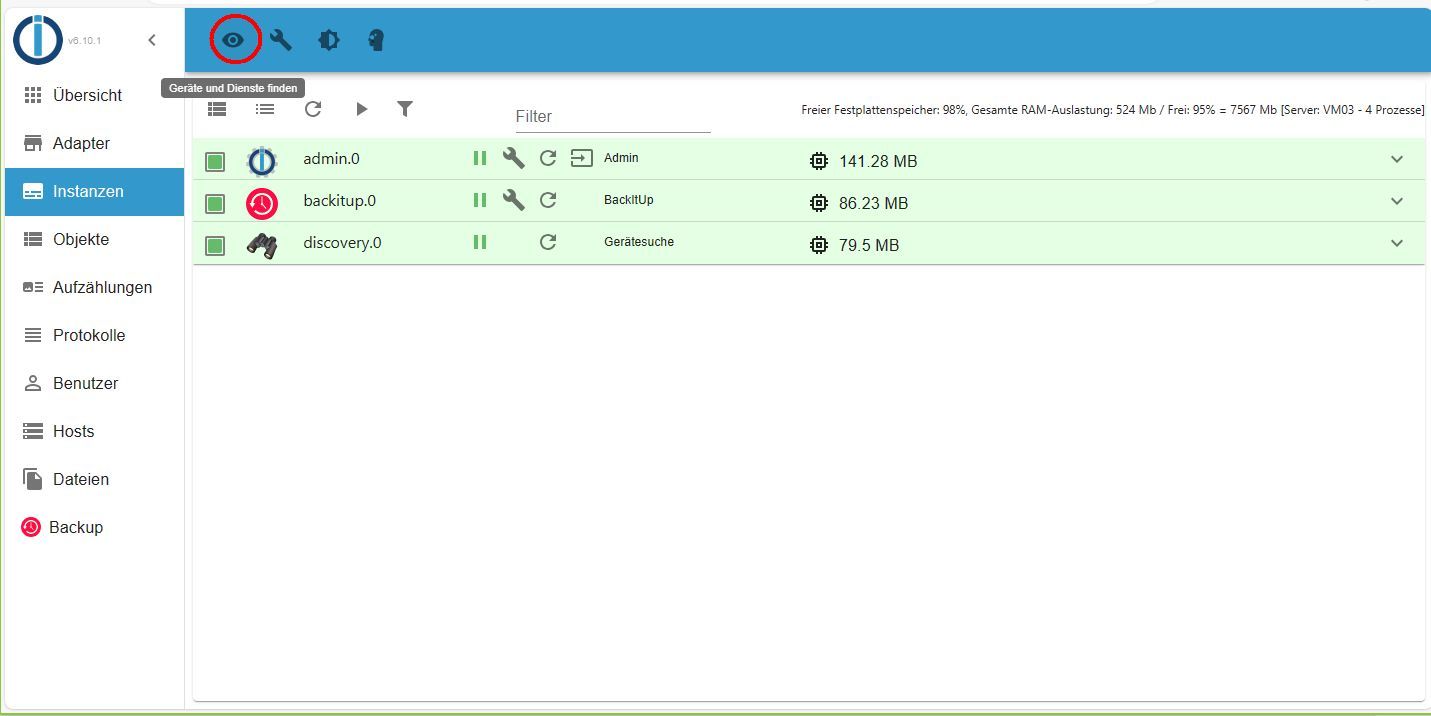
jetzt wieder
hat mir aber nicht alle Adapter nach dem update installiert

Hey! Du scheinst an dieser Unterhaltung interessiert zu sein, hast aber noch kein Konto.
Hast du es satt, bei jedem Besuch durch die gleichen Beiträge zu scrollen? Wenn du dich für ein Konto anmeldest, kommst du immer genau dorthin zurück, wo du zuvor warst, und kannst dich über neue Antworten benachrichtigen lassen (entweder per E-Mail oder Push-Benachrichtigung). Du kannst auch Lesezeichen speichern und Beiträge positiv bewerten, um anderen Community-Mitgliedern deine Wertschätzung zu zeigen.
Mit deinem Input könnte dieser Beitrag noch besser werden 💗
Registrieren Anmelden231
Online33.0k
Benutzer83.6k
Themen1.3m
Beiträge