




Adapter lassen sich nach io update nicht mehr öffnen?
-
-
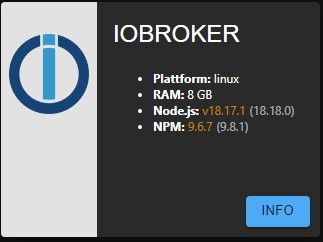
Kann es auch sein, dass meine Node.js und NPM Versionen nicht kompatibel sind? Welche wäre die letzte Stable Version?
18.18.0 und npm kommt da in passender Version gleich mit.
Siehe in meiner Signatur das 'node-fix-Skript'. -
@crunchip sagte in Adapter lassen sich nach io update nicht mehr öffnen?:
iob diag
Skript v.2023-06-20 *** BASE SYSTEM *** Static hostname: IOBroker Icon name: computer-container Chassis: container Machine ID: 00ce9495f0e241b5b8dd308da14042b1 Boot ID: 01ef84cc2372422eb709f4c5b1ac44ac Virtualization: lxc Operating System: Ubuntu 20.04.6 LTS Kernel: Linux 5.15.107-2-pve Architecture: x86-64 model name : AMD Ryzen 5 PRO 4650G with Radeon Graphics Docker : false Virtualization : lxc Kernel : x86_64 Userland : amd64 Systemuptime and Load: 11:43:33 up 9 days, 16:59, 1 user, load average: 0.46, 0.52, 0.70 CPU threads: 4 *** Time and Time Zones *** Local time: Fri 2023-09-29 11:43:33 CEST Universal time: Fri 2023-09-29 09:43:33 UTC RTC time: n/a Time zone: Europe/Berlin (CEST, +0200) System clock synchronized: yes NTP service: inactive RTC in local TZ: no *** User and Groups *** root /root root *** X-Server-Setup *** X-Server: false Desktop: Terminal: tty Boot Target: graphical.target *** MEMORY *** total used free shared buff/cache available Mem: 8.2G 58M 8.1G 0.0K 79M 8.1G Swap: 0B 0B 0B Total: 8.2G 58M 8.1G 8192 M total memory 58 M used memory 59 M active memory 53 M inactive memory 8053 M free memory 0 M buffer memory 79 M swap cache 0 M total swap 0 M used swap 0 M free swap *** FILESYSTEM *** Filesystem Type Size Used Avail Use% Mounted on rpool/data/subvol-301-disk-1 zfs 32G 3.5G 29G 11% / none tmpfs 492K 4.0K 488K 1% /dev udev devtmpfs 16G 0 16G 0% /dev/ttyACM0 tmpfs tmpfs 16G 0 16G 0% /dev/shm tmpfs tmpfs 3.1G 116K 3.1G 1% /run tmpfs tmpfs 5.0M 0 5.0M 0% /run/lock tmpfs tmpfs 3.1G 0 3.1G 0% /run/user/0 Messages concerning ext4 filesystem in dmesg: Show mounted filesystems (real ones only): TARGET SOURCE FSTYPE OPTIONS / rpool/data/subvol-301-disk-1 zfs rw,relatime,xattr,posixacl |-/proc/cpuinfo lxcfs[/proc/cpuinfo] fuse.lxcfs rw,nosuid,nodev,relatime,user_id=0,group_id=0,allow_other |-/proc/diskstats lxcfs[/proc/diskstats] fuse.lxcfs rw,nosuid,nodev,relatime,user_id=0,group_id=0,allow_other |-/proc/loadavg lxcfs[/proc/loadavg] fuse.lxcfs rw,nosuid,nodev,relatime,user_id=0,group_id=0,allow_other |-/proc/meminfo lxcfs[/proc/meminfo] fuse.lxcfs rw,nosuid,nodev,relatime,user_id=0,group_id=0,allow_other |-/proc/slabinfo lxcfs[/proc/slabinfo] fuse.lxcfs rw,nosuid,nodev,relatime,user_id=0,group_id=0,allow_other |-/proc/stat lxcfs[/proc/stat] fuse.lxcfs rw,nosuid,nodev,relatime,user_id=0,group_id=0,allow_other |-/proc/swaps lxcfs[/proc/swaps] fuse.lxcfs rw,nosuid,nodev,relatime,user_id=0,group_id=0,allow_other |-/proc/uptime lxcfs[/proc/uptime] fuse.lxcfs rw,nosuid,nodev,relatime,user_id=0,group_id=0,allow_other `-/sys/devices/system/cpu lxcfs[/sys/devices/system/cpu] fuse.lxcfs rw,nosuid,nodev,relatime,user_id=0,group_id=0,allow_other Files in neuralgic directories: /var: 940M /var/ 538M /var/log 535M /var/log/journal/00ce9495f0e241b5b8dd308da14042b1 535M /var/log/journal 278M /var/cache Archived and active journals take up 534.2M in the file system. /opt/iobroker/backups: 10M /opt/iobroker/backups/ /opt/iobroker/iobroker-data: 295M /opt/iobroker/iobroker-data/ 143M /opt/iobroker/iobroker-data/files 130M /opt/iobroker/iobroker-data/backup-objects 25M /opt/iobroker/iobroker-data/files/material 23M /opt/iobroker/iobroker-data/files/material/static The five largest files in iobroker-data are: 18M /opt/iobroker/iobroker-data/objects.jsonl 18M /opt/iobroker/iobroker-data/files/material/static/js/main.c5478f66.js.map 6.7M /opt/iobroker/iobroker-data/files/web.admin/static/js/main.edf7552a.js.map 6.1M /opt/iobroker/iobroker-data/files/iot.admin/static/js/main.2975a411.js.map 5.7M /opt/iobroker/iobroker-data/files/text2command.admin/static/js/main.274a4d8d.js.map *** NodeJS-Installation *** /usr/bin/nodejs v18.17.1 /usr/bin/node v18.17.1 /usr/bin/npm 9.6.7 /usr/bin/npx 9.6.7 nodejs: Installed: 18.17.1-deb-1nodesource1 Candidate: 18.17.1-deb-1nodesource1 Version table: *** 18.17.1-deb-1nodesource1 500 500 https://deb.nodesource.com/node_18.x focal/main amd64 Packages 100 /var/lib/dpkg/status 10.19.0~dfsg-3ubuntu1.1 500 500 http://archive.ubuntu.com/ubuntu focal-updates/universe amd64 Packages 500 http://archive.ubuntu.com/ubuntu focal-security/universe amd64 Packages 10.19.0~dfsg-3ubuntu1 500 500 http://archive.ubuntu.com/ubuntu focal/universe amd64 Packages Temp directories causing npm8 problem: 0 No problems detected Errors in npm tree: 0 *** ioBroker-Installation *** ioBroker Status iobroker is not running on this host. Objects type: jsonl States type: jsonl No configuration change needed. Multihost discovery server: disabled Discovery authentication: enabled Persistent activation: disabled Objects: jsonl on 127.0.0.1 States: jsonl on 127.0.0.1 Core adapters versions js-controller: 5.0.12 admin: 6.8.0 javascript: 7.1.4 Adapters from github: 3 Adapter State system.adapter.admin.0 : admin : IOBroker - enabled, port: 8081, bind: 0.0.0.0, run as: admin system.adapter.alexa2.0 : alexa2 : IOBroker - enabled system.adapter.amtronwallbox.0 : amtronwallbox : IOBroker - disabled system.adapter.apcups.0 : apcups : IOBroker - enabled system.adapter.backitup.0 : backitup : IOBroker - enabled system.adapter.cloud.0 : cloud : IOBroker - enabled system.adapter.daswetter.0 : daswetter : IOBroker - enabled system.adapter.discovery.0 : discovery : IOBroker - enabled system.adapter.energiefluss.0 : energiefluss : IOBroker - enabled system.adapter.feiertage.0 : feiertage : IOBroker - enabled system.adapter.history.0 : history : IOBroker - enabled system.adapter.hm-rega.0 : hm-rega : IOBroker - enabled system.adapter.hm-rpc.0 : hm-rpc : IOBroker - enabled, port: 0 system.adapter.hm-rpc.1 : hm-rpc : IOBroker - enabled, port: 0 system.adapter.hm-rpc.2 : hm-rpc : IOBroker - enabled, port: 0 system.adapter.hmip.0 : hmip : IOBroker - disabled system.adapter.influxdb.0 : influxdb : IOBroker - disabled, port: 8086 system.adapter.info.0 : info : IOBroker - enabled system.adapter.iot.0 : iot : IOBroker - enabled system.adapter.javascript.0 : javascript : IOBroker - enabled system.adapter.material.0 : material : IOBroker - enabled system.adapter.mielecloudservice.0 : mielecloudservice : IOBroker - disabled system.adapter.modbus.0 : modbus : IOBroker - enabled system.adapter.node-red.0 : node-red : IOBroker - disabled, port: 1880, bind: 10.14.4.34 (SSL) system.adapter.nut.0 : nut : IOBroker - disabled system.adapter.onvif.0 : onvif : IOBroker - disabled system.adapter.ping.0 : ping : IOBroker - enabled system.adapter.pushover.0 : pushover : IOBroker - enabled system.adapter.pushover.1 : pushover : IOBroker - enabled system.adapter.pushover.2 : pushover : IOBroker - enabled system.adapter.pushover.3 : pushover : IOBroker - enabled system.adapter.pushover.4 : pushover : IOBroker - enabled system.adapter.pushover.5 : pushover : IOBroker - enabled system.adapter.pushover.6 : pushover : IOBroker - enabled system.adapter.pushover.7 : pushover : IOBroker - enabled system.adapter.pushover.8 : pushover : IOBroker - enabled system.adapter.shelly.0 : shelly : IOBroker - enabled, port: 1882, bind: 0.0.0.0 system.adapter.shuttercontrol.0 : shuttercontrol : IOBroker - enabled system.adapter.sma-em.0 : sma-em : IOBroker - enabled system.adapter.smartmeter.0 : smartmeter : IOBroker - disabled system.adapter.sonoff.0 : sonoff : IOBroker - enabled, port: 1883, bind: 0.0.0.0 system.adapter.sourceanalytix.0 : sourceanalytix : IOBroker - disabled system.adapter.synology.0 : synology : IOBroker - enabled, port: 5001 system.adapter.telegram.0 : telegram : IOBroker - enabled, port: 8443, bind: 0.0.0.0 system.adapter.text2command.0 : text2command : IOBroker - enabled system.adapter.tibber.0 : tibber : IOBroker - enabled system.adapter.unifi.0 : unifi : IOBroker - disabled system.adapter.vis-material-webfont.0 : vis-material-webfont : IOBroker - enabled system.adapter.vis-materialdesign.0 : vis-materialdesign : IOBroker - enabled system.adapter.vis.0 : vis : IOBroker - disabled system.adapter.web.0 : web : IOBroker - enabled, port: 8082, bind: 0.0.0.0, run as: admin system.adapter.worx.0 : worx : IOBroker - enabled system.adapter.yahka.0 : yahka : IOBroker - enabled system.adapter.zigbee.0 : zigbee : IOBroker - enabled, port: /dev/ttyACM0 + instance is alive Enabled adapters with bindings system.adapter.admin.0 : admin : IOBroker - enabled, port: 8081, bind: 0.0.0.0, run as: admin system.adapter.hm-rpc.0 : hm-rpc : IOBroker - enabled, port: 0 system.adapter.hm-rpc.1 : hm-rpc : IOBroker - enabled, port: 0 system.adapter.hm-rpc.2 : hm-rpc : IOBroker - enabled, port: 0 system.adapter.shelly.0 : shelly : IOBroker - enabled, port: 1882, bind: 0.0.0.0 system.adapter.sonoff.0 : sonoff : IOBroker - enabled, port: 1883, bind: 0.0.0.0 system.adapter.synology.0 : synology : IOBroker - enabled, port: 5001 system.adapter.telegram.0 : telegram : IOBroker - enabled, port: 8443, bind: 0.0.0.0 system.adapter.web.0 : web : IOBroker - enabled, port: 8082, bind: 0.0.0.0, run as: admin system.adapter.zigbee.0 : zigbee : IOBroker - enabled, port: /dev/ttyACM0 ioBroker-Repositories Stable (default): http://download.iobroker.net/sources-dist.json Beta (latest) : http://download.iobroker.net/sources-dist-latest.json Github : https://github.com/ioBroker/ioBroker.admin Active repo(s): Stable (default), Github Installed ioBroker-Instances [/s] -
@crunchip sagte in Adapter lassen sich nach io update nicht mehr öffnen?:
iob diag
Skript v.2023-06-20 *** BASE SYSTEM *** Static hostname: IOBroker Icon name: computer-container Chassis: container Machine ID: 00ce9495f0e241b5b8dd308da14042b1 Boot ID: 01ef84cc2372422eb709f4c5b1ac44ac Virtualization: lxc Operating System: Ubuntu 20.04.6 LTS Kernel: Linux 5.15.107-2-pve Architecture: x86-64 model name : AMD Ryzen 5 PRO 4650G with Radeon Graphics Docker : false Virtualization : lxc Kernel : x86_64 Userland : amd64 Systemuptime and Load: 11:43:33 up 9 days, 16:59, 1 user, load average: 0.46, 0.52, 0.70 CPU threads: 4 *** Time and Time Zones *** Local time: Fri 2023-09-29 11:43:33 CEST Universal time: Fri 2023-09-29 09:43:33 UTC RTC time: n/a Time zone: Europe/Berlin (CEST, +0200) System clock synchronized: yes NTP service: inactive RTC in local TZ: no *** User and Groups *** root /root root *** X-Server-Setup *** X-Server: false Desktop: Terminal: tty Boot Target: graphical.target *** MEMORY *** total used free shared buff/cache available Mem: 8.2G 58M 8.1G 0.0K 79M 8.1G Swap: 0B 0B 0B Total: 8.2G 58M 8.1G 8192 M total memory 58 M used memory 59 M active memory 53 M inactive memory 8053 M free memory 0 M buffer memory 79 M swap cache 0 M total swap 0 M used swap 0 M free swap *** FILESYSTEM *** Filesystem Type Size Used Avail Use% Mounted on rpool/data/subvol-301-disk-1 zfs 32G 3.5G 29G 11% / none tmpfs 492K 4.0K 488K 1% /dev udev devtmpfs 16G 0 16G 0% /dev/ttyACM0 tmpfs tmpfs 16G 0 16G 0% /dev/shm tmpfs tmpfs 3.1G 116K 3.1G 1% /run tmpfs tmpfs 5.0M 0 5.0M 0% /run/lock tmpfs tmpfs 3.1G 0 3.1G 0% /run/user/0 Messages concerning ext4 filesystem in dmesg: Show mounted filesystems (real ones only): TARGET SOURCE FSTYPE OPTIONS / rpool/data/subvol-301-disk-1 zfs rw,relatime,xattr,posixacl |-/proc/cpuinfo lxcfs[/proc/cpuinfo] fuse.lxcfs rw,nosuid,nodev,relatime,user_id=0,group_id=0,allow_other |-/proc/diskstats lxcfs[/proc/diskstats] fuse.lxcfs rw,nosuid,nodev,relatime,user_id=0,group_id=0,allow_other |-/proc/loadavg lxcfs[/proc/loadavg] fuse.lxcfs rw,nosuid,nodev,relatime,user_id=0,group_id=0,allow_other |-/proc/meminfo lxcfs[/proc/meminfo] fuse.lxcfs rw,nosuid,nodev,relatime,user_id=0,group_id=0,allow_other |-/proc/slabinfo lxcfs[/proc/slabinfo] fuse.lxcfs rw,nosuid,nodev,relatime,user_id=0,group_id=0,allow_other |-/proc/stat lxcfs[/proc/stat] fuse.lxcfs rw,nosuid,nodev,relatime,user_id=0,group_id=0,allow_other |-/proc/swaps lxcfs[/proc/swaps] fuse.lxcfs rw,nosuid,nodev,relatime,user_id=0,group_id=0,allow_other |-/proc/uptime lxcfs[/proc/uptime] fuse.lxcfs rw,nosuid,nodev,relatime,user_id=0,group_id=0,allow_other `-/sys/devices/system/cpu lxcfs[/sys/devices/system/cpu] fuse.lxcfs rw,nosuid,nodev,relatime,user_id=0,group_id=0,allow_other Files in neuralgic directories: /var: 940M /var/ 538M /var/log 535M /var/log/journal/00ce9495f0e241b5b8dd308da14042b1 535M /var/log/journal 278M /var/cache Archived and active journals take up 534.2M in the file system. /opt/iobroker/backups: 10M /opt/iobroker/backups/ /opt/iobroker/iobroker-data: 295M /opt/iobroker/iobroker-data/ 143M /opt/iobroker/iobroker-data/files 130M /opt/iobroker/iobroker-data/backup-objects 25M /opt/iobroker/iobroker-data/files/material 23M /opt/iobroker/iobroker-data/files/material/static The five largest files in iobroker-data are: 18M /opt/iobroker/iobroker-data/objects.jsonl 18M /opt/iobroker/iobroker-data/files/material/static/js/main.c5478f66.js.map 6.7M /opt/iobroker/iobroker-data/files/web.admin/static/js/main.edf7552a.js.map 6.1M /opt/iobroker/iobroker-data/files/iot.admin/static/js/main.2975a411.js.map 5.7M /opt/iobroker/iobroker-data/files/text2command.admin/static/js/main.274a4d8d.js.map *** NodeJS-Installation *** /usr/bin/nodejs v18.17.1 /usr/bin/node v18.17.1 /usr/bin/npm 9.6.7 /usr/bin/npx 9.6.7 nodejs: Installed: 18.17.1-deb-1nodesource1 Candidate: 18.17.1-deb-1nodesource1 Version table: *** 18.17.1-deb-1nodesource1 500 500 https://deb.nodesource.com/node_18.x focal/main amd64 Packages 100 /var/lib/dpkg/status 10.19.0~dfsg-3ubuntu1.1 500 500 http://archive.ubuntu.com/ubuntu focal-updates/universe amd64 Packages 500 http://archive.ubuntu.com/ubuntu focal-security/universe amd64 Packages 10.19.0~dfsg-3ubuntu1 500 500 http://archive.ubuntu.com/ubuntu focal/universe amd64 Packages Temp directories causing npm8 problem: 0 No problems detected Errors in npm tree: 0 *** ioBroker-Installation *** ioBroker Status iobroker is not running on this host. Objects type: jsonl States type: jsonl No configuration change needed. Multihost discovery server: disabled Discovery authentication: enabled Persistent activation: disabled Objects: jsonl on 127.0.0.1 States: jsonl on 127.0.0.1 Core adapters versions js-controller: 5.0.12 admin: 6.8.0 javascript: 7.1.4 Adapters from github: 3 Adapter State system.adapter.admin.0 : admin : IOBroker - enabled, port: 8081, bind: 0.0.0.0, run as: admin system.adapter.alexa2.0 : alexa2 : IOBroker - enabled system.adapter.amtronwallbox.0 : amtronwallbox : IOBroker - disabled system.adapter.apcups.0 : apcups : IOBroker - enabled system.adapter.backitup.0 : backitup : IOBroker - enabled system.adapter.cloud.0 : cloud : IOBroker - enabled system.adapter.daswetter.0 : daswetter : IOBroker - enabled system.adapter.discovery.0 : discovery : IOBroker - enabled system.adapter.energiefluss.0 : energiefluss : IOBroker - enabled system.adapter.feiertage.0 : feiertage : IOBroker - enabled system.adapter.history.0 : history : IOBroker - enabled system.adapter.hm-rega.0 : hm-rega : IOBroker - enabled system.adapter.hm-rpc.0 : hm-rpc : IOBroker - enabled, port: 0 system.adapter.hm-rpc.1 : hm-rpc : IOBroker - enabled, port: 0 system.adapter.hm-rpc.2 : hm-rpc : IOBroker - enabled, port: 0 system.adapter.hmip.0 : hmip : IOBroker - disabled system.adapter.influxdb.0 : influxdb : IOBroker - disabled, port: 8086 system.adapter.info.0 : info : IOBroker - enabled system.adapter.iot.0 : iot : IOBroker - enabled system.adapter.javascript.0 : javascript : IOBroker - enabled system.adapter.material.0 : material : IOBroker - enabled system.adapter.mielecloudservice.0 : mielecloudservice : IOBroker - disabled system.adapter.modbus.0 : modbus : IOBroker - enabled system.adapter.node-red.0 : node-red : IOBroker - disabled, port: 1880, bind: 10.14.4.34 (SSL) system.adapter.nut.0 : nut : IOBroker - disabled system.adapter.onvif.0 : onvif : IOBroker - disabled system.adapter.ping.0 : ping : IOBroker - enabled system.adapter.pushover.0 : pushover : IOBroker - enabled system.adapter.pushover.1 : pushover : IOBroker - enabled system.adapter.pushover.2 : pushover : IOBroker - enabled system.adapter.pushover.3 : pushover : IOBroker - enabled system.adapter.pushover.4 : pushover : IOBroker - enabled system.adapter.pushover.5 : pushover : IOBroker - enabled system.adapter.pushover.6 : pushover : IOBroker - enabled system.adapter.pushover.7 : pushover : IOBroker - enabled system.adapter.pushover.8 : pushover : IOBroker - enabled system.adapter.shelly.0 : shelly : IOBroker - enabled, port: 1882, bind: 0.0.0.0 system.adapter.shuttercontrol.0 : shuttercontrol : IOBroker - enabled system.adapter.sma-em.0 : sma-em : IOBroker - enabled system.adapter.smartmeter.0 : smartmeter : IOBroker - disabled system.adapter.sonoff.0 : sonoff : IOBroker - enabled, port: 1883, bind: 0.0.0.0 system.adapter.sourceanalytix.0 : sourceanalytix : IOBroker - disabled system.adapter.synology.0 : synology : IOBroker - enabled, port: 5001 system.adapter.telegram.0 : telegram : IOBroker - enabled, port: 8443, bind: 0.0.0.0 system.adapter.text2command.0 : text2command : IOBroker - enabled system.adapter.tibber.0 : tibber : IOBroker - enabled system.adapter.unifi.0 : unifi : IOBroker - disabled system.adapter.vis-material-webfont.0 : vis-material-webfont : IOBroker - enabled system.adapter.vis-materialdesign.0 : vis-materialdesign : IOBroker - enabled system.adapter.vis.0 : vis : IOBroker - disabled system.adapter.web.0 : web : IOBroker - enabled, port: 8082, bind: 0.0.0.0, run as: admin system.adapter.worx.0 : worx : IOBroker - enabled system.adapter.yahka.0 : yahka : IOBroker - enabled system.adapter.zigbee.0 : zigbee : IOBroker - enabled, port: /dev/ttyACM0 + instance is alive Enabled adapters with bindings system.adapter.admin.0 : admin : IOBroker - enabled, port: 8081, bind: 0.0.0.0, run as: admin system.adapter.hm-rpc.0 : hm-rpc : IOBroker - enabled, port: 0 system.adapter.hm-rpc.1 : hm-rpc : IOBroker - enabled, port: 0 system.adapter.hm-rpc.2 : hm-rpc : IOBroker - enabled, port: 0 system.adapter.shelly.0 : shelly : IOBroker - enabled, port: 1882, bind: 0.0.0.0 system.adapter.sonoff.0 : sonoff : IOBroker - enabled, port: 1883, bind: 0.0.0.0 system.adapter.synology.0 : synology : IOBroker - enabled, port: 5001 system.adapter.telegram.0 : telegram : IOBroker - enabled, port: 8443, bind: 0.0.0.0 system.adapter.web.0 : web : IOBroker - enabled, port: 8082, bind: 0.0.0.0, run as: admin system.adapter.zigbee.0 : zigbee : IOBroker - enabled, port: /dev/ttyACM0 ioBroker-Repositories Stable (default): http://download.iobroker.net/sources-dist.json Beta (latest) : http://download.iobroker.net/sources-dist-latest.json Github : https://github.com/ioBroker/ioBroker.admin Active repo(s): Stable (default), Github Installed ioBroker-Instances [/s] -
@crunchip sagte in Adapter lassen sich nach io update nicht mehr öffnen?:
iob diag
Skript v.2023-06-20 *** BASE SYSTEM *** Static hostname: IOBroker Icon name: computer-container Chassis: container Machine ID: 00ce9495f0e241b5b8dd308da14042b1 Boot ID: 01ef84cc2372422eb709f4c5b1ac44ac Virtualization: lxc Operating System: Ubuntu 20.04.6 LTS Kernel: Linux 5.15.107-2-pve Architecture: x86-64 model name : AMD Ryzen 5 PRO 4650G with Radeon Graphics Docker : false Virtualization : lxc Kernel : x86_64 Userland : amd64 Systemuptime and Load: 11:43:33 up 9 days, 16:59, 1 user, load average: 0.46, 0.52, 0.70 CPU threads: 4 *** Time and Time Zones *** Local time: Fri 2023-09-29 11:43:33 CEST Universal time: Fri 2023-09-29 09:43:33 UTC RTC time: n/a Time zone: Europe/Berlin (CEST, +0200) System clock synchronized: yes NTP service: inactive RTC in local TZ: no *** User and Groups *** root /root root *** X-Server-Setup *** X-Server: false Desktop: Terminal: tty Boot Target: graphical.target *** MEMORY *** total used free shared buff/cache available Mem: 8.2G 58M 8.1G 0.0K 79M 8.1G Swap: 0B 0B 0B Total: 8.2G 58M 8.1G 8192 M total memory 58 M used memory 59 M active memory 53 M inactive memory 8053 M free memory 0 M buffer memory 79 M swap cache 0 M total swap 0 M used swap 0 M free swap *** FILESYSTEM *** Filesystem Type Size Used Avail Use% Mounted on rpool/data/subvol-301-disk-1 zfs 32G 3.5G 29G 11% / none tmpfs 492K 4.0K 488K 1% /dev udev devtmpfs 16G 0 16G 0% /dev/ttyACM0 tmpfs tmpfs 16G 0 16G 0% /dev/shm tmpfs tmpfs 3.1G 116K 3.1G 1% /run tmpfs tmpfs 5.0M 0 5.0M 0% /run/lock tmpfs tmpfs 3.1G 0 3.1G 0% /run/user/0 Messages concerning ext4 filesystem in dmesg: Show mounted filesystems (real ones only): TARGET SOURCE FSTYPE OPTIONS / rpool/data/subvol-301-disk-1 zfs rw,relatime,xattr,posixacl |-/proc/cpuinfo lxcfs[/proc/cpuinfo] fuse.lxcfs rw,nosuid,nodev,relatime,user_id=0,group_id=0,allow_other |-/proc/diskstats lxcfs[/proc/diskstats] fuse.lxcfs rw,nosuid,nodev,relatime,user_id=0,group_id=0,allow_other |-/proc/loadavg lxcfs[/proc/loadavg] fuse.lxcfs rw,nosuid,nodev,relatime,user_id=0,group_id=0,allow_other |-/proc/meminfo lxcfs[/proc/meminfo] fuse.lxcfs rw,nosuid,nodev,relatime,user_id=0,group_id=0,allow_other |-/proc/slabinfo lxcfs[/proc/slabinfo] fuse.lxcfs rw,nosuid,nodev,relatime,user_id=0,group_id=0,allow_other |-/proc/stat lxcfs[/proc/stat] fuse.lxcfs rw,nosuid,nodev,relatime,user_id=0,group_id=0,allow_other |-/proc/swaps lxcfs[/proc/swaps] fuse.lxcfs rw,nosuid,nodev,relatime,user_id=0,group_id=0,allow_other |-/proc/uptime lxcfs[/proc/uptime] fuse.lxcfs rw,nosuid,nodev,relatime,user_id=0,group_id=0,allow_other `-/sys/devices/system/cpu lxcfs[/sys/devices/system/cpu] fuse.lxcfs rw,nosuid,nodev,relatime,user_id=0,group_id=0,allow_other Files in neuralgic directories: /var: 940M /var/ 538M /var/log 535M /var/log/journal/00ce9495f0e241b5b8dd308da14042b1 535M /var/log/journal 278M /var/cache Archived and active journals take up 534.2M in the file system. /opt/iobroker/backups: 10M /opt/iobroker/backups/ /opt/iobroker/iobroker-data: 295M /opt/iobroker/iobroker-data/ 143M /opt/iobroker/iobroker-data/files 130M /opt/iobroker/iobroker-data/backup-objects 25M /opt/iobroker/iobroker-data/files/material 23M /opt/iobroker/iobroker-data/files/material/static The five largest files in iobroker-data are: 18M /opt/iobroker/iobroker-data/objects.jsonl 18M /opt/iobroker/iobroker-data/files/material/static/js/main.c5478f66.js.map 6.7M /opt/iobroker/iobroker-data/files/web.admin/static/js/main.edf7552a.js.map 6.1M /opt/iobroker/iobroker-data/files/iot.admin/static/js/main.2975a411.js.map 5.7M /opt/iobroker/iobroker-data/files/text2command.admin/static/js/main.274a4d8d.js.map *** NodeJS-Installation *** /usr/bin/nodejs v18.17.1 /usr/bin/node v18.17.1 /usr/bin/npm 9.6.7 /usr/bin/npx 9.6.7 nodejs: Installed: 18.17.1-deb-1nodesource1 Candidate: 18.17.1-deb-1nodesource1 Version table: *** 18.17.1-deb-1nodesource1 500 500 https://deb.nodesource.com/node_18.x focal/main amd64 Packages 100 /var/lib/dpkg/status 10.19.0~dfsg-3ubuntu1.1 500 500 http://archive.ubuntu.com/ubuntu focal-updates/universe amd64 Packages 500 http://archive.ubuntu.com/ubuntu focal-security/universe amd64 Packages 10.19.0~dfsg-3ubuntu1 500 500 http://archive.ubuntu.com/ubuntu focal/universe amd64 Packages Temp directories causing npm8 problem: 0 No problems detected Errors in npm tree: 0 *** ioBroker-Installation *** ioBroker Status iobroker is not running on this host. Objects type: jsonl States type: jsonl No configuration change needed. Multihost discovery server: disabled Discovery authentication: enabled Persistent activation: disabled Objects: jsonl on 127.0.0.1 States: jsonl on 127.0.0.1 Core adapters versions js-controller: 5.0.12 admin: 6.8.0 javascript: 7.1.4 Adapters from github: 3 Adapter State system.adapter.admin.0 : admin : IOBroker - enabled, port: 8081, bind: 0.0.0.0, run as: admin system.adapter.alexa2.0 : alexa2 : IOBroker - enabled system.adapter.amtronwallbox.0 : amtronwallbox : IOBroker - disabled system.adapter.apcups.0 : apcups : IOBroker - enabled system.adapter.backitup.0 : backitup : IOBroker - enabled system.adapter.cloud.0 : cloud : IOBroker - enabled system.adapter.daswetter.0 : daswetter : IOBroker - enabled system.adapter.discovery.0 : discovery : IOBroker - enabled system.adapter.energiefluss.0 : energiefluss : IOBroker - enabled system.adapter.feiertage.0 : feiertage : IOBroker - enabled system.adapter.history.0 : history : IOBroker - enabled system.adapter.hm-rega.0 : hm-rega : IOBroker - enabled system.adapter.hm-rpc.0 : hm-rpc : IOBroker - enabled, port: 0 system.adapter.hm-rpc.1 : hm-rpc : IOBroker - enabled, port: 0 system.adapter.hm-rpc.2 : hm-rpc : IOBroker - enabled, port: 0 system.adapter.hmip.0 : hmip : IOBroker - disabled system.adapter.influxdb.0 : influxdb : IOBroker - disabled, port: 8086 system.adapter.info.0 : info : IOBroker - enabled system.adapter.iot.0 : iot : IOBroker - enabled system.adapter.javascript.0 : javascript : IOBroker - enabled system.adapter.material.0 : material : IOBroker - enabled system.adapter.mielecloudservice.0 : mielecloudservice : IOBroker - disabled system.adapter.modbus.0 : modbus : IOBroker - enabled system.adapter.node-red.0 : node-red : IOBroker - disabled, port: 1880, bind: 10.14.4.34 (SSL) system.adapter.nut.0 : nut : IOBroker - disabled system.adapter.onvif.0 : onvif : IOBroker - disabled system.adapter.ping.0 : ping : IOBroker - enabled system.adapter.pushover.0 : pushover : IOBroker - enabled system.adapter.pushover.1 : pushover : IOBroker - enabled system.adapter.pushover.2 : pushover : IOBroker - enabled system.adapter.pushover.3 : pushover : IOBroker - enabled system.adapter.pushover.4 : pushover : IOBroker - enabled system.adapter.pushover.5 : pushover : IOBroker - enabled system.adapter.pushover.6 : pushover : IOBroker - enabled system.adapter.pushover.7 : pushover : IOBroker - enabled system.adapter.pushover.8 : pushover : IOBroker - enabled system.adapter.shelly.0 : shelly : IOBroker - enabled, port: 1882, bind: 0.0.0.0 system.adapter.shuttercontrol.0 : shuttercontrol : IOBroker - enabled system.adapter.sma-em.0 : sma-em : IOBroker - enabled system.adapter.smartmeter.0 : smartmeter : IOBroker - disabled system.adapter.sonoff.0 : sonoff : IOBroker - enabled, port: 1883, bind: 0.0.0.0 system.adapter.sourceanalytix.0 : sourceanalytix : IOBroker - disabled system.adapter.synology.0 : synology : IOBroker - enabled, port: 5001 system.adapter.telegram.0 : telegram : IOBroker - enabled, port: 8443, bind: 0.0.0.0 system.adapter.text2command.0 : text2command : IOBroker - enabled system.adapter.tibber.0 : tibber : IOBroker - enabled system.adapter.unifi.0 : unifi : IOBroker - disabled system.adapter.vis-material-webfont.0 : vis-material-webfont : IOBroker - enabled system.adapter.vis-materialdesign.0 : vis-materialdesign : IOBroker - enabled system.adapter.vis.0 : vis : IOBroker - disabled system.adapter.web.0 : web : IOBroker - enabled, port: 8082, bind: 0.0.0.0, run as: admin system.adapter.worx.0 : worx : IOBroker - enabled system.adapter.yahka.0 : yahka : IOBroker - enabled system.adapter.zigbee.0 : zigbee : IOBroker - enabled, port: /dev/ttyACM0 + instance is alive Enabled adapters with bindings system.adapter.admin.0 : admin : IOBroker - enabled, port: 8081, bind: 0.0.0.0, run as: admin system.adapter.hm-rpc.0 : hm-rpc : IOBroker - enabled, port: 0 system.adapter.hm-rpc.1 : hm-rpc : IOBroker - enabled, port: 0 system.adapter.hm-rpc.2 : hm-rpc : IOBroker - enabled, port: 0 system.adapter.shelly.0 : shelly : IOBroker - enabled, port: 1882, bind: 0.0.0.0 system.adapter.sonoff.0 : sonoff : IOBroker - enabled, port: 1883, bind: 0.0.0.0 system.adapter.synology.0 : synology : IOBroker - enabled, port: 5001 system.adapter.telegram.0 : telegram : IOBroker - enabled, port: 8443, bind: 0.0.0.0 system.adapter.web.0 : web : IOBroker - enabled, port: 8082, bind: 0.0.0.0, run as: admin system.adapter.zigbee.0 : zigbee : IOBroker - enabled, port: /dev/ttyACM0 ioBroker-Repositories Stable (default): http://download.iobroker.net/sources-dist.json Beta (latest) : http://download.iobroker.net/sources-dist-latest.json Github : https://github.com/ioBroker/ioBroker.admin Active repo(s): Stable (default), Github Installed ioBroker-Instances [/s]@tolkin sagte in Adapter lassen sich nach io update nicht mehr öffnen?:
Active repo(s): Stable (default), Github
Kick das Github-Ding raus.
Und installier nodejs 18.18.0 sauber.Die Ausgabe von
iob diagist auch nicht vollständig. -
@tolkin sagte in Adapter lassen sich nach io update nicht mehr öffnen?:
Active repo(s): Stable (default), Github
Kick das Github-Ding raus.
Und installier nodejs 18.18.0 sauber.Die Ausgabe von
iob diagist auch nicht vollständig.Habe dein Skript laufen lassen und bin jetzt auf 18.18.0. Danke dafür..
Die Adapter zeigen immer noch die gleiche Fehlermeldung. Wie kicke ich das Github-Ding raus? Keine Ahnung was das ist. -
Habe dein Skript laufen lassen und bin jetzt auf 18.18.0. Danke dafür..
Die Adapter zeigen immer noch die gleiche Fehlermeldung. Wie kicke ich das Github-Ding raus? Keine Ahnung was das ist.@tolkin sagte in Adapter lassen sich nach io update nicht mehr öffnen?:
Wie kicke ich das Github-Ding raus? Keine Ahnung was das ist.
Das ist schlecht. Die Kiste wird doch von dir verwaltet? Da solltest du schon wissen, was das ist und woher es kommt...
iob repo del Githubmüsste das lauten.
-
Habe dein Skript laufen lassen und bin jetzt auf 18.18.0. Danke dafür..
Die Adapter zeigen immer noch die gleiche Fehlermeldung. Wie kicke ich das Github-Ding raus? Keine Ahnung was das ist. -
@thomas-braun sagte in Adapter lassen sich nach io update nicht mehr öffnen?:
iob diag
Sorry, hast ja Recht ;) Jetzt läuft wieder alles..
-
@thomas-braun sagte in Adapter lassen sich nach io update nicht mehr öffnen?:
iob diag
Sorry, hast ja Recht ;) Jetzt läuft wieder alles..
@tolkin sagte in Adapter lassen sich nach io update nicht mehr öffnen?:
Jetzt läuft wieder alles..
hmm, alles?
@tolkin sagte in Adapter lassen sich nach io update nicht mehr öffnen?:
error: modbus.0 (667) Client in error state.
kein Support per PN! - Fragen im Forum stellen -
Benutzt das Voting rechts unten im Beitrag wenn er euch geholfen hat.
Das Forum freut sich über eine Spende. Benutzt dazu den Spendenbutton oben rechts. Danke!
der Installationsfixer: curl -fsL https://iobroker.net/fix.sh | bash - -
@thomas-braun sagte in Adapter lassen sich nach io update nicht mehr öffnen?:
iob diag
Sorry, hast ja Recht ;) Jetzt läuft wieder alles..
@tolkin sagte in Adapter lassen sich nach io update nicht mehr öffnen?:
Swap: 0B
Würde ich einschalten. Der wird auch dann und wann bei 8GB RAM verwendet.
Active repo(s): Stable (default), Github
Da schwirrt noch der Github-Eintrag herum.
iob repo unset Github -
@tolkin sagte in Adapter lassen sich nach io update nicht mehr öffnen?:
Jetzt läuft wieder alles..
hmm, alles?
@tolkin sagte in Adapter lassen sich nach io update nicht mehr öffnen?:
error: modbus.0 (667) Client in error state.
@homoran sagte in Adapter lassen sich nach io update nicht mehr öffnen?:
@tolkin sagte in Adapter lassen sich nach io update nicht mehr öffnen?:
Jetzt läuft wieder alles..
hmm, alles?
@tolkin sagte in Adapter lassen sich nach io update nicht mehr öffnen?:
error: modbus.0 (667) Client in error state.
Ja, der Modbus Adapter funktioniert jetzt auch wieder. ;)
Ob das Problem jetzt wirklich der Github Adapter war? -
@homoran sagte in Adapter lassen sich nach io update nicht mehr öffnen?:
@tolkin sagte in Adapter lassen sich nach io update nicht mehr öffnen?:
Jetzt läuft wieder alles..
hmm, alles?
@tolkin sagte in Adapter lassen sich nach io update nicht mehr öffnen?:
error: modbus.0 (667) Client in error state.
Ja, der Modbus Adapter funktioniert jetzt auch wieder. ;)
Ob das Problem jetzt wirklich der Github Adapter war?@tolkin sagte in Adapter lassen sich nach io update nicht mehr öffnen?:
der Github Adapter war
du hast
@tolkin sagte in Adapter lassen sich nach io update nicht mehr öffnen?:
Adapters from github: 3
ausgeschaltet wurde nur dein fehlerhafter Repoeintrag



Hey! Du scheinst an dieser Unterhaltung interessiert zu sein, hast aber noch kein Konto.
Hast du es satt, bei jedem Besuch durch die gleichen Beiträge zu scrollen? Wenn du dich für ein Konto anmeldest, kommst du immer genau dorthin zurück, wo du zuvor warst, und kannst dich über neue Antworten benachrichtigen lassen (entweder per E-Mail oder Push-Benachrichtigung). Du kannst auch Lesezeichen speichern und Beiträge positiv bewerten, um anderen Community-Mitgliedern deine Wertschätzung zu zeigen.
Mit deinem Input könnte dieser Beitrag noch besser werden 💗
Registrieren Anmelden275
Online33.0k
Benutzer83.4k
Themen1.3m
Beiträge