




Update vom Container gemacht und nun läuft nichts mehr
-
Hallo zusammen,
ich habe ein ähnliches Problem. Nach einem Update auf die aktuelle Version von buanet ist alles weg. Wenn ich mein letztes Image (kurz vor dem Update) zurückspiele kann ich es nicht als Container starten. Hat jemand eine Idee?@mcbirne wieso noch ein Post?
kein Support per PN! - Fragen im Forum stellen - Benutzt das Voting rechts unten im Beitrag wenn er euch geholfen hat.
Das Forum freut sich über eine Spende. Benutzt dazu den Spendenbutton oben rechts. Danke!
der Installationsfixer: curl -fsL https://iobroker.net/fix.sh | bash - -
@mcbirne wieso noch ein Post?
-
Hallo zusammen,
ich habe heute scheinbar einen blöden Fehler gemacht. ich habe ein update meines IObroker Containers gemacht. Nun ist alles weg.
Dann wollte ich einfach das Image vom alten Container zurückspielen und es wider starten. Aber ich kann aus dem alten Image keinen Container machen. Hat jemand eine Idee? woran das liegt?
Ich würde gerne das vom 12.9. verwenden.

-
Bei der Containererstellung erhalte ich folgende Fehlermeldung:
Create container buanet-iobroker-latest-1 failed: {"message":"No command specified"}.@mcbirne
Man macht keine Updates vom Container.
Der Container wird gelöscht, man zieht das neue Image und erstellt damit einen neuen Container mit identischen Einstellungen.
Den startet man und lässt ihn in Ruhe werkeln bis alles fertig ist."Any fool can write code that a computer can understand. Good programmers write code that humans can understand." (Martin Fowler, "Refactoring")
Proxmox 9.1.1 LXC|8 GB|Core i7-6700
HmIP|ZigBee|Tasmota|Unifi
Zabbix Certified Specialist
Konnte ich Dir helfen? Dann benutze bitte das Voting unten rechts im Beitrag -
@Homoran
ich dachte den anderen sieht niemand. Aber da habe ich mich wohl geirrt. Außerdem bin ich gerade sehr ratlos.@mcbirne sagte in Docker buanet startet nicht mehr (Synology NAS):
Außerdem bin ich gerade sehr ratlos.
Da geht's dir wie allen potentiellen Helfern. Die können nämlich mit deinen (Nicht-) Informationen nichts anfangen. Versuch bitte (in dem anderen Thread) alles zu beschreiben, was hilfreich ist. Worauf läuft Docker, was GENAU hast du gemacht, was GENAU funktioniert nicht, ...
-
hab die 2 Threads zusammengeführt
-
@mcbirne
Man macht keine Updates vom Container.
Der Container wird gelöscht, man zieht das neue Image und erstellt damit einen neuen Container mit identischen Einstellungen.
Den startet man und lässt ihn in Ruhe werkeln bis alles fertig ist.@codierknecht
OK, das werde ich auch nicht mehr tun.
Also einige Infos:
Mein IObroker läuft auf einem Synology in einem Docker Container (heißt jetzt container Manager).
Vor dem Update habe ich das alte Image gesichert.
Nach dem Update hatte ich einen leeren (neu aufgesetzten) IO Broker.
Daher wollte ich das Image zurückspielen.
Das hat auch funktioniert, allerdings kann ich das Image nicht "starten". -
@codierknecht
OK, das werde ich auch nicht mehr tun.
Also einige Infos:
Mein IObroker läuft auf einem Synology in einem Docker Container (heißt jetzt container Manager).
Vor dem Update habe ich das alte Image gesichert.
Nach dem Update hatte ich einen leeren (neu aufgesetzten) IO Broker.
Daher wollte ich das Image zurückspielen.
Das hat auch funktioniert, allerdings kann ich das Image nicht "starten". -
Vermutlich liegt es am Startbefehl. Wenn ich dort -v iobrokerdata:/opt/iobroker eingebe wird schonmal ein Container erstellt. Allerdings nicht gestartet. Den Befehl habe ich von https://registry.hub.docker.com/r/buanet/iobroker/
@mcbirne
Ich hatte bis vor kurzem meinen ioBroker als Container unter DSM 6 laufen.
Wieso Befehl? Ich habe das alles über die Oberfläche der Synology eingerichtet.
Wie oben beschrieben neuen Container mit gleichen Einstellungen (Volume, Ports usw.) und starten. Das dauert dann ne ganze Weile bis alles wieder läuft."Any fool can write code that a computer can understand. Good programmers write code that humans can understand." (Martin Fowler, "Refactoring")
Proxmox 9.1.1 LXC|8 GB|Core i7-6700
HmIP|ZigBee|Tasmota|Unifi
Zabbix Certified Specialist
Konnte ich Dir helfen? Dann benutze bitte das Voting unten rechts im Beitrag -
@mcbirne
Ich hatte bis vor kurzem meinen ioBroker als Container unter DSM 6 laufen.
Wieso Befehl? Ich habe das alles über die Oberfläche der Synology eingerichtet.
Wie oben beschrieben neuen Container mit gleichen Einstellungen (Volume, Ports usw.) und starten. Das dauert dann ne ganze Weile bis alles wieder läuft.@codierknecht
es gibt auch noch eine andere Möglichkeit, die leider auch nicht funktioniert. Ich habe jetzt die neue "leere" Version genommen und den ein Backup im IObroker zurückgespielt. Leider kann ich den Container nach dem zurückspielen des Backups nicht mehr erreichen.Hat jemand ein Idee?
-
@codierknecht
es gibt auch noch eine andere Möglichkeit, die leider auch nicht funktioniert. Ich habe jetzt die neue "leere" Version genommen und den ein Backup im IObroker zurückgespielt. Leider kann ich den Container nach dem zurückspielen des Backups nicht mehr erreichen.Hat jemand ein Idee?
hier der Logfile nach dem Backup im IObroker
buanet-iobroker-1
date	stream	content
2023/09/12 19:27:06	stdout	Provide following information in email: t@outlook.de, invoice: P202761280
2023/09/12 19:27:06	stdout	Your iobroker.vis license must be updated. Please contact info@iobroker.net to get a new license!
2023/09/12 19:27:06	stdout	host.buanet-iobroker1 check instance "system.adapter.web.0" for host "buanet-iobroker-1"
2023/09/12 19:27:06	stdout	host.buanet-iobroker1 check instance "system.adapter.vw-connect.0" for host "buanet-iobroker-1"
2023/09/12 19:27:06	stdout	host.buanet-iobroker1 check instance "system.adapter.vis.0" for host "buanet-iobroker-1"
2023/09/12 19:27:06	stdout	host.buanet-iobroker1 check instance "system.adapter.vis-materialdesign.0" for host "buanet-iobroker-1"
2023/09/12 19:27:06	stdout	host.buanet-iobroker1 check instance "system.adapter.vis-inventwo.0" for host "buanet-iobroker-1"
2023/09/12 19:27:06	stdout	host.buanet-iobroker1 check instance "system.adapter.vis-hqwidgets.0" for host "buanet-iobroker-1"
2023/09/12 19:27:06	stdout	host.buanet-iobroker1 check instance "system.adapter.vis-fancyswitch.0" for host "buanet-iobroker-1"
2023/09/12 19:27:06	stdout	host.buanet-iobroker1 check instance "system.adapter.vis-canvas-gauges.0" for host "buanet-iobroker-1"
2023/09/12 19:27:06	stdout	host.buanet-iobroker1 check instance "system.adapter.tibberlink.0" for host "buanet-iobroker-1"
2023/09/12 19:27:06	stdout	host.buanet-iobroker1 check instance "system.adapter.text2command.0" for host "buanet-iobroker-1"
2023/09/12 19:27:06	stdout	host.buanet-iobroker1 check instance "system.adapter.smartthings.0" for host "buanet-iobroker-1"
2023/09/12 19:27:06	stdout	host.buanet-iobroker1 check instance "system.adapter.smartgarden.0" for host "buanet-iobroker-1"
2023/09/12 19:27:06	stdout	host.buanet-iobroker1 check instance "system.adapter.schoolfree.0" for host "buanet-iobroker-1"
2023/09/12 19:27:06	stdout	host.buanet-iobroker1 check instance "system.adapter.pvforecast.1" for host "buanet-iobroker-1"
2023/09/12 19:27:06	stdout	host.buanet-iobroker1 check instance "system.adapter.pvforecast.0" for host "buanet-iobroker-1"
2023/09/12 19:27:06	stdout	host.buanet-iobroker1 check instance "system.adapter.parser.0" for host "buanet-iobroker-1"
2023/09/12 19:27:06	stdout	host.buanet-iobroker1 check instance "system.adapter.nuki.0" for host "buanet-iobroker-1"
2023/09/12 19:27:06	stdout	host.buanet-iobroker1 check instance "system.adapter.nina.0" for host "buanet-iobroker-1"
2023/09/12 19:27:06	stdout	host.buanet-iobroker1 check instance "system.adapter.info.0" for host "buanet-iobroker-1"
2023/09/12 19:27:06	stdout	host.buanet-iobroker1 check instance "system.adapter.hue-extended.0" for host "buanet-iobroker-1"
2023/09/12 19:27:06	stdout	host.buanet-iobroker1 check instance "system.adapter.homepilot20.0" for host "buanet-iobroker-1"
2023/09/12 19:27:06	stdout	host.buanet-iobroker1 check instance "system.adapter.homeconnect.0" for host "buanet-iobroker-1"
2023/09/12 19:27:06	stdout	host.buanet-iobroker1 check instance "system.adapter.fritzdect.0" for host "buanet-iobroker-1"
2023/09/12 19:27:06	stdout	host.buanet-iobroker1 check instance "system.adapter.feiertage.0" for host "buanet-iobroker-1"
2023/09/12 19:27:06	stdout	host.buanet-iobroker1 check instance "system.adapter.fb-checkpresence.0" for host "buanet-iobroker-1"
2023/09/12 19:27:06	stdout	host.buanet-iobroker1 check instance "system.adapter.ecovacs-deebot.0" for host "buanet-iobroker-1"
2023/09/12 19:27:06	stdout	host.buanet-iobroker1 check instance "system.adapter.daswetter.0" for host "buanet-iobroker-1"
2023/09/12 19:27:06	stdout	host.buanet-iobroker1 check instance "system.adapter.broadlink2.0" for host "buanet-iobroker-1"
2023/09/12 19:27:06	stdout	host.buanet-iobroker1 check instance "system.adapter.apsystems-ecu.0" for host "buanet-iobroker-1"
2023/09/12 19:27:06	stdout	host.buanet-iobroker1 check instance "system.adapter.backitup.0" for host "buanet-iobroker-1"
2023/09/12 19:27:06	stdout	host.buanet-iobroker1 check instance "system.adapter.discovery.0" for host "buanet-iobroker-1"
2023/09/12 19:27:06	stdout	host.buanet-iobroker1 check instance "system.adapter.weatherunderground.2" for host "buanet-iobroker-1"
2023/09/12 19:27:06	stdout	host.buanet-iobroker1 check instance "system.adapter.weatherunderground.1" for host "buanet-iobroker-1"
2023/09/12 19:27:06	stdout	host.buanet-iobroker1 check instance "system.adapter.weatherunderground.0" for host "buanet-iobroker-1"
2023/09/12 19:27:06	stdout	host.buanet-iobroker1 check instance "system.adapter.tuya.0" for host "buanet-iobroker-1"
2023/09/12 19:27:06	stdout	host.buanet-iobroker1 check instance "system.adapter.tr-064.0" for host "buanet-iobroker-1"
2023/09/12 19:27:06	stdout	host.buanet-iobroker1 check instance "system.adapter.ping.0" for host "buanet-iobroker-1"
2023/09/12 19:27:06	stdout	host.buanet-iobroker1 check instance "system.adapter.nuki-extended.0" for host "buanet-iobroker-1"
2023/09/12 19:27:06	stdout	host.buanet-iobroker1 check instance "system.adapter.modbus.0" for host "buanet-iobroker-1"
2023/09/12 19:27:06	stdout	host.buanet-iobroker1 check instance "system.adapter.mihome.0" for host "buanet-iobroker-1"
2023/09/12 19:27:06	stdout	host.buanet-iobroker1 check instance "system.adapter.meross.0" for host "buanet-iobroker-1"
2023/09/12 19:27:06	stdout	host.buanet-iobroker1 check instance "system.adapter.ical.0" for host "buanet-iobroker-1"
2023/09/12 19:27:06	stdout	host.buanet-iobroker1 check instance "system.adapter.hmip.0" for host "buanet-iobroker-1"
2023/09/12 19:27:06	stdout	host.buanet-iobroker1 check instance "system.adapter.alexa2.0" for host "buanet-iobroker-1"
2023/09/12 19:27:06	stdout	host.buanet-iobroker1 check instance "system.adapter.telegram.0" for host "buanet-iobroker-1"
2023/09/12 19:27:06	stdout	host.buanet-iobroker1 check instance "system.adapter.sql.0" for host "buanet-iobroker-1"
2023/09/12 19:27:06	stdout	host.buanet-iobroker1 check instance "system.adapter.node-red.0" for host "buanet-iobroker-1"
2023/09/12 19:27:06	stdout	host.buanet-iobroker1 check instance "system.adapter.javascript.0" for host "buanet-iobroker-1"
2023/09/12 19:27:06	stdout	host.buanet-iobroker1 check instance "system.adapter.history.0" for host "buanet-iobroker-1"
2023/09/12 19:27:06	stdout	host.buanet-iobroker1 check instance "system.adapter.email.0" for host "buanet-iobroker-1"
2023/09/12 19:27:06	stdout	host.buanet-iobroker1 check instance "system.adapter.admin.0" for host "buanet-iobroker-1"
2023/09/12 19:27:05	stdout	================================== > LOG REDIRECT system.adapter.admin.0 => true [starting]
2023/09/12 19:27:01	stdout	##### #### ### ## # iobroker.js-controller log output # ## ### #### #####
2023/09/12 19:27:01	stdout
2023/09/12 19:27:01	stdout	Starting ioBroker...
2023/09/12 19:27:01	stdout
2023/09/12 19:27:01	stdout	--------------------------------------------------------------------------------
2023/09/12 19:27:01	stdout	-----                    Step 5 of 5: ioBroker startup                     -----
2023/09/12 19:27:01	stdout	--------------------------------------------------------------------------------
2023/09/12 19:27:01	stdout
2023/09/12 19:27:01	stdout
2023/09/12 19:27:01	stdout	For more information see ioBroker Docker Image Docs (https://docs.buanet.de/iobroker-docker-image/docs/).
2023/09/12 19:27:01	stdout	Some adapters have special requirements/ settings which can be activated by the use of environment variables.
2023/09/12 19:27:01	stdout
2023/09/12 19:27:01	stdout	--------------------------------------------------------------------------------
2023/09/12 19:27:01	stdout	-----                Step 4 of 5: Applying special settings                -----
2023/09/12 19:27:01	stdout	--------------------------------------------------------------------------------
2023/09/12 19:27:01	stdout
2023/09/12 19:27:01	stdout	No action required.
2023/09/12 19:27:01	stdout	Hostname in ioBroker matches the hostname of this container.
2023/09/12 19:26:34	stdout
2023/09/12 19:26:34	stdout	Checking Database connection... Done.
2023/09/12 19:26:19	stdout
2023/09/12 19:26:19	stdout	Fixing "sudo-bug" by replacing sudo with gosu... Done.
2023/09/12 19:26:19	stdout
2023/09/12 19:26:19	stdout	(Re)setting permissions (This might take a while! Please be patient!)... Done.
2023/09/12 19:26:19	stdout
2023/09/12 19:26:19	stdout	--------------------------------------------------------------------------------
2023/09/12 19:26:19	stdout	-----             Step 3 of 5: Checking ioBroker installation              -----
2023/09/12 19:26:19	stdout	--------------------------------------------------------------------------------
2023/09/12 19:26:19	stdout
2023/09/12 19:26:19	stdout	Existing installation of ioBroker detected in "/opt/iobroker".
2023/09/12 19:26:19	stdout
2023/09/12 19:26:19	stdout	--------------------------------------------------------------------------------
2023/09/12 19:26:19	stdout	-----             Step 2 of 5: Detecting ioBroker installation             -----
2023/09/12 19:26:19	stdout	--------------------------------------------------------------------------------
2023/09/12 19:26:19	stdout
2023/09/12 19:26:19	stdout	This is not the first run of this container. Skipping first run preparation.
2023/09/12 19:26:19	stdout
2023/09/12 19:26:19	stdout	--------------------------------------------------------------------------------
2023/09/12 19:26:19	stdout	-----                   Step 1 of 5: Preparing container                   -----
2023/09/12 19:26:19	stdout	--------------------------------------------------------------------------------
2023/09/12 19:26:19	stdout
2023/09/12 19:26:19	stdout	--------------------------------------------------------------------------------
2023/09/12 19:26:19	stdout	-----                    SETUID:              1000                         -----
2023/09/12 19:26:19	stdout	-----                    SETGID:              1000                         -----
2023/09/12 19:26:19	stdout	-----                        Environment Variables                         -----
2023/09/12 19:26:19	stdout	-----                                                                      -----
2023/09/12 19:26:19	stdout	-----                    npm:                 9.6.7                        -----
2023/09/12 19:26:19	stdout	-----                    node:                v18.17.1                     -----
2023/09/12 19:26:19	stdout	-----                    build:               2023-08-19T23:45:39+00:00    -----
2023/09/12 19:26:19	stdout	-----                    image:               v8.1.0                       -----
2023/09/12 19:26:19	stdout	-----                          Version Information                         -----
2023/09/12 19:26:19	stdout	-----                                                                      -----
2023/09/12 19:26:19	stdout	-----                    hostname:            buanet-iobroker-1            -----
2023/09/12 19:26:19	stdout	-----                    arch:                x86_64                       -----
2023/09/12 19:26:19	stdout	-----                          System Information                          -----
2023/09/12 19:26:19	stdout	--------------------------------------------------------------------------------
2023/09/12 19:26:19	stdout
2023/09/12 19:26:19	stdout	--------------------------------------------------------------------------------
2023/09/12 19:26:19	stdout	-----                          Please be patient!                          -----
2023/09/12 19:26:19	stdout	-----                    Startupscript is now running!                     -----
2023/09/12 19:26:19	stdout	-----              Welcome to your ioBroker Docker container!              -----
2023/09/12 19:26:19	stdout	-----                                                                      -----
2023/09/12 19:26:19	stdout	----- ╚═╝  ╚═════╝  ╚═════╝  ╚═╝  ╚═╝  ╚═════╝  ╚═╝  ╚═╝ ╚══════╝ ╚═╝  ╚═╝ -----
2023/09/12 19:26:19	stdout	----- ██║ ╚██████╔╝ ██████╔╝ ██║  ██║ ╚██████╔╝ ██║  ██╗ ███████╗ ██║  ██║ -----
2023/09/12 19:26:19	stdout	----- ██║ ██║   ██║ ██╔══██╗ ██╔══██╗ ██║   ██║ ██╔═██╗  ██╔══╝   ██╔══██╗ -----
2023/09/12 19:26:19	stdout	----- ██║ ██║   ██║ ██████╔╝ ██████╔╝ ██║   ██║ █████╔╝  █████╗   ██████╔╝ -----
2023/09/12 19:26:19	stdout	----- ██║ ██╔═══██╗ ██╔══██╗ ██╔══██╗ ██╔═══██╗ ██║ ██╔╝ ██╔════╝ ██╔══██╗ -----
2023/09/12 19:26:19	stdout	----- ██╗  ██████╗  ██████╗  ██████╗   ██████╗  ██╗  ██╗ ███████╗ ██████╗  -----
2023/09/12 19:26:19	stdout	-----                                                                      -----
2023/09/12 19:26:19	stdout	--------------------------------------------------------------------------------
2023/09/12 19:26:19	stdout	-------------------------     2023-09-12 19:26:19      -------------------------
2023/09/12 19:26:19	stdout	--------------------------------------------------------------------------------
2023/09/12 19:26:19	stdout
2023/09/12 19:25:24	stdout	Shutting down ioBroker...
2023/09/12 19:25:24	stdout	Recived termination signal (SIGTERM).
2023/09/12 19:25:24	stdout
2023/09/12 19:25:24	stdout	Terminated
MOD-EDIT: Code in code-tags gesetzt!
-
@codierknecht
es gibt auch noch eine andere Möglichkeit, die leider auch nicht funktioniert. Ich habe jetzt die neue "leere" Version genommen und den ein Backup im IObroker zurückgespielt. Leider kann ich den Container nach dem zurückspielen des Backups nicht mehr erreichen.Hat jemand ein Idee?
So ganz verstehe ich nicht , was du da machst bzw. gemacht hast !?
Dann zu :
. Leider kann ich den Container nach dem zurückspielen des Backups nicht mehr erreichen.
Hat jemand ein Idee?2023/09/12 19:27:06 stdout host.buanet-iobroker1 check instance "system.adapter.web.0" for host "buanet-iobroker-1"
im Termial vom ioBroker Container
pkill -u iobroker
iob host this
danach den Container neu starten
Synology 918+ 16GB - ioBroker in Docker v9 , VISO auf Trekstor Primebook C13 13,3" , Hikvision Domkameras mit Surveillance Station .. CCU RaspberryMatic in Synology VM .. Zigbee CC2538+CC2592 .. Sonoff .. KNX .. Modbus ..
-
So ganz verstehe ich nicht , was du da machst bzw. gemacht hast !?
Dann zu :
. Leider kann ich den Container nach dem zurückspielen des Backups nicht mehr erreichen.
Hat jemand ein Idee?2023/09/12 19:27:06 stdout host.buanet-iobroker1 check instance "system.adapter.web.0" for host "buanet-iobroker-1"
im Termial vom ioBroker Container
pkill -u iobroker
iob host this
danach den Container neu starten
@glasfaser
super, nun kann ich in den neu aufgesetzten Container rein. Ich habe ja das Backup zurückgespielt. Leider sieht es nicht so toll aus. Alle Adapter müssen erneut konfiguriert werden
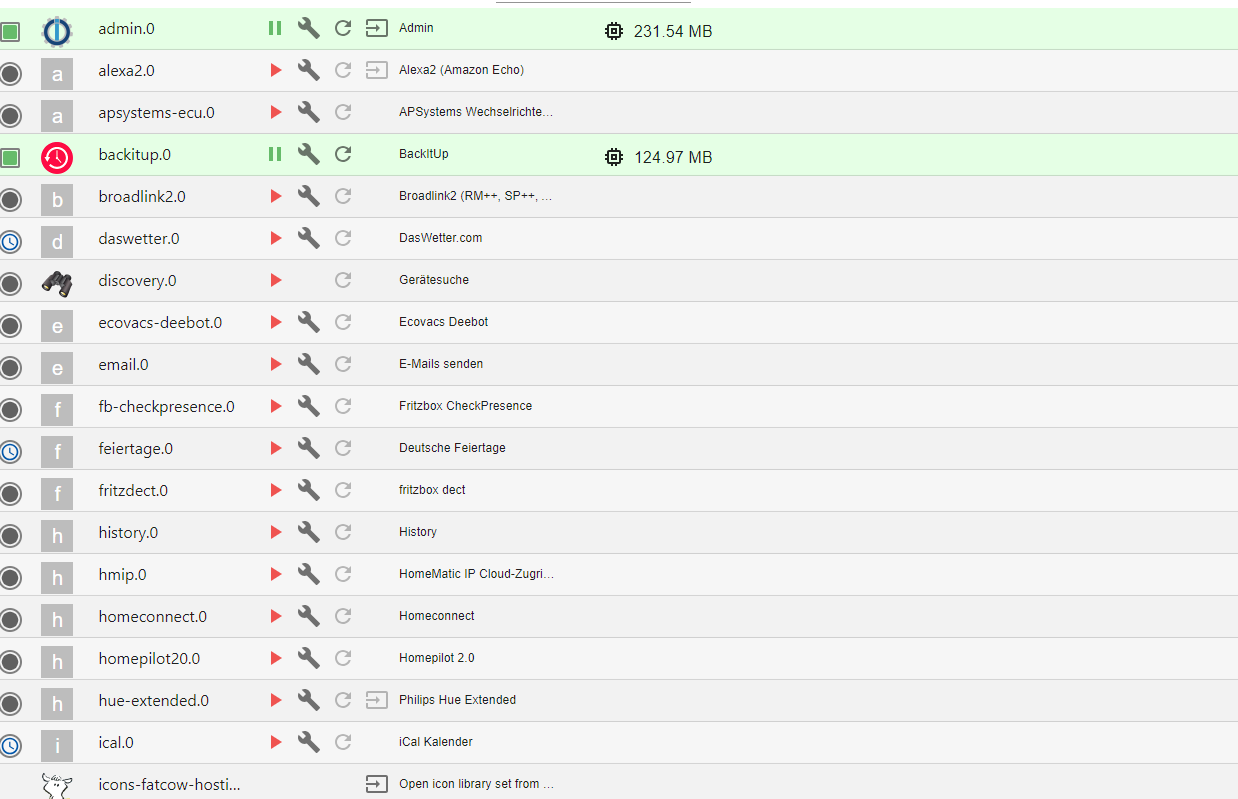
Hast du eine Idee, wie ich das alte Image (vor meinen blöden Update) wieder als Container starten kann. Dann sollte alles so sein wie vorher.
-
@glasfaser
super, nun kann ich in den neu aufgesetzten Container rein. Ich habe ja das Backup zurückgespielt. Leider sieht es nicht so toll aus. Alle Adapter müssen erneut konfiguriert werden
Hast du eine Idee, wie ich das alte Image (vor meinen blöden Update) wieder als Container starten kann. Dann sollte alles so sein wie vorher.
@mcbirne sagte in Update vom Container gemacht und nun läuft nichts mehr:
Alle Adapter müssen erneut konfiguriert werden
werden sie!
Finger weg!
der ist gerade erst bei
@codierknecht sagte in Update vom Container gemacht und nun läuft nichts mehr:
Den startet man und lässt ihn in Ruhe werkeln bis alles fertig ist.
-
@glasfaser
super, nun kann ich in den neu aufgesetzten Container rein. Ich habe ja das Backup zurückgespielt. Leider sieht es nicht so toll aus. Alle Adapter müssen erneut konfiguriert werden
Hast du eine Idee, wie ich das alte Image (vor meinen blöden Update) wieder als Container starten kann. Dann sollte alles so sein wie vorher.
@mcbirne sagte in Update vom Container gemacht und nun läuft nichts mehr:
. Ich habe ja das Backup zurückgespielt. Leider sieht es nicht so toll aus.
dann hast du "am Anfang "nicht lange genug gewartet , denn alle Adapter mit den dazugehörigen Einstellungen werden auch wieder hergestellt
siehe auch im Log nach ... was gerade passiert
Synology 918+ 16GB - ioBroker in Docker v9 , VISO auf Trekstor Primebook C13 13,3" , Hikvision Domkameras mit Surveillance Station .. CCU RaspberryMatic in Synology VM .. Zigbee CC2538+CC2592 .. Sonoff .. KNX .. Modbus ..
-
@mcbirne sagte in Update vom Container gemacht und nun läuft nichts mehr:
. Ich habe ja das Backup zurückgespielt. Leider sieht es nicht so toll aus.
dann hast du "am Anfang "nicht lange genug gewartet , denn alle Adapter mit den dazugehörigen Einstellungen werden auch wieder hergestellt
siehe auch im Log nach ... was gerade passiert
@glasfaser ok, dann warte ich mal noch. Die Skripte muss ich dann auch noch zurückspielen.
Ein Möglichkeit das Image wieder herzustellen gibt es nicht? das ist ja top aktuell. Da ins alle Änderungen drin. Das Backup ist schon einige Tage alt. -
@glasfaser ok, dann warte ich mal noch. Die Skripte muss ich dann auch noch zurückspielen.
Ein Möglichkeit das Image wieder herzustellen gibt es nicht? das ist ja top aktuell. Da ins alle Änderungen drin. Das Backup ist schon einige Tage alt.@mcbirne sagte in Update vom Container gemacht und nun läuft nichts mehr:
Die Skripte muss ich dann auch noch zurückspielen.
die kommen auch von selber zurück ... warte !
Synology 918+ 16GB - ioBroker in Docker v9 , VISO auf Trekstor Primebook C13 13,3" , Hikvision Domkameras mit Surveillance Station .. CCU RaspberryMatic in Synology VM .. Zigbee CC2538+CC2592 .. Sonoff .. KNX .. Modbus ..
-
@mcbirne sagte in Update vom Container gemacht und nun läuft nichts mehr:
Die Skripte muss ich dann auch noch zurückspielen.
die kommen auch von selber zurück ... warte !
@glasfaser OK, ich warte
-
@glasfaser ok, dann warte ich mal noch. Die Skripte muss ich dann auch noch zurückspielen.
Ein Möglichkeit das Image wieder herzustellen gibt es nicht? das ist ja top aktuell. Da ins alle Änderungen drin. Das Backup ist schon einige Tage alt.@mcbirne sagte in Update vom Container gemacht und nun läuft nichts mehr:
Ein Möglichkeit das Image wieder herzustellen gibt es nicht? das ist ja top aktuell.
wie hast du das gemacht ... und womit !?
Synology 918+ 16GB - ioBroker in Docker v9 , VISO auf Trekstor Primebook C13 13,3" , Hikvision Domkameras mit Surveillance Station .. CCU RaspberryMatic in Synology VM .. Zigbee CC2538+CC2592 .. Sonoff .. KNX .. Modbus ..
-
@mcbirne sagte in Update vom Container gemacht und nun läuft nichts mehr:
Ein Möglichkeit das Image wieder herzustellen gibt es nicht? das ist ja top aktuell.
wie hast du das gemacht ... und womit !?
@glasfaser
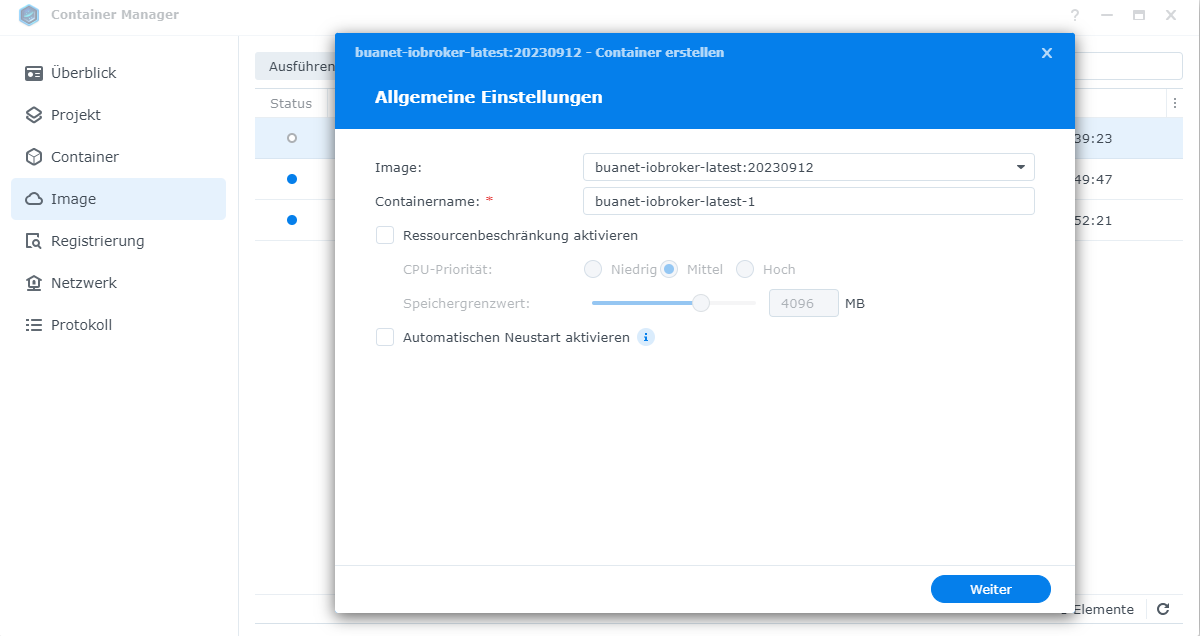
im Synology NAS. Dort habe ich im Containermanager den Container exportiert. Wenn ich ihn wider importiere ist ein Image da. Diese kann ich ausführen. Das klappt leider nicht. Vermutlich ist der Startbefehl oder so nicht korrekt, da nichts startet.




Hey! Du scheinst an dieser Unterhaltung interessiert zu sein, hast aber noch kein Konto.
Hast du es satt, bei jedem Besuch durch die gleichen Beiträge zu scrollen? Wenn du dich für ein Konto anmeldest, kommst du immer genau dorthin zurück, wo du zuvor warst, und kannst dich über neue Antworten benachrichtigen lassen (entweder per E-Mail oder Push-Benachrichtigung). Du kannst auch Lesezeichen speichern und Beiträge positiv bewerten, um anderen Community-Mitgliedern deine Wertschätzung zu zeigen.
Mit deinem Input könnte dieser Beitrag noch besser werden 💗
Registrieren AnmeldenSupport us
300
Online33.0k
Benutzer83.6k
Themen1.3m
Beiträge