




InfluxDB Error: 404 page not found
-
Hallo zusammen,
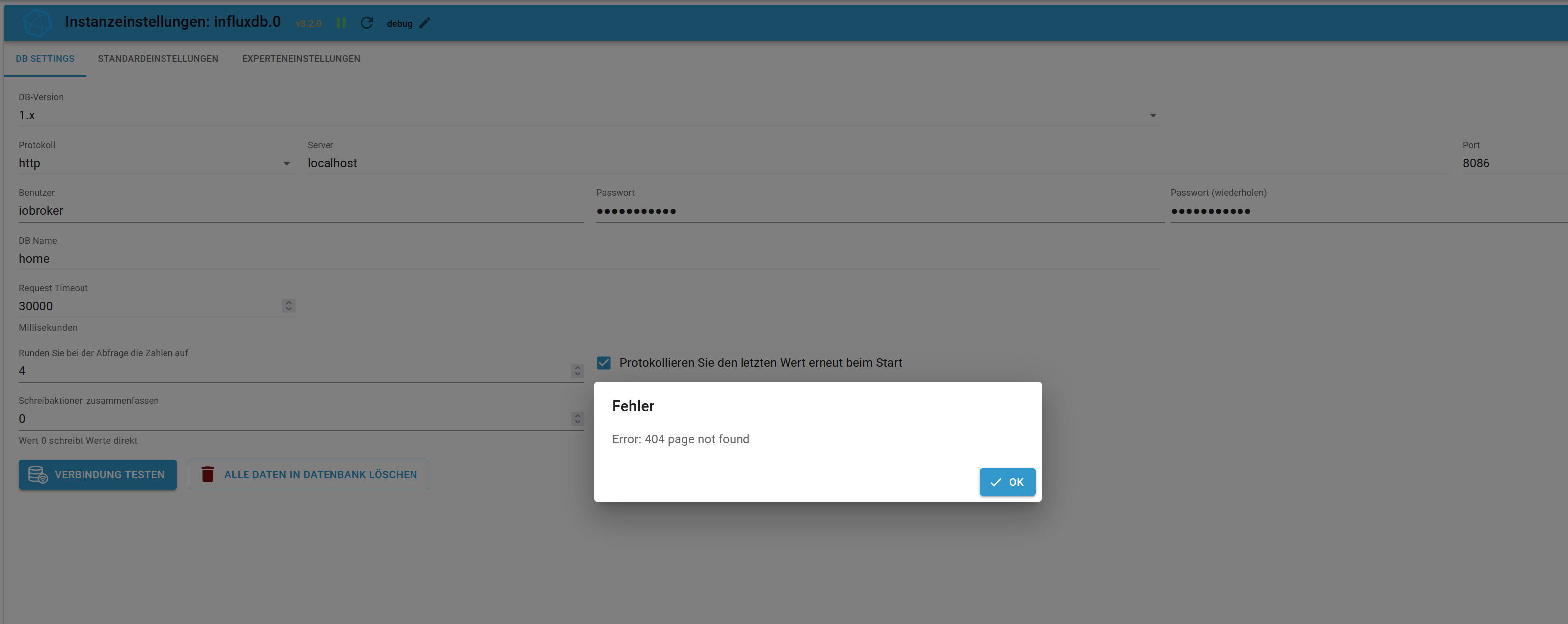
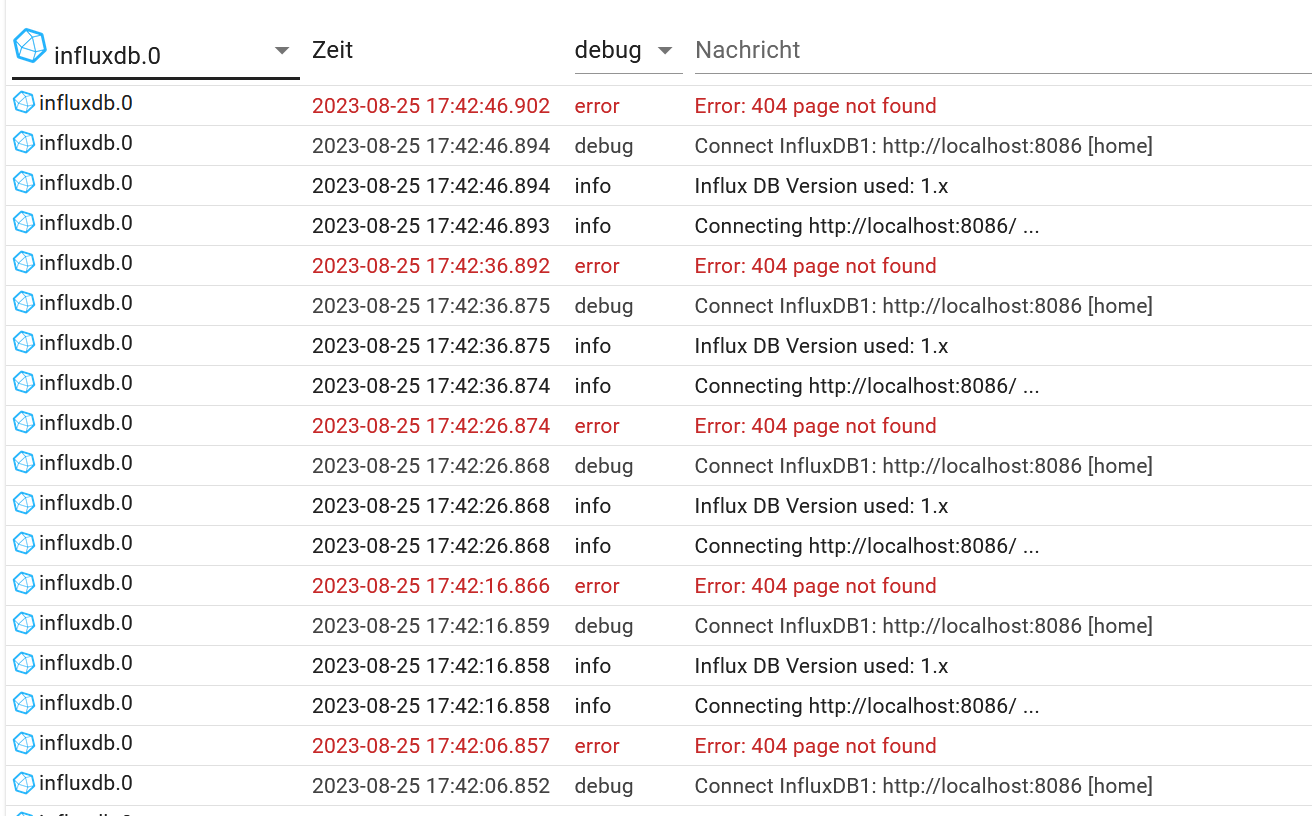
ich versuche bereits seit Stunden den ioBroker influxdb Adapter (v. 3.2.0) mit der influxdb v1.8 zu verbinden. Jedoch bekomme ich immer beim Testen der Verbindung: Error: 404 page not found
Hat einer eine Idee woran dies liegen könnte? Grafana funktioniert ohne Probleme...
Dies ist die influxdb.conf
### Welcome to the InfluxDB configuration file. # The values in this file override the default values used by the system if # a config option is not specified. The commented out lines are the configuration # field and the default value used. Uncommenting a line and changing the value # will change the value used at runtime when the process is restarted. # Once every 24 hours InfluxDB will report usage data to usage.influxdata.com # The data includes a random ID, os, arch, version, the number of series and other # usage data. No data from user databases is ever transmitted. # Change this option to true to disable reporting. # reporting-disabled = false # Bind address to use for the RPC service for backup and restore. # bind-address = "127.0.0.1:8088" ### ### [meta] ### ### Controls the parameters for the Raft consensus group that stores metadata ### about the InfluxDB cluster. ### [meta] # Where the metadata/raft database is stored dir = "/var/lib/influxdb/meta" # Automatically create a default retention policy when creating a database. # retention-autocreate = true # If log messages are printed for the meta service # logging-enabled = true ### ### [data] ### ### Controls where the actual shard data for InfluxDB lives and how it is ### flushed from the WAL. "dir" may need to be changed to a suitable place ### for your system, but the WAL settings are an advanced configuration. The ### defaults should work for most systems. ### [data] # The directory where the TSM storage engine stores TSM files. dir = "/var/lib/influxdb/data" # The directory where the TSM storage engine stores WAL files. wal-dir = "/var/lib/influxdb/wal" # The amount of time that a write will wait before fsyncing. A duration # greater than 0 can be used to batch up multiple fsync calls. This is useful for slower # disks or when WAL write contention is seen. A value of 0s fsyncs every write to the WAL. # Values in the range of 0-100ms are recommended for non-SSD disks. # wal-fsync-delay = "0s" # The type of shard index to use for new shards. The default is an in-memory index that is # recreated at startup. A value of "tsi1" will use a disk based index that supports higher # cardinality datasets. # index-version = "inmem" # Trace logging provides more verbose output around the tsm engine. Turning # this on can provide more useful output for debugging tsm engine issues. # trace-logging-enabled = false # Whether queries should be logged before execution. Very useful for troubleshooting, but will # log any sensitive data contained within a query. # query-log-enabled = true # Provides more error checking. For example, SELECT INTO will err out inserting an +/-Inf value # rather than silently failing. # strict-error-handling = false # Validates incoming writes to ensure keys only have valid unicode characters. # This setting will incur a small overhead because every key must be checked. # validate-keys = false # Settings for the TSM engine # CacheMaxMemorySize is the maximum size a shard's cache can # reach before it starts rejecting writes. # Valid size suffixes are k, m, or g (case insensitive, 1024 = 1k). # Values without a size suffix are in bytes. # cache-max-memory-size = "1g" # CacheSnapshotMemorySize is the size at which the engine will # snapshot the cache and write it to a TSM file, freeing up memory # Valid size suffixes are k, m, or g (case insensitive, 1024 = 1k). # Values without a size suffix are in bytes. # cache-snapshot-memory-size = "25m" # CacheSnapshotWriteColdDuration is the length of time at # which the engine will snapshot the cache and write it to # a new TSM file if the shard hasn't received writes or deletes # cache-snapshot-write-cold-duration = "10m" # CompactFullWriteColdDuration is the duration at which the engine # will compact all TSM files in a shard if it hasn't received a # write or delete # compact-full-write-cold-duration = "4h" # The maximum number of concurrent full and level compactions that can run at one time. A # value of 0 results in 50% of runtime.GOMAXPROCS(0) used at runtime. Any number greater # than 0 limits compactions to that value. This setting does not apply # to cache snapshotting. # max-concurrent-compactions = 0 # CompactThroughput is the rate limit in bytes per second that we # will allow TSM compactions to write to disk. Note that short bursts are allowed # to happen at a possibly larger value, set by CompactThroughputBurst # compact-throughput = "48m" # CompactThroughputBurst is the rate limit in bytes per second that we # will allow TSM compactions to write to disk. # compact-throughput-burst = "48m" # If true, then the mmap advise value MADV_WILLNEED will be provided to the kernel with respect to # TSM files. This setting has been found to be problematic on some kernels, and defaults to off. # It might help users who have slow disks in some cases. # tsm-use-madv-willneed = false # Settings for the inmem index # The maximum series allowed per database before writes are dropped. This limit can prevent # high cardinality issues at the database level. This limit can be disabled by setting it to # 0. # max-series-per-database = 1000000 # The maximum number of tag values per tag that are allowed before writes are dropped. This limit # can prevent high cardinality tag values from being written to a measurement. This limit can be # disabled by setting it to 0. # max-values-per-tag = 100000 # Settings for the tsi1 index # The threshold, in bytes, when an index write-ahead log file will compact # into an index file. Lower sizes will cause log files to be compacted more # quickly and result in lower heap usage at the expense of write throughput. # Higher sizes will be compacted less frequently, store more series in-memory, # and provide higher write throughput. # Valid size suffixes are k, m, or g (case insensitive, 1024 = 1k). # Values without a size suffix are in bytes. # max-index-log-file-size = "1m" # The size of the internal cache used in the TSI index to store previously # calculated series results. Cached results will be returned quickly from the cache rather # than needing to be recalculated when a subsequent query with a matching tag key/value # predicate is executed. Setting this value to 0 will disable the cache, which may # lead to query performance issues. # This value should only be increased if it is known that the set of regularly used # tag key/value predicates across all measurements for a database is larger than 100. An # increase in cache size may lead to an increase in heap usage. series-id-set-cache-size = 100 ### ### [coordinator] ### ### Controls the clustering service configuration. ### [coordinator] # The default time a write request will wait until a "timeout" error is returned to the caller. # write-timeout = "10s" # The maximum number of concurrent queries allowed to be executing at one time. If a query is # executed and exceeds this limit, an error is returned to the caller. This limit can be disabled # by setting it to 0. # max-concurrent-queries = 0 # The maximum time a query will is allowed to execute before being killed by the system. This limit # can help prevent run away queries. Setting the value to 0 disables the limit. # query-timeout = "0s" # The time threshold when a query will be logged as a slow query. This limit can be set to help # discover slow or resource intensive queries. Setting the value to 0 disables the slow query logging. # log-queries-after = "0s" # The maximum number of points a SELECT can process. A value of 0 will make # the maximum point count unlimited. This will only be checked every second so queries will not # be aborted immediately when hitting the limit. # max-select-point = 0 # The maximum number of series a SELECT can run. A value of 0 will make the maximum series # count unlimited. # max-select-series = 0 # The maximum number of group by time bucket a SELECT can create. A value of zero will max the maximum # number of buckets unlimited. # max-select-buckets = 0 ### ### [retention] ### ### Controls the enforcement of retention policies for evicting old data. ### [retention] # Determines whether retention policy enforcement enabled. # enabled = true # The interval of time when retention policy enforcement checks run. # check-interval = "30m" ### ### [shard-precreation] ### ### Controls the precreation of shards, so they are available before data arrives. ### Only shards that, after creation, will have both a start- and end-time in the ### future, will ever be created. Shards are never precreated that would be wholly ### or partially in the past. [shard-precreation] # Determines whether shard pre-creation service is enabled. # enabled = true # The interval of time when the check to pre-create new shards runs. # check-interval = "10m" # The default period ahead of the endtime of a shard group that its successor # group is created. # advance-period = "30m" ### ### Controls the system self-monitoring, statistics and diagnostics. ### ### The internal database for monitoring data is created automatically if ### if it does not already exist. The target retention within this database ### is called 'monitor' and is also created with a retention period of 7 days ### and a replication factor of 1, if it does not exist. In all cases the ### this retention policy is configured as the default for the database. [monitor] # Whether to record statistics internally. # store-enabled = true # The destination database for recorded statistics # store-database = "_internal" # The interval at which to record statistics # store-interval = "10s" ### ### [http] ### ### Controls how the HTTP endpoints are configured. These are the primary ### mechanism for getting data into and out of InfluxDB. ### [http] # Determines whether HTTP endpoint is enabled. enabled = true # Determines whether the Flux query endpoint is enabled. # flux-enabled = false # Determines whether the Flux query logging is enabled. # flux-log-enabled = false # The bind address used by the HTTP service. bind-address = ":8086" # Determines whether user authentication is enabled over HTTP/HTTPS. auth-enabled = true # The default realm sent back when issuing a basic auth challenge. # realm = "InfluxDB" # Determines whether HTTP request logging is enabled. log-enabled = true # Determines whether the HTTP write request logs should be suppressed when the log is enabled. # suppress-write-log = false # When HTTP request logging is enabled, this option specifies the path where # log entries should be written. If unspecified, the default is to write to stderr, which # intermingles HTTP logs with internal InfluxDB logging. # # If influxd is unable to access the specified path, it will log an error and fall back to writing # the request log to stderr. # access-log-path = "" # Filters which requests should be logged. Each filter is of the pattern NNN, NNX, or NXX where N is # a number and X is a wildcard for any number. To filter all 5xx responses, use the string 5xx. # If multiple filters are used, then only one has to match. The default is to have no filters which # will cause every request to be printed. # access-log-status-filters = [] # Determines whether detailed write logging is enabled. write-tracing = false # Determines whether the pprof endpoint is enabled. This endpoint is used for # troubleshooting and monitoring. pprof-enabled = false # Enables authentication on pprof endpoints. Users will need admin permissions # to access the pprof endpoints when this setting is enabled. This setting has # no effect if either auth-enabled or pprof-enabled are set to false. # pprof-auth-enabled = false # Enables a pprof endpoint that binds to localhost:6060 immediately on startup. # This is only needed to debug startup issues. # debug-pprof-enabled = false # Enables authentication on the /ping, /metrics, and deprecated /status # endpoints. This setting has no effect if auth-enabled is set to false. # ping-auth-enabled = false # Determines whether HTTPS is enabled. https-enabled = false # The SSL certificate to use when HTTPS is enabled. # https-certificate = "/etc/ssl/influxdb.pem" # Use a separate private key location. # https-private-key = "" # The JWT auth shared secret to validate requests using JSON web tokens. # shared-secret = "" # The default chunk size for result sets that should be chunked. # max-row-limit = 0 # The maximum number of HTTP connections that may be open at once. New connections that # would exceed this limit are dropped. Setting this value to 0 disables the limit. # max-connection-limit = 0 # Enable http service over unix domain socket # unix-socket-enabled = false # The path of the unix domain socket. # bind-socket = "/var/run/influxdb.sock" # The maximum size of a client request body, in bytes. Setting this value to 0 disables the limit. # max-body-size = 25000000 # The maximum number of writes processed concurrently. # Setting this to 0 disables the limit. # max-concurrent-write-limit = 0 # The maximum number of writes queued for processing. # Setting this to 0 disables the limit. # max-enqueued-write-limit = 0 # The maximum duration for a write to wait in the queue to be processed. # Setting this to 0 or setting max-concurrent-write-limit to 0 disables the limit. # enqueued-write-timeout = 0 # User supplied HTTP response headers # # [http.headers] # X-Header-1 = "Header Value 1" # X-Header-2 = "Header Value 2" ### ### [logging] ### ### Controls how the logger emits logs to the output. ### [logging] # Determines which log encoder to use for logs. Available options # are auto, logfmt, and json. auto will use a more a more user-friendly # output format if the output terminal is a TTY, but the format is not as # easily machine-readable. When the output is a non-TTY, auto will use # logfmt. # format = "auto" # Determines which level of logs will be emitted. The available levels # are error, warn, info, and debug. Logs that are equal to or above the # specified level will be emitted. # level = "info" # Suppresses the logo output that is printed when the program is started. # The logo is always suppressed if STDOUT is not a TTY. # suppress-logo = false ### ### [subscriber] ### ### Controls the subscriptions, which can be used to fork a copy of all data ### received by the InfluxDB host. ### [subscriber] # Determines whether the subscriber service is enabled. # enabled = true # The default timeout for HTTP writes to subscribers. # http-timeout = "30s" # Allows insecure HTTPS connections to subscribers. This is useful when testing with self- # signed certificates. # insecure-skip-verify = false # The path to the PEM encoded CA certs file. If the empty string, the default system certs will be used # ca-certs = "" # The number of writer goroutines processing the write channel. # write-concurrency = 40 # The number of in-flight writes buffered in the write channel. # write-buffer-size = 1000 ### ### [[graphite]] ### ### Controls one or many listeners for Graphite data. ### [[graphite]] # Determines whether the graphite endpoint is enabled. # enabled = false # database = "graphite" # retention-policy = "" # bind-address = ":2003" # protocol = "tcp" # consistency-level = "one" # These next lines control how batching works. You should have this enabled # otherwise you could get dropped metrics or poor performance. Batching # will buffer points in memory if you have many coming in. # Flush if this many points get buffered # batch-size = 5000 # number of batches that may be pending in memory # batch-pending = 10 # Flush at least this often even if we haven't hit buffer limit # batch-timeout = "1s" # UDP Read buffer size, 0 means OS default. UDP listener will fail if set above OS max. # udp-read-buffer = 0 ### This string joins multiple matching 'measurement' values providing more control over the final measurement name. # separator = "." ### Default tags that will be added to all metrics. These can be overridden at the template level ### or by tags extracted from metric # tags = ["region=us-east", "zone=1c"] ### Each template line requires a template pattern. It can have an optional ### filter before the template and separated by spaces. It can also have optional extra ### tags following the template. Multiple tags should be separated by commas and no spaces ### similar to the line protocol format. There can be only one default template. # templates = [ # "*.app env.service.resource.measurement", # # Default template # "server.*", # ] ### ### [collectd] ### ### Controls one or many listeners for collectd data. ### [[collectd]] # enabled = false # bind-address = ":25826" # database = "collectd" # retention-policy = "" # # The collectd service supports either scanning a directory for multiple types # db files, or specifying a single db file. # typesdb = "/usr/local/share/collectd" # # security-level = "none" # auth-file = "/etc/collectd/auth_file" # These next lines control how batching works. You should have this enabled # otherwise you could get dropped metrics or poor performance. Batching # will buffer points in memory if you have many coming in. # Flush if this many points get buffered # batch-size = 5000 # Number of batches that may be pending in memory # batch-pending = 10 # Flush at least this often even if we haven't hit buffer limit # batch-timeout = "10s" # UDP Read buffer size, 0 means OS default. UDP listener will fail if set above OS max. # read-buffer = 0 # Multi-value plugins can be handled two ways. # "split" will parse and store the multi-value plugin data into separate measurements # "join" will parse and store the multi-value plugin as a single multi-value measurement. # "split" is the default behavior for backward compatibility with previous versions of influxdb. # parse-multivalue-plugin = "split" ### ### [opentsdb] ### ### Controls one or many listeners for OpenTSDB data. ### [[opentsdb]] # enabled = false # bind-address = ":4242" # database = "opentsdb" # retention-policy = "" # consistency-level = "one" # tls-enabled = false # certificate= "/etc/ssl/influxdb.pem" # Log an error for every malformed point. # log-point-errors = true # These next lines control how batching works. You should have this enabled # otherwise you could get dropped metrics or poor performance. Only points # metrics received over the telnet protocol undergo batching. # Flush if this many points get buffered # batch-size = 1000 # Number of batches that may be pending in memory # batch-pending = 5 # Flush at least this often even if we haven't hit buffer limit # batch-timeout = "1s" ### ### [[udp]] ### ### Controls the listeners for InfluxDB line protocol data via UDP. ### [[udp]] # enabled = false # bind-address = ":8089" # database = "udp" # retention-policy = "" # InfluxDB precision for timestamps on received points ("" or "n", "u", "ms", "s", "m", "h") # precision = "" # These next lines control how batching works. You should have this enabled # otherwise you could get dropped metrics or poor performance. Batching # will buffer points in memory if you have many coming in. # Flush if this many points get buffered # batch-size = 5000 # Number of batches that may be pending in memory # batch-pending = 10 # Will flush at least this often even if we haven't hit buffer limit # batch-timeout = "1s" # UDP Read buffer size, 0 means OS default. UDP listener will fail if set above OS max. # read-buffer = 0 ### ### [continuous_queries] ### ### Controls how continuous queries are run within InfluxDB. ### [continuous_queries] # Determines whether the continuous query service is enabled. # enabled = true # Controls whether queries are logged when executed by the CQ service. # log-enabled = true # Controls whether queries are logged to the self-monitoring data store. # query-stats-enabled = false # interval for how often continuous queries will be checked if they need to run # run-interval = "1s" ### ### [tls] ### ### Global configuration settings for TLS in InfluxDB. ### [tls] # Determines the available set of cipher suites. See https://golang.org/pkg/crypto/tls/#pkg-constants # for a list of available ciphers, which depends on the version of Go (use the query # SHOW DIAGNOSTICS to see the version of Go used to build InfluxDB). If not specified, uses # the default settings from Go's crypto/tls package. # ciphers = [ # "TLS_ECDHE_ECDSA_WITH_CHACHA20_POLY1305", # "TLS_ECDHE_RSA_WITH_CHACHA20_POLY1305", # ] # Minimum version of the tls protocol that will be negotiated. If not specified, uses the # default settings from Go's crypto/tls package. # min-version = "tls1.2" # Maximum version of the tls protocol that will be negotiated. If not specified, uses the # default settings from Go's crypto/tls package. # max-version = "tls1.3"sudo apt update apt policy influxdb*liefert?
Und welche nodejs-Version ist wie installiert?
-
sudo apt update
apt policy influxdb*
liefert?
Und welche nodejs-Version ist wie installiert?
@thomas-braun
Danke für die schnelle Rückmeldung, hier ist der output:pi@raspberrypi:~ $ sudo apt update Hit:1 http://archive.raspberrypi.org/debian bullseye InRelease Hit:2 http://raspbian.raspberrypi.org/raspbian bullseye InRelease Get:3 https://packages.grafana.com/oss/deb stable InRelease [5,984 B] Hit:4 https://deb.nodesource.com/node_20.x bullseye InRelease Hit:5 https://repos.influxdata.com/debian stable InRelease Err:3 https://packages.grafana.com/oss/deb stable InRelease The following signatures couldn't be verified because the public key is not available: NO_PUBKEY 963FA27710458545 Reading package lists... Done Building dependency tree... Done Reading state information... Done All packages are up to date. W: An error occurred during the signature verification. The repository is not updated and the previous index files will be used. GPG error: https://packages.grafana.com/oss/deb stable InRelease: The following signatures couldn't be verified because the public key is not available: NO_PUBKEY 963FA27710458545 W: Failed to fetch https://packages.grafana.com/oss/deb/dists/stable/InRelease The following signatures couldn't be verified because the public key is not available: NO_PUBKEY 963FA27710458545 W: Some index files failed to download. They have been ignored, or old ones used instead. pi@raspberrypi:~ $ apt policy influxdb* N: Unable to locate package influxdb.key N: Couldn't find any package by glob 'influxdb.key'Hier noch die Node-JS version:
pi@raspberrypi:~ $ node -v v20.5.1 -
@thomas-braun
Danke für die schnelle Rückmeldung, hier ist der output:pi@raspberrypi:~ $ sudo apt update Hit:1 http://archive.raspberrypi.org/debian bullseye InRelease Hit:2 http://raspbian.raspberrypi.org/raspbian bullseye InRelease Get:3 https://packages.grafana.com/oss/deb stable InRelease [5,984 B] Hit:4 https://deb.nodesource.com/node_20.x bullseye InRelease Hit:5 https://repos.influxdata.com/debian stable InRelease Err:3 https://packages.grafana.com/oss/deb stable InRelease The following signatures couldn't be verified because the public key is not available: NO_PUBKEY 963FA27710458545 Reading package lists... Done Building dependency tree... Done Reading state information... Done All packages are up to date. W: An error occurred during the signature verification. The repository is not updated and the previous index files will be used. GPG error: https://packages.grafana.com/oss/deb stable InRelease: The following signatures couldn't be verified because the public key is not available: NO_PUBKEY 963FA27710458545 W: Failed to fetch https://packages.grafana.com/oss/deb/dists/stable/InRelease The following signatures couldn't be verified because the public key is not available: NO_PUBKEY 963FA27710458545 W: Some index files failed to download. They have been ignored, or old ones used instead. pi@raspberrypi:~ $ apt policy influxdb* N: Unable to locate package influxdb.key N: Couldn't find any package by glob 'influxdb.key'Hier noch die Node-JS version:
pi@raspberrypi:~ $ node -v v20.5.1@freakyj sagte in InfluxDB Error: 404 page not found:
influxdb.key
rm influxdb.keyDann diesen Thread lesen:
https://forum.iobroker.net/topic/67822/grafana-repo-braucht-neuen-schlüssel
Und nodejs20 ist NICHT die für ioBroker vorgesehene und empfohlene Version (und vermutlich der Grund für die Meldung). Installier nodejs@18.
-
Danke Danke Danke! Es lag echt nur an der nodeJS Version... argh...
-
Danke Danke Danke! Es lag echt nur an der nodeJS Version... argh...
@freakyj sagte in InfluxDB Error: 404 page not found:
Es lag echt nur an der nodeJS Version... argh...
Natürlich. Warum glaubst du denn, dass nodejs@18 die Empfehlung ist und noch nicht 20?
Hast du die beiden anderen Dinge auch erledigt?
-
@freakyj sagte in InfluxDB Error: 404 page not found:
Es lag echt nur an der nodeJS Version... argh...
Natürlich. Warum glaubst du denn, dass nodejs@18 die Empfehlung ist und noch nicht 20?
Hast du die beiden anderen Dinge auch erledigt?
-
Nee das war nicht nötig, nur nodeJS. Nun klappt alles :)
@freakyj sagte in InfluxDB Error: 404 page not found:
Nee das war nicht nötig,
Das ist nötig für ein ordentlich laufendes System. Das war nichts optionales...
-
@freakyj sagte in InfluxDB Error: 404 page not found:
Nee das war nicht nötig,
Das ist nötig für ein ordentlich laufendes System. Das war nichts optionales...
Sieht aber glaube ich gut aus, vielleicht habe ich es auch ausversehen gefixt...
pi@raspberrypi:~ $ apt policy influxdb* influxdb-client: Installed: (none) Candidate: 1.6.7~rc0-1 Version table: 1.6.7~rc0-1 500 500 http://raspbian.raspberrypi.org/raspbian bullseye/main armhf Packages influxdb-dev: Installed: (none) Candidate: (none) Version table: influxdb: Installed: 1.8.10-1 Candidate: 1.8.10-1 Version table: *** 1.8.10-1 500 500 https://repos.influxdata.com/debian stable/main armhf Packages 500 https://repos.influxdata.com/debian bullseye/stable armhf Packages 100 /var/lib/dpkg/status 1.6.7~rc0-1 500 500 http://raspbian.raspberrypi.org/raspbian bullseye/main armhf Packages pi@raspberrypi:~ $ -
Sieht aber glaube ich gut aus, vielleicht habe ich es auch ausversehen gefixt...
pi@raspberrypi:~ $ apt policy influxdb* influxdb-client: Installed: (none) Candidate: 1.6.7~rc0-1 Version table: 1.6.7~rc0-1 500 500 http://raspbian.raspberrypi.org/raspbian bullseye/main armhf Packages influxdb-dev: Installed: (none) Candidate: (none) Version table: influxdb: Installed: 1.8.10-1 Candidate: 1.8.10-1 Version table: *** 1.8.10-1 500 500 https://repos.influxdata.com/debian stable/main armhf Packages 500 https://repos.influxdata.com/debian bullseye/stable armhf Packages 100 /var/lib/dpkg/status 1.6.7~rc0-1 500 500 http://raspbian.raspberrypi.org/raspbian bullseye/main armhf Packages pi@raspberrypi:~ $ -
Musste ich doch noch machen^^
Nun klappt alles sauber:pi@raspberrypi:~ $ sudo apt update Hit:1 http://raspbian.raspberrypi.org/raspbian bullseye InRelease Hit:2 http://archive.raspberrypi.org/debian bullseye InRelease Get:3 https://apt.grafana.com stable InRelease [5,984 B] Hit:4 https://deb.nodesource.com/node_18.x bullseye InRelease Hit:5 https://repos.influxdata.com/debian stable InRelease Hit:6 https://repos.influxdata.com/debian bullseye InRelease Get:7 https://apt.grafana.com stable/main armhf Packages [92.4 kB] Fetched 98.3 kB in 1s (72.3 kB/s) Reading package lists... Done Building dependency tree... Done Reading state information... Done 1 package can be upgraded. Run 'apt list --upgradable' to see it. pi@raspberrypi:~ $allerdings bin ich nach dieser Anleitung vorgegangen:
https://forum.iobroker.net/topic/62040/linux-debian-grafana-repo-muss-aktualisiert-werdenDie andere hatte für mich nicht funktioniert.
-
@freakyj sagte in InfluxDB Error: 404 page not found:
Die andere hatte für mich nicht funktioniert.
Macht genau das gleiche. Nur der zurückgezogene Schlüssel ist natürlich ein anderer.
Wenn die andere Anleitung funktioniert hat, dann hast du die Meldung auch schon Monate mitgeschleppt.
-
Danke Danke Danke! Es lag echt nur an der nodeJS Version... argh...
@freakyj sagte in InfluxDB Error: 404 page not found:
Danke Danke Danke! Es lag echt nur an der nodeJS Version... argh...
Es hätte vielleicht auch das deaktivieren von Sentry ausreichen können.
-
@freakyj sagte in InfluxDB Error: 404 page not found:
Danke Danke Danke! Es lag echt nur an der nodeJS Version... argh...
Es hätte vielleicht auch das deaktivieren von Sentry ausreichen können.
nodejs@20 ist allerdings auch noch an anderen Stellen zickig.
-
@freakyj sagte in InfluxDB Error: 404 page not found:
Die andere hatte für mich nicht funktioniert.
Macht genau das gleiche. Nur der zurückgezogene Schlüssel ist natürlich ein anderer.
Wenn die andere Anleitung funktioniert hat, dann hast du die Meldung auch schon Monate mitgeschleppt.
@thomas-braun
Das ist korrekt :) Ich habe ein Loxone Smart Home und mache eigentlich alles in Loxone. Den ioBroker habe ich nur für zusätzliches Logging der PV Daten (parallel zu Loxone) und zum auslesen der maximalen Zelltemperatur meines Batteriespeichers. Ist also eher spielerei statt eines kritischen Systems^^Man kann auch ganz gut Daten in InfluxDB schreiben mit dem ioBroker und dann über Python weitere Auswertungen machen. Schaue gerade ob ich aus den Loxone Wetterdaten (Strahlung absolut) eine gute Korrelation zu meinem PV Ertrag hinbekomme. Läuft aber erst seit Sonntag und ich muss noch ein paar Daten sammeln.
-
Danke Danke Danke! Es lag echt nur an der nodeJS Version... argh...
-
@freakyj Hi, könntest du mir sagen, mit welchen befehl du Node18 installiert hast, bitte?
Grüße
Mittlerweile ist nodejs@20 die vorgesehene und empfohlene Version.
Installiert man periob nodejs-updateWenn aus irgendwelchen Gründen eine bestimmte Major-Version gewünscht ist kann man die als Option mitgeben:
iob nodejs-update 18

Hey! Du scheinst an dieser Unterhaltung interessiert zu sein, hast aber noch kein Konto.
Hast du es satt, bei jedem Besuch durch die gleichen Beiträge zu scrollen? Wenn du dich für ein Konto anmeldest, kommst du immer genau dorthin zurück, wo du zuvor warst, und kannst dich über neue Antworten benachrichtigen lassen (entweder per E-Mail oder Push-Benachrichtigung). Du kannst auch Lesezeichen speichern und Beiträge positiv bewerten, um anderen Community-Mitgliedern deine Wertschätzung zu zeigen.
Mit deinem Input könnte dieser Beitrag noch besser werden 💗
Registrieren Anmelden368
Online33.0k
Benutzende83.7k
Themen1.3m
Beiträge