




Probleme WebUi

-
@smirre sagte in Probleme WebUi:
Ich wollte eigentlich nur eine zweite Instanz des Admin-Adapters installieren.
Und wie hast du das gemacht?
Auch maliob diaganschauen.
-
@thomas-braun via "KAtze" und Github.
WEil ich eine andere Version wie "stable" für einen Adapter vom Matthias Kleine die höhere Admin wollte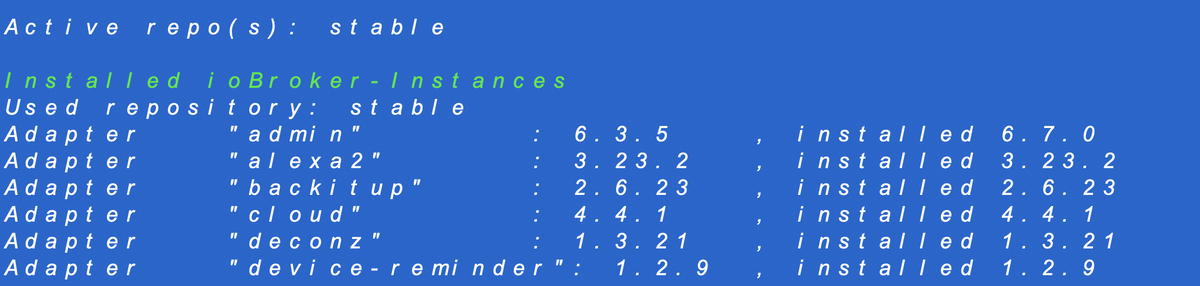
Bei hat er die 6.3.5 angezeigt, ich wollte aber die 6.7.0 testen
Gruß Smirre
@smirre sagte in Probleme WebUi:
via "KAtze" und Github.
Macht man grundsätzlich NICHT. Und beim Admin schon gerade gar nicht.
Man nimmt das wenn überhaupt aus dem Beta-Repo.
Die Katze ist räudig.iob diagsagt?
-
@smirre sagte in Probleme WebUi:
via "KAtze" und Github.
Macht man grundsätzlich NICHT. Und beim Admin schon gerade gar nicht.
Man nimmt das wenn überhaupt aus dem Beta-Repo.
Die Katze ist räudig.iob diagsagt?
@thomas-braun ja Thomas, da habe ich wohl Mist bebaut...... :-(
Hast Du eine Idee??
Zumal zwei admin-Instanzen da wären
-
@smirre sagte in Probleme WebUi:
via "KAtze" und Github.
Macht man grundsätzlich NICHT. Und beim Admin schon gerade gar nicht.
Man nimmt das wenn überhaupt aus dem Beta-Repo.
Die Katze ist räudig.iob diagsagt?
@thomas-braun sagte in Probleme WebUi:
@smirre sagte in Probleme WebUi:
via "KAtze" und Github.
Macht man grundsätzlich NICHT. Und beim Admin schon gerade gar nicht.
Man nimmt das wenn überhaupt aus dem Beta-Repo.
Die Katze ist räudig.iob diagsagt?
-
@thomas-braun sagte in Probleme WebUi:
@smirre sagte in Probleme WebUi:
via "KAtze" und Github.
Macht man grundsätzlich NICHT. Und beim Admin schon gerade gar nicht.
Man nimmt das wenn überhaupt aus dem Beta-Repo.
Die Katze ist räudig.iob diagsagt?
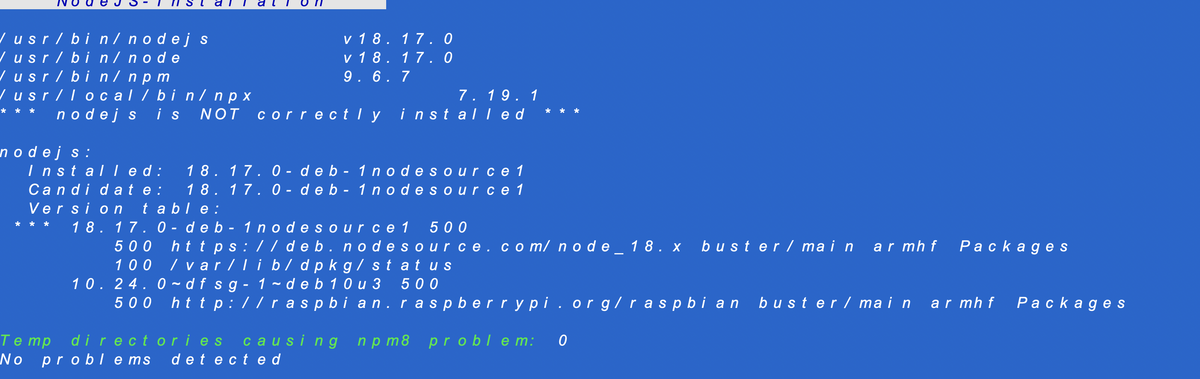
KEINE Schreenshots von Text sondern Text auch als Text in CodeTags eingebettet vollständig hier rein.
-
da bin ich ein wenig überfordert. Kannst Du mir bitte sagen wie?
-
======================= SUMMARY =======================
v.2023-04-16Operatingsystem: Raspbian GNU/Linux 10 (buster)
Kernel: 5.10.103-v7l+
Installation: Native
Timezone: Europe/Berlin (CEST, +0200)
User-ID: 1000
X-Server: false
Boot Target: multi-user.targetPending OS-Updates: 0
Pending iob updates: 0Nodejs-Installation: /usr/bin/nodejs v18.17.0
/usr/bin/node v18.17.0
/usr/bin/npm 9.6.7
/usr/local/bin/npx 7.19.1Recommended versions are nodejs 18.x.y and npm 9.x.y
*** nodejs is NOT correctly installed ***MEMORY:
total used free shared buff/cache available
Mem: 3.8G 1.2G 1.5G 24M 1.1G 2.4G
Swap: 99M 0B 99M
Total: 3.9G 1.2G 1.6GActive iob-Instances: 28
Active repo(s): stableioBroker Core: js-controller 4.0.24
admin 6.7.0ioBroker Status: iobroker is running on this host.
Objects type: jsonl
States type: jsonlStatus admin and web instance:
- system.adapter.admin.0 : admin : ioBroker-P4-15 - enabled, port: 8081, bind: 0.0.0.0, run as: admin
- system.adapter.admin.1 : admin : ioBroker-P4-15 - enabled, port: 8089, bind: 0.0.0.0, run as: admin
- system.adapter.web.0 : web : ioBroker-P4-15 - enabled, port: 8082, bind: 0.0.0.0, run as: admin
Objects: 9739
States: 8984Size of iob-Database:
21M /opt/iobroker/iobroker-data/objects.jsonl
11M /opt/iobroker/iobroker-data/objects.json.migrated
11M /opt/iobroker/iobroker-data/objects.json.bak.migrated
0 /opt/iobroker/iobroker-data/objects.json.broken
6.1M /opt/iobroker/iobroker-data/states.jsonl
1.8M /opt/iobroker/iobroker-data/states.json.migrated
1.8M /opt/iobroker/iobroker-data/states.json.bak.migrated
0 /opt/iobroker/iobroker-data/states.json.broken -
======================= SUMMARY =======================
v.2023-04-16Operatingsystem: Raspbian GNU/Linux 10 (buster)
Kernel: 5.10.103-v7l+
Installation: Native
Timezone: Europe/Berlin (CEST, +0200)
User-ID: 1000
X-Server: false
Boot Target: multi-user.targetPending OS-Updates: 0
Pending iob updates: 0Nodejs-Installation: /usr/bin/nodejs v18.17.0
/usr/bin/node v18.17.0
/usr/bin/npm 9.6.7
/usr/local/bin/npx 7.19.1Recommended versions are nodejs 18.x.y and npm 9.x.y
*** nodejs is NOT correctly installed ***MEMORY:
total used free shared buff/cache available
Mem: 3.8G 1.2G 1.5G 24M 1.1G 2.4G
Swap: 99M 0B 99M
Total: 3.9G 1.2G 1.6GActive iob-Instances: 28
Active repo(s): stableioBroker Core: js-controller 4.0.24
admin 6.7.0ioBroker Status: iobroker is running on this host.
Objects type: jsonl
States type: jsonlStatus admin and web instance:
- system.adapter.admin.0 : admin : ioBroker-P4-15 - enabled, port: 8081, bind: 0.0.0.0, run as: admin
- system.adapter.admin.1 : admin : ioBroker-P4-15 - enabled, port: 8089, bind: 0.0.0.0, run as: admin
- system.adapter.web.0 : web : ioBroker-P4-15 - enabled, port: 8082, bind: 0.0.0.0, run as: admin
Objects: 9739
States: 8984Size of iob-Database:
21M /opt/iobroker/iobroker-data/objects.jsonl
11M /opt/iobroker/iobroker-data/objects.json.migrated
11M /opt/iobroker/iobroker-data/objects.json.bak.migrated
0 /opt/iobroker/iobroker-data/objects.json.broken
6.1M /opt/iobroker/iobroker-data/states.jsonl
1.8M /opt/iobroker/iobroker-data/states.json.migrated
1.8M /opt/iobroker/iobroker-data/states.json.bak.migrated
0 /opt/iobroker/iobroker-data/states.json.broken@smirre sagte in Probleme WebUi:
buster
Muss durch den Nachfolger ersetzt werden.
/usr/local/bin/npx
Muss gelöscht werden. Auch /usr/local/bin/corepack , wenn es das gibt.
Und zeig mal die Langfassung davon.
-
@smirre sagte in Probleme WebUi:
buster
Muss durch den Nachfolger ersetzt werden.
/usr/local/bin/npx
Muss gelöscht werden. Auch /usr/local/bin/corepack , wenn es das gibt.
Und zeig mal die Langfassung davon.
@thomas-braun sagte in Probleme WebUi:
@smirre sagte in Probleme WebUi:
buster
Muss durch den Nachfolger ersetzt werden.
/usr/local/bin/npx
Muss gelöscht werden. Auch /usr/local/bin/corepack , wenn es das gibt.
=> das weiß ich leider auch nicht wie das geht
Und zeig mal die Langfassung davon.
=> die verschwindet immer. Konnte ich nicht kopieren
-
@smirre sagte in Probleme WebUi:
buster
Muss durch den Nachfolger ersetzt werden.
/usr/local/bin/npx
Muss gelöscht werden. Auch /usr/local/bin/corepack , wenn es das gibt.
Und zeig mal die Langfassung davon.
======== Start marking the full check here =========Skript v.2023-04-16
*** BASE SYSTEM ***
Model : Raspberry Pi 4 Model B Rev 1.2
Architecture : armv7l
Docker : false
Virtualization : none
Distributor ID: Raspbian
Description: Raspbian GNU/Linux 10 (buster)
Release: 10
Codename: busterPRETTY_NAME="Raspbian GNU/Linux 10 (buster)"
NAME="Raspbian GNU/Linux"
VERSION_ID="10"
VERSION="10 (buster)"
VERSION_CODENAME=buster
ID=raspbian
ID_LIKE=debian
HOME_URL="http://www.raspbian.org/"
SUPPORT_URL="http://www.raspbian.org/RaspbianForums"
BUG_REPORT_URL="http://www.raspbian.org/RaspbianBugs"Systemuptime and Load:
21:21:06 up 7 min, 1 user, load average: 0.66, 1.33, 0.74
CPU threads: 4Raspberry only:
throttled=0x0
Other values than 0x0 hint to temperature/voltage problems
temp=54.5'C
volt=0.8563V*** Time and Time Zones ***
Local time: Thu 2023-08-03 21:21:06 CEST
Universal time: Thu 2023-08-03 19:21:06 UTC
RTC time: n/a
Time zone: Europe/Berlin (CEST, +0200)
System clock synchronized: yes
NTP service: active
RTC in local TZ: no*** User and Groups ***
pi
/home/pi
pi adm dialout cdrom sudo audio video plugdev games users input netdev gpio i2c spi iobroker*** X-Server-Setup ***
X-Server: false
Desktop:
Terminal: tty
Boot Target: multi-user.target*** MEMORY ***
total used free shared buff/cache available
Mem: 3.8G 1.2G 2.0G 8.0M 696M 2.5G
Swap: 99M 0B 99M
Total: 3.9G 1.2G 2.1G3837 M total memory 1155 M used memory 264 M active memory 1482 M inactive memory 1985 M free memory 60 M buffer memory 636 M swap cache 99 M total swap 0 M used swap 99 M free swapRaspberry only:
oom events: 0
lifetime oom required: 0 Mbytes
total time in oom handler: 0 ms
max time spent in oom handler: 0 ms*** FILESYSTEM ***
Filesystem Type Size Used Avail Use% Mounted on
/dev/root ext4 459G 8.1G 432G 2% /
devtmpfs devtmpfs 1.8G 0 1.8G 0% /dev
tmpfs tmpfs 1.9G 0 1.9G 0% /dev/shm
tmpfs tmpfs 1.9G 8.5M 1.9G 1% /run
tmpfs tmpfs 5.0M 4.0K 5.0M 1% /run/lock
tmpfs tmpfs 1.9G 0 1.9G 0% /sys/fs/cgroup
/dev/sda1 vfat 253M 50M 203M 20% /boot
tmpfs tmpfs 384M 0 384M 0% /run/user/1000Messages concerning ext4 filesystem in dmesg:
[Thu Aug 3 21:13:40 2023] Kernel command line: coherent_pool=1M 8250.nr_uarts=0 snd_bcm2835.enable_compat_alsa=0 snd_bcm2835.enable_hdmi=1 smsc95xx.macaddr=DC:A6:32:70:35:CC vc_mem.mem_base=0x3eb00000 vc_mem.mem_size=0x3ff00000 dwc_otg.lpm_enable=0 console=ttyS0,115200 console=tty1 root=PARTUUID=52e4cf4c-02 rootfstype=ext4 elevator=deadline fsck.repair=yes rootwait
[Thu Aug 3 21:13:42 2023] EXT4-fs (sda2): mounted filesystem with ordered data mode. Opts: (null)
[Thu Aug 3 21:13:42 2023] VFS: Mounted root (ext4 filesystem) readonly on device 8:2.
[Thu Aug 3 21:13:44 2023] EXT4-fs (sda2): re-mounted. Opts: (null)Show mounted filesystems (real ones only):
TARGET SOURCE FSTYPE OPTIONS
/ /dev/sda2 ext4 rw,noatime
|-/sys/fs/bpf none bpf rw,nosuid,nodev,noexec,relatime,mode=700
`-/boot /dev/sda1 vfat rw,relatime,fmask=0022,dmask=0022,codepage=437,iocharset=ascii,shortname=mixed,errors=remount-roFiles in neuralgic directories:
/var:
608M /var/
402M /var/cache
397M /var/cache/apt
337M /var/cache/apt/archives
98M /var/libArchived and active journals take up 8.0M in the file system.
/opt/iobroker/backups:
404M /opt/iobroker/backups//opt/iobroker/iobroker-data:
730M /opt/iobroker/iobroker-data/
548M /opt/iobroker/iobroker-data/files
134M /opt/iobroker/iobroker-data/backup-objects
78M /opt/iobroker/iobroker-data/files/icons-open-icon-library-png
72M /opt/iobroker/iobroker-data/files/telegram.adminThe five largest files in iobroker-data are:
35M /opt/iobroker/iobroker-data/files/devices.admin/static/js/main.24f2bb56.js.map
19M /opt/iobroker/iobroker-data/files/iot.admin/static/js/main.2975a411.js.map
16M /opt/iobroker/iobroker-data/objects.jsonl
15M /opt/iobroker/iobroker-data/files/telegram.admin/rules/static/js/vendors-node_modules_iobroker_adapter-react-v5_assets_devices_parseNames_d_ts-node_modules_io-1d9f06.44fe4a3f.chunk.js.map
11M /opt/iobroker/iobroker-data/objects.json.migrated*** NodeJS-Installation ***
/usr/bin/nodejs v18.17.0
/usr/bin/node v18.17.0
/usr/bin/npm 9.6.7
/usr/local/bin/npx 7.19.1
*** nodejs is NOT correctly installed ***nodejs:
Installed: 18.17.0-deb-1nodesource1
Candidate: 18.17.0-deb-1nodesource1
Version table:
*** 18.17.0-deb-1nodesource1 500
500 https://deb.nodesource.com/node_18.x buster/main armhf Packages
100 /var/lib/dpkg/status
10.24.0~dfsg-1~deb10u3 500
500 http://raspbian.raspberrypi.org/raspbian buster/main armhf PackagesTemp directories causing npm8 problem: 0
No problems detected*** ioBroker-Installation ***
ioBroker Status
iobroker is running on this host.Objects type: jsonl
States type: jsonlMULTIHOSTSERVICE/enabled: false
Core adapters versions
js-controller: 4.0.24
admin: 6.7.0
javascript: 7.0.3npm ERR! code ELSPROBLEMS
npm ERR! invalid: iobroker.admin@6.7.0 /opt/iobroker/node_modules/iobroker.admin
npm ERR! invalid: iobroker.awtrix-light@0.6.2 /opt/iobroker/node_modules/iobroker.awtrix-light
npm ERR! invalid: iobroker.icons-open-icon-library-png@0.1.3 /opt/iobroker/node_modules/iobroker.icons-open-icon-library-pngnpm ERR! A complete log of this run can be found in: /home/pi/.npm/_logs/2023-08-03T19_21_32_699Z-debug-0.log
Adapters from github: 3Adapter State
-
system.adapter.admin.0 : admin : ioBroker-P4-15 - enabled, port: 8081, bind: 0.0.0.0, run as: admin
-
system.adapter.admin.1 : admin : ioBroker-P4-15 - enabled, port: 8089, bind: 0.0.0.0, run as: admin
-
system.adapter.alexa2.0 : alexa2 : ioBroker-P4-15 - enabled
-
system.adapter.backitup.0 : backitup : ioBroker-P4-15 - enabled
-
system.adapter.cloud.0 : cloud : ioBroker-P4-15 - enabled
-
system.adapter.deconz.0 : deconz : ioBroker-P4-15 - enabled
system.adapter.devices.0 : devices : ioBroker-P4-15 - enabled -
system.adapter.discovery.0 : discovery : ioBroker-P4-15 - enabled
system.adapter.dwd.0 : dwd : ioBroker-P4-15 - enabled
system.adapter.dwd.1 : dwd : ioBroker-P4-15 - enabled
system.adapter.dwd.2 : dwd : ioBroker-P4-15 - enabled -
system.adapter.email.0 : email : ioBroker-P4-15 - enabled
-
system.adapter.ham.0 : ham : ioBroker-P4-15 - enabled
-
system.adapter.hm-rega.0 : hm-rega : ioBroker-P4-15 - enabled
-
system.adapter.hm-rpc.0 : hm-rpc : ioBroker-P4-15 - enabled, port: 0
-
system.adapter.hm-rpc.1 : hm-rpc : ioBroker-P4-15 - enabled, port: 0
-
system.adapter.hue.0 : hue : ioBroker-P4-15 - enabled, port: 443
system.adapter.ical.0 : ical : ioBroker-P4-15 - enabled
system.adapter.ical.1 : ical : ioBroker-P4-15 - enabled
system.adapter.icons-fatcow-hosting.0 : icons-fatcow-hosting : ioBroker-P4-15 - enabled
system.adapter.icons-icons8.0 : icons-icons8 : ioBroker-P4-15 - enabled
system.adapter.icons-material-png.0 : icons-material-png : ioBroker-P4-15 - enabled
system.adapter.icons-open-icon-library-png.0: icons-open-icon-library-png: ioBroker-P4-15 - enabled
system.adapter.icons-ultimate-png.0 : icons-ultimate-png : ioBroker-P4-15 - enabled -
system.adapter.info.0 : info : ioBroker-P4-15 - enabled
-
system.adapter.iot.0 : iot : ioBroker-P4-15 - enabled
-
system.adapter.javascript.0 : javascript : ioBroker-P4-15 - enabled
-
system.adapter.ping.0 : ping : ioBroker-P4-15 - enabled
-
system.adapter.pushover.0 : pushover : ioBroker-P4-15 - enabled
-
system.adapter.scenes.0 : scenes : ioBroker-P4-15 - enabled
-
system.adapter.shelly.0 : shelly : ioBroker-P4-15 - enabled, port: 1882, bind: 0.0.0.0
-
system.adapter.sonoff.0 : sonoff : ioBroker-P4-15 - enabled, port: 1883, bind: 0.0.0.0
-
system.adapter.telegram.0 : telegram : ioBroker-P4-15 - enabled, port: 8443, bind: 0.0.0.0
-
system.adapter.text2command.0 : text2command : ioBroker-P4-15 - enabled
-
system.adapter.tr-064.0 : tr-064 : ioBroker-P4-15 - enabled
-
system.adapter.trashschedule.0 : trashschedule : ioBroker-P4-15 - enabled
system.adapter.vis-colorpicker.0 : vis-colorpicker : ioBroker-P4-15 - enabled
system.adapter.vis-hqwidgets.0 : vis-hqwidgets : ioBroker-P4-15 - enabled -
system.adapter.vis-inventwo.0 : vis-inventwo : ioBroker-P4-15 - enabled
system.adapter.vis-jqui-mfd.0 : vis-jqui-mfd : ioBroker-P4-15 - enabled
system.adapter.vis-materialdesign.0 : vis-materialdesign : ioBroker-P4-15 - enabled
system.adapter.vis-metro.0 : vis-metro : ioBroker-P4-15 - enabled
system.adapter.vis-timeandweather.0 : vis-timeandweather : ioBroker-P4-15 - enabled
system.adapter.vis.0 : vis : ioBroker-P4-15 - enabled -
system.adapter.web.0 : web : ioBroker-P4-15 - enabled, port: 8082, bind: 0.0.0.0, run as: admin
-
instance is alive
Enabled adapters with bindings
- system.adapter.admin.0 : admin : ioBroker-P4-15 - enabled, port: 8081, bind: 0.0.0.0, run as: admin
- system.adapter.admin.1 : admin : ioBroker-P4-15 - enabled, port: 8089, bind: 0.0.0.0, run as: admin
- system.adapter.hm-rpc.0 : hm-rpc : ioBroker-P4-15 - enabled, port: 0
- system.adapter.hm-rpc.1 : hm-rpc : ioBroker-P4-15 - enabled, port: 0
- system.adapter.hue.0 : hue : ioBroker-P4-15 - enabled, port: 443
- system.adapter.shelly.0 : shelly : ioBroker-P4-15 - enabled, port: 1882, bind: 0.0.0.0
- system.adapter.sonoff.0 : sonoff : ioBroker-P4-15 - enabled, port: 1883, bind: 0.0.0.0
- system.adapter.telegram.0 : telegram : ioBroker-P4-15 - enabled, port: 8443, bind: 0.0.0.0
- system.adapter.web.0 : web : ioBroker-P4-15 - enabled, port: 8082, bind: 0.0.0.0, run as: admin
ioBroker-Repositories
stable : http://download.iobroker.net/sources-dist.json
beta : http://download.iobroker.net/sources-dist-latest.jsonActive repo(s): stable
Installed ioBroker-Instances
Used repository: stable
Adapter "admin" : 6.3.5 , installed 6.7.0
Adapter "alexa2" : 3.23.2 , installed 3.23.2
Adapter "backitup" : 2.6.23 , installed 2.6.23
Adapter "cloud" : 4.4.1 , installed 4.4.1
Adapter "deconz" : 1.3.21 , installed 1.3.21
Adapter "device-reminder": 1.2.9 , installed 1.2.9
Adapter "devices" : 1.1.5 , installed 1.1.5
Adapter "discovery" : 3.1.0 , installed 3.1.0
Adapter "dwd" : 2.8.5 , installed 2.8.5
Adapter "email" : 1.2.0 , installed 1.2.0
Adapter "fb-checkpresence": 1.1.26, installed 1.1.26
Adapter "fullcalendar" : 1.2.0 , installed 1.2.0
Adapter "ham" : 5.3.1 , installed 5.3.1
Adapter "hm-rega" : 3.0.46 , installed 3.0.46
Adapter "hm-rpc" : 1.15.18 , installed 1.15.18
Adapter "hue" : 3.9.3 , installed 3.9.3
Adapter "hue-extended" : 2.0.0 , installed 2.0.0
Adapter "ical" : 1.13.3 , installed 1.13.3
Adapter "icons-fatcow-hosting": 0.1.0, installed 0.1.0
Adapter "icons-icons8" : 0.0.1 , installed 0.0.1
Adapter "icons-material-png": 0.1.0, installed 0.1.0
Adapter "icons-open-icon-library-png": 0.1.2, installed 0.1.3
Adapter "icons-ultimate-png": 1.0.1, installed 1.0.1
Adapter "info" : 1.9.26 , installed 1.9.26
Adapter "iot" : 1.14.5 , installed 1.14.5
Adapter "jarvis" : 3.1.2 , installed 3.1.2
Adapter "javascript" : 7.0.3 , installed 7.0.3
Controller "js-controller": 4.0.24 , installed 4.0.24
Adapter "ping" : 1.5.3 , installed 1.5.3
Adapter "pushover" : 3.0.3 , installed 3.0.3
Adapter "scenes" : 2.3.9 , installed 2.3.9
Adapter "shelly" : 6.4.1 , installed 6.4.1
Adapter "simple-api" : 2.7.2 , installed 2.7.2
Adapter "socketio" : 4.2.0 , installed 4.2.0
Adapter "sonoff" : 2.5.3 , installed 2.5.3
Adapter "telegram" : 1.16.0 , installed 1.16.0
Adapter "text2command" : 3.0.2 , installed 3.0.2
Adapter "tr-064" : 4.2.18 , installed 4.2.18
Adapter "trashschedule": 2.2.0 , installed 2.2.0
Adapter "vis" : 1.4.16 , installed 1.4.16
Adapter "vis-bars" : 0.1.4 , installed 0.1.4
Adapter "vis-colorpicker": 2.0.3 , installed 2.0.3
Adapter "vis-hqwidgets": 1.4.0 , installed 1.4.0
Adapter "vis-inventwo" : 3.3.3 , installed 3.3.3
Adapter "vis-jqui-mfd" : 1.0.12 , installed 1.0.12
Adapter "vis-metro" : 1.2.0 , installed 1.2.0
Adapter "vis-timeandweather": 1.2.2, installed 1.2.2
Adapter "web" : 4.3.0 , installed 4.3.0
Adapter "whatsapp-cmb" : 0.2.3 , installed 0.2.3
Adapter "ws" : 1.3.0 , installed 1.3.0Objects and States
Please stand by - This may take a while -
-
======== Start marking the full check here =========Skript v.2023-04-16
*** BASE SYSTEM ***
Model : Raspberry Pi 4 Model B Rev 1.2
Architecture : armv7l
Docker : false
Virtualization : none
Distributor ID: Raspbian
Description: Raspbian GNU/Linux 10 (buster)
Release: 10
Codename: busterPRETTY_NAME="Raspbian GNU/Linux 10 (buster)"
NAME="Raspbian GNU/Linux"
VERSION_ID="10"
VERSION="10 (buster)"
VERSION_CODENAME=buster
ID=raspbian
ID_LIKE=debian
HOME_URL="http://www.raspbian.org/"
SUPPORT_URL="http://www.raspbian.org/RaspbianForums"
BUG_REPORT_URL="http://www.raspbian.org/RaspbianBugs"Systemuptime and Load:
21:21:06 up 7 min, 1 user, load average: 0.66, 1.33, 0.74
CPU threads: 4Raspberry only:
throttled=0x0
Other values than 0x0 hint to temperature/voltage problems
temp=54.5'C
volt=0.8563V*** Time and Time Zones ***
Local time: Thu 2023-08-03 21:21:06 CEST
Universal time: Thu 2023-08-03 19:21:06 UTC
RTC time: n/a
Time zone: Europe/Berlin (CEST, +0200)
System clock synchronized: yes
NTP service: active
RTC in local TZ: no*** User and Groups ***
pi
/home/pi
pi adm dialout cdrom sudo audio video plugdev games users input netdev gpio i2c spi iobroker*** X-Server-Setup ***
X-Server: false
Desktop:
Terminal: tty
Boot Target: multi-user.target*** MEMORY ***
total used free shared buff/cache available
Mem: 3.8G 1.2G 2.0G 8.0M 696M 2.5G
Swap: 99M 0B 99M
Total: 3.9G 1.2G 2.1G3837 M total memory 1155 M used memory 264 M active memory 1482 M inactive memory 1985 M free memory 60 M buffer memory 636 M swap cache 99 M total swap 0 M used swap 99 M free swapRaspberry only:
oom events: 0
lifetime oom required: 0 Mbytes
total time in oom handler: 0 ms
max time spent in oom handler: 0 ms*** FILESYSTEM ***
Filesystem Type Size Used Avail Use% Mounted on
/dev/root ext4 459G 8.1G 432G 2% /
devtmpfs devtmpfs 1.8G 0 1.8G 0% /dev
tmpfs tmpfs 1.9G 0 1.9G 0% /dev/shm
tmpfs tmpfs 1.9G 8.5M 1.9G 1% /run
tmpfs tmpfs 5.0M 4.0K 5.0M 1% /run/lock
tmpfs tmpfs 1.9G 0 1.9G 0% /sys/fs/cgroup
/dev/sda1 vfat 253M 50M 203M 20% /boot
tmpfs tmpfs 384M 0 384M 0% /run/user/1000Messages concerning ext4 filesystem in dmesg:
[Thu Aug 3 21:13:40 2023] Kernel command line: coherent_pool=1M 8250.nr_uarts=0 snd_bcm2835.enable_compat_alsa=0 snd_bcm2835.enable_hdmi=1 smsc95xx.macaddr=DC:A6:32:70:35:CC vc_mem.mem_base=0x3eb00000 vc_mem.mem_size=0x3ff00000 dwc_otg.lpm_enable=0 console=ttyS0,115200 console=tty1 root=PARTUUID=52e4cf4c-02 rootfstype=ext4 elevator=deadline fsck.repair=yes rootwait
[Thu Aug 3 21:13:42 2023] EXT4-fs (sda2): mounted filesystem with ordered data mode. Opts: (null)
[Thu Aug 3 21:13:42 2023] VFS: Mounted root (ext4 filesystem) readonly on device 8:2.
[Thu Aug 3 21:13:44 2023] EXT4-fs (sda2): re-mounted. Opts: (null)Show mounted filesystems (real ones only):
TARGET SOURCE FSTYPE OPTIONS
/ /dev/sda2 ext4 rw,noatime
|-/sys/fs/bpf none bpf rw,nosuid,nodev,noexec,relatime,mode=700
`-/boot /dev/sda1 vfat rw,relatime,fmask=0022,dmask=0022,codepage=437,iocharset=ascii,shortname=mixed,errors=remount-roFiles in neuralgic directories:
/var:
608M /var/
402M /var/cache
397M /var/cache/apt
337M /var/cache/apt/archives
98M /var/libArchived and active journals take up 8.0M in the file system.
/opt/iobroker/backups:
404M /opt/iobroker/backups//opt/iobroker/iobroker-data:
730M /opt/iobroker/iobroker-data/
548M /opt/iobroker/iobroker-data/files
134M /opt/iobroker/iobroker-data/backup-objects
78M /opt/iobroker/iobroker-data/files/icons-open-icon-library-png
72M /opt/iobroker/iobroker-data/files/telegram.adminThe five largest files in iobroker-data are:
35M /opt/iobroker/iobroker-data/files/devices.admin/static/js/main.24f2bb56.js.map
19M /opt/iobroker/iobroker-data/files/iot.admin/static/js/main.2975a411.js.map
16M /opt/iobroker/iobroker-data/objects.jsonl
15M /opt/iobroker/iobroker-data/files/telegram.admin/rules/static/js/vendors-node_modules_iobroker_adapter-react-v5_assets_devices_parseNames_d_ts-node_modules_io-1d9f06.44fe4a3f.chunk.js.map
11M /opt/iobroker/iobroker-data/objects.json.migrated*** NodeJS-Installation ***
/usr/bin/nodejs v18.17.0
/usr/bin/node v18.17.0
/usr/bin/npm 9.6.7
/usr/local/bin/npx 7.19.1
*** nodejs is NOT correctly installed ***nodejs:
Installed: 18.17.0-deb-1nodesource1
Candidate: 18.17.0-deb-1nodesource1
Version table:
*** 18.17.0-deb-1nodesource1 500
500 https://deb.nodesource.com/node_18.x buster/main armhf Packages
100 /var/lib/dpkg/status
10.24.0~dfsg-1~deb10u3 500
500 http://raspbian.raspberrypi.org/raspbian buster/main armhf PackagesTemp directories causing npm8 problem: 0
No problems detected*** ioBroker-Installation ***
ioBroker Status
iobroker is running on this host.Objects type: jsonl
States type: jsonlMULTIHOSTSERVICE/enabled: false
Core adapters versions
js-controller: 4.0.24
admin: 6.7.0
javascript: 7.0.3npm ERR! code ELSPROBLEMS
npm ERR! invalid: iobroker.admin@6.7.0 /opt/iobroker/node_modules/iobroker.admin
npm ERR! invalid: iobroker.awtrix-light@0.6.2 /opt/iobroker/node_modules/iobroker.awtrix-light
npm ERR! invalid: iobroker.icons-open-icon-library-png@0.1.3 /opt/iobroker/node_modules/iobroker.icons-open-icon-library-pngnpm ERR! A complete log of this run can be found in: /home/pi/.npm/_logs/2023-08-03T19_21_32_699Z-debug-0.log
Adapters from github: 3Adapter State
-
system.adapter.admin.0 : admin : ioBroker-P4-15 - enabled, port: 8081, bind: 0.0.0.0, run as: admin
-
system.adapter.admin.1 : admin : ioBroker-P4-15 - enabled, port: 8089, bind: 0.0.0.0, run as: admin
-
system.adapter.alexa2.0 : alexa2 : ioBroker-P4-15 - enabled
-
system.adapter.backitup.0 : backitup : ioBroker-P4-15 - enabled
-
system.adapter.cloud.0 : cloud : ioBroker-P4-15 - enabled
-
system.adapter.deconz.0 : deconz : ioBroker-P4-15 - enabled
system.adapter.devices.0 : devices : ioBroker-P4-15 - enabled -
system.adapter.discovery.0 : discovery : ioBroker-P4-15 - enabled
system.adapter.dwd.0 : dwd : ioBroker-P4-15 - enabled
system.adapter.dwd.1 : dwd : ioBroker-P4-15 - enabled
system.adapter.dwd.2 : dwd : ioBroker-P4-15 - enabled -
system.adapter.email.0 : email : ioBroker-P4-15 - enabled
-
system.adapter.ham.0 : ham : ioBroker-P4-15 - enabled
-
system.adapter.hm-rega.0 : hm-rega : ioBroker-P4-15 - enabled
-
system.adapter.hm-rpc.0 : hm-rpc : ioBroker-P4-15 - enabled, port: 0
-
system.adapter.hm-rpc.1 : hm-rpc : ioBroker-P4-15 - enabled, port: 0
-
system.adapter.hue.0 : hue : ioBroker-P4-15 - enabled, port: 443
system.adapter.ical.0 : ical : ioBroker-P4-15 - enabled
system.adapter.ical.1 : ical : ioBroker-P4-15 - enabled
system.adapter.icons-fatcow-hosting.0 : icons-fatcow-hosting : ioBroker-P4-15 - enabled
system.adapter.icons-icons8.0 : icons-icons8 : ioBroker-P4-15 - enabled
system.adapter.icons-material-png.0 : icons-material-png : ioBroker-P4-15 - enabled
system.adapter.icons-open-icon-library-png.0: icons-open-icon-library-png: ioBroker-P4-15 - enabled
system.adapter.icons-ultimate-png.0 : icons-ultimate-png : ioBroker-P4-15 - enabled -
system.adapter.info.0 : info : ioBroker-P4-15 - enabled
-
system.adapter.iot.0 : iot : ioBroker-P4-15 - enabled
-
system.adapter.javascript.0 : javascript : ioBroker-P4-15 - enabled
-
system.adapter.ping.0 : ping : ioBroker-P4-15 - enabled
-
system.adapter.pushover.0 : pushover : ioBroker-P4-15 - enabled
-
system.adapter.scenes.0 : scenes : ioBroker-P4-15 - enabled
-
system.adapter.shelly.0 : shelly : ioBroker-P4-15 - enabled, port: 1882, bind: 0.0.0.0
-
system.adapter.sonoff.0 : sonoff : ioBroker-P4-15 - enabled, port: 1883, bind: 0.0.0.0
-
system.adapter.telegram.0 : telegram : ioBroker-P4-15 - enabled, port: 8443, bind: 0.0.0.0
-
system.adapter.text2command.0 : text2command : ioBroker-P4-15 - enabled
-
system.adapter.tr-064.0 : tr-064 : ioBroker-P4-15 - enabled
-
system.adapter.trashschedule.0 : trashschedule : ioBroker-P4-15 - enabled
system.adapter.vis-colorpicker.0 : vis-colorpicker : ioBroker-P4-15 - enabled
system.adapter.vis-hqwidgets.0 : vis-hqwidgets : ioBroker-P4-15 - enabled -
system.adapter.vis-inventwo.0 : vis-inventwo : ioBroker-P4-15 - enabled
system.adapter.vis-jqui-mfd.0 : vis-jqui-mfd : ioBroker-P4-15 - enabled
system.adapter.vis-materialdesign.0 : vis-materialdesign : ioBroker-P4-15 - enabled
system.adapter.vis-metro.0 : vis-metro : ioBroker-P4-15 - enabled
system.adapter.vis-timeandweather.0 : vis-timeandweather : ioBroker-P4-15 - enabled
system.adapter.vis.0 : vis : ioBroker-P4-15 - enabled -
system.adapter.web.0 : web : ioBroker-P4-15 - enabled, port: 8082, bind: 0.0.0.0, run as: admin
-
instance is alive
Enabled adapters with bindings
- system.adapter.admin.0 : admin : ioBroker-P4-15 - enabled, port: 8081, bind: 0.0.0.0, run as: admin
- system.adapter.admin.1 : admin : ioBroker-P4-15 - enabled, port: 8089, bind: 0.0.0.0, run as: admin
- system.adapter.hm-rpc.0 : hm-rpc : ioBroker-P4-15 - enabled, port: 0
- system.adapter.hm-rpc.1 : hm-rpc : ioBroker-P4-15 - enabled, port: 0
- system.adapter.hue.0 : hue : ioBroker-P4-15 - enabled, port: 443
- system.adapter.shelly.0 : shelly : ioBroker-P4-15 - enabled, port: 1882, bind: 0.0.0.0
- system.adapter.sonoff.0 : sonoff : ioBroker-P4-15 - enabled, port: 1883, bind: 0.0.0.0
- system.adapter.telegram.0 : telegram : ioBroker-P4-15 - enabled, port: 8443, bind: 0.0.0.0
- system.adapter.web.0 : web : ioBroker-P4-15 - enabled, port: 8082, bind: 0.0.0.0, run as: admin
ioBroker-Repositories
stable : http://download.iobroker.net/sources-dist.json
beta : http://download.iobroker.net/sources-dist-latest.jsonActive repo(s): stable
Installed ioBroker-Instances
Used repository: stable
Adapter "admin" : 6.3.5 , installed 6.7.0
Adapter "alexa2" : 3.23.2 , installed 3.23.2
Adapter "backitup" : 2.6.23 , installed 2.6.23
Adapter "cloud" : 4.4.1 , installed 4.4.1
Adapter "deconz" : 1.3.21 , installed 1.3.21
Adapter "device-reminder": 1.2.9 , installed 1.2.9
Adapter "devices" : 1.1.5 , installed 1.1.5
Adapter "discovery" : 3.1.0 , installed 3.1.0
Adapter "dwd" : 2.8.5 , installed 2.8.5
Adapter "email" : 1.2.0 , installed 1.2.0
Adapter "fb-checkpresence": 1.1.26, installed 1.1.26
Adapter "fullcalendar" : 1.2.0 , installed 1.2.0
Adapter "ham" : 5.3.1 , installed 5.3.1
Adapter "hm-rega" : 3.0.46 , installed 3.0.46
Adapter "hm-rpc" : 1.15.18 , installed 1.15.18
Adapter "hue" : 3.9.3 , installed 3.9.3
Adapter "hue-extended" : 2.0.0 , installed 2.0.0
Adapter "ical" : 1.13.3 , installed 1.13.3
Adapter "icons-fatcow-hosting": 0.1.0, installed 0.1.0
Adapter "icons-icons8" : 0.0.1 , installed 0.0.1
Adapter "icons-material-png": 0.1.0, installed 0.1.0
Adapter "icons-open-icon-library-png": 0.1.2, installed 0.1.3
Adapter "icons-ultimate-png": 1.0.1, installed 1.0.1
Adapter "info" : 1.9.26 , installed 1.9.26
Adapter "iot" : 1.14.5 , installed 1.14.5
Adapter "jarvis" : 3.1.2 , installed 3.1.2
Adapter "javascript" : 7.0.3 , installed 7.0.3
Controller "js-controller": 4.0.24 , installed 4.0.24
Adapter "ping" : 1.5.3 , installed 1.5.3
Adapter "pushover" : 3.0.3 , installed 3.0.3
Adapter "scenes" : 2.3.9 , installed 2.3.9
Adapter "shelly" : 6.4.1 , installed 6.4.1
Adapter "simple-api" : 2.7.2 , installed 2.7.2
Adapter "socketio" : 4.2.0 , installed 4.2.0
Adapter "sonoff" : 2.5.3 , installed 2.5.3
Adapter "telegram" : 1.16.0 , installed 1.16.0
Adapter "text2command" : 3.0.2 , installed 3.0.2
Adapter "tr-064" : 4.2.18 , installed 4.2.18
Adapter "trashschedule": 2.2.0 , installed 2.2.0
Adapter "vis" : 1.4.16 , installed 1.4.16
Adapter "vis-bars" : 0.1.4 , installed 0.1.4
Adapter "vis-colorpicker": 2.0.3 , installed 2.0.3
Adapter "vis-hqwidgets": 1.4.0 , installed 1.4.0
Adapter "vis-inventwo" : 3.3.3 , installed 3.3.3
Adapter "vis-jqui-mfd" : 1.0.12 , installed 1.0.12
Adapter "vis-metro" : 1.2.0 , installed 1.2.0
Adapter "vis-timeandweather": 1.2.2, installed 1.2.2
Adapter "web" : 4.3.0 , installed 4.3.0
Adapter "whatsapp-cmb" : 0.2.3 , installed 0.2.3
Adapter "ws" : 1.3.0 , installed 1.3.0Objects and States
Please stand by - This may take a whilesudo rm /usr/local/bin/npx sudo rm /usr/local/bin/corepack -
-
======== Start marking the full check here =========Skript v.2023-04-16
*** BASE SYSTEM ***
Model : Raspberry Pi 4 Model B Rev 1.2
Architecture : armv7l
Docker : false
Virtualization : none
Distributor ID: Raspbian
Description: Raspbian GNU/Linux 10 (buster)
Release: 10
Codename: busterPRETTY_NAME="Raspbian GNU/Linux 10 (buster)"
NAME="Raspbian GNU/Linux"
VERSION_ID="10"
VERSION="10 (buster)"
VERSION_CODENAME=buster
ID=raspbian
ID_LIKE=debian
HOME_URL="http://www.raspbian.org/"
SUPPORT_URL="http://www.raspbian.org/RaspbianForums"
BUG_REPORT_URL="http://www.raspbian.org/RaspbianBugs"Systemuptime and Load:
21:21:06 up 7 min, 1 user, load average: 0.66, 1.33, 0.74
CPU threads: 4Raspberry only:
throttled=0x0
Other values than 0x0 hint to temperature/voltage problems
temp=54.5'C
volt=0.8563V*** Time and Time Zones ***
Local time: Thu 2023-08-03 21:21:06 CEST
Universal time: Thu 2023-08-03 19:21:06 UTC
RTC time: n/a
Time zone: Europe/Berlin (CEST, +0200)
System clock synchronized: yes
NTP service: active
RTC in local TZ: no*** User and Groups ***
pi
/home/pi
pi adm dialout cdrom sudo audio video plugdev games users input netdev gpio i2c spi iobroker*** X-Server-Setup ***
X-Server: false
Desktop:
Terminal: tty
Boot Target: multi-user.target*** MEMORY ***
total used free shared buff/cache available
Mem: 3.8G 1.2G 2.0G 8.0M 696M 2.5G
Swap: 99M 0B 99M
Total: 3.9G 1.2G 2.1G3837 M total memory 1155 M used memory 264 M active memory 1482 M inactive memory 1985 M free memory 60 M buffer memory 636 M swap cache 99 M total swap 0 M used swap 99 M free swapRaspberry only:
oom events: 0
lifetime oom required: 0 Mbytes
total time in oom handler: 0 ms
max time spent in oom handler: 0 ms*** FILESYSTEM ***
Filesystem Type Size Used Avail Use% Mounted on
/dev/root ext4 459G 8.1G 432G 2% /
devtmpfs devtmpfs 1.8G 0 1.8G 0% /dev
tmpfs tmpfs 1.9G 0 1.9G 0% /dev/shm
tmpfs tmpfs 1.9G 8.5M 1.9G 1% /run
tmpfs tmpfs 5.0M 4.0K 5.0M 1% /run/lock
tmpfs tmpfs 1.9G 0 1.9G 0% /sys/fs/cgroup
/dev/sda1 vfat 253M 50M 203M 20% /boot
tmpfs tmpfs 384M 0 384M 0% /run/user/1000Messages concerning ext4 filesystem in dmesg:
[Thu Aug 3 21:13:40 2023] Kernel command line: coherent_pool=1M 8250.nr_uarts=0 snd_bcm2835.enable_compat_alsa=0 snd_bcm2835.enable_hdmi=1 smsc95xx.macaddr=DC:A6:32:70:35:CC vc_mem.mem_base=0x3eb00000 vc_mem.mem_size=0x3ff00000 dwc_otg.lpm_enable=0 console=ttyS0,115200 console=tty1 root=PARTUUID=52e4cf4c-02 rootfstype=ext4 elevator=deadline fsck.repair=yes rootwait
[Thu Aug 3 21:13:42 2023] EXT4-fs (sda2): mounted filesystem with ordered data mode. Opts: (null)
[Thu Aug 3 21:13:42 2023] VFS: Mounted root (ext4 filesystem) readonly on device 8:2.
[Thu Aug 3 21:13:44 2023] EXT4-fs (sda2): re-mounted. Opts: (null)Show mounted filesystems (real ones only):
TARGET SOURCE FSTYPE OPTIONS
/ /dev/sda2 ext4 rw,noatime
|-/sys/fs/bpf none bpf rw,nosuid,nodev,noexec,relatime,mode=700
`-/boot /dev/sda1 vfat rw,relatime,fmask=0022,dmask=0022,codepage=437,iocharset=ascii,shortname=mixed,errors=remount-roFiles in neuralgic directories:
/var:
608M /var/
402M /var/cache
397M /var/cache/apt
337M /var/cache/apt/archives
98M /var/libArchived and active journals take up 8.0M in the file system.
/opt/iobroker/backups:
404M /opt/iobroker/backups//opt/iobroker/iobroker-data:
730M /opt/iobroker/iobroker-data/
548M /opt/iobroker/iobroker-data/files
134M /opt/iobroker/iobroker-data/backup-objects
78M /opt/iobroker/iobroker-data/files/icons-open-icon-library-png
72M /opt/iobroker/iobroker-data/files/telegram.adminThe five largest files in iobroker-data are:
35M /opt/iobroker/iobroker-data/files/devices.admin/static/js/main.24f2bb56.js.map
19M /opt/iobroker/iobroker-data/files/iot.admin/static/js/main.2975a411.js.map
16M /opt/iobroker/iobroker-data/objects.jsonl
15M /opt/iobroker/iobroker-data/files/telegram.admin/rules/static/js/vendors-node_modules_iobroker_adapter-react-v5_assets_devices_parseNames_d_ts-node_modules_io-1d9f06.44fe4a3f.chunk.js.map
11M /opt/iobroker/iobroker-data/objects.json.migrated*** NodeJS-Installation ***
/usr/bin/nodejs v18.17.0
/usr/bin/node v18.17.0
/usr/bin/npm 9.6.7
/usr/local/bin/npx 7.19.1
*** nodejs is NOT correctly installed ***nodejs:
Installed: 18.17.0-deb-1nodesource1
Candidate: 18.17.0-deb-1nodesource1
Version table:
*** 18.17.0-deb-1nodesource1 500
500 https://deb.nodesource.com/node_18.x buster/main armhf Packages
100 /var/lib/dpkg/status
10.24.0~dfsg-1~deb10u3 500
500 http://raspbian.raspberrypi.org/raspbian buster/main armhf PackagesTemp directories causing npm8 problem: 0
No problems detected*** ioBroker-Installation ***
ioBroker Status
iobroker is running on this host.Objects type: jsonl
States type: jsonlMULTIHOSTSERVICE/enabled: false
Core adapters versions
js-controller: 4.0.24
admin: 6.7.0
javascript: 7.0.3npm ERR! code ELSPROBLEMS
npm ERR! invalid: iobroker.admin@6.7.0 /opt/iobroker/node_modules/iobroker.admin
npm ERR! invalid: iobroker.awtrix-light@0.6.2 /opt/iobroker/node_modules/iobroker.awtrix-light
npm ERR! invalid: iobroker.icons-open-icon-library-png@0.1.3 /opt/iobroker/node_modules/iobroker.icons-open-icon-library-pngnpm ERR! A complete log of this run can be found in: /home/pi/.npm/_logs/2023-08-03T19_21_32_699Z-debug-0.log
Adapters from github: 3Adapter State
-
system.adapter.admin.0 : admin : ioBroker-P4-15 - enabled, port: 8081, bind: 0.0.0.0, run as: admin
-
system.adapter.admin.1 : admin : ioBroker-P4-15 - enabled, port: 8089, bind: 0.0.0.0, run as: admin
-
system.adapter.alexa2.0 : alexa2 : ioBroker-P4-15 - enabled
-
system.adapter.backitup.0 : backitup : ioBroker-P4-15 - enabled
-
system.adapter.cloud.0 : cloud : ioBroker-P4-15 - enabled
-
system.adapter.deconz.0 : deconz : ioBroker-P4-15 - enabled
system.adapter.devices.0 : devices : ioBroker-P4-15 - enabled -
system.adapter.discovery.0 : discovery : ioBroker-P4-15 - enabled
system.adapter.dwd.0 : dwd : ioBroker-P4-15 - enabled
system.adapter.dwd.1 : dwd : ioBroker-P4-15 - enabled
system.adapter.dwd.2 : dwd : ioBroker-P4-15 - enabled -
system.adapter.email.0 : email : ioBroker-P4-15 - enabled
-
system.adapter.ham.0 : ham : ioBroker-P4-15 - enabled
-
system.adapter.hm-rega.0 : hm-rega : ioBroker-P4-15 - enabled
-
system.adapter.hm-rpc.0 : hm-rpc : ioBroker-P4-15 - enabled, port: 0
-
system.adapter.hm-rpc.1 : hm-rpc : ioBroker-P4-15 - enabled, port: 0
-
system.adapter.hue.0 : hue : ioBroker-P4-15 - enabled, port: 443
system.adapter.ical.0 : ical : ioBroker-P4-15 - enabled
system.adapter.ical.1 : ical : ioBroker-P4-15 - enabled
system.adapter.icons-fatcow-hosting.0 : icons-fatcow-hosting : ioBroker-P4-15 - enabled
system.adapter.icons-icons8.0 : icons-icons8 : ioBroker-P4-15 - enabled
system.adapter.icons-material-png.0 : icons-material-png : ioBroker-P4-15 - enabled
system.adapter.icons-open-icon-library-png.0: icons-open-icon-library-png: ioBroker-P4-15 - enabled
system.adapter.icons-ultimate-png.0 : icons-ultimate-png : ioBroker-P4-15 - enabled -
system.adapter.info.0 : info : ioBroker-P4-15 - enabled
-
system.adapter.iot.0 : iot : ioBroker-P4-15 - enabled
-
system.adapter.javascript.0 : javascript : ioBroker-P4-15 - enabled
-
system.adapter.ping.0 : ping : ioBroker-P4-15 - enabled
-
system.adapter.pushover.0 : pushover : ioBroker-P4-15 - enabled
-
system.adapter.scenes.0 : scenes : ioBroker-P4-15 - enabled
-
system.adapter.shelly.0 : shelly : ioBroker-P4-15 - enabled, port: 1882, bind: 0.0.0.0
-
system.adapter.sonoff.0 : sonoff : ioBroker-P4-15 - enabled, port: 1883, bind: 0.0.0.0
-
system.adapter.telegram.0 : telegram : ioBroker-P4-15 - enabled, port: 8443, bind: 0.0.0.0
-
system.adapter.text2command.0 : text2command : ioBroker-P4-15 - enabled
-
system.adapter.tr-064.0 : tr-064 : ioBroker-P4-15 - enabled
-
system.adapter.trashschedule.0 : trashschedule : ioBroker-P4-15 - enabled
system.adapter.vis-colorpicker.0 : vis-colorpicker : ioBroker-P4-15 - enabled
system.adapter.vis-hqwidgets.0 : vis-hqwidgets : ioBroker-P4-15 - enabled -
system.adapter.vis-inventwo.0 : vis-inventwo : ioBroker-P4-15 - enabled
system.adapter.vis-jqui-mfd.0 : vis-jqui-mfd : ioBroker-P4-15 - enabled
system.adapter.vis-materialdesign.0 : vis-materialdesign : ioBroker-P4-15 - enabled
system.adapter.vis-metro.0 : vis-metro : ioBroker-P4-15 - enabled
system.adapter.vis-timeandweather.0 : vis-timeandweather : ioBroker-P4-15 - enabled
system.adapter.vis.0 : vis : ioBroker-P4-15 - enabled -
system.adapter.web.0 : web : ioBroker-P4-15 - enabled, port: 8082, bind: 0.0.0.0, run as: admin
-
instance is alive
Enabled adapters with bindings
- system.adapter.admin.0 : admin : ioBroker-P4-15 - enabled, port: 8081, bind: 0.0.0.0, run as: admin
- system.adapter.admin.1 : admin : ioBroker-P4-15 - enabled, port: 8089, bind: 0.0.0.0, run as: admin
- system.adapter.hm-rpc.0 : hm-rpc : ioBroker-P4-15 - enabled, port: 0
- system.adapter.hm-rpc.1 : hm-rpc : ioBroker-P4-15 - enabled, port: 0
- system.adapter.hue.0 : hue : ioBroker-P4-15 - enabled, port: 443
- system.adapter.shelly.0 : shelly : ioBroker-P4-15 - enabled, port: 1882, bind: 0.0.0.0
- system.adapter.sonoff.0 : sonoff : ioBroker-P4-15 - enabled, port: 1883, bind: 0.0.0.0
- system.adapter.telegram.0 : telegram : ioBroker-P4-15 - enabled, port: 8443, bind: 0.0.0.0
- system.adapter.web.0 : web : ioBroker-P4-15 - enabled, port: 8082, bind: 0.0.0.0, run as: admin
ioBroker-Repositories
stable : http://download.iobroker.net/sources-dist.json
beta : http://download.iobroker.net/sources-dist-latest.jsonActive repo(s): stable
Installed ioBroker-Instances
Used repository: stable
Adapter "admin" : 6.3.5 , installed 6.7.0
Adapter "alexa2" : 3.23.2 , installed 3.23.2
Adapter "backitup" : 2.6.23 , installed 2.6.23
Adapter "cloud" : 4.4.1 , installed 4.4.1
Adapter "deconz" : 1.3.21 , installed 1.3.21
Adapter "device-reminder": 1.2.9 , installed 1.2.9
Adapter "devices" : 1.1.5 , installed 1.1.5
Adapter "discovery" : 3.1.0 , installed 3.1.0
Adapter "dwd" : 2.8.5 , installed 2.8.5
Adapter "email" : 1.2.0 , installed 1.2.0
Adapter "fb-checkpresence": 1.1.26, installed 1.1.26
Adapter "fullcalendar" : 1.2.0 , installed 1.2.0
Adapter "ham" : 5.3.1 , installed 5.3.1
Adapter "hm-rega" : 3.0.46 , installed 3.0.46
Adapter "hm-rpc" : 1.15.18 , installed 1.15.18
Adapter "hue" : 3.9.3 , installed 3.9.3
Adapter "hue-extended" : 2.0.0 , installed 2.0.0
Adapter "ical" : 1.13.3 , installed 1.13.3
Adapter "icons-fatcow-hosting": 0.1.0, installed 0.1.0
Adapter "icons-icons8" : 0.0.1 , installed 0.0.1
Adapter "icons-material-png": 0.1.0, installed 0.1.0
Adapter "icons-open-icon-library-png": 0.1.2, installed 0.1.3
Adapter "icons-ultimate-png": 1.0.1, installed 1.0.1
Adapter "info" : 1.9.26 , installed 1.9.26
Adapter "iot" : 1.14.5 , installed 1.14.5
Adapter "jarvis" : 3.1.2 , installed 3.1.2
Adapter "javascript" : 7.0.3 , installed 7.0.3
Controller "js-controller": 4.0.24 , installed 4.0.24
Adapter "ping" : 1.5.3 , installed 1.5.3
Adapter "pushover" : 3.0.3 , installed 3.0.3
Adapter "scenes" : 2.3.9 , installed 2.3.9
Adapter "shelly" : 6.4.1 , installed 6.4.1
Adapter "simple-api" : 2.7.2 , installed 2.7.2
Adapter "socketio" : 4.2.0 , installed 4.2.0
Adapter "sonoff" : 2.5.3 , installed 2.5.3
Adapter "telegram" : 1.16.0 , installed 1.16.0
Adapter "text2command" : 3.0.2 , installed 3.0.2
Adapter "tr-064" : 4.2.18 , installed 4.2.18
Adapter "trashschedule": 2.2.0 , installed 2.2.0
Adapter "vis" : 1.4.16 , installed 1.4.16
Adapter "vis-bars" : 0.1.4 , installed 0.1.4
Adapter "vis-colorpicker": 2.0.3 , installed 2.0.3
Adapter "vis-hqwidgets": 1.4.0 , installed 1.4.0
Adapter "vis-inventwo" : 3.3.3 , installed 3.3.3
Adapter "vis-jqui-mfd" : 1.0.12 , installed 1.0.12
Adapter "vis-metro" : 1.2.0 , installed 1.2.0
Adapter "vis-timeandweather": 1.2.2, installed 1.2.2
Adapter "web" : 4.3.0 , installed 4.3.0
Adapter "whatsapp-cmb" : 0.2.3 , installed 0.2.3
Adapter "ws" : 1.3.0 , installed 1.3.0Objects and States
Please stand by - This may take a whileDas ist nicht vollständig.
-
-
======== Start marking the full check here =========Skript v.2023-04-16
*** BASE SYSTEM ***
Model : Raspberry Pi 4 Model B Rev 1.2
Architecture : armv7l
Docker : false
Virtualization : none
Distributor ID: Raspbian
Description: Raspbian GNU/Linux 10 (buster)
Release: 10
Codename: busterPRETTY_NAME="Raspbian GNU/Linux 10 (buster)"
NAME="Raspbian GNU/Linux"
VERSION_ID="10"
VERSION="10 (buster)"
VERSION_CODENAME=buster
ID=raspbian
ID_LIKE=debian
HOME_URL="http://www.raspbian.org/"
SUPPORT_URL="http://www.raspbian.org/RaspbianForums"
BUG_REPORT_URL="http://www.raspbian.org/RaspbianBugs"Systemuptime and Load:
21:21:06 up 7 min, 1 user, load average: 0.66, 1.33, 0.74
CPU threads: 4Raspberry only:
throttled=0x0
Other values than 0x0 hint to temperature/voltage problems
temp=54.5'C
volt=0.8563V*** Time and Time Zones ***
Local time: Thu 2023-08-03 21:21:06 CEST
Universal time: Thu 2023-08-03 19:21:06 UTC
RTC time: n/a
Time zone: Europe/Berlin (CEST, +0200)
System clock synchronized: yes
NTP service: active
RTC in local TZ: no*** User and Groups ***
pi
/home/pi
pi adm dialout cdrom sudo audio video plugdev games users input netdev gpio i2c spi iobroker*** X-Server-Setup ***
X-Server: false
Desktop:
Terminal: tty
Boot Target: multi-user.target*** MEMORY ***
total used free shared buff/cache available
Mem: 3.8G 1.2G 2.0G 8.0M 696M 2.5G
Swap: 99M 0B 99M
Total: 3.9G 1.2G 2.1G3837 M total memory 1155 M used memory 264 M active memory 1482 M inactive memory 1985 M free memory 60 M buffer memory 636 M swap cache 99 M total swap 0 M used swap 99 M free swapRaspberry only:
oom events: 0
lifetime oom required: 0 Mbytes
total time in oom handler: 0 ms
max time spent in oom handler: 0 ms*** FILESYSTEM ***
Filesystem Type Size Used Avail Use% Mounted on
/dev/root ext4 459G 8.1G 432G 2% /
devtmpfs devtmpfs 1.8G 0 1.8G 0% /dev
tmpfs tmpfs 1.9G 0 1.9G 0% /dev/shm
tmpfs tmpfs 1.9G 8.5M 1.9G 1% /run
tmpfs tmpfs 5.0M 4.0K 5.0M 1% /run/lock
tmpfs tmpfs 1.9G 0 1.9G 0% /sys/fs/cgroup
/dev/sda1 vfat 253M 50M 203M 20% /boot
tmpfs tmpfs 384M 0 384M 0% /run/user/1000Messages concerning ext4 filesystem in dmesg:
[Thu Aug 3 21:13:40 2023] Kernel command line: coherent_pool=1M 8250.nr_uarts=0 snd_bcm2835.enable_compat_alsa=0 snd_bcm2835.enable_hdmi=1 smsc95xx.macaddr=DC:A6:32:70:35:CC vc_mem.mem_base=0x3eb00000 vc_mem.mem_size=0x3ff00000 dwc_otg.lpm_enable=0 console=ttyS0,115200 console=tty1 root=PARTUUID=52e4cf4c-02 rootfstype=ext4 elevator=deadline fsck.repair=yes rootwait
[Thu Aug 3 21:13:42 2023] EXT4-fs (sda2): mounted filesystem with ordered data mode. Opts: (null)
[Thu Aug 3 21:13:42 2023] VFS: Mounted root (ext4 filesystem) readonly on device 8:2.
[Thu Aug 3 21:13:44 2023] EXT4-fs (sda2): re-mounted. Opts: (null)Show mounted filesystems (real ones only):
TARGET SOURCE FSTYPE OPTIONS
/ /dev/sda2 ext4 rw,noatime
|-/sys/fs/bpf none bpf rw,nosuid,nodev,noexec,relatime,mode=700
`-/boot /dev/sda1 vfat rw,relatime,fmask=0022,dmask=0022,codepage=437,iocharset=ascii,shortname=mixed,errors=remount-roFiles in neuralgic directories:
/var:
608M /var/
402M /var/cache
397M /var/cache/apt
337M /var/cache/apt/archives
98M /var/libArchived and active journals take up 8.0M in the file system.
/opt/iobroker/backups:
404M /opt/iobroker/backups//opt/iobroker/iobroker-data:
730M /opt/iobroker/iobroker-data/
548M /opt/iobroker/iobroker-data/files
134M /opt/iobroker/iobroker-data/backup-objects
78M /opt/iobroker/iobroker-data/files/icons-open-icon-library-png
72M /opt/iobroker/iobroker-data/files/telegram.adminThe five largest files in iobroker-data are:
35M /opt/iobroker/iobroker-data/files/devices.admin/static/js/main.24f2bb56.js.map
19M /opt/iobroker/iobroker-data/files/iot.admin/static/js/main.2975a411.js.map
16M /opt/iobroker/iobroker-data/objects.jsonl
15M /opt/iobroker/iobroker-data/files/telegram.admin/rules/static/js/vendors-node_modules_iobroker_adapter-react-v5_assets_devices_parseNames_d_ts-node_modules_io-1d9f06.44fe4a3f.chunk.js.map
11M /opt/iobroker/iobroker-data/objects.json.migrated*** NodeJS-Installation ***
/usr/bin/nodejs v18.17.0
/usr/bin/node v18.17.0
/usr/bin/npm 9.6.7
/usr/local/bin/npx 7.19.1
*** nodejs is NOT correctly installed ***nodejs:
Installed: 18.17.0-deb-1nodesource1
Candidate: 18.17.0-deb-1nodesource1
Version table:
*** 18.17.0-deb-1nodesource1 500
500 https://deb.nodesource.com/node_18.x buster/main armhf Packages
100 /var/lib/dpkg/status
10.24.0~dfsg-1~deb10u3 500
500 http://raspbian.raspberrypi.org/raspbian buster/main armhf PackagesTemp directories causing npm8 problem: 0
No problems detected*** ioBroker-Installation ***
ioBroker Status
iobroker is running on this host.Objects type: jsonl
States type: jsonlMULTIHOSTSERVICE/enabled: false
Core adapters versions
js-controller: 4.0.24
admin: 6.7.0
javascript: 7.0.3npm ERR! code ELSPROBLEMS
npm ERR! invalid: iobroker.admin@6.7.0 /opt/iobroker/node_modules/iobroker.admin
npm ERR! invalid: iobroker.awtrix-light@0.6.2 /opt/iobroker/node_modules/iobroker.awtrix-light
npm ERR! invalid: iobroker.icons-open-icon-library-png@0.1.3 /opt/iobroker/node_modules/iobroker.icons-open-icon-library-pngnpm ERR! A complete log of this run can be found in: /home/pi/.npm/_logs/2023-08-03T19_21_32_699Z-debug-0.log
Adapters from github: 3Adapter State
-
system.adapter.admin.0 : admin : ioBroker-P4-15 - enabled, port: 8081, bind: 0.0.0.0, run as: admin
-
system.adapter.admin.1 : admin : ioBroker-P4-15 - enabled, port: 8089, bind: 0.0.0.0, run as: admin
-
system.adapter.alexa2.0 : alexa2 : ioBroker-P4-15 - enabled
-
system.adapter.backitup.0 : backitup : ioBroker-P4-15 - enabled
-
system.adapter.cloud.0 : cloud : ioBroker-P4-15 - enabled
-
system.adapter.deconz.0 : deconz : ioBroker-P4-15 - enabled
system.adapter.devices.0 : devices : ioBroker-P4-15 - enabled -
system.adapter.discovery.0 : discovery : ioBroker-P4-15 - enabled
system.adapter.dwd.0 : dwd : ioBroker-P4-15 - enabled
system.adapter.dwd.1 : dwd : ioBroker-P4-15 - enabled
system.adapter.dwd.2 : dwd : ioBroker-P4-15 - enabled -
system.adapter.email.0 : email : ioBroker-P4-15 - enabled
-
system.adapter.ham.0 : ham : ioBroker-P4-15 - enabled
-
system.adapter.hm-rega.0 : hm-rega : ioBroker-P4-15 - enabled
-
system.adapter.hm-rpc.0 : hm-rpc : ioBroker-P4-15 - enabled, port: 0
-
system.adapter.hm-rpc.1 : hm-rpc : ioBroker-P4-15 - enabled, port: 0
-
system.adapter.hue.0 : hue : ioBroker-P4-15 - enabled, port: 443
system.adapter.ical.0 : ical : ioBroker-P4-15 - enabled
system.adapter.ical.1 : ical : ioBroker-P4-15 - enabled
system.adapter.icons-fatcow-hosting.0 : icons-fatcow-hosting : ioBroker-P4-15 - enabled
system.adapter.icons-icons8.0 : icons-icons8 : ioBroker-P4-15 - enabled
system.adapter.icons-material-png.0 : icons-material-png : ioBroker-P4-15 - enabled
system.adapter.icons-open-icon-library-png.0: icons-open-icon-library-png: ioBroker-P4-15 - enabled
system.adapter.icons-ultimate-png.0 : icons-ultimate-png : ioBroker-P4-15 - enabled -
system.adapter.info.0 : info : ioBroker-P4-15 - enabled
-
system.adapter.iot.0 : iot : ioBroker-P4-15 - enabled
-
system.adapter.javascript.0 : javascript : ioBroker-P4-15 - enabled
-
system.adapter.ping.0 : ping : ioBroker-P4-15 - enabled
-
system.adapter.pushover.0 : pushover : ioBroker-P4-15 - enabled
-
system.adapter.scenes.0 : scenes : ioBroker-P4-15 - enabled
-
system.adapter.shelly.0 : shelly : ioBroker-P4-15 - enabled, port: 1882, bind: 0.0.0.0
-
system.adapter.sonoff.0 : sonoff : ioBroker-P4-15 - enabled, port: 1883, bind: 0.0.0.0
-
system.adapter.telegram.0 : telegram : ioBroker-P4-15 - enabled, port: 8443, bind: 0.0.0.0
-
system.adapter.text2command.0 : text2command : ioBroker-P4-15 - enabled
-
system.adapter.tr-064.0 : tr-064 : ioBroker-P4-15 - enabled
-
system.adapter.trashschedule.0 : trashschedule : ioBroker-P4-15 - enabled
system.adapter.vis-colorpicker.0 : vis-colorpicker : ioBroker-P4-15 - enabled
system.adapter.vis-hqwidgets.0 : vis-hqwidgets : ioBroker-P4-15 - enabled -
system.adapter.vis-inventwo.0 : vis-inventwo : ioBroker-P4-15 - enabled
system.adapter.vis-jqui-mfd.0 : vis-jqui-mfd : ioBroker-P4-15 - enabled
system.adapter.vis-materialdesign.0 : vis-materialdesign : ioBroker-P4-15 - enabled
system.adapter.vis-metro.0 : vis-metro : ioBroker-P4-15 - enabled
system.adapter.vis-timeandweather.0 : vis-timeandweather : ioBroker-P4-15 - enabled
system.adapter.vis.0 : vis : ioBroker-P4-15 - enabled -
system.adapter.web.0 : web : ioBroker-P4-15 - enabled, port: 8082, bind: 0.0.0.0, run as: admin
-
instance is alive
Enabled adapters with bindings
- system.adapter.admin.0 : admin : ioBroker-P4-15 - enabled, port: 8081, bind: 0.0.0.0, run as: admin
- system.adapter.admin.1 : admin : ioBroker-P4-15 - enabled, port: 8089, bind: 0.0.0.0, run as: admin
- system.adapter.hm-rpc.0 : hm-rpc : ioBroker-P4-15 - enabled, port: 0
- system.adapter.hm-rpc.1 : hm-rpc : ioBroker-P4-15 - enabled, port: 0
- system.adapter.hue.0 : hue : ioBroker-P4-15 - enabled, port: 443
- system.adapter.shelly.0 : shelly : ioBroker-P4-15 - enabled, port: 1882, bind: 0.0.0.0
- system.adapter.sonoff.0 : sonoff : ioBroker-P4-15 - enabled, port: 1883, bind: 0.0.0.0
- system.adapter.telegram.0 : telegram : ioBroker-P4-15 - enabled, port: 8443, bind: 0.0.0.0
- system.adapter.web.0 : web : ioBroker-P4-15 - enabled, port: 8082, bind: 0.0.0.0, run as: admin
ioBroker-Repositories
stable : http://download.iobroker.net/sources-dist.json
beta : http://download.iobroker.net/sources-dist-latest.jsonActive repo(s): stable
Installed ioBroker-Instances
Used repository: stable
Adapter "admin" : 6.3.5 , installed 6.7.0
Adapter "alexa2" : 3.23.2 , installed 3.23.2
Adapter "backitup" : 2.6.23 , installed 2.6.23
Adapter "cloud" : 4.4.1 , installed 4.4.1
Adapter "deconz" : 1.3.21 , installed 1.3.21
Adapter "device-reminder": 1.2.9 , installed 1.2.9
Adapter "devices" : 1.1.5 , installed 1.1.5
Adapter "discovery" : 3.1.0 , installed 3.1.0
Adapter "dwd" : 2.8.5 , installed 2.8.5
Adapter "email" : 1.2.0 , installed 1.2.0
Adapter "fb-checkpresence": 1.1.26, installed 1.1.26
Adapter "fullcalendar" : 1.2.0 , installed 1.2.0
Adapter "ham" : 5.3.1 , installed 5.3.1
Adapter "hm-rega" : 3.0.46 , installed 3.0.46
Adapter "hm-rpc" : 1.15.18 , installed 1.15.18
Adapter "hue" : 3.9.3 , installed 3.9.3
Adapter "hue-extended" : 2.0.0 , installed 2.0.0
Adapter "ical" : 1.13.3 , installed 1.13.3
Adapter "icons-fatcow-hosting": 0.1.0, installed 0.1.0
Adapter "icons-icons8" : 0.0.1 , installed 0.0.1
Adapter "icons-material-png": 0.1.0, installed 0.1.0
Adapter "icons-open-icon-library-png": 0.1.2, installed 0.1.3
Adapter "icons-ultimate-png": 1.0.1, installed 1.0.1
Adapter "info" : 1.9.26 , installed 1.9.26
Adapter "iot" : 1.14.5 , installed 1.14.5
Adapter "jarvis" : 3.1.2 , installed 3.1.2
Adapter "javascript" : 7.0.3 , installed 7.0.3
Controller "js-controller": 4.0.24 , installed 4.0.24
Adapter "ping" : 1.5.3 , installed 1.5.3
Adapter "pushover" : 3.0.3 , installed 3.0.3
Adapter "scenes" : 2.3.9 , installed 2.3.9
Adapter "shelly" : 6.4.1 , installed 6.4.1
Adapter "simple-api" : 2.7.2 , installed 2.7.2
Adapter "socketio" : 4.2.0 , installed 4.2.0
Adapter "sonoff" : 2.5.3 , installed 2.5.3
Adapter "telegram" : 1.16.0 , installed 1.16.0
Adapter "text2command" : 3.0.2 , installed 3.0.2
Adapter "tr-064" : 4.2.18 , installed 4.2.18
Adapter "trashschedule": 2.2.0 , installed 2.2.0
Adapter "vis" : 1.4.16 , installed 1.4.16
Adapter "vis-bars" : 0.1.4 , installed 0.1.4
Adapter "vis-colorpicker": 2.0.3 , installed 2.0.3
Adapter "vis-hqwidgets": 1.4.0 , installed 1.4.0
Adapter "vis-inventwo" : 3.3.3 , installed 3.3.3
Adapter "vis-jqui-mfd" : 1.0.12 , installed 1.0.12
Adapter "vis-metro" : 1.2.0 , installed 1.2.0
Adapter "vis-timeandweather": 1.2.2, installed 1.2.2
Adapter "web" : 4.3.0 , installed 4.3.0
Adapter "whatsapp-cmb" : 0.2.3 , installed 0.2.3
Adapter "ws" : 1.3.0 , installed 1.3.0Objects and States
Please stand by - This may take a whileiob repo set beta iob repo unset stable iob update iob upgrade admin@6.7.0 iob upgrade awtrix-light@0.7.0 iob upgrade icons-open-icon-library-png@0.1.2 iob repo unset beta iob repo set stable iob update -
-
iob repo set beta iob repo unset stable iob update iob upgrade admin@6.7.0 iob upgrade awtrix-light@0.7.0 iob upgrade icons-open-icon-library-png@0.1.2 iob repo unset beta iob repo set stable iob updateGuten Morgen Thomas,
funktioniert leider nicht.
Da ich jede Nacht ein BackUp mache, wird es wohl am Besten sein, dies von vorgestern wieder einzuspielen. Nur bräuchte ich da bitte nochmals Deine HIlfe, wie das über die Konsole (Mac) funktioniert.Vielen Dank im Voraus!
Smirre
-
Guten Morgen Thomas,
funktioniert leider nicht.
Da ich jede Nacht ein BackUp mache, wird es wohl am Besten sein, dies von vorgestern wieder einzuspielen. Nur bräuchte ich da bitte nochmals Deine HIlfe, wie das über die Konsole (Mac) funktioniert.Vielen Dank im Voraus!
Smirre
umgestiegen von Proxmox auf Unraid
-
-
@crunchip das bezog sich auf den letzten Post von @Thomas-Braun
@smirre und?
Auch er wird dir das selbe sagen.
Hellsehen können wir nicht, was genau nicht funktioniert. -
Guten Morgen Thomas,
funktioniert leider nicht.
Da ich jede Nacht ein BackUp mache, wird es wohl am Besten sein, dies von vorgestern wieder einzuspielen. Nur bräuchte ich da bitte nochmals Deine HIlfe, wie das über die Konsole (Mac) funktioniert.Vielen Dank im Voraus!
Smirre
@smirre sagte in Probleme WebUi:
funktioniert leider nicht.
Da musst du schon was konkreter werden. Denn eigentlich sollte das schon so funktionieren.
-
@smirre sagte in Probleme WebUi:
funktioniert leider nicht.
Da musst du schon was konkreter werden. Denn eigentlich sollte das schon so funktionieren.



Hey! Du scheinst an dieser Unterhaltung interessiert zu sein, hast aber noch kein Konto.
Hast du es satt, bei jedem Besuch durch die gleichen Beiträge zu scrollen? Wenn du dich für ein Konto anmeldest, kommst du immer genau dorthin zurück, wo du zuvor warst, und kannst dich über neue Antworten benachrichtigen lassen (entweder per E-Mail oder Push-Benachrichtigung). Du kannst auch Lesezeichen speichern und Beiträge positiv bewerten, um anderen Community-Mitgliedern deine Wertschätzung zu zeigen.
Mit deinem Input könnte dieser Beitrag noch besser werden 💗
Registrieren Anmelden393
Online33.0k
Benutzer83.5k
Themen1.3m
Beiträge