




ioBroker update führt zu GLIBCXX_3.4.26-Problem - GELÖST!
-
@thomas-braun sagte in ioBroker update führt zu GLIBCXX_3.4.26-Problem:
curl -sLf -o diag.sh https://iobroker.net/diag.sh && bash diag.sh
Jetzt hat das hier funktioniert:
======== Start marking the full check here =========


Skript v.2023-04-16

*** BASE SYSTEM ***
Model           : Raspberry Pi 4 Model B Rev 1.1
Architecture    : armv7l
Docker          : false
Virtualization  : none
Distributor ID: Raspbian
Description:    Raspbian GNU/Linux 10 (buster)
Release:        10
Codename:       buster

PRETTY_NAME="Raspbian GNU/Linux 10 (buster)"
NAME="Raspbian GNU/Linux"
VERSION_ID="10"
VERSION="10 (buster)"
VERSION_CODENAME=buster
ID=raspbian
ID_LIKE=debian
HOME_URL="http://www.raspbian.org/"
SUPPORT_URL="http://www.raspbian.org/RaspbianForums"
BUG_REPORT_URL="http://www.raspbian.org/RaspbianBugs"

Systemuptime and Load:
 23:43:25 up  1:31,  1 user,  load average: 4.70, 3.45, 1.83
CPU threads: 4

Raspberry only:
throttled=0x0
Other values than 0x0 hint to temperature/voltage problems
temp=61.8'C
volt=0.8625V

*** Time and Time Zones ***
               Local time: Wed 2023-06-21 23:43:36 CEST
           Universal time: Wed 2023-06-21 21:43:36 UTC
                 RTC time: n/a
                Time zone: Europe/Berlin (CEST, +0200)
System clock synchronized: yes
              NTP service: active
          RTC in local TZ: no

*** User and Groups ***
pi
/home/pi
pi adm dialout cdrom sudo audio video plugdev games users input netdev gpio i2c spi iobroker

*** X-Server-Setup ***
X-Server:       false
Desktop:
Terminal:       tty
Boot Target:    graphical.target

*** MEMORY ***
              total        used        free      shared  buff/cache   available
Mem:           1.9G        124M        834M        8.0M        913M        1.6G
Swap:           99M          0B         99M
Total:         2.0G        124M        934M

         1872 M total memory
          124 M used memory
          238 M active memory
          726 M inactive memory
          834 M free memory
          272 M buffer memory
          641 M swap cache
           99 M total swap
            0 M used swap
           99 M free swap

Raspberry only:
oom events: 0
lifetime oom required: 0 Mbytes
total time in oom handler: 0 ms
max time spent in oom handler: 0 ms

*** FILESYSTEM ***
Filesystem     Type      Size  Used Avail Use% Mounted on
/dev/root      ext4       29G  8.8G   20G  32% /
devtmpfs       devtmpfs  776M     0  776M   0% /dev
tmpfs          tmpfs     937M     0  937M   0% /dev/shm
tmpfs          tmpfs     937M  8.6M  928M   1% /run
tmpfs          tmpfs     5.0M  4.0K  5.0M   1% /run/lock
tmpfs          tmpfs     937M     0  937M   0% /sys/fs/cgroup
/dev/mmcblk0p1 vfat      253M   49M  204M  20% /boot
tmpfs          tmpfs     188M     0  188M   0% /run/user/1000

Messages concerning ext4 filesystem in dmesg:
[Wed Jun 21 22:11:39 2023] Kernel command line: coherent_pool=1M 8250.nr_uarts=0 snd_bcm2835.enable_compat_alsa=0 snd_bcm2835.enable_hdmi=1  smsc95xx.macaddr=DC:A6:32:12:E3:BA vc_mem.mem_base=0x3ec00000 vc_mem.mem_size=0x40000000  console=ttyS0,115200 console=tty1 root=PARTUUID=8578e3fa-02 rootfstype=ext4 elevator=deadline fsck.repair=yes rootwait fsck.mode=force
[Wed Jun 21 22:11:40 2023] EXT4-fs (mmcblk0p2): mounted filesystem with ordered data mode. Opts: (null)
[Wed Jun 21 22:11:40 2023] VFS: Mounted root (ext4 filesystem) readonly on device 179:2.
[Wed Jun 21 22:12:11 2023] EXT4-fs (mmcblk0p2): re-mounted. Opts: (null)

Show mounted filesystems (real ones only):
TARGET        SOURCE         FSTYPE OPTIONS
/             /dev/mmcblk0p2 ext4   rw,noatime
|-/sys/fs/bpf none           bpf    rw,nosuid,nodev,noexec,relatime,mode=700
`-/boot       /dev/mmcblk0p1 vfat   rw,relatime,fmask=0022,dmask=0022,codepage=437,iocharset=ascii,shortname=mixed,errors=remount-ro

Files in neuralgic directories:

/var:
408M    /var/
165M    /var/lib
129M    /var/cache
123M    /var/cache/apt
69M     /var/lib/apt/lists

Archived and active journals take up 8.0M in the file system.

/opt/iobroker/backups:
95M     /opt/iobroker/backups/

/opt/iobroker/iobroker-data:
499M    /opt/iobroker/iobroker-data/
341M    /opt/iobroker/iobroker-data/files
96M     /opt/iobroker/iobroker-data/backup-objects
78M     /opt/iobroker/iobroker-data/files/icons-open-icon-library-png
51M     /opt/iobroker/iobroker-data/files/javascript.admin

The five largest files in iobroker-data are:
28M     /opt/iobroker/iobroker-data/objects.jsonl
19M     /opt/iobroker/iobroker-data/files/iot.admin/static/js/main.904d455f.js.map
12M     /opt/iobroker/iobroker-data/objects.json.migrated
12M     /opt/iobroker/iobroker-data/objects.json.bak.migrated
9.7M    /opt/iobroker/iobroker-data/files/text2command.admin/static/js/main.bbfeb1bf.js.map

*** NodeJS-Installation ***

/usr/bin/nodejs         v18.16.0
/home/pi/.nvm/versions/node/v16.13.0/bin/node           v16.13.0
/home/pi/.nvm/versions/node/v16.13.0/bin/npm            8.1.0
/home/pi/.nvm/versions/node/v16.13.0/bin/npx            8.1.0
*** nodejs is NOT correctly installed ***

nodejs:
  Installed: 18.16.0-deb-1nodesource1
  Candidate: 18.16.0-deb-1nodesource1
  Version table:
 *** 18.16.0-deb-1nodesource1 500
        500 https://deb.nodesource.com/node_18.x buster/main armhf Packages
        100 /var/lib/dpkg/status
     10.24.0~dfsg-1~deb10u3 500
        500 http://raspbian.raspberrypi.org/raspbian buster/main armhf Packages

find: '/opt/iobroker/node_modules': No such file or directory
Temp directories causing npm8 problem: 0
No problems detected

*** ioBroker-Installation ***

ioBroker Status
node:internal/modules/cjs/loader:1078
  throw err;
  ^

Error: Cannot find module '/opt/iobroker/node_modules/iobroker.js-controller/iobroker.js'
    at Module._resolveFilename (node:internal/modules/cjs/loader:1075:15)
    at Module._load (node:internal/modules/cjs/loader:920:27)
    at Function.executeUserEntryPoint [as runMain] (node:internal/modules/run_main:81:12)
    at node:internal/main/run_main_module:23:47 {
  code: 'MODULE_NOT_FOUND',
  requireStack: []
}

Node.js v18.16.0

node:internal/modules/cjs/loader:1078
  throw err;
  ^

Error: Cannot find module '/opt/iobroker/node_modules/iobroker.js-controller/iobroker.js'
    at Module._resolveFilename (node:internal/modules/cjs/loader:1075:15)
    at Module._load (node:internal/modules/cjs/loader:920:27)
    at Function.executeUserEntryPoint [as runMain] (node:internal/modules/run_main:81:12)
    at node:internal/main/run_main_module:23:47 {
  code: 'MODULE_NOT_FOUND',
  requireStack: []
}

Node.js v18.16.0

Core adapters versions
node:internal/modules/cjs/loader:1078
  throw err;
  ^

Error: Cannot find module '/opt/iobroker/node_modules/iobroker.js-controller/iobroker.js'
    at Module._resolveFilename (node:internal/modules/cjs/loader:1075:15)
    at Module._load (node:internal/modules/cjs/loader:920:27)
    at Function.executeUserEntryPoint [as runMain] (node:internal/modules/run_main:81:12)
    at node:internal/main/run_main_module:23:47 {
  code: 'MODULE_NOT_FOUND',
  requireStack: []
}

Node.js v18.16.0
js-controller:
node:internal/modules/cjs/loader:1078
  throw err;
  ^

Error: Cannot find module '/opt/iobroker/node_modules/iobroker.js-controller/iobroker.js'
    at Module._resolveFilename (node:internal/modules/cjs/loader:1075:15)
    at Module._load (node:internal/modules/cjs/loader:920:27)
    at Function.executeUserEntryPoint [as runMain] (node:internal/modules/run_main:81:12)
    at node:internal/main/run_main_module:23:47 {
  code: 'MODULE_NOT_FOUND',
  requireStack: []
}

Node.js v18.16.0
admin:
node:internal/modules/cjs/loader:1078
  throw err;
  ^

Error: Cannot find module '/opt/iobroker/node_modules/iobroker.js-controller/iobroker.js'
    at Module._resolveFilename (node:internal/modules/cjs/loader:1075:15)
    at Module._load (node:internal/modules/cjs/loader:920:27)
    at Function.executeUserEntryPoint [as runMain] (node:internal/modules/run_main:81:12)
    at node:internal/main/run_main_module:23:47 {
  code: 'MODULE_NOT_FOUND',
  requireStack: []
}

Node.js v18.16.0
javascript:

npm ERR! code ELSPROBLEMS
npm ERR! missing: iobroker.accuweather@1.2.4, required by iobroker.inst@3.0.0
npm ERR! missing: iobroker.admin@6.3.5, required by iobroker.inst@3.0.0
npm ERR! missing: iobroker.alexa2@3.23.2, required by iobroker.inst@3.0.0
npm ERR! missing: iobroker.backitup@2.6.19, required by iobroker.inst@3.0.0
npm ERR! missing: iobroker.coronavirus-statistics@^0.8.7, required by iobroker.inst@3.0.0
npm ERR! missing: iobroker.cul@2.0.2, required by iobroker.inst@3.0.0
npm ERR! missing: iobroker.daswetter@3.1.8, required by iobroker.inst@3.0.0
npm ERR! missing: iobroker.deconz@1.3.21, required by iobroker.inst@3.0.0
npm ERR! missing: iobroker.discovery@3.1.0, required by iobroker.inst@3.0.0
npm ERR! missing: iobroker.dwd@2.8.3, required by iobroker.inst@3.0.0
npm ERR! missing: iobroker.feiertage@1.1.0, required by iobroker.inst@3.0.0
npm ERR! missing: iobroker.fhem@^1.6.3, required by iobroker.inst@3.0.0
npm ERR! missing: iobroker.firetv@1.0.0, required by iobroker.inst@3.0.0
npm ERR! missing: iobroker.fritzdect@2.2.6, required by iobroker.inst@3.0.0
npm ERR! missing: iobroker.fullybrowser@2.1.2, required by iobroker.inst@3.0.0
npm ERR! missing: iobroker.hue-extended@2.0.0, required by iobroker.inst@3.0.0
npm ERR! missing: iobroker.hue@3.7.1, required by iobroker.inst@3.0.0
npm ERR! missing: iobroker.ical@1.13.2, required by iobroker.inst@3.0.0
npm ERR! missing: iobroker.icons-addictive-flavour-png@0.1.0, required by iobroker.inst@3.0.0
npm ERR! missing: iobroker.icons-fatcow-hosting@0.1.0, required by iobroker.inst@3.0.0
npm ERR! missing: iobroker.icons-icons8@0.0.1, required by iobroker.inst@3.0.0
npm ERR! missing: iobroker.icons-material-png@0.1.0, required by iobroker.inst@3.0.0
npm ERR! missing: iobroker.icons-material-svg@0.1.0, required by iobroker.inst@3.0.0
npm ERR! missing: iobroker.icons-mfd-png@1.1.0, required by iobroker.inst@3.0.0
npm ERR! missing: iobroker.icons-mfd-svg@1.1.0, required by iobroker.inst@3.0.0
npm ERR! missing: iobroker.icons-open-icon-library-png@0.1.2, required by iobroker.inst@3.0.0
npm ERR! missing: iobroker.icons-ultimate-png@^1.0.1, required by iobroker.inst@3.0.0
npm ERR! missing: iobroker.iot@1.14.2, required by iobroker.inst@3.0.0
npm ERR! missing: iobroker.javascript@6.1.4, required by iobroker.inst@3.0.0
npm ERR! missing: iobroker.js-controller@4.0.24, required by iobroker.inst@3.0.0
npm ERR! missing: iobroker.mqtt@4.1.1, required by iobroker.inst@3.0.0
npm ERR! missing: iobroker.net-tools@0.2.0, required by iobroker.inst@3.0.0
npm ERR! missing: iobroker.octoprint@4.0.0, required by iobroker.inst@3.0.0
npm ERR! missing: iobroker.onvif@1.0.4, required by iobroker.inst@3.0.0
npm ERR! missing: iobroker.philips-tv@0.5.3, required by iobroker.inst@3.0.0
npm ERR! missing: iobroker.ping@1.5.3, required by iobroker.inst@3.0.0
npm ERR! missing: iobroker.plex@0.9.1, required by iobroker.inst@3.0.0
npm ERR! missing: iobroker.plexconnect@0.0.7, required by iobroker.inst@3.0.0
npm ERR! missing: iobroker.pollenflug@^1.0.6, required by iobroker.inst@3.0.0
npm ERR! missing: iobroker.scenes@2.3.9, required by iobroker.inst@3.0.0
npm ERR! missing: iobroker.simple-api@2.7.2, required by iobroker.inst@3.0.0
npm ERR! missing: iobroker.smartthings@0.0.4, required by iobroker.inst@3.0.0
npm ERR! missing: iobroker.socketio@4.2.0, required by iobroker.inst@3.0.0
npm ERR! missing: iobroker.spotify-premium@1.2.1, required by iobroker.inst@3.0.0
npm ERR! missing: iobroker.synology@2.1.13, required by iobroker.inst@3.0.0
npm ERR! missing: iobroker.tankerkoenig@^2.1.1, required by iobroker.inst@3.0.0
npm ERR! missing: iobroker.terminal@1.0.0, required by iobroker.inst@3.0.0
npm ERR! missing: iobroker.text2command@2.3.0, required by iobroker.inst@3.0.0
npm ERR! missing: iobroker.tr-064@4.2.18, required by iobroker.inst@3.0.0
npm ERR! missing: iobroker.trashschedule@2.2.0, required by iobroker.inst@3.0.0
npm ERR! missing: iobroker.tuya@3.14.2, required by iobroker.inst@3.0.0
npm ERR! missing: iobroker.upnp@1.0.21, required by iobroker.inst@3.0.0
npm ERR! missing: iobroker.virtualpowermeter@1.4.6, required by iobroker.inst@3.0.0
npm ERR! missing: iobroker.vis-bars@^0.1.4, required by iobroker.inst@3.0.0
npm ERR! missing: iobroker.vis-canvas-gauges@1.0.1, required by iobroker.inst@3.0.0
npm ERR! missing: iobroker.vis-colorpicker@1.2.0, required by iobroker.inst@3.0.0
npm ERR! missing: iobroker.vis-fancyswitch@1.1.0, required by iobroker.inst@3.0.0
npm ERR! missing: iobroker.vis-history@1.0.0, required by iobroker.inst@3.0.0
npm ERR! missing: iobroker.vis-hqwidgets@1.4.0, required by iobroker.inst@3.0.0
npm ERR! missing: iobroker.vis-icontwo@0.93.0, required by iobroker.inst@3.0.0
npm ERR! missing: iobroker.vis-inventwo@3.3.1, required by iobroker.inst@3.0.0
npm ERR! missing: iobroker.vis-jqui-mfd@1.0.12, required by iobroker.inst@3.0.0
npm ERR! missing: iobroker.vis-justgage@1.0.2, required by iobroker.inst@3.0.0
npm ERR! missing: iobroker.vis-material-advanced@1.7.2, required by iobroker.inst@3.0.0
npm ERR! missing: iobroker.vis-metro@1.2.0, required by iobroker.inst@3.0.0
npm ERR! missing: iobroker.vis-players@0.1.6, required by iobroker.inst@3.0.0
npm ERR! missing: iobroker.vis-rgraph@0.0.2, required by iobroker.inst@3.0.0
npm ERR! missing: iobroker.vis-timeandweather@1.2.2, required by iobroker.inst@3.0.0
npm ERR! missing: iobroker.vis@1.4.16, required by iobroker.inst@3.0.0
npm ERR! missing: iobroker.web@4.3.0, required by iobroker.inst@3.0.0
npm ERR! missing: iobroker.whatsapp-cmb@0.2.3, required by iobroker.inst@3.0.0

npm ERR! A complete log of this run can be found in:
npm ERR!     /home/pi/.npm/_logs/2023-06-21T21_43_48_180Z-debug.log
Adapters from github:   0

Adapter State
node:internal/modules/cjs/loader:1078
  throw err;
  ^

Error: Cannot find module '/opt/iobroker/node_modules/iobroker.js-controller/iobroker.js'
    at Module._resolveFilename (node:internal/modules/cjs/loader:1075:15)
    at Module._load (node:internal/modules/cjs/loader:920:27)
    at Function.executeUserEntryPoint [as runMain] (node:internal/modules/run_main:81:12)
    at node:internal/main/run_main_module:23:47 {
  code: 'MODULE_NOT_FOUND',
  requireStack: []
}

Node.js v18.16.0

Enabled adapters with bindings
node:internal/modules/cjs/loader:1078
  throw err;
  ^

Error: Cannot find module '/opt/iobroker/node_modules/iobroker.js-controller/iobroker.js'
    at Module._resolveFilename (node:internal/modules/cjs/loader:1075:15)
    at Module._load (node:internal/modules/cjs/loader:920:27)
    at Function.executeUserEntryPoint [as runMain] (node:internal/modules/run_main:81:12)
    at node:internal/main/run_main_module:23:47 {
  code: 'MODULE_NOT_FOUND',
  requireStack: []
}

Node.js v18.16.0

ioBroker-Repositories
node:internal/modules/cjs/loader:1078
  throw err;
  ^

Error: Cannot find module '/opt/iobroker/node_modules/iobroker.js-controller/iobroker.js'
    at Module._resolveFilename (node:internal/modules/cjs/loader:1075:15)
    at Module._load (node:internal/modules/cjs/loader:920:27)
    at Function.executeUserEntryPoint [as runMain] (node:internal/modules/run_main:81:12)
    at node:internal/main/run_main_module:23:47 {
  code: 'MODULE_NOT_FOUND',
  requireStack: []
}

Node.js v18.16.0

Installed ioBroker-Instances
node:internal/modules/cjs/loader:1078
  throw err;
  ^

Error: Cannot find module '/opt/iobroker/node_modules/iobroker.js-controller/iobroker.js'
    at Module._resolveFilename (node:internal/modules/cjs/loader:1075:15)
    at Module._load (node:internal/modules/cjs/loader:920:27)
    at Function.executeUserEntryPoint [as runMain] (node:internal/modules/run_main:81:12)
    at node:internal/main/run_main_module:23:47 {
  code: 'MODULE_NOT_FOUND',
  requireStack: []
}

Node.js v18.16.0

Objects and States
Please stand by - This may take a while
Objects:        0
States:         0

*** OS-Repositories and Updates ***
Hit:1 http://phoscon.de/apt/deconz buster InRelease
Hit:2 http://raspbian.raspberrypi.org/raspbian buster InRelease
Hit:3 http://archive.raspberrypi.org/debian buster InRelease
Hit:4 https://dl.yarnpkg.com/debian stable InRelease
Reading package lists... Donecom/node_18.x buster InRelease
Pending Updates: 0sts... 0%

*** Listening Ports ***
Active Internet connections (only servers)
Proto Recv-Q Send-Q Local Address           Foreign Address         State       User       Inode      PID/Program name
tcp        1      0 0.0.0.0:80              0.0.0.0:*               LISTEN      1000       17991      361/deCONZ
tcp        0      0 0.0.0.0:8083            0.0.0.0:*               LISTEN      999        19920      945/perl
tcp        0      0 0.0.0.0:22              0.0.0.0:*               LISTEN      0          20894      864/sshd
tcp        0      0 0.0.0.0:443             0.0.0.0:*               LISTEN      1000       18004      361/deCONZ
tcp        0      0 0.0.0.0:7072            0.0.0.0:*               LISTEN      999        19921      945/perl
tcp6       0      0 :::22                   :::*                    LISTEN      0          20896      864/sshd
tcp6       0      0 :::3000                 :::*                    LISTEN      109        21378      815/grafana-server
udp        0      0 0.0.0.0:68              0.0.0.0:*                           0          18020      813/dhcpcd
udp        0      0 0.0.0.0:38564           0.0.0.0:*                           108        14951      352/avahi-daemon: r
udp        0      0 0.0.0.0:5353            0.0.0.0:*                           108        14949      352/avahi-daemon: r
udp        0      0 0.0.0.0:1900            0.0.0.0:*                           1000       15209      361/deCONZ
udp6       0      0 :::546                  :::*                                0          18039      813/dhcpcd
udp6       0      0 :::5353                 :::*                                108        14950      352/avahi-daemon: r
udp6       0      0 :::49470                :::*                                108        14952      352/avahi-daemon: r

*** Log File - Last 25 Lines ***

2023-06-21 20:11:26.179  - info: host.ioBroker instance system.adapter.fhem.0 terminated with code 156 (START_IMMEDIATELY_AFTER_STOP)
2023-06-21 20:11:26.180  - info: host.ioBroker instance system.adapter.hue-extended.0 terminated with code 156 (START_IMMEDIATELY_AFTER_STOP)
2023-06-21 20:11:26.211  - info: host.ioBroker instance system.adapter.smartthings.0 terminated with code 156 (START_IMMEDIATELY_AFTER_STOP)
2023-06-21 20:11:27.076  - info: host.ioBroker instance system.adapter.trashschedule.0 terminated with code 156 (START_IMMEDIATELY_AFTER_STOP)
2023-06-21 20:11:27.078  - info: host.ioBroker instance system.adapter.javascript.0 terminated with code 156 (START_IMMEDIATELY_AFTER_STOP)
2023-06-21 20:11:27.078  - warn: host.ioBroker instance system.adapter.whatsapp-cmb.0 terminated due to SIGTERM
2023-06-21 20:11:27.078  - info: host.ioBroker instance system.adapter.whatsapp-cmb.0 terminated with code null ()
2023-06-21 20:11:27.190  - warn: host.ioBroker instance system.adapter.mqtt.0 terminated due to SIGTERM
2023-06-21 20:11:27.190  - info: host.ioBroker instance system.adapter.mqtt.0 terminated with code null ()
2023-06-21 20:11:27.191  - warn: host.ioBroker instance system.adapter.ping.0 terminated due to SIGTERM
2023-06-21 20:11:27.191  - info: host.ioBroker instance system.adapter.ping.0 terminated with code null ()
2023-06-21 20:11:27.191  - warn: host.ioBroker instance system.adapter.hue.0 terminated due to SIGTERM
2023-06-21 20:11:27.192  - info: host.ioBroker instance system.adapter.hue.0 terminated with code null ()
2023-06-21 20:11:27.285  - warn: host.ioBroker instance system.adapter.text2command.0 terminated due to SIGTERM
2023-06-21 20:11:27.286  - info: host.ioBroker instance system.adapter.text2command.0 terminated with code null ()
2023-06-21 20:11:27.286  - warn: host.ioBroker instance system.adapter.web.0 terminated due to SIGTERM
2023-06-21 20:11:27.286  - info: host.ioBroker instance system.adapter.web.0 terminated with code null ()
2023-06-21 20:11:27.287  - warn: host.ioBroker instance system.adapter.tankerkoenig.0 terminated due to SIGTERM
2023-06-21 20:11:27.287  - info: host.ioBroker instance system.adapter.tankerkoenig.0 terminated with code null ()
2023-06-21 20:11:27.358  - warn: host.ioBroker instance system.adapter.net-tools.0 terminated due to SIGTERM
2023-06-21 20:11:27.358  - info: host.ioBroker instance system.adapter.net-tools.0 terminated with code null ()
2023-06-21 20:11:27.359  - info: host.ioBroker instance system.adapter.virtualpowermeter.0 terminated with code 156 (START_IMMEDIATELY_AFTER_STOP)
2023-06-21 20:11:28.046  - info: host.ioBroker instance system.adapter.tuya.0 terminated with code 156 (START_IMMEDIATELY_AFTER_STOP)
2023-06-21 20:11:28.047  - info: host.ioBroker All instances are stopped.
2023-06-21 20:11:28.277  - info: host.ioBroker terminated


============ Mark until here for C&P =============

iob diag has finished.
Ich lese, dass der js-controller nicht zu lesen ist und die Adapter sind auch alle nicht erreichbar.
Ach ja, die Zusammenfassung:
======================= SUMMARY ======================= v.2023-04-16 Operatingsystem: Raspbian GNU/Linux 10 (buster) Kernel: 5.10.103-v7l+ Installation: Native Timezone: Europe/Berlin (CEST, +0200) User-ID: 1000 X-Server: false Boot Target: graphical.target Pending OS-Updates: 0 node:internal/modules/cjs/loader:1078 throw err; ^ Error: Cannot find module '/opt/iobroker/node_modules/iobroker.js-controller/iobroker.js' at Module._resolveFilename (node:internal/modules/cjs/loader:1075:15) at Module._load (node:internal/modules/cjs/loader:920:27) at Function.executeUserEntryPoint [as runMain] (node:internal/modules/run_main:81:12) at node:internal/main/run_main_module:23:47 { code: 'MODULE_NOT_FOUND', requireStack: [] } Node.js v18.16.0 Pending iob updates: 0 Nodejs-Installation: /usr/bin/nodejs v18.16.0 /home/pi/.nvm/versions/node/v16.13.0/bin/node v16.13.0 /home/pi/.nvm/versions/node/v16.13.0/bin/npm 8.1.0 /home/pi/.nvm/versions/node/v16.13.0/bin/npx 8.1.0 Recommended versions are nodejs 18.x.y and npm 9.x.y *** nodejs is NOT correctly installed *** MEMORY: total used free shared buff/cache available Mem: 1.9G 124M 859M 8.0M 887M 1.6G Swap: 99M 0B 99M Total: 2.0G 124M 959M node:internal/modules/cjs/loader:1078 throw err; ^ Error: Cannot find module '/opt/iobroker/node_modules/iobroker.js-controller/iobroker.js' at Module._resolveFilename (node:internal/modules/cjs/loader:1075:15) at Module._load (node:internal/modules/cjs/loader:920:27) at Function.executeUserEntryPoint [as runMain] (node:internal/modules/run_main:81:12) at node:internal/main/run_main_module:23:47 { code: 'MODULE_NOT_FOUND', requireStack: [] } Node.js v18.16.0 Active iob-Instances: 0 node:internal/modules/cjs/loader:1078 throw err; ^ Error: Cannot find module '/opt/iobroker/node_modules/iobroker.js-controller/iobroker.js' at Module._resolveFilename (node:internal/modules/cjs/loader:1075:15) at Module._load (node:internal/modules/cjs/loader:920:27) at Function.executeUserEntryPoint [as runMain] (node:internal/modules/run_main:81:12) at node:internal/main/run_main_module:23:47 { code: 'MODULE_NOT_FOUND', requireStack: [] } Node.js v18.16.0 node:internal/modules/cjs/loader:1078 throw err; ^ Error: Cannot find module '/opt/iobroker/node_modules/iobroker.js-controller/iobroker.js' at Module._resolveFilename (node:internal/modules/cjs/loader:1075:15) at Module._load (node:internal/modules/cjs/loader:920:27) at Function.executeUserEntryPoint [as runMain] (node:internal/modules/run_main:81:12) at node:internal/main/run_main_module:23:47 { code: 'MODULE_NOT_FOUND', requireStack: [] } Node.js v18.16.0 ioBroker Core: js-controller node:internal/modules/cjs/loader:1078 throw err; ^ Error: Cannot find module '/opt/iobroker/node_modules/iobroker.js-controller/iobroker.js' at Module._resolveFilename (node:internal/modules/cjs/loader:1075:15) at Module._load (node:internal/modules/cjs/loader:920:27) at Function.executeUserEntryPoint [as runMain] (node:internal/modules/run_main:81:12) at node:internal/main/run_main_module:23:47 { code: 'MODULE_NOT_FOUND', requireStack: [] } Node.js v18.16.0 admin node:internal/modules/cjs/loader:1078 throw err; ^ Error: Cannot find module '/opt/iobroker/node_modules/iobroker.js-controller/iobroker.js' at Module._resolveFilename (node:internal/modules/cjs/loader:1075:15) at Module._load (node:internal/modules/cjs/loader:920:27) at Function.executeUserEntryPoint [as runMain] (node:internal/modules/run_main:81:12) at node:internal/main/run_main_module:23:47 { code: 'MODULE_NOT_FOUND', requireStack: [] } Node.js v18.16.0 ioBroker Status: Status admin and web instance: node:internal/modules/cjs/loader:1078 throw err; ^ Error: Cannot find module '/opt/iobroker/node_modules/iobroker.js-controller/iobroker.js' at Module._resolveFilename (node:internal/modules/cjs/loader:1075:15) at Module._load (node:internal/modules/cjs/loader:920:27) at Function.executeUserEntryPoint [as runMain] (node:internal/modules/run_main:81:12) at node:internal/main/run_main_module:23:47 { code: 'MODULE_NOT_FOUND', requireStack: [] } Node.js v18.16.0 Objects: 0 States: 0 Size of iob-Database: 28M /opt/iobroker/iobroker-data/objects.jsonl 12M /opt/iobroker/iobroker-data/objects.json.migrated 12M /opt/iobroker/iobroker-data/objects.json.bak.migrated 7.0M /opt/iobroker/iobroker-data/states.jsonl 2.8M /opt/iobroker/iobroker-data/states.json.migrated 2.8M /opt/iobroker/iobroker-data/states.json.bak.migrated =================== END OF SUMMARY ====================@r-frase sagte in ioBroker update führt zu GLIBCXX_3.4.26-Problem:
*** nodejs is NOT correctly installed ***
Lass die Finger von wirren Installationen via nvm oder sonstigem Kram.
Softwarepakete werden ausschließlich via Paketmanager gehandhabt. Gerade wenn man sich nicht auskennt.Lösch den Mist:
rm -rf /home/pi/.nvm/find: '/opt/iobroker/node_modules': No such file or directory
Schlecht...
Linux-Werkzeugkasten:
https://forum.iobroker.net/topic/42952/der-kleine-iobroker-linux-werkzeugkasten
NodeJS Fixer Skript:
https://forum.iobroker.net/topic/68035/iob-node-fix-skript
iob_diag: curl -sLf -o diag.sh https://iobroker.net/diag.sh && bash diag.sh -
@r-frase sagte in ioBroker update führt zu GLIBCXX_3.4.26-Problem:
*** nodejs is NOT correctly installed ***
Lass die Finger von wirren Installationen via nvm oder sonstigem Kram.
Softwarepakete werden ausschließlich via Paketmanager gehandhabt. Gerade wenn man sich nicht auskennt.Lösch den Mist:
rm -rf /home/pi/.nvm/find: '/opt/iobroker/node_modules': No such file or directory
Schlecht...
@thomas-braun sagte in ioBroker update führt zu GLIBCXX_3.4.26-Problem:
@r-frase sagte in ioBroker update führt zu GLIBCXX_3.4.26-Problem:
*** nodejs is NOT correctly installed ***
Lass die Finger von wirren Installationen via nvm oder sonstigem Kram.
Softwarepakete werden ausschließlich via Paketmanager gehandhabt. Gerade wenn man sich nicht auskennt.Lösch den Mist:
rm -rf /home/pi/.nvm/find: '/opt/iobroker/node_modules': No such file or directory
Schlecht...
Lösch den Mist:
rm -rf /home/pi/.nvm/okay... hab ich.
find: '/opt/iobroker/node_modules': No such file or directory
Schlecht...
das heißt ich hab ein echtes Problem?
-
@thomas-braun sagte in ioBroker update führt zu GLIBCXX_3.4.26-Problem:
@r-frase sagte in ioBroker update führt zu GLIBCXX_3.4.26-Problem:
*** nodejs is NOT correctly installed ***
Lass die Finger von wirren Installationen via nvm oder sonstigem Kram.
Softwarepakete werden ausschließlich via Paketmanager gehandhabt. Gerade wenn man sich nicht auskennt.Lösch den Mist:
rm -rf /home/pi/.nvm/find: '/opt/iobroker/node_modules': No such file or directory
Schlecht...
Lösch den Mist:
rm -rf /home/pi/.nvm/okay... hab ich.
find: '/opt/iobroker/node_modules': No such file or directory
Schlecht...
das heißt ich hab ein echtes Problem?
@r-frase sagte in ioBroker update führt zu GLIBCXX_3.4.26-Problem:
das heißt ich hab ein echtes Problem?
Möglicherweise.
cd /opt/iobroker
sudo -H -u iobroker npm install iobroker.js-controller
iob start
Linux-Werkzeugkasten:
https://forum.iobroker.net/topic/42952/der-kleine-iobroker-linux-werkzeugkasten
NodeJS Fixer Skript:
https://forum.iobroker.net/topic/68035/iob-node-fix-skript
iob_diag: curl -sLf -o diag.sh https://iobroker.net/diag.sh && bash diag.sh -
@r-frase sagte in ioBroker update führt zu GLIBCXX_3.4.26-Problem:
das heißt ich hab ein echtes Problem?
Möglicherweise.
cd /opt/iobroker sudo -H -u iobroker npm install iobroker.js-controller iob start@thomas-braun sagte in ioBroker update führt zu GLIBCXX_3.4.26-Problem:
sudo -H -u iobroker npm install iobroker.js-controller
Die Installation läuft gerade...
Nebenbei: Der Ordner /opt/iobroker/node_modules_ existiert und ist gefüllt.
-
@thomas-braun sagte in ioBroker update führt zu GLIBCXX_3.4.26-Problem:
sudo -H -u iobroker npm install iobroker.js-controller
Die Installation läuft gerade...
Nebenbei: Der Ordner /opt/iobroker/node_modules_ existiert und ist gefüllt.
@r-frase sagte in ioBroker update führt zu GLIBCXX_3.4.26-Problem:
Der Ordner /opt/iobroker/node_modules_ existiert und ist gefüllt.
Rühr da jetzt nicht drin rum!!
Linux-Werkzeugkasten:
https://forum.iobroker.net/topic/42952/der-kleine-iobroker-linux-werkzeugkasten
NodeJS Fixer Skript:
https://forum.iobroker.net/topic/68035/iob-node-fix-skript
iob_diag: curl -sLf -o diag.sh https://iobroker.net/diag.sh && bash diag.sh -
@r-frase sagte in ioBroker update führt zu GLIBCXX_3.4.26-Problem:
Der Ordner /opt/iobroker/node_modules_ existiert und ist gefüllt.
Rühr da jetzt nicht drin rum!!
-
Oh nein - ganz sicher nicht!!!

Die Installation bleibt bei 470k bis 540k ms... das dauert wohl eine Weile
@r-frase
Sooooo lange sollte das eigentlich auch nicht dauern.
uname -m && type -P nodejs node npm npx && nodejs -v && node -v && npm -v && npx -v && iob -v && whoami && groups && echo $XDG_SESSION_TYPE && pwd && sudo apt update &> /dev/null && sudo apt update && apt policy nodejssagt?
Linux-Werkzeugkasten:
https://forum.iobroker.net/topic/42952/der-kleine-iobroker-linux-werkzeugkasten
NodeJS Fixer Skript:
https://forum.iobroker.net/topic/68035/iob-node-fix-skript
iob_diag: curl -sLf -o diag.sh https://iobroker.net/diag.sh && bash diag.sh -
@r-frase
Sooooo lange sollte das eigentlich auch nicht dauern.
uname -m && type -P nodejs node npm npx && nodejs -v && node -v && npm -v && npx -v && iob -v && whoami && groups && echo $XDG_SESSION_TYPE && pwd && sudo apt update &> /dev/null && sudo apt update && apt policy nodejssagt?
Das sieht aus, als ob alle Module neu heruntergeladen und installiert werden.
Ich kann es leider nicht kopieren, weil das durch die aktualisierten ms-Zahlen verhindert wird.unter anderem kamen einige npm WARN deprecated Warnungen.
darunter reify:localform und reify localforage bzgl. der Module.Im Moment läuft die Schätzung auf über 900k ms und ich erhalte die nächste Eingabemöglichkeit bestimmt erst, wenn der Raspi fertig ist
-
Das sieht aus, als ob alle Module neu heruntergeladen und installiert werden.
Ich kann es leider nicht kopieren, weil das durch die aktualisierten ms-Zahlen verhindert wird.unter anderem kamen einige npm WARN deprecated Warnungen.
darunter reify:localform und reify localforage bzgl. der Module.Im Moment läuft die Schätzung auf über 900k ms und ich erhalte die nächste Eingabemöglichkeit bestimmt erst, wenn der Raspi fertig ist
@r-frase sagte in ioBroker update führt zu GLIBCXX_3.4.26-Problem:
ich erhalte die nächste Eingabemöglichkeit bestimmt erst, wenn der Raspi fertig ist
Zweite Terminal-Session? Hat man i.d.R. eh mindestens zwei von offen.
Linux-Werkzeugkasten:
https://forum.iobroker.net/topic/42952/der-kleine-iobroker-linux-werkzeugkasten
NodeJS Fixer Skript:
https://forum.iobroker.net/topic/68035/iob-node-fix-skript
iob_diag: curl -sLf -o diag.sh https://iobroker.net/diag.sh && bash diag.sh -
@r-frase sagte in ioBroker update führt zu GLIBCXX_3.4.26-Problem:
ich erhalte die nächste Eingabemöglichkeit bestimmt erst, wenn der Raspi fertig ist
Zweite Terminal-Session? Hat man i.d.R. eh mindestens zwei von offen.
@thomas-braun sagte in ioBroker update führt zu GLIBCXX_3.4.26-Problem:
@r-frase sagte in ioBroker update führt zu GLIBCXX_3.4.26-Problem:
ich erhalte die nächste Eingabemöglichkeit bestimmt erst, wenn der Raspi fertig ist
Zweite Terminal-Session? Hat man i.d.R. eh mindestens zwei von offen.
Ich komme üblicherweise mit einer durchs Leben
 - aber okay, ich versuche es!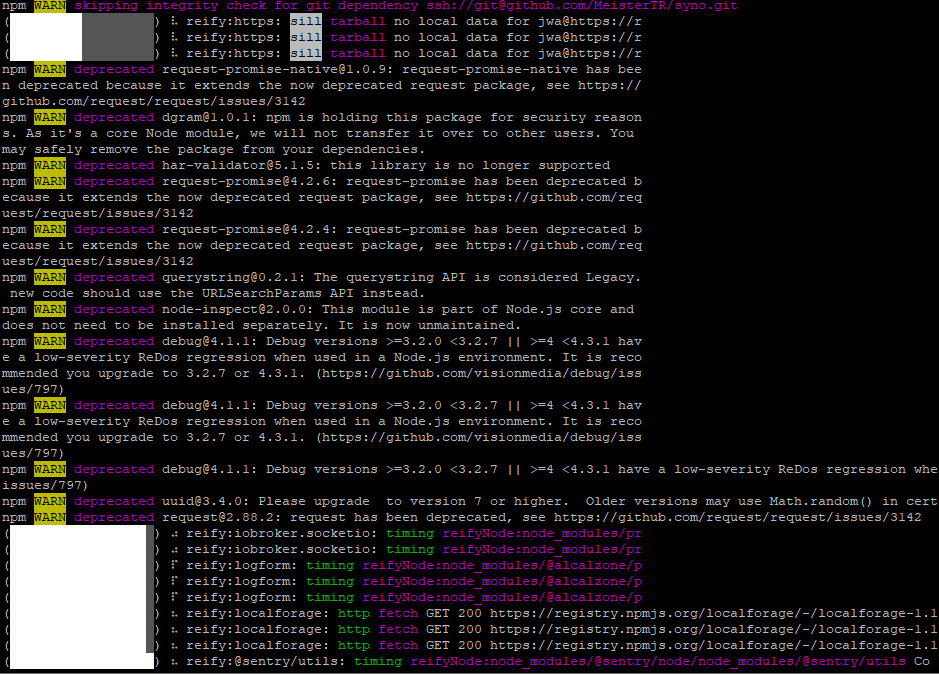
Die zweite Session reagiert nicht - der Raspi ist wohl zu beschäftigt

... doch, ich konnte mich anmelden. Es dauert leider...ich konnte
uname -m && type -P nodejs node npm npx && nodejs -v && node -v && npm -v && npx -v && iob -v && whoami && groups && echo $XDG_SESSION_TYPE && pwd && sudo apt update &> /dev/null && sudo apt update && apt policy nodejseben eingeben... der Raspi arbeitet gerade an der Antwort
Zumindest bremst es den Raspi so aus, dass ich aus der anderen Session eine Kopie extrahieren kann:
reify:iobroker.iot: timing reifyNode:node_modules/iobroker.vis-icontwo Completed in 1773824ms -
@thomas-braun sagte in ioBroker update führt zu GLIBCXX_3.4.26-Problem:
@r-frase sagte in ioBroker update führt zu GLIBCXX_3.4.26-Problem:
ich erhalte die nächste Eingabemöglichkeit bestimmt erst, wenn der Raspi fertig ist
Zweite Terminal-Session? Hat man i.d.R. eh mindestens zwei von offen.
Ich komme üblicherweise mit einer durchs Leben
- aber okay, ich versuche es!Die zweite Session reagiert nicht - der Raspi ist wohl zu beschäftigt
... doch, ich konnte mich anmelden. Es dauert leider...ich konnte
uname -m && type -P nodejs node npm npx && nodejs -v && node -v && npm -v && npx -v && iob -v && whoami && groups && echo $XDG_SESSION_TYPE && pwd && sudo apt update &> /dev/null && sudo apt update && apt policy nodejseben eingeben... der Raspi arbeitet gerade an der Antwort
Zumindest bremst es den Raspi so aus, dass ich aus der anderen Session eine Kopie extrahieren kann:
reify:iobroker.iot: timing reifyNode:node_modules/iobroker.vis-icontwo Completed in 1773824ms@r-frase sagte in ioBroker update führt zu GLIBCXX_3.4.26-Problem:
reify:iobroker.iot: timing reifyNode:node_modules/iobroker.vis-icontwo Completed in 1773824ms
Sind ganz normale Meldungen, wenn die Module neugebaut werden.
Linux-Werkzeugkasten:
https://forum.iobroker.net/topic/42952/der-kleine-iobroker-linux-werkzeugkasten
NodeJS Fixer Skript:
https://forum.iobroker.net/topic/68035/iob-node-fix-skript
iob_diag: curl -sLf -o diag.sh https://iobroker.net/diag.sh && bash diag.sh -
@r-frase sagte in ioBroker update führt zu GLIBCXX_3.4.26-Problem:
reify:iobroker.iot: timing reifyNode:node_modules/iobroker.vis-icontwo Completed in 1773824ms
Sind ganz normale Meldungen, wenn die Module neugebaut werden.
@thomas-braun sagte in ioBroker update führt zu GLIBCXX_3.4.26-Problem:
@r-frase sagte in ioBroker update führt zu GLIBCXX_3.4.26-Problem:
reify:iobroker.iot: timing reifyNode:node_modules/iobroker.vis-icontwo Completed in 1773824ms
Sind ganz normale Meldungen, wenn die Module neugebaut werden.
Ich habe Hoffnung!
-
@thomas-braun sagte in ioBroker update führt zu GLIBCXX_3.4.26-Problem:
@r-frase sagte in ioBroker update führt zu GLIBCXX_3.4.26-Problem:
reify:iobroker.iot: timing reifyNode:node_modules/iobroker.vis-icontwo Completed in 1773824ms
Sind ganz normale Meldungen, wenn die Module neugebaut werden.
Ich habe Hoffnung!
@r-frase
Wobei ich zugeben muss, dass es nicht die brillianteste Idee von mir war, auf einen 2GB-RAM Raspberry auch noch die ganzen apt aktionen parallel drauf zu werfen... Und das gleich im Doppeldecker...
Brauchst halt was Geduld jetzt. Kann sein das die Kiste die Nacht dazu braucht.
Linux-Werkzeugkasten:
https://forum.iobroker.net/topic/42952/der-kleine-iobroker-linux-werkzeugkasten
NodeJS Fixer Skript:
https://forum.iobroker.net/topic/68035/iob-node-fix-skript
iob_diag: curl -sLf -o diag.sh https://iobroker.net/diag.sh && bash diag.sh -
@r-frase
Wobei ich zugeben muss, dass es nicht die brillianteste Idee von mir war, auf einen 2GB-RAM Raspberry auch noch die ganzen apt aktionen parallel drauf zu werfen... Und das gleich im Doppeldecker...
Brauchst halt was Geduld jetzt. Kann sein das die Kiste die Nacht dazu braucht.
@thomas-braun
Ich kenne die Sprache nicht in der Du schreibst, weil es bei mir mit Turbo-Pascal aufgehört hat. Hinter mir liegt ein Buch zur Einführung in PERL, weil ich mich grundsätzlich gerne mit Dingen auseinandersetze die einen Anreiz haben. In groben Zügen verstehe ich das über die ersten 30 Seiten (ich hab auch erst angefangen...)Sollte es die ganze Nacht dauern bin ich in jedem Fall schon sehr viel weiter als bevor ich mich hier gemeldet habe!
Ich kann mich also morgen wieder melden - dann bekommen wir alle auch etwas Schlaf. Vielen lieben Dank schonmal!
-
@thomas-braun
Ich kenne die Sprache nicht in der Du schreibst, weil es bei mir mit Turbo-Pascal aufgehört hat. Hinter mir liegt ein Buch zur Einführung in PERL, weil ich mich grundsätzlich gerne mit Dingen auseinandersetze die einen Anreiz haben. In groben Zügen verstehe ich das über die ersten 30 Seiten (ich hab auch erst angefangen...)Sollte es die ganze Nacht dauern bin ich in jedem Fall schon sehr viel weiter als bevor ich mich hier gemeldet habe!
Ich kann mich also morgen wieder melden - dann bekommen wir alle auch etwas Schlaf. Vielen lieben Dank schonmal!
@r-frase
Knall den zweiten Prozess mal mit Strg-C weg.
type -P nodejs node npm npx && nodejs -v && node -v && npm -v && npx -vsollte dann aber flugs durch laufen.
Linux-Werkzeugkasten:
https://forum.iobroker.net/topic/42952/der-kleine-iobroker-linux-werkzeugkasten
NodeJS Fixer Skript:
https://forum.iobroker.net/topic/68035/iob-node-fix-skript
iob_diag: curl -sLf -o diag.sh https://iobroker.net/diag.sh && bash diag.sh -
@r-frase
Knall den zweiten Prozess mal mit Strg-C weg.
type -P nodejs node npm npx && nodejs -v && node -v && npm -v && npx -vsollte dann aber flugs durch laufen.
@thomas-braun sagte in ioBroker update führt zu GLIBCXX_3.4.26-Problem:
@r-frase
Knall den zweiten Prozess mal mit Strg-C weg.
type -P nodejs node npm npx && nodejs -v && node -v && npm -v && npx -vsollte dann aber flugs durch laufen.
type -P nodejs node npm npx && nodejs -v && node -v && npm -v && npx -v
/usr/bin/nodejs
/usr/bin/node
/usr/bin/npm
/usr/bin/npx
v18.16.0
v18.16.0
9.5.1
9.5.1 -
@thomas-braun sagte in ioBroker update führt zu GLIBCXX_3.4.26-Problem:
@r-frase
Knall den zweiten Prozess mal mit Strg-C weg.
type -P nodejs node npm npx && nodejs -v && node -v && npm -v && npx -vsollte dann aber flugs durch laufen.
type -P nodejs node npm npx && nodejs -v && node -v && npm -v && npx -v
/usr/bin/nodejs
/usr/bin/node
/usr/bin/npm
/usr/bin/npx
v18.16.0
v18.16.0
9.5.1
9.5.1@r-frase
Ja, das sieht gut aus.
Linux-Werkzeugkasten:
https://forum.iobroker.net/topic/42952/der-kleine-iobroker-linux-werkzeugkasten
NodeJS Fixer Skript:
https://forum.iobroker.net/topic/68035/iob-node-fix-skript
iob_diag: curl -sLf -o diag.sh https://iobroker.net/diag.sh && bash diag.sh -
@r-frase
Ja, das sieht gut aus.
@thomas-braun sagte in ioBroker update führt zu GLIBCXX_3.4.26-Problem:
@r-frase
Ja, das sieht gut aus.
uname -m && type -P nodejs node npm npx && nodejs -v && node -v && npm -v && npx -v && iob -v && whoami && groups && echo $XDG_SESSION_TYPE && pwd && sudo apt update &> /dev/null && sudo apt update && apt policy nodejs
armv7l
/usr/bin/nodejs
/usr/bin/node
/usr/bin/npm
/usr/bin/npx
v18.16.0
v18.16.0
9.5.1
9.5.1
4.0.24
pi
pi adm dialout cdrom sudo audio video plugdev games users input netdev gpio i2c spi iobroker

/home/pi
^C
... das hat der Raspi bis dahin geschafft
-
@thomas-braun sagte in ioBroker update führt zu GLIBCXX_3.4.26-Problem:
@r-frase
Ja, das sieht gut aus.
uname -m && type -P nodejs node npm npx && nodejs -v && node -v && npm -v && npx -v && iob -v && whoami && groups && echo $XDG_SESSION_TYPE && pwd && sudo apt update &> /dev/null && sudo apt update && apt policy nodejs
armv7l
/usr/bin/nodejs
/usr/bin/node
/usr/bin/npm
/usr/bin/npx
v18.16.0
v18.16.0
9.5.1
9.5.1
4.0.24
pi
pi adm dialout cdrom sudo audio video plugdev games users input netdev gpio i2c spi iobroker

/home/pi
^C
... das hat der Raspi bis dahin geschafft
@r-frase sagte in ioBroker update führt zu GLIBCXX_3.4.26-Problem:
Und damit war das Kistlein dann überfordert:sudo apt update &> /dev/null && sudo apt update
2x
apt updateist bei 2GB RAM und parallel laufendem rebuild vom ioBroker ein wenig heftig. Hatte ich nicht dran gedacht...Linux-Werkzeugkasten:
https://forum.iobroker.net/topic/42952/der-kleine-iobroker-linux-werkzeugkasten
NodeJS Fixer Skript:
https://forum.iobroker.net/topic/68035/iob-node-fix-skript
iob_diag: curl -sLf -o diag.sh https://iobroker.net/diag.sh && bash diag.sh -
@r-frase sagte in ioBroker update führt zu GLIBCXX_3.4.26-Problem:
Und damit war das Kistlein dann überfordert:sudo apt update &> /dev/null && sudo apt update
2x
apt updateist bei 2GB RAM und parallel laufendem rebuild vom ioBroker ein wenig heftig. Hatte ich nicht dran gedacht...@thomas-braun
ich werde Dir in jedem Fall verzeihen!


Hey! Du scheinst an dieser Unterhaltung interessiert zu sein, hast aber noch kein Konto.
Hast du es satt, bei jedem Besuch durch die gleichen Beiträge zu scrollen? Wenn du dich für ein Konto anmeldest, kommst du immer genau dorthin zurück, wo du zuvor warst, und kannst dich über neue Antworten benachrichtigen lassen (entweder per E-Mail oder Push-Benachrichtigung). Du kannst auch Lesezeichen speichern und Beiträge positiv bewerten, um anderen Community-Mitgliedern deine Wertschätzung zu zeigen.
Mit deinem Input könnte dieser Beitrag noch besser werden 💗
Registrieren Anmelden474
Online33.0k
Benutzende83.7k
Themen1.3m
Beiträge