



Skip to content
  • Home
  • Aktuell
  • Tags
  • 0 Ungelesen 0
  • Kategorien
  • Unreplied
  • Beliebt
  • GitHub
  • Docu
  • Hilfe
Skins
  • Light
  • Brite
  • Cerulean
  • Cosmo
  • Flatly
  • Journal
  • Litera
  • Lumen
  • Lux
  • Materia
  • Minty
  • Morph
  • Pulse
  • Sandstone
  • Simplex
  • Sketchy
  • Spacelab
  • United
  • Yeti
  • Zephyr
  • Dark
  • Cyborg
  • Darkly
  • Quartz
  • Slate
  • Solar
  • Superhero
  • Vapor

  • Standard: (Kein Skin)
  • Kein Skin
Einklappen
ioBroker Logo

Community Forum

donate donate
  1. ioBroker Community Home
  2. Deutsch
  3. Error/Bug
  4. Oilfox Instanz beendet sich nicht
NEWS

  • Jahresrückblick 2025 – unser neuer Blogbeitrag ist online! ✨
    BluefoxB
    Bluefox
    17
    1
    3.2k

  • Neuer Blogbeitrag: Monatsrückblick - Dezember 2025 🎄
    BluefoxB
    Bluefox
    13
    1
    1.1k

  • Weihnachtsangebot 2025! 🎄
    BluefoxB
    Bluefox
    25
    1
    2.4k

Oilfox Instanz beendet sich nicht

Geplant Angeheftet Gesperrt Verschoben Error/Bug
31 Beiträge 4 Kommentatoren 2.6k Aufrufe 4 Watching
  • Älteste zuerst
  • Neuste zuerst
  • Meiste Stimmen
Antworten
  • In einem neuen Thema antworten
Anmelden zum Antworten
Dieses Thema wurde gelöscht. Nur Nutzer mit entsprechenden Rechten können es sehen.
  • B bakerman23

    Nachdem ich den Prozess in der ssh gekillt habe funktioniert es so, wie es soll und die Instanz beendet sich selber.
    Das ist mir aber vorher auch schon aufgefallen. das hält aber nur 1-2 Tage.

    @DJMarc75 stimmt, es sind 4Gb. Es hat aber auch schon nicht funktioniert, als das System noch aktuell war.


    ======================= SUMMARY =======================
    v.2023-04-16

    Operatingsystem: Raspbian GNU/Linux 11 (bullseye)
    Kernel: 6.1.19-v8+
    Installation: Native
    Timezone: Europe/London (BST, +0100)
    User-ID: 1000
    X-Server: false
    Boot Target: graphical.target

    Pending OS-Updates: 44
    Pending iob updates: 0

    Nodejs-Installation: /usr/bin/nodejs v14.21.3
    /usr/bin/node v14.21.3
    /usr/bin/npm 6.14.18
    /usr/bin/npx 6.14.18

    Recommended versions are nodejs 18.x.y and npm 9.x.y
    Your nodejs installation is correct

    MEMORY:
    total used free shared buff/cache available
    Mem: 3.8G 1.8G 305M 0.0K 1.7G 2.3G
    Swap: 99M 2.0M 97M
    Total: 3.9G 1.8G 403M

    Active iob-Instances: 23
    Active repo(s): stable

    ioBroker Core: js-controller 4.0.24
    admin 6.3.5

    ioBroker Status: iobroker is running on this host.

    Objects type: jsonl
    States type: jsonl

    Status admin and web instance:

    • system.adapter.admin.0 : admin : raspberrypi - enabled, port: 8081, bind: 0.0.0.0, run as: admin
    • system.adapter.web.0 : web : raspberrypi - enabled, port: 8082, bind: 0.0.0.0, run as: admin

    Objects: 3773
    States: 3563

    Size of iob-Database:

    16M /opt/iobroker/iobroker-data/objects.jsonl
    7.5M /opt/iobroker/iobroker-data/objects.json.migrated
    7.5M /opt/iobroker/iobroker-data/objects.json.bak.migrated
    0 /opt/iobroker/iobroker-data/objects.json.broken
    6.9M /opt/iobroker/iobroker-data/states.jsonl
    440K /opt/iobroker/iobroker-data/states.json.migrated
    440K /opt/iobroker/iobroker-data/states.json.bak.migrated

    =================== END OF SUMMARY ====================

    DJMarc75D Offline
    DJMarc75D Offline
    DJMarc75
    schrieb am zuletzt editiert von DJMarc75
    #9

    @bakerman23 sagte in Oilfox Instanz beendet sich nicht:

    es sind 4Gb

    Und nochmals: einen RPI3 gibt es nicht mit 2, 4, 8 GB - dann ist das ein RPI4 !

    Und auch sonst ist, wie @Thomas-Braun schrieb, so ziemlich alles veraltet (systemtechnisch) ;)

    Lehrling seit 1975 !!!
    Beitrag geholfen ? dann gerne ein upvote rechts unten im Beitrag klicken ;)
    https://forum.iobroker.net/topic/51555/hinweise-f%C3%BCr-gute-forenbeitr%C3%A4ge

    1 Antwort Letzte Antwort
    0
    • B Offline
      B Offline
      bakerman23
      schrieb am zuletzt editiert von
      #10

      Wollte die Pakete installieren und jetzt ist der Rapberry nicht mehr erreichbar. Am raspberry leuchten beide LED dauerhaft.

      DJMarc75D Thomas BraunT 2 Antworten Letzte Antwort
      0
      • B bakerman23

        Wollte die Pakete installieren und jetzt ist der Rapberry nicht mehr erreichbar. Am raspberry leuchten beide LED dauerhaft.

        DJMarc75D Offline
        DJMarc75D Offline
        DJMarc75
        schrieb am zuletzt editiert von
        #11

        @bakerman23 sagte in Oilfox Instanz beendet sich nicht:

        Wollte die Pakete installieren

        Wie genau ?

        Lehrling seit 1975 !!!
        Beitrag geholfen ? dann gerne ein upvote rechts unten im Beitrag klicken ;)
        https://forum.iobroker.net/topic/51555/hinweise-f%C3%BCr-gute-forenbeitr%C3%A4ge

        1 Antwort Letzte Antwort
        0
        • B bakerman23

          Wollte die Pakete installieren und jetzt ist der Rapberry nicht mehr erreichbar. Am raspberry leuchten beide LED dauerhaft.

          Thomas BraunT Online
          Thomas BraunT Online
          Thomas Braun
          Most Active
          schrieb am zuletzt editiert von
          #12

          @bakerman23 sagte in Oilfox Instanz beendet sich nicht:

          Wollte die Pakete installieren und jetzt ist der Rapberry nicht mehr erreichbar.

          Was wie genau wo gemacht?

          Linux-Werkzeugkasten:
          https://forum.iobroker.net/topic/42952/der-kleine-iobroker-linux-werkzeugkasten
          NodeJS Fixer Skript:
          https://forum.iobroker.net/topic/68035/iob-node-fix-skript
          iob_diag: curl -sLf -o diag.sh https://iobroker.net/diag.sh && bash diag.sh

          B 1 Antwort Letzte Antwort
          0
          • Thomas BraunT Thomas Braun

            @bakerman23 sagte in Oilfox Instanz beendet sich nicht:

            Wollte die Pakete installieren und jetzt ist der Rapberry nicht mehr erreichbar.

            Was wie genau wo gemacht?

            B Offline
            B Offline
            bakerman23
            schrieb am zuletzt editiert von
            #13

            @thomas-braun
            sudo apt-get update
            sudo apt-get upgrade
            sudo reboot

            Thomas BraunT 1 Antwort Letzte Antwort
            0
            • B bakerman23

              @thomas-braun
              sudo apt-get update
              sudo apt-get upgrade
              sudo reboot

              Thomas BraunT Online
              Thomas BraunT Online
              Thomas Braun
              Most Active
              schrieb am zuletzt editiert von
              #14

              @bakerman23

              sudo apt update
              sudo apt full-upgrade
              sudo reboot
              

              wäre besser. Und halt den Output mitlesen.

              Im Boot Screen schaut das nun wie aus?

              Linux-Werkzeugkasten:
              https://forum.iobroker.net/topic/42952/der-kleine-iobroker-linux-werkzeugkasten
              NodeJS Fixer Skript:
              https://forum.iobroker.net/topic/68035/iob-node-fix-skript
              iob_diag: curl -sLf -o diag.sh https://iobroker.net/diag.sh && bash diag.sh

              B 1 Antwort Letzte Antwort
              0
              • Thomas BraunT Thomas Braun

                @bakerman23

                sudo apt update
                sudo apt full-upgrade
                sudo reboot
                

                wäre besser. Und halt den Output mitlesen.

                Im Boot Screen schaut das nun wie aus?

                B Offline
                B Offline
                bakerman23
                schrieb am zuletzt editiert von
                #15

                @thomas-braun kann ich leider nicht beurteilen, da der Raspberry im Netzwerk hängt und ich daran keinen Monitor habe.
                Die Speicherkarte ist aber noch lesbar.

                Thomas BraunT 1 Antwort Letzte Antwort
                0
                • B bakerman23

                  @thomas-braun kann ich leider nicht beurteilen, da der Raspberry im Netzwerk hängt und ich daran keinen Monitor habe.
                  Die Speicherkarte ist aber noch lesbar.

                  Thomas BraunT Online
                  Thomas BraunT Online
                  Thomas Braun
                  Most Active
                  schrieb am zuletzt editiert von
                  #16

                  @bakerman23 sagte in Oilfox Instanz beendet sich nicht:

                  Die Speicherkarte ist aber noch lesbar.

                  Wie hast du das festgestellt, wenn du doch nicht mehr drauf kommst?

                  Linux-Werkzeugkasten:
                  https://forum.iobroker.net/topic/42952/der-kleine-iobroker-linux-werkzeugkasten
                  NodeJS Fixer Skript:
                  https://forum.iobroker.net/topic/68035/iob-node-fix-skript
                  iob_diag: curl -sLf -o diag.sh https://iobroker.net/diag.sh && bash diag.sh

                  B 1 Antwort Letzte Antwort
                  0
                  • Thomas BraunT Thomas Braun

                    @bakerman23 sagte in Oilfox Instanz beendet sich nicht:

                    Die Speicherkarte ist aber noch lesbar.

                    Wie hast du das festgestellt, wenn du doch nicht mehr drauf kommst?

                    B Offline
                    B Offline
                    bakerman23
                    schrieb am zuletzt editiert von
                    #17

                    @thomas-braun Speicherkarte entnommen und mit ext2explore eine kopie der kompletten Karte gezogen.
                    Die boot partition kann ich aber auch im explorer noch sehen.

                    Thomas BraunT 1 Antwort Letzte Antwort
                    0
                    • B bakerman23

                      @thomas-braun Speicherkarte entnommen und mit ext2explore eine kopie der kompletten Karte gezogen.
                      Die boot partition kann ich aber auch im explorer noch sehen.

                      Thomas BraunT Online
                      Thomas BraunT Online
                      Thomas Braun
                      Most Active
                      schrieb am zuletzt editiert von Thomas Braun
                      #18

                      @bakerman23

                      Keine Ahnung was du da treibst bzw. getrieben hast.
                      Beobachte den Bootvorgang oder installier das Ding neu.

                      Linux-Werkzeugkasten:
                      https://forum.iobroker.net/topic/42952/der-kleine-iobroker-linux-werkzeugkasten
                      NodeJS Fixer Skript:
                      https://forum.iobroker.net/topic/68035/iob-node-fix-skript
                      iob_diag: curl -sLf -o diag.sh https://iobroker.net/diag.sh && bash diag.sh

                      B 1 Antwort Letzte Antwort
                      0
                      • Thomas BraunT Thomas Braun

                        @bakerman23

                        Keine Ahnung was du da treibst bzw. getrieben hast.
                        Beobachte den Bootvorgang oder installier das Ding neu.

                        B Offline
                        B Offline
                        bakerman23
                        schrieb am zuletzt editiert von
                        #19

                        @thomas-braun mal ganz dumm gefragt, wenn ich das Betriebssystem wieder neu installiert habe, könnte ich die Kopie einfach wieder zurück kopieren?

                        Thomas BraunT 1 Antwort Letzte Antwort
                        0
                        • B bakerman23

                          @thomas-braun mal ganz dumm gefragt, wenn ich das Betriebssystem wieder neu installiert habe, könnte ich die Kopie einfach wieder zurück kopieren?

                          Thomas BraunT Online
                          Thomas BraunT Online
                          Thomas Braun
                          Most Active
                          schrieb am zuletzt editiert von
                          #20

                          @bakerman23

                          Damit kopierst du den Murks ja wieder drauf.
                          Backups von defekten Medien sind recht sinnfrei.

                          Linux-Werkzeugkasten:
                          https://forum.iobroker.net/topic/42952/der-kleine-iobroker-linux-werkzeugkasten
                          NodeJS Fixer Skript:
                          https://forum.iobroker.net/topic/68035/iob-node-fix-skript
                          iob_diag: curl -sLf -o diag.sh https://iobroker.net/diag.sh && bash diag.sh

                          B 1 Antwort Letzte Antwort
                          0
                          • Thomas BraunT Thomas Braun

                            @bakerman23

                            Damit kopierst du den Murks ja wieder drauf.
                            Backups von defekten Medien sind recht sinnfrei.

                            B Offline
                            B Offline
                            bakerman23
                            schrieb am zuletzt editiert von
                            #21

                            @thomas-braun Ich melde mich hiermit zurück.
                            Das System ist jetzt neu aufgesetzt und up to date.
                            Die Instanz beendet sich aber nach wie vor nicht selbst.

                            admin@raspberrypi:~ $ sudo -u iobroker ps -C io.oilfox.0 -o pid=
                            12791
                            admin@raspberrypi:~ $ sudo -u iobroker kill 12791

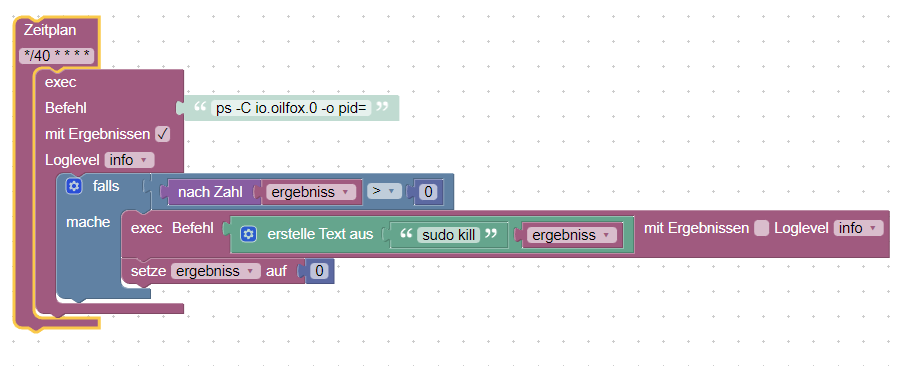
                            Das funktioniert aber ohne Probleme. Nur das Blockly Script mit den gleichen Befehlen anscheinend nicht.

                            DJMarc75D 1 Antwort Letzte Antwort
                            0
                            • B bakerman23

                              @thomas-braun Ich melde mich hiermit zurück.
                              Das System ist jetzt neu aufgesetzt und up to date.
                              Die Instanz beendet sich aber nach wie vor nicht selbst.

                              admin@raspberrypi:~ $ sudo -u iobroker ps -C io.oilfox.0 -o pid=
                              12791
                              admin@raspberrypi:~ $ sudo -u iobroker kill 12791

                              Das funktioniert aber ohne Probleme. Nur das Blockly Script mit den gleichen Befehlen anscheinend nicht.

                              DJMarc75D Offline
                              DJMarc75D Offline
                              DJMarc75
                              schrieb am zuletzt editiert von
                              #22

                              @bakerman23 sagte in Oilfox Instanz beendet sich nicht:

                              Das System ist jetzt neu aufgesetzt und up to date.

                              Bitte die Ausgabe von

                              iob diag
                              

                              zeigen.

                              Langfassung :)

                              Lehrling seit 1975 !!!
                              Beitrag geholfen ? dann gerne ein upvote rechts unten im Beitrag klicken ;)
                              https://forum.iobroker.net/topic/51555/hinweise-f%C3%BCr-gute-forenbeitr%C3%A4ge

                              B 1 Antwort Letzte Antwort
                              0
                              • DJMarc75D DJMarc75

                                @bakerman23 sagte in Oilfox Instanz beendet sich nicht:

                                Das System ist jetzt neu aufgesetzt und up to date.

                                Bitte die Ausgabe von

                                iob diag
                                

                                zeigen.

                                Langfassung :)

                                B Offline
                                B Offline
                                bakerman23
                                schrieb am zuletzt editiert von
                                #23

                                @djmarc75 ```
                                ======== Start marking the full check here =========

                                Skript v.2023-04-16
                                
                                *** BASE SYSTEM ***
                                Model           : Raspberry Pi 4 Model B Rev 1.4
                                Architecture    : aarch64
                                Docker          : false
                                Virtualization  : none
                                Distributor ID: Debian
                                Description:    Debian GNU/Linux 11 (bullseye)
                                Release:        11
                                Codename:       bullseye
                                
                                PRETTY_NAME="Debian GNU/Linux 11 (bullseye)"
                                NAME="Debian GNU/Linux"
                                VERSION_ID="11"
                                VERSION="11 (bullseye)"
                                VERSION_CODENAME=bullseye
                                ID=debian
                                HOME_URL="https://www.debian.org/"
                                SUPPORT_URL="https://www.debian.org/support"
                                BUG_REPORT_URL="https://bugs.debian.org/"
                                
                                Systemuptime and Load:
                                 17:00:25 up 4 days, 15:31,  1 user,  load average: 0.11, 0.08, 0.08
                                CPU threads: 4
                                
                                Raspberry only:
                                throttled=0x0
                                Other values than 0x0 hint to temperature/voltage problems
                                temp=39.9'C
                                volt=0.9160V
                                
                                *** Time and Time Zones ***
                                               Local time: Fri 2023-06-23 17:00:25 CEST
                                           Universal time: Fri 2023-06-23 15:00:25 UTC
                                                 RTC time: n/a
                                                Time zone: Europe/Berlin (CEST, +0200)
                                System clock synchronized: yes
                                              NTP service: active
                                          RTC in local TZ: no
                                
                                *** User and Groups ***
                                admin
                                /home/admin
                                admin adm dialout cdrom sudo audio video plugdev games users input render netdev gpio i2c spi iobroker
                                
                                *** X-Server-Setup ***
                                X-Server:       false
                                Desktop:
                                Terminal:       tty
                                Boot Target:    multi-user.target
                                
                                *** MEMORY ***
                                               total        used        free      shared  buff/cache   available
                                Mem:            3.8G        2.1G        156M        1.0M        1.5G        1.7G
                                Swap:            99M          0B         99M
                                Total:          3.9G        2.1G        256M
                                
                                         3794 M total memory
                                         2107 M used memory
                                         2954 M active memory
                                          504 M inactive memory
                                          156 M free memory
                                           59 M buffer memory
                                         1471 M swap cache
                                           99 M total swap
                                            0 M used swap
                                           99 M free swap
                                
                                Raspberry only:
                                oom events: 0
                                lifetime oom required: 0 Mbytes
                                total time in oom handler: 0 ms
                                max time spent in oom handler: 0 ms
                                
                                *** FILESYSTEM ***
                                Filesystem     Type      Size  Used Avail Use% Mounted on
                                /dev/root      ext4       58G  5.1G   51G  10% /
                                devtmpfs       devtmpfs  1.7G     0  1.7G   0% /dev
                                tmpfs          tmpfs     1.9G     0  1.9G   0% /dev/shm
                                tmpfs          tmpfs     759M  1.2M  758M   1% /run
                                tmpfs          tmpfs     5.0M  4.0K  5.0M   1% /run/lock
                                /dev/mmcblk0p1 vfat      255M   31M  225M  13% /boot
                                tmpfs          tmpfs     380M     0  380M   0% /run/user/1000
                                
                                Messages concerning ext4 filesystem in dmesg:
                                [Mon Jun 19 01:28:51 2023] Kernel command line: coherent_pool=1M 8250.nr_uarts=0 snd_bcm2835.enable_headphones=0 snd_bcm2835.enable_headphones=1 snd_bcm2835.enable_hdmi=1 snd_bcm2835.enable_hdmi=0  smsc95xx.macaddr=E4:5F:01:75:14:60 vc_mem.mem_base=0x3ec00000 vc_mem.mem_size=0x40000000  console=ttyS0,115200 console=tty1 root=PARTUUID=d633938e-02 rootfstype=ext4 fsck.repair=yes rootwait
                                [Mon Jun 19 01:28:52 2023] EXT4-fs (mmcblk0p2): mounted filesystem with ordered data mode. Quota mode: none.
                                [Mon Jun 19 01:28:52 2023] VFS: Mounted root (ext4 filesystem) readonly on device 179:2.
                                [Mon Jun 19 01:29:12 2023] EXT4-fs (mmcblk0p2): re-mounted. Quota mode: none.
                                
                                Show mounted filesystems (real ones only):
                                TARGET  SOURCE         FSTYPE OPTIONS
                                /       /dev/mmcblk0p2 ext4   rw,noatime
                                `-/boot /dev/mmcblk0p1 vfat   rw,relatime,fmask=0022,dmask=0022,codepage=437,iocharset=ascii,shortname=mixed,errors=remount-ro
                                
                                Files in neuralgic directories:
                                
                                /var:
                                1.6G    /var/
                                1.1G    /var/log
                                849M    /var/log/journal/f264e0f0f4e84eb586c8445ff4174603
                                849M    /var/log/journal
                                184M    /var/lib
                                
                                Archived and active journals take up 848.0M in the file system.
                                
                                /opt/iobroker/backups:
                                19M     /opt/iobroker/backups/
                                
                                /opt/iobroker/iobroker-data:
                                362M    /opt/iobroker/iobroker-data/
                                286M    /opt/iobroker/iobroker-data/files
                                78M     /opt/iobroker/iobroker-data/files/icons-open-icon-library-png
                                58M     /opt/iobroker/iobroker-data/backup-objects
                                52M     /opt/iobroker/iobroker-data/files/javascript.admin
                                
                                The five largest files in iobroker-data are:
                                35M     /opt/iobroker/iobroker-data/files/devices.admin/static/js/main.24f2bb56.js.map
                                17M     /opt/iobroker/iobroker-data/objects.jsonl
                                8.6M    /opt/iobroker/iobroker-data/files/devices.admin/static/js/main.24f2bb56.js
                                6.9M    /opt/iobroker/iobroker-data/files/javascript.admin/static/js/610.312d98a8.chunk.js.map
                                6.3M    /opt/iobroker/iobroker-data/files/admin.admin/custom/static/js/vendors-node_modules_iobroker_adapter-react-v5_assets_devices_parseNames_js-node_modules_iobr-99c23e.847b8ad9.chunk.js.map
                                
                                *** NodeJS-Installation ***
                                
                                /usr/bin/nodejs         v18.16.0
                                /usr/bin/node           v18.16.0
                                /usr/bin/npm            9.5.1
                                /usr/bin/npx            9.5.1
                                
                                
                                nodejs:
                                  Installed: 18.16.0-deb-1nodesource1
                                  Candidate: 18.16.1-deb-1nodesource1
                                  Version table:
                                     18.16.1-deb-1nodesource1 500
                                        500 https://deb.nodesource.com/node_18.x bullseye/main arm64 Packages
                                 *** 18.16.0-deb-1nodesource1 100
                                        100 /var/lib/dpkg/status
                                     12.22.12~dfsg-1~deb11u4 500
                                        500 http://security.debian.org/debian-security bullseye-security/main arm64 Packages
                                     12.22.12~dfsg-1~deb11u3 500
                                        500 http://deb.debian.org/debian bullseye/main arm64 Packages
                                
                                Temp directories causing npm8 problem: 0
                                No problems detected
                                
                                *** ioBroker-Installation ***
                                
                                ioBroker Status
                                iobroker is running on this host.
                                
                                
                                Objects type: jsonl
                                States  type: jsonl
                                
                                MULTIHOSTSERVICE/enabled: false
                                
                                Core adapters versions
                                js-controller:  4.0.24
                                admin:          6.3.5
                                javascript:     7.0.3
                                
                                Adapters from github:   2
                                
                                Adapter State
                                + system.adapter.admin.0                  : admin                 : raspberrypi                              -  enabled, port: 8081, bind: 0.0.0.0, run as: admin
                                  system.adapter.alias-manager.0          : alias-manager         : raspberrypi                              - disabled
                                + system.adapter.backitup.0               : backitup              : raspberrypi                              -  enabled
                                + system.adapter.cloud.0                  : cloud                 : raspberrypi                              -  enabled
                                  system.adapter.devices.0                : devices               : raspberrypi                              - disabled
                                + system.adapter.discovery.0              : discovery             : raspberrypi                              -  enabled
                                + system.adapter.evcc.0                   : evcc                  : raspberrypi                              -  enabled, port: 7070
                                + system.adapter.fullybrowser.0           : fullybrowser          : raspberrypi                              -  enabled
                                + system.adapter.hm-rega.0                : hm-rega               : raspberrypi                              -  enabled
                                + system.adapter.hm-rpc.0                 : hm-rpc                : raspberrypi                              -  enabled, port: 0
                                + system.adapter.hm-rpc.1                 : hm-rpc                : raspberrypi                              -  enabled, port: 0
                                + system.adapter.hm-rpc.3                 : hm-rpc                : raspberrypi                              -  enabled, port: 12012
                                  system.adapter.ical.0                   : ical                  : raspberrypi                              -  enabled
                                  system.adapter.icons-fatcow-hosting.0   : icons-fatcow-hosting  : raspberrypi                              - disabled
                                  system.adapter.icons-material-png.0     : icons-material-png    : raspberrypi                              - disabled
                                  system.adapter.icons-material-svg.0     : icons-material-svg    : raspberrypi                              - disabled
                                  system.adapter.icons-mfd-png.0          : icons-mfd-png         : raspberrypi                              - disabled
                                  system.adapter.icons-mfd-svg.0          : icons-mfd-svg         : raspberrypi                              - disabled
                                  system.adapter.icons-open-icon-library-png.0: icons-open-icon-library-png: raspberrypi                              - disabled
                                  system.adapter.influxdb.0               : influxdb              : raspberrypi                              - disabled, port: 8086
                                + system.adapter.influxdb.1               : influxdb              : raspberrypi                              -  enabled, port: 8086
                                + system.adapter.javascript.0             : javascript            : raspberrypi                              -  enabled
                                + system.adapter.net-tools.0              : net-tools             : raspberrypi                              -  enabled
                                + system.adapter.nuki-extended.0          : nuki-extended         : raspberrypi                              -  enabled
                                  system.adapter.oilfox.0                 : oilfox                : raspberrypi                              -  enabled
                                + system.adapter.ping.0                   : ping                  : raspberrypi                              -  enabled
                                + system.adapter.plenticore.0             : plenticore            : raspberrypi                              -  enabled, port: 80
                                + system.adapter.shelly.0                 : shelly                : raspberrypi                              -  enabled, port: 1882, bind: 0.0.0.0
                                  system.adapter.simple-api.0             : simple-api            : raspberrypi                              - disabled, port: 8087, bind: 0.0.0.0, run as: admin
                                + system.adapter.trashschedule.0          : trashschedule         : raspberrypi                              -  enabled
                                  system.adapter.vis-hqwidgets.0          : vis-hqwidgets         : raspberrypi                              - disabled
                                  system.adapter.vis-icontwo.0            : vis-icontwo           : raspberrypi                              - disabled
                                + system.adapter.vis-inventwo.0           : vis-inventwo          : raspberrypi                              -  enabled
                                  system.adapter.vis-jqui-mfd.0           : vis-jqui-mfd          : raspberrypi                              - disabled
                                  system.adapter.vis-material-advanced.0  : vis-material-advanced : raspberrypi                              - disabled
                                  system.adapter.vis-material.0           : vis-material          : raspberrypi                              - disabled
                                  system.adapter.vis-materialdesign.0     : vis-materialdesign    : raspberrypi                              - disabled
                                  system.adapter.vis-plumb.0              : vis-plumb             : raspberrypi                              - disabled
                                  system.adapter.vis-weather.0            : vis-weather           : raspberrypi                              - disabled
                                  system.adapter.vis.0                    : vis                   : raspberrypi                              -  enabled
                                + system.adapter.web.0                    : web                   : raspberrypi                              -  enabled, port: 8082, bind: 0.0.0.0, run as: admin
                                + system.adapter.whatsapp-cmb.0           : whatsapp-cmb          : raspberrypi                              -  enabled
                                
                                + instance is alive
                                
                                Enabled adapters with bindings
                                + system.adapter.admin.0                  : admin                 : raspberrypi                              -  enabled, port: 8081, bind: 0.0.0.0, run as: admin
                                + system.adapter.evcc.0                   : evcc                  : raspberrypi                              -  enabled, port: 7070
                                + system.adapter.hm-rpc.0                 : hm-rpc                : raspberrypi                              -  enabled, port: 0
                                + system.adapter.hm-rpc.1                 : hm-rpc                : raspberrypi                              -  enabled, port: 0
                                + system.adapter.hm-rpc.3                 : hm-rpc                : raspberrypi                              -  enabled, port: 12012
                                + system.adapter.influxdb.1               : influxdb              : raspberrypi                              -  enabled, port: 8086
                                + system.adapter.plenticore.0             : plenticore            : raspberrypi                              -  enabled, port: 80
                                + system.adapter.shelly.0                 : shelly                : raspberrypi                              -  enabled, port: 1882, bind: 0.0.0.0
                                + system.adapter.web.0                    : web                   : raspberrypi                              -  enabled, port: 8082, bind: 0.0.0.0, run as: admin
                                
                                ioBroker-Repositories
                                stable        : http://download.iobroker.net/sources-dist.json
                                beta          : http://download.iobroker.net/sources-dist-latest.json
                                
                                Active repo(s): stable
                                
                                Installed ioBroker-Instances
                                Used repository: stable
                                Adapter    "admin"        : 6.3.5    , installed 6.3.5
                                Adapter    "alias-manager": 1.2.4    , installed 1.2.4
                                Adapter    "backitup"     : 2.6.23   , installed 2.6.23
                                Adapter    "cloud"        : 4.4.1    , installed 4.4.1
                                Adapter    "devices"      : 1.1.5    , installed 1.1.5
                                Adapter    "discovery"    : 3.1.0    , installed 3.1.0
                                Adapter    "fullybrowser" : 2.1.2    , installed 2.1.2
                                Adapter    "hm-rega"      : 3.0.46   , installed 3.0.46
                                Adapter    "hm-rpc"       : 1.15.18  , installed 1.15.18
                                Adapter    "ical"         : 1.13.2   , installed 1.13.2
                                Adapter    "icons-fatcow-hosting": 0.1.0, installed 0.1.0
                                Adapter    "icons-material-png": 0.1.0, installed 0.1.0
                                Adapter    "icons-material-svg": 0.1.0, installed 0.1.0
                                Adapter    "icons-mfd-png": 1.1.0    , installed 1.1.0
                                Adapter    "icons-mfd-svg": 1.1.0    , installed 1.1.0
                                Adapter    "icons-open-icon-library-png": 0.1.2, installed 0.1.2
                                Adapter    "influxdb"     : 3.2.0    , installed 3.2.0
                                Adapter    "javascript"   : 7.0.3    , installed 7.0.3
                                Controller "js-controller": 4.0.24   , installed 4.0.24
                                Adapter    "net-tools"    : 0.2.0    , installed 0.2.0
                                Adapter    "nuki-extended": 2.3.1    , installed 2.6.5
                                Adapter    "oilfox"       : 4.1.2    , installed 4.1.2
                                Adapter    "ping"         : 1.5.3    , installed 1.5.3
                                Adapter    "plenticore"   : 2.2.0    , installed 2.2.0
                                Adapter    "shelly"       : 6.4.1    , installed 6.4.1
                                Adapter    "simple-api"   : 2.7.2    , installed 2.7.2
                                Adapter    "socketio"     : 4.2.0    , installed 4.2.0
                                Adapter    "trashschedule": 2.2.0    , installed 2.2.0
                                Adapter    "vis"          : 1.4.16   , installed 1.4.16
                                Adapter    "vis-hqwidgets": 1.4.0    , installed 1.4.0
                                Adapter    "vis-icontwo"  : 0.94.0   , installed 0.94.0
                                Adapter    "vis-inventwo" : 3.3.1    , installed 3.3.1
                                Adapter    "vis-jqui-mfd" : 1.0.12   , installed 1.0.12
                                Adapter    "vis-material-advanced": 1.7.2, installed 1.7.2
                                Adapter    "vis-plumb"    : 1.0.2    , installed 1.0.2
                                Adapter    "vis-weather"  : 2.5.6    , installed 2.5.6
                                Adapter    "web"          : 4.3.0    , installed 4.3.0
                                Adapter    "whatsapp-cmb" : 0.2.3    , installed 0.2.3
                                Adapter    "ws"           : 1.3.0    , installed 1.3.0
                                
                                Objects and States
                                Please stand by - This may take a while
                                Objects:        4932
                                States:         4103
                                
                                *** OS-Repositories and Updates ***
                                Hit:1 http://archive.raspberrypi.org/debian bullseye InRelease
                                Hit:2 http://deb.debian.org/debian bullseye InRelease
                                Hit:3 http://security.debian.org/debian-security bullseye-security InRelease
                                Get:4 https://dl.cloudsmith.io/public/evcc/stable/deb/debian bullseye InRelease [5127 B]
                                Hit:5 https://repos.influxdata.com/debian bullseye InRelease
                                Hit:6 https://deb.nodesource.com/node_18.x bullseye InRelease
                                Hit:7 http://deb.debian.org/debian bullseye-updates InRelease
                                Hit:8 https://packages.grafana.com/oss/deb stable InRelease
                                Fetched 5127 B in 2s (2430 B/s)
                                Reading package lists...
                                Pending Updates: 2
                                
                                *** Listening Ports ***
                                Active Internet connections (only servers)
                                Proto Recv-Q Send-Q Local Address           Foreign Address         State       User       Inode      PID/Program name
                                tcp        0      0 192.168.178.47:2001     0.0.0.0:*               LISTEN      1001       1198571    100682/io.hm-rpc.0
                                tcp        0      0 192.168.178.47:2010     0.0.0.0:*               LISTEN      1001       1198584    100689/io.hm-rpc.1
                                tcp        0      0 0.0.0.0:22              0.0.0.0:*               LISTEN      0          12628      541/sshd: /usr/sbin
                                tcp        0      0 127.0.0.1:9001          0.0.0.0:*               LISTEN      1001       15581      916/iobroker.js-con
                                tcp        0      0 127.0.0.1:9000          0.0.0.0:*               LISTEN      1001       15588      916/iobroker.js-con
                                tcp        0      0 192.168.178.47:12012    0.0.0.0:*               LISTEN      1001       1199809    100695/io.hm-rpc.3
                                tcp        0      0 127.0.0.1:8088          0.0.0.0:*               LISTEN      999        14901      770/influxd
                                tcp6       0      0 :::4712                 :::*                    LISTEN      111        15572      704/evcc
                                tcp6       0      0 :::51989                :::*                    LISTEN      1001       29038      2727/io.nuki-extend
                                tcp6       0      0 :::7070                 :::*                    LISTEN      111        12137      704/evcc
                                tcp6       0      0 :::3000                 :::*                    LISTEN      110        28097      2577/grafana
                                tcp6       0      0 :::22                   :::*                    LISTEN      0          12630      541/sshd: /usr/sbin
                                tcp6       0      0 :::8086                 :::*                    LISTEN      999        12893      770/influxd
                                tcp6       0      0 :::8081                 :::*                    LISTEN      1001       12204      969/io.admin.0
                                tcp6       0      0 :::8082                 :::*                    LISTEN      1001       16042      1381/io.web.0
                                udp        0      0 0.0.0.0:42406           0.0.0.0:*                           108        11177      393/avahi-daemon: r
                                udp        0      0 0.0.0.0:5683            0.0.0.0:*                           1001       15818      1173/io.shelly.0
                                udp        0      0 0.0.0.0:68              0.0.0.0:*                           0          14809      703/dhcpcd
                                udp        0      0 0.0.0.0:5353            0.0.0.0:*                           111        12135      704/evcc
                                udp        0      0 0.0.0.0:5353            0.0.0.0:*                           108        11175      393/avahi-daemon: r
                                udp6       0      0 :::35140                :::*                                108        11178      393/avahi-daemon: r
                                udp6       0      0 :::546                  :::*                                0          11707      703/dhcpcd
                                udp6       0      0 :::5353                 :::*                                111        12136      704/evcc
                                udp6       0      0 :::5353                 :::*                                108        11176      393/avahi-daemon: r
                                
                                *** Log File - Last 25 Lines ***
                                
                                2023-06-23 16:00:04.185  - info: host.raspberrypi instance system.adapter.oilfox.0 started with pid 130498
                                2023-06-23 16:00:06.329  - info: oilfox.0 (130498) starting. Version 4.1.2 in /opt/iobroker/node_modules/iobroker.oilfox, node: v18.16.0, js-controller: 4.0.24
                                2023-06-23 16:00:08.471  - info: ical.0 (130482) Terminated (NO_ERROR): Without reason
                                2023-06-23 16:00:09.009  - info: host.raspberrypi instance system.adapter.ical.0 terminated with code 0 (NO_ERROR)
                                2023-06-23 16:00:33.581  - info: oilfox.0 (130498) Terminated (NO_ERROR): Without reason
                                2023-06-23 16:00:34.112  - info: host.raspberrypi instance system.adapter.oilfox.0 terminated with code 0 (NO_ERROR)
                                2023-06-23 16:15:05.165  - info: web.0 (1381) ==> Connected system.user.admin from ::ffff:192.168.178.46
                                2023-06-23 16:23:36.311  - info: web.0 (1381) <== Disconnect system.user.admin from ::ffff:192.168.178.46 vis.0
                                2023-06-23 16:30:00.067  - info: host.raspberrypi instance system.adapter.ical.0 started with pid 131393
                                2023-06-23 16:30:02.564  - info: ical.0 (131393) starting. Version 1.13.2 in /opt/iobroker/node_modules/iobroker.ical, node: v18.16.0, js-controller: 4.0.24
                                2023-06-23 16:30:03.217  - info: ical.0 (131393) processing URL: feiertage https://calendar.google.com/calendar/ical/de.german%23holiday%40group.v.calendar.google.com/public/basic.ics
                                2023-06-23 16:30:03.312  - info: ical.0 (131393) processing URL: calendar1 https://calendar.google.com/calendar/ical/ifg2kcqsom5jevtr35rj2enitg%40group.calendar.google.com/private-4161fbf6a8aba61e0052575ace37982b/basic.ics
                                2023-06-23 16:30:08.467  - info: ical.0 (131393) Terminated (NO_ERROR): Without reason
                                2023-06-23 16:30:09.007  - info: host.raspberrypi instance system.adapter.ical.0 terminated with code 0 (NO_ERROR)
                                2023-06-23 16:45:19.528  - info: admin.0 (969) Adapter rating updated
                                2023-06-23 17:00:00.083  - info: host.raspberrypi instance system.adapter.ical.0 started with pid 131768
                                2023-06-23 17:00:02.494  - info: ical.0 (131768) starting. Version 1.13.2 in /opt/iobroker/node_modules/iobroker.ical, node: v18.16.0, js-controller: 4.0.24
                                2023-06-23 17:00:03.126  - info: ical.0 (131768) processing URL: calendar1 https://calendar.google.com/calendar/ical/ifg2kcqsom5jevtr35rj2enitg%40group.calendar.google.com/private-4161fbf6a8aba61e0052575ace37982b/basic.ics
                                2023-06-23 17:00:03.220  - info: ical.0 (131768) processing URL: feiertage https://calendar.google.com/calendar/ical/de.german%23holiday%40group.v.calendar.google.com/public/basic.ics
                                2023-06-23 17:00:04.131  - info: host.raspberrypi instance system.adapter.oilfox.0 started with pid 131794
                                2023-06-23 17:00:06.352  - info: oilfox.0 (131794) starting. Version 4.1.2 in /opt/iobroker/node_modules/iobroker.oilfox, node: v18.16.0, js-controller: 4.0.24
                                2023-06-23 17:00:08.376  - info: ical.0 (131768) Terminated (NO_ERROR): Without reason
                                2023-06-23 17:00:08.917  - info: host.raspberrypi instance system.adapter.ical.0 terminated with code 0 (NO_ERROR)
                                2023-06-23 17:00:37.604  - info: oilfox.0 (131794) Terminated (NO_ERROR): Without reason
                                2023-06-23 17:00:38.139  - info: host.raspberrypi instance system.adapter.oilfox.0 terminated with code 0 (NO_ERROR)


                                ============ Mark until here for C&P =============

                                iob diag has finished.

                                B 1 Antwort Letzte Antwort
                                0
                                • B bakerman23

                                  @djmarc75 ```
                                  ======== Start marking the full check here =========

                                  Skript v.2023-04-16
                                  
                                  *** BASE SYSTEM ***
                                  Model           : Raspberry Pi 4 Model B Rev 1.4
                                  Architecture    : aarch64
                                  Docker          : false
                                  Virtualization  : none
                                  Distributor ID: Debian
                                  Description:    Debian GNU/Linux 11 (bullseye)
                                  Release:        11
                                  Codename:       bullseye
                                  
                                  PRETTY_NAME="Debian GNU/Linux 11 (bullseye)"
                                  NAME="Debian GNU/Linux"
                                  VERSION_ID="11"
                                  VERSION="11 (bullseye)"
                                  VERSION_CODENAME=bullseye
                                  ID=debian
                                  HOME_URL="https://www.debian.org/"
                                  SUPPORT_URL="https://www.debian.org/support"
                                  BUG_REPORT_URL="https://bugs.debian.org/"
                                  
                                  Systemuptime and Load:
                                   17:00:25 up 4 days, 15:31,  1 user,  load average: 0.11, 0.08, 0.08
                                  CPU threads: 4
                                  
                                  Raspberry only:
                                  throttled=0x0
                                  Other values than 0x0 hint to temperature/voltage problems
                                  temp=39.9'C
                                  volt=0.9160V
                                  
                                  *** Time and Time Zones ***
                                                 Local time: Fri 2023-06-23 17:00:25 CEST
                                             Universal time: Fri 2023-06-23 15:00:25 UTC
                                                   RTC time: n/a
                                                  Time zone: Europe/Berlin (CEST, +0200)
                                  System clock synchronized: yes
                                                NTP service: active
                                            RTC in local TZ: no
                                  
                                  *** User and Groups ***
                                  admin
                                  /home/admin
                                  admin adm dialout cdrom sudo audio video plugdev games users input render netdev gpio i2c spi iobroker
                                  
                                  *** X-Server-Setup ***
                                  X-Server:       false
                                  Desktop:
                                  Terminal:       tty
                                  Boot Target:    multi-user.target
                                  
                                  *** MEMORY ***
                                                 total        used        free      shared  buff/cache   available
                                  Mem:            3.8G        2.1G        156M        1.0M        1.5G        1.7G
                                  Swap:            99M          0B         99M
                                  Total:          3.9G        2.1G        256M
                                  
                                           3794 M total memory
                                           2107 M used memory
                                           2954 M active memory
                                            504 M inactive memory
                                            156 M free memory
                                             59 M buffer memory
                                           1471 M swap cache
                                             99 M total swap
                                              0 M used swap
                                             99 M free swap
                                  
                                  Raspberry only:
                                  oom events: 0
                                  lifetime oom required: 0 Mbytes
                                  total time in oom handler: 0 ms
                                  max time spent in oom handler: 0 ms
                                  
                                  *** FILESYSTEM ***
                                  Filesystem     Type      Size  Used Avail Use% Mounted on
                                  /dev/root      ext4       58G  5.1G   51G  10% /
                                  devtmpfs       devtmpfs  1.7G     0  1.7G   0% /dev
                                  tmpfs          tmpfs     1.9G     0  1.9G   0% /dev/shm
                                  tmpfs          tmpfs     759M  1.2M  758M   1% /run
                                  tmpfs          tmpfs     5.0M  4.0K  5.0M   1% /run/lock
                                  /dev/mmcblk0p1 vfat      255M   31M  225M  13% /boot
                                  tmpfs          tmpfs     380M     0  380M   0% /run/user/1000
                                  
                                  Messages concerning ext4 filesystem in dmesg:
                                  [Mon Jun 19 01:28:51 2023] Kernel command line: coherent_pool=1M 8250.nr_uarts=0 snd_bcm2835.enable_headphones=0 snd_bcm2835.enable_headphones=1 snd_bcm2835.enable_hdmi=1 snd_bcm2835.enable_hdmi=0  smsc95xx.macaddr=E4:5F:01:75:14:60 vc_mem.mem_base=0x3ec00000 vc_mem.mem_size=0x40000000  console=ttyS0,115200 console=tty1 root=PARTUUID=d633938e-02 rootfstype=ext4 fsck.repair=yes rootwait
                                  [Mon Jun 19 01:28:52 2023] EXT4-fs (mmcblk0p2): mounted filesystem with ordered data mode. Quota mode: none.
                                  [Mon Jun 19 01:28:52 2023] VFS: Mounted root (ext4 filesystem) readonly on device 179:2.
                                  [Mon Jun 19 01:29:12 2023] EXT4-fs (mmcblk0p2): re-mounted. Quota mode: none.
                                  
                                  Show mounted filesystems (real ones only):
                                  TARGET  SOURCE         FSTYPE OPTIONS
                                  /       /dev/mmcblk0p2 ext4   rw,noatime
                                  `-/boot /dev/mmcblk0p1 vfat   rw,relatime,fmask=0022,dmask=0022,codepage=437,iocharset=ascii,shortname=mixed,errors=remount-ro
                                  
                                  Files in neuralgic directories:
                                  
                                  /var:
                                  1.6G    /var/
                                  1.1G    /var/log
                                  849M    /var/log/journal/f264e0f0f4e84eb586c8445ff4174603
                                  849M    /var/log/journal
                                  184M    /var/lib
                                  
                                  Archived and active journals take up 848.0M in the file system.
                                  
                                  /opt/iobroker/backups:
                                  19M     /opt/iobroker/backups/
                                  
                                  /opt/iobroker/iobroker-data:
                                  362M    /opt/iobroker/iobroker-data/
                                  286M    /opt/iobroker/iobroker-data/files
                                  78M     /opt/iobroker/iobroker-data/files/icons-open-icon-library-png
                                  58M     /opt/iobroker/iobroker-data/backup-objects
                                  52M     /opt/iobroker/iobroker-data/files/javascript.admin
                                  
                                  The five largest files in iobroker-data are:
                                  35M     /opt/iobroker/iobroker-data/files/devices.admin/static/js/main.24f2bb56.js.map
                                  17M     /opt/iobroker/iobroker-data/objects.jsonl
                                  8.6M    /opt/iobroker/iobroker-data/files/devices.admin/static/js/main.24f2bb56.js
                                  6.9M    /opt/iobroker/iobroker-data/files/javascript.admin/static/js/610.312d98a8.chunk.js.map
                                  6.3M    /opt/iobroker/iobroker-data/files/admin.admin/custom/static/js/vendors-node_modules_iobroker_adapter-react-v5_assets_devices_parseNames_js-node_modules_iobr-99c23e.847b8ad9.chunk.js.map
                                  
                                  *** NodeJS-Installation ***
                                  
                                  /usr/bin/nodejs         v18.16.0
                                  /usr/bin/node           v18.16.0
                                  /usr/bin/npm            9.5.1
                                  /usr/bin/npx            9.5.1
                                  
                                  
                                  nodejs:
                                    Installed: 18.16.0-deb-1nodesource1
                                    Candidate: 18.16.1-deb-1nodesource1
                                    Version table:
                                       18.16.1-deb-1nodesource1 500
                                          500 https://deb.nodesource.com/node_18.x bullseye/main arm64 Packages
                                   *** 18.16.0-deb-1nodesource1 100
                                          100 /var/lib/dpkg/status
                                       12.22.12~dfsg-1~deb11u4 500
                                          500 http://security.debian.org/debian-security bullseye-security/main arm64 Packages
                                       12.22.12~dfsg-1~deb11u3 500
                                          500 http://deb.debian.org/debian bullseye/main arm64 Packages
                                  
                                  Temp directories causing npm8 problem: 0
                                  No problems detected
                                  
                                  *** ioBroker-Installation ***
                                  
                                  ioBroker Status
                                  iobroker is running on this host.
                                  
                                  
                                  Objects type: jsonl
                                  States  type: jsonl
                                  
                                  MULTIHOSTSERVICE/enabled: false
                                  
                                  Core adapters versions
                                  js-controller:  4.0.24
                                  admin:          6.3.5
                                  javascript:     7.0.3
                                  
                                  Adapters from github:   2
                                  
                                  Adapter State
                                  + system.adapter.admin.0                  : admin                 : raspberrypi                              -  enabled, port: 8081, bind: 0.0.0.0, run as: admin
                                    system.adapter.alias-manager.0          : alias-manager         : raspberrypi                              - disabled
                                  + system.adapter.backitup.0               : backitup              : raspberrypi                              -  enabled
                                  + system.adapter.cloud.0                  : cloud                 : raspberrypi                              -  enabled
                                    system.adapter.devices.0                : devices               : raspberrypi                              - disabled
                                  + system.adapter.discovery.0              : discovery             : raspberrypi                              -  enabled
                                  + system.adapter.evcc.0                   : evcc                  : raspberrypi                              -  enabled, port: 7070
                                  + system.adapter.fullybrowser.0           : fullybrowser          : raspberrypi                              -  enabled
                                  + system.adapter.hm-rega.0                : hm-rega               : raspberrypi                              -  enabled
                                  + system.adapter.hm-rpc.0                 : hm-rpc                : raspberrypi                              -  enabled, port: 0
                                  + system.adapter.hm-rpc.1                 : hm-rpc                : raspberrypi                              -  enabled, port: 0
                                  + system.adapter.hm-rpc.3                 : hm-rpc                : raspberrypi                              -  enabled, port: 12012
                                    system.adapter.ical.0                   : ical                  : raspberrypi                              -  enabled
                                    system.adapter.icons-fatcow-hosting.0   : icons-fatcow-hosting  : raspberrypi                              - disabled
                                    system.adapter.icons-material-png.0     : icons-material-png    : raspberrypi                              - disabled
                                    system.adapter.icons-material-svg.0     : icons-material-svg    : raspberrypi                              - disabled
                                    system.adapter.icons-mfd-png.0          : icons-mfd-png         : raspberrypi                              - disabled
                                    system.adapter.icons-mfd-svg.0          : icons-mfd-svg         : raspberrypi                              - disabled
                                    system.adapter.icons-open-icon-library-png.0: icons-open-icon-library-png: raspberrypi                              - disabled
                                    system.adapter.influxdb.0               : influxdb              : raspberrypi                              - disabled, port: 8086
                                  + system.adapter.influxdb.1               : influxdb              : raspberrypi                              -  enabled, port: 8086
                                  + system.adapter.javascript.0             : javascript            : raspberrypi                              -  enabled
                                  + system.adapter.net-tools.0              : net-tools             : raspberrypi                              -  enabled
                                  + system.adapter.nuki-extended.0          : nuki-extended         : raspberrypi                              -  enabled
                                    system.adapter.oilfox.0                 : oilfox                : raspberrypi                              -  enabled
                                  + system.adapter.ping.0                   : ping                  : raspberrypi                              -  enabled
                                  + system.adapter.plenticore.0             : plenticore            : raspberrypi                              -  enabled, port: 80
                                  + system.adapter.shelly.0                 : shelly                : raspberrypi                              -  enabled, port: 1882, bind: 0.0.0.0
                                    system.adapter.simple-api.0             : simple-api            : raspberrypi                              - disabled, port: 8087, bind: 0.0.0.0, run as: admin
                                  + system.adapter.trashschedule.0          : trashschedule         : raspberrypi                              -  enabled
                                    system.adapter.vis-hqwidgets.0          : vis-hqwidgets         : raspberrypi                              - disabled
                                    system.adapter.vis-icontwo.0            : vis-icontwo           : raspberrypi                              - disabled
                                  + system.adapter.vis-inventwo.0           : vis-inventwo          : raspberrypi                              -  enabled
                                    system.adapter.vis-jqui-mfd.0           : vis-jqui-mfd          : raspberrypi                              - disabled
                                    system.adapter.vis-material-advanced.0  : vis-material-advanced : raspberrypi                              - disabled
                                    system.adapter.vis-material.0           : vis-material          : raspberrypi                              - disabled
                                    system.adapter.vis-materialdesign.0     : vis-materialdesign    : raspberrypi                              - disabled
                                    system.adapter.vis-plumb.0              : vis-plumb             : raspberrypi                              - disabled
                                    system.adapter.vis-weather.0            : vis-weather           : raspberrypi                              - disabled
                                    system.adapter.vis.0                    : vis                   : raspberrypi                              -  enabled
                                  + system.adapter.web.0                    : web                   : raspberrypi                              -  enabled, port: 8082, bind: 0.0.0.0, run as: admin
                                  + system.adapter.whatsapp-cmb.0           : whatsapp-cmb          : raspberrypi                              -  enabled
                                  
                                  + instance is alive
                                  
                                  Enabled adapters with bindings
                                  + system.adapter.admin.0                  : admin                 : raspberrypi                              -  enabled, port: 8081, bind: 0.0.0.0, run as: admin
                                  + system.adapter.evcc.0                   : evcc                  : raspberrypi                              -  enabled, port: 7070
                                  + system.adapter.hm-rpc.0                 : hm-rpc                : raspberrypi                              -  enabled, port: 0
                                  + system.adapter.hm-rpc.1                 : hm-rpc                : raspberrypi                              -  enabled, port: 0
                                  + system.adapter.hm-rpc.3                 : hm-rpc                : raspberrypi                              -  enabled, port: 12012
                                  + system.adapter.influxdb.1               : influxdb              : raspberrypi                              -  enabled, port: 8086
                                  + system.adapter.plenticore.0             : plenticore            : raspberrypi                              -  enabled, port: 80
                                  + system.adapter.shelly.0                 : shelly                : raspberrypi                              -  enabled, port: 1882, bind: 0.0.0.0
                                  + system.adapter.web.0                    : web                   : raspberrypi                              -  enabled, port: 8082, bind: 0.0.0.0, run as: admin
                                  
                                  ioBroker-Repositories
                                  stable        : http://download.iobroker.net/sources-dist.json
                                  beta          : http://download.iobroker.net/sources-dist-latest.json
                                  
                                  Active repo(s): stable
                                  
                                  Installed ioBroker-Instances
                                  Used repository: stable
                                  Adapter    "admin"        : 6.3.5    , installed 6.3.5
                                  Adapter    "alias-manager": 1.2.4    , installed 1.2.4
                                  Adapter    "backitup"     : 2.6.23   , installed 2.6.23
                                  Adapter    "cloud"        : 4.4.1    , installed 4.4.1
                                  Adapter    "devices"      : 1.1.5    , installed 1.1.5
                                  Adapter    "discovery"    : 3.1.0    , installed 3.1.0
                                  Adapter    "fullybrowser" : 2.1.2    , installed 2.1.2
                                  Adapter    "hm-rega"      : 3.0.46   , installed 3.0.46
                                  Adapter    "hm-rpc"       : 1.15.18  , installed 1.15.18
                                  Adapter    "ical"         : 1.13.2   , installed 1.13.2
                                  Adapter    "icons-fatcow-hosting": 0.1.0, installed 0.1.0
                                  Adapter    "icons-material-png": 0.1.0, installed 0.1.0
                                  Adapter    "icons-material-svg": 0.1.0, installed 0.1.0
                                  Adapter    "icons-mfd-png": 1.1.0    , installed 1.1.0
                                  Adapter    "icons-mfd-svg": 1.1.0    , installed 1.1.0
                                  Adapter    "icons-open-icon-library-png": 0.1.2, installed 0.1.2
                                  Adapter    "influxdb"     : 3.2.0    , installed 3.2.0
                                  Adapter    "javascript"   : 7.0.3    , installed 7.0.3
                                  Controller "js-controller": 4.0.24   , installed 4.0.24
                                  Adapter    "net-tools"    : 0.2.0    , installed 0.2.0
                                  Adapter    "nuki-extended": 2.3.1    , installed 2.6.5
                                  Adapter    "oilfox"       : 4.1.2    , installed 4.1.2
                                  Adapter    "ping"         : 1.5.3    , installed 1.5.3
                                  Adapter    "plenticore"   : 2.2.0    , installed 2.2.0
                                  Adapter    "shelly"       : 6.4.1    , installed 6.4.1
                                  Adapter    "simple-api"   : 2.7.2    , installed 2.7.2
                                  Adapter    "socketio"     : 4.2.0    , installed 4.2.0
                                  Adapter    "trashschedule": 2.2.0    , installed 2.2.0
                                  Adapter    "vis"          : 1.4.16   , installed 1.4.16
                                  Adapter    "vis-hqwidgets": 1.4.0    , installed 1.4.0
                                  Adapter    "vis-icontwo"  : 0.94.0   , installed 0.94.0
                                  Adapter    "vis-inventwo" : 3.3.1    , installed 3.3.1
                                  Adapter    "vis-jqui-mfd" : 1.0.12   , installed 1.0.12
                                  Adapter    "vis-material-advanced": 1.7.2, installed 1.7.2
                                  Adapter    "vis-plumb"    : 1.0.2    , installed 1.0.2
                                  Adapter    "vis-weather"  : 2.5.6    , installed 2.5.6
                                  Adapter    "web"          : 4.3.0    , installed 4.3.0
                                  Adapter    "whatsapp-cmb" : 0.2.3    , installed 0.2.3
                                  Adapter    "ws"           : 1.3.0    , installed 1.3.0
                                  
                                  Objects and States
                                  Please stand by - This may take a while
                                  Objects:        4932
                                  States:         4103
                                  
                                  *** OS-Repositories and Updates ***
                                  Hit:1 http://archive.raspberrypi.org/debian bullseye InRelease
                                  Hit:2 http://deb.debian.org/debian bullseye InRelease
                                  Hit:3 http://security.debian.org/debian-security bullseye-security InRelease
                                  Get:4 https://dl.cloudsmith.io/public/evcc/stable/deb/debian bullseye InRelease [5127 B]
                                  Hit:5 https://repos.influxdata.com/debian bullseye InRelease
                                  Hit:6 https://deb.nodesource.com/node_18.x bullseye InRelease
                                  Hit:7 http://deb.debian.org/debian bullseye-updates InRelease
                                  Hit:8 https://packages.grafana.com/oss/deb stable InRelease
                                  Fetched 5127 B in 2s (2430 B/s)
                                  Reading package lists...
                                  Pending Updates: 2
                                  
                                  *** Listening Ports ***
                                  Active Internet connections (only servers)
                                  Proto Recv-Q Send-Q Local Address           Foreign Address         State       User       Inode      PID/Program name
                                  tcp        0      0 192.168.178.47:2001     0.0.0.0:*               LISTEN      1001       1198571    100682/io.hm-rpc.0
                                  tcp        0      0 192.168.178.47:2010     0.0.0.0:*               LISTEN      1001       1198584    100689/io.hm-rpc.1
                                  tcp        0      0 0.0.0.0:22              0.0.0.0:*               LISTEN      0          12628      541/sshd: /usr/sbin
                                  tcp        0      0 127.0.0.1:9001          0.0.0.0:*               LISTEN      1001       15581      916/iobroker.js-con
                                  tcp        0      0 127.0.0.1:9000          0.0.0.0:*               LISTEN      1001       15588      916/iobroker.js-con
                                  tcp        0      0 192.168.178.47:12012    0.0.0.0:*               LISTEN      1001       1199809    100695/io.hm-rpc.3
                                  tcp        0      0 127.0.0.1:8088          0.0.0.0:*               LISTEN      999        14901      770/influxd
                                  tcp6       0      0 :::4712                 :::*                    LISTEN      111        15572      704/evcc
                                  tcp6       0      0 :::51989                :::*                    LISTEN      1001       29038      2727/io.nuki-extend
                                  tcp6       0      0 :::7070                 :::*                    LISTEN      111        12137      704/evcc
                                  tcp6       0      0 :::3000                 :::*                    LISTEN      110        28097      2577/grafana
                                  tcp6       0      0 :::22                   :::*                    LISTEN      0          12630      541/sshd: /usr/sbin
                                  tcp6       0      0 :::8086                 :::*                    LISTEN      999        12893      770/influxd
                                  tcp6       0      0 :::8081                 :::*                    LISTEN      1001       12204      969/io.admin.0
                                  tcp6       0      0 :::8082                 :::*                    LISTEN      1001       16042      1381/io.web.0
                                  udp        0      0 0.0.0.0:42406           0.0.0.0:*                           108        11177      393/avahi-daemon: r
                                  udp        0      0 0.0.0.0:5683            0.0.0.0:*                           1001       15818      1173/io.shelly.0
                                  udp        0      0 0.0.0.0:68              0.0.0.0:*                           0          14809      703/dhcpcd
                                  udp        0      0 0.0.0.0:5353            0.0.0.0:*                           111        12135      704/evcc
                                  udp        0      0 0.0.0.0:5353            0.0.0.0:*                           108        11175      393/avahi-daemon: r
                                  udp6       0      0 :::35140                :::*                                108        11178      393/avahi-daemon: r
                                  udp6       0      0 :::546                  :::*                                0          11707      703/dhcpcd
                                  udp6       0      0 :::5353                 :::*                                111        12136      704/evcc
                                  udp6       0      0 :::5353                 :::*                                108        11176      393/avahi-daemon: r
                                  
                                  *** Log File - Last 25 Lines ***
                                  
                                  2023-06-23 16:00:04.185  - info: host.raspberrypi instance system.adapter.oilfox.0 started with pid 130498
                                  2023-06-23 16:00:06.329  - info: oilfox.0 (130498) starting. Version 4.1.2 in /opt/iobroker/node_modules/iobroker.oilfox, node: v18.16.0, js-controller: 4.0.24
                                  2023-06-23 16:00:08.471  - info: ical.0 (130482) Terminated (NO_ERROR): Without reason
                                  2023-06-23 16:00:09.009  - info: host.raspberrypi instance system.adapter.ical.0 terminated with code 0 (NO_ERROR)
                                  2023-06-23 16:00:33.581  - info: oilfox.0 (130498) Terminated (NO_ERROR): Without reason
                                  2023-06-23 16:00:34.112  - info: host.raspberrypi instance system.adapter.oilfox.0 terminated with code 0 (NO_ERROR)
                                  2023-06-23 16:15:05.165  - info: web.0 (1381) ==> Connected system.user.admin from ::ffff:192.168.178.46
                                  2023-06-23 16:23:36.311  - info: web.0 (1381) <== Disconnect system.user.admin from ::ffff:192.168.178.46 vis.0
                                  2023-06-23 16:30:00.067  - info: host.raspberrypi instance system.adapter.ical.0 started with pid 131393
                                  2023-06-23 16:30:02.564  - info: ical.0 (131393) starting. Version 1.13.2 in /opt/iobroker/node_modules/iobroker.ical, node: v18.16.0, js-controller: 4.0.24
                                  2023-06-23 16:30:03.217  - info: ical.0 (131393) processing URL: feiertage https://calendar.google.com/calendar/ical/de.german%23holiday%40group.v.calendar.google.com/public/basic.ics
                                  2023-06-23 16:30:03.312  - info: ical.0 (131393) processing URL: calendar1 https://calendar.google.com/calendar/ical/ifg2kcqsom5jevtr35rj2enitg%40group.calendar.google.com/private-4161fbf6a8aba61e0052575ace37982b/basic.ics
                                  2023-06-23 16:30:08.467  - info: ical.0 (131393) Terminated (NO_ERROR): Without reason
                                  2023-06-23 16:30:09.007  - info: host.raspberrypi instance system.adapter.ical.0 terminated with code 0 (NO_ERROR)
                                  2023-06-23 16:45:19.528  - info: admin.0 (969) Adapter rating updated
                                  2023-06-23 17:00:00.083  - info: host.raspberrypi instance system.adapter.ical.0 started with pid 131768
                                  2023-06-23 17:00:02.494  - info: ical.0 (131768) starting. Version 1.13.2 in /opt/iobroker/node_modules/iobroker.ical, node: v18.16.0, js-controller: 4.0.24
                                  2023-06-23 17:00:03.126  - info: ical.0 (131768) processing URL: calendar1 https://calendar.google.com/calendar/ical/ifg2kcqsom5jevtr35rj2enitg%40group.calendar.google.com/private-4161fbf6a8aba61e0052575ace37982b/basic.ics
                                  2023-06-23 17:00:03.220  - info: ical.0 (131768) processing URL: feiertage https://calendar.google.com/calendar/ical/de.german%23holiday%40group.v.calendar.google.com/public/basic.ics
                                  2023-06-23 17:00:04.131  - info: host.raspberrypi instance system.adapter.oilfox.0 started with pid 131794
                                  2023-06-23 17:00:06.352  - info: oilfox.0 (131794) starting. Version 4.1.2 in /opt/iobroker/node_modules/iobroker.oilfox, node: v18.16.0, js-controller: 4.0.24
                                  2023-06-23 17:00:08.376  - info: ical.0 (131768) Terminated (NO_ERROR): Without reason
                                  2023-06-23 17:00:08.917  - info: host.raspberrypi instance system.adapter.ical.0 terminated with code 0 (NO_ERROR)
                                  2023-06-23 17:00:37.604  - info: oilfox.0 (131794) Terminated (NO_ERROR): Without reason
                                  2023-06-23 17:00:38.139  - info: host.raspberrypi instance system.adapter.oilfox.0 terminated with code 0 (NO_ERROR)


                                  ============ Mark until here for C&P =============

                                  iob diag has finished.

                                  B Offline
                                  B Offline
                                  bakerman23
                                  schrieb am zuletzt editiert von
                                  #24

                                  Hm. Jetzt habe ich alles, wie gewünscht, aktuell, aber auf meine ursprüngliche Frage wurde bisher nicht eingegangen.

                                  Thomas BraunT ? 2 Antworten Letzte Antwort
                                  0
                                  • B bakerman23

                                    Hm. Jetzt habe ich alles, wie gewünscht, aktuell, aber auf meine ursprüngliche Frage wurde bisher nicht eingegangen.

                                    Thomas BraunT Online
                                    Thomas BraunT Online
                                    Thomas Braun
                                    Most Active
                                    schrieb am zuletzt editiert von
                                    #25

                                    @bakerman23

                                    Frag mal Mr. Blockly @paul53

                                    Linux-Werkzeugkasten:
                                    https://forum.iobroker.net/topic/42952/der-kleine-iobroker-linux-werkzeugkasten
                                    NodeJS Fixer Skript:
                                    https://forum.iobroker.net/topic/68035/iob-node-fix-skript
                                    iob_diag: curl -sLf -o diag.sh https://iobroker.net/diag.sh && bash diag.sh

                                    1 Antwort Letzte Antwort
                                    0
                                    • B bakerman23

                                      Hm. Jetzt habe ich alles, wie gewünscht, aktuell, aber auf meine ursprüngliche Frage wurde bisher nicht eingegangen.

                                      ? Offline
                                      ? Offline
                                      Ein ehemaliger Benutzer
                                      schrieb am zuletzt editiert von
                                      #26

                                      @bakerman23

                                      Hast du Sudo in den Einstellungen von JavaScript erlaubt?
                                      Ansonsten mal auf debug stellen..

                                      B 2 Antworten Letzte Antwort
                                      0
                                      • ? Ein ehemaliger Benutzer

                                        @bakerman23

                                        Hast du Sudo in den Einstellungen von JavaScript erlaubt?
                                        Ansonsten mal auf debug stellen..

                                        B Offline
                                        B Offline
                                        bakerman23
                                        schrieb am zuletzt editiert von
                                        #27

                                        @ilovegym In den Einstellungen ist überall das Häckchen gesetzt.

                                        29.6.2023, 15:25:56.636	[info ]: javascript.0 (150837) Start javascript script.js.oilfox_beenden
                                        29.6.2023, 15:25:56.730	[info ]: javascript.0 (150837) script.js.oilfox_beenden: subscribe: {"pattern":{"id":"fullybrowser.0.192_168_178_46.Info.batteryLevel","change":"any","q":0},"name":"script.js.oilfox_beenden"}
                                        29.6.2023, 15:25:56.737	[info ]: javascript.0 (150837) script.js.oilfox_beenden: schedule(cron=*/2 * * * *)
                                        29.6.2023, 15:25:56.737	[info ]: javascript.0 (150837) script.js.oilfox_beenden: registered 1 subscription, 1 schedule, 0 messages, 0 logs and 0 file subscriptions
                                        29.6.2023, 15:26:00.013	[info ]: javascript.0 (150837) script.js.oilfox_beenden: exec: ps -C io.oilfox.0 -o pid=
                                        29.6.2023, 15:26:00.013	[warn ]: javascript.0 (150837) script.js.oilfox_beenden: Command ps -C io.oilfox.0 -o pid= was not executed, while debug mode is active
                                        29.6.2023, 15:26:00.014	[info ]: javascript.0 (150837) script.js.oilfox_beenden: exec: ps -C io.oilfox.0 -o pid=
                                        29.6.2023, 15:26:00.014	[info ]: javascript.0 (150837) script.js.oilfox_beenden: exec: ps -C io.oilfox.0 -o pid=
                                        29.6.2023, 15:26:00.014	[warn ]: javascript.0 (150837) script.js.oilfox_beenden: Command ps -C io.oilfox.0 -o pid= was not executed, while debug mode is active
                                        29.6.2023, 15:26:00.014	[info ]: javascript.0 (150837) script.js.oilfox_beenden: exec: ps -C io.oilfox.0 -o pid=
                                        29.6.2023, 15:28:00.012	[info ]: javascript.0 (150837) script.js.oilfox_beenden: exec: ps -C io.oilfox.0 -o pid=
                                        29.6.2023, 15:28:00.013	[warn ]: javascript.0 (150837) script.js.oilfox_beenden: Command ps -C io.oilfox.0 -o pid= was not executed, while debug mode is active
                                        29.6.2023, 15:28:00.013	[info ]: javascript.0 (150837) script.js.oilfox_beenden: exec: ps -C io.oilfox.0 -o pid=
                                        29.6.2023, 15:28:00.013	[info ]: javascript.0 (150837) script.js.oilfox_beenden: exec: ps -C io.oilfox.0 -o pid=
                                        29.6.2023, 15:28:00.014	[warn ]: javascript.0 (150837) script.js.oilfox_beenden: Command ps -C io.oilfox.0 -o pid= was not executed, while debug mode is active
                                        29.6.2023, 15:28:00.014	[info ]: javascript.0 (150837) script.js.oilfox_beenden: exec: ps -C io.oilfox.0 -o pid=
                                        DJMarc75D ? 2 Antworten Letzte Antwort
                                        0
                                        • B bakerman23

                                          @ilovegym In den Einstellungen ist überall das Häckchen gesetzt.

                                          29.6.2023, 15:25:56.636	[info ]: javascript.0 (150837) Start javascript script.js.oilfox_beenden
                                          29.6.2023, 15:25:56.730	[info ]: javascript.0 (150837) script.js.oilfox_beenden: subscribe: {"pattern":{"id":"fullybrowser.0.192_168_178_46.Info.batteryLevel","change":"any","q":0},"name":"script.js.oilfox_beenden"}
                                          29.6.2023, 15:25:56.737	[info ]: javascript.0 (150837) script.js.oilfox_beenden: schedule(cron=*/2 * * * *)
                                          29.6.2023, 15:25:56.737	[info ]: javascript.0 (150837) script.js.oilfox_beenden: registered 1 subscription, 1 schedule, 0 messages, 0 logs and 0 file subscriptions
                                          29.6.2023, 15:26:00.013	[info ]: javascript.0 (150837) script.js.oilfox_beenden: exec: ps -C io.oilfox.0 -o pid=
                                          29.6.2023, 15:26:00.013	[warn ]: javascript.0 (150837) script.js.oilfox_beenden: Command ps -C io.oilfox.0 -o pid= was not executed, while debug mode is active
                                          29.6.2023, 15:26:00.014	[info ]: javascript.0 (150837) script.js.oilfox_beenden: exec: ps -C io.oilfox.0 -o pid=
                                          29.6.2023, 15:26:00.014	[info ]: javascript.0 (150837) script.js.oilfox_beenden: exec: ps -C io.oilfox.0 -o pid=
                                          29.6.2023, 15:26:00.014	[warn ]: javascript.0 (150837) script.js.oilfox_beenden: Command ps -C io.oilfox.0 -o pid= was not executed, while debug mode is active
                                          29.6.2023, 15:26:00.014	[info ]: javascript.0 (150837) script.js.oilfox_beenden: exec: ps -C io.oilfox.0 -o pid=
                                          29.6.2023, 15:28:00.012	[info ]: javascript.0 (150837) script.js.oilfox_beenden: exec: ps -C io.oilfox.0 -o pid=
                                          29.6.2023, 15:28:00.013	[warn ]: javascript.0 (150837) script.js.oilfox_beenden: Command ps -C io.oilfox.0 -o pid= was not executed, while debug mode is active
                                          29.6.2023, 15:28:00.013	[info ]: javascript.0 (150837) script.js.oilfox_beenden: exec: ps -C io.oilfox.0 -o pid=
                                          29.6.2023, 15:28:00.013	[info ]: javascript.0 (150837) script.js.oilfox_beenden: exec: ps -C io.oilfox.0 -o pid=
                                          29.6.2023, 15:28:00.014	[warn ]: javascript.0 (150837) script.js.oilfox_beenden: Command ps -C io.oilfox.0 -o pid= was not executed, while debug mode is active
                                          29.6.2023, 15:28:00.014	[info ]: javascript.0 (150837) script.js.oilfox_beenden: exec: ps -C io.oilfox.0 -o pid=
                                          DJMarc75D Offline
                                          DJMarc75D Offline
                                          DJMarc75
                                          schrieb am zuletzt editiert von
                                          #28

                                          @bakerman23 sagte in Oilfox Instanz beendet sich nicht:

                                          29.6.2023, 15:26:00.014 [warn ]: javascript.0 (150837) script.js.oilfox_beenden: Command ps -C io.oilfox.0 -o pid= was not executed, while debug mode is active

                                          Debuggen im JavaSkriptAdapter deaktivieren.

                                          findet man rechts oben beim Klicken auf den Schraubenschlüssel

                                          Lehrling seit 1975 !!!
                                          Beitrag geholfen ? dann gerne ein upvote rechts unten im Beitrag klicken ;)
                                          https://forum.iobroker.net/topic/51555/hinweise-f%C3%BCr-gute-forenbeitr%C3%A4ge

                                          1 Antwort Letzte Antwort
                                          0
                                          Antworten
                                          • In einem neuen Thema antworten
                                          Anmelden zum Antworten
                                          • Älteste zuerst
                                          • Neuste zuerst
                                          • Meiste Stimmen


                                          Support us

                                          ioBroker
                                          Community Adapters
                                          Donate

                                          433

                                          Online

                                          32.7k

                                          Benutzer

                                          82.3k

                                          Themen

                                          1.3m

                                          Beiträge
                                          Community
                                          Impressum | Datenschutz-Bestimmungen | Nutzungsbedingungen | Einwilligungseinstellungen
                                          ioBroker Community 2014-2025
                                          logo
                                          • Anmelden

                                          • Du hast noch kein Konto? Registrieren

                                          • Anmelden oder registrieren, um zu suchen
                                          • Erster Beitrag
                                            Letzter Beitrag
                                          0
                                          • Home
                                          • Aktuell
                                          • Tags
                                          • Ungelesen 0
                                          • Kategorien
                                          • Unreplied
                                          • Beliebt
                                          • GitHub
                                          • Docu
                                          • Hilfe