




Multihost - Master in Synology Docker, Slave RPI - jsonl?
-
@thomas-braun Sorry - keine Ahnung... Bin da leider nicht sehr bewandert.
Ich komme zu dieser Aussage, weil ich folgende Info in Docker sehe (sorry, wieder ein Screenshot - copy/paste geht nicht):
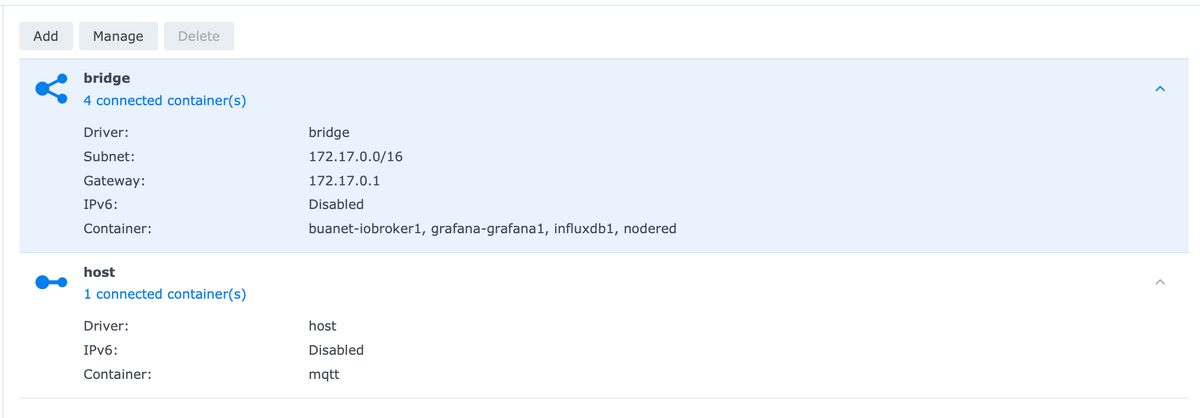
Die Synology selbst und der Raspberry sind unter 192.168.178.xxx zu erreichen.
-
@homoran OK - danke! Dann hat es sich ja schon mal gelohnt zu fragen... Wobei auch hier interessanterweise jsonl nicht als Option angegeben wird.
@sebhoff sagte in Multihost - Master in Synology Docker, Slave RPI - jsonl?:
Wobei auch hier interessanterweise jsonl nicht als Option angegeben wird.
ist historisch bedingt
-
@thomas-braun Sorry - keine Ahnung... Bin da leider nicht sehr bewandert.
Ich komme zu dieser Aussage, weil ich folgende Info in Docker sehe (sorry, wieder ein Screenshot - copy/paste geht nicht):
Die Synology selbst und der Raspberry sind unter 192.168.178.xxx zu erreichen.
@sebhoff sagte in Multihost - Master in Synology Docker, Slave RPI - jsonl?:
Bin da leider nicht sehr bewandert.
Und ich nicht von Docker-Setups.
-
@sebhoff sagte in Multihost - Master in Synology Docker, Slave RPI - jsonl?:
Bin da leider nicht sehr bewandert.
Und ich nicht von Docker-Setups.
Oh jeh - was ist denn jetzt auf einmal los...
host.buanet-iobroker1-Server 2023-06-11 21:01:58.743 error States 172.17.0.1:45550 (Init=false) Redis error:Error: Invalid Chunk: parse failed host.buanet-iobroker1-Server 2023-06-11 21:01:58.743 error States 172.17.0.1:45548 (Init=false) Redis error:Error: Invalid Chunk: parse failed host.buanet-iobroker1-Server 2023-06-11 21:01:58.742 error States 172.17.0.1:45546 (Init=false) Redis error:Error: Invalid Chunk: parse failed host.buanet-iobroker1-Server 2023-06-11 21:01:58.740 error States 172.17.0.1:45544 (Init=false) Redis error:Error: Invalid Chunk: parse failed host.buanet-iobroker1-Server 2023-06-11 21:01:58.726 error States 172.17.0.1:45542 (Init=false) Redis error:Error: Invalid Chunk: parse failed host.buanet-iobroker1-Server 2023-06-11 21:01:58.725 error States 172.17.0.1:45540 (Init=false) Redis error:Error: Invalid Chunk: parse failed host.buanet-iobroker1-Server 2023-06-11 21:01:58.721 error States 172.17.0.1:45538 (Init=false) Redis error:Error: Invalid Chunk: parse failed host.buanet-iobroker1-Server 2023-06-11 21:01:58.721 error States 172.17.0.1:45536 (Init=false) Redis error:Error: Invalid Chunk: parse failed -
Hallo in die Runde - nur zur Sicherheit, da das alles hier für mich doch recht neu ist...:
Ich möchte gerne dieser Anleitung folgen: https://www.iobroker.net/docu/index-24.htm?page_id=3068&lang=de Ziel ist, dass ich einen Raspberry Pi als slave laufen lassen kann, um an ihm dann einen ESP8266 via ESPhome via USB Port flashen zu können. (Via USB Port auf der Synology bekomme ich das nicht hin...)
Die beiden Hosts befinden sich in verschiedenen Subnetzen - ich kann also nicht einfach "sudo iobroker multihost enable" benutzen. Wenn ich nun in der iobroker docker shell "iobroker setup custom" ausführe, bekomme ich aber eine andere Auswahl als bei allen Webseiten (und der oben verlinkten Webseite) angegeben:
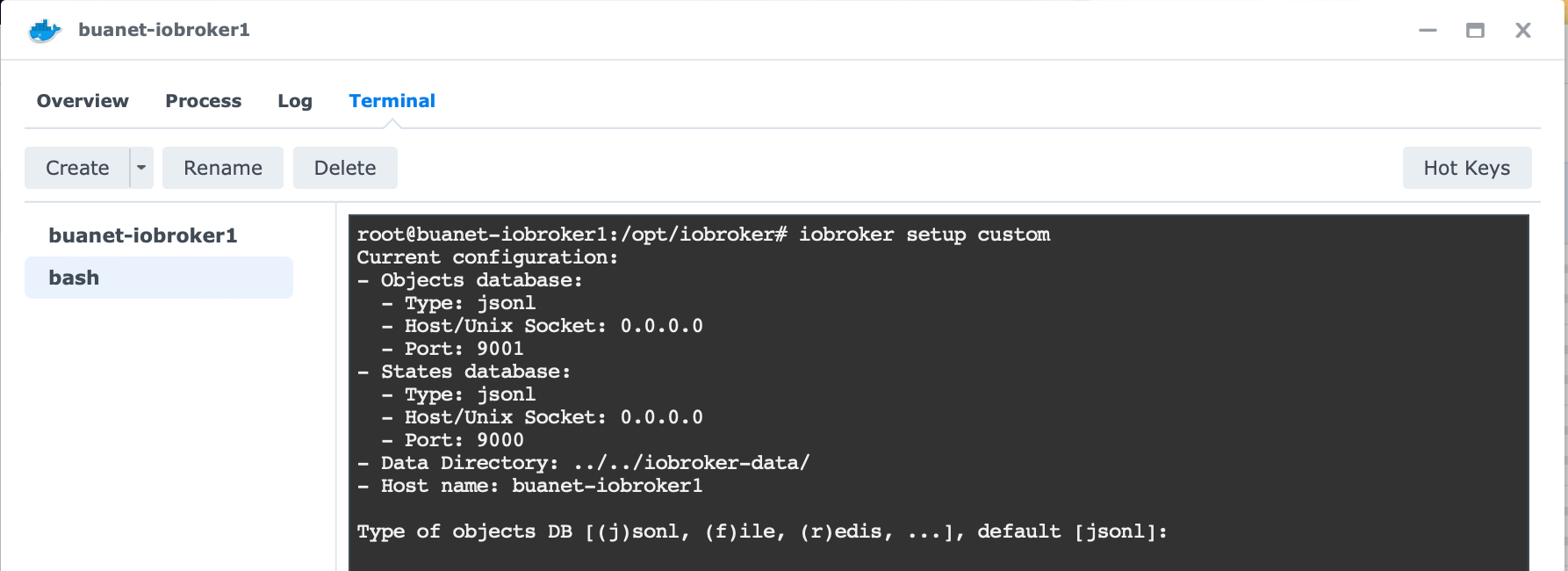
Ich gehe nun mal davon aus, dass ich nichts kaputt machen kann, wenn ich einfach die Defaults annehme (also jsonl anstelle von file oder redis) und die anderen Infos gemäß der Anleitung eingebe - oder?

Falls ich da doch irgendeinen Denkfehler mache, würde ich mich über einen kurzen Hinweis freuen. Vielen Dank!
Sebastian
@sebhoff sagte in Multihost - Master in Synology Docker, Slave RPI - jsonl?:
Wenn ich nun in der iobroker docker shell "iobroker setup custom" ausführe
Nix da ..
so
IOB_MULTIHOST = masterhttps://docs.buanet.de/iobroker-docker-image/docs/#environment-variables-env
https://docs.buanet.de/iobroker-docker-image/docs/#multihost
-
OK - ich habe es jetzt einfach mal versucht, und nachdem ich die Ports in Docker (hoffentlich) richtig geöffnet hatte, müsste es doch nun eigentlich klappen. Tut es aber nicht.
In der Docker bash (sorry - copy/paste geht nicht, deshalb screenshot):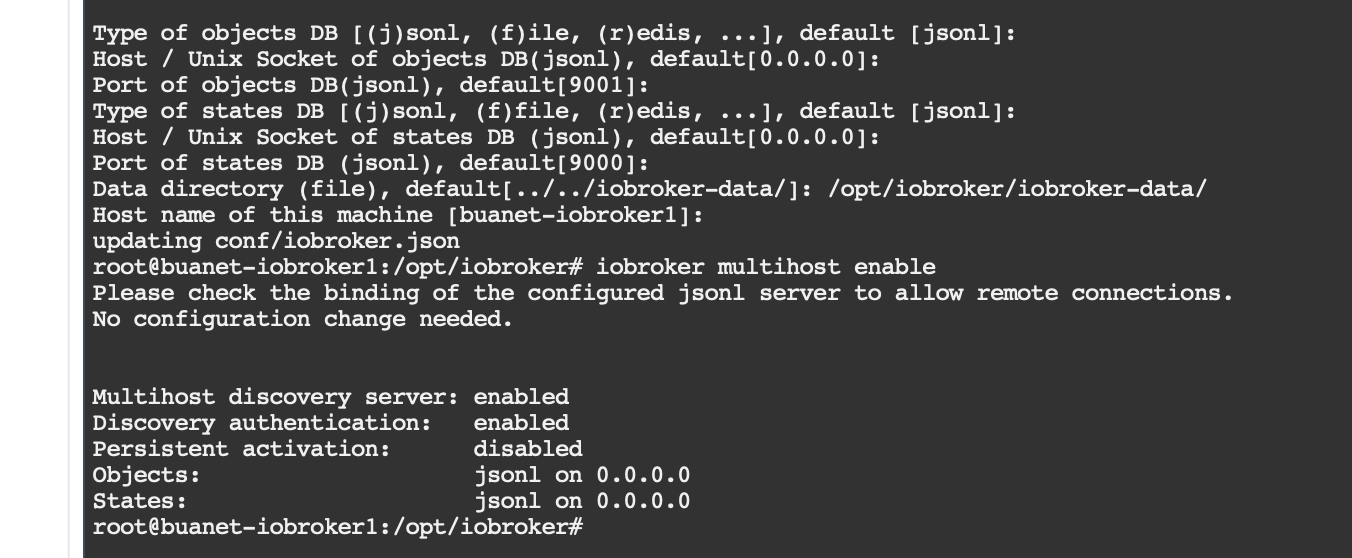
Dann im iobroker Log nachgeschaut:
host.buanet-iobroker1
2023-06-11 19:49:20.308	info	Multi-host discovery server: service started on 0.0.0.0:50005
Aber leider kommt dann auf dem Slave folgende Fehlermeldung:
pi@raspberrypi:~ $ iobroker setup custom
Current configuration:
- Objects database:
  - Type: jsonl
  - Host/Unix Socket: 192.168.178.135
  - Port: 9001
- States database:
  - Type: jsonl
  - Host/Unix Socket: 192.168.178.135
  - Port: 9000
- Data Directory: ../../iobroker-data/

Type of objects DB [(j)sonl, (f)ile, (r)edis, ...], default [jsonl]:
Host / Unix Socket of objects DB(jsonl), default[192.168.178.135]:
Port of objects DB(jsonl), default[9001]:
Type of states DB [(j)sonl, (f)file, (r)edis, ...], default [jsonl]:
Host / Unix Socket of states DB (jsonl), default[192.168.178.135]:
Port of states DB (jsonl), default[9000]:
Host name of this machine [raspberrypi]:
updating conf/iobroker.json
pi@raspberrypi:~ $ iobroker multihost connect
No Multihost server found. Make sure iobroker is running on the host where you enabled multihost discovery (and it is not this host)!
Sicher habe ich etwas Triviales übersehen (ich kenne mich...
 ) - hat jemand ggf. einen Tipp?
Sebastian
@sebhoff sagte in Multihost - Master in Synology Docker, Slave RPI - jsonl?:
OK - ich habe es jetzt einfach mal versucht, und nachdem ich die Ports in Docker (hoffentlich) richtig geöffnet hatte,
Zitat :
Die Umgebungsvariable IOB_MULTIHOST beim Master setzen. Je nach verwendetem Netzwerk (bei Bridge) müssen auch die Ports 9000 und 9001 geöffnet werden.https://forum.iobroker.net/topic/4733/howto-iobroker-unter-docker-auf-synology-diskstation/2206
-
@sebhoff sagte in Multihost - Master in Synology Docker, Slave RPI - jsonl?:
OK - ich habe es jetzt einfach mal versucht, und nachdem ich die Ports in Docker (hoffentlich) richtig geöffnet hatte,
Zitat :
Die Umgebungsvariable IOB_MULTIHOST beim Master setzen. Je nach verwendetem Netzwerk (bei Bridge) müssen auch die Ports 9000 und 9001 geöffnet werden.https://forum.iobroker.net/topic/4733/howto-iobroker-unter-docker-auf-synology-diskstation/2206
@glasfaser Danke! Ja - das habe ich glaube ich richtig gemacht (?):
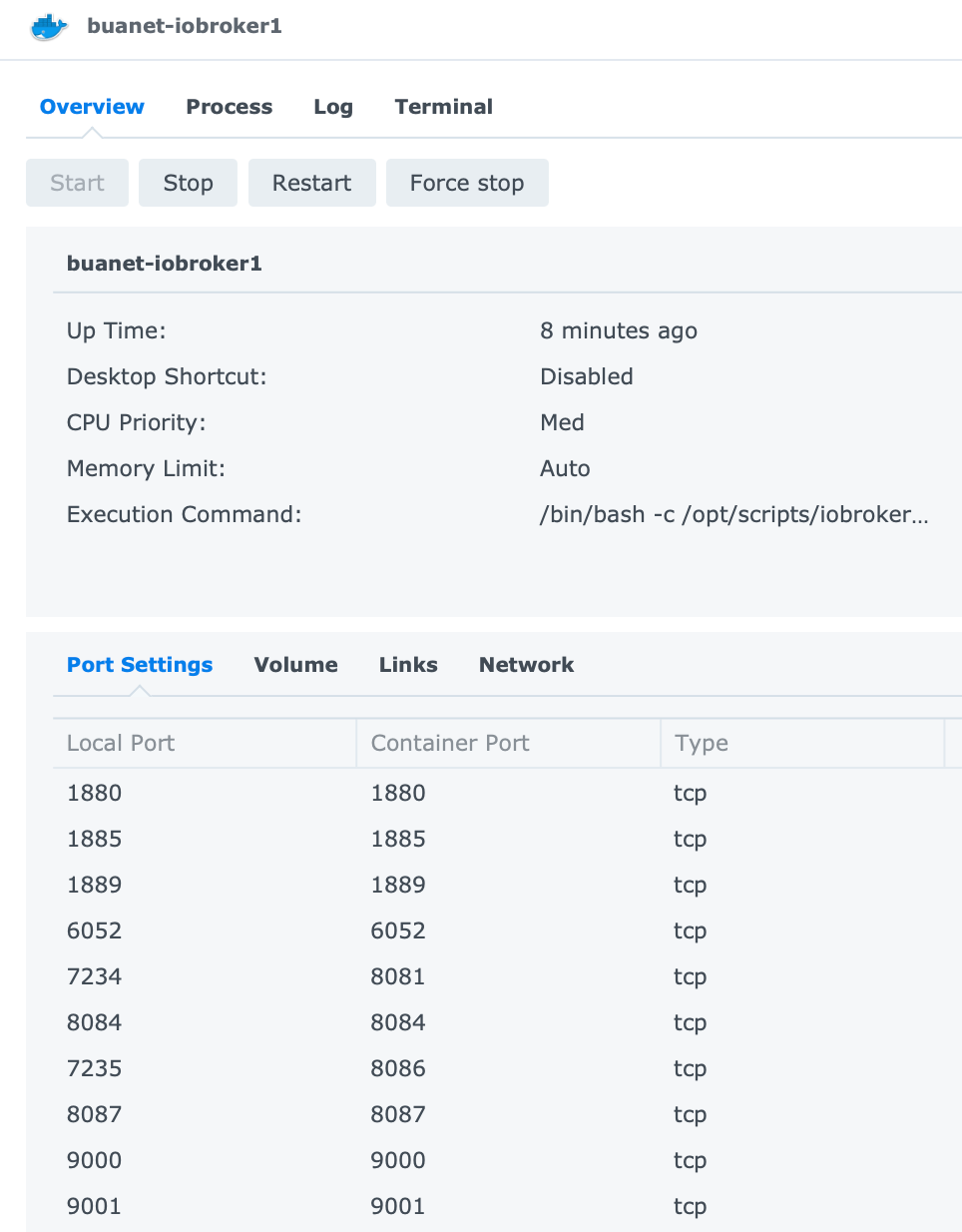
Die Environment Variable habe ich inzwischen auch eingegeben. Gebracht hat es noch nichts. Nach einem Neustart vom Container sind die logs wieder unauffällig.
Danke für die Geduld und die Unterstützung!
Sebastian
-
@glasfaser Danke! Ja - das habe ich glaube ich richtig gemacht (?):
Die Environment Variable habe ich inzwischen auch eingegeben. Gebracht hat es noch nichts. Nach einem Neustart vom Container sind die logs wieder unauffällig.
Danke für die Geduld und die Unterstützung!
Sebastian
-
Noch ne Frage zur ENV IOB_OBJECTSDB_HOST: In der alten Dokumentation stand "default[0.0.0.0]:", nun steht da "127.0.0.1" als Default. Meine Synology hat die 192.168.178.135, der Raspi 192.168.178.44.
Irgendwelche Vorschläge...? ;-)
SebastianLangsam nährt sich das Eichhörnchen...
Habe ENV IOB_OBJECTSDB_HOST nun auf 127.0.0.1 gestellt und bekomme jetzt was Neues:
pi@raspberrypi:~ $ iobroker multihost connect
 The DB port  9001 is occupied by something that is not a Redis protocol server. Please check other software running on this port or, if you use iobroker, make sure to update to js-controller 2.0 or higher!
 The DB port  9001 is occupied by something that is not a Redis protocol server. Please check other software running on this port or, if you use iobroker, make sure to update to js-controller 2.0 or higher!
 The DB port  9001 is occupied by something that is not a Redis protocol server. Please check other software running on this port or, if you use iobroker, make sure to update to js-controller 2.0 or higher!
Mhm. Portainer (wofür dann wohl Port 9001 belegt worden wäre) läuft bei mir nicht unter Docker - das hatte ich schon gelöscht…
Auf dem Raspberry sieht die Sache so aus:
pi@raspberrypi:~ $ iobroker setup custom
Current configuration:
- Objects database:
  - Type: jsonl
  - Host/Unix Socket: 192.168.178.135
  - Port: 9001
- States database:
  - Type: jsonl
  - Host/Unix Socket: 192.168.178.135
  - Port: 9000
- Data Directory: ../../iobroker-data/
Mache ich irgendeinen Denkfehler?
-
Langsam nährt sich das Eichhörnchen...
Habe ENV IOB_OBJECTSDB_HOST nun auf 127.0.0.1 gestellt und bekomme jetzt was Neues:
pi@raspberrypi:~ $ iobroker multihost connect
 The DB port  9001 is occupied by something that is not a Redis protocol server. Please check other software running on this port or, if you use iobroker, make sure to update to js-controller 2.0 or higher!
 The DB port  9001 is occupied by something that is not a Redis protocol server. Please check other software running on this port or, if you use iobroker, make sure to update to js-controller 2.0 or higher!
 The DB port  9001 is occupied by something that is not a Redis protocol server. Please check other software running on this port or, if you use iobroker, make sure to update to js-controller 2.0 or higher!
Mhm. Portainer (wofür dann wohl Port 9001 belegt worden wäre) läuft bei mir nicht unter Docker - das hatte ich schon gelöscht…
Auf dem Raspberry sieht die Sache so aus:
pi@raspberrypi:~ $ iobroker setup custom
Current configuration:
- Objects database:
  - Type: jsonl
  - Host/Unix Socket: 192.168.178.135
  - Port: 9001
- States database:
  - Type: jsonl
  - Host/Unix Socket: 192.168.178.135
  - Port: 9000
- Data Directory: ../../iobroker-data/
Mache ich irgendeinen Denkfehler?
-
Könnte es ggf. etwas mit dem mqtt container zu tun haben? Ich habe gelesen, dass dieser möglicherweise auf Port 9001 "die Ohren offen hat"...? In mosquitto.conf steht bei mir allerdings nur "listener 1883".
<seufz> -
@glasfaser said in Multihost - Master in Synology Docker, Slave RPI - jsonl?:
iob diag
Uhm. Gibt es eine Möglichkeit, den Output irgendwie zu exportieren? Ich schaffe es nicht, den Output in der Docker shell (im Browser) mit Copy/Paste zu sichern - ich kann die Sache schlicht nicht als Ganzes markieren...
-
@glasfaser said in Multihost - Master in Synology Docker, Slave RPI - jsonl?:
iob diag
Uhm. Gibt es eine Möglichkeit, den Output irgendwie zu exportieren? Ich schaffe es nicht, den Output in der Docker shell (im Browser) mit Copy/Paste zu sichern - ich kann die Sache schlicht nicht als Ganzes markieren...
@sebhoff sagte in Multihost - Master in Synology Docker, Slave RPI - jsonl?:
Gibt es eine Möglichkeit, den Output irgendwie zu exportieren?
Welches Terminal verwendest du? Kann man dem Docker nicht mit SSH und einer gescheiten Konsole auf den Leib rücken?
Eine Ausgabe in Dateiform findet sich aber auch in /home/iobroker
-
@sebhoff sagte in Multihost - Master in Synology Docker, Slave RPI - jsonl?:
Gibt es eine Möglichkeit, den Output irgendwie zu exportieren?
Welches Terminal verwendest du? Kann man dem Docker nicht mit SSH und einer gescheiten Konsole auf den Leib rücken?
Eine Ausgabe in Dateiform findet sich aber auch in /home/iobroker
@thomas-braun Ich rufe das web-interface der Synology auf, öffne Docker, lasse mir die laufenden Container anzeigen und wähle buanet-iobroker1 via double-click aus und dann den Reiter "Terminal". Dann "Create" -> dann habe ich eine neue Shell...
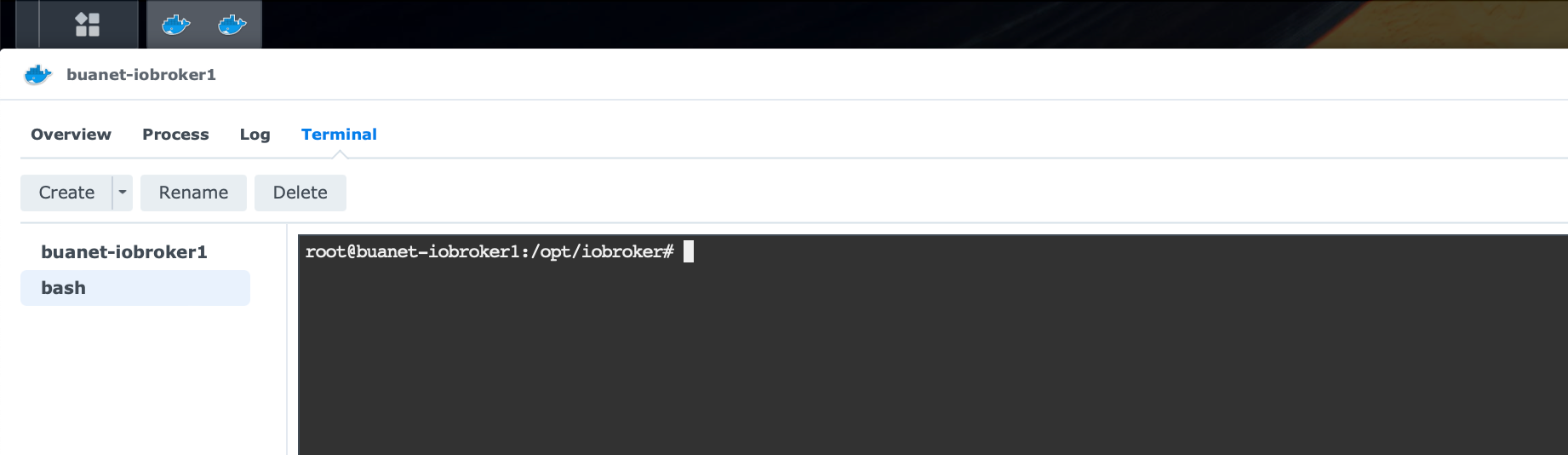
Das Ganze funktioniert, aber sehr mühsam. Ich google jetzt mal, ob ich was Besseres finde...
-
@thomas-braun Ich rufe das web-interface der Synology auf, öffne Docker, lasse mir die laufenden Container anzeigen und wähle buanet-iobroker1 via double-click aus und dann den Reiter "Terminal". Dann "Create" -> dann habe ich eine neue Shell...
Das Ganze funktioniert, aber sehr mühsam. Ich google jetzt mal, ob ich was Besseres finde...
Ich würde ja ein 'richtiges' Terminal verwenden und per SSH auf die Kiste gehen. Die PowerShell z. B. ist ganz brauchbar unter Windows. Vergiss puTTY, das ist Mumpf, imho.
-
Ich würde ja ein 'richtiges' Terminal verwenden und per SSH auf die Kiste gehen. Die PowerShell z. B. ist ganz brauchbar unter Windows. Vergiss puTTY, das ist Mumpf, imho.
@thomas-braun Ja - ich muss nur herausfinden wie. Bin auf einem Mac unterwegs und habe da natürlich ein sinnvolles Terminal. Bis jetzt war ich davon ausgegangen, dass ich nicht SSH in einen Container machen kann. Aber das ist wahrscheinlich falsch...
-
@thomas-braun Ich rufe das web-interface der Synology auf, öffne Docker, lasse mir die laufenden Container anzeigen und wähle buanet-iobroker1 via double-click aus und dann den Reiter "Terminal". Dann "Create" -> dann habe ich eine neue Shell...
Das Ganze funktioniert, aber sehr mühsam. Ich google jetzt mal, ob ich was Besseres finde...
@sebhoff das thema hatten wir schon gestern
https://forum.iobroker.net/post/1002370
@Thomas-Braun
Immer diese Docker Experten , machen alles über die Web-Ui
Synology 918+ 16GB - ioBroker in Docker v9 , VISO auf Trekstor Primebook C13 13,3" , Hikvision Domkameras mit Surveillance Station .. CCU RaspberryMatic in Synology VM .. Zigbee CC2538+CC2592 .. Sonoff .. KNX .. Modbus ..
-
@sebhoff das thema hatten wir schon gestern
https://forum.iobroker.net/post/1002370
@Thomas-Braun
Immer diese Docker Experten , machen alles über die Web-Ui@glasfaser Ahhh - danke! Das hatte ich übersehen. Sorry.
-
@sebhoff das thema hatten wir schon gestern
https://forum.iobroker.net/post/1002370
@Thomas-Braun
Immer diese Docker Experten , machen alles über die Web-Ui@glasfaser sagte in Multihost - Master in Synology Docker, Slave RPI - jsonl?:
Docker Experten
Im Umkehrschluß: Da ich kein Docker-Experte bin muss ich mit einem Terminal arbeiten.
-
@glasfaser So - nun habe ich es geschafft...
Raspberry:
Skript v.2023-04-16

*** BASE SYSTEM ***
Model		: Raspberry Pi 4 Model B Rev 1.5
Architecture    : aarch64
Docker          : false
Virtualization  : none
Distributor ID:	Raspbian
Description:	Raspbian GNU/Linux 11 (bullseye)
Release:	11
Codename:	bullseye

PRETTY_NAME="Raspbian GNU/Linux 11 (bullseye)"
NAME="Raspbian GNU/Linux"
VERSION_ID="11"
VERSION="11 (bullseye)"
VERSION_CODENAME=bullseye
ID=raspbian
ID_LIKE=debian
HOME_URL="http://www.raspbian.org/"
SUPPORT_URL="http://www.raspbian.org/RaspbianForums"
BUG_REPORT_URL="http://www.raspbian.org/RaspbianBugs"

Systemuptime and Load:
 19:10:07 up 1 min,  3 users,  load average: 0.98, 0.35, 0.12
CPU threads: 4

Raspberry only:
throttled=0x0
Other values than 0x0 hint to temperature/voltage problems
temp=40.4'C
volt=0.9160V

*** Time and Time Zones ***
               Local time: Mon 2023-06-12 19:10:07 CEST
           Universal time: Mon 2023-06-12 17:10:07 UTC
                 RTC time: n/a
                Time zone: Europe/Berlin (CEST, +0200)
System clock synchronized: yes
              NTP service: active
          RTC in local TZ: no

*** User and Groups ***
pi
/home/pi
pi adm dialout cdrom sudo audio www-data video plugdev games users input render netdev lpadmin gpio i2c spi iobroker

*** X-Server-Setup ***
X-Server: 	true
Desktop:
Terminal: 	tty
Boot Target: 	graphical.target

*** MEMORY ***
               total        used        free      shared  buff/cache   available
Mem:            7.8G        298M        7.0G         42M        520M        7.4G
Swap:            99M          0B         99M
Total:          7.9G        298M        7.1G

         7811 M total memory
          298 M used memory
          547 M active memory
          123 M inactive memory
         6992 M free memory
           37 M buffer memory
          483 M swap cache
           99 M total swap
            0 M used swap
           99 M free swap

Raspberry only:
oom events: 0
lifetime oom required: 0 Mbytes
total time in oom handler: 0 ms
max time spent in oom handler: 0 ms

*** FILESYSTEM ***
Filesystem     Type      Size  Used Avail Use% Mounted on
/dev/root      ext4      110G  7.3G   97G   8% /
devtmpfs       devtmpfs  3.6G     0  3.6G   0% /dev
tmpfs          tmpfs     3.9G     0  3.9G   0% /dev/shm
tmpfs          tmpfs     1.6G  1.2M  1.6G   1% /run
tmpfs          tmpfs     5.0M  4.0K  5.0M   1% /run/lock
/dev/sda1      vfat      253M   52M  201M  21% /boot
tmpfs          tmpfs     782M   24K  782M   1% /run/user/1000

Messages concerning ext4 filesystem in dmesg:
[Mon Jun 12 19:09:06 2023] Kernel command line: coherent_pool=1M 8250.nr_uarts=1 snd_bcm2835.enable_headphones=0 snd_bcm2835.enable_headphones=1 snd_bcm2835.enable_hdmi=1 snd_bcm2835.enable_hdmi=0  smsc95xx.macaddr=D8:3A:DD:0A:FB:70 vc_mem.mem_base=0x3eb00000 vc_mem.mem_size=0x3ff00000  console=ttyS0,115200 console=tty1 root=PARTUUID=ecf8b169-02 rootfstype=ext4 fsck.repair=yes rootwait quiet splash plymouth.ignore-serial-consoles
[Mon Jun 12 19:09:09 2023] EXT4-fs (sda2): mounted filesystem with ordered data mode. Quota mode: none.
[Mon Jun 12 19:09:09 2023] VFS: Mounted root (ext4 filesystem) readonly on device 8:2.
[Mon Jun 12 19:09:11 2023] EXT4-fs (sda2): re-mounted. Quota mode: none.

Show mounted filesystems (real ones only):
TARGET  SOURCE    FSTYPE OPTIONS
/       /dev/sda2 ext4   rw,noatime
`-/boot /dev/sda1 vfat   rw,relatime,fmask=0022,dmask=0022,codepage=437,iocharset=ascii,shortname=mixed,errors=remount-ro

Files in neuralgic directories:

/var:
976M	/var/
459M	/var/log
457M	/var/log/journal/d0ff3fe7bc51440c943b485698aeaf33
457M	/var/log/journal
258M	/var/cache

Archived and active journals take up 456.0M in the file system.

/opt/iobroker/backups:
4.0K	/opt/iobroker/backups/

/opt/iobroker/iobroker-data:
40M	/opt/iobroker/iobroker-data/
19M	/opt/iobroker/iobroker-data/backup-objects
15M	/opt/iobroker/iobroker-data/files
13M	/opt/iobroker/iobroker-data/files/admin.admin/custom/static/js
13M	/opt/iobroker/iobroker-data/files/admin.admin/custom/static

The five largest files in iobroker-data are:
6.4M	/opt/iobroker/iobroker-data/objects.jsonl
6.3M	/opt/iobroker/iobroker-data/files/admin.admin/custom/static/js/vendors-node_modules_iobroker_adapter-react-v5_assets_devices_parseNames_js-node_modules_iobr-99c23e.847b8ad9.chunk.js.map
2.8M	/opt/iobroker/iobroker-data/files/admin.admin/custom/static/js/vendors-node_modules_iobroker_adapter-react-v5_assets_devices_parseNames_js-node_modules_iobr-99c23e.847b8ad9.chunk.js
1.6M	/opt/iobroker/iobroker-data/files/admin.admin/custom/static/js/vendors-node_modules_mui_material_Accordion_index_js-node_modules_mui_material_AccordionDetai-57e02d.0886b730.chunk.js.map
1.1M	/opt/iobroker/iobroker-data/backup-objects/2023-06-12_17-27_objects.jsonl.gz

*** NodeJS-Installation ***

/usr/bin/nodejs 	v20.2.0
/usr/bin/node 		v20.2.0
/usr/bin/npm 		9.6.6
/usr/bin/npx 		9.6.6


nodejs:
  Installed: 20.2.0-deb-1nodesource1
  Candidate: 20.2.0-deb-1nodesource1
  Version table:
 *** 20.2.0-deb-1nodesource1 500
        500 https://deb.nodesource.com/node_20.x bullseye/main armhf Packages
        100 /var/lib/dpkg/status
     12.22.12~dfsg-1~deb11u4 500
        500 http://raspbian.raspberrypi.org/raspbian bullseye/main armhf Packages

Temp directories causing npm8 problem: 0
No problems detected

*** ioBroker-Installation ***

ioBroker Status
 The DB port  9001 is occupied by something that is not a Redis protocol server. Please check other software running on this port or, if you use iobroker, make sure to update to js-controller 2.0 or higher!
 The DB port  9001 is occupied by something that is not a Redis protocol server. Please check other software running on this port or, if you use iobroker, make sure to update to js-controller 2.0 or higher!
 The DB port  9001 is occupied by something that is not a Redis protocol server. Please check other software running on this port or, if you use iobroker, make sure to update to js-controller 2.0 or higher!
 The DB port  9001 is occupied by something that is not a Redis protocol server. Please check other software running on this port or, if you use iobroker, make sure to update to js-controller 2.0 or higher!
 The DB port  9001 is occupied by something that is not a Redis protocol server. Please check other software running on this port or, if you use iobroker, make sure to update to js-controller 2.0 or higher!
 The DB port  9001 is occupied by something that is not a Redis protocol server. Please check other software running on this port or, if you use iobroker, make sure to update to js-controller 2.0 or higher!
 The DB port  9001 is occupied by something that is not a Redis protocol server. Please check other software running on this port or, if you use iobroker, make sure to update to js-controller 2.0 or higher!
 The DB port  9001 is occupied by something that is not a Redis protocol server. Please check other software running on this port or, if you use iobroker, make sure to update to js-controller 2.0 or higher!
 The DB port  9001 is occupied by something that is not a Redis protocol server. Please check other software running on this port or, if you use iobroker, make sure to update to js-controller 2.0 or higher!
 The DB port  9001 is occupied by something that is not a Redis protocol server. Please check other software running on this port or, if you use iobroker, make sure to update to js-controller 2.0 or higher!
 The DB port  9001 is occupied by something that is not a Redis protocol server. Please check other software running on this port or, if you use iobroker, make sure to update to js-controller 2.0 or higher!
 The DB port  9001 is occupied by something that is not a Redis protocol server. Please check other software running on this port or, if you use iobroker, make sure to update to js-controller 2.0 or higher!
 The DB port  9001 is occupied by something that is not a Redis protocol server. Please check other software running on this port or, if you use iobroker, make sure to update to js-controller 2.0 or higher!
 The DB port  9001 is occupied by something that is not a Redis protocol server. Please check other software running on this port or, if you use iobroker, make sure to update to js-controller 2.0 or higher!
 The DB port  9001 is occupied by something that is not a Redis protocol server. Please check other software running on this port or, if you use iobroker, make sure to update to js-controller 2.0 or higher!
 The DB port  9001 is occupied by something that is not a Redis protocol server. Please check other software running on this port or, if you use iobroker, make sure to update to js-controller 2.0 or higher!
 The DB port  9001 is occupied by something that is not a Redis protocol server. Please check other software running on this port or, if you use iobroker, make sure to update to js-controller 2.0 or higher!
 The DB port  9001 is occupied by something that is not a Redis protocol server. Please check other software running on this port or, if you use iobroker, make sure to update to js-controller 2.0 or higher!
 The DB port  9001 is occupied by something that is not a Redis protocol server. Please check other software running on this port or, if you use iobroker, make sure to update to js-controller 2.0 or higher!
 The DB port  9001 is occupied by something that is not a Redis protocol server. Please check other software running on this port or, if you use iobroker, make sure to update to js-controller 2.0 or higher!
 The DB port  9001 is occupied by something that is not a Redis protocol server. Please check other software running on this port or, if you use iobroker, make sure to update to js-controller 2.0 or higher!
 The DB port  9001 is occupied by something that is not a Redis protocol server. Please check other software running on this port or, if you use iobroker, make sure to update to js-controller 2.0 or higher!
 The DB port  9001 is occupied by something that is not a Redis protocol server. Please check other software running on this port or, if you use iobroker, make sure to update to js-controller 2.0 or higher!
 The DB port  9001 is occupied by something that is not a Redis protocol server. Please check other software running on this port or, if you use iobroker, make sure to update to js-controller 2.0 or higher!
 The DB port  9001 is occupied by something that is not a Redis protocol server. Please check other software running on this port or, if you use iobroker, make sure to update to js-controller 2.0 or higher!
 The DB port  9001 is occupied by something that is not a Redis protocol server. Please check other software running on this port or, if you use iobroker, make sure to update to js-controller 2.0 or higher!
No connection to databases possible ...


Core adapters versions
js-controller: 	4.0.24
admin: 		6.3.5
javascript: 	"javascript" not found

Adapters from github: 	0

Adapter State
 The DB port  9000 is occupied by something that is not a Redis protocol server. Please check other software running on this port or, if you use iobroker, make sure to update to js-controller 2.0 or higher!
 The DB port  9001 is occupied by something that is not a Redis protocol server. Please check other software running on this port or, if you use iobroker, make sure to update to js-controller 2.0 or higher!
 The DB port  9001 is occupied by something that is not a Redis protocol server. Please check other software running on this port or, if you use iobroker, make sure to update to js-controller 2.0 or higher!
 The DB port  9001 is occupied by something that is not a Redis protocol server. Please check other software running on this port or, if you use iobroker, make sure to update to js-controller 2.0 or higher!
 The DB port  9001 is occupied by something that is not a Redis protocol server. Please check other software running on this port or, if you use iobroker, make sure to update to js-controller 2.0 or higher!
 The DB port  9001 is occupied by something that is not a Redis protocol server. Please check other software running on this port or, if you use iobroker, make sure to update to js-controller 2.0 or higher!
 The DB port  9001 is occupied by something that is not a Redis protocol server. Please check other software running on this port or, if you use iobroker, make sure to update to js-controller 2.0 or higher!
 The DB port  9001 is occupied by something that is not a Redis protocol server. Please check other software running on this port or, if you use iobroker, make sure to update to js-controller 2.0 or higher!
 The DB port  9001 is occupied by something that is not a Redis protocol server. Please check other software running on this port or, if you use iobroker, make sure to update to js-controller 2.0 or higher!
 The DB port  9001 is occupied by something that is not a Redis protocol server. Please check other software running on this port or, if you use iobroker, make sure to update to js-controller 2.0 or higher!
 The DB port  9001 is occupied by something that is not a Redis protocol server. Please check other software running on this port or, if you use iobroker, make sure to update to js-controller 2.0 or higher!
 The DB port  9001 is occupied by something that is not a Redis protocol server. Please check other software running on this port or, if you use iobroker, make sure to update to js-controller 2.0 or higher!
 The DB port  9001 is occupied by something that is not a Redis protocol server. Please check other software running on this port or, if you use iobroker, make sure to update to js-controller 2.0 or higher!
 The DB port  9001 is occupied by something that is not a Redis protocol server. Please check other software running on this port or, if you use iobroker, make sure to update to js-controller 2.0 or higher!
 The DB port  9001 is occupied by something that is not a Redis protocol server. Please check other software running on this port or, if you use iobroker, make sure to update to js-controller 2.0 or higher!
 The DB port  9001 is occupied by something that is not a Redis protocol server. Please check other software running on this port or, if you use iobroker, make sure to update to js-controller 2.0 or higher!
 The DB port  9001 is occupied by something that is not a Redis protocol server. Please check other software running on this port or, if you use iobroker, make sure to update to js-controller 2.0 or higher!
 The DB port  9001 is occupied by something that is not a Redis protocol server. Please check other software running on this port or, if you use iobroker, make sure to update to js-controller 2.0 or higher!
 The DB port  9001 is occupied by something that is not a Redis protocol server. Please check other software running on this port or, if you use iobroker, make sure to update to js-controller 2.0 or higher!
 The DB port  9001 is occupied by something that is not a Redis protocol server. Please check other software running on this port or, if you use iobroker, make sure to update to js-controller 2.0 or higher!
 The DB port  9001 is occupied by something that is not a Redis protocol server. Please check other software running on this port or, if you use iobroker, make sure to update to js-controller 2.0 or higher!
 The DB port  9001 is occupied by something that is not a Redis protocol server. Please check other software running on this port or, if you use iobroker, make sure to update to js-controller 2.0 or higher!
 The DB port  9001 is occupied by something that is not a Redis protocol server. Please check other software running on this port or, if you use iobroker, make sure to update to js-controller 2.0 or higher!
 The DB port  9001 is occupied by something that is not a Redis protocol server. Please check other software running on this port or, if you use iobroker, make sure to update to js-controller 2.0 or higher!
 The DB port  9001 is occupied by something that is not a Redis protocol server. Please check other software running on this port or, if you use iobroker, make sure to update to js-controller 2.0 or higher!
 The DB port  9001 is occupied by something that is not a Redis protocol server. Please check other software running on this port or, if you use iobroker, make sure to update to js-controller 2.0 or higher!
 The DB port  9001 is occupied by something that is not a Redis protocol server. Please check other software running on this port or, if you use iobroker, make sure to update to js-controller 2.0 or higher!
 The DB port  9001 is occupied by something that is not a Redis protocol server. Please check other software running on this port or, if you use iobroker, make sure to update to js-controller 2.0 or higher!
 The DB port  9001 is occupied by something that is not a Redis protocol server. Please check other software running on this port or, if you use iobroker, make sure to update to js-controller 2.0 or higher!
No connection to databases possible ...

Enabled adapters with bindings

ioBroker-Repositories
 The DB port  9001 is occupied by something that is not a Redis protocol server. Please check other software running on this port or, if you use iobroker, make sure to update to js-controller 2.0 or higher!
 The DB port  9001 is occupied by something that is not a Redis protocol server. Please check other software running on this port or, if you use iobroker, make sure to update to js-controller 2.0 or higher!
 The DB port  9001 is occupied by something that is not a Redis protocol server. Please check other software running on this port or, if you use iobroker, make sure to update to js-controller 2.0 or higher!
 The DB port  9001 is occupied by something that is not a Redis protocol server. Please check other software running on this port or, if you use iobroker, make sure to update to js-controller 2.0 or higher!
 The DB port  9001 is occupied by something that is not a Redis protocol server. Please check other software running on this port or, if you use iobroker, make sure to update to js-controller 2.0 or higher!
 The DB port  9001 is occupied by something that is not a Redis protocol server. Please check other software running on this port or, if you use iobroker, make sure to update to js-controller 2.0 or higher!
 The DB port  9001 is occupied by something that is not a Redis protocol server. Please check other software running on this port or, if you use iobroker, make sure to update to js-controller 2.0 or higher!
 The DB port  9001 is occupied by something that is not a Redis protocol server. Please check other software running on this port or, if you use iobroker, make sure to update to js-controller 2.0 or higher!
 The DB port  9001 is occupied by something that is not a Redis protocol server. Please check other software running on this port or, if you use iobroker, make sure to update to js-controller 2.0 or higher!
 The DB port  9001 is occupied by something that is not a Redis protocol server. Please check other software running on this port or, if you use iobroker, make sure to update to js-controller 2.0 or higher!
 The DB port  9001 is occupied by something that is not a Redis protocol server. Please check other software running on this port or, if you use iobroker, make sure to update to js-controller 2.0 or higher!
 The DB port  9001 is occupied by something that is not a Redis protocol server. Please check other software running on this port or, if you use iobroker, make sure to update to js-controller 2.0 or higher!
 The DB port  9001 is occupied by something that is not a Redis protocol server. Please check other software running on this port or, if you use iobroker, make sure to update to js-controller 2.0 or higher!
 The DB port  9001 is occupied by something that is not a Redis protocol server. Please check other software running on this port or, if you use iobroker, make sure to update to js-controller 2.0 or higher!
 The DB port  9001 is occupied by something that is not a Redis protocol server. Please check other software running on this port or, if you use iobroker, make sure to update to js-controller 2.0 or higher!
 The DB port  9001 is occupied by something that is not a Redis protocol server. Please check other software running on this port or, if you use iobroker, make sure to update to js-controller 2.0 or higher!
 The DB port  9001 is occupied by something that is not a Redis protocol server. Please check other software running on this port or, if you use iobroker, make sure to update to js-controller 2.0 or higher!
 The DB port  9001 is occupied by something that is not a Redis protocol server. Please check other software running on this port or, if you use iobroker, make sure to update to js-controller 2.0 or higher!
 The DB port  9001 is occupied by something that is not a Redis protocol server. Please check other software running on this port or, if you use iobroker, make sure to update to js-controller 2.0 or higher!
 The DB port  9001 is occupied by something that is not a Redis protocol server. Please check other software running on this port or, if you use iobroker, make sure to update to js-controller 2.0 or higher!
 The DB port  9001 is occupied by something that is not a Redis protocol server. Please check other software running on this port or, if you use iobroker, make sure to update to js-controller 2.0 or higher!
 The DB port  9001 is occupied by something that is not a Redis protocol server. Please check other software running on this port or, if you use iobroker, make sure to update to js-controller 2.0 or higher!
 The DB port  9001 is occupied by something that is not a Redis protocol server. Please check other software running on this port or, if you use iobroker, make sure to update to js-controller 2.0 or higher!
 The DB port  9001 is occupied by something that is not a Redis protocol server. Please check other software running on this port or, if you use iobroker, make sure to update to js-controller 2.0 or higher!
 The DB port  9001 is occupied by something that is not a Redis protocol server. Please check other software running on this port or, if you use iobroker, make sure to update to js-controller 2.0 or higher!
 The DB port  9001 is occupied by something that is not a Redis protocol server. Please check other software running on this port or, if you use iobroker, make sure to update to js-controller 2.0 or higher!
 The DB port  9001 is occupied by something that is not a Redis protocol server. Please check other software running on this port or, if you use iobroker, make sure to update to js-controller 2.0 or higher!
 The DB port  9001 is occupied by something that is not a Redis protocol server. Please check other software running on this port or, if you use iobroker, make sure to update to js-controller 2.0 or higher!
No connection to databases possible ...

Installed ioBroker-Instances
 The DB port  9001 is occupied by something that is not a Redis protocol server. Please check other software running on this port or, if you use iobroker, make sure to update to js-controller 2.0 or higher!
 The DB port  9001 is occupied by something that is not a Redis protocol server. Please check other software running on this port or, if you use iobroker, make sure to update to js-controller 2.0 or higher!
 The DB port  9001 is occupied by something that is not a Redis protocol server. Please check other software running on this port or, if you use iobroker, make sure to update to js-controller 2.0 or higher!
 The DB port  9001 is occupied by something that is not a Redis protocol server. Please check other software running on this port or, if you use iobroker, make sure to update to js-controller 2.0 or higher!
 The DB port  9001 is occupied by something that is not a Redis protocol server. Please check other software running on this port or, if you use iobroker, make sure to update to js-controller 2.0 or higher!
 The DB port  9001 is occupied by something that is not a Redis protocol server. Please check other software running on this port or, if you use iobroker, make sure to update to js-controller 2.0 or higher!
 The DB port  9001 is occupied by something that is not a Redis protocol server. Please check other software running on this port or, if you use iobroker, make sure to update to js-controller 2.0 or higher!
 The DB port  9001 is occupied by something that is not a Redis protocol server. Please check other software running on this port or, if you use iobroker, make sure to update to js-controller 2.0 or higher!
 The DB port  9001 is occupied by something that is not a Redis protocol server. Please check other software running on this port or, if you use iobroker, make sure to update to js-controller 2.0 or higher!
 The DB port  9001 is occupied by something that is not a Redis protocol server. Please check other software running on this port or, if you use iobroker, make sure to update to js-controller 2.0 or higher!
 The DB port  9001 is occupied by something that is not a Redis protocol server. Please check other software running on this port or, if you use iobroker, make sure to update to js-controller 2.0 or higher!
 The DB port  9001 is occupied by something that is not a Redis protocol server. Please check other software running on this port or, if you use iobroker, make sure to update to js-controller 2.0 or higher!
 The DB port  9001 is occupied by something that is not a Redis protocol server. Please check other software running on this port or, if you use iobroker, make sure to update to js-controller 2.0 or higher!
 The DB port  9001 is occupied by something that is not a Redis protocol server. Please check other software running on this port or, if you use iobroker, make sure to update to js-controller 2.0 or higher!
 The DB port  9001 is occupied by something that is not a Redis protocol server. Please check other software running on this port or, if you use iobroker, make sure to update to js-controller 2.0 or higher!
 The DB port  9001 is occupied by something that is not a Redis protocol server. Please check other software running on this port or, if you use iobroker, make sure to update to js-controller 2.0 or higher!
 The DB port  9001 is occupied by something that is not a Redis protocol server. Please check other software running on this port or, if you use iobroker, make sure to update to js-controller 2.0 or higher!
 The DB port  9001 is occupied by something that is not a Redis protocol server. Please check other software running on this port or, if you use iobroker, make sure to update to js-controller 2.0 or higher!
 The DB port  9001 is occupied by something that is not a Redis protocol server. Please check other software running on this port or, if you use iobroker, make sure to update to js-controller 2.0 or higher!
 The DB port  9001 is occupied by something that is not a Redis protocol server. Please check other software running on this port or, if you use iobroker, make sure to update to js-controller 2.0 or higher!
 The DB port  9001 is occupied by something that is not a Redis protocol server. Please check other software running on this port or, if you use iobroker, make sure to update to js-controller 2.0 or higher!
 The DB port  9001 is occupied by something that is not a Redis protocol server. Please check other software running on this port or, if you use iobroker, make sure to update to js-controller 2.0 or higher!
 The DB port  9001 is occupied by something that is not a Redis protocol server. Please check other software running on this port or, if you use iobroker, make sure to update to js-controller 2.0 or higher!
 The DB port  9001 is occupied by something that is not a Redis protocol server. Please check other software running on this port or, if you use iobroker, make sure to update to js-controller 2.0 or higher!
 The DB port  9001 is occupied by something that is not a Redis protocol server. Please check other software running on this port or, if you use iobroker, make sure to update to js-controller 2.0 or higher!
No connection to databases possible ...

Objects and States
Please stand by - This may take a while
Objects: 	26
States: 	29

*** OS-Repositories and Updates ***
Hit:1 http://raspbian.raspberrypi.org/raspbian bullseye InRelease
Hit:2 http://archive.raspberrypi.org/debian bullseye InRelease
Hit:3 https://repos.influxdata.com/debian stable InRelease
Hit:4 https://deb.nodesource.com/node_20.x bullseye InRelease
Hit:5 https://repos.influxdata.com/debian bullseye InRelease
Reading package lists...
Pending Updates: 0

*** Listening Ports ***
Active Internet connections (only servers)
Proto Recv-Q Send-Q Local Address           Foreign Address         State       User       Inode      PID/Program name
tcp        0      0 127.0.0.1:631           0.0.0.0:*               LISTEN      0          12999      597/cupsd
tcp        0      0 0.0.0.0:22              0.0.0.0:*               LISTEN      0          14665      638/sshd: /usr/sbin
tcp        0      0 0.0.0.0:5900            0.0.0.0:*               LISTEN      0          16502      623/vncserver-x11-c
tcp        0      0 0.0.0.0:1883            0.0.0.0:*               LISTEN      116        14650      612/mosquitto
tcp        0      0 0.0.0.0:1880            0.0.0.0:*               LISTEN      1000       17141      456/node-red
tcp        0      0 127.0.0.1:8088          0.0.0.0:*               LISTEN      999        16480      458/influxd
tcp6       0      0 :::8086                 :::*                    LISTEN      999        17182      458/influxd
tcp6       0      0 ::1:631                 :::*                    LISTEN      0          12998      597/cupsd
tcp6       0      0 :::22                   :::*                    LISTEN      0          14667      638/sshd: /usr/sbin
tcp6       0      0 :::80                   :::*                    LISTEN      0          16429      663/apache2
tcp6       0      0 :::5900                 :::*                    LISTEN      0          16501      623/vncserver-x11-c
tcp6       0      0 :::1883                 :::*                    LISTEN      116        14651      612/mosquitto
udp        0      0 0.0.0.0:54638           0.0.0.0:*                           108        15900      433/avahi-daemon: r
udp        0      0 0.0.0.0:68              0.0.0.0:*                           0          17584      511/dhcpcd
udp        0      0 0.0.0.0:631             0.0.0.0:*                           0          16497      756/cups-browsed
udp        0      0 0.0.0.0:5353            0.0.0.0:*                           108        15898      433/avahi-daemon: r
udp6       0      0 :::46829                :::*                                108        15901      433/avahi-daemon: r
udp6       0      0 :::5353                 :::*                                108        15899      433/avahi-daemon: r

*** Log File - Last 25 Lines ***

2023-06-12 19:14:07.823  - error: host.raspberrypi The DB port  9001 is occupied by something that is not a Redis protocol server. Please check other software running on this port or, if you use iobroker, make sure to update to js-controller 2.0 or higher!
2023-06-12 19:14:08.130  - error: host.raspberrypi The DB port  9001 is occupied by something that is not a Redis protocol server. Please check other software running on this port or, if you use iobroker, make sure to update to js-controller 2.0 or higher!
2023-06-12 19:14:08.439  - error: host.raspberrypi The DB port  9001 is occupied by something that is not a Redis protocol server. Please check other software running on this port or, if you use iobroker, make sure to update to js-controller 2.0 or higher!
2023-06-12 19:14:08.746  - error: host.raspberrypi The DB port  9001 is occupied by something that is not a Redis protocol server. Please check other software running on this port or, if you use iobroker, make sure to update to js-controller 2.0 or higher!
2023-06-12 19:14:09.057  - error: host.raspberrypi The DB port  9001 is occupied by something that is not a Redis protocol server. Please check other software running on this port or, if you use iobroker, make sure to update to js-controller 2.0 or higher!
2023-06-12 19:14:09.366  - error: host.raspberrypi The DB port  9001 is occupied by something that is not a Redis protocol server. Please check other software running on this port or, if you use iobroker, make sure to update to js-controller 2.0 or higher!
2023-06-12 19:14:09.676  - error: host.raspberrypi The DB port  9001 is occupied by something that is not a Redis protocol server. Please check other software running on this port or, if you use iobroker, make sure to update to js-controller 2.0 or higher!
2023-06-12 19:14:09.986  - error: host.raspberrypi The DB port  9001 is occupied by something that is not a Redis protocol server. Please check other software running on this port or, if you use iobroker, make sure to update to js-controller 2.0 or higher!
2023-06-12 19:14:10.296  - error: host.raspberrypi The DB port  9001 is occupied by something that is not a Redis protocol server. Please check other software running on this port or, if you use iobroker, make sure to update to js-controller 2.0 or higher!
2023-06-12 19:14:10.604  - error: host.raspberrypi The DB port  9001 is occupied by something that is not a Redis protocol server. Please check other software running on this port or, if you use iobroker, make sure to update to js-controller 2.0 or higher!
2023-06-12 19:14:10.910  - error: host.raspberrypi The DB port  9001 is occupied by something that is not a Redis protocol server. Please check other software running on this port or, if you use iobroker, make sure to update to js-controller 2.0 or higher!
2023-06-12 19:14:11.217  - error: host.raspberrypi The DB port  9001 is occupied by something that is not a Redis protocol server. Please check other software running on this port or, if you use iobroker, make sure to update to js-controller 2.0 or higher!
2023-06-12 19:14:11.525  - error: host.raspberrypi The DB port  9001 is occupied by something that is not a Redis protocol server. Please check other software running on this port or, if you use iobroker, make sure to update to js-controller 2.0 or higher!
2023-06-12 19:14:11.832  - error: host.raspberrypi The DB port  9001 is occupied by something that is not a Redis protocol server. Please check other software running on this port or, if you use iobroker, make sure to update to js-controller 2.0 or higher!
2023-06-12 19:14:12.139  - error: host.raspberrypi The DB port  9001 is occupied by something that is not a Redis protocol server. Please check other software running on this port or, if you use iobroker, make sure to update to js-controller 2.0 or higher!
2023-06-12 19:14:12.446  - error: host.raspberrypi The DB port  9001 is occupied by something that is not a Redis protocol server. Please check other software running on this port or, if you use iobroker, make sure to update to js-controller 2.0 or higher!
2023-06-12 19:14:12.757  - error: host.raspberrypi The DB port  9001 is occupied by something that is not a Redis protocol server. Please check other software running on this port or, if you use iobroker, make sure to update to js-controller 2.0 or higher!
2023-06-12 19:14:13.063  - error: host.raspberrypi The DB port  9001 is occupied by something that is not a Redis protocol server. Please check other software running on this port or, if you use iobroker, make sure to update to js-controller 2.0 or higher!
2023-06-12 19:14:13.372  - error: host.raspberrypi The DB port  9001 is occupied by something that is not a Redis protocol server. Please check other software running on this port or, if you use iobroker, make sure to update to js-controller 2.0 or higher!
2023-06-12 19:14:13.681  - error: host.raspberrypi The DB port  9001 is occupied by something that is not a Redis protocol server. Please check other software running on this port or, if you use iobroker, make sure to update to js-controller 2.0 or higher!
2023-06-12 19:14:13.966  - error: host.raspberrypi No connection to databases possible, restart
2023-06-12 19:14:13.971  - info: host.raspberrypi iobroker _restart
2023-06-12 19:14:13.996  - error: host.raspberrypi The DB port  9001 is occupied by something that is not a Redis protocol server. Please check other software running on this port or, if you use iobroker, make sure to update to js-controller 2.0 or higher!
2023-06-12 19:14:14.304  - error: host.raspberrypi The DB port  9001 is occupied by something that is not a Redis protocol server. Please check other software running on this port or, if you use iobroker, make sure to update to js-controller 2.0 or higher!
2023-06-12 19:14:14.611  - error: host.raspberrypi The DB port  9001 is occupied by something that is not a Redis protocol server. Please check other software running on this port or, if you use iobroker, make sure to update to js-controller 2.0 or higher!
Synology:
Skript v.2023-04-16

*** BASE SYSTEM ***
Architecture    : x86_64
Docker          : v8.0.0
Virtualization  : Unknown (buanet/Synology?)
Distributor ID:	Debian
Description:	Debian GNU/Linux 11 (bullseye)
Release:	11
Codename:	bullseye

PRETTY_NAME="Debian GNU/Linux 11 (bullseye)"
NAME="Debian GNU/Linux"
VERSION_ID="11"
VERSION="11 (bullseye)"
VERSION_CODENAME=bullseye
ID=debian
HOME_URL="https://www.debian.org/"
SUPPORT_URL="https://www.debian.org/support"
BUG_REPORT_URL="https://bugs.debian.org/"

Systemuptime and Load:
 19:56:48 up 54 days, 12:41,  0 users,  load average: 0.64, 0.56, 0.67
CPU threads: 2


*** Time and Time Zones ***
Mon Jun 12 17:56:48 UTC 2023
Mon Jun 12 19:56:48 CEST 2023
CEST +0200
Etc/UTC

*** User and Groups ***
root
/root
root

*** X-Server-Setup ***
X-Server: 	false
Desktop:
Terminal:


*** MEMORY ***
               total        used        free      shared  buff/cache   available
Mem:            5.8G        2.0G        151M         38M        3.6G        3.4G
Swap:           5.5G        966M        4.6G
Total:           11G        3.0G        4.7G

         5786 M total memory
         2035 M used memory
         2467 M active memory
         2365 M inactive memory
          151 M free memory
           14 M buffer memory
         3584 M swap cache
         5519 M total swap
          966 M used swap
         4553 M free swap

*** FILESYSTEM ***
Filesystem     Type   Size  Used Avail Use% Mounted on
/dev/vg1000/lv btrfs  8.8T  3.1T  5.7T  36% /
tmpfs          tmpfs   64M     0   64M   0% /dev
tmpfs          tmpfs  2.9G     0  2.9G   0% /sys/fs/cgroup
shm            tmpfs   64M     0   64M   0% /dev/shm
/dev/vg1000/lv btrfs  8.8T  3.1T  5.7T  36% /opt/iobroker
/dev/vg1000/lv btrfs  8.8T  3.1T  5.7T  36% /etc/hosts
tmpfs          tmpfs  2.9G     0  2.9G   0% /proc/acpi
tmpfs          tmpfs  2.9G     0  2.9G   0% /proc/scsi
tmpfs          tmpfs  2.9G     0  2.9G   0% /sys/firmware

Messages concerning ext4 filesystem in dmesg:

Show mounted filesystems (real ones only):
TARGET             SOURCE                                                                                                                 FSTYPE OPTIONS
/                  /dev/vg1000/lv[/@syno/@docker/btrfs/subvolumes/0a15fff5f15149cd4b791dd277c106f39f903fcd69ed43d1a2cf7b3d4811cfc0]       btrfs  rw,nodev,relatime,ssd,synoacl,space_cache=v2,auto_reclaim_space,metadata_ratio=50,syno_allocator,subvolid=1172,subvol=/@syno/@docker/btrfs/subvolumes/0a15fff5f15149cd4b791dd277c106f39f903fcd69ed43d1a2cf7b3d4811cfc0
|-/opt/iobroker    /dev/vg1000/lv[/@syno/docker/iobroker]                                                                                 btrfs  rw,nodev,relatime,ssd,synoacl,space_cache=v2,auto_reclaim_space,metadata_ratio=50,syno_allocator,subvolid=1061,subvol=/@syno/docker/iobroker
|-/etc/resolv.conf /dev/vg1000/lv[/@syno/@docker/containers/4ac5b3189883032b687a2bc64e1c0851b081119ca9b628d5ebd426e7171d9482/resolv.conf] btrfs  rw,nodev,relatime,ssd,synoacl,space_cache=v2,auto_reclaim_space,metadata_ratio=50,syno_allocator,subvolid=257,subvol=/@syno/@docker/containers/4ac5b3189883032b687a2bc64e1c0851b081119ca9b628d5ebd426e7171d9482/resolv.conf
|-/etc/hostname    /dev/vg1000/lv[/@syno/@docker/containers/4ac5b3189883032b687a2bc64e1c0851b081119ca9b628d5ebd426e7171d9482/hostname]    btrfs  rw,nodev,relatime,ssd,synoacl,space_cache=v2,auto_reclaim_space,metadata_ratio=50,syno_allocator,subvolid=257,subvol=/@syno/@docker/containers/4ac5b3189883032b687a2bc64e1c0851b081119ca9b628d5ebd426e7171d9482/hostname
`-/etc/hosts       /dev/vg1000/lv[/@syno/@docker/containers/4ac5b3189883032b687a2bc64e1c0851b081119ca9b628d5ebd426e7171d9482/hosts]       btrfs  rw,nodev,relatime,ssd,synoacl,space_cache=v2,auto_reclaim_space,metadata_ratio=50,syno_allocator,subvolid=257,subvol=/@syno/@docker/containers/4ac5b3189883032b687a2bc64e1c0851b081119ca9b628d5ebd426e7171d9482/hosts

Files in neuralgic directories:

/var:
33M	/var/
30M	/var/lib
18M	/var/lib/apt/lists
18M	/var/lib/apt
13M	/var/lib/dpkg


/opt/iobroker/backups:
35M	/opt/iobroker/backups/

/opt/iobroker/iobroker-data:
150M	/opt/iobroker/iobroker-data/
65M	/opt/iobroker/iobroker-data/files
56M	/opt/iobroker/iobroker-data/backup-objects
51M	/opt/iobroker/iobroker-data/files/javascript.admin
32M	/opt/iobroker/iobroker-data/files/javascript.admin/static/js

The five largest files in iobroker-data are:
22M	/opt/iobroker/iobroker-data/objects.jsonl
6.9M	/opt/iobroker/iobroker-data/files/javascript.admin/static/js/610.de0231c9.chunk.js.map
6.8M	/opt/iobroker/iobroker-data/states.jsonl
6.3M	/opt/iobroker/iobroker-data/files/admin.admin/custom/static/js/vendors-node_modules_iobroker_adapter-react-v5_assets_devices_parseNames_js-node_modules_iobr-99c23e.847b8ad9.chunk.js.map
4.9M	/opt/iobroker/iobroker-data/files/javascript.admin/static/js/848.7424922d.chunk.js.map

*** NodeJS-Installation ***

/usr/bin/nodejs 	v18.16.0
/usr/bin/node 		v18.16.0
/usr/bin/npm 		9.5.1
/usr/bin/npx 		9.5.1


nodejs:
  Installed: 18.16.0-deb-1nodesource1
  Candidate: 18.16.0-deb-1nodesource1
  Version table:
 *** 18.16.0-deb-1nodesource1 500
        500 https://deb.nodesource.com/node_18.x bullseye/main amd64 Packages
        100 /var/lib/dpkg/status
     12.22.12~dfsg-1~deb11u4 500
        500 http://deb.debian.org/debian-security bullseye-security/main amd64 Packages
     12.22.12~dfsg-1~deb11u3 500
        500 http://deb.debian.org/debian bullseye/main amd64 Packages

Temp directories causing npm8 problem: 0
No problems detected

*** ioBroker-Installation ***

ioBroker Status
iobroker is running on this host.


Objects type: jsonl
States  type: jsonl

MULTIHOSTSERVICE/enabled: false

Core adapters versions
js-controller: 	4.0.24
admin: 		6.3.5
javascript: 	6.1.4

Adapters from github: 	0

Adapter State
+ system.adapter.admin.0                  : admin                 : buanet-iobroker1                         -  enabled, port: 8081, bind: 0.0.0.0, run as: admin
+ system.adapter.backitup.0               : backitup              : buanet-iobroker1                         -  enabled
+ system.adapter.discovery.0              : discovery             : buanet-iobroker1                         -  enabled
+ system.adapter.esphome.0                : esphome               : buanet-iobroker1                         -  enabled
+ system.adapter.influxdb.0               : influxdb              : buanet-iobroker1                         -  enabled, port: 8086
+ system.adapter.javascript.0             : javascript            : buanet-iobroker1                         -  enabled
+ system.adapter.node-red.0               : node-red              : buanet-iobroker1                         -  enabled, port: 1880, bind: 0.0.0.0
+ system.adapter.simple-api.0             : simple-api            : buanet-iobroker1                         -  enabled, port: 8087, bind: 0.0.0.0, run as: admin
+ system.adapter.sonoff.0                 : sonoff                : buanet-iobroker1                         -  enabled, port: 1889, bind: 0.0.0.0

+ instance is alive

Enabled adapters with bindings
+ system.adapter.admin.0                  : admin                 : buanet-iobroker1                         -  enabled, port: 8081, bind: 0.0.0.0, run as: admin
+ system.adapter.influxdb.0               : influxdb              : buanet-iobroker1                         -  enabled, port: 8086
+ system.adapter.node-red.0               : node-red              : buanet-iobroker1                         -  enabled, port: 1880, bind: 0.0.0.0
+ system.adapter.simple-api.0             : simple-api            : buanet-iobroker1                         -  enabled, port: 8087, bind: 0.0.0.0, run as: admin
+ system.adapter.sonoff.0                 : sonoff                : buanet-iobroker1                         -  enabled, port: 1889, bind: 0.0.0.0

ioBroker-Repositories
stable        : http://download.iobroker.net/sources-dist.json
beta          : http://download.iobroker.net/sources-dist-latest.json

Active repo(s): stable

Installed ioBroker-Instances
Used repository: stable
Adapter    "admin"        : 6.3.5    , installed 6.3.5
Adapter    "backitup"     : 2.6.19   , installed 2.6.19
Adapter    "discovery"    : 3.1.0    , installed 3.1.0
Adapter    "influxdb"     : 3.2.0    , installed 3.2.0
Adapter    "javascript"   : 6.1.4    , installed 6.1.4
Controller "js-controller": 4.0.24   , installed 4.0.24
Adapter    "node-red"     : 4.0.0    , installed 4.0.0
Adapter    "simple-api"   : 2.7.2    , installed 2.7.2
Adapter    "sonoff"       : 2.5.1    , installed 2.5.1

Objects and States
Please stand by - This may take a while
Objects: 	684
States: 	608

*** OS-Repositories and Updates ***
Hit:1 http://deb.debian.org/debian bullseye InRelease
Hit:2 http://deb.debian.org/debian-security bullseye-security InRelease
Hit:3 http://deb.debian.org/debian bullseye-updates InRelease
Hit:4 https://deb.nodesource.com/node_18.x bullseye InRelease
Reading package lists...
Pending Updates: 33

*** Listening Ports ***
Active Internet connections (only servers)
Proto Recv-Q Send-Q Local Address           Foreign Address         State       User       Inode      PID/Program name
tcp        0      0 0.0.0.0:1889            0.0.0.0:*               LISTEN      1000       421507695  -
tcp        0      0 0.0.0.0:6052            0.0.0.0:*               LISTEN      1000       421510022  -
tcp        0      0 127.0.0.1:9000          0.0.0.0:*               LISTEN      1000       421504716  -
tcp        0      0 127.0.0.1:9001          0.0.0.0:*               LISTEN      1000       421503506  -
tcp        0      0 0.0.0.0:1880            0.0.0.0:*               LISTEN      1000       421506660  -
tcp6       0      0 :::8081                 :::*                    LISTEN      1000       421503847  -
tcp6       0      0 :::8087                 :::*                    LISTEN      1000       421509377  -
udp        0      0 172.17.0.4:5353         0.0.0.0:*                           1000       421508883  -
udp        0      0 127.0.0.1:5353          0.0.0.0:*                           1000       421508882  -
udp        0      0 0.0.0.0:5353            0.0.0.0:*                           1000       421508876  -
udp        0      0 0.0.0.0:5353            0.0.0.0:*                           1000       421508762  -

*** Log File - Last 25 Lines ***

2023-06-12 02:28:36.926  - info: host.buanet-iobroker1 Delete log file iobroker.2023-06-04.log.gz
2023-06-12 08:06:52.002  - info: admin.0 (199) ==> Connected system.user.admin from ::ffff:172.17.0.1
2023-06-12 09:40:52.435  - info: admin.0 (199) <== Disconnect system.user.admin from ::ffff:172.17.0.1 admin
2023-06-12 09:52:41.607  - info: admin.0 (199) ==> Connected system.user.admin from ::ffff:172.17.0.1
2023-06-12 09:59:51.649  - info: admin.0 (199) <== Disconnect system.user.admin from ::ffff:172.17.0.1 admin
2023-06-12 13:58:07.603  - info: sonoff.0 (296) Client [mqtt-analyzer-Abv3g7IH] connected with secret 1686571087570_7455
2023-06-12 13:58:07.746  - info: sonoff.0 (296) new object created: sonoff.0.mqtt-analyzer-Abv3g7IH
2023-06-12 13:58:07.753  - info: sonoff.0 (296) new object created: sonoff.0.mqtt-analyzer-Abv3g7IH.alive
2023-06-12 14:03:07.692  - info: sonoff.0 (296) Client [mqtt-analyzer-Abv3g7IH] connection closed: timeout
2023-06-12 14:27:50.853  - info: admin.0 (199) ==> Connected system.user.admin from ::ffff:172.17.0.1
2023-06-12 14:28:28.499  - info: admin.0 (199) <== Disconnect system.user.admin from ::ffff:172.17.0.1 admin
2023-06-12 15:44:29.187  - info: admin.0 (199) ==> Connected system.user.admin from ::ffff:172.17.0.1
2023-06-12 15:44:47.834  - info: admin.0 (199) ==> Connected system.user.admin from ::ffff:172.17.0.1
2023-06-12 15:44:49.489  - info: admin.0 (199) <== Disconnect system.user.admin from ::ffff:172.17.0.1 admin
2023-06-12 15:52:14.361  - info: admin.0 (199) <== Disconnect system.user.admin from ::ffff:172.17.0.1 admin
2023-06-12 17:47:35.600  - info: sonoff.0 (296) Client [mqtt-analyzer-7d4oNp12] connected with secret 1686584855581_4924
2023-06-12 17:47:35.612  - info: sonoff.0 (296) new object created: sonoff.0.mqtt-analyzer-7d4oNp12
2023-06-12 17:47:35.619  - info: sonoff.0 (296) new object created: sonoff.0.mqtt-analyzer-7d4oNp12.alive
2023-06-12 17:48:19.139  - info: sonoff.0 (296) Client [mqtt-analyzer-7d4oNp12] connection closed: closed
2023-06-12 17:49:37.330  - info: admin.0 (199) ==> Connected system.user.admin from ::ffff:172.17.0.1
2023-06-12 17:49:53.419  - info: admin.0 (199) ==> Connected system.user.admin from ::ffff:172.17.0.1
2023-06-12 17:50:56.369  - info: admin.0 (199) <== Disconnect system.user.admin from ::ffff:172.17.0.1
2023-06-12 17:51:39.697  - info: admin.0 (199) ==> Connected system.user.admin from ::ffff:172.17.0.1
2023-06-12 17:52:07.731  - info: admin.0 (199) <== Disconnect system.user.admin from ::ffff:172.17.0.1
2023-06-12 19:04:35.565  - info: admin.0 (199) <== Disconnect system.user.admin from ::ffff:172.17.0.1 admin


Hey! Du scheinst an dieser Unterhaltung interessiert zu sein, hast aber noch kein Konto.
Hast du es satt, bei jedem Besuch durch die gleichen Beiträge zu scrollen? Wenn du dich für ein Konto anmeldest, kommst du immer genau dorthin zurück, wo du zuvor warst, und kannst dich über neue Antworten benachrichtigen lassen (entweder per E-Mail oder Push-Benachrichtigung). Du kannst auch Lesezeichen speichern und Beiträge positiv bewerten, um anderen Community-Mitgliedern deine Wertschätzung zu zeigen.
Mit deinem Input könnte dieser Beitrag noch besser werden 💗
Registrieren Anmelden212
Online33.0k
Benutzer83.5k
Themen1.3m
Beiträge