




Fehlermeldung host.io.Broker
-
ich habe schon lange nichts mehr an der VIS gemacht.
Sorry ich weiß es nicht.
Hatte vorhin noch eine andere Fehlermeldung die hatte meine "Stable (default) angemekert, habe ich dann beseitigt.
Active repo(s): stable, Stable (default) michael@ioBroker:~$ iob repo unset 'Stable (default)' Repository "Stable (default)" deactivated. Stable (default): http://download.iobroker.net/sources-dist.json Beta (latest) : http://download.iobroker.net/sources-dist-latest.json Active repo(s): stable michael@ioBroker:~$ iob stop michael@ioBroker:~$ iob start michael@ioBroker:~$ iob stop michael@ioBroker:~$ iob start michael@ioBroker:~$ iobroker repo list Stable (default): http://download.iobroker.net/sources-dist.json Beta (latest) : http://download.iobroker.net/sources-dist-latest.json Active repo(s): stable michael@ioBroker:~$ iob repo unset stable Repository "stable" deactivated. Stable (default): http://download.iobroker.net/sources-dist.json Beta (latest) : http://download.iobroker.net/sources-dist-latest.json Active repo(s): michael@ioBroker:~$ iob repo unset Stable Repository "Stable" deactivated. Stable (default): http://download.iobroker.net/sources-dist.json Beta (latest) : http://download.iobroker.net/sources-dist-latest.json Active repo(s): michael@ioBroker:~$ iob update Used repository: michael@ioBroker:~$ iob upgrade all --debug ERROR: No repositories defined. Please define one repository as active: "iob repo set <Stable (default) | Beta (latest)> Cannot upgrade: 45 michael@ioBroker:~$ iob repo set Stable Cannot activate repository: Repository "Stable" not found. michael@ioBroker:~$ iobroker repo list Stable (default): http://download.iobroker.net/sources-dist.json Beta (latest) : http://download.iobroker.net/sources-dist-latest.json Active repo(s): michael@ioBroker:~$ iob repo unset 'Stable (default)' Repository "Stable (default)" deactivated. Stable (default): http://download.iobroker.net/sources-dist.json Beta (latest) : http://download.iobroker.net/sources-dist-latest.json Active repo(s): michael@ioBroker:~$ iob repo del 'Stable (default)' Repository "Stable (default)" deleted. Beta (latest) : http://download.iobroker.net/sources-dist-latest.json Active repo(s): michael@ioBroker:~$ iob repo addset stable http://download.iobroker.net/sources-dist.json Repository "stable" set as active: "http://download.iobroker.net/sources-dist.json" Beta (latest) : http://download.iobroker.net/sources-dist-latest.json stable : http://download.iobroker.net/sources-dist.json Active repo(s): stable michael@ioBroker:~$ iob stop michael@ioBroker:~$ iob start michael@ioBroker:~$Die Meldung zu vis-material kommt daher, das du auf stable bist, der Adapter aber nur im Beta-Repo verfügbar ist. Also alles in Ordnung.
-
Die Meldung zu vis-material kommt daher, das du auf stable bist, der Adapter aber nur im Beta-Repo verfügbar ist. Also alles in Ordnung.
@thomas-braun
gut dann lebe ich damit, sagen dir die anderen Meldungen, sayit und alex etwas??Proxmox, VM`s Windows, IoBroker im unprivilegiert LXC, Openmediavault; LXC `s Tasmota, PiHole, , InfluxDB, Motioneye, WireguardVPN, UniFi:
Smarthome...Sonoff, Alexa, Wled, raspberrymatic,... -
@thomas-braun
gut dann lebe ich damit, sagen dir die anderen Meldungen, sayit und alex etwas??sayIt.play: there was an error while playing the file: Error: spawn amixer ENOENTDa dürfte das Paket 'amixer' fehlen.
apt policy amixersagt?
-
Die Meldung zu vis-material kommt daher, das du auf stable bist, der Adapter aber nur im Beta-Repo verfügbar ist. Also alles in Ordnung.
@thomas-braun
und weil es so gut läuft noch eine frage....
Ich habe vorhin den WIFILIGHT Adapter runtergeschissen weil auch er meckerte, angeblich sind meine 3 Sender nicht mehr unterstützt.
Nun meckert mein WLED Adapter.Blöde ist nur, der WIFILIGHT ist nicht mehr zu finden.
-
sayIt.play: there was an error while playing the file: Error: spawn amixer ENOENTDa dürfte das Paket 'amixer' fehlen.
apt policy amixersagt?
@thomas-braun sagte in Fehlermeldung host.io.Broker:
apt policy amixer
Da hast Du recht!!!
michael@ioBroker:~$ apt policy amixer
N: Unable to locate package amixer
michael@ioBroker:~$ ^C
michael@ioBroker:~$
Proxmox, VM`s Windows, IoBroker im unprivilegiert LXC, Openmediavault; LXC `s Tasmota, PiHole, , InfluxDB, Motioneye, WireguardVPN, UniFi:
Smarthome...Sonoff, Alexa, Wled, raspberrymatic,... -
sayIt.play: there was an error while playing the file: Error: spawn amixer ENOENTDa dürfte das Paket 'amixer' fehlen.
apt policy amixersagt?
@thomas-braun
wäre dann die frage:
wie installiere ich den?apt-get install amixer??
Oder im iobroker als Adapter??
Keine Ahnung!!
-
@thomas-braun sagte in Fehlermeldung host.io.Broker:
apt policy amixer
Da hast Du recht!!!
michael@ioBroker:~$ apt policy amixer N: Unable to locate package amixer michael@ioBroker:~$ ^C michael@ioBroker:~$@einstein2002
Das wird in einem anderen Paket drin stecken.apt policy alsa-utilsWenn das fehlt einfach mittels
sudo apt install alsa-utilsnachinstallieren.
-
@einstein2002
Das wird in einem anderen Paket drin stecken.apt policy alsa-utilsWenn das fehlt einfach mittels
sudo apt install alsa-utilsnachinstallieren.
@thomas-braun sagte in Fehlermeldung host.io.Broker:
apt policy alsa-utils
geht nicht!
michael@ioBroker:~$ apt policy amixer
N: Unable to locate package amixer
michael@ioBroker:~$ ^C
michael@ioBroker:~$ apt policy alsa-utils
alsa-utils:
  Installed: (none)
  Candidate: 1.2.6-1ubuntu1
  Version table:
     1.2.6-1ubuntu1 500
        500 http://archive.ubuntu.com/ubuntu jammy/main amd64 Packages
michael@ioBroker:~$
Proxmox, VM`s Windows, IoBroker im unprivilegiert LXC, Openmediavault; LXC `s Tasmota, PiHole, , InfluxDB, Motioneye, WireguardVPN, UniFi:
Smarthome...Sonoff, Alexa, Wled, raspberrymatic,... -
@thomas-braun sagte in Fehlermeldung host.io.Broker:
apt policy alsa-utils
geht nicht!
michael@ioBroker:~$ apt policy amixer N: Unable to locate package amixer michael@ioBroker:~$ ^C michael@ioBroker:~$ apt policy alsa-utils alsa-utils: Installed: (none) Candidate: 1.2.6-1ubuntu1 Version table: 1.2.6-1ubuntu1 500 500 http://archive.ubuntu.com/ubuntu jammy/main amd64 Packages michael@ioBroker:~$ -
@thomas-braun
Sorry überlesen!! Mein Fehler -
@thomas-braun
Sorry überlesen!! Mein Fehlerhabe ich gemacht, aber....
michael@ioBroker:~$ apt policy alsa-utils
alsa-utils:
  Installed: 1.2.6-1ubuntu1
  Candidate: 1.2.6-1ubuntu1
  Version table:
 *** 1.2.6-1ubuntu1 500
        500 http://archive.ubuntu.com/ubuntu jammy/main amd64 Packages
        100 /var/lib/dpkg/status
michael@ioBroker:~$ apt policy amixer
N: Unable to locate package amixer
michael@ioBroker:~$
Proxmox, VM`s Windows, IoBroker im unprivilegiert LXC, Openmediavault; LXC `s Tasmota, PiHole, , InfluxDB, Motioneye, WireguardVPN, UniFi:
Smarthome...Sonoff, Alexa, Wled, raspberrymatic,... -
habe ich gemacht, aber....
michael@ioBroker:~$ apt policy alsa-utils alsa-utils: Installed: 1.2.6-1ubuntu1 Candidate: 1.2.6-1ubuntu1 Version table: *** 1.2.6-1ubuntu1 500 500 http://archive.ubuntu.com/ubuntu jammy/main amd64 Packages 100 /var/lib/dpkg/status michael@ioBroker:~$ apt policy amixer N: Unable to locate package amixer michael@ioBroker:~$Das Programm 'amixer' ist im Paket 'alsa-utils' enthalten. Die Meldung sollte jetzt nicht mehr auftauchen.
-
Das Programm 'amixer' ist im Paket 'alsa-utils' enthalten. Die Meldung sollte jetzt nicht mehr auftauchen.
okay, muss ich nicht verstehen, aber gut.
habe gerade ein reboot gemacht, jetzt nur noch die Fehlermeldung von der VIS.
Proxmox, VM`s Windows, IoBroker im unprivilegiert LXC, Openmediavault; LXC `s Tasmota, PiHole, , InfluxDB, Motioneye, WireguardVPN, UniFi:
Smarthome...Sonoff, Alexa, Wled, raspberrymatic,... -
Das Programm 'amixer' ist im Paket 'alsa-utils' enthalten. Die Meldung sollte jetzt nicht mehr auftauchen.
Jetzt habe ich halt noch dieses Problem und da könnte ich schwören das es schon mal gegangen ist.
Den WIFI LIGHT Adapter habe ich installiert, Fehler/Warnmeldungen im Protokoll des WLED Adapters sind weg, aber dafür das hier.
config.device.type "" (HF-LPB100) is not a known device type. Skipping this device!Known types are: LW12, LD382A, LD686, LD382, UFO, MiLight, MiLightRGB, MiLightWEr kann meine HF-LPB100 anscheinend nicht mehr, obwohl sie unter Geräte suche gefunden werden und auch im Adapter als Gerät eingefügt sind.
Update:
Für den Fall das jemand genau das gleiche Problem hat, hier meine Lösung:
Ich habe die HF-LPB100 als Geräte gefunden, eingetragen und dann unter Type einfach das " MiLightRGB" eingegeben.
Damit ist die Fehlermeldung weg!
Warum ich den Adapter unbedingt brauche erschließt sich mir nicht, aber ohne ihn kommen vom WLED Adapter andauernd Fehlermeldungen.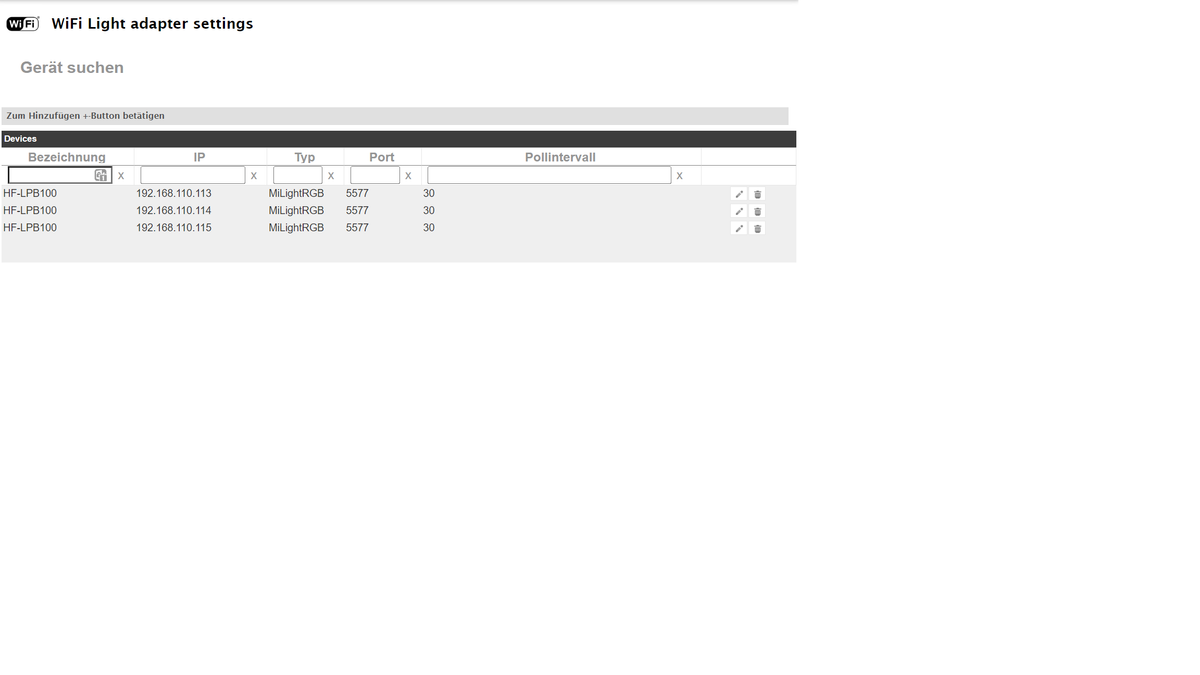
Proxmox, VM`s Windows, IoBroker im unprivilegiert LXC, Openmediavault; LXC `s Tasmota, PiHole, , InfluxDB, Motioneye, WireguardVPN, UniFi:
Smarthome...Sonoff, Alexa, Wled, raspberrymatic,... -
okay, muss ich nicht verstehen, aber gut.
habe gerade ein reboot gemacht, jetzt nur noch die Fehlermeldung von der VIS.
@einstein2002 sagte in Fehlermeldung host.io.Broker:
okay, muss ich nicht verstehen, aber gut.
amixer ist kein eigenständiges Software-Paket sondern wurde vom Ubuntu-Package-Maintainer zusammen mit anderen Programmen in das Paket 'alsa-utils' gepackt.
-
Jetzt habe ich halt noch dieses Problem und da könnte ich schwören das es schon mal gegangen ist.
Den WIFI LIGHT Adapter habe ich installiert, Fehler/Warnmeldungen im Protokoll des WLED Adapters sind weg, aber dafür das hier.
config.device.type "" (HF-LPB100) is not a known device type. Skipping this device!Known types are: LW12, LD382A, LD686, LD382, UFO, MiLight, MiLightRGB, MiLightWEr kann meine HF-LPB100 anscheinend nicht mehr, obwohl sie unter Geräte suche gefunden werden und auch im Adapter als Gerät eingefügt sind.
Update:
Für den Fall das jemand genau das gleiche Problem hat, hier meine Lösung:
Ich habe die HF-LPB100 als Geräte gefunden, eingetragen und dann unter Type einfach das " MiLightRGB" eingegeben.
Damit ist die Fehlermeldung weg!
Warum ich den Adapter unbedingt brauche erschließt sich mir nicht, aber ohne ihn kommen vom WLED Adapter andauernd Fehlermeldungen.Zu vis und dem wifi-led kann ich nix sagen.
-
@einstein2002 sagte in Fehlermeldung host.io.Broker:
okay, muss ich nicht verstehen, aber gut.
amixer ist kein eigenständiges Software-Paket sondern wurde vom Ubuntu-Package-Maintainer zusammen mit anderen Programmen in das Paket 'alsa-utils' gepackt.
@thomas-braun
Okay, micht hat halt nur die Meldung irritiert.michael@ioBroker:~$ apt policy amixer N: Unable to locate package amixerProxmox, VM`s Windows, IoBroker im unprivilegiert LXC, Openmediavault; LXC `s Tasmota, PiHole, , InfluxDB, Motioneye, WireguardVPN, UniFi:
Smarthome...Sonoff, Alexa, Wled, raspberrymatic,... -
Zu vis und dem wifi-led kann ich nix sagen.
@thomas-braun
Und das mit der Alexa? Oder sollte ich ein neues Thema aufmachen??Dir auf jeden Fall mal ein herzliches Dankeschön für Deine Zeit und Hilfe.
Dankeschön!! -
@thomas-braun
Okay, micht hat halt nur die Meldung irritiert.michael@ioBroker:~$ apt policy amixer N: Unable to locate package amixer@einstein2002 sagte in Fehlermeldung host.io.Broker:
Okay, micht hat halt nur die Meldung irritiert.
Die ist ja auch richtig, ein Paket namens 'amixer' gibt es halt nicht.

Hey! Du scheinst an dieser Unterhaltung interessiert zu sein, hast aber noch kein Konto.
Hast du es satt, bei jedem Besuch durch die gleichen Beiträge zu scrollen? Wenn du dich für ein Konto anmeldest, kommst du immer genau dorthin zurück, wo du zuvor warst, und kannst dich über neue Antworten benachrichtigen lassen (entweder per E-Mail oder Push-Benachrichtigung). Du kannst auch Lesezeichen speichern und Beiträge positiv bewerten, um anderen Community-Mitgliedern deine Wertschätzung zu zeigen.
Mit deinem Input könnte dieser Beitrag noch besser werden 💗
Registrieren Anmelden466
Online33.0k
Benutzer83.5k
Themen1.3m
Beiträge