




Fehlermeldung host.io.Broker
-
Also das ganze sieht eigentlich für mich gut aus.
======== Start marking the full check here =========
Skript v.2023-04-16 *** BASE SYSTEM *** Architecture : x86_64 Docker : false Virtualization : lxc Distributor ID: Ubuntu Description: Ubuntu 22.04.2 LTS Release: 22.04 Codename: jammy PRETTY_NAME="Ubuntu 22.04.2 LTS" NAME="Ubuntu" VERSION_ID="22.04" VERSION="22.04.2 LTS (Jammy Jellyfish)" VERSION_CODENAME=jammy ID=ubuntu ID_LIKE=debian HOME_URL="https://www.ubuntu.com/" SUPPORT_URL="https://help.ubuntu.com/" BUG_REPORT_URL="https://bugs.launchpad.net/ubuntu/" PRIVACY_POLICY_URL="https://www.ubuntu.com/legal/terms-and-policies/privacy-policy" UBUNTU_CODENAME=jammy Systemuptime and Load: 13:58:10 up 38 days, 13:57, 2 users, load average: 3.39, 2.95, 2.88 CPU threads: 4 *** Time and Time Zones *** Local time: Fri 2023-06-09 13:58:10 CEST Universal time: Fri 2023-06-09 11:58:10 UTC RTC time: n/a Time zone: Europe/Berlin (CEST, +0200) System clock synchronized: yes NTP service: inactive RTC in local TZ: no *** User and Groups *** michael /home/michael michael sudo iobroker *** X-Server-Setup *** X-Server: false Desktop: Terminal: tty Boot Target: graphical.target *** MEMORY *** total used free shared buff/cache available Mem: 4.1G 2.3G 581M 0.0K 1.2G 1.8G Swap: 512M 0.0K 511M Total: 4.6G 2.3G 1.1G 4096 M total memory 2287 M used memory 550 M active memory 2653 M inactive memory 581 M free memory 0 M buffer memory 1227 M swap cache 512 M total swap 0 M used swap 511 M free swap *** FILESYSTEM *** Filesystem Type Size Used Avail Use% Mounted on /dev/loop2 ext4 40G 5.9G 32G 16% / none tmpfs 492K 4.0K 488K 1% /dev tmpfs tmpfs 32G 0 32G 0% /dev/shm tmpfs tmpfs 13G 128K 13G 1% /run tmpfs tmpfs 5.0M 0 5.0M 0% /run/lock tmpfs tmpfs 6.3G 0 6.3G 0% /run/user/1002 Messages concerning ext4 filesystem in dmesg: [Thu Apr 13 20:52:29 2023] EXT4-fs (dm-1): mounted filesystem with ordered data mode. Opts: (null). Quota mode: none. [Thu Apr 13 20:52:29 2023] EXT4-fs (dm-1): re-mounted. Opts: errors=remount-ro. Quota mode: none. [Thu Apr 13 20:52:29 2023] EXT4-fs (sda1): mounted filesystem with ordered data mode. Opts: (null). Quota mode: none. [Thu Apr 13 20:52:29 2023] EXT4-fs (sdb1): mounted filesystem with ordered data mode. Opts: (null). Quota mode: none. [Thu Apr 13 20:57:00 2023] EXT4-fs (dm-7): mounted filesystem with ordered data mode. Opts: (null). Quota mode: none. [Thu Apr 13 21:24:21 2023] EXT4-fs (dm-7): mounted filesystem with ordered data mode. Opts: (null). Quota mode: none. [Wed Apr 26 20:09:18 2023] EXT4-fs (dm-7): mounted filesystem with ordered data mode. Opts: (null). Quota mode: none. [Thu Apr 27 19:06:00 2023] EXT4-fs (dm-7): mounted filesystem with ordered data mode. Opts: (null). Quota mode: none. [Thu Apr 27 19:32:00 2023] EXT4-fs (dm-7): mounted filesystem with ordered data mode. Opts: (null). Quota mode: none. [Sun Apr 30 17:29:57 2023] EXT4-fs (loop0): mounted filesystem with ordered data mode. Opts: (null). Quota mode: none. [Sun Apr 30 17:30:10 2023] EXT4-fs (loop1): mounted filesystem with ordered data mode. Opts: (null). Quota mode: none. [Sun Apr 30 17:41:07 2023] EXT4-fs (loop2): mounted filesystem with ordered data mode. Opts: (null). Quota mode: none. [Sun Apr 30 17:51:07 2023] EXT4-fs (loop2): mounted filesystem with ordered data mode. Opts: (null). Quota mode: none. [Sun Apr 30 17:53:31 2023] EXT4-fs (loop2): mounted filesystem with ordered data mode. Opts: (null). Quota mode: none. [Sun Apr 30 18:23:01 2023] EXT4-fs (loop2): mounted filesystem with ordered data mode. Opts: (null). Quota mode: none. [Mon May 1 10:01:24 2023] EXT4-fs (dm-12): write access unavailable, skipping orphan cleanup [Mon May 1 10:01:24 2023] EXT4-fs (dm-12): mounted filesystem without journal. Opts: noload. Quota mode: none. [Mon May 1 10:06:18 2023] EXT4-fs (dm-11): mounted filesystem with ordered data mode. Opts: (null). Quota mode: none. [Mon May 1 12:43:43 2023] EXT4-fs (loop0): mounted filesystem with ordered data mode. Opts: (null). Quota mode: none. [Mon May 1 12:46:57 2023] EXT4-fs (loop0): mounted filesystem with ordered data mode. Opts: (null). Quota mode: none. [Mon May 1 22:08:37 2023] EXT4-fs (dm-12): write access unavailable, skipping orphan cleanup [Mon May 1 22:08:37 2023] EXT4-fs (dm-12): mounted filesystem without journal. Opts: noload. Quota mode: none. [Mon May 1 22:10:54 2023] EXT4-fs (loop0): mounted filesystem with ordered data mode. Opts: (null). Quota mode: none. [Mon May 1 22:12:02 2023] EXT4-fs (loop0): mounted filesystem with ordered data mode. Opts: (null). Quota mode: none. [Mon May 1 22:14:27 2023] EXT4-fs (loop2): mounted filesystem with ordered data mode. Opts: (null). Quota mode: none. [Tue May 2 00:00:45 2023] EXT4-fs (loop2): mounted filesystem with ordered data mode. Opts: (null). Quota mode: none. [Sun May 7 10:56:37 2023] EXT4-fs (loop0): mounted filesystem with ordered data mode. Opts: (null). Quota mode: none. [Sat May 13 12:06:40 2023] EXT4-fs (dm-7): mounted filesystem with ordered data mode. Opts: (null). Quota mode: none. [Sat May 13 12:07:14 2023] EXT4-fs (dm-7): mounted filesystem with ordered data mode. Opts: (null). Quota mode: none. [Sat May 13 12:07:51 2023] EXT4-fs (dm-7): mounted filesystem with ordered data mode. Opts: (null). Quota mode: none. [Sat May 13 14:14:43 2023] EXT4-fs (dm-7): mounted filesystem with ordered data mode. Opts: (null). Quota mode: none. [Sat May 13 14:24:36 2023] EXT4-fs (loop1): mounted filesystem with ordered data mode. Opts: (null). Quota mode: none. [Sun May 14 09:53:24 2023] EXT4-fs (dm-7): mounted filesystem with ordered data mode. Opts: (null). Quota mode: none. [Sun May 14 09:58:07 2023] EXT4-fs (dm-7): mounted filesystem with ordered data mode. Opts: (null). Quota mode: none. [Sun May 14 09:58:09 2023] EXT4-fs (dm-7): mounted filesystem with ordered data mode. Opts: (null). Quota mode: none. [Sun May 14 10:35:28 2023] EXT4-fs (dm-7): mounted filesystem with ordered data mode. Opts: (null). Quota mode: none. [Sun May 14 11:06:32 2023] EXT4-fs (dm-7): mounted filesystem with ordered data mode. Opts: (null). Quota mode: none. [Sun May 14 11:32:24 2023] EXT4-fs (dm-7): mounted filesystem with ordered data mode. Opts: (null). Quota mode: none. [Sun May 14 11:32:26 2023] EXT4-fs (dm-7): mounted filesystem with ordered data mode. Opts: (null). Quota mode: none. [Sun May 14 11:35:38 2023] EXT4-fs (dm-7): mounted filesystem with ordered data mode. Opts: (null). Quota mode: none. [Sun May 14 11:35:40 2023] EXT4-fs (dm-7): mounted filesystem with ordered data mode. Opts: (null). Quota mode: none. [Sun May 14 11:56:24 2023] EXT4-fs (loop1): mounted filesystem with ordered data mode. Opts: (null). Quota mode: none. [Sun May 14 11:56:30 2023] EXT4-fs (loop1): mounted filesystem with ordered data mode. Opts: (null). Quota mode: none. [Sun May 14 12:44:48 2023] EXT4-fs (loop1): resizing filesystem from 16777216 to 56098816 blocks [Sun May 14 12:44:48 2023] EXT4-fs (loop1): resized filesystem to 56098816 [Sun May 14 12:57:13 2023] EXT4-fs (loop3): mounted filesystem with ordered data mode. Opts: (null). Quota mode: none. [Sun May 14 16:08:27 2023] EXT4-fs (dm-7): mounted filesystem with ordered data mode. Opts: (null). Quota mode: none. [Sun May 14 16:08:29 2023] EXT4-fs (dm-7): mounted filesystem with ordered data mode. Opts: (null). Quota mode: none. [Sun May 14 16:11:11 2023] EXT4-fs (dm-7): mounted filesystem with ordered data mode. Opts: (null). Quota mode: none. [Sun May 14 16:11:13 2023] EXT4-fs (dm-7): mounted filesystem with ordered data mode. Opts: (null). Quota mode: none. [Sun May 14 16:14:35 2023] EXT4-fs (dm-12): write access unavailable, skipping orphan cleanup [Sun May 14 16:14:35 2023] EXT4-fs (dm-12): mounted filesystem without journal. Opts: noload. Quota mode: none. [Sun May 14 16:38:38 2023] EXT4-fs (loop1): mounted filesystem with ordered data mode. Opts: (null). Quota mode: none. [Sun May 14 16:38:58 2023] EXT4-fs (loop1): mounted filesystem with ordered data mode. Opts: (null). Quota mode: none. [Sun May 14 16:49:36 2023] EXT4-fs (loop1): mounted filesystem with ordered data mode. Opts: (null). Quota mode: none. [Sun May 14 16:59:43 2023] EXT4-fs (loop1): mounted filesystem with ordered data mode. Opts: (null). Quota mode: none. [Sun May 14 17:03:36 2023] EXT4-fs (loop1): mounted filesystem with ordered data mode. Opts: (null). Quota mode: none. [Sun May 14 21:22:18 2023] EXT4-fs (loop1): mounted filesystem with ordered data mode. Opts: (null). Quota mode: none. [Thu May 18 16:30:23 2023] EXT4-fs (dm-11): mounted filesystem with ordered data mode. Opts: (null). Quota mode: none. [Sun May 28 13:51:29 2023] EXT4-fs (dm-11): mounted filesystem with ordered data mode. Opts: (null). Quota mode: none. [Sun May 28 13:55:43 2023] EXT4-fs (dm-11): mounted filesystem with ordered data mode. Opts: (null). Quota mode: none. [Sun May 28 19:22:29 2023] EXT4-fs (loop0): mounted filesystem with ordered data mode. Opts: (null). Quota mode: none. [Mon May 29 13:19:17 2023] EXT4-fs (dm-11): mounted filesystem with ordered data mode. Opts: (null). Quota mode: none. [Thu Jun 1 00:01:46 2023] EXT4-fs (loop3): mounted filesystem with ordered data mode. Opts: (null). Quota mode: none. [Thu Jun 1 00:06:46 2023] EXT4-fs (dm-12): mounted filesystem without journal. Opts: noload. Quota mode: none. [Thu Jun 8 09:18:42 2023] EXT4-fs (loop0): mounted filesystem with ordered data mode. Opts: (null). Quota mode: none. Show mounted filesystems (real ones only): TARGET SOURCE FSTYPE OPTIONS / /dev/loop2 ext4 rw,relatime Files in neuralgic directories: /var: 1.1G /var/ 451M /var/log 448M /var/log/journal/f2983a9a781041d3aae1cad2068f213d 448M /var/log/journal 353M /var/cache Hint: You are currently not seeing messages from other users and the system. Users in groups 'adm', 'systemd-journal' can see all messages. Pass -q to turn off this notice. Archived and active journals take up 28.6M in the file system. /opt/iobroker/backups: 45M /opt/iobroker/backups/ /opt/iobroker/iobroker-data: 807M /opt/iobroker/iobroker-data/ 442M /opt/iobroker/iobroker-data/files 186M /opt/iobroker/iobroker-data/backup-objects 78M /opt/iobroker/iobroker-data/files/icons-open-icon-library-png 51M /opt/iobroker/iobroker-data/files/javascript.admin The five largest files in iobroker-data are: 67M /opt/iobroker/iobroker-data/states.jsonl 30M /opt/iobroker/iobroker-data/objects.jsonl 22M /opt/iobroker/iobroker-data/objects.json.migrated 22M /opt/iobroker/iobroker-data/objects.json.bak.migrated 19M /opt/iobroker/iobroker-data/files/iot.admin/static/js/main.904d455f.js.map *** NodeJS-Installation *** /usr/bin/nodejs v18.16.0 /usr/bin/node v18.16.0 /usr/bin/npm 9.5.1 /usr/bin/npx 9.5.1 nodejs: Installed: 18.16.0-deb-1nodesource1 Candidate: 18.16.0-deb-1nodesource1 Version table: *** 18.16.0-deb-1nodesource1 500 500 https://deb.nodesource.com/node_18.x jammy/main amd64 Packages 100 /var/lib/dpkg/status 12.22.9~dfsg-1ubuntu3 500 500 http://archive.ubuntu.com/ubuntu jammy/universe amd64 Packages Temp directories causing npm8 problem: 0 No problems detected *** ioBroker-Installation *** ioBroker Status iobroker is running on this host. Objects type: jsonl States type: jsonl MULTIHOSTSERVICE/enabled: false Core adapters versions js-controller: 4.0.24 admin: 6.3.5 javascript: 6.1.4 Adapters from github: 5 Adapter State + system.adapter.admin.0 : admin : ioBroker - enabled, port: 8081, bind: 0.0.0.0 (SSL), run as: admin + system.adapter.alexa2.0 : alexa2 : ioBroker - enabled system.adapter.birthdays.0 : birthdays : ioBroker - disabled system.adapter.broadlink2.0 : broadlink2 : ioBroker - disabled system.adapter.cloud.0 : cloud : ioBroker - disabled system.adapter.daswetter.0 : daswetter : ioBroker - disabled + system.adapter.device-reminder.0 : device-reminder : ioBroker - enabled + system.adapter.discovery.0 : discovery : ioBroker - enabled system.adapter.ds18b20.0 : ds18b20 : ioBroker - disabled system.adapter.dwd.0 : dwd : ioBroker - enabled + system.adapter.enigma2.0 : enigma2 : ioBroker - enabled system.adapter.feiertage.0 : feiertage : ioBroker - enabled system.adapter.flot.0 : flot : ioBroker - disabled system.adapter.fullybrowser.0 : fullybrowser : ioBroker - disabled system.adapter.habpanel.0 : habpanel : ioBroker - disabled + system.adapter.history.0 : history : ioBroker - enabled + system.adapter.hm-rega.0 : hm-rega : ioBroker - enabled + system.adapter.hm-rpc.0 : hm-rpc : ioBroker - enabled, port: 0 system.adapter.ical.0 : ical : ioBroker - enabled system.adapter.ical.1 : ical : ioBroker - enabled system.adapter.ical.2 : ical : ioBroker - enabled system.adapter.ical.3 : ical : ioBroker - enabled system.adapter.icons-icons8.0 : icons-icons8 : ioBroker - enabled system.adapter.icons-open-icon-library-png.0: icons-open-icon-library-png: ioBroker - enabled system.adapter.influxdb.0 : influxdb : ioBroker - disabled, port: 8086 + system.adapter.info.0 : info : ioBroker - enabled + system.adapter.iot.0 : iot : ioBroker - enabled + system.adapter.iqontrol.0 : iqontrol : ioBroker - enabled + system.adapter.jarvis.0 : jarvis : ioBroker - enabled + system.adapter.javascript.0 : javascript : ioBroker - enabled + system.adapter.milight-smart-light.0 : milight-smart-light : ioBroker - enabled + system.adapter.milight-smart-light.1 : milight-smart-light : ioBroker - enabled + system.adapter.milight-smart-light.2 : milight-smart-light : ioBroker - enabled + system.adapter.mqtt.0 : mqtt : ioBroker - enabled, port: 1883, bind: 0.0.0.0 + system.adapter.net-tools.0 : net-tools : ioBroker - enabled system.adapter.onvif.0 : onvif : ioBroker - disabled system.adapter.openligadb.0 : openligadb : ioBroker - disabled system.adapter.openweathermap.0 : openweathermap : ioBroker - disabled + system.adapter.pi-hole.0 : pi-hole : ioBroker - enabled + system.adapter.ping.0 : ping : ioBroker - enabled + system.adapter.pollenflug.0 : pollenflug : ioBroker - enabled + system.adapter.reolink.0 : reolink : ioBroker - enabled + system.adapter.samsung.0 : samsung : ioBroker - enabled + system.adapter.sayit.0 : sayit : ioBroker - enabled + system.adapter.scenes.0 : scenes : ioBroker - enabled system.adapter.schoolfree.0 : schoolfree : ioBroker - enabled system.adapter.schoolfree.1 : schoolfree : ioBroker - enabled + system.adapter.shuttercontrol.0 : shuttercontrol : ioBroker - enabled + system.adapter.sonos.0 : sonos : ioBroker - enabled + system.adapter.tankerkoenig.0 : tankerkoenig : ioBroker - enabled + system.adapter.telegram.0 : telegram : ioBroker - enabled, port: 8443, bind: 0.0.0.0 + system.adapter.text2command.0 : text2command : ioBroker - enabled + system.adapter.trashschedule.0 : trashschedule : ioBroker - enabled + system.adapter.unifi.0 : unifi : ioBroker - enabled system.adapter.vis-colorpicker.0 : vis-colorpicker : ioBroker - disabled system.adapter.vis-hqwidgets.0 : vis-hqwidgets : ioBroker - disabled system.adapter.vis-jqui-mfd.0 : vis-jqui-mfd : ioBroker - disabled system.adapter.vis-justgage.0 : vis-justgage : ioBroker - disabled system.adapter.vis-keyboard.0 : vis-keyboard : ioBroker - disabled system.adapter.vis-map.0 : vis-map : ioBroker - disabled system.adapter.vis-material.0 : vis-material : ioBroker - disabled system.adapter.vis-metro.0 : vis-metro : ioBroker - disabled system.adapter.vis-players.0 : vis-players : ioBroker - disabled system.adapter.vis-timeandweather.0 : vis-timeandweather : ioBroker - disabled system.adapter.vis.0 : vis : ioBroker - enabled system.adapter.weatherunderground.0 : weatherunderground : ioBroker - disabled + system.adapter.web.0 : web : ioBroker - enabled, port: 8082, bind: 0.0.0.0, run as: admin system.adapter.wireguard.0 : wireguard : ioBroker - disabled + system.adapter.wled.0 : wled : ioBroker - enabled system.adapter.yr.0 : yr : ioBroker - disabled + instance is alive Enabled adapters with bindings + system.adapter.admin.0 : admin : ioBroker - enabled, port: 8081, bind: 0.0.0.0 (SSL), run as: admin + system.adapter.hm-rpc.0 : hm-rpc : ioBroker - enabled, port: 0 + system.adapter.mqtt.0 : mqtt : ioBroker - enabled, port: 1883, bind: 0.0.0.0 + system.adapter.telegram.0 : telegram : ioBroker - enabled, port: 8443, bind: 0.0.0.0 + system.adapter.web.0 : web : ioBroker - enabled, port: 8082, bind: 0.0.0.0, run as: admin ioBroker-Repositories Beta (latest) : http://download.iobroker.net/sources-dist-latest.json stable : http://download.iobroker.net/sources-dist.json Active repo(s): stable Installed ioBroker-Instances Used repository: stable Adapter "admin" : 6.3.5 , installed 6.3.5 Adapter "alexa2" : 3.23.2 , installed 3.23.2 Adapter "birthdays" : 2.2.0 , installed 2.2.0 Adapter "broadlink2" : 2.1.5 , installed 2.1.5 Adapter "cloud" : 4.3.0 , installed 4.3.0 Adapter "daswetter" : 3.1.8 , installed 3.1.8 Adapter "device-reminder": 1.2.9 , installed 1.2.9 Adapter "discovery" : 3.1.0 , installed 3.1.0 Adapter "ds18b20" : 1.6.1 , installed 1.6.1 Adapter "dwd" : 2.8.3 , installed 2.8.3 Adapter "feiertage" : 1.1.0 , installed 1.1.0 Adapter "flot" : 1.11.0 , installed 1.11.0 Adapter "fritzdect" : 2.2.6 , installed 2.2.6 Adapter "fullybrowser" : 2.1.2 , installed 2.1.2 Adapter "habpanel" : 0.5.0 , installed 0.5.0 Adapter "history" : 2.2.4 , installed 2.2.4 Adapter "hm-rega" : 3.0.46 , installed 3.0.46 Adapter "hm-rpc" : 1.15.16 , installed 1.15.16 Adapter "ical" : 1.13.2 , installed 1.13.2 Adapter "icons-icons8" : 0.0.1 , installed 0.0.1 Adapter "icons-open-icon-library-png": 0.1.2, installed 0.1.2 Adapter "influxdb" : 3.2.0 , installed 3.2.0 Adapter "info" : 1.9.26 , installed 1.9.26 Adapter "iot" : 1.14.2 , installed 1.14.2 Adapter "iqontrol" : 2.1.0 , installed 2.2.0 Adapter "jarvis" : 3.1.2 , installed 3.1.2 Adapter "javascript" : 6.1.4 , installed 6.1.4 Controller "js-controller": 4.0.24 , installed 4.0.24 Adapter "milight-smart-light": 1.2.2, installed 1.2.2 Adapter "mqtt" : 4.0.7 , installed 4.0.7 Adapter "net-tools" : 0.2.0 , installed 0.2.0 Adapter "onvif" : 1.0.4 , installed 1.0.4 Adapter "openligadb" : 1.2.4 , installed 1.2.4 Adapter "openweathermap": 0.3.3 , installed 0.3.3 Adapter "pi-hole" : 1.3.4 , installed 1.3.4 Adapter "ping" : 1.5.3 , installed 1.5.3 Adapter "pollenflug" : 1.0.6 , installed 1.0.6 Adapter "samsung" : 0.5.11 , installed 0.5.11 Adapter "sayit" : 1.12.3 , installed 1.12.3 Adapter "scenes" : 2.3.9 , installed 2.3.9 Adapter "schoolfree" : 1.1.1 , installed 1.1.1 Adapter "shelly" : 6.3.1 , installed 6.3.1 Adapter "shuttercontrol": 1.4.29 , installed 1.4.29 Adapter "simple-api" : 2.7.2 , installed 2.7.2 Adapter "socketio" : 4.2.0 , installed 4.2.0 Adapter "sonos" : 2.2.3 , installed 2.2.3 Adapter "tankerkoenig" : 3.3.7 , installed 3.3.7 Adapter "telegram" : 1.15.2 , installed 1.15.2 Adapter "text2command" : 2.3.0 , installed 2.3.0 Adapter "trashschedule": 2.2.0 , installed 2.2.0 Adapter "unifi" : 0.5.10 , installed 0.6.3 Adapter "vis" : 1.4.16 , installed 1.4.16 Adapter "vis-colorpicker": 1.2.0 , installed 1.2.0 Adapter "vis-hqwidgets": 1.3.0 , installed 1.3.0 Adapter "vis-jqui-mfd" : 1.0.12 , installed 1.0.12 Adapter "vis-justgage" : 1.0.2 , installed 1.0.2 Adapter "vis-keyboard" : 0.0.2 , installed 0.0.2 Adapter "vis-map" : 1.0.4 , installed 1.0.4 Adapter "vis-metro" : 1.2.0 , installed 1.2.0 Adapter "vis-players" : 0.1.6 , installed 0.1.6 Adapter "vis-timeandweather": 1.2.2, installed 1.2.2 Adapter "weatherunderground": 3.4.2, installed 3.4.2 Adapter "web" : 4.3.0 , installed 4.3.0 Adapter "wireguard" : 1.3.1 , installed 1.3.1 Adapter "wled" : 0.6.7 , installed 0.6.7 Adapter "ws" : 1.3.0 , installed 1.3.0 Adapter "yr" : 5.3.0 , installed 5.3.0 Objects and States Please stand by - This may take a while Objects: 29388 States: 27886 *** OS-Repositories and Updates *** Hit:1 https://deb.nodesource.com/node_18.x jammy InRelease Hit:2 http://archive.ubuntu.com/ubuntu jammy InRelease Hit:3 http://archive.ubuntu.com/ubuntu jammy-updates InRelease Hit:4 http://archive.ubuntu.com/ubuntu jammy-security InRelease Reading package lists... Pending Updates: 0 *** Listening Ports *** Active Internet connections (only servers) Proto Recv-Q Send-Q Local Address Foreign Address State User Inode PID/Program name tcp 0 0 0.0.0.0:8400 0.0.0.0:* LISTEN 1001 161496026 2728897/io.jarvis.0 tcp 0 0 0.0.0.0:111 0.0.0.0:* LISTEN 0 28481593 1/init tcp 0 0 127.0.0.53:53 0.0.0.0:* LISTEN 106 28479139 137/systemd-resolve tcp 0 0 192.168.110.2:42010 0.0.0.0:* LISTEN 1001 161495449 2728355/io.hm-rpc.0 tcp 0 0 127.0.0.1:9000 0.0.0.0:* LISTEN 1001 161487788 2728113/iobroker.js tcp 0 0 127.0.0.1:9001 0.0.0.0:* LISTEN 1001 161495205 2728113/iobroker.js tcp 0 0 127.0.0.1:25 0.0.0.0:* LISTEN 0 28491662 1352/master tcp6 0 0 :::111 :::* LISTEN 0 28469765 1/init tcp6 0 0 :::22 :::* LISTEN 0 28476164 1/init tcp6 0 0 ::1:25 :::* LISTEN 0 28491663 1352/master tcp6 0 0 :::4400 :::* LISTEN 1001 161499083 2728915/io.milight- tcp6 0 0 :::8082 :::* LISTEN 1001 161505522 2729120/io.web.0 tcp6 0 0 :::8081 :::* LISTEN 1001 161495251 2728138/io.admin.0 udp 0 0 0.0.0.0:5353 0.0.0.0:* 1001 161506904 2729265/io.wled.0 udp 0 0 0.0.0.0:55780 0.0.0.0:* 1001 161505287 2728933/io.milight- udp 0 0 127.0.0.53:53 0.0.0.0:* 106 28479138 137/systemd-resolve udp 0 0 0.0.0.0:111 0.0.0.0:* 0 28476721 1/init udp 0 0 0.0.0.0:33113 0.0.0.0:* 1001 161503769 2728915/io.milight- udp 0 0 0.0.0.0:34067 0.0.0.0:* 1001 161506339 2728951/io.milight- udp 0 0 0.0.0.0:1905 0.0.0.0:* 1001 161592891 2728319/io.sonos.0 udp6 0 0 :::111 :::* 0 28481594 1/init *** Log File - Last 25 Lines *** 2023-06-09 13:50:00.606 - info: host.ioBroker instance system.adapter.tankerkoenig.0 scheduled normal terminated and will be restarted on schedule. 2023-06-09 13:50:00.606 - info: host.ioBroker Restart adapter system.adapter.tankerkoenig.0 because enabled 2023-06-09 13:50:01.678 - info: host.ioBroker instance system.adapter.tankerkoenig.0 started with pid 2729867 2023-06-09 13:50:02.246 - info: tankerkoenig.0 (2729867) starting. Version 3.3.7 (non-npm: iobroker-community-adapters/ioBroker.tankerkoenig) in /opt/iobroker/node_modules/iobroker.tankerkoenig, node: v18.16.0, js-controller: 4.0.24 2023-06-09 13:50:02.287 - info: tankerkoenig.0 (2729867) Adapter is already in daemon mode 2023-06-09 13:50:02.287 - info: tankerkoenig.0 (2729867) Sync time set to 10 minutes or 600000 ms 2023-06-09 13:50:03.895 - info: tankerkoenig.0 (2729867) Start first request 2023-06-09 13:50:37.319 - info: alexa2.0 (2728409) Alexa-Push-Connection disconnected - retry: Retry Connection in 60s 2023-06-09 13:51:38.812 - info: alexa2.0 (2728409) Alexa-Push-Connection disconnected - retry: Retry Connection in 60s 2023-06-09 13:52:39.299 - info: alexa2.0 (2728409) Alexa-Push-Connection disconnected - retry: Retry Connection in 60s 2023-06-09 13:53:39.803 - info: alexa2.0 (2728409) Alexa-Push-Connection disconnected - retry: Retry Connection in 60s 2023-06-09 13:54:40.291 - info: alexa2.0 (2728409) Alexa-Push-Connection disconnected - retry: Retry Connection in 60s 2023-06-09 13:55:00.003 - info: tankerkoenig.0 (2729867) Scheduled restart. 2023-06-09 13:55:00.058 - info: tankerkoenig.0 (2729867) terminating 2023-06-09 13:55:00.058 - info: tankerkoenig.0 (2729867) Terminated (START_IMMEDIATELY_AFTER_STOP): Without reason 2023-06-09 13:55:00.602 - info: host.ioBroker instance system.adapter.tankerkoenig.0 scheduled normal terminated and will be restarted on schedule. 2023-06-09 13:55:00.602 - info: host.ioBroker Restart adapter system.adapter.tankerkoenig.0 because enabled 2023-06-09 13:55:01.663 - info: host.ioBroker instance system.adapter.tankerkoenig.0 started with pid 2730087 2023-06-09 13:55:02.245 - info: tankerkoenig.0 (2730087) starting. Version 3.3.7 (non-npm: iobroker-community-adapters/ioBroker.tankerkoenig) in /opt/iobroker/node_modules/iobroker.tankerkoenig, node: v18.16.0, js-controller: 4.0.24 2023-06-09 13:55:02.282 - info: tankerkoenig.0 (2730087) Adapter is already in daemon mode 2023-06-09 13:55:02.282 - info: tankerkoenig.0 (2730087) Sync time set to 10 minutes or 600000 ms 2023-06-09 13:55:03.935 - info: tankerkoenig.0 (2730087) Start first request 2023-06-09 13:55:40.777 - info: alexa2.0 (2728409) Alexa-Push-Connection disconnected - retry: Retry Connection in 60s 2023-06-09 13:56:41.265 - info: alexa2.0 (2728409) Alexa-Push-Connection disconnected - retry: Retry Connection in 60s 2023-06-09 13:57:41.737 - info: alexa2.0 (2728409) Alexa-Push-Connection disconnected - retry: Retry Connection in 60s============ Mark until here for C&P =============
iob diag has finished.
Der zweite Teil..Copy text starting here:
======================= SUMMARY =======================
                     v.2023-04-16


Operatingsystem:        Ubuntu 22.04.2 LTS
Kernel:                 5.15.104-1-pve
Installation:           lxc
Timezone:               Europe/Berlin (CEST, +0200)
User-ID:                1002
X-Server:               false
Boot Target:            graphical.target

Pending OS-Updates:     0
Pending iob updates:    0

Nodejs-Installation:    /usr/bin/nodejs         v18.16.0
                        /usr/bin/node           v18.16.0
                        /usr/bin/npm            9.5.1
                        /usr/bin/npx            9.5.1

Recommended versions are nodejs 18.x.y and npm 9.x.y
Your nodejs installation is correct

MEMORY:
               total        used        free      shared  buff/cache   available
Mem:            4.1G        2.3G        534M        0.0K        1.2G        1.8G
Swap:           512M        0.0K        511M
Total:          4.6G        2.3G        1.0G

Active iob-Instances:   35
Active repo(s): stable

ioBroker Core:          js-controller           4.0.24
                        admin                   6.3.5

ioBroker Status:        iobroker is running on this host.


Objects type: jsonl
States  type: jsonl

Status admin and web instance:
+ system.adapter.admin.0                  : admin                 : ioBroker                                 -  enabled, port: 8081, bind: 0.0.0.0 (SSL), run as: admin
+ system.adapter.web.0                    : web                   : ioBroker                                 -  enabled, port: 8082, bind: 0.0.0.0, run as: admin

Objects:                29388
States:                 27886

Size of iob-Database:

30M     /opt/iobroker/iobroker-data/objects.jsonl
22M     /opt/iobroker/iobroker-data/objects.json.migrated
22M     /opt/iobroker/iobroker-data/objects.json.bak.migrated
11M     /opt/iobroker/iobroker-data/states.jsonl
5.5M    /opt/iobroker/iobroker-data/states.json.migrated
5.5M    /opt/iobroker/iobroker-data/states.json.bak.migrated


=================== END OF SUMMARY ====================
Proxmox, VM`s Windows, IoBroker im unprivilegiert LXC, Openmediavault; LXC `s Tasmota, PiHole, , InfluxDB, Motioneye, WireguardVPN, UniFi:
Smarthome...Sonoff, Alexa, Wled, raspberrymatic,... -
@thomas-braun
und das mit Alexa kann ich auch nicht nachvollziehen. Was ist damit gemeint.info: alexa2.0 (2728409) Alexa-Push-Connection disconnected - retry: Retry Connection in 60s 2023-06-09 13:51:38.812 - info: alexa2.0 (2728409) Alexa-Push-Connection disconnected - retry: Retry Connection in 60s 2023-06-09 13:52:39.299 - info: alexa2.0 (2728409) Alexa-Push-Connection disconnected - retry: Retry Connection in 60s 2023-06-09 13:53:39.803 - info: alexa2.0 (2728409) Alexa-Push-Connection disconnected - retry: Retry Connection in 60s 2023-06-09 13:54:40.291 - info: alexa2.0 (2728409) Alexa-Push-Connection disconnected - retry: Retry Connection in 60s -
Also das ganze sieht eigentlich für mich gut aus.
======== Start marking the full check here =========
Skript v.2023-04-16 *** BASE SYSTEM *** Architecture : x86_64 Docker : false Virtualization : lxc Distributor ID: Ubuntu Description: Ubuntu 22.04.2 LTS Release: 22.04 Codename: jammy PRETTY_NAME="Ubuntu 22.04.2 LTS" NAME="Ubuntu" VERSION_ID="22.04" VERSION="22.04.2 LTS (Jammy Jellyfish)" VERSION_CODENAME=jammy ID=ubuntu ID_LIKE=debian HOME_URL="https://www.ubuntu.com/" SUPPORT_URL="https://help.ubuntu.com/" BUG_REPORT_URL="https://bugs.launchpad.net/ubuntu/" PRIVACY_POLICY_URL="https://www.ubuntu.com/legal/terms-and-policies/privacy-policy" UBUNTU_CODENAME=jammy Systemuptime and Load: 13:58:10 up 38 days, 13:57, 2 users, load average: 3.39, 2.95, 2.88 CPU threads: 4 *** Time and Time Zones *** Local time: Fri 2023-06-09 13:58:10 CEST Universal time: Fri 2023-06-09 11:58:10 UTC RTC time: n/a Time zone: Europe/Berlin (CEST, +0200) System clock synchronized: yes NTP service: inactive RTC in local TZ: no *** User and Groups *** michael /home/michael michael sudo iobroker *** X-Server-Setup *** X-Server: false Desktop: Terminal: tty Boot Target: graphical.target *** MEMORY *** total used free shared buff/cache available Mem: 4.1G 2.3G 581M 0.0K 1.2G 1.8G Swap: 512M 0.0K 511M Total: 4.6G 2.3G 1.1G 4096 M total memory 2287 M used memory 550 M active memory 2653 M inactive memory 581 M free memory 0 M buffer memory 1227 M swap cache 512 M total swap 0 M used swap 511 M free swap *** FILESYSTEM *** Filesystem Type Size Used Avail Use% Mounted on /dev/loop2 ext4 40G 5.9G 32G 16% / none tmpfs 492K 4.0K 488K 1% /dev tmpfs tmpfs 32G 0 32G 0% /dev/shm tmpfs tmpfs 13G 128K 13G 1% /run tmpfs tmpfs 5.0M 0 5.0M 0% /run/lock tmpfs tmpfs 6.3G 0 6.3G 0% /run/user/1002 Messages concerning ext4 filesystem in dmesg: [Thu Apr 13 20:52:29 2023] EXT4-fs (dm-1): mounted filesystem with ordered data mode. Opts: (null). Quota mode: none. [Thu Apr 13 20:52:29 2023] EXT4-fs (dm-1): re-mounted. Opts: errors=remount-ro. Quota mode: none. [Thu Apr 13 20:52:29 2023] EXT4-fs (sda1): mounted filesystem with ordered data mode. Opts: (null). Quota mode: none. [Thu Apr 13 20:52:29 2023] EXT4-fs (sdb1): mounted filesystem with ordered data mode. Opts: (null). Quota mode: none. [Thu Apr 13 20:57:00 2023] EXT4-fs (dm-7): mounted filesystem with ordered data mode. Opts: (null). Quota mode: none. [Thu Apr 13 21:24:21 2023] EXT4-fs (dm-7): mounted filesystem with ordered data mode. Opts: (null). Quota mode: none. [Wed Apr 26 20:09:18 2023] EXT4-fs (dm-7): mounted filesystem with ordered data mode. Opts: (null). Quota mode: none. [Thu Apr 27 19:06:00 2023] EXT4-fs (dm-7): mounted filesystem with ordered data mode. Opts: (null). Quota mode: none. [Thu Apr 27 19:32:00 2023] EXT4-fs (dm-7): mounted filesystem with ordered data mode. Opts: (null). Quota mode: none. [Sun Apr 30 17:29:57 2023] EXT4-fs (loop0): mounted filesystem with ordered data mode. Opts: (null). Quota mode: none. [Sun Apr 30 17:30:10 2023] EXT4-fs (loop1): mounted filesystem with ordered data mode. Opts: (null). Quota mode: none. [Sun Apr 30 17:41:07 2023] EXT4-fs (loop2): mounted filesystem with ordered data mode. Opts: (null). Quota mode: none. [Sun Apr 30 17:51:07 2023] EXT4-fs (loop2): mounted filesystem with ordered data mode. Opts: (null). Quota mode: none. [Sun Apr 30 17:53:31 2023] EXT4-fs (loop2): mounted filesystem with ordered data mode. Opts: (null). Quota mode: none. [Sun Apr 30 18:23:01 2023] EXT4-fs (loop2): mounted filesystem with ordered data mode. Opts: (null). Quota mode: none. [Mon May 1 10:01:24 2023] EXT4-fs (dm-12): write access unavailable, skipping orphan cleanup [Mon May 1 10:01:24 2023] EXT4-fs (dm-12): mounted filesystem without journal. Opts: noload. Quota mode: none. [Mon May 1 10:06:18 2023] EXT4-fs (dm-11): mounted filesystem with ordered data mode. Opts: (null). Quota mode: none. [Mon May 1 12:43:43 2023] EXT4-fs (loop0): mounted filesystem with ordered data mode. Opts: (null). Quota mode: none. [Mon May 1 12:46:57 2023] EXT4-fs (loop0): mounted filesystem with ordered data mode. Opts: (null). Quota mode: none. [Mon May 1 22:08:37 2023] EXT4-fs (dm-12): write access unavailable, skipping orphan cleanup [Mon May 1 22:08:37 2023] EXT4-fs (dm-12): mounted filesystem without journal. Opts: noload. Quota mode: none. [Mon May 1 22:10:54 2023] EXT4-fs (loop0): mounted filesystem with ordered data mode. Opts: (null). Quota mode: none. [Mon May 1 22:12:02 2023] EXT4-fs (loop0): mounted filesystem with ordered data mode. Opts: (null). Quota mode: none. [Mon May 1 22:14:27 2023] EXT4-fs (loop2): mounted filesystem with ordered data mode. Opts: (null). Quota mode: none. [Tue May 2 00:00:45 2023] EXT4-fs (loop2): mounted filesystem with ordered data mode. Opts: (null). Quota mode: none. [Sun May 7 10:56:37 2023] EXT4-fs (loop0): mounted filesystem with ordered data mode. Opts: (null). Quota mode: none. [Sat May 13 12:06:40 2023] EXT4-fs (dm-7): mounted filesystem with ordered data mode. Opts: (null). Quota mode: none. [Sat May 13 12:07:14 2023] EXT4-fs (dm-7): mounted filesystem with ordered data mode. Opts: (null). Quota mode: none. [Sat May 13 12:07:51 2023] EXT4-fs (dm-7): mounted filesystem with ordered data mode. Opts: (null). Quota mode: none. [Sat May 13 14:14:43 2023] EXT4-fs (dm-7): mounted filesystem with ordered data mode. Opts: (null). Quota mode: none. [Sat May 13 14:24:36 2023] EXT4-fs (loop1): mounted filesystem with ordered data mode. Opts: (null). Quota mode: none. [Sun May 14 09:53:24 2023] EXT4-fs (dm-7): mounted filesystem with ordered data mode. Opts: (null). Quota mode: none. [Sun May 14 09:58:07 2023] EXT4-fs (dm-7): mounted filesystem with ordered data mode. Opts: (null). Quota mode: none. [Sun May 14 09:58:09 2023] EXT4-fs (dm-7): mounted filesystem with ordered data mode. Opts: (null). Quota mode: none. [Sun May 14 10:35:28 2023] EXT4-fs (dm-7): mounted filesystem with ordered data mode. Opts: (null). Quota mode: none. [Sun May 14 11:06:32 2023] EXT4-fs (dm-7): mounted filesystem with ordered data mode. Opts: (null). Quota mode: none. [Sun May 14 11:32:24 2023] EXT4-fs (dm-7): mounted filesystem with ordered data mode. Opts: (null). Quota mode: none. [Sun May 14 11:32:26 2023] EXT4-fs (dm-7): mounted filesystem with ordered data mode. Opts: (null). Quota mode: none. [Sun May 14 11:35:38 2023] EXT4-fs (dm-7): mounted filesystem with ordered data mode. Opts: (null). Quota mode: none. [Sun May 14 11:35:40 2023] EXT4-fs (dm-7): mounted filesystem with ordered data mode. Opts: (null). Quota mode: none. [Sun May 14 11:56:24 2023] EXT4-fs (loop1): mounted filesystem with ordered data mode. Opts: (null). Quota mode: none. [Sun May 14 11:56:30 2023] EXT4-fs (loop1): mounted filesystem with ordered data mode. Opts: (null). Quota mode: none. [Sun May 14 12:44:48 2023] EXT4-fs (loop1): resizing filesystem from 16777216 to 56098816 blocks [Sun May 14 12:44:48 2023] EXT4-fs (loop1): resized filesystem to 56098816 [Sun May 14 12:57:13 2023] EXT4-fs (loop3): mounted filesystem with ordered data mode. Opts: (null). Quota mode: none. [Sun May 14 16:08:27 2023] EXT4-fs (dm-7): mounted filesystem with ordered data mode. Opts: (null). Quota mode: none. [Sun May 14 16:08:29 2023] EXT4-fs (dm-7): mounted filesystem with ordered data mode. Opts: (null). Quota mode: none. [Sun May 14 16:11:11 2023] EXT4-fs (dm-7): mounted filesystem with ordered data mode. Opts: (null). Quota mode: none. [Sun May 14 16:11:13 2023] EXT4-fs (dm-7): mounted filesystem with ordered data mode. Opts: (null). Quota mode: none. [Sun May 14 16:14:35 2023] EXT4-fs (dm-12): write access unavailable, skipping orphan cleanup [Sun May 14 16:14:35 2023] EXT4-fs (dm-12): mounted filesystem without journal. Opts: noload. Quota mode: none. [Sun May 14 16:38:38 2023] EXT4-fs (loop1): mounted filesystem with ordered data mode. Opts: (null). Quota mode: none. [Sun May 14 16:38:58 2023] EXT4-fs (loop1): mounted filesystem with ordered data mode. Opts: (null). Quota mode: none. [Sun May 14 16:49:36 2023] EXT4-fs (loop1): mounted filesystem with ordered data mode. Opts: (null). Quota mode: none. [Sun May 14 16:59:43 2023] EXT4-fs (loop1): mounted filesystem with ordered data mode. Opts: (null). Quota mode: none. [Sun May 14 17:03:36 2023] EXT4-fs (loop1): mounted filesystem with ordered data mode. Opts: (null). Quota mode: none. [Sun May 14 21:22:18 2023] EXT4-fs (loop1): mounted filesystem with ordered data mode. Opts: (null). Quota mode: none. [Thu May 18 16:30:23 2023] EXT4-fs (dm-11): mounted filesystem with ordered data mode. Opts: (null). Quota mode: none. [Sun May 28 13:51:29 2023] EXT4-fs (dm-11): mounted filesystem with ordered data mode. Opts: (null). Quota mode: none. [Sun May 28 13:55:43 2023] EXT4-fs (dm-11): mounted filesystem with ordered data mode. Opts: (null). Quota mode: none. [Sun May 28 19:22:29 2023] EXT4-fs (loop0): mounted filesystem with ordered data mode. Opts: (null). Quota mode: none. [Mon May 29 13:19:17 2023] EXT4-fs (dm-11): mounted filesystem with ordered data mode. Opts: (null). Quota mode: none. [Thu Jun 1 00:01:46 2023] EXT4-fs (loop3): mounted filesystem with ordered data mode. Opts: (null). Quota mode: none. [Thu Jun 1 00:06:46 2023] EXT4-fs (dm-12): mounted filesystem without journal. Opts: noload. Quota mode: none. [Thu Jun 8 09:18:42 2023] EXT4-fs (loop0): mounted filesystem with ordered data mode. Opts: (null). Quota mode: none. Show mounted filesystems (real ones only): TARGET SOURCE FSTYPE OPTIONS / /dev/loop2 ext4 rw,relatime Files in neuralgic directories: /var: 1.1G /var/ 451M /var/log 448M /var/log/journal/f2983a9a781041d3aae1cad2068f213d 448M /var/log/journal 353M /var/cache Hint: You are currently not seeing messages from other users and the system. Users in groups 'adm', 'systemd-journal' can see all messages. Pass -q to turn off this notice. Archived and active journals take up 28.6M in the file system. /opt/iobroker/backups: 45M /opt/iobroker/backups/ /opt/iobroker/iobroker-data: 807M /opt/iobroker/iobroker-data/ 442M /opt/iobroker/iobroker-data/files 186M /opt/iobroker/iobroker-data/backup-objects 78M /opt/iobroker/iobroker-data/files/icons-open-icon-library-png 51M /opt/iobroker/iobroker-data/files/javascript.admin The five largest files in iobroker-data are: 67M /opt/iobroker/iobroker-data/states.jsonl 30M /opt/iobroker/iobroker-data/objects.jsonl 22M /opt/iobroker/iobroker-data/objects.json.migrated 22M /opt/iobroker/iobroker-data/objects.json.bak.migrated 19M /opt/iobroker/iobroker-data/files/iot.admin/static/js/main.904d455f.js.map *** NodeJS-Installation *** /usr/bin/nodejs v18.16.0 /usr/bin/node v18.16.0 /usr/bin/npm 9.5.1 /usr/bin/npx 9.5.1 nodejs: Installed: 18.16.0-deb-1nodesource1 Candidate: 18.16.0-deb-1nodesource1 Version table: *** 18.16.0-deb-1nodesource1 500 500 https://deb.nodesource.com/node_18.x jammy/main amd64 Packages 100 /var/lib/dpkg/status 12.22.9~dfsg-1ubuntu3 500 500 http://archive.ubuntu.com/ubuntu jammy/universe amd64 Packages Temp directories causing npm8 problem: 0 No problems detected *** ioBroker-Installation *** ioBroker Status iobroker is running on this host. Objects type: jsonl States type: jsonl MULTIHOSTSERVICE/enabled: false Core adapters versions js-controller: 4.0.24 admin: 6.3.5 javascript: 6.1.4 Adapters from github: 5 Adapter State + system.adapter.admin.0 : admin : ioBroker - enabled, port: 8081, bind: 0.0.0.0 (SSL), run as: admin + system.adapter.alexa2.0 : alexa2 : ioBroker - enabled system.adapter.birthdays.0 : birthdays : ioBroker - disabled system.adapter.broadlink2.0 : broadlink2 : ioBroker - disabled system.adapter.cloud.0 : cloud : ioBroker - disabled system.adapter.daswetter.0 : daswetter : ioBroker - disabled + system.adapter.device-reminder.0 : device-reminder : ioBroker - enabled + system.adapter.discovery.0 : discovery : ioBroker - enabled system.adapter.ds18b20.0 : ds18b20 : ioBroker - disabled system.adapter.dwd.0 : dwd : ioBroker - enabled + system.adapter.enigma2.0 : enigma2 : ioBroker - enabled system.adapter.feiertage.0 : feiertage : ioBroker - enabled system.adapter.flot.0 : flot : ioBroker - disabled system.adapter.fullybrowser.0 : fullybrowser : ioBroker - disabled system.adapter.habpanel.0 : habpanel : ioBroker - disabled + system.adapter.history.0 : history : ioBroker - enabled + system.adapter.hm-rega.0 : hm-rega : ioBroker - enabled + system.adapter.hm-rpc.0 : hm-rpc : ioBroker - enabled, port: 0 system.adapter.ical.0 : ical : ioBroker - enabled system.adapter.ical.1 : ical : ioBroker - enabled system.adapter.ical.2 : ical : ioBroker - enabled system.adapter.ical.3 : ical : ioBroker - enabled system.adapter.icons-icons8.0 : icons-icons8 : ioBroker - enabled system.adapter.icons-open-icon-library-png.0: icons-open-icon-library-png: ioBroker - enabled system.adapter.influxdb.0 : influxdb : ioBroker - disabled, port: 8086 + system.adapter.info.0 : info : ioBroker - enabled + system.adapter.iot.0 : iot : ioBroker - enabled + system.adapter.iqontrol.0 : iqontrol : ioBroker - enabled + system.adapter.jarvis.0 : jarvis : ioBroker - enabled + system.adapter.javascript.0 : javascript : ioBroker - enabled + system.adapter.milight-smart-light.0 : milight-smart-light : ioBroker - enabled + system.adapter.milight-smart-light.1 : milight-smart-light : ioBroker - enabled + system.adapter.milight-smart-light.2 : milight-smart-light : ioBroker - enabled + system.adapter.mqtt.0 : mqtt : ioBroker - enabled, port: 1883, bind: 0.0.0.0 + system.adapter.net-tools.0 : net-tools : ioBroker - enabled system.adapter.onvif.0 : onvif : ioBroker - disabled system.adapter.openligadb.0 : openligadb : ioBroker - disabled system.adapter.openweathermap.0 : openweathermap : ioBroker - disabled + system.adapter.pi-hole.0 : pi-hole : ioBroker - enabled + system.adapter.ping.0 : ping : ioBroker - enabled + system.adapter.pollenflug.0 : pollenflug : ioBroker - enabled + system.adapter.reolink.0 : reolink : ioBroker - enabled + system.adapter.samsung.0 : samsung : ioBroker - enabled + system.adapter.sayit.0 : sayit : ioBroker - enabled + system.adapter.scenes.0 : scenes : ioBroker - enabled system.adapter.schoolfree.0 : schoolfree : ioBroker - enabled system.adapter.schoolfree.1 : schoolfree : ioBroker - enabled + system.adapter.shuttercontrol.0 : shuttercontrol : ioBroker - enabled + system.adapter.sonos.0 : sonos : ioBroker - enabled + system.adapter.tankerkoenig.0 : tankerkoenig : ioBroker - enabled + system.adapter.telegram.0 : telegram : ioBroker - enabled, port: 8443, bind: 0.0.0.0 + system.adapter.text2command.0 : text2command : ioBroker - enabled + system.adapter.trashschedule.0 : trashschedule : ioBroker - enabled + system.adapter.unifi.0 : unifi : ioBroker - enabled system.adapter.vis-colorpicker.0 : vis-colorpicker : ioBroker - disabled system.adapter.vis-hqwidgets.0 : vis-hqwidgets : ioBroker - disabled system.adapter.vis-jqui-mfd.0 : vis-jqui-mfd : ioBroker - disabled system.adapter.vis-justgage.0 : vis-justgage : ioBroker - disabled system.adapter.vis-keyboard.0 : vis-keyboard : ioBroker - disabled system.adapter.vis-map.0 : vis-map : ioBroker - disabled system.adapter.vis-material.0 : vis-material : ioBroker - disabled system.adapter.vis-metro.0 : vis-metro : ioBroker - disabled system.adapter.vis-players.0 : vis-players : ioBroker - disabled system.adapter.vis-timeandweather.0 : vis-timeandweather : ioBroker - disabled system.adapter.vis.0 : vis : ioBroker - enabled system.adapter.weatherunderground.0 : weatherunderground : ioBroker - disabled + system.adapter.web.0 : web : ioBroker - enabled, port: 8082, bind: 0.0.0.0, run as: admin system.adapter.wireguard.0 : wireguard : ioBroker - disabled + system.adapter.wled.0 : wled : ioBroker - enabled system.adapter.yr.0 : yr : ioBroker - disabled + instance is alive Enabled adapters with bindings + system.adapter.admin.0 : admin : ioBroker - enabled, port: 8081, bind: 0.0.0.0 (SSL), run as: admin + system.adapter.hm-rpc.0 : hm-rpc : ioBroker - enabled, port: 0 + system.adapter.mqtt.0 : mqtt : ioBroker - enabled, port: 1883, bind: 0.0.0.0 + system.adapter.telegram.0 : telegram : ioBroker - enabled, port: 8443, bind: 0.0.0.0 + system.adapter.web.0 : web : ioBroker - enabled, port: 8082, bind: 0.0.0.0, run as: admin ioBroker-Repositories Beta (latest) : http://download.iobroker.net/sources-dist-latest.json stable : http://download.iobroker.net/sources-dist.json Active repo(s): stable Installed ioBroker-Instances Used repository: stable Adapter "admin" : 6.3.5 , installed 6.3.5 Adapter "alexa2" : 3.23.2 , installed 3.23.2 Adapter "birthdays" : 2.2.0 , installed 2.2.0 Adapter "broadlink2" : 2.1.5 , installed 2.1.5 Adapter "cloud" : 4.3.0 , installed 4.3.0 Adapter "daswetter" : 3.1.8 , installed 3.1.8 Adapter "device-reminder": 1.2.9 , installed 1.2.9 Adapter "discovery" : 3.1.0 , installed 3.1.0 Adapter "ds18b20" : 1.6.1 , installed 1.6.1 Adapter "dwd" : 2.8.3 , installed 2.8.3 Adapter "feiertage" : 1.1.0 , installed 1.1.0 Adapter "flot" : 1.11.0 , installed 1.11.0 Adapter "fritzdect" : 2.2.6 , installed 2.2.6 Adapter "fullybrowser" : 2.1.2 , installed 2.1.2 Adapter "habpanel" : 0.5.0 , installed 0.5.0 Adapter "history" : 2.2.4 , installed 2.2.4 Adapter "hm-rega" : 3.0.46 , installed 3.0.46 Adapter "hm-rpc" : 1.15.16 , installed 1.15.16 Adapter "ical" : 1.13.2 , installed 1.13.2 Adapter "icons-icons8" : 0.0.1 , installed 0.0.1 Adapter "icons-open-icon-library-png": 0.1.2, installed 0.1.2 Adapter "influxdb" : 3.2.0 , installed 3.2.0 Adapter "info" : 1.9.26 , installed 1.9.26 Adapter "iot" : 1.14.2 , installed 1.14.2 Adapter "iqontrol" : 2.1.0 , installed 2.2.0 Adapter "jarvis" : 3.1.2 , installed 3.1.2 Adapter "javascript" : 6.1.4 , installed 6.1.4 Controller "js-controller": 4.0.24 , installed 4.0.24 Adapter "milight-smart-light": 1.2.2, installed 1.2.2 Adapter "mqtt" : 4.0.7 , installed 4.0.7 Adapter "net-tools" : 0.2.0 , installed 0.2.0 Adapter "onvif" : 1.0.4 , installed 1.0.4 Adapter "openligadb" : 1.2.4 , installed 1.2.4 Adapter "openweathermap": 0.3.3 , installed 0.3.3 Adapter "pi-hole" : 1.3.4 , installed 1.3.4 Adapter "ping" : 1.5.3 , installed 1.5.3 Adapter "pollenflug" : 1.0.6 , installed 1.0.6 Adapter "samsung" : 0.5.11 , installed 0.5.11 Adapter "sayit" : 1.12.3 , installed 1.12.3 Adapter "scenes" : 2.3.9 , installed 2.3.9 Adapter "schoolfree" : 1.1.1 , installed 1.1.1 Adapter "shelly" : 6.3.1 , installed 6.3.1 Adapter "shuttercontrol": 1.4.29 , installed 1.4.29 Adapter "simple-api" : 2.7.2 , installed 2.7.2 Adapter "socketio" : 4.2.0 , installed 4.2.0 Adapter "sonos" : 2.2.3 , installed 2.2.3 Adapter "tankerkoenig" : 3.3.7 , installed 3.3.7 Adapter "telegram" : 1.15.2 , installed 1.15.2 Adapter "text2command" : 2.3.0 , installed 2.3.0 Adapter "trashschedule": 2.2.0 , installed 2.2.0 Adapter "unifi" : 0.5.10 , installed 0.6.3 Adapter "vis" : 1.4.16 , installed 1.4.16 Adapter "vis-colorpicker": 1.2.0 , installed 1.2.0 Adapter "vis-hqwidgets": 1.3.0 , installed 1.3.0 Adapter "vis-jqui-mfd" : 1.0.12 , installed 1.0.12 Adapter "vis-justgage" : 1.0.2 , installed 1.0.2 Adapter "vis-keyboard" : 0.0.2 , installed 0.0.2 Adapter "vis-map" : 1.0.4 , installed 1.0.4 Adapter "vis-metro" : 1.2.0 , installed 1.2.0 Adapter "vis-players" : 0.1.6 , installed 0.1.6 Adapter "vis-timeandweather": 1.2.2, installed 1.2.2 Adapter "weatherunderground": 3.4.2, installed 3.4.2 Adapter "web" : 4.3.0 , installed 4.3.0 Adapter "wireguard" : 1.3.1 , installed 1.3.1 Adapter "wled" : 0.6.7 , installed 0.6.7 Adapter "ws" : 1.3.0 , installed 1.3.0 Adapter "yr" : 5.3.0 , installed 5.3.0 Objects and States Please stand by - This may take a while Objects: 29388 States: 27886 *** OS-Repositories and Updates *** Hit:1 https://deb.nodesource.com/node_18.x jammy InRelease Hit:2 http://archive.ubuntu.com/ubuntu jammy InRelease Hit:3 http://archive.ubuntu.com/ubuntu jammy-updates InRelease Hit:4 http://archive.ubuntu.com/ubuntu jammy-security InRelease Reading package lists... Pending Updates: 0 *** Listening Ports *** Active Internet connections (only servers) Proto Recv-Q Send-Q Local Address Foreign Address State User Inode PID/Program name tcp 0 0 0.0.0.0:8400 0.0.0.0:* LISTEN 1001 161496026 2728897/io.jarvis.0 tcp 0 0 0.0.0.0:111 0.0.0.0:* LISTEN 0 28481593 1/init tcp 0 0 127.0.0.53:53 0.0.0.0:* LISTEN 106 28479139 137/systemd-resolve tcp 0 0 192.168.110.2:42010 0.0.0.0:* LISTEN 1001 161495449 2728355/io.hm-rpc.0 tcp 0 0 127.0.0.1:9000 0.0.0.0:* LISTEN 1001 161487788 2728113/iobroker.js tcp 0 0 127.0.0.1:9001 0.0.0.0:* LISTEN 1001 161495205 2728113/iobroker.js tcp 0 0 127.0.0.1:25 0.0.0.0:* LISTEN 0 28491662 1352/master tcp6 0 0 :::111 :::* LISTEN 0 28469765 1/init tcp6 0 0 :::22 :::* LISTEN 0 28476164 1/init tcp6 0 0 ::1:25 :::* LISTEN 0 28491663 1352/master tcp6 0 0 :::4400 :::* LISTEN 1001 161499083 2728915/io.milight- tcp6 0 0 :::8082 :::* LISTEN 1001 161505522 2729120/io.web.0 tcp6 0 0 :::8081 :::* LISTEN 1001 161495251 2728138/io.admin.0 udp 0 0 0.0.0.0:5353 0.0.0.0:* 1001 161506904 2729265/io.wled.0 udp 0 0 0.0.0.0:55780 0.0.0.0:* 1001 161505287 2728933/io.milight- udp 0 0 127.0.0.53:53 0.0.0.0:* 106 28479138 137/systemd-resolve udp 0 0 0.0.0.0:111 0.0.0.0:* 0 28476721 1/init udp 0 0 0.0.0.0:33113 0.0.0.0:* 1001 161503769 2728915/io.milight- udp 0 0 0.0.0.0:34067 0.0.0.0:* 1001 161506339 2728951/io.milight- udp 0 0 0.0.0.0:1905 0.0.0.0:* 1001 161592891 2728319/io.sonos.0 udp6 0 0 :::111 :::* 0 28481594 1/init *** Log File - Last 25 Lines *** 2023-06-09 13:50:00.606 - info: host.ioBroker instance system.adapter.tankerkoenig.0 scheduled normal terminated and will be restarted on schedule. 2023-06-09 13:50:00.606 - info: host.ioBroker Restart adapter system.adapter.tankerkoenig.0 because enabled 2023-06-09 13:50:01.678 - info: host.ioBroker instance system.adapter.tankerkoenig.0 started with pid 2729867 2023-06-09 13:50:02.246 - info: tankerkoenig.0 (2729867) starting. Version 3.3.7 (non-npm: iobroker-community-adapters/ioBroker.tankerkoenig) in /opt/iobroker/node_modules/iobroker.tankerkoenig, node: v18.16.0, js-controller: 4.0.24 2023-06-09 13:50:02.287 - info: tankerkoenig.0 (2729867) Adapter is already in daemon mode 2023-06-09 13:50:02.287 - info: tankerkoenig.0 (2729867) Sync time set to 10 minutes or 600000 ms 2023-06-09 13:50:03.895 - info: tankerkoenig.0 (2729867) Start first request 2023-06-09 13:50:37.319 - info: alexa2.0 (2728409) Alexa-Push-Connection disconnected - retry: Retry Connection in 60s 2023-06-09 13:51:38.812 - info: alexa2.0 (2728409) Alexa-Push-Connection disconnected - retry: Retry Connection in 60s 2023-06-09 13:52:39.299 - info: alexa2.0 (2728409) Alexa-Push-Connection disconnected - retry: Retry Connection in 60s 2023-06-09 13:53:39.803 - info: alexa2.0 (2728409) Alexa-Push-Connection disconnected - retry: Retry Connection in 60s 2023-06-09 13:54:40.291 - info: alexa2.0 (2728409) Alexa-Push-Connection disconnected - retry: Retry Connection in 60s 2023-06-09 13:55:00.003 - info: tankerkoenig.0 (2729867) Scheduled restart. 2023-06-09 13:55:00.058 - info: tankerkoenig.0 (2729867) terminating 2023-06-09 13:55:00.058 - info: tankerkoenig.0 (2729867) Terminated (START_IMMEDIATELY_AFTER_STOP): Without reason 2023-06-09 13:55:00.602 - info: host.ioBroker instance system.adapter.tankerkoenig.0 scheduled normal terminated and will be restarted on schedule. 2023-06-09 13:55:00.602 - info: host.ioBroker Restart adapter system.adapter.tankerkoenig.0 because enabled 2023-06-09 13:55:01.663 - info: host.ioBroker instance system.adapter.tankerkoenig.0 started with pid 2730087 2023-06-09 13:55:02.245 - info: tankerkoenig.0 (2730087) starting. Version 3.3.7 (non-npm: iobroker-community-adapters/ioBroker.tankerkoenig) in /opt/iobroker/node_modules/iobroker.tankerkoenig, node: v18.16.0, js-controller: 4.0.24 2023-06-09 13:55:02.282 - info: tankerkoenig.0 (2730087) Adapter is already in daemon mode 2023-06-09 13:55:02.282 - info: tankerkoenig.0 (2730087) Sync time set to 10 minutes or 600000 ms 2023-06-09 13:55:03.935 - info: tankerkoenig.0 (2730087) Start first request 2023-06-09 13:55:40.777 - info: alexa2.0 (2728409) Alexa-Push-Connection disconnected - retry: Retry Connection in 60s 2023-06-09 13:56:41.265 - info: alexa2.0 (2728409) Alexa-Push-Connection disconnected - retry: Retry Connection in 60s 2023-06-09 13:57:41.737 - info: alexa2.0 (2728409) Alexa-Push-Connection disconnected - retry: Retry Connection in 60s============ Mark until here for C&P =============
iob diag has finished.
Der zweite Teil..Copy text starting here:
======================= SUMMARY ======================= v.2023-04-16 Operatingsystem: Ubuntu 22.04.2 LTS Kernel: 5.15.104-1-pve Installation: lxc Timezone: Europe/Berlin (CEST, +0200) User-ID: 1002 X-Server: false Boot Target: graphical.target Pending OS-Updates: 0 Pending iob updates: 0 Nodejs-Installation: /usr/bin/nodejs v18.16.0 /usr/bin/node v18.16.0 /usr/bin/npm 9.5.1 /usr/bin/npx 9.5.1 Recommended versions are nodejs 18.x.y and npm 9.x.y Your nodejs installation is correct MEMORY: total used free shared buff/cache available Mem: 4.1G 2.3G 534M 0.0K 1.2G 1.8G Swap: 512M 0.0K 511M Total: 4.6G 2.3G 1.0G Active iob-Instances: 35 Active repo(s): stable ioBroker Core: js-controller 4.0.24 admin 6.3.5 ioBroker Status: iobroker is running on this host. Objects type: jsonl States type: jsonl Status admin and web instance: + system.adapter.admin.0 : admin : ioBroker - enabled, port: 8081, bind: 0.0.0.0 (SSL), run as: admin + system.adapter.web.0 : web : ioBroker - enabled, port: 8082, bind: 0.0.0.0, run as: admin Objects: 29388 States: 27886 Size of iob-Database: 30M /opt/iobroker/iobroker-data/objects.jsonl 22M /opt/iobroker/iobroker-data/objects.json.migrated 22M /opt/iobroker/iobroker-data/objects.json.bak.migrated 11M /opt/iobroker/iobroker-data/states.jsonl 5.5M /opt/iobroker/iobroker-data/states.json.migrated 5.5M /opt/iobroker/iobroker-data/states.json.bak.migrated =================== END OF SUMMARY ====================@einstein2002 sagte in Fehlermeldung host.io.Broker:
Also das ganze sieht eigentlich für mich gut aus.
auch
@einstein2002 sagte in Fehlermeldung host.io.Broker:
write access unavailable, skipping orphan cleanup
usw.?
-
@einstein2002 sagte in Fehlermeldung host.io.Broker:
Also das ganze sieht eigentlich für mich gut aus.
auch
@einstein2002 sagte in Fehlermeldung host.io.Broker:
write access unavailable, skipping orphan cleanup
usw.?
@homoran sagte in Fehlermeldung host.io.Broker:
@einstein2002 sagte in Fehlermeldung host.io.Broker:
Also das ganze sieht eigentlich für mich gut aus.
auch
@einstein2002 sagte in Fehlermeldung host.io.Broker:
write access unavailable, skipping orphan cleanup
usw.? Wo genau oder was genau möchtest du wissen???
-
ich habe schon lange nichts mehr an der VIS gemacht.
Sorry ich weiß es nicht.
Hatte vorhin noch eine andere Fehlermeldung die hatte meine "Stable (default) angemekert, habe ich dann beseitigt.
Active repo(s): stable, Stable (default) michael@ioBroker:~$ iob repo unset 'Stable (default)' Repository "Stable (default)" deactivated. Stable (default): http://download.iobroker.net/sources-dist.json Beta (latest) : http://download.iobroker.net/sources-dist-latest.json Active repo(s): stable michael@ioBroker:~$ iob stop michael@ioBroker:~$ iob start michael@ioBroker:~$ iob stop michael@ioBroker:~$ iob start michael@ioBroker:~$ iobroker repo list Stable (default): http://download.iobroker.net/sources-dist.json Beta (latest) : http://download.iobroker.net/sources-dist-latest.json Active repo(s): stable michael@ioBroker:~$ iob repo unset stable Repository "stable" deactivated. Stable (default): http://download.iobroker.net/sources-dist.json Beta (latest) : http://download.iobroker.net/sources-dist-latest.json Active repo(s): michael@ioBroker:~$ iob repo unset Stable Repository "Stable" deactivated. Stable (default): http://download.iobroker.net/sources-dist.json Beta (latest) : http://download.iobroker.net/sources-dist-latest.json Active repo(s): michael@ioBroker:~$ iob update Used repository: michael@ioBroker:~$ iob upgrade all --debug ERROR: No repositories defined. Please define one repository as active: "iob repo set <Stable (default) | Beta (latest)> Cannot upgrade: 45 michael@ioBroker:~$ iob repo set Stable Cannot activate repository: Repository "Stable" not found. michael@ioBroker:~$ iobroker repo list Stable (default): http://download.iobroker.net/sources-dist.json Beta (latest) : http://download.iobroker.net/sources-dist-latest.json Active repo(s): michael@ioBroker:~$ iob repo unset 'Stable (default)' Repository "Stable (default)" deactivated. Stable (default): http://download.iobroker.net/sources-dist.json Beta (latest) : http://download.iobroker.net/sources-dist-latest.json Active repo(s): michael@ioBroker:~$ iob repo del 'Stable (default)' Repository "Stable (default)" deleted. Beta (latest) : http://download.iobroker.net/sources-dist-latest.json Active repo(s): michael@ioBroker:~$ iob repo addset stable http://download.iobroker.net/sources-dist.json Repository "stable" set as active: "http://download.iobroker.net/sources-dist.json" Beta (latest) : http://download.iobroker.net/sources-dist-latest.json stable : http://download.iobroker.net/sources-dist.json Active repo(s): stable michael@ioBroker:~$ iob stop michael@ioBroker:~$ iob start michael@ioBroker:~$Die Meldung zu vis-material kommt daher, das du auf stable bist, der Adapter aber nur im Beta-Repo verfügbar ist. Also alles in Ordnung.
-
Die Meldung zu vis-material kommt daher, das du auf stable bist, der Adapter aber nur im Beta-Repo verfügbar ist. Also alles in Ordnung.
@thomas-braun
gut dann lebe ich damit, sagen dir die anderen Meldungen, sayit und alex etwas??Proxmox, VM`s Windows, IoBroker im unprivilegiert LXC, Openmediavault; LXC `s Tasmota, PiHole, , InfluxDB, Motioneye, WireguardVPN, UniFi:
Smarthome...Sonoff, Alexa, Wled, raspberrymatic,... -
@thomas-braun
gut dann lebe ich damit, sagen dir die anderen Meldungen, sayit und alex etwas??sayIt.play: there was an error while playing the file: Error: spawn amixer ENOENTDa dürfte das Paket 'amixer' fehlen.
apt policy amixersagt?
-
Die Meldung zu vis-material kommt daher, das du auf stable bist, der Adapter aber nur im Beta-Repo verfügbar ist. Also alles in Ordnung.
@thomas-braun
und weil es so gut läuft noch eine frage....
Ich habe vorhin den WIFILIGHT Adapter runtergeschissen weil auch er meckerte, angeblich sind meine 3 Sender nicht mehr unterstützt.
Nun meckert mein WLED Adapter.Blöde ist nur, der WIFILIGHT ist nicht mehr zu finden.
-
sayIt.play: there was an error while playing the file: Error: spawn amixer ENOENTDa dürfte das Paket 'amixer' fehlen.
apt policy amixersagt?
@thomas-braun sagte in Fehlermeldung host.io.Broker:
apt policy amixer
Da hast Du recht!!!
michael@ioBroker:~$ apt policy amixer
N: Unable to locate package amixer
michael@ioBroker:~$ ^C
michael@ioBroker:~$
Proxmox, VM`s Windows, IoBroker im unprivilegiert LXC, Openmediavault; LXC `s Tasmota, PiHole, , InfluxDB, Motioneye, WireguardVPN, UniFi:
Smarthome...Sonoff, Alexa, Wled, raspberrymatic,... -
sayIt.play: there was an error while playing the file: Error: spawn amixer ENOENTDa dürfte das Paket 'amixer' fehlen.
apt policy amixersagt?
@thomas-braun
wäre dann die frage:
wie installiere ich den?apt-get install amixer??
Oder im iobroker als Adapter??
Keine Ahnung!!
-
@thomas-braun sagte in Fehlermeldung host.io.Broker:
apt policy amixer
Da hast Du recht!!!
michael@ioBroker:~$ apt policy amixer N: Unable to locate package amixer michael@ioBroker:~$ ^C michael@ioBroker:~$@einstein2002
Das wird in einem anderen Paket drin stecken.apt policy alsa-utilsWenn das fehlt einfach mittels
sudo apt install alsa-utilsnachinstallieren.
-
@einstein2002
Das wird in einem anderen Paket drin stecken.apt policy alsa-utilsWenn das fehlt einfach mittels
sudo apt install alsa-utilsnachinstallieren.
@thomas-braun sagte in Fehlermeldung host.io.Broker:
apt policy alsa-utils
geht nicht!
michael@ioBroker:~$ apt policy amixer
N: Unable to locate package amixer
michael@ioBroker:~$ ^C
michael@ioBroker:~$ apt policy alsa-utils
alsa-utils:
  Installed: (none)
  Candidate: 1.2.6-1ubuntu1
  Version table:
     1.2.6-1ubuntu1 500
        500 http://archive.ubuntu.com/ubuntu jammy/main amd64 Packages
michael@ioBroker:~$
Proxmox, VM`s Windows, IoBroker im unprivilegiert LXC, Openmediavault; LXC `s Tasmota, PiHole, , InfluxDB, Motioneye, WireguardVPN, UniFi:
Smarthome...Sonoff, Alexa, Wled, raspberrymatic,... -
@thomas-braun sagte in Fehlermeldung host.io.Broker:
apt policy alsa-utils
geht nicht!
michael@ioBroker:~$ apt policy amixer N: Unable to locate package amixer michael@ioBroker:~$ ^C michael@ioBroker:~$ apt policy alsa-utils alsa-utils: Installed: (none) Candidate: 1.2.6-1ubuntu1 Version table: 1.2.6-1ubuntu1 500 500 http://archive.ubuntu.com/ubuntu jammy/main amd64 Packages michael@ioBroker:~$ -
@thomas-braun
Sorry überlesen!! Mein Fehler -
@thomas-braun
Sorry überlesen!! Mein Fehlerhabe ich gemacht, aber....
michael@ioBroker:~$ apt policy alsa-utils
alsa-utils:
  Installed: 1.2.6-1ubuntu1
  Candidate: 1.2.6-1ubuntu1
  Version table:
 *** 1.2.6-1ubuntu1 500
        500 http://archive.ubuntu.com/ubuntu jammy/main amd64 Packages
        100 /var/lib/dpkg/status
michael@ioBroker:~$ apt policy amixer
N: Unable to locate package amixer
michael@ioBroker:~$
Proxmox, VM`s Windows, IoBroker im unprivilegiert LXC, Openmediavault; LXC `s Tasmota, PiHole, , InfluxDB, Motioneye, WireguardVPN, UniFi:
Smarthome...Sonoff, Alexa, Wled, raspberrymatic,... -
habe ich gemacht, aber....
michael@ioBroker:~$ apt policy alsa-utils alsa-utils: Installed: 1.2.6-1ubuntu1 Candidate: 1.2.6-1ubuntu1 Version table: *** 1.2.6-1ubuntu1 500 500 http://archive.ubuntu.com/ubuntu jammy/main amd64 Packages 100 /var/lib/dpkg/status michael@ioBroker:~$ apt policy amixer N: Unable to locate package amixer michael@ioBroker:~$Das Programm 'amixer' ist im Paket 'alsa-utils' enthalten. Die Meldung sollte jetzt nicht mehr auftauchen.
-
Das Programm 'amixer' ist im Paket 'alsa-utils' enthalten. Die Meldung sollte jetzt nicht mehr auftauchen.
okay, muss ich nicht verstehen, aber gut.
habe gerade ein reboot gemacht, jetzt nur noch die Fehlermeldung von der VIS.
Proxmox, VM`s Windows, IoBroker im unprivilegiert LXC, Openmediavault; LXC `s Tasmota, PiHole, , InfluxDB, Motioneye, WireguardVPN, UniFi:
Smarthome...Sonoff, Alexa, Wled, raspberrymatic,... -
Das Programm 'amixer' ist im Paket 'alsa-utils' enthalten. Die Meldung sollte jetzt nicht mehr auftauchen.
Jetzt habe ich halt noch dieses Problem und da könnte ich schwören das es schon mal gegangen ist.
Den WIFI LIGHT Adapter habe ich installiert, Fehler/Warnmeldungen im Protokoll des WLED Adapters sind weg, aber dafür das hier.
config.device.type "" (HF-LPB100) is not a known device type. Skipping this device!Known types are: LW12, LD382A, LD686, LD382, UFO, MiLight, MiLightRGB, MiLightWEr kann meine HF-LPB100 anscheinend nicht mehr, obwohl sie unter Geräte suche gefunden werden und auch im Adapter als Gerät eingefügt sind.
Update:
Für den Fall das jemand genau das gleiche Problem hat, hier meine Lösung:
Ich habe die HF-LPB100 als Geräte gefunden, eingetragen und dann unter Type einfach das " MiLightRGB" eingegeben.
Damit ist die Fehlermeldung weg!
Warum ich den Adapter unbedingt brauche erschließt sich mir nicht, aber ohne ihn kommen vom WLED Adapter andauernd Fehlermeldungen.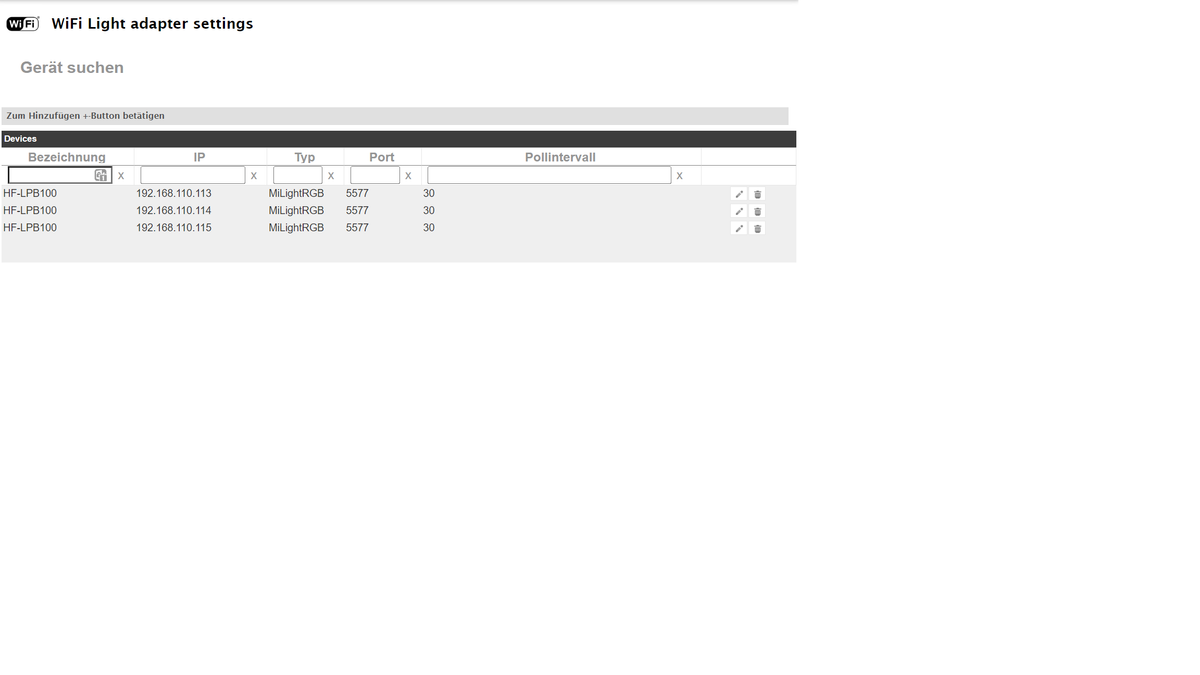
Proxmox, VM`s Windows, IoBroker im unprivilegiert LXC, Openmediavault; LXC `s Tasmota, PiHole, , InfluxDB, Motioneye, WireguardVPN, UniFi:
Smarthome...Sonoff, Alexa, Wled, raspberrymatic,... -
okay, muss ich nicht verstehen, aber gut.
habe gerade ein reboot gemacht, jetzt nur noch die Fehlermeldung von der VIS.
@einstein2002 sagte in Fehlermeldung host.io.Broker:
okay, muss ich nicht verstehen, aber gut.
amixer ist kein eigenständiges Software-Paket sondern wurde vom Ubuntu-Package-Maintainer zusammen mit anderen Programmen in das Paket 'alsa-utils' gepackt.
-
Jetzt habe ich halt noch dieses Problem und da könnte ich schwören das es schon mal gegangen ist.
Den WIFI LIGHT Adapter habe ich installiert, Fehler/Warnmeldungen im Protokoll des WLED Adapters sind weg, aber dafür das hier.
config.device.type "" (HF-LPB100) is not a known device type. Skipping this device!Known types are: LW12, LD382A, LD686, LD382, UFO, MiLight, MiLightRGB, MiLightWEr kann meine HF-LPB100 anscheinend nicht mehr, obwohl sie unter Geräte suche gefunden werden und auch im Adapter als Gerät eingefügt sind.
Update:
Für den Fall das jemand genau das gleiche Problem hat, hier meine Lösung:
Ich habe die HF-LPB100 als Geräte gefunden, eingetragen und dann unter Type einfach das " MiLightRGB" eingegeben.
Damit ist die Fehlermeldung weg!
Warum ich den Adapter unbedingt brauche erschließt sich mir nicht, aber ohne ihn kommen vom WLED Adapter andauernd Fehlermeldungen.Zu vis und dem wifi-led kann ich nix sagen.

Hey! Du scheinst an dieser Unterhaltung interessiert zu sein, hast aber noch kein Konto.
Hast du es satt, bei jedem Besuch durch die gleichen Beiträge zu scrollen? Wenn du dich für ein Konto anmeldest, kommst du immer genau dorthin zurück, wo du zuvor warst, und kannst dich über neue Antworten benachrichtigen lassen (entweder per E-Mail oder Push-Benachrichtigung). Du kannst auch Lesezeichen speichern und Beiträge positiv bewerten, um anderen Community-Mitgliedern deine Wertschätzung zu zeigen.
Mit deinem Input könnte dieser Beitrag noch besser werden 💗
Registrieren Anmelden399
Online33.0k
Benutzer83.5k
Themen1.3m
Beiträge