




Blockly + Javascripte aus einer script.json extrahieren



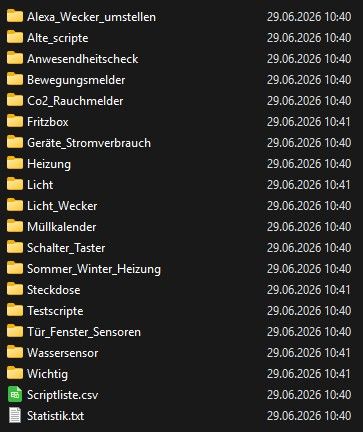
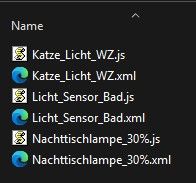
-
Hi,
hab das ganze nun auch als .exe, aber weiß nicht ob man sowas hier posten/anbieten darf.Edit: nur noch "ioBroker_Script_Extractor.exe" starten und die Javascript Backupdatei oder script.json auswählen und fertig. Keine Datei erstellen oder PowerShell und Links eingeben.
-
Dann stell ich das mal hier rein. Falls nicht erwünscht dann löschen.
-
Sehr cool, probiere ich heute Abend mal aus. Aber gibt es dafür nicht auch einen Adapter?
test-adapter-script-restoreSehr cool, probiere ich heute Abend mal aus. Aber gibt es dafür nicht auch einen Adapter?
Ja gibt es, aber das wird man ja nicht sooo oft brauchen (hoffe ich) und dann möchte ich mir nicht extra einen Adapter installieren. Das Tool sollte dafür reichen. (für meine Zwecke)
-
Ich habe aktuell einen Adapter für das Thema im Latest.
Denke, dass er bald im stable ankommen wird.
https://forum.iobroker.net/topic/84506/test-adapter-script-restore-v0.1.11Aber auch ein Cooler Ansatz für Windows User.
EDIT
Oh, wurde oben ja schon drauf hingewiesen...
Ja gibt es, aber das wird man ja nicht sooo oft brauchen (hoffe ich) und dann möchte ich mir nicht extra einen Adapter installieren. Das Tool sollte dafür reichen. (für meine Zwecke)
Ich hab mir schon oft Scripte zerschossen, weil ich vergessen hab eine Kopie zu erstellen 😂
-
Das Tool sollte dafür reichen
Hi Michael,
dein Tool für Windows eignet sich hervorragend zum Ansehen und Herauskopieren von Skripts bzw. -teilen aus Backups. Ich hab's ausprobiert. Danke für deine Ideen!
Gruß, Fuzzy
-
Hi, gern geschehen. Freu mich wenn es nützlich ist ;)
-
Hier die neueste Version
ioBroker_Script_Extractor.ps1
Add-Type -AssemblyName System.Windows.Forms
Add-Type -AssemblyName System.Drawing
Add-Type -AssemblyName System.Web
Add-Type -AssemblyName System.IO.Compression
Add-Type -AssemblyName System.IO.Compression.FileSystem

$so = "C:\iobroker_Script_recover"
$jp = ""
$tmp = Join-Path $so "temp_extract"

try {
    # 1. Dateifenster beim Start öffnen
    $fd = New-Object System.Windows.Forms.OpenFileDialog
    $fd.InitialDirectory = if (Test-Path $so) { $so } else { [Environment]::GetFolderPath("Desktop") }
    $fd.Filter = "ioBroker Dateien (*.json;*.tar.gz)|*.json;*.tar.gz"
    $fd.Title = "Bitte waehle deine script.json ODER eine ioBroker .tar.gz Datei aus"

    if ($fd.ShowDialog() -ne [System.Windows.Forms.DialogResult]::OK) { exit }
    $gewaehlteDatei = $fd.FileName

    # Wenn eine .tar.gz ausgewählt wurde, entpacken im Speicher
    if ($gewaehlteDatei.ToLower().EndsWith(".tar.gz")) {
        if (Test-Path $tmp) { Remove-Item $tmp -Recurse -Force -EA SilentlyContinue }
        New-Item -ItemType Directory -Force -Path $tmp | Out-Null

        try {
            $inFile = New-Object System.IO.FileInfo($gewaehlteDatei)
            $gz = New-Object System.IO.Compression.GZipStream($inFile.OpenRead(), [System.IO.Compression.CompressionMode]::Decompress)

            $tarPath = Join-Path $tmp "temp_backup.tar"
            $tarOut = [System.IO.File]::Create($tarPath)
            $gz.CopyTo($tarOut)
            $tarOut.Close()
            $gz.Close()

            $ts = [System.IO.File]::OpenRead($tarPath)
            $buf = New-Object byte[] 512

            while ($ts.Read($buf, 0, 512) -eq 512) {
                $name = [System.Text.Encoding]::ASCII.GetString($buf, 0, 100).Trim(([char]0))
                $szStr = [System.Text.Encoding]::ASCII.GetString($buf, 124, 12).Trim()
                $sz = 0
                if ($szStr) { $sz = [Convert]::ToInt64($szStr, 8) }

                if ($name.ToLower().EndsWith("script.json")) {
                    $outStream = [System.IO.File]::Create((Join-Path $tmp "script.json"))
                    $rem = $sz
                    $dBuf = New-Object byte[] 512
                    while ($rem -gt 0) {
                        $read = 512
                        if ($rem -lt 512) { $read = $rem }
                        [void]$ts.Read($dBuf, 0, 512)
                        $outStream.Write($dBuf, 0, $read)
                        $rem -= 512
                    }
                    $outStream.Close()
                    $jp = Join-Path $tmp "script.json"
                    break
                } else {
                    if ($sz -gt 0) {
                        $blocks = [Math]::Ceiling($sz / 512)
                        [void]$ts.Seek(($blocks * 512), [System.IO.SeekOrigin]::Current)
                    }
                }
            }
            $ts.Close()
        } catch {}
    } else {
        $jp = $gewaehlteDatei
    }

    if (-not $jp -or -not (Test-Path $jp)) { exit }

    $raw = Get-Content $jp -Raw -Encoding UTF8
    if ([string]::IsNullOrWhiteSpace($raw)) { exit }
    $json = ConvertFrom-Json $raw
    $skriptListe = [System.Collections.Generic.List[Object]]::new()

    function Get-SichererBlocklyXml ([string]$sourceCode) {
        if ([string]::IsNullOrWhiteSpace($sourceCode)) { return "" }
        if ($sourceCode -match '//([A-Za-z0-9+/=%]{50,})\s*$') {
            try {
                $xml = [System.Web.HttpUtility]::UrlDecode([Text.Encoding]::UTF8.GetString([Convert]::FromBase64String($Matches[1])))
                if ($xml -match '<xml') { return ($xml -replace '><', ">`r`n<").Trim() }
            } catch {}
        }
        if ($sourceCode -match '(?s)(<xml.*?</xml>)') { return ($Matches[1] -replace '><', ">`r`n<").Trim() }
        return ""
    }

    function Add-SkriptToList ([string]$id, $obj) {
        if (-not $obj) { return }
        if ($obj.type -match "channel|folder") { return }
        $parts = ($id -replace '^script\.js\.(common\.|global\.)?', '').Split('.')
        $p = "Hauptordner"
        if ($parts.Count -gt 1) { $p = $parts[0..($parts.Count-2)] -join '/' }
        $src = ""
        if ($obj.common -and $obj.common.source) { $src = $obj.common.source }
        $en = $true
        if ($obj.common -and $obj.common.enabled -ne $null) { $en = $obj.common.enabled }
        $xml = Get-SichererBlocklyXml -sourceCode $src
        $typText = "JavaScript"
        if ($xml) { $typText = "Blockly" }
        $statText = "Deaktiviert"
        if ($en) { $statText = "Aktiv" }
        $skriptListe.Add([PSCustomObject]@{
            Name      = $parts[-1]
            Pfad      = $p
            Internal  = $id
            JsSource  = $src
            XmlSource = $xml
            Typ       = $typText
            Status    = $statText
        })
    }

    if ($json.PSObject.Properties.Name -contains "objects") {
        foreach ($p in $json.objects.PSObject.Properties) { if ($p.Name -like "script.js.*") { Add-SkriptToList -id $p.Name -obj $p.Value } }
    } else {
        foreach ($p in $json.PSObject.Properties) { if ($p.Name -like "script.js.*") { Add-SkriptToList -id $p.Name -obj $p.Value } }
    }
    if ($skriptListe.Count -eq 0) { exit }

    function Update-Grid {
        $filterText = $txtSearch.Text.Trim()
        $ausTyp = $cmbType.SelectedItem.ToString()
        $suchenInCode = $rbSearchDp.Checked

        $filtered = $skriptListe | Where-Object {
            if ([string]::IsNullOrWhiteSpace($filterText)) {
                $true
            } else {
                if ($suchenInCode) {
                    # Durchsucht JavaScript-Quellcode und Blockly-XML nach dem Datenpunkt/Begriff
                    $_.JsSource.ToLower().Contains($filterText.ToLower()) -or
                    ($_.XmlSource -and $_.XmlSource.ToLower().Contains($filterText.ToLower()))
                } else {
                    # Standard-Suche nach Name oder Pfad
                    $_.Name.ToLower().Contains($filterText.ToLower()) -or
                    $_.Pfad.ToLower().Contains($filterText.ToLower())
                }
            }
        }

        if ($chkHide.Checked) {
            $filtered = $filtered | Where-Object { $_.Status -eq "Aktiv" }
        }
        if ($ausTyp -eq "Nur Blockly") {
            $filtered = $filtered | Where-Object { $_.Typ -eq "Blockly" }
        }
        elseif ($ausTyp -eq "Nur JavaScript") {
            $filtered = $filtered | Where-Object { $_.Typ -eq "JavaScript" }
        }

        $dt = New-Object System.Data.DataTable
        [void]$dt.Columns.AddRange(@("Name","ioBroker-Pfad","Typ","Status","InternalID"))
        foreach ($item in $filtered) { [void]$dt.Rows.Add($item.Name, $item.Pfad, $item.Typ, $item.Status, $item.Internal) }
        $dgv.DataSource = $dt
        if ($dgv.Columns["InternalID"]) { $dgv.Columns["InternalID"].Visible = $false }

        $modusText = if ($suchenInCode) { "Treffer für Datenpunkt/Code" } else { "Gefundene Skripte" }
        $lblCount.Text = "$modusText (aktueller Filter): " + $filtered.Count
        $lblPrev.Text = "Code-Vorschau (0 Skripte ausgewählt):"
    }

    function Start-ScriptExport ([string]$modus) {
        $ausIDs = @()
        if ($modus -eq "all") {
            foreach ($row in $dgv.Rows) {
                if ($row.Cells["InternalID"].Value) { $ausIDs += [string]$row.Cells["InternalID"].Value }
            }
        } else {
            if ($dgv.SelectedRows.Count -eq 0) { return }
            foreach ($row in $dgv.SelectedRows) {
                if ($row.Cells["InternalID"].Value) { $ausIDs += [string]$row.Cells["InternalID"].Value }
            }
        }

        $folderDialog = New-Object System.Windows.Forms.FolderBrowserDialog
        if ($folderDialog.ShowDialog() -ne [System.Windows.Forms.DialogResult]::OK) { return }

        $root = Join-Path $folderDialog.SelectedPath ("ioBroker_Backup_" + (Get-Date -Format "yyyy-MM-dd_HH-mm"))
        New-Item -ItemType Directory -Force -Path $root | Out-Null

        $utf8NoBom = New-Object System.Text.UTF8Encoding $false

        foreach ($targetID in $ausIDs) {
            $scriptData = $skriptListe | Where-Object { $_.Internal -eq $targetID }
            if (-not $scriptData) { continue }
            $folder = $root
            if ($scriptData.Pfad -ne "Hauptordner") { $folder = Join-Path $root ($scriptData.Pfad -replace '/', '\') }
            if ($scriptData.Status -eq "Deaktiviert") { $folder = Join-Path $folder "_DEAKTIVIERT" }
            New-Item -ItemType Directory -Force -Path $folder | Out-Null

            if ($scriptData.Typ -eq "Blockly" -and $scriptData.XmlSource) {
                [System.IO.File]::WriteAllText((Join-Path $folder ($scriptData.Name + ".xml")), $scriptData.XmlSource, $utf8NoBom)
                $cleanJs = $scriptData.JsSource
                if ($cleanJs -match '//([A-Za-z0-9+/=%]{50,})\s*$') { $cleanJs = $cleanJs.Replace($Matches[0], "").Trim() }
                if ($cleanJs -match '(?s)<xml.*?></xml>') { $cleanJs = $cleanJs.Replace($Matches[0], "").Trim() }
                [System.IO.File]::WriteAllText((Join-Path $folder ($scriptData.Name + ".js")), $cleanJs, $utf8NoBom)
            } else {
                [System.IO.File]::WriteAllText((Join-Path $folder ($scriptData.Name + ".js")), $scriptData.JsSource, $utf8NoBom)
            }
        }
        Invoke-Item $root
        [System.Windows.Forms.MessageBox]::Show("Export von $($ausIDs.Count) Skripte(n) erfolgreich abgeschlossen!", "Fertig", [System.Windows.Forms.MessageBoxButtons]::OK, [System.Windows.Forms.MessageBoxIcon]::Information)
    }

    # GUI Definition
    $f = New-Object System.Windows.Forms.Form
    $f.Text = "ioBroker Script Extractor & Search"
    $f.Size = New-Object System.Drawing.Size(960, 830)
    $f.StartPosition = "CenterScreen"

    $pnlTop = New-Object System.Windows.Forms.Panel
    $pnlTop.Dock = "Top"
    $pnlTop.Height = 100
    $f.Controls.Add($pnlTop)

    # Suchmodus Radio-Buttons
    $grpMode = New-Object System.Windows.Forms.GroupBox -Property @{Text="Suchmodus"; Location=New-Object System.Drawing.Point(10,5); Size=New-Object System.Drawing.Size(465,40)}
    $rbSearchName = New-Object System.Windows.Forms.RadioButton -Property @{Text="Skripte (Name/Pfad)"; Location=New-Object System.Drawing.Point(10,15); Size=New-Object System.Drawing.Size(150,20); Checked=$true}
    $rbSearchDp = New-Object System.Windows.Forms.RadioButton -Property @{Text="In Skripten nach Datenpunkt / Code suchen"; Location=New-Object System.Drawing.Point(170,15); Size=New-Object System.Drawing.Size(280,20)}
    $grpMode.Controls.AddRange(@($rbSearchName, $rbSearchDp))

    $lblSrc = New-Object System.Windows.Forms.Label -Property @{Text="Suchen:"; Location=New-Object System.Drawing.Point(10,53); Size=New-Object System.Drawing.Size(50,20)}
    $txtSearch = New-Object System.Windows.Forms.TextBox -Property @{Location=New-Object System.Drawing.Point(65,50); Size=New-Object System.Drawing.Size(410,20)}
    $chkHide = New-Object System.Windows.Forms.CheckBox -Property @{Text="Deaktivierte ausblenden"; Location=New-Object System.Drawing.Point(490,48); Size=New-Object System.Drawing.Size(170,24)}

    $cmbType = New-Object System.Windows.Forms.ComboBox
    $cmbType.Location = New-Object System.Drawing.Point(670, 48)
    $cmbType.Size = New-Object System.Drawing.Size(150, 24)
    $cmbType.DropDownStyle = [System.Windows.Forms.ComboBoxStyle]::DropDownList
    [void]$cmbType.Items.AddRange(@("Alle Typen", "Nur Blockly", "Nur JavaScript"))
    $cmbType.SelectedIndex = 0

    $lblCount = New-Object System.Windows.Forms.Label
    $lblCount.Text = "Gefundene Skripte: 0"
    $lblCount.Location = New-Object System.Drawing.Point(10, 78)
    $lblCount.Size = New-Object System.Drawing.Size(500, 20)
    $lblCount.Font = New-Object System.Drawing.Font("Arial", 9, [System.Drawing.FontStyle]::Bold)

    $pnlTop.Controls.AddRange(@($grpMode, $lblSrc, $txtSearch, $chkHide, $cmbType, $lblCount))

    $pnlBottom = New-Object System.Windows.Forms.Panel
    $pnlBottom.Dock = "Bottom"
    $pnlBottom.Height = 55
    $f.Controls.Add($pnlBottom)

    $btnClip = New-Object System.Windows.Forms.Button -Property @{Text="In Zwischenablage"; Location=New-Object System.Drawing.Point(10,10); Size=New-Object System.Drawing.Size(160,35)}
    $btnAll = New-Object System.Windows.Forms.Button -Property @{Text="Alle exportieren"; Location=New-Object System.Drawing.Point(180,10); Size=New-Object System.Drawing.Size(150,35)}
    $btnOk = New-Object System.Windows.Forms.Button -Property @{Text="Ausgewaehlte exportieren"; Location=New-Object System.Drawing.Point(500,10); Size=New-Object System.Drawing.Size(160,35)}
    $btnCan = New-Object System.Windows.Forms.Button -Property @{Text="Schliessen"; Location=New-Object System.Drawing.Point(670,10); Size=New-Object System.Drawing.Size(150,35)}
    $pnlBottom.Controls.AddRange(@($btnClip, $btnAll, $btnOk, $btnCan))

    $dgv = New-Object System.Windows.Forms.DataGridView -Property @{Location=New-Object System.Drawing.Point(10, 105); Size=New-Object System.Drawing.Size(925, 235); Anchor="Top, Left, Right"; AutoSizeColumnsMode="Fill"; SelectionMode="FullRowSelect"; MultiSelect=$true; AllowUserToAddRows=$false; ReadOnly=$true; RowHeadersVisible=$false}
    $f.Controls.Add($dgv)

    $lblPrev = New-Object System.Windows.Forms.Label
    $lblPrev.Text = "Code-Vorschau:"
    $lblPrev.Location = New-Object System.Drawing.Point(10, 345)
    $lblPrev.Size = New-Object System.Drawing.Size(500, 20)
    $lblPrev.Anchor = "Top, Left"
    $f.Controls.Add($lblPrev)

    $txtPrev = New-Object System.Windows.Forms.RichTextBox
    $txtPrev.Location = New-Object System.Drawing.Point(10, 370)
    $txtPrev.Size = New-Object System.Drawing.Size(925, 310)
    $txtPrev.Anchor = "Top, Bottom, Left, Right"
    $txtPrev.Font = New-Object System.Drawing.Font("Consolas", 10)
    $txtPrev.ReadOnly = $true
    $txtPrev.WordWrap = $false
    $f.Controls.Add($txtPrev)

    $txtSearch.Add_TextChanged({ Update-Grid })
    $chkHide.Add_CheckedChanged({ Update-Grid })
    $cmbType.Add_SelectedIndexChanged({ Update-Grid })
    $rbSearchName.Add_CheckedChanged({ Update-Grid })
    $rbSearchDp.Add_CheckedChanged({ Update-Grid })

    $dgv.Add_SelectionChanged({
        $anz = $dgv.SelectedRows.Count
        if ($anz -gt 0) {
            $selectedRow = $dgv.SelectedRows | Select-Object -First 1
            if ($selectedRow.Cells["InternalID"] -and $selectedRow.Cells["InternalID"].Value) {
                $selID = [string]$selectedRow.Cells["InternalID"].Value
                $m = $skriptListe | Where-Object { $_.Internal -eq $selID }
                if ($m) {
                    $codeText = if ($m.Typ -eq "Blockly" -and $m.XmlSource) { $m.XmlSource } else { $m.JsSource }

                    # Vorschau zurücksetzen
                    $txtPrev.Text = $codeText
                    $txtPrev.SelectAll()
                    $txtPrev.SelectionBackColor = [System.Drawing.Color]::White
                    $txtPrev.SelectionColor = [System.Drawing.Color]::Black
                    $txtPrev.DeselectAll()

                    # Bei Datenpunktsuche Treffer gelb markieren & anspringen
                    $searchTerm = $txtSearch.Text.Trim()
                    if ($rbSearchDp.Checked -and -not [string]::IsNullOrWhiteSpace($searchTerm)) {
                        $idx = $codeText.IndexOf($searchTerm, [System.StringComparison]::OrdinalIgnoreCase)
                        if ($idx -ge 0) {
                            $txtPrev.Select($idx, $searchTerm.Length)
                            # Korrigierte Eigenschaft SelectionBackColor für WinForms RichTextBox
                            $txtPrev.SelectionBackColor = [System.Drawing.Color]::Yellow
                            $txtPrev.SelectionColor = [System.Drawing.Color]::Black
                            $txtPrev.ScrollToCaret()
                        }
                    }
                }
            }
            $lblPrev.Text = if ($anz -eq 1) { "Code-Vorschau (1 Skript ausgewählt):" } else { "Code-Vorschau ($anz Skripte ausgewählt):" }
        } else {
            $txtPrev.Text = ""
            $lblPrev.Text = "Code-Vorschau (0 Skripte ausgewählt):"
        }
    })

    $btnClip.Add_Click({
        if (-not [string]::IsNullOrEmpty($txtPrev.Text)) {
            [System.Windows.Forms.Clipboard]::SetText($txtPrev.Text)
            $global:oldText = $btnClip.Text
            $btnClip.Text = "Kopiert!"
            $btnClip.Enabled = $false
            $global:clipTimer = New-Object System.Windows.Forms.Timer -Property @{ Interval = 1500 }
            $global:clipTimer.Add_Tick({
                $btnClip.Text = $global:oldText
                $btnClip.Enabled = $true
                $global:clipTimer.Stop()
                $global:clipTimer.Dispose()
            })
            $global:clipTimer.Start()
        }
    })

    $btnAll.Add_Click({ Start-ScriptExport -modus "all" })
    $btnOk.Add_Click({ Start-ScriptExport -modus "selected" })
    $btnCan.Add_Click({ $f.Close() })

    Update-Grid
    [void]$f.ShowDialog()

} finally {
    if (Test-Path $tmp) { Remove-Item $tmp -Recurse -Force -EA SilentlyContinue }
}
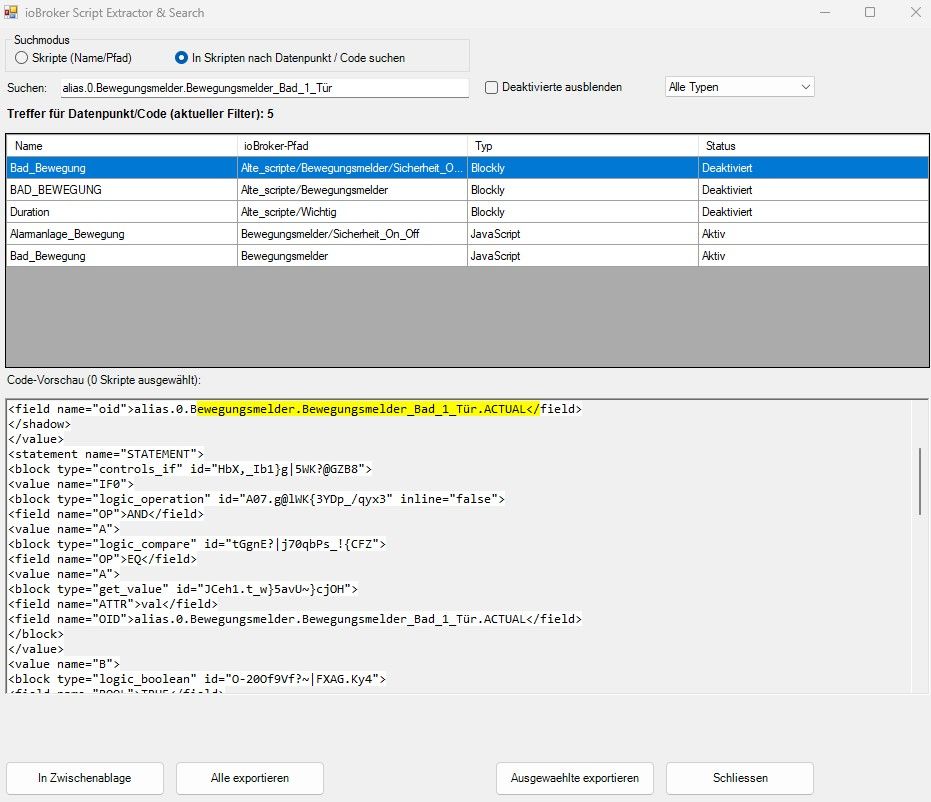
damit kann man nun auch nach Datenpunkten in den Scripten suchen und diese werden dann aufgelistet.
-
Hallo,
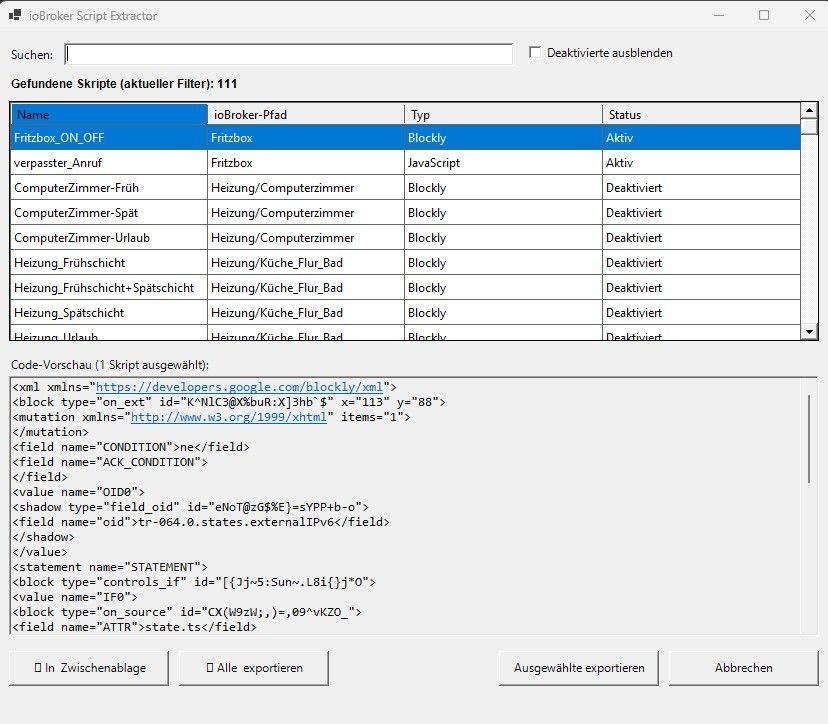
hab jetzt noch ein wenig daran gebaut (Ki war der Macher) und nun schaut es so aus.
Ist nur mit Javascript und Blockly getestet.Jetzt mit
- Suchfunktion
- einzelne Scripte wiederherstellen
- direkt in Zwischenablage kopieren
- deaktivierte Scripte ausblenden
- Namens oder Ordnersuche
- Ordner in C:\iobroker_Script_recover erstellen
in diesen Ordner - Datei erstellen: ioBroker_Script_Extractor.ps1 mit diesem Inhalt.
Add-Type -AssemblyName System.Windows.Forms Add-Type -AssemblyName System.Drawing Add-Type -AssemblyName System.Web $fd = New-Object System.Windows.Forms.OpenFileDialog $fd.InitialDirectory = "C:\" $fd.Filter = "script.json|*.json" $fd.Title = "Wähle script.json" if ($fd.ShowDialog() -ne [System.Windows.Forms.DialogResult]::OK) { exit } $raw = Get-Content $fd.FileName -Raw if ([string]::IsNullOrWhiteSpace($raw)) { exit } $json = ConvertFrom-Json $raw $skriptListe = [System.Collections.Generic.List[Object]]::new() function Get-SichererBlocklyXml ([string]$sourceCode) { if ([string]::IsNullOrWhiteSpace($sourceCode)) { return "" } if ($sourceCode -match '//([A-Za-z0-9+/=%]{50,})\s*$') { try { $xml = [System.Web.HttpUtility]::UrlDecode([Text.Encoding]::UTF8.GetString([Convert]::FromBase64String($Matches[1]))) if ($xml -match '<xml') { return ($xml -replace '><', ">`r`n<").Trim() } } catch {} } if ($sourceCode -match '(?s)(<xml.*?</xml>)') { return ($Matches[1] -replace '><', ">`r`n<").Trim() } return "" } function Add-SkriptToList ([string]$id, $obj) { if (-not $obj -or ($obj.type -match "channel|folder")) { return } $saubereID = $id -replace '^script\.js\.(common\.|global\.)?', '' $parts = $saubereID.Split('.') $p = "Hauptordner" if ($parts.Count -gt 1) { $p = $parts[0..($parts.Count-2)] -join '/' } $src = "" if ($obj.common -and $obj.common.source) { $src = $obj.common.source } elseif ($obj.source) { $src = $obj.source } $en = $true if ($obj.common -and $obj.common.enabled -ne $null) { $en = $obj.common.enabled } $xml = Get-SichererBlocklyXml -sourceCode $src $skriptListe.Add([PSCustomObject]@{ Name = $parts[-1]; Pfad = $p; Internal = $id; JsSource = $src; XmlSource = $xml; Typ = if ($xml) { "Blockly" } else { "JavaScript" }; Status = if ($en) { "Aktiv" } else { "Deaktiviert" } }) } if ($json.PSObject.Properties.Name -contains "objects") { foreach ($p in $json.objects.PSObject.Properties) { if ($p.Name -like "script.js.*") { Add-SkriptToList -id $p.Name -obj $p.Value } } } else { foreach ($p in $json.PSObject.Properties) { if ($p.Name -like "script.js.*") { Add-SkriptToList -id $p.Name -obj $p.Value } } } if ($skriptListe.Count -eq 0) { exit } $f = New-Object System.Windows.Forms.Form $f.Text = "ioBroker Script Extractor" $f.Size = New-Object System.Drawing.Size(850, 750) $f.StartPosition = "CenterScreen" $txtSearch = New-Object System.Windows.Forms.TextBox $txtSearch.Location = New-Object System.Drawing.Point(65, 12) $txtSearch.Size = New-Object System.Drawing.Size(450, 20) $f.Controls.Add($txtSearch) $chkHide = New-Object System.Windows.Forms.CheckBox $chkHide.Text = "Deaktivierte ausblenden" $chkHide.Location = New-Object System.Drawing.Point(530, 10) $chkHide.Size = New-Object System.Drawing.Size(180, 24) $f.Controls.Add($chkHide) $lblCount = New-Object System.Windows.Forms.Label $lblCount.Text = "Gefundene Skripte: 0" $lblCount.Location = New-Object System.Drawing.Point(10, 45) $lblCount.Size = New-Object System.Drawing.Size(400, 20) $lblCount.Font = New-Object System.Drawing.Font("Arial", 9, [System.Drawing.FontStyle]::Bold) $f.Controls.Add($lblCount) $dgv = New-Object System.Windows.Forms.DataGridView $dgv.Location = New-Object System.Drawing.Point(10, 70) $dgv.Size = New-Object System.Drawing.Size(810, 240) $dgv.AutoSizeColumnsMode = "Fill" $dgv.SelectionMode = "FullRowSelect" $dgv.MultiSelect = $true $dgv.AllowUserToAddRows = $false $dgv.ReadOnly = $true $dgv.RowHeadersVisible = $false $f.Controls.Add($dgv) $lblPrev = New-Object System.Windows.Forms.Label $lblPrev.Text = "Vorschau:" $lblPrev.Location = New-Object System.Drawing.Point(10, 325) $lblPrev.Size = New-Object System.Drawing.Size(500, 20) $f.Controls.Add($lblPrev) $txtPrev = New-Object System.Windows.Forms.RichTextBox $txtPrev.Location = New-Object System.Drawing.Point(10, 345) $txtPrev.Size = New-Object System.Drawing.Size(810, 260) $txtPrev.Font = New-Object System.Drawing.Font("Consolas", 10) $txtPrev.ReadOnly = $true $txtPrev.WordWrap = $false $f.Controls.Add($txtPrev) $btnClip = New-Object System.Windows.Forms.Button $btnClip.Text = "📋 In Zwischenablage" $btnClip.Location = New-Object System.Drawing.Point(10, 620) $btnClip.Size = New-Object System.Drawing.Size(160, 35) $f.Controls.Add($btnClip) $btnAll = New-Object System.Windows.Forms.Button $btnAll.Text = "📦 Alle exportieren" $btnAll.Location = New-Object System.Drawing.Point(180, 620) $btnAll.Size = New-Object System.Drawing.Size(150, 35) $btnAll.DialogResult = 7 $f.Controls.Add($btnAll) $btnOk = New-Object System.Windows.Forms.Button $btnOk.Text = "Ausgewählte exportieren" $btnOk.Location = New-Object System.Drawing.Point(500, 620) $btnOk.Size = New-Object System.Drawing.Size(160, 35) $btnOk.DialogResult = [System.Windows.Forms.DialogResult]::OK $f.Controls.Add($btnOk) $btnCan = New-Object System.Windows.Forms.Button $btnCan.Text = "Abbrechen" $btnCan.Location = New-Object System.Drawing.Point(670, 620) $btnCan.Size = New-Object System.Drawing.Size(150, 35) $btnCan.DialogResult = [System.Windows.Forms.DialogResult]::Cancel $f.Controls.Add($btnCan) $lblSrc = New-Object System.Windows.Forms.Label -Property @{Text="Suchen:"; Location=New-Object System.Drawing.Point(10,15); Size=New-Object System.Drawing.Size(50,20)} $f.Controls.Add($lblSrc) # KORREKTUR: Wildcards (*...) wieder korrekt für den Pfad-Vergleich aktiviert function Update-Grid { $filtered = $skriptListe | Where-Object { [string]::IsNullOrWhiteSpace($txtSearch.Text) -or $_.Name -like "*$($txtSearch.Text)*" -or $_.Pfad -like "*$($txtSearch.Text)*" } | Where-Object { -not $chkHide.Checked -or $_.Status -eq "Aktiv" } $dt = New-Object System.Data.DataTable; [void]$dt.Columns.AddRange(@("Name","ioBroker-Pfad","Typ","Status","InternalID")) foreach ($item in $filtered) { [void]$dt.Rows.Add($item.Name, $item.Pfad, $item.Typ, $item.Status, $item.Internal) } $dgv.DataSource = $dt; if ($dgv.Columns["InternalID"]) { $dgv.Columns["InternalID"].Visible = $false } $lblCount.Text = "Gefundene Skripte (aktueller Filter): " + $filtered.Count $lblPrev.Text = "Vorschau (0 Skripte ausgewählt):" } $txtSearch.Add_TextChanged({ Update-Grid }); $chkHide.Add_CheckedChanged({ Update-Grid }) $dgv.Add_SelectionChanged({ $anz = $dgv.SelectedRows.Count if ($anz -gt 0) { $selID = [string]$dgv.SelectedRows[0].Cells["InternalID"].Value if (-not [string]::IsNullOrEmpty($selID)) { $m = $skriptListe | Where-Object { $_.Internal -eq $selID } if ($m) { $txtPrev.Text = if ($m.Typ -eq "Blockly" -and $m.XmlSource) { $m.XmlSource } else { $m.JsSource } } } $lblPrev.Text = if ($anz -eq 1) { "Code-Vorschau (1 Skript ausgewählt):" } else { "Code-Vorschau ($anz Skripte ausgewählt):" } } else { $txtPrev.Text = ""; $lblPrev.Text = "Vorschau (0 Skripte ausgewählt):" } }) $btnClip.Add_Click({ if (-not [string]::IsNullOrEmpty($txtPrev.Text)) { [System.Windows.Forms.Clipboard]::SetText($txtPrev.Text) $global:oldText = $btnClip.Text; $btnClip.Text = "✅ Kopiert!"; $btnClip.Enabled = $false $global:clipTimer = New-Object System.Windows.Forms.Timer -Property @{ Interval = 1500 } $global:clipTimer.Add_Tick({ $btnClip.Text = $global:oldText; $btnClip.Enabled = $true; $global:clipTimer.Stop(); $global:clipTimer.Dispose() }); $global:clipTimer.Start() } }) Update-Grid $res = $f.ShowDialog(); $ausIDs = @() if ($res -eq 7) { foreach ($r in $dgv.Rows) { $ausIDs += [string]$r.Cells["InternalID"].Value } } elseif ($res -eq [System.Windows.Forms.DialogResult]::OK -and $dgv.SelectedRows.Count -gt 0) { foreach ($r in $dgv.SelectedRows) { $ausIDs += [string]$r.Cells["InternalID"].Value } } else { $f.Dispose(); exit }; $f.Dispose() $folderDialog = New-Object System.Windows.Forms.FolderBrowserDialog if ($folderDialog.ShowDialog() -ne [System.Windows.Forms.DialogResult]::OK) { exit } $root = Join-Path $folderDialog.SelectedPath ("ioBroker_Backup_" + (Get-Date -Format "yyyy-MM-dd_HH-mm")) New-Item -ItemType Directory -Force -Path $root | Out-Null foreach ($targetID in $ausIDs) { $scriptData = $skriptListe | Where-Object { $_.Internal -eq $targetID } if (-not $scriptData) { continue } $folder = if ($scriptData.Pfad -ne "Hauptordner") { Join-Path $root ($scriptData.Pfad -replace '/', '\') } else { $root } if ($scriptData.Status -eq "Deaktiviert") { $folder = Join-Path $folder "_DEAKTIVIERT" } New-Item -ItemType Directory -Force -Path $folder | Out-Null if ($scriptData.Typ -eq "Blockly" -and $scriptData.XmlSource) { $scriptData.XmlSource | Set-Content (Join-Path $folder ($scriptData.Name + ".xml")) -Encoding UTF8 $cleanJs = $scriptData.JsSource if ($cleanJs -match '//([A-Za-z0-9+/=%]{50,})\s*$') { $cleanJs = $cleanJs.Replace($Matches[0], "").Trim() } if ($cleanJs -match '(?s)<xml.*?></xml>') { $cleanJs = $cleanJs.Replace($Matches[0], "").Trim() } $cleanJs | Set-Content (Join-Path $folder ($scriptData.Name + ".js")) -Encoding UTF8 } else { $scriptData.JsSource | Set-Content (Join-Path $folder ($scriptData.Name + ".js")) -Encoding UTF8 } } Invoke-Item $root- Powershell öffnen
- cd C:\iobroker_Script_recover
- .\ioBroker_Script_Extractor.ps1
- script.json aus dem Javascript Backup auswählen (muß man davor natürlich entpacken)
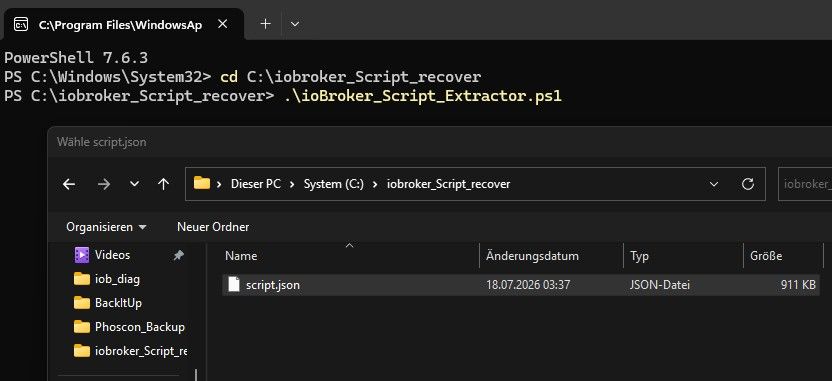
hier zB mit deaktivierten scripten ausblenden
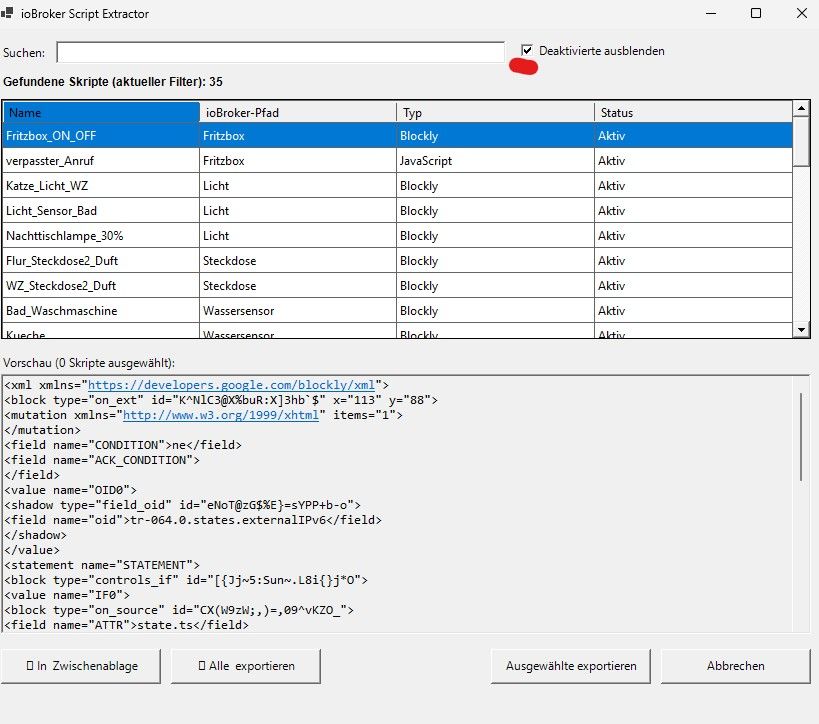
ich hoffe es hilft jemandem ;)
-
@vowill werden dir den in der GUI die Scripte angezeigt ?
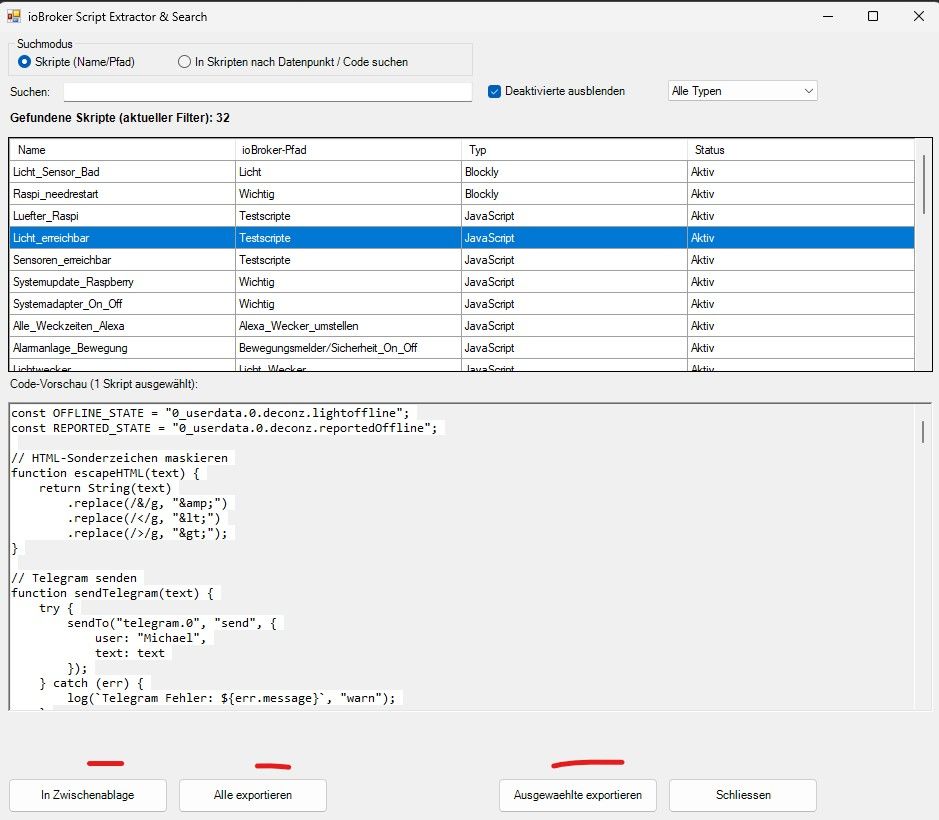
du kannst unten auf
- in Zwischenablage - kopiert den code der unten steht in die Zwischenablage
- Alle exportieren - hiermit werden alle gefundenen Scripte exportiert
- Ausgewählte exportieren - die Scripte die blau unterlegt sind werden exportiert
-
@michael-schmitt Danke für deine schnelle Rückmeldung. Vermutlich läuft bei mir das Programm nicht richtig: Es legt nur die schon genannte Datei 'temp_backup.tar' an, ohne dass sich ein Fenster öffnet. Vielleicht braucht das exe noch irgendwelche Zugriffsrechte ...
-
du hast aber die zb "iobroker_2026_08_09-03_37_10_backupiobroker.tar.gz" auf deinem PC. wenn die Dateien angelegt werden sollte das Programm auch laufen. Ist kein Symbol in der Taskleiste ?
-
du hast aber die zb "iobroker_2026_08_09-03_37_10_backupiobroker.tar.gz" auf deinem PC. wenn die Dateien angelegt werden sollte das Programm auch laufen. Ist kein Symbol in der Taskleiste ?
@Michael-Schmitt
Mit welcher KI baust du das Tool? -
Teilweise Gemini und ChatGPT
EDIT: es ist jeder Willkommen die Idee weiter zu spinnen und zu verbessern. Ich mach das nur aus Spaß an der Freude und aus der Not das ein oder andere mal ein Script zerschossen zu haben. Also Leute mit bezahlter Ki zaubern da sicher was besseres ;)
Für mich reichts




Hey! Du scheinst an dieser Unterhaltung interessiert zu sein, hast aber noch kein Konto.
Hast du es satt, bei jedem Besuch durch die gleichen Beiträge zu scrollen? Wenn du dich für ein Konto anmeldest, kommst du immer genau dorthin zurück, wo du zuvor warst, und kannst dich über neue Antworten benachrichtigen lassen (entweder per E-Mail oder Push-Benachrichtigung). Du kannst auch Lesezeichen speichern und Beiträge positiv bewerten, um anderen Community-Mitgliedern deine Wertschätzung zu zeigen.
Mit deinem Input könnte dieser Beitrag noch besser werden 💗
Registrieren AnmeldenSupport us
456
Online33.0k
Benutzer83.6k
Themen1.3m
Beiträge