




ioB sehr langsam, Proxmox ständig im Staubsaugermodus
-
Chassis - Container? Stehe gerade auf dem Schlauch...
Ich würde den Mount ja ändern wenn ich wüsste wie...
Was meinst du mit Zigbee deaktivieren? Den Zigbee-Adapter im ioBroker?
Chassis - Container? Stehe gerade auf dem Schlauch...
Nicht ohne Grund hatte ich CONTAINER fett geschrieben.
Was meinst du mit Zigbee deaktivieren? Den Zigbee-Adapter im ioBroker?
Ja
-
Hallo zusammen,
Seit einiger Zeit (ich kann nicht mal sagen seit wann, da ich eine ganze Weile nicht zu Hause war und gerade erst wieder angekommen bin, aber meine Frau sagt schon seit Wochen) staubsaugert der Proxmox wo der ioB drauf läuft permanent laut vor sich hin. Außerdem ist er sehr langsam geworden. Vielleicht hat ja jemand eine Idee, woran das liegen könnte (bewusst wurde nichts geändert):
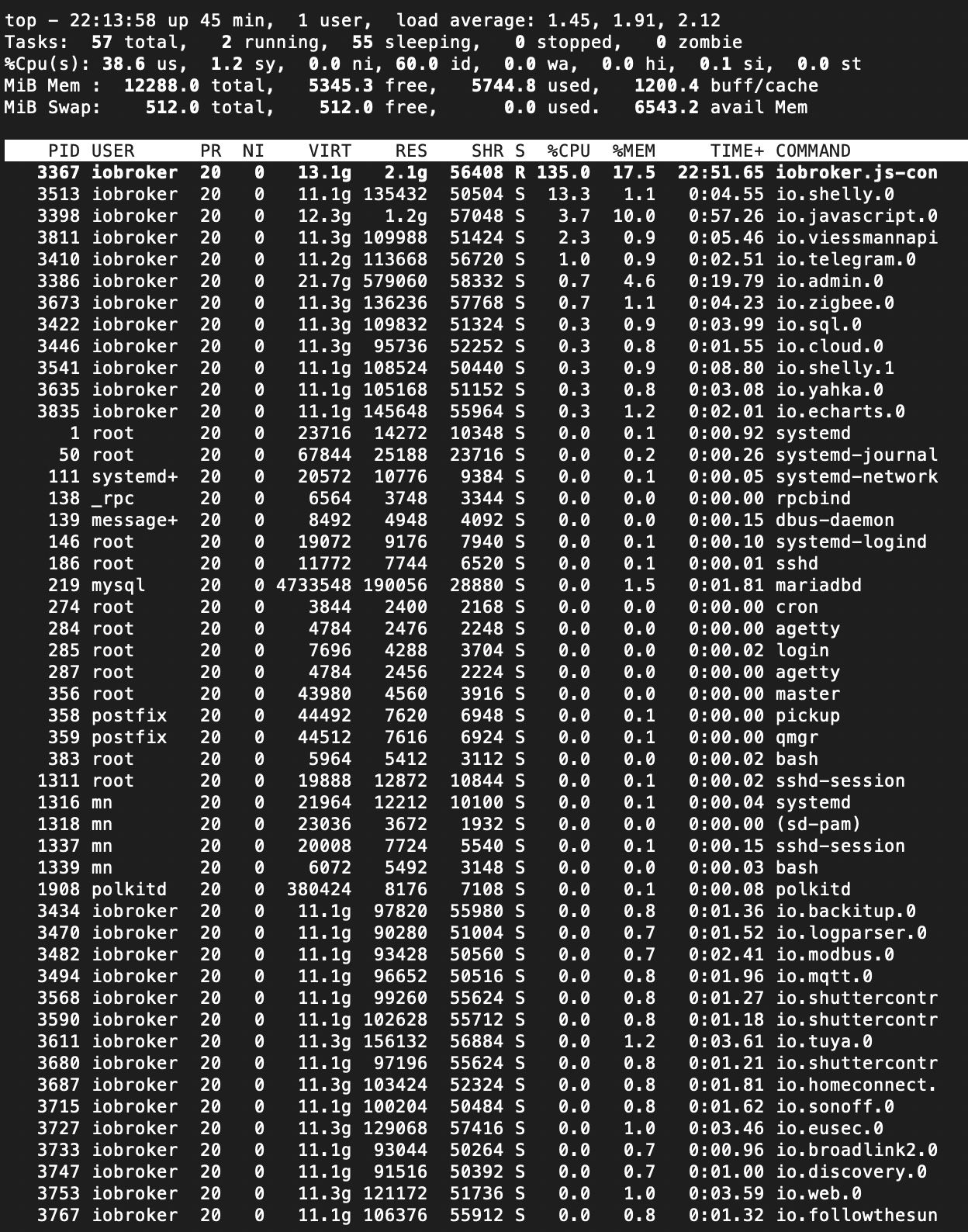
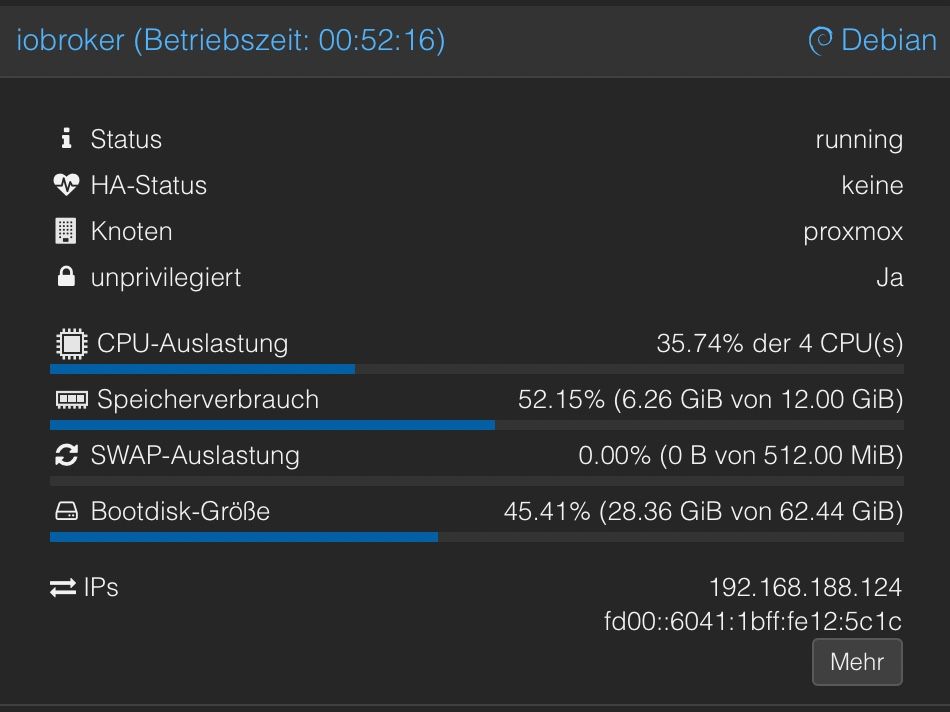
bash Script v.2026-01-31 *** BASE SYSTEM *** Operating System: Debian GNU/Linux 13 (trixie) Static hostname: iobroker Icon name: computer-container Chassis: container ☐ Virtualization: lxc Kernel: Linux 7.0.0-3-pve Architecture: x86-64 OS is similar to: model name : Intel(R) Core(TM) i5-10210U CPU @ 1.60GHz Docker : false Virtualization : lxc Kernel : x86_64 Userland : 64 bit Systemuptime and Load: 22:20:13 up 51 min, 1 user, load average: 1.22, 1.69, 1.96 CPU threads: 4 *** LIFE CYCLE STATUS *** Operating System is the current Debian stable version codenamed 'trixie'! *** TIME AND TIMEZONES *** Local time: Wed 2026-04-29 22:20:13 CEST Universal time: Wed 2026-04-29 20:20:13 UTC RTC time: n/a Time zone: Europe/Berlin (CEST, +0200) System clock synchronized: yes NTP service: inactive RTC in local TZ: no *** Users and Groups *** User that called 'iob diag': mn HOME=/home/mn GROUPS=mn adm dialout sudo users iobroker User that is running 'js-controller': iobroker HOME=/home/iobroker SUDO_HOME=/home/mn GROUPS=iobroker tty dialout audio video plugdev bluetooth *** DISPLAY-SERVER SETUP *** Display-Server: false Unit display-manager.service could not be found. Display-Manager: Desktop: Session: tty *** MEMORY *** total used free shared buff/cache available Mem: 12G 6.1G 5.6G 2.8M 1.3G 6.8G Swap: 536M 0B 536M Total: 13G 6.1G 6.1G Active iob-Instances: 33 12288 M total memory 5778 M used memory 5810 M active memory 833 M inactive memory 5296 M free memory 0 M buffer memory 1215 M swap cache 512 M total swap 0 M used swap 512 M free swap *** top - Table Of Processes *** top - 22:20:13 up 51 min, 1 user, load average: 1.22, 1.69, 1.96 Tasks: 65 total, 2 running, 63 sleeping, 0 stopped, 0 zombie %Cpu(s): 27.9 us, 4.7 sy, 0.0 ni, 67.4 id, 0.0 wa, 0.0 hi, 0.0 si, 0.0 st MiB Mem : 12288.0 total, 5284.4 free, 5790.2 used, 1215.9 buff/cache MiB Swap: 512.0 total, 512.0 free, 0.0 used. 6497.8 avail Mem *** FAILED SERVICES *** UNIT LOAD ACTIVE SUB DESCRIPTION * run-rpc_pipefs.mount loaded failed failed RPC Pipe File System * sys-kernel-config.mount loaded failed failed Kernel Configuration File System Legend: LOAD -> Reflects whether the unit definition was properly loaded. ACTIVE -> The high-level unit activation state, i.e. generalization of SUB. SUB -> The low-level unit activation state, values depend on unit type. 2 loaded units listed. *** DMESG CRITICAL ERRORS *** dmesg: read kernel buffer failed: Operation not permitted No critical errors detected *** FILESYSTEM *** Filesystem Type Size Used Avail Use% Mounted on /dev/mapper/pve-vm--100--disk--0 ext4 63G 29G 31G 48% / none tmpfs 492K 4.0K 488K 1% /dev /dev/mapper/pve-root ext4 94G 17G 73G 19% /dev/ttyACM0 udev devtmpfs 29G 0 29G 0% /dev/tty tmpfs tmpfs 32G 0 32G 0% /dev/shm tmpfs tmpfs 13G 132K 13G 1% /run tmpfs tmpfs 5.0M 0 5.0M 0% /run/lock tmpfs tmpfs 32G 2.6M 32G 1% /tmp tmpfs tmpfs 6.3G 8.0K 6.3G 1% /run/user/1001 Messages concerning ext4 filesystem in dmesg: dmesg: read kernel buffer failed: Operation not permitted Show mounted filesystems: TARGET SOURCE FSTYPE OPTIONS / /dev/mapper/pve-vm--100--disk--0 ext4 rw,relatime,stripe=16 `-/dev/ttyACM0 /dev/mapper/pve-root[/var/lib/lxc/101/devices/ttyACM0] ext4 rw,relatime,errors=remount-ro Files in neuralgic directories: /var: 10G /var/ 8.8G /var/lib 8.7G /var/lib/mysql 8.5G /var/lib/mysql/DBioBroker 1.1G /var/log/journal/105f04df101b4fd9aa5af34dea5da7f8 Archived and active journals take up 1G in the file system. /opt/iobroker/backups: 11G /opt/iobroker/backups/ /opt/iobroker/iobroker-data: 924M /opt/iobroker/iobroker-data/ 363M /opt/iobroker/iobroker-data/files 273M /opt/iobroker/iobroker-data/backup-objects 84M /opt/iobroker/iobroker-data/files/vis-2 76M /opt/iobroker/iobroker-data/files/vis The five largest files in iobroker-data are: 205M /opt/iobroker/iobroker-data/objects.jsonl 84M /opt/iobroker/iobroker-data/states.jsonl 30M /opt/iobroker/iobroker-data/files/notification-manager.admin/build/index.js.map 11M /opt/iobroker/iobroker-data/files/notification-manager.admin/build/index.js 9.8M /opt/iobroker/iobroker-data/files/vis-2/material-icons/knx-uf.json USB-Devices by-id: USB-Sticks - Avoid direct links to /dev/tty* in your adapter setups, please always prefer the links 'by-id': /dev/serial/by-id/usb-dresden_elektronik_ingenieurtechnik_GmbH_ConBee_II_DE2285504-if00 *** ZigBee Settings *** ⚠ HINT: Your zigbee.0 COM-Port is NOT matching 'by-id'. Please check your setting: /dev/ttyACM0 Zigbee Network Settings on your coordinator/in nvbackup are: zigbee.X Extended Pan ID: *** MASKED *** Pan ID: *** MASKED *** Channel: *** MASKED *** Network Key: *** MASKED *** To unmask the settings run 'iob diag --unmask' *** NodeJS-Installation *** /usr/bin/nodejs v22.22.2 /usr/bin/node v22.22.2 /usr/bin/npm 10.9.7 /usr/bin/npx 10.9.7 ✓ Node.js installation is correct nodejs: Installed: 22.22.2-1nodesource1 Candidate: 22.22.2-1nodesource1 Version table: *** 22.22.2-1nodesource1 600 500 https://deb.nodesource.com/node_22.x nodistro/main amd64 Packages 100 /var/lib/dpkg/status 22.22.1-1nodesource1 600 500 https://deb.nodesource.com/node_22.x nodistro/main amd64 Packages 22.22.0-1nodesource1 600 500 https://deb.nodesource.com/node_22.x nodistro/main amd64 Packages 22.21.0-1nodesource1 600 500 https://deb.nodesource.com/node_22.x nodistro/main amd64 Packages 22.20.0-1nodesource1 600 500 https://deb.nodesource.com/node_22.x nodistro/main amd64 Packages 22.19.0-1nodesource1 600 500 https://deb.nodesource.com/node_22.x nodistro/main amd64 Packages 22.18.0-1nodesource1 600 500 https://deb.nodesource.com/node_22.x nodistro/main amd64 Packages 22.17.1-1nodesource1 600 500 https://deb.nodesource.com/node_22.x nodistro/main amd64 Packages 22.17.0-1nodesource1 600 500 https://deb.nodesource.com/node_22.x nodistro/main amd64 Packages 22.16.0-1nodesource1 600 500 https://deb.nodesource.com/node_22.x nodistro/main amd64 Packages 22.15.1-1nodesource1 600 500 https://deb.nodesource.com/node_22.x nodistro/main amd64 Packages 22.15.0-1nodesource1 600 500 https://deb.nodesource.com/node_22.x nodistro/main amd64 Packages 22.14.0-1nodesource1 600 500 https://deb.nodesource.com/node_22.x nodistro/main amd64 Packages 22.13.1-1nodesource1 600 500 https://deb.nodesource.com/node_22.x nodistro/main amd64 Packages 22.13.0-1nodesource1 600 500 https://deb.nodesource.com/node_22.x nodistro/main amd64 Packages 22.12.0-1nodesource1 600 500 https://deb.nodesource.com/node_22.x nodistro/main amd64 Packages 22.11.0-1nodesource1 600 500 https://deb.nodesource.com/node_22.x nodistro/main amd64 Packages 22.10.0-1nodesource1 600 500 https://deb.nodesource.com/node_22.x nodistro/main amd64 Packages 22.9.0-1nodesource1 600 500 https://deb.nodesource.com/node_22.x nodistro/main amd64 Packages 22.8.0-1nodesource1 600 500 https://deb.nodesource.com/node_22.x nodistro/main amd64 Packages 22.7.0-1nodesource1 600 500 https://deb.nodesource.com/node_22.x nodistro/main amd64 Packages 22.6.0-1nodesource1 600 500 https://deb.nodesource.com/node_22.x nodistro/main amd64 Packages 22.5.1-1nodesource1 600 500 https://deb.nodesource.com/node_22.x nodistro/main amd64 Packages 22.5.0-1nodesource1 600 500 https://deb.nodesource.com/node_22.x nodistro/main amd64 Packages 22.4.1-1nodesource1 600 500 https://deb.nodesource.com/node_22.x nodistro/main amd64 Packages 22.4.0-1nodesource1 600 500 https://deb.nodesource.com/node_22.x nodistro/main amd64 Packages 22.3.0-1nodesource1 600 500 https://deb.nodesource.com/node_22.x nodistro/main amd64 Packages 22.2.0-1nodesource1 600 500 https://deb.nodesource.com/node_22.x nodistro/main amd64 Packages 22.1.0-1nodesource1 600 500 https://deb.nodesource.com/node_22.x nodistro/main amd64 Packages 22.0.0-1nodesource1 600 500 https://deb.nodesource.com/node_22.x nodistro/main amd64 Packages 20.19.2+dfsg-1+deb13u2 500 500 http://security.debian.org trixie-security/main amd64 Packages 20.19.2+dfsg-1 500 500 http://deb.debian.org/debian trixie/main amd64 Packages Temp directories causing deletion problem: 0 No problems detected Errors in npm tree: 0 No problems detected Checking for nodejs vulnerability: █████ ██ ██ ██████ ██████ ██████ ██████ ██ ██ ██ ██ ██ ██ ██ ██ ██ ██ ██ ██ ██ ██ ███████ ██ ██ ██ ███ ██ ██ ██ ██ ██ ██ ██ ██ ██ ██ ██ ██ ██ ██ ██ ██ ██ ██ ██ ██ ██ ██ ██ ███████ ███████ ██████ ██████ ██████ ██████ ██ *** ioBroker-Installation *** ioBroker Status No connection to databases possible ... Hosts: iobroker iobroker (version: 7.0.7, hostname: iobroker , alive, uptime: 1410) Core adapters versions js-controller: 7.0.7 admin: 7.7.22 javascript: 9.0.18 nodejs modules from github: 1 +-- iobroker.vw-connect@0.7.15 (git+ssh://git@github.com/ta2k/ioBroker.vw-connect.git#f756508d8a444a476296f880c2ae1ac3e3010beb) Adapter State + system.adapter.admin.0 : admin : iobroker - enabled, port: 8081, bind: 0.0.0.0, run as: admin system.adapter.alias-manager.0 : alias-manager : iobroker - enabled + system.adapter.backitup.0 : backitup : iobroker - enabled + system.adapter.broadlink2.0 : broadlink2 : iobroker - enabled + system.adapter.cloud.0 : cloud : iobroker - enabled + system.adapter.discovery.0 : discovery : iobroker - enabled + system.adapter.echarts.0 : echarts : iobroker - enabled + system.adapter.eusec.0 : eusec : iobroker - enabled system.adapter.feiertage.0 : feiertage : iobroker - enabled + system.adapter.followthesun.0 : followthesun : iobroker - enabled + system.adapter.homeconnect.0 : homeconnect : iobroker - enabled + system.adapter.hydrawise.0 : hydrawise : iobroker - enabled + system.adapter.javascript.0 : javascript : iobroker - enabled + system.adapter.logparser.0 : logparser : iobroker - enabled + system.adapter.modbus.0 : modbus : iobroker - enabled + system.adapter.mqtt.0 : mqtt : iobroker - enabled, port: 1886, bind: 0.0.0.0 + system.adapter.nanoleaf-lightpanels.0 : nanoleaf-lightpanels : iobroker - enabled, port: 16021 + system.adapter.notification-manager.0 : notification-manager : iobroker - enabled + system.adapter.pvforecast.0 : pvforecast : iobroker - enabled + system.adapter.shelly.0 : shelly : iobroker - enabled, port: 1882, bind: 0.0.0.0 + system.adapter.shelly.1 : shelly : iobroker - enabled, port: 1883, bind: 0.0.0.0 + system.adapter.shuttercontrol.0 : shuttercontrol : iobroker - enabled + system.adapter.shuttercontrol.1 : shuttercontrol : iobroker - enabled + system.adapter.shuttercontrol.2 : shuttercontrol : iobroker - enabled system.adapter.solaredge.0 : solaredge : iobroker - enabled + system.adapter.sonoff.0 : sonoff : iobroker - enabled, port: 1888, bind: 0.0.0.0 + system.adapter.sql.0 : sql : iobroker - enabled, port: 3306 + system.adapter.telegram.0 : telegram : iobroker - enabled, port: 8443, bind: 0.0.0.0 + system.adapter.tuya.0 : tuya : iobroker - enabled system.adapter.uv-protect.0 : uv-protect : iobroker - enabled + system.adapter.viessmannapi.0 : viessmannapi : iobroker - enabled system.adapter.vis-2-widgets-material.0 : vis-2-widgets-material: iobroker - enabled + system.adapter.vis-2.0 : vis-2 : iobroker - enabled system.adapter.vis-map.0 : vis-map : iobroker - disabled system.adapter.vis-materialdesign.0 : vis-materialdesign : iobroker - disabled system.adapter.vis.0 : vis : iobroker - enabled + system.adapter.vw-connect.0 : vw-connect : iobroker - enabled system.adapter.weatherunderground.0 : weatherunderground : iobroker - enabled + system.adapter.web.0 : web : iobroker - enabled, port: 8082, bind: 0.0.0.0, run as: admin + system.adapter.yahka.0 : yahka : iobroker - enabled + system.adapter.zigbee.0 : zigbee : iobroker - enabled, port: /dev/ttyACM0 + instance is alive Enabled adapters with bindings + system.adapter.admin.0 : admin : iobroker - enabled, port: 8081, bind: 0.0.0.0, run as: admin + system.adapter.mqtt.0 : mqtt : iobroker - enabled, port: 1886, bind: 0.0.0.0 + system.adapter.nanoleaf-lightpanels.0 : nanoleaf-lightpanels : iobroker - enabled, port: 16021 + system.adapter.shelly.0 : shelly : iobroker - enabled, port: 1882, bind: 0.0.0.0 + system.adapter.shelly.1 : shelly : iobroker - enabled, port: 1883, bind: 0.0.0.0 + system.adapter.sonoff.0 : sonoff : iobroker - enabled, port: 1888, bind: 0.0.0.0 + system.adapter.sql.0 : sql : iobroker - enabled, port: 3306 + system.adapter.telegram.0 : telegram : iobroker - enabled, port: 8443, bind: 0.0.0.0 + system.adapter.web.0 : web : iobroker - enabled, port: 8082, bind: 0.0.0.0, run as: admin + system.adapter.zigbee.0 : zigbee : iobroker - enabled, port: /dev/ttyACM0 ioBroker-Repositories ┌─────────┬───────────────┬──────────────────────────────────────────────────────────┬──────────────┐ │ (index) │ name │ url │ auto upgrade │ ├─────────┼───────────────┼──────────────────────────────────────────────────────────┼──────────────┤ │ 0 │ 'stable' │ 'https://download.iobroker.net/sources-dist.json' │ false │ │ 1 │ 'beta' │ 'https://download.iobroker.net/sources-dist-latest.json' │ false │ │ 2 │ 'live-stable' │ 'http://iobroker.live/repo/sources-dist.json' │ false │ │ 3 │ 'live-beta' │ 'http://iobroker.live/repo/sources-dist-latest.json' │ false │ └─────────┴───────────────┴──────────────────────────────────────────────────────────┴──────────────┘ Active repo(s): stable Upgrade policy: none Installed ioBroker-Adapters Used repository: stable Adapter "admin" : 7.7.22 , installed 7.7.22 Adapter "alias-manager": 2.1.0 , installed 2.1.0 Adapter "backitup" : 3.3.14 , installed 3.3.14 Adapter "broadlink2" : 2.3.0 , installed 2.3.0 Adapter "cloud" : 5.0.1 , installed 5.0.1 Adapter "discovery" : 5.0.0 , installed 5.0.0 Adapter "echarts" : 3.1.0 , installed 3.1.0 Adapter "eusec" : 2.0.3 , installed 2.0.3 Adapter "feiertage" : 1.3.0 , installed 1.3.0 Adapter "followthesun" : 0.5.2 , installed 0.5.2 Adapter "homeconnect" : 1.5.2 , installed 1.5.2 Adapter "hydrawise" : 1.0.2 , installed 1.0.2 Adapter "javascript" : 9.0.18 , installed 9.0.18 Controller "js-controller": 7.0.7 , installed 7.0.7 Adapter "logparser" : 2.4.0 , installed 2.4.0 Adapter "modbus" : 8.0.3 , installed 8.0.3 Adapter "mqtt" : 6.1.4 , installed 6.1.4 Adapter "nanoleaf-lightpanels": 1.4.0, installed 1.4.0 Adapter "notification-manager": 1.3.0, installed 1.3.0 Adapter "pvforecast" : 5.1.0 , installed 5.1.0 Adapter "shelly" : 10.6.1 , installed 10.6.1 Adapter "shuttercontrol": 2.0.12 , installed 2.0.12 Adapter "simple-api" : 3.0.7 , installed 3.0.7 Adapter "socketio" : 7.0.8 , installed 7.0.8 Adapter "solaredge" : 1.4.1 , installed 1.4.1 Adapter "sonoff" : 3.3.0 , installed 3.3.0 Adapter "sql" : 3.0.1 , installed 3.0.1 Adapter "telegram" : 4.1.0 , installed 4.1.0 Adapter "tuya" : 3.17.0 , installed 3.17.0 Adapter "uv-protect" : 0.6.11 , installed 0.6.11 Adapter "vis" : 1.5.6 , installed 1.5.6 Adapter "vis-2" : 2.13.8 , installed 2.13.8 Adapter "vis-2-widgets-material": 1.6.1, installed 1.6.1 Adapter "vis-map" : 1.1.2 , installed 1.1.2 Adapter "vis-materialdesign": 0.5.9, installed 0.5.9 Adapter "weatherunderground": 3.7.0, installed 3.7.0 Adapter "web" : 8.0.0 , installed 8.0.0 Adapter "ws" : 4.0.0 , installed 4.0.0 Adapter "yahka" : 1.1.5 , installed 1.1.5 Adapter "zigbee" : 3.3.5 , installed 3.3.5 Objects and States Please stand by - This may take a while Objects: 350096 States: 300366 *** OS-Repositories and Updates *** Hit:1 http://deb.debian.org/debian trixie InRelease Hit:2 http://deb.debian.org/debian trixie-updates InRelease Hit:3 http://security.debian.org trixie-security InRelease Hit:4 https://deb.nodesource.com/node_22.x nodistro InRelease Reading package lists... Pending systemupdates: 0 *** Listening Ports *** Active Internet connections (only servers) Proto Recv-Q Send-Q Local Address Foreign Address State User Inode PID/Program name tcp 0 0 127.0.0.1:42485 0.0.0.0:* LISTEN 1000 205281 3635/io.yahka.0 tcp 0 0 127.0.0.1:9001 0.0.0.0:* LISTEN 1000 167995 3367/iobroker.js-co tcp 0 0 127.0.0.1:9000 0.0.0.0:* LISTEN 1000 163570 3367/iobroker.js-co tcp 0 0 0.0.0.0:1887 0.0.0.0:* LISTEN 1000 207979 3494/io.mqtt.0 tcp 0 0 0.0.0.0:1886 0.0.0.0:* LISTEN 1000 207978 3494/io.mqtt.0 tcp 0 0 0.0.0.0:1883 0.0.0.0:* LISTEN 1000 208702 3541/io.shelly.1 tcp 0 0 0.0.0.0:1888 0.0.0.0:* LISTEN 1000 221488 3715/io.sonoff.0 tcp 0 0 0.0.0.0:111 0.0.0.0:* LISTEN 0 17756 1/init tcp 0 0 127.0.0.1:3306 0.0.0.0:* LISTEN 105 23155 219/mariadbd tcp 0 0 127.0.0.1:25 0.0.0.0:* LISTEN 0 19286 356/master tcp6 0 0 :::8555 :::* LISTEN 1000 208363 4000/go2rtc tcp6 0 0 :::8554 :::* LISTEN 1000 208362 4000/go2rtc tcp6 0 0 :::46145 :::* LISTEN 1000 205262 3635/io.yahka.0 tcp6 0 0 :::1984 :::* LISTEN 1000 217009 4000/go2rtc tcp6 0 0 ::1:25 :::* LISTEN 0 19287 356/master tcp6 0 0 :::111 :::* LISTEN 0 17758 1/init tcp6 0 0 :::22 :::* LISTEN 0 20971 1/init tcp6 0 0 :::8082 :::* LISTEN 1000 208288 3753/io.web.0 tcp6 0 0 :::8081 :::* LISTEN 1000 168381 3386/io.admin.0 udp 0 0 0.0.0.0:60094 0.0.0.0:* 1000 221598 3733/io.broadlink2. udp 0 0 0.0.0.0:111 0.0.0.0:* 0 17757 1/init udp 0 0 0.0.0.0:32929 0.0.0.0:* 1000 208356 3727/io.eusec.0 udp 0 0 0.0.0.0:1900 0.0.0.0:* 1000 221509 3887/io.nanoleaf-li udp 0 0 0.0.0.0:35918 0.0.0.0:* 1000 208351 3727/io.eusec.0 udp 0 0 0.0.0.0:5353 0.0.0.0:* 1000 205267 3635/io.yahka.0 udp 0 0 0.0.0.0:5353 0.0.0.0:* 1000 205266 3635/io.yahka.0 udp 0 0 0.0.0.0:38256 0.0.0.0:* 1000 216877 3733/io.broadlink2. udp 0 0 0.0.0.0:5683 0.0.0.0:* 1000 239169 3513/io.shelly.0 udp 0 0 0.0.0.0:6666 0.0.0.0:* 1000 208469 3611/io.tuya.0 udp 0 0 0.0.0.0:6667 0.0.0.0:* 1000 208470 3611/io.tuya.0 udp 0 0 0.0.0.0:15001 0.0.0.0:* 1000 208216 3733/io.broadlink2. udp6 0 0 :::111 :::* 0 17759 1/init udp6 0 0 :::8555 :::* 1000 208364 4000/go2rtc *** Log File - Last 25 Lines *** 2026-04-29 22:12:41.841 - info: cloud.0 (3446) Adapter redirected temporally to "https://iobroker.net:10556" in one minute. Reason: command from server 2026-04-29 22:12:41.841 - info: cloud.0 (3446) Connection changed: disconnect 2026-04-29 22:13:57.147 - info: cloud.0 (3446) Trying to connect as system.user.admin to cloud 2026-04-29 22:14:41.555 - info: cloud.0 (3446) Got terminate signal TERMINATE_YOURSELF 2026-04-29 22:14:41.556 - info: cloud.0 (3446) Connection changed: disconnect 2026-04-29 22:14:41.556 - info: cloud.0 (3446) terminating 2026-04-29 22:14:41.557 - info: cloud.0 (3446) Terminated (ADAPTER_REQUESTED_TERMINATION): Without reason 2026-04-29 22:14:42.061 - info: cloud.0 (3446) terminating 2026-04-29 22:14:43.061 - info: cloud.0 (3446) terminating with timeout 2026-04-29 22:15:12.793 - warn: cloud.0 (4168) slow connection to states DB. Still waiting ... 2026-04-29 22:15:20.192 - info: javascript.0 (3398) script.js.common.Mitteilung.Mitteilung_Instanz_läuft_nicht: Folgende Instanz läuft nicht: system.adapter.cloud.0 2026-04-29 22:15:20.193 - info: javascript.0 (3398) script.js.common.Mitteilung.Mitteilung_Instanz_läuft_nicht: Die Nachricht, dass Instanzen nicht laufen, wurde an Mirko gesendet. 2026-04-29 22:15:45.234 - info: cloud.0 (4168) starting. Version 5.0.1 in /opt/iobroker/node_modules/iobroker.cloud, node: v22.22.2, js-controller: 7.0.7 2026-04-29 22:15:47.614 - info: cloud.0 (4168) Connecting with https://iobroker.net:10555 with "dr.mirko.neumann@web.de_8d52a510-3ad9-11eb-a8aa-65121e566f6c" 2026-04-29 22:15:47.715 - info: cloud.0 (4168) Trying to connect as system.user.admin to cloud 2026-04-29 22:15:47.832 - info: cloud.0 (4168) Adapter redirected temporally to "https://iobroker.net:10556" in one minute. Reason: command from server 2026-04-29 22:15:47.833 - info: cloud.0 (4168) Connection changed: disconnect 2026-04-29 22:15:50.595 - warn: hydrawise.0 (3853) received 429 response from /api/v1/customerdetails.php with content: "Exceeded maximum number of requests. You cannot make more than 5 requests in any 5 minute period to this endpoint." 2026-04-29 22:16:49.438 - info: cloud.0 (4168) Trying to connect as system.user.admin to cloud 2026-04-29 22:17:47.837 - info: cloud.0 (4168) Trying to connect as system.user.admin to cloud 2026-04-29 22:17:47.919 - info: cloud.0 (4168) Connection changed: connect 2026-04-29 22:17:49.925 - info: javascript.0 (3398) script.js.common.Mitteilung.Mitteilung_Shelly_offline: Folgende Shellys sind offline: Licht Decke Bad (SHRGBW2#00BDFE#1) 2026-04-29 22:17:49.925 - info: javascript.0 (3398) script.js.common.Mitteilung.Mitteilung_Shelly_offline: Die Nachricht, dass Shellys offline sind, wurde per Telegram an Mirko gesendet. 2026-04-29 22:20:50.781 - warn: hydrawise.0 (3853) received 429 response from /api/v1/customerdetails.php with content: "Exceeded maximum number of requests. You cannot make more than 5 requests in any 5 minute period to this endpoint."Schau dir auch mal die ein und ausgehenden Nachrichten an.
Das findest du in der Detail Sicht der Instanzen.
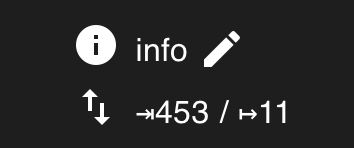
Insbesondere die ausgehenden. 11 ist Standard.
Wenn da höhere Anzahlen stehen, dann beschäftigt der Adapter den iobroker mehr.Oft sieht man das eigentlich schon in der CPU Auslastung.
Oben war es bspw der Shelly Adapter mit 13 Prozent.
Im 2. sieht das aber ok aus. -
Egal ob der Zigbee-Adapter aktiv oder deaktiviert ist, beim ioB-Controller schwankt die CPU-Auslastung zwischen 2% und 160% in regelmäßigen Abständen von ca. 15 Sekunden. Manchmal länger, manchmal kürzer.
Bei den Nachrichten wird es interessant. Da haben wir abweichend von 11 schwankende Werte bei:
- Hydrawise 14-38
- Javascript 37-44
- Logparser 12-14
- Modbus 106-261
- MQTT 21-34
- Shelly 50-235
- Sonoff 30-35
- Tuya 33-185
- Web 19-26
Dann ist mir aufgefallen, dass immer mal wieder die meisten Instanzen rot sind und nach ein paar Sekunden wieder grün. Erst dachte ich, es ist nur ein Darstellungsfehler, aber in der Rot-Zeit stehen auch die Nachrichten auf 0.
Keine Ahnung was das alles bedeutet?
-
Hallo zusammen,
Seit einiger Zeit (ich kann nicht mal sagen seit wann, da ich eine ganze Weile nicht zu Hause war und gerade erst wieder angekommen bin, aber meine Frau sagt schon seit Wochen) staubsaugert der Proxmox wo der ioB drauf läuft permanent laut vor sich hin. Außerdem ist er sehr langsam geworden. Vielleicht hat ja jemand eine Idee, woran das liegen könnte (bewusst wurde nichts geändert):
bash Script v.2026-01-31 *** BASE SYSTEM *** Operating System: Debian GNU/Linux 13 (trixie) Static hostname: iobroker Icon name: computer-container Chassis: container ☐ Virtualization: lxc Kernel: Linux 7.0.0-3-pve Architecture: x86-64 OS is similar to: model name : Intel(R) Core(TM) i5-10210U CPU @ 1.60GHz Docker : false Virtualization : lxc Kernel : x86_64 Userland : 64 bit Systemuptime and Load: 22:20:13 up 51 min, 1 user, load average: 1.22, 1.69, 1.96 CPU threads: 4 *** LIFE CYCLE STATUS *** Operating System is the current Debian stable version codenamed 'trixie'! *** TIME AND TIMEZONES *** Local time: Wed 2026-04-29 22:20:13 CEST Universal time: Wed 2026-04-29 20:20:13 UTC RTC time: n/a Time zone: Europe/Berlin (CEST, +0200) System clock synchronized: yes NTP service: inactive RTC in local TZ: no *** Users and Groups *** User that called 'iob diag': mn HOME=/home/mn GROUPS=mn adm dialout sudo users iobroker User that is running 'js-controller': iobroker HOME=/home/iobroker SUDO_HOME=/home/mn GROUPS=iobroker tty dialout audio video plugdev bluetooth *** DISPLAY-SERVER SETUP *** Display-Server: false Unit display-manager.service could not be found. Display-Manager: Desktop: Session: tty *** MEMORY *** total used free shared buff/cache available Mem: 12G 6.1G 5.6G 2.8M 1.3G 6.8G Swap: 536M 0B 536M Total: 13G 6.1G 6.1G Active iob-Instances: 33 12288 M total memory 5778 M used memory 5810 M active memory 833 M inactive memory 5296 M free memory 0 M buffer memory 1215 M swap cache 512 M total swap 0 M used swap 512 M free swap *** top - Table Of Processes *** top - 22:20:13 up 51 min, 1 user, load average: 1.22, 1.69, 1.96 Tasks: 65 total, 2 running, 63 sleeping, 0 stopped, 0 zombie %Cpu(s): 27.9 us, 4.7 sy, 0.0 ni, 67.4 id, 0.0 wa, 0.0 hi, 0.0 si, 0.0 st MiB Mem : 12288.0 total, 5284.4 free, 5790.2 used, 1215.9 buff/cache MiB Swap: 512.0 total, 512.0 free, 0.0 used. 6497.8 avail Mem *** FAILED SERVICES *** UNIT LOAD ACTIVE SUB DESCRIPTION * run-rpc_pipefs.mount loaded failed failed RPC Pipe File System * sys-kernel-config.mount loaded failed failed Kernel Configuration File System Legend: LOAD -> Reflects whether the unit definition was properly loaded. ACTIVE -> The high-level unit activation state, i.e. generalization of SUB. SUB -> The low-level unit activation state, values depend on unit type. 2 loaded units listed. *** DMESG CRITICAL ERRORS *** dmesg: read kernel buffer failed: Operation not permitted No critical errors detected *** FILESYSTEM *** Filesystem Type Size Used Avail Use% Mounted on /dev/mapper/pve-vm--100--disk--0 ext4 63G 29G 31G 48% / none tmpfs 492K 4.0K 488K 1% /dev /dev/mapper/pve-root ext4 94G 17G 73G 19% /dev/ttyACM0 udev devtmpfs 29G 0 29G 0% /dev/tty tmpfs tmpfs 32G 0 32G 0% /dev/shm tmpfs tmpfs 13G 132K 13G 1% /run tmpfs tmpfs 5.0M 0 5.0M 0% /run/lock tmpfs tmpfs 32G 2.6M 32G 1% /tmp tmpfs tmpfs 6.3G 8.0K 6.3G 1% /run/user/1001 Messages concerning ext4 filesystem in dmesg: dmesg: read kernel buffer failed: Operation not permitted Show mounted filesystems: TARGET SOURCE FSTYPE OPTIONS / /dev/mapper/pve-vm--100--disk--0 ext4 rw,relatime,stripe=16 `-/dev/ttyACM0 /dev/mapper/pve-root[/var/lib/lxc/101/devices/ttyACM0] ext4 rw,relatime,errors=remount-ro Files in neuralgic directories: /var: 10G /var/ 8.8G /var/lib 8.7G /var/lib/mysql 8.5G /var/lib/mysql/DBioBroker 1.1G /var/log/journal/105f04df101b4fd9aa5af34dea5da7f8 Archived and active journals take up 1G in the file system. /opt/iobroker/backups: 11G /opt/iobroker/backups/ /opt/iobroker/iobroker-data: 924M /opt/iobroker/iobroker-data/ 363M /opt/iobroker/iobroker-data/files 273M /opt/iobroker/iobroker-data/backup-objects 84M /opt/iobroker/iobroker-data/files/vis-2 76M /opt/iobroker/iobroker-data/files/vis The five largest files in iobroker-data are: 205M /opt/iobroker/iobroker-data/objects.jsonl 84M /opt/iobroker/iobroker-data/states.jsonl 30M /opt/iobroker/iobroker-data/files/notification-manager.admin/build/index.js.map 11M /opt/iobroker/iobroker-data/files/notification-manager.admin/build/index.js 9.8M /opt/iobroker/iobroker-data/files/vis-2/material-icons/knx-uf.json USB-Devices by-id: USB-Sticks - Avoid direct links to /dev/tty* in your adapter setups, please always prefer the links 'by-id': /dev/serial/by-id/usb-dresden_elektronik_ingenieurtechnik_GmbH_ConBee_II_DE2285504-if00 *** ZigBee Settings *** ⚠ HINT: Your zigbee.0 COM-Port is NOT matching 'by-id'. Please check your setting: /dev/ttyACM0 Zigbee Network Settings on your coordinator/in nvbackup are: zigbee.X Extended Pan ID: *** MASKED *** Pan ID: *** MASKED *** Channel: *** MASKED *** Network Key: *** MASKED *** To unmask the settings run 'iob diag --unmask' *** NodeJS-Installation *** /usr/bin/nodejs v22.22.2 /usr/bin/node v22.22.2 /usr/bin/npm 10.9.7 /usr/bin/npx 10.9.7 ✓ Node.js installation is correct nodejs: Installed: 22.22.2-1nodesource1 Candidate: 22.22.2-1nodesource1 Version table: *** 22.22.2-1nodesource1 600 500 https://deb.nodesource.com/node_22.x nodistro/main amd64 Packages 100 /var/lib/dpkg/status 22.22.1-1nodesource1 600 500 https://deb.nodesource.com/node_22.x nodistro/main amd64 Packages 22.22.0-1nodesource1 600 500 https://deb.nodesource.com/node_22.x nodistro/main amd64 Packages 22.21.0-1nodesource1 600 500 https://deb.nodesource.com/node_22.x nodistro/main amd64 Packages 22.20.0-1nodesource1 600 500 https://deb.nodesource.com/node_22.x nodistro/main amd64 Packages 22.19.0-1nodesource1 600 500 https://deb.nodesource.com/node_22.x nodistro/main amd64 Packages 22.18.0-1nodesource1 600 500 https://deb.nodesource.com/node_22.x nodistro/main amd64 Packages 22.17.1-1nodesource1 600 500 https://deb.nodesource.com/node_22.x nodistro/main amd64 Packages 22.17.0-1nodesource1 600 500 https://deb.nodesource.com/node_22.x nodistro/main amd64 Packages 22.16.0-1nodesource1 600 500 https://deb.nodesource.com/node_22.x nodistro/main amd64 Packages 22.15.1-1nodesource1 600 500 https://deb.nodesource.com/node_22.x nodistro/main amd64 Packages 22.15.0-1nodesource1 600 500 https://deb.nodesource.com/node_22.x nodistro/main amd64 Packages 22.14.0-1nodesource1 600 500 https://deb.nodesource.com/node_22.x nodistro/main amd64 Packages 22.13.1-1nodesource1 600 500 https://deb.nodesource.com/node_22.x nodistro/main amd64 Packages 22.13.0-1nodesource1 600 500 https://deb.nodesource.com/node_22.x nodistro/main amd64 Packages 22.12.0-1nodesource1 600 500 https://deb.nodesource.com/node_22.x nodistro/main amd64 Packages 22.11.0-1nodesource1 600 500 https://deb.nodesource.com/node_22.x nodistro/main amd64 Packages 22.10.0-1nodesource1 600 500 https://deb.nodesource.com/node_22.x nodistro/main amd64 Packages 22.9.0-1nodesource1 600 500 https://deb.nodesource.com/node_22.x nodistro/main amd64 Packages 22.8.0-1nodesource1 600 500 https://deb.nodesource.com/node_22.x nodistro/main amd64 Packages 22.7.0-1nodesource1 600 500 https://deb.nodesource.com/node_22.x nodistro/main amd64 Packages 22.6.0-1nodesource1 600 500 https://deb.nodesource.com/node_22.x nodistro/main amd64 Packages 22.5.1-1nodesource1 600 500 https://deb.nodesource.com/node_22.x nodistro/main amd64 Packages 22.5.0-1nodesource1 600 500 https://deb.nodesource.com/node_22.x nodistro/main amd64 Packages 22.4.1-1nodesource1 600 500 https://deb.nodesource.com/node_22.x nodistro/main amd64 Packages 22.4.0-1nodesource1 600 500 https://deb.nodesource.com/node_22.x nodistro/main amd64 Packages 22.3.0-1nodesource1 600 500 https://deb.nodesource.com/node_22.x nodistro/main amd64 Packages 22.2.0-1nodesource1 600 500 https://deb.nodesource.com/node_22.x nodistro/main amd64 Packages 22.1.0-1nodesource1 600 500 https://deb.nodesource.com/node_22.x nodistro/main amd64 Packages 22.0.0-1nodesource1 600 500 https://deb.nodesource.com/node_22.x nodistro/main amd64 Packages 20.19.2+dfsg-1+deb13u2 500 500 http://security.debian.org trixie-security/main amd64 Packages 20.19.2+dfsg-1 500 500 http://deb.debian.org/debian trixie/main amd64 Packages Temp directories causing deletion problem: 0 No problems detected Errors in npm tree: 0 No problems detected Checking for nodejs vulnerability: █████ ██ ██ ██████ ██████ ██████ ██████ ██ ██ ██ ██ ██ ██ ██ ██ ██ ██ ██ ██ ██ ██ ███████ ██ ██ ██ ███ ██ ██ ██ ██ ██ ██ ██ ██ ██ ██ ██ ██ ██ ██ ██ ██ ██ ██ ██ ██ ██ ██ ██ ███████ ███████ ██████ ██████ ██████ ██████ ██ *** ioBroker-Installation *** ioBroker Status No connection to databases possible ... Hosts: iobroker iobroker (version: 7.0.7, hostname: iobroker , alive, uptime: 1410) Core adapters versions js-controller: 7.0.7 admin: 7.7.22 javascript: 9.0.18 nodejs modules from github: 1 +-- iobroker.vw-connect@0.7.15 (git+ssh://git@github.com/ta2k/ioBroker.vw-connect.git#f756508d8a444a476296f880c2ae1ac3e3010beb) Adapter State + system.adapter.admin.0 : admin : iobroker - enabled, port: 8081, bind: 0.0.0.0, run as: admin system.adapter.alias-manager.0 : alias-manager : iobroker - enabled + system.adapter.backitup.0 : backitup : iobroker - enabled + system.adapter.broadlink2.0 : broadlink2 : iobroker - enabled + system.adapter.cloud.0 : cloud : iobroker - enabled + system.adapter.discovery.0 : discovery : iobroker - enabled + system.adapter.echarts.0 : echarts : iobroker - enabled + system.adapter.eusec.0 : eusec : iobroker - enabled system.adapter.feiertage.0 : feiertage : iobroker - enabled + system.adapter.followthesun.0 : followthesun : iobroker - enabled + system.adapter.homeconnect.0 : homeconnect : iobroker - enabled + system.adapter.hydrawise.0 : hydrawise : iobroker - enabled + system.adapter.javascript.0 : javascript : iobroker - enabled + system.adapter.logparser.0 : logparser : iobroker - enabled + system.adapter.modbus.0 : modbus : iobroker - enabled + system.adapter.mqtt.0 : mqtt : iobroker - enabled, port: 1886, bind: 0.0.0.0 + system.adapter.nanoleaf-lightpanels.0 : nanoleaf-lightpanels : iobroker - enabled, port: 16021 + system.adapter.notification-manager.0 : notification-manager : iobroker - enabled + system.adapter.pvforecast.0 : pvforecast : iobroker - enabled + system.adapter.shelly.0 : shelly : iobroker - enabled, port: 1882, bind: 0.0.0.0 + system.adapter.shelly.1 : shelly : iobroker - enabled, port: 1883, bind: 0.0.0.0 + system.adapter.shuttercontrol.0 : shuttercontrol : iobroker - enabled + system.adapter.shuttercontrol.1 : shuttercontrol : iobroker - enabled + system.adapter.shuttercontrol.2 : shuttercontrol : iobroker - enabled system.adapter.solaredge.0 : solaredge : iobroker - enabled + system.adapter.sonoff.0 : sonoff : iobroker - enabled, port: 1888, bind: 0.0.0.0 + system.adapter.sql.0 : sql : iobroker - enabled, port: 3306 + system.adapter.telegram.0 : telegram : iobroker - enabled, port: 8443, bind: 0.0.0.0 + system.adapter.tuya.0 : tuya : iobroker - enabled system.adapter.uv-protect.0 : uv-protect : iobroker - enabled + system.adapter.viessmannapi.0 : viessmannapi : iobroker - enabled system.adapter.vis-2-widgets-material.0 : vis-2-widgets-material: iobroker - enabled + system.adapter.vis-2.0 : vis-2 : iobroker - enabled system.adapter.vis-map.0 : vis-map : iobroker - disabled system.adapter.vis-materialdesign.0 : vis-materialdesign : iobroker - disabled system.adapter.vis.0 : vis : iobroker - enabled + system.adapter.vw-connect.0 : vw-connect : iobroker - enabled system.adapter.weatherunderground.0 : weatherunderground : iobroker - enabled + system.adapter.web.0 : web : iobroker - enabled, port: 8082, bind: 0.0.0.0, run as: admin + system.adapter.yahka.0 : yahka : iobroker - enabled + system.adapter.zigbee.0 : zigbee : iobroker - enabled, port: /dev/ttyACM0 + instance is alive Enabled adapters with bindings + system.adapter.admin.0 : admin : iobroker - enabled, port: 8081, bind: 0.0.0.0, run as: admin + system.adapter.mqtt.0 : mqtt : iobroker - enabled, port: 1886, bind: 0.0.0.0 + system.adapter.nanoleaf-lightpanels.0 : nanoleaf-lightpanels : iobroker - enabled, port: 16021 + system.adapter.shelly.0 : shelly : iobroker - enabled, port: 1882, bind: 0.0.0.0 + system.adapter.shelly.1 : shelly : iobroker - enabled, port: 1883, bind: 0.0.0.0 + system.adapter.sonoff.0 : sonoff : iobroker - enabled, port: 1888, bind: 0.0.0.0 + system.adapter.sql.0 : sql : iobroker - enabled, port: 3306 + system.adapter.telegram.0 : telegram : iobroker - enabled, port: 8443, bind: 0.0.0.0 + system.adapter.web.0 : web : iobroker - enabled, port: 8082, bind: 0.0.0.0, run as: admin + system.adapter.zigbee.0 : zigbee : iobroker - enabled, port: /dev/ttyACM0 ioBroker-Repositories ┌─────────┬───────────────┬──────────────────────────────────────────────────────────┬──────────────┐ │ (index) │ name │ url │ auto upgrade │ ├─────────┼───────────────┼──────────────────────────────────────────────────────────┼──────────────┤ │ 0 │ 'stable' │ 'https://download.iobroker.net/sources-dist.json' │ false │ │ 1 │ 'beta' │ 'https://download.iobroker.net/sources-dist-latest.json' │ false │ │ 2 │ 'live-stable' │ 'http://iobroker.live/repo/sources-dist.json' │ false │ │ 3 │ 'live-beta' │ 'http://iobroker.live/repo/sources-dist-latest.json' │ false │ └─────────┴───────────────┴──────────────────────────────────────────────────────────┴──────────────┘ Active repo(s): stable Upgrade policy: none Installed ioBroker-Adapters Used repository: stable Adapter "admin" : 7.7.22 , installed 7.7.22 Adapter "alias-manager": 2.1.0 , installed 2.1.0 Adapter "backitup" : 3.3.14 , installed 3.3.14 Adapter "broadlink2" : 2.3.0 , installed 2.3.0 Adapter "cloud" : 5.0.1 , installed 5.0.1 Adapter "discovery" : 5.0.0 , installed 5.0.0 Adapter "echarts" : 3.1.0 , installed 3.1.0 Adapter "eusec" : 2.0.3 , installed 2.0.3 Adapter "feiertage" : 1.3.0 , installed 1.3.0 Adapter "followthesun" : 0.5.2 , installed 0.5.2 Adapter "homeconnect" : 1.5.2 , installed 1.5.2 Adapter "hydrawise" : 1.0.2 , installed 1.0.2 Adapter "javascript" : 9.0.18 , installed 9.0.18 Controller "js-controller": 7.0.7 , installed 7.0.7 Adapter "logparser" : 2.4.0 , installed 2.4.0 Adapter "modbus" : 8.0.3 , installed 8.0.3 Adapter "mqtt" : 6.1.4 , installed 6.1.4 Adapter "nanoleaf-lightpanels": 1.4.0, installed 1.4.0 Adapter "notification-manager": 1.3.0, installed 1.3.0 Adapter "pvforecast" : 5.1.0 , installed 5.1.0 Adapter "shelly" : 10.6.1 , installed 10.6.1 Adapter "shuttercontrol": 2.0.12 , installed 2.0.12 Adapter "simple-api" : 3.0.7 , installed 3.0.7 Adapter "socketio" : 7.0.8 , installed 7.0.8 Adapter "solaredge" : 1.4.1 , installed 1.4.1 Adapter "sonoff" : 3.3.0 , installed 3.3.0 Adapter "sql" : 3.0.1 , installed 3.0.1 Adapter "telegram" : 4.1.0 , installed 4.1.0 Adapter "tuya" : 3.17.0 , installed 3.17.0 Adapter "uv-protect" : 0.6.11 , installed 0.6.11 Adapter "vis" : 1.5.6 , installed 1.5.6 Adapter "vis-2" : 2.13.8 , installed 2.13.8 Adapter "vis-2-widgets-material": 1.6.1, installed 1.6.1 Adapter "vis-map" : 1.1.2 , installed 1.1.2 Adapter "vis-materialdesign": 0.5.9, installed 0.5.9 Adapter "weatherunderground": 3.7.0, installed 3.7.0 Adapter "web" : 8.0.0 , installed 8.0.0 Adapter "ws" : 4.0.0 , installed 4.0.0 Adapter "yahka" : 1.1.5 , installed 1.1.5 Adapter "zigbee" : 3.3.5 , installed 3.3.5 Objects and States Please stand by - This may take a while Objects: 350096 States: 300366 *** OS-Repositories and Updates *** Hit:1 http://deb.debian.org/debian trixie InRelease Hit:2 http://deb.debian.org/debian trixie-updates InRelease Hit:3 http://security.debian.org trixie-security InRelease Hit:4 https://deb.nodesource.com/node_22.x nodistro InRelease Reading package lists... Pending systemupdates: 0 *** Listening Ports *** Active Internet connections (only servers) Proto Recv-Q Send-Q Local Address Foreign Address State User Inode PID/Program name tcp 0 0 127.0.0.1:42485 0.0.0.0:* LISTEN 1000 205281 3635/io.yahka.0 tcp 0 0 127.0.0.1:9001 0.0.0.0:* LISTEN 1000 167995 3367/iobroker.js-co tcp 0 0 127.0.0.1:9000 0.0.0.0:* LISTEN 1000 163570 3367/iobroker.js-co tcp 0 0 0.0.0.0:1887 0.0.0.0:* LISTEN 1000 207979 3494/io.mqtt.0 tcp 0 0 0.0.0.0:1886 0.0.0.0:* LISTEN 1000 207978 3494/io.mqtt.0 tcp 0 0 0.0.0.0:1883 0.0.0.0:* LISTEN 1000 208702 3541/io.shelly.1 tcp 0 0 0.0.0.0:1888 0.0.0.0:* LISTEN 1000 221488 3715/io.sonoff.0 tcp 0 0 0.0.0.0:111 0.0.0.0:* LISTEN 0 17756 1/init tcp 0 0 127.0.0.1:3306 0.0.0.0:* LISTEN 105 23155 219/mariadbd tcp 0 0 127.0.0.1:25 0.0.0.0:* LISTEN 0 19286 356/master tcp6 0 0 :::8555 :::* LISTEN 1000 208363 4000/go2rtc tcp6 0 0 :::8554 :::* LISTEN 1000 208362 4000/go2rtc tcp6 0 0 :::46145 :::* LISTEN 1000 205262 3635/io.yahka.0 tcp6 0 0 :::1984 :::* LISTEN 1000 217009 4000/go2rtc tcp6 0 0 ::1:25 :::* LISTEN 0 19287 356/master tcp6 0 0 :::111 :::* LISTEN 0 17758 1/init tcp6 0 0 :::22 :::* LISTEN 0 20971 1/init tcp6 0 0 :::8082 :::* LISTEN 1000 208288 3753/io.web.0 tcp6 0 0 :::8081 :::* LISTEN 1000 168381 3386/io.admin.0 udp 0 0 0.0.0.0:60094 0.0.0.0:* 1000 221598 3733/io.broadlink2. udp 0 0 0.0.0.0:111 0.0.0.0:* 0 17757 1/init udp 0 0 0.0.0.0:32929 0.0.0.0:* 1000 208356 3727/io.eusec.0 udp 0 0 0.0.0.0:1900 0.0.0.0:* 1000 221509 3887/io.nanoleaf-li udp 0 0 0.0.0.0:35918 0.0.0.0:* 1000 208351 3727/io.eusec.0 udp 0 0 0.0.0.0:5353 0.0.0.0:* 1000 205267 3635/io.yahka.0 udp 0 0 0.0.0.0:5353 0.0.0.0:* 1000 205266 3635/io.yahka.0 udp 0 0 0.0.0.0:38256 0.0.0.0:* 1000 216877 3733/io.broadlink2. udp 0 0 0.0.0.0:5683 0.0.0.0:* 1000 239169 3513/io.shelly.0 udp 0 0 0.0.0.0:6666 0.0.0.0:* 1000 208469 3611/io.tuya.0 udp 0 0 0.0.0.0:6667 0.0.0.0:* 1000 208470 3611/io.tuya.0 udp 0 0 0.0.0.0:15001 0.0.0.0:* 1000 208216 3733/io.broadlink2. udp6 0 0 :::111 :::* 0 17759 1/init udp6 0 0 :::8555 :::* 1000 208364 4000/go2rtc *** Log File - Last 25 Lines *** 2026-04-29 22:12:41.841 - info: cloud.0 (3446) Adapter redirected temporally to "https://iobroker.net:10556" in one minute. Reason: command from server 2026-04-29 22:12:41.841 - info: cloud.0 (3446) Connection changed: disconnect 2026-04-29 22:13:57.147 - info: cloud.0 (3446) Trying to connect as system.user.admin to cloud 2026-04-29 22:14:41.555 - info: cloud.0 (3446) Got terminate signal TERMINATE_YOURSELF 2026-04-29 22:14:41.556 - info: cloud.0 (3446) Connection changed: disconnect 2026-04-29 22:14:41.556 - info: cloud.0 (3446) terminating 2026-04-29 22:14:41.557 - info: cloud.0 (3446) Terminated (ADAPTER_REQUESTED_TERMINATION): Without reason 2026-04-29 22:14:42.061 - info: cloud.0 (3446) terminating 2026-04-29 22:14:43.061 - info: cloud.0 (3446) terminating with timeout 2026-04-29 22:15:12.793 - warn: cloud.0 (4168) slow connection to states DB. Still waiting ... 2026-04-29 22:15:20.192 - info: javascript.0 (3398) script.js.common.Mitteilung.Mitteilung_Instanz_läuft_nicht: Folgende Instanz läuft nicht: system.adapter.cloud.0 2026-04-29 22:15:20.193 - info: javascript.0 (3398) script.js.common.Mitteilung.Mitteilung_Instanz_läuft_nicht: Die Nachricht, dass Instanzen nicht laufen, wurde an Mirko gesendet. 2026-04-29 22:15:45.234 - info: cloud.0 (4168) starting. Version 5.0.1 in /opt/iobroker/node_modules/iobroker.cloud, node: v22.22.2, js-controller: 7.0.7 2026-04-29 22:15:47.614 - info: cloud.0 (4168) Connecting with https://iobroker.net:10555 with "dr.mirko.neumann@web.de_8d52a510-3ad9-11eb-a8aa-65121e566f6c" 2026-04-29 22:15:47.715 - info: cloud.0 (4168) Trying to connect as system.user.admin to cloud 2026-04-29 22:15:47.832 - info: cloud.0 (4168) Adapter redirected temporally to "https://iobroker.net:10556" in one minute. Reason: command from server 2026-04-29 22:15:47.833 - info: cloud.0 (4168) Connection changed: disconnect 2026-04-29 22:15:50.595 - warn: hydrawise.0 (3853) received 429 response from /api/v1/customerdetails.php with content: "Exceeded maximum number of requests. You cannot make more than 5 requests in any 5 minute period to this endpoint." 2026-04-29 22:16:49.438 - info: cloud.0 (4168) Trying to connect as system.user.admin to cloud 2026-04-29 22:17:47.837 - info: cloud.0 (4168) Trying to connect as system.user.admin to cloud 2026-04-29 22:17:47.919 - info: cloud.0 (4168) Connection changed: connect 2026-04-29 22:17:49.925 - info: javascript.0 (3398) script.js.common.Mitteilung.Mitteilung_Shelly_offline: Folgende Shellys sind offline: Licht Decke Bad (SHRGBW2#00BDFE#1) 2026-04-29 22:17:49.925 - info: javascript.0 (3398) script.js.common.Mitteilung.Mitteilung_Shelly_offline: Die Nachricht, dass Shellys offline sind, wurde per Telegram an Mirko gesendet. 2026-04-29 22:20:50.781 - warn: hydrawise.0 (3853) received 429 response from /api/v1/customerdetails.php with content: "Exceeded maximum number of requests. You cannot make more than 5 requests in any 5 minute period to this endpoint."Objects and States
Please stand by - This may take a while
Objects: 350096
States: 300366Ich glaube nicht, dass ich bisher eine höhere Zahl an Objects/States im Baum gesehen habe.
Eigentlich hast Du ja nicht sehr viele Adapter, aber was sammelst Du da alles an Objekten? Hast Du Dich da noch nie auf die Suche gemacht?
Welcher Adapter oder welches Script erzeugt die alle? -
Viessmann erzeugt jede Menge Objekte. Ebenso der VW-Adapter.
Und ich habe über 100 Geräte, die meisten davon Shellys.
Aber das sind wirklich sehr viele Objekte... -
Ich weiß nicht wie ich da suchen kann? Das System ist so quälend langsam, gibts da irgendwie einen Shortcut wo man sieht wo wieviele Objekte sind? Per Hand durchhangeln - da braucht ich ewig...
Ich weiß nicht wie ich da suchen kann?
Ich überschlage das oft so:
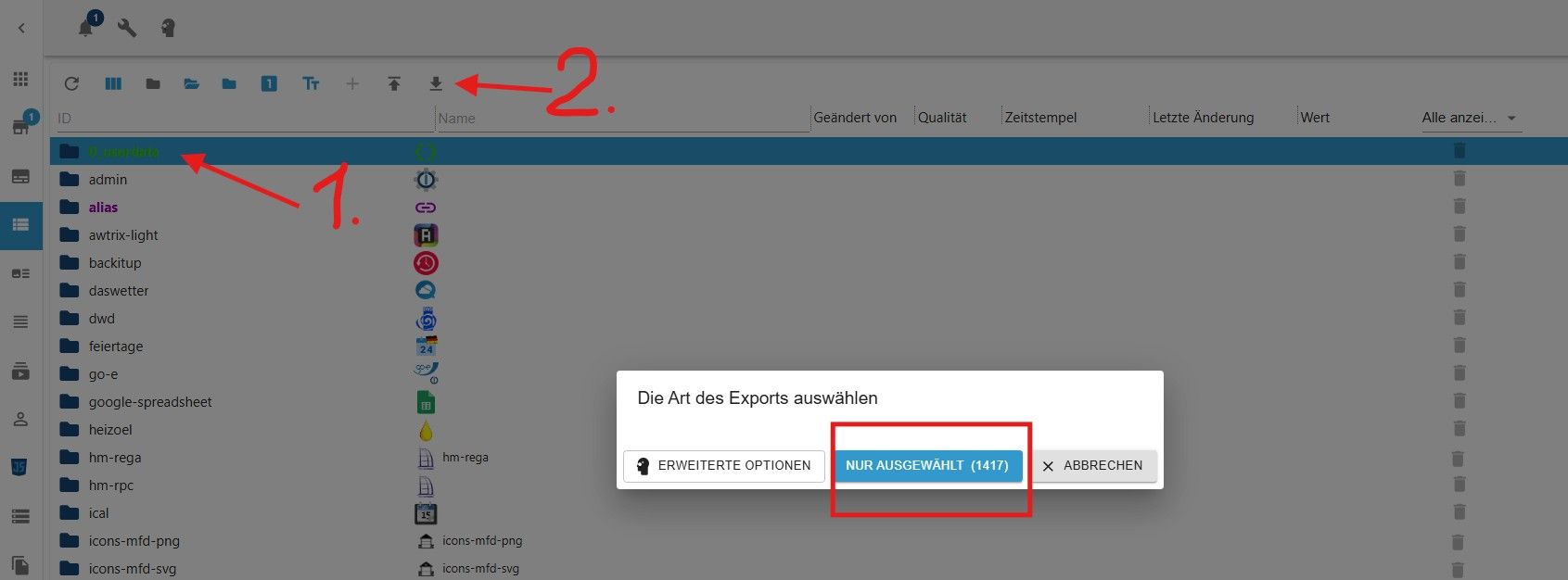
Dann würde ich die von Dir genannten Adapter zuerst jeweils markieren und dann den
Export machen. Kannst ja dann wieder "ABRECHEN".
Ist nicht elegant, aber ich kenne nichts anderes. -
Oder du drückst hinten den Papierkorb, dann siehst du auch die Anzahl der Objekte. ABER DANN "ABBRECHEN" klicken.

Ro75.
-
Danke für die Hinweise! Wieder was gelernt.
Fiesmann ist das Problem. Dort sind knapp 350000 Objekte drin. Wie sind die da reingekommen? Arrrrggghhhh...
Hab alles gelöscht was da nicht hingehört. Mal sehen wie es sich auswirkt...Edit: Habe gelöscht ist falsch ausgedrückt - wenn das weiter so schnell geht dauert das Löschen bis morgen früh... :-)
Ich möchte wirklich mal wissen, wie es Viessmann geschafft hat, mir 350000 Objekte zu verpassen. Das ist ja wirklich der Hammer.
-
Danke für die Hinweise! Wieder was gelernt.
Fiesmann ist das Problem. Dort sind knapp 350000 Objekte drin. Wie sind die da reingekommen? Arrrrggghhhh...
Hab alles gelöscht was da nicht hingehört. Mal sehen wie es sich auswirkt...Edit: Habe gelöscht ist falsch ausgedrückt - wenn das weiter so schnell geht dauert das Löschen bis morgen früh... :-)
Ich möchte wirklich mal wissen, wie es Viessmann geschafft hat, mir 350000 Objekte zu verpassen. Das ist ja wirklich der Hammer.
-
Danke für die Hinweise! Wieder was gelernt.
Fiesmann ist das Problem. Dort sind knapp 350000 Objekte drin. Wie sind die da reingekommen? Arrrrggghhhh...
Hab alles gelöscht was da nicht hingehört. Mal sehen wie es sich auswirkt...Edit: Habe gelöscht ist falsch ausgedrückt - wenn das weiter so schnell geht dauert das Löschen bis morgen früh... :-)
Ich möchte wirklich mal wissen, wie es Viessmann geschafft hat, mir 350000 Objekte zu verpassen. Das ist ja wirklich der Hammer.
Dort sind knapp 350000 Objekte drin.
sollte doch eigentlich ne Meldung direkt vom Controller kommen, dass das Limit überschritten ist
-
Nein, hab leider keine Nachricht bekommen.
Der Viessmann-Adapter hat das System mit Objekten zugemüllt, und zwar hat der jedesmal, wenn ein Fehler in der WP aufgetreten ist, einen kompletten neuen Objektbaum mit allen Fehlerdetails angelegt.
Bei mir war es der Fehler 2c in der WP, zu welchem Viessmann geschrieben hatte, dass dieser Fehler ignoriert werden kann und bei der nächsten Wartung durch einen Monteur zurück gesetzt werden kann. Der Fehler trat quasi im Stundentakt seit Anfang des Jahres auf, da kamen einige Objekte zusammen. Mittlerweile wer der Monteur da, der Fehler tritt nicht mehr auf, aber ich hatte knapp 350000 Objekte mit diesem Fehler im ioB. -
Egal ob der Zigbee-Adapter aktiv oder deaktiviert ist, beim ioB-Controller schwankt die CPU-Auslastung zwischen 2% und 160% in regelmäßigen Abständen von ca. 15 Sekunden. Manchmal länger, manchmal kürzer.
Bei den Nachrichten wird es interessant. Da haben wir abweichend von 11 schwankende Werte bei:
- Hydrawise 14-38
- Javascript 37-44
- Logparser 12-14
- Modbus 106-261
- MQTT 21-34
- Shelly 50-235
- Sonoff 30-35
- Tuya 33-185
- Web 19-26
Dann ist mir aufgefallen, dass immer mal wieder die meisten Instanzen rot sind und nach ein paar Sekunden wieder grün. Erst dachte ich, es ist nur ein Darstellungsfehler, aber in der Rot-Zeit stehen auch die Nachrichten auf 0.
Keine Ahnung was das alles bedeutet?
Egal ob der Zigbee-Adapter aktiv oder deaktiviert ist, beim ioB-Controller schwankt die CPU-Auslastung zwischen 2% und 160% in regelmäßigen Abständen von ca. 15 Sekunden. Manchmal länger, manchmal kürzer.
Bei den Nachrichten wird es interessant. Da haben wir abweichend von 11 schwankende Werte bei:
- Hydrawise 14-38
- Javascript 37-44
- Logparser 12-14
- Modbus 106-261
- MQTT 21-34
- Shelly 50-235
- Sonoff 30-35
- Tuya 33-185
- Web 19-26
Dann ist mir aufgefallen, dass immer mal wieder die meisten Instanzen rot sind und nach ein paar Sekunden wieder grün. Erst dachte ich, es ist nur ein Darstellungsfehler, aber in der Rot-Zeit stehen auch die Nachrichten auf 0.
Keine Ahnung was das alles bedeutet?
Das sind die Anzahl der Nachrichten, die der Adapter zum io Roger oder umgekehrt schickt. Also mehr oder weniger. Wie viel States werden tatsächlich pro Sekunde geschrieben oder gelesen.
Angefangen mit den hohen Werten könntest du jetzt der Reihe nach Adapter pausieren und schauen, ob sich das auf die Auslastung des Brokers auswirkt.
Wenn ja, hast du den Adapter gefunden, der viel Last auf den Rechner ausübt und wahrscheinlich den Engpass zum Schreiben nach inFlux auslöst -
- Hast du den javascript adapter mal ausgeschaltet.
- zeig mal das hier:
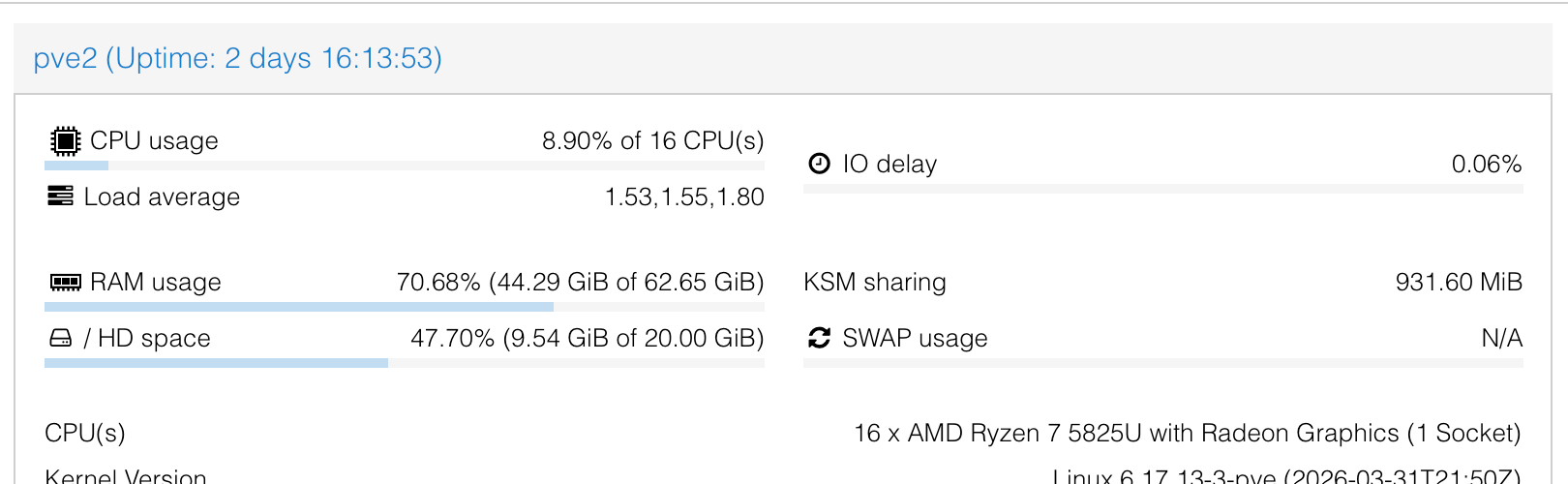
der i-o delay vom host - hat bei mir schon für manch nerviges "wtf" gesorgt.
Als 3. Frage ich mich ob jsonl tatsächlich mit so einer Anzahl an States klar kommt - das weiß ich aber nicht. Auf jeden Fall steht im diagnose teil, das da was nicht geantwortet hat:
No connection to databases possible ...205M /opt/iobroker/iobroker-data/objects.jsonl 84M /opt/iobroker/iobroker-data/states.jsonlDazu soll aber bitte @thomas-braun was sagen



Hey! Du scheinst an dieser Unterhaltung interessiert zu sein, hast aber noch kein Konto.
Hast du es satt, bei jedem Besuch durch die gleichen Beiträge zu scrollen? Wenn du dich für ein Konto anmeldest, kommst du immer genau dorthin zurück, wo du zuvor warst, und kannst dich über neue Antworten benachrichtigen lassen (entweder per E-Mail oder Push-Benachrichtigung). Du kannst auch Lesezeichen speichern und Beiträge positiv bewerten, um anderen Community-Mitgliedern deine Wertschätzung zu zeigen.
Mit deinem Input könnte dieser Beitrag noch besser werden 💗
Registrieren Anmelden485
Online33.0k
Benutzer83.6k
Themen1.3m
Beiträge