Skip to content
  • Home
  • Aktuell
  • Tags
  • 0 Ungelesen 0
  • Kategorien
  • Unreplied
  • Beliebt
  • GitHub
  • Docu
  • Hilfe
Skins
  • Light
  • Brite
  • Cerulean
  • Cosmo
  • Flatly
  • Journal
  • Litera
  • Lumen
  • Lux
  • Materia
  • Minty
  • Morph
  • Pulse
  • Sandstone
  • Simplex
  • Sketchy
  • Spacelab
  • United
  • Yeti
  • Zephyr
  • Dark
  • Cyborg
  • Darkly
  • Quartz
  • Slate
  • Solar
  • Superhero
  • Vapor

  • Standard: (Kein Skin)
  • Kein Skin
Einklappen
ioBroker Logo

Community Forum

donate donate
  1. ioBroker Community Home
  2. Deutsch
  3. ioBroker Allgemein
  4. Sonos-HTTP-API uninstall ??

NEWS

  • Jahresrückblick 2025 – unser neuer Blogbeitrag ist online! ✨
    BluefoxB
    Bluefox
    16
    1
    1.6k

  • Neuer Blogbeitrag: Monatsrückblick - Dezember 2025 🎄
    BluefoxB
    Bluefox
    13
    1
    860

  • Weihnachtsangebot 2025! 🎄
    BluefoxB
    Bluefox
    25
    1
    2.1k

Sonos-HTTP-API uninstall ??

Geplant Angeheftet Gesperrt Verschoben ioBroker Allgemein
16 Beiträge 2 Kommentatoren 115 Aufrufe 2 Watching
  • Älteste zuerst
  • Neuste zuerst
  • Meiste Stimmen
Antworten
  • In einem neuen Thema antworten
Anmelden zum Antworten
Dieses Thema wurde gelöscht. Nur Nutzer mit entsprechenden Rechten können es sehen.
  • FriedhofsblondF Offline
    FriedhofsblondF Offline
    Friedhofsblond
    schrieb am zuletzt editiert von Friedhofsblond
    #3

    Hallo,
    ja sorry jetzt kommts raus.
    Ich versuche mich immer strikt an die Vorlagen zu halten, hab ich wohl unter sudo bzw root installiert.
    So wie hier:
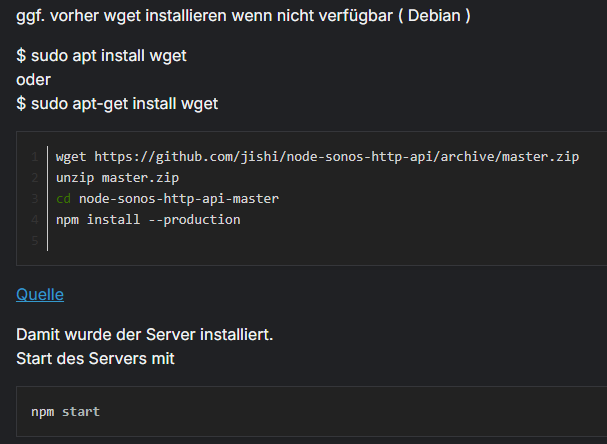
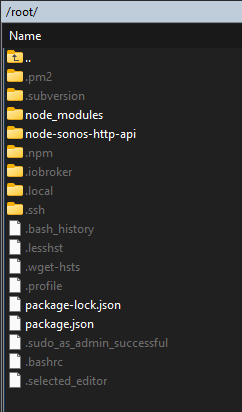
    image.png
    510e4f33-4b23-469c-9936-73d6e84897a7-image.png

    Thomas BraunT 1 Antwort Letzte Antwort
    0
    • FriedhofsblondF Friedhofsblond

      Hallo,
      ja sorry jetzt kommts raus.
      Ich versuche mich immer strikt an die Vorlagen zu halten, hab ich wohl unter sudo bzw root installiert.
      So wie hier:

      image.png
      510e4f33-4b23-469c-9936-73d6e84897a7-image.png

      Thomas BraunT Online
      Thomas BraunT Online
      Thomas Braun
      Most Active
      schrieb am zuletzt editiert von
      #4

      @Friedhofsblond

      Da wird aber eben NICHT als root installiert. Sondern als user, der den Befehl 'npm install' absetzt.
      Und das ist nicht der root, weil man ja nicht als root herumhampelt...

      Dann halt jetzt als root:

      npm uninstall MODULNAME

      Linux-Werkzeugkasten:
      https://forum.iobroker.net/topic/42952/der-kleine-iobroker-linux-werkzeugkasten
      NodeJS Fixer Skript:
      https://forum.iobroker.net/topic/68035/iob-node-fix-skript
      iob_diag: curl -sLf -o diag.sh https://iobroker.net/diag.sh && bash diag.sh

      1 Antwort Letzte Antwort
      0
      • FriedhofsblondF Offline
        FriedhofsblondF Offline
        Friedhofsblond
        schrieb am zuletzt editiert von Friedhofsblond
        #5

        Modulname ist dann : node-sonos-http-api ?

        Thomas BraunT 1 Antwort Letzte Antwort
        0
        • FriedhofsblondF Friedhofsblond

          Modulname ist dann : node-sonos-http-api ?

          Thomas BraunT Online
          Thomas BraunT Online
          Thomas Braun
          Most Active
          schrieb am zuletzt editiert von
          #6

          @Friedhofsblond

          Mit

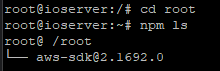
          cd /root
          npm ls
          

          siehst du alle im aktuellen Verzeichnis installierten Module.

          Linux-Werkzeugkasten:
          https://forum.iobroker.net/topic/42952/der-kleine-iobroker-linux-werkzeugkasten
          NodeJS Fixer Skript:
          https://forum.iobroker.net/topic/68035/iob-node-fix-skript
          iob_diag: curl -sLf -o diag.sh https://iobroker.net/diag.sh && bash diag.sh

          1 Antwort Letzte Antwort
          0
          • FriedhofsblondF Offline
            FriedhofsblondF Offline
            Friedhofsblond
            schrieb am zuletzt editiert von
            #7

            image.png

            :(

            Thomas BraunT 1 Antwort Letzte Antwort
            0
            • FriedhofsblondF Friedhofsblond

              image.png

              :(

              Thomas BraunT Online
              Thomas BraunT Online
              Thomas Braun
              Most Active
              schrieb am zuletzt editiert von
              #8

              @Friedhofsblond

              Bitte KEINE Screenshots von Konsolentext.
              Das gehört als Text in CodeTags eingebettet hier rein.

              Das Modul wurde in
              /root/node-sonos-http-apti-master

              installiert. Und daher muss es auch dort deinstalliert werden.

              Davon abgesehen hat aber auch aws-sdk nichts in /root verloren. Solltest du auch rauswerfen.

              Linux-Werkzeugkasten:
              https://forum.iobroker.net/topic/42952/der-kleine-iobroker-linux-werkzeugkasten
              NodeJS Fixer Skript:
              https://forum.iobroker.net/topic/68035/iob-node-fix-skript
              iob_diag: curl -sLf -o diag.sh https://iobroker.net/diag.sh && bash diag.sh

              FriedhofsblondF 1 Antwort Letzte Antwort
              0
              • FriedhofsblondF Offline
                FriedhofsblondF Offline
                Friedhofsblond
                schrieb am zuletzt editiert von
                #9

                keine Ahnung wie das aws ... da hin gekommen ist.
                OK, ist spät ich muß erstmal abbrechen.

                Vielen Dank erstmal für deine Hilfe - ich melde mich ;)

                1 Antwort Letzte Antwort
                0
                • Thomas BraunT Thomas Braun

                  @Friedhofsblond

                  Bitte KEINE Screenshots von Konsolentext.
                  Das gehört als Text in CodeTags eingebettet hier rein.

                  Das Modul wurde in
                  /root/node-sonos-http-apti-master

                  installiert. Und daher muss es auch dort deinstalliert werden.

                  Davon abgesehen hat aber auch aws-sdk nichts in /root verloren. Solltest du auch rauswerfen.

                  FriedhofsblondF Offline
                  FriedhofsblondF Offline
                  Friedhofsblond
                  schrieb am zuletzt editiert von
                  #10

                  @Thomas-Braun

                  Moin,
                  also ich finde den sonos-api einfach nicht.
                  Das aws-sdk habe ich wegbekommen aber den Sonos-api nicht.
                  Sonst mache ich mir immer eine txt-Datei wo die Installationsschritte drin stehen.
                  Aber wie ich den Sonos-Dienst installiert habe, finde ich nicht.
                  Das aws-sdk ist auch ein Modul von der sonos-API:
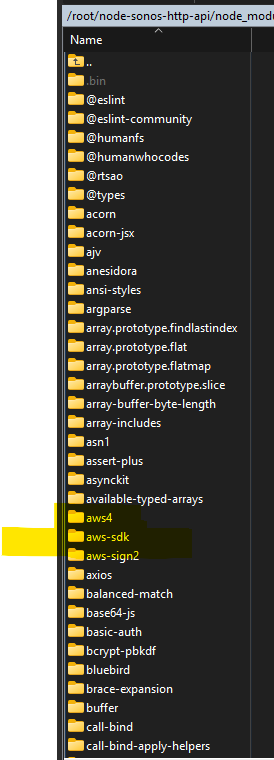
                  Screenshot 2026-01-20 190112.png

                  Wenn ich mir die master.zip ansehe finde ich die vielen Module garnicht, oder werden die nachträglich geladen?

                  Also ich nutze die API jetzt doch weiter, würde die aber jetzt sauber installieren. Aber versauen möchte ich auch nix.
                  Was soll ich tun??

                  root@ioserver:~# npm ls
                  /root
                  └── (empty)
                  
                  root@ioserver:~# npm audit
                  found 0 vulnerabilities
                  root@ioserver:~# 
                  
                  
                  Thomas BraunT 1 Antwort Letzte Antwort
                  0
                  • FriedhofsblondF Friedhofsblond

                    @Thomas-Braun

                    Moin,
                    also ich finde den sonos-api einfach nicht.
                    Das aws-sdk habe ich wegbekommen aber den Sonos-api nicht.
                    Sonst mache ich mir immer eine txt-Datei wo die Installationsschritte drin stehen.
                    Aber wie ich den Sonos-Dienst installiert habe, finde ich nicht.
                    Das aws-sdk ist auch ein Modul von der sonos-API:

                    Screenshot 2026-01-20 190112.png

                    Wenn ich mir die master.zip ansehe finde ich die vielen Module garnicht, oder werden die nachträglich geladen?

                    Also ich nutze die API jetzt doch weiter, würde die aber jetzt sauber installieren. Aber versauen möchte ich auch nix.
                    Was soll ich tun??

                    root@ioserver:~# npm ls
                    /root
                    └── (empty)
                    
                    root@ioserver:~# npm audit
                    found 0 vulnerabilities
                    root@ioserver:~# 
                    
                    
                    Thomas BraunT Online
                    Thomas BraunT Online
                    Thomas Braun
                    Most Active
                    schrieb am zuletzt editiert von
                    #11

                    @Friedhofsblond sagte in Sonos-HTTP-API uninstall ??:

                    Wenn ich mir die master.zip ansehe finde ich die vielen Module garnicht,

                    Du musst in das Verzeichnis /root/node-sonos-htto-api einsteigen.
                    Und mal wieder BITTE keine Screenshots. Man kann daraus nicht kopieren.

                    Linux-Werkzeugkasten:
                    https://forum.iobroker.net/topic/42952/der-kleine-iobroker-linux-werkzeugkasten
                    NodeJS Fixer Skript:
                    https://forum.iobroker.net/topic/68035/iob-node-fix-skript
                    iob_diag: curl -sLf -o diag.sh https://iobroker.net/diag.sh && bash diag.sh

                    FriedhofsblondF 1 Antwort Letzte Antwort
                    0
                    • Thomas BraunT Thomas Braun

                      @Friedhofsblond sagte in Sonos-HTTP-API uninstall ??:

                      Wenn ich mir die master.zip ansehe finde ich die vielen Module garnicht,

                      Du musst in das Verzeichnis /root/node-sonos-htto-api einsteigen.
                      Und mal wieder BITTE keine Screenshots. Man kann daraus nicht kopieren.

                      FriedhofsblondF Offline
                      FriedhofsblondF Offline
                      Friedhofsblond
                      schrieb am zuletzt editiert von Friedhofsblond
                      #12

                      @Thomas-Braun

                      root@ioserver:~# dir
                      node_modules  node-sonos-http-api  package.json  package-lock.json
                      root@ioserver:~# cd node-sonos-http-api/
                      root@ioserver:~/node-sonos-http-api# npm ls
                      sonos-http-api@1.6.9 /root/node-sonos-http-api
                      ├── anesidora@1.2.1
                      ├── aws-sdk@2.1692.0
                      ├── basic-auth@1.1.0
                      ├── elevenlabs-node@2.0.1
                      ├── eslint-config-airbnb-base@15.0.0
                      ├── eslint-plugin-import@2.31.0
                      ├── eslint@9.16.0
                      ├── fuse.js@6.4.1
                      ├── html-entities@1.2.1
                      ├── json5@2.2.3
                      ├── mime@1.6.0
                      ├── music-metadata@1.1.0
                      ├── request-promise@4.2.6
                      ├── serve-static@1.16.2
                      ├── sonos-discovery@1.7.3
                      └── wav-file-info@0.0.8
                      
                      root@ioserver:~/node-sonos-http-api# npm uninstall node-sonos-http-api-master
                      npm error code ERESOLVE
                      npm error ERESOLVE could not resolve
                      npm error
                      npm error While resolving: eslint-config-airbnb-base@15.0.0
                      npm error Found: eslint@9.16.0
                      npm error node_modules/eslint
                      npm error   peer eslint@"^6.0.0 || ^7.0.0 || >=8.0.0" from @eslint-community/eslint-utils@4.4.1
                      npm error   node_modules/@eslint-community/eslint-utils
                      npm error     @eslint-community/eslint-utils@"^4.2.0" from eslint@9.16.0
                      npm error   peer eslint@"^2 || ^3 || ^4 || ^5 || ^6 || ^7.2.0 || ^8 || ^9" from eslint-plugin-import@2.31.0
                      npm error   node_modules/eslint-plugin-import
                      npm error     peer eslint-plugin-import@"^2.25.2" from eslint-config-airbnb-base@15.0.0
                      npm error     node_modules/eslint-config-airbnb-base
                      npm error       dev eslint-config-airbnb-base@"^15.0.0" from the root project
                      npm error     dev eslint-plugin-import@"^2.7.0" from the root project
                      npm error   1 more (the root project)
                      npm error
                      npm error Could not resolve dependency:
                      npm error peer eslint@"^7.32.0 || ^8.2.0" from eslint-config-airbnb-base@15.0.0
                      npm error node_modules/eslint-config-airbnb-base
                      npm error   dev eslint-config-airbnb-base@"^15.0.0" from the root project
                      npm error
                      npm error Conflicting peer dependency: eslint@8.57.1
                      npm error node_modules/eslint
                      npm error   peer eslint@"^7.32.0 || ^8.2.0" from eslint-config-airbnb-base@15.0.0
                      npm error   node_modules/eslint-config-airbnb-base
                      npm error     dev eslint-config-airbnb-base@"^15.0.0" from the root project
                      npm error
                      npm error Fix the upstream dependency conflict, or retry
                      npm error this command with --force or --legacy-peer-deps
                      npm error to accept an incorrect (and potentially broken) dependency resolution.
                      npm error
                      npm error
                      npm error For a full report see:
                      npm error /root/.npm/_logs/2026-01-20T19_04_26_506Z-eresolve-report.txt
                      npm error A complete log of this run can be found in: /root/.npm/_logs/2026-01-20T19_04_26_506Z-debug-0.log
                      

                      Log:

                      'Log files:
                      /root/.npm/_logs/2026-01-20T19_04_26_506Z-debug-0.log
                      
                      # npm resolution error report
                      
                      While resolving: eslint-config-airbnb-base@15.0.0
                      Found: eslint@9.16.0
                      node_modules/eslint
                        peer eslint@"^6.0.0 || ^7.0.0 || >=8.0.0" from @eslint-community/eslint-utils@4.4.1
                        node_modules/@eslint-community/eslint-utils
                          @eslint-community/eslint-utils@"^4.2.0" from eslint@9.16.0
                        peer eslint@"^2 || ^3 || ^4 || ^5 || ^6 || ^7.2.0 || ^8 || ^9" from eslint-plugin-import@2.31.0
                        node_modules/eslint-plugin-import
                          peer eslint-plugin-import@"^2.25.2" from eslint-config-airbnb-base@15.0.0
                          node_modules/eslint-config-airbnb-base
                            dev eslint-config-airbnb-base@"^15.0.0" from the root project
                          dev eslint-plugin-import@"^2.7.0" from the root project
                        dev eslint@"^9.16.0" from the root project
                      
                      Could not resolve dependency:
                      peer eslint@"^7.32.0 || ^8.2.0" from eslint-config-airbnb-base@15.0.0
                      node_modules/eslint-config-airbnb-base
                        dev eslint-config-airbnb-base@"^15.0.0" from the root project
                      
                      Conflicting peer dependency: eslint@8.57.1
                      node_modules/eslint
                        peer eslint@"^7.32.0 || ^8.2.0" from eslint-config-airbnb-base@15.0.0
                        node_modules/eslint-config-airbnb-base
                          dev eslint-config-airbnb-base@"^15.0.0" from the root project
                      
                      Fix the upstream dependency conflict, or retry
                      this command with --force or --legacy-peer-deps
                      to accept an incorrect (and potentially broken) dependency resolution.


                      Ich habe keinen Schimmer ..... :(

                      Aber ich will dir nicht den Abend versauen - hat bis morgen Zeit.

                      Thomas BraunT 1 Antwort Letzte Antwort
                      0
                      • FriedhofsblondF Friedhofsblond

                        @Thomas-Braun

                        root@ioserver:~# dir
                        node_modules  node-sonos-http-api  package.json  package-lock.json
                        root@ioserver:~# cd node-sonos-http-api/
                        root@ioserver:~/node-sonos-http-api# npm ls
                        sonos-http-api@1.6.9 /root/node-sonos-http-api
                        ├── anesidora@1.2.1
                        ├── aws-sdk@2.1692.0
                        ├── basic-auth@1.1.0
                        ├── elevenlabs-node@2.0.1
                        ├── eslint-config-airbnb-base@15.0.0
                        ├── eslint-plugin-import@2.31.0
                        ├── eslint@9.16.0
                        ├── fuse.js@6.4.1
                        ├── html-entities@1.2.1
                        ├── json5@2.2.3
                        ├── mime@1.6.0
                        ├── music-metadata@1.1.0
                        ├── request-promise@4.2.6
                        ├── serve-static@1.16.2
                        ├── sonos-discovery@1.7.3
                        └── wav-file-info@0.0.8
                        
                        root@ioserver:~/node-sonos-http-api# npm uninstall node-sonos-http-api-master
                        npm error code ERESOLVE
                        npm error ERESOLVE could not resolve
                        npm error
                        npm error While resolving: eslint-config-airbnb-base@15.0.0
                        npm error Found: eslint@9.16.0
                        npm error node_modules/eslint
                        npm error   peer eslint@"^6.0.0 || ^7.0.0 || >=8.0.0" from @eslint-community/eslint-utils@4.4.1
                        npm error   node_modules/@eslint-community/eslint-utils
                        npm error     @eslint-community/eslint-utils@"^4.2.0" from eslint@9.16.0
                        npm error   peer eslint@"^2 || ^3 || ^4 || ^5 || ^6 || ^7.2.0 || ^8 || ^9" from eslint-plugin-import@2.31.0
                        npm error   node_modules/eslint-plugin-import
                        npm error     peer eslint-plugin-import@"^2.25.2" from eslint-config-airbnb-base@15.0.0
                        npm error     node_modules/eslint-config-airbnb-base
                        npm error       dev eslint-config-airbnb-base@"^15.0.0" from the root project
                        npm error     dev eslint-plugin-import@"^2.7.0" from the root project
                        npm error   1 more (the root project)
                        npm error
                        npm error Could not resolve dependency:
                        npm error peer eslint@"^7.32.0 || ^8.2.0" from eslint-config-airbnb-base@15.0.0
                        npm error node_modules/eslint-config-airbnb-base
                        npm error   dev eslint-config-airbnb-base@"^15.0.0" from the root project
                        npm error
                        npm error Conflicting peer dependency: eslint@8.57.1
                        npm error node_modules/eslint
                        npm error   peer eslint@"^7.32.0 || ^8.2.0" from eslint-config-airbnb-base@15.0.0
                        npm error   node_modules/eslint-config-airbnb-base
                        npm error     dev eslint-config-airbnb-base@"^15.0.0" from the root project
                        npm error
                        npm error Fix the upstream dependency conflict, or retry
                        npm error this command with --force or --legacy-peer-deps
                        npm error to accept an incorrect (and potentially broken) dependency resolution.
                        npm error
                        npm error
                        npm error For a full report see:
                        npm error /root/.npm/_logs/2026-01-20T19_04_26_506Z-eresolve-report.txt
                        npm error A complete log of this run can be found in: /root/.npm/_logs/2026-01-20T19_04_26_506Z-debug-0.log
                        

                        Log:

                        'Log files:
                        /root/.npm/_logs/2026-01-20T19_04_26_506Z-debug-0.log
                        
                        # npm resolution error report
                        
                        While resolving: eslint-config-airbnb-base@15.0.0
                        Found: eslint@9.16.0
                        node_modules/eslint
                          peer eslint@"^6.0.0 || ^7.0.0 || >=8.0.0" from @eslint-community/eslint-utils@4.4.1
                          node_modules/@eslint-community/eslint-utils
                            @eslint-community/eslint-utils@"^4.2.0" from eslint@9.16.0
                          peer eslint@"^2 || ^3 || ^4 || ^5 || ^6 || ^7.2.0 || ^8 || ^9" from eslint-plugin-import@2.31.0
                          node_modules/eslint-plugin-import
                            peer eslint-plugin-import@"^2.25.2" from eslint-config-airbnb-base@15.0.0
                            node_modules/eslint-config-airbnb-base
                              dev eslint-config-airbnb-base@"^15.0.0" from the root project
                            dev eslint-plugin-import@"^2.7.0" from the root project
                          dev eslint@"^9.16.0" from the root project
                        
                        Could not resolve dependency:
                        peer eslint@"^7.32.0 || ^8.2.0" from eslint-config-airbnb-base@15.0.0
                        node_modules/eslint-config-airbnb-base
                          dev eslint-config-airbnb-base@"^15.0.0" from the root project
                        
                        Conflicting peer dependency: eslint@8.57.1
                        node_modules/eslint
                          peer eslint@"^7.32.0 || ^8.2.0" from eslint-config-airbnb-base@15.0.0
                          node_modules/eslint-config-airbnb-base
                            dev eslint-config-airbnb-base@"^15.0.0" from the root project
                        
                        Fix the upstream dependency conflict, or retry
                        this command with --force or --legacy-peer-deps
                        to accept an incorrect (and potentially broken) dependency resolution.


                        Ich habe keinen Schimmer ..... :(

                        Aber ich will dir nicht den Abend versauen - hat bis morgen Zeit.

                        Thomas BraunT Online
                        Thomas BraunT Online
                        Thomas Braun
                        Most Active
                        schrieb am zuletzt editiert von
                        #13

                        @Friedhofsblond

                        Was liegt denn genau da alles rum?

                        npm ls
                        

                        anschauen.

                        Linux-Werkzeugkasten:
                        https://forum.iobroker.net/topic/42952/der-kleine-iobroker-linux-werkzeugkasten
                        NodeJS Fixer Skript:
                        https://forum.iobroker.net/topic/68035/iob-node-fix-skript
                        iob_diag: curl -sLf -o diag.sh https://iobroker.net/diag.sh && bash diag.sh

                        FriedhofsblondF 1 Antwort Letzte Antwort
                        0
                        • FriedhofsblondF Offline
                          FriedhofsblondF Offline
                          Friedhofsblond
                          schrieb am zuletzt editiert von
                          #14

                          Habe ich oben noch ergänzt

                          FriedhofsblondF 1 Antwort Letzte Antwort
                          0
                          • FriedhofsblondF Friedhofsblond

                            Habe ich oben noch ergänzt

                            FriedhofsblondF Offline
                            FriedhofsblondF Offline
                            Friedhofsblond
                            schrieb am zuletzt editiert von
                            #15

                            Habe in der .bash-history folgendes gefunden:

                            nmp fund
                            node -v
                            npm -v
                            git clone https://github.com/jishi/node-sonos-http-api.git
                            ls
                            cd node-sonos-http-api
                            npm install --production
                            npm install -g npm@10.9.2
                            npm fund
                            node -v
                            npm -v
                            npm install --production
                            npm audit
                            npm audit fix
                            npm audit
                            npm audit fix
                            npm audit fix --force
                            npm audit
                            sudo npm start
                            npm install aws-sdk
                            npm fund
                            npm install -g pm2
                            pm2 startup
                            pm2 startup
                            pm2 startup systems
                            systemctl status pm2-root.service
                            cd node-sonos-http-api
                            pm2 start server.js -x --name "http-api"
                            pm2 save
                            pm2 status
                            pm2 list
                            
                            
                            1 Antwort Letzte Antwort
                            0
                            • Thomas BraunT Thomas Braun

                              @Friedhofsblond

                              Was liegt denn genau da alles rum?

                              npm ls
                              

                              anschauen.

                              FriedhofsblondF Offline
                              FriedhofsblondF Offline
                              Friedhofsblond
                              schrieb am zuletzt editiert von Friedhofsblond
                              #16

                              @Thomas-Braun

                              Moin,
                              ich bin da wohl einer alten Installationsvariante für einen Raspi aufgessen.
                              Irgendwas mit PM2 (Prozessmanager) , hier geht es um dieses Thema:
                              https://github.com/jishi/node-sonos-http-api/issues/539

                              PS:
                              habe jetzt (glaube ich) die alte Install weg bekommen.
                              Die Sonos-API wurde wohl über den PM2 gestartet. Darum habe ich auch den sonos-api-dienst nicht gefunden nur den PM2.
                              Mit diversen Befehlen konnte ich ermitteln was alles über den PM2 gestartet wird.
                              Nur die "http-api" , habe den PM2 deinstalliert und das alte Verzeichnis erstmal umbenannt.
                              Es kam aber bisher keine Fehlermeldung.
                              Ich denke dann ist das erledigt.
                              Nun brauche ich wohl noch hilfe beim Start der API - da geh ich in das andere Thema.

                              1 Antwort Letzte Antwort
                              0
                              Antworten
                              • In einem neuen Thema antworten
                              Anmelden zum Antworten
                              • Älteste zuerst
                              • Neuste zuerst
                              • Meiste Stimmen


                              Support us

                              ioBroker
                              Community Adapters
                              Donate
                              FAQ Cloud / IOT
                              HowTo: Node.js-Update
                              HowTo: Backup/Restore
                              Downloads
                              BLOG

                              844

                              Online

                              32.6k

                              Benutzer

                              82.1k

                              Themen

                              1.3m

                              Beiträge
                              Community
                              Impressum | Datenschutz-Bestimmungen | Nutzungsbedingungen | Einwilligungseinstellungen
                              ioBroker Community 2014-2025
                              logo
                              • Anmelden

                              • Du hast noch kein Konto? Registrieren

                              • Anmelden oder registrieren, um zu suchen
                              • Erster Beitrag
                                Letzter Beitrag
                              0
                              • Home
                              • Aktuell
                              • Tags
                              • Ungelesen 0
                              • Kategorien
                              • Unreplied
                              • Beliebt
                              • GitHub
                              • Docu
                              • Hilfe