




Hilfe bei Blockly

-
Habe jetzt erneut ein Backup von Sonntag zurückgespielt, jetzt sieht es so aus wie es aussehen soll, gerundete Zahlen, aber im Dashboard wird nicht angezeigt, hatte die Heizung eben mal ein paar Minuten laufen lassen.
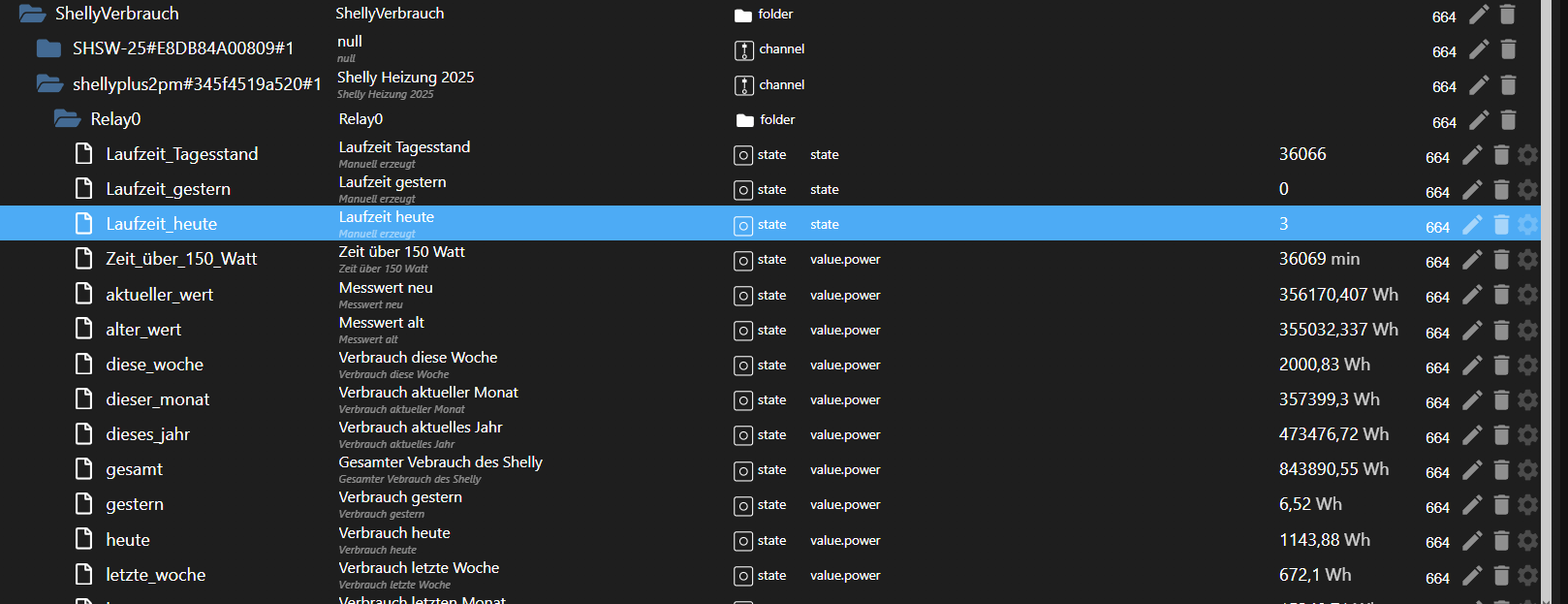
und was ich gefunden habe ist ein JS das so aussieht und ich keine Ahnung mehr habe wo das herkommt. Habe eigentlich nur Blocklys
/* * @copyright 2021 Stephan Kreyenborg <stephan@kreyenborg.koeln> * * @author 2021 Stephan Kreyenborg <stephan@kreyenborg.koeln> * * Dieses Skript dient zur freien Verwendung in ioBroker zur Verbrauchserfassung der Shelly Geräte. * Jegliche Verantwortung liegt beim Benutzer. Das Skript wurde unter Berücksichtigung der bestmöglichen Nutzung * und Performance entwickelt. * Der Entwickler versichert, das keine böswilligen Systemeingriffe im originalen Skript vorhanden sind. * * Sollte das Skript wider Erwarten nicht korrekt funktionieren, so hast Du jederzeit die Möglichkeit, Dich auf * https://www.kreyenborg.koeln * für Unterstützung zu melden. Jedes Skript besitzt seine eigene Kommentarseite, auf der, * nach zeitlicher Möglichkeit des Autors, Hilfe angeboten wird. Ein Anrecht hierauf besteht nicht! * * Ansprüche gegenüber Dritten bestehen nicht. * * Skript Name: Shelly-Verbrauch * Skript Version: 1.60 * Erstell-Datum: 08. Oktober 2021 | Update: 20. Juli 2022 | Override Functions by SpacerX 26.09.2022 (Zeile 402) * */ // Datenpunkte neu erstellen var ueberschreiben = false; // Hauptdatenpunkt unterhalb javascript var datenpunkt = "ShellyVerbrauch."; // Abschließender Punkt !!! WICHTIG !!! // Verbrauchs Objekte der einzelnen Shelly var objekt = ["gesamt", "dieses_jahr", "letztes_jahr", "letzter_monat", "dieser_monat", "letzte_woche", "diese_woche", "gestern", "heute", "alter_wert", "aktueller_wert" ]; // Beschreibung der Objekte var beschreibung = ["Gesamter Vebrauch des Shelly", "Verbrauch aktuelles Jahr", "Verbrauch letztes Jahr", "Verbrauch letzten Monat", "Verbrauch aktueller Monat", "Verbrauch letzte Woche", "Verbrauch diese Woche", "Verbrauch gestern", "Verbrauch heute", "Messwert alt", "Messwert neu" ]; // Datenpunkt der Shelly (Standard: shelly.0) var shelly_dp = "shelly.1"; // Datenpunkte der Shelly (!!! Bitte nicht ändern !!!) var shellyDps = $('state[id=' + shelly_dp + '.*.*.Energy]'); // Datenpunkte der Shelly 3EM DP var shelly3EMDps = $('state[id=' + shelly_dp + '.*.*.Total]'); // Datenpunkte der Shelly 3EM DP - Total var shelly3EMTotalDps = $('state[id=' + shelly_dp + '.*.*.ConsumedPower]'); // Datenpunkte der Shelly 3EM DP - Total var shelly3EMTotalReturned = $('state[id=' + shelly_dp + '.*.*.Total_Returned]'); // Datenpunkte der Shelly Namen (!!! Bitte nicht ändern !!!) var shellyDpsName = $('state[id=' + shelly_dp + '.*.name]'); // Shelly Verbrauch aktualisieren - nachts um 00:00 Uhr function shelly_vebrauch_tag() { // Nochmals das Tagesupdate durchlaufen, damit die restlichen Werte gelesen werden shelly_verbrauch_update(); // Datumsvariable var heute = new Date(); // Heute zu Gestern verschieben. Täglich um 00:00 Uhr verschiebe_verbrauch_objekt("heute", "gestern"); log("Shelly Verbrauch: Werte für gestern und heute aktualisiert!"); // aktuelle Woche in letzte Woche verschieben. Am Montag um 00:00 Uhr if (heute.getDay() === 1) { verschiebe_verbrauch_objekt("diese_woche", "letzte_woche"); log("Shelly Verbrauch: Werte für diese und letzte Woche aktualisiert!"); } // aktueller Monat in letzten Monat verschieben. Am 1. des Monats um 00:00 Uhr if (heute.getDate() === 1) { verschiebe_verbrauch_objekt("dieser_monat", "letzter_monat"); log("Shelly Verbrauch: Werte für diesen und letzten Monat aktualisiert!"); } // aktuelles Jahr in letztes Jahr verschieben. Am 1. des Monats am 1. Monat um 00:00 Uhr if (heute.getDate() === 1 && heute.getMonth() === 0) { verschiebe_verbrauch_objekt("dieses_jahr", "letztes_jahr"); log("Shelly Verbrauch: Werte für dieses und letztes Jahr aktualisiert!"); } } // Tagesverbrauch alle 15 Min von der Original Variable des Shelly in eigene Variable kopieren function shelly_verbrauch_update() { var anzahl_updates = 0; var anzahl_reboots = 0; var anzahl_gleich = 0; shellyDps.each(function (id, i) { var shelly_verbrauch = getState(id).val; // Einige Shelly haben keine Verbrauchswerte (noch nicht) if (shelly_verbrauch != null) { // Hole aktuellen Wert, um zu kontrollieren, ob ein Reboot stattgefunden hat var aktueller_wert = getState(shelly_DP(id) + "aktueller_wert").val; var alter_wert = 0; // Prüfe alten und neuen Wert if (shelly_verbrauch > aktueller_wert) { // Verbrauchswert ist größer als alter Wert -> es wurde kein Reboot durchgeführt setState(shelly_DP(id) + "alter_wert", aktueller_wert, true); alter_wert = aktueller_wert; anzahl_updates++; } if (aktueller_wert > shelly_verbrauch) { // Verbrauchswert ist kleiner als alter Wert -> es wurde ein Reboot durchgeführt setState(shelly_DP(id) + "alter_wert", 0, true); alter_wert = 0; anzahl_reboots++; } if (shelly_verbrauch == aktueller_wert) { // Verbrauchswert ist gleich wie alter Wert -> kein Update notwendig alter_wert = aktueller_wert; anzahl_gleich++; } setState(shelly_DP(id) + "aktueller_wert", shelly_verbrauch, true); // Alter und neuer Wert -> aktuelle Differenz var verbrauch = parseFloat(shelly_verbrauch) - alter_wert; // Tagesverbrauch aktualisieren aktualisiere_vebrauch_objekt(shelly_DP(id), "heute", verbrauch); // Wochenverbrauch aktualisieren aktualisiere_vebrauch_objekt(shelly_DP(id), "diese_woche", verbrauch); // Monatsverbrauch aktualisieren aktualisiere_vebrauch_objekt(shelly_DP(id), "dieser_monat", verbrauch); // Jahresverbrauch aktualisieren aktualisiere_vebrauch_objekt(shelly_DP(id), "dieses_jahr", verbrauch); // Gesamten Vebrauch aktualisieren aktualisiere_vebrauch_objekt(shelly_DP(id), "gesamt", verbrauch); } }); shelly3EMDps.each(function (id, i) { var shelly_verbrauch = getState(id).val; // Einige Shelly haben keine Verbrauchswerte (noch nicht) if (shelly_verbrauch != null) { // Hole aktuellen Wert, um zu kontrollieren, ob ein Reboot stattgefunden hat var aktueller_wert = getState(shelly_DP(id) + "aktueller_wert").val; var alter_wert = 0; // Prüfe alten und neuen Wert if (shelly_verbrauch > aktueller_wert) { // Verbrauchswert ist größer als alter Wert -> es wurde kein Reboot durchgeführt setState(shelly_DP(id) + "alter_wert", aktueller_wert, true); alter_wert = aktueller_wert; anzahl_updates++; } if (aktueller_wert > shelly_verbrauch) { // Verbrauchswert ist kleiner als alter Wert -> es wurde ein Reboot durchgeführt setState(shelly_DP(id) + "alter_wert", 0, true); alter_wert = 0; anzahl_reboots++; } if (shelly_verbrauch == aktueller_wert) { // Verbrauchswert ist gleich wie alter Wert -> kein Update notwendig alter_wert = aktueller_wert; anzahl_gleich++; } setState(shelly_DP(id) + "aktueller_wert", shelly_verbrauch, true); // Alter und neuer Wert -> aktuelle Differenz var verbrauch = parseFloat(shelly_verbrauch) - alter_wert; // Tagesverbrauch aktualisieren aktualisiere_vebrauch_objekt(shelly_DP(id), "heute", verbrauch); // Wochenverbrauch aktualisieren aktualisiere_vebrauch_objekt(shelly_DP(id), "diese_woche", verbrauch); // Monatsverbrauch aktualisieren aktualisiere_vebrauch_objekt(shelly_DP(id), "dieser_monat", verbrauch); // Jahresverbrauch aktualisieren aktualisiere_vebrauch_objekt(shelly_DP(id), "dieses_jahr", verbrauch); // Gesamten Vebrauch aktualisieren aktualisiere_vebrauch_objekt(shelly_DP(id), "gesamt", verbrauch); } }); shelly3EMTotalDps.each(function (id, i) { var shelly_verbrauch = getState(id).val; // Einige Shelly haben keine Verbrauchswerte (noch nicht) if (shelly_verbrauch != null) { // Hole aktuellen Wert, um zu kontrollieren, ob ein Reboot stattgefunden hat var aktueller_wert = getState(shelly_DP(id) + "aktueller_wert").val; var alter_wert = 0; // Prüfe alten und neuen Wert if (shelly_verbrauch > aktueller_wert) { // Verbrauchswert ist größer als alter Wert -> es wurde kein Reboot durchgeführt setState(shelly_DP(id) + "alter_wert", aktueller_wert, true); alter_wert = aktueller_wert; anzahl_updates++; } if (aktueller_wert > shelly_verbrauch) { // Verbrauchswert ist kleiner als alter Wert -> es wurde ein Reboot durchgeführt setState(shelly_DP(id) + "alter_wert", 0, true); alter_wert = 0; anzahl_reboots++; } if (shelly_verbrauch == aktueller_wert) { // Verbrauchswert ist gleich wie alter Wert -> kein Update notwendig alter_wert = aktueller_wert; anzahl_gleich++; } setState(shelly_DP(id) + "aktueller_wert", shelly_verbrauch, true); // Alter und neuer Wert -> aktuelle Differenz var verbrauch = parseFloat(shelly_verbrauch) - alter_wert; // Tagesverbrauch aktualisieren aktualisiere_vebrauch_objekt(shelly_DP(id), "heute", verbrauch); // Wochenverbrauch aktualisieren aktualisiere_vebrauch_objekt(shelly_DP(id), "diese_woche", verbrauch); // Monatsverbrauch aktualisieren aktualisiere_vebrauch_objekt(shelly_DP(id), "dieser_monat", verbrauch); // Jahresverbrauch aktualisieren aktualisiere_vebrauch_objekt(shelly_DP(id), "dieses_jahr", verbrauch); // Gesamten Vebrauch aktualisieren aktualisiere_vebrauch_objekt(shelly_DP(id), "gesamt", verbrauch); } }); shelly3EMTotalReturned.each(function (id, i) { var shelly_verbrauch = getState(id).val; // Einige Shelly haben keine Verbrauchswerte (noch nicht) if (shelly_verbrauch != null) { // Hole aktuellen Wert, um zu kontrollieren, ob ein Reboot stattgefunden hat var aktueller_wert = getState(shelly_DP(id, true) + "aktueller_wert").val; var alter_wert = 0; // Prüfe alten und neuen Wert if (shelly_verbrauch > aktueller_wert) { // Verbrauchswert ist größer als alter Wert -> es wurde kein Reboot durchgeführt setState(shelly_DP(id, true) + "alter_wert", aktueller_wert, true); alter_wert = aktueller_wert; anzahl_updates++; } if (aktueller_wert > shelly_verbrauch) { // Verbrauchswert ist kleiner als alter Wert -> es wurde ein Reboot durchgeführt setState(shelly_DP(id, true) + "alter_wert", 0, true); alter_wert = 0; anzahl_reboots++; } if (shelly_verbrauch == aktueller_wert) { // Verbrauchswert ist gleich wie alter Wert -> kein Update notwendig alter_wert = aktueller_wert; anzahl_gleich++; } setState(shelly_DP(id, true) + "aktueller_wert", shelly_verbrauch, true); // Alter und neuer Wert -> aktuelle Differenz var verbrauch = parseFloat(shelly_verbrauch) - alter_wert; // Tagesverbrauch aktualisieren aktualisiere_vebrauch_objekt(shelly_DP(id, true), "heute", verbrauch); // Wochenverbrauch aktualisieren aktualisiere_vebrauch_objekt(shelly_DP(id, true), "diese_woche", verbrauch); // Monatsverbrauch aktualisieren aktualisiere_vebrauch_objekt(shelly_DP(id, true), "dieser_monat", verbrauch); // Jahresverbrauch aktualisieren aktualisiere_vebrauch_objekt(shelly_DP(id, true), "dieses_jahr", verbrauch); // Gesamten Vebrauch aktualisieren aktualisiere_vebrauch_objekt(shelly_DP(id, true), "gesamt", verbrauch); } }); aktualisiere_namen(); log("Shelly Verbrauch: Verbrauchswerte aktualisiert: " + anzahl_updates + " | Reboots korrigiert: " + anzahl_reboots + " | Unveränderte Werte: " + anzahl_gleich); } // aktualisiert das jeweilige Verbrauchs-Objekt und addiert den Verbrauch dazu function aktualisiere_vebrauch_objekt(dp, objekt, wert) { // Hole alten Verbrauch let alter_verbrauch = getState(dp + objekt).val; let verbrauch = 0; // Kein Wert vorhanden - nutze den übermittelten Wert if (alter_verbrauch < 1 || alter_verbrauch == null) { verbrauch = parseFloat(wert) } else { verbrauch = parseFloat(alter_verbrauch) + parseFloat(wert); } setState(dp + objekt, parseFloat(verbrauch.toFixed(2)), true); } // Verschiebt das jeweilige Verbrauchs-Objekt und nullt den Ursprung (Tag, Woche, Monat, Jahr) function verschiebe_verbrauch_objekt(von, nach) { $('state[id=*.' + datenpunkt + '*.*.' + von + ']').each(function (id, i) { // Temporärer Gruppen-Datenpunkt var tmp_dp = id.slice(0, -(von.length)); var verbrauch = getState(id).val; if (verbrauch != null) { setState(tmp_dp + nach, verbrauch, true); } // Setze "von" zurück setState(id, 0, true); }); } // Funktion um die aktuellen Namen des Shelly abzuholen function aktualisiere_namen() { if (typeof extendObject === "function") { shellyDpsName.each(function (id, i) { if (existsState(id)) { setState(shelly_DP_Name(id), String(getState(id).val), true); extendObject("javascript.0." + shelly_DP_Name_Main(id), { common: { name: String(getState(id).val), desc: String(getState(id).val) }, type: "channel" }); } }); } } // Erstelle die benötigten Datenpunkte function datenpunkte_erstellen() { // Anzahl der gefundenen Shelly var anzahl = shellyDps.length; shellyDps.each(function (id, j) { var initial_wert = 0.0; for (var i = 0; i < objekt.length; i++) { // Startwerte werden nur bei alter_wert und aktueller_wert eingetragen if (i > 8) { initial_wert = getState(id).val; } createState(shelly_DP(id) + objekt[i], initial_wert, ueberschreiben, { name: beschreibung[i], desc: beschreibung[i], type: "number", role: "value.power", unit: "Wh" }); } }); // Anzahl der gefundenen Shelly 3EM var anzahl_3em = shelly3EMDps.length; shelly3EMDps.each(function (id, j) { var initial_wert = 0.0; for (var i = 0; i < objekt.length; i++) { // Startwerte werden nur bei alter_wert und aktueller_wert eingetragen if (i > 8) { initial_wert = getState(id).val; } createState(shelly_DP(id) + objekt[i], initial_wert, ueberschreiben, { name: beschreibung[i], desc: beschreibung[i], type: "number", role: "value.power", unit: "Wh" }); } }); // Anzahl der gefundenen Shelly 3EM - Total var anzahl_3em_total = shelly3EMTotalDps.length; shelly3EMTotalDps.each(function (id, j) { var initial_wert = 0.0; for (var i = 0; i < objekt.length; i++) { // Startwerte werden nur bei alter_wert und aktueller_wert eingetragen if (i > 8) { initial_wert = getState(id).val; } createState(shelly_DP(id) + objekt[i], initial_wert, ueberschreiben, { name: beschreibung[i], desc: beschreibung[i], type: "number", role: "value.power", unit: "Wh" }); } }); // Anzahl der gefundenen Shelly 3EM - Total var anzahl_3em_total_returned = shelly3EMTotalReturned.length; shelly3EMTotalReturned.each(function (id, j) { var initial_wert = 0.0; for (var i = 0; i < objekt.length; i++) { // Startwerte werden nur bei alter_wert und aktueller_wert eingetragen if (i > 8) { initial_wert = getState(id).val; } createState(shelly_DP(id, true) + objekt[i], initial_wert, ueberschreiben, { name: beschreibung[i], desc: beschreibung[i], type: "number", role: "value.power", unit: "Wh" }); } }); // Alle Datenpunkte erstellt. Frage ersten Verbrauch ab! log("Shelly Verbrauch: Datenpunkte erstellt! Erster Verbrauch steht nach 30 Sekunden zur Verfügung! Anzahl gefundener Shelly Datenpunkte: " + (anzahl_3em + anzahl + anzahl_3em_total + anzahl_3em_total_returned)); setTimeout(shelly_verbrauch_update, 30000); // Datenpunkte für die Namen der Shelly erstellen shellyDpsName.each(function (id, j) { createState(shelly_DP_Name(id), "", ueberschreiben, { name: "Name des Shelly", desc: "Name des Shelly", type: "string", role: "value", unit: "" }); }); } /** * Wenn 3EM DP, dann anderen Wert zurückgeben * @param {any} dp * @param {boolean} extended */ function shelly_DP(dp, extended = false) { dp = dp.split("."); dp = datenpunkt + dp[2] + "." + dp[3]; if (extended) { dp = dp + "_Returned."; } else { dp = dp + "."; } return dp; } function shelly_DP_Name(dp) { dp = dp.split("."); dp = datenpunkt + dp[2] + "." + dp[3]; return dp; } function shelly_DP_Name_Main(dp) { dp = dp.split("."); dp = datenpunkt + dp[2]; return dp; } function shelly_verbrauch_erster_start() { log("Shelly Verbrauch: Erster Start des Skriptes! Datenpunkte werden erstellt!"); // Datenpunkte werden erstellt datenpunkte_erstellen(); } /* * Override Functions * @autor 2022 SpacerX <spacerx@rbe-base.de> * Überschreibt Funktionen um Datenpunkte unter 0_userdata.0 zu erstellen * *** START SpacerX ***/ // Userdatenpunkt var userdir = "0_userdata.0."; // Abschließender Punkt !!! WICHTIG !!! /** * Letzten des Monats berechnen. * @param {Date} oHeute */ function letzterDesMonats(oHeute) { return new Date(oHeute.getFullYear(), oHeute.getMonth() + 1, 0).getDate(); } //Override at row 48 // Shelly Verbrauch aktualisieren - nachts um 23:59 Uhr function shelly_vebrauch_tag() { // Nochmals das Tagesupdate durchlaufen, damit die restlichen Werte gelesen werden shelly_verbrauch_update(); // Datumsvariable var heute = new Date(); // Heute zu Gestern verschieben. Täglich um 23:59 Uhr verschiebe_verbrauch_objekt("heute", "gestern"); log("Shelly Verbrauch: Werte für gestern und heute aktualisiert!"); // aktuelle Woche in letzte Woche verschieben. Am Sonntag um 23:59 Uhr if (heute.getDay() === 0) { /*line changed by spacerx (Sonntag=0, Montag=1)*/ verschiebe_verbrauch_objekt("diese_woche", "letzte_woche"); log("Shelly Verbrauch: Werte für diese und letzte Woche aktualisiert!"); } // aktueller Monat in letzten Monat verschieben. Am letzten des Monats um 23:59 Uhr if (heute.getDate() === letzterDesMonats(heute)) { /*line changed by spacerx*/ verschiebe_verbrauch_objekt("dieser_monat", "letzter_monat"); log("Shelly Verbrauch: Werte für diesen und letzten Monat aktualisiert!"); } // aktuelles Jahr in letztes Jahr verschieben. Am letzten Tag des Jahres um 23:59 Uhr if (heute.getDate() === letzterDesMonats(heute) && heute.getMonth() === 11) { /*line changed by spacerx (Jan=0, Dez=11)*/ verschiebe_verbrauch_objekt("dieses_jahr", "letztes_jahr"); log("Shelly Verbrauch: Werte für dieses und letztes Jahr aktualisiert!"); } } //Override at row 254 //Verschiebt das jeweilige Verbrauchs-Objekt und nullt den Ursprung (Tag, Woche, Monat, Jahr) function verschiebe_verbrauch_objekt(von, nach) { $('state[id=' + userdir + datenpunkt + '*.*.' + von + ']').each(function (id, i) { /*line changed by spacerx*/ // Temporärer Gruppen-Datenpunkt var tmp_dp = id.slice(0, -(von.length)); var verbrauch = getState(id).val; if (verbrauch != null) { setState(tmp_dp + nach, verbrauch, true); } // Setze "von" zurück setState(id, 0, true); }); } //Override at row 267 // Funktion um die aktuellen Namen des Shelly abzuholen function aktualisiere_namen() { if (typeof extendObject === "function") { shellyDpsName.each(function (id, i) { if (existsState(id)) { setState(shelly_DP_Name(id), String(getState(id).val), true); extendObject(shelly_DP_Name_Main(id), { /*line changed by spacerx*/ common: { name: String(getState(id).val), desc: String(getState(id).val) }, type: "channel" }); } }); } } //Override at row 377 function shelly_DP(dp, extended = false) { dp = dp.split("."); dp = userdir + datenpunkt + dp[2] + "." + dp[3]; /*line changed by spacerx*/ if (extended) { dp = dp + "_Returned."; } else { dp = dp + "."; } return dp; } //Override at row 387 function shelly_DP_Name(dp) { dp = dp.split("."); dp = userdir + datenpunkt + dp[2] + "." + dp[3]; /*line changed by spacerx*/ return dp; } //Override at row 392 function shelly_DP_Name_Main(dp) { dp = dp.split("."); dp = userdir + datenpunkt + dp[2]; /*line changed by spacerx*/ return dp; } /*** END SpacerX ***/ // Erster Start und Initialisierung shelly_verbrauch_erster_start(); // Alle 15 Minuten das Skript für den Tagesverbrauch ausführen schedule('*/15 * * * *', shelly_verbrauch_update); /*** START Edit SpacerX ***/ // Nachts um 24 Uhr werden die Werte in andere Variablen gespeichert, um den Verlauf zu erstellen //schedule('0 0 * * *', shelly_vebrauch_tag); // Nachts um 23:59 Uhr werden die Werte in andere Variablen gespeichert, um den Verlauf zu erstellen schedule('59 23 * * *', shelly_vebrauch_tag); /*** END Edit SpacerX ***/ -
Ich glaube ich habe den Fehler gefunden
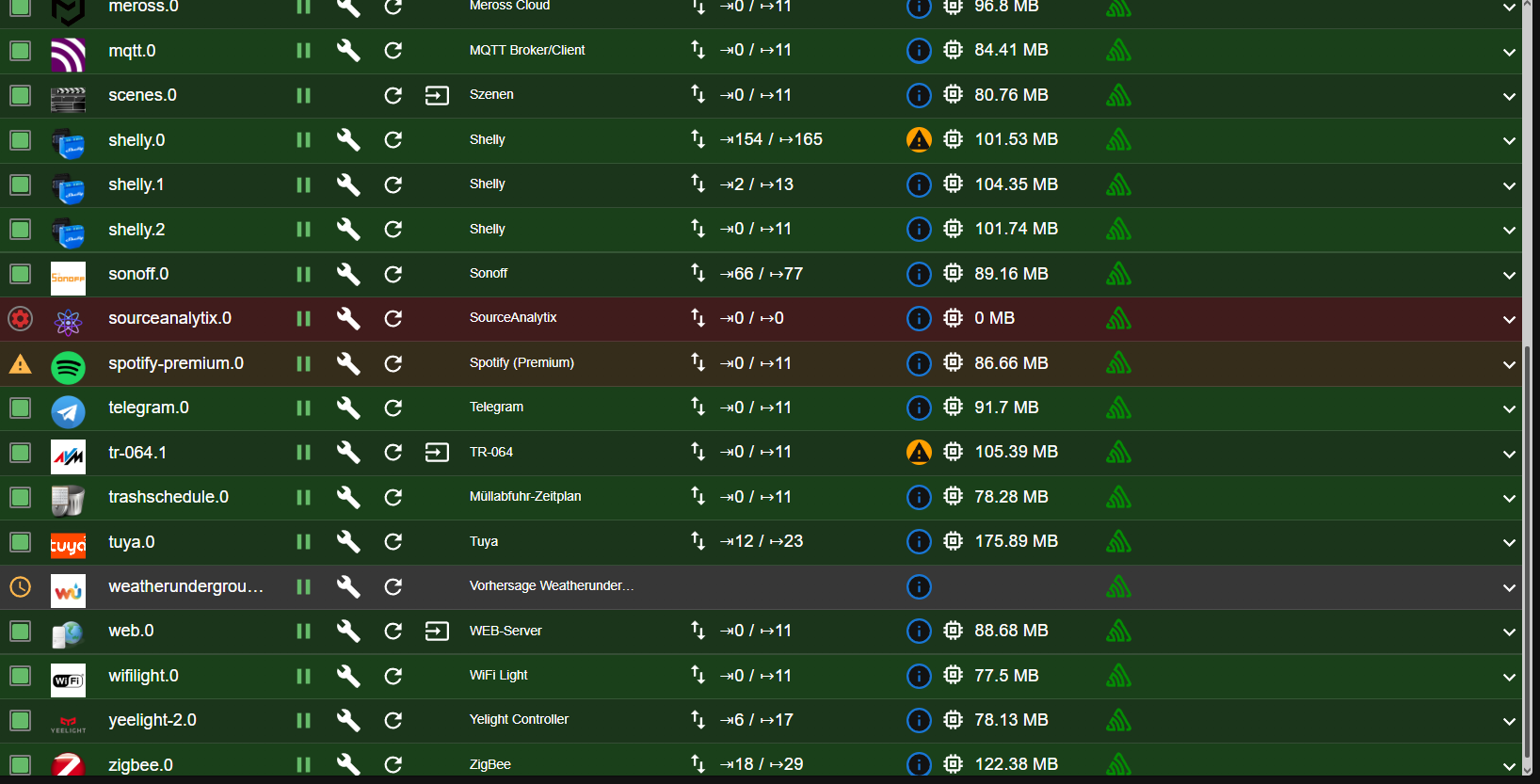
Sourceanalytics Startet nicht, die Verbrauchsdaten sind aber vorhanden
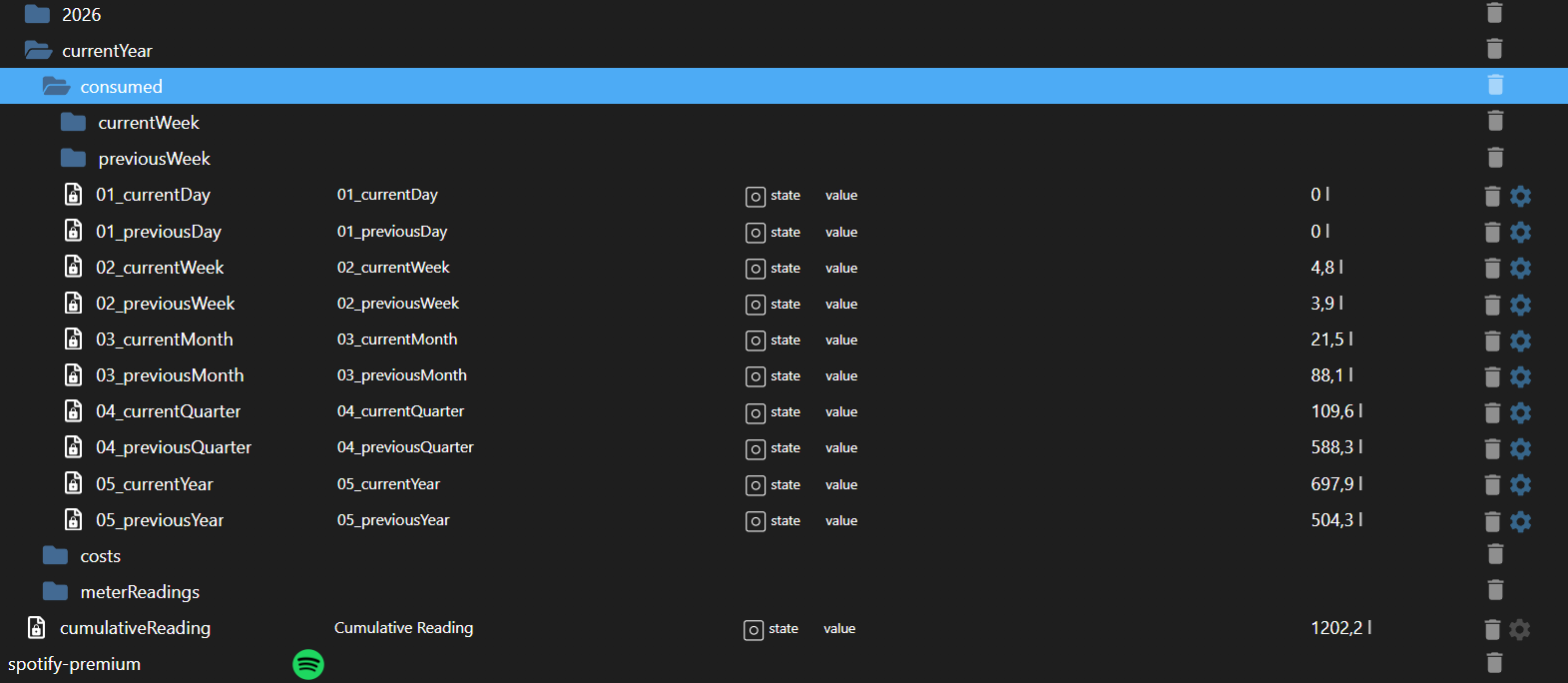
host.raspberrypi 2026-06-04 16:22:36.735 error Cannot download and install adapter "sourceanalytix@0.4.14". To retry it disable/enable the adapter or restart host. Also check the error messages in the log!
host.raspberrypi 2026-06-04 16:22:35.639 error iobroker npm-install: adapter "sourceanalytix" cannot be installed: Unknown packet name sourceanalytix. Please install packages from outside the repository using "iobroker url <url-or-package>"!
host.raspberrypi 2026-06-04 16:22:35.638 error iobroker npm-install: host.raspberrypi Unknown packet name sourceanalytix. Please install packages from outside the repository using "iobroker url <url-or-package>"!
host.raspberrypi 2026-06-04 16:22:31.244 error iobroker npm-install: adapter "sourceanalytix" cannot be installed: Unknown packet name sourceanalytix. Please install packages from outside the repository using "iobroker url <url-or-package>"!
host.raspberrypi 2026-06-04 16:22:31.243 error iobroker npm-install: host.raspberrypi Unknown packet name sourceanalytix. Please install packages from outside the repository using "iobroker url <url-or-package>"!
host.raspberrypi 2026-06-04 16:22:26.803 error iobroker npm-install: host.raspberrypi Unknown packet name sourceanalytix. Please install packages from outside the repository using "iobroker url <url-or-package>"!adapter "sourceanalytix" cannot be installed: Unknown packet name sourceanalytix. Please install packages from outside the repository using "iobroker url <url-or-package>"!
host.raspberrypi 2026-06-04 16:22:21.824 error iobroker npm-install: adapter "sourceanalytix" cannot be installed: Unknown packet name sourceanalytix. Please install packages from outside the repository using "iobroker url <url-or-package>"!
host.raspberrypi 2026-06-04 16:22:21.823 error iobroker npm-install: host.raspberrypi Unknown packet name sourceanalytix. Please install packages from outside the repository using "iobroker url <url-or-package>"!
Raspberry Pi 4 8gb
-
Ich glaube ich habe den Fehler gefunden
Sourceanalytics Startet nicht, die Verbrauchsdaten sind aber vorhanden
host.raspberrypi 2026-06-04 16:22:36.735 error Cannot download and install adapter "sourceanalytix@0.4.14". To retry it disable/enable the adapter or restart host. Also check the error messages in the log!
host.raspberrypi 2026-06-04 16:22:35.639 error iobroker npm-install: adapter "sourceanalytix" cannot be installed: Unknown packet name sourceanalytix. Please install packages from outside the repository using "iobroker url <url-or-package>"!
host.raspberrypi 2026-06-04 16:22:35.638 error iobroker npm-install: host.raspberrypi Unknown packet name sourceanalytix. Please install packages from outside the repository using "iobroker url <url-or-package>"!
host.raspberrypi 2026-06-04 16:22:31.244 error iobroker npm-install: adapter "sourceanalytix" cannot be installed: Unknown packet name sourceanalytix. Please install packages from outside the repository using "iobroker url <url-or-package>"!
host.raspberrypi 2026-06-04 16:22:31.243 error iobroker npm-install: host.raspberrypi Unknown packet name sourceanalytix. Please install packages from outside the repository using "iobroker url <url-or-package>"!
host.raspberrypi 2026-06-04 16:22:26.803 error iobroker npm-install: host.raspberrypi Unknown packet name sourceanalytix. Please install packages from outside the repository using "iobroker url <url-or-package>"!adapter "sourceanalytix" cannot be installed: Unknown packet name sourceanalytix. Please install packages from outside the repository using "iobroker url <url-or-package>"!
host.raspberrypi 2026-06-04 16:22:21.824 error iobroker npm-install: adapter "sourceanalytix" cannot be installed: Unknown packet name sourceanalytix. Please install packages from outside the repository using "iobroker url <url-or-package>"!
host.raspberrypi 2026-06-04 16:22:21.823 error iobroker npm-install: host.raspberrypi Unknown packet name sourceanalytix. Please install packages from outside the repository using "iobroker url <url-or-package>"!
Ist denn sourceanalytix überhaupt richtig installiert?
Sieht man u. a. in der Ausgabe von
iob diag -
pi@raspberrypi:~ $ iob diag /usr/bin/iob: Zeile 21: /home/iobroker/iob_diag.log: Keine Berechtigung pi@raspberrypi:~ $Joh, da haste den
iob fixnach der Installation nicht ausgeführt...
Dann tu das jetzt.iob stop iob fix sudo reboot -
-
Das was in deinem Terminal erscheint, wenn du
iob diagausführst. Vollständig hier rein kopieren.
-
Hab ich erledigt, alle Instanzen laufen, außer Sourceanalytix
Klar doch!
Steht alles im log!host.raspberrypi 2026-06-04 16:22:21.824 error iobroker npm-install: adapter "sourceanalytix" cannot be installed: Unknown packet name sourceanalytix. Please install packages from outside the repository using "iobroker url <url-or-package>"!
Du hast sourceanalytix noch gar nicht installiert.
Im Backup sind lediglich die Instanzenkonfigurationenkein Support per PN! - Fragen im Forum stellen - Benutzt das Voting rechts unten im Beitrag wenn er euch geholfen hat.
Das Forum freut sich über eine Spende. Benutzt dazu den Spendenbutton oben rechts. Danke!
der Installationsfixer: curl -fsL https://iobroker.net/fix.sh | bash - -
Bitte nicht meckern wegen fehlender Updates, das hat einen besonderen Grund 🙊
========== Start marking the full check here ===========
Script v.2026-06-01 *** BASE SYSTEM *** Operating System: Debian GNU/Linux 12 (bookworm) Static hostname: raspberrypi Icon name: computer Kernel: Linux 6.12.25+rpt-rpi-v8 Architecture: arm64 OS is similar to: Model : Raspberry Pi 4 Model B Rev 1.4 Docker : false Virtualization : none Kernel : aarch64 Userland : 64bit System was installed 387 days ago (on 2025-05-13). Systemuptime and Load: 18:11:03 up 17 min, 2 users, load average: 0.69, 0.87, 1.04 CPU threads : 4 *** LIFE CYCLE STATUS *** Operating System is the current Debian stable version codenamed 'bookworm'! *** RASPBERRY THROTTLING *** Current issues: No throttling issues detected. Previously detected issues: ~ Under-voltage has occurred ~ Arm frequency capping has occurred ~ Throttling has occurred ~ Soft temperature limit has occurred *** TIME AND TIMEZONES *** Local time: Thu 2026-06-04 18:11:03 CEST Universal time: Thu 2026-06-04 16:11:03 UTC RTC time: n/a Time zone: Europe/Berlin (CEST, +0200) System clock synchronized: yes NTP service: active RTC in local TZ: no *** Users and Groups *** User that called 'iob diag': pi HOME=/home/pi GROUPS=pi adm dialout cdrom sudo audio plugdev games users input netdev lpadmin gpio i2c spi iobroker User that is running 'js-controller': iobroker HOME=/home/iobroker GROUPS=iobroker tty dialout audio video plugdev bluetooth gpio i2c *** DISPLAY-SERVER SETUP *** Display-Server: X11 Display-Manager: * lightdm.service - Light Display Manager Desktop: LXDE-pi Session: x11 Boot Target: multi-user.target *** MEMORY *** total used free shared buff/cache available Mem: 8.2G 2.5G 4.9G 35M 949M 5.7G Swap: 536M 0B 536M Total: 8.7G 2.5G 5.4G Active iob-Instances: 29 7809 M total memory 2412 M used memory 2517 M active memory 493 M inactive memory 4645 M free memory 62 M buffer memory 843 M swap cache 511 M total swap 0 M used swap 511 M free swap *** top - Table Of Processes *** top - 18:11:04 up 17 min, 2 users, load average: 0.69, 0.87, 1.04 Tasks: 243 total, 1 running, 242 sleeping, 0 stopped, 0 zombie %Cpu(s): 12.5 us, 12.5 sy, 0.0 ni, 75.0 id, 0.0 wa, 0.0 hi, 0.0 si, 0.0 st MiB Mem : 7809.4 total, 4644.5 free, 2413.1 used, 905.5 buff/cache MiB Swap: 512.0 total, 512.0 free, 0.0 used. 5396.3 avail Mem *** FAILED SERVICES *** UNIT LOAD ACTIVE SUB DESCRIPTION * session-1.scope loaded failed failed Session 1 of User pi LOAD = Reflects whether the unit definition was properly loaded. ACTIVE = The high-level unit activation state, i.e. generalization of SUB. SUB = The low-level unit activation state, values depend on unit type. 1 loaded units listed. *** DMESG CRITICAL ERRORS *** No critical errors detected *** FILESYSTEM *** Filesystem Type Size Used Avail Use% Mounted on udev devtmpfs 3.6G 0 3.6G 0% /dev tmpfs tmpfs 781M 9.3M 772M 2% /run /dev/mmcblk0p2 ext4 58G 9.1G 46G 17% / tmpfs tmpfs 3.9G 8.0K 3.9G 1% /dev/shm tmpfs tmpfs 5.0M 16K 5.0M 1% /run/lock /dev/mmcblk0p1 vfat 510M 68M 443M 14% /boot/firmware tmpfs tmpfs 781M 44K 781M 1% /run/user/1000 Messages concerning filesystems in dmesg: [Thu Jun 4 17:53:21 2026] EXT4-fs (mmcblk0p2): mounted filesystem d6ecfcd5-2703-41bf-9301-10c403b6fb0c ro with ordered data mode. Quota mode: none. [Thu Jun 4 17:53:22 2026] EXT4-fs (mmcblk0p2): re-mounted d6ecfcd5-2703-41bf-9301-10c403b6fb0c r/w. Quota mode: none. Show mounted filesystems: TARGET SOURCE FSTYPE OPTIONS / /dev/mmcblk0p2 ext4 rw,noatime |-/boot/firmware /dev/mmcblk0p1 vfat rw,relatime,fmask=0022,dmask=0022,codepage=437,iocharset=ascii,shortname=mixed,errors=remount-ro `-/home/pi/thinclient_drives xrdp-chansrv fuse.xrdp-chansrv rw,nosuid,nodev,relatime,user_id=1000,group_id=1000 Files in neuralgic directories: /var: 888M /var/ 204M /var/lib 170M /var/cache 161M /var/cache/apt 144M /var/lib/apt/lists Archived and active journals take up 8.0M in the file system. /opt/iobroker/backups: 376M /opt/iobroker/backups/ /opt/iobroker/iobroker-data: 581M /opt/iobroker/iobroker-data/ 420M /opt/iobroker/iobroker-data/files 156M /opt/iobroker/iobroker-data/files/vis-2 129M /opt/iobroker/iobroker-data/backup-objects 89M /opt/iobroker/iobroker-data/files/vis-2/static The five largest files in iobroker-data are: 38M /opt/iobroker/iobroker-data/files/iot.admin/static/js/main.d3d286bd.js.map 24M /opt/iobroker/iobroker-data/files/vis-2/static/js/main.f305bc29.js.map 24M /opt/iobroker/iobroker-data/files/vis-2/static/js/main.8e80ccb0.js.map 24M /opt/iobroker/iobroker-data/files/vis-2/customWidgets.js.map 21M /opt/iobroker/iobroker-data/objects.jsonl USB-Devices by-id: USB-Sticks - Avoid direct links to /dev/tty* in your adapter setups, please always prefer the links 'by-id': /dev/serial/by-id/usb-Texas_Instruments_TI_CC2531_USB_CDC___0X00124B001CDD4A3A-if00 *** ZigBee Settings *** â Your zigbee.0 COM-Port is matching 'by-id'. Very good! Zigbee Network Settings on your coordinator / in nvbackup are: zigbee.X Extended Pan ID: *** MASKED *** Pan ID: *** MASKED *** Channel: *** MASKED *** Network Key: *** MASKED *** To unmask the settings run 'iob diag --unmask' === ZigBee Port Overview === Instance Configured Port Available by-id Port Status -------- ---------------------------- ---------------------------- ------ zigbee.0 ...__0X00124B001CDD4A3A-if00 ...__0X00124B001CDD4A3A-if00 â Matching *** NodeJS-Installation *** /usr/bin/nodejs v20.19.2 /usr/bin/node v20.19.2 /usr/bin/npm 10.8.2 /usr/bin/npx 10.8.2 â Node.js installation is correct nodejs: Installed: 20.19.2-1nodesource1 Candidate: 20.20.2-1nodesource1 Version table: 20.20.2-1nodesource1 600 500 https://deb.nodesource.com/node_20.x nodistro/main arm64 Packages 20.20.1-1nodesource1 600 500 https://deb.nodesource.com/node_20.x nodistro/main arm64 Packages 20.20.0-1nodesource1 600 500 https://deb.nodesource.com/node_20.x nodistro/main arm64 Packages 20.19.6-1nodesource1 600 500 https://deb.nodesource.com/node_20.x nodistro/main arm64 Packages 20.19.5-1nodesource1 600 500 https://deb.nodesource.com/node_20.x nodistro/main arm64 Packages 20.19.4-1nodesource1 600 500 https://deb.nodesource.com/node_20.x nodistro/main arm64 Packages 20.19.3-1nodesource1 600 500 https://deb.nodesource.com/node_20.x nodistro/main arm64 Packages *** 20.19.2-1nodesource1 600 500 https://deb.nodesource.com/node_20.x nodistro/main arm64 Packages 100 /var/lib/dpkg/status 20.19.1-1nodesource1 600 500 https://deb.nodesource.com/node_20.x nodistro/main arm64 Packages 20.19.0-1nodesource1 600 500 https://deb.nodesource.com/node_20.x nodistro/main arm64 Packages 20.18.3-1nodesource1 600 500 https://deb.nodesource.com/node_20.x nodistro/main arm64 Packages 20.18.2-1nodesource1 600 500 https://deb.nodesource.com/node_20.x nodistro/main arm64 Packages 20.18.1-1nodesource1 600 500 https://deb.nodesource.com/node_20.x nodistro/main arm64 Packages 20.18.0-1nodesource1 600 500 https://deb.nodesource.com/node_20.x nodistro/main arm64 Packages 20.17.0-1nodesource1 600 500 https://deb.nodesource.com/node_20.x nodistro/main arm64 Packages 20.16.0-1nodesource1 600 500 https://deb.nodesource.com/node_20.x nodistro/main arm64 Packages 20.15.1-1nodesource1 600 500 https://deb.nodesource.com/node_20.x nodistro/main arm64 Packages 20.15.0-1nodesource1 600 500 https://deb.nodesource.com/node_20.x nodistro/main arm64 Packages 20.14.0-1nodesource1 600 500 https://deb.nodesource.com/node_20.x nodistro/main arm64 Packages 20.13.1-1nodesource1 600 500 https://deb.nodesource.com/node_20.x nodistro/main arm64 Packages 20.13.0-1nodesource1 600 500 https://deb.nodesource.com/node_20.x nodistro/main arm64 Packages 20.12.2-1nodesource1 600 500 https://deb.nodesource.com/node_20.x nodistro/main arm64 Packages 20.12.1-1nodesource1 600 500 https://deb.nodesource.com/node_20.x nodistro/main arm64 Packages 20.12.0-1nodesource1 600 500 https://deb.nodesource.com/node_20.x nodistro/main arm64 Packages 20.11.1-1nodesource1 600 500 https://deb.nodesource.com/node_20.x nodistro/main arm64 Packages 20.11.0-1nodesource1 600 500 https://deb.nodesource.com/node_20.x nodistro/main arm64 Packages 20.10.0-1nodesource1 600 500 https://deb.nodesource.com/node_20.x nodistro/main arm64 Packages 20.9.0-1nodesource1 600 500 https://deb.nodesource.com/node_20.x nodistro/main arm64 Packages 20.8.1-1nodesource1 600 500 https://deb.nodesource.com/node_20.x nodistro/main arm64 Packages 20.8.0-1nodesource1 600 500 https://deb.nodesource.com/node_20.x nodistro/main arm64 Packages 20.7.0-1nodesource1 600 500 https://deb.nodesource.com/node_20.x nodistro/main arm64 Packages 20.6.1-1nodesource1 600 500 https://deb.nodesource.com/node_20.x nodistro/main arm64 Packages 20.6.0-1nodesource1 600 500 https://deb.nodesource.com/node_20.x nodistro/main arm64 Packages 20.5.1-1nodesource1 600 500 https://deb.nodesource.com/node_20.x nodistro/main arm64 Packages 20.5.0-1nodesource1 600 500 https://deb.nodesource.com/node_20.x nodistro/main arm64 Packages 20.4.0-1nodesource1 600 500 https://deb.nodesource.com/node_20.x nodistro/main arm64 Packages 20.3.1-1nodesource1 600 500 https://deb.nodesource.com/node_20.x nodistro/main arm64 Packages 20.3.0-1nodesource1 600 500 https://deb.nodesource.com/node_20.x nodistro/main arm64 Packages 20.2.0-1nodesource1 600 500 https://deb.nodesource.com/node_20.x nodistro/main arm64 Packages 20.1.0-1nodesource1 600 500 https://deb.nodesource.com/node_20.x nodistro/main arm64 Packages 20.0.0-1nodesource1 600 500 https://deb.nodesource.com/node_20.x nodistro/main arm64 Packages 18.20.4+dfsg-1~deb12u2 500 500 http://deb.debian.org/debian-security bookworm-security/main arm64 Packages 18.20.4+dfsg-1~deb12u1 500 500 http://deb.debian.org/debian bookworm/main arm64 Packages Temp directories causing deletion problem: 0 No problems detected Errors in npm tree: 0 No problems detected Checking for nodejs vulnerability: Vulnerabilities detected in the Node.js version! node:fs:2368 return binding.writeFileUtf8( ^ Error: EACCES: permission denied, open '/home/iobroker/node_modules/is-my-node-vulnerable/schedule.etag' at Object.writeFileSync (node:fs:2368:20) at ClientRequest.<anonymous> (/home/iobroker/node_modules/is-my-node-vulnerable/is-vulnerable.js:82:12) at Object.onceWrapper (node:events:639:26) at ClientRequest.emit (node:events:524:28) at HTTPParser.parserOnIncomingClient [as onIncoming] (node:_http_client:702:27) at HTTPParser.parserOnHeadersComplete (node:_http_common:118:17) at TLSSocket.socketOnData (node:_http_client:544:22) at TLSSocket.emit (node:events:524:28) at addChunk (node:internal/streams/readable:561:12) at readableAddChunkPushByteMode (node:internal/streams/readable:512:3) { errno: -13, code: 'EACCES', syscall: 'open', path: '/home/iobroker/node_modules/is-my-node-vulnerable/schedule.etag' } Node.js v20.19.2 npm notice npm notice New major version of npm available! 10.8.2 -> 11.16.0 npm notice Changelog: https://github.com/npm/cli/releases/tag/v11.16.0 npm notice To update run: npm install -g npm@11.16.0 npm notice *** ioBroker-Installation *** ioBroker Status iobroker is running on this host. Objects type: jsonl States type: jsonl Hosts: raspberrypi raspberrypi (version: 7.0.6, hostname: raspberrypi , alive, uptime: 1043) Core adapters versions js-controller: 7.0.6 admin: 7.6.17 javascript: 8.9.2 nodejs modules from github: 0 Adapter State + system.adapter.admin.0 : admin : raspberrypi - enabled, port: 8081, bind: 0.0.0.0, run as: admin + system.adapter.alexa2.0 : alexa2 : raspberrypi - enabled + system.adapter.backitup.0 : backitup : raspberrypi - enabled + system.adapter.cloud.0 : cloud : raspberrypi - enabled system.adapter.devices.0 : devices : raspberrypi - disabled + system.adapter.discovery.0 : discovery : raspberrypi - enabled + system.adapter.eusec.0 : eusec : raspberrypi - enabled + system.adapter.fullybrowser.0 : fullybrowser : raspberrypi - enabled + system.adapter.govee-local.0 : govee-local : raspberrypi - enabled + system.adapter.history.0 : history : raspberrypi - enabled system.adapter.ical.0 : ical : raspberrypi - enabled system.adapter.icons-mfd-svg.0 : icons-mfd-svg : raspberrypi - disabled + system.adapter.javascript.0 : javascript : raspberrypi - enabled + system.adapter.lovelace.0 : lovelace : raspberrypi - enabled, port: 8091, bind: 0.0.0.0, run as: admin + system.adapter.meross.0 : meross : raspberrypi - enabled + system.adapter.mqtt.0 : mqtt : raspberrypi - enabled, port: 1883, bind: 0.0.0.0 + system.adapter.scenes.0 : scenes : raspberrypi - enabled + system.adapter.shelly.0 : shelly : raspberrypi - enabled, port: 8081, bind: 0.0.0.0 + system.adapter.shelly.1 : shelly : raspberrypi - enabled, port: 1882, bind: 0.0.0.0 + system.adapter.shelly.2 : shelly : raspberrypi - enabled, port: 1881, bind: 0.0.0.0 + system.adapter.sonoff.0 : sonoff : raspberrypi - enabled, port: 1883, bind: 0.0.0.0 system.adapter.sourceanalytix.0 : sourceanalytix : raspberrypi - enabled + system.adapter.spotify-premium.0 : spotify-premium : raspberrypi - enabled + system.adapter.telegram.0 : telegram : raspberrypi - enabled, port: 8443, bind: 0.0.0.0 + system.adapter.tr-064.1 : tr-064 : raspberrypi - enabled + system.adapter.trashschedule.0 : trashschedule : raspberrypi - enabled + system.adapter.tuya.0 : tuya : raspberrypi - enabled system.adapter.weatherunderground.0 : weatherunderground : raspberrypi - enabled + system.adapter.web.0 : web : raspberrypi - enabled, port: 8082, bind: 0.0.0.0, run as: admin + system.adapter.wifilight.0 : wifilight : raspberrypi - enabled + system.adapter.yeelight-2.0 : yeelight-2 : raspberrypi - enabled + system.adapter.zigbee.0 : zigbee : raspberrypi - enabled, port: /dev/serial/by-id/usb-Texas_Instruments_TI_CC2531_USB_CDC___0X00124B001CDD4A3A-if00 + instance is alive Enabled adapters with bindings + system.adapter.admin.0 : admin : raspberrypi - enabled, port: 8081, bind: 0.0.0.0, run as: admin + system.adapter.lovelace.0 : lovelace : raspberrypi - enabled, port: 8091, bind: 0.0.0.0, run as: admin + system.adapter.mqtt.0 : mqtt : raspberrypi - enabled, port: 1883, bind: 0.0.0.0 + system.adapter.shelly.0 : shelly : raspberrypi - enabled, port: 8081, bind: 0.0.0.0 + system.adapter.shelly.1 : shelly : raspberrypi - enabled, port: 1882, bind: 0.0.0.0 + system.adapter.shelly.2 : shelly : raspberrypi - enabled, port: 1881, bind: 0.0.0.0 + system.adapter.sonoff.0 : sonoff : raspberrypi - enabled, port: 1883, bind: 0.0.0.0 + system.adapter.telegram.0 : telegram : raspberrypi - enabled, port: 8443, bind: 0.0.0.0 + system.adapter.web.0 : web : raspberrypi - enabled, port: 8082, bind: 0.0.0.0, run as: admin + system.adapter.zigbee.0 : zigbee : raspberrypi - enabled, port: /dev/serial/by-id/usb-Texas_Instruments_TI_CC2531_USB_CDC___0X00124B001CDD4A3A-if00 ioBroker-Repositories âââââââââââ¬âââââââââââ¬ââââââââââââââââââââââââââââââââââââââââââââââââââââââââââ¬âââââââââââââââ (index) â name â url â auto upgrade â âââââââââââ¼âââââââââââ¼ââââââââââââââââââââââââââââââââââââââââââââââââââââââââââ¼ââââââââââââââ⤠â 0 â 'stable' â 'http://download.iobroker.net/sources-dist.json' â false â â 1 â 'beta' â 'http://download.iobroker.net/sources-dist-latest.json' â false â âââââââââââ´âââââââââââ´ââââââââââââââââââââââââââââââââââââââââââââââââââââââââââ´âââââââââââââââInstalled ioBroker-Adapters âââââââââââ¬ââââââââââââââââââââââââââââââââââââââ¬âââââââââââââââââââââââ¬âââââââââââ¬âââââââââââââââââ (index) â id â name â version â upgrade policy â âââââââââââ¼ââââââââââââââââââââââââââââââââââââââ¼âââââââââââââââââââââââ¼âââââââââââ¼ââââââââââââââââ⤠â 0 â 'system.adapter.admin' â 'admin' â '7.6.17' â 'none' â â 1 â 'system.adapter.alexa2' â 'alexa2' â '3.27.4' â 'none' â â 2 â 'system.adapter.backitup' â 'backitup' â '3.2.2' â 'none' â â 3 â 'system.adapter.cloud' â 'cloud' â '5.0.1' â 'none' â â 4 â 'system.adapter.daswetter' â 'daswetter' â '3.2.3' â 'none' â â 5 â 'system.adapter.devices' â 'devices' â '1.2.9' â 'none' â â 6 â 'system.adapter.discovery' â 'discovery' â '5.0.0' â 'none' â â 7 â 'system.adapter.eusec' â 'eusec' â '1.3.3' â 'none' â â 8 â 'system.adapter.fullybrowser' â 'fullybrowser' â '3.1.5' â 'none' â â 9 â 'system.adapter.govee-local' â 'govee-local' â '0.2.8' â 'none' â â 10 â 'system.adapter.history' â 'history' â '3.0.1' â 'none' â â 11 â 'system.adapter.ical' â 'ical' â '1.16.1' â 'none' â â 12 â 'system.adapter.icons-mfd-svg' â 'icons-mfd-svg' â '1.0.2' â 'none' â â 13 â 'system.adapter.javascript' â 'javascript' â '8.9.2' â 'none' â â 14 â 'system.adapter.lovelace' â 'lovelace' â '4.1.15' â 'none' â â 15 â 'system.adapter.meross' â 'meross' â '1.17.0' â 'none' â â 16 â 'system.adapter.mqtt' â 'mqtt' â '6.1.2' â 'none' â â 17 â 'system.adapter.mqtt-client' â 'mqtt-client' â '1.7.0' â 'none' â â 18 â 'system.adapter.scenes' â 'scenes' â '4.0.4' â 'none' â â 19 â 'system.adapter.shelly' â 'shelly' â '9.5.1' â 'none' â â 20 â 'system.adapter.socketio' â 'socketio' â '6.7.1' â 'none' â â 21 â 'system.adapter.sonoff' â 'sonoff' â '3.0.3' â 'none' â â 22 â 'system.adapter.sourceanalytix' â 'sourceanalytix' â '0.4.14' â 'none' â â 23 â 'system.adapter.spotify-premium' â 'spotify-premium' â '1.5.3' â 'none' â â 24 â 'system.adapter.telegram' â 'telegram' â '4.1.0' â 'none' â â 25 â 'system.adapter.tr-064' â 'tr-064' â '4.3.0' â 'none' â â 26 â 'system.adapter.trashschedule' â 'trashschedule' â '3.3.0' â 'none' â â 27 â 'system.adapter.tuya' â 'tuya' â '3.17.0' â 'none' â â 28 â 'system.adapter.weatherunderground' â 'weatherunderground' â '3.7.0' â 'none' â â 29 â 'system.adapter.web' â 'web' â '6.1.10' â 'none' â â 30 â 'system.adapter.wifilight' â 'wifilight' â '2.0.3' â 'none' â â 31 â 'system.adapter.ws' â 'ws' â '2.6.2' â 'none' â â 32 â 'system.adapter.yeelight-2' â 'yeelight-2' â '1.4.0' â 'none' â â 33 â 'system.adapter.zigbee' â 'zigbee' â '3.4.1' â 'none' â âââââââââââ´ââââââââââââââââââââââââââââââââââââââ´âââââââââââââââââââââââ´âââââââââââ´âââââââââââââââââioBroker-Adapter Versions and update status Used repository: stable Adapter "admin" : 7.8.23 , installed 7.6.17 [Updatable] Adapter "alexa2" : 3.27.4 , installed 3.27.4 Adapter "backitup" : 3.3.14 , installed 3.2.2 [Updatable] Adapter "cloud" : 6.0.1 , installed 5.0.1 [Updatable] Adapter "devices" : 1.2.14 , installed 1.2.9 [Updatable] Adapter "discovery" : 5.0.0 , installed 5.0.0 Adapter "eusec" : 2.0.3 , installed 1.3.3 [Updatable] Adapter "fullybrowser" : 3.1.2 , installed 3.1.5 Adapter "govee-local" : 0.4.5 , installed 0.2.8 [Updatable] Adapter "history" : 4.0.0 , installed 3.0.1 [Updatable] Adapter "ical" : 1.20.0 , installed 1.16.1 [Updatable] Adapter "icons-mfd-svg": 1.2.0 , installed 1.0.2 [Updatable] Adapter "javascript" : 9.0.18 , installed 8.9.2 [Updatable] Controller "js-controller": 7.0.7 , installed 7.0.6 [Updatable] Adapter "lovelace" : 5.0.5 , installed 4.1.15 [Updatable] Adapter "meross" : 1.17.0 , installed 1.17.0 Adapter "mqtt" : 6.1.4 , installed 6.1.2 [Updatable] Adapter "scenes" : 4.0.4 , installed 4.0.4 Adapter "shelly" : 10.6.1 , installed 9.5.1 [Updatable] Adapter "simple-api" : 3.0.7 , installed 2.8.0 [Updatable] Adapter "socketio" : 7.1.3 , installed 6.6.0 [Updatable] Adapter "sonoff" : 3.3.0 , installed 3.0.3 [Updatable] Adapter "spotify-premium": 2.0.3 , installed 1.5.3 [Updatable] Adapter "telegram" : 4.1.0 , installed 4.1.0 Adapter "tr-064" : 4.3.0 , installed 4.3.0 Adapter "trashschedule": 5.3.0 , installed 3.3.0 [Updatable] Adapter "tuya" : 3.17.0 , installed 3.17.0 Adapter "weatherunderground": 3.7.0, installed 3.7.0 Adapter "web" : 8.0.0 , installed 6.1.10 [Updatable] Adapter "wifilight" : 2.0.3 , installed 2.0.3 Adapter "ws" : 4.0.0 , installed 2.5.8 [Updatable] Adapter "yeelight-2" : 1.5.2 , installed 1.4.0 [Updatable] Adapter "zigbee" : 3.3.5 , installed 3.4.1 Objects and States Please stand by - This may take a while Objects: 9137 States: 7370 *** OS-Repositories and Updates *** Hit:1 http://deb.debian.org/debian bookworm InRelease Hit:2 http://deb.debian.org/debian-security bookworm-security InRelease Hit:3 http://deb.debian.org/debian bookworm-updates InRelease Hit:4 https://deb.nodesource.com/node_20.x nodistro InRelease Hit:5 http://archive.raspberrypi.com/debian bookworm InRelease Reading package lists... Pending systemupdates: 300 *** Listening Ports *** Netid State Recv-Q Send-Q Local Address:Port Peer Address:PortProcess udp UNCONN 0 0 0.0.0.0:56718 0.0.0.0:* users:(("avahi-daemon",pid=481,fd=14)) udp UNCONN 0 0 0.0.0.0:4002 0.0.0.0:* users:(("io.govee-local.",pid=1508,fd=32)) udp UNCONN 0 0 0.0.0.0:32938 0.0.0.0:* users:(("io.eusec.0",pid=1485,fd=31)) udp UNCONN 0 0 192.168.178.76:mdns 0.0.0.0:* users:(("io.tr-064.1",pid=2072,fd=28)) udp UNCONN 0 0 192.168.178.75:mdns 0.0.0.0:* users:(("io.tr-064.1",pid=2072,fd=27)) udp UNCONN 0 0 0.0.0.0:mdns 0.0.0.0:* users:(("avahi-daemon",pid=481,fd=12)) udp UNCONN 0 0 0.0.0.0:5683 0.0.0.0:* users:(("io.shelly.0",pid=1978,fd=28)) udp UNCONN 0 0 0.0.0.0:6666 0.0.0.0:* users:(("io.tuya.0",pid=2087,fd=33)) udp UNCONN 0 0 0.0.0.0:6667 0.0.0.0:* users:(("io.tuya.0",pid=2087,fd=34)) udp UNCONN 0 0 *:36824 *:* users:(("avahi-daemon",pid=481,fd=15)) udp UNCONN 0 0 *:8555 *:* users:(("go2rtc",pid=1966,fd=9)) udp UNCONN 0 0 [fe80::416b:2ff3:8143:a968]:dhcpv6-client *:* users:(("NetworkManager",pid=589,fd=38)) udp UNCONN 0 0 [fe80::4f85:77ac:fa1b:1b20]:dhcpv6-client *:* users:(("NetworkManager",pid=589,fd=36)) udp UNCONN 0 0 *:mdns *:* users:(("avahi-daemon",pid=481,fd=13)) tcp LISTEN 0 511 127.0.0.1:9000 0.0.0.0:* users:(("iobroker.js-con",pid=649,fd=25)) tcp LISTEN 0 511 127.0.0.1:9001 0.0.0.0:* users:(("iobroker.js-con",pid=649,fd=19)) tcp LISTEN 0 128 0.0.0.0:ssh 0.0.0.0:* users:(("sshd",pid=671,fd=3)) tcp LISTEN 0 128 127.0.0.1:ipp 0.0.0.0:* users:(("cupsd",pid=648,fd=7)) tcp LISTEN 0 511 0.0.0.0:1881 0.0.0.0:* users:(("io.shelly.2",pid=2023,fd=31)) tcp LISTEN 0 511 0.0.0.0:1883 0.0.0.0:* users:(("io.sonoff.0",pid=2042,fd=32)) tcp LISTEN 0 511 0.0.0.0:1882 0.0.0.0:* users:(("io.shelly.1",pid=2000,fd=29)) tcp LISTEN 0 511 0.0.0.0:38965 0.0.0.0:* users:(("io.alexa2.0",pid=1394,fd=29)) tcp LISTEN 0 2 [::1]:3350 [::]:* users:(("xrdp-sesman",pid=660,fd=11)) tcp LISTEN 0 128 [::]:ssh [::]:* users:(("sshd",pid=671,fd=4)) tcp LISTEN 0 4096 *:8555 *:* users:(("go2rtc",pid=1966,fd=8)) tcp LISTEN 0 4096 *:8554 *:* users:(("go2rtc",pid=1966,fd=7)) tcp LISTEN 0 4096 *:1984 *:* users:(("go2rtc",pid=1966,fd=6)) tcp LISTEN 0 2 *:ms-wbt-server *:* users:(("xrdp",pid=678,fd=11)) tcp LISTEN 0 511 *:tproxy *:* users:(("io.admin.0",pid=901,fd=30)) tcp LISTEN 0 511 *:8082 *:* users:(("io.web.0",pid=2219,fd=27)) tcp LISTEN 0 511 *:8091 *:* users:(("io.lovelace.0",pid=2173,fd=26)) tcp LISTEN 0 128 [::1]:ipp [::]:* users:(("cupsd",pid=648,fd=6)) *** Log File - Last 25 Lines *** 2026-06-04 18:08:23.253 - info: host.raspberrypi instance system.adapter.weatherunderground.0 having pid 2446 terminated with code 0 (NO_ERROR) 2026-06-04 18:09:15.021 - info: host.raspberrypi instance system.adapter.weatherunderground.0 in version "3.7.0" started with pid 2464 2026-06-04 18:09:17.681 - info: weatherunderground.0 (2464) starting. Version 3.7.0 in /opt/iobroker/node_modules/iobroker.weatherunderground, node: v20.19.2, js-controller: 7.0.6 2026-06-04 18:09:47.196 - info: weatherunderground.0 (2464) Terminated (NO_ERROR): Without reason 2026-06-04 18:09:47.740 - info: host.raspberrypi instance system.adapter.weatherunderground.0 having pid 2464 terminated with code 0 (NO_ERROR) 2026-06-04 18:10:15.025 - info: host.raspberrypi instance system.adapter.weatherunderground.0 in version "3.7.0" started with pid 2479 2026-06-04 18:10:17.560 - info: weatherunderground.0 (2479) starting. Version 3.7.0 in /opt/iobroker/node_modules/iobroker.weatherunderground, node: v20.19.2, js-controller: 7.0.6 2026-06-04 18:10:46.842 - info: weatherunderground.0 (2479) Terminated (NO_ERROR): Without reason 2026-06-04 18:10:47.382 - info: host.raspberrypi instance system.adapter.weatherunderground.0 having pid 2479 terminated with code 0 (NO_ERROR) 2026-06-04 18:11:15.066 - info: host.raspberrypi instance system.adapter.weatherunderground.0 in version "3.7.0" started with pid 2828 2026-06-04 18:11:18.304 - info: weatherunderground.0 (2828) starting. Version 3.7.0 in /opt/iobroker/node_modules/iobroker.weatherunderground, node: v20.19.2, js-controller: 7.0.6 2026-06-04 18:11:50.491 - info: weatherunderground.0 (2828) Terminated (NO_ERROR): Without reason 2026-06-04 18:11:51.321 - warn: weatherunderground.0 (2828) get state error: Connection is closed. 2026-06-04 18:11:51.459 - info: host.raspberrypi instance system.adapter.weatherunderground.0 having pid 2828 terminated with code 0 (NO_ERROR) 2026-06-04 18:12:15.065 - info: host.raspberrypi instance system.adapter.weatherunderground.0 in version "3.7.0" started with pid 3848 2026-06-04 18:12:17.447 - info: sonoff.0 (2042) Client [raspberrypi.mqtt.0] connection closed: timeout 2026-06-04 18:12:17.456 - info: mqtt.0 (1947) Disconnected from 127.0.0.1: undefined 2026-06-04 18:12:18.501 - info: weatherunderground.0 (3848) starting. Version 3.7.0 in /opt/iobroker/node_modules/iobroker.weatherunderground, node: v20.19.2, js-controller: 7.0.6 2026-06-04 18:12:27.456 - info: mqtt.0 (1947) Reconnected to 127.0.0.1 2026-06-04 18:12:27.462 - info: sonoff.0 (2042) Client [raspberrypi.mqtt.0] connected with secret 1780589547460_63 2026-06-04 18:12:27.466 - info: mqtt.0 (1947) Connected to 127.0.0.1 2026-06-04 18:12:27.471 - info: mqtt.0 (1947) Subscribe on "#" 2026-06-04 18:12:27.471 - info: mqtt.0 (1947) Publishing state mqtt.0.info.connection 2026-06-04 18:12:27.472 - info: mqtt.0 (1947) Publishing state mqtt.0.info.lastSession 2026-06-04 18:12:27.481 - info: mqtt.0 (1947) All states published============= Mark until here for C&P =============
iob diag has finished.
pi@raspberrypi:~ $
Raspberry Pi 4 8gb
-
Bitte nicht meckern wegen fehlender Updates, das hat einen besonderen Grund 🙊
========== Start marking the full check here ===========
Script v.2026-06-01 *** BASE SYSTEM *** Operating System: Debian GNU/Linux 12 (bookworm) Static hostname: raspberrypi Icon name: computer Kernel: Linux 6.12.25+rpt-rpi-v8 Architecture: arm64 OS is similar to: Model : Raspberry Pi 4 Model B Rev 1.4 Docker : false Virtualization : none Kernel : aarch64 Userland : 64bit System was installed 387 days ago (on 2025-05-13). Systemuptime and Load: 18:11:03 up 17 min, 2 users, load average: 0.69, 0.87, 1.04 CPU threads : 4 *** LIFE CYCLE STATUS *** Operating System is the current Debian stable version codenamed 'bookworm'! *** RASPBERRY THROTTLING *** Current issues: No throttling issues detected. Previously detected issues: ~ Under-voltage has occurred ~ Arm frequency capping has occurred ~ Throttling has occurred ~ Soft temperature limit has occurred *** TIME AND TIMEZONES *** Local time: Thu 2026-06-04 18:11:03 CEST Universal time: Thu 2026-06-04 16:11:03 UTC RTC time: n/a Time zone: Europe/Berlin (CEST, +0200) System clock synchronized: yes NTP service: active RTC in local TZ: no *** Users and Groups *** User that called 'iob diag': pi HOME=/home/pi GROUPS=pi adm dialout cdrom sudo audio plugdev games users input netdev lpadmin gpio i2c spi iobroker User that is running 'js-controller': iobroker HOME=/home/iobroker GROUPS=iobroker tty dialout audio video plugdev bluetooth gpio i2c *** DISPLAY-SERVER SETUP *** Display-Server: X11 Display-Manager: * lightdm.service - Light Display Manager Desktop: LXDE-pi Session: x11 Boot Target: multi-user.target *** MEMORY *** total used free shared buff/cache available Mem: 8.2G 2.5G 4.9G 35M 949M 5.7G Swap: 536M 0B 536M Total: 8.7G 2.5G 5.4G Active iob-Instances: 29 7809 M total memory 2412 M used memory 2517 M active memory 493 M inactive memory 4645 M free memory 62 M buffer memory 843 M swap cache 511 M total swap 0 M used swap 511 M free swap *** top - Table Of Processes *** top - 18:11:04 up 17 min, 2 users, load average: 0.69, 0.87, 1.04 Tasks: 243 total, 1 running, 242 sleeping, 0 stopped, 0 zombie %Cpu(s): 12.5 us, 12.5 sy, 0.0 ni, 75.0 id, 0.0 wa, 0.0 hi, 0.0 si, 0.0 st MiB Mem : 7809.4 total, 4644.5 free, 2413.1 used, 905.5 buff/cache MiB Swap: 512.0 total, 512.0 free, 0.0 used. 5396.3 avail Mem *** FAILED SERVICES *** UNIT LOAD ACTIVE SUB DESCRIPTION * session-1.scope loaded failed failed Session 1 of User pi LOAD = Reflects whether the unit definition was properly loaded. ACTIVE = The high-level unit activation state, i.e. generalization of SUB. SUB = The low-level unit activation state, values depend on unit type. 1 loaded units listed. *** DMESG CRITICAL ERRORS *** No critical errors detected *** FILESYSTEM *** Filesystem Type Size Used Avail Use% Mounted on udev devtmpfs 3.6G 0 3.6G 0% /dev tmpfs tmpfs 781M 9.3M 772M 2% /run /dev/mmcblk0p2 ext4 58G 9.1G 46G 17% / tmpfs tmpfs 3.9G 8.0K 3.9G 1% /dev/shm tmpfs tmpfs 5.0M 16K 5.0M 1% /run/lock /dev/mmcblk0p1 vfat 510M 68M 443M 14% /boot/firmware tmpfs tmpfs 781M 44K 781M 1% /run/user/1000 Messages concerning filesystems in dmesg: [Thu Jun 4 17:53:21 2026] EXT4-fs (mmcblk0p2): mounted filesystem d6ecfcd5-2703-41bf-9301-10c403b6fb0c ro with ordered data mode. Quota mode: none. [Thu Jun 4 17:53:22 2026] EXT4-fs (mmcblk0p2): re-mounted d6ecfcd5-2703-41bf-9301-10c403b6fb0c r/w. Quota mode: none. Show mounted filesystems: TARGET SOURCE FSTYPE OPTIONS / /dev/mmcblk0p2 ext4 rw,noatime |-/boot/firmware /dev/mmcblk0p1 vfat rw,relatime,fmask=0022,dmask=0022,codepage=437,iocharset=ascii,shortname=mixed,errors=remount-ro `-/home/pi/thinclient_drives xrdp-chansrv fuse.xrdp-chansrv rw,nosuid,nodev,relatime,user_id=1000,group_id=1000 Files in neuralgic directories: /var: 888M /var/ 204M /var/lib 170M /var/cache 161M /var/cache/apt 144M /var/lib/apt/lists Archived and active journals take up 8.0M in the file system. /opt/iobroker/backups: 376M /opt/iobroker/backups/ /opt/iobroker/iobroker-data: 581M /opt/iobroker/iobroker-data/ 420M /opt/iobroker/iobroker-data/files 156M /opt/iobroker/iobroker-data/files/vis-2 129M /opt/iobroker/iobroker-data/backup-objects 89M /opt/iobroker/iobroker-data/files/vis-2/static The five largest files in iobroker-data are: 38M /opt/iobroker/iobroker-data/files/iot.admin/static/js/main.d3d286bd.js.map 24M /opt/iobroker/iobroker-data/files/vis-2/static/js/main.f305bc29.js.map 24M /opt/iobroker/iobroker-data/files/vis-2/static/js/main.8e80ccb0.js.map 24M /opt/iobroker/iobroker-data/files/vis-2/customWidgets.js.map 21M /opt/iobroker/iobroker-data/objects.jsonl USB-Devices by-id: USB-Sticks - Avoid direct links to /dev/tty* in your adapter setups, please always prefer the links 'by-id': /dev/serial/by-id/usb-Texas_Instruments_TI_CC2531_USB_CDC___0X00124B001CDD4A3A-if00 *** ZigBee Settings *** â Your zigbee.0 COM-Port is matching 'by-id'. Very good! Zigbee Network Settings on your coordinator / in nvbackup are: zigbee.X Extended Pan ID: *** MASKED *** Pan ID: *** MASKED *** Channel: *** MASKED *** Network Key: *** MASKED *** To unmask the settings run 'iob diag --unmask' === ZigBee Port Overview === Instance Configured Port Available by-id Port Status -------- ---------------------------- ---------------------------- ------ zigbee.0 ...__0X00124B001CDD4A3A-if00 ...__0X00124B001CDD4A3A-if00 â Matching *** NodeJS-Installation *** /usr/bin/nodejs v20.19.2 /usr/bin/node v20.19.2 /usr/bin/npm 10.8.2 /usr/bin/npx 10.8.2 â Node.js installation is correct nodejs: Installed: 20.19.2-1nodesource1 Candidate: 20.20.2-1nodesource1 Version table: 20.20.2-1nodesource1 600 500 https://deb.nodesource.com/node_20.x nodistro/main arm64 Packages 20.20.1-1nodesource1 600 500 https://deb.nodesource.com/node_20.x nodistro/main arm64 Packages 20.20.0-1nodesource1 600 500 https://deb.nodesource.com/node_20.x nodistro/main arm64 Packages 20.19.6-1nodesource1 600 500 https://deb.nodesource.com/node_20.x nodistro/main arm64 Packages 20.19.5-1nodesource1 600 500 https://deb.nodesource.com/node_20.x nodistro/main arm64 Packages 20.19.4-1nodesource1 600 500 https://deb.nodesource.com/node_20.x nodistro/main arm64 Packages 20.19.3-1nodesource1 600 500 https://deb.nodesource.com/node_20.x nodistro/main arm64 Packages *** 20.19.2-1nodesource1 600 500 https://deb.nodesource.com/node_20.x nodistro/main arm64 Packages 100 /var/lib/dpkg/status 20.19.1-1nodesource1 600 500 https://deb.nodesource.com/node_20.x nodistro/main arm64 Packages 20.19.0-1nodesource1 600 500 https://deb.nodesource.com/node_20.x nodistro/main arm64 Packages 20.18.3-1nodesource1 600 500 https://deb.nodesource.com/node_20.x nodistro/main arm64 Packages 20.18.2-1nodesource1 600 500 https://deb.nodesource.com/node_20.x nodistro/main arm64 Packages 20.18.1-1nodesource1 600 500 https://deb.nodesource.com/node_20.x nodistro/main arm64 Packages 20.18.0-1nodesource1 600 500 https://deb.nodesource.com/node_20.x nodistro/main arm64 Packages 20.17.0-1nodesource1 600 500 https://deb.nodesource.com/node_20.x nodistro/main arm64 Packages 20.16.0-1nodesource1 600 500 https://deb.nodesource.com/node_20.x nodistro/main arm64 Packages 20.15.1-1nodesource1 600 500 https://deb.nodesource.com/node_20.x nodistro/main arm64 Packages 20.15.0-1nodesource1 600 500 https://deb.nodesource.com/node_20.x nodistro/main arm64 Packages 20.14.0-1nodesource1 600 500 https://deb.nodesource.com/node_20.x nodistro/main arm64 Packages 20.13.1-1nodesource1 600 500 https://deb.nodesource.com/node_20.x nodistro/main arm64 Packages 20.13.0-1nodesource1 600 500 https://deb.nodesource.com/node_20.x nodistro/main arm64 Packages 20.12.2-1nodesource1 600 500 https://deb.nodesource.com/node_20.x nodistro/main arm64 Packages 20.12.1-1nodesource1 600 500 https://deb.nodesource.com/node_20.x nodistro/main arm64 Packages 20.12.0-1nodesource1 600 500 https://deb.nodesource.com/node_20.x nodistro/main arm64 Packages 20.11.1-1nodesource1 600 500 https://deb.nodesource.com/node_20.x nodistro/main arm64 Packages 20.11.0-1nodesource1 600 500 https://deb.nodesource.com/node_20.x nodistro/main arm64 Packages 20.10.0-1nodesource1 600 500 https://deb.nodesource.com/node_20.x nodistro/main arm64 Packages 20.9.0-1nodesource1 600 500 https://deb.nodesource.com/node_20.x nodistro/main arm64 Packages 20.8.1-1nodesource1 600 500 https://deb.nodesource.com/node_20.x nodistro/main arm64 Packages 20.8.0-1nodesource1 600 500 https://deb.nodesource.com/node_20.x nodistro/main arm64 Packages 20.7.0-1nodesource1 600 500 https://deb.nodesource.com/node_20.x nodistro/main arm64 Packages 20.6.1-1nodesource1 600 500 https://deb.nodesource.com/node_20.x nodistro/main arm64 Packages 20.6.0-1nodesource1 600 500 https://deb.nodesource.com/node_20.x nodistro/main arm64 Packages 20.5.1-1nodesource1 600 500 https://deb.nodesource.com/node_20.x nodistro/main arm64 Packages 20.5.0-1nodesource1 600 500 https://deb.nodesource.com/node_20.x nodistro/main arm64 Packages 20.4.0-1nodesource1 600 500 https://deb.nodesource.com/node_20.x nodistro/main arm64 Packages 20.3.1-1nodesource1 600 500 https://deb.nodesource.com/node_20.x nodistro/main arm64 Packages 20.3.0-1nodesource1 600 500 https://deb.nodesource.com/node_20.x nodistro/main arm64 Packages 20.2.0-1nodesource1 600 500 https://deb.nodesource.com/node_20.x nodistro/main arm64 Packages 20.1.0-1nodesource1 600 500 https://deb.nodesource.com/node_20.x nodistro/main arm64 Packages 20.0.0-1nodesource1 600 500 https://deb.nodesource.com/node_20.x nodistro/main arm64 Packages 18.20.4+dfsg-1~deb12u2 500 500 http://deb.debian.org/debian-security bookworm-security/main arm64 Packages 18.20.4+dfsg-1~deb12u1 500 500 http://deb.debian.org/debian bookworm/main arm64 Packages Temp directories causing deletion problem: 0 No problems detected Errors in npm tree: 0 No problems detected Checking for nodejs vulnerability: Vulnerabilities detected in the Node.js version! node:fs:2368 return binding.writeFileUtf8( ^ Error: EACCES: permission denied, open '/home/iobroker/node_modules/is-my-node-vulnerable/schedule.etag' at Object.writeFileSync (node:fs:2368:20) at ClientRequest.<anonymous> (/home/iobroker/node_modules/is-my-node-vulnerable/is-vulnerable.js:82:12) at Object.onceWrapper (node:events:639:26) at ClientRequest.emit (node:events:524:28) at HTTPParser.parserOnIncomingClient [as onIncoming] (node:_http_client:702:27) at HTTPParser.parserOnHeadersComplete (node:_http_common:118:17) at TLSSocket.socketOnData (node:_http_client:544:22) at TLSSocket.emit (node:events:524:28) at addChunk (node:internal/streams/readable:561:12) at readableAddChunkPushByteMode (node:internal/streams/readable:512:3) { errno: -13, code: 'EACCES', syscall: 'open', path: '/home/iobroker/node_modules/is-my-node-vulnerable/schedule.etag' } Node.js v20.19.2 npm notice npm notice New major version of npm available! 10.8.2 -> 11.16.0 npm notice Changelog: https://github.com/npm/cli/releases/tag/v11.16.0 npm notice To update run: npm install -g npm@11.16.0 npm notice *** ioBroker-Installation *** ioBroker Status iobroker is running on this host. Objects type: jsonl States type: jsonl Hosts: raspberrypi raspberrypi (version: 7.0.6, hostname: raspberrypi , alive, uptime: 1043) Core adapters versions js-controller: 7.0.6 admin: 7.6.17 javascript: 8.9.2 nodejs modules from github: 0 Adapter State + system.adapter.admin.0 : admin : raspberrypi - enabled, port: 8081, bind: 0.0.0.0, run as: admin + system.adapter.alexa2.0 : alexa2 : raspberrypi - enabled + system.adapter.backitup.0 : backitup : raspberrypi - enabled + system.adapter.cloud.0 : cloud : raspberrypi - enabled system.adapter.devices.0 : devices : raspberrypi - disabled + system.adapter.discovery.0 : discovery : raspberrypi - enabled + system.adapter.eusec.0 : eusec : raspberrypi - enabled + system.adapter.fullybrowser.0 : fullybrowser : raspberrypi - enabled + system.adapter.govee-local.0 : govee-local : raspberrypi - enabled + system.adapter.history.0 : history : raspberrypi - enabled system.adapter.ical.0 : ical : raspberrypi - enabled system.adapter.icons-mfd-svg.0 : icons-mfd-svg : raspberrypi - disabled + system.adapter.javascript.0 : javascript : raspberrypi - enabled + system.adapter.lovelace.0 : lovelace : raspberrypi - enabled, port: 8091, bind: 0.0.0.0, run as: admin + system.adapter.meross.0 : meross : raspberrypi - enabled + system.adapter.mqtt.0 : mqtt : raspberrypi - enabled, port: 1883, bind: 0.0.0.0 + system.adapter.scenes.0 : scenes : raspberrypi - enabled + system.adapter.shelly.0 : shelly : raspberrypi - enabled, port: 8081, bind: 0.0.0.0 + system.adapter.shelly.1 : shelly : raspberrypi - enabled, port: 1882, bind: 0.0.0.0 + system.adapter.shelly.2 : shelly : raspberrypi - enabled, port: 1881, bind: 0.0.0.0 + system.adapter.sonoff.0 : sonoff : raspberrypi - enabled, port: 1883, bind: 0.0.0.0 system.adapter.sourceanalytix.0 : sourceanalytix : raspberrypi - enabled + system.adapter.spotify-premium.0 : spotify-premium : raspberrypi - enabled + system.adapter.telegram.0 : telegram : raspberrypi - enabled, port: 8443, bind: 0.0.0.0 + system.adapter.tr-064.1 : tr-064 : raspberrypi - enabled + system.adapter.trashschedule.0 : trashschedule : raspberrypi - enabled + system.adapter.tuya.0 : tuya : raspberrypi - enabled system.adapter.weatherunderground.0 : weatherunderground : raspberrypi - enabled + system.adapter.web.0 : web : raspberrypi - enabled, port: 8082, bind: 0.0.0.0, run as: admin + system.adapter.wifilight.0 : wifilight : raspberrypi - enabled + system.adapter.yeelight-2.0 : yeelight-2 : raspberrypi - enabled + system.adapter.zigbee.0 : zigbee : raspberrypi - enabled, port: /dev/serial/by-id/usb-Texas_Instruments_TI_CC2531_USB_CDC___0X00124B001CDD4A3A-if00 + instance is alive Enabled adapters with bindings + system.adapter.admin.0 : admin : raspberrypi - enabled, port: 8081, bind: 0.0.0.0, run as: admin + system.adapter.lovelace.0 : lovelace : raspberrypi - enabled, port: 8091, bind: 0.0.0.0, run as: admin + system.adapter.mqtt.0 : mqtt : raspberrypi - enabled, port: 1883, bind: 0.0.0.0 + system.adapter.shelly.0 : shelly : raspberrypi - enabled, port: 8081, bind: 0.0.0.0 + system.adapter.shelly.1 : shelly : raspberrypi - enabled, port: 1882, bind: 0.0.0.0 + system.adapter.shelly.2 : shelly : raspberrypi - enabled, port: 1881, bind: 0.0.0.0 + system.adapter.sonoff.0 : sonoff : raspberrypi - enabled, port: 1883, bind: 0.0.0.0 + system.adapter.telegram.0 : telegram : raspberrypi - enabled, port: 8443, bind: 0.0.0.0 + system.adapter.web.0 : web : raspberrypi - enabled, port: 8082, bind: 0.0.0.0, run as: admin + system.adapter.zigbee.0 : zigbee : raspberrypi - enabled, port: /dev/serial/by-id/usb-Texas_Instruments_TI_CC2531_USB_CDC___0X00124B001CDD4A3A-if00 ioBroker-Repositories âââââââââââ¬âââââââââââ¬ââââââââââââââââââââââââââââââââââââââââââââââââââââââââââ¬âââââââââââââââ (index) â name â url â auto upgrade â âââââââââââ¼âââââââââââ¼ââââââââââââââââââââââââââââââââââââââââââââââââââââââââââ¼ââââââââââââââ⤠â 0 â 'stable' â 'http://download.iobroker.net/sources-dist.json' â false â â 1 â 'beta' â 'http://download.iobroker.net/sources-dist-latest.json' â false â âââââââââââ´âââââââââââ´ââââââââââââââââââââââââââââââââââââââââââââââââââââââââââ´âââââââââââââââInstalled ioBroker-Adapters âââââââââââ¬ââââââââââââââââââââââââââââââââââââââ¬âââââââââââââââââââââââ¬âââââââââââ¬âââââââââââââââââ (index) â id â name â version â upgrade policy â âââââââââââ¼ââââââââââââââââââââââââââââââââââââââ¼âââââââââââââââââââââââ¼âââââââââââ¼ââââââââââââââââ⤠â 0 â 'system.adapter.admin' â 'admin' â '7.6.17' â 'none' â â 1 â 'system.adapter.alexa2' â 'alexa2' â '3.27.4' â 'none' â â 2 â 'system.adapter.backitup' â 'backitup' â '3.2.2' â 'none' â â 3 â 'system.adapter.cloud' â 'cloud' â '5.0.1' â 'none' â â 4 â 'system.adapter.daswetter' â 'daswetter' â '3.2.3' â 'none' â â 5 â 'system.adapter.devices' â 'devices' â '1.2.9' â 'none' â â 6 â 'system.adapter.discovery' â 'discovery' â '5.0.0' â 'none' â â 7 â 'system.adapter.eusec' â 'eusec' â '1.3.3' â 'none' â â 8 â 'system.adapter.fullybrowser' â 'fullybrowser' â '3.1.5' â 'none' â â 9 â 'system.adapter.govee-local' â 'govee-local' â '0.2.8' â 'none' â â 10 â 'system.adapter.history' â 'history' â '3.0.1' â 'none' â â 11 â 'system.adapter.ical' â 'ical' â '1.16.1' â 'none' â â 12 â 'system.adapter.icons-mfd-svg' â 'icons-mfd-svg' â '1.0.2' â 'none' â â 13 â 'system.adapter.javascript' â 'javascript' â '8.9.2' â 'none' â â 14 â 'system.adapter.lovelace' â 'lovelace' â '4.1.15' â 'none' â â 15 â 'system.adapter.meross' â 'meross' â '1.17.0' â 'none' â â 16 â 'system.adapter.mqtt' â 'mqtt' â '6.1.2' â 'none' â â 17 â 'system.adapter.mqtt-client' â 'mqtt-client' â '1.7.0' â 'none' â â 18 â 'system.adapter.scenes' â 'scenes' â '4.0.4' â 'none' â â 19 â 'system.adapter.shelly' â 'shelly' â '9.5.1' â 'none' â â 20 â 'system.adapter.socketio' â 'socketio' â '6.7.1' â 'none' â â 21 â 'system.adapter.sonoff' â 'sonoff' â '3.0.3' â 'none' â â 22 â 'system.adapter.sourceanalytix' â 'sourceanalytix' â '0.4.14' â 'none' â â 23 â 'system.adapter.spotify-premium' â 'spotify-premium' â '1.5.3' â 'none' â â 24 â 'system.adapter.telegram' â 'telegram' â '4.1.0' â 'none' â â 25 â 'system.adapter.tr-064' â 'tr-064' â '4.3.0' â 'none' â â 26 â 'system.adapter.trashschedule' â 'trashschedule' â '3.3.0' â 'none' â â 27 â 'system.adapter.tuya' â 'tuya' â '3.17.0' â 'none' â â 28 â 'system.adapter.weatherunderground' â 'weatherunderground' â '3.7.0' â 'none' â â 29 â 'system.adapter.web' â 'web' â '6.1.10' â 'none' â â 30 â 'system.adapter.wifilight' â 'wifilight' â '2.0.3' â 'none' â â 31 â 'system.adapter.ws' â 'ws' â '2.6.2' â 'none' â â 32 â 'system.adapter.yeelight-2' â 'yeelight-2' â '1.4.0' â 'none' â â 33 â 'system.adapter.zigbee' â 'zigbee' â '3.4.1' â 'none' â âââââââââââ´ââââââââââââââââââââââââââââââââââââââ´âââââââââââââââââââââââ´âââââââââââ´âââââââââââââââââioBroker-Adapter Versions and update status Used repository: stable Adapter "admin" : 7.8.23 , installed 7.6.17 [Updatable] Adapter "alexa2" : 3.27.4 , installed 3.27.4 Adapter "backitup" : 3.3.14 , installed 3.2.2 [Updatable] Adapter "cloud" : 6.0.1 , installed 5.0.1 [Updatable] Adapter "devices" : 1.2.14 , installed 1.2.9 [Updatable] Adapter "discovery" : 5.0.0 , installed 5.0.0 Adapter "eusec" : 2.0.3 , installed 1.3.3 [Updatable] Adapter "fullybrowser" : 3.1.2 , installed 3.1.5 Adapter "govee-local" : 0.4.5 , installed 0.2.8 [Updatable] Adapter "history" : 4.0.0 , installed 3.0.1 [Updatable] Adapter "ical" : 1.20.0 , installed 1.16.1 [Updatable] Adapter "icons-mfd-svg": 1.2.0 , installed 1.0.2 [Updatable] Adapter "javascript" : 9.0.18 , installed 8.9.2 [Updatable] Controller "js-controller": 7.0.7 , installed 7.0.6 [Updatable] Adapter "lovelace" : 5.0.5 , installed 4.1.15 [Updatable] Adapter "meross" : 1.17.0 , installed 1.17.0 Adapter "mqtt" : 6.1.4 , installed 6.1.2 [Updatable] Adapter "scenes" : 4.0.4 , installed 4.0.4 Adapter "shelly" : 10.6.1 , installed 9.5.1 [Updatable] Adapter "simple-api" : 3.0.7 , installed 2.8.0 [Updatable] Adapter "socketio" : 7.1.3 , installed 6.6.0 [Updatable] Adapter "sonoff" : 3.3.0 , installed 3.0.3 [Updatable] Adapter "spotify-premium": 2.0.3 , installed 1.5.3 [Updatable] Adapter "telegram" : 4.1.0 , installed 4.1.0 Adapter "tr-064" : 4.3.0 , installed 4.3.0 Adapter "trashschedule": 5.3.0 , installed 3.3.0 [Updatable] Adapter "tuya" : 3.17.0 , installed 3.17.0 Adapter "weatherunderground": 3.7.0, installed 3.7.0 Adapter "web" : 8.0.0 , installed 6.1.10 [Updatable] Adapter "wifilight" : 2.0.3 , installed 2.0.3 Adapter "ws" : 4.0.0 , installed 2.5.8 [Updatable] Adapter "yeelight-2" : 1.5.2 , installed 1.4.0 [Updatable] Adapter "zigbee" : 3.3.5 , installed 3.4.1 Objects and States Please stand by - This may take a while Objects: 9137 States: 7370 *** OS-Repositories and Updates *** Hit:1 http://deb.debian.org/debian bookworm InRelease Hit:2 http://deb.debian.org/debian-security bookworm-security InRelease Hit:3 http://deb.debian.org/debian bookworm-updates InRelease Hit:4 https://deb.nodesource.com/node_20.x nodistro InRelease Hit:5 http://archive.raspberrypi.com/debian bookworm InRelease Reading package lists... Pending systemupdates: 300 *** Listening Ports *** Netid State Recv-Q Send-Q Local Address:Port Peer Address:PortProcess udp UNCONN 0 0 0.0.0.0:56718 0.0.0.0:* users:(("avahi-daemon",pid=481,fd=14)) udp UNCONN 0 0 0.0.0.0:4002 0.0.0.0:* users:(("io.govee-local.",pid=1508,fd=32)) udp UNCONN 0 0 0.0.0.0:32938 0.0.0.0:* users:(("io.eusec.0",pid=1485,fd=31)) udp UNCONN 0 0 192.168.178.76:mdns 0.0.0.0:* users:(("io.tr-064.1",pid=2072,fd=28)) udp UNCONN 0 0 192.168.178.75:mdns 0.0.0.0:* users:(("io.tr-064.1",pid=2072,fd=27)) udp UNCONN 0 0 0.0.0.0:mdns 0.0.0.0:* users:(("avahi-daemon",pid=481,fd=12)) udp UNCONN 0 0 0.0.0.0:5683 0.0.0.0:* users:(("io.shelly.0",pid=1978,fd=28)) udp UNCONN 0 0 0.0.0.0:6666 0.0.0.0:* users:(("io.tuya.0",pid=2087,fd=33)) udp UNCONN 0 0 0.0.0.0:6667 0.0.0.0:* users:(("io.tuya.0",pid=2087,fd=34)) udp UNCONN 0 0 *:36824 *:* users:(("avahi-daemon",pid=481,fd=15)) udp UNCONN 0 0 *:8555 *:* users:(("go2rtc",pid=1966,fd=9)) udp UNCONN 0 0 [fe80::416b:2ff3:8143:a968]:dhcpv6-client *:* users:(("NetworkManager",pid=589,fd=38)) udp UNCONN 0 0 [fe80::4f85:77ac:fa1b:1b20]:dhcpv6-client *:* users:(("NetworkManager",pid=589,fd=36)) udp UNCONN 0 0 *:mdns *:* users:(("avahi-daemon",pid=481,fd=13)) tcp LISTEN 0 511 127.0.0.1:9000 0.0.0.0:* users:(("iobroker.js-con",pid=649,fd=25)) tcp LISTEN 0 511 127.0.0.1:9001 0.0.0.0:* users:(("iobroker.js-con",pid=649,fd=19)) tcp LISTEN 0 128 0.0.0.0:ssh 0.0.0.0:* users:(("sshd",pid=671,fd=3)) tcp LISTEN 0 128 127.0.0.1:ipp 0.0.0.0:* users:(("cupsd",pid=648,fd=7)) tcp LISTEN 0 511 0.0.0.0:1881 0.0.0.0:* users:(("io.shelly.2",pid=2023,fd=31)) tcp LISTEN 0 511 0.0.0.0:1883 0.0.0.0:* users:(("io.sonoff.0",pid=2042,fd=32)) tcp LISTEN 0 511 0.0.0.0:1882 0.0.0.0:* users:(("io.shelly.1",pid=2000,fd=29)) tcp LISTEN 0 511 0.0.0.0:38965 0.0.0.0:* users:(("io.alexa2.0",pid=1394,fd=29)) tcp LISTEN 0 2 [::1]:3350 [::]:* users:(("xrdp-sesman",pid=660,fd=11)) tcp LISTEN 0 128 [::]:ssh [::]:* users:(("sshd",pid=671,fd=4)) tcp LISTEN 0 4096 *:8555 *:* users:(("go2rtc",pid=1966,fd=8)) tcp LISTEN 0 4096 *:8554 *:* users:(("go2rtc",pid=1966,fd=7)) tcp LISTEN 0 4096 *:1984 *:* users:(("go2rtc",pid=1966,fd=6)) tcp LISTEN 0 2 *:ms-wbt-server *:* users:(("xrdp",pid=678,fd=11)) tcp LISTEN 0 511 *:tproxy *:* users:(("io.admin.0",pid=901,fd=30)) tcp LISTEN 0 511 *:8082 *:* users:(("io.web.0",pid=2219,fd=27)) tcp LISTEN 0 511 *:8091 *:* users:(("io.lovelace.0",pid=2173,fd=26)) tcp LISTEN 0 128 [::1]:ipp [::]:* users:(("cupsd",pid=648,fd=6)) *** Log File - Last 25 Lines *** 2026-06-04 18:08:23.253 - info: host.raspberrypi instance system.adapter.weatherunderground.0 having pid 2446 terminated with code 0 (NO_ERROR) 2026-06-04 18:09:15.021 - info: host.raspberrypi instance system.adapter.weatherunderground.0 in version "3.7.0" started with pid 2464 2026-06-04 18:09:17.681 - info: weatherunderground.0 (2464) starting. Version 3.7.0 in /opt/iobroker/node_modules/iobroker.weatherunderground, node: v20.19.2, js-controller: 7.0.6 2026-06-04 18:09:47.196 - info: weatherunderground.0 (2464) Terminated (NO_ERROR): Without reason 2026-06-04 18:09:47.740 - info: host.raspberrypi instance system.adapter.weatherunderground.0 having pid 2464 terminated with code 0 (NO_ERROR) 2026-06-04 18:10:15.025 - info: host.raspberrypi instance system.adapter.weatherunderground.0 in version "3.7.0" started with pid 2479 2026-06-04 18:10:17.560 - info: weatherunderground.0 (2479) starting. Version 3.7.0 in /opt/iobroker/node_modules/iobroker.weatherunderground, node: v20.19.2, js-controller: 7.0.6 2026-06-04 18:10:46.842 - info: weatherunderground.0 (2479) Terminated (NO_ERROR): Without reason 2026-06-04 18:10:47.382 - info: host.raspberrypi instance system.adapter.weatherunderground.0 having pid 2479 terminated with code 0 (NO_ERROR) 2026-06-04 18:11:15.066 - info: host.raspberrypi instance system.adapter.weatherunderground.0 in version "3.7.0" started with pid 2828 2026-06-04 18:11:18.304 - info: weatherunderground.0 (2828) starting. Version 3.7.0 in /opt/iobroker/node_modules/iobroker.weatherunderground, node: v20.19.2, js-controller: 7.0.6 2026-06-04 18:11:50.491 - info: weatherunderground.0 (2828) Terminated (NO_ERROR): Without reason 2026-06-04 18:11:51.321 - warn: weatherunderground.0 (2828) get state error: Connection is closed. 2026-06-04 18:11:51.459 - info: host.raspberrypi instance system.adapter.weatherunderground.0 having pid 2828 terminated with code 0 (NO_ERROR) 2026-06-04 18:12:15.065 - info: host.raspberrypi instance system.adapter.weatherunderground.0 in version "3.7.0" started with pid 3848 2026-06-04 18:12:17.447 - info: sonoff.0 (2042) Client [raspberrypi.mqtt.0] connection closed: timeout 2026-06-04 18:12:17.456 - info: mqtt.0 (1947) Disconnected from 127.0.0.1: undefined 2026-06-04 18:12:18.501 - info: weatherunderground.0 (3848) starting. Version 3.7.0 in /opt/iobroker/node_modules/iobroker.weatherunderground, node: v20.19.2, js-controller: 7.0.6 2026-06-04 18:12:27.456 - info: mqtt.0 (1947) Reconnected to 127.0.0.1 2026-06-04 18:12:27.462 - info: sonoff.0 (2042) Client [raspberrypi.mqtt.0] connected with secret 1780589547460_63 2026-06-04 18:12:27.466 - info: mqtt.0 (1947) Connected to 127.0.0.1 2026-06-04 18:12:27.471 - info: mqtt.0 (1947) Subscribe on "#" 2026-06-04 18:12:27.471 - info: mqtt.0 (1947) Publishing state mqtt.0.info.connection 2026-06-04 18:12:27.472 - info: mqtt.0 (1947) Publishing state mqtt.0.info.lastSession 2026-06-04 18:12:27.481 - info: mqtt.0 (1947) All states published============= Mark until here for C&P =============
iob diag has finished.
pi@raspberrypi:~ $
-
Hab ich erledigt, alle Instanzen laufen, außer Sourceanalytix
Klar doch!
Steht alles im log!host.raspberrypi 2026-06-04 16:22:21.824 error iobroker npm-install: adapter "sourceanalytix" cannot be installed: Unknown packet name sourceanalytix. Please install packages from outside the repository using "iobroker url <url-or-package>"!
Du hast sourceanalytix noch gar nicht installiert.
Im Backup sind lediglich die Instanzenkonfigurationen -
-
wie bekomme ich die jetzt installiert, wenn ich nach Sourceanalytix suche, wird nichts angezeigt?
Zuerst bringst du die Großbaustelle auf den aktuellen Stand.
-
Zuerst bringst du die Großbaustelle auf den aktuellen Stand.
Zuerst bringst du die Großbaustelle auf den aktuellen Stand.
Wenn ich das mache, weiß ich zu 100 Prozent, dass dann gar nichts mehr läuft, und ich dann eine Woche brauche bis alles wieder läuft, sind Erfahrungen die ich leider machen musste. Aktualisiere ich eine Instanz, funktioniert danach nichts mehr, wie gerade bei einem User hier, der Lovelace aktualisiert hat, und danach liefen seine BubbleCards nicht mehr. Kannst Du mir bitte ohne Aktualisierung der der Adapter helfen?
Für heute muss ich erstmal abbrechen, morgen kann ich wieder weitermachen, trotzdem erstmal vielen Dank!!!Raspberry Pi 4 8gb



Hey! Du scheinst an dieser Unterhaltung interessiert zu sein, hast aber noch kein Konto.
Hast du es satt, bei jedem Besuch durch die gleichen Beiträge zu scrollen? Wenn du dich für ein Konto anmeldest, kommst du immer genau dorthin zurück, wo du zuvor warst, und kannst dich über neue Antworten benachrichtigen lassen (entweder per E-Mail oder Push-Benachrichtigung). Du kannst auch Lesezeichen speichern und Beiträge positiv bewerten, um anderen Community-Mitgliedern deine Wertschätzung zu zeigen.
Mit deinem Input könnte dieser Beitrag noch besser werden 💗
Registrieren AnmeldenSupport us
441
Online33.0k
Benutzer83.6k
Themen1.3m
Beiträge