




Wir empfehlen: Node.js 22.x
-
Ich habe eine Frage zum Thema Node.js 22.
Ich habe meinen iobroker auf einem recht frisch installierten RaspberrypiOS Trixie am Laufen und Node.js ist v22.22.0Beim update bekomme ich nun folgendes:
OK:6 https://deb.nodesource.com/node_22.x nodistro InRelease
Fehl:6 https://deb.nodesource.com/node_22.x nodistro InRelease
  Sub-process /usr/bin/sqv returned an error code (1), error message is: Signing key on 6F71F525282841EEDAF851B42F59B5F99B1BE0B4 is not bound: No binding signature at time 2026-01-23T18:12:38Z because: Policy rejected non-revocation signature (PositiveCertification) requiring second pre-image resistance because: SHA1 is not considered secure since 2026-02-01T00:00:00Z
Alle Pakete sind aktuell.
Warnung: Während der Überprüfung der Signatur trat ein Fehler auf. Das Depot wurde nicht aktualisiert und die vorherigen Indexdateien werden verwendet. OpenPGP-Signaturüberprüfung fehlgeschlagen: https://deb.nodesource.com/node_22.x nodistro InRelease: Sub-process /usr/bin/sqv returned an error code (1), error message is: Signing key on 6F71F525282841EEDAF851B42F59B5F99B1BE0B4 is not bound: No binding signature at time 2026-01-23T18:12:38Z because: Policy rejected non-revocation signature (PositiveCertification) requiring second pre-image resistance because: SHA1 is not considered secure since 2026-02-01T00:00:00Z
Warnung: Fehlschlag beim Holen von https://deb.nodesource.com/node_22.x/dists/nodistro/InRelease Sub-process /usr/bin/sqv returned an error code (1), error message is: Signing key on 6F71F525282841EEDAF851B42F59B5F99B1BE0B4 is not bound: No binding signature at time 2026-01-23T18:12:38Z because: Policy rejected non-revocation signature (PositiveCertification) requiring second pre-image resistance because: SHA1 is not considered secure since 2026-02-01T00:00:00Z
Warnung: Einige Indexdateien konnten nicht heruntergeladen werden. Sie wurden ignoriert oder alte an ihrer Stelle benutzt.
Die KI meint jetzt:
NodeSource kann und darf auf deinem System nicht mehr verwendet werden (SHA-1-Signatur).
nvm ist die offiziell empfohlene Methode für ioBroker, sobald neuere Node-Versionen nötig sind.
Stimmt letzteres?
Und gibt es irgendwo ausführliche Anweisungen, was genau man da jetzt am besten macht?
@BertDerKleine sagte in Wir empfehlen: Node.js 22.x:
Beim update bekomme ich nun folgendes:
Was und wie?
was kommt bei
iob nodejs-update 22?kein Support per PN! - Fragen im Forum stellen - Benutzt das Voting rechts unten im Beitrag wenn er euch geholfen hat.
Das Forum freut sich über eine Spende. Benutzt dazu den Spendenbutton oben rechts. Danke!
der Installationsfixer: curl -fsL https://iobroker.net/fix.sh | bash - -
@BertDerKleine sagte in Wir empfehlen: Node.js 22.x:
Beim update bekomme ich nun folgendes:
Was und wie?
was kommt bei
iob nodejs-update 22?@Homoran sagte in Wir empfehlen: Node.js 22.x:
was kommt bei iob nodejs-update 22 ?
ioBroker nodejs fixer 2026-01-31
You requested to install latest version from nodejs v22 tree.

Your current setup is:
/usr/bin/nodejs 	v22.22.0
/usr/bin/node 		v22.22.0
/usr/bin/npm 		10.9.4
/usr/bin/npx 		10.9.4

We found these nodejs versions available for installation:

nodejs:
  Installed: 22.22.0-1nodesource1
  Candidate: 22.22.0-1nodesource1
  Version table:
 *** 22.22.0-1nodesource1 100
        100 /var/lib/dpkg/status
     20.19.2+dfsg-1 500
        500 http://deb.debian.org/debian trixie/main arm64 Packages


Nothing to do - Your installation is using the correct paths.

You are missing the nodesource.list or
you want to change your current nodejs version: v22.22.0 ?

Press <y> to continue or any other key to quit
Soll ich das weiter machen mit "y"?
-
@Homoran sagte in Wir empfehlen: Node.js 22.x:
was kommt bei iob nodejs-update 22 ?
ioBroker nodejs fixer 2026-01-31
You requested to install latest version from nodejs v22 tree.

Your current setup is:
/usr/bin/nodejs 	v22.22.0
/usr/bin/node 		v22.22.0
/usr/bin/npm 		10.9.4
/usr/bin/npx 		10.9.4

We found these nodejs versions available for installation:

nodejs:
  Installed: 22.22.0-1nodesource1
  Candidate: 22.22.0-1nodesource1
  Version table:
 *** 22.22.0-1nodesource1 100
        100 /var/lib/dpkg/status
     20.19.2+dfsg-1 500
        500 http://deb.debian.org/debian trixie/main arm64 Packages


Nothing to do - Your installation is using the correct paths.

You are missing the nodesource.list or
you want to change your current nodejs version: v22.22.0 ?

Press <y> to continue or any other key to quit
Soll ich das weiter machen mit "y"?
@BertDerKleine sagte in Wir empfehlen: Node.js 22.x:
Soll ich das weiter machen mit "y"?
Ich zitiere mich mal selber:
und die Rückfragen mit y beantworten.
-
Ok, danke.
Das scheint durchgelaufen zu sein ohne Probleme:
ioBroker nodejs fixer 2026-01-31
You requested to install latest version from nodejs v22 tree.

Your current setup is:
/usr/bin/nodejs 	v22.22.0
/usr/bin/node 		v22.22.0
/usr/bin/npm 		10.9.4
/usr/bin/npx 		10.9.4

We found these nodejs versions available for installation:

nodejs:
  Installed: 22.22.0-1nodesource1
  Candidate: 22.22.0-1nodesource1
  Version table:
 *** 22.22.0-1nodesource1 100
        100 /var/lib/dpkg/status
     20.19.2+dfsg-1 500
        500 http://deb.debian.org/debian trixie/main arm64 Packages


Nothing to do - Your installation is using the correct paths.

You are missing the nodesource.list or
you want to change your current nodejs version: v22.22.0 ?

Press <y> to continue or any other key to quit
Trying to fix your installation now. Please be patient.

You are running nodejs v22.22.0. Do you want to install latest version from nodejs v.22 tree?

Press <y> to continue or any other key to quit
Trying to fix your installation now. Please be patient.
find: '/run/user/1000/doc': Permission denied
find: '/run/user/1000/gvfs': Permission denied
rm: cannot remove '/usr/share/keyrings/nodesource.gpg'$'\n''/etc/apt/keyrings/nodesource.gpg'$'\n''/etc/apt/trusted.gpg.d/nodesource.gpg': No such file or directory
Stopping ioBroker now
#########
ioBroker has been stopped


Removing dfsg-nodejs


*** These repos are active on your system:
Hit:1 http://deb.debian.org/debian trixie InRelease
Hit:2 http://deb.debian.org/debian trixie-updates InRelease
Hit:3 http://phoscon.de/apt/deconz generic InRelease
Hit:4 http://archive.raspberrypi.com/debian trixie InRelease
Hit:5 http://deb.debian.org/debian-security trixie-security InRelease
Reading package lists... Done

*** Installing ca-certificates, curl and gnupg, just in case they are missing.

*** Creating new /etc/apt/sources.list.d/nodesource.list and pinning source

Package: nodejs
Pin: origin deb.nodesource.com
Pin-Priority: 1001

*** These repos are active after the adjustments:
Hit:1 http://deb.debian.org/debian trixie InRelease
Hit:2 http://deb.debian.org/debian trixie-updates InRelease
Hit:3 http://phoscon.de/apt/deconz generic InRelease
Hit:4 http://archive.raspberrypi.com/debian trixie InRelease
Hit:5 http://deb.debian.org/debian-security trixie-security InRelease
Get:6 https://deb.nodesource.com/node_22.x nodistro InRelease [12.1 kB]
Get:7 https://deb.nodesource.com/node_22.x nodistro/main arm64 Packages [9049 B]
Fetched 21.2 kB in 0s (63.2 kB/s)
Reading package lists... Done

Installing nodejs now!

Installing latest nodejs v22 release

SUCCESS!
v22.22.0 has been installed! You are using the latest nodejs@22 release now!

COMPATIBILITY CHECK IN PROGRESS (Only a --dry-run! No modules are really changed or added!)
add fsevents 2.3.3
add @img/sharp-win32-x64 0.34.5
add @img/sharp-win32-ia32 0.34.5
add @img/sharp-win32-arm64 0.34.5
add @img/sharp-wasm32 0.34.5
add @img/sharp-linuxmusl-x64 0.34.5
add @img/sharp-linux-x64 0.34.5
add @img/sharp-linux-s390x 0.34.5
add @img/sharp-linux-riscv64 0.34.5
add @img/sharp-linux-ppc64 0.34.5
add @img/sharp-linux-arm 0.34.5
add @img/sharp-libvips-linuxmusl-x64 1.2.4
add @img/sharp-libvips-linux-x64 1.2.4
add @img/sharp-libvips-linux-s390x 1.2.4
add @img/sharp-libvips-linux-riscv64 1.2.4
add @img/sharp-libvips-linux-ppc64 1.2.4
add @img/sharp-libvips-linux-arm 1.2.4
add @img/sharp-libvips-darwin-x64 1.2.4
add @img/sharp-libvips-darwin-arm64 1.2.4
add @img/sharp-darwin-x64 0.34.5
add @img/sharp-darwin-arm64 0.34.5
add @emnapi/runtime 1.7.1

added 22 packages in 8s

309 packages are looking for funding
  run `npm fund` for details


We tried our best to fix your nodejs. Please run iob diag again to verify.

*** RESTARTING ioBroker NOW! ***
 Please refresh or restart your browser in a few moments.
Ein "sudo apt update" danach zeigt jetzt auch keine Fehler mehr.
Komisch dass der Fehler jetzt überhaupt auftrat, denn vorher gab's den ja nicht.
-
Ok, danke.
Das scheint durchgelaufen zu sein ohne Probleme:
ioBroker nodejs fixer 2026-01-31
You requested to install latest version from nodejs v22 tree.

Your current setup is:
/usr/bin/nodejs 	v22.22.0
/usr/bin/node 		v22.22.0
/usr/bin/npm 		10.9.4
/usr/bin/npx 		10.9.4

We found these nodejs versions available for installation:

nodejs:
  Installed: 22.22.0-1nodesource1
  Candidate: 22.22.0-1nodesource1
  Version table:
 *** 22.22.0-1nodesource1 100
        100 /var/lib/dpkg/status
     20.19.2+dfsg-1 500
        500 http://deb.debian.org/debian trixie/main arm64 Packages


Nothing to do - Your installation is using the correct paths.

You are missing the nodesource.list or
you want to change your current nodejs version: v22.22.0 ?

Press <y> to continue or any other key to quit
Trying to fix your installation now. Please be patient.

You are running nodejs v22.22.0. Do you want to install latest version from nodejs v.22 tree?

Press <y> to continue or any other key to quit
Trying to fix your installation now. Please be patient.
find: '/run/user/1000/doc': Permission denied
find: '/run/user/1000/gvfs': Permission denied
rm: cannot remove '/usr/share/keyrings/nodesource.gpg'$'\n''/etc/apt/keyrings/nodesource.gpg'$'\n''/etc/apt/trusted.gpg.d/nodesource.gpg': No such file or directory
Stopping ioBroker now
#########
ioBroker has been stopped


Removing dfsg-nodejs


*** These repos are active on your system:
Hit:1 http://deb.debian.org/debian trixie InRelease
Hit:2 http://deb.debian.org/debian trixie-updates InRelease
Hit:3 http://phoscon.de/apt/deconz generic InRelease
Hit:4 http://archive.raspberrypi.com/debian trixie InRelease
Hit:5 http://deb.debian.org/debian-security trixie-security InRelease
Reading package lists... Done

*** Installing ca-certificates, curl and gnupg, just in case they are missing.

*** Creating new /etc/apt/sources.list.d/nodesource.list and pinning source

Package: nodejs
Pin: origin deb.nodesource.com
Pin-Priority: 1001

*** These repos are active after the adjustments:
Hit:1 http://deb.debian.org/debian trixie InRelease
Hit:2 http://deb.debian.org/debian trixie-updates InRelease
Hit:3 http://phoscon.de/apt/deconz generic InRelease
Hit:4 http://archive.raspberrypi.com/debian trixie InRelease
Hit:5 http://deb.debian.org/debian-security trixie-security InRelease
Get:6 https://deb.nodesource.com/node_22.x nodistro InRelease [12.1 kB]
Get:7 https://deb.nodesource.com/node_22.x nodistro/main arm64 Packages [9049 B]
Fetched 21.2 kB in 0s (63.2 kB/s)
Reading package lists... Done

Installing nodejs now!

Installing latest nodejs v22 release

SUCCESS!
v22.22.0 has been installed! You are using the latest nodejs@22 release now!

COMPATIBILITY CHECK IN PROGRESS (Only a --dry-run! No modules are really changed or added!)
add fsevents 2.3.3
add @img/sharp-win32-x64 0.34.5
add @img/sharp-win32-ia32 0.34.5
add @img/sharp-win32-arm64 0.34.5
add @img/sharp-wasm32 0.34.5
add @img/sharp-linuxmusl-x64 0.34.5
add @img/sharp-linux-x64 0.34.5
add @img/sharp-linux-s390x 0.34.5
add @img/sharp-linux-riscv64 0.34.5
add @img/sharp-linux-ppc64 0.34.5
add @img/sharp-linux-arm 0.34.5
add @img/sharp-libvips-linuxmusl-x64 1.2.4
add @img/sharp-libvips-linux-x64 1.2.4
add @img/sharp-libvips-linux-s390x 1.2.4
add @img/sharp-libvips-linux-riscv64 1.2.4
add @img/sharp-libvips-linux-ppc64 1.2.4
add @img/sharp-libvips-linux-arm 1.2.4
add @img/sharp-libvips-darwin-x64 1.2.4
add @img/sharp-libvips-darwin-arm64 1.2.4
add @img/sharp-darwin-x64 0.34.5
add @img/sharp-darwin-arm64 0.34.5
add @emnapi/runtime 1.7.1

added 22 packages in 8s

309 packages are looking for funding
  run `npm fund` for details


We tried our best to fix your nodejs. Please run iob diag again to verify.

*** RESTARTING ioBroker NOW! ***
 Please refresh or restart your browser in a few moments.
Ein "sudo apt update" danach zeigt jetzt auch keine Fehler mehr.
Komisch dass der Fehler jetzt überhaupt auftrat, denn vorher gab's den ja nicht.
@BertDerKleine sagte in Wir empfehlen: Node.js 22.x:
Komisch dass der Fehler jetzt überhaupt auftrat, denn vorher gab's den ja nicht.
Doch... Das ist schon seit geraumer Zeit angekündigt gewesen, das zum 01. Februar die alten Schlüssel nicht mehr verwendet werden können. Die Meldung sah so aus:
W: https://deb.nodesource.com/node_22.x/dists/nodistro/InRelease: Policy will reject signature within a year, see --audit for details
Siehe auch hier:
https://forum.iobroker.net/topic/83744/nodesource-repo-openpgp-signature-verification-failed
Das ganze ist auch kein Fehler, das ist den aktualisierten Anforderungen an die signatur keys geschuldet.
-
@BertDerKleine sagte in Wir empfehlen: Node.js 22.x:
Komisch dass der Fehler jetzt überhaupt auftrat, denn vorher gab's den ja nicht.
Doch... Das ist schon seit geraumer Zeit angekündigt gewesen, das zum 01. Februar die alten Schlüssel nicht mehr verwendet werden können. Die Meldung sah so aus:
W: https://deb.nodesource.com/node_22.x/dists/nodistro/InRelease: Policy will reject signature within a year, see --audit for details
Siehe auch hier:
https://forum.iobroker.net/topic/83744/nodesource-repo-openpgp-signature-verification-failed
Das ganze ist auch kein Fehler, das ist den aktualisierten Anforderungen an die signatur keys geschuldet.
@Thomas-Braun Mal wieder interessant was sich eine so genannte KI da wieder zusammenreimt:
@BertDerKleine sagte in Wir empfehlen: Node.js 22.x:
NodeSource kann und darf auf deinem System nicht mehr verwendet werden
kein Support per PN! - Fragen im Forum stellen - Benutzt das Voting rechts unten im Beitrag wenn er euch geholfen hat.
Das Forum freut sich über eine Spende. Benutzt dazu den Spendenbutton oben rechts. Danke!
der Installationsfixer: curl -fsL https://iobroker.net/fix.sh | bash - -
@Thomas-Braun Mal wieder interessant was sich eine so genannte KI da wieder zusammenreimt:
@BertDerKleine sagte in Wir empfehlen: Node.js 22.x:
NodeSource kann und darf auf deinem System nicht mehr verwendet werden
(seufz) Ja...
Wobei der erste TeilNodeSource kann und darf auf deinem System nicht mehr verwendet werden (SHA-1-Signatur).
in Computer-'Logik' sogar stimmt. Die veraltete Signatur verhindert/verbietet eine Installation von aktuellen von nodesource gebackenen Paketen. Der zweite Teil ist natürlich katastrophaler Unsinn.
nvm ist die offiziell empfohlene Methode für ioBroker, sobald neuere Node-Versionen nötig sind.
Das Gegenteil ist der Fall. Finger weg von 'nvm', 'n' und sonstigen Vorgehen ein nodejs auf das System zuklatschen.
-
(seufz) Ja...
Wobei der erste TeilNodeSource kann und darf auf deinem System nicht mehr verwendet werden (SHA-1-Signatur).
in Computer-'Logik' sogar stimmt. Die veraltete Signatur verhindert/verbietet eine Installation von aktuellen von nodesource gebackenen Paketen. Der zweite Teil ist natürlich katastrophaler Unsinn.
nvm ist die offiziell empfohlene Methode für ioBroker, sobald neuere Node-Versionen nötig sind.
Das Gegenteil ist der Fall. Finger weg von 'nvm', 'n' und sonstigen Vorgehen ein nodejs auf das System zuklatschen.
@Thomas-Braun sagte in Wir empfehlen: Node.js 22.x:
in Computer-'Logik' sogar stimmt.
aber nur für das alte Vorgehen, was inzwischen durch die aktualisierte Version / Anpassung des Keys wieder hinfällig ist.
Ein Hinweis darauf wäre von einer Intelligenz zu erwarten gewesen
kein Support per PN! - Fragen im Forum stellen - Benutzt das Voting rechts unten im Beitrag wenn er euch geholfen hat.
Das Forum freut sich über eine Spende. Benutzt dazu den Spendenbutton oben rechts. Danke!
der Installationsfixer: curl -fsL https://iobroker.net/fix.sh | bash - -
Ok, danke.
Das scheint durchgelaufen zu sein ohne Probleme:
ioBroker nodejs fixer 2026-01-31
You requested to install latest version from nodejs v22 tree.

Your current setup is:
/usr/bin/nodejs 	v22.22.0
/usr/bin/node 		v22.22.0
/usr/bin/npm 		10.9.4
/usr/bin/npx 		10.9.4

We found these nodejs versions available for installation:

nodejs:
  Installed: 22.22.0-1nodesource1
  Candidate: 22.22.0-1nodesource1
  Version table:
 *** 22.22.0-1nodesource1 100
        100 /var/lib/dpkg/status
     20.19.2+dfsg-1 500
        500 http://deb.debian.org/debian trixie/main arm64 Packages


Nothing to do - Your installation is using the correct paths.

You are missing the nodesource.list or
you want to change your current nodejs version: v22.22.0 ?

Press <y> to continue or any other key to quit
Trying to fix your installation now. Please be patient.

You are running nodejs v22.22.0. Do you want to install latest version from nodejs v.22 tree?

Press <y> to continue or any other key to quit
Trying to fix your installation now. Please be patient.
find: '/run/user/1000/doc': Permission denied
find: '/run/user/1000/gvfs': Permission denied
rm: cannot remove '/usr/share/keyrings/nodesource.gpg'$'\n''/etc/apt/keyrings/nodesource.gpg'$'\n''/etc/apt/trusted.gpg.d/nodesource.gpg': No such file or directory
Stopping ioBroker now
#########
ioBroker has been stopped


Removing dfsg-nodejs


*** These repos are active on your system:
Hit:1 http://deb.debian.org/debian trixie InRelease
Hit:2 http://deb.debian.org/debian trixie-updates InRelease
Hit:3 http://phoscon.de/apt/deconz generic InRelease
Hit:4 http://archive.raspberrypi.com/debian trixie InRelease
Hit:5 http://deb.debian.org/debian-security trixie-security InRelease
Reading package lists... Done

*** Installing ca-certificates, curl and gnupg, just in case they are missing.

*** Creating new /etc/apt/sources.list.d/nodesource.list and pinning source

Package: nodejs
Pin: origin deb.nodesource.com
Pin-Priority: 1001

*** These repos are active after the adjustments:
Hit:1 http://deb.debian.org/debian trixie InRelease
Hit:2 http://deb.debian.org/debian trixie-updates InRelease
Hit:3 http://phoscon.de/apt/deconz generic InRelease
Hit:4 http://archive.raspberrypi.com/debian trixie InRelease
Hit:5 http://deb.debian.org/debian-security trixie-security InRelease
Get:6 https://deb.nodesource.com/node_22.x nodistro InRelease [12.1 kB]
Get:7 https://deb.nodesource.com/node_22.x nodistro/main arm64 Packages [9049 B]
Fetched 21.2 kB in 0s (63.2 kB/s)
Reading package lists... Done

Installing nodejs now!

Installing latest nodejs v22 release

SUCCESS!
v22.22.0 has been installed! You are using the latest nodejs@22 release now!

COMPATIBILITY CHECK IN PROGRESS (Only a --dry-run! No modules are really changed or added!)
add fsevents 2.3.3
add @img/sharp-win32-x64 0.34.5
add @img/sharp-win32-ia32 0.34.5
add @img/sharp-win32-arm64 0.34.5
add @img/sharp-wasm32 0.34.5
add @img/sharp-linuxmusl-x64 0.34.5
add @img/sharp-linux-x64 0.34.5
add @img/sharp-linux-s390x 0.34.5
add @img/sharp-linux-riscv64 0.34.5
add @img/sharp-linux-ppc64 0.34.5
add @img/sharp-linux-arm 0.34.5
add @img/sharp-libvips-linuxmusl-x64 1.2.4
add @img/sharp-libvips-linux-x64 1.2.4
add @img/sharp-libvips-linux-s390x 1.2.4
add @img/sharp-libvips-linux-riscv64 1.2.4
add @img/sharp-libvips-linux-ppc64 1.2.4
add @img/sharp-libvips-linux-arm 1.2.4
add @img/sharp-libvips-darwin-x64 1.2.4
add @img/sharp-libvips-darwin-arm64 1.2.4
add @img/sharp-darwin-x64 0.34.5
add @img/sharp-darwin-arm64 0.34.5
add @emnapi/runtime 1.7.1

added 22 packages in 8s

309 packages are looking for funding
  run `npm fund` for details


We tried our best to fix your nodejs. Please run iob diag again to verify.

*** RESTARTING ioBroker NOW! ***
 Please refresh or restart your browser in a few moments.
Ein "sudo apt update" danach zeigt jetzt auch keine Fehler mehr.
Komisch dass der Fehler jetzt überhaupt auftrat, denn vorher gab's den ja nicht.
@BertDerKleine sagte in Wir empfehlen: Node.js 22.x:
Ein "sudo apt update" danach zeigt jetzt auch keine Fehler mehr.
Und ein nochmaliges
iob nodejs-update(ohne Major-Release-Angabe) sollte jetzt zu einem doppelten
'Nothing to do' in grüner Schrift führen.
(Und auch zum Hinweis die Finger von nvm, n und Co. zu lassen erscheint dann) -
@Thomas-Braun sagte in Wir empfehlen: Node.js 22.x:
in Computer-'Logik' sogar stimmt.
aber nur für das alte Vorgehen, was inzwischen durch die aktualisierte Version / Anpassung des Keys wieder hinfällig ist.
Ein Hinweis darauf wäre von einer Intelligenz zu erwarten gewesen
@Homoran sagte in Wir empfehlen: Node.js 22.x:
Ein Hinweis darauf wäre von einer Intelligenz zu erwarten gewesen
nodesource hat sich aber auch ewig Zeit gelassen den key anzupassen. Der wurde ja erst 'kurz vor knapp' veröffentlicht.
So schnell lernt die KI dann wohl nicht dazu. -
Ich habe eine Frage zum Thema Node.js 22.
Ich habe meinen iobroker auf einem recht frisch installierten RaspberrypiOS Trixie am Laufen und Node.js ist v22.22.0Beim update bekomme ich nun folgendes:
OK:6 https://deb.nodesource.com/node_22.x nodistro InRelease
Fehl:6 https://deb.nodesource.com/node_22.x nodistro InRelease
  Sub-process /usr/bin/sqv returned an error code (1), error message is: Signing key on 6F71F525282841EEDAF851B42F59B5F99B1BE0B4 is not bound: No binding signature at time 2026-01-23T18:12:38Z because: Policy rejected non-revocation signature (PositiveCertification) requiring second pre-image resistance because: SHA1 is not considered secure since 2026-02-01T00:00:00Z
Alle Pakete sind aktuell.
Warnung: Während der Überprüfung der Signatur trat ein Fehler auf. Das Depot wurde nicht aktualisiert und die vorherigen Indexdateien werden verwendet. OpenPGP-Signaturüberprüfung fehlgeschlagen: https://deb.nodesource.com/node_22.x nodistro InRelease: Sub-process /usr/bin/sqv returned an error code (1), error message is: Signing key on 6F71F525282841EEDAF851B42F59B5F99B1BE0B4 is not bound: No binding signature at time 2026-01-23T18:12:38Z because: Policy rejected non-revocation signature (PositiveCertification) requiring second pre-image resistance because: SHA1 is not considered secure since 2026-02-01T00:00:00Z
Warnung: Fehlschlag beim Holen von https://deb.nodesource.com/node_22.x/dists/nodistro/InRelease Sub-process /usr/bin/sqv returned an error code (1), error message is: Signing key on 6F71F525282841EEDAF851B42F59B5F99B1BE0B4 is not bound: No binding signature at time 2026-01-23T18:12:38Z because: Policy rejected non-revocation signature (PositiveCertification) requiring second pre-image resistance because: SHA1 is not considered secure since 2026-02-01T00:00:00Z
Warnung: Einige Indexdateien konnten nicht heruntergeladen werden. Sie wurden ignoriert oder alte an ihrer Stelle benutzt.
Die KI meint jetzt:
NodeSource kann und darf auf deinem System nicht mehr verwendet werden (SHA-1-Signatur).
nvm ist die offiziell empfohlene Methode für ioBroker, sobald neuere Node-Versionen nötig sind.
Stimmt letzteres?
Und gibt es irgendwo ausführliche Anweisungen, was genau man da jetzt am besten macht?
@BertDerKleine sagte in Wir empfehlen: Node.js 22.x:
Beim update bekomme ich nun folgendes:
OK:6 https://deb.nodesource.com/node_22.x nodistro InRelease
Fehl:6 https://deb.nodesource.com/node_22.x nodistro InRelease
  Sub-process /usr/bin/sqv returned an error code (1), error message is: Signing key on 6F71F525282841EEDAF851B42F59B5F99B1BE0B4 is not bound: No binding signature at time 2026-01-23T18:12:38Z because: Policy rejected non-revocation signature (PositiveCertification) requiring second pre-image resistance because: SHA1 is not considered secure since 2026-02-01T00:00:00Z
Alle Pakete sind aktuell.
Warnung: Während der Überprüfung der Signatur trat ein Fehler auf. Das Depot wurde nicht aktualisiert und die vorherigen Indexdateien werden verwendet. OpenPGP-Signaturüberprüfung fehlgeschlagen: https://deb.nodesource.com/node_22.x nodistro InRelease: Sub-process /usr/bin/sqv returned an error code (1), error message is: Signing key on 6F71F525282841EEDAF851B42F59B5F99B1BE0B4 is not bound: No binding signature at time 2026-01-23T18:12:38Z because: Policy rejected non-revocation signature (PositiveCertification) requiring second pre-image resistance because: SHA1 is not considered secure since 2026-02-01T00:00:00Z
Warnung: Fehlschlag beim Holen von https://deb.nodesource.com/node_22.x/dists/nodistro/InRelease Sub-process /usr/bin/sqv returned an error code (1), error message is: Signing key on 6F71F525282841EEDAF851B42F59B5F99B1BE0B4 is not bound: No binding signature at time 2026-01-23T18:12:38Z because: Policy rejected non-revocation signature (PositiveCertification) requiring second pre-image resistance because: SHA1 is not considered secure since 2026-02-01T00:00:00Z
Warnung: Einige Indexdateien konnten nicht heruntergeladen werden. Sie wurden ignoriert oder alte an ihrer Stelle benutzt.
Ich habe in dem Thread mitgelesen.
Den gleichen Fehler hatte ich auch.Behoben habe ich es auch so:
@Thomas-Braun sagte in Wir empfehlen: Node.js 22.x:
Ganz ausführlich:
iob nodejs-update 22und die Rückfragen mit y beantworten.
Muss das jetzt jeder ioBroker-Nutzer manuell so beheben?
fraenk for friends Code: MATF103
-
@BertDerKleine sagte in Wir empfehlen: Node.js 22.x:
Beim update bekomme ich nun folgendes:
OK:6 https://deb.nodesource.com/node_22.x nodistro InRelease
Fehl:6 https://deb.nodesource.com/node_22.x nodistro InRelease
  Sub-process /usr/bin/sqv returned an error code (1), error message is: Signing key on 6F71F525282841EEDAF851B42F59B5F99B1BE0B4 is not bound: No binding signature at time 2026-01-23T18:12:38Z because: Policy rejected non-revocation signature (PositiveCertification) requiring second pre-image resistance because: SHA1 is not considered secure since 2026-02-01T00:00:00Z
Alle Pakete sind aktuell.
Warnung: Während der Überprüfung der Signatur trat ein Fehler auf. Das Depot wurde nicht aktualisiert und die vorherigen Indexdateien werden verwendet. OpenPGP-Signaturüberprüfung fehlgeschlagen: https://deb.nodesource.com/node_22.x nodistro InRelease: Sub-process /usr/bin/sqv returned an error code (1), error message is: Signing key on 6F71F525282841EEDAF851B42F59B5F99B1BE0B4 is not bound: No binding signature at time 2026-01-23T18:12:38Z because: Policy rejected non-revocation signature (PositiveCertification) requiring second pre-image resistance because: SHA1 is not considered secure since 2026-02-01T00:00:00Z
Warnung: Fehlschlag beim Holen von https://deb.nodesource.com/node_22.x/dists/nodistro/InRelease Sub-process /usr/bin/sqv returned an error code (1), error message is: Signing key on 6F71F525282841EEDAF851B42F59B5F99B1BE0B4 is not bound: No binding signature at time 2026-01-23T18:12:38Z because: Policy rejected non-revocation signature (PositiveCertification) requiring second pre-image resistance because: SHA1 is not considered secure since 2026-02-01T00:00:00Z
Warnung: Einige Indexdateien konnten nicht heruntergeladen werden. Sie wurden ignoriert oder alte an ihrer Stelle benutzt.
Ich habe in dem Thread mitgelesen.
Den gleichen Fehler hatte ich auch.Behoben habe ich es auch so:
@Thomas-Braun sagte in Wir empfehlen: Node.js 22.x:
Ganz ausführlich:
iob nodejs-update 22und die Rückfragen mit y beantworten.
Muss das jetzt jeder ioBroker-Nutzer manuell so beheben?
Bitte bezeichnet das NICHT als Fehler! Das ist eine strengere Anforderung an die Qualität der Signatur Keys, KEIN Fehler.
Muss das jetzt jeder ioBroker-Nutzer manuell so beheben?
Ja. Oder man setzt sich mit seinem Paketmanager auseinander und zieht den Key manuell rein.
Irgendwas musst du aber halt machen, sonst kommen keine Updates für Pakete mit veralteten Schlüsseln rein. -
@Homoran sagte in Wir empfehlen: Node.js 22.x:
Ein Hinweis darauf wäre von einer Intelligenz zu erwarten gewesen
nodesource hat sich aber auch ewig Zeit gelassen den key anzupassen. Der wurde ja erst 'kurz vor knapp' veröffentlicht.
So schnell lernt die KI dann wohl nicht dazu.In den meisten Fällen ist es eine Frage des "prompts". Ich habe gerade etwas spezifischer nach einen "iobroker system" gefragt, damm kennt die KI Deine Antworten schon ;o)
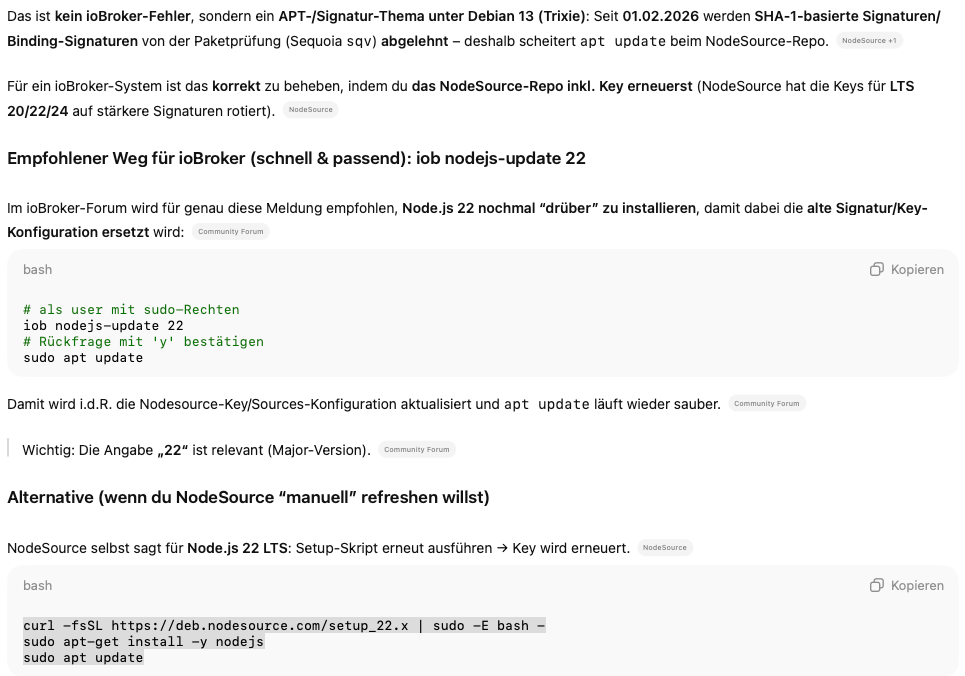
Ganz gute Antwort, wie ich finde ...
Trotzdem, oder gerade deswegen: VORSICHT mit den halluzinierenden KIs dieser Welt bei solchen Aktionen!iobroker in Debian-VM auf Proxmox Server (Ryzen 7 / 32GB / 1TB NVMe SSD) als Master - mehrere Raspberry Pis (3+4) als Slaves. InfluxDB V2 und Grafana auf LXC.
*Wer freundlich ist, dem wird freundlich geholfen *
-
In den meisten Fällen ist es eine Frage des "prompts". Ich habe gerade etwas spezifischer nach einen "iobroker system" gefragt, damm kennt die KI Deine Antworten schon ;o)
Ganz gute Antwort, wie ich finde ...
Trotzdem, oder gerade deswegen: VORSICHT mit den halluzinierenden KIs dieser Welt bei solchen Aktionen!@reutli sagte in Wir empfehlen: Node.js 22.x:
Ganz gute Antwort, wie ich finde ...
Und die kommt zu 99,9% aus einem Beitrag von mir
-
@reutli sagte in Wir empfehlen: Node.js 22.x:
Ganz gute Antwort, wie ich finde ...
Und die kommt zu 99,9% aus einem Beitrag von mir
@Thomas-Braun sagte in Wir empfehlen: Node.js 22.x:
Und die kommt zu 99,9% aus einem Beitrag von mir
Eben, auch die KI kann von Dir lernen, nicht nur wir ;o)
iobroker in Debian-VM auf Proxmox Server (Ryzen 7 / 32GB / 1TB NVMe SSD) als Master - mehrere Raspberry Pis (3+4) als Slaves. InfluxDB V2 und Grafana auf LXC.
*Wer freundlich ist, dem wird freundlich geholfen *
-
@Thomas-Braun sagte in Wir empfehlen: Node.js 22.x:
Und die kommt zu 99,9% aus einem Beitrag von mir
Eben, auch die KI kann von Dir lernen, nicht nur wir ;o)
Irgendwie kann ich der Begeisterung für K(eine) I(ntelligenz) nichts abgewinnen.
Um die pseudoschlauen Antworten richtig zu bewerten und einordnen zu können brauchst du zumindest im fraglichen Thema Grundkenntnisse.Ich hab schon mal Code von mir zwecks Verbesserungsvorschlägen durch eine KI gejagt. Wenn es dann einen Aha-Effekt gibt wie "Jetzt wo ich es lese... Na logisch! Verstehe ich und kann das dann künftig selber so machen." macht das ja Sinn. Aber irgendwas einfach nachmachen, weil es die KI ja gesagt hat, wird schon richtig sein, halte ich für brandgefährlich.
-
Irgendwie kann ich der Begeisterung für K(eine) I(ntelligenz) nichts abgewinnen.
Um die pseudoschlauen Antworten richtig zu bewerten und einordnen zu können brauchst du zumindest im fraglichen Thema Grundkenntnisse.Ich hab schon mal Code von mir zwecks Verbesserungsvorschlägen durch eine KI gejagt. Wenn es dann einen Aha-Effekt gibt wie "Jetzt wo ich es lese... Na logisch! Verstehe ich und kann das dann künftig selber so machen." macht das ja Sinn. Aber irgendwas einfach nachmachen, weil es die KI ja gesagt hat, wird schon richtig sein, halte ich für brandgefährlich.
@Thomas-Braun sagte in Wir empfehlen: Node.js 22.x:
Um die pseudoschlauen Antworten richtig zu bewerten und einordnen zu können brauchst du zumindest im fraglichen Thema Grundkenntnisse.
man benötigt erst einmal ausreichend Kenntnisse um den Prompt sauber zu formulieren.
Dann braucht es ausreichend Kenntnisse um die Antwort auf Richtigkeit einordnen zu können.Hat man das nicht, läuft einiges möglicherweise so schief und man kann den Grund gar nicht mehr finden.
KI ersetzt nicht das notwendige strukturierte Denken!
Wenn man das einsetzt, bekommt man es aber fast selber hin.
Dieser "Fall" istcein schönes Beidpiel, warum wir KI-Aussagen unbedingt als solche gekennzeichnet haben möchten.
-
@noio sagte in Wir empfehlen: Node.js 22.x:
ob nodejs-update reicht aus ....war bei mir so..
Aber nur, wenn da nicht schon v22.22.0 läuft.
Ansonsten wird der Code für die Korrektur nicht durchlaufen und es kommt die (doppelte) Meldung, dass alles okay ist. -
@Thomas-Braun sagte in Wir empfehlen: Node.js 22.x:
Um die pseudoschlauen Antworten richtig zu bewerten und einordnen zu können brauchst du zumindest im fraglichen Thema Grundkenntnisse.
man benötigt erst einmal ausreichend Kenntnisse um den Prompt sauber zu formulieren.
Dann braucht es ausreichend Kenntnisse um die Antwort auf Richtigkeit einordnen zu können.Hat man das nicht, läuft einiges möglicherweise so schief und man kann den Grund gar nicht mehr finden.
KI ersetzt nicht das notwendige strukturierte Denken!
Wenn man das einsetzt, bekommt man es aber fast selber hin.
Dieser "Fall" istcein schönes Beidpiel, warum wir KI-Aussagen unbedingt als solche gekennzeichnet haben möchten.
@Homoran sagte in Wir empfehlen: Node.js 22.x:
man benötigt erst einmal ausreichend Kenntnisse um den Prompt sauber zu formulieren.
Dann braucht es ausreichend Kenntnisse um die Antwort auf Richtigkeit einordnen zu können.Genau das war mein Ansinnen, das hier zu posten:
- Ohne sauberes Prompting kommt nur Müll raus, was man in so manchen postings hier ja auch sieht.
- KI-Aussagen muss man (technisch) bewerten können und dann ggf. als Anregung verstehen. Ohne strukturiertes Nachdenken für Prompt und Ergebnis ist man "des Todes"
- zum Schmunzeln hat mich die Tatsache gebracht, dass dann aber genau das raus kommt, wass @thomas-braun hier schon lang und breit erklärt hat. Ergo die KI lernt von den wirklich Schlauen 😉
Deshalb ist das Forum hier so wichtig, dann kann die KI was sinnvolles lernen 😂
Ich erlebe es nicht nur hier jeden Tag: "...die KI hat gesagt..." - wer Kinder hat, der weiß wovon ich rede...
iobroker in Debian-VM auf Proxmox Server (Ryzen 7 / 32GB / 1TB NVMe SSD) als Master - mehrere Raspberry Pis (3+4) als Slaves. InfluxDB V2 und Grafana auf LXC.
*Wer freundlich ist, dem wird freundlich geholfen *



Hey! Du scheinst an dieser Unterhaltung interessiert zu sein, hast aber noch kein Konto.
Hast du es satt, bei jedem Besuch durch die gleichen Beiträge zu scrollen? Wenn du dich für ein Konto anmeldest, kommst du immer genau dorthin zurück, wo du zuvor warst, und kannst dich über neue Antworten benachrichtigen lassen (entweder per E-Mail oder Push-Benachrichtigung). Du kannst auch Lesezeichen speichern und Beiträge positiv bewerten, um anderen Community-Mitgliedern deine Wertschätzung zu zeigen.
Mit deinem Input könnte dieser Beitrag noch besser werden 💗
Registrieren Anmelden493
Online33.0k
Benutzer83.6k
Themen1.3m
Beiträge