Skip to content
  • Home
  • Aktuell
  • Tags
  • 0 Ungelesen 0
  • Kategorien
  • Unreplied
  • Beliebt
  • GitHub
  • Docu
  • Hilfe
Skins
  • Light
  • Brite
  • Cerulean
  • Cosmo
  • Flatly
  • Journal
  • Litera
  • Lumen
  • Lux
  • Materia
  • Minty
  • Morph
  • Pulse
  • Sandstone
  • Simplex
  • Sketchy
  • Spacelab
  • United
  • Yeti
  • Zephyr
  • Dark
  • Cyborg
  • Darkly
  • Quartz
  • Slate
  • Solar
  • Superhero
  • Vapor

  • Standard: (Kein Skin)
  • Kein Skin
Einklappen
ioBroker Logo

Community Forum

donate donate
  1. ioBroker Community Home
  2. Deutsch
  3. Einsteigerfragen
  4. Einbindung von Geräten
  5. ESPHome .yaml Fehlermeldung Pillow Version

NEWS

  • Jahresrückblick 2025 – unser neuer Blogbeitrag ist online! ✨
    BluefoxB
    Bluefox
    15
    1
    533

  • Neuer Blogbeitrag: Monatsrückblick - Dezember 2025 🎄
    BluefoxB
    Bluefox
    13
    1
    622

  • Weihnachtsangebot 2025! 🎄
    BluefoxB
    Bluefox
    25
    1
    1.9k

ESPHome .yaml Fehlermeldung Pillow Version

Geplant Angeheftet Gesperrt Verschoben Einbindung von Geräten
45 Beiträge 4 Kommentatoren 4.3k Aufrufe 3 Watching
  • Älteste zuerst
  • Neuste zuerst
  • Meiste Stimmen
Antworten
  • In einem neuen Thema antworten
Anmelden zum Antworten
Dieses Thema wurde gelöscht. Nur Nutzer mit entsprechenden Rechten können es sehen.
  • W Offline
    W Offline
    wibear
    schrieb am zuletzt editiert von wibear
    #1

    Hallo Forum,

    mein IOBroker läuft auf einem Raspi 4, 4 MB, 64-bit, Bookworm. ESPHome ist v0.5.0-beta.8.
    Es gibt eine Fehlermeldung in der .yaml Datei, obwohl die Pillow V. 10.3.0 über virtuelle Umgebung installiert ist:

    Fehler-esphome.jpg

    raspi@raspi:~ $ source .venv/Pillow/bin/activate
    (Pillow) raspi@raspi:~ $ .venv/Pillow/bin/pip install pillow
    Looking in indexes: https://pypi.org/simple, https://www.piwheels.org/simple
    Requirement already satisfied: pillow in ./.venv/Pillow/lib/python3.11/site-packages (11.2.1)
    (Pillow) raspi@raspi:~ $ pip install "pillow==10.3.0"
    Looking in indexes: https://pypi.org/simple, https://www.piwheels.org/simple
    Collecting pillow==10.3.0
      Using cached pillow-10.3.0-cp311-cp311-manylinux_2_28_aarch64.whl.metadata (9.2 kB)
    Using cached pillow-10.3.0-cp311-cp311-manylinux_2_28_aarch64.whl (4.3 MB)
    Installing collected packages: pillow
      Attempting uninstall: pillow
        Found existing installation: pillow 11.2.1
        Uninstalling pillow-11.2.1:
          Successfully uninstalled pillow-11.2.1
    Successfully installed pillow-10.3.0
    (Pillow) raspi@raspi:~ $ pip3 show pillow
    Name: pillow
    Version: 10.3.0
    Summary: Python Imaging Library (Fork)
    Home-page: https://python-pillow.org
    Author:
    Author-email: "Jeffrey A. Clark" <aclark@aclark.net>
    License: HPND
    Location: /home/raspi/.venv/Pillow/lib/python3.11/site-packages
    Requires:
    Required-by:
    

    Auch mit der Pillow V11.2.1 komt dieselbe Fehlermeldung.

    Was läuft da falsch?
    Danke und Grüße

    Thomas BraunT 1 Antwort Letzte Antwort
    0
    • W wibear

      Hallo Forum,

      mein IOBroker läuft auf einem Raspi 4, 4 MB, 64-bit, Bookworm. ESPHome ist v0.5.0-beta.8.
      Es gibt eine Fehlermeldung in der .yaml Datei, obwohl die Pillow V. 10.3.0 über virtuelle Umgebung installiert ist:

      Fehler-esphome.jpg

      raspi@raspi:~ $ source .venv/Pillow/bin/activate
      (Pillow) raspi@raspi:~ $ .venv/Pillow/bin/pip install pillow
      Looking in indexes: https://pypi.org/simple, https://www.piwheels.org/simple
      Requirement already satisfied: pillow in ./.venv/Pillow/lib/python3.11/site-packages (11.2.1)
      (Pillow) raspi@raspi:~ $ pip install "pillow==10.3.0"
      Looking in indexes: https://pypi.org/simple, https://www.piwheels.org/simple
      Collecting pillow==10.3.0
        Using cached pillow-10.3.0-cp311-cp311-manylinux_2_28_aarch64.whl.metadata (9.2 kB)
      Using cached pillow-10.3.0-cp311-cp311-manylinux_2_28_aarch64.whl (4.3 MB)
      Installing collected packages: pillow
        Attempting uninstall: pillow
          Found existing installation: pillow 11.2.1
          Uninstalling pillow-11.2.1:
            Successfully uninstalled pillow-11.2.1
      Successfully installed pillow-10.3.0
      (Pillow) raspi@raspi:~ $ pip3 show pillow
      Name: pillow
      Version: 10.3.0
      Summary: Python Imaging Library (Fork)
      Home-page: https://python-pillow.org
      Author:
      Author-email: "Jeffrey A. Clark" <aclark@aclark.net>
      License: HPND
      Location: /home/raspi/.venv/Pillow/lib/python3.11/site-packages
      Requires:
      Required-by:
      

      Auch mit der Pillow V11.2.1 komt dieselbe Fehlermeldung.

      Was läuft da falsch?
      Danke und Grüße

      Thomas BraunT Online
      Thomas BraunT Online
      Thomas Braun
      Most Active
      schrieb am zuletzt editiert von
      #2

      @wibear

      Das venv ist für den user raspi, der iobroker braucht ein eigenes venv, würde ich sagen.

      Linux-Werkzeugkasten:
      https://forum.iobroker.net/topic/42952/der-kleine-iobroker-linux-werkzeugkasten
      NodeJS Fixer Skript:
      https://forum.iobroker.net/topic/68035/iob-node-fix-skript
      iob_diag: curl -sLf -o diag.sh https://iobroker.net/diag.sh && bash diag.sh

      W 1 Antwort Letzte Antwort
      0
      • Thomas BraunT Thomas Braun

        @wibear

        Das venv ist für den user raspi, der iobroker braucht ein eigenes venv, würde ich sagen.

        W Offline
        W Offline
        wibear
        schrieb am zuletzt editiert von
        #3

        @thomas-braun sagte in ESPHome .yaml Fehlermeldung Pillow Version:

        iobroker braucht ein eigenes venv

        Hallo Thomas,

        so sieht meine Umgebung aus, die damit erzeugt wurde:

        python3 -m venv .venv/Pillow
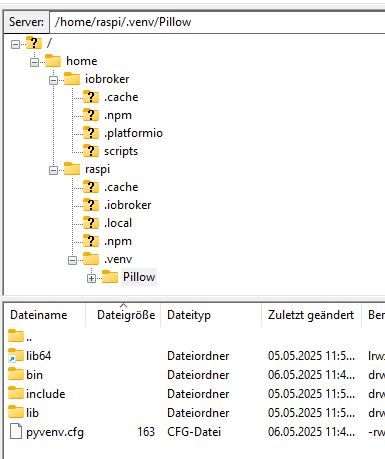
        

        Scrennshot1.jpg

        Wie kann ich es für den user iobroker machen?
        Danke und Grüße

        Thomas BraunT 1 Antwort Letzte Antwort
        0
        • W wibear

          @thomas-braun sagte in ESPHome .yaml Fehlermeldung Pillow Version:

          iobroker braucht ein eigenes venv

          Hallo Thomas,

          so sieht meine Umgebung aus, die damit erzeugt wurde:

          python3 -m venv .venv/Pillow
          

          Scrennshot1.jpg

          Wie kann ich es für den user iobroker machen?
          Danke und Grüße

          Thomas BraunT Online
          Thomas BraunT Online
          Thomas Braun
          Most Active
          schrieb am zuletzt editiert von
          #4

          @wibear

          Ich würde es mit

          sudo -H -u iobroker HIER_DIE_PIP_KOMMANDOS
          

          mal versuchen. Dann sollte das eigentlich alles im home des iobrokers passieren.

          Linux-Werkzeugkasten:
          https://forum.iobroker.net/topic/42952/der-kleine-iobroker-linux-werkzeugkasten
          NodeJS Fixer Skript:
          https://forum.iobroker.net/topic/68035/iob-node-fix-skript
          iob_diag: curl -sLf -o diag.sh https://iobroker.net/diag.sh && bash diag.sh

          W 2 Antworten Letzte Antwort
          0
          • Thomas BraunT Thomas Braun

            @wibear

            Ich würde es mit

            sudo -H -u iobroker HIER_DIE_PIP_KOMMANDOS
            

            mal versuchen. Dann sollte das eigentlich alles im home des iobrokers passieren.

            W Offline
            W Offline
            wibear
            schrieb am zuletzt editiert von
            #5

            @thomas-braun

            Es kommt eine Fehlermeldung:

            raspi@raspi:~ $ sudo -H -u iobroker python3 -m venv .venv/pillow
            Error: [Errno 13] Permission denied: '/home/raspi/.venv'
            
            Thomas BraunT 1 Antwort Letzte Antwort
            0
            • W wibear

              @thomas-braun

              Es kommt eine Fehlermeldung:

              raspi@raspi:~ $ sudo -H -u iobroker python3 -m venv .venv/pillow
              Error: [Errno 13] Permission denied: '/home/raspi/.venv'
              
              Thomas BraunT Online
              Thomas BraunT Online
              Thomas Braun
              Most Active
              schrieb am zuletzt editiert von
              #6

              @wibear

              Dann stell dich mal in das home des iobrokers rein.

              Linux-Werkzeugkasten:
              https://forum.iobroker.net/topic/42952/der-kleine-iobroker-linux-werkzeugkasten
              NodeJS Fixer Skript:
              https://forum.iobroker.net/topic/68035/iob-node-fix-skript
              iob_diag: curl -sLf -o diag.sh https://iobroker.net/diag.sh && bash diag.sh

              W 1 Antwort Letzte Antwort
              0
              • Thomas BraunT Thomas Braun

                @wibear

                Dann stell dich mal in das home des iobrokers rein.

                W Offline
                W Offline
                wibear
                schrieb am zuletzt editiert von wibear
                #7

                @thomas-braun

                Guten Morgen,

                das klappt irgendwie auch nicht:

                raspi@raspi:~ $ cd /home/iobroker/
                raspi@raspi:/home/iobroker $ python3 -m venv .venv/Pillow
                Error: [Errno 13] Permission denied: '/home/iobroker/.venv'
                raspi@raspi:/home/iobroker $ sudo python3 -m venv .venv/Pillow
                raspi@raspi:/home/iobroker $ source .venv/Pillow/bin/activate
                (Pillow) raspi@raspi:/home/iobroker $ pip install "pillow==11.2.1"
                Looking in indexes: https://pypi.org/simple, https://www.piwheels.org/simple
                Collecting pillow==11.2.1
                  Using cached pillow-11.2.1-cp311-cp311-manylinux_2_28_aarch64.whl (4.5 MB)
                Installing collected packages: pillow
                ERROR: Could not install packages due to an OSError: [Errno 13] Permission denied: '/home/iobroker/.venv/Pillow/lib/python3.11/site-packages/PIL'
                Check the permissions.
                
                (Pillow) raspi@raspi:/home/iobroker $ sudo pip install "pillow==11.2.1"
                error: externally-managed-environment


                Allerdings in "pip list" ist die Pillow Version 9.4.0:

                pip list
                
                
                Pillow             9.4.0
                

                Grüße

                Thomas BraunT 1 Antwort Letzte Antwort
                0
                • W wibear

                  @thomas-braun

                  Guten Morgen,

                  das klappt irgendwie auch nicht:

                  raspi@raspi:~ $ cd /home/iobroker/
                  raspi@raspi:/home/iobroker $ python3 -m venv .venv/Pillow
                  Error: [Errno 13] Permission denied: '/home/iobroker/.venv'
                  raspi@raspi:/home/iobroker $ sudo python3 -m venv .venv/Pillow
                  raspi@raspi:/home/iobroker $ source .venv/Pillow/bin/activate
                  (Pillow) raspi@raspi:/home/iobroker $ pip install "pillow==11.2.1"
                  Looking in indexes: https://pypi.org/simple, https://www.piwheels.org/simple
                  Collecting pillow==11.2.1
                    Using cached pillow-11.2.1-cp311-cp311-manylinux_2_28_aarch64.whl (4.5 MB)
                  Installing collected packages: pillow
                  ERROR: Could not install packages due to an OSError: [Errno 13] Permission denied: '/home/iobroker/.venv/Pillow/lib/python3.11/site-packages/PIL'
                  Check the permissions.
                  
                  (Pillow) raspi@raspi:/home/iobroker $ sudo pip install "pillow==11.2.1"
                  error: externally-managed-environment


                  Allerdings in "pip list" ist die Pillow Version 9.4.0:

                  pip list
                  
                  
                  Pillow             9.4.0
                  

                  Grüße

                  Thomas BraunT Online
                  Thomas BraunT Online
                  Thomas Braun
                  Most Active
                  schrieb am zuletzt editiert von
                  #8

                  @wibear sagte in ESPHome .yaml Fehlermeldung Pillow Version:

                  sudo pip install "pillow==11.2.1"

                  Damit wirst du zum root.
                  Das ist aber falsch, falsch, falsch. Du willst die Rechte vom 'iobroker' haben.

                  Linux-Werkzeugkasten:
                  https://forum.iobroker.net/topic/42952/der-kleine-iobroker-linux-werkzeugkasten
                  NodeJS Fixer Skript:
                  https://forum.iobroker.net/topic/68035/iob-node-fix-skript
                  iob_diag: curl -sLf -o diag.sh https://iobroker.net/diag.sh && bash diag.sh

                  W 1 Antwort Letzte Antwort
                  0
                  • Thomas BraunT Thomas Braun

                    @wibear sagte in ESPHome .yaml Fehlermeldung Pillow Version:

                    sudo pip install "pillow==11.2.1"

                    Damit wirst du zum root.
                    Das ist aber falsch, falsch, falsch. Du willst die Rechte vom 'iobroker' haben.

                    W Offline
                    W Offline
                    wibear
                    schrieb am zuletzt editiert von
                    #9

                    @thomas-braun

                    Ich denke, das Problem liegt woanders. Obwohl die Installation fehlerfrei erfolgt (s. meinen 1. Beitrag), "Successfully installed pillow-10.3.0", zeigt die pip list immer noch die alte Pillow Version 9.4.0, statt z.B. 10.3.0.

                    Thomas BraunT 1 Antwort Letzte Antwort
                    0
                    • W wibear

                      @thomas-braun

                      Ich denke, das Problem liegt woanders. Obwohl die Installation fehlerfrei erfolgt (s. meinen 1. Beitrag), "Successfully installed pillow-10.3.0", zeigt die pip list immer noch die alte Pillow Version 9.4.0, statt z.B. 10.3.0.

                      Thomas BraunT Online
                      Thomas BraunT Online
                      Thomas Braun
                      Most Active
                      schrieb am zuletzt editiert von
                      #10

                      @wibear

                      Das dürfte die Version aus dem Paketmanager sein.

                      sudo apt update
                      apt policy python3-pil
                      

                      wird 9.4.0 liefern.

                      Linux-Werkzeugkasten:
                      https://forum.iobroker.net/topic/42952/der-kleine-iobroker-linux-werkzeugkasten
                      NodeJS Fixer Skript:
                      https://forum.iobroker.net/topic/68035/iob-node-fix-skript
                      iob_diag: curl -sLf -o diag.sh https://iobroker.net/diag.sh && bash diag.sh

                      W 1 Antwort Letzte Antwort
                      0
                      • Thomas BraunT Thomas Braun

                        @wibear

                        Das dürfte die Version aus dem Paketmanager sein.

                        sudo apt update
                        apt policy python3-pil
                        

                        wird 9.4.0 liefern.

                        W Offline
                        W Offline
                        wibear
                        schrieb am zuletzt editiert von
                        #11

                        @thomas-braun

                        Es wird geliefert:

                        raspi@raspi:~ $ sudo apt update
                        Hit:1 http://deb.debian.org/debian bookworm InRelease
                        Hit:2 http://deb.debian.org/debian-security bookworm-security InRelease
                        Hit:3 http://archive.raspberrypi.com/debian bookworm InRelease
                        Hit:4 http://deb.debian.org/debian bookworm-updates InRelease
                        Hit:5 https://repos.influxdata.com/debian stable InRelease
                        Hit:6 https://packages.grafana.com/oss/deb stable InRelease
                        Hit:7 https://apt.pivccu.de/piVCCU stable InRelease
                        Hit:8 https://deb.nodesource.com/node_20.x nodistro InRelease
                        Reading package lists... Done
                        Building dependency tree... Done
                        Reading state information... Done
                        15 packages can be upgraded. Run 'apt list --upgradable' to see them.
                        raspi@raspi:~ $ apt policy python3-pil
                        python3-pil:
                          Installed: 9.4.0-1.1+deb12u1
                          Candidate: 9.4.0-1.1+deb12u1
                          Version table:
                         *** 9.4.0-1.1+deb12u1 500
                                500 http://deb.debian.org/debian bookworm/main arm64 Packages
                                500 http://deb.debian.org/debian-security bookworm-security/main arm64 Packages
                                100 /var/lib/dpkg/status
                        
                        Thomas BraunT 1 Antwort Letzte Antwort
                        0
                        • W wibear

                          @thomas-braun

                          Es wird geliefert:

                          raspi@raspi:~ $ sudo apt update
                          Hit:1 http://deb.debian.org/debian bookworm InRelease
                          Hit:2 http://deb.debian.org/debian-security bookworm-security InRelease
                          Hit:3 http://archive.raspberrypi.com/debian bookworm InRelease
                          Hit:4 http://deb.debian.org/debian bookworm-updates InRelease
                          Hit:5 https://repos.influxdata.com/debian stable InRelease
                          Hit:6 https://packages.grafana.com/oss/deb stable InRelease
                          Hit:7 https://apt.pivccu.de/piVCCU stable InRelease
                          Hit:8 https://deb.nodesource.com/node_20.x nodistro InRelease
                          Reading package lists... Done
                          Building dependency tree... Done
                          Reading state information... Done
                          15 packages can be upgraded. Run 'apt list --upgradable' to see them.
                          raspi@raspi:~ $ apt policy python3-pil
                          python3-pil:
                            Installed: 9.4.0-1.1+deb12u1
                            Candidate: 9.4.0-1.1+deb12u1
                            Version table:
                           *** 9.4.0-1.1+deb12u1 500
                                  500 http://deb.debian.org/debian bookworm/main arm64 Packages
                                  500 http://deb.debian.org/debian-security bookworm-security/main arm64 Packages
                                  100 /var/lib/dpkg/status
                          
                          Thomas BraunT Online
                          Thomas BraunT Online
                          Thomas Braun
                          Most Active
                          schrieb am zuletzt editiert von
                          #12

                          @wibear sagte in ESPHome .yaml Fehlermeldung Pillow Version:

                          15 packages can be upgraded.

                          Tu das.

                          Installed: 9.4.0-1.1+deb12u1

                          Wie ich sagte.

                          Linux-Werkzeugkasten:
                          https://forum.iobroker.net/topic/42952/der-kleine-iobroker-linux-werkzeugkasten
                          NodeJS Fixer Skript:
                          https://forum.iobroker.net/topic/68035/iob-node-fix-skript
                          iob_diag: curl -sLf -o diag.sh https://iobroker.net/diag.sh && bash diag.sh

                          W 1 Antwort Letzte Antwort
                          0
                          • Thomas BraunT Thomas Braun

                            @wibear sagte in ESPHome .yaml Fehlermeldung Pillow Version:

                            15 packages can be upgraded.

                            Tu das.

                            Installed: 9.4.0-1.1+deb12u1

                            Wie ich sagte.

                            W Offline
                            W Offline
                            wibear
                            schrieb am zuletzt editiert von
                            #13

                            @thomas-braun

                            apt update & upgrade ausgeführt und nach reboot die pillow version gecheckt:

                            raspi@raspi:~ $ pip show pillow
                            Name: Pillow
                            Version: 9.4.0
                            Summary: Python Imaging Library (Fork)
                            Home-page: https://python-pillow.org
                            Author: Alex Clark (PIL Fork Author)
                            Author-email: aclark@python-pillow.org
                            License: HPND
                            Location: /usr/lib/python3/dist-packages
                            Requires:
                            Required-by:
                            raspi@raspi:~ $ sudo apt update
                            Hit:1 http://archive.raspberrypi.com/debian bookworm InRelease
                            Hit:2 http://deb.debian.org/debian bookworm InRelease
                            Hit:3 http://deb.debian.org/debian-security bookworm-security InRelease
                            Hit:4 http://deb.debian.org/debian bookworm-updates InRelease
                            Hit:5 https://apt.pivccu.de/piVCCU stable InRelease
                            Hit:6 https://deb.nodesource.com/node_20.x nodistro InRelease
                            Hit:7 https://packages.grafana.com/oss/deb stable InRelease
                            Hit:8 https://repos.influxdata.com/debian stable InRelease
                            Reading package lists... Done
                            Building dependency tree... Done
                            Reading state information... Done
                            8 packages can be upgraded. Run 'apt list --upgradable' to see them.
                            raspi@raspi:~ $ ^C
                            raspi@raspi:~ $ apt list --upgradable
                            Listing... Done
                            firmware-libertas/stable,stable 1:20240709-2~bpo12+1+rpt3 all [upgradable from: 1:20230625-2+rpt3]
                            firmware-misc-nonfree/stable,stable 1:20240709-2~bpo12+1+rpt3 all [upgradable from: 1:20230625-2+rpt3]
                            libcamera-ipa/stable 0.5.0+rpt20250429-1 arm64 [upgradable from: 0.3.2+rpt20241119-1]
                            linux-headers-rpi-2712/stable 1:6.12.25-1+rpt1 arm64 [upgradable from: 1:6.6.62-1+rpt1]
                            linux-headers-rpi-v8/stable 1:6.12.25-1+rpt1 arm64 [upgradable from: 1:6.6.62-1+rpt1]
                            linux-image-rpi-2712/stable 1:6.12.25-1+rpt1 arm64 [upgradable from: 1:6.6.62-1+rpt1]
                            linux-image-rpi-v8/stable 1:6.12.25-1+rpt1 arm64 [upgradable from: 1:6.6.62-1+rpt1]
                            rpicam-apps-lite/stable 1.7.0-1 arm64 [upgradable from: 1.5.3-1]
                            
                            Thomas BraunT 1 Antwort Letzte Antwort
                            0
                            • W wibear

                              @thomas-braun

                              apt update & upgrade ausgeführt und nach reboot die pillow version gecheckt:

                              raspi@raspi:~ $ pip show pillow
                              Name: Pillow
                              Version: 9.4.0
                              Summary: Python Imaging Library (Fork)
                              Home-page: https://python-pillow.org
                              Author: Alex Clark (PIL Fork Author)
                              Author-email: aclark@python-pillow.org
                              License: HPND
                              Location: /usr/lib/python3/dist-packages
                              Requires:
                              Required-by:
                              raspi@raspi:~ $ sudo apt update
                              Hit:1 http://archive.raspberrypi.com/debian bookworm InRelease
                              Hit:2 http://deb.debian.org/debian bookworm InRelease
                              Hit:3 http://deb.debian.org/debian-security bookworm-security InRelease
                              Hit:4 http://deb.debian.org/debian bookworm-updates InRelease
                              Hit:5 https://apt.pivccu.de/piVCCU stable InRelease
                              Hit:6 https://deb.nodesource.com/node_20.x nodistro InRelease
                              Hit:7 https://packages.grafana.com/oss/deb stable InRelease
                              Hit:8 https://repos.influxdata.com/debian stable InRelease
                              Reading package lists... Done
                              Building dependency tree... Done
                              Reading state information... Done
                              8 packages can be upgraded. Run 'apt list --upgradable' to see them.
                              raspi@raspi:~ $ ^C
                              raspi@raspi:~ $ apt list --upgradable
                              Listing... Done
                              firmware-libertas/stable,stable 1:20240709-2~bpo12+1+rpt3 all [upgradable from: 1:20230625-2+rpt3]
                              firmware-misc-nonfree/stable,stable 1:20240709-2~bpo12+1+rpt3 all [upgradable from: 1:20230625-2+rpt3]
                              libcamera-ipa/stable 0.5.0+rpt20250429-1 arm64 [upgradable from: 0.3.2+rpt20241119-1]
                              linux-headers-rpi-2712/stable 1:6.12.25-1+rpt1 arm64 [upgradable from: 1:6.6.62-1+rpt1]
                              linux-headers-rpi-v8/stable 1:6.12.25-1+rpt1 arm64 [upgradable from: 1:6.6.62-1+rpt1]
                              linux-image-rpi-2712/stable 1:6.12.25-1+rpt1 arm64 [upgradable from: 1:6.6.62-1+rpt1]
                              linux-image-rpi-v8/stable 1:6.12.25-1+rpt1 arm64 [upgradable from: 1:6.6.62-1+rpt1]
                              rpicam-apps-lite/stable 1.7.0-1 arm64 [upgradable from: 1.5.3-1]
                              
                              Thomas BraunT Online
                              Thomas BraunT Online
                              Thomas Braun
                              Most Active
                              schrieb am zuletzt editiert von Thomas Braun
                              #14

                              @wibear

                              Die Kernelupdates auch einspielen...
                              Solange bis da nix mehr gemeldet wird.
                              Hat aber nix mit deiner pillow-Installation zu tun, ist grundsätzlich aktuell zu halten.

                              Linux-Werkzeugkasten:
                              https://forum.iobroker.net/topic/42952/der-kleine-iobroker-linux-werkzeugkasten
                              NodeJS Fixer Skript:
                              https://forum.iobroker.net/topic/68035/iob-node-fix-skript
                              iob_diag: curl -sLf -o diag.sh https://iobroker.net/diag.sh && bash diag.sh

                              W 1 Antwort Letzte Antwort
                              0
                              • Thomas BraunT Thomas Braun

                                @wibear

                                Die Kernelupdates auch einspielen...
                                Solange bis da nix mehr gemeldet wird.
                                Hat aber nix mit deiner pillow-Installation zu tun, ist grundsätzlich aktuell zu halten.

                                W Offline
                                W Offline
                                wibear
                                schrieb am zuletzt editiert von
                                #15

                                @thomas-braun sagte in ESPHome .yaml Fehlermeldung Pillow Version:

                                Kernelupdates auch einspielen

                                Updates eingespielt.
                                Hast Du irgendeine weitere Idee zu Pillow?

                                Thomas BraunT 1 Antwort Letzte Antwort
                                0
                                • W wibear

                                  @thomas-braun sagte in ESPHome .yaml Fehlermeldung Pillow Version:

                                  Kernelupdates auch einspielen

                                  Updates eingespielt.
                                  Hast Du irgendeine weitere Idee zu Pillow?

                                  Thomas BraunT Online
                                  Thomas BraunT Online
                                  Thomas Braun
                                  Most Active
                                  schrieb am zuletzt editiert von
                                  #16

                                  @wibear

                                  Du musst dir anschauen, wie mehrere unterschiedliche Installationen (via Paketmanager und via Environment) auf dem System koexistieren können und wie man die Reihenfolge des Auffindens im $PATH beinflussen kann.
                                  Bei Python weiß ich das aber nicht, muss ich selber nachlesen.
                                  Alternativ könntest du auch das Paket python3-pil deinstallieren und schauen, was dann passiert.

                                  Linux-Werkzeugkasten:
                                  https://forum.iobroker.net/topic/42952/der-kleine-iobroker-linux-werkzeugkasten
                                  NodeJS Fixer Skript:
                                  https://forum.iobroker.net/topic/68035/iob-node-fix-skript
                                  iob_diag: curl -sLf -o diag.sh https://iobroker.net/diag.sh && bash diag.sh

                                  W 1 Antwort Letzte Antwort
                                  0
                                  • Thomas BraunT Thomas Braun

                                    @wibear

                                    Du musst dir anschauen, wie mehrere unterschiedliche Installationen (via Paketmanager und via Environment) auf dem System koexistieren können und wie man die Reihenfolge des Auffindens im $PATH beinflussen kann.
                                    Bei Python weiß ich das aber nicht, muss ich selber nachlesen.
                                    Alternativ könntest du auch das Paket python3-pil deinstallieren und schauen, was dann passiert.

                                    W Offline
                                    W Offline
                                    wibear
                                    schrieb am zuletzt editiert von
                                    #17

                                    @thomas-braun

                                    Guten Morgen,

                                    ich bin wie hier "https://forum.iobroker.net/topic/79199/esphome-und-pillow/12?_=1746878720690" vorgegangen und habe diesen Fehler bekommen:

                                    raspi@raspi:~ $ source /home/iobroker/.cache/autopy/venv/esphome/bin/activate
                                    (esphome) raspi@raspi:~ $ pip install "pillow==10.2.0"
                                    Looking in indexes: https://pypi.org/simple, https://www.piwheels.org/simple
                                    Collecting pillow==10.2.0
                                      Downloading pillow-10.2.0-cp311-cp311-manylinux_2_28_aarch64.whl.metadata (9.7 kB)
                                    Downloading pillow-10.2.0-cp311-cp311-manylinux_2_28_aarch64.whl (4.3 MB)
                                       ━━━━━━━━━━━━━━━━━━━━━━━━━━━━━━━━━━━━━━━━ 4.3/4.3 MB 5.6 MB/s eta 0:00:00
                                    Installing collected packages: pillow
                                      Attempting uninstall: pillow
                                        Found existing installation: Pillow 10.0.1
                                        Uninstalling Pillow-10.0.1:
                                    ERROR: Could not install packages due to an OSError: [Errno 13] Permission denied: 'BufrStubImagePlugin.py'
                                    Check the permissions.
                                    
                                    [notice] A new release of pip is available: 24.0 -> 25.1.1
                                    [notice] To update, run: pip install --upgrade pip
                                    (esphome) raspi@raspi:~ $
                                    

                                    Muss es mit sudo gemacht werden?
                                    Danke und Grüße

                                    1 Antwort Letzte Antwort
                                    0
                                    • Thomas BraunT Thomas Braun

                                      @wibear

                                      Ich würde es mit

                                      sudo -H -u iobroker HIER_DIE_PIP_KOMMANDOS
                                      

                                      mal versuchen. Dann sollte das eigentlich alles im home des iobrokers passieren.

                                      W Offline
                                      W Offline
                                      wibear
                                      schrieb am zuletzt editiert von wibear
                                      #18

                                      @thomas-braun sagte in ESPHome .yaml Fehlermeldung Pillow Version:

                                      @wibear

                                      Ich würde es mit

                                      sudo -H -u iobroker HIER_DIE_PIP_KOMMANDOS
                                      

                                      mal versuchen. Dann sollte das eigentlich alles im home des iobrokers passieren.

                                      Es kommt eine Fehlermeldung, wenn ich sudo.... voranstelle:

                                      raspi@raspi:~ $ sudo -H -u iobroker python3 -m venv .venv/Pillow                Error: [Errno 13] Permission denied: '/home/raspi/.venv'
                                      

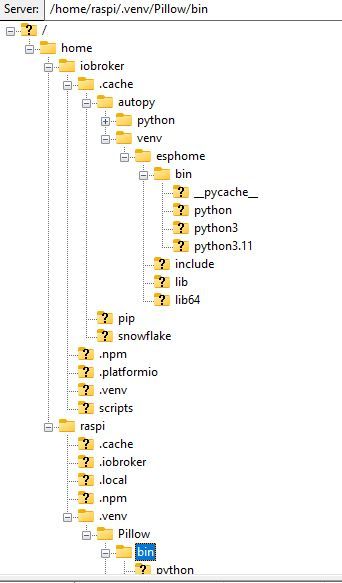
                                      Das ist die Ordner-Struktur:

                                      struktur.jpg

                                      Was fehlt hier?

                                      Es werden auch unterschiedliche Pillow Versionen angezeigt, wenn ich sie unter (Pillow) oder ohne abfrage.

                                      raspi@raspi:~ $ python3 -m venv .venv/Pillow
                                      raspi@raspi:~ $ source .venv/Pillow/bin/activate
                                      (Pillow) raspi@raspi:~ $ pip install "pillow==10.3.0"
                                      Looking in indexes: https://pypi.org/simple, https://www.piwheels.org/simple
                                      Requirement already satisfied: pillow==10.3.0 in ./.venv/Pillow/lib/python3.11/site-packages (10.3.0)
                                      (Pillow) raspi@raspi:~ $ pip3 install "pillow==10.3.0"
                                      Looking in indexes: https://pypi.org/simple, https://www.piwheels.org/simple
                                      Requirement already satisfied: pillow==10.3.0 in ./.venv/Pillow/lib/python3.11/site-packages (10.3.0)
                                      (Pillow) raspi@raspi:~ $ pip3 install "pillow==11.2.1"
                                      Looking in indexes: https://pypi.org/simple, https://www.piwheels.org/simple
                                      Collecting pillow==11.2.1
                                        Using cached pillow-11.2.1-cp311-cp311-manylinux_2_28_aarch64.whl.metadata (8.9 kB)
                                      Using cached pillow-11.2.1-cp311-cp311-manylinux_2_28_aarch64.whl (4.5 MB)
                                      Installing collected packages: pillow
                                        Attempting uninstall: pillow
                                          Found existing installation: pillow 10.3.0
                                          Uninstalling pillow-10.3.0:
                                            Successfully uninstalled pillow-10.3.0
                                      Successfully installed pillow-11.2.1
                                      (Pillow) raspi@raspi:~ $ pip3 show pillow
                                      Name: pillow
                                      Version: 11.2.1
                                      
                                      (Pillow) raspi@raspi:~ $ pip3 install "pillow==10.3.0"
                                      Looking in indexes: https://pypi.org/simple, https://www.piwheels.org/simple
                                      Collecting pillow==10.3.0
                                        Using cached pillow-10.3.0-cp311-cp311-manylinux_2_28_aarch64.whl.metadata (9.2 kB)
                                      Using cached pillow-10.3.0-cp311-cp311-manylinux_2_28_aarch64.whl (4.3 MB)
                                      Installing collected packages: pillow
                                        Attempting uninstall: pillow
                                          Found existing installation: pillow 11.2.1
                                          Uninstalling pillow-11.2.1:
                                            Successfully uninstalled pillow-11.2.1
                                      Successfully installed pillow-10.3.0
                                      (Pillow) raspi@raspi:~ $ pip3 show pillow
                                      Name: pillow
                                      Version: 10.3.0
                                      
                                      (Pillow) raspi@raspi:~ $ deactivate
                                      raspi@raspi:~ $ pip3 show pillow
                                      Name: Pillow
                                      Version: 9.4.0
                                      Summary: Python Imaging Library (Fork)
                                      
                                      (Pillow) raspi@raspi:~ $ pip list
                                      Package    Version
                                      ---------- -------
                                      pillow     10.3.0
                                      pip        25.1.1
                                      setuptools 66.1.1
                                      (Pillow) raspi@raspi:~ $
                                      raspi@raspi:~ $ pip list
                                      Package            Version
                                      ------------------ ------------
                                      
                                      Pillow             9.4.0


                                      Danke und Grüße

                                      Thomas BraunT 1 Antwort Letzte Antwort
                                      0
                                      • W wibear

                                        @thomas-braun sagte in ESPHome .yaml Fehlermeldung Pillow Version:

                                        @wibear

                                        Ich würde es mit

                                        sudo -H -u iobroker HIER_DIE_PIP_KOMMANDOS
                                        

                                        mal versuchen. Dann sollte das eigentlich alles im home des iobrokers passieren.

                                        Es kommt eine Fehlermeldung, wenn ich sudo.... voranstelle:

                                        raspi@raspi:~ $ sudo -H -u iobroker python3 -m venv .venv/Pillow                Error: [Errno 13] Permission denied: '/home/raspi/.venv'
                                        

                                        Das ist die Ordner-Struktur:

                                        struktur.jpg

                                        Was fehlt hier?

                                        Es werden auch unterschiedliche Pillow Versionen angezeigt, wenn ich sie unter (Pillow) oder ohne abfrage.

                                        raspi@raspi:~ $ python3 -m venv .venv/Pillow
                                        raspi@raspi:~ $ source .venv/Pillow/bin/activate
                                        (Pillow) raspi@raspi:~ $ pip install "pillow==10.3.0"
                                        Looking in indexes: https://pypi.org/simple, https://www.piwheels.org/simple
                                        Requirement already satisfied: pillow==10.3.0 in ./.venv/Pillow/lib/python3.11/site-packages (10.3.0)
                                        (Pillow) raspi@raspi:~ $ pip3 install "pillow==10.3.0"
                                        Looking in indexes: https://pypi.org/simple, https://www.piwheels.org/simple
                                        Requirement already satisfied: pillow==10.3.0 in ./.venv/Pillow/lib/python3.11/site-packages (10.3.0)
                                        (Pillow) raspi@raspi:~ $ pip3 install "pillow==11.2.1"
                                        Looking in indexes: https://pypi.org/simple, https://www.piwheels.org/simple
                                        Collecting pillow==11.2.1
                                          Using cached pillow-11.2.1-cp311-cp311-manylinux_2_28_aarch64.whl.metadata (8.9 kB)
                                        Using cached pillow-11.2.1-cp311-cp311-manylinux_2_28_aarch64.whl (4.5 MB)
                                        Installing collected packages: pillow
                                          Attempting uninstall: pillow
                                            Found existing installation: pillow 10.3.0
                                            Uninstalling pillow-10.3.0:
                                              Successfully uninstalled pillow-10.3.0
                                        Successfully installed pillow-11.2.1
                                        (Pillow) raspi@raspi:~ $ pip3 show pillow
                                        Name: pillow
                                        Version: 11.2.1
                                        
                                        (Pillow) raspi@raspi:~ $ pip3 install "pillow==10.3.0"
                                        Looking in indexes: https://pypi.org/simple, https://www.piwheels.org/simple
                                        Collecting pillow==10.3.0
                                          Using cached pillow-10.3.0-cp311-cp311-manylinux_2_28_aarch64.whl.metadata (9.2 kB)
                                        Using cached pillow-10.3.0-cp311-cp311-manylinux_2_28_aarch64.whl (4.3 MB)
                                        Installing collected packages: pillow
                                          Attempting uninstall: pillow
                                            Found existing installation: pillow 11.2.1
                                            Uninstalling pillow-11.2.1:
                                              Successfully uninstalled pillow-11.2.1
                                        Successfully installed pillow-10.3.0
                                        (Pillow) raspi@raspi:~ $ pip3 show pillow
                                        Name: pillow
                                        Version: 10.3.0
                                        
                                        (Pillow) raspi@raspi:~ $ deactivate
                                        raspi@raspi:~ $ pip3 show pillow
                                        Name: Pillow
                                        Version: 9.4.0
                                        Summary: Python Imaging Library (Fork)
                                        
                                        (Pillow) raspi@raspi:~ $ pip list
                                        Package    Version
                                        ---------- -------
                                        pillow     10.3.0
                                        pip        25.1.1
                                        setuptools 66.1.1
                                        (Pillow) raspi@raspi:~ $
                                        raspi@raspi:~ $ pip list
                                        Package            Version
                                        ------------------ ------------
                                        
                                        Pillow             9.4.0


                                        Danke und Grüße

                                        Thomas BraunT Online
                                        Thomas BraunT Online
                                        Thomas Braun
                                        Most Active
                                        schrieb am zuletzt editiert von Thomas Braun
                                        #19

                                        @wibear

                                        sudo apt remove python3-pil
                                        sudo mv /usr/lib/python3.11/EXTERNALLY-MANAGED /usr/lib/python3.11/EXTERNALLY-MANAGED.orig 
                                        sudo -H -u iobroker python3 -m pip install --upgrade Pillow
                                        sudo mv /usr/lib/python3.11/EXTERNALLY-MANAGED.orig /usr/lib/python3.11/EXTERNALLY-MANAGED
                                        

                                        Führt zu:

                                        echad@chet:~ $ sudo -H -u iobroker pip show pillow
                                        Name: pillow
                                        Version: 11.2.1
                                        Summary: Python Imaging Library (Fork)
                                        Home-page: 
                                        Author: 
                                        Author-email: "Jeffrey A. Clark" <aclark@aclark.net>
                                        License: 
                                        Location: /home/iobroker/.local/lib/python3.11/site-packages
                                        Requires: 
                                        Required-by: 
                                        echad@chet:~ $
                                        

                                        Linux-Werkzeugkasten:
                                        https://forum.iobroker.net/topic/42952/der-kleine-iobroker-linux-werkzeugkasten
                                        NodeJS Fixer Skript:
                                        https://forum.iobroker.net/topic/68035/iob-node-fix-skript
                                        iob_diag: curl -sLf -o diag.sh https://iobroker.net/diag.sh && bash diag.sh

                                        W 1 Antwort Letzte Antwort
                                        0
                                        • Thomas BraunT Thomas Braun

                                          @wibear

                                          sudo apt remove python3-pil
                                          sudo mv /usr/lib/python3.11/EXTERNALLY-MANAGED /usr/lib/python3.11/EXTERNALLY-MANAGED.orig 
                                          sudo -H -u iobroker python3 -m pip install --upgrade Pillow
                                          sudo mv /usr/lib/python3.11/EXTERNALLY-MANAGED.orig /usr/lib/python3.11/EXTERNALLY-MANAGED
                                          

                                          Führt zu:

                                          echad@chet:~ $ sudo -H -u iobroker pip show pillow
                                          Name: pillow
                                          Version: 11.2.1
                                          Summary: Python Imaging Library (Fork)
                                          Home-page: 
                                          Author: 
                                          Author-email: "Jeffrey A. Clark" <aclark@aclark.net>
                                          License: 
                                          Location: /home/iobroker/.local/lib/python3.11/site-packages
                                          Requires: 
                                          Required-by: 
                                          echad@chet:~ $
                                          
                                          W Offline
                                          W Offline
                                          wibear
                                          schrieb am zuletzt editiert von
                                          #20

                                          @thomas-braun

                                          Guten Morrgen Thomas,
                                          danke für Deine Antwort. Die Befehle wurden fehlerfrei ausgeführt, aber die Fehlermeldung mit der Pillow Version wie im #1 wird weiterhin angezeigt.

                                          Außerdem wird Pillow ohne sudo -H -u iobroker nicht gefunden:

                                          raspi@raspi:~ $ pip show pillow
                                          WARNING: Package(s) not found: pillow
                                          raspi@raspi:~ $ pip list
                                          Package            Version
                                          ------------------ ------------
                                          argcomplete        2.0.0
                                          .....
                                          packaging          23.0
                                          pigpio             1.78
                                          pip                23.0.1
                                          pipx               1.1.0
                                          

                                          Was muss ich noch prüfen?
                                          Danke und Grüße

                                          Thomas BraunT 1 Antwort Letzte Antwort
                                          0
                                          Antworten
                                          • In einem neuen Thema antworten
                                          Anmelden zum Antworten
                                          • Älteste zuerst
                                          • Neuste zuerst
                                          • Meiste Stimmen


                                          Support us

                                          ioBroker
                                          Community Adapters
                                          Donate

                                          875

                                          Online

                                          32.6k

                                          Benutzer

                                          81.9k

                                          Themen

                                          1.3m

                                          Beiträge
                                          Community
                                          Impressum | Datenschutz-Bestimmungen | Nutzungsbedingungen | Einwilligungseinstellungen
                                          ioBroker Community 2014-2025
                                          logo
                                          • Anmelden

                                          • Du hast noch kein Konto? Registrieren

                                          • Anmelden oder registrieren, um zu suchen
                                          • Erster Beitrag
                                            Letzter Beitrag
                                          0
                                          • Home
                                          • Aktuell
                                          • Tags
                                          • Ungelesen 0
                                          • Kategorien
                                          • Unreplied
                                          • Beliebt
                                          • GitHub
                                          • Docu
                                          • Hilfe