
NEWS




NSPanel/Lovelace und Sonoff TRV
-
@tt-tom Sodale, ich hoffe das sind die richtige DAten über den DDP Mode:
{
  "type": "state",
  "common": {
    "name": "Mode",
    "type": "string",
    "states": {
      "auto": "AUTO",
      "heat": "heat",
      "off": "off"
    },
    "read": true,
    "write": true,
    "role": "state"
  },
  "native": {},
  "_id": "zigbee.1.0ceff6fffedc84ef.mode",
  "acl": {
    "object": 1636,
    "state": 1636,
    "owner": "system.user.admin",
    "ownerGroup": "system.group.administrator"
  },
  "from": "system.adapter.admin.0",
  "user": "system.user.admin",
  "ts": 1737991842032
}
Aber warum man die nicht entsprechend in dem Alias einstellen bleibt ein Rätselt?!
Und für dir Batterie wäre ein Wechsel auf "Low Bat" bei X% eine (Not)-Lösung.@darksoul
das Script kann nur eine gewisse Struktur auswerten, wir haben uns da an die Device Typen vom ioBroker orientiert. Deshalb ist es notwendig bei einigen Geräten Anpassungen zu machen und die Werte in eine Form für das Script zubringen.Gib mir ein wenig Zeit dann liegt die erste Version für dein Thermostat bereit.
-
hier mal das Script als Verbindung zwischen Sonoff und Panel.
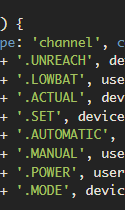
Du musst die ersten drei Konstanten anpassen und dann das Script starten. Es sollten alle Datenpunkte im 0_userdata und alias angelegt werden.const devicePath = '0_userdata.0.Thermostat_TRV-sonoff'; // Pfad zu den Thermostat Datenpunkten const aliasPath = 'alias.0.Thermostat_TRV-sonoff'; // Pfad zu den Thermostat Alias const userPath = '0_userdata.0.Thermostat_TRV-sonoff'; // Pfad für die Benutzerdatenpunkte async function createUserdata() { extendObject(userPath, { type: 'folder', common: { name: 'Thermostat' }, native: {} }); await createStateAsync(userPath + '.lowbat', false, { type: 'boolean', write: true }); await createStateAsync(userPath + '.Auto', false, { type: 'boolean', write: true }); await createStateAsync(userPath + '.Manual', false, { type: 'boolean', write: true }); await createStateAsync(userPath + '.power', false, { type: 'boolean', write: true }); } createUserdata(); async function createAliasThermostat() { extendObjectAsync(aliasPath, { type: 'channel', common: { name: 'Thermostat', role: 'thermostat' }, native: {} }); await createAliasAsync(aliasPath + '.UNREACH', devicePath + '.available', true, <iobJS.StateCommon>{ type: 'boolean', role: 'switch', name: 'available', write: false }); await createAliasAsync(aliasPath + '.LOWBAT', userPath + '.lowbat', true, <iobJS.StateCommon>{ type: 'boolean', role: 'indicator.maintenance', name: 'Battery', write: false }); await createAliasAsync(aliasPath + '.ACTUAL', devicePath + '.local_temperature', true, <iobJS.StateCommon>{ type: 'number', role: 'value.themperature', name: 'Temperature', write: false }); await createAliasAsync(aliasPath + '.SET', devicePath + '.occupied_heating_setpoint', true, <iobJS.StateCommon>{ type: 'number', role: 'level.themperature', name: 'Setpoint', write: true }); await createAliasAsync(aliasPath + '.AUTOMATIC', userPath + '.Auto', true, <iobJS.StateCommon>{ type: 'boolean', role: 'switch.mode.enable', name: 'Auto', write: true }); await createAliasAsync(aliasPath + '.MANUAL', userPath + '.Manual', true, <iobJS.StateCommon>{ type: 'boolean', role: 'switch.mode.enable', name: 'Manual', write: true }); await createAliasAsync(aliasPath + '.POWER', userPath + '.power', true, <iobJS.StateCommon>{ type: 'boolean', role: 'switch.power', name: 'Power', write: true }); await createAliasAsync(aliasPath + '.MODE', devicePath + '.Mode', true, <iobJS.StateCommon>{ type: 'string', role: 'state', name: 'Modus' }); } createAliasThermostat(); // überwacht Batterielevel // kleiner als 25% wird angezeigt on({ id: [devicePath + '.battery'], change: 'ne' }, function (obj) { if (obj.state.val < 25) { setStateAsync(userPath + '.lowbat', true); } else { setStateAsync(userPath + '.lowbat', false); } }); // überwacht den Modus vom Thermostat // setzt die Benutzerdatenpunkte entsprechend on({ id: [devicePath + '.Mode'], change: 'ne' }, function (obj) { switch (obj.state.val) { case 'auto': setStateAsync(userPath + '.Auto', true); setStateAsync(userPath + '.Manual', false); setStateAsync(userPath + '.power', true); break; case 'heat': setStateAsync(userPath + '.Auto', false); setStateAsync(userPath + '.Manual', true); setStateAsync(userPath + '.power', true); break; default: setStateAsync(userPath + '.Auto', false); setStateAsync(userPath + '.Manual', false); setStateAsync(userPath + '.power', false); break; } }); // überwacht den Modus der Benutzerdatenpunkte // setzt den Thermostat Modus entsprechend on({ id: [userPath + '.Auto'], change: 'ne' }, function (obj) { if (obj.state.val) { setStateAsync(devicePath + '.Mode', 'auto'); } }); on({ id: [userPath + '.Manual'], change: 'ne' }, function (obj) { if (obj.state.val) { setStateAsync(devicePath + '.Mode', 'heat'); } }); on({ id: [userPath + '.power'], change: 'ne' }, function (obj) { if (obj.state.val) { setStateAsync(devicePath + '.Mode', 'auto'); } else { setStateAsync(devicePath + '.Mode', 'off'); } }); -
hier mal das Script als Verbindung zwischen Sonoff und Panel.
Du musst die ersten drei Konstanten anpassen und dann das Script starten. Es sollten alle Datenpunkte im 0_userdata und alias angelegt werden.const devicePath = '0_userdata.0.Thermostat_TRV-sonoff'; // Pfad zu den Thermostat Datenpunkten const aliasPath = 'alias.0.Thermostat_TRV-sonoff'; // Pfad zu den Thermostat Alias const userPath = '0_userdata.0.Thermostat_TRV-sonoff'; // Pfad für die Benutzerdatenpunkte async function createUserdata() { extendObject(userPath, { type: 'folder', common: { name: 'Thermostat' }, native: {} }); await createStateAsync(userPath + '.lowbat', false, { type: 'boolean', write: true }); await createStateAsync(userPath + '.Auto', false, { type: 'boolean', write: true }); await createStateAsync(userPath + '.Manual', false, { type: 'boolean', write: true }); await createStateAsync(userPath + '.power', false, { type: 'boolean', write: true }); } createUserdata(); async function createAliasThermostat() { extendObjectAsync(aliasPath, { type: 'channel', common: { name: 'Thermostat', role: 'thermostat' }, native: {} }); await createAliasAsync(aliasPath + '.UNREACH', devicePath + '.available', true, <iobJS.StateCommon>{ type: 'boolean', role: 'switch', name: 'available', write: false }); await createAliasAsync(aliasPath + '.LOWBAT', userPath + '.lowbat', true, <iobJS.StateCommon>{ type: 'boolean', role: 'indicator.maintenance', name: 'Battery', write: false }); await createAliasAsync(aliasPath + '.ACTUAL', devicePath + '.local_temperature', true, <iobJS.StateCommon>{ type: 'number', role: 'value.themperature', name: 'Temperature', write: false }); await createAliasAsync(aliasPath + '.SET', devicePath + '.occupied_heating_setpoint', true, <iobJS.StateCommon>{ type: 'number', role: 'level.themperature', name: 'Setpoint', write: true }); await createAliasAsync(aliasPath + '.AUTOMATIC', userPath + '.Auto', true, <iobJS.StateCommon>{ type: 'boolean', role: 'switch.mode.enable', name: 'Auto', write: true }); await createAliasAsync(aliasPath + '.MANUAL', userPath + '.Manual', true, <iobJS.StateCommon>{ type: 'boolean', role: 'switch.mode.enable', name: 'Manual', write: true }); await createAliasAsync(aliasPath + '.POWER', userPath + '.power', true, <iobJS.StateCommon>{ type: 'boolean', role: 'switch.power', name: 'Power', write: true }); await createAliasAsync(aliasPath + '.MODE', devicePath + '.Mode', true, <iobJS.StateCommon>{ type: 'string', role: 'state', name: 'Modus' }); } createAliasThermostat(); // überwacht Batterielevel // kleiner als 25% wird angezeigt on({ id: [devicePath + '.battery'], change: 'ne' }, function (obj) { if (obj.state.val < 25) { setStateAsync(userPath + '.lowbat', true); } else { setStateAsync(userPath + '.lowbat', false); } }); // überwacht den Modus vom Thermostat // setzt die Benutzerdatenpunkte entsprechend on({ id: [devicePath + '.Mode'], change: 'ne' }, function (obj) { switch (obj.state.val) { case 'auto': setStateAsync(userPath + '.Auto', true); setStateAsync(userPath + '.Manual', false); setStateAsync(userPath + '.power', true); break; case 'heat': setStateAsync(userPath + '.Auto', false); setStateAsync(userPath + '.Manual', true); setStateAsync(userPath + '.power', true); break; default: setStateAsync(userPath + '.Auto', false); setStateAsync(userPath + '.Manual', false); setStateAsync(userPath + '.power', false); break; } }); // überwacht den Modus der Benutzerdatenpunkte // setzt den Thermostat Modus entsprechend on({ id: [userPath + '.Auto'], change: 'ne' }, function (obj) { if (obj.state.val) { setStateAsync(devicePath + '.Mode', 'auto'); } }); on({ id: [userPath + '.Manual'], change: 'ne' }, function (obj) { if (obj.state.val) { setStateAsync(devicePath + '.Mode', 'heat'); } }); on({ id: [userPath + '.power'], change: 'ne' }, function (obj) { if (obj.state.val) { setStateAsync(devicePath + '.Mode', 'auto'); } else { setStateAsync(devicePath + '.Mode', 'off'); } });@tt-tom :Hallo und schon mal danke für die Mühe. Funktion... jein
Die Scriptzeilen habe ich angepasst:const devicePath = 'zigbee.1.0ceff6fffedc84ef'; // Pfad zu den Thermostat Datenpunkten const aliasPath = 'alias.0.Heizungen.HeizungBad'; // Pfad zu den Thermostat Alias const userPath = '0_userdata.0'; // Pfad für die BenutzerdatenpunkteAllerdings kommt eine Reihe Fehlermeldungen:
28.1.2025, 17:43:12.810	[info ]: javascript.0 (5956) Compiling TypeScript source script.js.TRVs.Sonoff_Display
28.1.2025, 17:43:12.829	[info ]: javascript.0 (5956) script.js.TRVs.Sonoff_Display: source code did not change, using cached compilation result...
28.1.2025, 17:43:12.840	[info ]: javascript.0 (5956) script.js.TRVs.Sonoff_Display: registered 5 subscriptions, 0 schedules, 0 messages, 0 logs and 0 file subscriptions
28.1.2025, 17:43:12.883	[error]: javascript.0 (5956) script.js.TRVs.Sonoff_Display: Alias source object "zigbee.1.0ceff6fffedc84ef.Mode" does not exist.
28.1.2025, 17:43:12.887	[error]: javascript.0 (5956) script.js.TRVs.Sonoff_Display: Error: Alias source object "zigbee.1.0ceff6fffedc84ef.Mode" does not exist.
28.1.2025, 17:43:12.888	[error]: javascript.0 (5956)     at script.js.TRVs.Sonoff_Display:93:42
28.1.2025, 17:43:12.888	[error]: javascript.0 (5956)     at step (script.js.TRVs.Sonoff_Display:33:23)
28.1.2025, 17:43:12.888	[error]: javascript.0 (5956)     at Object.next (script.js.TRVs.Sonoff_Display:14:53)
28.1.2025, 17:43:12.888	[error]: javascript.0 (5956)     at fulfilled (script.js.TRVs.Sonoff_Display:5:58)
28.1.2025, 17:43:34.352	[warn ]: javascript.0 (5956)     at Object.<anonymous> (script.js.TRVs.Sonoff_Display:137:9)
28.1.2025, 17:43:34.368	[info ]: javascript.0 (5956) Stopping script script.js.TRVs.Sonoff_Display
28.1.2025, 17:43:34.934	[error]: host.ioBroker(SmartHome) Caught by controller[1]:     at script.js.TRVs.Sonoff_Display:7008:42
28.1.2025, 17:43:34.934	[error]: host.ioBroker(SmartHome) Caught by controller[1]:     at step (script.js.TRVs.Sonoff_Display:6948:23)
28.1.2025, 17:43:34.934	[error]: host.ioBroker(SmartHome) Caught by controller[1]:     at Object.next (script.js.TRVs.Sonoff_Display:6929:53)
28.1.2025, 17:43:34.934	[error]: host.ioBroker(SmartHome) Caught by controller[1]:     at fulfilled (script.js.TRVs.Sonoff_Display:6920:58)
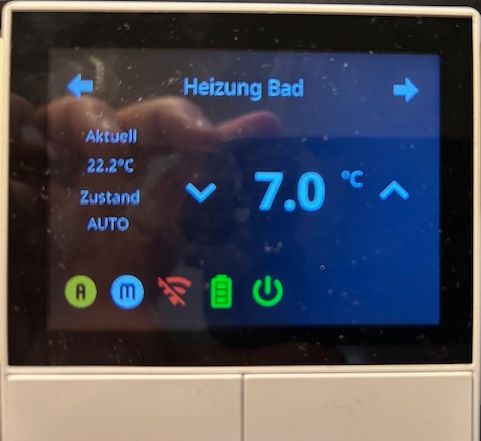
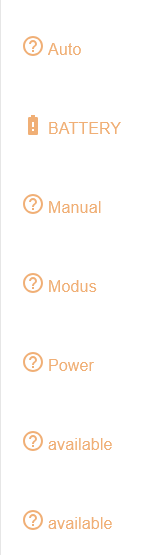
Im Display tauchen ein paar zusätzliche Symbole auf, die sich auch schalten lassen. Jeden Falls die "A","M" und "On/Off"
A und M lassen auch den Zustand ändern.
Allerdings ist mir schon einmal der JS Adapter dabei abgestürzt...
-
@tt-tom :Hallo und schon mal danke für die Mühe. Funktion... jein
Die Scriptzeilen habe ich angepasst:const devicePath = 'zigbee.1.0ceff6fffedc84ef'; // Pfad zu den Thermostat Datenpunkten const aliasPath = 'alias.0.Heizungen.HeizungBad'; // Pfad zu den Thermostat Alias const userPath = '0_userdata.0'; // Pfad für die BenutzerdatenpunkteAllerdings kommt eine Reihe Fehlermeldungen:
28.1.2025, 17:43:12.810	[info ]: javascript.0 (5956) Compiling TypeScript source script.js.TRVs.Sonoff_Display
28.1.2025, 17:43:12.829	[info ]: javascript.0 (5956) script.js.TRVs.Sonoff_Display: source code did not change, using cached compilation result...
28.1.2025, 17:43:12.840	[info ]: javascript.0 (5956) script.js.TRVs.Sonoff_Display: registered 5 subscriptions, 0 schedules, 0 messages, 0 logs and 0 file subscriptions
28.1.2025, 17:43:12.883	[error]: javascript.0 (5956) script.js.TRVs.Sonoff_Display: Alias source object "zigbee.1.0ceff6fffedc84ef.Mode" does not exist.
28.1.2025, 17:43:12.887	[error]: javascript.0 (5956) script.js.TRVs.Sonoff_Display: Error: Alias source object "zigbee.1.0ceff6fffedc84ef.Mode" does not exist.
28.1.2025, 17:43:12.888	[error]: javascript.0 (5956)     at script.js.TRVs.Sonoff_Display:93:42
28.1.2025, 17:43:12.888	[error]: javascript.0 (5956)     at step (script.js.TRVs.Sonoff_Display:33:23)
28.1.2025, 17:43:12.888	[error]: javascript.0 (5956)     at Object.next (script.js.TRVs.Sonoff_Display:14:53)
28.1.2025, 17:43:12.888	[error]: javascript.0 (5956)     at fulfilled (script.js.TRVs.Sonoff_Display:5:58)
28.1.2025, 17:43:34.352	[warn ]: javascript.0 (5956)     at Object.<anonymous> (script.js.TRVs.Sonoff_Display:137:9)
28.1.2025, 17:43:34.368	[info ]: javascript.0 (5956) Stopping script script.js.TRVs.Sonoff_Display
28.1.2025, 17:43:34.934	[error]: host.ioBroker(SmartHome) Caught by controller[1]:     at script.js.TRVs.Sonoff_Display:7008:42
28.1.2025, 17:43:34.934	[error]: host.ioBroker(SmartHome) Caught by controller[1]:     at step (script.js.TRVs.Sonoff_Display:6948:23)
28.1.2025, 17:43:34.934	[error]: host.ioBroker(SmartHome) Caught by controller[1]:     at Object.next (script.js.TRVs.Sonoff_Display:6929:53)
28.1.2025, 17:43:34.934	[error]: host.ioBroker(SmartHome) Caught by controller[1]:     at fulfilled (script.js.TRVs.Sonoff_Display:6920:58)
Im Display tauchen ein paar zusätzliche Symbole auf, die sich auch schalten lassen. Jeden Falls die "A","M" und "On/Off"
A und M lassen auch den Zustand ändern.
Allerdings ist mir schon einmal der JS Adapter dabei abgestürzt...
habe es jetzt zwar nicht getestet. aber tausche mal das Script gegen dieses aus.
Hintergrund:
- Der Pfad zu den Thermostat Datenpunkten dürfte
zigbee.1.0ceff6fffedc84ef.modesein - nicht 0_userdata.0... - Selbst wenn das korrekt angepasst wäre, stand ".Mode" statt ".mode" im Script und das könnte JS auch nicht finden
const devicePath = 'zigbee.1.0ceff6fffedc84ef'; // Pfad zu den Thermostat Datenpunkten const aliasPath = 'alias.0.Thermostat_TRV-sonoff'; // Pfad zu den Thermostat Alias const userPath = '0_userdata.0.Thermostat_TRV-sonoff'; // Pfad für die Benutzerdatenpunkte async function createUserdata() { extendObject(userPath, { type: 'folder', common: { name: 'Thermostat' }, native: {} }); await createStateAsync(userPath + '.lowbat', false, { type: 'boolean', write: true }); await createStateAsync(userPath + '.Auto', false, { type: 'boolean', write: true }); await createStateAsync(userPath + '.Manual', false, { type: 'boolean', write: true }); await createStateAsync(userPath + '.power', false, { type: 'boolean', write: true }); } createUserdata(); async function createAliasThermostat() { extendObjectAsync(aliasPath, { type: 'channel', common: { name: 'Thermostat', role: 'thermostat' }, native: {} }); await createAliasAsync(aliasPath + '.UNREACH', devicePath + '.available', true, <iobJS.StateCommon>{ type: 'boolean', role: 'switch', name: 'available', write: false }); await createAliasAsync(aliasPath + '.LOWBAT', userPath + '.lowbat', true, <iobJS.StateCommon>{ type: 'boolean', role: 'indicator.maintenance', name: 'Battery', write: false }); await createAliasAsync(aliasPath + '.ACTUAL', devicePath + '.local_temperature', true, <iobJS.StateCommon>{ type: 'number', role: 'value.themperature', name: 'Temperature', write: false }); await createAliasAsync(aliasPath + '.SET', devicePath + '.occupied_heating_setpoint', true, <iobJS.StateCommon>{ type: 'number', role: 'level.themperature', name: 'Setpoint', write: true }); await createAliasAsync(aliasPath + '.AUTOMATIC', userPath + '.Auto', true, <iobJS.StateCommon>{ type: 'boolean', role: 'switch.mode.enable', name: 'Auto', write: true }); await createAliasAsync(aliasPath + '.MANUAL', userPath + '.Manual', true, <iobJS.StateCommon>{ type: 'boolean', role: 'switch.mode.enable', name: 'Manual', write: true }); await createAliasAsync(aliasPath + '.POWER', userPath + '.power', true, <iobJS.StateCommon>{ type: 'boolean', role: 'switch.power', name: 'Power', write: true }); await createAliasAsync(aliasPath + '.MODE', devicePath + '.mode', true, <iobJS.StateCommon>{ type: 'string', role: 'state', name: 'Modus' }); } createAliasThermostat(); // überwacht Batterielevel // kleiner als 25% wird angezeigt on({ id: [devicePath + '.battery'], change: 'ne' }, function (obj) { if (obj.state.val < 25) { setStateAsync(userPath + '.lowbat', true); } else { setStateAsync(userPath + '.lowbat', false); } }); // überwacht den Modus vom Thermostat // setzt die Benutzerdatenpunkte entsprechend on({ id: [devicePath + '.mode'], change: 'ne' }, function (obj) { switch (obj.state.val) { case 'auto': setStateAsync(userPath + '.Auto', true); setStateAsync(userPath + '.Manual', false); setStateAsync(userPath + '.power', true); break; case 'heat': setStateAsync(userPath + '.Auto', false); setStateAsync(userPath + '.Manual', true); setStateAsync(userPath + '.power', true); break; default: setStateAsync(userPath + '.Auto', false); setStateAsync(userPath + '.Manual', false); setStateAsync(userPath + '.power', false); break; } }); // überwacht den Modus der Benutzerdatenpunkte // setzt den Thermostat Modus entsprechend on({ id: [userPath + '.Auto'], change: 'ne' }, function (obj) { if (obj.state.val) { setStateAsync(devicePath + '.mode', 'auto'); } }); on({ id: [userPath + '.Manual'], change: 'ne' }, function (obj) { if (obj.state.val) { setStateAsync(devicePath + '.mode', 'heat'); } }); on({ id: [userPath + '.power'], change: 'ne' }, function (obj) { if (obj.state.val) { setStateAsync(devicePath + '.mode', 'auto'); } else { setStateAsync(devicePath + '.mode', 'off'); } }); - Der Pfad zu den Thermostat Datenpunkten dürfte
-
habe es jetzt zwar nicht getestet. aber tausche mal das Script gegen dieses aus.
Hintergrund:
- Der Pfad zu den Thermostat Datenpunkten dürfte
zigbee.1.0ceff6fffedc84ef.modesein - nicht 0_userdata.0... - Selbst wenn das korrekt angepasst wäre, stand ".Mode" statt ".mode" im Script und das könnte JS auch nicht finden
const devicePath = 'zigbee.1.0ceff6fffedc84ef'; // Pfad zu den Thermostat Datenpunkten const aliasPath = 'alias.0.Thermostat_TRV-sonoff'; // Pfad zu den Thermostat Alias const userPath = '0_userdata.0.Thermostat_TRV-sonoff'; // Pfad für die Benutzerdatenpunkte async function createUserdata() { extendObject(userPath, { type: 'folder', common: { name: 'Thermostat' }, native: {} }); await createStateAsync(userPath + '.lowbat', false, { type: 'boolean', write: true }); await createStateAsync(userPath + '.Auto', false, { type: 'boolean', write: true }); await createStateAsync(userPath + '.Manual', false, { type: 'boolean', write: true }); await createStateAsync(userPath + '.power', false, { type: 'boolean', write: true }); } createUserdata(); async function createAliasThermostat() { extendObjectAsync(aliasPath, { type: 'channel', common: { name: 'Thermostat', role: 'thermostat' }, native: {} }); await createAliasAsync(aliasPath + '.UNREACH', devicePath + '.available', true, <iobJS.StateCommon>{ type: 'boolean', role: 'switch', name: 'available', write: false }); await createAliasAsync(aliasPath + '.LOWBAT', userPath + '.lowbat', true, <iobJS.StateCommon>{ type: 'boolean', role: 'indicator.maintenance', name: 'Battery', write: false }); await createAliasAsync(aliasPath + '.ACTUAL', devicePath + '.local_temperature', true, <iobJS.StateCommon>{ type: 'number', role: 'value.themperature', name: 'Temperature', write: false }); await createAliasAsync(aliasPath + '.SET', devicePath + '.occupied_heating_setpoint', true, <iobJS.StateCommon>{ type: 'number', role: 'level.themperature', name: 'Setpoint', write: true }); await createAliasAsync(aliasPath + '.AUTOMATIC', userPath + '.Auto', true, <iobJS.StateCommon>{ type: 'boolean', role: 'switch.mode.enable', name: 'Auto', write: true }); await createAliasAsync(aliasPath + '.MANUAL', userPath + '.Manual', true, <iobJS.StateCommon>{ type: 'boolean', role: 'switch.mode.enable', name: 'Manual', write: true }); await createAliasAsync(aliasPath + '.POWER', userPath + '.power', true, <iobJS.StateCommon>{ type: 'boolean', role: 'switch.power', name: 'Power', write: true }); await createAliasAsync(aliasPath + '.MODE', devicePath + '.mode', true, <iobJS.StateCommon>{ type: 'string', role: 'state', name: 'Modus' }); } createAliasThermostat(); // überwacht Batterielevel // kleiner als 25% wird angezeigt on({ id: [devicePath + '.battery'], change: 'ne' }, function (obj) { if (obj.state.val < 25) { setStateAsync(userPath + '.lowbat', true); } else { setStateAsync(userPath + '.lowbat', false); } }); // überwacht den Modus vom Thermostat // setzt die Benutzerdatenpunkte entsprechend on({ id: [devicePath + '.mode'], change: 'ne' }, function (obj) { switch (obj.state.val) { case 'auto': setStateAsync(userPath + '.Auto', true); setStateAsync(userPath + '.Manual', false); setStateAsync(userPath + '.power', true); break; case 'heat': setStateAsync(userPath + '.Auto', false); setStateAsync(userPath + '.Manual', true); setStateAsync(userPath + '.power', true); break; default: setStateAsync(userPath + '.Auto', false); setStateAsync(userPath + '.Manual', false); setStateAsync(userPath + '.power', false); break; } }); // überwacht den Modus der Benutzerdatenpunkte // setzt den Thermostat Modus entsprechend on({ id: [userPath + '.Auto'], change: 'ne' }, function (obj) { if (obj.state.val) { setStateAsync(devicePath + '.mode', 'auto'); } }); on({ id: [userPath + '.Manual'], change: 'ne' }, function (obj) { if (obj.state.val) { setStateAsync(devicePath + '.mode', 'heat'); } }); on({ id: [userPath + '.power'], change: 'ne' }, function (obj) { if (obj.state.val) { setStateAsync(devicePath + '.mode', 'auto'); } else { setStateAsync(devicePath + '.mode', 'off'); } }); - Der Pfad zu den Thermostat Datenpunkten dürfte
-
habe es jetzt zwar nicht getestet. aber tausche mal das Script gegen dieses aus.
Hintergrund:
- Der Pfad zu den Thermostat Datenpunkten dürfte
zigbee.1.0ceff6fffedc84ef.modesein - nicht 0_userdata.0... - Selbst wenn das korrekt angepasst wäre, stand ".Mode" statt ".mode" im Script und das könnte JS auch nicht finden
const devicePath = 'zigbee.1.0ceff6fffedc84ef'; // Pfad zu den Thermostat Datenpunkten const aliasPath = 'alias.0.Thermostat_TRV-sonoff'; // Pfad zu den Thermostat Alias const userPath = '0_userdata.0.Thermostat_TRV-sonoff'; // Pfad für die Benutzerdatenpunkte async function createUserdata() { extendObject(userPath, { type: 'folder', common: { name: 'Thermostat' }, native: {} }); await createStateAsync(userPath + '.lowbat', false, { type: 'boolean', write: true }); await createStateAsync(userPath + '.Auto', false, { type: 'boolean', write: true }); await createStateAsync(userPath + '.Manual', false, { type: 'boolean', write: true }); await createStateAsync(userPath + '.power', false, { type: 'boolean', write: true }); } createUserdata(); async function createAliasThermostat() { extendObjectAsync(aliasPath, { type: 'channel', common: { name: 'Thermostat', role: 'thermostat' }, native: {} }); await createAliasAsync(aliasPath + '.UNREACH', devicePath + '.available', true, <iobJS.StateCommon>{ type: 'boolean', role: 'switch', name: 'available', write: false }); await createAliasAsync(aliasPath + '.LOWBAT', userPath + '.lowbat', true, <iobJS.StateCommon>{ type: 'boolean', role: 'indicator.maintenance', name: 'Battery', write: false }); await createAliasAsync(aliasPath + '.ACTUAL', devicePath + '.local_temperature', true, <iobJS.StateCommon>{ type: 'number', role: 'value.themperature', name: 'Temperature', write: false }); await createAliasAsync(aliasPath + '.SET', devicePath + '.occupied_heating_setpoint', true, <iobJS.StateCommon>{ type: 'number', role: 'level.themperature', name: 'Setpoint', write: true }); await createAliasAsync(aliasPath + '.AUTOMATIC', userPath + '.Auto', true, <iobJS.StateCommon>{ type: 'boolean', role: 'switch.mode.enable', name: 'Auto', write: true }); await createAliasAsync(aliasPath + '.MANUAL', userPath + '.Manual', true, <iobJS.StateCommon>{ type: 'boolean', role: 'switch.mode.enable', name: 'Manual', write: true }); await createAliasAsync(aliasPath + '.POWER', userPath + '.power', true, <iobJS.StateCommon>{ type: 'boolean', role: 'switch.power', name: 'Power', write: true }); await createAliasAsync(aliasPath + '.MODE', devicePath + '.mode', true, <iobJS.StateCommon>{ type: 'string', role: 'state', name: 'Modus' }); } createAliasThermostat(); // überwacht Batterielevel // kleiner als 25% wird angezeigt on({ id: [devicePath + '.battery'], change: 'ne' }, function (obj) { if (obj.state.val < 25) { setStateAsync(userPath + '.lowbat', true); } else { setStateAsync(userPath + '.lowbat', false); } }); // überwacht den Modus vom Thermostat // setzt die Benutzerdatenpunkte entsprechend on({ id: [devicePath + '.mode'], change: 'ne' }, function (obj) { switch (obj.state.val) { case 'auto': setStateAsync(userPath + '.Auto', true); setStateAsync(userPath + '.Manual', false); setStateAsync(userPath + '.power', true); break; case 'heat': setStateAsync(userPath + '.Auto', false); setStateAsync(userPath + '.Manual', true); setStateAsync(userPath + '.power', true); break; default: setStateAsync(userPath + '.Auto', false); setStateAsync(userPath + '.Manual', false); setStateAsync(userPath + '.power', false); break; } }); // überwacht den Modus der Benutzerdatenpunkte // setzt den Thermostat Modus entsprechend on({ id: [userPath + '.Auto'], change: 'ne' }, function (obj) { if (obj.state.val) { setStateAsync(devicePath + '.mode', 'auto'); } }); on({ id: [userPath + '.Manual'], change: 'ne' }, function (obj) { if (obj.state.val) { setStateAsync(devicePath + '.mode', 'heat'); } }); on({ id: [userPath + '.power'], change: 'ne' }, function (obj) { if (obj.state.val) { setStateAsync(devicePath + '.mode', 'auto'); } else { setStateAsync(devicePath + '.mode', 'off'); } });@armilar Moin.
So das geänderte Script ausprobiert läuft soweit...
Die beiden Punkte "Set" und Actual" haben ja funktioniert in dem original Alias. Ich habe mir mal erlaubt die im Script auszuklammern.async function createAliasThermostat() { extendObjectAsync(aliasPath, { type: 'channel', common: { name: 'Thermostat', role: 'thermostat' }, native: {} }); await createAliasAsync(aliasPath + '.UNREACH', devicePath + '.available', true, <iobJS.StateCommon>{ type: 'boolean', role: 'switch', name: 'available', write: false }); await createAliasAsync(aliasPath + '.LOWBAT', userPath + '.lowbat', true, <iobJS.StateCommon>{ type: 'boolean', role: 'indicator.maintenance', name: 'Battery', write: false }); /*await createAliasAsync(aliasPath + '.ACTUAL', devicePath + '.local_temperature', true, <iobJS.StateCommon>{ type: 'number', role: 'value.themperature', name: 'Temperature', write: false });*/ /*await createAliasAsync(aliasPath + '.SET', devicePath + '.occupied_heating_setpoint', true, <iobJS.StateCommon>{ type: 'number', role: 'level.themperature', name: 'Setpoint', write: true });*/ await createAliasAsync(aliasPath + '.AUTOMATIC', userPath + '.Auto', true, <iobJS.StateCommon>{ type: 'boolean', role: 'switch.mode.enable', name: 'Auto', write: true }); await createAliasAsync(aliasPath + '.MANUAL', userPath + '.Manual', true, <iobJS.StateCommon>{ type: 'boolean', role: 'switch.mode.enable', name: 'Manual', write: true }); await createAliasAsync(aliasPath + '.POWER', userPath + '.power', true, <iobJS.StateCommon>{ type: 'boolean', role: 'switch.power', name: 'Power', write: true }); await createAliasAsync(aliasPath + '.MODE', devicePath + '.mode', true, <iobJS.StateCommon>{ type: 'string', role: 'state', name: 'Modus' }); }Wenn sie noch im Script drin sind funktioniert die Temperatureinstellung nur zeitweise.
Die Modi Umschaltung klemmt ein wenig. Mal geht es mal nicht. Hat fast den Anschein als muss man den richtigen Moment für das Umschalten erwischen?!?!
Mal so eine ketzerische Frage. Eine kleine html Seite, z.B. ein extra vis aus dem Broker, kann man nicht auf dem Display darstellen? Das würde alles wesentlich vereinfachen. Nur so ein Gedanke...:innocent:
- Der Pfad zu den Thermostat Datenpunkten dürfte
-
@armilar Moin.
So das geänderte Script ausprobiert läuft soweit...
Die beiden Punkte "Set" und Actual" haben ja funktioniert in dem original Alias. Ich habe mir mal erlaubt die im Script auszuklammern.async function createAliasThermostat() { extendObjectAsync(aliasPath, { type: 'channel', common: { name: 'Thermostat', role: 'thermostat' }, native: {} }); await createAliasAsync(aliasPath + '.UNREACH', devicePath + '.available', true, <iobJS.StateCommon>{ type: 'boolean', role: 'switch', name: 'available', write: false }); await createAliasAsync(aliasPath + '.LOWBAT', userPath + '.lowbat', true, <iobJS.StateCommon>{ type: 'boolean', role: 'indicator.maintenance', name: 'Battery', write: false }); /*await createAliasAsync(aliasPath + '.ACTUAL', devicePath + '.local_temperature', true, <iobJS.StateCommon>{ type: 'number', role: 'value.themperature', name: 'Temperature', write: false });*/ /*await createAliasAsync(aliasPath + '.SET', devicePath + '.occupied_heating_setpoint', true, <iobJS.StateCommon>{ type: 'number', role: 'level.themperature', name: 'Setpoint', write: true });*/ await createAliasAsync(aliasPath + '.AUTOMATIC', userPath + '.Auto', true, <iobJS.StateCommon>{ type: 'boolean', role: 'switch.mode.enable', name: 'Auto', write: true }); await createAliasAsync(aliasPath + '.MANUAL', userPath + '.Manual', true, <iobJS.StateCommon>{ type: 'boolean', role: 'switch.mode.enable', name: 'Manual', write: true }); await createAliasAsync(aliasPath + '.POWER', userPath + '.power', true, <iobJS.StateCommon>{ type: 'boolean', role: 'switch.power', name: 'Power', write: true }); await createAliasAsync(aliasPath + '.MODE', devicePath + '.mode', true, <iobJS.StateCommon>{ type: 'string', role: 'state', name: 'Modus' }); }Wenn sie noch im Script drin sind funktioniert die Temperatureinstellung nur zeitweise.
Die Modi Umschaltung klemmt ein wenig. Mal geht es mal nicht. Hat fast den Anschein als muss man den richtigen Moment für das Umschalten erwischen?!?!
Mal so eine ketzerische Frage. Eine kleine html Seite, z.B. ein extra vis aus dem Broker, kann man nicht auf dem Display darstellen? Das würde alles wesentlich vereinfachen. Nur so ein Gedanke...:innocent:
Du kannst ja keine 2 Alias-Channel haben. Das Script von @TT-Tom hat also automatisch einen vollständigen Alias-Channel mit allen Alias-States zu den erforderlichen Datenpunkten angelegt. Ich hätte jetzt den alten weggeworfen und den aliasPath so angepasst, dass er der alte ist. Dann den aliasPath in das
itemin der Variable des Thermostaten im NSPanelTs eingetragen und alles wäre korrekt. :blush:Mal so eine ketzerische Frage. Eine kleine html Seite, z.B. ein extra vis aus dem Broker, kann man nicht auf dem Display darstellen? Das würde alles wesentlich vereinfachen. Nur so ein Gedanke...😇
Nein, ist halt ein Nextion-TFT und angesteuert über Tasmota/Berry (ESP32). Wäre in etwa so als würdest du zu Apple sagen, dass du die Oberfläche eines iPhones selbst gestalten möchtest ;-)
Ein getweaktes "NSPanel Pro" könnte HTML, kostet aber auch etwas mehr.
-
@armilar Moin.
So das geänderte Script ausprobiert läuft soweit...
Die beiden Punkte "Set" und Actual" haben ja funktioniert in dem original Alias. Ich habe mir mal erlaubt die im Script auszuklammern.async function createAliasThermostat() { extendObjectAsync(aliasPath, { type: 'channel', common: { name: 'Thermostat', role: 'thermostat' }, native: {} }); await createAliasAsync(aliasPath + '.UNREACH', devicePath + '.available', true, <iobJS.StateCommon>{ type: 'boolean', role: 'switch', name: 'available', write: false }); await createAliasAsync(aliasPath + '.LOWBAT', userPath + '.lowbat', true, <iobJS.StateCommon>{ type: 'boolean', role: 'indicator.maintenance', name: 'Battery', write: false }); /*await createAliasAsync(aliasPath + '.ACTUAL', devicePath + '.local_temperature', true, <iobJS.StateCommon>{ type: 'number', role: 'value.themperature', name: 'Temperature', write: false });*/ /*await createAliasAsync(aliasPath + '.SET', devicePath + '.occupied_heating_setpoint', true, <iobJS.StateCommon>{ type: 'number', role: 'level.themperature', name: 'Setpoint', write: true });*/ await createAliasAsync(aliasPath + '.AUTOMATIC', userPath + '.Auto', true, <iobJS.StateCommon>{ type: 'boolean', role: 'switch.mode.enable', name: 'Auto', write: true }); await createAliasAsync(aliasPath + '.MANUAL', userPath + '.Manual', true, <iobJS.StateCommon>{ type: 'boolean', role: 'switch.mode.enable', name: 'Manual', write: true }); await createAliasAsync(aliasPath + '.POWER', userPath + '.power', true, <iobJS.StateCommon>{ type: 'boolean', role: 'switch.power', name: 'Power', write: true }); await createAliasAsync(aliasPath + '.MODE', devicePath + '.mode', true, <iobJS.StateCommon>{ type: 'string', role: 'state', name: 'Modus' }); }Wenn sie noch im Script drin sind funktioniert die Temperatureinstellung nur zeitweise.
Die Modi Umschaltung klemmt ein wenig. Mal geht es mal nicht. Hat fast den Anschein als muss man den richtigen Moment für das Umschalten erwischen?!?!
Mal so eine ketzerische Frage. Eine kleine html Seite, z.B. ein extra vis aus dem Broker, kann man nicht auf dem Display darstellen? Das würde alles wesentlich vereinfachen. Nur so ein Gedanke...:innocent:
die beiden States auszuklammern hat kein Einfluss auf die Kommunikation, diese Funktion erstellt nur die Datenpunkte, mehr nicht.
Du kommunizierst über zwei Funksysteme WLAN und Zigbee, da kann es schon mal passieren das es zum timeout kommt, wenn die Funkverbindung nicht optimal sind. -
Du kannst ja keine 2 Alias-Channel haben. Das Script von @TT-Tom hat also automatisch einen vollständigen Alias-Channel mit allen Alias-States zu den erforderlichen Datenpunkten angelegt. Ich hätte jetzt den alten weggeworfen und den aliasPath so angepasst, dass er der alte ist. Dann den aliasPath in das
itemin der Variable des Thermostaten im NSPanelTs eingetragen und alles wäre korrekt. :blush:Mal so eine ketzerische Frage. Eine kleine html Seite, z.B. ein extra vis aus dem Broker, kann man nicht auf dem Display darstellen? Das würde alles wesentlich vereinfachen. Nur so ein Gedanke...😇
Nein, ist halt ein Nextion-TFT und angesteuert über Tasmota/Berry (ESP32). Wäre in etwa so als würdest du zu Apple sagen, dass du die Oberfläche eines iPhones selbst gestalten möchtest ;-)
Ein getweaktes "NSPanel Pro" könnte HTML, kostet aber auch etwas mehr.
@armilar Ist nur ein Alias. Ein Teril besteht aus den Daten des Scripts, ein Teil aus den direkten DP.
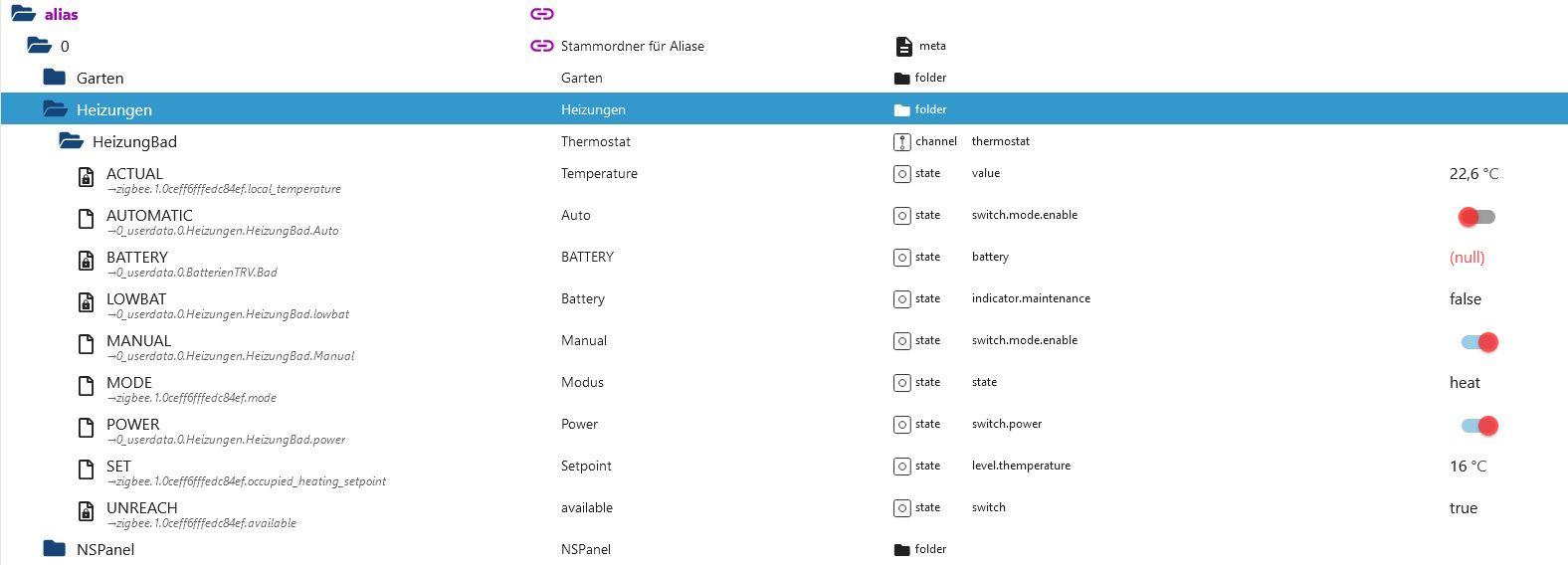
Und ja an das Pro hatte ich auch schon gedacht, aber ich brauche die beiden echten Tasten mit den Relais. Wenn alles klappt ersetzt es einen Doppellichtschalter.
@TT-Tom Ist auch kein Problem mit der Verzögerung. Die Modi werden sehr selten umgeschaltet.
Dank euch beiden noch einmal recht herzlich, toller Service :+1:
-
@armilar Ist nur ein Alias. Ein Teril besteht aus den Daten des Scripts, ein Teil aus den direkten DP.
Und ja an das Pro hatte ich auch schon gedacht, aber ich brauche die beiden echten Tasten mit den Relais. Wenn alles klappt ersetzt es einen Doppellichtschalter.
@TT-Tom Ist auch kein Problem mit der Verzögerung. Die Modi werden sehr selten umgeschaltet.
Dank euch beiden noch einmal recht herzlich, toller Service :+1:
den Datenpunkt
BATTERYkannst du löschen, macht im alias kein Sinn.Wenn noch Fragen zum Script oder Panel sind dann schreibe bitte im offiziellen Thread weiter.
https://forum.iobroker.net/topic/58170/sonoff-nspanel-mit-lovelace-ui/6802 -
@armilar Ist nur ein Alias. Ein Teril besteht aus den Daten des Scripts, ein Teil aus den direkten DP.
Und ja an das Pro hatte ich auch schon gedacht, aber ich brauche die beiden echten Tasten mit den Relais. Wenn alles klappt ersetzt es einen Doppellichtschalter.
@TT-Tom Ist auch kein Problem mit der Verzögerung. Die Modi werden sehr selten umgeschaltet.
Dank euch beiden noch einmal recht herzlich, toller Service :+1:
-
@darksoul
Läuft das Script jetzt mit dem Thermostat oder muss noch etwas angepasst werden. Würde es dann ins Wiki übernehmen. -
@tt-tom Ja läuft.
Ich habe bei mir noch die Zeile mit dem Unreach raus genommen. Irgendwie habe ich da immer ein rotes Sysmbol gehabt.
Denke da ist irgenwo noch ein Dreher der Zustände drin. -
@darksoul
Ja stimmt der Wert muss negiert werden. Du kannst im alias in der read Konvertierung !val eintragen. Dann wird aus true false -
@tt-tom Ähm, jaaa, nur kann ich den Alias dann nicht Speichern. Das Feld ist ausgegraut. Es geht nur Abbrechen und damit wird die Änderung dann nicht übernommen ???
-
@tt-tom
Mit !val im fx
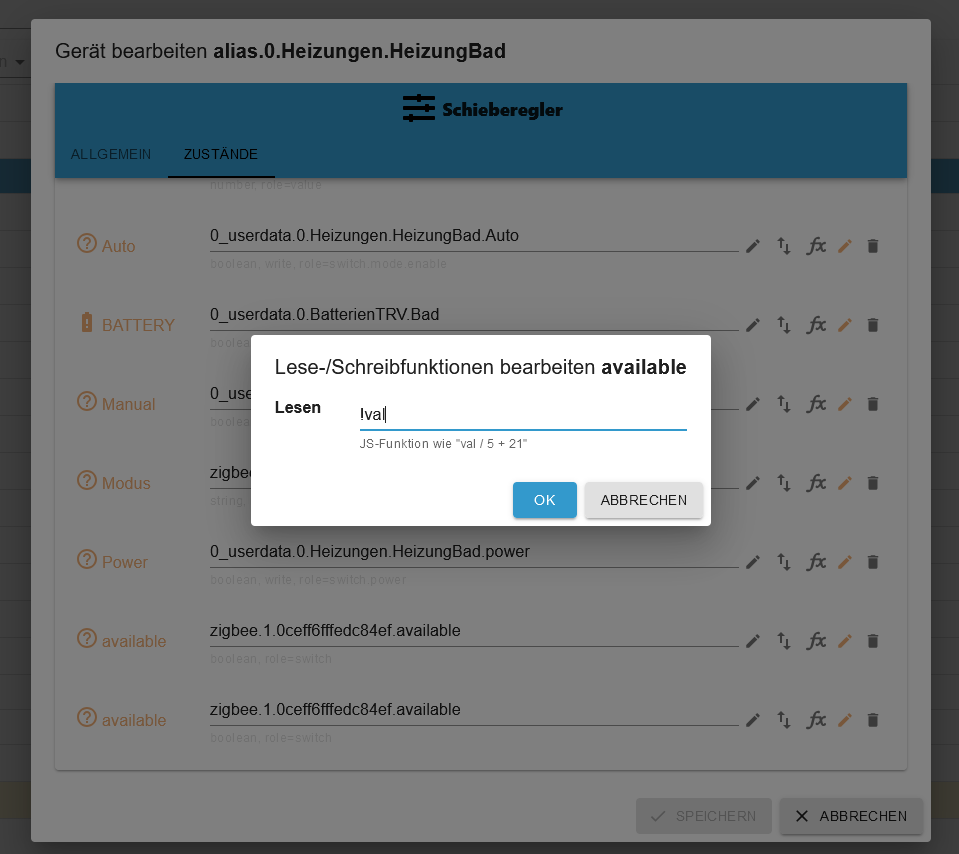
Nach dem "OK"
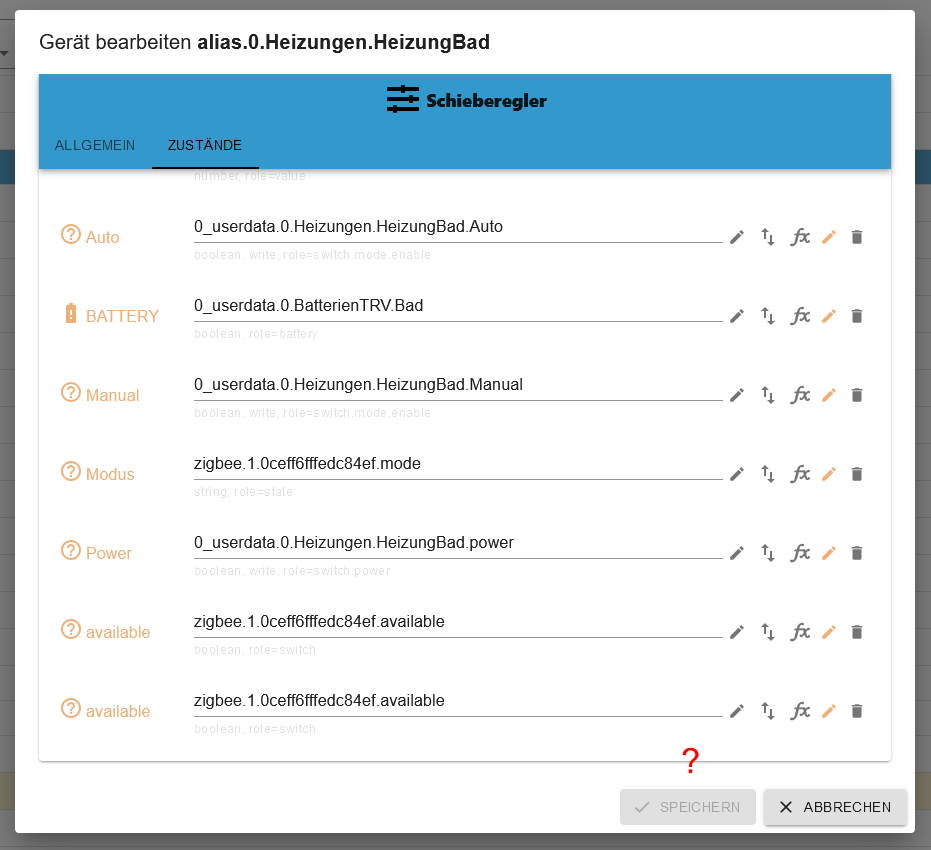
Kein Speichern verfügbar ...Ich habe gerade gesehen, das der Punkt avaible zeimal drin ist, aber selbst wenn ich einen raus lösche geht es nicht.
-
@tt-tom
Mit !val im fx
Nach dem "OK"
Kein Speichern verfügbar ...Ich habe gerade gesehen, das der Punkt avaible zeimal drin ist, aber selbst wenn ich einen raus lösche geht es nicht.
-
@armilar oh ja, so genau habe ich da nicht hingeschaut. Da läuft anscheinend noch mehr schief.
Gruß Tom
https://github.com/tt-tom17
Wenn meine Hilfe erfolgreich war, benutze bitte das Voting unten rechts im BeitragNSPanel Script Wiki
https://github.com/joBr99/nspanel-lovelace-ui/wikiNSPanel Adapter Wiki
https://github.com/ticaki/ioBroker.nspanel-lovelace-ui/wiki -
@armilar oh ja, so genau habe ich da nicht hingeschaut. Da läuft anscheinend noch mehr schief.
eben. Ich musste etwas schlucken, als ich selbstgebaute Typen wie
availablegesehen habe und weitere die hinten kleingeschrieben sind. Das NSPanelTs.ts kann nur handelsübliche Alias-States zum jeweiligen Alias-Channel auswerten (ist ja keine KI :blush:)

Support us
669
Online32.5k
Users81.6k
Topics1.3m
Posts