
NEWS




-
ok,
es geht jetzt! Schalten geht auch. Super!
Jetzt möchte ich einen zweiten Tasmota einbinden. Kann ich den gleichen Port sowie Benutzername und Passwort nehmen?
Muß ich eine neue Instanz des Adapters installieren?
1526_unbenannt3.png
1526_unbenannt4.png
1526_unbenann2.png -
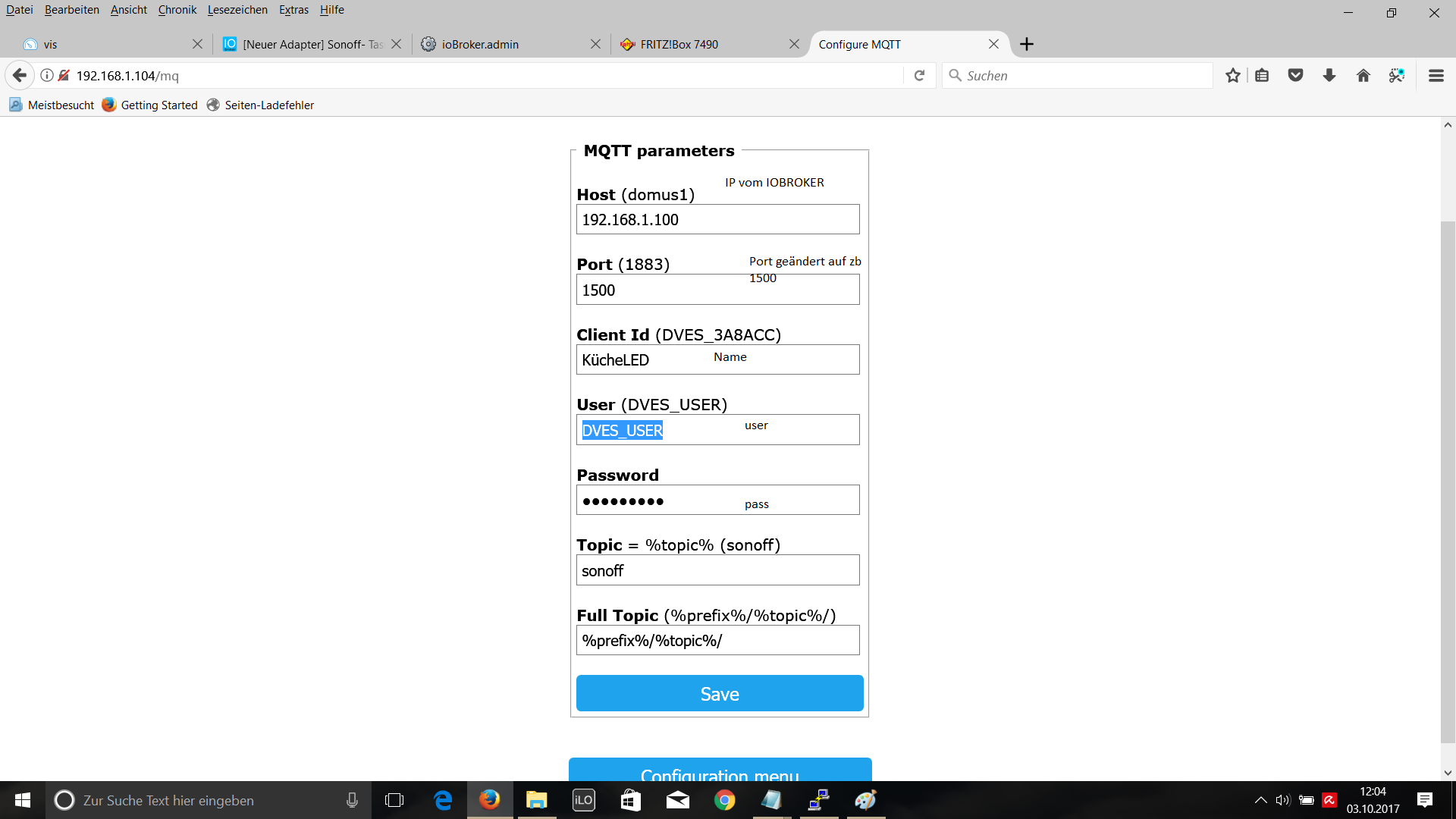
Auf jedem Sonoff die gleichen Daten eingeben. Ein Adapter. Aber immer eine andere Client ID vergeben.
-
Ich denke Bluefox hat die Geräte nicht alle selber daher bat er uns Debugs zu schicken.
Aktivier mal bitte Debug bei dem Adapter und schau mal ob der Sonoff Daten sendet. Schick das ganze mal Bluefox oder füg es hier an dann kann er das im Adapter aufnehmen.
-
Weiß nicht ob das richtig ist
mqtt.0	2017-10-03 14:49:50.648	info	publishOnSubscribe send all known states
mqtt.0	2017-10-03 14:49:50.648	info	Client [DVES_0736F2] subscribes on "cmnd.DVES_0736F2.#" with regex /^mqtt\.0\.cmnd\.DVES_0736F2\..*/
mqtt.0	2017-10-03 14:49:50.647	info	Client [DVES_0736F2] subscribes on "cmnd.DVES_0736F2.#" with regex /^cmnd\.DVES_0736F2\..*/
mqtt.0	2017-10-03 14:49:50.407	info	publishOnSubscribe send all known states
mqtt.0	2017-10-03 14:49:50.407	info	Client [DVES_0736F2] subscribes on "cmnd.sonoffs.#" with regex /^mqtt\.0\.cmnd\.sonoffs\..*/
mqtt.0	2017-10-03 14:49:50.406	info	Client [DVES_0736F2] subscribes on "cmnd.sonoffs.#" with regex /^cmnd\.sonoffs\..*/
mqtt.0	2017-10-03 14:49:50.274	info	publishOnSubscribe send all known states
mqtt.0	2017-10-03 14:49:50.274	info	Client [DVES_0736F2] subscribes on "cmnd.sonoff5.#" with regex /^mqtt\.0\.cmnd\.sonoff5\..*/
mqtt.0	2017-10-03 14:49:50.273	info	Client [DVES_0736F2] subscribes on "cmnd.sonoff5.#" with regex /^cmnd\.sonoff5\..*/
Gesendet von iPad mit Tapatalk Pro
geändert: Code in Code-Tags; Homoran (Mod)
-
du hast den mqtt adapter geloggt xD
Hast du unter Instanzen den Adapter auf Debug gesetzt? (Expertenansicht aktivieren)
Nimm lieber den Sonoff und benutze die```
<code>[code]hier den code einfügen[/code]</code> -
! ````
sonoff.0 2017-10-03 15:03:08.830 debug Client [DVES_0736F2] pingreq
sonoff.0 2017-10-03 15:03:08.340 debug Client [DVES_42009A] pingreq
sonoff.0 2017-10-03 15:03:05.018 debug Client [DVES_41ECEC] pingreq
sonoff.0 2017-10-03 15:02:53.830 debug Client [DVES_0736F2] pingreq
sonoff.0 2017-10-03 15:02:53.340 debug Client [DVES_42009A] pingreq
sonoff.0 2017-10-03 15:02:50.017 debug Client [DVES_41ECEC] pingreq
sonoff.0 2017-10-03 15:02:38.829 debug Client [DVES_0736F2] pingreq
sonoff.0 2017-10-03 15:02:38.340 debug Client [DVES_42009A] pingreq
sonoff.0 2017-10-03 15:02:34.968 debug [DVES_41ECEC] Received: cmnd/sonoff2/POWER =
sonoff.0 2017-10-03 15:02:34.940 debug stateChange sonoff.0.DVES_41ECEC.alive: {"val":true,"ack":true,"ts":1507035754933,"q":0,"from":"system.adapter.sonoff.0","lc":1507035754933}
sonoff.0 2017-10-03 15:02:34.938 debug redis pmessage io.sonoff.0.* io.sonoff.0.DVES_41ECEC.alive {"val":true,"ack":true,"ts":1507035754933,"q":0,"from":"system.adapter.sonoff.0","lc":1507035754933}
sonoff.0 2017-10-03 15:02:34.929 debug stateChange sonoff.0.info.connection: {"val":"DVES_42009A,DVES_0736F2,DVES_41ECEC","ack":true,"ts":1507035754925,"q":0,"from":"system.adapter.sonoff.0","lc":1507035754925}
sonoff.0 2017-10-03 15:02:34.928 debug redis pmessage io.sonoff.0.* io.sonoff.0.info.connection {"val":"DVES_42009A,DVES_0736F2,DVES_41ECEC","ack":true,"ts":1507035754925,"q":0,"from":"system.adapter.sonoff.0","lc":1507035754925}
sonoff.0 2017-10-03 15:02:34.924 info Client [DVES_41ECEC] connected
sonoff.0 2017-10-03 15:02:25.972 debug [DVES_0736F2] Received: tele/sonoff5/SENSOR = {"Time":"2017-10-03T14:02:25", "AM2301-14":{"Temperature":21.6, "Humidity":54.7}, "TempUnit":"C"}
sonoff.0 2017-10-03 15:02:25.910 debug stateChange sonoff.0.DVES_0736F2.POWER: {"val":false,"ack":true,"ts":1507035745898,"q":0,"from":"system.adapter.sonoff.0","lc":1507035745898}
sonoff.0 2017-10-03 15:02:25.907 debug stateChange sonoff.0.DVES_0736F2.RSSI: {"val":84,"ack":true,"ts":1507035745897,"q":0,"from":"system.adapter.sonoff.0","lc":1507035745897}
sonoff.0 2017-10-03 15:02:25.906 debug stateChange sonoff.0.DVES_0736F2.Vcc: {"val":3.177,"ack":true,"ts":1507035745896,"q":0,"from":"system.adapter.sonoff.0","lc":1507035745896}
sonoff.0 2017-10-03 15:02:25.906 debug redis pmessage io.sonoff.0.* io.sonoff.0.DVES_0736F2.POWER {"val":false,"ack":true,"ts":1507035745898,"q":0,"from":"system.adapter.sonoff.0","lc":1507035745898}
sonoff.0 2017-10-03 15:02:25.905 debug redis pmessage io.sonoff.0.* io.sonoff.0.DVES_0736F2.RSSI {"val":84,"ack":true,"ts":1507035745897,"q":0,"from":"system.adapter.sonoff.0","lc":1507035745897}
sonoff.0 2017-10-03 15:02:25.904 debug redis pmessage io.sonoff.0.* io.sonoff.0.DVES_0736F2.Vcc {"val":3.177,"ack":true,"ts":1507035745896,"q":0,"from":"system.adapter.sonoff.0","lc":1507035745896}
sonoff.0 2017-10-03 15:02:25.886 debug [DVES_0736F2] Received: tele/sonoff5/STATE = {"Time":"2017-10-03T14:02:25", "Uptime":16, "Vcc":3.177, "POWER":"OFF", "Wifi":{"AP":1, "SSId":"Chucky", "RSSI":84, "APMac":"CC:CE:1E:A3:6C:D3"}}
sonoff.0 2017-10-03 15:02:23.693 debug [DVES_0736F2] Received: cmnd/sonoff5/POWER =
sonoff.0 2017-10-03 15:02:23.666 debug stateChange sonoff.0.DVES_0736F2.alive: {"val":true,"ack":true,"ts":1507035743661,"q":0,"from":"system.adapter.sonoff.0","lc":1507035743661}
sonoff.0 2017-10-03 15:02:23.663 debug redis pmessage io.sonoff.0.* io.sonoff.0.DVES_0736F2.alive {"val":true,"ack":true,"ts":1507035743661,"q":0,"from":"system.adapter.sonoff.0","lc":1507035743661}
sonoff.0 2017-10-03 15:02:23.659 debug stateChange sonoff.0.info.connection: {"val":"DVES_42009A,DVES_0736F2","ack":true,"ts":1507035743648,"q":0,"from":"system.adapter.sonoff.0","lc":1507035743648}
sonoff.0 2017-10-03 15:02:23.655 debug redis pmessage io.sonoff.0.* io.sonoff.0.info.connection {"val":"DVES_42009A,DVES_0736F2","ack":true,"ts":1507035743648,"q":0,"from":"system.adapter.sonoff.0","lc":1507035743648}
sonoff.0 2017-10-03 15:02:23.645 info Client [DVES_0736F2] connected
sonoff.0 2017-10-03 15:02:23.348 debug stateChange sonoff.0.DVES_42009A.alive: {"val":true,"ack":true,"ts":1507035743342,"q":0,"from":"system.adapter.sonoff.0","lc":1507035743342}
sonoff.0 2017-10-03 15:02:23.347 debug stateChange sonoff.0.DVES_42009A.alive: {"val":true,"ack":true,"ts":1507035743341,"q":0,"from":"system.adapter.sonoff.0","lc":1507035743341}
sonoff.0 2017-10-03 15:02:23.347 debug redis pmessage io.sonoff.0.* io.sonoff.0.DVES_42009A.alive {"val":true,"ack":true,"ts":1507035743342,"q":0,"from":"system.adapter.sonoff.0","lc":1507035743342}
sonoff.0 2017-10-03 15:02:23.346 debug redis pmessage io.sonoff.0.* io.sonoff.0.DVES_42009A.alive {"val":true,"ack":true,"ts":1507035743341,"q":0,"from":"system.adapter.sonoff.0","lc":1507035743341}
sonoff.0 2017-10-03 15:02:23.328 debug [DVES_42009A] Received: cmnd/sonoff3/POWER =
sonoff.0 2017-10-03 15:02:23.258 debug stateChange sonoff.0.info.connection: {"val":"DVES_42009A","ack":true,"ts":1507035743241,"q":0,"from":"system.adapter.sonoff.0","lc":1507035743241}
sonoff.0 2017-10-03 15:02:23.254 debug redis pmessage io.sonoff.0.* io.sonoff.0.info.connection {"val":"DVES_42009A","ack":true,"ts":1507035743241,"q":0,"from":"system.adapter.sonoff.0","lc":1507035743241}
sonoff.0 2017-10-03 15:02:23.239 debug stateChange sonoff.0.DVES_41ECEC.alive: {"val":false,"ack":true,"ts":1507035743194,"q":0,"from":"system.adapter.sonoff.0","lc":1506976409102}
sonoff.0 2017-10-03 15:02:23.239 debug stateChange sonoff.0.DVES_42009A.alive: {"val":false,"ack":true,"ts":1507035743193,"q":0,"from":"system.adapter.sonoff.0","lc":1506976409099}
sonoff.0 2017-10-03 15:02:23.238 debug stateChange sonoff.0.DVES_0736F2.alive: {"val":false,"ack":true,"ts":1507035743193,"q":0,"from":"system.adapter.sonoff.0","lc":1506976409098}
sonoff.0 2017-10-03 15:02:23.237 debug stateChange sonoff.0.info.connection: {"val":"","ack":true,"ts":1507035743192,"q":0,"from":"system.adapter.sonoff.0","lc":1506975964976}
sonoff.0 2017-10-03 15:02:23.222 info Client [DVES_42009A] connected
sonoff.0 2017-10-03 15:02:23.206 debug redis pmessage io.sonoff.0.* io.sonoff.0.DVES_41ECEC.alive {"val":false,"ack":true,"ts":1507035743194,"q":0,"from":"system.adapter.sonoff.0","lc":1506976409102}
sonoff.0 2017-10-03 15:02:23.204 debug redis pmessage io.sonoff.0.* io.sonoff.0.DVES_42009A.alive {"val":false,"ack":true,"ts":1507035743193,"q":0,"from":"system.adapter.sonoff.0","lc":1506976409099}
sonoff.0 2017-10-03 15:02:23.203 debug redis pmessage io.sonoff.0.* io.sonoff.0.DVES_0736F2.alive {"val":false,"ack":true,"ts":1507035743193,"q":0,"from":"system.adapter.sonoff.0","lc":1506976409098}
sonoff.0 2017-10-03 15:02:23.197 debug redis pmessage io.sonoff.0.* io.sonoff.0.info.connection {"val":"","ack":true,"ts":1507035743192,"q":0,"from":"system.adapter.sonoff.0","lc":1506975964976}
sonoff.0 2017-10-03 15:02:23.121 info Starting MQTT authenticated server on port 1883Gesendet von iPad mit Tapatalk Pro ****geändert: Code in Code-Tags und spoiler; Homoran (Mod)**** -
läuft, trotz fehler beim installieren
https://pastebin.com/raw/5AyQYApp
Aber, wieso bekomme ich die Temperatur nicht angezeigt im iobroker?
Tasmota-console:
! ````
17:40:55 MQTT: cmnd/sonoff/POWER =
17:40:56 UPnP: Multicast (re)joined
17:41:33 MQTT: stat/sonoff/RESULT = {"POWER1":"ON"}
17:41:33 MQTT: stat/sonoff/POWER1 = ON
17:41:34 MQTT: stat/sonoff/RESULT = {"POWER2":"ON"}
17:41:34 MQTT: stat/sonoff/POWER2 = ON
17:41:35 MQTT: stat/sonoff/RESULT = {"POWER3":"ON"}
17:41:35 MQTT: stat/sonoff/POWER3 = ON
17:41:40 MQTT: stat/sonoff/RESULT = {"POWER4":"ON"}
17:41:40 MQTT: stat/sonoff/POWER4 = ON
17:41:43 MQTT: stat/sonoff/RESULT = {"POWER2":"OFF"}
17:41:43 MQTT: stat/sonoff/POWER2 = OFF
17:41:44 MQTT: stat/sonoff/RESULT = {"POWER3":"OFF"}
17:41:44 MQTT: stat/sonoff/POWER3 = OFF
17:41:45 MQTT: stat/sonoff/RESULT = {"POWER4":"OFF"}
17:41:45 MQTT: stat/sonoff/POWER4 = OFF
17:41:46 MQTT: stat/sonoff/RESULT = {"POWER1":"OFF"}
17:41:46 MQTT: stat/sonoff/POWER1 = OFF
17:43:19 MQTT: tele/sonoff/STATE = {"Time":"2017-10-05T17:43:19", "Uptime":21, "Vcc":3.249, "POWER1":"OFF", "POWER2":"OFF", "POWER3":"OFF", "POWER4":"OFF", "Wifi":{"AP":2, "SSID":"myhome2_AP", "RSSI":52, "APMac":"F8:1A:67:3D:F2:81"}}
17:43:19 MQTT: tele/sonoff/SENSOR = {"Time":"2017-10-05T17:43:19", "DS18x20":{"DS1":{"Type":"DS18B20", "Address":"28FF9ABC7115022A", "Temperature":12.2}}, "TempUnit":"C"}Gruß [2880_01.png](/assets/uploads/files/2880_01.png) [2880_02.png](/assets/uploads/files/2880_02.png) -
Die Daten werden schon mal gesendet. Es wird nicht angezeigt weil es aktuell noch nicht eingefügt ist.
Bluefox schreibt in seinem letzten Satz:
> Ich habe nur DH28xx angebunden. Für weitere Sensoren brauche ich debug outputs. Am besten per PR :)Mit PR meint er wohl PN -
Die Daten werden schon mal gesendet. Es wird nicht angezeigt weil es aktuell noch nicht eingefügt ist.
Bluefox schreibt in seinem letzten Satz:
> Ich habe nur DH28xx angebunden. Für weitere Sensoren brauche ich debug outputs. Am besten per PR :)Mit PR meint er wohl PN `
Mit PR meine ich Pull Request auf dem Github :) -
Danke für den Adapter
Wäre schön wenn du den Sonoff Th10 mit Temperatur Sensor einbinden könntest.
sonoff.0 2017-10-05 21:10:39.820 debug stateChange sonoff.0.info.connection: {"val":"DVES_0736F2","ack":true,"ts":1507230639811,"q":0,"from":"system.adapter.sonoff.0","lc":1507230639811} sonoff.0 2017-10-05 21:10:39.818 debug redis pmessage io.sonoff.0.* io.sonoff.0.info.connection {"val":"DVES_0736F2","ack":true,"ts":1507230639811,"q":0,"from":"system.adapter.sonoff.0","lc":1507230639811} sonoff.0 2017-10-05 21:10:39.599 info Client [DVES_0736F2] connected -
Danke für den Adapter
Wäre schön wenn du den Sonoff Th10 mit Temperatur Sensor einbinden könntest.
sonoff.0	2017-10-05 21:10:39.820	debug	stateChange sonoff.0.info.connection: {"val":"DVES_0736F2","ack":true,"ts":1507230639811,"q":0,"from":"system.adapter.sonoff.0","lc":1507230639811}
sonoff.0	2017-10-05 21:10:39.818	debug	redis pmessage io.sonoff.0.* io.sonoff.0.info.connection {"val":"DVES_0736F2","ack":true,"ts":1507230639811,"q":0,"from":"system.adapter.sonoff.0","lc":1507230639811}
sonoff.0	2017-10-05 21:10:39.599	info	Client [DVES_0736F2] connected
```` `
Die Info, die ich brauche sehe ich nicht.
Brauche so was:
[Sonoff4ch] Received: tele/sonoff_4ch/STATE = {"Time":"2017-10-02T19:26:06", "Uptime":0, "Vcc":3.226, "POWER1":"OFF", "POWER2":"OFF", "POWER3":"OFF", "POWER4":"OFF", "Wifi":{"AP":1, "SSId":"AAA", "RSS -
hier wäre die:
sonoff.0 2017-10-03 15:02:25.972 debug [DVES_0736F2] Received: tele/sonoff5/SENSOR = {"Time":"2017-10-03T14:02:25", "AM2301-14":{"Temperature":21.6, "Humidity":54.7}, "TempUnit":"C"}Edit: Als Idee. Genau wie der Adapter aufgebaut ist könnte man doch auch einen ESPEasy Adapter bauen oder nicht? Nur da könnte man dann noch mehr Hardware reinpacken. Von den Daten her kommt da fast das selbe an siehe meinen Beitrag auf Seite 1.
-
Hi,
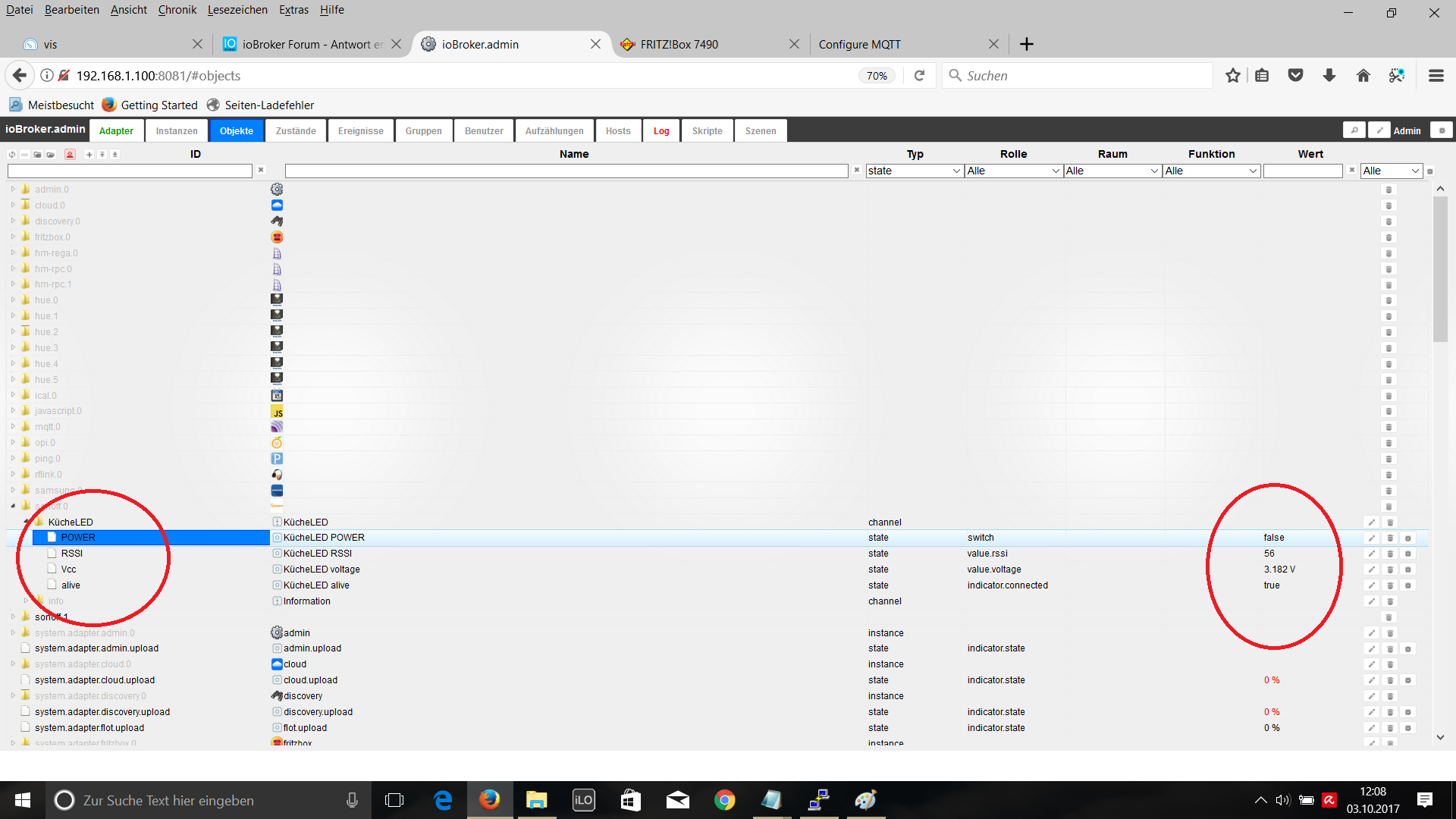
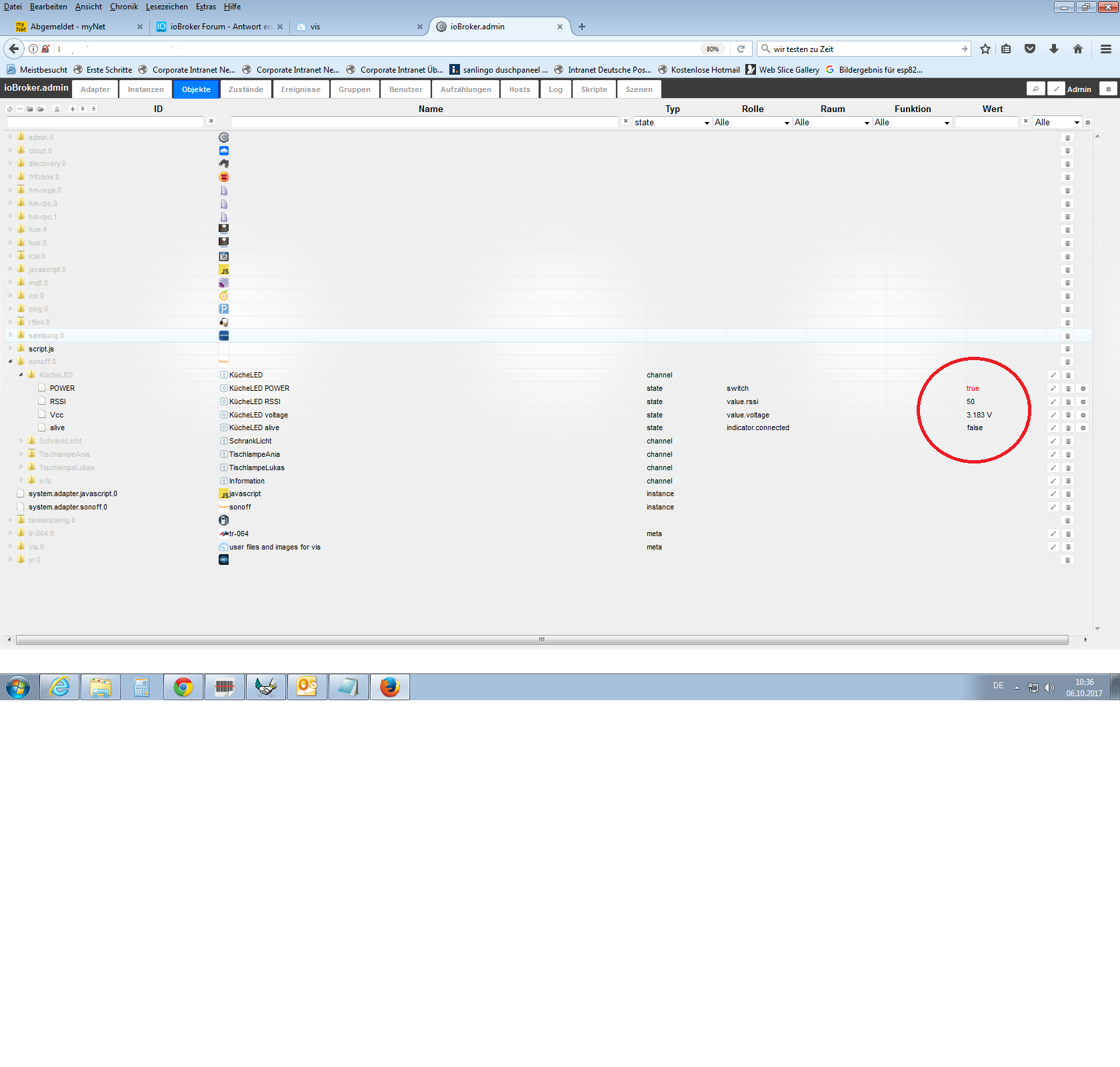
ich habe ein Sonoff in der Küche, was mit einem Schalter Ein/Aus geschaltet wird. (Sonoff wird Spannungslos- alive –-- false)
Problem. Wenn ich mein Widget für Licht EIN betätige, leuchtet mein Widget für EIN, obwohl das Sonoff Gerät aus ist. (alive --- false)
Um dieses zu vermeiden, habe ich ein Blockly geschrieben.
Falls Sonoff Spannungslos (alive false) und Widget auf true, dann aktualiesiere Widget auf false. Irgendwie läuft mein Blockly nicht und mein Widget bleibt die ganze Zeit an.
Wenn ich aber ein Ping Adapter dazu verwende um ein false oder true vom Sonoff zu bekommen, läuft das Script einwandfrei und das Widget geht nach paar sek. wieder selbständig aus.
Jemand eine Idee wo es klemmt?
EDIT:
habe die Lösung. Mein Blockly war falsch weil den falschen Trigger verwendet...
1526_22.png
1526_33.png
1526_44.png
1526_55.png -
Hallo knopers,
Eine andere Lösung wäre wenn du im vis Editor die Sichtbarkeit des küchenLED widget vom sonoff alive abhängig machst. Also widjet nur zeigen wenn alive true. Somit weißt du auch das dein sonoff gar nicht eingeschaltet ist wenn das widget nicht zu sehen ist.
Gesendet von meinem SM-G950F mit Tapatalk
-
Meine beiden sonoffs wollen leider nicht so richtig. Über ihre IP sind sie zu erreichen und lassen sich schalten. Durch Neustarten des sonoff-Adapters ist es wieder für eine kurze Zeit ok. Das hatte ich mit dem mqtt-Adapter auch gehabt.
sonoff.0	2017-10-06 17:56:01.601	info	Client [DVES_077E9B] connected
sonoff.0	2017-10-06 17:56:01.251	info	Client [DVES_077E54] connected
sonoff.0	2017-10-06 17:55:57.976	info	Starting MQTT authenticated server on port 1883
sonoff.0	2017-10-06 17:55:57.845	info	starting. Version 0.2.0 in /opt/iobroker/node_modules/iobroker.sonoff, node: v6.11.4
sonoff.0	2017-10-06 17:55:54.363	info	terminating
sonoff.0	2017-10-06 17:55:50.943	info	Starting MQTT authenticated server on port 1883
sonoff.0	2017-10-06 17:55:50.806	info	starting. Version 0.2.0 in /opt/iobroker/node_modules/iobroker.sonoff, node: v6.11.4
sonoff.0	2017-10-06 17:55:47.317	info	terminating
sonoff.0	2017-10-06 17:55:47.311	warn	Client error [DVES_077E54]: Error: Invalid messageId
sonoff.0	2017-10-06 17:55:47.310	info	Client [DVES_077E54] closed
sonoff.0	2017-10-06 17:55:47.310	info	Client [DVES_077E9B] closed
sonoff.0	2017-10-06 17:54:55.271	warn	Client "DVES_077E9B" not connected
sonoff.0	2017-10-06 17:52:29.041	warn	Client "DVES_077E9B" not connected
sonoff.0	2017-10-06 17:50:43.277	warn	Client "DVES_077E9B" not connected
sonoff.0	2017-10-06 17:48:55.276	warn	Client "DVES_077E9B" not connected
sonoff.0	2017-10-06 17:56:01.604	info	Client [DVES_077E9B] connected
sonoff.0	2017-10-06 17:56:01.363	info	Client [DVES_077E54] connected







Support us
655
Online32.7k
Users82.4k
Topics1.3m
Posts