
NEWS




-
Hallo,
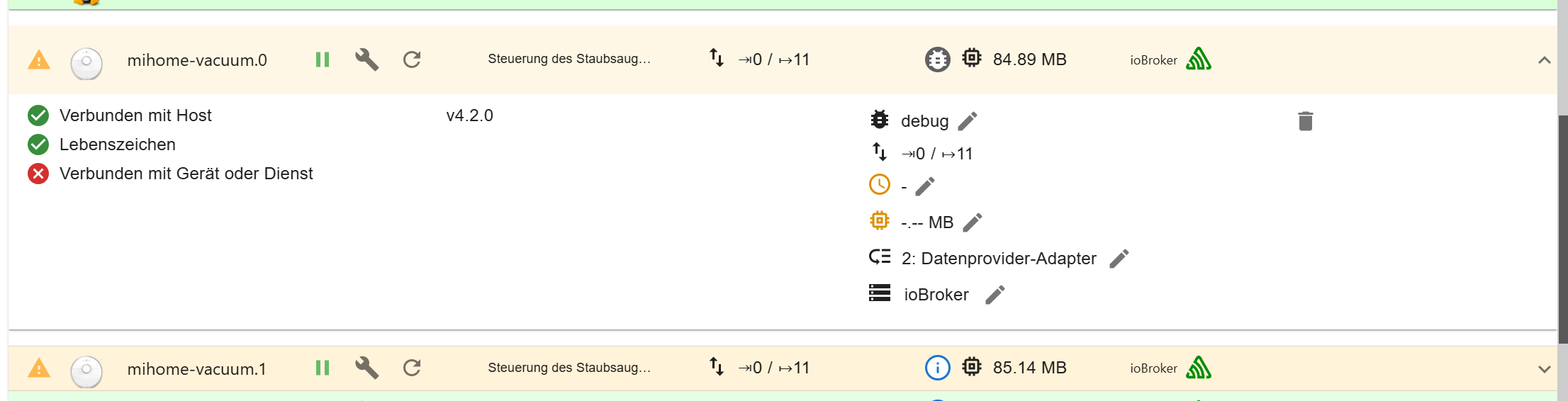
nachdem ich meine ioBroker Instanz auf die aktuellste Node.js: v20.18.1 aktualisiert hatte, läuft der Mihome-vacuum Adapter leider nicht mehr. Im Log kommt oben genannter Fehler.
mihome-vacuum.0
2024-12-01 13:48:05.866	debug	Helo message Timeout

mihome-vacuum.0
2024-12-01 13:47:53.864	debug	Helo message Timeout

mihome-vacuum.0
2024-12-01 13:47:41.864	debug	Helo message Timeout

mihome-vacuum.0
2024-12-01 13:47:29.861	debug	Helo message Timeout

mihome-vacuum.0
2024-12-01 13:47:17.859	debug	Helo message Timeout

mihome-vacuum.0
2024-12-01 13:47:05.857	debug	Helo message Timeout

mihome-vacuum.0
2024-12-01 13:46:53.855	debug	Helo message Timeout

mihome-vacuum.0
2024-12-01 13:46:41.854	debug	Helo message Timeout

mihome-vacuum.0
2024-12-01 13:46:29.852	debug	Helo message Timeout

mihome-vacuum.0
2024-12-01 13:46:17.851	debug	Helo message Timeout

mihome-vacuum.0
2024-12-01 13:46:05.848	debug	Helo message Timeout

mihome-vacuum.0
2024-12-01 13:45:53.848	debug	Helo message Timeout

mihome-vacuum.0
2024-12-01 13:45:51.847	debug	server started on 0.0.0.0:53421

mihome-vacuum.0
2024-12-01 13:45:51.847	info	IOT enabled, create state

mihome-vacuum.0
2024-12-01 13:45:51.845	debug	MIIO: Config: ip:192.168.1.91 token: 67336a5578XXXXXXXXX

mihome-vacuum.0
2024-12-01 13:45:51.845	debug	Create State for deviceInfounsupported

mihome-vacuum.0
2024-12-01 13:45:51.845	debug	Create State for deviceInfowifi_signal

mihome-vacuum.0
2024-12-01 13:45:51.845	debug	Create State for deviceInfofw_ver

mihome-vacuum.0
2024-12-01 13:45:51.845	debug	Create State for deviceInfomodel

mihome-vacuum.0
2024-12-01 13:45:51.845	debug	Create State for deviceInfomac

mihome-vacuum.0
2024-12-01 13:45:51.845	debug	Create State for deviceInfo

mihome-vacuum.0
2024-12-01 13:45:51.839	debug	load Map creator... true

mihome-vacuum.0
2024-12-01 13:45:51.822	info	starting. Version 4.2.0 in /opt/iobroker/node_modules/iobroker.mihome-vacuum, node: v20.18.1, js-controller: 7.0.3

mihome-vacuum.0
2024-12-01 13:45:51.697	debug	Plugin sentry Initialize Plugin (enabled=true)

mihome-vacuum.0
2024-12-01 13:45:47.680	info	terminating

mihome-vacuum.0
2024-12-01 13:45:47.181	info	Terminated (ADAPTER_REQUESTED_TERMINATION): Without reason

mihome-vacuum.0
2024-12-01 13:45:47.180	info	terminating

mihome-vacuum.0
2024-12-01 13:45:47.180	error	Socket Close

mihome-vacuum.0
2024-12-01 13:45:47.179	info	Got terminate signal TERMINATE_YOURSELF

mihome-vacuum.0
2024-12-01 13:44:45.411	info	IOT enabled, create state

mihome-vacuum.0
2024-12-01 13:44:45.383	info	starting. Version 4.2.0 in /opt/iobroker/node_modules/iobroker.mihome-vacuum, node: v20.18.1, js-controller: 7.0.3

mihome-vacuum.0
2024-12-01 13:44:41.073	info	terminating

mihome-vacuum.0
2024-12-01 13:44:40.573	info	Terminated (ADAPTER_REQUESTED_TERMINATION): Without reason

mihome-vacuum.0
2024-12-01 13:44:40.573	info	terminating

mihome-vacuum.0
2024-12-01 13:44:40.573	error	Socket Close

mihome-vacuum.0
2024-12-01 13:44:40.572	info	Got terminate signal TERMINATE_YOURSELF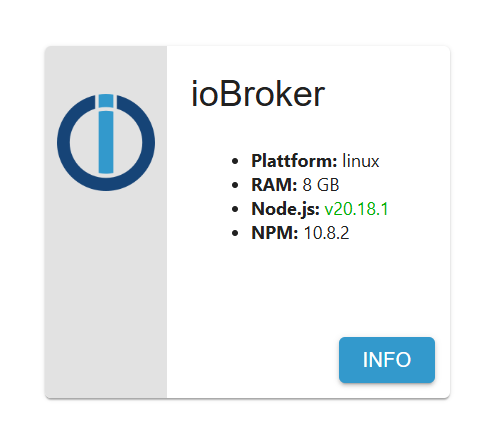
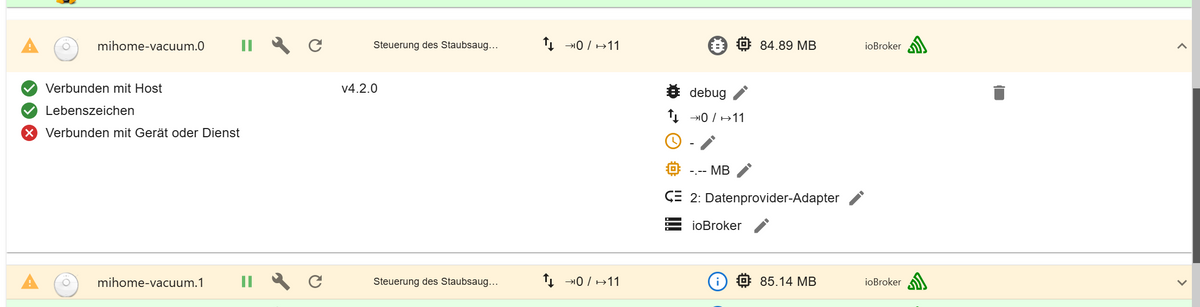
Hat jemand eine Idee wie man das fixt oder hab ich was übersehen?
Danke schonmal für eure Hilfe!
-
Hallo,
nachdem ich meine ioBroker Instanz auf die aktuellste Node.js: v20.18.1 aktualisiert hatte, läuft der Mihome-vacuum Adapter leider nicht mehr. Im Log kommt oben genannter Fehler.
mihome-vacuum.0
2024-12-01 13:48:05.866	debug	Helo message Timeout

mihome-vacuum.0
2024-12-01 13:47:53.864	debug	Helo message Timeout

mihome-vacuum.0
2024-12-01 13:47:41.864	debug	Helo message Timeout

mihome-vacuum.0
2024-12-01 13:47:29.861	debug	Helo message Timeout

mihome-vacuum.0
2024-12-01 13:47:17.859	debug	Helo message Timeout

mihome-vacuum.0
2024-12-01 13:47:05.857	debug	Helo message Timeout

mihome-vacuum.0
2024-12-01 13:46:53.855	debug	Helo message Timeout

mihome-vacuum.0
2024-12-01 13:46:41.854	debug	Helo message Timeout

mihome-vacuum.0
2024-12-01 13:46:29.852	debug	Helo message Timeout

mihome-vacuum.0
2024-12-01 13:46:17.851	debug	Helo message Timeout

mihome-vacuum.0
2024-12-01 13:46:05.848	debug	Helo message Timeout

mihome-vacuum.0
2024-12-01 13:45:53.848	debug	Helo message Timeout

mihome-vacuum.0
2024-12-01 13:45:51.847	debug	server started on 0.0.0.0:53421

mihome-vacuum.0
2024-12-01 13:45:51.847	info	IOT enabled, create state

mihome-vacuum.0
2024-12-01 13:45:51.845	debug	MIIO: Config: ip:192.168.1.91 token: 67336a5578XXXXXXXXX

mihome-vacuum.0
2024-12-01 13:45:51.845	debug	Create State for deviceInfounsupported

mihome-vacuum.0
2024-12-01 13:45:51.845	debug	Create State for deviceInfowifi_signal

mihome-vacuum.0
2024-12-01 13:45:51.845	debug	Create State for deviceInfofw_ver

mihome-vacuum.0
2024-12-01 13:45:51.845	debug	Create State for deviceInfomodel

mihome-vacuum.0
2024-12-01 13:45:51.845	debug	Create State for deviceInfomac

mihome-vacuum.0
2024-12-01 13:45:51.845	debug	Create State for deviceInfo

mihome-vacuum.0
2024-12-01 13:45:51.839	debug	load Map creator... true

mihome-vacuum.0
2024-12-01 13:45:51.822	info	starting. Version 4.2.0 in /opt/iobroker/node_modules/iobroker.mihome-vacuum, node: v20.18.1, js-controller: 7.0.3

mihome-vacuum.0
2024-12-01 13:45:51.697	debug	Plugin sentry Initialize Plugin (enabled=true)

mihome-vacuum.0
2024-12-01 13:45:47.680	info	terminating

mihome-vacuum.0
2024-12-01 13:45:47.181	info	Terminated (ADAPTER_REQUESTED_TERMINATION): Without reason

mihome-vacuum.0
2024-12-01 13:45:47.180	info	terminating

mihome-vacuum.0
2024-12-01 13:45:47.180	error	Socket Close

mihome-vacuum.0
2024-12-01 13:45:47.179	info	Got terminate signal TERMINATE_YOURSELF

mihome-vacuum.0
2024-12-01 13:44:45.411	info	IOT enabled, create state

mihome-vacuum.0
2024-12-01 13:44:45.383	info	starting. Version 4.2.0 in /opt/iobroker/node_modules/iobroker.mihome-vacuum, node: v20.18.1, js-controller: 7.0.3

mihome-vacuum.0
2024-12-01 13:44:41.073	info	terminating

mihome-vacuum.0
2024-12-01 13:44:40.573	info	Terminated (ADAPTER_REQUESTED_TERMINATION): Without reason

mihome-vacuum.0
2024-12-01 13:44:40.573	info	terminating

mihome-vacuum.0
2024-12-01 13:44:40.573	error	Socket Close

mihome-vacuum.0
2024-12-01 13:44:40.572	info	Got terminate signal TERMINATE_YOURSELF
Hat jemand eine Idee wie man das fixt oder hab ich was übersehen?
Danke schonmal für eure Hilfe!
Das sollte aber nichts mit nodejs 20.18.1 zu tun haben, denn:
2024-12-01 13:56:09.624  - info: mihome-vacuum.0 (85667) starting. Version 4.2.0 in /opt/iobroker/node_modules/iobroker.mihome-vacuum, node: v20.18.1, js-controller: 7.0.3
2024-12-01 13:56:09.679  - info: mihome-vacuum.0 (85667) IOT enabled, create state
2024-12-01 13:56:09.739  - info: mihome-vacuum.0 (85667) select standard vacuum protocol....
2024-12-01 13:56:09.944  - info: mihome-vacuum.0 (85667) create state for carpet_mode
2024-12-01 13:56:10.327  - info: mihome-vacuum.0 (85667) settest next timer: not available
Hol mal einen gescheiten Auszug aus dem log ran.
Periob logs --watchz. B.
-
Das sollte aber nichts mit nodejs 20.18.1 zu tun haben, denn:
2024-12-01 13:56:09.624  - info: mihome-vacuum.0 (85667) starting. Version 4.2.0 in /opt/iobroker/node_modules/iobroker.mihome-vacuum, node: v20.18.1, js-controller: 7.0.3
2024-12-01 13:56:09.679  - info: mihome-vacuum.0 (85667) IOT enabled, create state
2024-12-01 13:56:09.739  - info: mihome-vacuum.0 (85667) select standard vacuum protocol....
2024-12-01 13:56:09.944  - info: mihome-vacuum.0 (85667) create state for carpet_mode
2024-12-01 13:56:10.327  - info: mihome-vacuum.0 (85667) settest next timer: not available
Hol mal einen gescheiten Auszug aus dem log ran.
Periob logs --watchz. B.
@thomas-braun sagte in Mihome-vacuum Adapter error Socket Close nach Node.js update:
iob logs --watch
Ist wirklich komisch, nach dem update liefen beide Adapter nicht mehr hab schon die Adapter mehrmals neu gestartet. Sogar den iob fix habe ich nach dem update durchlaufen lassen -> keine Fehler.
2024-12-01 14:01:10.305 - info: host.ioBroker stopInstance system.adapter.mihome-vacuum.0 (force=false, process=true) 2024-12-01 14:01:10.306 - info: mihome-vacuum.0 (5618) Got terminate signal TERMINATE_YOURSELF 2024-12-01 14:01:10.307 - error: mihome-vacuum.0 (5618) Socket Close 2024-12-01 14:01:10.307 - info: mihome-vacuum.0 (5618) terminating 2024-12-01 14:01:10.308 - debug: mihome-vacuum.0 (5618) Plugin sentry destroyed 2024-12-01 14:01:10.308 - info: mihome-vacuum.0 (5618) Terminated (ADAPTER_REQUESTED_TERMINATION): Without reason 2024-12-01 14:01:10.370 - debug: ping.0 (2512) Ping result for 192.168.1.161: true in 68.5ms (Tried 0/1 times) 2024-12-01 14:01:10.383 - info: host.ioBroker stopInstance system.adapter.mihome-vacuum.0 send kill signal 2024-12-01 14:01:10.808 - info: mihome-vacuum.0 (5618) terminating 2024-12-01 14:01:10.898 - info: host.ioBroker instance system.adapter.mihome-vacuum.0 terminated with code 11 (ADAPTER_REQUESTED_TERMINATION) 2024-12-01 14:01:11.250 - info: smartmeter.0 (2661) Received 13 values, 6 updated 2024-12-01 14:01:12.306 - info: smartmeter.0 (2661) Received 13 values, 5 updated 2024-12-01 14:01:13.380 - info: smartmeter.0 (2661) Received 13 values, 5 updated 2024-12-01 14:01:14.183 - info: host.ioBroker instance system.adapter.mihome-vacuum.0 in version "4.2.0" started with pid 6369 2024-12-01 14:01:14.456 - info: smartmeter.0 (2661) Received 13 values, 6 updated 2024-12-01 14:01:14.609 - debug: mihome-vacuum.0 (6369) Redis Objects: Use Redis connection: 0.0.0.0:9001 2024-12-01 14:01:14.627 - debug: mihome-vacuum.0 (6369) Objects client ready ... initialize now 2024-12-01 14:01:14.628 - debug: mihome-vacuum.0 (6369) Objects create System PubSub Client 2024-12-01 14:01:14.628 - debug: mihome-vacuum.0 (6369) Objects create User PubSub Client 2024-12-01 14:01:14.664 - debug: mihome-vacuum.0 (6369) Objects client initialize lua scripts 2024-12-01 14:01:14.667 - debug: mihome-vacuum.0 (6369) Objects connected to redis: 0.0.0.0:9001 2024-12-01 14:01:14.685 - debug: mihome-vacuum.0 (6369) Redis States: Use Redis connection: 0.0.0.0:9000 2024-12-01 14:01:14.694 - debug: mihome-vacuum.0 (6369) States create System PubSub Client 2024-12-01 14:01:14.695 - debug: mihome-vacuum.0 (6369) States create User PubSub Client 2024-12-01 14:01:14.749 - debug: mihome-vacuum.0 (6369) States connected to redis: 0.0.0.0:9000 2024-12-01 14:01:14.764 - debug: mihome-vacuum.0 (6369) Plugin sentry Initialize Plugin (enabled=true) 2024-12-01 14:01:14.888 - info: mihome-vacuum.0 (6369) starting. Version 4.2.0 in /opt/iobroker/node_modules/iobroker.mihome-vacuum, node: v20.18.1, js-controller: 7.0.3 2024-12-01 14:01:14.904 - debug: mihome-vacuum.0 (6369) load Map creator... true 2024-12-01 14:01:14.913 - debug: mihome-vacuum.0 (6369) Create State for deviceInfo 2024-12-01 14:01:14.913 - debug: mihome-vacuum.0 (6369) Create State for deviceInfomac 2024-12-01 14:01:14.913 - debug: mihome-vacuum.0 (6369) Create State for deviceInfomodel 2024-12-01 14:01:14.913 - debug: mihome-vacuum.0 (6369) Create State for deviceInfofw_ver 2024-12-01 14:01:14.913 - debug: mihome-vacuum.0 (6369) Create State for deviceInfowifi_signal 2024-12-01 14:01:14.913 - debug: mihome-vacuum.0 (6369) Create State for deviceInfounsupported 2024-12-01 14:01:14.914 - debug: mihome-vacuum.0 (6369) MIIO: Config: ip:192.168.1.91 token: 67336a5578XXXXXXXXX 2024-12-01 14:01:14.915 - info: mihome-vacuum.0 (6369) IOT enabled, create state 2024-12-01 14:01:14.916 - debug: mihome-vacuum.0 (6369) server started on 0.0.0.0:53421 2024-12-01 14:01:15.387 - debug: ping.0 (2512) Pinging alive 192.168.1.95 2024-12-01 14:01:15.387 - debug: ping.0 (2512) System command: /bin/ping -n -w 2 -c 1 192.168.1.95 2024-12-01 14:01:15.527 - info: smartmeter.0 (2661) Received 13 values, 6 updated 2024-12-01 14:01:16.118 - debug: ping.0 (2512) Ping result for 192.168.1.95: true in 729ms (Tried 0/1 times) 2024-12-01 14:01:16.121 - debug: ping.0 (2512) Pinging alive 192.168.1.161 2024-12-01 14:01:16.121 - debug: ping.0 (2512) System command: /bin/ping -n -w 2 -c 1 192.168.1.161 2024-12-01 14:01:16.128 - debug: ping.0 (2512) Ping result for 192.168.1.161: true in 4.75ms (Tried 0/1 times) 2024-12-01 14:01:16.584 - info: smartmeter.0 (2661) Received 13 values, 6 updated 2024-12-01 14:01:16.916 - debug: mihome-vacuum.0 (6369) Helo message Timeout 2024-12-01 14:01:17.658 - info: smartmeter.0 (2661) Received 13 values, 6 updated 2024-12-01 14:01:18.746 - info: smartmeter.0 (2661) Received 13 values, 5 updated 2024-12-01 14:01:19.803 - info: smartmeter.0 (2661) Received 13 values, 6 updated 2024-12-01 14:01:20.877 - info: smartmeter.0 (2661) Received 13 values, 6 updated 2024-12-01 14:01:21.173 - debug: ping.0 (2512) Pinging alive 192.168.1.95 2024-12-01 14:01:21.173 - debug: ping.0 (2512) System command: /bin/ping -n -w 2 -c 1 192.168.1.95 2024-12-01 14:01:21.355 - debug: ping.0 (2512) Ping result for 192.168.1.95: true in 180ms (Tried 0/1 times) 2024-12-01 14:01:21.358 - debug: ping.0 (2512) Pinging alive 192.168.1.161 2024-12-01 14:01:21.358 - debug: ping.0 (2512) System command: /bin/ping -n -w 2 -c 1 192.168.1.161 2024-12-01 14:01:21.425 - debug: ping.0 (2512) Ping result for 192.168.1.161: true in 65.0ms (Tried 0/1 times) 2024-12-01 14:01:21.965 - info: smartmeter.0 (2661) Received 13 values, 6 updated 2024-12-01 14:01:23.039 - info: smartmeter.0 (2661) Received 13 values, 6 updated 2024-12-01 14:01:24.112 - info: smartmeter.0 (2661) Received 13 values, 5 updated 2024-12-01 14:01:25.203 - info: smartmeter.0 (2661) Received 13 values, 5 updated 2024-12-01 14:01:26.291 - info: smartmeter.0 (2661) Received 13 values, 6 updated 2024-12-01 14:01:26.428 - debug: ping.0 (2512) Pinging alive 192.168.1.95 2024-12-01 14:01:26.428 - debug: ping.0 (2512) System command: /bin/ping -n -w 2 -c 1 192.168.1.95 2024-12-01 14:01:27.199 - debug: ping.0 (2512) Ping result for 192.168.1.95: true in 769ms (Tried 0/1 times) 2024-12-01 14:01:27.203 - debug: ping.0 (2512) Pinging alive 192.168.1.161 2024-12-01 14:01:27.203 - debug: ping.0 (2512) System command: /bin/ping -n -w 2 -c 1 192.168.1.161 2024-12-01 14:01:27.260 - debug: ping.0 (2512) Ping result for 192.168.1.161: true in 54.4ms (Tried 0/1 times) 2024-12-01 14:01:27.380 - info: smartmeter.0 (2661) Received 13 values, 6 updated 2024-12-01 14:01:28.453 - info: smartmeter.0 (2661) Received 13 values, 6 updated 2024-12-01 14:01:28.916 - debug: mihome-vacuum.0 (6369) Helo message Timeout 2024-12-01 14:01:29.559 - info: smartmeter.0 (2661) Received 13 values, 6 updated 2024-12-01 14:01:30.007 - debug: unifi.0 (6261) Update started 2024-12-01 14:01:30.310 - debug: unifi.0 (6261) Login successful 2024-12-01 14:01:30.341 - debug: unifi.0 (6261) fetchSites: default 2024-12-01 14:01:30.341 - debug: unifi.0 (6261) Update site: default 2024-12-01 14:01:30.370 - debug: unifi.0 (6261) fetchSiteSysinfo default: 1 2024-12-01 14:01:30.445 - debug: unifi.0 (6261) fetchClients default: 77 2024-12-01 14:01:30.653 - info: smartmeter.0 (2661) Received 13 values, 6 updated 2024-12-01 14:01:30.944 - debug: unifi.0 (6261) fetchDevices default: 10 2024-12-01 14:01:31.185 - debug: unifi.0 (6261) fetchWlans default: 3 2024-12-01 14:01:31.208 - debug: unifi.0 (6261) fetchNetworks default: 9 -
@thomas-braun sagte in Mihome-vacuum Adapter error Socket Close nach Node.js update:
iob logs --watch
Ist wirklich komisch, nach dem update liefen beide Adapter nicht mehr hab schon die Adapter mehrmals neu gestartet. Sogar den iob fix habe ich nach dem update durchlaufen lassen -> keine Fehler.
2024-12-01 14:01:10.305 - info: host.ioBroker stopInstance system.adapter.mihome-vacuum.0 (force=false, process=true) 2024-12-01 14:01:10.306 - info: mihome-vacuum.0 (5618) Got terminate signal TERMINATE_YOURSELF 2024-12-01 14:01:10.307 - error: mihome-vacuum.0 (5618) Socket Close 2024-12-01 14:01:10.307 - info: mihome-vacuum.0 (5618) terminating 2024-12-01 14:01:10.308 - debug: mihome-vacuum.0 (5618) Plugin sentry destroyed 2024-12-01 14:01:10.308 - info: mihome-vacuum.0 (5618) Terminated (ADAPTER_REQUESTED_TERMINATION): Without reason 2024-12-01 14:01:10.370 - debug: ping.0 (2512) Ping result for 192.168.1.161: true in 68.5ms (Tried 0/1 times) 2024-12-01 14:01:10.383 - info: host.ioBroker stopInstance system.adapter.mihome-vacuum.0 send kill signal 2024-12-01 14:01:10.808 - info: mihome-vacuum.0 (5618) terminating 2024-12-01 14:01:10.898 - info: host.ioBroker instance system.adapter.mihome-vacuum.0 terminated with code 11 (ADAPTER_REQUESTED_TERMINATION) 2024-12-01 14:01:11.250 - info: smartmeter.0 (2661) Received 13 values, 6 updated 2024-12-01 14:01:12.306 - info: smartmeter.0 (2661) Received 13 values, 5 updated 2024-12-01 14:01:13.380 - info: smartmeter.0 (2661) Received 13 values, 5 updated 2024-12-01 14:01:14.183 - info: host.ioBroker instance system.adapter.mihome-vacuum.0 in version "4.2.0" started with pid 6369 2024-12-01 14:01:14.456 - info: smartmeter.0 (2661) Received 13 values, 6 updated 2024-12-01 14:01:14.609 - debug: mihome-vacuum.0 (6369) Redis Objects: Use Redis connection: 0.0.0.0:9001 2024-12-01 14:01:14.627 - debug: mihome-vacuum.0 (6369) Objects client ready ... initialize now 2024-12-01 14:01:14.628 - debug: mihome-vacuum.0 (6369) Objects create System PubSub Client 2024-12-01 14:01:14.628 - debug: mihome-vacuum.0 (6369) Objects create User PubSub Client 2024-12-01 14:01:14.664 - debug: mihome-vacuum.0 (6369) Objects client initialize lua scripts 2024-12-01 14:01:14.667 - debug: mihome-vacuum.0 (6369) Objects connected to redis: 0.0.0.0:9001 2024-12-01 14:01:14.685 - debug: mihome-vacuum.0 (6369) Redis States: Use Redis connection: 0.0.0.0:9000 2024-12-01 14:01:14.694 - debug: mihome-vacuum.0 (6369) States create System PubSub Client 2024-12-01 14:01:14.695 - debug: mihome-vacuum.0 (6369) States create User PubSub Client 2024-12-01 14:01:14.749 - debug: mihome-vacuum.0 (6369) States connected to redis: 0.0.0.0:9000 2024-12-01 14:01:14.764 - debug: mihome-vacuum.0 (6369) Plugin sentry Initialize Plugin (enabled=true) 2024-12-01 14:01:14.888 - info: mihome-vacuum.0 (6369) starting. Version 4.2.0 in /opt/iobroker/node_modules/iobroker.mihome-vacuum, node: v20.18.1, js-controller: 7.0.3 2024-12-01 14:01:14.904 - debug: mihome-vacuum.0 (6369) load Map creator... true 2024-12-01 14:01:14.913 - debug: mihome-vacuum.0 (6369) Create State for deviceInfo 2024-12-01 14:01:14.913 - debug: mihome-vacuum.0 (6369) Create State for deviceInfomac 2024-12-01 14:01:14.913 - debug: mihome-vacuum.0 (6369) Create State for deviceInfomodel 2024-12-01 14:01:14.913 - debug: mihome-vacuum.0 (6369) Create State for deviceInfofw_ver 2024-12-01 14:01:14.913 - debug: mihome-vacuum.0 (6369) Create State for deviceInfowifi_signal 2024-12-01 14:01:14.913 - debug: mihome-vacuum.0 (6369) Create State for deviceInfounsupported 2024-12-01 14:01:14.914 - debug: mihome-vacuum.0 (6369) MIIO: Config: ip:192.168.1.91 token: 67336a5578XXXXXXXXX 2024-12-01 14:01:14.915 - info: mihome-vacuum.0 (6369) IOT enabled, create state 2024-12-01 14:01:14.916 - debug: mihome-vacuum.0 (6369) server started on 0.0.0.0:53421 2024-12-01 14:01:15.387 - debug: ping.0 (2512) Pinging alive 192.168.1.95 2024-12-01 14:01:15.387 - debug: ping.0 (2512) System command: /bin/ping -n -w 2 -c 1 192.168.1.95 2024-12-01 14:01:15.527 - info: smartmeter.0 (2661) Received 13 values, 6 updated 2024-12-01 14:01:16.118 - debug: ping.0 (2512) Ping result for 192.168.1.95: true in 729ms (Tried 0/1 times) 2024-12-01 14:01:16.121 - debug: ping.0 (2512) Pinging alive 192.168.1.161 2024-12-01 14:01:16.121 - debug: ping.0 (2512) System command: /bin/ping -n -w 2 -c 1 192.168.1.161 2024-12-01 14:01:16.128 - debug: ping.0 (2512) Ping result for 192.168.1.161: true in 4.75ms (Tried 0/1 times) 2024-12-01 14:01:16.584 - info: smartmeter.0 (2661) Received 13 values, 6 updated 2024-12-01 14:01:16.916 - debug: mihome-vacuum.0 (6369) Helo message Timeout 2024-12-01 14:01:17.658 - info: smartmeter.0 (2661) Received 13 values, 6 updated 2024-12-01 14:01:18.746 - info: smartmeter.0 (2661) Received 13 values, 5 updated 2024-12-01 14:01:19.803 - info: smartmeter.0 (2661) Received 13 values, 6 updated 2024-12-01 14:01:20.877 - info: smartmeter.0 (2661) Received 13 values, 6 updated 2024-12-01 14:01:21.173 - debug: ping.0 (2512) Pinging alive 192.168.1.95 2024-12-01 14:01:21.173 - debug: ping.0 (2512) System command: /bin/ping -n -w 2 -c 1 192.168.1.95 2024-12-01 14:01:21.355 - debug: ping.0 (2512) Ping result for 192.168.1.95: true in 180ms (Tried 0/1 times) 2024-12-01 14:01:21.358 - debug: ping.0 (2512) Pinging alive 192.168.1.161 2024-12-01 14:01:21.358 - debug: ping.0 (2512) System command: /bin/ping -n -w 2 -c 1 192.168.1.161 2024-12-01 14:01:21.425 - debug: ping.0 (2512) Ping result for 192.168.1.161: true in 65.0ms (Tried 0/1 times) 2024-12-01 14:01:21.965 - info: smartmeter.0 (2661) Received 13 values, 6 updated 2024-12-01 14:01:23.039 - info: smartmeter.0 (2661) Received 13 values, 6 updated 2024-12-01 14:01:24.112 - info: smartmeter.0 (2661) Received 13 values, 5 updated 2024-12-01 14:01:25.203 - info: smartmeter.0 (2661) Received 13 values, 5 updated 2024-12-01 14:01:26.291 - info: smartmeter.0 (2661) Received 13 values, 6 updated 2024-12-01 14:01:26.428 - debug: ping.0 (2512) Pinging alive 192.168.1.95 2024-12-01 14:01:26.428 - debug: ping.0 (2512) System command: /bin/ping -n -w 2 -c 1 192.168.1.95 2024-12-01 14:01:27.199 - debug: ping.0 (2512) Ping result for 192.168.1.95: true in 769ms (Tried 0/1 times) 2024-12-01 14:01:27.203 - debug: ping.0 (2512) Pinging alive 192.168.1.161 2024-12-01 14:01:27.203 - debug: ping.0 (2512) System command: /bin/ping -n -w 2 -c 1 192.168.1.161 2024-12-01 14:01:27.260 - debug: ping.0 (2512) Ping result for 192.168.1.161: true in 54.4ms (Tried 0/1 times) 2024-12-01 14:01:27.380 - info: smartmeter.0 (2661) Received 13 values, 6 updated 2024-12-01 14:01:28.453 - info: smartmeter.0 (2661) Received 13 values, 6 updated 2024-12-01 14:01:28.916 - debug: mihome-vacuum.0 (6369) Helo message Timeout 2024-12-01 14:01:29.559 - info: smartmeter.0 (2661) Received 13 values, 6 updated 2024-12-01 14:01:30.007 - debug: unifi.0 (6261) Update started 2024-12-01 14:01:30.310 - debug: unifi.0 (6261) Login successful 2024-12-01 14:01:30.341 - debug: unifi.0 (6261) fetchSites: default 2024-12-01 14:01:30.341 - debug: unifi.0 (6261) Update site: default 2024-12-01 14:01:30.370 - debug: unifi.0 (6261) fetchSiteSysinfo default: 1 2024-12-01 14:01:30.445 - debug: unifi.0 (6261) fetchClients default: 77 2024-12-01 14:01:30.653 - info: smartmeter.0 (2661) Received 13 values, 6 updated 2024-12-01 14:01:30.944 - debug: unifi.0 (6261) fetchDevices default: 10 2024-12-01 14:01:31.185 - debug: unifi.0 (6261) fetchWlans default: 3 2024-12-01 14:01:31.208 - debug: unifi.0 (6261) fetchNetworks default: 9@elektroniker86 und englisch ist das auch nicht ;-)
-
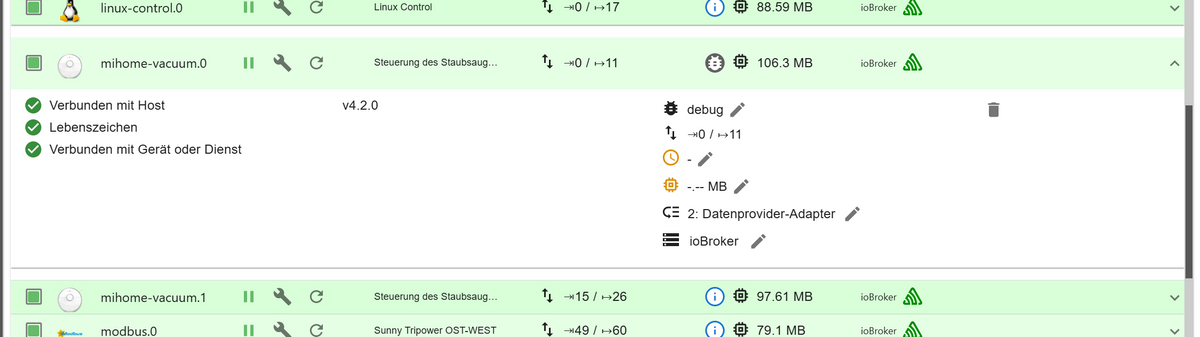
Ok... falscher Alarm nachdem ich beide Roboter komplett aus und wieder eingeschaltet habe und danach die Instanzen neu gestartet hatte, ist wieder alles grün und connectet.
Trotzdem Danke!
-
Ok... falscher Alarm nachdem ich beide Roboter komplett aus und wieder eingeschaltet habe und danach die Instanzen neu gestartet hatte, ist wieder alles grün und connectet.
Trotzdem Danke!
Das wollte ich gerade sagen. Denn hier
2024-12-01 14:01:16.916 - debug: mihome-vacuum.0 (6369) Helo message Timeoutantwortet der Sauger nicht.
-
@elektroniker86 und englisch ist das auch nicht ;-)
-
@homoran
Sorry, hab ich mich wohl verklickt.Wie kann ich das Thema auf gelöst setzen?
@elektroniker86
Titel im ersten Beitrag editieren




Support us
605
Online32.6k
Users82.1k
Topics1.3m
Posts