




[Aufruf] Plex connect testen
-
Du kannst damit alles machen was du willst.
Mit Blockly kannst du ein Skript machen das z.B. deine Beleuchtung geschaltet wird oder irgendeine Szene die alle steuert.
In der VIS kannst du das natürlich auch alles rein packen. Ebenso kannst du dir da anzeigen lassen was gerade gespielt wird in so.
Dafür ist ioBroker ja da. Du kannst da deine Fantasien freien lauf lassen.
-
Einfach hier im Forum lesen oder ein paar Youtube Videos angucken, dann verstehst du das Grundprinzip und wie Blockly funktioniert eigentlich ganz schnell.
Dann einfach ein bisschen über den Tellerrand hinaus denken und du wirst sehen was man damit tolles machen kann ;)
-
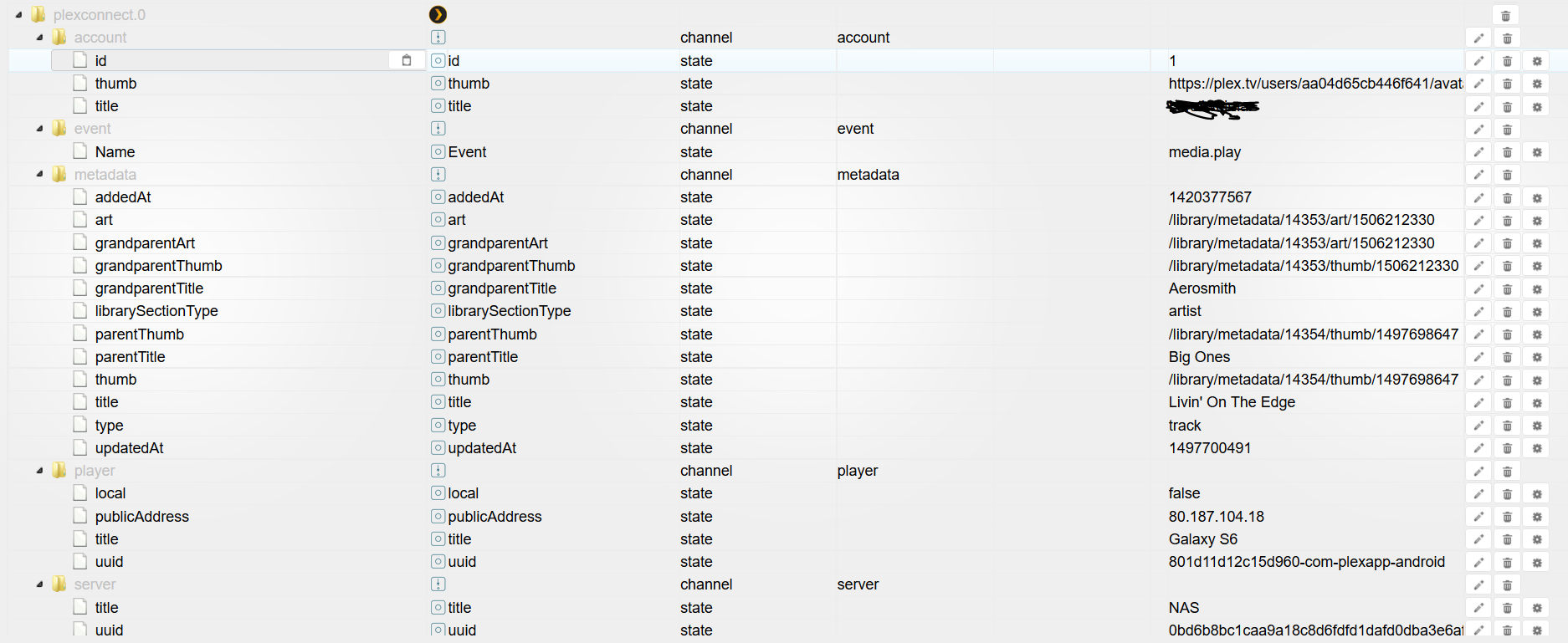
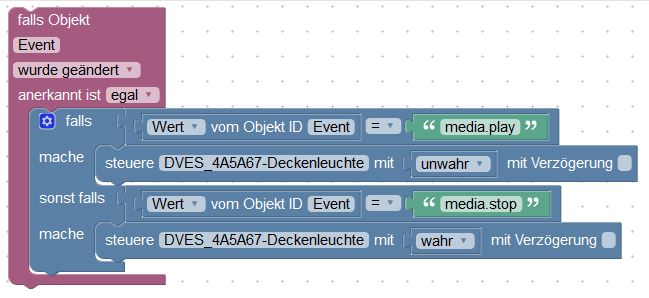
Wie kann ich die einzelne werte lesen bei plex.connect event name?
Media.play und media.pause und media.resume.
Mann kann ja nicht mit true oder fals.
Wo kann ich die werte teilen oder so?
Ich möchte ja wenn stop ist das licht einschalten und bei play einschalten.
Hatt mir jemand ein beispiel? Das ich weis wo anfangen?
Besten dank für die zeit und geduld.
-
Hallo Zusammen
Sorry wenn ich nochmal schreibe.
Plex licht dimmem läuft super danke nochmals dafür.
Aber was ich noch nicht ganz verstehe ist, wenn ich den server wo plex läuft ausschalte, und z.B am nächsten tag wider einschalte, aktualisiert iobroker nicht und es bleib das datum von gestern.
Wenn ich im webhook die ip erneuere funktioniert es wider.
Ist das normal, oder übersehe ich wider etwas..
Weis da jemand rat?
Lg und besten dank
-
Erstmal hab ich keine Idee, da mein plex 24x7 läuft. Kannst du mal den debug Modus vom Adapter einschalten und die Logs Posten? An besten mit Filter, sodass nur die Adapter Logs dabei sind.
Gruß
Gesendet von meinem SM-G950F mit Tapatalk
-
Ist das richtig so?
undefined2019-02-04 19:57:19.365 - debug: plexconnect.0 redis pmessage io.*.logging io.system.adapter.admin.0.logging {"val":false,"ack":true,"ts":1549306639364,"q":0,"from":"system.adapter.admin.0","lc":1549306639364}
2019-02-04 19:57:19.366 - debug: plexconnect.0 system.adapter.admin.0: logging false
2019-02-04 19:57:24.328 - debug: plexconnect.0 redis pmessage io.*.logging io.system.adapter.admin.0.logging {"val":true,"ack":true,"ts":1549306644322,"q":0,"from":"system.adapter.admin.0","lc":1549306644322}
2019-02-04 19:57:24.329 - debug: plexconnect.0 system.adapter.admin.0: logging true
2019-02-04 19:58:31.599 - debug: plexconnect.0 redis pmessage io.*.logging io.system.adapter.admin.0.logging {"val":false,"ack":true,"ts":1549306711598,"q":0,"from":"system.adapter.admin.0","lc":1549306711598}
2019-02-04 19:58:31.600 - debug: plexconnect.0 system.adapter.admin.0: logging false
2019-02-04 19:58:47.305 - debug: plexconnect.0 redis pmessage io.*.logging io.system.adapter.admin.0.logging {"val":true,"ack":true,"ts":1549306727301,"q":0,"from":"system.adapter.admin.0","lc":1549306727301}
2019-02-04 19:58:47.306 - debug: plexconnect.0 system.adapter.admin.0: logging true
2019-02-04 19:59:41.876 - debug: plexconnect.0 redis pmessage io.*.logging io.system.adapter.admin.0.logging {"val":false,"ack":true,"ts":1549306781872,"q":0,"from":"system.adapter.admin.0","lc":1549306781872}
2019-02-04 19:59:41.878 - debug: plexconnect.0 system.adapter.admin.0: logging false
2019-02-04 20:02:22.883 - debug: plexconnect.0 redis pmessage io.*.logging io.system.adapter.admin.0.logging {"val":true,"ack":true,"ts":1549306942876,"q":0,"from":"system.adapter.admin.0","lc":1549306942876}
2019-02-04 20:02:22.884 - debug: plexconnect.0 system.adapter.admin.0: logging true
sorry bin noch nicht der Profi auf dem Gebiet..
-
Hallo x-ess
Kein Problem. Den Adapter setzt du wie hier beschrieben auf Debug: viewtopic.php?p=135414#p135414
Ersetzte die Suche mit plex, dann sollte da was sinnvolles rauskommen.
Dann bitte hier posten, aber als "Code" oder "Spoiler", dann wird das hier lesbar.
Danke.
-
2019-02-05 19:00:31.099 - debug: plexconnect.0 objectDB connected 2019-02-05 19:00:31.177 - debug: plexconnect.0 statesDB connected 2019-02-05 19:00:31.190 - info: plexconnect.0 States connected to redis: 127.0.0.1:6379 2019-02-05 19:00:32.094 - info: plexconnect.0 starting. Version 0.0.7 in /opt/iobroker/node_modules/iobroker.plexconnect, node: v8.15.0 2019-02-05 19:00:32.105 - info: plexconnect.0 function ready 2019-02-05 19:00:32.139 - info: plexconnect.0 function main 2019-02-05 19:00:32.143 - info: plexconnect.0 Server listening on port:10000 2019-02-05 19:00:32.144 - info: plexconnect.0 PMS:192.168.1.206 2019-02-05 19:00:50.376 - debug: plexconnect.0 redis pmessage io.*.logging io.system.adapter.admin.0.logging {"val":true,"ack":true,"ts":1549389650346,"q":0,"from":"system.adapter.admin.0","lc":1549389650346} 2019-02-05 19:00:50.382 - debug: plexconnect.0 system.adapter.admin.0: logging true 2019-02-05 19:02:08.237 - debug: plexconnect.0 redis pmessage io.*.logging io.system.adapter.admin.0.logging {"val":false,"ack":true,"ts":1549389728235,"q":0,"from":"system.adapter.admin.0","lc":1549389728235} 2019-02-05 19:02:08.238 - debug: plexconnect.0 system.adapter.admin.0: logging false 2019-02-05 19:03:29.305 - debug: plexconnect.0 redis pmessage io.*.logging io.system.adapter.admin.0.logging {"val":true,"ack":true,"ts":1549389809303,"q":0,"from":"system.adapter.admin.0","lc":1549389809303} 2019-02-05 19:03:29.306 - debug: plexconnect.0 system.adapter.admin.0: logging true 2019-02-05 19:04:57.887 - debug: plexconnect.0 redis pmessage io.*.logging io.system.adapter.admin.0.logging {"val":false,"ack":true,"ts":1549389897884,"q":0,"from":"system.adapter.admin.0","lc":1549389897884} 2019-02-05 19:04:57.889 - debug: plexconnect.0 system.adapter.admin.0: logging false 2019-02-05 19:04:59.143 - info: host.ioBroker-RasPi object change system.adapter.plexconnect.0 2019-02-05 19:04:59.147 - info: host.ioBroker-RasPi stopInstance system.adapter.plexconnect.0 2019-02-05 19:04:59.148 - info: host.ioBroker-RasPi stopInstance system.adapter.plexconnect.0 killing pid 898 2019-02-05 19:04:59.679 - info: host.ioBroker-RasPi instance system.adapter.plexconnect.0 terminated with code 0 (OK) 2019-02-05 19:05:01.674 - info: host.ioBroker-RasPi instance system.adapter.plexconnect.0 started with pid 1187 2019-02-05 19:05:04.918 - info: plexconnect.0 States connected to redis: 127.0.0.1:6379 2019-02-05 19:05:05.234 - info: plexconnect.0 starting. Version 0.0.7 in /opt/iobroker/node_modules/iobroker.plexconnect, node: v8.15.0 2019-02-05 19:05:05.252 - info: plexconnect.0 function ready 2019-02-05 19:05:05.274 - info: plexconnect.0 function main 2019-02-05 19:05:05.279 - info: plexconnect.0 Server listening on port:10000 2019-02-05 19:05:05.280 - info: plexconnect.0 PMS:192.168.1.206 2019-02-05 19:05:43.512 - info: host.ioBroker-RasPi object change system.adapter.plexconnect.0 2019-02-05 19:05:43.513 - info: host.ioBroker-RasPi stopInstance system.adapter.plexconnect.0 2019-02-05 19:05:43.514 - info: host.ioBroker-RasPi stopInstance system.adapter.plexconnect.0 killing pid 1187 2019-02-05 19:05:44.045 - info: host.ioBroker-RasPi instance system.adapter.plexconnect.0 terminated with code 0 (OK) 2019-02-05 19:05:46.039 - info: host.ioBroker-RasPi instance system.adapter.plexconnect.0 started with pid 1254 2019-02-05 19:05:49.403 - debug: plexconnect.0 objectDB connected 2019-02-05 19:05:49.486 - debug: plexconnect.0 statesDB connected 2019-02-05 19:05:49.502 - info: plexconnect.0 States connected to redis: 127.0.0.1:6379 2019-02-05 19:05:49.822 - info: plexconnect.0 starting. Version 0.0.7 in /opt/iobroker/node_modules/iobroker.plexconnect, node: v8.15.0 2019-02-05 19:05:49.834 - info: plexconnect.0 function ready 2019-02-05 19:05:49.864 - info: plexconnect.0 function main 2019-02-05 19:05:49.869 - info: plexconnect.0 Server listening on port:10000 2019-02-05 19:05:49.870 - info: plexconnect.0 PMS:192.168.1.206 -
2019-02-05 19:00:31.099 - debug: plexconnect.0 objectDB connected 2019-02-05 19:00:31.177 - debug: plexconnect.0 statesDB connected 2019-02-05 19:00:31.190 - info: plexconnect.0 States connected to redis: 127.0.0.1:6379 2019-02-05 19:00:32.094 - info: plexconnect.0 starting. Version 0.0.7 in /opt/iobroker/node_modules/iobroker.plexconnect, node: v8.15.0 2019-02-05 19:00:32.105 - info: plexconnect.0 function ready 2019-02-05 19:00:32.139 - info: plexconnect.0 function main 2019-02-05 19:00:32.143 - info: plexconnect.0 Server listening on port:10000 2019-02-05 19:00:32.144 - info: plexconnect.0 PMS:192.168.1.206 2019-02-05 19:00:50.376 - debug: plexconnect.0 redis pmessage io.*.logging io.system.adapter.admin.0.logging {"val":true,"ack":true,"ts":1549389650346,"q":0,"from":"system.adapter.admin.0","lc":1549389650346} 2019-02-05 19:00:50.382 - debug: plexconnect.0 system.adapter.admin.0: logging true 2019-02-05 19:02:08.237 - debug: plexconnect.0 redis pmessage io.*.logging io.system.adapter.admin.0.logging {"val":false,"ack":true,"ts":1549389728235,"q":0,"from":"system.adapter.admin.0","lc":1549389728235} 2019-02-05 19:02:08.238 - debug: plexconnect.0 system.adapter.admin.0: logging false 2019-02-05 19:03:29.305 - debug: plexconnect.0 redis pmessage io.*.logging io.system.adapter.admin.0.logging {"val":true,"ack":true,"ts":1549389809303,"q":0,"from":"system.adapter.admin.0","lc":1549389809303} 2019-02-05 19:03:29.306 - debug: plexconnect.0 system.adapter.admin.0: logging true 2019-02-05 19:04:57.887 - debug: plexconnect.0 redis pmessage io.*.logging io.system.adapter.admin.0.logging {"val":false,"ack":true,"ts":1549389897884,"q":0,"from":"system.adapter.admin.0","lc":1549389897884} 2019-02-05 19:04:57.889 - debug: plexconnect.0 system.adapter.admin.0: logging false 2019-02-05 19:04:59.143 - info: host.ioBroker-RasPi object change system.adapter.plexconnect.0 2019-02-05 19:04:59.147 - info: host.ioBroker-RasPi stopInstance system.adapter.plexconnect.0 2019-02-05 19:04:59.148 - info: host.ioBroker-RasPi stopInstance system.adapter.plexconnect.0 killing pid 898 2019-02-05 19:04:59.679 - info: host.ioBroker-RasPi instance system.adapter.plexconnect.0 terminated with code 0 (OK) 2019-02-05 19:05:01.674 - info: host.ioBroker-RasPi instance system.adapter.plexconnect.0 started with pid 1187 2019-02-05 19:05:04.918 - info: plexconnect.0 States connected to redis: 127.0.0.1:6379 2019-02-05 19:05:05.234 - info: plexconnect.0 starting. Version 0.0.7 in /opt/iobroker/node_modules/iobroker.plexconnect, node: v8.15.0 2019-02-05 19:05:05.252 - info: plexconnect.0 function ready 2019-02-05 19:05:05.274 - info: plexconnect.0 function main 2019-02-05 19:05:05.279 - info: plexconnect.0 Server listening on port:10000 2019-02-05 19:05:05.280 - info: plexconnect.0 PMS:192.168.1.206 2019-02-05 19:05:43.512 - info: host.ioBroker-RasPi object change system.adapter.plexconnect.0 2019-02-05 19:05:43.513 - info: host.ioBroker-RasPi stopInstance system.adapter.plexconnect.0 2019-02-05 19:05:43.514 - info: host.ioBroker-RasPi stopInstance system.adapter.plexconnect.0 killing pid 1187 2019-02-05 19:05:44.045 - info: host.ioBroker-RasPi instance system.adapter.plexconnect.0 terminated with code 0 (OK) 2019-02-05 19:05:46.039 - info: host.ioBroker-RasPi instance system.adapter.plexconnect.0 started with pid 1254 2019-02-05 19:05:49.403 - debug: plexconnect.0 objectDB connected 2019-02-05 19:05:49.486 - debug: plexconnect.0 statesDB connected 2019-02-05 19:05:49.502 - info: plexconnect.0 States connected to redis: 127.0.0.1:6379 2019-02-05 19:05:49.822 - info: plexconnect.0 starting. Version 0.0.7 in /opt/iobroker/node_modules/iobroker.plexconnect, node: v8.15.0 2019-02-05 19:05:49.834 - info: plexconnect.0 function ready 2019-02-05 19:05:49.864 - info: plexconnect.0 function main 2019-02-05 19:05:49.869 - info: plexconnect.0 Server listening on port:10000 2019-02-05 19:05:49.870 - info: plexconnect.0 PMS:192.168.1.206 2019-02-05 19:19:58.231 - debug: plexconnect.0 redis pmessage io.*.logging io.system.adapter.admin.0.logging {"val":false,"ack":true,"ts":1549390798229,"q":0,"from":"system.adapter.admin.0","lc":1549390798229} 2019-02-05 19:19:58.238 - debug: plexconnect.0 system.adapter.admin.0: logging false 2019-02-05 19:20:08.196 - debug: plexconnect.0 redis pmessage io.*.logging io.system.adapter.admin.0.logging {"val":true,"ack":true,"ts":1549390808194,"q":0,"from":"system.adapter.admin.0","lc":1549390808194} 2019-02-05 19:20:08.197 - debug: plexconnect.0 system.adapter.admin.0: logging true -
Hmm, dein Adapter startet immer wieder neu. Oder hast du das angestoßen?
Kann es sein, dass du in das RAM Problem läufst?
Dein iobroker läuft auf einem RPi. Beobachte mal bitte deinen RAM.
Es läuft gerade eine Umstellung von iobroker, mit der die Adapter keinen separaten Prozess mehr starten, also weniger RAM benötigen. Nachteil ist aber, dass wenn ein Adapter ein Problem hat, es alle anderen mit auf die Bretter zieht.
Schau mal mit top auf dem rpi, wie der RAM ausgelastet ist.
Grüße Eisbaeeer
-
Vielen Dank für dieses Tool!
... aber leider bekomme ich es einfach nicht zum laufen.
Ich wäre sehr dankbar, wenn mir einer sagen könnte, wo evtl. bei mir der Fehler liegen könnte. Vermutlich habe ich irgend was mit den Einstellungen falsch gemacht.PMS
Plex Media Server läuft (Mit Lifetime Plexpass) auf meinem QNAP NAS mit der IP 192.168.1.214
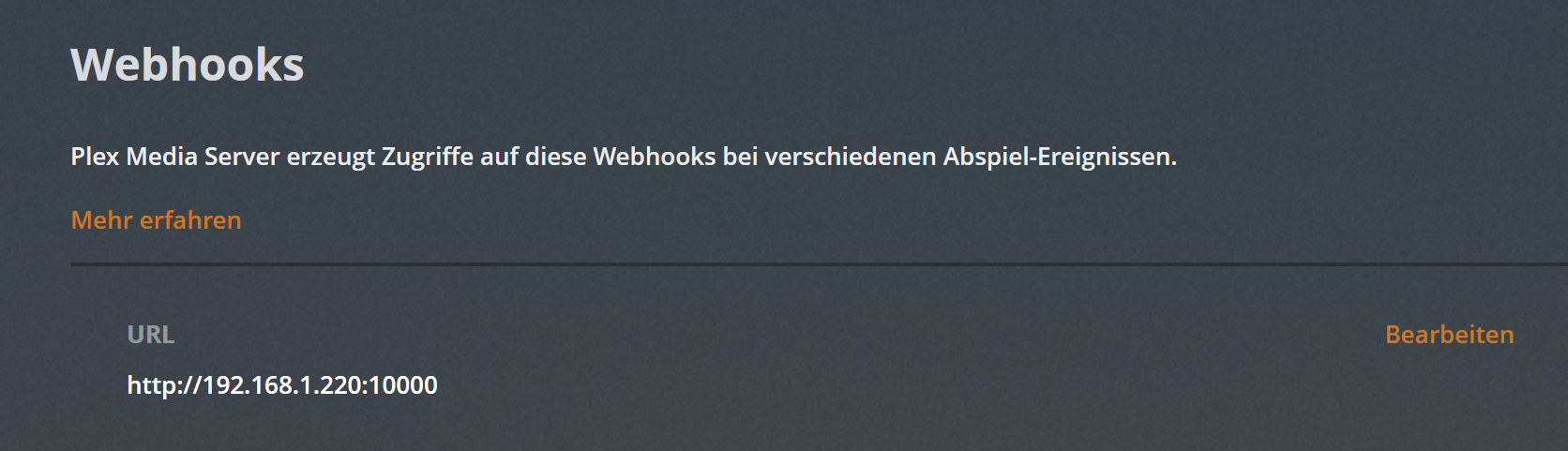
Webhooks wurde aktiviert und folgendes hinzugefügt: http://192.168.1.220:10000
In den Einstellungen ist "Webhooks: Diese Funktion erlaubt deinem Server, Ereignisse an externe Dienste zu senden." ebenfalls aktiviert.
ioBroker
ioBroker läuft auf dem selben NAS, allerdings in einem Docker Container und hat daher eine andere IP: 192.168.1.220
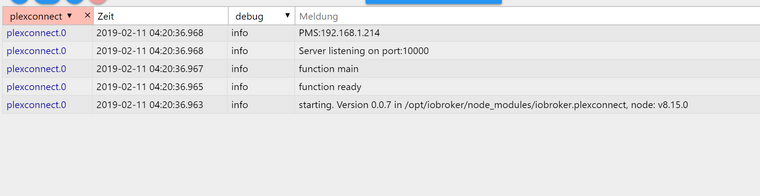
RAM Probleme habe ich sicher nicht.Die Ampel von Plexconnect ist Grün und die Logs zeigen mir keine Fehler an:
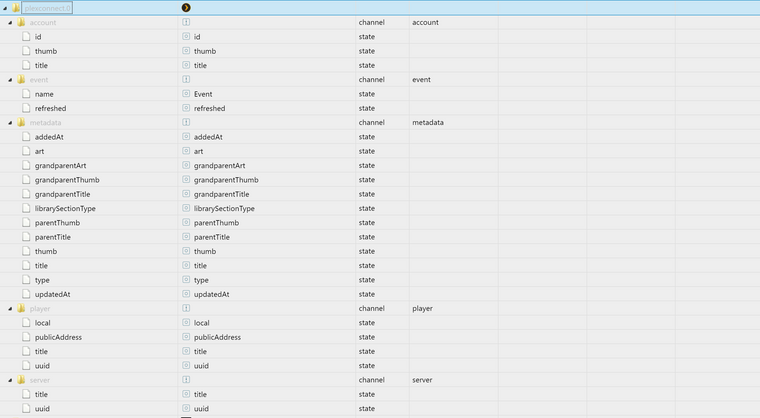
unter Objekte zeigt mir Plexconnect aber keine Werte an:

Hey! Du scheinst an dieser Unterhaltung interessiert zu sein, hast aber noch kein Konto.
Hast du es satt, bei jedem Besuch durch die gleichen Beiträge zu scrollen? Wenn du dich für ein Konto anmeldest, kommst du immer genau dorthin zurück, wo du zuvor warst, und kannst dich über neue Antworten benachrichtigen lassen (entweder per E-Mail oder Push-Benachrichtigung). Du kannst auch Lesezeichen speichern und Beiträge positiv bewerten, um anderen Community-Mitgliedern deine Wertschätzung zu zeigen.
Mit deinem Input könnte dieser Beitrag noch besser werden 💗
Registrieren AnmeldenSupport us
274
Online33.0k
Benutzer83.7k
Themen1.3m
Beiträge