Skip to content
  • Home
  • Aktuell
  • Tags
  • 0 Ungelesen 0
  • Kategorien
  • Unreplied
  • Beliebt
  • GitHub
  • Docu
  • Hilfe
Skins
  • Light
  • Brite
  • Cerulean
  • Cosmo
  • Flatly
  • Journal
  • Litera
  • Lumen
  • Lux
  • Materia
  • Minty
  • Morph
  • Pulse
  • Sandstone
  • Simplex
  • Sketchy
  • Spacelab
  • United
  • Yeti
  • Zephyr
  • Dark
  • Cyborg
  • Darkly
  • Quartz
  • Slate
  • Solar
  • Superhero
  • Vapor

  • Standard: (Kein Skin)
  • Kein Skin
Einklappen
ioBroker Logo

Community Forum

donate donate
  1. ioBroker Community Home
  2. Deutsch
  3. Tester
  4. [Aufruf] Plex connect testen
NEWS

  • UPDATE 31.10.: Amazon Alexa - ioBroker Skill läuft aus ?
    apollon77A
    apollon77
    48
    3
    8.8k

  • Monatsrückblick – September 2025
    BluefoxB
    Bluefox
    13
    1
    2.2k

  • Neues Video "KI im Smart Home" - ioBroker plus n8n
    BluefoxB
    Bluefox
    16
    1
    3.2k

[Aufruf] Plex connect testen

Geplant Angeheftet Gesperrt Verschoben Tester
66 Beiträge 11 Kommentatoren 12.6k Aufrufe 5 Watching
  • Älteste zuerst
  • Neuste zuerst
  • Meiste Stimmen
Antworten
  • In einem neuen Thema antworten
Anmelden zum Antworten
Dieses Thema wurde gelöscht. Nur Nutzer mit entsprechenden Rechten können es sehen.
  • X Offline
    X Offline
    x-ess
    schrieb am zuletzt editiert von
    #41

    Super danke…

    Kann mann das mitt einem skript blockly programieren das mit dem licht, oder kann mann auch gerade im iobroker vis damit arbeiten.

    1 Antwort Letzte Antwort
    0
    • E Offline
      E Offline
      el_malto
      schrieb am zuletzt editiert von
      #42

      Du kannst damit alles machen was du willst.

      Mit Blockly kannst du ein Skript machen das z.B. deine Beleuchtung geschaltet wird oder irgendeine Szene die alle steuert.

      In der VIS kannst du das natürlich auch alles rein packen. Ebenso kannst du dir da anzeigen lassen was gerade gespielt wird in so.

      Dafür ist ioBroker ja da. Du kannst da deine Fantasien freien lauf lassen.

      1 Antwort Letzte Antwort
      0
      • X Offline
        X Offline
        x-ess
        schrieb am zuletzt editiert von
        #43

        Danke für deine Antwort, probiere ich gleich aus!

        Bin noch nicht der profi was blockly und skripe anbelangt.

        Versuche es eimal welche blöcke ich nehmen muss!

        1 Antwort Letzte Antwort
        0
        • E Offline
          E Offline
          el_malto
          schrieb am zuletzt editiert von
          #44

          Einfach hier im Forum lesen oder ein paar Youtube Videos angucken, dann verstehst du das Grundprinzip und wie Blockly funktioniert eigentlich ganz schnell.

          Dann einfach ein bisschen über den Tellerrand hinaus denken und du wirst sehen was man damit tolles machen kann ;)

          1 Antwort Letzte Antwort
          0
          • X Offline
            X Offline
            x-ess
            schrieb am zuletzt editiert von
            #45

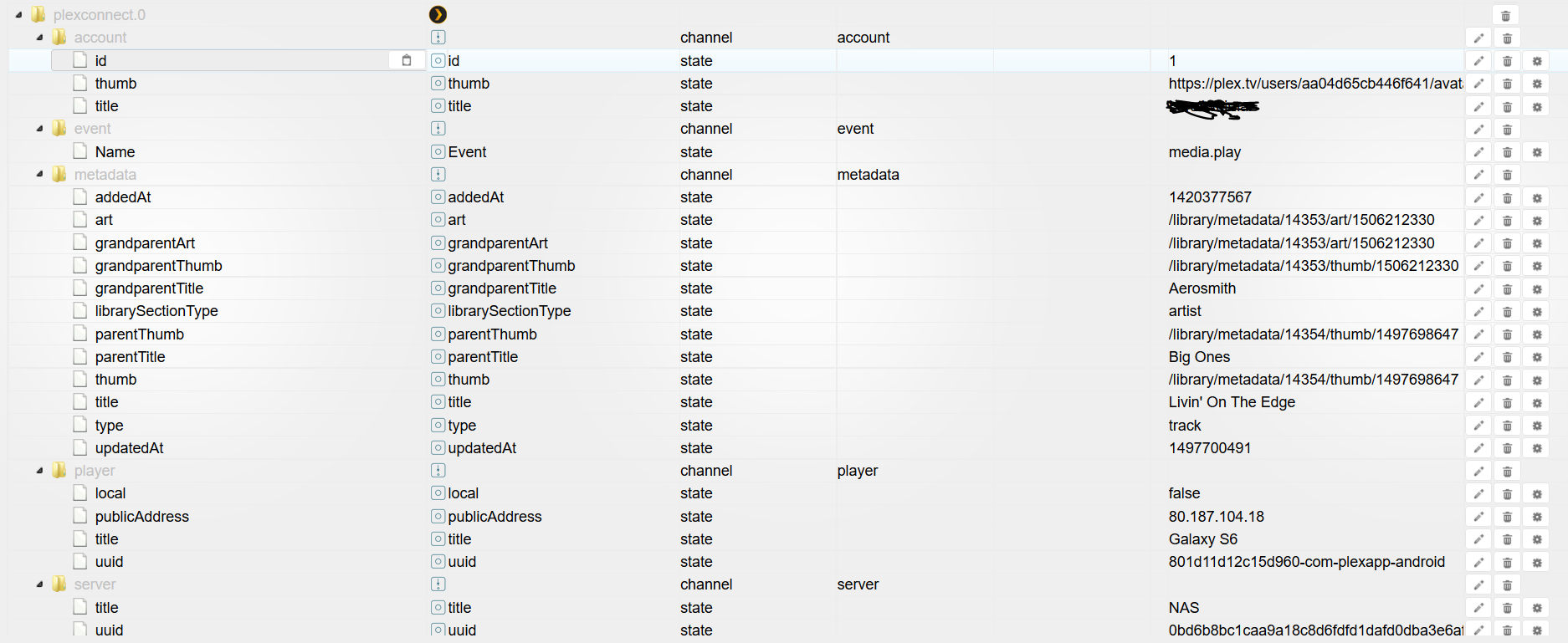
            Wie kann ich die einzelne werte lesen bei plex.connect event name?

            Media.play und media.pause und media.resume.

            Mann kann ja nicht mit true oder fals.

            Wo kann ich die werte teilen oder so?

            Ich möchte ja wenn stop ist das licht einschalten und bei play einschalten.

            Hatt mir jemand ein beispiel? Das ich weis wo anfangen?

            Besten dank für die zeit und geduld.

            1 Antwort Letzte Antwort
            0
            • E Offline
              E Offline
              el_malto
              schrieb am zuletzt editiert von
              #46

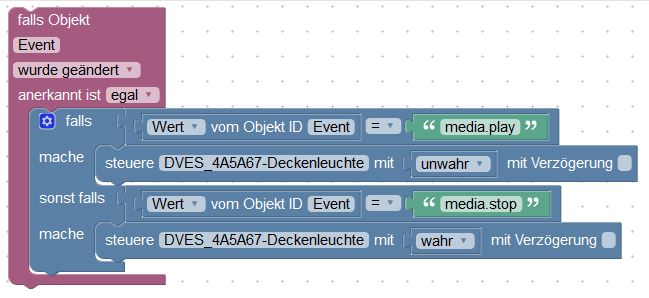
              Hier mal ein Beispiel wie sowas aussehen könnte.
              9731_beispiel.jpg

              1 Antwort Letzte Antwort
              0
              • X Offline
                X Offline
                x-ess
                schrieb am zuletzt editiert von
                #47

                Ach super ist ja logisch.

                Habe es immer mit den text blöcken versucht. :roll:

                So geht es ja viel eifacher.

                Ich danke dir recht herzlich für die info.

                1 Antwort Letzte Antwort
                0
                • E Offline
                  E Offline
                  el_malto
                  schrieb am zuletzt editiert von
                  #48

                  Ja ist recht simple. Wenn man sich erstmal ein bisschen mit Blocky beschäftigt hat, hat man es schnell raus.

                  1 Antwort Letzte Antwort
                  0
                  • X Offline
                    X Offline
                    x-ess
                    schrieb am zuletzt editiert von
                    #49

                    Ja du hast recht..

                    Bis man di logik versteht und dan macht es spass.

                    Danke nochmal.

                    1 Antwort Letzte Antwort
                    0
                    • X Offline
                      X Offline
                      x-ess
                      schrieb am zuletzt editiert von
                      #50

                      Hallo Zusammen

                      Sorry wenn ich nochmal schreibe.

                      Plex licht dimmem läuft super danke nochmals dafür.

                      Aber was ich noch nicht ganz verstehe ist, wenn ich den server wo plex läuft ausschalte, und z.B am nächsten tag wider einschalte, aktualisiert iobroker nicht und es bleib das datum von gestern.

                      Wenn ich im webhook die ip erneuere funktioniert es wider.

                      Ist das normal, oder übersehe ich wider etwas..

                      Weis da jemand rat?

                      Lg und besten dank

                      1 Antwort Letzte Antwort
                      0
                      • EisbaeeerE Offline
                        EisbaeeerE Offline
                        Eisbaeeer
                        Developer
                        schrieb am zuletzt editiert von
                        #51

                        Erstmal hab ich keine Idee, da mein plex 24x7 läuft. Kannst du mal den debug Modus vom Adapter einschalten und die Logs Posten? An besten mit Filter, sodass nur die Adapter Logs dabei sind.

                        Gruß

                        Gesendet von meinem SM-G950F mit Tapatalk

                        Kein support per PM. Bitte im Forum Fragen stellen!

                        1 Antwort Letzte Antwort
                        0
                        • X Offline
                          X Offline
                          x-ess
                          schrieb am zuletzt editiert von
                          #52

                          Ist das richtig so?

                          undefined2019-02-04 19:57:19.365 - debug: plexconnect.0 redis pmessage io.*.logging io.system.adapter.admin.0.logging {"val":false,"ack":true,"ts":1549306639364,"q":0,"from":"system.adapter.admin.0","lc":1549306639364}

                          2019-02-04 19:57:19.366 - debug: plexconnect.0 system.adapter.admin.0: logging false

                          2019-02-04 19:57:24.328 - debug: plexconnect.0 redis pmessage io.*.logging io.system.adapter.admin.0.logging {"val":true,"ack":true,"ts":1549306644322,"q":0,"from":"system.adapter.admin.0","lc":1549306644322}

                          2019-02-04 19:57:24.329 - debug: plexconnect.0 system.adapter.admin.0: logging true

                          2019-02-04 19:58:31.599 - debug: plexconnect.0 redis pmessage io.*.logging io.system.adapter.admin.0.logging {"val":false,"ack":true,"ts":1549306711598,"q":0,"from":"system.adapter.admin.0","lc":1549306711598}

                          2019-02-04 19:58:31.600 - debug: plexconnect.0 system.adapter.admin.0: logging false

                          2019-02-04 19:58:47.305 - debug: plexconnect.0 redis pmessage io.*.logging io.system.adapter.admin.0.logging {"val":true,"ack":true,"ts":1549306727301,"q":0,"from":"system.adapter.admin.0","lc":1549306727301}

                          2019-02-04 19:58:47.306 - debug: plexconnect.0 system.adapter.admin.0: logging true

                          2019-02-04 19:59:41.876 - debug: plexconnect.0 redis pmessage io.*.logging io.system.adapter.admin.0.logging {"val":false,"ack":true,"ts":1549306781872,"q":0,"from":"system.adapter.admin.0","lc":1549306781872}

                          2019-02-04 19:59:41.878 - debug: plexconnect.0 system.adapter.admin.0: logging false

                          2019-02-04 20:02:22.883 - debug: plexconnect.0 redis pmessage io.*.logging io.system.adapter.admin.0.logging {"val":true,"ack":true,"ts":1549306942876,"q":0,"from":"system.adapter.admin.0","lc":1549306942876}

                          2019-02-04 20:02:22.884 - debug: plexconnect.0 system.adapter.admin.0: logging true

                          sorry bin noch nicht der Profi auf dem Gebiet..

                          1 Antwort Letzte Antwort
                          0
                          • EisbaeeerE Offline
                            EisbaeeerE Offline
                            Eisbaeeer
                            Developer
                            schrieb am zuletzt editiert von
                            #53

                            Hallo x-ess

                            Kein Problem. Den Adapter setzt du wie hier beschrieben auf Debug: viewtopic.php?p=135414#p135414

                            Ersetzte die Suche mit plex, dann sollte da was sinnvolles rauskommen.

                            Dann bitte hier posten, aber als "Code" oder "Spoiler", dann wird das hier lesbar.

                            Danke.

                            Kein support per PM. Bitte im Forum Fragen stellen!

                            1 Antwort Letzte Antwort
                            0
                            • X Offline
                              X Offline
                              x-ess
                              schrieb am zuletzt editiert von
                              #54
                              2019-02-05 19:00:31.099 - debug: plexconnect.0 objectDB connected
                              2019-02-05 19:00:31.177 - debug: plexconnect.0 statesDB connected
                              2019-02-05 19:00:31.190 - info: plexconnect.0 States connected to redis: 127.0.0.1:6379
                              2019-02-05 19:00:32.094 - info: plexconnect.0 starting. Version 0.0.7 in /opt/iobroker/node_modules/iobroker.plexconnect, node: v8.15.0
                              2019-02-05 19:00:32.105 - info: plexconnect.0 function ready
                              2019-02-05 19:00:32.139 - info: plexconnect.0 function main
                              2019-02-05 19:00:32.143 - info: plexconnect.0 Server listening on port:10000
                              2019-02-05 19:00:32.144 - info: plexconnect.0 PMS:192.168.1.206
                              2019-02-05 19:00:50.376 - debug: plexconnect.0 redis pmessage io.*.logging io.system.adapter.admin.0.logging {"val":true,"ack":true,"ts":1549389650346,"q":0,"from":"system.adapter.admin.0","lc":1549389650346}
                              2019-02-05 19:00:50.382 - debug: plexconnect.0 system.adapter.admin.0: logging true
                              2019-02-05 19:02:08.237 - debug: plexconnect.0 redis pmessage io.*.logging io.system.adapter.admin.0.logging {"val":false,"ack":true,"ts":1549389728235,"q":0,"from":"system.adapter.admin.0","lc":1549389728235}
                              2019-02-05 19:02:08.238 - debug: plexconnect.0 system.adapter.admin.0: logging false
                              2019-02-05 19:03:29.305 - debug: plexconnect.0 redis pmessage io.*.logging io.system.adapter.admin.0.logging {"val":true,"ack":true,"ts":1549389809303,"q":0,"from":"system.adapter.admin.0","lc":1549389809303}
                              2019-02-05 19:03:29.306 - debug: plexconnect.0 system.adapter.admin.0: logging true
                              2019-02-05 19:04:57.887 - debug: plexconnect.0 redis pmessage io.*.logging io.system.adapter.admin.0.logging {"val":false,"ack":true,"ts":1549389897884,"q":0,"from":"system.adapter.admin.0","lc":1549389897884}
                              2019-02-05 19:04:57.889 - debug: plexconnect.0 system.adapter.admin.0: logging false
                              2019-02-05 19:04:59.143 - info: host.ioBroker-RasPi object change system.adapter.plexconnect.0
                              2019-02-05 19:04:59.147 - info: host.ioBroker-RasPi stopInstance system.adapter.plexconnect.0
                              2019-02-05 19:04:59.148 - info: host.ioBroker-RasPi stopInstance system.adapter.plexconnect.0 killing pid 898
                              2019-02-05 19:04:59.679 - info: host.ioBroker-RasPi instance system.adapter.plexconnect.0 terminated with code 0 (OK)
                              2019-02-05 19:05:01.674 - info: host.ioBroker-RasPi instance system.adapter.plexconnect.0 started with pid 1187
                              2019-02-05 19:05:04.918 - info: plexconnect.0 States connected to redis: 127.0.0.1:6379
                              2019-02-05 19:05:05.234 - info: plexconnect.0 starting. Version 0.0.7 in /opt/iobroker/node_modules/iobroker.plexconnect, node: v8.15.0
                              2019-02-05 19:05:05.252 - info: plexconnect.0 function ready
                              2019-02-05 19:05:05.274 - info: plexconnect.0 function main
                              2019-02-05 19:05:05.279 - info: plexconnect.0 Server listening on port:10000
                              2019-02-05 19:05:05.280 - info: plexconnect.0 PMS:192.168.1.206
                              2019-02-05 19:05:43.512 - info: host.ioBroker-RasPi object change system.adapter.plexconnect.0
                              2019-02-05 19:05:43.513 - info: host.ioBroker-RasPi stopInstance system.adapter.plexconnect.0
                              2019-02-05 19:05:43.514 - info: host.ioBroker-RasPi stopInstance system.adapter.plexconnect.0 killing pid 1187
                              2019-02-05 19:05:44.045 - info: host.ioBroker-RasPi instance system.adapter.plexconnect.0 terminated with code 0 (OK)
                              2019-02-05 19:05:46.039 - info: host.ioBroker-RasPi instance system.adapter.plexconnect.0 started with pid 1254
                              2019-02-05 19:05:49.403 - debug: plexconnect.0 objectDB connected
                              2019-02-05 19:05:49.486 - debug: plexconnect.0 statesDB connected
                              2019-02-05 19:05:49.502 - info: plexconnect.0 States connected to redis: 127.0.0.1:6379
                              2019-02-05 19:05:49.822 - info: plexconnect.0 starting. Version 0.0.7 in /opt/iobroker/node_modules/iobroker.plexconnect, node: v8.15.0
                              2019-02-05 19:05:49.834 - info: plexconnect.0 function ready
                              2019-02-05 19:05:49.864 - info: plexconnect.0 function main
                              2019-02-05 19:05:49.869 - info: plexconnect.0 Server listening on port:10000
                              2019-02-05 19:05:49.870 - info: plexconnect.0 PMS:192.168.1.206
                              
                              1 Antwort Letzte Antwort
                              0
                              • X Offline
                                X Offline
                                x-ess
                                schrieb am zuletzt editiert von
                                #55
                                2019-02-05 19:00:31.099 - debug: plexconnect.0 objectDB connected
                                2019-02-05 19:00:31.177 - debug: plexconnect.0 statesDB connected
                                2019-02-05 19:00:31.190 - info: plexconnect.0 States connected to redis: 127.0.0.1:6379
                                2019-02-05 19:00:32.094 - info: plexconnect.0 starting. Version 0.0.7 in /opt/iobroker/node_modules/iobroker.plexconnect, node: v8.15.0
                                2019-02-05 19:00:32.105 - info: plexconnect.0 function ready
                                2019-02-05 19:00:32.139 - info: plexconnect.0 function main
                                2019-02-05 19:00:32.143 - info: plexconnect.0 Server listening on port:10000
                                2019-02-05 19:00:32.144 - info: plexconnect.0 PMS:192.168.1.206
                                2019-02-05 19:00:50.376 - debug: plexconnect.0 redis pmessage io.*.logging io.system.adapter.admin.0.logging {"val":true,"ack":true,"ts":1549389650346,"q":0,"from":"system.adapter.admin.0","lc":1549389650346}
                                2019-02-05 19:00:50.382 - debug: plexconnect.0 system.adapter.admin.0: logging true
                                2019-02-05 19:02:08.237 - debug: plexconnect.0 redis pmessage io.*.logging io.system.adapter.admin.0.logging {"val":false,"ack":true,"ts":1549389728235,"q":0,"from":"system.adapter.admin.0","lc":1549389728235}
                                2019-02-05 19:02:08.238 - debug: plexconnect.0 system.adapter.admin.0: logging false
                                2019-02-05 19:03:29.305 - debug: plexconnect.0 redis pmessage io.*.logging io.system.adapter.admin.0.logging {"val":true,"ack":true,"ts":1549389809303,"q":0,"from":"system.adapter.admin.0","lc":1549389809303}
                                2019-02-05 19:03:29.306 - debug: plexconnect.0 system.adapter.admin.0: logging true
                                2019-02-05 19:04:57.887 - debug: plexconnect.0 redis pmessage io.*.logging io.system.adapter.admin.0.logging {"val":false,"ack":true,"ts":1549389897884,"q":0,"from":"system.adapter.admin.0","lc":1549389897884}
                                2019-02-05 19:04:57.889 - debug: plexconnect.0 system.adapter.admin.0: logging false
                                2019-02-05 19:04:59.143 - info: host.ioBroker-RasPi object change system.adapter.plexconnect.0
                                2019-02-05 19:04:59.147 - info: host.ioBroker-RasPi stopInstance system.adapter.plexconnect.0
                                2019-02-05 19:04:59.148 - info: host.ioBroker-RasPi stopInstance system.adapter.plexconnect.0 killing pid 898
                                2019-02-05 19:04:59.679 - info: host.ioBroker-RasPi instance system.adapter.plexconnect.0 terminated with code 0 (OK)
                                2019-02-05 19:05:01.674 - info: host.ioBroker-RasPi instance system.adapter.plexconnect.0 started with pid 1187
                                2019-02-05 19:05:04.918 - info: plexconnect.0 States connected to redis: 127.0.0.1:6379
                                2019-02-05 19:05:05.234 - info: plexconnect.0 starting. Version 0.0.7 in /opt/iobroker/node_modules/iobroker.plexconnect, node: v8.15.0
                                2019-02-05 19:05:05.252 - info: plexconnect.0 function ready
                                2019-02-05 19:05:05.274 - info: plexconnect.0 function main
                                2019-02-05 19:05:05.279 - info: plexconnect.0 Server listening on port:10000
                                2019-02-05 19:05:05.280 - info: plexconnect.0 PMS:192.168.1.206
                                2019-02-05 19:05:43.512 - info: host.ioBroker-RasPi object change system.adapter.plexconnect.0
                                2019-02-05 19:05:43.513 - info: host.ioBroker-RasPi stopInstance system.adapter.plexconnect.0
                                2019-02-05 19:05:43.514 - info: host.ioBroker-RasPi stopInstance system.adapter.plexconnect.0 killing pid 1187
                                2019-02-05 19:05:44.045 - info: host.ioBroker-RasPi instance system.adapter.plexconnect.0 terminated with code 0 (OK)
                                2019-02-05 19:05:46.039 - info: host.ioBroker-RasPi instance system.adapter.plexconnect.0 started with pid 1254
                                2019-02-05 19:05:49.403 - debug: plexconnect.0 objectDB connected
                                2019-02-05 19:05:49.486 - debug: plexconnect.0 statesDB connected
                                2019-02-05 19:05:49.502 - info: plexconnect.0 States connected to redis: 127.0.0.1:6379
                                2019-02-05 19:05:49.822 - info: plexconnect.0 starting. Version 0.0.7 in /opt/iobroker/node_modules/iobroker.plexconnect, node: v8.15.0
                                2019-02-05 19:05:49.834 - info: plexconnect.0 function ready
                                2019-02-05 19:05:49.864 - info: plexconnect.0 function main
                                2019-02-05 19:05:49.869 - info: plexconnect.0 Server listening on port:10000
                                2019-02-05 19:05:49.870 - info: plexconnect.0 PMS:192.168.1.206
                                2019-02-05 19:19:58.231 - debug: plexconnect.0 redis pmessage io.*.logging io.system.adapter.admin.0.logging {"val":false,"ack":true,"ts":1549390798229,"q":0,"from":"system.adapter.admin.0","lc":1549390798229}
                                2019-02-05 19:19:58.238 - debug: plexconnect.0 system.adapter.admin.0: logging false
                                2019-02-05 19:20:08.196 - debug: plexconnect.0 redis pmessage io.*.logging io.system.adapter.admin.0.logging {"val":true,"ack":true,"ts":1549390808194,"q":0,"from":"system.adapter.admin.0","lc":1549390808194}
                                2019-02-05 19:20:08.197 - debug: plexconnect.0 system.adapter.admin.0: logging true
                                
                                1 Antwort Letzte Antwort
                                0
                                • EisbaeeerE Offline
                                  EisbaeeerE Offline
                                  Eisbaeeer
                                  Developer
                                  schrieb am zuletzt editiert von
                                  #56

                                  Hmm, dein Adapter startet immer wieder neu. Oder hast du das angestoßen?

                                  Kann es sein, dass du in das RAM Problem läufst?

                                  Dein iobroker läuft auf einem RPi. Beobachte mal bitte deinen RAM.

                                  Es läuft gerade eine Umstellung von iobroker, mit der die Adapter keinen separaten Prozess mehr starten, also weniger RAM benötigen. Nachteil ist aber, dass wenn ein Adapter ein Problem hat, es alle anderen mit auf die Bretter zieht.

                                  Schau mal mit top auf dem rpi, wie der RAM ausgelastet ist.

                                  Grüße Eisbaeeer
                                  Kein support per PM. Bitte im Forum Fragen stellen!

                                  1 Antwort Letzte Antwort
                                  0
                                  • X Offline
                                    X Offline
                                    x-ess
                                    schrieb am zuletzt editiert von
                                    #57

                                    Danke für Deine Antwort.

                                    so weit ich weis stoße ich nichts an.

                                    Habe das mit dem Top probiert, aber für mich sieht das ok aus.

                                    1 Antwort Letzte Antwort
                                    0
                                    • X Offline
                                      X Offline
                                      x-ess
                                      schrieb am zuletzt editiert von
                                      #58

                                      Wenn ich die IP Adresse im plex webhooks neu speichere funktioniert es sofort.

                                      1 Antwort Letzte Antwort
                                      0
                                      • EisbaeeerE Offline
                                        EisbaeeerE Offline
                                        Eisbaeeer
                                        Developer
                                        schrieb am zuletzt editiert von
                                        #59

                                        Dann wird die Socket Verbindung nicht wieder hergestellt. Ich schau mir das beim nächsten Update an.

                                        Gruß Eisbaeeer

                                        Gesendet von meinem SM-G950F mit Tapatalk

                                        Kein support per PM. Bitte im Forum Fragen stellen!

                                        1 Antwort Letzte Antwort
                                        0
                                        • X Offline
                                          X Offline
                                          x-ess
                                          schrieb am zuletzt editiert von
                                          #60

                                          Vielen herzlichen dank.

                                          Danke für deine mühe.

                                          Lg x-ess

                                          1 Antwort Letzte Antwort
                                          0
                                          Antworten
                                          • In einem neuen Thema antworten
                                          Anmelden zum Antworten
                                          • Älteste zuerst
                                          • Neuste zuerst
                                          • Meiste Stimmen


                                          Support us

                                          ioBroker
                                          Community Adapters
                                          Donate

                                          432

                                          Online

                                          32.4k

                                          Benutzer

                                          81.5k

                                          Themen

                                          1.3m

                                          Beiträge
                                          Community
                                          Impressum | Datenschutz-Bestimmungen | Nutzungsbedingungen | Einwilligungseinstellungen
                                          ioBroker Community 2014-2025
                                          logo
                                          • Anmelden

                                          • Du hast noch kein Konto? Registrieren

                                          • Anmelden oder registrieren, um zu suchen
                                          • Erster Beitrag
                                            Letzter Beitrag
                                          0
                                          • Home
                                          • Aktuell
                                          • Tags
                                          • Ungelesen 0
                                          • Kategorien
                                          • Unreplied
                                          • Beliebt
                                          • GitHub
                                          • Docu
                                          • Hilfe