



Skip to content
  • Home
  • Recent
  • Tags
  • 0 Unread 0
  • Categories
  • Unreplied
  • Popular
  • GitHub
  • Docu
  • Hilfe
Skins
  • Light
  • Brite
  • Cerulean
  • Cosmo
  • Flatly
  • Journal
  • Litera
  • Lumen
  • Lux
  • Materia
  • Minty
  • Morph
  • Pulse
  • Sandstone
  • Simplex
  • Sketchy
  • Spacelab
  • United
  • Yeti
  • Zephyr
  • Dark
  • Cyborg
  • Darkly
  • Quartz
  • Slate
  • Solar
  • Superhero
  • Vapor

  • Default (No Skin)
  • No Skin
Collapse
ioBroker Logo

Community Forum

donate donate
  1. ioBroker Community Home
  2. Deutsch
  3. Einsteigerfragen
  4. [gelöst] Datenpunkt mit base64 in Bilddatei schreiben

NEWS

  • Weihnachtsangebot 2025! 🎄
    BluefoxB
    Bluefox
    12
    1
    333

  • UPDATE 31.10.: Amazon Alexa - ioBroker Skill läuft aus ?
    apollon77A
    apollon77
    48
    3
    8.9k

  • Monatsrückblick – September 2025
    BluefoxB
    Bluefox
    14
    1
    2.3k

[gelöst] Datenpunkt mit base64 in Bilddatei schreiben

Scheduled Pinned Locked Moved Einsteigerfragen
15 Posts 3 Posters 674 Views 3 Watching
  • Oldest to Newest
  • Newest to Oldest
  • Most Votes
Reply
  • Reply as topic
Log in to reply
This topic has been deleted. Only users with topic management privileges can see it.
  • A accessburn

    Ich google mir de Wolf, weiß denn jemand wie das geht?

    Ich möchte einfach nur den Datenpunkt, der ein Bild in base64 enthält in eine Bilddatei schreiben.

    Grüße,
    Toby

    OliverIOO Offline
    OliverIOO Offline
    OliverIO
    wrote on last edited by OliverIO
    #2

    @accessburn

    es fehlen leider ein paar informationen.
    im browser? auf dem server?
    welches bildformat?

    hier mal ein beispie für png und node

    var base64Data = base64bild.replace(/^data:image\/png;base64,/, "");
    
    require("fs").writeFile("out.png", base64Data, 'base64', function(err) {
      console.log(err);
    });
    

    Meine Adapter und Widgets
    TVProgram, SqueezeboxRPC, OpenLiga, RSSFeed, MyTime,, pi-hole2, vis-json-template, skiinfo, vis-mapwidgets, vis-2-widgets-rssfeed
    Links im Profil

    A 1 Reply Last reply
    0
    • OliverIOO OliverIO

      @accessburn

      es fehlen leider ein paar informationen.
      im browser? auf dem server?
      welches bildformat?

      hier mal ein beispie für png und node

      var base64Data = base64bild.replace(/^data:image\/png;base64,/, "");
      
      require("fs").writeFile("out.png", base64Data, 'base64', function(err) {
        console.log(err);
      });
      
      A Offline
      A Offline
      accessburn
      wrote on last edited by
      #3

      @oliverio Okay, sorry...

      Ich habe einen Datenpunkt mit einer Grafik als base64 und ich möchte ihn auf dem Server direkt speichern, also quasi unter userfiles...

      Und würde das als Blockly gehen?

      OliverIOO 1 Reply Last reply
      0
      • A accessburn

        @oliverio Okay, sorry...

        Ich habe einen Datenpunkt mit einer Grafik als base64 und ich möchte ihn auf dem Server direkt speichern, also quasi unter userfiles...

        Und würde das als Blockly gehen?

        OliverIOO Offline
        OliverIOO Offline
        OliverIO
        wrote on last edited by
        #4

        @accessburn

        von blockly hab ich keine ahnung.
        aber ich denke, das die formatangabe beim speichern der datei bei blockly direkt nicht enthalten ist.
        das muss man dann in einem funktionsblock als javascript eintragen

        Meine Adapter und Widgets
        TVProgram, SqueezeboxRPC, OpenLiga, RSSFeed, MyTime,, pi-hole2, vis-json-template, skiinfo, vis-mapwidgets, vis-2-widgets-rssfeed
        Links im Profil

        1 Reply Last reply
        0
        • A Offline
          A Offline
          accessburn
          wrote on last edited by
          #5

          Okay, ich komme null weiter...

          data:image/png;base64,iVBORw0KGgoAAAANSUhEUg...
          

          Das steht im Datenpunkt und ich möchte ein Script haben dass mir beim ändern des Datenpunkts, das Bild daraus auf das Laufwerk legt. Kann mir da jemand helfen?

          1 Reply Last reply
          0
          • OliverIOO Offline
            OliverIOO Offline
            OliverIO
            wrote on last edited by OliverIO
            #6

            @accessburn

            https://stackoverflow.com/questions/6926016/how-can-i-save-a-base64-encoded-image-to-disk

            let imgstr = getState("datepunktidmitbild");
            var base64Data = imgstr.rawBody.replace(/^data:image\/png;base64,/, "");
            require("fs").writeFile("out.png", base64Data, 'base64', function(err) {
              console.log(err);
            });
            

            Meine Adapter und Widgets
            TVProgram, SqueezeboxRPC, OpenLiga, RSSFeed, MyTime,, pi-hole2, vis-json-template, skiinfo, vis-mapwidgets, vis-2-widgets-rssfeed
            Links im Profil

            A 1 Reply Last reply
            0
            • OliverIOO OliverIO

              @accessburn

              https://stackoverflow.com/questions/6926016/how-can-i-save-a-base64-encoded-image-to-disk

              let imgstr = getState("datepunktidmitbild");
              var base64Data = imgstr.rawBody.replace(/^data:image\/png;base64,/, "");
              require("fs").writeFile("out.png", base64Data, 'base64', function(err) {
                console.log(err);
              });
              
              A Offline
              A Offline
              accessburn
              wrote on last edited by
              #7

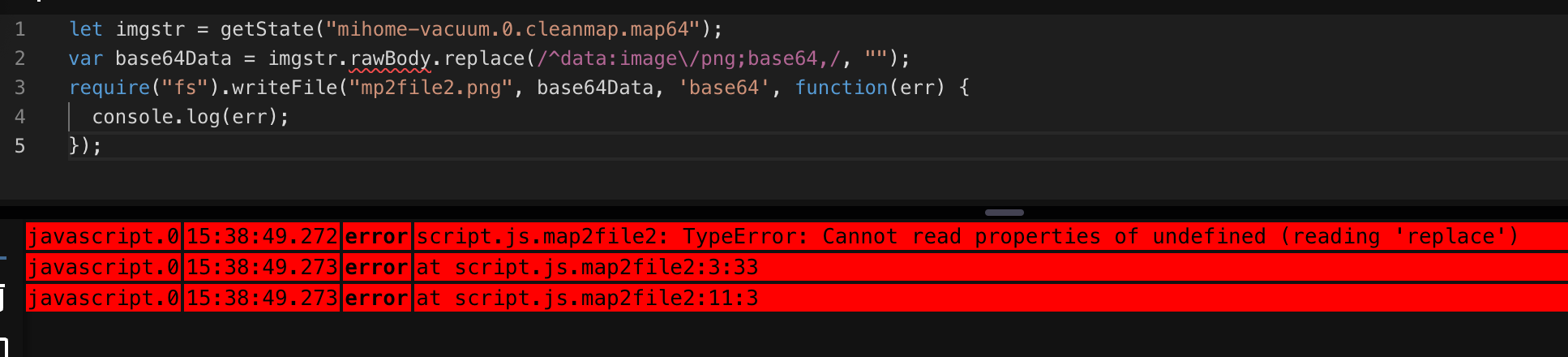
              Danke @oliverio , habe ich einfach mal kopiert und die werte angepasst.
              76938d8c-b342-4f18-97dc-7499596aea69-image.png

              haus-automatisierungH OliverIOO 2 Replies Last reply
              0
              • A accessburn

                Danke @oliverio , habe ich einfach mal kopiert und die werte angepasst.
                76938d8c-b342-4f18-97dc-7499596aea69-image.png

                haus-automatisierungH Offline
                haus-automatisierungH Offline
                haus-automatisierung
                Developer Most Active
                wrote on last edited by haus-automatisierung
                #8

                @accessburn

                const value = getState('mihome-vacuum.0.cleanmap.map64').val;
                const base64str = value.replace(/^data:image\/png;base64,/, '');
                const base64data = Buffer.from(base64str, 'base64');
                
                writeFile('0_userdata.0', '/cleanmap.png', base64data, (err) => {
                    if (!err) {
                        console.info('File written');
                    } else {
                        console.error(err);
                    }
                });
                

                🧑‍🎓 Autor des beliebten ioBroker-Master-Kurses
                🎥 Tutorials rund um das Thema DIY-Smart-Home: https://haus-automatisierung.com/
                📚 Meine inoffizielle ioBroker Dokumentation

                A 1 Reply Last reply
                0
                • haus-automatisierungH haus-automatisierung

                  @accessburn

                  const value = getState('mihome-vacuum.0.cleanmap.map64').val;
                  const base64str = value.replace(/^data:image\/png;base64,/, '');
                  const base64data = Buffer.from(base64str, 'base64');
                  
                  writeFile('0_userdata.0', '/cleanmap.png', base64data, (err) => {
                      if (!err) {
                          console.info('File written');
                      } else {
                          console.error(err);
                      }
                  });
                  
                  A Offline
                  A Offline
                  accessburn
                  wrote on last edited by
                  #9

                  @haus-automatisierung

                  on({ id: [].concat(['mihome-vacuum.0.cleanmap.map64']), change: 'ne' }, async (obj) => {
                  
                      const value = getState('mihome-vacuum.0.cleanmap.map64').val;
                      const base64str = value.replace(/^data:image\/png;base64,/, '');
                      const base64data = Buffer.from(base64str, 'base64');
                      
                      writeFile('0_userdata.0', '/cleanmap.png', base64data, (err) => {
                          if (!err) {
                              console.info('File written');
                          } else {
                              console.error(err);
                          }
                      });
                  
                    // console.error(getState('mihome-vacuum.0.cleanmap.map64').val);
                  });
                  

                  Vielen Dank, das klappte schon mal auf anhieb.
                  Macht das so Sinn mit dem "change"?

                  haus-automatisierungH 1 Reply Last reply
                  0
                  • A accessburn

                    @haus-automatisierung

                    on({ id: [].concat(['mihome-vacuum.0.cleanmap.map64']), change: 'ne' }, async (obj) => {
                    
                        const value = getState('mihome-vacuum.0.cleanmap.map64').val;
                        const base64str = value.replace(/^data:image\/png;base64,/, '');
                        const base64data = Buffer.from(base64str, 'base64');
                        
                        writeFile('0_userdata.0', '/cleanmap.png', base64data, (err) => {
                            if (!err) {
                                console.info('File written');
                            } else {
                                console.error(err);
                            }
                        });
                    
                      // console.error(getState('mihome-vacuum.0.cleanmap.map64').val);
                    });
                    

                    Vielen Dank, das klappte schon mal auf anhieb.
                    Macht das so Sinn mit dem "change"?

                    haus-automatisierungH Offline
                    haus-automatisierungH Offline
                    haus-automatisierung
                    Developer Most Active
                    wrote on last edited by haus-automatisierung
                    #10

                    @accessburn sagte in Datenpunkt mit base64 in Bilddatei schreiben:

                    Macht das so Sinn mit dem "change"?

                    Ja, wenn es nur eine ID ist, würde ich mir aber das Array sparen:

                    on({ id: 'mihome-vacuum.0.cleanmap.map64', change: 'ne' }, async (obj) => {
                    

                    Und Du kannst direkt mit dem Wert arbeiten (ohne den nochmal zu holen):

                    on({ id: 'mihome-vacuum.0.cleanmap.map64', change: 'ne' }, async (obj) => {
                        const value = obj.state.val;
                        const base64str = value.replace(/^data:image\/png;base64,/, '');
                        const base64data = Buffer.from(base64str, 'base64');
                        
                        writeFile('0_userdata.0', '/cleanmap.png', base64data, (err) => {
                            if (!err) {
                                console.info('File written');
                            } else {
                                console.error(err);
                            }
                        });
                    });
                    

                    🧑‍🎓 Autor des beliebten ioBroker-Master-Kurses
                    🎥 Tutorials rund um das Thema DIY-Smart-Home: https://haus-automatisierung.com/
                    📚 Meine inoffizielle ioBroker Dokumentation

                    A 1 Reply Last reply
                    0
                    • haus-automatisierungH haus-automatisierung

                      @accessburn sagte in Datenpunkt mit base64 in Bilddatei schreiben:

                      Macht das so Sinn mit dem "change"?

                      Ja, wenn es nur eine ID ist, würde ich mir aber das Array sparen:

                      on({ id: 'mihome-vacuum.0.cleanmap.map64', change: 'ne' }, async (obj) => {
                      

                      Und Du kannst direkt mit dem Wert arbeiten (ohne den nochmal zu holen):

                      on({ id: 'mihome-vacuum.0.cleanmap.map64', change: 'ne' }, async (obj) => {
                          const value = obj.state.val;
                          const base64str = value.replace(/^data:image\/png;base64,/, '');
                          const base64data = Buffer.from(base64str, 'base64');
                          
                          writeFile('0_userdata.0', '/cleanmap.png', base64data, (err) => {
                              if (!err) {
                                  console.info('File written');
                              } else {
                                  console.error(err);
                              }
                          });
                      });
                      
                      A Offline
                      A Offline
                      accessburn
                      wrote on last edited by
                      #11

                      @haus-automatisierung sagte in Datenpunkt mit base64 in Bilddatei schreiben:

                      n({ id: 'mihome-vacuum.0.cleanmap.map64', change: 'ne' }, async (obj) => {

                      Sehr cool. Danke! :hearts:
                      Diese Sprache beherrsche ich einfach nicht. Bin in PHP groß geworden ;-)

                      haus-automatisierungH 1 Reply Last reply
                      0
                      • A accessburn

                        @haus-automatisierung sagte in Datenpunkt mit base64 in Bilddatei schreiben:

                        n({ id: 'mihome-vacuum.0.cleanmap.map64', change: 'ne' }, async (obj) => {

                        Sehr cool. Danke! :hearts:
                        Diese Sprache beherrsche ich einfach nicht. Bin in PHP groß geworden ;-)

                        haus-automatisierungH Offline
                        haus-automatisierungH Offline
                        haus-automatisierung
                        Developer Most Active
                        wrote on last edited by
                        #12

                        @accessburn sagte in Datenpunkt mit base64 in Bilddatei schreiben:

                        Bin in PHP groß geworden

                        Ja, ich auch.

                        Gerade 2 Tage lang alle PHP-Klassen des Online-Shops auf PHP 8.3 und strict types umgestellt...

                        🧑‍🎓 Autor des beliebten ioBroker-Master-Kurses
                        🎥 Tutorials rund um das Thema DIY-Smart-Home: https://haus-automatisierung.com/
                        📚 Meine inoffizielle ioBroker Dokumentation

                        A 1 Reply Last reply
                        0
                        • haus-automatisierungH haus-automatisierung

                          @accessburn sagte in Datenpunkt mit base64 in Bilddatei schreiben:

                          Bin in PHP groß geworden

                          Ja, ich auch.

                          Gerade 2 Tage lang alle PHP-Klassen des Online-Shops auf PHP 8.3 und strict types umgestellt...

                          A Offline
                          A Offline
                          accessburn
                          wrote on last edited by
                          #13

                          @haus-automatisierung
                          Na das passt ja. :-)

                          Aber Frage, würde sich das mit Blockly umsetzen lassen?

                          haus-automatisierungH 1 Reply Last reply
                          0
                          • A accessburn

                            @haus-automatisierung
                            Na das passt ja. :-)

                            Aber Frage, würde sich das mit Blockly umsetzen lassen?

                            haus-automatisierungH Offline
                            haus-automatisierungH Offline
                            haus-automatisierung
                            Developer Most Active
                            wrote on last edited by
                            #14

                            @accessburn sagte in Datenpunkt mit base64 in Bilddatei schreiben:

                            würde sich das mit Blockly umsetzen lassen?

                            Zu 90%, ja.

                            🧑‍🎓 Autor des beliebten ioBroker-Master-Kurses
                            🎥 Tutorials rund um das Thema DIY-Smart-Home: https://haus-automatisierung.com/
                            📚 Meine inoffizielle ioBroker Dokumentation

                            1 Reply Last reply
                            0
                            • A accessburn

                              Danke @oliverio , habe ich einfach mal kopiert und die werte angepasst.
                              76938d8c-b342-4f18-97dc-7499596aea69-image.png

                              OliverIOO Offline
                              OliverIOO Offline
                              OliverIO
                              wrote on last edited by
                              #15

                              @accessburn

                              ahja das rawbody hatte ich nicht entfernt

                              Meine Adapter und Widgets
                              TVProgram, SqueezeboxRPC, OpenLiga, RSSFeed, MyTime,, pi-hole2, vis-json-template, skiinfo, vis-mapwidgets, vis-2-widgets-rssfeed
                              Links im Profil

                              1 Reply Last reply
                              0
                              Reply
                              • Reply as topic
                              Log in to reply
                              • Oldest to Newest
                              • Newest to Oldest
                              • Most Votes


                              Support us

                              ioBroker
                              Community Adapters
                              Donate

                              387

                              Online

                              32.5k

                              Users

                              81.6k

                              Topics

                              1.3m

                              Posts
                              Community
                              Impressum | Datenschutz-Bestimmungen | Nutzungsbedingungen | Einwilligungseinstellungen
                              ioBroker Community 2014-2025
                              logo
                              • Login

                              • Don't have an account? Register

                              • Login or register to search.
                              • First post
                                Last post
                              0
                              • Home
                              • Recent
                              • Tags
                              • Unread 0
                              • Categories
                              • Unreplied
                              • Popular
                              • GitHub
                              • Docu
                              • Hilfe
