
NEWS




IRobot Roomba Adapter
-
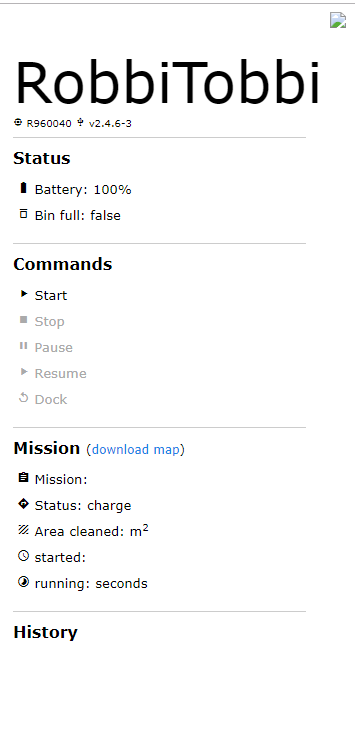
OK, das Webinterface ist wieder da, aber ich bekomme immer noch keine Karte :(
ioBroker auf Intel Core i3-5005U NUC und Windwos10 Pro
-
OK, das Webinterface ist wieder da, aber ich bekomme immer noch keine Karte :(
An alle, die Probleme mit
EPROTObzw.Secure Connection to Roomba failed!haben, die folgenden Optionen beheben den Fehler:var options = { port: 8883, clientId: user, rejectUnauthorized: false, protocolId: 'MQTT', protocolVersion: 4, ciphers: 'AES128-SHA256', clean: false, username: user, password: password }; -
An alle, die Probleme mit
EPROTObzw.Secure Connection to Roomba failed!haben, die folgenden Optionen beheben den Fehler:var options = { port: 8883, clientId: user, rejectUnauthorized: false, protocolId: 'MQTT', protocolVersion: 4, ciphers: 'AES128-SHA256', clean: false, username: user, password: password }; -
@Zefau
Es klappt soweit das er bei mir die verbingung aufbaut! Unter Objekte kann ich den iRobot starten, leider aber in der Web-Page nicht. Er schreibt auch keinen Namen hin, als ob der keine verbindung hat -.-@HerrStrich Liegt daran, dass noch nicht alle Einstellungen vom Roomba geladen sind. Dauert eine kurze Weile, dann sind diese nachgeladen und es sollte funktionieren.
EDIT: In den Adapter-Einstellungen eine refresh Zeit von 20 Sekunden eintragen, dann geht's schneller.
-
@HerrStrich Liegt daran, dass noch nicht alle Einstellungen vom Roomba geladen sind. Dauert eine kurze Weile, dann sind diese nachgeladen und es sollte funktionieren.
EDIT: In den Adapter-Einstellungen eine refresh Zeit von 20 Sekunden eintragen, dann geht's schneller.
-
Meine 980 gibt bei Problemen eine Sprachnachricht mit einer Fehler Nummer aus.
Ist diese Fehler Nummer irgendwo bei den Daten zu finden? Irgendwie finde ich da nichts passendeS.Wichtig ist mir, wenn ihr stecken bleibt das ich dort ein Ereignis bezüglich Informationen über Alexa oder Telegramm starten kann.
Vielleicht hat jemand ja eine Alternative.
Und natürlich herzlichen Dank für den Adapter :+1: :heart_eyes:
-
Meine 980 gibt bei Problemen eine Sprachnachricht mit einer Fehler Nummer aus.
Ist diese Fehler Nummer irgendwo bei den Daten zu finden? Irgendwie finde ich da nichts passendeS.Wichtig ist mir, wenn ihr stecken bleibt das ich dort ein Ereignis bezüglich Informationen über Alexa oder Telegramm starten kann.
Vielleicht hat jemand ja eine Alternative.
Und natürlich herzlichen Dank für den Adapter :+1: :heart_eyes:
@ctnnemo Die Sprachnachricht von Roomba selbst ist Roomba spezifisch (nicht Adapter-spezifisch). Was gibt er denn aus? Bei mir (auch 980) sagt er nach der Fehler Nummer auch den Fehler selbst an.
Auf Github findest du ein Skript, um die Karte über Telegram zu schicken, wenn die Mission beendet ist (siehe https://github.com/Zefau/ioBroker.roomba#send-map-via-telegram-when-mission-is-finished).
Du kannst den State
roomba.0.missions.current.errorüberwachen. Dieser geht auftrue, wenn es zu einem Fehler kommt. -
@Zefau - hast du evtl. nochmal in meine LOG Dateien geschaut, wo bei meiner Installation der Wurm drin sein kann?
@JB_Sullivan Leider sehr herausfordernd. :-D
Kannst du mal mit
node-gyp -vprüfen, welche Version du hast? Bei mir ist es die v5.0.3.
Ggf. nachinstallieren mitnpm install -g node-gypund den Python Pfad setzen (siehe https://github.com/nodejs/node-gyp#configuring-python-dependency). -
@Zefau sagte in IRobot Roomba Adapter:
node-gyp -v
Also bei mir zeigt er auch 5.0.3 an - Python Pfad guck ich mir gleich man an.
-
Also Python liegt hier - C:\ProgramData\Microsoft\Windows\Start Menu\Programs\Python 2.7
Aber dein Github Link sind Böhmische Dörfer für mich. Ich bin nicht so fit in sowas. Ich kann ganz gut Copy& Paste ;) aber was da auf Github geschrieben steht, bringe ich nicht zusammen.
ioBroker auf Intel Core i3-5005U NUC und Windwos10 Pro
-
Also Python liegt hier - C:\ProgramData\Microsoft\Windows\Start Menu\Programs\Python 2.7
Aber dein Github Link sind Böhmische Dörfer für mich. Ich bin nicht so fit in sowas. Ich kann ganz gut Copy& Paste ;) aber was da auf Github geschrieben steht, bringe ich nicht zusammen.
@JB_Sullivan Hast du Visual Studio manuell nachinstalliert (https://visualstudio.microsoft.com/pl/thank-you-downloading-visual-studio/?sku=Community)? Ist oben im Screenshot ja fehlgeschlagen?
-
Ja, hatte ich auch schon versucht - aber da kommt wieder die Meldung das es nicht installiert werden konnte.
[>                                            ] 0.0% (0 B/s)
Downloaded vs_BuildTools.exe. Saved to C:\Users\SmartHome\.windows-build-tools\vs_BuildTools.exe.

Starting installation...
Launched installers, now waiting for them to finish.
This will likely take some time - please be patient!

Status from the installers:
---------- Visual Studio Build Tools ----------
2019-08-17T16:37:34 : Verbose : [InstalledProductsProviderImpl]: Stream was closed
2019-08-17T16:37:34 : Verbose : [InstallerImpl]: Rpc connection was closed.
2019-08-17T16:37:34 : Verbose : [InstallerImpl]: Stream was closed
2019-08-17T16:37:34 : Verbose : [SetupUpdaterImpl]: Rpc connection was closed.
2019-08-17T16:37:34 : Verbose : [SetupUpdaterImpl]: Stream was closed
------------------- Python --------------------
Python 2.7.15 is already installed, not installing again.


Could not install Visual Studio Build Tools.
Please find more details in the log files, which can be found at
C:\Users\SmartHome\.windows-build-tools

Skipping configuration: No configuration for Python or Visual Studio Build Tools required.

All done!

+ windows-build-tools@5.2.2
updated 2 packages in 13.44s

C:\>
ioBroker auf Intel Core i3-5005U NUC und Windwos10 Pro
-
Ja, hatte ich auch schon versucht - aber da kommt wieder die Meldung das es nicht installiert werden konnte.
[> ] 0.0% (0 B/s) Downloaded vs_BuildTools.exe. Saved to C:\Users\SmartHome\.windows-build-tools\vs_BuildTools.exe. Starting installation... Launched installers, now waiting for them to finish. This will likely take some time - please be patient! Status from the installers: ---------- Visual Studio Build Tools ---------- 2019-08-17T16:37:34 : Verbose : [InstalledProductsProviderImpl]: Stream was closed 2019-08-17T16:37:34 : Verbose : [InstallerImpl]: Rpc connection was closed. 2019-08-17T16:37:34 : Verbose : [InstallerImpl]: Stream was closed 2019-08-17T16:37:34 : Verbose : [SetupUpdaterImpl]: Rpc connection was closed. 2019-08-17T16:37:34 : Verbose : [SetupUpdaterImpl]: Stream was closed ------------------- Python -------------------- Python 2.7.15 is already installed, not installing again. Could not install Visual Studio Build Tools. Please find more details in the log files, which can be found at C:\Users\SmartHome\.windows-build-tools Skipping configuration: No configuration for Python or Visual Studio Build Tools required. All done! + windows-build-tools@5.2.2 updated 2 packages in 13.44s C:\>@JB_Sullivan Einfach normal als .exe über die GUI installieren, oder hast du nur Shell Zugriff? Download: https://visualstudio.microsoft.com/pl/thank-you-downloading-visual-studio/?sku=Community
-
Ich habe es jetzt nochmal über die .exe angestoßen. Also drauf war es auf jeden Fall, denn es hat sich jetzt "nur" ein Update auf 15.5.15 gezogen.

AHA - sieht jetzt schonmal besser aus.
---------- Visual Studio Build Tools ----------
Successfully installed Visual Studio Build Tools.
------------------- Python --------------------
Python 2.7.15 is already installed, not installing again.

Now configuring the Visual Studio Build Tools..

All done!

+ windows-build-tools@5.2.2
updated 1 package in 22.454s

C:\>
:( Leider immer noch keine Karte ladbar .....
ioBroker auf Intel Core i3-5005U NUC und Windwos10 Pro
-
Ich habe es jetzt nochmal über die .exe angestoßen. Also drauf war es auf jeden Fall, denn es hat sich jetzt "nur" ein Update auf 15.5.15 gezogen.
AHA - sieht jetzt schonmal besser aus.
---------- Visual Studio Build Tools ----------
Successfully installed Visual Studio Build Tools.
------------------- Python --------------------
Python 2.7.15 is already installed, not installing again.

Now configuring the Visual Studio Build Tools..

All done!

+ windows-build-tools@5.2.2
updated 1 package in 22.454s

C:\>
:( Leider immer noch keine Karte ladbar .....
@JB_Sullivan sagte in IRobot Roomba Adapter:
Leider immer noch keine Karte ladbar .....
Ist ja alles nur eine Voraussetzung
canvaszu installieren. Also nochmalnpm install canvas@2.6.0 --unsafe-perm=true -
Leider immer noch einen Arsch voll Fehlermeldungen bei der Installation.
C:\>npm install canvas@2.6.0 --unsafe-perm=true

> canvas@2.6.0 install C:\node_modules\canvas
> node-pre-gyp install --fallback-to-build

node-pre-gyp WARN Using needle for node-pre-gyp https download
node-pre-gyp WARN Tried to download(404): https://github.com/node-gfx/node-canvas-prebuilt/releases/download/v2.6.0/canvas-v2.6.0-node-v64-win32-unknown-ia32.tar.gz
node-pre-gyp WARN Pre-built binaries not found for canvas@2.6.0 and node@10.16.0 (node-v64 ABI, unknown) (falling back to source compile with node-gyp)
gyp ERR! configure error
gyp ERR! stack Error: Can't find Python executable "python2.7", you can set the PYTHON env variable.
gyp ERR! stack     at PythonFinder.failNoPython (C:\Users\SmartHome\AppData\Roaming\npm\node_modules\npm\node_modules\node-gyp\lib\configure.js:484:19)
gyp ERR! stack     at PythonFinder.<anonymous> (C:\Users\SmartHome\AppData\Roaming\npm\node_modules\npm\node_modules\node-gyp\lib\configure.js:509:16)
gyp ERR! stack     at C:\Users\SmartHome\AppData\Roaming\npm\node_modules\npm\node_modules\graceful-fs\polyfills.js:282:31
gyp ERR! stack     at FSReqWrap.oncomplete (fs.js:153:21)
gyp ERR! System Windows_NT 10.0.17763
gyp ERR! command "C:\\Program Files\\nodejs\\node.exe" "C:\\Users\\SmartHome\\AppData\\Roaming\\npm\\node_modules\\npm\\node_modules\\node-gyp\\bin\\node-gyp.js" "configure" "--fallback-to-build" "--module=C:\\node_modules\\canvas\\build\\Release\\canvas.node" "--module_name=canvas" "--module_path=C:\\node_modules\\canvas\\build\\Release" "--napi_version=4" "--node_abi_napi=napi" "--napi_build_version=0" "--node_napi_label=node-v64" "--python=python2.7" "--msvs_version=2017"
gyp ERR! cwd C:\node_modules\canvas
gyp ERR! node -v v10.16.0
gyp ERR! node-gyp -v v3.8.0
gyp ERR! not ok
node-pre-gyp ERR! build error
node-pre-gyp ERR! stack Error: Failed to execute 'C:\Program Files\nodejs\node.exe C:\Users\SmartHome\AppData\Roaming\npm\node_modules\npm\node_modules\node-gyp\bin\node-gyp.js configure --fallback-to-build --module=C:\node_modules\canvas\build\Release\canvas.node --module_name=canvas --module_path=C:\node_modules\canvas\build\Release --napi_version=4 --node_abi_napi=napi --napi_build_version=0 --node_napi_label=node-v64 --python=python2.7 --msvs_version=2017' (1)
node-pre-gyp ERR! stack     at ChildProcess.<anonymous> (C:\node_modules\node-pre-gyp\lib\util\compile.js:83:29)
node-pre-gyp ERR! stack     at ChildProcess.emit (events.js:198:13)
node-pre-gyp ERR! stack     at maybeClose (internal/child_process.js:982:16)
node-pre-gyp ERR! stack     at Process.ChildProcess._handle.onexit (internal/child_process.js:259:5)
node-pre-gyp ERR! System Windows_NT 10.0.17763
node-pre-gyp ERR! command "C:\\Program Files\\nodejs\\node.exe" "C:\\node_modules\\node-pre-gyp\\bin\\node-pre-gyp" "install" "--fallback-to-build"
node-pre-gyp ERR! cwd C:\node_modules\canvas
node-pre-gyp ERR! node -v v10.16.0
node-pre-gyp ERR! node-pre-gyp -v v0.11.0
node-pre-gyp ERR! not ok
Failed to execute 'C:\Program Files\nodejs\node.exe C:\Users\SmartHome\AppData\Roaming\npm\node_modules\npm\node_modules\node-gyp\bin\node-gyp.js configure --fallback-to-build --module=C:\node_modules\canvas\build\Release\canvas.node --module_name=canvas --module_path=C:\node_modules\canvas\build\Release --napi_version=4 --node_abi_napi=napi --napi_build_version=0 --node_napi_label=node-v64 --python=python2.7 --msvs_version=2017' (1)
npm WARN enoent ENOENT: no such file or directory, open 'C:\package.json'
npm WARN !invalid#1 No description
npm WARN !invalid#1 No repository field.
npm WARN !invalid#1 No README data
npm WARN !invalid#1 No license field.

npm ERR! code ELIFECYCLE
npm ERR! errno 1
npm ERR! canvas@2.6.0 install: `node-pre-gyp install --fallback-to-build`
npm ERR! Exit status 1
npm ERR!
npm ERR! Failed at the canvas@2.6.0 install script.
npm ERR! This is probably not a problem with npm. There is likely additional logging output above.

npm ERR! A complete log of this run can be found in:
npm ERR!     C:\Users\SmartHome\AppData\Roaming\npm-cache\_logs\2019-08-20T19_49_18_807Z-debug.log

C:\>
ioBroker auf Intel Core i3-5005U NUC und Windwos10 Pro
-
Leider immer noch einen Arsch voll Fehlermeldungen bei der Installation.
C:\>npm install canvas@2.6.0 --unsafe-perm=true > canvas@2.6.0 install C:\node_modules\canvas > node-pre-gyp install --fallback-to-build node-pre-gyp WARN Using needle for node-pre-gyp https download node-pre-gyp WARN Tried to download(404): https://github.com/node-gfx/node-canvas-prebuilt/releases/download/v2.6.0/canvas-v2.6.0-node-v64-win32-unknown-ia32.tar.gz node-pre-gyp WARN Pre-built binaries not found for canvas@2.6.0 and node@10.16.0 (node-v64 ABI, unknown) (falling back to source compile with node-gyp) gyp ERR! configure error gyp ERR! stack Error: Can't find Python executable "python2.7", you can set the PYTHON env variable. gyp ERR! stack at PythonFinder.failNoPython (C:\Users\SmartHome\AppData\Roaming\npm\node_modules\npm\node_modules\node-gyp\lib\configure.js:484:19) gyp ERR! stack at PythonFinder.<anonymous> (C:\Users\SmartHome\AppData\Roaming\npm\node_modules\npm\node_modules\node-gyp\lib\configure.js:509:16) gyp ERR! stack at C:\Users\SmartHome\AppData\Roaming\npm\node_modules\npm\node_modules\graceful-fs\polyfills.js:282:31 gyp ERR! stack at FSReqWrap.oncomplete (fs.js:153:21) gyp ERR! System Windows_NT 10.0.17763 gyp ERR! command "C:\\Program Files\\nodejs\\node.exe" "C:\\Users\\SmartHome\\AppData\\Roaming\\npm\\node_modules\\npm\\node_modules\\node-gyp\\bin\\node-gyp.js" "configure" "--fallback-to-build" "--module=C:\\node_modules\\canvas\\build\\Release\\canvas.node" "--module_name=canvas" "--module_path=C:\\node_modules\\canvas\\build\\Release" "--napi_version=4" "--node_abi_napi=napi" "--napi_build_version=0" "--node_napi_label=node-v64" "--python=python2.7" "--msvs_version=2017" gyp ERR! cwd C:\node_modules\canvas gyp ERR! node -v v10.16.0 gyp ERR! node-gyp -v v3.8.0 gyp ERR! not ok node-pre-gyp ERR! build error node-pre-gyp ERR! stack Error: Failed to execute 'C:\Program Files\nodejs\node.exe C:\Users\SmartHome\AppData\Roaming\npm\node_modules\npm\node_modules\node-gyp\bin\node-gyp.js configure --fallback-to-build --module=C:\node_modules\canvas\build\Release\canvas.node --module_name=canvas --module_path=C:\node_modules\canvas\build\Release --napi_version=4 --node_abi_napi=napi --napi_build_version=0 --node_napi_label=node-v64 --python=python2.7 --msvs_version=2017' (1) node-pre-gyp ERR! stack at ChildProcess.<anonymous> (C:\node_modules\node-pre-gyp\lib\util\compile.js:83:29) node-pre-gyp ERR! stack at ChildProcess.emit (events.js:198:13) node-pre-gyp ERR! stack at maybeClose (internal/child_process.js:982:16) node-pre-gyp ERR! stack at Process.ChildProcess._handle.onexit (internal/child_process.js:259:5) node-pre-gyp ERR! System Windows_NT 10.0.17763 node-pre-gyp ERR! command "C:\\Program Files\\nodejs\\node.exe" "C:\\node_modules\\node-pre-gyp\\bin\\node-pre-gyp" "install" "--fallback-to-build" node-pre-gyp ERR! cwd C:\node_modules\canvas node-pre-gyp ERR! node -v v10.16.0 node-pre-gyp ERR! node-pre-gyp -v v0.11.0 node-pre-gyp ERR! not ok Failed to execute 'C:\Program Files\nodejs\node.exe C:\Users\SmartHome\AppData\Roaming\npm\node_modules\npm\node_modules\node-gyp\bin\node-gyp.js configure --fallback-to-build --module=C:\node_modules\canvas\build\Release\canvas.node --module_name=canvas --module_path=C:\node_modules\canvas\build\Release --napi_version=4 --node_abi_napi=napi --napi_build_version=0 --node_napi_label=node-v64 --python=python2.7 --msvs_version=2017' (1) npm WARN enoent ENOENT: no such file or directory, open 'C:\package.json' npm WARN !invalid#1 No description npm WARN !invalid#1 No repository field. npm WARN !invalid#1 No README data npm WARN !invalid#1 No license field. npm ERR! code ELIFECYCLE npm ERR! errno 1 npm ERR! canvas@2.6.0 install: `node-pre-gyp install --fallback-to-build` npm ERR! Exit status 1 npm ERR! npm ERR! Failed at the canvas@2.6.0 install script. npm ERR! This is probably not a problem with npm. There is likely additional logging output above. npm ERR! A complete log of this run can be found in: npm ERR! C:\Users\SmartHome\AppData\Roaming\npm-cache\_logs\2019-08-20T19_49_18_807Z-debug.log C:\>@JB_Sullivan Sehr gut!! Das ist tatsächlich ein Fortschritt. Er versucht jetzt endlich canvas zu compilen.
node-gyp kennt den Python Pfad nicht.
node-gyp --python "C:/ProgramData/Microsoft/Windows/Start Menu/Programs/Python 2.7"und
npm set python "C:/ProgramData/Microsoft/Windows/Start Menu/Programs/Python 2.7" -
@Zefau sagte in IRobot Roomba Adapter:
npm set python "C:/ProgramData/Microsoft/Windows/Start Menu/Programs/Python 2.7"
Na du kriegst noch graue Haare mit mir :D
Habe ich gemacht, aber leider immer noch alles voller Fehler
C:\>node-gyp --python "C:/ProgramData/Microsoft/Windows/Start Menu/Programs/Python 2.7"

  Usage: node-gyp <command> [options]

  where <command> is one of:
    - build - undefined
    - clean - Removes any generated build files and the "out" dir
    - configure - Generates MSVC project files for the current module
    - rebuild - Runs "clean", "configure" and "build" all at once
    - install - Install node development files for the specified node version.
    - list - undefined
    - remove - Removes the node development files for the specified version

node-gyp@5.0.3  C:\Users\SmartHome\AppData\Roaming\npm\node_modules\node-gyp
node@10.16.0

C:\>npm set python "C:/ProgramData/Microsoft/Windows/Start Menu/Programs/Python 2.7"

C:\>npm install canvas@2.6.0 --unsafe-perm=true

> canvas@2.6.0 install C:\node_modules\canvas
> node-pre-gyp install --fallback-to-build

node-pre-gyp WARN Using needle for node-pre-gyp https download
node-pre-gyp WARN Tried to download(404): https://github.com/node-gfx/node-canvas-prebuilt/releases/download/v2.6.0/canvas-v2.6.0-node-v64-win32-unknown-ia32.tar.gz
node-pre-gyp WARN Pre-built binaries not found for canvas@2.6.0 and node@10.16.0 (node-v64 ABI, unknown) (falling back to source compile with node-gyp)
gyp ERR! configure error
gyp ERR! stack Error: Can't find Python executable "C:/ProgramData/Microsoft/Windows/Start Menu/Programs/Python 2.7", you can set the PYTHON env variable.
gyp ERR! stack     at PythonFinder.failNoPython (C:\Users\SmartHome\AppData\Roaming\npm\node_modules\npm\node_modules\node-gyp\lib\configure.js:484:19)
gyp ERR! stack     at PythonFinder.<anonymous> (C:\Users\SmartHome\AppData\Roaming\npm\node_modules\npm\node_modules\node-gyp\lib\configure.js:509:16)
gyp ERR! stack     at C:\Users\SmartHome\AppData\Roaming\npm\node_modules\npm\node_modules\graceful-fs\polyfills.js:282:31
gyp ERR! stack     at FSReqWrap.oncomplete (fs.js:153:21)
gyp ERR! System Windows_NT 10.0.17763
gyp ERR! command "C:\\Program Files\\nodejs\\node.exe" "C:\\Users\\SmartHome\\AppData\\Roaming\\npm\\node_modules\\npm\\node_modules\\node-gyp\\bin\\node-gyp.js" "configure" "--fallback-to-build" "--module=C:\\node_modules\\canvas\\build\\Release\\canvas.node" "--module_name=canvas" "--module_path=C:\\node_modules\\canvas\\build\\Release" "--napi_version=4" "--node_abi_napi=napi" "--napi_build_version=0" "--node_napi_label=node-v64" "--python=C:/ProgramData/Microsoft/Windows/Start Menu/Programs/Python 2.7" "--msvs_version=2017"
gyp ERR! cwd C:\node_modules\canvas
gyp ERR! node -v v10.16.0
gyp ERR! node-gyp -v v3.8.0
gyp ERR! not ok
node-pre-gyp ERR! build error
node-pre-gyp ERR! stack Error: Failed to execute 'C:\Program Files\nodejs\node.exe C:\Users\SmartHome\AppData\Roaming\npm\node_modules\npm\node_modules\node-gyp\bin\node-gyp.js configure --fallback-to-build --module=C:\node_modules\canvas\build\Release\canvas.node --module_name=canvas --module_path=C:\node_modules\canvas\build\Release --napi_version=4 --node_abi_napi=napi --napi_build_version=0 --node_napi_label=node-v64 --python=C:/ProgramData/Microsoft/Windows/Start Menu/Programs/Python 2.7 --msvs_version=2017' (1)
node-pre-gyp ERR! stack     at ChildProcess.<anonymous> (C:\node_modules\node-pre-gyp\lib\util\compile.js:83:29)
node-pre-gyp ERR! stack     at ChildProcess.emit (events.js:198:13)
node-pre-gyp ERR! stack     at maybeClose (internal/child_process.js:982:16)
node-pre-gyp ERR! stack     at Process.ChildProcess._handle.onexit (internal/child_process.js:259:5)
node-pre-gyp ERR! System Windows_NT 10.0.17763
node-pre-gyp ERR! command "C:\\Program Files\\nodejs\\node.exe" "C:\\node_modules\\node-pre-gyp\\bin\\node-pre-gyp" "install" "--fallback-to-build"
node-pre-gyp ERR! cwd C:\node_modules\canvas
node-pre-gyp ERR! node -v v10.16.0
node-pre-gyp ERR! node-pre-gyp -v v0.11.0
node-pre-gyp ERR! not ok
Failed to execute 'C:\Program Files\nodejs\node.exe C:\Users\SmartHome\AppData\Roaming\npm\node_modules\npm\node_modules\node-gyp\bin\node-gyp.js configure --fallback-to-build --module=C:\node_modules\canvas\build\Release\canvas.node --module_name=canvas --module_path=C:\node_modules\canvas\build\Release --napi_version=4 --node_abi_napi=napi --napi_build_version=0 --node_napi_label=node-v64 --python=C:/ProgramData/Microsoft/Windows/Start Menu/Programs/Python 2.7 --msvs_version=2017' (1)
npm WARN enoent ENOENT: no such file or directory, open 'C:\package.json'
npm WARN !invalid#1 No description
npm WARN !invalid#1 No repository field.
npm WARN !invalid#1 No README data
npm WARN !invalid#1 No license field.

npm ERR! code ELIFECYCLE
npm ERR! errno 1
npm ERR! canvas@2.6.0 install: `node-pre-gyp install --fallback-to-build`
npm ERR! Exit status 1
npm ERR!
npm ERR! Failed at the canvas@2.6.0 install script.
npm ERR! This is probably not a problem with npm. There is likely additional logging output above.

npm ERR! A complete log of this run can be found in:
npm ERR!     C:\Users\SmartHome\AppData\Roaming\npm-cache\_logs\2019-08-20T19_59_21_725Z-debug.log

C:\>
ioBroker auf Intel Core i3-5005U NUC und Windwos10 Pro
-
@Zefau sagte in IRobot Roomba Adapter:
npm set python "C:/ProgramData/Microsoft/Windows/Start Menu/Programs/Python 2.7"
Na du kriegst noch graue Haare mit mir :D
Habe ich gemacht, aber leider immer noch alles voller Fehler
C:\>node-gyp --python "C:/ProgramData/Microsoft/Windows/Start Menu/Programs/Python 2.7" Usage: node-gyp <command> [options] where <command> is one of: - build - undefined - clean - Removes any generated build files and the "out" dir - configure - Generates MSVC project files for the current module - rebuild - Runs "clean", "configure" and "build" all at once - install - Install node development files for the specified node version. - list - undefined - remove - Removes the node development files for the specified version node-gyp@5.0.3 C:\Users\SmartHome\AppData\Roaming\npm\node_modules\node-gyp node@10.16.0 C:\>npm set python "C:/ProgramData/Microsoft/Windows/Start Menu/Programs/Python 2.7" C:\>npm install canvas@2.6.0 --unsafe-perm=true > canvas@2.6.0 install C:\node_modules\canvas > node-pre-gyp install --fallback-to-build node-pre-gyp WARN Using needle for node-pre-gyp https download node-pre-gyp WARN Tried to download(404): https://github.com/node-gfx/node-canvas-prebuilt/releases/download/v2.6.0/canvas-v2.6.0-node-v64-win32-unknown-ia32.tar.gz node-pre-gyp WARN Pre-built binaries not found for canvas@2.6.0 and node@10.16.0 (node-v64 ABI, unknown) (falling back to source compile with node-gyp) gyp ERR! configure error gyp ERR! stack Error: Can't find Python executable "C:/ProgramData/Microsoft/Windows/Start Menu/Programs/Python 2.7", you can set the PYTHON env variable. gyp ERR! stack at PythonFinder.failNoPython (C:\Users\SmartHome\AppData\Roaming\npm\node_modules\npm\node_modules\node-gyp\lib\configure.js:484:19) gyp ERR! stack at PythonFinder.<anonymous> (C:\Users\SmartHome\AppData\Roaming\npm\node_modules\npm\node_modules\node-gyp\lib\configure.js:509:16) gyp ERR! stack at C:\Users\SmartHome\AppData\Roaming\npm\node_modules\npm\node_modules\graceful-fs\polyfills.js:282:31 gyp ERR! stack at FSReqWrap.oncomplete (fs.js:153:21) gyp ERR! System Windows_NT 10.0.17763 gyp ERR! command "C:\\Program Files\\nodejs\\node.exe" "C:\\Users\\SmartHome\\AppData\\Roaming\\npm\\node_modules\\npm\\node_modules\\node-gyp\\bin\\node-gyp.js" "configure" "--fallback-to-build" "--module=C:\\node_modules\\canvas\\build\\Release\\canvas.node" "--module_name=canvas" "--module_path=C:\\node_modules\\canvas\\build\\Release" "--napi_version=4" "--node_abi_napi=napi" "--napi_build_version=0" "--node_napi_label=node-v64" "--python=C:/ProgramData/Microsoft/Windows/Start Menu/Programs/Python 2.7" "--msvs_version=2017" gyp ERR! cwd C:\node_modules\canvas gyp ERR! node -v v10.16.0 gyp ERR! node-gyp -v v3.8.0 gyp ERR! not ok node-pre-gyp ERR! build error node-pre-gyp ERR! stack Error: Failed to execute 'C:\Program Files\nodejs\node.exe C:\Users\SmartHome\AppData\Roaming\npm\node_modules\npm\node_modules\node-gyp\bin\node-gyp.js configure --fallback-to-build --module=C:\node_modules\canvas\build\Release\canvas.node --module_name=canvas --module_path=C:\node_modules\canvas\build\Release --napi_version=4 --node_abi_napi=napi --napi_build_version=0 --node_napi_label=node-v64 --python=C:/ProgramData/Microsoft/Windows/Start Menu/Programs/Python 2.7 --msvs_version=2017' (1) node-pre-gyp ERR! stack at ChildProcess.<anonymous> (C:\node_modules\node-pre-gyp\lib\util\compile.js:83:29) node-pre-gyp ERR! stack at ChildProcess.emit (events.js:198:13) node-pre-gyp ERR! stack at maybeClose (internal/child_process.js:982:16) node-pre-gyp ERR! stack at Process.ChildProcess._handle.onexit (internal/child_process.js:259:5) node-pre-gyp ERR! System Windows_NT 10.0.17763 node-pre-gyp ERR! command "C:\\Program Files\\nodejs\\node.exe" "C:\\node_modules\\node-pre-gyp\\bin\\node-pre-gyp" "install" "--fallback-to-build" node-pre-gyp ERR! cwd C:\node_modules\canvas node-pre-gyp ERR! node -v v10.16.0 node-pre-gyp ERR! node-pre-gyp -v v0.11.0 node-pre-gyp ERR! not ok Failed to execute 'C:\Program Files\nodejs\node.exe C:\Users\SmartHome\AppData\Roaming\npm\node_modules\npm\node_modules\node-gyp\bin\node-gyp.js configure --fallback-to-build --module=C:\node_modules\canvas\build\Release\canvas.node --module_name=canvas --module_path=C:\node_modules\canvas\build\Release --napi_version=4 --node_abi_napi=napi --napi_build_version=0 --node_napi_label=node-v64 --python=C:/ProgramData/Microsoft/Windows/Start Menu/Programs/Python 2.7 --msvs_version=2017' (1) npm WARN enoent ENOENT: no such file or directory, open 'C:\package.json' npm WARN !invalid#1 No description npm WARN !invalid#1 No repository field. npm WARN !invalid#1 No README data npm WARN !invalid#1 No license field. npm ERR! code ELIFECYCLE npm ERR! errno 1 npm ERR! canvas@2.6.0 install: `node-pre-gyp install --fallback-to-build` npm ERR! Exit status 1 npm ERR! npm ERR! Failed at the canvas@2.6.0 install script. npm ERR! This is probably not a problem with npm. There is likely additional logging output above. npm ERR! A complete log of this run can be found in: npm ERR! C:\Users\SmartHome\AppData\Roaming\npm-cache\_logs\2019-08-20T19_59_21_725Z-debug.log C:\>@JB_Sullivan Er braucht die genaue .exe, nicht nur den Pfad. Diese befindet sich bei mir unter
C:\Users\<User>\.windows-build-tools\python27\python.exe. Bei dir auch?Dann einfach
node-gyp --python "C:\Users\<User>\.windows-build-tools\python27\python.exe"und
npm set python "C:\Users\<User>\.windows-build-tools\python27\python.exe"


832
Online32.4k
Users81.5k
Topics1.3m
Posts