




HM-PB-6-WM55 Datenpunkte rpc.0

-
@homoran
Danke für die schnelle Hilfe.Leider werde ich daraus noch nicht ganz schlau.
OK Dateisystemfehler ist klar.
Am besten das System komplett auf ner neuen SD aufsetzen!Was meinst Du mit "Mutig" ?
Iobroker hat beim synchronisieren "HM-PB-6-WM55" in rpc.0 gepackt, nicht ich oder kann das durch das fehlerhafte Dateisystem entstanden sein?
Konfiguration der Instanzen sind als .json angehängt:
admin.0.json
system.adapter.backitup.0.json
system.adapter.harmony.0.json
hm-rpc.0.json
hm-rpc.1.json
javascript.0.jsonHoffe das ist so richtig.
Danke und Grüße
Thomas@tk-0 sagte in HM-PB-6-WM55 Datenpunkte rpc.0:
Am besten das System komplett auf ner neuen SD aufsetzen!
richtig!
@tk-0 sagte in HM-PB-6-WM55 Datenpunkte rpc.0:
Was meinst Du mit "Mutig" ?
dein geringes RAM mit nur 1GB reicht wahrscheinlich nicht.
Auf keinen Fall wenn du noch weitere Instanzen installieren wirst.@tk-0 sagte in HM-PB-6-WM55 Datenpunkte rpc.0:
Iobroker hat beim synchronisieren "HM-PB-6-WM55" in rpc.0 gepackt, nicht ich oder kann das durch das fehlerhafte Dateisystem entstanden sein?
nein, diese Informationen kommen von hm-rega, und da du anscheinend keine Instanz für HomeMatic hayt, kommt auch nicht mehr.
@tk-0 sagte in HM-PB-6-WM55 Datenpunkte rpc.0:
Konfiguration der Instanzen sind als .json angehängt:
nutzt mir mobil nichts
Screenshots der HM Instanzen wären jetzt mal besser
-
Hallo Homoran, hallo Paul,
danke für eure Hilfe.
Dann fange ich am besten bei 0 an mit ner neuen SD Karte, einem frisch installiertem System und am besten auch einem stärkeren Raspberry. Der PI5 sollte es sicher dann eine Zeit lang tun, oder?
Sollte es dann wieder nicht tun, melde ich mich wieder ;-)
Danke.
Grüße
Thomas -
Hallo Homoran, hallo Paul,
danke für eure Hilfe.
Dann fange ich am besten bei 0 an mit ner neuen SD Karte, einem frisch installiertem System und am besten auch einem stärkeren Raspberry. Der PI5 sollte es sicher dann eine Zeit lang tun, oder?
Sollte es dann wieder nicht tun, melde ich mich wieder ;-)
Danke.
Grüße
Thomas@tk-0 sagte in HM-PB-6-WM55 Datenpunkte rpc.0:
Der PI5 sollte es sicher dann eine Zeit lang tun, oder?
ja
in extremo -
Hallo Homoran, hallo Paul,
habe einen neuen Raspi5 komplett frisch aufgesetzt, alles upgedatet und den aktuellsten Stand von Iobroker aufgespielt.
Leider wird der 6-Fach Taster immer noch nicht richtig erkannt und die Instanz hm-rpc.0 läuft nun auch nicht richtig. Diese startet immer wieder neu.
Hatte die Hoffnung, dass auf einem komplett neu installiertem System alles fehlerfrei läuft. :-(
CPU: 6,13 %
RAM: 12 %
Betriebszeit: 0h
Verfügbar: 5.0.19
Installiert: 5.0.19
Ereignisse: ⇥9 / ↦13
Plattform: linux
Betriebssystem: linux
Architektur: arm64
CPUs: 4
Geschwindigkeit: 2400 MHz
Modell: Cortex-A76
RAM: 7.8 GB
System-Betriebszeit: 00:20:49
Node.js: v20.15.0
time: 1719766706278
timeOffset: -120
NPM: 10.7.0
Adapter-Anzahl: 538
Datenträgergröße: 116.7 GB
Freier Festplattenspeicher: 113.2 GB
Aktive Instanzen: 7
Pfad: /opt/iobroker/
Betriebszeit: 1 T. 09:25:42
aktiv: true
_nodeCurrent: 20.15.0
_nodeNewest: 20.15.0
_nodeNewestNext: 18.20.3
_npmCurrent: 10.7.0
_npmNewest: 10.7.0
_npmNewestNext: 10.7.0
Ausgabe iob diag
Skript v.2024-05-22

*** BASE SYSTEM ***
 Static hostname: raspi5
       Icon name: computer
Operating System: Debian GNU/Linux 12 (bookworm)
          Kernel: Linux 6.6.31+rpt-rpi-2712
    Architecture: arm64

Model           : Raspberry Pi 5 Model B Rev 1.0
Docker          : false
Virtualization  : none
Kernel          : aarch64
Userland        : 64 bit

Systemuptime and Load:
 19:08:53 up 31 min,  2 users,  load average: 0.53, 0.28, 0.14
CPU threads: 4


*** RASPBERRY THROTTLING ***
Current issues:
No throttling issues detected.

Previously detected issues:
~ Under-voltage has occurred
~ Arm frequency capping has occurred

*** Time and Time Zones ***
               Local time: Sun 2024-06-30 19:08:53 CEST
           Universal time: Sun 2024-06-30 17:08:53 UTC
                 RTC time: Sun 2024-06-30 17:08:53
                Time zone: Europe/Berlin (CEST, +0200)
System clock synchronized: yes
              NTP service: active
          RTC in local TZ: no

*** Users and Groups ***
User that called 'iob diag':
pi
HOME=/home/pi
GROUPS=pi adm dialout cdrom sudo audio video plugdev games users input render netdev gpio i2c spi iobroker

User that is running 'js-controller':
iobroker
HOME=/home/iobroker
GROUPS=iobroker tty dialout audio video plugdev bluetooth gpio i2c

*** Display-Server-Setup ***
Display-Server: false
Desktop:
Terminal:       tty
Boot Target:    multi-user.target

*** MEMORY ***
               total        used        free      shared  buff/cache   available
Mem:            8.4G        845M        7.0G        5.4M        651M        7.6G
Swap:           209M          0B        209M
Total:          8.7G        845M        7.3G

Active iob-Instances:   10

         8052 M total memory
          806 M used memory
          734 M active memory
          432 M inactive memory
         6720 M free memory
           48 M buffer memory
          573 M swap cache
          199 M total swap
            0 M used swap
          199 M free swap

*** top - Table Of Processes  ***
top - 19:08:54 up 31 min,  2 users,  load average: 0.53, 0.28, 0.14
Tasks: 167 total,   2 running, 165 sleeping,   0 stopped,   0 zombie
%Cpu(s):  0.0 us,  0.0 sy,  0.0 ni,100.0 id,  0.0 wa,  0.0 hi,  0.0 si,  0.0 st
MiB Mem :   8052.4 total,   6719.2 free,    808.4 used,    621.3 buff/cache
MiB Swap:    200.0 total,    200.0 free,      0.0 used.   7244.0 avail Mem

*** FAILED SERVICES ***

  UNIT LOAD ACTIVE SUB DESCRIPTION
0 loaded units listed.

*** FILESYSTEM ***
Filesystem     Type      Size  Used Avail Use% Mounted on
udev           devtmpfs  3.8G     0  3.8G   0% /dev
tmpfs          tmpfs     806M  5.2M  801M   1% /run
/dev/mmcblk0p2 ext4      117G  3.5G  108G   4% /
tmpfs          tmpfs     4.0G     0  4.0G   0% /dev/shm
tmpfs          tmpfs     5.0M   48K  5.0M   1% /run/lock
/dev/mmcblk0p1 vfat      510M   64M  447M  13% /boot/firmware
tmpfs          tmpfs     806M     0  806M   0% /run/user/1000

Messages concerning ext4 filesystem in dmesg:
[Sun Jun 30 18:37:37 2024] Kernel command line: reboot=w coherent_pool=1M 8250.nr_uarts=1 pci=pcie_bus_safe  smsc95xx.macaddr=D8:3A:DD:DE:20:86 vc_mem.mem_base=0x3fc00000 vc_mem.mem_size=0x40000000  console=ttyAMA10,115200 console=tty1 root=PARTUUID=ca399bea-02 rootfstype=ext4 fsck.repair=yes rootwait
[Sun Jun 30 18:37:40 2024] EXT4-fs (mmcblk0p2): mounted filesystem 93c89e92-8f2e-4522-ad32-68faed883d2f ro with ordered data mode. Quota mode: none.
[Sun Jun 30 18:37:41 2024] EXT4-fs (mmcblk0p2): re-mounted 93c89e92-8f2e-4522-ad32-68faed883d2f r/w. Quota mode: none.

Show mounted filesystems:
TARGET                                                  SOURCE         FSTYPE      OPTIONS
/                                                       /dev/mmcblk0p2 ext4        rw,noatime,commit=600
|-/sys                                                  sysfs          sysfs       rw,nosuid,nodev,noexec,relatime
| |-/sys/kernel/security                                securityfs     securityfs  rw,nosuid,nodev,noexec,relatime
| |-/sys/fs/cgroup                                      cgroup2        cgroup2     rw,nosuid,nodev,noexec,relatime,nsdelegate,memory_recursiveprot
| |-/sys/fs/pstore                                      pstore         pstore      rw,nosuid,nodev,noexec,relatime
| |-/sys/fs/bpf                                         bpf            bpf         rw,nosuid,nodev,noexec,relatime,mode=700
| |-/sys/kernel/debug                                   debugfs        debugfs     rw,nosuid,nodev,noexec,relatime
| |-/sys/kernel/tracing                                 tracefs        tracefs     rw,nosuid,nodev,noexec,relatime
| |-/sys/fs/fuse/connections                            fusectl        fusectl     rw,nosuid,nodev,noexec,relatime
| `-/sys/kernel/config                                  configfs       configfs    rw,nosuid,nodev,noexec,relatime
|-/proc                                                 proc           proc        rw,relatime
| `-/proc/sys/fs/binfmt_misc                            systemd-1      autofs      rw,relatime,fd=30,pgrp=1,timeout=0,minproto=5,maxproto=5,direct,pipe_ino=1281
|   `-/proc/sys/fs/binfmt_misc                          binfmt_misc    binfmt_misc rw,nosuid,nodev,noexec,relatime
|-/dev                                                  udev           devtmpfs    rw,nosuid,relatime,size=3950816k,nr_inodes=246926,mode=755
| |-/dev/pts                                            devpts         devpts      rw,nosuid,noexec,relatime,gid=5,mode=620,ptmxmode=000
| |-/dev/shm                                            tmpfs          tmpfs       rw,nosuid,nodev
| `-/dev/mqueue                                         mqueue         mqueue      rw,nosuid,nodev,noexec,relatime
|-/run                                                  tmpfs          tmpfs       rw,nosuid,nodev,noexec,relatime,size=824576k,mode=755
| |-/run/lock                                           tmpfs          tmpfs       rw,nosuid,nodev,noexec,relatime,size=5120k
| |-/run/credentials/systemd-sysusers.service           ramfs          ramfs       ro,nosuid,nodev,noexec,relatime,mode=700
| |-/run/credentials/systemd-tmpfiles-setup-dev.service ramfs          ramfs       ro,nosuid,nodev,noexec,relatime,mode=700
| |-/run/credentials/systemd-sysctl.service             ramfs          ramfs       ro,nosuid,nodev,noexec,relatime,mode=700
| |-/run/rpc_pipefs                                     sunrpc         rpc_pipefs  rw,relatime
| |-/run/credentials/systemd-tmpfiles-setup.service     ramfs          ramfs       ro,nosuid,nodev,noexec,relatime,mode=700
| `-/run/user/1000                                      tmpfs          tmpfs       rw,nosuid,nodev,relatime,size=824560k,nr_inodes=206140,mode=700,uid=1000,gid=1000
`-/boot/firmware                                        /dev/mmcblk0p1 vfat        rw,relatime,fmask=0022,dmask=0022,codepage=437,iocharset=ascii,shortname=mixed,errors=remount-ro

Files in neuralgic directories:

/var:
635M    /var/
205M    /var/cache
200M    /var/cache/apt
165M    /var/lib
133M    /var/lib/apt/lists

Archived and active journals take up 63.7M in the file system.

/opt/iobroker/backups:
4.0K    /opt/iobroker/backups/

/opt/iobroker/iobroker-data:
163M    /opt/iobroker/iobroker-data/
156M    /opt/iobroker/iobroker-data/files
138M    /opt/iobroker/iobroker-data/files/javascript.admin
118M    /opt/iobroker/iobroker-data/files/javascript.admin/static
117M    /opt/iobroker/iobroker-data/files/javascript.admin/static/js

The five largest files in iobroker-data are:
7.0M    /opt/iobroker/iobroker-data/files/javascript.admin/static/js/675.a9c6d34a.chunk.js.map
7.0M    /opt/iobroker/iobroker-data/files/javascript.admin/static/js/61.54b23816.chunk.js.map
6.6M    /opt/iobroker/iobroker-data/files/javascript.admin/static/js/139.52cd9c26.chunk.js.map
6.5M    /opt/iobroker/iobroker-data/files/javascript.admin/static/js/516.837647f3.chunk.js.map
6.3M    /opt/iobroker/iobroker-data/files/admin.admin/custom/static/js/vendors-node_modules_iobroker_adapter-react-v5_assets_devices_parseNames_js-node_modules_iobr-99c23e.847b8ad9.chunk.js.map

USB-Devices by-id:
USB-Sticks -  Avoid direct links to /dev/tty* in your adapter setups, please always prefer the links 'by-id':

No Devices found 'by-id'


*** NodeJS-Installation ***

/usr/bin/nodejs         v20.15.0
/usr/bin/node           v20.15.0
/usr/bin/npm            10.7.0
/usr/bin/npx            10.7.0
/usr/bin/corepack       0.28.1


nodejs:
  Installed: 20.15.0-1nodesource1
  Candidate: 20.15.0-1nodesource1
  Version table:
 *** 20.15.0-1nodesource1 1001
        500 https://deb.nodesource.com/node_20.x nodistro/main arm64 Packages
        100 /var/lib/dpkg/status
     20.14.0-1nodesource1 1001
        500 https://deb.nodesource.com/node_20.x nodistro/main arm64 Packages
     20.13.1-1nodesource1 1001
        500 https://deb.nodesource.com/node_20.x nodistro/main arm64 Packages
     20.13.0-1nodesource1 1001
        500 https://deb.nodesource.com/node_20.x nodistro/main arm64 Packages
     20.12.2-1nodesource1 1001
        500 https://deb.nodesource.com/node_20.x nodistro/main arm64 Packages
     20.12.1-1nodesource1 1001
        500 https://deb.nodesource.com/node_20.x nodistro/main arm64 Packages
     20.12.0-1nodesource1 1001
        500 https://deb.nodesource.com/node_20.x nodistro/main arm64 Packages
     20.11.1-1nodesource1 1001
        500 https://deb.nodesource.com/node_20.x nodistro/main arm64 Packages
     20.11.0-1nodesource1 1001
        500 https://deb.nodesource.com/node_20.x nodistro/main arm64 Packages
     20.10.0-1nodesource1 1001
        500 https://deb.nodesource.com/node_20.x nodistro/main arm64 Packages
     20.9.0-1nodesource1 1001
        500 https://deb.nodesource.com/node_20.x nodistro/main arm64 Packages
     20.8.1-1nodesource1 1001
        500 https://deb.nodesource.com/node_20.x nodistro/main arm64 Packages
     20.8.0-1nodesource1 1001
        500 https://deb.nodesource.com/node_20.x nodistro/main arm64 Packages
     20.7.0-1nodesource1 1001
        500 https://deb.nodesource.com/node_20.x nodistro/main arm64 Packages
     20.6.1-1nodesource1 1001
        500 https://deb.nodesource.com/node_20.x nodistro/main arm64 Packages
     20.6.0-1nodesource1 1001
        500 https://deb.nodesource.com/node_20.x nodistro/main arm64 Packages
     20.5.1-1nodesource1 1001
        500 https://deb.nodesource.com/node_20.x nodistro/main arm64 Packages
     20.5.0-1nodesource1 1001
        500 https://deb.nodesource.com/node_20.x nodistro/main arm64 Packages
     20.4.0-1nodesource1 1001
        500 https://deb.nodesource.com/node_20.x nodistro/main arm64 Packages
     20.3.1-1nodesource1 1001
        500 https://deb.nodesource.com/node_20.x nodistro/main arm64 Packages
     20.3.0-1nodesource1 1001
        500 https://deb.nodesource.com/node_20.x nodistro/main arm64 Packages
     20.2.0-1nodesource1 1001
        500 https://deb.nodesource.com/node_20.x nodistro/main arm64 Packages
     20.1.0-1nodesource1 1001
        500 https://deb.nodesource.com/node_20.x nodistro/main arm64 Packages
     20.0.0-1nodesource1 1001
        500 https://deb.nodesource.com/node_20.x nodistro/main arm64 Packages
     18.19.0+dfsg-6~deb12u2 500
        500 http://deb.debian.org/debian bookworm/main arm64 Packages
     18.19.0+dfsg-6~deb12u1 500
        500 http://deb.debian.org/debian-security bookworm-security/main arm64 Packages

Temp directories causing npm8 problem: 0
No problems detected

Errors in npm tree:

*** ioBroker-Installation ***

ioBroker Status
iobroker is running on this host.


Objects type: jsonl
States  type: jsonl

Core adapters versions
js-controller:  5.0.19
admin:          6.17.14
javascript:     8.3.1

nodejs modules from github:     0

Adapter State
+ system.adapter.admin.0                  : admin                 : raspi5                                   -  enabled, port: 8081, bind: 0.0.0.0, run as: admin
+ system.adapter.backitup.0               : backitup              : raspi5                                   -  enabled
+ system.adapter.discovery.0              : discovery             : raspi5                                   -  enabled
+ system.adapter.harmony.0                : harmony               : raspi5                                   -  enabled
+ system.adapter.hm-rega.0                : hm-rega               : raspi5                                   -  enabled
+ system.adapter.hm-rpc.0                 : hm-rpc                : raspi5                                   -  enabled, port: 12001
+ system.adapter.hm-rpc.1                 : hm-rpc                : raspi5                                   -  enabled, port: 12010
+ system.adapter.javascript.0             : javascript            : raspi5                                   -  enabled
  system.adapter.sonnen.0                 : sonnen                : raspi5                                   - disabled
+ system.adapter.wifilight.0              : wifilight             : raspi5                                   -  enabled

+ instance is alive

Enabled adapters with bindings
+ system.adapter.admin.0                  : admin                 : raspi5                                   -  enabled, port: 8081, bind: 0.0.0.0, run as: admin
+ system.adapter.hm-rpc.0                 : hm-rpc                : raspi5                                   -  enabled, port: 12001
+ system.adapter.hm-rpc.1                 : hm-rpc                : raspi5                                   -  enabled, port: 12010

ioBroker-Repositories
stable        : http://download.iobroker.net/sources-dist.json
beta          : http://download.iobroker.net/sources-dist-latest.json

Active repo(s): stable

Installed ioBroker-Instances
Used repository: stable
Adapter    "admin"        : 6.17.14  , installed 6.17.14
Adapter    "backitup"     : 2.11.0   , installed 2.11.0
Adapter    "discovery"    : 4.5.0    , installed 4.5.0
Adapter    "harmony"      : 1.4.0    , installed 1.4.0
Adapter    "hm-rega"      : 4.0.0    , installed 4.0.0
Adapter    "hm-rpc"       : 1.17.0   , installed 1.17.0
Adapter    "javascript"   : 8.3.1    , installed 8.3.1
Controller "js-controller": 5.0.19   , installed 5.0.19
Adapter    "sonnen"       : 1.18.1   , installed 1.18.1
Adapter    "wifilight"    : 1.2.2    , installed 1.2.2

Objects and States
Please stand by - This may take a while
Objects:        1874
States:         1260

*** OS-Repositories and Updates ***
Hit:1 http://archive.raspberrypi.com/debian bookworm InRelease
Hit:2 http://deb.debian.org/debian bookworm InRelease
Hit:3 http://deb.debian.org/debian-security bookworm-security InRelease
Hit:4 http://deb.debian.org/debian bookworm-updates InRelease
Hit:5 https://deb.nodesource.com/node_20.x nodistro InRelease
Reading package lists...
Pending Updates: 43

*** Listening Ports ***
Active Internet connections (only servers)
Proto Recv-Q Send-Q Local Address           Foreign Address         State       User       Inode      PID/Program name
tcp        0      0 127.0.0.1:9001          0.0.0.0:*               LISTEN      1001       1888       767/iobroker.js-con
tcp        0      0 127.0.0.1:9000          0.0.0.0:*               LISTEN      1001       1893       767/iobroker.js-con
tcp        0      0 0.0.0.0:22              0.0.0.0:*               LISTEN      0          1883       775/sshd: /usr/sbin
tcp        0      0 192.168.178.60:12010    0.0.0.0:*               LISTEN      1001       7280       1090/io.hm-rpc.1
tcp        0      0 192.168.178.60:12001    0.0.0.0:*               LISTEN      1001       15561      2888/io.hm-rpc.0
tcp6       0      0 :::8081                 :::*                    LISTEN      1001       6511       1018/io.admin.0
tcp6       0      0 :::22                   :::*                    LISTEN      0          1885       775/sshd: /usr/sbin
tcp6       0      0 :::61991                :::*                    LISTEN      1001       9337       1218/io.harmony.0
udp        0      0 0.0.0.0:57073           0.0.0.0:*                           104        5712       649/avahi-daemon: r
udp        0      0 0.0.0.0:61991           0.0.0.0:*                           1001       9338       1218/io.harmony.0
udp        0      0 0.0.0.0:5353            0.0.0.0:*                           104        5710       649/avahi-daemon: r
udp6       0      0 :::53052                :::*                                104        5713       649/avahi-daemon: r
udp6       0      0 fe80::eb4d:88c3:cf0:546 :::*                                0          5057       734/NetworkManager
udp6       0      0 :::5353                 :::*                                104        5711       649/avahi-daemon: r

*** Log File - Last 25 Lines ***

2024-06-30 19:08:27.399  - warn: hm-rpc.0 (2603) setTimeout called, but adapter is shutting down
2024-06-30 19:08:28.399  - info: hm-rpc.0 (2603) terminating
2024-06-30 19:08:28.400  - debug: hm-rpc.0 (2603) Plugin sentry destroyed
2024-06-30 19:08:28.400  - info: hm-rpc.0 (2603) Terminated (NO_ERROR): Without reason
2024-06-30 19:08:28.923  - info: host.raspi5 instance system.adapter.hm-rpc.0 terminated with code 0 (NO_ERROR)
2024-06-30 19:08:28.923  - info: host.raspi5 Restart adapter system.adapter.hm-rpc.0 because enabled
2024-06-30 19:08:58.939  - info: host.raspi5 instance system.adapter.hm-rpc.0 started with pid 2888
2024-06-30 19:08:59.419  - debug: hm-rpc.0 (2888) Redis Objects: Use Redis connection: 127.0.0.1:9001
2024-06-30 19:08:59.434  - debug: hm-rpc.0 (2888) Objects client ready ... initialize now
2024-06-30 19:08:59.435  - debug: hm-rpc.0 (2888) Objects create System PubSub Client
2024-06-30 19:08:59.436  - debug: hm-rpc.0 (2888) Objects create User PubSub Client
2024-06-30 19:08:59.448  - debug: hm-rpc.0 (2888) Objects client initialize lua scripts
2024-06-30 19:08:59.453  - debug: hm-rpc.0 (2888) Objects connected to redis: 127.0.0.1:9001
2024-06-30 19:08:59.464  - debug: hm-rpc.0 (2888) Redis States: Use Redis connection: 127.0.0.1:9000
2024-06-30 19:08:59.469  - debug: hm-rpc.0 (2888) States create System PubSub Client
2024-06-30 19:08:59.470  - debug: hm-rpc.0 (2888) States create User PubSub Client
2024-06-30 19:08:59.519  - debug: hm-rpc.0 (2888) States connected to redis: 127.0.0.1:9000
2024-06-30 19:08:59.546  - debug: hm-rpc.0 (2888) Plugin sentry Initialize Plugin (enabled=true)
2024-06-30 19:08:59.692  - info: hm-rpc.0 (2888) starting. Version 1.17.0 in /opt/iobroker/node_modules/iobroker.hm-rpc, node: v20.15.0, js-controller: 5.0.19
2024-06-30 19:08:59.773  - info: hm-rpc.0 (2888) binrpc server is trying to listen on 192.168.178.60:12001
2024-06-30 19:08:59.774  - info: hm-rpc.0 (2888) binrpc client is trying to connect to 192.168.178.45:2001/ with ["xmlrpc_bin://192.168.178.60:12001","raspi5:hm-rpc.0:6591a0a2ae2e68ddbe0279bb3c164480"]
2024-06-30 19:08:59.775  - debug: hm-rpc.0 (2888) Connect...
2024-06-30 19:08:59.775  - debug: hm-rpc.0 (2888) binrpc -> 192.168.178.45:2001/ init ["xmlrpc_bin://192.168.178.60:12001","raspi5:hm-rpc.0:6591a0a2ae2e68ddbe0279bb3c164480"]
2024-06-30 19:08:59.777  - debug: hm-rpc.0 (2888) start connecting interval
2024-06-30 19:09:04.778  - error: hm-rpc.0 (2888) Init not possible, going to stop: response timeout
iob diag Zusammenfassung
======================= SUMMARY =======================
                        v.2024-05-22


 Static hostname: raspi5
       Icon name: computer
Operating System: Debian GNU/Linux 12 (bookworm)
          Kernel: Linux 6.6.31+rpt-rpi-2712
    Architecture: arm64

Installation:           native
Kernel:                 aarch64
Userland:               64 bit
Timezone:               Europe/Berlin (CEST, +0200)
User-ID:                1000
Display-Server:         false
Boot Target:            multi-user.target

Pending OS-Updates:     43
Pending iob updates:    0

Nodejs-Installation:
/usr/bin/nodejs         v20.15.0
/usr/bin/node           v20.15.0
/usr/bin/npm            10.7.0
/usr/bin/npx            10.7.0
/usr/bin/corepack       0.28.1

Recommended versions are nodejs 18.20.3 and npm 10.7.0
Your nodejs installation is correct

MEMORY:
               total        used        free      shared  buff/cache   available
Mem:            8.4G        864M        7.0G        5.4M        653M        7.6G
Swap:           209M          0B        209M
Total:          8.7G        864M        7.2G

Active iob-Instances:   10
Active repo(s): stable

ioBroker Core:          js-controller           5.0.19
                        admin                   6.17.14

ioBroker Status:        iobroker is running on this host.


Objects type: jsonl
States  type: jsonl

Status admin and web instance:
+ system.adapter.admin.0                  : admin                 : raspi5                                   -  enabled, port: 8081, bind: 0.0.0.0, run as: admin

Objects:                1874
States:                 1260

Size of iob-Database:

6.0M    /opt/iobroker/iobroker-data/objects.jsonl
884K    /opt/iobroker/iobroker-data/states.jsonl


=================== END OF SUMMARY ====================
Hier das Protokoll mit Debug Ausgabe für rpc.0
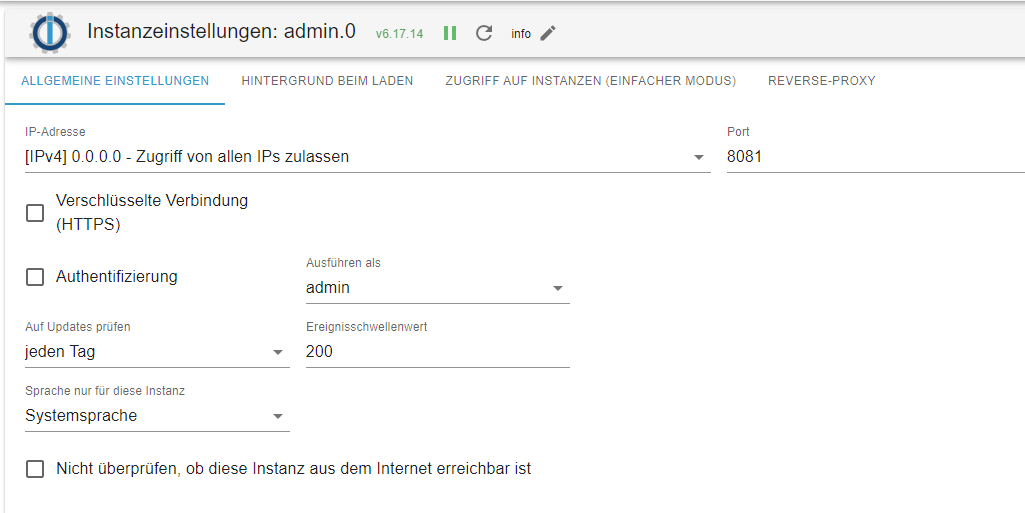
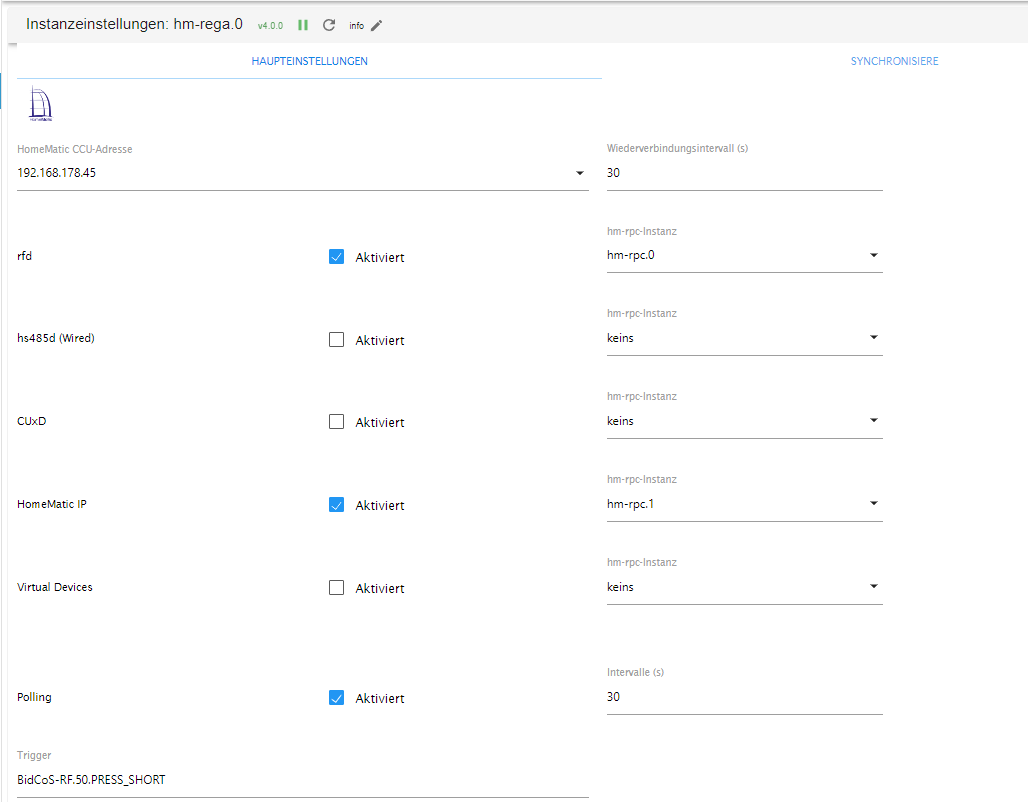
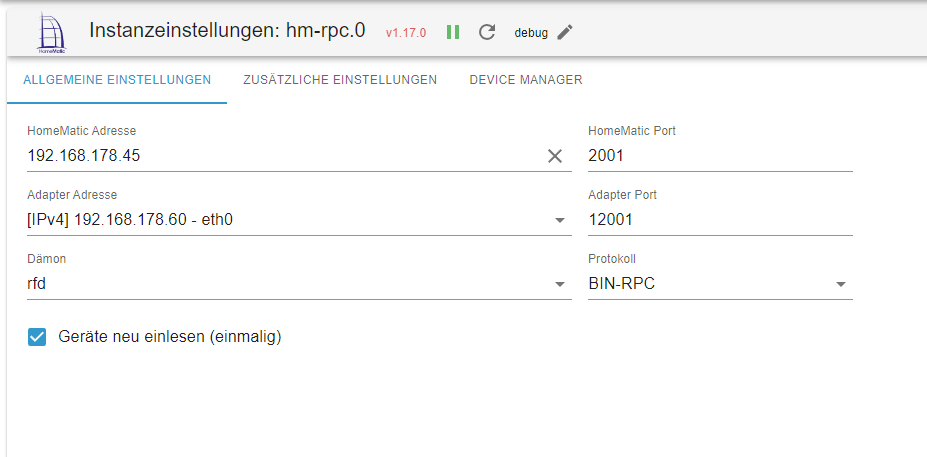
iobroker.current.log.htmHier Screenshots zur Konfiguration. Alles original belassen!
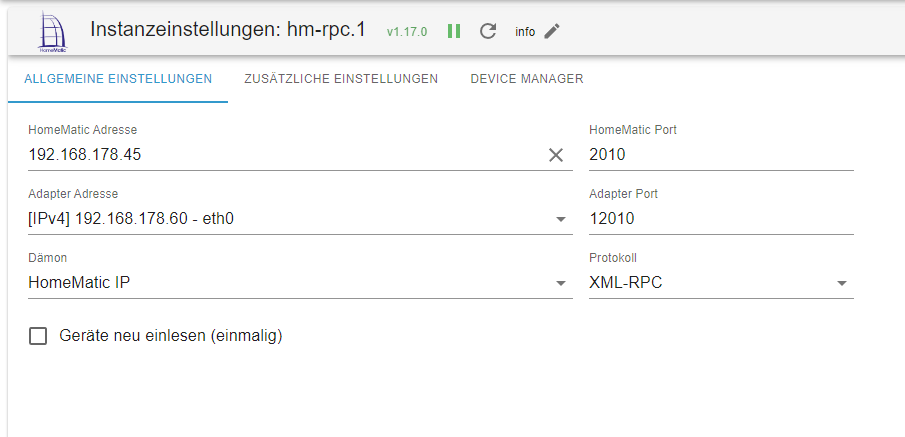
Was stimmt nicht?
Danke
-
Hallo Homoran, hallo Paul,
habe einen neuen Raspi5 komplett frisch aufgesetzt, alles upgedatet und den aktuellsten Stand von Iobroker aufgespielt.
Leider wird der 6-Fach Taster immer noch nicht richtig erkannt und die Instanz hm-rpc.0 läuft nun auch nicht richtig. Diese startet immer wieder neu.
Hatte die Hoffnung, dass auf einem komplett neu installiertem System alles fehlerfrei läuft. :-(
CPU: 6,13 %
RAM: 12 %
Betriebszeit: 0h
Verfügbar: 5.0.19
Installiert: 5.0.19
Ereignisse: ⇥9 / ↦13
Plattform: linux
Betriebssystem: linux
Architektur: arm64
CPUs: 4
Geschwindigkeit: 2400 MHz
Modell: Cortex-A76
RAM: 7.8 GB
System-Betriebszeit: 00:20:49
Node.js: v20.15.0
time: 1719766706278
timeOffset: -120
NPM: 10.7.0
Adapter-Anzahl: 538
Datenträgergröße: 116.7 GB
Freier Festplattenspeicher: 113.2 GB
Aktive Instanzen: 7
Pfad: /opt/iobroker/
Betriebszeit: 1 T. 09:25:42
aktiv: true
_nodeCurrent: 20.15.0
_nodeNewest: 20.15.0
_nodeNewestNext: 18.20.3
_npmCurrent: 10.7.0
_npmNewest: 10.7.0
_npmNewestNext: 10.7.0
Ausgabe iob diag
Skript v.2024-05-22

*** BASE SYSTEM ***
 Static hostname: raspi5
       Icon name: computer
Operating System: Debian GNU/Linux 12 (bookworm)
          Kernel: Linux 6.6.31+rpt-rpi-2712
    Architecture: arm64

Model           : Raspberry Pi 5 Model B Rev 1.0
Docker          : false
Virtualization  : none
Kernel          : aarch64
Userland        : 64 bit

Systemuptime and Load:
 19:08:53 up 31 min,  2 users,  load average: 0.53, 0.28, 0.14
CPU threads: 4


*** RASPBERRY THROTTLING ***
Current issues:
No throttling issues detected.

Previously detected issues:
~ Under-voltage has occurred
~ Arm frequency capping has occurred

*** Time and Time Zones ***
               Local time: Sun 2024-06-30 19:08:53 CEST
           Universal time: Sun 2024-06-30 17:08:53 UTC
                 RTC time: Sun 2024-06-30 17:08:53
                Time zone: Europe/Berlin (CEST, +0200)
System clock synchronized: yes
              NTP service: active
          RTC in local TZ: no

*** Users and Groups ***
User that called 'iob diag':
pi
HOME=/home/pi
GROUPS=pi adm dialout cdrom sudo audio video plugdev games users input render netdev gpio i2c spi iobroker

User that is running 'js-controller':
iobroker
HOME=/home/iobroker
GROUPS=iobroker tty dialout audio video plugdev bluetooth gpio i2c

*** Display-Server-Setup ***
Display-Server: false
Desktop:
Terminal:       tty
Boot Target:    multi-user.target

*** MEMORY ***
               total        used        free      shared  buff/cache   available
Mem:            8.4G        845M        7.0G        5.4M        651M        7.6G
Swap:           209M          0B        209M
Total:          8.7G        845M        7.3G

Active iob-Instances:   10

         8052 M total memory
          806 M used memory
          734 M active memory
          432 M inactive memory
         6720 M free memory
           48 M buffer memory
          573 M swap cache
          199 M total swap
            0 M used swap
          199 M free swap

*** top - Table Of Processes  ***
top - 19:08:54 up 31 min,  2 users,  load average: 0.53, 0.28, 0.14
Tasks: 167 total,   2 running, 165 sleeping,   0 stopped,   0 zombie
%Cpu(s):  0.0 us,  0.0 sy,  0.0 ni,100.0 id,  0.0 wa,  0.0 hi,  0.0 si,  0.0 st
MiB Mem :   8052.4 total,   6719.2 free,    808.4 used,    621.3 buff/cache
MiB Swap:    200.0 total,    200.0 free,      0.0 used.   7244.0 avail Mem

*** FAILED SERVICES ***

  UNIT LOAD ACTIVE SUB DESCRIPTION
0 loaded units listed.

*** FILESYSTEM ***
Filesystem     Type      Size  Used Avail Use% Mounted on
udev           devtmpfs  3.8G     0  3.8G   0% /dev
tmpfs          tmpfs     806M  5.2M  801M   1% /run
/dev/mmcblk0p2 ext4      117G  3.5G  108G   4% /
tmpfs          tmpfs     4.0G     0  4.0G   0% /dev/shm
tmpfs          tmpfs     5.0M   48K  5.0M   1% /run/lock
/dev/mmcblk0p1 vfat      510M   64M  447M  13% /boot/firmware
tmpfs          tmpfs     806M     0  806M   0% /run/user/1000

Messages concerning ext4 filesystem in dmesg:
[Sun Jun 30 18:37:37 2024] Kernel command line: reboot=w coherent_pool=1M 8250.nr_uarts=1 pci=pcie_bus_safe  smsc95xx.macaddr=D8:3A:DD:DE:20:86 vc_mem.mem_base=0x3fc00000 vc_mem.mem_size=0x40000000  console=ttyAMA10,115200 console=tty1 root=PARTUUID=ca399bea-02 rootfstype=ext4 fsck.repair=yes rootwait
[Sun Jun 30 18:37:40 2024] EXT4-fs (mmcblk0p2): mounted filesystem 93c89e92-8f2e-4522-ad32-68faed883d2f ro with ordered data mode. Quota mode: none.
[Sun Jun 30 18:37:41 2024] EXT4-fs (mmcblk0p2): re-mounted 93c89e92-8f2e-4522-ad32-68faed883d2f r/w. Quota mode: none.

Show mounted filesystems:
TARGET                                                  SOURCE         FSTYPE      OPTIONS
/                                                       /dev/mmcblk0p2 ext4        rw,noatime,commit=600
|-/sys                                                  sysfs          sysfs       rw,nosuid,nodev,noexec,relatime
| |-/sys/kernel/security                                securityfs     securityfs  rw,nosuid,nodev,noexec,relatime
| |-/sys/fs/cgroup                                      cgroup2        cgroup2     rw,nosuid,nodev,noexec,relatime,nsdelegate,memory_recursiveprot
| |-/sys/fs/pstore                                      pstore         pstore      rw,nosuid,nodev,noexec,relatime
| |-/sys/fs/bpf                                         bpf            bpf         rw,nosuid,nodev,noexec,relatime,mode=700
| |-/sys/kernel/debug                                   debugfs        debugfs     rw,nosuid,nodev,noexec,relatime
| |-/sys/kernel/tracing                                 tracefs        tracefs     rw,nosuid,nodev,noexec,relatime
| |-/sys/fs/fuse/connections                            fusectl        fusectl     rw,nosuid,nodev,noexec,relatime
| `-/sys/kernel/config                                  configfs       configfs    rw,nosuid,nodev,noexec,relatime
|-/proc                                                 proc           proc        rw,relatime
| `-/proc/sys/fs/binfmt_misc                            systemd-1      autofs      rw,relatime,fd=30,pgrp=1,timeout=0,minproto=5,maxproto=5,direct,pipe_ino=1281
|   `-/proc/sys/fs/binfmt_misc                          binfmt_misc    binfmt_misc rw,nosuid,nodev,noexec,relatime
|-/dev                                                  udev           devtmpfs    rw,nosuid,relatime,size=3950816k,nr_inodes=246926,mode=755
| |-/dev/pts                                            devpts         devpts      rw,nosuid,noexec,relatime,gid=5,mode=620,ptmxmode=000
| |-/dev/shm                                            tmpfs          tmpfs       rw,nosuid,nodev
| `-/dev/mqueue                                         mqueue         mqueue      rw,nosuid,nodev,noexec,relatime
|-/run                                                  tmpfs          tmpfs       rw,nosuid,nodev,noexec,relatime,size=824576k,mode=755
| |-/run/lock                                           tmpfs          tmpfs       rw,nosuid,nodev,noexec,relatime,size=5120k
| |-/run/credentials/systemd-sysusers.service           ramfs          ramfs       ro,nosuid,nodev,noexec,relatime,mode=700
| |-/run/credentials/systemd-tmpfiles-setup-dev.service ramfs          ramfs       ro,nosuid,nodev,noexec,relatime,mode=700
| |-/run/credentials/systemd-sysctl.service             ramfs          ramfs       ro,nosuid,nodev,noexec,relatime,mode=700
| |-/run/rpc_pipefs                                     sunrpc         rpc_pipefs  rw,relatime
| |-/run/credentials/systemd-tmpfiles-setup.service     ramfs          ramfs       ro,nosuid,nodev,noexec,relatime,mode=700
| `-/run/user/1000                                      tmpfs          tmpfs       rw,nosuid,nodev,relatime,size=824560k,nr_inodes=206140,mode=700,uid=1000,gid=1000
`-/boot/firmware                                        /dev/mmcblk0p1 vfat        rw,relatime,fmask=0022,dmask=0022,codepage=437,iocharset=ascii,shortname=mixed,errors=remount-ro

Files in neuralgic directories:

/var:
635M    /var/
205M    /var/cache
200M    /var/cache/apt
165M    /var/lib
133M    /var/lib/apt/lists

Archived and active journals take up 63.7M in the file system.

/opt/iobroker/backups:
4.0K    /opt/iobroker/backups/

/opt/iobroker/iobroker-data:
163M    /opt/iobroker/iobroker-data/
156M    /opt/iobroker/iobroker-data/files
138M    /opt/iobroker/iobroker-data/files/javascript.admin
118M    /opt/iobroker/iobroker-data/files/javascript.admin/static
117M    /opt/iobroker/iobroker-data/files/javascript.admin/static/js

The five largest files in iobroker-data are:
7.0M    /opt/iobroker/iobroker-data/files/javascript.admin/static/js/675.a9c6d34a.chunk.js.map
7.0M    /opt/iobroker/iobroker-data/files/javascript.admin/static/js/61.54b23816.chunk.js.map
6.6M    /opt/iobroker/iobroker-data/files/javascript.admin/static/js/139.52cd9c26.chunk.js.map
6.5M    /opt/iobroker/iobroker-data/files/javascript.admin/static/js/516.837647f3.chunk.js.map
6.3M    /opt/iobroker/iobroker-data/files/admin.admin/custom/static/js/vendors-node_modules_iobroker_adapter-react-v5_assets_devices_parseNames_js-node_modules_iobr-99c23e.847b8ad9.chunk.js.map

USB-Devices by-id:
USB-Sticks -  Avoid direct links to /dev/tty* in your adapter setups, please always prefer the links 'by-id':

No Devices found 'by-id'


*** NodeJS-Installation ***

/usr/bin/nodejs         v20.15.0
/usr/bin/node           v20.15.0
/usr/bin/npm            10.7.0
/usr/bin/npx            10.7.0
/usr/bin/corepack       0.28.1


nodejs:
  Installed: 20.15.0-1nodesource1
  Candidate: 20.15.0-1nodesource1
  Version table:
 *** 20.15.0-1nodesource1 1001
        500 https://deb.nodesource.com/node_20.x nodistro/main arm64 Packages
        100 /var/lib/dpkg/status
     20.14.0-1nodesource1 1001
        500 https://deb.nodesource.com/node_20.x nodistro/main arm64 Packages
     20.13.1-1nodesource1 1001
        500 https://deb.nodesource.com/node_20.x nodistro/main arm64 Packages
     20.13.0-1nodesource1 1001
        500 https://deb.nodesource.com/node_20.x nodistro/main arm64 Packages
     20.12.2-1nodesource1 1001
        500 https://deb.nodesource.com/node_20.x nodistro/main arm64 Packages
     20.12.1-1nodesource1 1001
        500 https://deb.nodesource.com/node_20.x nodistro/main arm64 Packages
     20.12.0-1nodesource1 1001
        500 https://deb.nodesource.com/node_20.x nodistro/main arm64 Packages
     20.11.1-1nodesource1 1001
        500 https://deb.nodesource.com/node_20.x nodistro/main arm64 Packages
     20.11.0-1nodesource1 1001
        500 https://deb.nodesource.com/node_20.x nodistro/main arm64 Packages
     20.10.0-1nodesource1 1001
        500 https://deb.nodesource.com/node_20.x nodistro/main arm64 Packages
     20.9.0-1nodesource1 1001
        500 https://deb.nodesource.com/node_20.x nodistro/main arm64 Packages
     20.8.1-1nodesource1 1001
        500 https://deb.nodesource.com/node_20.x nodistro/main arm64 Packages
     20.8.0-1nodesource1 1001
        500 https://deb.nodesource.com/node_20.x nodistro/main arm64 Packages
     20.7.0-1nodesource1 1001
        500 https://deb.nodesource.com/node_20.x nodistro/main arm64 Packages
     20.6.1-1nodesource1 1001
        500 https://deb.nodesource.com/node_20.x nodistro/main arm64 Packages
     20.6.0-1nodesource1 1001
        500 https://deb.nodesource.com/node_20.x nodistro/main arm64 Packages
     20.5.1-1nodesource1 1001
        500 https://deb.nodesource.com/node_20.x nodistro/main arm64 Packages
     20.5.0-1nodesource1 1001
        500 https://deb.nodesource.com/node_20.x nodistro/main arm64 Packages
     20.4.0-1nodesource1 1001
        500 https://deb.nodesource.com/node_20.x nodistro/main arm64 Packages
     20.3.1-1nodesource1 1001
        500 https://deb.nodesource.com/node_20.x nodistro/main arm64 Packages
     20.3.0-1nodesource1 1001
        500 https://deb.nodesource.com/node_20.x nodistro/main arm64 Packages
     20.2.0-1nodesource1 1001
        500 https://deb.nodesource.com/node_20.x nodistro/main arm64 Packages
     20.1.0-1nodesource1 1001
        500 https://deb.nodesource.com/node_20.x nodistro/main arm64 Packages
     20.0.0-1nodesource1 1001
        500 https://deb.nodesource.com/node_20.x nodistro/main arm64 Packages
     18.19.0+dfsg-6~deb12u2 500
        500 http://deb.debian.org/debian bookworm/main arm64 Packages
     18.19.0+dfsg-6~deb12u1 500
        500 http://deb.debian.org/debian-security bookworm-security/main arm64 Packages

Temp directories causing npm8 problem: 0
No problems detected

Errors in npm tree:

*** ioBroker-Installation ***

ioBroker Status
iobroker is running on this host.


Objects type: jsonl
States  type: jsonl

Core adapters versions
js-controller:  5.0.19
admin:          6.17.14
javascript:     8.3.1

nodejs modules from github:     0

Adapter State
+ system.adapter.admin.0                  : admin                 : raspi5                                   -  enabled, port: 8081, bind: 0.0.0.0, run as: admin
+ system.adapter.backitup.0               : backitup              : raspi5                                   -  enabled
+ system.adapter.discovery.0              : discovery             : raspi5                                   -  enabled
+ system.adapter.harmony.0                : harmony               : raspi5                                   -  enabled
+ system.adapter.hm-rega.0                : hm-rega               : raspi5                                   -  enabled
+ system.adapter.hm-rpc.0                 : hm-rpc                : raspi5                                   -  enabled, port: 12001
+ system.adapter.hm-rpc.1                 : hm-rpc                : raspi5                                   -  enabled, port: 12010
+ system.adapter.javascript.0             : javascript            : raspi5                                   -  enabled
  system.adapter.sonnen.0                 : sonnen                : raspi5                                   - disabled
+ system.adapter.wifilight.0              : wifilight             : raspi5                                   -  enabled

+ instance is alive

Enabled adapters with bindings
+ system.adapter.admin.0                  : admin                 : raspi5                                   -  enabled, port: 8081, bind: 0.0.0.0, run as: admin
+ system.adapter.hm-rpc.0                 : hm-rpc                : raspi5                                   -  enabled, port: 12001
+ system.adapter.hm-rpc.1                 : hm-rpc                : raspi5                                   -  enabled, port: 12010

ioBroker-Repositories
stable        : http://download.iobroker.net/sources-dist.json
beta          : http://download.iobroker.net/sources-dist-latest.json

Active repo(s): stable

Installed ioBroker-Instances
Used repository: stable
Adapter    "admin"        : 6.17.14  , installed 6.17.14
Adapter    "backitup"     : 2.11.0   , installed 2.11.0
Adapter    "discovery"    : 4.5.0    , installed 4.5.0
Adapter    "harmony"      : 1.4.0    , installed 1.4.0
Adapter    "hm-rega"      : 4.0.0    , installed 4.0.0
Adapter    "hm-rpc"       : 1.17.0   , installed 1.17.0
Adapter    "javascript"   : 8.3.1    , installed 8.3.1
Controller "js-controller": 5.0.19   , installed 5.0.19
Adapter    "sonnen"       : 1.18.1   , installed 1.18.1
Adapter    "wifilight"    : 1.2.2    , installed 1.2.2

Objects and States
Please stand by - This may take a while
Objects:        1874
States:         1260

*** OS-Repositories and Updates ***
Hit:1 http://archive.raspberrypi.com/debian bookworm InRelease
Hit:2 http://deb.debian.org/debian bookworm InRelease
Hit:3 http://deb.debian.org/debian-security bookworm-security InRelease
Hit:4 http://deb.debian.org/debian bookworm-updates InRelease
Hit:5 https://deb.nodesource.com/node_20.x nodistro InRelease
Reading package lists...
Pending Updates: 43

*** Listening Ports ***
Active Internet connections (only servers)
Proto Recv-Q Send-Q Local Address           Foreign Address         State       User       Inode      PID/Program name
tcp        0      0 127.0.0.1:9001          0.0.0.0:*               LISTEN      1001       1888       767/iobroker.js-con
tcp        0      0 127.0.0.1:9000          0.0.0.0:*               LISTEN      1001       1893       767/iobroker.js-con
tcp        0      0 0.0.0.0:22              0.0.0.0:*               LISTEN      0          1883       775/sshd: /usr/sbin
tcp        0      0 192.168.178.60:12010    0.0.0.0:*               LISTEN      1001       7280       1090/io.hm-rpc.1
tcp        0      0 192.168.178.60:12001    0.0.0.0:*               LISTEN      1001       15561      2888/io.hm-rpc.0
tcp6       0      0 :::8081                 :::*                    LISTEN      1001       6511       1018/io.admin.0
tcp6       0      0 :::22                   :::*                    LISTEN      0          1885       775/sshd: /usr/sbin
tcp6       0      0 :::61991                :::*                    LISTEN      1001       9337       1218/io.harmony.0
udp        0      0 0.0.0.0:57073           0.0.0.0:*                           104        5712       649/avahi-daemon: r
udp        0      0 0.0.0.0:61991           0.0.0.0:*                           1001       9338       1218/io.harmony.0
udp        0      0 0.0.0.0:5353            0.0.0.0:*                           104        5710       649/avahi-daemon: r
udp6       0      0 :::53052                :::*                                104        5713       649/avahi-daemon: r
udp6       0      0 fe80::eb4d:88c3:cf0:546 :::*                                0          5057       734/NetworkManager
udp6       0      0 :::5353                 :::*                                104        5711       649/avahi-daemon: r

*** Log File - Last 25 Lines ***

2024-06-30 19:08:27.399  - warn: hm-rpc.0 (2603) setTimeout called, but adapter is shutting down
2024-06-30 19:08:28.399  - info: hm-rpc.0 (2603) terminating
2024-06-30 19:08:28.400  - debug: hm-rpc.0 (2603) Plugin sentry destroyed
2024-06-30 19:08:28.400  - info: hm-rpc.0 (2603) Terminated (NO_ERROR): Without reason
2024-06-30 19:08:28.923  - info: host.raspi5 instance system.adapter.hm-rpc.0 terminated with code 0 (NO_ERROR)
2024-06-30 19:08:28.923  - info: host.raspi5 Restart adapter system.adapter.hm-rpc.0 because enabled
2024-06-30 19:08:58.939  - info: host.raspi5 instance system.adapter.hm-rpc.0 started with pid 2888
2024-06-30 19:08:59.419  - debug: hm-rpc.0 (2888) Redis Objects: Use Redis connection: 127.0.0.1:9001
2024-06-30 19:08:59.434  - debug: hm-rpc.0 (2888) Objects client ready ... initialize now
2024-06-30 19:08:59.435  - debug: hm-rpc.0 (2888) Objects create System PubSub Client
2024-06-30 19:08:59.436  - debug: hm-rpc.0 (2888) Objects create User PubSub Client
2024-06-30 19:08:59.448  - debug: hm-rpc.0 (2888) Objects client initialize lua scripts
2024-06-30 19:08:59.453  - debug: hm-rpc.0 (2888) Objects connected to redis: 127.0.0.1:9001
2024-06-30 19:08:59.464  - debug: hm-rpc.0 (2888) Redis States: Use Redis connection: 127.0.0.1:9000
2024-06-30 19:08:59.469  - debug: hm-rpc.0 (2888) States create System PubSub Client
2024-06-30 19:08:59.470  - debug: hm-rpc.0 (2888) States create User PubSub Client
2024-06-30 19:08:59.519  - debug: hm-rpc.0 (2888) States connected to redis: 127.0.0.1:9000
2024-06-30 19:08:59.546  - debug: hm-rpc.0 (2888) Plugin sentry Initialize Plugin (enabled=true)
2024-06-30 19:08:59.692  - info: hm-rpc.0 (2888) starting. Version 1.17.0 in /opt/iobroker/node_modules/iobroker.hm-rpc, node: v20.15.0, js-controller: 5.0.19
2024-06-30 19:08:59.773  - info: hm-rpc.0 (2888) binrpc server is trying to listen on 192.168.178.60:12001
2024-06-30 19:08:59.774  - info: hm-rpc.0 (2888) binrpc client is trying to connect to 192.168.178.45:2001/ with ["xmlrpc_bin://192.168.178.60:12001","raspi5:hm-rpc.0:6591a0a2ae2e68ddbe0279bb3c164480"]
2024-06-30 19:08:59.775  - debug: hm-rpc.0 (2888) Connect...
2024-06-30 19:08:59.775  - debug: hm-rpc.0 (2888) binrpc -> 192.168.178.45:2001/ init ["xmlrpc_bin://192.168.178.60:12001","raspi5:hm-rpc.0:6591a0a2ae2e68ddbe0279bb3c164480"]
2024-06-30 19:08:59.777  - debug: hm-rpc.0 (2888) start connecting interval
2024-06-30 19:09:04.778  - error: hm-rpc.0 (2888) Init not possible, going to stop: response timeout
iob diag Zusammenfassung
======================= SUMMARY =======================
                        v.2024-05-22


 Static hostname: raspi5
       Icon name: computer
Operating System: Debian GNU/Linux 12 (bookworm)
          Kernel: Linux 6.6.31+rpt-rpi-2712
    Architecture: arm64

Installation:           native
Kernel:                 aarch64
Userland:               64 bit
Timezone:               Europe/Berlin (CEST, +0200)
User-ID:                1000
Display-Server:         false
Boot Target:            multi-user.target

Pending OS-Updates:     43
Pending iob updates:    0

Nodejs-Installation:
/usr/bin/nodejs         v20.15.0
/usr/bin/node           v20.15.0
/usr/bin/npm            10.7.0
/usr/bin/npx            10.7.0
/usr/bin/corepack       0.28.1

Recommended versions are nodejs 18.20.3 and npm 10.7.0
Your nodejs installation is correct

MEMORY:
               total        used        free      shared  buff/cache   available
Mem:            8.4G        864M        7.0G        5.4M        653M        7.6G
Swap:           209M          0B        209M
Total:          8.7G        864M        7.2G

Active iob-Instances:   10
Active repo(s): stable

ioBroker Core:          js-controller           5.0.19
                        admin                   6.17.14

ioBroker Status:        iobroker is running on this host.


Objects type: jsonl
States  type: jsonl

Status admin and web instance:
+ system.adapter.admin.0                  : admin                 : raspi5                                   -  enabled, port: 8081, bind: 0.0.0.0, run as: admin

Objects:                1874
States:                 1260

Size of iob-Database:

6.0M    /opt/iobroker/iobroker-data/objects.jsonl
884K    /opt/iobroker/iobroker-data/states.jsonl


=================== END OF SUMMARY ====================
Hier das Protokoll mit Debug Ausgabe für rpc.0
iobroker.current.log.htmHier Screenshots zur Konfiguration. Alles original belassen!
Was stimmt nicht?
Danke
@tk-0 rpc.0 hat bin rpc statt xml
-
@tk-0 sagte in HM-PB-6-WM55 Datenpunkte rpc.0:
Ja, so ist es in der Konfigration drin. rpc.0 mit bin-rpc
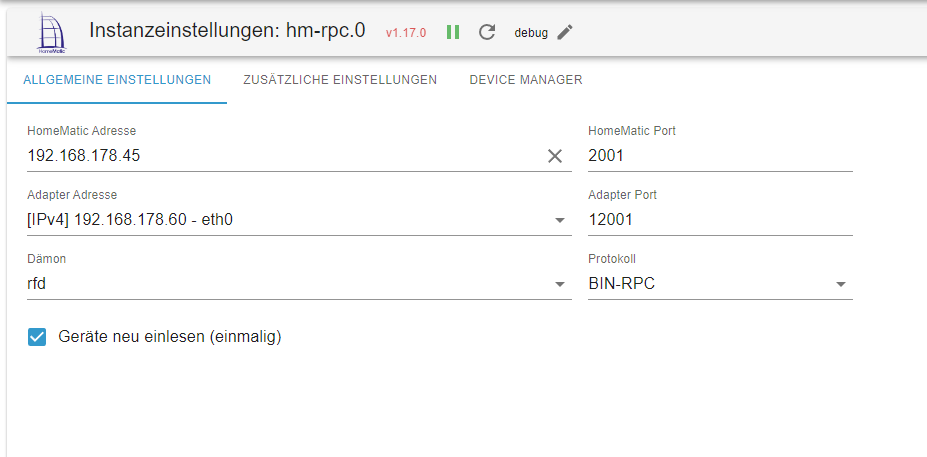
ja, und das ist falsch
-

Hey! Du scheinst an dieser Unterhaltung interessiert zu sein, hast aber noch kein Konto.
Hast du es satt, bei jedem Besuch durch die gleichen Beiträge zu scrollen? Wenn du dich für ein Konto anmeldest, kommst du immer genau dorthin zurück, wo du zuvor warst, und kannst dich über neue Antworten benachrichtigen lassen (entweder per E-Mail oder Push-Benachrichtigung). Du kannst auch Lesezeichen speichern und Beiträge positiv bewerten, um anderen Community-Mitgliedern deine Wertschätzung zu zeigen.
Mit deinem Input könnte dieser Beitrag noch besser werden 💗
Registrieren Anmelden284
Online33.0k
Benutzende83.7k
Themen1.3m
Beiträge