Skip to content
  • Home
  • Recent
  • Tags
  • 0 Unread 0
  • Categories
  • Unreplied
  • Popular
  • GitHub
  • Docu
  • Hilfe
Skins
  • Light
  • Brite
  • Cerulean
  • Cosmo
  • Flatly
  • Journal
  • Litera
  • Lumen
  • Lux
  • Materia
  • Minty
  • Morph
  • Pulse
  • Sandstone
  • Simplex
  • Sketchy
  • Spacelab
  • United
  • Yeti
  • Zephyr
  • Dark
  • Cyborg
  • Darkly
  • Quartz
  • Slate
  • Solar
  • Superhero
  • Vapor

  • Default (No Skin)
  • No Skin
Collapse
ioBroker Logo

Community Forum

donate donate
  1. ioBroker Community Home
  2. Deutsch
  3. ioBroker Allgemein
  4. Anzahl Adapter

NEWS

  • Jahresrückblick 2025 – unser neuer Blogbeitrag ist online! ✨
    BluefoxB
    Bluefox
    17
    1
    3.2k

  • Neuer Blogbeitrag: Monatsrückblick - Dezember 2025 🎄
    BluefoxB
    Bluefox
    13
    1
    1.1k

  • Weihnachtsangebot 2025! 🎄
    BluefoxB
    Bluefox
    25
    1
    2.4k

Anzahl Adapter

Scheduled Pinned Locked Moved ioBroker Allgemein
50 Posts 3 Posters 3.4k Views
  • Oldest to Newest
  • Newest to Oldest
  • Most Votes
Reply
  • Reply as topic
Log in to reply
This topic has been deleted. Only users with topic management privileges can see it.
  • eric2905E Offline
    eric2905E Offline
    eric2905
    wrote on last edited by
    #18

    @Homoran:

    Das kommt, wenn der RasPi keinen Zugriff auf das Repo hat. `
    Repo ist aber online … leider hat es keinen Cloud-Adapter installiert - da könnte man schnell sehen, ob Inet da ist, oder nicht.

    Ich hatte das mit dem Darstellungsfehler aber auch schon mal. Da war der Filter aktiv, aber der Stern war grau.

    Gruß,

    Eric

    Roses are red, violets are blue,

    if I listen to metal, my neighbours do too

    1 Reply Last reply
    0
    • G Offline
      G Offline
      Gerni
      wrote on last edited by
      #19

      @eric2905:

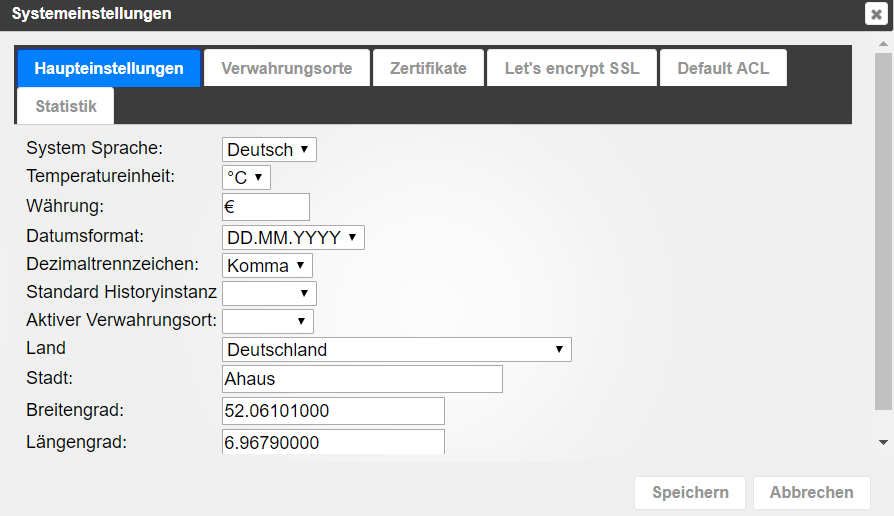
      Bitte noch den Screenshot vom Reiter "Haupteinstellungen", so dass das Feld "Aktiver Verwahrungsort" sichtbar ist.

      gefunden… In der Tat steht da nichts drin. In Zwischenzeit habe ich neu Installiert, aktuell konnte 0.cloud für Alexa nicht installiert werden, Fehler -25.

      Sry, ich bin bisher nie in einem Forum unterwegs gewesen und sammle Erfahrungen :-D.
      3449_haupteinstellungen.png

      Jede Menge verschiedenes Zeug

      1 Reply Last reply
      0
      • HomoranH Do not disturb
        HomoranH Do not disturb
        Homoran
        Global Moderator Administrators
        wrote on last edited by
        #20

        Links neben Verwahrungsorte ;-)

        Gruß

        Rainer

        kein Support per PN! - Fragen im Forum stellen - es gibt fast nichts, was nicht auch für andere interessant ist.

        Benutzt das Voting rechts unten im Beitrag wenn er euch geholfen hat.

        der Installationsfixer: curl -fsL https://iobroker.net/fix.sh | bash -

        1 Reply Last reply
        0
        • eric2905E Offline
          eric2905E Offline
          eric2905
          wrote on last edited by
          #21

          Hi,

          @Gerni:

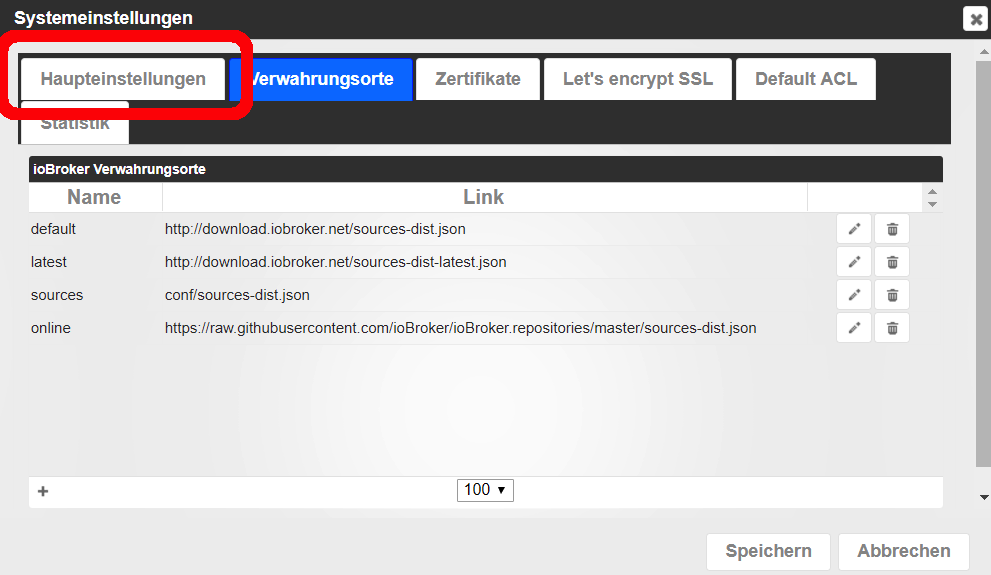
          Wo soll der Reiter "Haupteinstellungen" sein? `
          in den Einstellungen des Admin-Adapters.

          Ich habe es Dir mal in Deinem eigene Screenshot markiert:
          355_verwahrungsorte.png

          Gruß,

          Eric

          Roses are red, violets are blue,

          if I listen to metal, my neighbours do too

          1 Reply Last reply
          0
          • G Offline
            G Offline
            Gerni
            wrote on last edited by
            #22

            Jau, hat sich überschnitten, hab Screenshot in vorherigem Post hochgeladen. Im Verwahrungsort ist nichts hinterlegt. Was muss denn da eingetragen sein?

            Jede Menge verschiedenes Zeug

            1 Reply Last reply
            0
            • HomoranH Do not disturb
              HomoranH Do not disturb
              Homoran
              Global Moderator Administrators
              wrote on last edited by
              #23

              Nimm erst einmal default!

              Das könnte die Ursache sein.

              Hast du denn mittlerweile mal den reload-Button angeklickt?

              http://www.iobroker.net/docu/?page_id=5 … _einzelnen

              #5

              http://www.iobroker.net/docu/?page_id=5 … tes_suchen

              Gruß

              Rainer

              kein Support per PN! - Fragen im Forum stellen - es gibt fast nichts, was nicht auch für andere interessant ist.

              Benutzt das Voting rechts unten im Beitrag wenn er euch geholfen hat.

              der Installationsfixer: curl -fsL https://iobroker.net/fix.sh | bash -

              1 Reply Last reply
              0
              • eric2905E Offline
                eric2905E Offline
                eric2905
                wrote on last edited by
                #24

                @Gerni:

                Im Verwahrungsort ist nichts hinterlegt. Was muss denn da eingetragen sein? `
                Wenn Du mutig bist, nimmst Du "Latest". Das sind die, die noch Fehler haben können (sind im Field-Test).

                Ansonsten nimmst Du Default. Das sind die "Stable" Adapter, wo es keine negativen Meldungen von usern mehr zu gibt.

                Ich fahre immer nur "Latest" oder direkt aus dem Git und habe noch nie wirklich unlösbare Probleme gehabt.

                Gruß,

                Eric

                PS: Rainer war schneller :D

                Roses are red, violets are blue,

                if I listen to metal, my neighbours do too

                1 Reply Last reply
                0
                • HomoranH Do not disturb
                  HomoranH Do not disturb
                  Homoran
                  Global Moderator Administrators
                  wrote on last edited by
                  #25

                  Das habe ich noch nie gesehen, dass dieses pulldown leer ist :shock:

                  Solltest du noch mehr Probleme bekommen, kann sein dass dein Download oder deine Karte defekt sind.

                  Gruß

                  Rainer

                  kein Support per PN! - Fragen im Forum stellen - es gibt fast nichts, was nicht auch für andere interessant ist.

                  Benutzt das Voting rechts unten im Beitrag wenn er euch geholfen hat.

                  der Installationsfixer: curl -fsL https://iobroker.net/fix.sh | bash -

                  1 Reply Last reply
                  0
                  • G Offline
                    G Offline
                    Gerni
                    wrote on last edited by
                    #26

                    IHR SEID GEIL!!!!

                    "Default" im "Aktiver Verwahrungsort" eingestellt und schon werden wieder alle gewohnten Adapter angezeigt.

                    Komisch nur, dass die nicht von Anfang an da waren, ich habe ioBroker schon mehrfach installiert (ich teste und fummel da viel, steige gerade erst ein) aber sowas hatte ich noch nie,

                    Vielen vielen Dank Leute!

                    Jede Menge verschiedenes Zeug

                    1 Reply Last reply
                    0
                    • eric2905E Offline
                      eric2905E Offline
                      eric2905
                      wrote on last edited by
                      #27

                      Gern geschehen.

                      Mach vorsichtshalber mal ein Backup von Deinen Views, usw.

                      Rainer könnte mit dem defekten Download ( des Images) oder einer defekten SD durchaus Recht haben … und dann hängst Du ggf. irgendwann komplett in den Seilen .... auch ich habe de Pulldownliste für den Verwahrungsort noch nie unbelegt / leer gesehen.

                      Gruß,

                      Eric

                      Roses are red, violets are blue,

                      if I listen to metal, my neighbours do too

                      1 Reply Last reply
                      0
                      • G Offline
                        G Offline
                        Gerni
                        wrote on last edited by
                        #28

                        MOD-edit by eric2905; 08092017 / 2234; Code-Tags gesetzt

                        Irgendetwas scheint noch zu sein. Bei Installation des Dash Button Adapters sieht die Commando-Zeile etwas komisch aus, vor allem weil einige Errors aufgeführt werden. Ich poste das mal hier, da ich nicht weiß welcher Teil relevant ist, komplett.

                        Aktuell nichts wildes weil ich eh alles neu aufgesetzt habe.

                        Selbes übrigens auch bei anderen Adaptern wie den Logitech z.B.

                        $ ./iobroker add amazon-dash
                        npm install iobroker.amazon-dash --production --prefix "/opt/iobroker" (System call)
                        npm
                         WARN lifecycle iobroker.amazon-dash@0.2.2~preinstall: cannot run in wd %s %s (wd=%s) iobroker.amazon-dash@0.2.2 apt-get install libpcap-dev -y || true /opt/iobroker/node_modules/.staging/iobroker.amazon-dash-eb5038e9
                        ../socket_watcher.cpp: In static member function ‘static void SocketWatcher::New(const Nan::FunctionCallbackInfo<v8::value>&)’:../socket_watcher.cpp:104:49: warning: ‘v8::Local <v8::object>v8::Function::NewInstance() const’ is deprecated: Use maybe version [-Wdeprecated-declarations]
                             info.GetReturnValue().Set(cons->NewInstance());
                                                                         ^
                        
                        In file included from /root/.node-gyp/6.11.2/include/node/v8.h:25:0,                 from /root/.node-gyp/6.11.2/include/node/node.h:42,
                                         from ../../nan/nan.h:49,
                                         from ../socket_watcher.hpp:8,
                                         from ../socket_watcher.cpp:5:
                        /root/.node-gyp/6.11.2/include/node/v8.h:3276:52: note: declared here
                           V8_DEPRECATED("Use maybe version", Local <object>NewInstance() const);
                                                                            ^
                        /root/.node-gyp/6.11.2/include/node/v8config.h:333:3: note: in definition of macro ‘V8_DEPRECATED’
                           declarator __attribute__((deprecated(message)))
                           ^~~~~~~~~~
                        
                        ../pcap_binding.cc:2:23: fatal error: pcap/pcap.h: Datei oder Verzeichnis nicht gefunden #include <pcap pcap.h="">
                                               ^
                        compilation terminated.
                        
                        make: *** [Release/obj.target/pcap_binding/pcap_binding.o] Fehler 1gyp ERR! build error 
                        gyp ERR! stack Error: `make` failed with exit code: 2
                        gyp ERR! stack     at ChildProcess.onExit (/usr/lib/node_modules/npm/node_modules/node-gyp/lib/build.js:276:23)
                        gyp ERR! stack     at emitTwo (events.js:106:13)
                        gyp ERR! stack     at ChildProcess.emit (events.js:191:7)
                        gyp ERR! stack     at Process.ChildProcess._handle.onexit (internal/child_process.js:215:12)
                        gyp ERR! System Linux 4.9.41-v7+
                        gyp ERR! command "/usr/bin/nodejs" "/usr/lib/node_modules/npm/node_modules/node-gyp/bin/node-gyp.js" "rebuild"
                        gyp ERR! cwd /opt/iobroker/node_modules/pcap
                        gyp ERR! node -v v6.11.2
                        gyp ERR! node-gyp -v v3.4.0
                        gyp ERR! not ok 
                        
                        npm
                         ERR!
                         Linux 4.9.41-v7+npm ERR!
                         argv "/usr/bin/nodejs" "/usr/bin/npm" "install" "iobroker.amazon-dash" "--production" "--prefix" "/opt/iobroker"npm ERR! node v6.11.2
                        npm ERR! npm  v3.10.10
                        npm ERR! code ELIFECYCLE
                        
                        npm ERR! pcap@2.0.0 install: `node-gyp rebuild`npm ERR! Exit status 1
                        npm ERR! 
                        npm ERR! Failed at the pcap@2.0.0 install script 'node-gyp rebuild'.
                        npm ERR! Make sure you have the latest version of node.js and npm installed.
                        npm ERR! If you do, this is most likely a problem with the pcap package,
                        npm ERR! not with npm itself.
                        npm ERR! Tell the author that this fails on your system:
                        npm ERR!     node-gyp rebuild
                        npm ERR! You can get information on how to open an issue for this project with:
                        npm ERR!     npm bugs pcap
                        npm 
                        ERR! Or if that isn't available, you can get their info via:npm ERR!     npm owner ls pcap
                        npm ERR! There is likely additional logging output above.
                        
                        npm ERR! Please include the following file with any support request:npm ERR!     /npm-debug.log
                        
                        host.ioBroker-Pi3 install adapter amazon-dash
                        npm install iobroker.amazon-dash --production --prefix "/opt/iobroker" (System call)
                        npm
                         WARN lifecycle iobroker.amazon-dash@0.2.2~preinstall: cannot run in wd %s %s (wd=%s) iobroker.amazon-dash@0.2.2 apt-get install libpcap-dev -y || true /opt/iobroker/node_modules/.staging/iobroker.amazon-dash-eb5038e9
                        ../socket_watcher.cpp: In static member function ‘static void SocketWatcher::New(const Nan::FunctionCallbackInfo<v8::value>&)’:../socket_watcher.cpp:104:49: warning: ‘v8::Local <v8::object>v8::Function::NewInstance() const’ is deprecated: Use maybe version [-Wdeprecated-declarations]
                             info.GetReturnValue().Set(cons->NewInstance());
                                                                         ^
                        
                        In file included from /root/.node-gyp/6.11.2/include/node/v8.h:25:0,                 from /root/.node-gyp/6.11.2/include/node/node.h:42,
                                         from ../../nan/nan.h:49,
                                         from ../socket_watcher.hpp:8,
                                         from ../socket_watcher.cpp:5:
                        /root/.node-gyp/6.11.2/include/node/v8.h:3276:52: note: declared here
                           V8_DEPRECATED("Use maybe version", Local <object>NewInstance() const);
                                                                            ^
                        /root/.node-gyp/6.11.2/include/node/v8config.h:333:3: note: in definition of macro ‘V8_DEPRECATED’
                           declarator __attribute__((deprecated(message)))
                           ^~~~~~~~~~
                        
                        ../pcap_binding.cc:2:23: fatal error: pcap/pcap.h: Datei oder Verzeichnis nicht gefunden #include <pcap pcap.h="">
                                               ^
                        compilation terminated.
                        
                        make: *** [Release/obj.target/pcap_binding/pcap_binding.o] Fehler 1
                        gyp
                        
                        ERR! build error 
                        gyp
                         ERR! stack Error: `make` failed with exit code: 2gyp ERR! stack     at ChildProcess.onExit (/usr/lib/node_modules/npm/node_modules/node-gyp/lib/build.js:276:23)
                        gyp ERR! stack     at emitTwo (events.js:106:13)
                        gyp ERR! stack     at ChildProcess.emit (events.js:191:7)
                        gyp ERR! stack     at Process.ChildProcess._handle.onexit (internal/child_process.js:215:12)
                        
                        gyp
                         ERR! System Linux 4.9.41-v7+gyp ERR! command "/usr/bin/nodejs" "/usr/lib/node_modules/npm/node_modules/node-gyp/bin/node-gyp.js" "rebuild"
                        gyp
                         ERR! cwd /opt/iobroker/node_modules/pcapgyp ERR! node -v v6.11.2
                        gyp ERR! node-gyp -v v3.4.0
                        gyp ERR! not ok 
                        
                        npm
                         ERR! Linux 4.9.41-v7+npm ERR! argv "/usr/bin/nodejs" "/usr/bin/npm" "install" "iobroker.amazon-dash" "--production" "--prefix" "/opt/iobroker"
                        
                        npm ERR! node v6.11.2npm ERR! npm  v3.10.10
                        
                        npm ERR! code ELIFECYCLE
                        
                        npm
                         ERR! pcap@2.0.0 install: `node-gyp rebuild`npm ERR! Exit status 1
                        npm ERR! 
                        npm ERR! Failed at the pcap@2.0.0 install script 'node-gyp rebuild'.
                        npm ERR! Make sure you have the latest version of node.js and npm installed.
                        npm ERR!
                         If you do, this is most likely a problem with the pcap package,npm ERR!
                         not with npm itself.npm ERR! Tell the author that this fails on your system:
                        
                        npm ERR!     node-gyp rebuildnpm ERR! You can get information on how to open an issue for this project with:
                        npm ERR!     npm bugs pcap
                        npm ERR! Or if that isn't available, you can get their info via:
                        npm ERR!     npm owner ls pcap
                        npm ERR! There is likely additional logging output above.
                        
                        npm ERR! Please include the following file with any support request:npm ERR!     /npm-debug.log
                        
                        host.ioBroker-Pi3 install adapter amazon-dash
                        npm install iobroker.amazon-dash --production --prefix "/opt/iobroker" (System call)
                        npm
                         WARN lifecycle iobroker.amazon-dash@0.2.2~preinstall: cannot run in wd %s %s (wd=%s) iobroker.amazon-dash@0.2.2 apt-get install libpcap-dev -y || true /opt/iobroker/node_modules/.staging/iobroker.amazon-dash-eb5038e9
                        ../socket_watcher.cpp: In static member function ‘static void SocketWatcher::New(const Nan::FunctionCallbackInfo<v8::value>&)’:../socket_watcher.cpp:104:49: warning: ‘v8::Local <v8::object>v8::Function::NewInstance() const’ is deprecated: Use maybe version [-Wdeprecated-declarations]
                             info.GetReturnValue().Set(cons->NewInstance());
                                                                         ^
                        
                        In file included from /root/.node-gyp/6.11.2/include/node/v8.h:25:0,                 from /root/.node-gyp/6.11.2/include/node/node.h:42,
                                         from ../../nan/nan.h:49,
                                         from ../socket_watcher.hpp:8,
                                         from ../socket_watcher.cpp:5:
                        /root/.node-gyp/6.11.2/include/node/v8.h:3276:52: note: declared here
                           V8_DEPRECATED("Use maybe version", Local <object>NewInstance() const);
                                                                            ^
                        /root/.node-gyp/6.11.2/include/node/v8config.h:333:3: note: in definition of macro ‘V8_DEPRECATED’
                           declarator __attribute__((deprecated(message)))
                           ^~~~~~~~~~
                        
                        ../pcap_binding.cc:2:23: fatal error: pcap/pcap.h: Datei oder Verzeichnis nicht gefunden #include <pcap pcap.h="">
                                               ^
                        compilation terminated.
                        
                        make: *** [Release/obj.target/pcap_binding/pcap_binding.o] Fehler 1
                        gyp
                         ERR! build error 
                        gyp ERR! stack Error: `make` failed with exit code: 2gyp ERR! stack     at ChildProcess.onExit (/usr/lib/node_modules/npm/node_modules/node-gyp/lib/build.js:276:23)
                        gyp ERR! stack     at emitTwo (events.js:106:13)
                        gyp ERR! stack     at ChildProcess.emit (events.js:191:7)
                        gyp ERR! stack     at Process.ChildProcess._handle.onexit (internal/child_process.js:215:12)
                        
                        gyp ERR! System Linux 4.9.41-v7+gyp ERR! command "/usr/bin/nodejs" "/usr/lib/node_modules/npm/node_modules/node-gyp/bin/node-gyp.js" "rebuild"
                        gyp ERR! cwd /opt/iobroker/node_modules/pcap
                        gyp ERR! node -v v6.11.2
                        gyp ERR! node-gyp -v v3.4.0
                        gyp ERR! not ok 
                        
                        npm ERR! Linux 4.9.41-v7+
                        npm ERR! argv "/usr/bin/nodejs" "/usr/bin/npm" "install" "iobroker.amazon-dash" "--production" "--prefix" "/opt/iobroker"npm ERR! node v6.11.2
                        npm ERR! npm  v3.10.10
                        npm ERR! code ELIFECYCLE
                        
                        npm ERR! pcap@2.0.0 install: `node-gyp rebuild`npm ERR! Exit status 1
                        npm ERR! 
                        npm ERR! Failed at the pcap@2.0.0 install script 'node-gyp rebuild'.
                        npm ERR! Make sure you have the latest version of node.js and npm installed.
                        npm ERR!
                         If you do, this is most likely a problem with the pcap package,npm ERR! not with npm itself.
                        
                        npm ERR! Tell the author that this fails on your system:npm ERR!     node-gyp rebuild
                        npm ERR! You can get information on how to open an issue for this project with:
                        npm ERR!     npm bugs pcap
                        npm ERR! Or if that isn't available, you can get their info via:
                        npm ERR!     npm owner ls pcap
                        npm ERR! There is likely additional logging output above.
                        
                        npm ERR! Please include the following file with any support request:npm ERR!     /npm-debug.log
                        
                        host.ioBroker-Pi3 install adapter amazon-dash
                        ERROR: host.ioBroker-Pi3 Cannot install amazon-dash
                        ERROR: process exited with code 13</pcap></object></v8::object></v8::value></pcap></object></v8::object></v8::value></pcap></object></v8::object></v8::value>
                        

                        Jede Menge verschiedenes Zeug

                        1 Reply Last reply
                        0
                        • eric2905E Offline
                          eric2905E Offline
                          eric2905
                          wrote on last edited by
                          #29

                          Mit welchem User bist Du da angemeldet? Root?

                          Und hast Du den Command im Verzeichnis "/opt/iobroker" abgesetzt, oder im user-home?

                          Gruß,

                          Eric

                          Roses are red, violets are blue,

                          if I listen to metal, my neighbours do too

                          1 Reply Last reply
                          0
                          • G Offline
                            G Offline
                            Gerni
                            wrote on last edited by
                            #30

                            Ehm ja gute Frage.

                            Nach Aufsetzen der SD Card und Einlegen ist der Admin ja über die IP aufzurufen. Lt. Adminoberfläche müsste ich Admin sein, steht oben links neben dem Icon für die Einstellungen.

                            "Und hast Du den Command im Verzeichnis "/opt/iobroker" abgesetzt, oder im user-home?"

                            Warum sollte ich das machen und wozu ist das gut?

                            Gruß

                            Jede Menge verschiedenes Zeug

                            1 Reply Last reply
                            0
                            • HomoranH Do not disturb
                              HomoranH Do not disturb
                              Homoran
                              Global Moderator Administrators
                              wrote on last edited by
                              #31

                              im root home ;)

                              Gruß

                              Rainer

                              kein Support per PN! - Fragen im Forum stellen - es gibt fast nichts, was nicht auch für andere interessant ist.

                              Benutzt das Voting rechts unten im Beitrag wenn er euch geholfen hat.

                              der Installationsfixer: curl -fsL https://iobroker.net/fix.sh | bash -

                              1 Reply Last reply
                              0
                              • G Offline
                                G Offline
                                Gerni
                                wrote on last edited by
                                #32

                                Da kann ich gerade nichts mit anfangen, sry

                                Jede Menge verschiedenes Zeug

                                1 Reply Last reply
                                0
                                • HomoranH Do not disturb
                                  HomoranH Do not disturb
                                  Homoran
                                  Global Moderator Administrators
                                  wrote on last edited by
                                  #33

                                  Jeder befehl für iobroker muss im ioBroker verzeichnis ausgeführt werden. Dazu wechselst du zuerst dahin:

                                  cd /opt/iobroker
                                  

                                  Nach deinem code bist du als root angemeldet (wie auch immer du das gemacht hast) und hast in dessen homeverzeichnis versucht einen Adapter zu installieren.

                                  Bestenfalls ist das komplett schiefgegangen, schlimmstenfalls hst du jetzt Datenleichen im System, die evtl. später zu Problemen führen können.

                                  Gruß

                                  Rainer

                                  kein Support per PN! - Fragen im Forum stellen - es gibt fast nichts, was nicht auch für andere interessant ist.

                                  Benutzt das Voting rechts unten im Beitrag wenn er euch geholfen hat.

                                  der Installationsfixer: curl -fsL https://iobroker.net/fix.sh | bash -

                                  1 Reply Last reply
                                  0
                                  • G Offline
                                    G Offline
                                    Gerni
                                    wrote on last edited by
                                    #34

                                    ok verstanden. Aber ich setze per Putty / Kommandozeile doch keine Befehle um einen Adapter zu installieren. Das erfolgt doch im ioBroker Admin. Oder stehe ich jetzt völlig auf dem Schlauch?

                                    Fakt ist, es lassen sich aktuell keine Adapter - egal welche - installieren.

                                    Noch Ideen oder soll ich nochmal neu runterladen auf auf SD Card kopieren?

                                    Gruß

                                    Stefan

                                    Jede Menge verschiedenes Zeug

                                    1 Reply Last reply
                                    0
                                    • eric2905E Offline
                                      eric2905E Offline
                                      eric2905
                                      wrote on last edited by
                                      #35

                                      @Gerni:

                                      Nach Aufsetzen der SD Card und Einlegen ist der Admin ja über die IP aufzurufen. Lt. Adminoberfläche müsste ich Admin sein, steht oben links neben dem Icon für die Einstellungen. `
                                      Das sind zwei grundverschiedene Baustellen. Ich meinte den User, mit dem Du an der Konsole angemeldet bist.

                                      Sieht aber aus, wie root - da hat Rainer recht.

                                      @Gerni:

                                      "Und hast Du den Command im Verzeichnis "/opt/iobroker" abgesetzt, oder im user-home?"

                                      Warum sollte ich das machen und wozu ist das gut? `
                                      Eh, jetzt hast Du mich abgehängt … ich habe eine Frage entweder (/opt/iobroker) oder (user-home) gestellt - die kann man nicht mit "warum sollte ich das machen" beantworten :)

                                      Führe Konsolen-Kommandos, die sich auf iobroker beziehen, am Besten immer im Installationsverzeichnis (/opt/iobroker) aus. In der Regel funktioniert das auch von woanders aus, muss aber nicht (fehlerhafte Pfadverarbeitung im Code reicht da aus).

                                      Du rufst die Kommandos schlicht nicht im "gewollten" Verzeichnis (/opt/iobroker) auf. Das kann Immer mal zu Problemen führen (muss aber nicht) - mach einfach vorher immer ein "cd /opt/iobroker" und Du bist auf der sicheren Seite.

                                      @Gerni:

                                      Aber ich setze per Putty / Kommandozeile doch keine Befehle um einen Adapter zu installieren. Das erfolgt doch im ioBroker Admin. Oder stehe ich jetzt völlig auf dem Schlauch? `
                                      Und ob Du Adapter-Installationen ausgeführt hast.

                                      Du hast, zumindest nach Deinem Log, ein "./iobroker add amazon-dash" abgesetzt - das ist eine Adapter-Installation.

                                      Gruß,

                                      Eric

                                      Roses are red, violets are blue,

                                      if I listen to metal, my neighbours do too

                                      1 Reply Last reply
                                      0
                                      • HomoranH Do not disturb
                                        HomoranH Do not disturb
                                        Homoran
                                        Global Moderator Administrators
                                        wrote on last edited by
                                        #36

                                        @eric

                                        Wenn ich den TE richtig verstanden habe ist das entweder der Errorlog im Admin oder eher das Installationsfenster im Admin.

                                        und da ioBroker mit Admin-Rechten installiert ist kann das so sein.

                                        Aber da steht etwas von fehlendem pcap im log.

                                        kannst du damit etwas anfangen.

                                        im Raspbian stetch fehlt schon das git, vielleicht fehlt da noch mehr.

                                        Aber "Kein Adapter" ist schon hart.

                                        Gruß

                                        Rainer

                                        kein Support per PN! - Fragen im Forum stellen - es gibt fast nichts, was nicht auch für andere interessant ist.

                                        Benutzt das Voting rechts unten im Beitrag wenn er euch geholfen hat.

                                        der Installationsfixer: curl -fsL https://iobroker.net/fix.sh | bash -

                                        1 Reply Last reply
                                        0
                                        • G Offline
                                          G Offline
                                          Gerni
                                          wrote on last edited by
                                          #37

                                          Du hast, zumindest nach Deinem Log, ein "./iobroker add amazon-dash" abgesetzt - das ist eine Adapter-Installation.

                                          Gruß,

                                          Eric

                                          Ich glaube jetzt hängst Du mich ab :-D Ich bewege mich nicht in der Console. Die zuvor reporteten Kommandozeilen stammen aus der ioBroker Admin Oberfläche wenn man einen Adapter installiert. Da die Installation jedoch nicht erfolgreich ist bleibt dieses Fenster zur Kommandozeile eben sichtbar.

                                          Gruß

                                          Jede Menge verschiedenes Zeug

                                          1 Reply Last reply
                                          0
                                          Reply
                                          • Reply as topic
                                          Log in to reply
                                          • Oldest to Newest
                                          • Newest to Oldest
                                          • Most Votes


                                          Support us

                                          ioBroker
                                          Community Adapters
                                          Donate
                                          FAQ Cloud / IOT
                                          HowTo: Node.js-Update
                                          HowTo: Backup/Restore
                                          Downloads
                                          BLOG

                                          649

                                          Online

                                          32.7k

                                          Users

                                          82.3k

                                          Topics

                                          1.3m

                                          Posts
                                          Community
                                          Impressum | Datenschutz-Bestimmungen | Nutzungsbedingungen | Einwilligungseinstellungen
                                          ioBroker Community 2014-2025
                                          logo
                                          • Login

                                          • Don't have an account? Register

                                          • Login or register to search.
                                          • First post
                                            Last post
                                          0
                                          • Home
                                          • Recent
                                          • Tags
                                          • Unread 0
                                          • Categories
                                          • Unreplied
                                          • Popular
                                          • GitHub
                                          • Docu
                                          • Hilfe