Skip to content
  • Home
  • Recent
  • Tags
  • 0 Unread 0
  • Categories
  • Unreplied
  • Popular
  • GitHub
  • Docu
  • Hilfe
Skins
  • Light
  • Brite
  • Cerulean
  • Cosmo
  • Flatly
  • Journal
  • Litera
  • Lumen
  • Lux
  • Materia
  • Minty
  • Morph
  • Pulse
  • Sandstone
  • Simplex
  • Sketchy
  • Spacelab
  • United
  • Yeti
  • Zephyr
  • Dark
  • Cyborg
  • Darkly
  • Quartz
  • Slate
  • Solar
  • Superhero
  • Vapor

  • Default (No Skin)
  • No Skin
Collapse
ioBroker Logo

Community Forum

donate donate
  1. ioBroker Community Home
  2. Deutsch
  3. ioBroker Allgemein
  4. Dyson pure Hot&cool link

NEWS

  • Jahresrückblick 2025 – unser neuer Blogbeitrag ist online! ✨
    BluefoxB
    Bluefox
    17
    1
    2.9k

  • Neuer Blogbeitrag: Monatsrückblick - Dezember 2025 🎄
    BluefoxB
    Bluefox
    13
    1
    1.1k

  • Weihnachtsangebot 2025! 🎄
    BluefoxB
    Bluefox
    25
    1
    2.4k

Dyson pure Hot&cool link

Scheduled Pinned Locked Moved ioBroker Allgemein
32 Posts 13 Posters 7.9k Views 11 Watching
  • Oldest to Newest
  • Newest to Oldest
  • Most Votes
Reply
  • Reply as topic
Log in to reply
This topic has been deleted. Only users with topic management privileges can see it.
  • J Offline
    J Offline
    Jonny
    wrote on last edited by
    #1

    Hallo,

    Gibt es schon einen Adapter beziehungsweise die Möglichkeit die Werte des Dyson Luftreiniger auszulesen beziehungsweise zu steuern?

    Sollte den Dyson pure hot & cool link und dem Modell ohne hot betreffen.

    Gruß Jonny

    FB7490

    CCU2

    Synology ds-716+II 8gb Ram

    MacBook Pro 2018 tb

    Homematic Komponenten

    Samsung Pad A zur Visualisierung ioBroker

    GrizzelbeeG 1 Reply Last reply
    0
    • H Offline
      H Offline
      holgerwolf
      wrote on last edited by
      #2

      Hier gibt es eine Api und auch alle anderen Infos.

      Geräte zum Testen hätte ich, aber Programmieren ist bei mir nicht :-(

      Gruß

      Holger

      1 Reply Last reply
      0
      • apollon77A Offline
        apollon77A Offline
        apollon77
        wrote on last edited by
        #3

        Wo ist denn "hier"?

        Beitrag hat geholfen? Votet rechts unten im Beitrag :-) https://paypal.me/Apollon77 / https://github.com/sponsors/Apollon77

        • Debug-Log für Instanz einschalten? Admin -> Instanzen -> Expertenmodus -> Instanz aufklappen - Loglevel ändern
        • Logfiles auf Platte /opt/iobroker/log/… nutzen, Admin schneidet Zeilen ab
        1 Reply Last reply
        0
        • H Offline
          H Offline
          holgerwolf
          wrote on last edited by
          #4

          @holgerwolf:

          Hier gibt es eine Api und auch alle anderen Infos.

          Geräte zum Testen hätte ich, aber Programmieren ist bei mir nicht :-(

          Gruß

          Holger `

          Jetzt auch mit Link ;-)

          https://github.com/CharlesBlonde/libpurecoollink

          1 Reply Last reply
          0
          • DutchmanD Offline
            DutchmanD Offline
            Dutchman
            Developer Most Active Administrators
            wrote on last edited by
            #5

            Lasst der Library man per http und mqtt steuern das wäre dann auch per Script/blockly möglich.

            Nur leider nirgendwo beschrieben wie die http Commandos aussehen sollen

            –-----------------------

            Send from mobile device

            1 Reply Last reply
            0
            • D Offline
              D Offline
              der_Auge
              wrote on last edited by
              #6

              Hi

              Habe auch einen Dyson Pure Cool™ Link Luftreiniger

              Daher meine Frage: Seit ihr da schon mit weiter gekommen?

              Gruß

              Jürgen

              Master: DN2820FYKH (4GB) Linux NUC 4.4.0-22-generic #40-Ubuntu x86_64

              Slave: Linux RPi2-1 4.1.19-v7+ #858 v4.4.3 # 2.15.1

              SQL-DB : Linux DS 3.10.77 #7321 x86_64 synology412+

              Test : DS916+ VM Debian

              Test : Tinker mit piVCCU

              1 Reply Last reply
              0
              • T Offline
                T Offline
                totti
                wrote on last edited by
                #7

                Auch von mir noch mal die Nachfrage:

                Hat jemand einen Weg gefunden die Dyson - Luftreiniger (und ähnliches) einzubinden.

                (einen Alexa-Skill gibt es ja nun)

                LG Totti

                –----------------

                CCU2 mit 40 Geräten

                DS716+II

                Philips Hue

                Alexa

                Homekit nebst Siri

                Home Connect

                Kostal Wechselrichter

                SENEC Akku

                1 Reply Last reply
                0
                • H Offline
                  H Offline
                  holgerwolf
                  wrote on last edited by
                  #8

                  @totti:

                  Auch von mir noch mal die Nachfrage:

                  Hat jemand einen Weg gefunden die Dyson - Luftreiniger (und ähnliches) einzubinden.

                  (einen Alexa-Skill gibt es ja nun) `

                  Schau mal hier:

                  viewtopic.php?f=20&t=15021#p156936

                  Gruß

                  Holger

                  1 Reply Last reply
                  0
                  • apollon77A Offline
                    apollon77A Offline
                    apollon77
                    wrote on last edited by
                    #9

                    Legt es ggf auch unter AdapterRequests im GitHub an. Dazu schreiben da es oder homebridge geht. Und in die homebridge Funktionen ausreichend sind. Dann können wir es auch nutzen um zu sehen welche ham-plugins sinnvoll sind.

                    Beitrag hat geholfen? Votet rechts unten im Beitrag :-) https://paypal.me/Apollon77 / https://github.com/sponsors/Apollon77

                    • Debug-Log für Instanz einschalten? Admin -> Instanzen -> Expertenmodus -> Instanz aufklappen - Loglevel ändern
                    • Logfiles auf Platte /opt/iobroker/log/… nutzen, Admin schneidet Zeilen ab
                    1 Reply Last reply
                    0
                    • P Offline
                      P Offline
                      Phteven
                      wrote on last edited by
                      #10

                      Hallo, ich hab es mit dieser lib hier gemacht:

                      https://github.com/auchenberg/dyson-purelink

                      und in einem JavaScript integriert.

                      var DysonPureLink = require('../../dyson-purelink')
                      
                      createState("Dyson.On", false);
                      createState("Dyson.Off", false);
                      createState("Dyson.Rotation", false);
                      createState("Dyson.FanSpeed", 10);
                      createState("Dyson.Auto", false);
                      
                      var pureLink = new DysonPureLink("xxx@xxx.de", "xxxxxxx");
                      
                      var dyson;
                      
                      pureLink.getDevices().then(devices => {
                          if(!devices)
                          {
                              log('No devices found');
                          }
                          else
                          {
                              dyson = devices[0];
                          }
                      }).catch(err => console.error(err))
                      
                      on({id: "javascript.0.Dyson.On", val: true}, function (obj)
                      {
                      
                          dyson.turnOn();
                      
                          setState("javascript.0.Dyson.On", false);
                      });
                      
                      on({id: "javascript.0.Dyson.Off", val: true}, function (obj)
                      {
                          dyson.turnOff();
                      
                          setState("javascript.0.Dyson.Off", false);
                      });
                      
                      on({id: "javascript.0.Dyson.Rotation"}, function (obj)
                      {
                          dyson.setRotation(obj.state.val);
                      });
                      
                      on({id: "javascript.0.Dyson.FanSpeed"}, function (obj)
                      {
                          dyson.setFanSpeed(obj.state.val * 10);
                      });
                      
                      on({id: "javascript.0.Dyson.Auto"}, function (obj)
                      {
                          dyson.setAuto(obj.state.val);
                      });
                      
                      /*pureLink.getDevices().then(devices => {
                      
                          if(!devices) {
                              log('No devices found');
                              return
                          }
                          // Get status
                          devices[0].getTemperature().then(t => log('getTemperature', t))
                          devices[0].getAirQuality().then(t => log('getAirQuality', t))
                          devices[0].getRelativeHumidity().then(t => log('getRelativeHumidity', t))
                          devices[0].getFanStatus().then(t => log('getFanStatus', t))
                          devices[0].getFanSpeed().then(t => log('getFanSpeed', t))
                          devices[0].getRotationStatus().then(t => log('getRotationStatus', t))
                          devices[0].getAutoOnStatus().then(t => log('getAutoOnStatus', t))
                      */
                          // Actions
                          //devices[0].turnOff();
                          //devices[0].setRotation(true).then(t => console.log('setRotation', t))
                          //devices[0].setFanSpeed(100).then(t => console.log('setFanSpeed', t))
                      
                      //})
                      

                      Gruß

                      1 Reply Last reply
                      0
                      • K Offline
                        K Offline
                        Kludi
                        wrote on last edited by Negalein
                        #11

                        Hallo, ich habe heute versucht den Dyson-purelink adapter von auchenberg zu installieren, aber ich bekomme immer bei der Installation die Meldung.

                        "$ ./iobroker url "https://github.com/auchenberg/dyson-purelink.git"
                        install https://github.com/auchenberg/dyson-purelink/tarball/master
                        npm install https://github.com/auchenberg/dyson-purelink/tarball/master --unsafe-perm --production --save --prefix "/opt/iobroker" (System call)
                        npm
                         WARN optional SKIPPING OPTIONAL DEPENDENCY: osx-temperature-sensor@1.0.3 (node_modules/osx-temperature-sensor):npm WARN 
                        notsup SKIPPING OPTIONAL DEPENDENCY: Unsupported platform for osx-temperature-sensor@1.0.3: wanted {"os":"darwin","arch":"any"} (current: {"os":"linux","arch":"arm"})npm
                         WARN optional SKIPPING OPTIONAL DEPENDENCY: xpc-connection@0.1.4 (node_modules/xpc-connection):npm WARN notsup SKIPPING OPTIONAL DEPENDENCY: Unsupported platform for xpc-connection@0.1.4: wanted {"os":"darwin","arch":"any"} (current: {"os":"linux","arch":"arm"})"
                        

                        Was muss ich machen das es funktioniert. Oder ist der Adapter schon für den aktuellen ioBroker zu alt.

                        Gruß

                        H 1 Reply Last reply
                        0
                        • K Kludi

                          Hallo, ich habe heute versucht den Dyson-purelink adapter von auchenberg zu installieren, aber ich bekomme immer bei der Installation die Meldung.

                          "$ ./iobroker url "https://github.com/auchenberg/dyson-purelink.git"
                          install https://github.com/auchenberg/dyson-purelink/tarball/master
                          npm install https://github.com/auchenberg/dyson-purelink/tarball/master --unsafe-perm --production --save --prefix "/opt/iobroker" (System call)
                          npm
                           WARN optional SKIPPING OPTIONAL DEPENDENCY: osx-temperature-sensor@1.0.3 (node_modules/osx-temperature-sensor):npm WARN 
                          notsup SKIPPING OPTIONAL DEPENDENCY: Unsupported platform for osx-temperature-sensor@1.0.3: wanted {"os":"darwin","arch":"any"} (current: {"os":"linux","arch":"arm"})npm
                           WARN optional SKIPPING OPTIONAL DEPENDENCY: xpc-connection@0.1.4 (node_modules/xpc-connection):npm WARN notsup SKIPPING OPTIONAL DEPENDENCY: Unsupported platform for xpc-connection@0.1.4: wanted {"os":"darwin","arch":"any"} (current: {"os":"linux","arch":"arm"})"
                          

                          Was muss ich machen das es funktioniert. Oder ist der Adapter schon für den aktuellen ioBroker zu alt.

                          Gruß

                          H Offline
                          H Offline
                          holgerwolf
                          wrote on last edited by
                          #12

                          @Kludi
                          Den Dyson kann man prima über den Umweg über den HAM Adapter steuern:

                          https://forum.iobroker.net/topic/13509/aufruf-iobroker-ham-homebridge-accessory-manager-testen/240

                          So sehen dann die Objekte aus:

                          525aa0f5-5ccd-499e-b8ad-6c4785da0e24-grafik.png

                          Gruß
                          Holger

                          K 1 Reply Last reply
                          0
                          • H holgerwolf

                            @Kludi
                            Den Dyson kann man prima über den Umweg über den HAM Adapter steuern:

                            https://forum.iobroker.net/topic/13509/aufruf-iobroker-ham-homebridge-accessory-manager-testen/240

                            So sehen dann die Objekte aus:

                            525aa0f5-5ccd-499e-b8ad-6c4785da0e24-grafik.png

                            Gruß
                            Holger

                            K Offline
                            K Offline
                            Kludi
                            wrote on last edited by Kludi
                            #13

                            @holgerwolf Danke für deine schnelle Antwort. Ich habe den HAM Adapter installiert.

                            Ich bekomme nur keine Objekte.
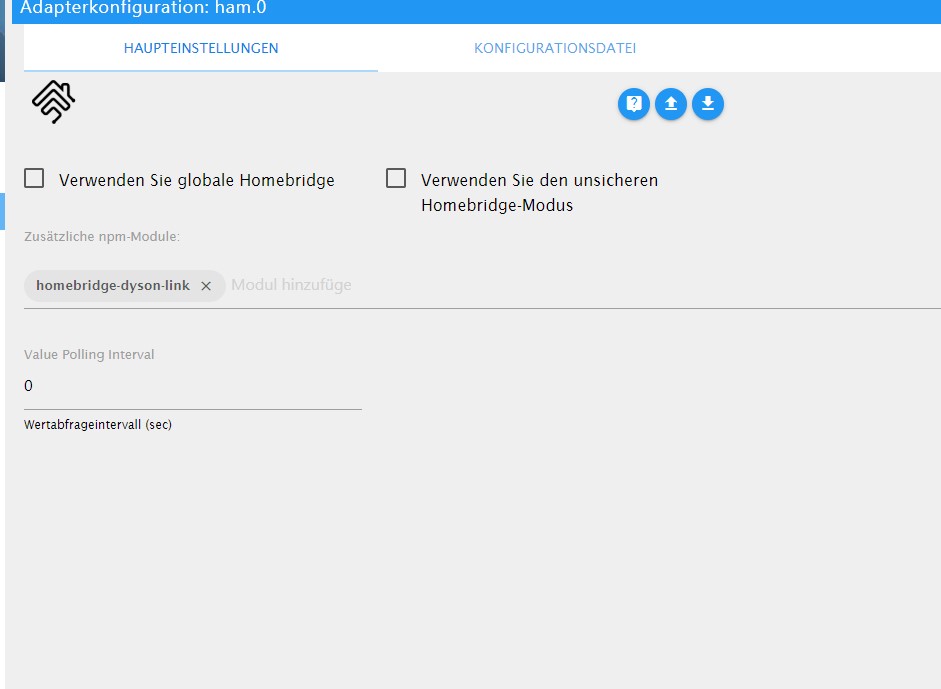
                            ham.0.jpg

                            ham.1.jpg

                            Was mache ich falsch?

                            Gruß

                            1 Reply Last reply
                            0
                            • K Offline
                              K Offline
                              Kludi
                              wrote on last edited by
                              #14

                              Hallo,
                              Danke noch mal für den Tipp.
                              Ich habe jetzt den HAM Adapter zum laufen bekommen und ich habe es auch geschafft das die Ganzen Objekte da sind. Ich hatte noch einige Fehler im JavaScript gehabt. (ich hatte es nie gelernt)

                              Jetzt habe ich alle Objekte von Dyson-purelink nur habe ich keine werte.
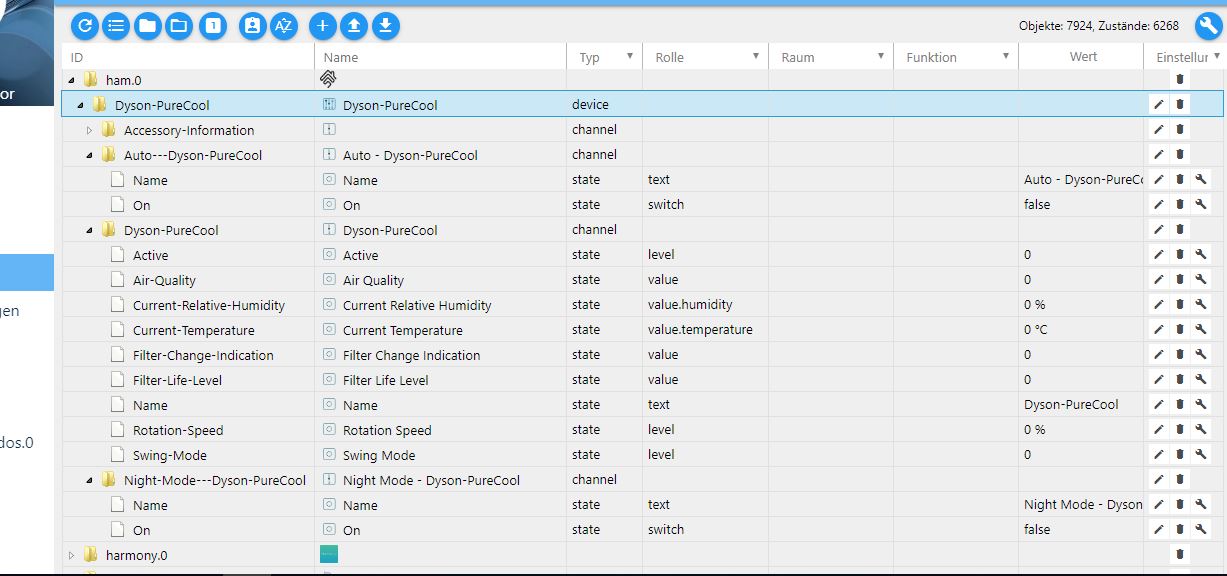
                              Dyson.JPG

                              {
                                "platforms": [
                                  {
                                    "platform": "DysonPlatform",
                                    "name": "DysonPlatform",
                                    "email": "xxxxxxx@xxx.de",
                                    "password": "xxxx",
                                    "country": "DE",
                                    "accessories": [
                                      {
                                        "ip": "192.168.178.53",
                                        "displayName": "Dyson-PureCool",
                                        "serialNumber": "DYSON-xxx-EU-xxxxxxxx-xxx",
                                        "password": "xxxx"
                                      }
                                    ]
                                  }
                                ]
                              }
                              

                              Was muss ich noch machen das ich meine Werte habe?

                              Gruß Kludi

                              1 Reply Last reply
                              0
                              • H Offline
                                H Offline
                                holgerwolf
                                wrote on last edited by holgerwolf
                                #15

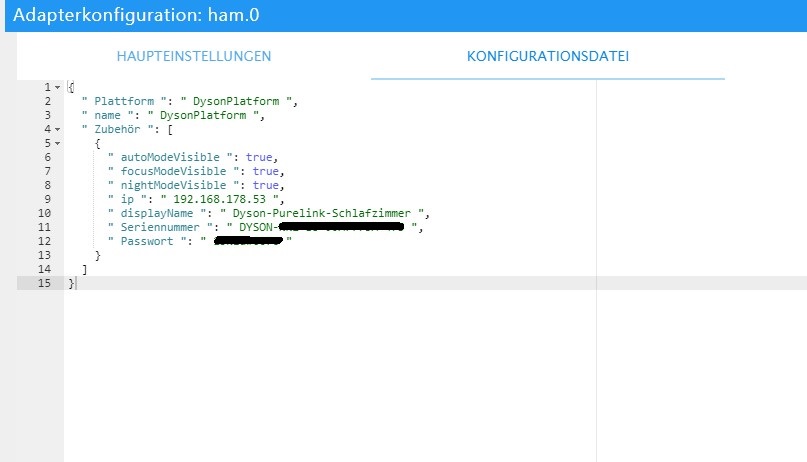
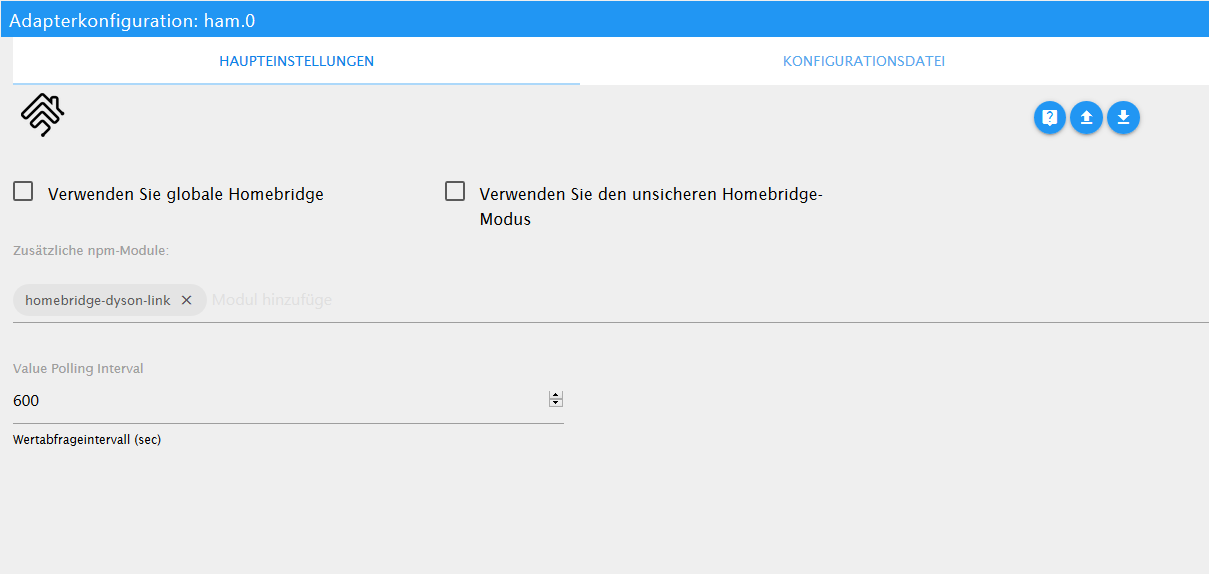
                                So sehen meine Einstellunge aus:

                                4a411f2a-2f89-4ffa-9675-6512dab28992-grafik.png

                                {
                                  "platforms": [
                                    {
                                      "platform": "DysonPlatform",
                                      "name": "DysonPlatform",
                                      "email": "xx@xx.com",
                                      "password": "xyz",
                                      "country": "DE",
                                      "accessories": [
                                        {
                                          "ip": "192.168.178.152",
                                          "displayName": "Dyson-Wohnzimmer",
                                          "serialNumber": "DYSON-NN2-EU-xxxx-475",
                                          "password": "xyz"
                                        }
                                      ]
                                    }
                                  ],
                                  "description": "Add configuration for your accessories or platforms according to the docs of the plugins.",
                                  "accessories": []
                                }
                                

                                Ich denke es liegt am Polling Wert....

                                K 1 Reply Last reply
                                0
                                • H holgerwolf

                                  So sehen meine Einstellunge aus:

                                  4a411f2a-2f89-4ffa-9675-6512dab28992-grafik.png

                                  {
                                    "platforms": [
                                      {
                                        "platform": "DysonPlatform",
                                        "name": "DysonPlatform",
                                        "email": "xx@xx.com",
                                        "password": "xyz",
                                        "country": "DE",
                                        "accessories": [
                                          {
                                            "ip": "192.168.178.152",
                                            "displayName": "Dyson-Wohnzimmer",
                                            "serialNumber": "DYSON-NN2-EU-xxxx-475",
                                            "password": "xyz"
                                          }
                                        ]
                                      }
                                    ],
                                    "description": "Add configuration for your accessories or platforms according to the docs of the plugins.",
                                    "accessories": []
                                  }
                                  

                                  Ich denke es liegt am Polling Wert....

                                  K Offline
                                  K Offline
                                  Kludi
                                  wrote on last edited by
                                  #16

                                  @holgerwolf Danke ich habe dein JavaScript übernommen.
                                  Leider bleibt der HAM-Adapter nicht Grün wechselt immer wieder hin und her.
                                  Wenn ich das richtig in den Log's verstanden habe hat der mit meinem Zugangsdaten Probleme.

                                  
                                  host.tinkerboard	2019-06-09 20:00:24.313	error	instance system.adapter.ham.0 terminated with code 0 (OK)
                                  host.tinkerboard	2019-06-09 20:00:24.313	error	Caught by controller[4]: at Socket.emit (events.js:211:7) code: 4 }
                                  host.tinkerboard	2019-06-09 20:00:24.313	error	Caught by controller[4]: at emitOne (events.js:116:13)
                                  host.tinkerboard	2019-06-09 20:00:24.313	error	Caught by controller[4]: at Socket.ondata (_stream_readable.js:639:20)
                                  host.tinkerboard	2019-06-09 20:00:24.313	error	Caught by controller[4]: at Writable.write (/opt/iobroker/node_modules/iobroker.ham/node_modules/readable-stream/lib/_stream_writable.js:334:11)
                                  host.tinkerboard	2019-06-09 20:00:24.312	error	Caught by controller[4]: at writeOrBuffer (/opt/iobroker/node_modules/iobroker.ham/node_modules/readable-stream/lib/_stream_writable.js:417:5)
                                  host.tinkerboard	2019-06-09 20:00:24.312	error	Caught by controller[4]: at doWrite (/opt/iobroker/node_modules/iobroker.ham/node_modules/readable-stream/lib/_stream_writable.js:428:64)
                                  host.tinkerboard	2019-06-09 20:00:24.312	error	Caught by controller[4]: at Writable.writable._write (/opt/iobroker/node_modules/iobroker.ham/node_modules/mqtt/lib/client.js:271:5)
                                  host.tinkerboard	2019-06-09 20:00:24.312	error	Caught by controller[4]: at work (/opt/iobroker/node_modules/iobroker.ham/node_modules/mqtt/lib/client.js:261:12)
                                  host.tinkerboard	2019-06-09 20:00:24.312	error	Caught by controller[4]: at MqttClient._handlePacket (/opt/iobroker/node_modules/iobroker.ham/node_modules/mqtt/lib/client.js:319:12)
                                  host.tinkerboard	2019-06-09 20:00:24.312	error	Caught by controller[4]: at MqttClient._handleConnack (/opt/iobroker/node_modules/iobroker.ham/node_modules/mqtt/lib/client.js:877:15)
                                  host.tinkerboard	2019-06-09 20:00:24.312	error	Caught by controller[4]: { Error: Connection refused: Bad username or password
                                  host.tinkerboard	2019-06-09 20:00:24.312	error	Caught by controller[3]: HAP Warning: Characteristic 000000BF-0000-1000-8000-0026BB765291 not in required or optional characteristics for service 000000B7-0000-1000-8000-0026BB765291. Adding anyway.
                                  host.tinkerboard	2019-06-09 20:00:24.312	error	Caught by controller[2]: [2019-6-9 20:00:22] Warning: skipping plugin found at '/usr/lib/node_modules/homebridge-dyson-link' since we already loaded the same plugin from '/opt/iobroker/node_modules/io
                                  host.tinkerboard	2019-06-09 20:00:24.312	error	Caught by controller[1]: [2019-6-9 20:00:22] Plugin /opt/iobroker/node_modules/homebridge-plugin-wrapper package.json does not contain the keyword 'homebridge-plugin'.
                                  host.tinkerboard	2019-06-09 20:00:24.311	error	Caught by controller[0]: [2019-6-9 20:00:21] Plugin /opt/iobroker/node_modules/iobroker.ham/node_modules/homebridge-plugin-wrapper package.json does not contain the keyword 'homebridge-plugin'.
                                  ham.0	2019-06-09 20:00:24.269	error	uncaught exception: Connection refused: Bad username or password
                                  host.tinkerboard	2019-06-09 19:59:50.182	error	instance system.adapter.ham.0 terminated with code 0 (OK)
                                  Caught	2019-06-09 19:59:50.182	error	by controller[4]: at Socket.emit (events.js:211:7) code: 4 }
                                  Caught	2019-06-09 19:59:50.182	error	by controller[4]: at emitOne (events.js:116:13)
                                  Caught	2019-06-09 19:59:50.182	error	by controller[4]: at Socket.ondata (_stream_readable.js:639:20)
                                  Caught	2019-06-09 19:59:50.182	error	by controller[4]: at Writable.write (/opt/iobroker/node_modules/iobroker.ham/node_modules/readable-stream/lib/_stream_writable.js:334:11)
                                  Caught	2019-06-09 19:59:50.182	error	by controller[4]: at writeOrBuffer (/opt/iobroker/node_modules/iobroker.ham/node_modules/readable-stream/lib/_stream_writable.js:417:5)
                                  Caught	2019-06-09 19:59:50.182	error	by controller[4]: at doWrite (/opt/iobroker/node_modules/iobroker.ham/node_modules/readable-stream/lib/_stream_writable.js:428:64)
                                  Caught	2019-06-09 19:59:50.182	error	by controller[4]: at Writable.writable._write (/opt/iobroker/node_modules/iobroker.ham/node_modules/mqtt/lib/client.js:271:5)
                                  Caught	2019-06-09 19:59:50.182	error	by controller[4]: at work (/opt/iobroker/node_modules/iobroker.ham/node_modules/mqtt/lib/client.js:261:12)
                                  Caught	2019-06-09 19:59:50.182	error	by controller[4]: at MqttClient._handlePacket (/opt/iobroker/node_modules/iobroker.ham/node_modules/mqtt/lib/client.js:319:12)
                                  Caught	2019-06-09 19:59:50.182	error	by controller[4]: at MqttClient._handleConnack (/opt/iobroker/node_modules/iobroker.ham/node_modules/mqtt/lib/client.js:877:15)
                                  Caught	2019-06-09 19:59:50.182	error	by controller[4]: { Error: Connection refused: Bad username or password
                                  Caught	2019-06-09 19:59:50.182	error	by controller[3]: HAP Warning: Characteristic 000000BF-0000-1000-8000-0026BB765291 not in required or optional characteristics for service 000000B7-0000-1000-8000-0026BB765291. Adding anyway.
                                  Caught	2019-06-09 19:59:50.181	error	by controller[2]: [2019-6-9 19:59:48] Warning: skipping plugin found at '/usr/lib/node_modules/homebridge-dyson-link' since we already loaded the same plugin from '/opt/iobroker/node_modules/iobroker
                                  Caught	2019-06-09 19:59:50.181	error	by controller[1]: [2019-6-9 19:59:47] Plugin /opt/iobroker/node_modules/homebridge-plugin-wrapper package.json does not contain the keyword 'homebridge-plugin'.
                                  Caught	2019-06-09 19:59:50.181	error	by controller[0]: [2019-6-9 19:59:47] Plugin /opt/iobroker/node_modules/iobroker.ham/node_modules/homebridge-plugin-wrapper package.json does not contain the keyword 'homebridge-plugin'.
                                  ham.0	2019-06-09 19:59:50.145	error	at Socket.emit (events.js:211:7)
                                  ham.0	2019-06-09 19:59:50.145	error	at emitOne (events.js:116:13)
                                  ham.0	2019-06-09 19:59:50.145	error	at Socket.ondata (_stream_readable.js:639:20)
                                  ham.0	2019-06-09 19:59:50.145	error	at Writable.write (/opt/iobroker/node_modules/iobroker.ham/node_modules/readable-stream/lib/_stream_writable.js:334:11)
                                  ham.0	2019-06-09 19:59:50.145	error	at writeOrBuffer (/opt/iobroker/node_modules/iobroker.ham/node_modules/readable-stream/lib/_stream_writable.js:417:5)
                                  ham.0	2019-06-09 19:59:50.145	error	at doWrite (/opt/iobroker/node_modules/iobroker.ham/node_modules/readable-stream/lib/_stream_writable.js:428:64)
                                  ham.0	2019-06-09 19:59:50.145	error	at Writable.writable._write (/opt/iobroker/node_modules/iobroker.ham/node_modules/mqtt/lib/client.js:271:5)
                                  ham.0	2019-06-09 19:59:50.145	error	at work (/opt/iobroker/node_modules/iobroker.ham/node_modules/mqtt/lib/client.js:261:12)
                                  ham.0	2019-06-09 19:59:50.145	error	at MqttClient._handlePacket (/opt/iobroker/node_modules/iobroker.ham/node_modules/mqtt/lib/client.js:319:12)
                                  ham.0	2019-06-09 19:59:50.145	error	at MqttClient._handleConnack (/opt/iobroker/node_modules/iobroker.ham/node_modules/mqtt/lib/client.js:877:15)
                                  ham.0	2019-06-09 19:59:50.145	error	Error: Connection refused: Bad username or password
                                  ham.0	2019-06-09 19:59:50.145	error	uncaught exception: Connection refused: Bad username or password
                                  

                                  Aber meine Zugangsdaten stimmen, sonnst hätte ich ja auch mit der Dyson app. Probleme.
                                  Ich danke dir noch mal das du dir das anschaust.

                                  Gruß Kludi

                                  1 Reply Last reply
                                  0
                                  • H Offline
                                    H Offline
                                    holgerwolf
                                    wrote on last edited by
                                    #17

                                    Vielleicht weil das ein wenig verwirrend ist. Oben in Kombi mit der E-Mail Adresse muss das PW aus dem Dyson Web Login rein. Unten bei der Seriennummer das WLAN PW vom Dyson. Das vom Aufkleber.

                                    Gruss
                                    Holger

                                    K 1 Reply Last reply
                                    0
                                    • K Offline
                                      K Offline
                                      Kludi
                                      wrote on last edited by
                                      #18

                                      @holgerwolf Das ist ja interessant darauf wehre ich nie drauf gekommen. Das Password vom Aufkleber zu nehmen.

                                      Super jetzt habe ich werte, hat ein bissen gedauert bis er die anzeigt.
                                      Ich denke das liegt am Polling.
                                      Aber ich kann daraus nicht steuern oder habe ich immer noch ein Fehler? :see_no_evil:

                                      Gruß Kludi

                                      1 Reply Last reply
                                      0
                                      • K Offline
                                        K Offline
                                        Kludi
                                        wrote on last edited by
                                        #19

                                        Doch geht ich kann alles machen! Danke für die Super Hilfe :relaxed:

                                        Gruß
                                        Kludi

                                        1 Reply Last reply
                                        0
                                        • H holgerwolf

                                          Vielleicht weil das ein wenig verwirrend ist. Oben in Kombi mit der E-Mail Adresse muss das PW aus dem Dyson Web Login rein. Unten bei der Seriennummer das WLAN PW vom Dyson. Das vom Aufkleber.

                                          Gruss
                                          Holger

                                          K Offline
                                          K Offline
                                          Kludi
                                          wrote on last edited by Kludi
                                          #20

                                          @holgerwolf Sorry ich muss dich noch mal stören.
                                          Kann das sein wenn der Lüfter auf Auto seht, dass man dann keine neuen Werte bekommt und auch nicht eingreifen bzw. steuern kann?

                                          Gruß Kludi

                                          H 1 Reply Last reply
                                          0
                                          Reply
                                          • Reply as topic
                                          Log in to reply
                                          • Oldest to Newest
                                          • Newest to Oldest
                                          • Most Votes


                                          Support us

                                          ioBroker
                                          Community Adapters
                                          Donate
                                          FAQ Cloud / IOT
                                          HowTo: Node.js-Update
                                          HowTo: Backup/Restore
                                          Downloads
                                          BLOG

                                          743

                                          Online

                                          32.6k

                                          Users

                                          82.3k

                                          Topics

                                          1.3m

                                          Posts
                                          Community
                                          Impressum | Datenschutz-Bestimmungen | Nutzungsbedingungen | Einwilligungseinstellungen
                                          ioBroker Community 2014-2025
                                          logo
                                          • Login

                                          • Don't have an account? Register

                                          • Login or register to search.
                                          • First post
                                            Last post
                                          0
                                          • Home
                                          • Recent
                                          • Tags
                                          • Unread 0
                                          • Categories
                                          • Unreplied
                                          • Popular
                                          • GitHub
                                          • Docu
                                          • Hilfe