




[Aufruf] BLE Adapter testen (v0.6.0)
-
Ich wollte Dir nur einmal DANKE sagen @AlCalzone! Ich bin total iobroker newbee und bin gerade einfach nur begeistert, wie einfach mein Xiaomi Hygrometer erkannt und eingebunden worden ist. Und, ich hatte fast vergessen, das meine Xiaomi Waage auch Bluettooth hat. Selbst auf 20 Meter durchs ganze Haus wurde die gefunden. Und so einfach! Eine Sache über die ich fast gestolpert wäre, ist bei den Einstellungen das Freifeld Plugins. Könnte man da nicht ein DropDown Menü mit den am häufigsten genutzten Plugins machen? Das musste ich mir erst ergooglen. Aber toll, wie einfach das sonst geht. Großartig! DANKE! `
welche Plugins meinst du denn? Noch andere als die drei auf githup erwähnten?
Ich selbst wollte auch gerne meine Waage ins Netz einbinden. Habe eine YUNMAI mini smart scale. YUNMAI habe ich auch schon in Verbindung mit XIAOMI im Internet gefunden. Aber mein Versuch zeigte keine gesichtete Waage im BLE-Adapter.
Welche Waage hast du denn?
-
Bei mir geht der Adapter auch nur auf Gelb ("unauthorized" … )
Voll die noob frage: Wie kann ich denn nach diesen Befehlen iobroker neu starten?! :-D
EDIT: Hat sich soeben erledigt. Ich musste ein Plugin eintragen und jetzt schaltet er auf grün.
-
Welche Waage hast du denn? `
Es ist die MI Smart Scale: https://www.mi.com/global/scale/
Ist bestimmt schon drei - vier Jahre alt. Läuft immer noch mit den ersten Batterien. :shock:
Wird aber auch nicht so häufig genutzt->Eigenschutz ;)
Hatte nur das XIAOMI Plugin ausgewählt.
-
Welche Waage hast du denn? `
Es ist die MI Smart Scale: https://www.mi.com/global/scale/
Ist bestimmt schon drei - vier Jahre alt. Läuft immer noch mit den ersten Batterien. :shock:
Wird aber auch nicht so häufig genutzt->Eigenschutz ;)
Hatte nur das XIAOMI Plugin ausgewählt. `
Vielen Dank.
Ist das die erste oder zweite Generation.
Oder anders gefragt: Funktioniert die 2. Generation (mit BMI) auch damit?
-
Hallo zusammen,
nachdem ich die ganzen 15 Seiten Thread durchgeschaut habe komme ich nicht weiter…
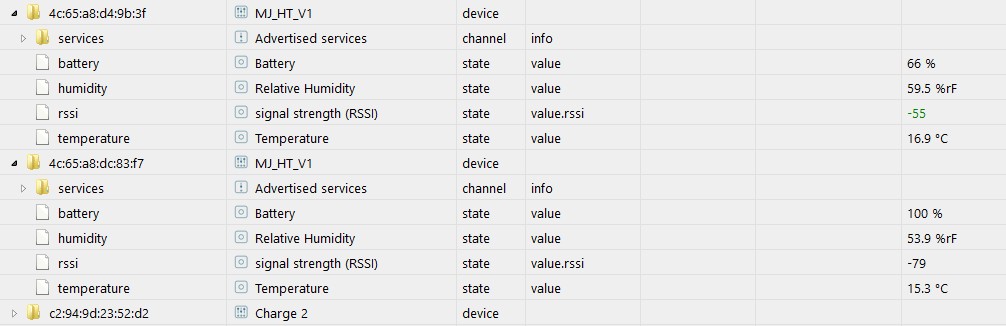
Habe 2 Xiaomi Thermostate und empfange leider keine Temp und Humidity Werte. Nur einmal kurz bei einem der beiden. Jetzt liegen beide relativ nah an dem Raspi 3.
Wie komme ich wieder an meine Werte?
Hardware: Raspi 3b+, Node-Version 8.15, Adapter ist grün, ansonsten geht alles :)
Danke schon einmal!

 )
)xiaomi_thermostat.JPG[/attachment]" /> -
Auch das hat bei mir dazu geführt, dass der Adapter auf grün wechselt. Und das ganze funktioniert auch mit einem ioBroker Start mit Sudo.
Danke dafür.
sudo usermod -a -G bluetooth iobroker@AlCalzone: Dieser Befehl hatte leider bei mir keinen Effekt. `
Wundert mich nicht, wenn du ioBroker als root startest ;)
-
Ich habe auch ein Problem mit dem ble Adapter plötzlich.
Im Debug-Log bzw, auch in den Objekten steht bei "driver state" poweredoff. Denke mal das soll nicht so sein!?
Die zwei Codezeilen auf den letzten Seiten bewirken bei mir leider gar nichts.
-
Bei mir war nach dem Umzug auf einen NUC der BLE Adapter ebenfalls gelb und Info zeigte "Unauthorized"
nach den beiden Befehlen:
setcap cap_net_raw+eip $(eval readlink -f `which node`)
usermod -a -G bluetooth iobroker
jetzt wieder alles grün und lüppt. :mrgreen:
-
Soo. Einiges getan, debuglog schaut nun anders aus.
uncaught error Exception: listen EADDRINUSE 127.0.0.1:9001
Another error instance is running or some application uses port!
Ble.0 error unhandled promise rejection: error: cannot find module '@abandonware/bluetooth-hci-socket'
Endergebnis dasselbe.
Adapter gelb
Driver state poweredoff
Edit:
   cd /opt/iobroker
sudo npm i iobroker.ble --production --unsafe-perm
Hat das problem schlussendlich gelöst.
-
   cd /opt/iobroker
sudo npm i iobroker.ble --production --unsafe-perm
```` `
Und bevor du in 2 Tagen mit dem näcshten Problem um die Ecke kommst, dass eine Installation nicht funktioniert:
viewtopic.php?f=8&t=19209 => Lesen und anwenden!
-
So, bevor ich mir jetzt ein paar Fehler bei dem Versuch den BLE Adapter grün zu bekommen einfange noch mal für doofe, was muss ich auf einem Raspberry 3B Plus der nach der alten Methode den IOBroker installiert hat tun, damit der Adapter grün wird?
Bei meinem "alten" Raspberry hab ich eigentlich nichts besonderes gemacht um den Adapter mit meinen Sensoren ans Laufen zu bekommen. Die BT Pakete, den Adapter installiert und mi-flora als Plugin eingetragen. Die Sensoren wurden sofort erkannt und alles lief. Alle Adapter und Node, Nodejs und NPM Versionen sind identisch, nur will der neu nicht und der alte immer sofort.
Wenn ich mit VNC rein gehe und dort BT suchen lasse, dann werden auch Geräte gefunden, somit funktioniert BT ja auch schon mal grundsätzlich nur über den BLE Adapter tut sich nichts.
pi@Pi3Bplus:/opt/iobroker $ node -v
v8.15.0
pi@Pi3Bplus:/opt/iobroker $ nodejs -v
v8.15.0
pi@Pi3Bplus:/opt/iobroker $ npm -v
6.6.0
Fehler dazu im Log: Cannot find module '@abandonware/bluetooth-hci-socket
So ich konnte es selber lösen mit dem Link hier: viewtopic.php?t=13963
npm install bluetooth-hci-socketund den Adapter noch mal installiert
sudo npm i iobroker.ble --production --unsafe-permDas erklärt auch warum die alte Installation sofort lief. Anscheinend installiert die Node 8.15 das Paket nicht automatisch mit, denn die alte Installation habe ich von Node 6.* hoch gezogen und die 6er hat das noch mit installiert. Die neue Installation habe ich direkt mit 8.15 begonnen.
Sollte vielleicht gleich als Installationshinweis mit auf die erste Seite und oder abgeklärt werden, warum es die 8.15er nicht mehr macht.
-
Sollte vielleicht gleich als Installationshinweis mit auf die erste Seite und oder abgeklärt werden, warum es die 8.15er nicht mehr macht. `
Nur mal so: Ich bin auch auf 8.15 und habe keine Probleme. Die scheinen sich auch erst zu häufen, als die Bluetooth-Library noble durch einen Fork (@abandonware/…) ausgetauscht wurde, der Node 10 unterstützt.Bisher hat es aber noch niemand, der diese Probleme hat, geschafft hier ein Log der Installation zu posten. So kann ich auch nicht nachvollziehen, warum die Pakete nicht installiert werden oder Hilfestellung geben.
und den Adapter noch mal installiert
sudo npm i iobroker.ble --production --unsafe-perm
```` `
Und auch du solltest den Link in meinem vorigen Post mal lesen. Ich habe fast die Vermutung, dass das Problem aus früheren npm-Installationen mit sudo kommt, wodurch die Permissions versaut wurden.
-
Mach ich heute Mittag gleich.
Bin derzeit am Basteln und hab das Problem nur, wenn ich gleich mit einem System startet, dass von Anfang an die altuellen Versionen von Node und NPM drauf hat.
Mein altes System macht da keine Problme mit den upgedateten Versionen.
Ich hab moch ne Bastelumgebung und die sollte genau das gewünschte Log liefern ;)
-
So hier mal das Installations-Log:
!
$ ./iobroker add ble --host Pi3Bplus NPM version: 6.6.0 npm install iobroker.ble --production --save --prefix "/opt/iobroker" (System call) npm notice created a lockfile as package-lock.json. You should commit this file. node-pre-gyp WARN Using request for node-pre-gyp https download node-pre-gyp WARN Tried to download(404): https://github.com/tessel/node-usb/releases/download/1.5.0/usb_bindings-v1.5.0-node-v57-linux-arm.tar.gz node-pre-gyp WARN Pre-built binaries not found for usb@1.5.0 and node@8.15.0 (node-v57 ABI, glibc) (falling back to source compile with node-gyp) ! ../src/node_usb.cc: In function ‘void handleHotplug(std::pair<libusb_device*, libusb_hotplug_event="">)’:../src/node_usb.cc:151:58: warning: ‘v8::Local <v8::value>Nan::MakeCallback(v8::Local<v8::object>, const char*, int, v8::Local<v8::value>*)’ is deprecated [-Wdeprecated-declarations] Nan::MakeCallback(Nan::New(hotplugThis), "emit", 2, argv); ^ In file included from ../src/helpers.h:3:0, from ../src/node_usb.h:21, from ../src/node_usb.cc:1: ../../nan/nan.h:1001:46: note: declared here NAN_DEPRECATED inline v8::Local <v8::value>MakeCallback( ^~~~~~~~~~~~ ! ../src/device.cc: In static member function ‘static void Req::default_after(uv_work_t*)’:../src/device.cc:237:64: warning: ‘v8::Local <v8::value>Nan::MakeCallback(v8::Local<v8::object>, v8::Local<v8::function>, int, v8::Local<v8::value>*)’ is deprecated [-Wdeprecated-declarations] Nan::MakeCallback(device, Nan::New(baton->callback), 1, argv); ^ ! In file included from ../src/helpers.h:3:0, from ../src/node_usb.h:21, from ../src/device.cc:1: ../../nan/nan.h:959:46: note: declared here NAN_DEPRECATED inline v8::Local <v8::value>MakeCallback( ^~~~~~~~~~~~ ! ../src/transfer.cc: In function ‘void handleCompletion(Transfer*)’:../src/transfer.cc:126:72: warning: ‘v8::Local <v8::value>Nan::MakeCallback(v8::Local<v8::object>, v8::Local<v8::function>, int, v8::Local<v8::value>*)’ is deprecated [-Wdeprecated-declarations] Nan::MakeCallback(self->handle(), Nan::New(self->v8callback), 3, argv); ^ In file included from ../src/helpers.h:3:0, from ../src/node_usb.h:21, from ../src/transfer.cc:1: ../../nan/nan.h:959:46: note: declared here NAN_DEPRECATED inline v8::Local <v8::value>MakeCallback( ^~~~~~~~~~~~ ! node-pre-gyp WARN Using request for node-pre-gyp https download node-pre-gyp WARN Tried to download(404): https://github.com/sandeepmistry/node-bluetooth-hci-socket/releases/download/0.5.3-1/binding-0.5.3-1-node-v57-linux-arm.tar.gz node-pre-gyp WARN Pre-built binaries not found for @abandonware/bluetooth-hci-socket@0.5.3-1 and node@8.15.0 (node-v57 ABI, glibc) (falling back to source compile with node-gyp) ! ../src/BluetoothHciSocket.cpp: In member function ‘void BluetoothHciSocket::poll()’:../src/BluetoothHciSocket.cpp:252:95: warning: ‘v8::Local <v8::value>Nan::MakeCallback(v8::Local<v8::object>, v8::Local<v8::string>, int, v8::Local<v8::value>*)’ is deprecated [-Wdeprecated-declarations] Nan::MakeCallback(Nan::New<object>(this->This), Nan::New("emit").ToLocalChecked(), 2, argv); ^ ! In file included from ../src/BluetoothHciSocket.cpp:8:0:../../../nan/nan.h:980:46: note: declared here NAN_DEPRECATED inline v8::Local <v8::value>MakeCallback( ^~~~~~~~~~~~ ! ../src/BluetoothHciSocket.cpp: In member function ‘void BluetoothHciSocket::emitErrnoError()’:../src/BluetoothHciSocket.cpp:283:93: warning: ‘v8::Local <v8::value>Nan::MakeCallback(v8::Local<v8::object>, v8::Local<v8::string>, int, v8::Local<v8::value>*)’ is deprecated [-Wdeprecated-declarations] Nan::MakeCallback(Nan::New<object>(this->This), Nan::New("emit").ToLocalChecked(), 2, argv); ^ In file included from ../src/BluetoothHciSocket.cpp:8:0: ../../../nan/nan.h:980:46: note: declared here NAN_DEPRECATED inline v8::Local <v8::value>MakeCallback( ^~~~~~~~~~~~ ! npm WARN optional SKIPPING OPTIONAL DEPENDENCY: xpc-connection@0.1.4 (node_modules/xpc-connection):npm WARN notsup SKIPPING OPTIONAL DEPENDENCY: Unsupported platform for xpc-connection@0.1.4: wanted {"os":"darwin","arch":"any"} (current: {"os":"linux","arch":"arm"}) ! host.Pi3Bplus install adapter ble got /opt/iobroker/node_modules/iobroker.ble/admin upload [2] ble.admin /opt/iobroker/node_modules/iobroker.ble/admin/words.js words.js application/javascript upload [1] ble.admin /opt/iobroker/node_modules/iobroker.ble/admin/index.html index.html text/html upload [0] ble.admin /opt/iobroker/node_modules/iobroker.ble/admin/ble.png ble.png image/png host.Pi3Bplus object system.adapter.ble created host.Pi3Bplus create instance ble host.Pi3Bplus object ble.0.options.allowNewDevices created host.Pi3Bplus object ble.0.options created host.Pi3Bplus object ble.0.info.driverState created host.Pi3Bplus object ble.0.info.connection created host.Pi3Bplus object ble.0.info created host.Pi3Bplus object system.adapter.ble.0.outputCount created host.Pi3Bplus object system.adapter.ble.0.inputCount created host.Pi3Bplus object system.adapter.ble.0.uptime created host.Pi3Bplus object system.adapter.ble.0.memRss created host.Pi3Bplus object system.adapter.ble.0.memHeapTotal created host.Pi3Bplus object system.adapter.ble.0.memHeapUsed created host.Pi3Bplus object system.adapter.ble.0.connected created host.Pi3Bplus object system.adapter.ble.0.alive created host.Pi3Bplus object system.adapter.ble.0 created process exited with code 0 ! und zur Sicherheit habe ich noch den Admin auf debug gestellt und das ist das Log während der Installation von ble: ! >!
undefined2019-01-23 15:58:43.212 - debug: admin.0 Unsubscribe LOGS
2019-01-23 15:58:43.213 - debug: admin.0 Subscribes:
2019-01-23 15:58:53.215 - debug: admin.0 Change log subscriber state: FALSE
2019-01-23 15:58:53.223 - debug: admin.0 system.adapter.admin.0: logging false
2019-01-23 15:58:54.238 - info: iobroker add ble --host Pi3Bplus
2019-01-23 15:58:56.993 - info: iobroker NPM version: 6.6.0
2019-01-23 15:58:58.053 - info: iobroker npm install iobroker.ble --production --save --prefix "/opt/iobroker" (System call)
2019-01-23 15:59:48.930 - info: iobroker npm
2019-01-23 15:59:48.932 - info: iobroker notice
2019-01-23 15:59:48.935 - info: iobroker created a lockfile as package-lock.json. You should commit this file.
2019-01-23 15:59:50.528 - info: iobroker node-pre-gyp
2019-01-23 15:59:50.532 - info: iobroker WARN Using request for node-pre-gyp https download
2019-01-23 15:59:51.344 - info: iobroker node-pre-gyp WARN Tried to download(404): https://github.com/tessel/node-usb/releases/download/1.5.0/usb_bindings-v1.5.0-node-v57-linux-arm.tar.gz node-pre-gyp WARN Pre-built binaries not found for usb@1.5.0 and node@8.15.0 (node-v57 ABI, glibc) (falling back to source compile with node-gyp)
2019-01-23 16:00:14.910 - info: iobroker ../src/node_usb.cc: In function ‘void handleHotplug(std::pair)’:../src/node_usb.cc:151:58: warning: ‘v8::Local Nan::MakeCallback(v8::Local, const char*, int, v8::Local*)’ is deprecated [-Wdeprecated-declarations]
Nan::MakeCallback(Nan::New(hotplugThis), "emit", 2, argv);
^
In file included from ../src/helpers.h:3:0,
from ../src/node_usb.h:21,
from ../src/node_usb.cc:1:
../../nan/nan.h:1001:46: note: declared here
NAN_DEPRECATED inline v8::Local MakeCallback(
^~~~~~~~~~~~
2019-01-23 16:00:25.768 - info: iobroker ../src/device.cc: In static member function ‘static void Req::default_after(uv_work_t*)’:../src/device.cc:237:64: warning: ‘v8::Local Nan::MakeCallback(v8::Local, v8::Local, int, v8::Local*)’ is deprecated [-Wdeprecated-declarations]
Nan::MakeCallback(device, Nan::New(baton->callback), 1, argv);
^
2019-01-23 16:00:25.773 - info: iobroker In file included from ../src/helpers.h:3:0, from ../src/node_usb.h:21,
from ../src/device.cc:1:
../../nan/nan.h:959:46: note: declared here
NAN_DEPRECATED inline v8::Local MakeCallback(
^~~~~~~~~~~~
2019-01-23 16:00:35.457 - info: iobroker ../src/transfer.cc: In function ‘void handleCompletion(Transfer*)’:../src/transfer.cc:126:72: warning: ‘v8::Local Nan::MakeCallback(v8::Local, v8::Local, int, v8::Local*)’ is deprecated [-Wdeprecated-declarations]
Nan::MakeCallback(self->handle(), Nan::New(self->v8callback), 3, argv);
^
In file included from ../src/helpers.h:3:0,
from ../src/node_usb.h:21,
from ../src/transfer.cc:1:
../../nan/nan.h:959:46: note: declared here
NAN_DEPRECATED inline v8::Local MakeCallback(
^~~~~~~~~~~~
2019-01-23 16:00:39.610 - info: iobroker node-pre-gyp
2019-01-23 16:00:39.613 - info: iobroker WARN Using request for node-pre-gyp https download
2019-01-23 16:00:41.704 - info: iobroker node-pre-gyp WARN Tried to download(404): https://github.com/sandeepmistry/node-bluetooth-hci-socket/releases/download/0.5.3-1/binding-0.5.3-1-node-v57-linux-arm.tar.gz node-pre-gyp WARN Pre-built binaries not found for @abandonware/bluetooth-hci-socket@0.5.3-1 and node@8.15.0 (node-v57 ABI, glibc) (falling back to source compile with node-gyp)
2019-01-23 16:00:48.294 - info: iobroker ../src/BluetoothHciSocket.cpp: In member function ‘void BluetoothHciSocket::poll()’:../src/BluetoothHciSocket.cpp:252:95: warning: ‘v8::Local Nan::MakeCallback(v8::Local, v8::Local, int, v8::Local*)’ is deprecated [-Wdeprecated-declarations]
Nan::MakeCallback(Nan::New(this->This), Nan::New("emit").ToLocalChecked(), 2, argv);
^
2019-01-23 16:00:48.296 - info: iobroker In file included from ../src/BluetoothHciSocket.cpp:8:0:../../../nan/nan.h:980:46: note: declared here
NAN_DEPRECATED inline v8::Local MakeCallback(
^~~~~~~~~~~~
2019-01-23 16:00:48.304 - info: iobroker ../src/BluetoothHciSocket.cpp: In member function ‘void BluetoothHciSocket::emitErrnoError()’:../src/BluetoothHciSocket.cpp:283:93: warning: ‘v8::Local Nan::MakeCallback(v8::Local, v8::Local, int, v8::Local*)’ is deprecated [-Wdeprecated-declarations]
Nan::MakeCallback(Nan::New(this->This), Nan::New("emit").ToLocalChecked(), 2, argv);
^
In file included from ../src/BluetoothHciSocket.cpp:8:0:
../../../nan/nan.h:980:46: note: declared here
NAN_DEPRECATED inline v8::Local MakeCallback(
^~~~~~~~~~~~
2019-01-23 16:00:55.098 - info: iobroker npm
2019-01-23 16:00:55.100 - info: iobroker WARN optional SKIPPING OPTIONAL DEPENDENCY: xpc-connection@0.1.4 (node_modules/xpc-connection):npm WARN notsup SKIPPING OPTIONAL DEPENDENCY: Unsupported platform for xpc-connection@0.1.4: wanted {"os":"darwin","arch":"any"} (current: {"os":"linux","arch":"arm"})
2019-01-23 16:00:55.108 - info: iobroker
2019-01-23 16:00:55.195 - info: iobroker host.Pi3Bplus install adapter ble
2019-01-23 16:00:55.218 - info: iobroker got /opt/iobroker/node_modules/iobroker.ble/admin
2019-01-23 16:00:55.244 - info: iobroker upload [2] ble.admin /opt/iobroker/node_modules/iobroker.ble/admin/words.js words.js application/javascript
2019-01-23 16:00:55.328 - info: iobroker upload [1] ble.admin /opt/iobroker/node_modules/iobroker.ble/admin/index.html index.html text/html
2019-01-23 16:00:55.392 - info: iobroker upload [0] ble.admin /opt/iobroker/node_modules/iobroker.ble/admin/ble.png ble.png image/png
2019-01-23 16:00:55.507 - info: iobroker host.Pi3Bplus object system.adapter.ble created
2019-01-23 16:00:55.546 - info: iobroker host.Pi3Bplus create instance ble
2019-01-23 16:00:55.555 - info: iobroker host.Pi3Bplus object ble.0.options.allowNewDevices created
2019-01-23 16:00:55.587 - info: iobroker host.Pi3Bplus object ble.0.options created
2019-01-23 16:00:55.619 - info: iobroker host.Pi3Bplus object ble.0.info.driverState created
2019-01-23 16:00:55.652 - info: iobroker host.Pi3Bplus object ble.0.info.connection created
2019-01-23 16:00:55.685 - info: iobroker host.Pi3Bplus object ble.0.info created
2019-01-23 16:00:55.719 - info: iobroker host.Pi3Bplus object system.adapter.ble.0.outputCount created
2019-01-23 16:00:55.751 - info: iobroker host.Pi3Bplus object system.adapter.ble.0.inputCount created
2019-01-23 16:00:55.783 - info: iobroker host.Pi3Bplus object system.adapter.ble.0.uptime created
2019-01-23 16:00:55.817 - info: iobroker host.Pi3Bplus object system.adapter.ble.0.memRss created
2019-01-23 16:00:55.849 - info: iobroker host.Pi3Bplus object system.adapter.ble.0.memHeapTotal created
2019-01-23 16:00:55.881 - info: iobroker host.Pi3Bplus object system.adapter.ble.0.memHeapUsed created
2019-01-23 16:00:55.913 - info: iobroker host.Pi3Bplus object system.adapter.ble.0.connected created
2019-01-23 16:00:55.945 - info: iobroker host.Pi3Bplus object system.adapter.ble.0.alive created
2019-01-23 16:00:55.980 - info: host.Pi3Bplus object change system.adapter.ble.0
2019-01-23 16:00:56.001 - info: host.Pi3Bplus instance system.adapter.ble.0 started with pid 2378
2019-01-23 16:00:56.006 - info: iobroker host.Pi3Bplus object system.adapter.ble.0 created
2019-01-23 16:00:56.033 - info: iobroker exit 0
2019-01-23 16:00:56.245 - debug: admin.0 Subscribe OBJECTS: system.adapter.*
2019-01-23 16:00:56.251 - debug: admin.0 Subscribe STATES: system.adapter.*
2019-01-23 16:00:56.253 - debug: admin.0 Subscribes: system.host., system.adapter.
2019-01-23 16:00:56.258 - debug: admin.0 Subscribe STATES: .info.connection
2019-01-23 16:00:56.260 - debug: admin.0 Subscribes: system.host., system.adapter., .info.connection
2019-01-23 16:00:57.450 - info: ble.0 starting. Version 0.6.0 in /opt/iobroker/node_modules/iobroker.ble, node: v8.15.0
2019-01-23 16:00:57.509 - info: ble.0 loaded plugins: Xiaomi, mi-flora, ruuvi-tag, _default
2019-01-23 16:00:57.512 - info: ble.0 enabled plugins: _default
2019-01-23 16:00:57.514 - info: ble.0 monitored services:
2019-01-23 16:00:59.018 - debug: admin.0 sendTo "getHCIPorts" to system.adapter.ble.0 from system.adapter.admin.0
2019-01-23 16:00:59.051 - info: ble.0 {"index":0,"bus":"UART"}
2019-01-23 16:01:52.559 - debug: admin.0 Unsubscribe OBJECTS: system.adapter.
2019-01-23 16:01:52.583 - debug: admin.0 Disable logging, because no one socket connected
2019-01-23 16:01:52.585 - debug: admin.0 Change log subscriber state: true
2019-01-23 16:01:52.601 - debug: admin.0 system.adapter.admin.0: logging true
2019-01-23 16:01:52.609 - debug: admin.0 Unsubscribe STATES: system.host.
2019-01-23 16:01:52.611 - debug: admin.0 Subscribes: system.adapter., .info.connection
2019-01-23 16:01:52.630 - debug: admin.0 Unsubscribe OBJECTS: system.host.
2019-01-23 16:01:52.637 - debug: admin.0 Unsubscribe STATES: system.adapter.
2019-01-23 16:01:52.641 - debug: admin.0 Subscribes: *.info.connection
2019-01-23 16:01:52.647 - debug: admin.0 Unsubscribe STATES: .info.connection
2019-01-23 16:01:52.650 - debug: admin.0 Subscribes:
2019-01-23 16:01:52.748 - debug: admin.0 Subscribe LOGS
2019-01-23 16:01:52.748 - debug: admin.0 Subscribes: dummy
! ````
! Das ganze auf einem frisch aufgesetzte Debian und IOBroker. Sonst keine Adapter installiert und gestartet direkt von Node 8.15 und NPM 6.6.0.</v8::value></object></v8::value></v8::string></v8::object></v8::value></v8::value></object></v8::value></v8::string></v8::object></v8::value></v8::value></v8::value></v8::function></v8::object></v8::value></v8::value></v8::value></v8::function></v8::object></v8::value></v8::value></v8::value></v8::object></v8::value></libusb_device,> -
Nein, wird nicht grün.
Das Nachinstallieren wie ich es oben schon mal gemacht hatte bringt auch keine Besserung.
Da ich ein paar der Daten vom BLE Adapter zur Heizungssteuerung verwende, ist das nun etwas nervig.
Es liegt ja an der neuen Version des Node oder NPM. Mit einem Downgrade würde das erst mal laufen.
Könntest Du bitte eins von beiden auschliesen und den sauberen Downgrade Weg beschreiben?


Hey! Du scheinst an dieser Unterhaltung interessiert zu sein, hast aber noch kein Konto.
Hast du es satt, bei jedem Besuch durch die gleichen Beiträge zu scrollen? Wenn du dich für ein Konto anmeldest, kommst du immer genau dorthin zurück, wo du zuvor warst, und kannst dich über neue Antworten benachrichtigen lassen (entweder per E-Mail oder Push-Benachrichtigung). Du kannst auch Lesezeichen speichern und Beiträge positiv bewerten, um anderen Community-Mitgliedern deine Wertschätzung zu zeigen.
Mit deinem Input könnte dieser Beitrag noch besser werden 💗
Registrieren AnmeldenSupport us
414
Online33.0k
Benutzer83.7k
Themen1.3m
Beiträge