



Skip to content
  • Home
  • Recent
  • Tags
  • 0 Unread 0
  • Categories
  • Unreplied
  • Popular
  • GitHub
  • Docu
  • Hilfe
Skins
  • Light
  • Brite
  • Cerulean
  • Cosmo
  • Flatly
  • Journal
  • Litera
  • Lumen
  • Lux
  • Materia
  • Minty
  • Morph
  • Pulse
  • Sandstone
  • Simplex
  • Sketchy
  • Spacelab
  • United
  • Yeti
  • Zephyr
  • Dark
  • Cyborg
  • Darkly
  • Quartz
  • Slate
  • Solar
  • Superhero
  • Vapor

  • Default (No Skin)
  • No Skin
Collapse
ioBroker Logo

Community Forum

donate donate
  1. ioBroker Community Home
  2. Deutsch
  3. ioBroker Allgemein
  4. Problem mit Shelly Adapter

NEWS

  • Jahresrückblick 2025 – unser neuer Blogbeitrag ist online! ✨
    BluefoxB
    Bluefox
    17
    1
    3.8k

  • Neuer Blogbeitrag: Monatsrückblick - Dezember 2025 🎄
    BluefoxB
    Bluefox
    13
    1
    1.2k

  • Weihnachtsangebot 2025! 🎄
    BluefoxB
    Bluefox
    25
    1
    2.5k

Problem mit Shelly Adapter

Scheduled Pinned Locked Moved ioBroker Allgemein
22 Posts 7 Posters 3.0k Views 6 Watching
  • Oldest to Newest
  • Newest to Oldest
  • Most Votes
Reply
  • Reply as topic
Log in to reply
This topic has been deleted. Only users with topic management privileges can see it.
  • Eagle71E Eagle71

    @da_woody :grinning: :grinning:
    Oh, dann darf ich wohl keinen Sonnensensor dran hängen.
    Habe z.Z. für 5-10 Tage 3x Sonnenauf/-untergang in 24h.
    Dann für~1,5Monate Sonnenaufgang nach 14:00.

    Und für den Sonnenstand würde München/Stuttgart besser passen, sind nur nördlicher.

    A Offline
    A Offline
    AXMLM
    wrote on last edited by AXMLM
    #13

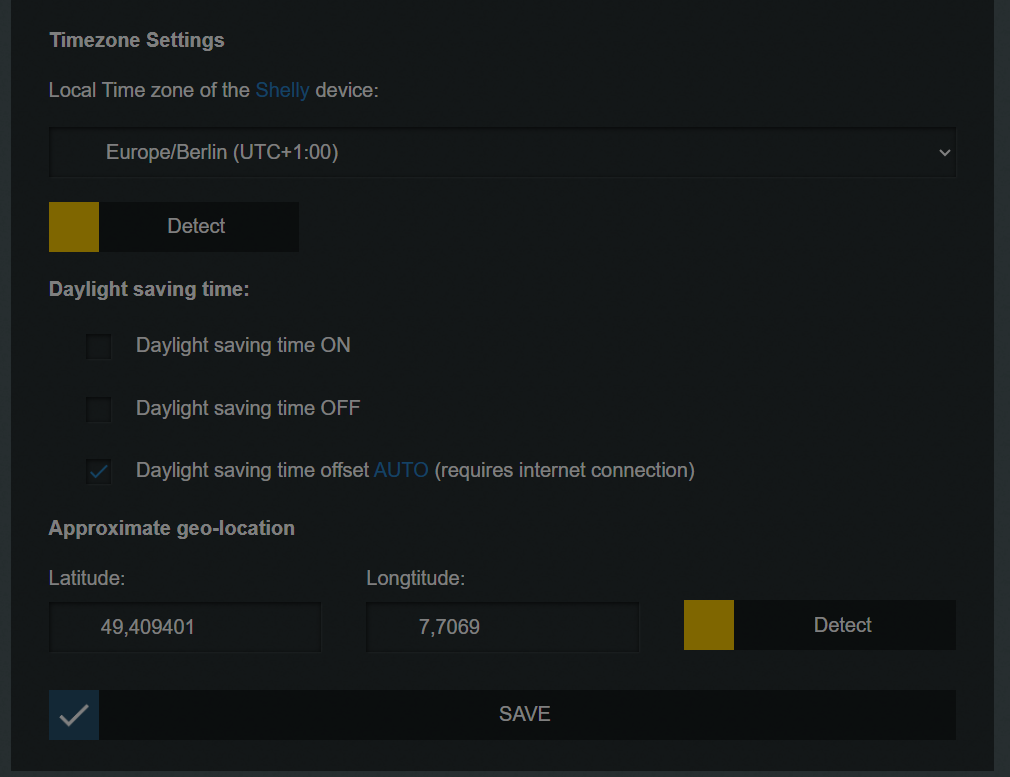
    habe das gleiche Problem mit Unbuntu Server,

    Shelly ist auf Berlin eingestellt der Server auch,

    Server bringt folgendes raus

    
    Current default time zone: 'Europe/Berlin'
    Local time is now:      Sun Dec  8 00:24:47 CET 2024.
    Universal Time is now:  Sat Dec  7 23:24:47 UTC 2024.


    also richtig. Im Shelly ist auch alles richtig
    b26d7a71-d010-49a6-8903-c06b142b044e-image.png

    Thomas BraunT 1 Reply Last reply
    0
    • A AXMLM

      habe das gleiche Problem mit Unbuntu Server,

      Shelly ist auf Berlin eingestellt der Server auch,

      Server bringt folgendes raus

      
      Current default time zone: 'Europe/Berlin'
      Local time is now:      Sun Dec  8 00:24:47 CET 2024.
      Universal Time is now:  Sat Dec  7 23:24:47 UTC 2024.


      also richtig. Im Shelly ist auch alles richtig

      b26d7a71-d010-49a6-8903-c06b142b044e-image.png

      Thomas BraunT Online
      Thomas BraunT Online
      Thomas Braun
      Most Active
      wrote on last edited by
      #14

      @axmlm sagte in Problem mit Shelly Adapter:

      habe das gleiche Problem

      Welches genau?

      Linux-Werkzeugkasten:
      https://forum.iobroker.net/topic/42952/der-kleine-iobroker-linux-werkzeugkasten
      NodeJS Fixer Skript:
      https://forum.iobroker.net/topic/68035/iob-node-fix-skript
      iob_diag: curl -sLf -o diag.sh https://iobroker.net/diag.sh && bash diag.sh

      1 Reply Last reply
      0
      • T Titanflex

        Hallo zusammen,

        ich bekomme im Log seit längerem folgende Meldungen

        eae86899-ad1c-446f-bfce-10270fc02230-image.png

        Ich habe die Shelly an sich auf automatische Zeit. In Iobroker selber habe ich bisher nichts gefunden.

        Wie kann ich diese Meldungen beheben ?

        Grüße

        A Offline
        A Offline
        AXMLM
        wrote on last edited by
        #15

        @titanflex said in Problem mit Shelly Adapter:

        Hallo zusammen,
        ich bekomme im Log seit längerem folgende Meldungen

        Ich habe die Shelly an sich auf automatische Zeit. In Iobroker selber habe ich bisher nichts gefunden.
        Wie kann ich diese Meldungen beheben ?
        Grüße

        This

        HomoranH 1 Reply Last reply
        0
        • A AXMLM

          @titanflex said in Problem mit Shelly Adapter:

          Hallo zusammen,
          ich bekomme im Log seit längerem folgende Meldungen

          Ich habe die Shelly an sich auf automatische Zeit. In Iobroker selber habe ich bisher nichts gefunden.
          Wie kann ich diese Meldungen beheben ?
          Grüße

          This

          HomoranH Offline
          HomoranH Offline
          Homoran
          Global Moderator Administrators
          wrote on last edited by
          #16

          @axmlm und wie dieht das mit deiner Installation als Text in code-tags aus?

          kein Support per PN! - Fragen im Forum stellen - es gibt fast nichts, was nicht auch für andere interessant ist.

          Benutzt das Voting rechts unten im Beitrag wenn er euch geholfen hat.

          der Installationsfixer: curl -fsL https://iobroker.net/fix.sh | bash -

          A 1 Reply Last reply
          0
          • HomoranH Homoran

            @axmlm und wie dieht das mit deiner Installation als Text in code-tags aus?

            A Offline
            A Offline
            AXMLM
            wrote on last edited by
            #17

            @homoran
            so fit bin ich nicht. Ich verstehe Deine Frage nicht. Wo muss ich was schauen. Ich bin ein "Copy Paste" Linux User.

            HomoranH 1 Reply Last reply
            0
            • A Offline
              A Offline
              AXMLM
              wrote on last edited by AXMLM
              #18

              Also hier um das Problem an einer Stelle zu beschreiben.

              Hier Auszug aus Log:

              
              shelly.0
              2024-12-08 14:32:08.546	info	[Sys.timezone] 192.168.178.67 (shelly1 / shelly1-244CAB42E2CD / SHSW-1#244CAB42E2CD#1): Configured timezone "Europe/Berlin" and system timezone "UTC" do not match. Please check configuration
              
              shelly.0
              2024-12-08 14:32:06.174	info	[Sys.timezone] 192.168.178.205 (shelly1 / shelly1-244CAB434DAA / SHSW-1#244CAB434DAA#1): Configured timezone "Europe/Berlin" and system timezone "UTC" do not match. Please check configuration
              
              shelly.0
              2024-12-08 14:32:05.046	info	[Sys.timezone] 192.168.178.204 (shelly1 / shelly1-349454722152 / SHSW-1#349454722152#1): Configured timezone "Europe/Berlin" and system timezone "UTC" do not match. Please check configuration
              
              shelly.0
              2024-12-08 14:32:03.797	info	[Sys.timezone] 192.168.178.202 (shelly1 / shelly1-244CAB434B4A / SHSW-1#244CAB434B4A#1): Configured timezone "Europe/Berlin" and system timezone "UTC" do not match. Please check configuration
              

              das gibt

              date
              

              in Ubuntu raus.

              Current default time zone: 'Europe/Berlin'
              Local time is now:      Sun Dec  8 00:24:47 CET 2024.
              Universal Time is now:  Sat Dec  7 23:24:47 UTC 2024.
              

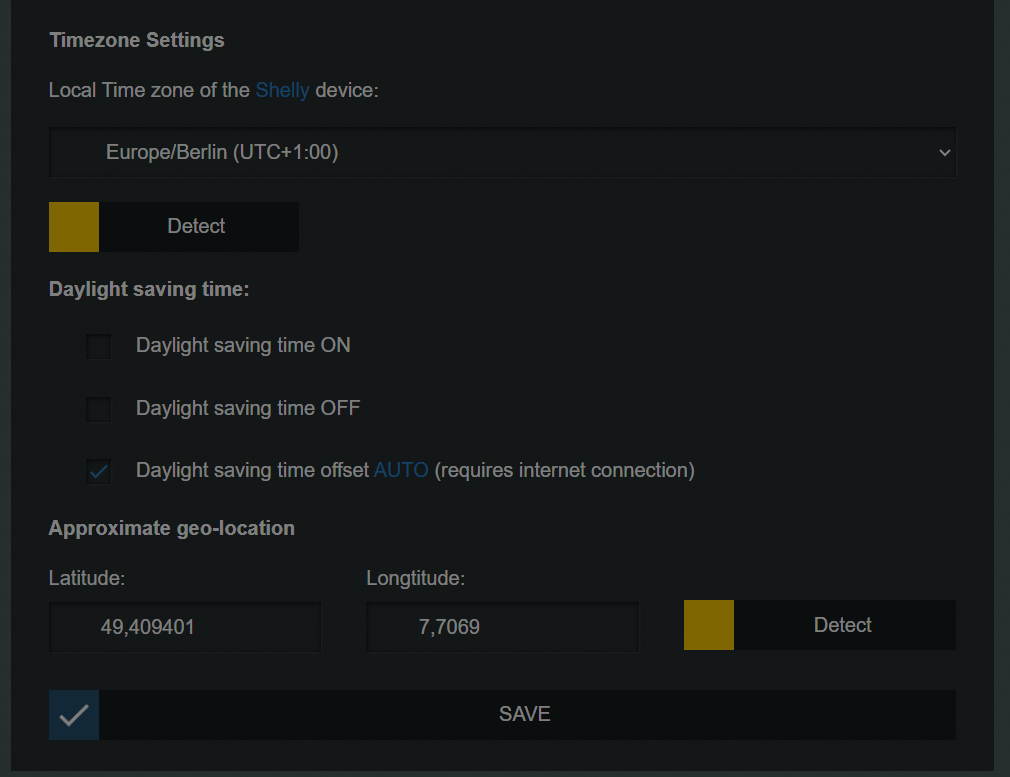
              und das steht im Shelly
              b3969d99-eaeb-4676-8858-517633c09845-image.png

              1 Reply Last reply
              0
              • A AXMLM

                @homoran
                so fit bin ich nicht. Ich verstehe Deine Frage nicht. Wo muss ich was schauen. Ich bin ein "Copy Paste" Linux User.

                HomoranH Offline
                HomoranH Offline
                Homoran
                Global Moderator Administrators
                wrote on last edited by
                #19

                @axmlm sagte in Problem mit Shelly Adapter:

                Ich verstehe Deine Frage nicht.

                du sollst das log von dem Fehler bei dir hier als Text in code-tags posten

                kein Support per PN! - Fragen im Forum stellen - es gibt fast nichts, was nicht auch für andere interessant ist.

                Benutzt das Voting rechts unten im Beitrag wenn er euch geholfen hat.

                der Installationsfixer: curl -fsL https://iobroker.net/fix.sh | bash -

                A 1 Reply Last reply
                0
                • HomoranH Homoran

                  @axmlm sagte in Problem mit Shelly Adapter:

                  Ich verstehe Deine Frage nicht.

                  du sollst das log von dem Fehler bei dir hier als Text in code-tags posten

                  A Offline
                  A Offline
                  AXMLM
                  wrote on last edited by AXMLM
                  #20

                  @homoran
                  habe ich doch gemacht. s.

                  @axmlm said in Problem mit Shelly Adapter:

                  2CD / SHSW-1#244CAB42E2CD#1): Configured timezone "Europe/Berlin" and system timezone "UTC" do not match. Please check configuration

                  shelly.0
                  2024-12-08 14:32:06.174 info [Sys.timezone] 192.168.178.205 (shelly1 / shelly1-2

                  Thomas BraunT 1 Reply Last reply
                  0
                  • A AXMLM

                    @homoran
                    habe ich doch gemacht. s.

                    @axmlm said in Problem mit Shelly Adapter:

                    2CD / SHSW-1#244CAB42E2CD#1): Configured timezone "Europe/Berlin" and system timezone "UTC" do not match. Please check configuration

                    shelly.0
                    2024-12-08 14:32:06.174 info [Sys.timezone] 192.168.178.205 (shelly1 / shelly1-2

                    Thomas BraunT Online
                    Thomas BraunT Online
                    Thomas Braun
                    Most Active
                    wrote on last edited by
                    #21

                    @axmlm

                    Ist das was virutelles da? Proxmox?
                    Auch auf dem Host muss die richtige Zeitzone gesetzt sein.

                    Linux-Werkzeugkasten:
                    https://forum.iobroker.net/topic/42952/der-kleine-iobroker-linux-werkzeugkasten
                    NodeJS Fixer Skript:
                    https://forum.iobroker.net/topic/68035/iob-node-fix-skript
                    iob_diag: curl -sLf -o diag.sh https://iobroker.net/diag.sh && bash diag.sh

                    A 1 Reply Last reply
                    0
                    • Thomas BraunT Thomas Braun

                      @axmlm

                      Ist das was virutelles da? Proxmox?
                      Auch auf dem Host muss die richtige Zeitzone gesetzt sein.

                      A Offline
                      A Offline
                      AXMLM
                      wrote on last edited by
                      #22

                      @thomas-braun
                      Nein ist ubuntu server 24 LT und IOBroker drauf. Beides frisch aufgesetzt.

                      1 Reply Last reply
                      0
                      Reply
                      • Reply as topic
                      Log in to reply
                      • Oldest to Newest
                      • Newest to Oldest
                      • Most Votes


                      Support us

                      ioBroker
                      Community Adapters
                      Donate
                      FAQ Cloud / IOT
                      HowTo: Node.js-Update
                      HowTo: Backup/Restore
                      Downloads
                      BLOG

                      365

                      Online

                      32.7k

                      Users

                      82.4k

                      Topics

                      1.3m

                      Posts
                      Community
                      Impressum | Datenschutz-Bestimmungen | Nutzungsbedingungen | Einwilligungseinstellungen
                      ioBroker Community 2014-2025
                      logo
                      • Login

                      • Don't have an account? Register

                      • Login or register to search.
                      • First post
                        Last post
                      0
                      • Home
                      • Recent
                      • Tags
                      • Unread 0
                      • Categories
                      • Unreplied
                      • Popular
                      • GitHub
                      • Docu
                      • Hilfe
