




Unterschiedliches Verhalten bei Update Nodejs auf 18.20.0
-
Frohe Ostern Euch allen!
Nachdem ich heute morgen das
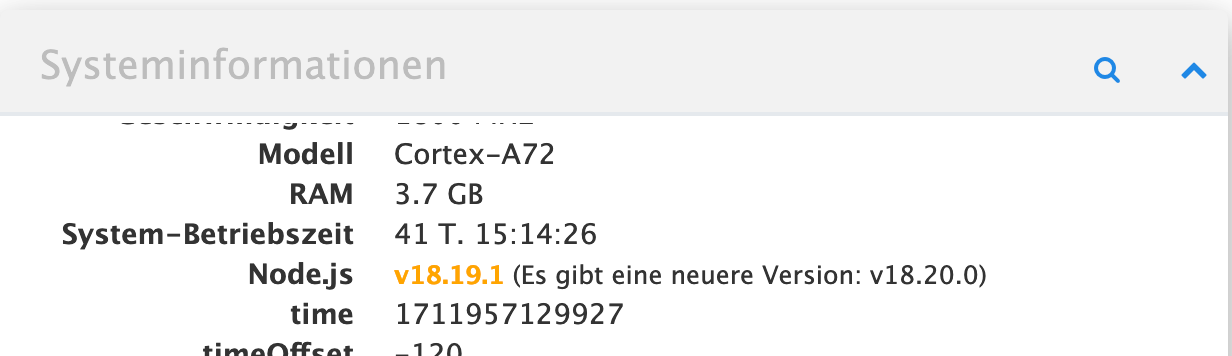
gesehen habe, habe ich auf allen Maschinen mal schnell
iobroker nodejs-updatelaufen lassen.
Bei zwei Maschinen war das mit 'Wenigzeilern' schnell erledigt.
Auf meinen RasPI 4 kam aber, bei eigentlich gleicher Installation, eine ziemliche "Litanei" und ich wollte nur wissen, wo der Unterschied liegt, warum auf der einen Maschine so ein "Aufriss" kam, damit ich's verstehe.
Alle Maschinen sind auf gleichem Stand an OS und Patches (gestern alle der Wartung unterzogen).
Maschine 1 Master als VM unter Proxmox
Maschine 2 Slave PI 3
Maschine 3 Slave PI 4Anderes Verhalten war auf der Maschine 3.
Hier die Ausgabe:
ioBroker nodejs updater 2023-10-13
No recommendation for a nodejs version found on your system. We recommend to install latest version from nodejs v18 tree.

Your current setup is:
/usr/bin/nodejs 	v18.20.0
/usr/bin/node 		v18.20.0
/usr/bin/npm 		10.5.0
/usr/bin/npx 		10.5.0
/usr/bin/corepack 	0.25.2

We found these nodejs versions available for installation:

nodejs:
  Installed: 18.20.0-1nodesource1
  Candidate: 18.20.0-1nodesource1
  Version table:
 *** 18.20.0-1nodesource1 1001
        500 https://deb.nodesource.com/node_18.x nodistro/main arm64 Packages
        100 /var/lib/dpkg/status
     18.19.1-1nodesource1 1001
        500 https://deb.nodesource.com/node_18.x nodistro/main arm64 Packages
     18.19.0+dfsg-6~deb12u1 500
        500 http://deb.debian.org/debian-security bookworm-security/main arm64 Packages
     18.19.0-1nodesource1 1001
        500 https://deb.nodesource.com/node_18.x nodistro/main arm64 Packages
     18.18.2-1nodesource1 1001
        500 https://deb.nodesource.com/node_18.x nodistro/main arm64 Packages
     18.18.1-1nodesource1 1001
        500 https://deb.nodesource.com/node_18.x nodistro/main arm64 Packages
     18.18.0-1nodesource1 1001
        500 https://deb.nodesource.com/node_18.x nodistro/main arm64 Packages
     18.17.1-1nodesource1 1001
        500 https://deb.nodesource.com/node_18.x nodistro/main arm64 Packages
     18.17.0-1nodesource1 1001
        500 https://deb.nodesource.com/node_18.x nodistro/main arm64 Packages
     18.16.1-1nodesource1 1001
        500 https://deb.nodesource.com/node_18.x nodistro/main arm64 Packages
     18.16.0-1nodesource1 1001
        500 https://deb.nodesource.com/node_18.x nodistro/main arm64 Packages
     18.15.0-1nodesource1 1001
        500 https://deb.nodesource.com/node_18.x nodistro/main arm64 Packages
     18.14.2-1nodesource1 1001
        500 https://deb.nodesource.com/node_18.x nodistro/main arm64 Packages
     18.14.1-1nodesource1 1001
        500 https://deb.nodesource.com/node_18.x nodistro/main arm64 Packages
     18.14.0-1nodesource1 1001
        500 https://deb.nodesource.com/node_18.x nodistro/main arm64 Packages
     18.13.0+dfsg1-1 500
        500 http://deb.debian.org/debian bookworm/main arm64 Packages
     18.13.0-1nodesource1 1001
        500 https://deb.nodesource.com/node_18.x nodistro/main arm64 Packages
     18.12.0-1nodesource1 1001
        500 https://deb.nodesource.com/node_18.x nodistro/main arm64 Packages
     18.11.0-1nodesource1 1001
        500 https://deb.nodesource.com/node_18.x nodistro/main arm64 Packages
     18.10.0-1nodesource1 1001
        500 https://deb.nodesource.com/node_18.x nodistro/main arm64 Packages
     18.9.1-1nodesource1 1001
        500 https://deb.nodesource.com/node_18.x nodistro/main arm64 Packages
     18.9.0-1nodesource1 1001
        500 https://deb.nodesource.com/node_18.x nodistro/main arm64 Packages
     18.8.0-1nodesource1 1001
        500 https://deb.nodesource.com/node_18.x nodistro/main arm64 Packages
     18.7.0-1nodesource1 1001
        500 https://deb.nodesource.com/node_18.x nodistro/main arm64 Packages
     18.6.0-1nodesource1 1001
        500 https://deb.nodesource.com/node_18.x nodistro/main arm64 Packages
     18.5.0-1nodesource1 1001
        500 https://deb.nodesource.com/node_18.x nodistro/main arm64 Packages
     18.4.0-1nodesource1 1001
        500 https://deb.nodesource.com/node_18.x nodistro/main arm64 Packages
     18.3.0-1nodesource1 1001
        500 https://deb.nodesource.com/node_18.x nodistro/main arm64 Packages
     18.2.0-1nodesource1 1001
        500 https://deb.nodesource.com/node_18.x nodistro/main arm64 Packages
     18.1.0-1nodesource1 1001
        500 https://deb.nodesource.com/node_18.x nodistro/main arm64 Packages
     18.0.0-1nodesource1 1001
        500 https://deb.nodesource.com/node_18.x nodistro/main arm64 Packages


Nothing to do - Your installation is using the correct paths.

You are running nodejs v18.20.0. Do you want to install latest version from nodejs v.18 tree?

Press <y> to continue or any other key to quit
Trying to update your installation now. Please be patient.
Waiting for ioBroker to shut down - Give me a minute...
############################################################

*** These repos are active on your system:
Hit:1 http://deb.debian.org/debian bookworm InRelease
Get:2 http://deb.debian.org/debian-security bookworm-security InRelease [48.0 kB]
Hit:3 http://archive.raspberrypi.com/debian bookworm InRelease
Get:4 http://deb.debian.org/debian bookworm-updates InRelease [55.4 kB]
Get:5 http://deb.debian.org/debian-security bookworm-security/main arm64 Packages [147 kB]
Get:6 http://deb.debian.org/debian-security bookworm-security/main armhf Packages [144 kB]
Get:7 http://deb.debian.org/debian-security bookworm-security/main Translation-en [90.2 kB]
Fetched 484 kB in 1s (350 kB/s)
Reading package lists... Done

*** Installing ca-certificates, curl and gnupg, just in case they are missing.

*** Creating new /etc/apt/sources.list.d/nodesource.list and pinning source

deb [signed-by=/etc/apt/keyrings/nodesource.gpg] https://deb.nodesource.com/node_18.x nodistro main
Package: nodejs
Pin: origin deb.nodesource.com
Pin-Priority: 1001

*** These repos are active after the adjustments:
Hit:1 http://deb.debian.org/debian bookworm InRelease
Hit:2 http://archive.raspberrypi.com/debian bookworm InRelease
Hit:3 http://deb.debian.org/debian-security bookworm-security InRelease
Hit:4 http://deb.debian.org/debian bookworm-updates InRelease
Get:5 https://deb.nodesource.com/node_18.x nodistro InRelease [12.1 kB]
Get:6 https://deb.nodesource.com/node_18.x nodistro/main arm64 Packages [7772 B]
Get:7 https://deb.nodesource.com/node_18.x nodistro/main armhf Packages [7772 B]
Fetched 27.7 kB in 1s (23.2 kB/s)
Reading package lists... Done

Installing the recommended nodejs version now!

Exact recommended version unknown, installing a fallback!
dpkg: warning: downgrading nodejs from 18.20.0-1nodesource1 to 18.0.0-1nodesource1
(Reading database ... 127732 files and directories currently installed.)
Preparing to unpack .../nodejs_18.0.0-1nodesource1_arm64.deb ...
Detected old npm client, removing...
Unpacking nodejs (18.0.0-1nodesource1) over (18.20.0-1nodesource1) ...
Setting up nodejs (18.0.0-1nodesource1) ...
Processing triggers for man-db (2.11.2-2) ...

Updating fallback to latest nodejs v18 release
(Reading database ... 128063 files and directories currently installed.)
Preparing to unpack .../bsdutils_1%3a2.38.1-5+deb12u1_arm64.deb ...
Unpacking bsdutils (1:2.38.1-5+deb12u1) over (1:2.38.1-5+b1) ...
Setting up bsdutils (1:2.38.1-5+deb12u1) ...
(Reading database ... 128062 files and directories currently installed.)
Preparing to unpack .../libsmartcols1_2.38.1-5+deb12u1_arm64.deb ...
Unpacking libsmartcols1:arm64 (2.38.1-5+deb12u1) over (2.38.1-5+b1) ...
Setting up libsmartcols1:arm64 (2.38.1-5+deb12u1) ...
(Reading database ... 128061 files and directories currently installed.)
Preparing to unpack .../util-linux-extra_2.38.1-5+deb12u1_arm64.deb ...
Unpacking util-linux-extra (2.38.1-5+deb12u1) over (2.38.1-5+b1) ...
Setting up util-linux-extra (2.38.1-5+deb12u1) ...
(Reading database ... 128060 files and directories currently installed.)
Preparing to unpack .../util-linux_2.38.1-5+deb12u1_arm64.deb ...
Unpacking util-linux (2.38.1-5+deb12u1) over (2.38.1-5+b1) ...
Setting up util-linux (2.38.1-5+deb12u1) ...
fstrim.service is a disabled or a static unit not running, not starting it.
(Reading database ... 128059 files and directories currently installed.)
Preparing to unpack .../mount_2.38.1-5+deb12u1_arm64.deb ...
Unpacking mount (2.38.1-5+deb12u1) over (2.38.1-5+b1) ...
Preparing to unpack .../uuid-dev_2.38.1-5+deb12u1_arm64.deb ...
Unpacking uuid-dev:arm64 (2.38.1-5+deb12u1) over (2.38.1-5+b1) ...
Preparing to unpack .../libuuid1_2.38.1-5+deb12u1_arm64.deb ...
Unpacking libuuid1:arm64 (2.38.1-5+deb12u1) over (2.38.1-5+b1) ...
Setting up libuuid1:arm64 (2.38.1-5+deb12u1) ...
(Reading database ... 128056 files and directories currently installed.)
Preparing to unpack .../libblkid-dev_2.38.1-5+deb12u1_arm64.deb ...
Unpacking libblkid-dev:arm64 (2.38.1-5+deb12u1) over (2.38.1-5+b1) ...
Preparing to unpack .../libblkid1_2.38.1-5+deb12u1_arm64.deb ...
Unpacking libblkid1:arm64 (2.38.1-5+deb12u1) over (2.38.1-5+b1) ...
Setting up libblkid1:arm64 (2.38.1-5+deb12u1) ...
(Reading database ... 128054 files and directories currently installed.)
Preparing to unpack .../libmount-dev_2.38.1-5+deb12u1_arm64.deb ...
Unpacking libmount-dev:arm64 (2.38.1-5+deb12u1) over (2.38.1-5+b1) ...
Preparing to unpack .../libmount1_2.38.1-5+deb12u1_arm64.deb ...
Unpacking libmount1:arm64 (2.38.1-5+deb12u1) over (2.38.1-5+b1) ...
Setting up libmount1:arm64 (2.38.1-5+deb12u1) ...
(Reading database ... 128052 files and directories currently installed.)
Preparing to unpack .../0-libfdisk1_2.38.1-5+deb12u1_arm64.deb ...
Unpacking libfdisk1:arm64 (2.38.1-5+deb12u1) over (2.38.1-5+b1) ...
Preparing to unpack .../1-fdisk_2.38.1-5+deb12u1_arm64.deb ...
Unpacking fdisk (2.38.1-5+deb12u1) over (2.38.1-5+b1) ...
Preparing to unpack .../2-bsdextrautils_2.38.1-5+deb12u1_arm64.deb ...
Unpacking bsdextrautils (2.38.1-5+deb12u1) over (2.38.1-5+b1) ...
Preparing to unpack .../3-eject_2.38.1-5+deb12u1_arm64.deb ...
Unpacking eject (2.38.1-5+deb12u1) over (2.38.1-5+b1) ...
Preparing to unpack .../4-nodejs_18.20.0-1nodesource1_arm64.deb ...
Detected old npm client, removing...
Unpacking nodejs (18.20.0-1nodesource1) over (18.0.0-1nodesource1) ...
Preparing to unpack .../5-rfkill_2.38.1-5+deb12u1_arm64.deb ...
Unpacking rfkill (2.38.1-5+deb12u1) over (2.38.1-5+b1) ...
Setting up bsdextrautils (2.38.1-5+deb12u1) ...
Setting up nodejs (18.20.0-1nodesource1) ...
Setting up eject (2.38.1-5+deb12u1) ...
Setting up uuid-dev:arm64 (2.38.1-5+deb12u1) ...
Setting up rfkill (2.38.1-5+deb12u1) ...
Setting up libfdisk1:arm64 (2.38.1-5+deb12u1) ...
Setting up mount (2.38.1-5+deb12u1) ...
Setting up libblkid-dev:arm64 (2.38.1-5+deb12u1) ...
Setting up fdisk (2.38.1-5+deb12u1) ...
Setting up libmount-dev:arm64 (2.38.1-5+deb12u1) ...
Processing triggers for man-db (2.11.2-2) ...
Processing triggers for libc-bin (2.36-9+rpt2+deb12u4) ...
v18.20.0 has been installed! You are using the latest version now!
Installing the recommended nodejs version!

We tried our best to update or fix your nodejs. Please run iob diag again to verify.

*** RESTARTING ioBroker NOW! ***
 Please refresh or restart your browser in a few moments.

pi@iobroker2:~ $ node -v
v18.20.0
pi@iobroker2:~ $
iobroker in Debian-VM auf Proxmox Server (Ryzen 7 / 32GB / 1TB NVMe SSD) als Master - mehrere Raspberry Pis (3+4) als Slaves. InfluxDB V2 und Grafana auf LXC.
*Wer freundlich ist, dem wird freundlich geholfen *
-
Frohe Ostern Euch allen!
Nachdem ich heute morgen das
gesehen habe, habe ich auf allen Maschinen mal schnell
iobroker nodejs-updatelaufen lassen.
Bei zwei Maschinen war das mit 'Wenigzeilern' schnell erledigt.
Auf meinen RasPI 4 kam aber, bei eigentlich gleicher Installation, eine ziemliche "Litanei" und ich wollte nur wissen, wo der Unterschied liegt, warum auf der einen Maschine so ein "Aufriss" kam, damit ich's verstehe.
Alle Maschinen sind auf gleichem Stand an OS und Patches (gestern alle der Wartung unterzogen).
Maschine 1 Master als VM unter Proxmox
Maschine 2 Slave PI 3
Maschine 3 Slave PI 4Anderes Verhalten war auf der Maschine 3.
Hier die Ausgabe:
ioBroker nodejs updater 2023-10-13 No recommendation for a nodejs version found on your system. We recommend to install latest version from nodejs v18 tree. Your current setup is: /usr/bin/nodejs v18.20.0 /usr/bin/node v18.20.0 /usr/bin/npm 10.5.0 /usr/bin/npx 10.5.0 /usr/bin/corepack 0.25.2 We found these nodejs versions available for installation: nodejs: Installed: 18.20.0-1nodesource1 Candidate: 18.20.0-1nodesource1 Version table: *** 18.20.0-1nodesource1 1001 500 https://deb.nodesource.com/node_18.x nodistro/main arm64 Packages 100 /var/lib/dpkg/status 18.19.1-1nodesource1 1001 500 https://deb.nodesource.com/node_18.x nodistro/main arm64 Packages 18.19.0+dfsg-6~deb12u1 500 500 http://deb.debian.org/debian-security bookworm-security/main arm64 Packages 18.19.0-1nodesource1 1001 500 https://deb.nodesource.com/node_18.x nodistro/main arm64 Packages 18.18.2-1nodesource1 1001 500 https://deb.nodesource.com/node_18.x nodistro/main arm64 Packages 18.18.1-1nodesource1 1001 500 https://deb.nodesource.com/node_18.x nodistro/main arm64 Packages 18.18.0-1nodesource1 1001 500 https://deb.nodesource.com/node_18.x nodistro/main arm64 Packages 18.17.1-1nodesource1 1001 500 https://deb.nodesource.com/node_18.x nodistro/main arm64 Packages 18.17.0-1nodesource1 1001 500 https://deb.nodesource.com/node_18.x nodistro/main arm64 Packages 18.16.1-1nodesource1 1001 500 https://deb.nodesource.com/node_18.x nodistro/main arm64 Packages 18.16.0-1nodesource1 1001 500 https://deb.nodesource.com/node_18.x nodistro/main arm64 Packages 18.15.0-1nodesource1 1001 500 https://deb.nodesource.com/node_18.x nodistro/main arm64 Packages 18.14.2-1nodesource1 1001 500 https://deb.nodesource.com/node_18.x nodistro/main arm64 Packages 18.14.1-1nodesource1 1001 500 https://deb.nodesource.com/node_18.x nodistro/main arm64 Packages 18.14.0-1nodesource1 1001 500 https://deb.nodesource.com/node_18.x nodistro/main arm64 Packages 18.13.0+dfsg1-1 500 500 http://deb.debian.org/debian bookworm/main arm64 Packages 18.13.0-1nodesource1 1001 500 https://deb.nodesource.com/node_18.x nodistro/main arm64 Packages 18.12.0-1nodesource1 1001 500 https://deb.nodesource.com/node_18.x nodistro/main arm64 Packages 18.11.0-1nodesource1 1001 500 https://deb.nodesource.com/node_18.x nodistro/main arm64 Packages 18.10.0-1nodesource1 1001 500 https://deb.nodesource.com/node_18.x nodistro/main arm64 Packages 18.9.1-1nodesource1 1001 500 https://deb.nodesource.com/node_18.x nodistro/main arm64 Packages 18.9.0-1nodesource1 1001 500 https://deb.nodesource.com/node_18.x nodistro/main arm64 Packages 18.8.0-1nodesource1 1001 500 https://deb.nodesource.com/node_18.x nodistro/main arm64 Packages 18.7.0-1nodesource1 1001 500 https://deb.nodesource.com/node_18.x nodistro/main arm64 Packages 18.6.0-1nodesource1 1001 500 https://deb.nodesource.com/node_18.x nodistro/main arm64 Packages 18.5.0-1nodesource1 1001 500 https://deb.nodesource.com/node_18.x nodistro/main arm64 Packages 18.4.0-1nodesource1 1001 500 https://deb.nodesource.com/node_18.x nodistro/main arm64 Packages 18.3.0-1nodesource1 1001 500 https://deb.nodesource.com/node_18.x nodistro/main arm64 Packages 18.2.0-1nodesource1 1001 500 https://deb.nodesource.com/node_18.x nodistro/main arm64 Packages 18.1.0-1nodesource1 1001 500 https://deb.nodesource.com/node_18.x nodistro/main arm64 Packages 18.0.0-1nodesource1 1001 500 https://deb.nodesource.com/node_18.x nodistro/main arm64 Packages Nothing to do - Your installation is using the correct paths. You are running nodejs v18.20.0. Do you want to install latest version from nodejs v.18 tree? Press <y> to continue or any other key to quit Trying to update your installation now. Please be patient. Waiting for ioBroker to shut down - Give me a minute... ############################################################ *** These repos are active on your system: Hit:1 http://deb.debian.org/debian bookworm InRelease Get:2 http://deb.debian.org/debian-security bookworm-security InRelease [48.0 kB] Hit:3 http://archive.raspberrypi.com/debian bookworm InRelease Get:4 http://deb.debian.org/debian bookworm-updates InRelease [55.4 kB] Get:5 http://deb.debian.org/debian-security bookworm-security/main arm64 Packages [147 kB] Get:6 http://deb.debian.org/debian-security bookworm-security/main armhf Packages [144 kB] Get:7 http://deb.debian.org/debian-security bookworm-security/main Translation-en [90.2 kB] Fetched 484 kB in 1s (350 kB/s) Reading package lists... Done *** Installing ca-certificates, curl and gnupg, just in case they are missing. *** Creating new /etc/apt/sources.list.d/nodesource.list and pinning source deb [signed-by=/etc/apt/keyrings/nodesource.gpg] https://deb.nodesource.com/node_18.x nodistro main Package: nodejs Pin: origin deb.nodesource.com Pin-Priority: 1001 *** These repos are active after the adjustments: Hit:1 http://deb.debian.org/debian bookworm InRelease Hit:2 http://archive.raspberrypi.com/debian bookworm InRelease Hit:3 http://deb.debian.org/debian-security bookworm-security InRelease Hit:4 http://deb.debian.org/debian bookworm-updates InRelease Get:5 https://deb.nodesource.com/node_18.x nodistro InRelease [12.1 kB] Get:6 https://deb.nodesource.com/node_18.x nodistro/main arm64 Packages [7772 B] Get:7 https://deb.nodesource.com/node_18.x nodistro/main armhf Packages [7772 B] Fetched 27.7 kB in 1s (23.2 kB/s) Reading package lists... Done Installing the recommended nodejs version now! Exact recommended version unknown, installing a fallback! dpkg: warning: downgrading nodejs from 18.20.0-1nodesource1 to 18.0.0-1nodesource1 (Reading database ... 127732 files and directories currently installed.) Preparing to unpack .../nodejs_18.0.0-1nodesource1_arm64.deb ... Detected old npm client, removing... Unpacking nodejs (18.0.0-1nodesource1) over (18.20.0-1nodesource1) ... Setting up nodejs (18.0.0-1nodesource1) ... Processing triggers for man-db (2.11.2-2) ... Updating fallback to latest nodejs v18 release (Reading database ... 128063 files and directories currently installed.) Preparing to unpack .../bsdutils_1%3a2.38.1-5+deb12u1_arm64.deb ... Unpacking bsdutils (1:2.38.1-5+deb12u1) over (1:2.38.1-5+b1) ... Setting up bsdutils (1:2.38.1-5+deb12u1) ... (Reading database ... 128062 files and directories currently installed.) Preparing to unpack .../libsmartcols1_2.38.1-5+deb12u1_arm64.deb ... Unpacking libsmartcols1:arm64 (2.38.1-5+deb12u1) over (2.38.1-5+b1) ... Setting up libsmartcols1:arm64 (2.38.1-5+deb12u1) ... (Reading database ... 128061 files and directories currently installed.) Preparing to unpack .../util-linux-extra_2.38.1-5+deb12u1_arm64.deb ... Unpacking util-linux-extra (2.38.1-5+deb12u1) over (2.38.1-5+b1) ... Setting up util-linux-extra (2.38.1-5+deb12u1) ... (Reading database ... 128060 files and directories currently installed.) Preparing to unpack .../util-linux_2.38.1-5+deb12u1_arm64.deb ... Unpacking util-linux (2.38.1-5+deb12u1) over (2.38.1-5+b1) ... Setting up util-linux (2.38.1-5+deb12u1) ... fstrim.service is a disabled or a static unit not running, not starting it. (Reading database ... 128059 files and directories currently installed.) Preparing to unpack .../mount_2.38.1-5+deb12u1_arm64.deb ... Unpacking mount (2.38.1-5+deb12u1) over (2.38.1-5+b1) ... Preparing to unpack .../uuid-dev_2.38.1-5+deb12u1_arm64.deb ... Unpacking uuid-dev:arm64 (2.38.1-5+deb12u1) over (2.38.1-5+b1) ... Preparing to unpack .../libuuid1_2.38.1-5+deb12u1_arm64.deb ... Unpacking libuuid1:arm64 (2.38.1-5+deb12u1) over (2.38.1-5+b1) ... Setting up libuuid1:arm64 (2.38.1-5+deb12u1) ... (Reading database ... 128056 files and directories currently installed.) Preparing to unpack .../libblkid-dev_2.38.1-5+deb12u1_arm64.deb ... Unpacking libblkid-dev:arm64 (2.38.1-5+deb12u1) over (2.38.1-5+b1) ... Preparing to unpack .../libblkid1_2.38.1-5+deb12u1_arm64.deb ... Unpacking libblkid1:arm64 (2.38.1-5+deb12u1) over (2.38.1-5+b1) ... Setting up libblkid1:arm64 (2.38.1-5+deb12u1) ... (Reading database ... 128054 files and directories currently installed.) Preparing to unpack .../libmount-dev_2.38.1-5+deb12u1_arm64.deb ... Unpacking libmount-dev:arm64 (2.38.1-5+deb12u1) over (2.38.1-5+b1) ... Preparing to unpack .../libmount1_2.38.1-5+deb12u1_arm64.deb ... Unpacking libmount1:arm64 (2.38.1-5+deb12u1) over (2.38.1-5+b1) ... Setting up libmount1:arm64 (2.38.1-5+deb12u1) ... (Reading database ... 128052 files and directories currently installed.) Preparing to unpack .../0-libfdisk1_2.38.1-5+deb12u1_arm64.deb ... Unpacking libfdisk1:arm64 (2.38.1-5+deb12u1) over (2.38.1-5+b1) ... Preparing to unpack .../1-fdisk_2.38.1-5+deb12u1_arm64.deb ... Unpacking fdisk (2.38.1-5+deb12u1) over (2.38.1-5+b1) ... Preparing to unpack .../2-bsdextrautils_2.38.1-5+deb12u1_arm64.deb ... Unpacking bsdextrautils (2.38.1-5+deb12u1) over (2.38.1-5+b1) ... Preparing to unpack .../3-eject_2.38.1-5+deb12u1_arm64.deb ... Unpacking eject (2.38.1-5+deb12u1) over (2.38.1-5+b1) ... Preparing to unpack .../4-nodejs_18.20.0-1nodesource1_arm64.deb ... Detected old npm client, removing... Unpacking nodejs (18.20.0-1nodesource1) over (18.0.0-1nodesource1) ... Preparing to unpack .../5-rfkill_2.38.1-5+deb12u1_arm64.deb ... Unpacking rfkill (2.38.1-5+deb12u1) over (2.38.1-5+b1) ... Setting up bsdextrautils (2.38.1-5+deb12u1) ... Setting up nodejs (18.20.0-1nodesource1) ... Setting up eject (2.38.1-5+deb12u1) ... Setting up uuid-dev:arm64 (2.38.1-5+deb12u1) ... Setting up rfkill (2.38.1-5+deb12u1) ... Setting up libfdisk1:arm64 (2.38.1-5+deb12u1) ... Setting up mount (2.38.1-5+deb12u1) ... Setting up libblkid-dev:arm64 (2.38.1-5+deb12u1) ... Setting up fdisk (2.38.1-5+deb12u1) ... Setting up libmount-dev:arm64 (2.38.1-5+deb12u1) ... Processing triggers for man-db (2.11.2-2) ... Processing triggers for libc-bin (2.36-9+rpt2+deb12u4) ... v18.20.0 has been installed! You are using the latest version now! Installing the recommended nodejs version! We tried our best to update or fix your nodejs. Please run iob diag again to verify. *** RESTARTING ioBroker NOW! *** Please refresh or restart your browser in a few moments. pi@iobroker2:~ $ node -v v18.20.0 pi@iobroker2:~ $@reutli sagte in Unterschiedliches Verhalten bei Update Nodejs auf 18.20.0:
No recommendation for a nodejs version found on your system. We recommend to install latest version from nodejs v18 tree.
Daran liegt das. Es wurde auf dem System keine Empehlung zur nodejs-Version gefunden und daher wird dann 'blind' der allgemein vorgesehene Zweig (Stand heute nodejs 18)installiert und anschließend auf die letzte Version aus diesem Zweig gehoben. Wenn direkt eine genaue Versionsnummer als Empfehlung gefunden wird dann wird auch direkt diese installiert.
Auf 'Slaves' funktioniert diese Erkennung aber nicht immer. Wundert mich, das es bei Maschine 2 funktioniert haben soll.
Man sollte das Kommando
iob nodejs-updateauch eigentlich für Updates innerhalb eines Zweiges nicht verwenden, das läuft beim regulären Systemupdate mit. -
@reutli sagte in Unterschiedliches Verhalten bei Update Nodejs auf 18.20.0:
No recommendation for a nodejs version found on your system. We recommend to install latest version from nodejs v18 tree.
Daran liegt das. Es wurde auf dem System keine Empehlung zur nodejs-Version gefunden und daher wird dann 'blind' der allgemein vorgesehene Zweig (Stand heute nodejs 18)installiert und anschließend auf die letzte Version aus diesem Zweig gehoben. Wenn direkt eine genaue Versionsnummer als Empfehlung gefunden wird dann wird auch direkt diese installiert.
Auf 'Slaves' funktioniert diese Erkennung aber nicht immer. Wundert mich, das es bei Maschine 2 funktioniert haben soll.
Man sollte das Kommando
iob nodejs-updateauch eigentlich für Updates innerhalb eines Zweiges nicht verwenden, das läuft beim regulären Systemupdate mit.@thomas-braun sagte in Unterschiedliches Verhalten bei Update Nodejs auf 18.20.0:
Man sollte das Kommando iob nodejs-update auch eigentlich für Updates innerhalb eines Zweiges nicht verwenden, das läuft beim regulären Systemupdate mit.
Das war wohl mein Fehler. Nachdem er aber nach meiner Wochenwartung auf den Maschinen Node als nicht aktuell gezeigt hat, habe ich iob nodejs-update angeworfen...
Also hätte das eigentlich mit
sudo apt full-upgrademitkommen müssen?
Dann müsste ich da mal forschen...iobroker in Debian-VM auf Proxmox Server (Ryzen 7 / 32GB / 1TB NVMe SSD) als Master - mehrere Raspberry Pis (3+4) als Slaves. InfluxDB V2 und Grafana auf LXC.
*Wer freundlich ist, dem wird freundlich geholfen *
-
@thomas-braun sagte in Unterschiedliches Verhalten bei Update Nodejs auf 18.20.0:
Man sollte das Kommando iob nodejs-update auch eigentlich für Updates innerhalb eines Zweiges nicht verwenden, das läuft beim regulären Systemupdate mit.
Das war wohl mein Fehler. Nachdem er aber nach meiner Wochenwartung auf den Maschinen Node als nicht aktuell gezeigt hat, habe ich iob nodejs-update angeworfen...
Also hätte das eigentlich mit
sudo apt full-upgrademitkommen müssen?
Dann müsste ich da mal forschen...@reutli sagte in Unterschiedliches Verhalten bei Update Nodejs auf 18.20.0:
Also hätte das eigentlich mit sudo apt full-upgrade mitkommen müssen?
Wenn das nodejs-Repo richtig angelegt ist: Ja.
Wenn es falsch angelegt war ist es jetzt richtig und die übliche Systempflege viaaptgreift wieder. -
@reutli sagte in Unterschiedliches Verhalten bei Update Nodejs auf 18.20.0:
Also hätte das eigentlich mit sudo apt full-upgrade mitkommen müssen?
Wenn das nodejs-Repo richtig angelegt ist: Ja.
Wenn es falsch angelegt war ist es jetzt richtig und die übliche Systempflege viaaptgreift wieder.@thomas-braun
alles klar, danke. Dann ist/war das ggf. der Knackpunkt.Werde ich jetzt einfach mal beobachten.

Hey! Du scheinst an dieser Unterhaltung interessiert zu sein, hast aber noch kein Konto.
Hast du es satt, bei jedem Besuch durch die gleichen Beiträge zu scrollen? Wenn du dich für ein Konto anmeldest, kommst du immer genau dorthin zurück, wo du zuvor warst, und kannst dich über neue Antworten benachrichtigen lassen (entweder per E-Mail oder Push-Benachrichtigung). Du kannst auch Lesezeichen speichern und Beiträge positiv bewerten, um anderen Community-Mitgliedern deine Wertschätzung zu zeigen.
Mit deinem Input könnte dieser Beitrag noch besser werden 💗
Registrieren Anmelden247
Online33.0k
Benutzende83.7k
Themen1.3m
Beiträge