Skip to content
  • Home
  • Aktuell
  • Tags
  • 0 Ungelesen 0
  • Kategorien
  • Unreplied
  • Beliebt
  • GitHub
  • Docu
  • Hilfe
Skins
  • Light
  • Brite
  • Cerulean
  • Cosmo
  • Flatly
  • Journal
  • Litera
  • Lumen
  • Lux
  • Materia
  • Minty
  • Morph
  • Pulse
  • Sandstone
  • Simplex
  • Sketchy
  • Spacelab
  • United
  • Yeti
  • Zephyr
  • Dark
  • Cyborg
  • Darkly
  • Quartz
  • Slate
  • Solar
  • Superhero
  • Vapor

  • Standard: (Kein Skin)
  • Kein Skin
Einklappen
ioBroker Logo

Community Forum

donate donate
  1. ioBroker Community Home
  2. Deutsch
  3. Error/Bug
  4. Backitup Adapter sichert sqlite.db nicht vollständig

NEWS

  • Weihnachtsangebot 2025! 🎄
    BluefoxB
    Bluefox
    22
    1
    1.1k

  • UPDATE 31.10.: Amazon Alexa - ioBroker Skill läuft aus ?
    apollon77A
    apollon77
    48
    3
    9.1k

  • Monatsrückblick – September 2025
    BluefoxB
    Bluefox
    14
    1
    2.4k

Backitup Adapter sichert sqlite.db nicht vollständig

Geplant Angeheftet Gesperrt Verschoben Error/Bug
11 Beiträge 2 Kommentatoren 714 Aufrufe 2 Watching
  • Älteste zuerst
  • Neuste zuerst
  • Meiste Stimmen
Antworten
  • In einem neuen Thema antworten
Anmelden zum Antworten
Dieses Thema wurde gelöscht. Nur Nutzer mit entsprechenden Rechten können es sehen.
  • jomaJ Offline
    jomaJ Offline
    joma
    schrieb am zuletzt editiert von joma
    #1

    Moinsen, bin mit iobroker gerade von windows auf linux umgezogen. Als Backuplösung hatte ich unter windows einfach den iobroker-data Ordner stündlich gesichert. In Notfällen war iobroker damit ruckzuck incl. aller aktuellen Verlaufsdaten aus der sql Datei neuinstalliert.
    .
    Bei Linux bin ich derzeit noch Frischling, aber immerhin iobroker läuft schon mal. :+1:
    Nur der Backitup Adapter macht hier irgendwie Murks bei der sqlite Sicherung (iobroker Sicherung läuft dagegen einwandfrei). Aus ca. 300MB werden da mal eben 200Byte. Die sql Datei die in dem erzeugten Archiv generiert wird, lehnt der DB Browser for SQLite mit 'file is not a database' ab.
    Öffne ich die Datei mit Notepad++ kommt da folgendes:

    PRAGMA foreign_keys=OFF;
    BEGIN TRANSACTION;
    COMMIT;

    Keine Ahnung was das beutet. Fehlermeldungen hat das Protokoll nicht.
    Gesichert wird Lokal und mit FTP auf Fritzbox.
    Hoffentlich ist das Problem lösbar!?

    Zutaten:

    • Adaptername: Backitup
    • Adapterversion: 2.10.11
    • js-controller Version: 5.0.19
    • Admin Version: 6.3.16
    • Hardwaresystem: Intel(R) Celeron(R) J4125 CPU @ 2.00GHz
    • Arbeitsspeicher: ...8GB
    • Festplattenart: NVME 500GB ...
    • Betriebssystem: Sparky Linux (xfce)
    • Nodejs-Version: 18.19.1
    • NPM-Version: 10.2.4
    • Installationsart: curl -sLf https://iobroker.net/install.sh | bash -
    • Image, Docker genutzt: Nein

    hier noch meine iob diag


    ======== Start marking the full check here =========

    Skript v.2023-10-10
    
    *** BASE SYSTEM ***
     Static hostname: iob
           Icon name: computer-desktop
             Chassis: desktop ️
    Operating System: SparkyLinux 7.2 (Orion-Belt)
              Kernel: Linux 6.1.0-18-amd64
        Architecture: x86-64
     Hardware Vendor: $_DEFAULT_STRING_
      Hardware Model: $_DEFAULT_STRING_
    Firmware Version: 5.13
    
    model name	: Intel(R) Celeron(R) J4125 CPU @ 2.00GHz
    Docker          : false
    Virtualization  : none
    Kernel          : x86_64
    Userland        : amd64
    
    Systemuptime and Load:
     22:35:41 up 1 day, 23:12,  2 users,  load average: 0.84, 0.80, 0.66
    CPU threads: 4
    
    
    *** Time and Time Zones ***
                   Local time: Tue 2024-02-27 22:35:41 CET
               Universal time: Tue 2024-02-27 21:35:41 UTC
                     RTC time: Tue 2024-02-27 21:35:41
                    Time zone: Europe/Berlin (CET, +0100)
    System clock synchronized: yes
                  NTP service: active
              RTC in local TZ: no
    
    *** User and Groups ***
    joma
    /home/joma
    joma dialout cdrom floppy sudo audio dip video plugdev users scanner lpadmin netdev bluetooth autologin iobroker
    
    *** X-Server-Setup ***
    /home/iobroker/.diag.sh: line 200: [[: 29992
    75476: syntax error in expression (error token is "75476")
    X-Server: 	false
    Desktop: 	xfce
    Terminal: 	x11
    Boot Target: 	graphical.target
    
    *** MEMORY ***
                   total        used        free      shared  buff/cache   available
    Mem:            6.0G        4.7G        344M         83M        1.4G        1.4G
    Swap:             0B          0B          0B
    Total:          6.0G        4.7G        344M
    
             5760 M total memory
             4464 M used memory
              722 M active memory
             4153 M inactive memory
              327 M free memory
              347 M buffer memory
              965 M swap cache
                0 M total swap
                0 M used swap
                0 M free swap
    
    *** FAILED SERVICES ***
    
      UNIT LOAD ACTIVE SUB DESCRIPTION
    0 loaded units listed.
    
    *** FILESYSTEM ***
    Filesystem     Type      Size  Used Avail Use% Mounted on
    udev           devtmpfs  2.8G     0  2.8G   0% /dev
    tmpfs          tmpfs     577M  2.1M  575M   1% /run
    /dev/nvme0n1p1 ext4      469G  9.2G  436G   3% /
    tmpfs          tmpfs     2.9G     0  2.9G   0% /dev/shm
    tmpfs          tmpfs     5.0M  8.0K  5.0M   1% /run/lock
    tmpfs          tmpfs     2.9G   44K  2.9G   1% /tmp
    tmpfs          tmpfs     577M   72K  576M   1% /run/user/1000
    tmpfs          tmpfs     577M   68K  576M   1% /run/user/0
    tmpfs          tmpfs     577M   64K  576M   1% /run/user/109
    
    Messages concerning ext4 filesystem in dmesg:
    [Sun Feb 25 23:23:35 2024] EXT4-fs (nvme0n1p1): mounted filesystem with ordered data mode. Quota mode: none.
    [Sun Feb 25 23:23:35 2024] EXT4-fs (nvme0n1p1): re-mounted. Quota mode: none.
    [Mon Feb 26 16:30:08 2024] EXT4-fs (mmcblk0p1): mounted filesystem with ordered data mode. Quota mode: none.
    
    Show mounted filesystems \(real ones only\):
    TARGET                                             SOURCE         FSTYPE            OPTIONS
    /                                                  /dev/nvme0n1p1 ext4              rw,noatime,discard
    |-/media/root/528f2830-e0cf-494a-8558-cd6b82d797d0 /dev/mmcblk0p1 ext4              rw,nosuid,nodev,relatime,errors=remount-ro
    `-/home/joma/thinclient_drives                     xrdp-chansrv   fuse.xrdp-chansrv rw,nosuid,nodev,relatime,user_id=1000,group_id=1001
    
    Files in neuralgic directories:
    
    /var:
    700M	/var/
    341M	/var/cache
    313M	/var/cache/apt
    305M	/var/lib
    197M	/var/cache/apt/archives
    
    Hint: You are currently not seeing messages from other users and the system.
          Users in groups 'adm', 'systemd-journal' can see all messages.
          Pass -q to turn off this notice.
    Archived and active journals take up 16.0M in the file system.
    
    /opt/iobroker/backups:
    46M	/opt/iobroker/backups/
    
    /opt/iobroker/iobroker-data:
    863M	/opt/iobroker/iobroker-data/
    462M	/opt/iobroker/iobroker-data/files
    289M	/opt/iobroker/iobroker-data/sqlite
    143M	/opt/iobroker/iobroker-data/files/vis-2
    89M	/opt/iobroker/iobroker-data/files/echarts.admin
    
    The five largest files in iobroker-data are:
    289M	/opt/iobroker/iobroker-data/sqlite/sqlite.db
    33M	/opt/iobroker/iobroker-data/files/iot.admin/static/js/main.1797d034.js.map
    24M	/opt/iobroker/iobroker-data/files/echarts/static/js/main.2b7495c2.js.map
    24M	/opt/iobroker/iobroker-data/files/echarts.admin/chart/static/js/main.2b7495c2.js.map
    23M	/opt/iobroker/iobroker-data/files/echarts.admin/static/js/main.245b61c0.js.map
    
    USB-Devices by-id:
    USB-Sticks -  Avoid direct links to /dev/* in your adapter setups, please always prefer the links 'by-id':
    
    find: '/dev/serial/by-id/': No such file or directory
    
    *** NodeJS-Installation ***
    
    /usr/bin/nodejs 	v18.19.1
    /usr/bin/node 		v18.19.1
    /usr/bin/npm 		10.2.4
    /usr/bin/npx 		10.2.4
    /usr/bin/corepack 	0.22.0
    
    
    nodejs:
      Installed: 18.19.1-1nodesource1
      Candidate: 18.19.1-1nodesource1
      Version table:
     *** 18.19.1-1nodesource1 1001
            500 https://deb.nodesource.com/node_18.x nodistro/main amd64 Packages
            100 /var/lib/dpkg/status
         18.19.0+dfsg-6~deb12u1 500
            500 http://security.debian.org/debian-security bookworm-security/updates/main amd64 Packages
         18.19.0-1nodesource1 1001
            500 https://deb.nodesource.com/node_18.x nodistro/main amd64 Packages
         18.18.2-1nodesource1 1001
            500 https://deb.nodesource.com/node_18.x nodistro/main amd64 Packages
         18.18.1-1nodesource1 1001
            500 https://deb.nodesource.com/node_18.x nodistro/main amd64 Packages
         18.18.0-1nodesource1 1001
            500 https://deb.nodesource.com/node_18.x nodistro/main amd64 Packages
         18.17.1-1nodesource1 1001
            500 https://deb.nodesource.com/node_18.x nodistro/main amd64 Packages
         18.17.0-1nodesource1 1001
            500 https://deb.nodesource.com/node_18.x nodistro/main amd64 Packages
         18.16.1-1nodesource1 1001
            500 https://deb.nodesource.com/node_18.x nodistro/main amd64 Packages
         18.16.0-1nodesource1 1001
            500 https://deb.nodesource.com/node_18.x nodistro/main amd64 Packages
         18.15.0-1nodesource1 1001
            500 https://deb.nodesource.com/node_18.x nodistro/main amd64 Packages
         18.14.2-1nodesource1 1001
            500 https://deb.nodesource.com/node_18.x nodistro/main amd64 Packages
         18.14.1-1nodesource1 1001
            500 https://deb.nodesource.com/node_18.x nodistro/main amd64 Packages
         18.14.0-1nodesource1 1001
            500 https://deb.nodesource.com/node_18.x nodistro/main amd64 Packages
         18.13.0+dfsg1-1 500
            500 http://deb.debian.org/debian bookworm/main amd64 Packages
         18.13.0-1nodesource1 1001
            500 https://deb.nodesource.com/node_18.x nodistro/main amd64 Packages
         18.12.0-1nodesource1 1001
            500 https://deb.nodesource.com/node_18.x nodistro/main amd64 Packages
         18.11.0-1nodesource1 1001
            500 https://deb.nodesource.com/node_18.x nodistro/main amd64 Packages
         18.10.0-1nodesource1 1001
            500 https://deb.nodesource.com/node_18.x nodistro/main amd64 Packages
         18.9.1-1nodesource1 1001
            500 https://deb.nodesource.com/node_18.x nodistro/main amd64 Packages
         18.9.0-1nodesource1 1001
            500 https://deb.nodesource.com/node_18.x nodistro/main amd64 Packages
         18.8.0-1nodesource1 1001
            500 https://deb.nodesource.com/node_18.x nodistro/main amd64 Packages
         18.7.0-1nodesource1 1001
            500 https://deb.nodesource.com/node_18.x nodistro/main amd64 Packages
         18.6.0-1nodesource1 1001
            500 https://deb.nodesource.com/node_18.x nodistro/main amd64 Packages
         18.5.0-1nodesource1 1001
            500 https://deb.nodesource.com/node_18.x nodistro/main amd64 Packages
         18.4.0-1nodesource1 1001
            500 https://deb.nodesource.com/node_18.x nodistro/main amd64 Packages
         18.3.0-1nodesource1 1001
            500 https://deb.nodesource.com/node_18.x nodistro/main amd64 Packages
         18.2.0-1nodesource1 1001
            500 https://deb.nodesource.com/node_18.x nodistro/main amd64 Packages
         18.1.0-1nodesource1 1001
            500 https://deb.nodesource.com/node_18.x nodistro/main amd64 Packages
         18.0.0-1nodesource1 1001
            500 https://deb.nodesource.com/node_18.x nodistro/main amd64 Packages
    
    Temp directories causing npm8 problem: 0
    No problems detected
    
    Errors in npm tree:
    
    *** ioBroker-Installation ***
    
    ioBroker Status
    iobroker is running on this host.
    
    
    Objects type: jsonl
    States  type: jsonl
    
    Core adapters versions
    js-controller: 	5.0.19
    admin: 		6.13.16
    javascript: 	7.8.0
    
    Adapters from github: 	2
    
    Adapter State
    + system.adapter.admin.0                  : admin                 : iob                                      -  enabled, port: 8081, bind: 0.0.0.0, run as: admin
    + system.adapter.alexa-shoppinglist.0     : alexa-shoppinglist    : iob                                      -  enabled
    + system.adapter.alexa2.0                 : alexa2                : iob                                      -  enabled
    + system.adapter.backitup.0               : backitup              : iob                                      -  enabled
      system.adapter.discovery.0              : discovery             : iob                                      - disabled
      system.adapter.dwd.0                    : dwd                   : iob                                      -  enabled
    + system.adapter.echarts.0                : echarts               : iob                                      -  enabled
    + system.adapter.energiefluss-erweitert.0 : energiefluss-erweitert: iob                                      -  enabled
    + system.adapter.hm-rega.0                : hm-rega               : iob                                      -  enabled
    + system.adapter.hm-rpc.0                 : hm-rpc                : iob                                      -  enabled, port: 0
    + system.adapter.hm-rpc.1                 : hm-rpc                : iob                                      -  enabled, port: 0
    + system.adapter.hue.0                    : hue                   : iob                                      -  enabled, port: 443
      system.adapter.ical.0                   : ical                  : iob                                      -  enabled
      system.adapter.ical.1                   : ical                  : iob                                      -  enabled
    + system.adapter.iot.0                    : iot                   : iob                                      -  enabled
    + system.adapter.javascript.0             : javascript            : iob                                      -  enabled
    + system.adapter.myuplink.0               : myuplink              : iob                                      -  enabled
    + system.adapter.netatmo.0                : netatmo               : iob                                      -  enabled
    + system.adapter.ping.0                   : ping                  : iob                                      -  enabled
    + system.adapter.rct.0                    : rct                   : iob                                      -  enabled
    + system.adapter.simple-api.0             : simple-api            : iob                                      -  enabled, port: 8087, bind: 0.0.0.0, run as: admin
    + system.adapter.sonoff.0                 : sonoff                : iob                                      -  enabled, port: 1883, bind: 0.0.0.0
    + system.adapter.sourceanalytix.0         : sourceanalytix        : iob                                      -  enabled
    + system.adapter.sql.0                    : sql                   : iob                                      -  enabled, port: 0
    + system.adapter.tankerkoenig.0           : tankerkoenig          : iob                                      -  enabled
    + system.adapter.telegram.0               : telegram              : iob                                      -  enabled, port: 8443, bind: 0.0.0.0
    + system.adapter.tr-064.0                 : tr-064                : iob                                      -  enabled
    + system.adapter.trashschedule.0          : trashschedule         : iob                                      -  enabled
    + system.adapter.vis-2.0                  : vis-2                 : iob                                      -  enabled
    + system.adapter.web.0                    : web                   : iob                                      -  enabled, port: 8082, bind: 0.0.0.0, run as: admin
    
    + instance is alive
    
    Enabled adapters with bindings
    + system.adapter.admin.0                  : admin                 : iob                                      -  enabled, port: 8081, bind: 0.0.0.0, run as: admin
    + system.adapter.hm-rpc.0                 : hm-rpc                : iob                                      -  enabled, port: 0
    + system.adapter.hm-rpc.1                 : hm-rpc                : iob                                      -  enabled, port: 0
    + system.adapter.hue.0                    : hue                   : iob                                      -  enabled, port: 443
    + system.adapter.simple-api.0             : simple-api            : iob                                      -  enabled, port: 8087, bind: 0.0.0.0, run as: admin
    + system.adapter.sonoff.0                 : sonoff                : iob                                      -  enabled, port: 1883, bind: 0.0.0.0
    + system.adapter.sql.0                    : sql                   : iob                                      -  enabled, port: 0
    + system.adapter.telegram.0               : telegram              : iob                                      -  enabled, port: 8443, bind: 0.0.0.0
    + system.adapter.web.0                    : web                   : iob                                      -  enabled, port: 8082, bind: 0.0.0.0, run as: admin
    
    ioBroker-Repositories
    Stable (default): http://download.iobroker.net/sources-dist.json
    Beta (latest) : http://download.iobroker.net/sources-dist-latest.json
    
    Active repo(s): Stable (default)
    
    Installed ioBroker-Instances
    Used repository: Stable (default)
    Adapter    "admin"        : 6.13.16  , installed 6.13.16
    Adapter    "alexa-shoppinglist": 0.1.5, installed 0.1.5
    Adapter    "alexa2"       : 3.26.4   , installed 3.26.4
    Adapter    "backitup"     : 2.10.11  , installed 2.10.11
    Adapter    "discovery"    : 4.2.0    , installed 4.2.0
    Adapter    "dwd"          : 2.8.5    , installed 2.8.5
    Adapter    "echarts"      : 1.7.2    , installed 1.7.2
    Adapter    "hm-rega"      : 4.0.0    , installed 4.0.0
    Adapter    "hm-rpc"       : 1.16.0   , installed 1.16.0
    Adapter    "hue"          : 3.10.2   , installed 3.10.2
    Adapter    "ical"         : 1.13.3   , installed 1.14.2
    Adapter    "iot"          : 2.0.11   , installed 2.0.11
    Adapter    "javascript"   : 7.8.0    , installed 7.8.0
    Controller "js-controller": 5.0.19   , installed 5.0.19
    Adapter    "myuplink"     : 0.7.1    , installed 0.7.1
    Adapter    "netatmo"      : 3.1.0    , installed 3.1.0
    Adapter    "ping"         : 1.6.2    , installed 1.6.2
    Adapter    "rct"          : 1.2.2    , installed 1.2.4
    Adapter    "simple-api"   : 2.7.2    , installed 2.7.2
    Adapter    "socketio"     : 6.6.0    , installed 6.6.0
    Adapter    "sonoff"       : 3.0.3    , installed 3.0.3
    Adapter    "sql"          : 2.2.0    , installed 2.2.0
    Adapter    "tankerkoenig" : 3.3.7    , installed 3.3.7
    Adapter    "telegram"     : 3.0.1    , installed 3.0.1
    Adapter    "tr-064"       : 4.2.18   , installed 4.2.18
    Adapter    "trashschedule": 2.3.0    , installed 2.3.0
    Adapter    "vis-2"        : 2.9.32   , installed 2.9.32
    Adapter    "web"          : 6.2.3    , installed 6.2.3
    Adapter    "ws"           : 2.5.10   , installed 2.5.10
    
    Objects and States
    Please stand by - This may take a while
    Objects: 	13216
    States: 	11745
    
    *** OS-Repositories and Updates ***
    Hit:1 http://deb-multimedia.org bookworm InRelease
    Hit:2 http://deb.debian.org/debian bookworm InRelease
    Hit:3 http://security.debian.org/debian-security bookworm-security/updates InRelease
    Hit:4 http://deb.debian.org/debian bookworm-updates InRelease
    Hit:5 https://repo.sparkylinux.org core InRelease
    Hit:6 https://repo.sparkylinux.org orion InRelease
    Hit:7 https://deb.nodesource.com/node_18.x nodistro InRelease
    Reading package lists...
    Pending Updates: 0
    
    *** Listening Ports ***
    Active Internet connections (only servers)
    Proto Recv-Q Send-Q Local Address           Foreign Address         State       User       Inode      PID/Program name    
    tcp        0      0 192.168.116.10:2010     0.0.0.0:*               LISTEN      1001       26241      1722/io.hm-rpc.1    
    tcp        0      0 192.168.116.10:2001     0.0.0.0:*               LISTEN      1001       1200571    79487/io.hm-rpc.0   
    tcp        0      0 127.0.0.1:25            0.0.0.0:*               LISTEN      0          23301      1423/exim4          
    tcp        0      0 0.0.0.0:111             0.0.0.0:*               LISTEN      0          17933      1/init              
    tcp        0      0 127.0.0.1:631           0.0.0.0:*               LISTEN      0          641645     44031/cupsd         
    tcp        0      0 127.0.0.1:9001          0.0.0.0:*               LISTEN      1001       23051      698/iobroker.js-con 
    tcp        0      0 127.0.0.1:9000          0.0.0.0:*               LISTEN      1001       23137      698/iobroker.js-con 
    tcp        0      0 0.0.0.0:1883            0.0.0.0:*               LISTEN      1001       29115      2217/io.sonoff.0    
    tcp6       0      0 ::1:25                  :::*                    LISTEN      0          23302      1423/exim4          
    tcp6       0      0 ::1:631                 :::*                    LISTEN      0          641644     44031/cupsd         
    tcp6       0      0 :::3389                 :::*                    LISTEN      121        24843      733/xrdp            
    tcp6       0      0 :::8082                 :::*                    LISTEN      1001       29399      2412/io.web.0       
    tcp6       0      0 :::8081                 :::*                    LISTEN      1001       25803      924/io.admin.0      
    tcp6       0      0 :::8087                 :::*                    LISTEN      1001       27295      2337/io.simple-api. 
    tcp6       0      0 :::111                  :::*                    LISTEN      0          16114      1/init              
    tcp6       0      0 ::1:3350                :::*                    LISTEN      0          19155      705/xrdp-sesman     
    udp        0      0 0.0.0.0:111             0.0.0.0:*                           0          1845       1/init              
    udp        0      0 0.0.0.0:631             0.0.0.0:*                           0          642421     44032/cups-browsed  
    udp        0      0 0.0.0.0:49974           0.0.0.0:*                           106        17278      568/avahi-daemon: r 
    udp        0      0 0.0.0.0:5353            0.0.0.0:*                           106        17276      568/avahi-daemon: r 
    udp6       0      0 :::35986                :::*                                106        17279      568/avahi-daemon: r 
    udp6       0      0 :::111                  :::*                                0          17934      1/init              
    udp6       0      0 fe80::5edf:5fe1:52e:546 :::*                                0          24955      620/NetworkManager  
    udp6       0      0 :::5353                 :::*                                106        17277      568/avahi-daemon: r 
    
    *** Log File - Last 25 Lines ***
    
    2024-02-27 22:30:00.053  - info: hm-rpc.0 (79320) terminating
    2024-02-27 22:30:00.055  - info: hm-rpc.0 (79320) Terminated (START_IMMEDIATELY_AFTER_STOP): Without reason
    2024-02-27 22:30:00.632  - info: host.iob instance system.adapter.hm-rpc.0 scheduled normal terminated and will be restarted on schedule.
    2024-02-27 22:30:00.632  - info: host.iob Restart adapter system.adapter.hm-rpc.0 because enabled
    2024-02-27 22:30:01.214  - info: dwd.0 (79469) starting. Version 2.8.5 in /opt/iobroker/node_modules/iobroker.dwd, node: v18.19.1, js-controller: 5.0.19
    2024-02-27 22:30:01.736  - info: host.iob instance system.adapter.hm-rpc.0 started with pid 79487
    2024-02-27 22:30:02.007  - info: dwd.0 (79469) Terminated (ADAPTER_REQUESTED_TERMINATION): Without reason
    2024-02-27 22:30:02.561  - info: host.iob instance system.adapter.dwd.0 terminated with code 11 (ADAPTER_REQUESTED_TERMINATION)
    2024-02-27 22:30:02.648  - info: hm-rpc.0 (79487) Plugin sentry Sentry Plugin disabled for this process because data reporting is disabled on instance
    2024-02-27 22:30:02.735  - info: hm-rpc.0 (79487) starting. Version 1.16.0 in /opt/iobroker/node_modules/iobroker.hm-rpc, node: v18.19.1, js-controller: 5.0.19
    2024-02-27 22:30:03.066  - info: hm-rpc.0 (79487) xmlrpc server is trying to listen on 192.168.116.10:2001
    2024-02-27 22:30:03.066  - info: hm-rpc.0 (79487) xmlrpc client is trying to connect to 192.168.116.11:2001/ with ["http://192.168.116.10:2001","iob:hm-rpc.0:3e4875f6dac1947cc3bb079ecd190c67"]
    2024-02-27 22:30:03.096  - info: hm-rpc.0 (79487) xmlrpc <- system.listMethods ["iob:hm-rpc.0:3e4875f6dac1947cc3bb079ecd190c67"]
    2024-02-27 22:30:03.104  - info: hm-rpc.0 (79487) xmlrpc <- listDevices ["iob:hm-rpc.0:3e4875f6dac1947cc3bb079ecd190c67"]
    2024-02-27 22:30:03.173  - info: hm-rpc.0 (79487) xmlrpc -> 116 devices
    2024-02-27 22:30:03.207  - info: hm-rpc.0 (79487) Connected
    2024-02-27 22:30:04.064  - info: host.iob instance system.adapter.ical.1 started with pid 79502
    2024-02-27 22:30:05.322  - info: ical.1 (79502) starting. Version 1.14.2 in /opt/iobroker/node_modules/iobroker.ical, node: v18.19.1, js-controller: 5.0.19
    2024-02-27 22:30:05.829  - info: ical.1 (79502) processing URL: Anton https://.../calendar.ics
    2024-02-27 22:30:05.831  - info: ical.1 (79502) processing URL: Freizeit https://.../calendar.ics
    2024-02-27 22:30:05.963  - info: ical.1 (79502) processing URL: Kalender https://.../calendar.ics
    2024-02-27 22:30:06.020  - info: ical.1 (79502) processing URL: Haushalt https://.../calendar.ics
    2024-02-27 22:30:06.223  - info: ical.1 (79502) processing URL: Barbara https://.../calendar.ics
    2024-02-27 22:30:11.305  - info: ical.1 (79502) Terminated (NO_ERROR): Without reason
    2024-02-27 22:30:11.847  - info: host.iob instance system.adapter.ical.1 terminated with code 0 (NO_ERROR)


    ============ Mark until here for C&P =============


    und das relevante Protokoll

    2024-02-27 19:42:48.153 - debug: backitup.0 (75088) The local storage check was completed successfully. On the host "iob" are currently 470194 MB free space available!
    2024-02-27 19:42:51.312 - debug: backitup.0 (75088) The local storage check was completed successfully. On the host "iob" are currently 470194 MB free space available!
    2024-02-27 19:42:51.380 - debug: backitup.0 (75088) Backup has started ...
    2024-02-27 19:42:53.835 - debug: backitup.0 (75088) [iobroker/iobroker] host.iob 11733 states saved
    2024-02-27 19:42:54.182 - debug: backitup.0 (75088) [iobroker/iobroker] host.iob 13212 objects saved
    2024-02-27 19:42:55.705 - debug: backitup.0 (75088) [iobroker/iobroker] Backup created: /opt/iobroker/backups/iobroker_2024_02_27-19_42_51_backupiobroker.tar.gz
    2024-02-27 19:42:55.706 - debug: backitup.0 (75088) [iobroker/iobroker] This backup can only be restored with js-controller version up from 4.1
    2024-02-27 19:42:56.755 - debug: backitup.0 (75088) [iobroker/iobroker] done
    2024-02-27 19:42:57.362 - debug: backitup.0 (75088) [iobroker/sqlite] Start SQLite3 Backup ...
    2024-02-27 19:42:57.474 - debug: backitup.0 (75088) [iobroker/sqlite] sql.0 is stopped
    2024-02-27 19:42:57.475 - info: host.iob instance "system.adapter.sql.0" disabled via .alive
    2024-02-27 19:42:57.496 - info: host.iob "system.adapter.sql.0" disabled
    2024-02-27 19:42:57.496 - info: host.iob stopInstance system.adapter.sql.0 (force=false, process=true)
    2024-02-27 19:42:57.591 - info: host.iob instance "system.adapter.sql.0" enabled via .alive
    2024-02-27 19:42:57.605 - info: host.iob "system.adapter.sql.0" enabled
    2024-02-27 19:42:57.605 - info: host.iob stopInstance system.adapter.sql.0 (force=false, process=true)
    2024-02-27 19:42:57.635 - debug: backitup.0 (75088) [iobroker/sqlite] sql.0 started
    2024-02-27 19:42:57.635 - debug: backitup.0 (75088) [iobroker/sqlite] Backup created: /opt/iobroker/backups/sqlite_2024_02_27-19_42_57_backupiobroker.tar.gz
    2024-02-27 19:42:57.636 - debug: backitup.0 (75088) [iobroker/sqlite] sqlite File deleted!
    2024-02-27 19:42:57.637 - debug: backitup.0 (75088) [iobroker/sqlite] done
    2024-02-27 19:42:57.820 - info: sql.0 (75042) terminating
    2024-02-27 19:42:57.822 - info: sql.0 (75042) Terminated (NO_ERROR): Without reason
    2024-02-27 19:42:58.415 - info: host.iob instance system.adapter.sql.0 terminated with code 0 (NO_ERROR)
    2024-02-27 19:42:58.415 - info: host.iob Restart adapter system.adapter.sql.0 because enabled
    2024-02-27 19:42:59.528 - info: host.iob instance system.adapter.sql.0 started with pid 75124
    2024-02-27 19:43:00.228 - debug: backitup.0 (75088) [iobroker/ftp] FTP connected.
    2024-02-27 19:43:00.228 - debug: backitup.0 (75088) [iobroker/ftp] Send iobroker_2024_02_27-19_42_51_backupiobroker.tar.gz
    2024-02-27 19:43:00.652 - debug: backitup.0 (75088) [iobroker/ftp] Send sqlite_2024_02_27-19_42_57_backupiobroker.tar.gz
    2024-02-27 19:43:00.703 - debug: backitup.0 (75088) [iobroker/ftp] done
    .
    .
    .
    2024-02-27 19:43:01.609 - debug: backitup.0 (75088) [iobroker/clean] No older backup files are deleted, because this backup was started manually
    2024-02-27 19:43:01.611 - debug: backitup.0 (75088) [iobroker/clean] done
    2024-02-27 19:43:02.677 - debug: backitup.0 (75088) [iobroker/telegram] done
    2024-02-27 19:43:02.992 - debug: backitup.0 (75088) [iobroker/historyHTML] new history html values created
    2024-02-27 19:43:03.087 - debug: backitup.0 (75088) [iobroker/historyHTML] done
    2024-02-27 19:43:03.258 - debug: backitup.0 (75088) [iobroker/historyJSON] new history json values created
    2024-02-27 19:43:03.259 - debug: backitup.0 (75088) [iobroker/historyJSON] done
    2024-02-27 19:43:03.562 - debug: backitup.0 (75088) [iobroker] exec: done

    simatecS 1 Antwort Letzte Antwort
    0
    • jomaJ joma

      Moinsen, bin mit iobroker gerade von windows auf linux umgezogen. Als Backuplösung hatte ich unter windows einfach den iobroker-data Ordner stündlich gesichert. In Notfällen war iobroker damit ruckzuck incl. aller aktuellen Verlaufsdaten aus der sql Datei neuinstalliert.
      .
      Bei Linux bin ich derzeit noch Frischling, aber immerhin iobroker läuft schon mal. :+1:
      Nur der Backitup Adapter macht hier irgendwie Murks bei der sqlite Sicherung (iobroker Sicherung läuft dagegen einwandfrei). Aus ca. 300MB werden da mal eben 200Byte. Die sql Datei die in dem erzeugten Archiv generiert wird, lehnt der DB Browser for SQLite mit 'file is not a database' ab.
      Öffne ich die Datei mit Notepad++ kommt da folgendes:

      PRAGMA foreign_keys=OFF;
      BEGIN TRANSACTION;
      COMMIT;

      Keine Ahnung was das beutet. Fehlermeldungen hat das Protokoll nicht.
      Gesichert wird Lokal und mit FTP auf Fritzbox.
      Hoffentlich ist das Problem lösbar!?

      Zutaten:

      • Adaptername: Backitup
      • Adapterversion: 2.10.11
      • js-controller Version: 5.0.19
      • Admin Version: 6.3.16
      • Hardwaresystem: Intel(R) Celeron(R) J4125 CPU @ 2.00GHz
      • Arbeitsspeicher: ...8GB
      • Festplattenart: NVME 500GB ...
      • Betriebssystem: Sparky Linux (xfce)
      • Nodejs-Version: 18.19.1
      • NPM-Version: 10.2.4
      • Installationsart: curl -sLf https://iobroker.net/install.sh | bash -
      • Image, Docker genutzt: Nein

      hier noch meine iob diag


      ======== Start marking the full check here =========

      Skript v.2023-10-10
      
      *** BASE SYSTEM ***
       Static hostname: iob
             Icon name: computer-desktop
               Chassis: desktop ️
      Operating System: SparkyLinux 7.2 (Orion-Belt)
                Kernel: Linux 6.1.0-18-amd64
          Architecture: x86-64
       Hardware Vendor: $_DEFAULT_STRING_
        Hardware Model: $_DEFAULT_STRING_
      Firmware Version: 5.13
      
      model name	: Intel(R) Celeron(R) J4125 CPU @ 2.00GHz
      Docker          : false
      Virtualization  : none
      Kernel          : x86_64
      Userland        : amd64
      
      Systemuptime and Load:
       22:35:41 up 1 day, 23:12,  2 users,  load average: 0.84, 0.80, 0.66
      CPU threads: 4
      
      
      *** Time and Time Zones ***
                     Local time: Tue 2024-02-27 22:35:41 CET
                 Universal time: Tue 2024-02-27 21:35:41 UTC
                       RTC time: Tue 2024-02-27 21:35:41
                      Time zone: Europe/Berlin (CET, +0100)
      System clock synchronized: yes
                    NTP service: active
                RTC in local TZ: no
      
      *** User and Groups ***
      joma
      /home/joma
      joma dialout cdrom floppy sudo audio dip video plugdev users scanner lpadmin netdev bluetooth autologin iobroker
      
      *** X-Server-Setup ***
      /home/iobroker/.diag.sh: line 200: [[: 29992
      75476: syntax error in expression (error token is "75476")
      X-Server: 	false
      Desktop: 	xfce
      Terminal: 	x11
      Boot Target: 	graphical.target
      
      *** MEMORY ***
                     total        used        free      shared  buff/cache   available
      Mem:            6.0G        4.7G        344M         83M        1.4G        1.4G
      Swap:             0B          0B          0B
      Total:          6.0G        4.7G        344M
      
               5760 M total memory
               4464 M used memory
                722 M active memory
               4153 M inactive memory
                327 M free memory
                347 M buffer memory
                965 M swap cache
                  0 M total swap
                  0 M used swap
                  0 M free swap
      
      *** FAILED SERVICES ***
      
        UNIT LOAD ACTIVE SUB DESCRIPTION
      0 loaded units listed.
      
      *** FILESYSTEM ***
      Filesystem     Type      Size  Used Avail Use% Mounted on
      udev           devtmpfs  2.8G     0  2.8G   0% /dev
      tmpfs          tmpfs     577M  2.1M  575M   1% /run
      /dev/nvme0n1p1 ext4      469G  9.2G  436G   3% /
      tmpfs          tmpfs     2.9G     0  2.9G   0% /dev/shm
      tmpfs          tmpfs     5.0M  8.0K  5.0M   1% /run/lock
      tmpfs          tmpfs     2.9G   44K  2.9G   1% /tmp
      tmpfs          tmpfs     577M   72K  576M   1% /run/user/1000
      tmpfs          tmpfs     577M   68K  576M   1% /run/user/0
      tmpfs          tmpfs     577M   64K  576M   1% /run/user/109
      
      Messages concerning ext4 filesystem in dmesg:
      [Sun Feb 25 23:23:35 2024] EXT4-fs (nvme0n1p1): mounted filesystem with ordered data mode. Quota mode: none.
      [Sun Feb 25 23:23:35 2024] EXT4-fs (nvme0n1p1): re-mounted. Quota mode: none.
      [Mon Feb 26 16:30:08 2024] EXT4-fs (mmcblk0p1): mounted filesystem with ordered data mode. Quota mode: none.
      
      Show mounted filesystems \(real ones only\):
      TARGET                                             SOURCE         FSTYPE            OPTIONS
      /                                                  /dev/nvme0n1p1 ext4              rw,noatime,discard
      |-/media/root/528f2830-e0cf-494a-8558-cd6b82d797d0 /dev/mmcblk0p1 ext4              rw,nosuid,nodev,relatime,errors=remount-ro
      `-/home/joma/thinclient_drives                     xrdp-chansrv   fuse.xrdp-chansrv rw,nosuid,nodev,relatime,user_id=1000,group_id=1001
      
      Files in neuralgic directories:
      
      /var:
      700M	/var/
      341M	/var/cache
      313M	/var/cache/apt
      305M	/var/lib
      197M	/var/cache/apt/archives
      
      Hint: You are currently not seeing messages from other users and the system.
            Users in groups 'adm', 'systemd-journal' can see all messages.
            Pass -q to turn off this notice.
      Archived and active journals take up 16.0M in the file system.
      
      /opt/iobroker/backups:
      46M	/opt/iobroker/backups/
      
      /opt/iobroker/iobroker-data:
      863M	/opt/iobroker/iobroker-data/
      462M	/opt/iobroker/iobroker-data/files
      289M	/opt/iobroker/iobroker-data/sqlite
      143M	/opt/iobroker/iobroker-data/files/vis-2
      89M	/opt/iobroker/iobroker-data/files/echarts.admin
      
      The five largest files in iobroker-data are:
      289M	/opt/iobroker/iobroker-data/sqlite/sqlite.db
      33M	/opt/iobroker/iobroker-data/files/iot.admin/static/js/main.1797d034.js.map
      24M	/opt/iobroker/iobroker-data/files/echarts/static/js/main.2b7495c2.js.map
      24M	/opt/iobroker/iobroker-data/files/echarts.admin/chart/static/js/main.2b7495c2.js.map
      23M	/opt/iobroker/iobroker-data/files/echarts.admin/static/js/main.245b61c0.js.map
      
      USB-Devices by-id:
      USB-Sticks -  Avoid direct links to /dev/* in your adapter setups, please always prefer the links 'by-id':
      
      find: '/dev/serial/by-id/': No such file or directory
      
      *** NodeJS-Installation ***
      
      /usr/bin/nodejs 	v18.19.1
      /usr/bin/node 		v18.19.1
      /usr/bin/npm 		10.2.4
      /usr/bin/npx 		10.2.4
      /usr/bin/corepack 	0.22.0
      
      
      nodejs:
        Installed: 18.19.1-1nodesource1
        Candidate: 18.19.1-1nodesource1
        Version table:
       *** 18.19.1-1nodesource1 1001
              500 https://deb.nodesource.com/node_18.x nodistro/main amd64 Packages
              100 /var/lib/dpkg/status
           18.19.0+dfsg-6~deb12u1 500
              500 http://security.debian.org/debian-security bookworm-security/updates/main amd64 Packages
           18.19.0-1nodesource1 1001
              500 https://deb.nodesource.com/node_18.x nodistro/main amd64 Packages
           18.18.2-1nodesource1 1001
              500 https://deb.nodesource.com/node_18.x nodistro/main amd64 Packages
           18.18.1-1nodesource1 1001
              500 https://deb.nodesource.com/node_18.x nodistro/main amd64 Packages
           18.18.0-1nodesource1 1001
              500 https://deb.nodesource.com/node_18.x nodistro/main amd64 Packages
           18.17.1-1nodesource1 1001
              500 https://deb.nodesource.com/node_18.x nodistro/main amd64 Packages
           18.17.0-1nodesource1 1001
              500 https://deb.nodesource.com/node_18.x nodistro/main amd64 Packages
           18.16.1-1nodesource1 1001
              500 https://deb.nodesource.com/node_18.x nodistro/main amd64 Packages
           18.16.0-1nodesource1 1001
              500 https://deb.nodesource.com/node_18.x nodistro/main amd64 Packages
           18.15.0-1nodesource1 1001
              500 https://deb.nodesource.com/node_18.x nodistro/main amd64 Packages
           18.14.2-1nodesource1 1001
              500 https://deb.nodesource.com/node_18.x nodistro/main amd64 Packages
           18.14.1-1nodesource1 1001
              500 https://deb.nodesource.com/node_18.x nodistro/main amd64 Packages
           18.14.0-1nodesource1 1001
              500 https://deb.nodesource.com/node_18.x nodistro/main amd64 Packages
           18.13.0+dfsg1-1 500
              500 http://deb.debian.org/debian bookworm/main amd64 Packages
           18.13.0-1nodesource1 1001
              500 https://deb.nodesource.com/node_18.x nodistro/main amd64 Packages
           18.12.0-1nodesource1 1001
              500 https://deb.nodesource.com/node_18.x nodistro/main amd64 Packages
           18.11.0-1nodesource1 1001
              500 https://deb.nodesource.com/node_18.x nodistro/main amd64 Packages
           18.10.0-1nodesource1 1001
              500 https://deb.nodesource.com/node_18.x nodistro/main amd64 Packages
           18.9.1-1nodesource1 1001
              500 https://deb.nodesource.com/node_18.x nodistro/main amd64 Packages
           18.9.0-1nodesource1 1001
              500 https://deb.nodesource.com/node_18.x nodistro/main amd64 Packages
           18.8.0-1nodesource1 1001
              500 https://deb.nodesource.com/node_18.x nodistro/main amd64 Packages
           18.7.0-1nodesource1 1001
              500 https://deb.nodesource.com/node_18.x nodistro/main amd64 Packages
           18.6.0-1nodesource1 1001
              500 https://deb.nodesource.com/node_18.x nodistro/main amd64 Packages
           18.5.0-1nodesource1 1001
              500 https://deb.nodesource.com/node_18.x nodistro/main amd64 Packages
           18.4.0-1nodesource1 1001
              500 https://deb.nodesource.com/node_18.x nodistro/main amd64 Packages
           18.3.0-1nodesource1 1001
              500 https://deb.nodesource.com/node_18.x nodistro/main amd64 Packages
           18.2.0-1nodesource1 1001
              500 https://deb.nodesource.com/node_18.x nodistro/main amd64 Packages
           18.1.0-1nodesource1 1001
              500 https://deb.nodesource.com/node_18.x nodistro/main amd64 Packages
           18.0.0-1nodesource1 1001
              500 https://deb.nodesource.com/node_18.x nodistro/main amd64 Packages
      
      Temp directories causing npm8 problem: 0
      No problems detected
      
      Errors in npm tree:
      
      *** ioBroker-Installation ***
      
      ioBroker Status
      iobroker is running on this host.
      
      
      Objects type: jsonl
      States  type: jsonl
      
      Core adapters versions
      js-controller: 	5.0.19
      admin: 		6.13.16
      javascript: 	7.8.0
      
      Adapters from github: 	2
      
      Adapter State
      + system.adapter.admin.0                  : admin                 : iob                                      -  enabled, port: 8081, bind: 0.0.0.0, run as: admin
      + system.adapter.alexa-shoppinglist.0     : alexa-shoppinglist    : iob                                      -  enabled
      + system.adapter.alexa2.0                 : alexa2                : iob                                      -  enabled
      + system.adapter.backitup.0               : backitup              : iob                                      -  enabled
        system.adapter.discovery.0              : discovery             : iob                                      - disabled
        system.adapter.dwd.0                    : dwd                   : iob                                      -  enabled
      + system.adapter.echarts.0                : echarts               : iob                                      -  enabled
      + system.adapter.energiefluss-erweitert.0 : energiefluss-erweitert: iob                                      -  enabled
      + system.adapter.hm-rega.0                : hm-rega               : iob                                      -  enabled
      + system.adapter.hm-rpc.0                 : hm-rpc                : iob                                      -  enabled, port: 0
      + system.adapter.hm-rpc.1                 : hm-rpc                : iob                                      -  enabled, port: 0
      + system.adapter.hue.0                    : hue                   : iob                                      -  enabled, port: 443
        system.adapter.ical.0                   : ical                  : iob                                      -  enabled
        system.adapter.ical.1                   : ical                  : iob                                      -  enabled
      + system.adapter.iot.0                    : iot                   : iob                                      -  enabled
      + system.adapter.javascript.0             : javascript            : iob                                      -  enabled
      + system.adapter.myuplink.0               : myuplink              : iob                                      -  enabled
      + system.adapter.netatmo.0                : netatmo               : iob                                      -  enabled
      + system.adapter.ping.0                   : ping                  : iob                                      -  enabled
      + system.adapter.rct.0                    : rct                   : iob                                      -  enabled
      + system.adapter.simple-api.0             : simple-api            : iob                                      -  enabled, port: 8087, bind: 0.0.0.0, run as: admin
      + system.adapter.sonoff.0                 : sonoff                : iob                                      -  enabled, port: 1883, bind: 0.0.0.0
      + system.adapter.sourceanalytix.0         : sourceanalytix        : iob                                      -  enabled
      + system.adapter.sql.0                    : sql                   : iob                                      -  enabled, port: 0
      + system.adapter.tankerkoenig.0           : tankerkoenig          : iob                                      -  enabled
      + system.adapter.telegram.0               : telegram              : iob                                      -  enabled, port: 8443, bind: 0.0.0.0
      + system.adapter.tr-064.0                 : tr-064                : iob                                      -  enabled
      + system.adapter.trashschedule.0          : trashschedule         : iob                                      -  enabled
      + system.adapter.vis-2.0                  : vis-2                 : iob                                      -  enabled
      + system.adapter.web.0                    : web                   : iob                                      -  enabled, port: 8082, bind: 0.0.0.0, run as: admin
      
      + instance is alive
      
      Enabled adapters with bindings
      + system.adapter.admin.0                  : admin                 : iob                                      -  enabled, port: 8081, bind: 0.0.0.0, run as: admin
      + system.adapter.hm-rpc.0                 : hm-rpc                : iob                                      -  enabled, port: 0
      + system.adapter.hm-rpc.1                 : hm-rpc                : iob                                      -  enabled, port: 0
      + system.adapter.hue.0                    : hue                   : iob                                      -  enabled, port: 443
      + system.adapter.simple-api.0             : simple-api            : iob                                      -  enabled, port: 8087, bind: 0.0.0.0, run as: admin
      + system.adapter.sonoff.0                 : sonoff                : iob                                      -  enabled, port: 1883, bind: 0.0.0.0
      + system.adapter.sql.0                    : sql                   : iob                                      -  enabled, port: 0
      + system.adapter.telegram.0               : telegram              : iob                                      -  enabled, port: 8443, bind: 0.0.0.0
      + system.adapter.web.0                    : web                   : iob                                      -  enabled, port: 8082, bind: 0.0.0.0, run as: admin
      
      ioBroker-Repositories
      Stable (default): http://download.iobroker.net/sources-dist.json
      Beta (latest) : http://download.iobroker.net/sources-dist-latest.json
      
      Active repo(s): Stable (default)
      
      Installed ioBroker-Instances
      Used repository: Stable (default)
      Adapter    "admin"        : 6.13.16  , installed 6.13.16
      Adapter    "alexa-shoppinglist": 0.1.5, installed 0.1.5
      Adapter    "alexa2"       : 3.26.4   , installed 3.26.4
      Adapter    "backitup"     : 2.10.11  , installed 2.10.11
      Adapter    "discovery"    : 4.2.0    , installed 4.2.0
      Adapter    "dwd"          : 2.8.5    , installed 2.8.5
      Adapter    "echarts"      : 1.7.2    , installed 1.7.2
      Adapter    "hm-rega"      : 4.0.0    , installed 4.0.0
      Adapter    "hm-rpc"       : 1.16.0   , installed 1.16.0
      Adapter    "hue"          : 3.10.2   , installed 3.10.2
      Adapter    "ical"         : 1.13.3   , installed 1.14.2
      Adapter    "iot"          : 2.0.11   , installed 2.0.11
      Adapter    "javascript"   : 7.8.0    , installed 7.8.0
      Controller "js-controller": 5.0.19   , installed 5.0.19
      Adapter    "myuplink"     : 0.7.1    , installed 0.7.1
      Adapter    "netatmo"      : 3.1.0    , installed 3.1.0
      Adapter    "ping"         : 1.6.2    , installed 1.6.2
      Adapter    "rct"          : 1.2.2    , installed 1.2.4
      Adapter    "simple-api"   : 2.7.2    , installed 2.7.2
      Adapter    "socketio"     : 6.6.0    , installed 6.6.0
      Adapter    "sonoff"       : 3.0.3    , installed 3.0.3
      Adapter    "sql"          : 2.2.0    , installed 2.2.0
      Adapter    "tankerkoenig" : 3.3.7    , installed 3.3.7
      Adapter    "telegram"     : 3.0.1    , installed 3.0.1
      Adapter    "tr-064"       : 4.2.18   , installed 4.2.18
      Adapter    "trashschedule": 2.3.0    , installed 2.3.0
      Adapter    "vis-2"        : 2.9.32   , installed 2.9.32
      Adapter    "web"          : 6.2.3    , installed 6.2.3
      Adapter    "ws"           : 2.5.10   , installed 2.5.10
      
      Objects and States
      Please stand by - This may take a while
      Objects: 	13216
      States: 	11745
      
      *** OS-Repositories and Updates ***
      Hit:1 http://deb-multimedia.org bookworm InRelease
      Hit:2 http://deb.debian.org/debian bookworm InRelease
      Hit:3 http://security.debian.org/debian-security bookworm-security/updates InRelease
      Hit:4 http://deb.debian.org/debian bookworm-updates InRelease
      Hit:5 https://repo.sparkylinux.org core InRelease
      Hit:6 https://repo.sparkylinux.org orion InRelease
      Hit:7 https://deb.nodesource.com/node_18.x nodistro InRelease
      Reading package lists...
      Pending Updates: 0
      
      *** Listening Ports ***
      Active Internet connections (only servers)
      Proto Recv-Q Send-Q Local Address           Foreign Address         State       User       Inode      PID/Program name    
      tcp        0      0 192.168.116.10:2010     0.0.0.0:*               LISTEN      1001       26241      1722/io.hm-rpc.1    
      tcp        0      0 192.168.116.10:2001     0.0.0.0:*               LISTEN      1001       1200571    79487/io.hm-rpc.0   
      tcp        0      0 127.0.0.1:25            0.0.0.0:*               LISTEN      0          23301      1423/exim4          
      tcp        0      0 0.0.0.0:111             0.0.0.0:*               LISTEN      0          17933      1/init              
      tcp        0      0 127.0.0.1:631           0.0.0.0:*               LISTEN      0          641645     44031/cupsd         
      tcp        0      0 127.0.0.1:9001          0.0.0.0:*               LISTEN      1001       23051      698/iobroker.js-con 
      tcp        0      0 127.0.0.1:9000          0.0.0.0:*               LISTEN      1001       23137      698/iobroker.js-con 
      tcp        0      0 0.0.0.0:1883            0.0.0.0:*               LISTEN      1001       29115      2217/io.sonoff.0    
      tcp6       0      0 ::1:25                  :::*                    LISTEN      0          23302      1423/exim4          
      tcp6       0      0 ::1:631                 :::*                    LISTEN      0          641644     44031/cupsd         
      tcp6       0      0 :::3389                 :::*                    LISTEN      121        24843      733/xrdp            
      tcp6       0      0 :::8082                 :::*                    LISTEN      1001       29399      2412/io.web.0       
      tcp6       0      0 :::8081                 :::*                    LISTEN      1001       25803      924/io.admin.0      
      tcp6       0      0 :::8087                 :::*                    LISTEN      1001       27295      2337/io.simple-api. 
      tcp6       0      0 :::111                  :::*                    LISTEN      0          16114      1/init              
      tcp6       0      0 ::1:3350                :::*                    LISTEN      0          19155      705/xrdp-sesman     
      udp        0      0 0.0.0.0:111             0.0.0.0:*                           0          1845       1/init              
      udp        0      0 0.0.0.0:631             0.0.0.0:*                           0          642421     44032/cups-browsed  
      udp        0      0 0.0.0.0:49974           0.0.0.0:*                           106        17278      568/avahi-daemon: r 
      udp        0      0 0.0.0.0:5353            0.0.0.0:*                           106        17276      568/avahi-daemon: r 
      udp6       0      0 :::35986                :::*                                106        17279      568/avahi-daemon: r 
      udp6       0      0 :::111                  :::*                                0          17934      1/init              
      udp6       0      0 fe80::5edf:5fe1:52e:546 :::*                                0          24955      620/NetworkManager  
      udp6       0      0 :::5353                 :::*                                106        17277      568/avahi-daemon: r 
      
      *** Log File - Last 25 Lines ***
      
      2024-02-27 22:30:00.053  - info: hm-rpc.0 (79320) terminating
      2024-02-27 22:30:00.055  - info: hm-rpc.0 (79320) Terminated (START_IMMEDIATELY_AFTER_STOP): Without reason
      2024-02-27 22:30:00.632  - info: host.iob instance system.adapter.hm-rpc.0 scheduled normal terminated and will be restarted on schedule.
      2024-02-27 22:30:00.632  - info: host.iob Restart adapter system.adapter.hm-rpc.0 because enabled
      2024-02-27 22:30:01.214  - info: dwd.0 (79469) starting. Version 2.8.5 in /opt/iobroker/node_modules/iobroker.dwd, node: v18.19.1, js-controller: 5.0.19
      2024-02-27 22:30:01.736  - info: host.iob instance system.adapter.hm-rpc.0 started with pid 79487
      2024-02-27 22:30:02.007  - info: dwd.0 (79469) Terminated (ADAPTER_REQUESTED_TERMINATION): Without reason
      2024-02-27 22:30:02.561  - info: host.iob instance system.adapter.dwd.0 terminated with code 11 (ADAPTER_REQUESTED_TERMINATION)
      2024-02-27 22:30:02.648  - info: hm-rpc.0 (79487) Plugin sentry Sentry Plugin disabled for this process because data reporting is disabled on instance
      2024-02-27 22:30:02.735  - info: hm-rpc.0 (79487) starting. Version 1.16.0 in /opt/iobroker/node_modules/iobroker.hm-rpc, node: v18.19.1, js-controller: 5.0.19
      2024-02-27 22:30:03.066  - info: hm-rpc.0 (79487) xmlrpc server is trying to listen on 192.168.116.10:2001
      2024-02-27 22:30:03.066  - info: hm-rpc.0 (79487) xmlrpc client is trying to connect to 192.168.116.11:2001/ with ["http://192.168.116.10:2001","iob:hm-rpc.0:3e4875f6dac1947cc3bb079ecd190c67"]
      2024-02-27 22:30:03.096  - info: hm-rpc.0 (79487) xmlrpc <- system.listMethods ["iob:hm-rpc.0:3e4875f6dac1947cc3bb079ecd190c67"]
      2024-02-27 22:30:03.104  - info: hm-rpc.0 (79487) xmlrpc <- listDevices ["iob:hm-rpc.0:3e4875f6dac1947cc3bb079ecd190c67"]
      2024-02-27 22:30:03.173  - info: hm-rpc.0 (79487) xmlrpc -> 116 devices
      2024-02-27 22:30:03.207  - info: hm-rpc.0 (79487) Connected
      2024-02-27 22:30:04.064  - info: host.iob instance system.adapter.ical.1 started with pid 79502
      2024-02-27 22:30:05.322  - info: ical.1 (79502) starting. Version 1.14.2 in /opt/iobroker/node_modules/iobroker.ical, node: v18.19.1, js-controller: 5.0.19
      2024-02-27 22:30:05.829  - info: ical.1 (79502) processing URL: Anton https://.../calendar.ics
      2024-02-27 22:30:05.831  - info: ical.1 (79502) processing URL: Freizeit https://.../calendar.ics
      2024-02-27 22:30:05.963  - info: ical.1 (79502) processing URL: Kalender https://.../calendar.ics
      2024-02-27 22:30:06.020  - info: ical.1 (79502) processing URL: Haushalt https://.../calendar.ics
      2024-02-27 22:30:06.223  - info: ical.1 (79502) processing URL: Barbara https://.../calendar.ics
      2024-02-27 22:30:11.305  - info: ical.1 (79502) Terminated (NO_ERROR): Without reason
      2024-02-27 22:30:11.847  - info: host.iob instance system.adapter.ical.1 terminated with code 0 (NO_ERROR)


      ============ Mark until here for C&P =============


      und das relevante Protokoll

      2024-02-27 19:42:48.153 - debug: backitup.0 (75088) The local storage check was completed successfully. On the host "iob" are currently 470194 MB free space available!
      2024-02-27 19:42:51.312 - debug: backitup.0 (75088) The local storage check was completed successfully. On the host "iob" are currently 470194 MB free space available!
      2024-02-27 19:42:51.380 - debug: backitup.0 (75088) Backup has started ...
      2024-02-27 19:42:53.835 - debug: backitup.0 (75088) [iobroker/iobroker] host.iob 11733 states saved
      2024-02-27 19:42:54.182 - debug: backitup.0 (75088) [iobroker/iobroker] host.iob 13212 objects saved
      2024-02-27 19:42:55.705 - debug: backitup.0 (75088) [iobroker/iobroker] Backup created: /opt/iobroker/backups/iobroker_2024_02_27-19_42_51_backupiobroker.tar.gz
      2024-02-27 19:42:55.706 - debug: backitup.0 (75088) [iobroker/iobroker] This backup can only be restored with js-controller version up from 4.1
      2024-02-27 19:42:56.755 - debug: backitup.0 (75088) [iobroker/iobroker] done
      2024-02-27 19:42:57.362 - debug: backitup.0 (75088) [iobroker/sqlite] Start SQLite3 Backup ...
      2024-02-27 19:42:57.474 - debug: backitup.0 (75088) [iobroker/sqlite] sql.0 is stopped
      2024-02-27 19:42:57.475 - info: host.iob instance "system.adapter.sql.0" disabled via .alive
      2024-02-27 19:42:57.496 - info: host.iob "system.adapter.sql.0" disabled
      2024-02-27 19:42:57.496 - info: host.iob stopInstance system.adapter.sql.0 (force=false, process=true)
      2024-02-27 19:42:57.591 - info: host.iob instance "system.adapter.sql.0" enabled via .alive
      2024-02-27 19:42:57.605 - info: host.iob "system.adapter.sql.0" enabled
      2024-02-27 19:42:57.605 - info: host.iob stopInstance system.adapter.sql.0 (force=false, process=true)
      2024-02-27 19:42:57.635 - debug: backitup.0 (75088) [iobroker/sqlite] sql.0 started
      2024-02-27 19:42:57.635 - debug: backitup.0 (75088) [iobroker/sqlite] Backup created: /opt/iobroker/backups/sqlite_2024_02_27-19_42_57_backupiobroker.tar.gz
      2024-02-27 19:42:57.636 - debug: backitup.0 (75088) [iobroker/sqlite] sqlite File deleted!
      2024-02-27 19:42:57.637 - debug: backitup.0 (75088) [iobroker/sqlite] done
      2024-02-27 19:42:57.820 - info: sql.0 (75042) terminating
      2024-02-27 19:42:57.822 - info: sql.0 (75042) Terminated (NO_ERROR): Without reason
      2024-02-27 19:42:58.415 - info: host.iob instance system.adapter.sql.0 terminated with code 0 (NO_ERROR)
      2024-02-27 19:42:58.415 - info: host.iob Restart adapter system.adapter.sql.0 because enabled
      2024-02-27 19:42:59.528 - info: host.iob instance system.adapter.sql.0 started with pid 75124
      2024-02-27 19:43:00.228 - debug: backitup.0 (75088) [iobroker/ftp] FTP connected.
      2024-02-27 19:43:00.228 - debug: backitup.0 (75088) [iobroker/ftp] Send iobroker_2024_02_27-19_42_51_backupiobroker.tar.gz
      2024-02-27 19:43:00.652 - debug: backitup.0 (75088) [iobroker/ftp] Send sqlite_2024_02_27-19_42_57_backupiobroker.tar.gz
      2024-02-27 19:43:00.703 - debug: backitup.0 (75088) [iobroker/ftp] done
      .
      .
      .
      2024-02-27 19:43:01.609 - debug: backitup.0 (75088) [iobroker/clean] No older backup files are deleted, because this backup was started manually
      2024-02-27 19:43:01.611 - debug: backitup.0 (75088) [iobroker/clean] done
      2024-02-27 19:43:02.677 - debug: backitup.0 (75088) [iobroker/telegram] done
      2024-02-27 19:43:02.992 - debug: backitup.0 (75088) [iobroker/historyHTML] new history html values created
      2024-02-27 19:43:03.087 - debug: backitup.0 (75088) [iobroker/historyHTML] done
      2024-02-27 19:43:03.258 - debug: backitup.0 (75088) [iobroker/historyJSON] new history json values created
      2024-02-27 19:43:03.259 - debug: backitup.0 (75088) [iobroker/historyJSON] done
      2024-02-27 19:43:03.562 - debug: backitup.0 (75088) [iobroker] exec: done

      simatecS Offline
      simatecS Offline
      simatec
      Developer Most Active
      schrieb am zuletzt editiert von
      #2

      @joma Hast du in Backitup den korrekten Speicherpfad der sql Datei hinterlegt?

      • Besuche meine Github Seite
      • Beitrag hat geholfen oder willst du mich unterstützen
      • HowTo Restore ioBroker
      jomaJ 1 Antwort Letzte Antwort
      0
      • simatecS simatec

        @joma Hast du in Backitup den korrekten Speicherpfad der sql Datei hinterlegt?

        jomaJ Offline
        jomaJ Offline
        joma
        schrieb am zuletzt editiert von joma
        #3

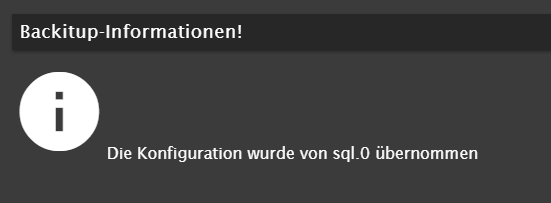
        @simatec Habe lediglich auf 'ermitteln der Konfiguration' gedrückt.
        als Antwort kommt dann:
        Screenshot 2024-02-28 201124.png
        Ein extra Pfad habe ich nicht weiter angegeben... muss das denn?

        simatecS 1 Antwort Letzte Antwort
        0
        • jomaJ joma

          @simatec Habe lediglich auf 'ermitteln der Konfiguration' gedrückt.
          als Antwort kommt dann:
          Screenshot 2024-02-28 201124.png
          Ein extra Pfad habe ich nicht weiter angegeben... muss das denn?

          simatecS Offline
          simatecS Offline
          simatec
          Developer Most Active
          schrieb am zuletzt editiert von
          #4

          @joma und was hast du dann für ein Pfad in der Config von Backitup stehen?

          • Besuche meine Github Seite
          • Beitrag hat geholfen oder willst du mich unterstützen
          • HowTo Restore ioBroker
          jomaJ simatecS 2 Antworten Letzte Antwort
          0
          • simatecS simatec

            @joma und was hast du dann für ein Pfad in der Config von Backitup stehen?

            jomaJ Offline
            jomaJ Offline
            joma
            schrieb am zuletzt editiert von
            #5

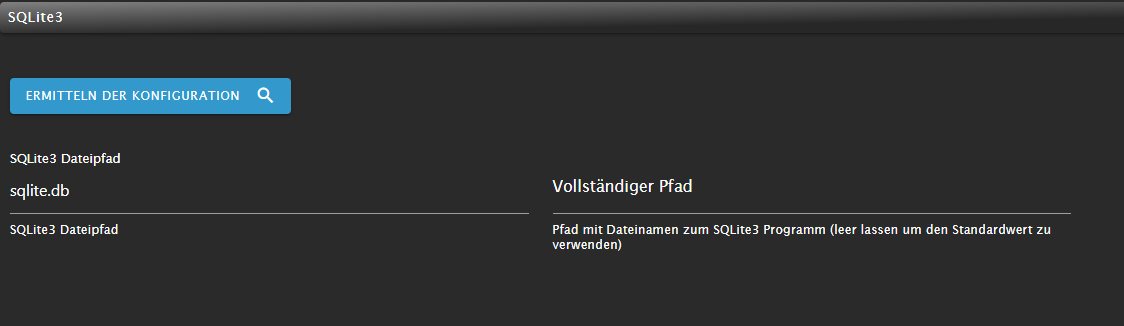
            @simatec das sieht hier einfach so aus:

            f989d03f-3549-4c52-b3fe-382a7d738ab4-image.png

            1 Antwort Letzte Antwort
            0
            • simatecS simatec

              @joma und was hast du dann für ein Pfad in der Config von Backitup stehen?

              simatecS Offline
              simatecS Offline
              simatec
              Developer Most Active
              schrieb am zuletzt editiert von
              #6

              @simatec naja das ist kein Pfad. Was steht im sql Adapter für ein Pfad?

              • Besuche meine Github Seite
              • Beitrag hat geholfen oder willst du mich unterstützen
              • HowTo Restore ioBroker
              jomaJ 1 Antwort Letzte Antwort
              0
              • simatecS simatec

                @simatec naja das ist kein Pfad. Was steht im sql Adapter für ein Pfad?

                jomaJ Offline
                jomaJ Offline
                joma
                schrieb am zuletzt editiert von
                #7

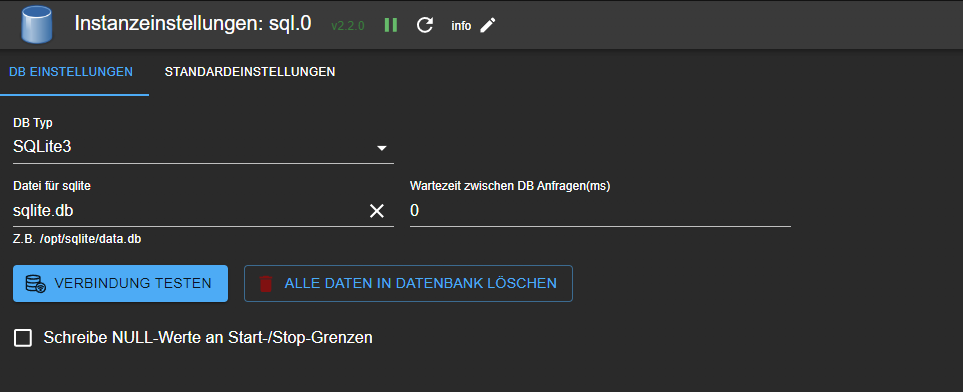
                @simatec da steht auch nur sqlite.db
                01136372-69af-4880-9a1e-950b80912ca8-image.png

                simatecS 1 Antwort Letzte Antwort
                0
                • jomaJ joma

                  @simatec da steht auch nur sqlite.db
                  01136372-69af-4880-9a1e-950b80912ca8-image.png

                  simatecS Offline
                  simatecS Offline
                  simatec
                  Developer Most Active
                  schrieb am zuletzt editiert von
                  #8

                  @joma Schaue mal in den Ordner /opt/iobroker/iobroker-data
                  Bzw. sollte dort auch ein Unterordner für sql sein

                  • Besuche meine Github Seite
                  • Beitrag hat geholfen oder willst du mich unterstützen
                  • HowTo Restore ioBroker
                  jomaJ 1 Antwort Letzte Antwort
                  1
                  • simatecS simatec

                    @joma Schaue mal in den Ordner /opt/iobroker/iobroker-data
                    Bzw. sollte dort auch ein Unterordner für sql sein

                    jomaJ Offline
                    jomaJ Offline
                    joma
                    schrieb am zuletzt editiert von
                    #9

                    @simatec ja, da gibt es einen sql Ordner und darin die sqlite.db.

                    Aber ich hab's jetzt!
                    Der Backitup Adapter braucht da tatsächlich die komplette Pfadangabe "/opt/iobroker/iobroker-data/sqlite/sqlite.db" ansonsten findet er die sqlite.db wohl nicht.
                    Mit der Pfadangabe funktioniert's jetzt perfekt... prima! :-)

                    Vielen Dank dir für deine hilfreiche Unterstützung:+1: :+1:

                    simatecS 1 Antwort Letzte Antwort
                    0
                    • jomaJ joma

                      @simatec ja, da gibt es einen sql Ordner und darin die sqlite.db.

                      Aber ich hab's jetzt!
                      Der Backitup Adapter braucht da tatsächlich die komplette Pfadangabe "/opt/iobroker/iobroker-data/sqlite/sqlite.db" ansonsten findet er die sqlite.db wohl nicht.
                      Mit der Pfadangabe funktioniert's jetzt perfekt... prima! :-)

                      Vielen Dank dir für deine hilfreiche Unterstützung:+1: :+1:

                      simatecS Offline
                      simatecS Offline
                      simatec
                      Developer Most Active
                      schrieb am zuletzt editiert von
                      #10

                      @joma mach da mal bitte ein Issue auf. Dann baue ich den Pfad als Default mit ein.

                      • Besuche meine Github Seite
                      • Beitrag hat geholfen oder willst du mich unterstützen
                      • HowTo Restore ioBroker
                      jomaJ 1 Antwort Letzte Antwort
                      1
                      • simatecS simatec

                        @joma mach da mal bitte ein Issue auf. Dann baue ich den Pfad als Default mit ein.

                        jomaJ Offline
                        jomaJ Offline
                        joma
                        schrieb am zuletzt editiert von
                        #11

                        @simatec OK, mach ich dann mal, heute am Abend.

                        aber als default? Ist für Windowsnutzer eventuell etwas ungünstig.
                        Meine Erwartung war ursprünglich, das durch Betätigung des Buttons 'Ermitteln der Konfiguration' der Adapter sich den richtigen Pfad sucht, oder wofür ist der Knopf gedacht?

                        1 Antwort Letzte Antwort
                        0
                        Antworten
                        • In einem neuen Thema antworten
                        Anmelden zum Antworten
                        • Älteste zuerst
                        • Neuste zuerst
                        • Meiste Stimmen


                        Support us

                        ioBroker
                        Community Adapters
                        Donate

                        650

                        Online

                        32.5k

                        Benutzer

                        81.6k

                        Themen

                        1.3m

                        Beiträge
                        Community
                        Impressum | Datenschutz-Bestimmungen | Nutzungsbedingungen | Einwilligungseinstellungen
                        ioBroker Community 2014-2025
                        logo
                        • Anmelden

                        • Du hast noch kein Konto? Registrieren

                        • Anmelden oder registrieren, um zu suchen
                        • Erster Beitrag
                          Letzter Beitrag
                        0
                        • Home
                        • Aktuell
                        • Tags
                        • Ungelesen 0
                        • Kategorien
                        • Unreplied
                        • Beliebt
                        • GitHub
                        • Docu
                        • Hilfe