




Nach Überlauf VM-virt. Festplatte Probleme mit VIS

-
Hallo zusammen,
erstmal noch alles Gute für 2024 für Euch alle.
Vorgeschichte:
Schon im Dezember hat sich mein ioBroker (Ubuntu-VM im VMM von Synology) wegen 100% Festplattenbelegung verabschiedet.
Dazu gibt es ja schon einige Beiträge, die ich soweit gefunden durchgearbeitet habe.
Dank Snapshot war das System woeder relativ schnell am Laufen.

Leider mit 2 Problemen: VIS- und FLOT-Adapter verweigern den Dienst, sind im Browser nicht erreichbar.
bisherige Massnahmen:
Da der ioBroker in der Übersicht nur noch 1,6GB freien Speicherplattenplatz anzeigte, habe ich
- der VM erstmal die Kapazität von 32GB auf 64GB erhöht.
Im ioBroker sieht es jetzt so aus:

Die Zahlen sind mir zwar noch nicht ganz verständlich, aber zumindest ist genug Platz da . ;-)
-
Ubuntu upgedatet
-
ioBroker "entmüllt", d.h. nicht mehr benötigte Adapter entfernt
-
Altlasten wie alte Backups gelöscht
-
JSON-Controler auf aktuellen Stand gebracht.
Annahme:
Ich weiß nicht, ob ich richtig liege, aber ich gehe davon aus, dass der FLOT-Adapter nicht ohne VIS läuft (?).
Daher will ich mich zunächst auf den VIS-Adapter kümmern. Dieser war aktuell.
Und ohne Visualisierung sinkt der WAF!
- Da ich einen Zusammenhang mit der nicht mehr nötigen Lizens vermutete, habe ich mal auf ältere Versionen down gegradet. -ohne Erfolg-
Das Debug-Log sieht immer gleich aus nach einem Neustart des Adapters:
vis.0
2024-01-06 16:43:26.284	info	Terminated (NO_ERROR): Without reason

vis.0
2024-01-06 16:43:25.015	info	starting. Version 1.5.4 in /opt/iobroker/node_modules/iobroker.vis, node: v18.17.1, js-controller: 5.0.17

vis.0
2024-01-06 16:43:24.962	debug	States connected to redis: 127.0.0.1:9000

vis.0
2024-01-06 16:43:24.915	debug	States create User PubSub Client

vis.0
2024-01-06 16:43:24.915	debug	States create System PubSub Client

vis.0
2024-01-06 16:43:24.891	debug	Redis States: Use Redis connection: 127.0.0.1:9000

vis.0
2024-01-06 16:43:24.843	debug	Objects connected to redis: 127.0.0.1:9001

vis.0
2024-01-06 16:43:24.839	debug	Objects client initialize lua scripts

vis.0
2024-01-06 16:43:24.743	debug	Objects create User PubSub Client

vis.0
2024-01-06 16:43:24.742	debug	Objects create System PubSub Client

vis.0
2024-01-06 16:43:24.741	debug	Objects client ready ... initialize now

vis.0
2024-01-06 16:43:24.688	debug	Redis Objects: Use Redis connection: 127.0.0.1:9001

vis.0
2024-01-06 16:43:19.318	info	Terminated (NO_ERROR): Without reason

vis.0
2024-01-06 16:43:18.420	info	starting. Version 1.5.4 in /opt/iobroker/node_modules/iobroker.vis, node: v18.17.1, js-controller: 5.0.17

vis.0
2024-01-06 16:43:18.299	debug	States connected to redis: 127.0.0.1:9000

vis.0
2024-01-06 16:43:18.207	debug	States create User PubSub Client

vis.0
2024-01-06 16:43:18.206	debug	States create System PubSub Client

vis.0
2024-01-06 16:43:18.148	debug	Redis States: Use Redis connection: 127.0.0.1:9000

vis.0
2024-01-06 16:43:18.079	debug	Objects connected to redis: 127.0.0.1:9001

vis.0
2024-01-06 16:43:18.070	debug	Objects client initialize lua scripts

vis.0
2024-01-06 16:43:17.957	debug	Objects create User PubSub Client

vis.0
2024-01-06 16:43:17.954	debug	Objects create System PubSub Client

vis.0
2024-01-06 16:43:17.949	debug	Objects client ready ... initialize now

vis.0
2024-01-06 16:43:17.884	debug	Redis Objects: Use Redis connection: 127.0.0.1:9001

vis.0
2024-01-06 16:43:14.372	info	Terminated (NO_ERROR): Without reason

vis.0
2024-01-06 16:43:13.868	info	Uploaded. 0

vis.0
2024-01-06 16:43:12.845	debug	upload [0] vis /opt/iobroker/node_modules/iobroker.vis/www/widgets/vis-material-advanced.html widgets/vis-material-advanced.html text/html

vis.0
2024-01-06 16:43:12.837	debug	upload [1] vis /opt/iobroker/node_modules/iobroker.vis/www/widgets/vis-material-advanced/js/words.js widgets/vis-material-advanced/js/words.js application/javascript

vis.0
2024-01-06 16:43:12.831	debug	upload [2] vis /opt/iobroker/node_modules/iobroker.vis/www/widgets/vis-material-advanced/js/vis-material-advanced.js widgets/vis-material-advanced/js/vis-material-advanced.js application/javascript

vis.0
2024-01-06 16:43:12.824	debug	upload [3] vis /opt/iobroker/node_modules/iobroker.vis/www/widgets/vis-material-advanced/js/list.js widgets/vis-material-advanced/js/list.js application/javascript

vis.0
2024-01-06 16:43:12.817	debug	upload [4] vis /opt/iobroker/node_modules/iobroker.vis/www/widgets/vis-material-advanced/js/genTitleContainer.js widgets/vis-material-advanced/js/genTitleContainer.js application/javascript

vis.0
2024-01-06 16:43:12.810	debug	upload [5] vis /opt/iobroker/node_modules/iobroker.vis/www/widgets/vis-material-advanced/js/do widgets/vis-material-advanced/js/do false

vis.0
2024-01-06 16:43:12.802	debug	upload [6] vis /opt/iobroker/node_modules/iobroker.vis/www/widgets/vis-material-advanced/js/base.js widgets/vis-material-advanced/js/base.js application/javascript

vis.0
2024-01-06 16:43:12.796	debug	upload [7] vis /opt/iobroker/node_modules/iobroker.vis/www/widgets/vis-material-advanced/js/TempIcon/TempIcon.js widgets/vis-material-advanced/js/TempIcon/TempIcon.js application/javascript

vis.0
2024-01-06 16:43:12.790	debug	upload [8] vis /opt/iobroker/node_modules/iobroker.vis/www/widgets/vis-material-advanced/js/ListWindowShutter/listWindowShutter.js widgets/vis-material-advanced/js/ListWindowShutter/listWindowShutter.js application/javascript

vis.0
2024-01-06 16:43:12.784	debug	upload [9] vis /opt/iobroker/node_modules/iobroker.vis/www/widgets/vis-material-advanced/js/ListWindow/listWindow.js widgets/vis-material-advanced/js/ListWindow/listWindow.js application/javascript

vis.0
2024-01-06 16:43:12.777	debug	upload [10] vis /opt/iobroker/node_modules/iobroker.vis/www/widgets/vis-material-advanced/js/ListVolume/listVolume.js widgets/vis-material-advanced/js/ListVolume/listVolume.js application/javascript

vis.0
2024-01-06 16:43:12.772	debug	upload [11] vis /opt/iobroker/node_modules/iobroker.vis/www/widgets/vis-material-advanced/js/ListValve/listValve.js widgets/vis-material-advanced/js/ListValve/listValve.js application/javascript

vis.0
2024-01-06 16:43:12.766	debug	upload [12] vis /opt/iobroker/node_modules/iobroker.vis/www/widgets/vis-material-advanced/js/ListThermostat/listThermostat.js widgets/vis-material-advanced/js/ListThermostat/listThermostat.js application/javascript

vis.0
2024-01-06 16:43:12.759	debug	upload [13] vis /opt/iobroker/node_modules/iobroker.vis/www/widgets/vis-material-advanced/js/ListText/listText.js widgets/vis-material-advanced/js/ListText/listText.js application/javascript

vis.0
2024-01-06 16:43:12.749	debug	upload [14] vis /opt/iobroker/node_modules/iobroker.vis/www/widgets/vis-material-advanced/js/ListTempHumid/listTempHumid.js widgets/vis-material-advanced/js/ListTempHumid/listTempHumid.js application/javascript

vis.0
2024-01-06 16:43:12.735	debug	upload [15] vis /opt/iobroker/node_modules/iobroker.vis/www/widgets/vis-material-advanced/js/ListTemp/listTemp.js widgets/vis-material-advanced/js/ListTemp/listTemp.js application/javascript

vis.0
2024-01-06 16:43:12.726	debug	upload [16] vis /opt/iobroker/node_modules/iobroker.vis/www/widgets/vis-material-advanced/js/ListRegenRadar/listRegenRadar.js widgets/vis-material-advanced/js/ListRegenRadar/listRegenRadar.js application/javascript

vis.0
2024-01-06 16:43:12.720	debug	upload [17] vis /opt/iobroker/node_modules/iobroker.vis/www/widgets/vis-material-advanced/js/ListPressure/listPressure.js widgets/vis-material-advanced/js/ListPressure/listPressure.js application/javascript

vis.0
2024-01-06 16:43:12.713	debug	upload [18] vis /opt/iobroker/node_modules/iobroker.vis/www/widgets/vis-material-advanced/js/ListPresence/listPresence.js widgets/vis-material-advanced/js/ListPresence/listPresence.js application/javascript

vis.0
2024-01-06 16:43:12.707	debug	upload [19] vis /opt/iobroker/node_modules/iobroker.vis/www/widgets/vis-material-advanced/js/ListOccupancy/listOccupancy.js widgets/vis-material-advanced/js/ListOccupancy/listOccupancy.js application/javascript

vis.0
2024-01-06 16:43:12.700	debug	upload [20] vis /opt/iobroker/node_modules/iobroker.vis/www/widgets/vis-material-advanced/js/ListNumber/listNumber.js widgets/vis-material-advanced/js/ListNumber/listNumber.js application/javascript

vis.0
2024-01-06 16:43:12.571	debug	upload [30] vis /opt/iobroker/node_modules/iobroker.vis/www/widgets/vis-material-advanced/img/watering_empty.png widgets/vis-material-advanced/img/watering_empty.png image/png

vis.0
2024-01-06 16:43:12.497	debug	upload [40] vis /opt/iobroker/node_modules/iobroker.vis/www/widgets/vis-material-advanced/img/unchecked.png widgets/vis-material-advanced/img/unchecked.png image/png

vis.0
2024-01-06 16:43:12.416	debug	upload [50] vis /opt/iobroker/node_modules/iobroker.vis/www/widgets/vis-material-advanced/img/temp_verlauf_60.png widgets/vis-material-advanced/img/temp_verlauf_60.png image/png

vis.0
2024-01-06 16:43:12.322	debug	upload [60] vis /opt/iobroker/node_modules/iobroker.vis/www/widgets/vis-material-advanced/img/temp_verlauf_100.png widgets/vis-material-advanced/img/temp_verlauf_100.png image/png

vis.0
2024-01-06 16:43:12.273	debug	upload [70] vis /opt/iobroker/node_modules/iobroker.vis/www/widgets/vis-material-advanced/img/pressure.png widgets/vis-material-advanced/img/pressure.png image/png

vis.0
2024-01-06 16:43:12.218	debug	upload [80] vis /opt/iobroker/node_modules/iobroker.vis/www/widgets/vis-material-advanced/img/ma_checkbox_checked.png widgets/vis-material-advanced/img/ma_checkbox_checked.png image/png

vis.0
2024-01-06 16:43:12.092	debug	upload [90] vis /opt/iobroker/node_modules/iobroker.vis/www/widgets/vis-material-advanced/img/light_light_dim_10.png widgets/vis-material-advanced/img/light_light_dim_10.png image/png

vis.0
2024-01-06 16:43:12.029	debug	upload [100] vis /opt/iobroker/node_modules/iobroker.vis/www/widgets/vis-material-advanced/img/garage.png widgets/vis-material-advanced/img/garage.png image/png

vis.0
2024-01-06 16:43:11.587	debug	upload [150] vis /opt/iobroker/node_modules/iobroker.vis/www/widgets/vis-material-advanced/img/checkbox-intermediate.png widgets/vis-material-advanced/img/checkbox-intermediate.png image/png

vis.0
2024-01-06 16:43:11.269	debug	upload [200] vis /opt/iobroker/node_modules/iobroker.vis/www/widgets/vis-inventwo/img/Slider2.gif widgets/vis-inventwo/img/Slider2.gif image/gif

vis.0
2024-01-06 16:43:10.239	debug	upload [250] vis /opt/iobroker/node_modules/iobroker.vis/www/widgets/swipe/img/noSwipe.jpg widgets/swipe/img/noSwipe.jpg image/jpeg

vis.0
2024-01-06 16:43:09.850	info	Terminated (NO_ERROR): Without reason

vis.0
2024-01-06 16:43:09.684	debug	upload [300] vis /opt/iobroker/node_modules/iobroker.vis/www/widgets/jqui/img/hue.png widgets/jqui/img/hue.png image/png

vis.0
2024-01-06 16:43:09.314	debug	upload [350] vis /opt/iobroker/node_modules/iobroker.vis/www/widgets/hqwidgets/css/glossy.css widgets/hqwidgets/css/glossy.css text/css

vis.0
2024-01-06 16:43:08.869	info	starting. Version 1.5.4 in /opt/iobroker/node_modules/iobroker.vis, node: v18.17.1, js-controller: 5.0.17

vis.0
2024-01-06 16:43:08.756	debug	upload [400] vis /opt/iobroker/node_modules/iobroker.vis/www/widgets/canvas-gauges/js/gauge.min.js.map widgets/canvas-gauges/js/gauge.min.js.map application/json

vis.0
2024-01-06 16:43:08.746	debug	States connected to redis: 127.0.0.1:9000

vis.0
2024-01-06 16:43:08.685	debug	States create User PubSub Client

vis.0
2024-01-06 16:43:08.684	debug	States create System PubSub Client

vis.0
2024-01-06 16:43:08.654	debug	Redis States: Use Redis connection: 127.0.0.1:9000

vis.0
2024-01-06 16:43:08.603	debug	Objects connected to redis: 127.0.0.1:9001

vis.0
2024-01-06 16:43:08.598	debug	Objects client initialize lua scripts

vis.0
2024-01-06 16:43:08.510	debug	Objects create User PubSub Client

vis.0
2024-01-06 16:43:08.508	debug	Objects create System PubSub Client

vis.0
2024-01-06 16:43:08.499	debug	Objects client ready ... initialize now

vis.0
2024-01-06 16:43:08.454	debug	Redis Objects: Use Redis connection: 127.0.0.1:9001

vis.0
2024-01-06 16:43:08.123	debug	upload [450] vis /opt/iobroker/node_modules/iobroker.vis/www/widgets/basic/img/Prev_FilterDropdown.png widgets/basic/img/Prev_FilterDropdown.png image/png

vis.0
2024-01-06 16:43:07.542	debug	upload [479] vis /opt/iobroker/node_modules/iobroker.vis/www/widgets/bars/css/barButtons.css widgets/bars/css/barButtons.css text/css

vis.0
2024-01-06 16:43:07.341	debug	Adapter "system.adapter.vis.0" restarted.

vis.0
2024-01-06 16:43:04.592	info	Upload vis anew, while changes detected...

vis.0
2024-01-06 16:43:04.514	info	Changes in index.html detected => update cache.manifest

vis.0
2024-01-06 16:43:03.504	info	starting. Version 1.5.4 in /opt/iobroker/node_modules/iobroker.vis, node: v18.17.1, js-controller: 5.0.17
(Das Log habe icch gerade frisch gezogen, nachdem ich wieder auf den aktuellen VIS-Adapter upgedatet habe.)
BTW:
Was hat es mit den "Redis"-Einträgen auf sich?
Sagt mir nix, außer dass ich mal gelesen hatte bei großen Installationen über eine Redis-Datenbank nachzudenken. Gemacht habe ich in der Richtung aber nix. Anders ausgedrückt werden die Datenpunkte "standard" gespeichert.Abschließend noch 1 aktueller Screenshot vom Adapter:
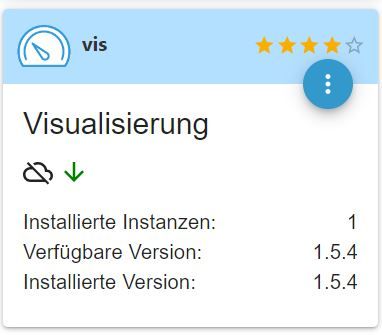
Ich weiß nicht mehr weiter und hoffe auf Eure Unterstützung.
Vielen Dank.
@66er sagte in Nach Überlauf VM-virt. Festplatte Probleme mit VIS:
Dank Snapshot war das System woeder relativ schnell am Laufen.
Damit schleppst du nur vorhandene Fehler immer mit ..
und das :
node: v18.17.1,
ist noch alt .. hat aber mit deinem Fehler nichts zu tun .
Mein Vorschlag :
Neue VM erstellen (aktuelles Ubuntu) mit einem frischen ioBroker , dann ein Backup rein !
Synology 918+ 16GB - ioBroker in Docker v9 , VISO auf Trekstor Primebook C13 13,3" , Hikvision Domkameras mit Surveillance Station .. CCU RaspberryMatic in Synology VM .. Zigbee CC2538+CC2592 .. Sonoff .. KNX .. Modbus ..
-
@66er sagte in Nach Überlauf VM-virt. Festplatte Probleme mit VIS:
Dank Snapshot war das System woeder relativ schnell am Laufen.
Damit schleppst du nur vorhandene Fehler immer mit ..
und das :
node: v18.17.1,
ist noch alt .. hat aber mit deinem Fehler nichts zu tun .
Mein Vorschlag :
Neue VM erstellen (aktuelles Ubuntu) mit einem frischen ioBroker , dann ein Backup rein !
Danke für Deine Antwort.
Der Snapshot lag deutlich vor dem Crash.
**Ich gehe davon aus, dass es was mit der nicht mehr nötigen Lizenz für VIS zu tun hat.
Vielleicht dazu eine Idee?**
Ein Neuaufsetzen muß aus verschiedenen Gründen warten.
LG
Stefan -
Danke für Deine Antwort.
Der Snapshot lag deutlich vor dem Crash.
**Ich gehe davon aus, dass es was mit der nicht mehr nötigen Lizenz für VIS zu tun hat.
Vielleicht dazu eine Idee?**
Ein Neuaufsetzen muß aus verschiedenen Gründen warten.
@66er sagte in Nach Überlauf VM-virt. Festplatte Probleme mit VIS:
**Ich gehe davon aus, dass es was mit der nicht mehr nötigen Lizenz für VIS zu tun hat.
kann ich mir nicht vorstellen !
Vielleicht dazu eine Idee?**
... eher ...
Zeige mal was du hast , damit ich / wir mehr dazu wissen was du so hastFull Ausgabe von
iob diagSynology 918+ 16GB - ioBroker in Docker v9 , VISO auf Trekstor Primebook C13 13,3" , Hikvision Domkameras mit Surveillance Station .. CCU RaspberryMatic in Synology VM .. Zigbee CC2538+CC2592 .. Sonoff .. KNX .. Modbus ..
-
@66er sagte in Nach Überlauf VM-virt. Festplatte Probleme mit VIS:
**Ich gehe davon aus, dass es was mit der nicht mehr nötigen Lizenz für VIS zu tun hat.
kann ich mir nicht vorstellen !
Vielleicht dazu eine Idee?**
... eher ...
Zeige mal was du hast , damit ich / wir mehr dazu wissen was du so hastFull Ausgabe von
iob diagGerne:
======== Start marking the full check here ========= Skript v.2023-10-10 *** BASE SYSTEM *** Static hostname: iobsynology Icon name: computer-vm Chassis: vm Virtualization: microsoft Operating System: Ubuntu 20.04.6 LTS Kernel: Linux 5.4.0-169-generic Architecture: x86-64 model name : AMD Ryzen Embedded R1600 Docker : false Virtualization : microsoft Kernel : x86_64 Userland : amd64 Systemuptime and Load: 17:45:16 up 5:39, 2 users, load average: 0.54, 0.90, 0.78 CPU threads: 2 *** Time and Time Zones *** Local time: Sat 2024-01-06 17:45:16 UTC Universal time: Sat 2024-01-06 17:45:16 UTC RTC time: Sat 2024-01-06 17:45:17 Time zone: Etc/UTC (UTC, +0000) System clock synchronized: yes NTP service: active RTC in local TZ: no *** User and Groups *** stefan /home/stefan stefan adm cdrom sudo dip plugdev lxd iobroker *** X-Server-Setup *** X-Server: false Desktop: Terminal: tty Boot Target: graphical.target *** MEMORY *** total used free shared buff/cache available Mem: 5.9G 2.4G 2.4G 1.0M 1.1G 3.3G Swap: 3.2G 0B 3.2G Total: 9.1G 2.4G 5.7G 5929 M total memory 2354 M used memory 2776 M active memory 382 M inactive memory 2445 M free memory 144 M buffer memory 986 M swap cache 3204 M total swap 0 M used swap 3204 M free swap *** FAILED SERVICES *** UNIT LOAD ACTIVE SUB DESCRIPTION 0 loaded units listed. *** FILESYSTEM *** Filesystem Type Size Used Avail Use% Mounted on udev devtmpfs 2.9G 0 2.9G 0% /dev tmpfs tmpfs 593M 1.1M 592M 1% /run /dev/mapper/ubuntu--vg-ubuntu--lv ext4 30G 13G 16G 47% / tmpfs tmpfs 2.9G 0 2.9G 0% /dev/shm tmpfs tmpfs 5.0M 0 5.0M 0% /run/lock tmpfs tmpfs 2.9G 0 2.9G 0% /sys/fs/cgroup /dev/loop0 squashfs 68M 68M 0 100% /snap/lxd/22753 /dev/loop1 squashfs 92M 92M 0 100% /snap/lxd/24061 /dev/loop4 squashfs 64M 64M 0 100% /snap/core20/2105 /dev/loop5 squashfs 41M 41M 0 100% /snap/snapd/20290 /dev/loop3 squashfs 41M 41M 0 100% /snap/snapd/20671 /dev/loop2 squashfs 64M 64M 0 100% /snap/core20/2015 /dev/sda2 ext4 2.0G 209M 1.6G 12% /boot tmpfs tmpfs 593M 0 593M 0% /run/user/1000 Messages concerning ext4 filesystem in dmesg: [Sat Jan 6 12:05:20 2024] EXT4-fs (dm-0): mounted filesystem with ordered data mode. Opts: (null) [Sat Jan 6 12:05:25 2024] EXT4-fs (dm-0): re-mounted. Opts: (null) [Sat Jan 6 12:05:32 2024] EXT4-fs (sda2): mounted filesystem with ordered data mode. Opts: (null) Show mounted filesystems \(real ones only\): TARGET SOURCE FSTYPE OPTIONS / /dev/mapper/ubuntu--vg-ubuntu--lv ext4 rw,relatime |-/sys/kernel/tracing tracefs tracefs rw,nosuid,nodev,noexec,relatime |-/snap/lxd/22753 /dev/loop0 squashfs ro,nodev,relatime |-/snap/lxd/24061 /dev/loop1 squashfs ro,nodev,relatime |-/snap/core20/2105 /dev/loop4 squashfs ro,nodev,relatime |-/snap/snapd/20290 /dev/loop5 squashfs ro,nodev,relatime |-/snap/snapd/20671 /dev/loop3 squashfs ro,nodev,relatime |-/snap/core20/2015 /dev/loop2 squashfs ro,nodev,relatime `-/boot /dev/sda2 ext4 rw,relatime Files in neuralgic directories: /var: 1.2G /var/ 734M /var/lib 479M /var/lib/snapd 340M /var/log 337M /var/log/journal/cfbf3a6449274692b4d456d944322c22 Archived and active journals take up 336.0M in the file system. /opt/iobroker/backups: 1.8G /opt/iobroker/backups/ /opt/iobroker/iobroker-data: 3.1G /opt/iobroker/iobroker-data/ 2.6G /opt/iobroker/iobroker-data/history 157M /opt/iobroker/iobroker-data/files 135M /opt/iobroker/iobroker-data/node-red 134M /opt/iobroker/iobroker-data/node-red/node_modules The five largest files in iobroker-data are: 39M /opt/iobroker/iobroker-data/objects.jsonl 35M /opt/iobroker/iobroker-data/files/devices.admin/static/js/main.24f2bb56.js.map 21M /opt/iobroker/iobroker-data/states.jsonl 21M /opt/iobroker/iobroker-data/files/web.admin/static/js/main.aaea95f8.js.map 8.6M /opt/iobroker/iobroker-data/files/devices.admin/static/js/main.24f2bb56.js USB-Devices by-id: USB-Sticks - Avoid direct links to /dev/* in your adapter setups, please always prefer the links 'by-id': find: '/dev/serial/by-id/': No such file or directory *** NodeJS-Installation *** /usr/bin/nodejs v18.17.1 /usr/bin/node v18.17.1 /usr/bin/npm 9.6.7 /usr/bin/npx 9.6.7 /usr/bin/corepack 0.18.0 nodejs: Installed: 18.17.1-deb-1nodesource1 Candidate: 18.17.1-deb-1nodesource1 Version table: *** 18.17.1-deb-1nodesource1 500 500 https://deb.nodesource.com/node_18.x focal/main amd64 Packages 100 /var/lib/dpkg/status 10.19.0~dfsg-3ubuntu1.3 500 500 http://de.archive.ubuntu.com/ubuntu focal-updates/universe amd64 Packages 500 http://de.archive.ubuntu.com/ubuntu focal-security/universe amd64 Packages 10.19.0~dfsg-3ubuntu1 500 500 http://de.archive.ubuntu.com/ubuntu focal/universe amd64 Packages Temp directories causing npm8 problem: 0 No problems detected Errors in npm tree: *** ioBroker-Installation *** ioBroker Status iobroker is running on this host. Objects type: jsonl States type: jsonl Core adapters versions js-controller: 5.0.17 admin: 6.12.0 javascript: "javascript" not found Adapters from github: 1 Adapter State + system.adapter.admin.0 : admin : iobsynology - enabled, port: 8081, bind: 0.0.0.0 (SSL), run as: admin system.adapter.backitup.0 : backitup : iobsynology - disabled system.adapter.backitup.1 : backitup : iobsynology - disabled system.adapter.backitup.2 : backitup : iobsynology - disabled + system.adapter.backitup.3 : backitup : iobsynology - enabled + system.adapter.backitup.4 : backitup : iobsynology - enabled + system.adapter.backitup.5 : backitup : iobsynology - enabled system.adapter.devices.0 : devices : iobsynology - disabled + system.adapter.discovery.0 : discovery : iobsynology - enabled + system.adapter.email.0 : email : iobsynology - enabled system.adapter.flot.0 : flot : iobsynology - disabled + system.adapter.history.0 : history : iobsynology - enabled + system.adapter.hm-rega.0 : hm-rega : iobsynology - enabled + system.adapter.hm-rega.1 : hm-rega : iobsynology - enabled + system.adapter.hm-rpc.0 : hm-rpc : iobsynology - enabled, port: 12001 + system.adapter.hm-rpc.1 : hm-rpc : iobsynology - enabled, port: 18701 + system.adapter.hm-rpc.2 : hm-rpc : iobsynology - enabled, port: 12001 + system.adapter.hm-rpc.4 : hm-rpc : iobsynology - enabled, port: 18701 + system.adapter.hm-rpc.5 : hm-rpc : iobsynology - enabled, port: 12001 + system.adapter.hm-rpc.7 : hm-rpc : iobsynology - enabled, port: 12001 system.adapter.ical.0 : ical : iobsynology - enabled system.adapter.ical.1 : ical : iobsynology - enabled system.adapter.icons-mfd-svg.0 : icons-mfd-svg : iobsynology - disabled system.adapter.icons-ultimate-png.0 : icons-ultimate-png : iobsynology - disabled + system.adapter.info.0 : info : iobsynology - enabled + system.adapter.mqtt.0 : mqtt : iobsynology - enabled, port: 1883, bind: 0.0.0.0 system.adapter.mqtt.1 : mqtt : iobsynology - disabled, port: 1883, bind: 0.0.0.0 + system.adapter.node-red.0 : node-red : iobsynology - enabled, port: 1880, bind: 192.168.1.92 system.adapter.ping.0 : ping : iobsynology - disabled system.adapter.rpi2.0 : rpi2 : iobsynology - disabled system.adapter.sayit.0 : sayit : iobsynology - disabled + system.adapter.shelly.0 : shelly : iobsynology - enabled, port: 1882, bind: 0.0.0.0 + system.adapter.shelly.1 : shelly : iobsynology - enabled, port: 1888, bind: 0.0.0.0 + system.adapter.simple-api.0 : simple-api : iobsynology - enabled, port: 8087, bind: 0.0.0.0, run as: admin system.adapter.sonos.0 : sonos : iobsynology - disabled + system.adapter.synology.0 : synology : iobsynology - enabled, port: 5000 + system.adapter.tr-064.0 : tr-064 : iobsynology - enabled + system.adapter.trashschedule.0 : trashschedule : iobsynology - enabled system.adapter.vis-bars.0 : vis-bars : iobsynology - disabled system.adapter.vis-canvas-gauges.0 : vis-canvas-gauges : iobsynology - disabled system.adapter.vis-colorpicker.0 : vis-colorpicker : iobsynology - disabled system.adapter.vis-fancyswitch.0 : vis-fancyswitch : iobsynology - disabled system.adapter.vis-hqwidgets.0 : vis-hqwidgets : iobsynology - disabled system.adapter.vis-icontwo.0 : vis-icontwo : iobsynology - disabled system.adapter.vis-inventwo.0 : vis-inventwo : iobsynology - disabled system.adapter.vis-material-advanced.0 : vis-material-advanced : iobsynology - disabled system.adapter.vis-players.0 : vis-players : iobsynology - disabled system.adapter.vis.0 : vis : iobsynology - enabled system.adapter.web.0 : web : iobsynology - disabled, port: 8082, bind: 0.0.0.0, run as: admin + instance is alive Enabled adapters with bindings + system.adapter.admin.0 : admin : iobsynology - enabled, port: 8081, bind: 0.0.0.0 (SSL), run as: admin + system.adapter.hm-rpc.0 : hm-rpc : iobsynology - enabled, port: 12001 + system.adapter.hm-rpc.1 : hm-rpc : iobsynology - enabled, port: 18701 + system.adapter.hm-rpc.2 : hm-rpc : iobsynology - enabled, port: 12001 + system.adapter.hm-rpc.4 : hm-rpc : iobsynology - enabled, port: 18701 + system.adapter.hm-rpc.5 : hm-rpc : iobsynology - enabled, port: 12001 + system.adapter.hm-rpc.7 : hm-rpc : iobsynology - enabled, port: 12001 + system.adapter.mqtt.0 : mqtt : iobsynology - enabled, port: 1883, bind: 0.0.0.0 + system.adapter.node-red.0 : node-red : iobsynology - enabled, port: 1880, bind: 192.168.1.92 + system.adapter.shelly.0 : shelly : iobsynology - enabled, port: 1882, bind: 0.0.0.0 + system.adapter.shelly.1 : shelly : iobsynology - enabled, port: 1888, bind: 0.0.0.0 + system.adapter.simple-api.0 : simple-api : iobsynology - enabled, port: 8087, bind: 0.0.0.0, run as: admin + system.adapter.synology.0 : synology : iobsynology - enabled, port: 5000 ioBroker-Repositories Stable (default): http://download.iobroker.net/sources-dist.json Beta (latest) : http://download.iobroker.net/sources-dist-latest.json alle : http://download.iobroker.net/list.html Active repo(s): Stable (default) Installed ioBroker-Instances Used repository: Stable (default) Adapter "admin" : 6.12.0 , installed 6.12.0 Adapter "backitup" : 2.9.8 , installed 2.8.7 [Updatable] Adapter "devices" : 1.1.5 , installed 1.1.5 Adapter "discovery" : 4.2.0 , installed 4.2.0 Adapter "email" : 1.2.1 , installed 1.2.1 Adapter "flot" : 1.12.0 , installed 1.12.0 Adapter "history" : 3.0.1 , installed 3.0.1 Adapter "hm-rega" : 4.0.0 , installed 4.0.0 Adapter "hm-rpc" : 1.15.19 , installed 1.15.19 Adapter "ical" : 1.13.3 , installed 1.13.3 Adapter "icons-mfd-svg": 1.2.0 , installed 1.2.0 Adapter "icons-ultimate-png": 1.0.1, installed 1.0.1 Adapter "info" : 2.0.0 , installed 2.0.0 Controller "js-controller": 5.0.17 , installed 5.0.17 Adapter "mqtt" : 5.1.0 , installed 5.1.0 Adapter "node-red" : 4.0.3 , installed 4.0.3 Adapter "ping" : 1.6.2 , installed 1.6.2 Adapter "rpi2" : 1.3.2 , installed 1.3.2 Adapter "sayit" : 3.0.5 , installed 3.0.5 Adapter "shelly" : 6.6.1 , installed 5.3.2 [Updatable] Adapter "simple-api" : 2.7.2 , installed 2.7.2 Adapter "socketio" : 6.6.0 , installed 6.6.0 Adapter "sonos" : 3.0.0 , installed 3.0.0 Adapter "synology" : 3.0.1 , installed 2.1.13 [Updatable] Adapter "tr-064" : 4.2.18 , installed 4.2.18 Adapter "trashschedule": 2.3.0 , installed 2.3.0 Adapter "vis" : 1.5.4 , installed 1.5.4 Adapter "vis-bars" : 0.1.4 , installed 0.1.4 Adapter "vis-canvas-gauges": 1.0.1, installed 1.0.1 Adapter "vis-colorpicker": 2.0.3 , installed 2.0.3 Adapter "vis-fancyswitch": 1.1.0 , installed 1.1.0 Adapter "vis-hqwidgets": 1.4.0 , installed 1.4.0 Adapter "vis-icontwo" : 1.3.0 , installed 1.3.0 Adapter "vis-inventwo" : 3.3.3 , installed 3.3.3 Adapter "vis-material-advanced": 1.7.4, installed 1.7.4 Adapter "vis-players" : 0.1.6 , installed 0.1.6 Adapter "web" : 6.1.10 , installed 6.1.10 Adapter "ws" : 2.5.8 , installed 2.5.8 Objects and States Please stand by - This may take a while Objects: 24822 States: 20698 *** OS-Repositories and Updates *** Hit:1 http://de.archive.ubuntu.com/ubuntu focal InRelease Hit:2 http://de.archive.ubuntu.com/ubuntu focal-updates InRelease Hit:3 http://de.archive.ubuntu.com/ubuntu focal-backports InRelease Get:4 https://deb.nodesource.com/node_18.x focal InRelease [4583 B] Hit:5 http://de.archive.ubuntu.com/ubuntu focal-security InRelease Fetched 4583 B in 1s (6057 B/s) Reading package lists... Pending Updates: 0 *** Listening Ports *** Active Internet connections (only servers) Proto Recv-Q Send-Q Local Address Foreign Address State User Inode PID/Program name tcp 0 0 192.168.1.92:12002 0.0.0.0:* LISTEN 1001 38107 2231/io.hm-rpc.2 tcp 0 0 192.168.1.92:12003 0.0.0.0:* LISTEN 1001 38157 2261/io.hm-rpc.5 tcp 0 0 192.168.1.92:12004 0.0.0.0:* LISTEN 1001 38202 2278/io.hm-rpc.7 tcp 0 0 127.0.0.1:9000 0.0.0.0:* LISTEN 1001 36698 2038/iobroker.js-co tcp 0 0 127.0.0.1:9001 0.0.0.0:* LISTEN 1001 37514 2038/iobroker.js-co tcp 0 0 192.168.1.92:18701 0.0.0.0:* LISTEN 1001 38065 2216/io.hm-rpc.1 tcp 0 0 192.168.1.92:18702 0.0.0.0:* LISTEN 1001 38137 2246/io.hm-rpc.4 tcp 0 0 0.0.0.0:111 0.0.0.0:* LISTEN 0 14966 1/init tcp 0 0 127.0.0.53:53 0.0.0.0:* LISTEN 101 23095 643/systemd-resolve tcp 0 0 0.0.0.0:22 0.0.0.0:* LISTEN 0 25784 706/sshd: /usr/sbin tcp 0 0 192.168.1.92:1880 0.0.0.0:* LISTEN 1001 37690 2149/node-red tcp 0 0 0.0.0.0:1883 0.0.0.0:* LISTEN 1001 38326 2323/io.mqtt.0 tcp 0 0 0.0.0.0:1888 0.0.0.0:* LISTEN 1001 39230 2353/io.shelly.1 tcp 0 0 192.168.1.92:12001 0.0.0.0:* LISTEN 1001 37771 2201/io.hm-rpc.0 tcp6 0 0 :::111 :::* LISTEN 0 14970 1/init tcp6 0 0 :::8081 :::* LISTEN 1001 37569 2076/io.admin.0 tcp6 0 0 :::22 :::* LISTEN 0 25795 706/sshd: /usr/sbin tcp6 0 0 :::8087 :::* LISTEN 1001 38683 2481/io.simple-api. tcp6 0 0 :::1980 :::* LISTEN 1001 37692 2149/node-red udp 0 0 127.0.0.53:53 0.0.0.0:* 101 23094 643/systemd-resolve udp 0 0 0.0.0.0:111 0.0.0.0:* 0 14967 1/init udp 0 0 0.0.0.0:5683 0.0.0.0:* 1001 39108 2338/io.shelly.0 udp6 0 0 :::111 :::* 0 14973 1/init *** Log File - Last 25 Lines *** 2024-01-06 17:43:51.902 - info: node-red.0 (2149) State value to set for "hm-rega.0.50675" has to be type "number" but received type "string" 2024-01-06 17:43:53.243 - info: node-red.0 (2149) State value to set for "hm-rega.0.24807" has to be type "number" but received type "string" 2024-01-06 17:44:01.581 - info: node-red.0 (2149) State value to set for "hm-rega.0.50674" has to be type "number" but received type "string" 2024-01-06 17:44:06.945 - info: node-red.0 (2149) State value to set for "hm-rega.0.50675" has to be type "number" but received type "string" 2024-01-06 17:44:08.716 - info: node-red.0 (2149) State value to set for "hm-rega.1.19863" has to be type "number" but received type "string" 2024-01-06 17:44:16.547 - info: node-red.0 (2149) State value to set for "hm-rega.0.50674" has to be type "number" but received type "string" 2024-01-06 17:44:22.454 - info: node-red.0 (2149) State value to set for "hm-rega.0.50675" has to be type "number" but received type "string" 2024-01-06 17:44:23.249 - info: node-red.0 (2149) State value to set for "hm-rega.0.24807" has to be type "number" but received type "string" 2024-01-06 17:44:30.366 - info: node-red.0 (2149) State value to set for "hm-rega.0.14591" has to be type "number" but received type "string" 2024-01-06 17:44:36.922 - info: node-red.0 (2149) State value to set for "hm-rega.0.50675" has to be type "number" but received type "string" 2024-01-06 17:44:38.714 - info: node-red.0 (2149) State value to set for "hm-rega.1.19863" has to be type "number" but received type "string" 2024-01-06 17:44:46.541 - info: node-red.0 (2149) State value to set for "hm-rega.0.50674" has to be type "number" but received type "string" 2024-01-06 17:44:51.903 - info: node-red.0 (2149) State value to set for "hm-rega.0.50675" has to be type "number" but received type "string" 2024-01-06 17:44:53.270 - info: node-red.0 (2149) State value to set for "hm-rega.0.24807" has to be type "number" but received type "string" 2024-01-06 17:45:06.993 - info: node-red.0 (2149) State value to set for "hm-rega.0.50675" has to be type "number" but received type "string" 2024-01-06 17:45:08.987 - info: node-red.0 (2149) State value to set for "hm-rega.1.19863" has to be type "number" but received type "string" 2024-01-06 17:45:16.601 - info: node-red.0 (2149) State value to set for "hm-rega.0.50674" has to be type "number" but received type "string" 2024-01-06 17:45:21.954 - info: node-red.0 (2149) State value to set for "hm-rega.0.50675" has to be type "number" but received type "string" 2024-01-06 17:45:23.260 - info: node-red.0 (2149) State value to set for "hm-rega.0.24807" has to be type "number" but received type "string" 2024-01-06 17:45:30.371 - info: node-red.0 (2149) State value to set for "hm-rega.0.14591" has to be type "number" but received type "string" 2024-01-06 17:45:31.715 - info: node-red.0 (2149) State value to set for "hm-rega.0.50674" has to be type "number" but received type "string" 2024-01-06 17:45:38.806 - info: node-red.0 (2149) State value to set for "hm-rega.1.19863" has to be type "number" but received type "string" 2024-01-06 17:45:46.755 - info: node-red.0 (2149) State value to set for "hm-rega.0.50674" has to be type "number" but received type "string" 2024-01-06 17:45:51.942 - info: node-red.0 (2149) State value to set for "hm-rega.0.50675" has to be type "number" but received type "string" 2024-01-06 17:45:53.296 - info: node-red.0 (2149) State value to set for "hm-rega.0.24807" has to be type "number" but received type "string"============ Mark until here for C&P =============
iob diag has finished.
Press any key for a summary
und das Summary:
Copy text starting here:
======================= SUMMARY =======================
                        v.2023-10-10


   Static hostname: iobsynology
         Icon name: computer-vm
           Chassis: vm
    Virtualization: microsoft
  Operating System: Ubuntu 20.04.6 LTS
            Kernel: Linux 5.4.0-169-generic
      Architecture: x86-64

Installation:           microsoft
Kernel:                 x86_64
Userland:               amd64
Timezone:               Etc/UTC (UTC, +0000)
User-ID:                1000
X-Server:               false
Boot Target:            graphical.target

Pending OS-Updates:     0
Pending iob updates:    3

Nodejs-Installation:    /usr/bin/nodejs         v18.17.1
                        /usr/bin/node           v18.17.1
                        /usr/bin/npm            9.6.7
                        /usr/bin/npx            9.6.7
                        /usr/bin/corepack       0.18.0

Recommended versions are nodejs 18.19.0 and npm 10.2.3
Your nodejs installation is correct

MEMORY:
              total        used        free      shared  buff/cache   available
Mem:           5.9G        2.3G        2.5G        1.0M        1.1G        3.3G
Swap:          3.2G          0B        3.2G
Total:         9.1G        2.3G        5.7G

Active iob-Instances:   25
Active repo(s): Stable (default)

ioBroker Core:          js-controller           5.0.17
                        admin                   6.12.0

ioBroker Status:        iobroker is running on this host.


Objects type: jsonl
States  type: jsonl

Status admin and web instance:
+ system.adapter.admin.0                  : admin                 : iobsynology                              -  enabled, port: 8081, bind: 0.0.0.0 (SSL), run as: admin
  system.adapter.web.0                    : web                   : iobsynology                              - disabled, port: 8082, bind: 0.0.0.0, run as: admin

Objects:                24822
States:                 20698

Size of iob-Database:

39M     /opt/iobroker/iobroker-data/objects.jsonl
21M     /opt/iobroker/iobroker-data/states.jsonl


=================== END OF SUMMARY ====================
=== Mark text until here for copying ===
stefan@iobsynology:~$LG
Stefan -
Gerne:
======== Start marking the full check here ========= Skript v.2023-10-10 *** BASE SYSTEM *** Static hostname: iobsynology Icon name: computer-vm Chassis: vm Virtualization: microsoft Operating System: Ubuntu 20.04.6 LTS Kernel: Linux 5.4.0-169-generic Architecture: x86-64 model name : AMD Ryzen Embedded R1600 Docker : false Virtualization : microsoft Kernel : x86_64 Userland : amd64 Systemuptime and Load: 17:45:16 up 5:39, 2 users, load average: 0.54, 0.90, 0.78 CPU threads: 2 *** Time and Time Zones *** Local time: Sat 2024-01-06 17:45:16 UTC Universal time: Sat 2024-01-06 17:45:16 UTC RTC time: Sat 2024-01-06 17:45:17 Time zone: Etc/UTC (UTC, +0000) System clock synchronized: yes NTP service: active RTC in local TZ: no *** User and Groups *** stefan /home/stefan stefan adm cdrom sudo dip plugdev lxd iobroker *** X-Server-Setup *** X-Server: false Desktop: Terminal: tty Boot Target: graphical.target *** MEMORY *** total used free shared buff/cache available Mem: 5.9G 2.4G 2.4G 1.0M 1.1G 3.3G Swap: 3.2G 0B 3.2G Total: 9.1G 2.4G 5.7G 5929 M total memory 2354 M used memory 2776 M active memory 382 M inactive memory 2445 M free memory 144 M buffer memory 986 M swap cache 3204 M total swap 0 M used swap 3204 M free swap *** FAILED SERVICES *** UNIT LOAD ACTIVE SUB DESCRIPTION 0 loaded units listed. *** FILESYSTEM *** Filesystem Type Size Used Avail Use% Mounted on udev devtmpfs 2.9G 0 2.9G 0% /dev tmpfs tmpfs 593M 1.1M 592M 1% /run /dev/mapper/ubuntu--vg-ubuntu--lv ext4 30G 13G 16G 47% / tmpfs tmpfs 2.9G 0 2.9G 0% /dev/shm tmpfs tmpfs 5.0M 0 5.0M 0% /run/lock tmpfs tmpfs 2.9G 0 2.9G 0% /sys/fs/cgroup /dev/loop0 squashfs 68M 68M 0 100% /snap/lxd/22753 /dev/loop1 squashfs 92M 92M 0 100% /snap/lxd/24061 /dev/loop4 squashfs 64M 64M 0 100% /snap/core20/2105 /dev/loop5 squashfs 41M 41M 0 100% /snap/snapd/20290 /dev/loop3 squashfs 41M 41M 0 100% /snap/snapd/20671 /dev/loop2 squashfs 64M 64M 0 100% /snap/core20/2015 /dev/sda2 ext4 2.0G 209M 1.6G 12% /boot tmpfs tmpfs 593M 0 593M 0% /run/user/1000 Messages concerning ext4 filesystem in dmesg: [Sat Jan 6 12:05:20 2024] EXT4-fs (dm-0): mounted filesystem with ordered data mode. Opts: (null) [Sat Jan 6 12:05:25 2024] EXT4-fs (dm-0): re-mounted. Opts: (null) [Sat Jan 6 12:05:32 2024] EXT4-fs (sda2): mounted filesystem with ordered data mode. Opts: (null) Show mounted filesystems \(real ones only\): TARGET SOURCE FSTYPE OPTIONS / /dev/mapper/ubuntu--vg-ubuntu--lv ext4 rw,relatime |-/sys/kernel/tracing tracefs tracefs rw,nosuid,nodev,noexec,relatime |-/snap/lxd/22753 /dev/loop0 squashfs ro,nodev,relatime |-/snap/lxd/24061 /dev/loop1 squashfs ro,nodev,relatime |-/snap/core20/2105 /dev/loop4 squashfs ro,nodev,relatime |-/snap/snapd/20290 /dev/loop5 squashfs ro,nodev,relatime |-/snap/snapd/20671 /dev/loop3 squashfs ro,nodev,relatime |-/snap/core20/2015 /dev/loop2 squashfs ro,nodev,relatime `-/boot /dev/sda2 ext4 rw,relatime Files in neuralgic directories: /var: 1.2G /var/ 734M /var/lib 479M /var/lib/snapd 340M /var/log 337M /var/log/journal/cfbf3a6449274692b4d456d944322c22 Archived and active journals take up 336.0M in the file system. /opt/iobroker/backups: 1.8G /opt/iobroker/backups/ /opt/iobroker/iobroker-data: 3.1G /opt/iobroker/iobroker-data/ 2.6G /opt/iobroker/iobroker-data/history 157M /opt/iobroker/iobroker-data/files 135M /opt/iobroker/iobroker-data/node-red 134M /opt/iobroker/iobroker-data/node-red/node_modules The five largest files in iobroker-data are: 39M /opt/iobroker/iobroker-data/objects.jsonl 35M /opt/iobroker/iobroker-data/files/devices.admin/static/js/main.24f2bb56.js.map 21M /opt/iobroker/iobroker-data/states.jsonl 21M /opt/iobroker/iobroker-data/files/web.admin/static/js/main.aaea95f8.js.map 8.6M /opt/iobroker/iobroker-data/files/devices.admin/static/js/main.24f2bb56.js USB-Devices by-id: USB-Sticks - Avoid direct links to /dev/* in your adapter setups, please always prefer the links 'by-id': find: '/dev/serial/by-id/': No such file or directory *** NodeJS-Installation *** /usr/bin/nodejs v18.17.1 /usr/bin/node v18.17.1 /usr/bin/npm 9.6.7 /usr/bin/npx 9.6.7 /usr/bin/corepack 0.18.0 nodejs: Installed: 18.17.1-deb-1nodesource1 Candidate: 18.17.1-deb-1nodesource1 Version table: *** 18.17.1-deb-1nodesource1 500 500 https://deb.nodesource.com/node_18.x focal/main amd64 Packages 100 /var/lib/dpkg/status 10.19.0~dfsg-3ubuntu1.3 500 500 http://de.archive.ubuntu.com/ubuntu focal-updates/universe amd64 Packages 500 http://de.archive.ubuntu.com/ubuntu focal-security/universe amd64 Packages 10.19.0~dfsg-3ubuntu1 500 500 http://de.archive.ubuntu.com/ubuntu focal/universe amd64 Packages Temp directories causing npm8 problem: 0 No problems detected Errors in npm tree: *** ioBroker-Installation *** ioBroker Status iobroker is running on this host. Objects type: jsonl States type: jsonl Core adapters versions js-controller: 5.0.17 admin: 6.12.0 javascript: "javascript" not found Adapters from github: 1 Adapter State + system.adapter.admin.0 : admin : iobsynology - enabled, port: 8081, bind: 0.0.0.0 (SSL), run as: admin system.adapter.backitup.0 : backitup : iobsynology - disabled system.adapter.backitup.1 : backitup : iobsynology - disabled system.adapter.backitup.2 : backitup : iobsynology - disabled + system.adapter.backitup.3 : backitup : iobsynology - enabled + system.adapter.backitup.4 : backitup : iobsynology - enabled + system.adapter.backitup.5 : backitup : iobsynology - enabled system.adapter.devices.0 : devices : iobsynology - disabled + system.adapter.discovery.0 : discovery : iobsynology - enabled + system.adapter.email.0 : email : iobsynology - enabled system.adapter.flot.0 : flot : iobsynology - disabled + system.adapter.history.0 : history : iobsynology - enabled + system.adapter.hm-rega.0 : hm-rega : iobsynology - enabled + system.adapter.hm-rega.1 : hm-rega : iobsynology - enabled + system.adapter.hm-rpc.0 : hm-rpc : iobsynology - enabled, port: 12001 + system.adapter.hm-rpc.1 : hm-rpc : iobsynology - enabled, port: 18701 + system.adapter.hm-rpc.2 : hm-rpc : iobsynology - enabled, port: 12001 + system.adapter.hm-rpc.4 : hm-rpc : iobsynology - enabled, port: 18701 + system.adapter.hm-rpc.5 : hm-rpc : iobsynology - enabled, port: 12001 + system.adapter.hm-rpc.7 : hm-rpc : iobsynology - enabled, port: 12001 system.adapter.ical.0 : ical : iobsynology - enabled system.adapter.ical.1 : ical : iobsynology - enabled system.adapter.icons-mfd-svg.0 : icons-mfd-svg : iobsynology - disabled system.adapter.icons-ultimate-png.0 : icons-ultimate-png : iobsynology - disabled + system.adapter.info.0 : info : iobsynology - enabled + system.adapter.mqtt.0 : mqtt : iobsynology - enabled, port: 1883, bind: 0.0.0.0 system.adapter.mqtt.1 : mqtt : iobsynology - disabled, port: 1883, bind: 0.0.0.0 + system.adapter.node-red.0 : node-red : iobsynology - enabled, port: 1880, bind: 192.168.1.92 system.adapter.ping.0 : ping : iobsynology - disabled system.adapter.rpi2.0 : rpi2 : iobsynology - disabled system.adapter.sayit.0 : sayit : iobsynology - disabled + system.adapter.shelly.0 : shelly : iobsynology - enabled, port: 1882, bind: 0.0.0.0 + system.adapter.shelly.1 : shelly : iobsynology - enabled, port: 1888, bind: 0.0.0.0 + system.adapter.simple-api.0 : simple-api : iobsynology - enabled, port: 8087, bind: 0.0.0.0, run as: admin system.adapter.sonos.0 : sonos : iobsynology - disabled + system.adapter.synology.0 : synology : iobsynology - enabled, port: 5000 + system.adapter.tr-064.0 : tr-064 : iobsynology - enabled + system.adapter.trashschedule.0 : trashschedule : iobsynology - enabled system.adapter.vis-bars.0 : vis-bars : iobsynology - disabled system.adapter.vis-canvas-gauges.0 : vis-canvas-gauges : iobsynology - disabled system.adapter.vis-colorpicker.0 : vis-colorpicker : iobsynology - disabled system.adapter.vis-fancyswitch.0 : vis-fancyswitch : iobsynology - disabled system.adapter.vis-hqwidgets.0 : vis-hqwidgets : iobsynology - disabled system.adapter.vis-icontwo.0 : vis-icontwo : iobsynology - disabled system.adapter.vis-inventwo.0 : vis-inventwo : iobsynology - disabled system.adapter.vis-material-advanced.0 : vis-material-advanced : iobsynology - disabled system.adapter.vis-players.0 : vis-players : iobsynology - disabled system.adapter.vis.0 : vis : iobsynology - enabled system.adapter.web.0 : web : iobsynology - disabled, port: 8082, bind: 0.0.0.0, run as: admin + instance is alive Enabled adapters with bindings + system.adapter.admin.0 : admin : iobsynology - enabled, port: 8081, bind: 0.0.0.0 (SSL), run as: admin + system.adapter.hm-rpc.0 : hm-rpc : iobsynology - enabled, port: 12001 + system.adapter.hm-rpc.1 : hm-rpc : iobsynology - enabled, port: 18701 + system.adapter.hm-rpc.2 : hm-rpc : iobsynology - enabled, port: 12001 + system.adapter.hm-rpc.4 : hm-rpc : iobsynology - enabled, port: 18701 + system.adapter.hm-rpc.5 : hm-rpc : iobsynology - enabled, port: 12001 + system.adapter.hm-rpc.7 : hm-rpc : iobsynology - enabled, port: 12001 + system.adapter.mqtt.0 : mqtt : iobsynology - enabled, port: 1883, bind: 0.0.0.0 + system.adapter.node-red.0 : node-red : iobsynology - enabled, port: 1880, bind: 192.168.1.92 + system.adapter.shelly.0 : shelly : iobsynology - enabled, port: 1882, bind: 0.0.0.0 + system.adapter.shelly.1 : shelly : iobsynology - enabled, port: 1888, bind: 0.0.0.0 + system.adapter.simple-api.0 : simple-api : iobsynology - enabled, port: 8087, bind: 0.0.0.0, run as: admin + system.adapter.synology.0 : synology : iobsynology - enabled, port: 5000 ioBroker-Repositories Stable (default): http://download.iobroker.net/sources-dist.json Beta (latest) : http://download.iobroker.net/sources-dist-latest.json alle : http://download.iobroker.net/list.html Active repo(s): Stable (default) Installed ioBroker-Instances Used repository: Stable (default) Adapter "admin" : 6.12.0 , installed 6.12.0 Adapter "backitup" : 2.9.8 , installed 2.8.7 [Updatable] Adapter "devices" : 1.1.5 , installed 1.1.5 Adapter "discovery" : 4.2.0 , installed 4.2.0 Adapter "email" : 1.2.1 , installed 1.2.1 Adapter "flot" : 1.12.0 , installed 1.12.0 Adapter "history" : 3.0.1 , installed 3.0.1 Adapter "hm-rega" : 4.0.0 , installed 4.0.0 Adapter "hm-rpc" : 1.15.19 , installed 1.15.19 Adapter "ical" : 1.13.3 , installed 1.13.3 Adapter "icons-mfd-svg": 1.2.0 , installed 1.2.0 Adapter "icons-ultimate-png": 1.0.1, installed 1.0.1 Adapter "info" : 2.0.0 , installed 2.0.0 Controller "js-controller": 5.0.17 , installed 5.0.17 Adapter "mqtt" : 5.1.0 , installed 5.1.0 Adapter "node-red" : 4.0.3 , installed 4.0.3 Adapter "ping" : 1.6.2 , installed 1.6.2 Adapter "rpi2" : 1.3.2 , installed 1.3.2 Adapter "sayit" : 3.0.5 , installed 3.0.5 Adapter "shelly" : 6.6.1 , installed 5.3.2 [Updatable] Adapter "simple-api" : 2.7.2 , installed 2.7.2 Adapter "socketio" : 6.6.0 , installed 6.6.0 Adapter "sonos" : 3.0.0 , installed 3.0.0 Adapter "synology" : 3.0.1 , installed 2.1.13 [Updatable] Adapter "tr-064" : 4.2.18 , installed 4.2.18 Adapter "trashschedule": 2.3.0 , installed 2.3.0 Adapter "vis" : 1.5.4 , installed 1.5.4 Adapter "vis-bars" : 0.1.4 , installed 0.1.4 Adapter "vis-canvas-gauges": 1.0.1, installed 1.0.1 Adapter "vis-colorpicker": 2.0.3 , installed 2.0.3 Adapter "vis-fancyswitch": 1.1.0 , installed 1.1.0 Adapter "vis-hqwidgets": 1.4.0 , installed 1.4.0 Adapter "vis-icontwo" : 1.3.0 , installed 1.3.0 Adapter "vis-inventwo" : 3.3.3 , installed 3.3.3 Adapter "vis-material-advanced": 1.7.4, installed 1.7.4 Adapter "vis-players" : 0.1.6 , installed 0.1.6 Adapter "web" : 6.1.10 , installed 6.1.10 Adapter "ws" : 2.5.8 , installed 2.5.8 Objects and States Please stand by - This may take a while Objects: 24822 States: 20698 *** OS-Repositories and Updates *** Hit:1 http://de.archive.ubuntu.com/ubuntu focal InRelease Hit:2 http://de.archive.ubuntu.com/ubuntu focal-updates InRelease Hit:3 http://de.archive.ubuntu.com/ubuntu focal-backports InRelease Get:4 https://deb.nodesource.com/node_18.x focal InRelease [4583 B] Hit:5 http://de.archive.ubuntu.com/ubuntu focal-security InRelease Fetched 4583 B in 1s (6057 B/s) Reading package lists... Pending Updates: 0 *** Listening Ports *** Active Internet connections (only servers) Proto Recv-Q Send-Q Local Address Foreign Address State User Inode PID/Program name tcp 0 0 192.168.1.92:12002 0.0.0.0:* LISTEN 1001 38107 2231/io.hm-rpc.2 tcp 0 0 192.168.1.92:12003 0.0.0.0:* LISTEN 1001 38157 2261/io.hm-rpc.5 tcp 0 0 192.168.1.92:12004 0.0.0.0:* LISTEN 1001 38202 2278/io.hm-rpc.7 tcp 0 0 127.0.0.1:9000 0.0.0.0:* LISTEN 1001 36698 2038/iobroker.js-co tcp 0 0 127.0.0.1:9001 0.0.0.0:* LISTEN 1001 37514 2038/iobroker.js-co tcp 0 0 192.168.1.92:18701 0.0.0.0:* LISTEN 1001 38065 2216/io.hm-rpc.1 tcp 0 0 192.168.1.92:18702 0.0.0.0:* LISTEN 1001 38137 2246/io.hm-rpc.4 tcp 0 0 0.0.0.0:111 0.0.0.0:* LISTEN 0 14966 1/init tcp 0 0 127.0.0.53:53 0.0.0.0:* LISTEN 101 23095 643/systemd-resolve tcp 0 0 0.0.0.0:22 0.0.0.0:* LISTEN 0 25784 706/sshd: /usr/sbin tcp 0 0 192.168.1.92:1880 0.0.0.0:* LISTEN 1001 37690 2149/node-red tcp 0 0 0.0.0.0:1883 0.0.0.0:* LISTEN 1001 38326 2323/io.mqtt.0 tcp 0 0 0.0.0.0:1888 0.0.0.0:* LISTEN 1001 39230 2353/io.shelly.1 tcp 0 0 192.168.1.92:12001 0.0.0.0:* LISTEN 1001 37771 2201/io.hm-rpc.0 tcp6 0 0 :::111 :::* LISTEN 0 14970 1/init tcp6 0 0 :::8081 :::* LISTEN 1001 37569 2076/io.admin.0 tcp6 0 0 :::22 :::* LISTEN 0 25795 706/sshd: /usr/sbin tcp6 0 0 :::8087 :::* LISTEN 1001 38683 2481/io.simple-api. tcp6 0 0 :::1980 :::* LISTEN 1001 37692 2149/node-red udp 0 0 127.0.0.53:53 0.0.0.0:* 101 23094 643/systemd-resolve udp 0 0 0.0.0.0:111 0.0.0.0:* 0 14967 1/init udp 0 0 0.0.0.0:5683 0.0.0.0:* 1001 39108 2338/io.shelly.0 udp6 0 0 :::111 :::* 0 14973 1/init *** Log File - Last 25 Lines *** 2024-01-06 17:43:51.902 - info: node-red.0 (2149) State value to set for "hm-rega.0.50675" has to be type "number" but received type "string" 2024-01-06 17:43:53.243 - info: node-red.0 (2149) State value to set for "hm-rega.0.24807" has to be type "number" but received type "string" 2024-01-06 17:44:01.581 - info: node-red.0 (2149) State value to set for "hm-rega.0.50674" has to be type "number" but received type "string" 2024-01-06 17:44:06.945 - info: node-red.0 (2149) State value to set for "hm-rega.0.50675" has to be type "number" but received type "string" 2024-01-06 17:44:08.716 - info: node-red.0 (2149) State value to set for "hm-rega.1.19863" has to be type "number" but received type "string" 2024-01-06 17:44:16.547 - info: node-red.0 (2149) State value to set for "hm-rega.0.50674" has to be type "number" but received type "string" 2024-01-06 17:44:22.454 - info: node-red.0 (2149) State value to set for "hm-rega.0.50675" has to be type "number" but received type "string" 2024-01-06 17:44:23.249 - info: node-red.0 (2149) State value to set for "hm-rega.0.24807" has to be type "number" but received type "string" 2024-01-06 17:44:30.366 - info: node-red.0 (2149) State value to set for "hm-rega.0.14591" has to be type "number" but received type "string" 2024-01-06 17:44:36.922 - info: node-red.0 (2149) State value to set for "hm-rega.0.50675" has to be type "number" but received type "string" 2024-01-06 17:44:38.714 - info: node-red.0 (2149) State value to set for "hm-rega.1.19863" has to be type "number" but received type "string" 2024-01-06 17:44:46.541 - info: node-red.0 (2149) State value to set for "hm-rega.0.50674" has to be type "number" but received type "string" 2024-01-06 17:44:51.903 - info: node-red.0 (2149) State value to set for "hm-rega.0.50675" has to be type "number" but received type "string" 2024-01-06 17:44:53.270 - info: node-red.0 (2149) State value to set for "hm-rega.0.24807" has to be type "number" but received type "string" 2024-01-06 17:45:06.993 - info: node-red.0 (2149) State value to set for "hm-rega.0.50675" has to be type "number" but received type "string" 2024-01-06 17:45:08.987 - info: node-red.0 (2149) State value to set for "hm-rega.1.19863" has to be type "number" but received type "string" 2024-01-06 17:45:16.601 - info: node-red.0 (2149) State value to set for "hm-rega.0.50674" has to be type "number" but received type "string" 2024-01-06 17:45:21.954 - info: node-red.0 (2149) State value to set for "hm-rega.0.50675" has to be type "number" but received type "string" 2024-01-06 17:45:23.260 - info: node-red.0 (2149) State value to set for "hm-rega.0.24807" has to be type "number" but received type "string" 2024-01-06 17:45:30.371 - info: node-red.0 (2149) State value to set for "hm-rega.0.14591" has to be type "number" but received type "string" 2024-01-06 17:45:31.715 - info: node-red.0 (2149) State value to set for "hm-rega.0.50674" has to be type "number" but received type "string" 2024-01-06 17:45:38.806 - info: node-red.0 (2149) State value to set for "hm-rega.1.19863" has to be type "number" but received type "string" 2024-01-06 17:45:46.755 - info: node-red.0 (2149) State value to set for "hm-rega.0.50674" has to be type "number" but received type "string" 2024-01-06 17:45:51.942 - info: node-red.0 (2149) State value to set for "hm-rega.0.50675" has to be type "number" but received type "string" 2024-01-06 17:45:53.296 - info: node-red.0 (2149) State value to set for "hm-rega.0.24807" has to be type "number" but received type "string"============ Mark until here for C&P =============
iob diag has finished.
Press any key for a summary
und das Summary:
Copy text starting here:
======================= SUMMARY =======================
                        v.2023-10-10


   Static hostname: iobsynology
         Icon name: computer-vm
           Chassis: vm
    Virtualization: microsoft
  Operating System: Ubuntu 20.04.6 LTS
            Kernel: Linux 5.4.0-169-generic
      Architecture: x86-64

Installation:           microsoft
Kernel:                 x86_64
Userland:               amd64
Timezone:               Etc/UTC (UTC, +0000)
User-ID:                1000
X-Server:               false
Boot Target:            graphical.target

Pending OS-Updates:     0
Pending iob updates:    3

Nodejs-Installation:    /usr/bin/nodejs         v18.17.1
                        /usr/bin/node           v18.17.1
                        /usr/bin/npm            9.6.7
                        /usr/bin/npx            9.6.7
                        /usr/bin/corepack       0.18.0

Recommended versions are nodejs 18.19.0 and npm 10.2.3
Your nodejs installation is correct

MEMORY:
              total        used        free      shared  buff/cache   available
Mem:           5.9G        2.3G        2.5G        1.0M        1.1G        3.3G
Swap:          3.2G          0B        3.2G
Total:         9.1G        2.3G        5.7G

Active iob-Instances:   25
Active repo(s): Stable (default)

ioBroker Core:          js-controller           5.0.17
                        admin                   6.12.0

ioBroker Status:        iobroker is running on this host.


Objects type: jsonl
States  type: jsonl

Status admin and web instance:
+ system.adapter.admin.0                  : admin                 : iobsynology                              -  enabled, port: 8081, bind: 0.0.0.0 (SSL), run as: admin
  system.adapter.web.0                    : web                   : iobsynology                              - disabled, port: 8082, bind: 0.0.0.0, run as: admin

Objects:                24822
States:                 20698

Size of iob-Database:

39M     /opt/iobroker/iobroker-data/objects.jsonl
21M     /opt/iobroker/iobroker-data/states.jsonl


=================== END OF SUMMARY ====================
=== Mark text until here for copying ===
stefan@iobsynology:~$Synology 918+ 16GB - ioBroker in Docker v9 , VISO auf Trekstor Primebook C13 13,3" , Hikvision Domkameras mit Surveillance Station .. CCU RaspberryMatic in Synology VM .. Zigbee CC2538+CC2592 .. Sonoff .. KNX .. Modbus ..
-
-
Gerne:
======== Start marking the full check here ========= Skript v.2023-10-10 *** BASE SYSTEM *** Static hostname: iobsynology Icon name: computer-vm Chassis: vm Virtualization: microsoft Operating System: Ubuntu 20.04.6 LTS Kernel: Linux 5.4.0-169-generic Architecture: x86-64 model name : AMD Ryzen Embedded R1600 Docker : false Virtualization : microsoft Kernel : x86_64 Userland : amd64 Systemuptime and Load: 17:45:16 up 5:39, 2 users, load average: 0.54, 0.90, 0.78 CPU threads: 2 *** Time and Time Zones *** Local time: Sat 2024-01-06 17:45:16 UTC Universal time: Sat 2024-01-06 17:45:16 UTC RTC time: Sat 2024-01-06 17:45:17 Time zone: Etc/UTC (UTC, +0000) System clock synchronized: yes NTP service: active RTC in local TZ: no *** User and Groups *** stefan /home/stefan stefan adm cdrom sudo dip plugdev lxd iobroker *** X-Server-Setup *** X-Server: false Desktop: Terminal: tty Boot Target: graphical.target *** MEMORY *** total used free shared buff/cache available Mem: 5.9G 2.4G 2.4G 1.0M 1.1G 3.3G Swap: 3.2G 0B 3.2G Total: 9.1G 2.4G 5.7G 5929 M total memory 2354 M used memory 2776 M active memory 382 M inactive memory 2445 M free memory 144 M buffer memory 986 M swap cache 3204 M total swap 0 M used swap 3204 M free swap *** FAILED SERVICES *** UNIT LOAD ACTIVE SUB DESCRIPTION 0 loaded units listed. *** FILESYSTEM *** Filesystem Type Size Used Avail Use% Mounted on udev devtmpfs 2.9G 0 2.9G 0% /dev tmpfs tmpfs 593M 1.1M 592M 1% /run /dev/mapper/ubuntu--vg-ubuntu--lv ext4 30G 13G 16G 47% / tmpfs tmpfs 2.9G 0 2.9G 0% /dev/shm tmpfs tmpfs 5.0M 0 5.0M 0% /run/lock tmpfs tmpfs 2.9G 0 2.9G 0% /sys/fs/cgroup /dev/loop0 squashfs 68M 68M 0 100% /snap/lxd/22753 /dev/loop1 squashfs 92M 92M 0 100% /snap/lxd/24061 /dev/loop4 squashfs 64M 64M 0 100% /snap/core20/2105 /dev/loop5 squashfs 41M 41M 0 100% /snap/snapd/20290 /dev/loop3 squashfs 41M 41M 0 100% /snap/snapd/20671 /dev/loop2 squashfs 64M 64M 0 100% /snap/core20/2015 /dev/sda2 ext4 2.0G 209M 1.6G 12% /boot tmpfs tmpfs 593M 0 593M 0% /run/user/1000 Messages concerning ext4 filesystem in dmesg: [Sat Jan 6 12:05:20 2024] EXT4-fs (dm-0): mounted filesystem with ordered data mode. Opts: (null) [Sat Jan 6 12:05:25 2024] EXT4-fs (dm-0): re-mounted. Opts: (null) [Sat Jan 6 12:05:32 2024] EXT4-fs (sda2): mounted filesystem with ordered data mode. Opts: (null) Show mounted filesystems \(real ones only\): TARGET SOURCE FSTYPE OPTIONS / /dev/mapper/ubuntu--vg-ubuntu--lv ext4 rw,relatime |-/sys/kernel/tracing tracefs tracefs rw,nosuid,nodev,noexec,relatime |-/snap/lxd/22753 /dev/loop0 squashfs ro,nodev,relatime |-/snap/lxd/24061 /dev/loop1 squashfs ro,nodev,relatime |-/snap/core20/2105 /dev/loop4 squashfs ro,nodev,relatime |-/snap/snapd/20290 /dev/loop5 squashfs ro,nodev,relatime |-/snap/snapd/20671 /dev/loop3 squashfs ro,nodev,relatime |-/snap/core20/2015 /dev/loop2 squashfs ro,nodev,relatime `-/boot /dev/sda2 ext4 rw,relatime Files in neuralgic directories: /var: 1.2G /var/ 734M /var/lib 479M /var/lib/snapd 340M /var/log 337M /var/log/journal/cfbf3a6449274692b4d456d944322c22 Archived and active journals take up 336.0M in the file system. /opt/iobroker/backups: 1.8G /opt/iobroker/backups/ /opt/iobroker/iobroker-data: 3.1G /opt/iobroker/iobroker-data/ 2.6G /opt/iobroker/iobroker-data/history 157M /opt/iobroker/iobroker-data/files 135M /opt/iobroker/iobroker-data/node-red 134M /opt/iobroker/iobroker-data/node-red/node_modules The five largest files in iobroker-data are: 39M /opt/iobroker/iobroker-data/objects.jsonl 35M /opt/iobroker/iobroker-data/files/devices.admin/static/js/main.24f2bb56.js.map 21M /opt/iobroker/iobroker-data/states.jsonl 21M /opt/iobroker/iobroker-data/files/web.admin/static/js/main.aaea95f8.js.map 8.6M /opt/iobroker/iobroker-data/files/devices.admin/static/js/main.24f2bb56.js USB-Devices by-id: USB-Sticks - Avoid direct links to /dev/* in your adapter setups, please always prefer the links 'by-id': find: '/dev/serial/by-id/': No such file or directory *** NodeJS-Installation *** /usr/bin/nodejs v18.17.1 /usr/bin/node v18.17.1 /usr/bin/npm 9.6.7 /usr/bin/npx 9.6.7 /usr/bin/corepack 0.18.0 nodejs: Installed: 18.17.1-deb-1nodesource1 Candidate: 18.17.1-deb-1nodesource1 Version table: *** 18.17.1-deb-1nodesource1 500 500 https://deb.nodesource.com/node_18.x focal/main amd64 Packages 100 /var/lib/dpkg/status 10.19.0~dfsg-3ubuntu1.3 500 500 http://de.archive.ubuntu.com/ubuntu focal-updates/universe amd64 Packages 500 http://de.archive.ubuntu.com/ubuntu focal-security/universe amd64 Packages 10.19.0~dfsg-3ubuntu1 500 500 http://de.archive.ubuntu.com/ubuntu focal/universe amd64 Packages Temp directories causing npm8 problem: 0 No problems detected Errors in npm tree: *** ioBroker-Installation *** ioBroker Status iobroker is running on this host. Objects type: jsonl States type: jsonl Core adapters versions js-controller: 5.0.17 admin: 6.12.0 javascript: "javascript" not found Adapters from github: 1 Adapter State + system.adapter.admin.0 : admin : iobsynology - enabled, port: 8081, bind: 0.0.0.0 (SSL), run as: admin system.adapter.backitup.0 : backitup : iobsynology - disabled system.adapter.backitup.1 : backitup : iobsynology - disabled system.adapter.backitup.2 : backitup : iobsynology - disabled + system.adapter.backitup.3 : backitup : iobsynology - enabled + system.adapter.backitup.4 : backitup : iobsynology - enabled + system.adapter.backitup.5 : backitup : iobsynology - enabled system.adapter.devices.0 : devices : iobsynology - disabled + system.adapter.discovery.0 : discovery : iobsynology - enabled + system.adapter.email.0 : email : iobsynology - enabled system.adapter.flot.0 : flot : iobsynology - disabled + system.adapter.history.0 : history : iobsynology - enabled + system.adapter.hm-rega.0 : hm-rega : iobsynology - enabled + system.adapter.hm-rega.1 : hm-rega : iobsynology - enabled + system.adapter.hm-rpc.0 : hm-rpc : iobsynology - enabled, port: 12001 + system.adapter.hm-rpc.1 : hm-rpc : iobsynology - enabled, port: 18701 + system.adapter.hm-rpc.2 : hm-rpc : iobsynology - enabled, port: 12001 + system.adapter.hm-rpc.4 : hm-rpc : iobsynology - enabled, port: 18701 + system.adapter.hm-rpc.5 : hm-rpc : iobsynology - enabled, port: 12001 + system.adapter.hm-rpc.7 : hm-rpc : iobsynology - enabled, port: 12001 system.adapter.ical.0 : ical : iobsynology - enabled system.adapter.ical.1 : ical : iobsynology - enabled system.adapter.icons-mfd-svg.0 : icons-mfd-svg : iobsynology - disabled system.adapter.icons-ultimate-png.0 : icons-ultimate-png : iobsynology - disabled + system.adapter.info.0 : info : iobsynology - enabled + system.adapter.mqtt.0 : mqtt : iobsynology - enabled, port: 1883, bind: 0.0.0.0 system.adapter.mqtt.1 : mqtt : iobsynology - disabled, port: 1883, bind: 0.0.0.0 + system.adapter.node-red.0 : node-red : iobsynology - enabled, port: 1880, bind: 192.168.1.92 system.adapter.ping.0 : ping : iobsynology - disabled system.adapter.rpi2.0 : rpi2 : iobsynology - disabled system.adapter.sayit.0 : sayit : iobsynology - disabled + system.adapter.shelly.0 : shelly : iobsynology - enabled, port: 1882, bind: 0.0.0.0 + system.adapter.shelly.1 : shelly : iobsynology - enabled, port: 1888, bind: 0.0.0.0 + system.adapter.simple-api.0 : simple-api : iobsynology - enabled, port: 8087, bind: 0.0.0.0, run as: admin system.adapter.sonos.0 : sonos : iobsynology - disabled + system.adapter.synology.0 : synology : iobsynology - enabled, port: 5000 + system.adapter.tr-064.0 : tr-064 : iobsynology - enabled + system.adapter.trashschedule.0 : trashschedule : iobsynology - enabled system.adapter.vis-bars.0 : vis-bars : iobsynology - disabled system.adapter.vis-canvas-gauges.0 : vis-canvas-gauges : iobsynology - disabled system.adapter.vis-colorpicker.0 : vis-colorpicker : iobsynology - disabled system.adapter.vis-fancyswitch.0 : vis-fancyswitch : iobsynology - disabled system.adapter.vis-hqwidgets.0 : vis-hqwidgets : iobsynology - disabled system.adapter.vis-icontwo.0 : vis-icontwo : iobsynology - disabled system.adapter.vis-inventwo.0 : vis-inventwo : iobsynology - disabled system.adapter.vis-material-advanced.0 : vis-material-advanced : iobsynology - disabled system.adapter.vis-players.0 : vis-players : iobsynology - disabled system.adapter.vis.0 : vis : iobsynology - enabled system.adapter.web.0 : web : iobsynology - disabled, port: 8082, bind: 0.0.0.0, run as: admin + instance is alive Enabled adapters with bindings + system.adapter.admin.0 : admin : iobsynology - enabled, port: 8081, bind: 0.0.0.0 (SSL), run as: admin + system.adapter.hm-rpc.0 : hm-rpc : iobsynology - enabled, port: 12001 + system.adapter.hm-rpc.1 : hm-rpc : iobsynology - enabled, port: 18701 + system.adapter.hm-rpc.2 : hm-rpc : iobsynology - enabled, port: 12001 + system.adapter.hm-rpc.4 : hm-rpc : iobsynology - enabled, port: 18701 + system.adapter.hm-rpc.5 : hm-rpc : iobsynology - enabled, port: 12001 + system.adapter.hm-rpc.7 : hm-rpc : iobsynology - enabled, port: 12001 + system.adapter.mqtt.0 : mqtt : iobsynology - enabled, port: 1883, bind: 0.0.0.0 + system.adapter.node-red.0 : node-red : iobsynology - enabled, port: 1880, bind: 192.168.1.92 + system.adapter.shelly.0 : shelly : iobsynology - enabled, port: 1882, bind: 0.0.0.0 + system.adapter.shelly.1 : shelly : iobsynology - enabled, port: 1888, bind: 0.0.0.0 + system.adapter.simple-api.0 : simple-api : iobsynology - enabled, port: 8087, bind: 0.0.0.0, run as: admin + system.adapter.synology.0 : synology : iobsynology - enabled, port: 5000 ioBroker-Repositories Stable (default): http://download.iobroker.net/sources-dist.json Beta (latest) : http://download.iobroker.net/sources-dist-latest.json alle : http://download.iobroker.net/list.html Active repo(s): Stable (default) Installed ioBroker-Instances Used repository: Stable (default) Adapter "admin" : 6.12.0 , installed 6.12.0 Adapter "backitup" : 2.9.8 , installed 2.8.7 [Updatable] Adapter "devices" : 1.1.5 , installed 1.1.5 Adapter "discovery" : 4.2.0 , installed 4.2.0 Adapter "email" : 1.2.1 , installed 1.2.1 Adapter "flot" : 1.12.0 , installed 1.12.0 Adapter "history" : 3.0.1 , installed 3.0.1 Adapter "hm-rega" : 4.0.0 , installed 4.0.0 Adapter "hm-rpc" : 1.15.19 , installed 1.15.19 Adapter "ical" : 1.13.3 , installed 1.13.3 Adapter "icons-mfd-svg": 1.2.0 , installed 1.2.0 Adapter "icons-ultimate-png": 1.0.1, installed 1.0.1 Adapter "info" : 2.0.0 , installed 2.0.0 Controller "js-controller": 5.0.17 , installed 5.0.17 Adapter "mqtt" : 5.1.0 , installed 5.1.0 Adapter "node-red" : 4.0.3 , installed 4.0.3 Adapter "ping" : 1.6.2 , installed 1.6.2 Adapter "rpi2" : 1.3.2 , installed 1.3.2 Adapter "sayit" : 3.0.5 , installed 3.0.5 Adapter "shelly" : 6.6.1 , installed 5.3.2 [Updatable] Adapter "simple-api" : 2.7.2 , installed 2.7.2 Adapter "socketio" : 6.6.0 , installed 6.6.0 Adapter "sonos" : 3.0.0 , installed 3.0.0 Adapter "synology" : 3.0.1 , installed 2.1.13 [Updatable] Adapter "tr-064" : 4.2.18 , installed 4.2.18 Adapter "trashschedule": 2.3.0 , installed 2.3.0 Adapter "vis" : 1.5.4 , installed 1.5.4 Adapter "vis-bars" : 0.1.4 , installed 0.1.4 Adapter "vis-canvas-gauges": 1.0.1, installed 1.0.1 Adapter "vis-colorpicker": 2.0.3 , installed 2.0.3 Adapter "vis-fancyswitch": 1.1.0 , installed 1.1.0 Adapter "vis-hqwidgets": 1.4.0 , installed 1.4.0 Adapter "vis-icontwo" : 1.3.0 , installed 1.3.0 Adapter "vis-inventwo" : 3.3.3 , installed 3.3.3 Adapter "vis-material-advanced": 1.7.4, installed 1.7.4 Adapter "vis-players" : 0.1.6 , installed 0.1.6 Adapter "web" : 6.1.10 , installed 6.1.10 Adapter "ws" : 2.5.8 , installed 2.5.8 Objects and States Please stand by - This may take a while Objects: 24822 States: 20698 *** OS-Repositories and Updates *** Hit:1 http://de.archive.ubuntu.com/ubuntu focal InRelease Hit:2 http://de.archive.ubuntu.com/ubuntu focal-updates InRelease Hit:3 http://de.archive.ubuntu.com/ubuntu focal-backports InRelease Get:4 https://deb.nodesource.com/node_18.x focal InRelease [4583 B] Hit:5 http://de.archive.ubuntu.com/ubuntu focal-security InRelease Fetched 4583 B in 1s (6057 B/s) Reading package lists... Pending Updates: 0 *** Listening Ports *** Active Internet connections (only servers) Proto Recv-Q Send-Q Local Address Foreign Address State User Inode PID/Program name tcp 0 0 192.168.1.92:12002 0.0.0.0:* LISTEN 1001 38107 2231/io.hm-rpc.2 tcp 0 0 192.168.1.92:12003 0.0.0.0:* LISTEN 1001 38157 2261/io.hm-rpc.5 tcp 0 0 192.168.1.92:12004 0.0.0.0:* LISTEN 1001 38202 2278/io.hm-rpc.7 tcp 0 0 127.0.0.1:9000 0.0.0.0:* LISTEN 1001 36698 2038/iobroker.js-co tcp 0 0 127.0.0.1:9001 0.0.0.0:* LISTEN 1001 37514 2038/iobroker.js-co tcp 0 0 192.168.1.92:18701 0.0.0.0:* LISTEN 1001 38065 2216/io.hm-rpc.1 tcp 0 0 192.168.1.92:18702 0.0.0.0:* LISTEN 1001 38137 2246/io.hm-rpc.4 tcp 0 0 0.0.0.0:111 0.0.0.0:* LISTEN 0 14966 1/init tcp 0 0 127.0.0.53:53 0.0.0.0:* LISTEN 101 23095 643/systemd-resolve tcp 0 0 0.0.0.0:22 0.0.0.0:* LISTEN 0 25784 706/sshd: /usr/sbin tcp 0 0 192.168.1.92:1880 0.0.0.0:* LISTEN 1001 37690 2149/node-red tcp 0 0 0.0.0.0:1883 0.0.0.0:* LISTEN 1001 38326 2323/io.mqtt.0 tcp 0 0 0.0.0.0:1888 0.0.0.0:* LISTEN 1001 39230 2353/io.shelly.1 tcp 0 0 192.168.1.92:12001 0.0.0.0:* LISTEN 1001 37771 2201/io.hm-rpc.0 tcp6 0 0 :::111 :::* LISTEN 0 14970 1/init tcp6 0 0 :::8081 :::* LISTEN 1001 37569 2076/io.admin.0 tcp6 0 0 :::22 :::* LISTEN 0 25795 706/sshd: /usr/sbin tcp6 0 0 :::8087 :::* LISTEN 1001 38683 2481/io.simple-api. tcp6 0 0 :::1980 :::* LISTEN 1001 37692 2149/node-red udp 0 0 127.0.0.53:53 0.0.0.0:* 101 23094 643/systemd-resolve udp 0 0 0.0.0.0:111 0.0.0.0:* 0 14967 1/init udp 0 0 0.0.0.0:5683 0.0.0.0:* 1001 39108 2338/io.shelly.0 udp6 0 0 :::111 :::* 0 14973 1/init *** Log File - Last 25 Lines *** 2024-01-06 17:43:51.902 - info: node-red.0 (2149) State value to set for "hm-rega.0.50675" has to be type "number" but received type "string" 2024-01-06 17:43:53.243 - info: node-red.0 (2149) State value to set for "hm-rega.0.24807" has to be type "number" but received type "string" 2024-01-06 17:44:01.581 - info: node-red.0 (2149) State value to set for "hm-rega.0.50674" has to be type "number" but received type "string" 2024-01-06 17:44:06.945 - info: node-red.0 (2149) State value to set for "hm-rega.0.50675" has to be type "number" but received type "string" 2024-01-06 17:44:08.716 - info: node-red.0 (2149) State value to set for "hm-rega.1.19863" has to be type "number" but received type "string" 2024-01-06 17:44:16.547 - info: node-red.0 (2149) State value to set for "hm-rega.0.50674" has to be type "number" but received type "string" 2024-01-06 17:44:22.454 - info: node-red.0 (2149) State value to set for "hm-rega.0.50675" has to be type "number" but received type "string" 2024-01-06 17:44:23.249 - info: node-red.0 (2149) State value to set for "hm-rega.0.24807" has to be type "number" but received type "string" 2024-01-06 17:44:30.366 - info: node-red.0 (2149) State value to set for "hm-rega.0.14591" has to be type "number" but received type "string" 2024-01-06 17:44:36.922 - info: node-red.0 (2149) State value to set for "hm-rega.0.50675" has to be type "number" but received type "string" 2024-01-06 17:44:38.714 - info: node-red.0 (2149) State value to set for "hm-rega.1.19863" has to be type "number" but received type "string" 2024-01-06 17:44:46.541 - info: node-red.0 (2149) State value to set for "hm-rega.0.50674" has to be type "number" but received type "string" 2024-01-06 17:44:51.903 - info: node-red.0 (2149) State value to set for "hm-rega.0.50675" has to be type "number" but received type "string" 2024-01-06 17:44:53.270 - info: node-red.0 (2149) State value to set for "hm-rega.0.24807" has to be type "number" but received type "string" 2024-01-06 17:45:06.993 - info: node-red.0 (2149) State value to set for "hm-rega.0.50675" has to be type "number" but received type "string" 2024-01-06 17:45:08.987 - info: node-red.0 (2149) State value to set for "hm-rega.1.19863" has to be type "number" but received type "string" 2024-01-06 17:45:16.601 - info: node-red.0 (2149) State value to set for "hm-rega.0.50674" has to be type "number" but received type "string" 2024-01-06 17:45:21.954 - info: node-red.0 (2149) State value to set for "hm-rega.0.50675" has to be type "number" but received type "string" 2024-01-06 17:45:23.260 - info: node-red.0 (2149) State value to set for "hm-rega.0.24807" has to be type "number" but received type "string" 2024-01-06 17:45:30.371 - info: node-red.0 (2149) State value to set for "hm-rega.0.14591" has to be type "number" but received type "string" 2024-01-06 17:45:31.715 - info: node-red.0 (2149) State value to set for "hm-rega.0.50674" has to be type "number" but received type "string" 2024-01-06 17:45:38.806 - info: node-red.0 (2149) State value to set for "hm-rega.1.19863" has to be type "number" but received type "string" 2024-01-06 17:45:46.755 - info: node-red.0 (2149) State value to set for "hm-rega.0.50674" has to be type "number" but received type "string" 2024-01-06 17:45:51.942 - info: node-red.0 (2149) State value to set for "hm-rega.0.50675" has to be type "number" but received type "string" 2024-01-06 17:45:53.296 - info: node-red.0 (2149) State value to set for "hm-rega.0.24807" has to be type "number" but received type "string"============ Mark until here for C&P =============
iob diag has finished.
Press any key for a summary
und das Summary:
Copy text starting here:
======================= SUMMARY =======================
                        v.2023-10-10


   Static hostname: iobsynology
         Icon name: computer-vm
           Chassis: vm
    Virtualization: microsoft
  Operating System: Ubuntu 20.04.6 LTS
            Kernel: Linux 5.4.0-169-generic
      Architecture: x86-64

Installation:           microsoft
Kernel:                 x86_64
Userland:               amd64
Timezone:               Etc/UTC (UTC, +0000)
User-ID:                1000
X-Server:               false
Boot Target:            graphical.target

Pending OS-Updates:     0
Pending iob updates:    3

Nodejs-Installation:    /usr/bin/nodejs         v18.17.1
                        /usr/bin/node           v18.17.1
                        /usr/bin/npm            9.6.7
                        /usr/bin/npx            9.6.7
                        /usr/bin/corepack       0.18.0

Recommended versions are nodejs 18.19.0 and npm 10.2.3
Your nodejs installation is correct

MEMORY:
              total        used        free      shared  buff/cache   available
Mem:           5.9G        2.3G        2.5G        1.0M        1.1G        3.3G
Swap:          3.2G          0B        3.2G
Total:         9.1G        2.3G        5.7G

Active iob-Instances:   25
Active repo(s): Stable (default)

ioBroker Core:          js-controller           5.0.17
                        admin                   6.12.0

ioBroker Status:        iobroker is running on this host.


Objects type: jsonl
States  type: jsonl

Status admin and web instance:
+ system.adapter.admin.0                  : admin                 : iobsynology                              -  enabled, port: 8081, bind: 0.0.0.0 (SSL), run as: admin
  system.adapter.web.0                    : web                   : iobsynology                              - disabled, port: 8082, bind: 0.0.0.0, run as: admin

Objects:                24822
States:                 20698

Size of iob-Database:

39M     /opt/iobroker/iobroker-data/objects.jsonl
21M     /opt/iobroker/iobroker-data/states.jsonl


=================== END OF SUMMARY ====================
=== Mark text until here for copying ===
stefan@iobsynology:~$@66er sagte in Nach Überlauf VM-virt. Festplatte Probleme mit VIS:
system.adapter.web.0 : web : iobsynology - disabled, port: 8082, bind: 0.0.0.0, run as: admin
der ist schonmal aus .. der ist das A und O
Synology 918+ 16GB - ioBroker in Docker v9 , VISO auf Trekstor Primebook C13 13,3" , Hikvision Domkameras mit Surveillance Station .. CCU RaspberryMatic in Synology VM .. Zigbee CC2538+CC2592 .. Sonoff .. KNX .. Modbus ..
-
@66er sagte in Nach Überlauf VM-virt. Festplatte Probleme mit VIS:
system.adapter.web.0 : web : iobsynology - disabled, port: 8082, bind: 0.0.0.0, run as: admin
der ist schonmal aus .. der ist das A und O
Danke, checke und aktiviere ich.
Der Code Tag sollte jetzt richtig sein. Da hatte sich ein paar Zeilen ... zuviel eingeschlichen.
-
Gerne:
======== Start marking the full check here ========= Skript v.2023-10-10 *** BASE SYSTEM *** Static hostname: iobsynology Icon name: computer-vm Chassis: vm Virtualization: microsoft Operating System: Ubuntu 20.04.6 LTS Kernel: Linux 5.4.0-169-generic Architecture: x86-64 model name : AMD Ryzen Embedded R1600 Docker : false Virtualization : microsoft Kernel : x86_64 Userland : amd64 Systemuptime and Load: 17:45:16 up 5:39, 2 users, load average: 0.54, 0.90, 0.78 CPU threads: 2 *** Time and Time Zones *** Local time: Sat 2024-01-06 17:45:16 UTC Universal time: Sat 2024-01-06 17:45:16 UTC RTC time: Sat 2024-01-06 17:45:17 Time zone: Etc/UTC (UTC, +0000) System clock synchronized: yes NTP service: active RTC in local TZ: no *** User and Groups *** stefan /home/stefan stefan adm cdrom sudo dip plugdev lxd iobroker *** X-Server-Setup *** X-Server: false Desktop: Terminal: tty Boot Target: graphical.target *** MEMORY *** total used free shared buff/cache available Mem: 5.9G 2.4G 2.4G 1.0M 1.1G 3.3G Swap: 3.2G 0B 3.2G Total: 9.1G 2.4G 5.7G 5929 M total memory 2354 M used memory 2776 M active memory 382 M inactive memory 2445 M free memory 144 M buffer memory 986 M swap cache 3204 M total swap 0 M used swap 3204 M free swap *** FAILED SERVICES *** UNIT LOAD ACTIVE SUB DESCRIPTION 0 loaded units listed. *** FILESYSTEM *** Filesystem Type Size Used Avail Use% Mounted on udev devtmpfs 2.9G 0 2.9G 0% /dev tmpfs tmpfs 593M 1.1M 592M 1% /run /dev/mapper/ubuntu--vg-ubuntu--lv ext4 30G 13G 16G 47% / tmpfs tmpfs 2.9G 0 2.9G 0% /dev/shm tmpfs tmpfs 5.0M 0 5.0M 0% /run/lock tmpfs tmpfs 2.9G 0 2.9G 0% /sys/fs/cgroup /dev/loop0 squashfs 68M 68M 0 100% /snap/lxd/22753 /dev/loop1 squashfs 92M 92M 0 100% /snap/lxd/24061 /dev/loop4 squashfs 64M 64M 0 100% /snap/core20/2105 /dev/loop5 squashfs 41M 41M 0 100% /snap/snapd/20290 /dev/loop3 squashfs 41M 41M 0 100% /snap/snapd/20671 /dev/loop2 squashfs 64M 64M 0 100% /snap/core20/2015 /dev/sda2 ext4 2.0G 209M 1.6G 12% /boot tmpfs tmpfs 593M 0 593M 0% /run/user/1000 Messages concerning ext4 filesystem in dmesg: [Sat Jan 6 12:05:20 2024] EXT4-fs (dm-0): mounted filesystem with ordered data mode. Opts: (null) [Sat Jan 6 12:05:25 2024] EXT4-fs (dm-0): re-mounted. Opts: (null) [Sat Jan 6 12:05:32 2024] EXT4-fs (sda2): mounted filesystem with ordered data mode. Opts: (null) Show mounted filesystems \(real ones only\): TARGET SOURCE FSTYPE OPTIONS / /dev/mapper/ubuntu--vg-ubuntu--lv ext4 rw,relatime |-/sys/kernel/tracing tracefs tracefs rw,nosuid,nodev,noexec,relatime |-/snap/lxd/22753 /dev/loop0 squashfs ro,nodev,relatime |-/snap/lxd/24061 /dev/loop1 squashfs ro,nodev,relatime |-/snap/core20/2105 /dev/loop4 squashfs ro,nodev,relatime |-/snap/snapd/20290 /dev/loop5 squashfs ro,nodev,relatime |-/snap/snapd/20671 /dev/loop3 squashfs ro,nodev,relatime |-/snap/core20/2015 /dev/loop2 squashfs ro,nodev,relatime `-/boot /dev/sda2 ext4 rw,relatime Files in neuralgic directories: /var: 1.2G /var/ 734M /var/lib 479M /var/lib/snapd 340M /var/log 337M /var/log/journal/cfbf3a6449274692b4d456d944322c22 Archived and active journals take up 336.0M in the file system. /opt/iobroker/backups: 1.8G /opt/iobroker/backups/ /opt/iobroker/iobroker-data: 3.1G /opt/iobroker/iobroker-data/ 2.6G /opt/iobroker/iobroker-data/history 157M /opt/iobroker/iobroker-data/files 135M /opt/iobroker/iobroker-data/node-red 134M /opt/iobroker/iobroker-data/node-red/node_modules The five largest files in iobroker-data are: 39M /opt/iobroker/iobroker-data/objects.jsonl 35M /opt/iobroker/iobroker-data/files/devices.admin/static/js/main.24f2bb56.js.map 21M /opt/iobroker/iobroker-data/states.jsonl 21M /opt/iobroker/iobroker-data/files/web.admin/static/js/main.aaea95f8.js.map 8.6M /opt/iobroker/iobroker-data/files/devices.admin/static/js/main.24f2bb56.js USB-Devices by-id: USB-Sticks - Avoid direct links to /dev/* in your adapter setups, please always prefer the links 'by-id': find: '/dev/serial/by-id/': No such file or directory *** NodeJS-Installation *** /usr/bin/nodejs v18.17.1 /usr/bin/node v18.17.1 /usr/bin/npm 9.6.7 /usr/bin/npx 9.6.7 /usr/bin/corepack 0.18.0 nodejs: Installed: 18.17.1-deb-1nodesource1 Candidate: 18.17.1-deb-1nodesource1 Version table: *** 18.17.1-deb-1nodesource1 500 500 https://deb.nodesource.com/node_18.x focal/main amd64 Packages 100 /var/lib/dpkg/status 10.19.0~dfsg-3ubuntu1.3 500 500 http://de.archive.ubuntu.com/ubuntu focal-updates/universe amd64 Packages 500 http://de.archive.ubuntu.com/ubuntu focal-security/universe amd64 Packages 10.19.0~dfsg-3ubuntu1 500 500 http://de.archive.ubuntu.com/ubuntu focal/universe amd64 Packages Temp directories causing npm8 problem: 0 No problems detected Errors in npm tree: *** ioBroker-Installation *** ioBroker Status iobroker is running on this host. Objects type: jsonl States type: jsonl Core adapters versions js-controller: 5.0.17 admin: 6.12.0 javascript: "javascript" not found Adapters from github: 1 Adapter State + system.adapter.admin.0 : admin : iobsynology - enabled, port: 8081, bind: 0.0.0.0 (SSL), run as: admin system.adapter.backitup.0 : backitup : iobsynology - disabled system.adapter.backitup.1 : backitup : iobsynology - disabled system.adapter.backitup.2 : backitup : iobsynology - disabled + system.adapter.backitup.3 : backitup : iobsynology - enabled + system.adapter.backitup.4 : backitup : iobsynology - enabled + system.adapter.backitup.5 : backitup : iobsynology - enabled system.adapter.devices.0 : devices : iobsynology - disabled + system.adapter.discovery.0 : discovery : iobsynology - enabled + system.adapter.email.0 : email : iobsynology - enabled system.adapter.flot.0 : flot : iobsynology - disabled + system.adapter.history.0 : history : iobsynology - enabled + system.adapter.hm-rega.0 : hm-rega : iobsynology - enabled + system.adapter.hm-rega.1 : hm-rega : iobsynology - enabled + system.adapter.hm-rpc.0 : hm-rpc : iobsynology - enabled, port: 12001 + system.adapter.hm-rpc.1 : hm-rpc : iobsynology - enabled, port: 18701 + system.adapter.hm-rpc.2 : hm-rpc : iobsynology - enabled, port: 12001 + system.adapter.hm-rpc.4 : hm-rpc : iobsynology - enabled, port: 18701 + system.adapter.hm-rpc.5 : hm-rpc : iobsynology - enabled, port: 12001 + system.adapter.hm-rpc.7 : hm-rpc : iobsynology - enabled, port: 12001 system.adapter.ical.0 : ical : iobsynology - enabled system.adapter.ical.1 : ical : iobsynology - enabled system.adapter.icons-mfd-svg.0 : icons-mfd-svg : iobsynology - disabled system.adapter.icons-ultimate-png.0 : icons-ultimate-png : iobsynology - disabled + system.adapter.info.0 : info : iobsynology - enabled + system.adapter.mqtt.0 : mqtt : iobsynology - enabled, port: 1883, bind: 0.0.0.0 system.adapter.mqtt.1 : mqtt : iobsynology - disabled, port: 1883, bind: 0.0.0.0 + system.adapter.node-red.0 : node-red : iobsynology - enabled, port: 1880, bind: 192.168.1.92 system.adapter.ping.0 : ping : iobsynology - disabled system.adapter.rpi2.0 : rpi2 : iobsynology - disabled system.adapter.sayit.0 : sayit : iobsynology - disabled + system.adapter.shelly.0 : shelly : iobsynology - enabled, port: 1882, bind: 0.0.0.0 + system.adapter.shelly.1 : shelly : iobsynology - enabled, port: 1888, bind: 0.0.0.0 + system.adapter.simple-api.0 : simple-api : iobsynology - enabled, port: 8087, bind: 0.0.0.0, run as: admin system.adapter.sonos.0 : sonos : iobsynology - disabled + system.adapter.synology.0 : synology : iobsynology - enabled, port: 5000 + system.adapter.tr-064.0 : tr-064 : iobsynology - enabled + system.adapter.trashschedule.0 : trashschedule : iobsynology - enabled system.adapter.vis-bars.0 : vis-bars : iobsynology - disabled system.adapter.vis-canvas-gauges.0 : vis-canvas-gauges : iobsynology - disabled system.adapter.vis-colorpicker.0 : vis-colorpicker : iobsynology - disabled system.adapter.vis-fancyswitch.0 : vis-fancyswitch : iobsynology - disabled system.adapter.vis-hqwidgets.0 : vis-hqwidgets : iobsynology - disabled system.adapter.vis-icontwo.0 : vis-icontwo : iobsynology - disabled system.adapter.vis-inventwo.0 : vis-inventwo : iobsynology - disabled system.adapter.vis-material-advanced.0 : vis-material-advanced : iobsynology - disabled system.adapter.vis-players.0 : vis-players : iobsynology - disabled system.adapter.vis.0 : vis : iobsynology - enabled system.adapter.web.0 : web : iobsynology - disabled, port: 8082, bind: 0.0.0.0, run as: admin + instance is alive Enabled adapters with bindings + system.adapter.admin.0 : admin : iobsynology - enabled, port: 8081, bind: 0.0.0.0 (SSL), run as: admin + system.adapter.hm-rpc.0 : hm-rpc : iobsynology - enabled, port: 12001 + system.adapter.hm-rpc.1 : hm-rpc : iobsynology - enabled, port: 18701 + system.adapter.hm-rpc.2 : hm-rpc : iobsynology - enabled, port: 12001 + system.adapter.hm-rpc.4 : hm-rpc : iobsynology - enabled, port: 18701 + system.adapter.hm-rpc.5 : hm-rpc : iobsynology - enabled, port: 12001 + system.adapter.hm-rpc.7 : hm-rpc : iobsynology - enabled, port: 12001 + system.adapter.mqtt.0 : mqtt : iobsynology - enabled, port: 1883, bind: 0.0.0.0 + system.adapter.node-red.0 : node-red : iobsynology - enabled, port: 1880, bind: 192.168.1.92 + system.adapter.shelly.0 : shelly : iobsynology - enabled, port: 1882, bind: 0.0.0.0 + system.adapter.shelly.1 : shelly : iobsynology - enabled, port: 1888, bind: 0.0.0.0 + system.adapter.simple-api.0 : simple-api : iobsynology - enabled, port: 8087, bind: 0.0.0.0, run as: admin + system.adapter.synology.0 : synology : iobsynology - enabled, port: 5000 ioBroker-Repositories Stable (default): http://download.iobroker.net/sources-dist.json Beta (latest) : http://download.iobroker.net/sources-dist-latest.json alle : http://download.iobroker.net/list.html Active repo(s): Stable (default) Installed ioBroker-Instances Used repository: Stable (default) Adapter "admin" : 6.12.0 , installed 6.12.0 Adapter "backitup" : 2.9.8 , installed 2.8.7 [Updatable] Adapter "devices" : 1.1.5 , installed 1.1.5 Adapter "discovery" : 4.2.0 , installed 4.2.0 Adapter "email" : 1.2.1 , installed 1.2.1 Adapter "flot" : 1.12.0 , installed 1.12.0 Adapter "history" : 3.0.1 , installed 3.0.1 Adapter "hm-rega" : 4.0.0 , installed 4.0.0 Adapter "hm-rpc" : 1.15.19 , installed 1.15.19 Adapter "ical" : 1.13.3 , installed 1.13.3 Adapter "icons-mfd-svg": 1.2.0 , installed 1.2.0 Adapter "icons-ultimate-png": 1.0.1, installed 1.0.1 Adapter "info" : 2.0.0 , installed 2.0.0 Controller "js-controller": 5.0.17 , installed 5.0.17 Adapter "mqtt" : 5.1.0 , installed 5.1.0 Adapter "node-red" : 4.0.3 , installed 4.0.3 Adapter "ping" : 1.6.2 , installed 1.6.2 Adapter "rpi2" : 1.3.2 , installed 1.3.2 Adapter "sayit" : 3.0.5 , installed 3.0.5 Adapter "shelly" : 6.6.1 , installed 5.3.2 [Updatable] Adapter "simple-api" : 2.7.2 , installed 2.7.2 Adapter "socketio" : 6.6.0 , installed 6.6.0 Adapter "sonos" : 3.0.0 , installed 3.0.0 Adapter "synology" : 3.0.1 , installed 2.1.13 [Updatable] Adapter "tr-064" : 4.2.18 , installed 4.2.18 Adapter "trashschedule": 2.3.0 , installed 2.3.0 Adapter "vis" : 1.5.4 , installed 1.5.4 Adapter "vis-bars" : 0.1.4 , installed 0.1.4 Adapter "vis-canvas-gauges": 1.0.1, installed 1.0.1 Adapter "vis-colorpicker": 2.0.3 , installed 2.0.3 Adapter "vis-fancyswitch": 1.1.0 , installed 1.1.0 Adapter "vis-hqwidgets": 1.4.0 , installed 1.4.0 Adapter "vis-icontwo" : 1.3.0 , installed 1.3.0 Adapter "vis-inventwo" : 3.3.3 , installed 3.3.3 Adapter "vis-material-advanced": 1.7.4, installed 1.7.4 Adapter "vis-players" : 0.1.6 , installed 0.1.6 Adapter "web" : 6.1.10 , installed 6.1.10 Adapter "ws" : 2.5.8 , installed 2.5.8 Objects and States Please stand by - This may take a while Objects: 24822 States: 20698 *** OS-Repositories and Updates *** Hit:1 http://de.archive.ubuntu.com/ubuntu focal InRelease Hit:2 http://de.archive.ubuntu.com/ubuntu focal-updates InRelease Hit:3 http://de.archive.ubuntu.com/ubuntu focal-backports InRelease Get:4 https://deb.nodesource.com/node_18.x focal InRelease [4583 B] Hit:5 http://de.archive.ubuntu.com/ubuntu focal-security InRelease Fetched 4583 B in 1s (6057 B/s) Reading package lists... Pending Updates: 0 *** Listening Ports *** Active Internet connections (only servers) Proto Recv-Q Send-Q Local Address Foreign Address State User Inode PID/Program name tcp 0 0 192.168.1.92:12002 0.0.0.0:* LISTEN 1001 38107 2231/io.hm-rpc.2 tcp 0 0 192.168.1.92:12003 0.0.0.0:* LISTEN 1001 38157 2261/io.hm-rpc.5 tcp 0 0 192.168.1.92:12004 0.0.0.0:* LISTEN 1001 38202 2278/io.hm-rpc.7 tcp 0 0 127.0.0.1:9000 0.0.0.0:* LISTEN 1001 36698 2038/iobroker.js-co tcp 0 0 127.0.0.1:9001 0.0.0.0:* LISTEN 1001 37514 2038/iobroker.js-co tcp 0 0 192.168.1.92:18701 0.0.0.0:* LISTEN 1001 38065 2216/io.hm-rpc.1 tcp 0 0 192.168.1.92:18702 0.0.0.0:* LISTEN 1001 38137 2246/io.hm-rpc.4 tcp 0 0 0.0.0.0:111 0.0.0.0:* LISTEN 0 14966 1/init tcp 0 0 127.0.0.53:53 0.0.0.0:* LISTEN 101 23095 643/systemd-resolve tcp 0 0 0.0.0.0:22 0.0.0.0:* LISTEN 0 25784 706/sshd: /usr/sbin tcp 0 0 192.168.1.92:1880 0.0.0.0:* LISTEN 1001 37690 2149/node-red tcp 0 0 0.0.0.0:1883 0.0.0.0:* LISTEN 1001 38326 2323/io.mqtt.0 tcp 0 0 0.0.0.0:1888 0.0.0.0:* LISTEN 1001 39230 2353/io.shelly.1 tcp 0 0 192.168.1.92:12001 0.0.0.0:* LISTEN 1001 37771 2201/io.hm-rpc.0 tcp6 0 0 :::111 :::* LISTEN 0 14970 1/init tcp6 0 0 :::8081 :::* LISTEN 1001 37569 2076/io.admin.0 tcp6 0 0 :::22 :::* LISTEN 0 25795 706/sshd: /usr/sbin tcp6 0 0 :::8087 :::* LISTEN 1001 38683 2481/io.simple-api. tcp6 0 0 :::1980 :::* LISTEN 1001 37692 2149/node-red udp 0 0 127.0.0.53:53 0.0.0.0:* 101 23094 643/systemd-resolve udp 0 0 0.0.0.0:111 0.0.0.0:* 0 14967 1/init udp 0 0 0.0.0.0:5683 0.0.0.0:* 1001 39108 2338/io.shelly.0 udp6 0 0 :::111 :::* 0 14973 1/init *** Log File - Last 25 Lines *** 2024-01-06 17:43:51.902 - info: node-red.0 (2149) State value to set for "hm-rega.0.50675" has to be type "number" but received type "string" 2024-01-06 17:43:53.243 - info: node-red.0 (2149) State value to set for "hm-rega.0.24807" has to be type "number" but received type "string" 2024-01-06 17:44:01.581 - info: node-red.0 (2149) State value to set for "hm-rega.0.50674" has to be type "number" but received type "string" 2024-01-06 17:44:06.945 - info: node-red.0 (2149) State value to set for "hm-rega.0.50675" has to be type "number" but received type "string" 2024-01-06 17:44:08.716 - info: node-red.0 (2149) State value to set for "hm-rega.1.19863" has to be type "number" but received type "string" 2024-01-06 17:44:16.547 - info: node-red.0 (2149) State value to set for "hm-rega.0.50674" has to be type "number" but received type "string" 2024-01-06 17:44:22.454 - info: node-red.0 (2149) State value to set for "hm-rega.0.50675" has to be type "number" but received type "string" 2024-01-06 17:44:23.249 - info: node-red.0 (2149) State value to set for "hm-rega.0.24807" has to be type "number" but received type "string" 2024-01-06 17:44:30.366 - info: node-red.0 (2149) State value to set for "hm-rega.0.14591" has to be type "number" but received type "string" 2024-01-06 17:44:36.922 - info: node-red.0 (2149) State value to set for "hm-rega.0.50675" has to be type "number" but received type "string" 2024-01-06 17:44:38.714 - info: node-red.0 (2149) State value to set for "hm-rega.1.19863" has to be type "number" but received type "string" 2024-01-06 17:44:46.541 - info: node-red.0 (2149) State value to set for "hm-rega.0.50674" has to be type "number" but received type "string" 2024-01-06 17:44:51.903 - info: node-red.0 (2149) State value to set for "hm-rega.0.50675" has to be type "number" but received type "string" 2024-01-06 17:44:53.270 - info: node-red.0 (2149) State value to set for "hm-rega.0.24807" has to be type "number" but received type "string" 2024-01-06 17:45:06.993 - info: node-red.0 (2149) State value to set for "hm-rega.0.50675" has to be type "number" but received type "string" 2024-01-06 17:45:08.987 - info: node-red.0 (2149) State value to set for "hm-rega.1.19863" has to be type "number" but received type "string" 2024-01-06 17:45:16.601 - info: node-red.0 (2149) State value to set for "hm-rega.0.50674" has to be type "number" but received type "string" 2024-01-06 17:45:21.954 - info: node-red.0 (2149) State value to set for "hm-rega.0.50675" has to be type "number" but received type "string" 2024-01-06 17:45:23.260 - info: node-red.0 (2149) State value to set for "hm-rega.0.24807" has to be type "number" but received type "string" 2024-01-06 17:45:30.371 - info: node-red.0 (2149) State value to set for "hm-rega.0.14591" has to be type "number" but received type "string" 2024-01-06 17:45:31.715 - info: node-red.0 (2149) State value to set for "hm-rega.0.50674" has to be type "number" but received type "string" 2024-01-06 17:45:38.806 - info: node-red.0 (2149) State value to set for "hm-rega.1.19863" has to be type "number" but received type "string" 2024-01-06 17:45:46.755 - info: node-red.0 (2149) State value to set for "hm-rega.0.50674" has to be type "number" but received type "string" 2024-01-06 17:45:51.942 - info: node-red.0 (2149) State value to set for "hm-rega.0.50675" has to be type "number" but received type "string" 2024-01-06 17:45:53.296 - info: node-red.0 (2149) State value to set for "hm-rega.0.24807" has to be type "number" but received type "string"============ Mark until here for C&P =============
iob diag has finished.
Press any key for a summary
und das Summary:
Copy text starting here:
======================= SUMMARY =======================
                        v.2023-10-10


   Static hostname: iobsynology
         Icon name: computer-vm
           Chassis: vm
    Virtualization: microsoft
  Operating System: Ubuntu 20.04.6 LTS
            Kernel: Linux 5.4.0-169-generic
      Architecture: x86-64

Installation:           microsoft
Kernel:                 x86_64
Userland:               amd64
Timezone:               Etc/UTC (UTC, +0000)
User-ID:                1000
X-Server:               false
Boot Target:            graphical.target

Pending OS-Updates:     0
Pending iob updates:    3

Nodejs-Installation:    /usr/bin/nodejs         v18.17.1
                        /usr/bin/node           v18.17.1
                        /usr/bin/npm            9.6.7
                        /usr/bin/npx            9.6.7
                        /usr/bin/corepack       0.18.0

Recommended versions are nodejs 18.19.0 and npm 10.2.3
Your nodejs installation is correct

MEMORY:
              total        used        free      shared  buff/cache   available
Mem:           5.9G        2.3G        2.5G        1.0M        1.1G        3.3G
Swap:          3.2G          0B        3.2G
Total:         9.1G        2.3G        5.7G

Active iob-Instances:   25
Active repo(s): Stable (default)

ioBroker Core:          js-controller           5.0.17
                        admin                   6.12.0

ioBroker Status:        iobroker is running on this host.


Objects type: jsonl
States  type: jsonl

Status admin and web instance:
+ system.adapter.admin.0                  : admin                 : iobsynology                              -  enabled, port: 8081, bind: 0.0.0.0 (SSL), run as: admin
  system.adapter.web.0                    : web                   : iobsynology                              - disabled, port: 8082, bind: 0.0.0.0, run as: admin

Objects:                24822
States:                 20698

Size of iob-Database:

39M     /opt/iobroker/iobroker-data/objects.jsonl
21M     /opt/iobroker/iobroker-data/states.jsonl


=================== END OF SUMMARY ====================
=== Mark text until here for copying ===
stefan@iobsynology:~$ -
@66er sagte in Nach Überlauf VM-virt. Festplatte Probleme mit VIS:
system.adapter.web.0 : web : iobsynology - disabled, port: 8082, bind: 0.0.0.0, run as: admin
der ist schonmal aus .. der ist das A und O
@glasfaser sagte in Nach Überlauf VM-virt. Festplatte Probleme mit VIS:
@66er sagte in Nach Überlauf VM-virt. Festplatte Probleme mit VIS:
system.adapter.web.0 : web : iobsynology - disabled, port: 8082, bind: 0.0.0.0, run as: admin
der ist schonmal aus .. der ist das A und O
Danke Danke Danke. :-)
Die Visualisierung läuft nun auch wieder!
Und auch FLOT tut wieder.
Du glaubst gar nicht wie erleichtert ich bin.
Irgendwann sieht man den Wald vor lauter Bäumen nicht mehr.
Nochmals vielen Dank.
LG
Stefan -
@glasfaser sagte in Nach Überlauf VM-virt. Festplatte Probleme mit VIS:
@66er sagte in Nach Überlauf VM-virt. Festplatte Probleme mit VIS:
system.adapter.web.0 : web : iobsynology - disabled, port: 8082, bind: 0.0.0.0, run as: admin
der ist schonmal aus .. der ist das A und O
Danke Danke Danke. :-)
Die Visualisierung läuft nun auch wieder!
Und auch FLOT tut wieder.
Du glaubst gar nicht wie erleichtert ich bin.
Irgendwann sieht man den Wald vor lauter Bäumen nicht mehr.
Nochmals vielen Dank.



Hey! Du scheinst an dieser Unterhaltung interessiert zu sein, hast aber noch kein Konto.
Hast du es satt, bei jedem Besuch durch die gleichen Beiträge zu scrollen? Wenn du dich für ein Konto anmeldest, kommst du immer genau dorthin zurück, wo du zuvor warst, und kannst dich über neue Antworten benachrichtigen lassen (entweder per E-Mail oder Push-Benachrichtigung). Du kannst auch Lesezeichen speichern und Beiträge positiv bewerten, um anderen Community-Mitgliedern deine Wertschätzung zu zeigen.
Mit deinem Input könnte dieser Beitrag noch besser werden 💗
Registrieren Anmelden525
Online33.0k
Benutzende83.7k
Themen1.3m
Beiträge