
NEWS




-
Hallo zusammen
Ich bin seid einer Woche von PI4 auf Docker (Unraid) umgestiegen.
Am Anfang lief alles ganz gut. Aber jetzt startet der Container nicht mehr :...(
Der Container startet und beendet sich nach kurzer Zeit wieder. Die logs habe ich angehängt. Ich weiß jetzt aber ehrlich nicht was ich machen kann um die Sache wieder ans laufen zu bekommen.Könnt ihr mir bitte helfen?
DANKEtext error warn system array login find: ‘/opt/iobroker/node_modules/underscore’: Structure needs cleaning chown: cannot read directory '/opt/iobroker/node_modules/underscore': Structure needs cleaning find: ‘/opt/iobroker/node_modules/underscore’: Structure needs cleaning chown: cannot read directory '/opt/iobroker/node_modules/underscore': Structure needs cleaning ----- Version Information ----- ----- image: v9.0.1 ----- ----- build: 2023-12-24T23:44:38+00:00 ----- ----- node: v18.19.0 ----- ----- npm: 10.2.3 ----- ----- ----- ----- Environment Variables ----- ----- SETGID: 100 ----- ----- SETUID: 99 ----- -------------------------------------------------------------------------------- -------------------------------------------------------------------------------- ----- Step 1 of 5: Preparing container ----- -------------------------------------------------------------------------------- Updating Linux packages on first run... Done. Registering maintenance script as command... Done. -------------------------------------------------------------------------------- ----- Step 2 of 5: Detecting ioBroker installation ----- -------------------------------------------------------------------------------- Existing installation of ioBroker detected in "/opt/iobroker". -------------------------------------------------------------------------------- ----- Step 3 of 5: Checking ioBroker installation ----- -------------------------------------------------------------------------------- (Re)setting permissions (This might take a while! Please be patient!)... -------------------------------------------------------------------------------- ------------------------- 2023-12-31 14:34:52 ------------------------- -------------------------------------------------------------------------------- ----- ----- ----- ██╗ ██████╗ ██████╗ ██████╗ ██████╗ ██╗ ██╗ ███████╗ ██████╗ ----- ----- ██║ ██╔═══██╗ ██╔══██╗ ██╔══██╗ ██╔═══██╗ ██║ ██╔╝ ██╔════╝ ██╔══██╗ ----- ----- ██║ ██║ ██║ ██████╔╝ ██████╔╝ ██║ ██║ █████╔╝ █████╗ ██████╔╝ ----- ----- ██║ ██║ ██║ ██╔══██╗ ██╔══██╗ ██║ ██║ ██╔═██╗ ██╔══╝ ██╔══██╗ ----- ----- ██║ ╚██████╔╝ ██████╔╝ ██║ ██║ ╚██████╔╝ ██║ ██╗ ███████╗ ██║ ██║ ----- ----- ╚═╝ ╚═════╝ ╚═════╝ ╚═╝ ╚═╝ ╚═════╝ ╚═╝ ╚═╝ ╚══════╝ ╚═╝ ╚═╝ ----- ----- ----- ----- Welcome to your ioBroker Docker container! ----- ----- Startupscript is now running! ----- ----- Please be patient! ----- -------------------------------------------------------------------------------- -------------------------------------------------------------------------------- ----- System Information ----- ----- arch: x86_64 ----- ----- hostname: d86013112fb2 ----- ----- ----- ----- Version Information ----- ----- image: v9.0.1 ----- ----- build: 2023-12-24T23:44:38+00:00 ----- ----- node: v18.19.0 ----- ----- npm: 10.2.3 ----- ----- ----- ----- Environment Variables ----- ----- SETGID: 100 ----- ----- SETUID: 99 ----- -------------------------------------------------------------------------------- -------------------------------------------------------------------------------- ----- Step 1 of 5: Preparing container ----- -------------------------------------------------------------------------------- Updating Linux packages on first run... Done. Registering maintenance script as command... Done. -------------------------------------------------------------------------------- ----- Step 2 of 5: Detecting ioBroker installation ----- -------------------------------------------------------------------------------- Existing installation of ioBroker detected in "/opt/iobroker". -------------------------------------------------------------------------------- ----- Step 3 of 5: Checking ioBroker installation ----- -------------------------------------------------------------------------------- (Re)setting permissions (This might take a while! Please be patient!)... ** Press ANY KEY to close this window ** -
Hallo zusammen
Ich bin seid einer Woche von PI4 auf Docker (Unraid) umgestiegen.
Am Anfang lief alles ganz gut. Aber jetzt startet der Container nicht mehr :...(
Der Container startet und beendet sich nach kurzer Zeit wieder. Die logs habe ich angehängt. Ich weiß jetzt aber ehrlich nicht was ich machen kann um die Sache wieder ans laufen zu bekommen.Könnt ihr mir bitte helfen?
DANKEtext error warn system array login find: ‘/opt/iobroker/node_modules/underscore’: Structure needs cleaning chown: cannot read directory '/opt/iobroker/node_modules/underscore': Structure needs cleaning find: ‘/opt/iobroker/node_modules/underscore’: Structure needs cleaning chown: cannot read directory '/opt/iobroker/node_modules/underscore': Structure needs cleaning ----- Version Information ----- ----- image: v9.0.1 ----- ----- build: 2023-12-24T23:44:38+00:00 ----- ----- node: v18.19.0 ----- ----- npm: 10.2.3 ----- ----- ----- ----- Environment Variables ----- ----- SETGID: 100 ----- ----- SETUID: 99 ----- -------------------------------------------------------------------------------- -------------------------------------------------------------------------------- ----- Step 1 of 5: Preparing container ----- -------------------------------------------------------------------------------- Updating Linux packages on first run... Done. Registering maintenance script as command... Done. -------------------------------------------------------------------------------- ----- Step 2 of 5: Detecting ioBroker installation ----- -------------------------------------------------------------------------------- Existing installation of ioBroker detected in "/opt/iobroker". -------------------------------------------------------------------------------- ----- Step 3 of 5: Checking ioBroker installation ----- -------------------------------------------------------------------------------- (Re)setting permissions (This might take a while! Please be patient!)... -------------------------------------------------------------------------------- ------------------------- 2023-12-31 14:34:52 ------------------------- -------------------------------------------------------------------------------- ----- ----- ----- ██╗ ██████╗ ██████╗ ██████╗ ██████╗ ██╗ ██╗ ███████╗ ██████╗ ----- ----- ██║ ██╔═══██╗ ██╔══██╗ ██╔══██╗ ██╔═══██╗ ██║ ██╔╝ ██╔════╝ ██╔══██╗ ----- ----- ██║ ██║ ██║ ██████╔╝ ██████╔╝ ██║ ██║ █████╔╝ █████╗ ██████╔╝ ----- ----- ██║ ██║ ██║ ██╔══██╗ ██╔══██╗ ██║ ██║ ██╔═██╗ ██╔══╝ ██╔══██╗ ----- ----- ██║ ╚██████╔╝ ██████╔╝ ██║ ██║ ╚██████╔╝ ██║ ██╗ ███████╗ ██║ ██║ ----- ----- ╚═╝ ╚═════╝ ╚═════╝ ╚═╝ ╚═╝ ╚═════╝ ╚═╝ ╚═╝ ╚══════╝ ╚═╝ ╚═╝ ----- ----- ----- ----- Welcome to your ioBroker Docker container! ----- ----- Startupscript is now running! ----- ----- Please be patient! ----- -------------------------------------------------------------------------------- -------------------------------------------------------------------------------- ----- System Information ----- ----- arch: x86_64 ----- ----- hostname: d86013112fb2 ----- ----- ----- ----- Version Information ----- ----- image: v9.0.1 ----- ----- build: 2023-12-24T23:44:38+00:00 ----- ----- node: v18.19.0 ----- ----- npm: 10.2.3 ----- ----- ----- ----- Environment Variables ----- ----- SETGID: 100 ----- ----- SETUID: 99 ----- -------------------------------------------------------------------------------- -------------------------------------------------------------------------------- ----- Step 1 of 5: Preparing container ----- -------------------------------------------------------------------------------- Updating Linux packages on first run... Done. Registering maintenance script as command... Done. -------------------------------------------------------------------------------- ----- Step 2 of 5: Detecting ioBroker installation ----- -------------------------------------------------------------------------------- Existing installation of ioBroker detected in "/opt/iobroker". -------------------------------------------------------------------------------- ----- Step 3 of 5: Checking ioBroker installation ----- -------------------------------------------------------------------------------- (Re)setting permissions (This might take a while! Please be patient!)... ** Press ANY KEY to close this window **Neuen Container verwenden? Die Dinger sind doch eh Wegwerfware.
-
Hallo zusammen
Ich bin seid einer Woche von PI4 auf Docker (Unraid) umgestiegen.
Am Anfang lief alles ganz gut. Aber jetzt startet der Container nicht mehr :...(
Der Container startet und beendet sich nach kurzer Zeit wieder. Die logs habe ich angehängt. Ich weiß jetzt aber ehrlich nicht was ich machen kann um die Sache wieder ans laufen zu bekommen.Könnt ihr mir bitte helfen?
DANKEtext error warn system array login find: ‘/opt/iobroker/node_modules/underscore’: Structure needs cleaning chown: cannot read directory '/opt/iobroker/node_modules/underscore': Structure needs cleaning find: ‘/opt/iobroker/node_modules/underscore’: Structure needs cleaning chown: cannot read directory '/opt/iobroker/node_modules/underscore': Structure needs cleaning ----- Version Information ----- ----- image: v9.0.1 ----- ----- build: 2023-12-24T23:44:38+00:00 ----- ----- node: v18.19.0 ----- ----- npm: 10.2.3 ----- ----- ----- ----- Environment Variables ----- ----- SETGID: 100 ----- ----- SETUID: 99 ----- -------------------------------------------------------------------------------- -------------------------------------------------------------------------------- ----- Step 1 of 5: Preparing container ----- -------------------------------------------------------------------------------- Updating Linux packages on first run... Done. Registering maintenance script as command... Done. -------------------------------------------------------------------------------- ----- Step 2 of 5: Detecting ioBroker installation ----- -------------------------------------------------------------------------------- Existing installation of ioBroker detected in "/opt/iobroker". -------------------------------------------------------------------------------- ----- Step 3 of 5: Checking ioBroker installation ----- -------------------------------------------------------------------------------- (Re)setting permissions (This might take a while! Please be patient!)... -------------------------------------------------------------------------------- ------------------------- 2023-12-31 14:34:52 ------------------------- -------------------------------------------------------------------------------- ----- ----- ----- ██╗ ██████╗ ██████╗ ██████╗ ██████╗ ██╗ ██╗ ███████╗ ██████╗ ----- ----- ██║ ██╔═══██╗ ██╔══██╗ ██╔══██╗ ██╔═══██╗ ██║ ██╔╝ ██╔════╝ ██╔══██╗ ----- ----- ██║ ██║ ██║ ██████╔╝ ██████╔╝ ██║ ██║ █████╔╝ █████╗ ██████╔╝ ----- ----- ██║ ██║ ██║ ██╔══██╗ ██╔══██╗ ██║ ██║ ██╔═██╗ ██╔══╝ ██╔══██╗ ----- ----- ██║ ╚██████╔╝ ██████╔╝ ██║ ██║ ╚██████╔╝ ██║ ██╗ ███████╗ ██║ ██║ ----- ----- ╚═╝ ╚═════╝ ╚═════╝ ╚═╝ ╚═╝ ╚═════╝ ╚═╝ ╚═╝ ╚══════╝ ╚═╝ ╚═╝ ----- ----- ----- ----- Welcome to your ioBroker Docker container! ----- ----- Startupscript is now running! ----- ----- Please be patient! ----- -------------------------------------------------------------------------------- -------------------------------------------------------------------------------- ----- System Information ----- ----- arch: x86_64 ----- ----- hostname: d86013112fb2 ----- ----- ----- ----- Version Information ----- ----- image: v9.0.1 ----- ----- build: 2023-12-24T23:44:38+00:00 ----- ----- node: v18.19.0 ----- ----- npm: 10.2.3 ----- ----- ----- ----- Environment Variables ----- ----- SETGID: 100 ----- ----- SETUID: 99 ----- -------------------------------------------------------------------------------- -------------------------------------------------------------------------------- ----- Step 1 of 5: Preparing container ----- -------------------------------------------------------------------------------- Updating Linux packages on first run... Done. Registering maintenance script as command... Done. -------------------------------------------------------------------------------- ----- Step 2 of 5: Detecting ioBroker installation ----- -------------------------------------------------------------------------------- Existing installation of ioBroker detected in "/opt/iobroker". -------------------------------------------------------------------------------- ----- Step 3 of 5: Checking ioBroker installation ----- -------------------------------------------------------------------------------- (Re)setting permissions (This might take a while! Please be patient!)... ** Press ANY KEY to close this window **@markus_ Ich vernute du hast als Network Type Bridge gewählt, nimm Host
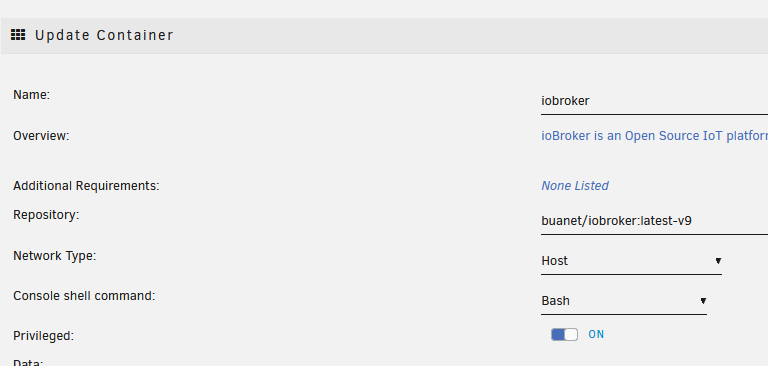
Und... schalte gleich privileged ein... damit backitup funktioniert
-
@markus_ Ich vernute du hast als Network Type Bridge gewählt, nimm Host
Und... schalte gleich privileged ein... damit backitup funktioniert
@FredF
Danke für deine Antwort.Es leider nichts geändert. Der Container beendet sich wieder mit "Exited (1)".
Folgendes hab ich noch regelmässig in den urnaid logs gefunden. SMART ist aber i.o.
Dec 31 15:02:46 UNRAID kernel: pcieport 0000:00:1b.0: AER: Corrected error received: 0000:01:00.0 Dec 31 15:02:46 UNRAID kernel: nvme 0000:01:00.0: PCIe Bus Error: severity=Corrected, type=Physical Layer, (Receiver ID) Dec 31 15:02:46 UNRAID kernel: nvme 0000:01:00.0: device [15b7:5006] error status/mask=00000001/0000e000 Dec 31 15:02:46 UNRAID kernel: nvme 0000:01:00.0: [ 0] RxErr -
Neuen Container verwenden? Die Dinger sind doch eh Wegwerfware.
@thomas-braun
neuer Container hat nichts gebracht -
Hallo zusammen
Ich bin seid einer Woche von PI4 auf Docker (Unraid) umgestiegen.
Am Anfang lief alles ganz gut. Aber jetzt startet der Container nicht mehr :...(
Der Container startet und beendet sich nach kurzer Zeit wieder. Die logs habe ich angehängt. Ich weiß jetzt aber ehrlich nicht was ich machen kann um die Sache wieder ans laufen zu bekommen.Könnt ihr mir bitte helfen?
DANKEtext error warn system array login find: ‘/opt/iobroker/node_modules/underscore’: Structure needs cleaning chown: cannot read directory '/opt/iobroker/node_modules/underscore': Structure needs cleaning find: ‘/opt/iobroker/node_modules/underscore’: Structure needs cleaning chown: cannot read directory '/opt/iobroker/node_modules/underscore': Structure needs cleaning ----- Version Information ----- ----- image: v9.0.1 ----- ----- build: 2023-12-24T23:44:38+00:00 ----- ----- node: v18.19.0 ----- ----- npm: 10.2.3 ----- ----- ----- ----- Environment Variables ----- ----- SETGID: 100 ----- ----- SETUID: 99 ----- -------------------------------------------------------------------------------- -------------------------------------------------------------------------------- ----- Step 1 of 5: Preparing container ----- -------------------------------------------------------------------------------- Updating Linux packages on first run... Done. Registering maintenance script as command... Done. -------------------------------------------------------------------------------- ----- Step 2 of 5: Detecting ioBroker installation ----- -------------------------------------------------------------------------------- Existing installation of ioBroker detected in "/opt/iobroker". -------------------------------------------------------------------------------- ----- Step 3 of 5: Checking ioBroker installation ----- -------------------------------------------------------------------------------- (Re)setting permissions (This might take a while! Please be patient!)... -------------------------------------------------------------------------------- ------------------------- 2023-12-31 14:34:52 ------------------------- -------------------------------------------------------------------------------- ----- ----- ----- ██╗ ██████╗ ██████╗ ██████╗ ██████╗ ██╗ ██╗ ███████╗ ██████╗ ----- ----- ██║ ██╔═══██╗ ██╔══██╗ ██╔══██╗ ██╔═══██╗ ██║ ██╔╝ ██╔════╝ ██╔══██╗ ----- ----- ██║ ██║ ██║ ██████╔╝ ██████╔╝ ██║ ██║ █████╔╝ █████╗ ██████╔╝ ----- ----- ██║ ██║ ██║ ██╔══██╗ ██╔══██╗ ██║ ██║ ██╔═██╗ ██╔══╝ ██╔══██╗ ----- ----- ██║ ╚██████╔╝ ██████╔╝ ██║ ██║ ╚██████╔╝ ██║ ██╗ ███████╗ ██║ ██║ ----- ----- ╚═╝ ╚═════╝ ╚═════╝ ╚═╝ ╚═╝ ╚═════╝ ╚═╝ ╚═╝ ╚══════╝ ╚═╝ ╚═╝ ----- ----- ----- ----- Welcome to your ioBroker Docker container! ----- ----- Startupscript is now running! ----- ----- Please be patient! ----- -------------------------------------------------------------------------------- -------------------------------------------------------------------------------- ----- System Information ----- ----- arch: x86_64 ----- ----- hostname: d86013112fb2 ----- ----- ----- ----- Version Information ----- ----- image: v9.0.1 ----- ----- build: 2023-12-24T23:44:38+00:00 ----- ----- node: v18.19.0 ----- ----- npm: 10.2.3 ----- ----- ----- ----- Environment Variables ----- ----- SETGID: 100 ----- ----- SETUID: 99 ----- -------------------------------------------------------------------------------- -------------------------------------------------------------------------------- ----- Step 1 of 5: Preparing container ----- -------------------------------------------------------------------------------- Updating Linux packages on first run... Done. Registering maintenance script as command... Done. -------------------------------------------------------------------------------- ----- Step 2 of 5: Detecting ioBroker installation ----- -------------------------------------------------------------------------------- Existing installation of ioBroker detected in "/opt/iobroker". -------------------------------------------------------------------------------- ----- Step 3 of 5: Checking ioBroker installation ----- -------------------------------------------------------------------------------- (Re)setting permissions (This might take a while! Please be patient!)... ** Press ANY KEY to close this window ** -
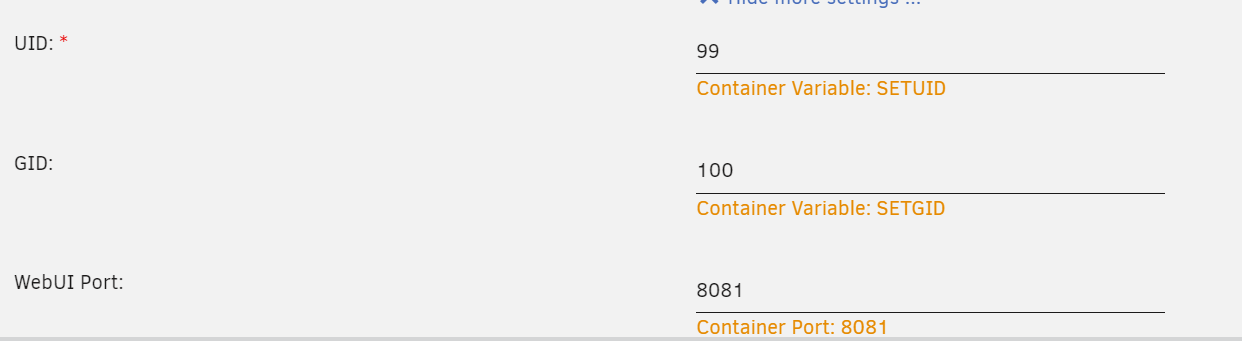
@markus_ sagte in DOCKER: Container startet nicht mehr (UNRAID):
SETGID: 100 -----
----- SETUID: 99Wo hast du diese Werte her ... das sind keine Standart Einstellungen .
Trage in der ENV
DEBUG : Trueein dann sieht man mehr
-
@glasfaser
Ich habe den Wert nicht geändert. Dieser war bei mir als Standard gesetzt
@markus_ sagte in DOCKER: Container startet nicht mehr (UNRAID):
Dieser war bei mir als Standard gesetzt
Kenn dein System nicht ...
Standart ist 1000 , aber wie gesagt ist Sytemabhängig , dashalb nur meine Frage dazu.https://docs.buanet.de/iobroker-docker-image/docs/#environment-variables-env
For some reasons it might be useful to specify the gid of the containers iobroker user to match an existing group on the docker host
dann ist ja alles gut



Support us
715
Online32.6k
Users82.2k
Topics1.3m
Posts