
NEWS




BackItUp Update hängt
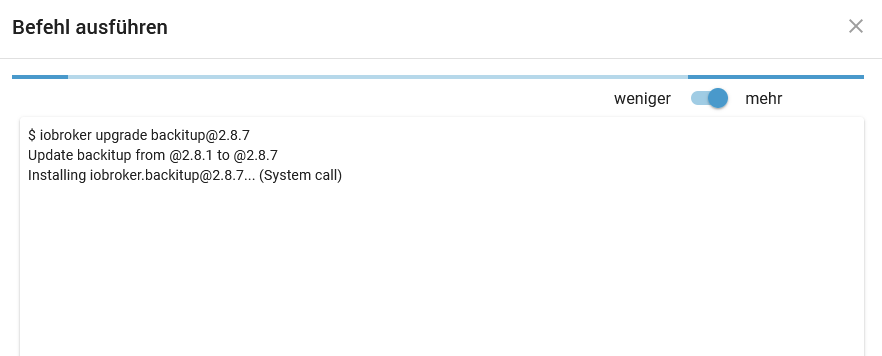
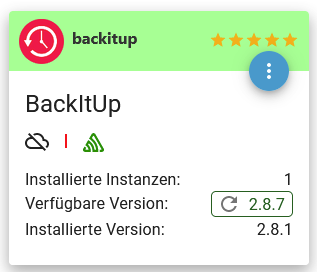
-
@myssv Das Problem ist, dass bei Dir auf die Anfrage von iobroker anscheinend vom DNS-Server eine IPv6-Adresse kommt, mit der Dein iobroker aber eben nix anfangen kann, da er nur IPv4 spricht (sprechen darf, da Du ihm ja IPv6 partout abdrehen willst). Warum da von Deinem DNS-Server (den ich nicht kenne) eine IPv6 kommt und keine IPv4 weiss ich nicht. Dein Netzwerk hast ja Du konfiguriert und nicht ich. Aber, wenn ein Netzwerk sauber konfiguriert ist, dann funktioniert das wunderbar. Und, wenn man es partout will, dann lässt sich auch ein Netzwerk mit IPv4-only sauber konfigurieren. Das fängt dann aber bereits beim Router an, dass man bei diesem IPv6 deaktiviert, so dass er sich erst gar keine IPv6-Präfixe holt. Der DHCP-Server darf dann auch keine IPv6-Präfixe oder Adressen von sich aus verteilen. Der DNS-Server darf auf Anfragen nur mit IPv4 antworten, bzw. wird das dann auch tun, da er auch keine IPv6 kennt.
Vermutlich hast Du IPv4 und IPv6 laufen und nutzt es nur nicht bewusst. Also im Router aktiviert, wenn der Router auch als DHCP-Server und DNS läuft (Fritzbox?) dann laufen auch diese zwei Komponenten mit IPv6. Dann drehst Du aber irgendeinem Gerät in Deinem Netzwerk IPv6 „mit Gewalt“ ab und erwartest, dass dennoch alles funktioniert? Da kann Dir keiner helfen, die Konfiguration Deines Netzwerks musst Du selber vornehmen, aber eben sauber. Das ist eben das, was @Thomas-Braun so treffend mit kaputtkonfiguriert meinte.Schalte entweder überall IPv6 aus oder schalte es überall ein und lebe mit den Vorteilen. Es gibt keine Nachteile durch IPv6. Und IPv4 und IPv6 laufen wunderbar parallel und stören sich in keinster Weise, sondern ergänzen sich bravurös, wenn alles sauber konfiguriert ist. Aber so halbe Sachen machen halt nur Probleme, wie man sieht.
Gruss, Jürgen
@wildbill sagte in BackItUp Update hängt:
Vermutlich hast Du IPv4 und IPv6 laufen und nutzt es nur nicht bewusst. Also im Router aktiviert, wenn der Router auch als DHCP-Server und DNS läuft (Fritzbox?) dann laufen auch diese zwei Komponenten mit IPv6.
Vermutlich?
Mit Sicherheit nicht !!
Sowohl in der FritzBox
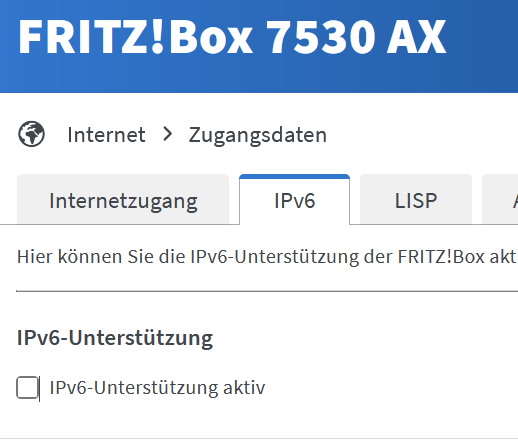
Als auch im Adguard

Der Adguard ist der einzige DNS-Server im Netz! (für IPv4)
Aber lassen wir es jetzt gut sein. Da bis auf den ioBroker alles (in meinen Augen) sauber funktioniert und ich keine sonstigen Probleme habe, werde ich mit meinen Workaround von oben leben und alles ist gut. Legt Eure Glaskugeln zurück und dgenießt den Abend!
-
@wildbill sagte in BackItUp Update hängt:
Vermutlich hast Du IPv4 und IPv6 laufen und nutzt es nur nicht bewusst. Also im Router aktiviert, wenn der Router auch als DHCP-Server und DNS läuft (Fritzbox?) dann laufen auch diese zwei Komponenten mit IPv6.
Vermutlich?
Mit Sicherheit nicht !!
Sowohl in der FritzBox
Als auch im Adguard
Der Adguard ist der einzige DNS-Server im Netz! (für IPv4)
Aber lassen wir es jetzt gut sein. Da bis auf den ioBroker alles (in meinen Augen) sauber funktioniert und ich keine sonstigen Probleme habe, werde ich mit meinen Workaround von oben leben und alles ist gut. Legt Eure Glaskugeln zurück und dgenießt den Abend!
@myssv Wie gesagt. In der heutigen zeit sollte man IPv6 einfach aktivieren und gut. Es gibt Seiten, die sind nur noch per IPv6 erreichbar, in Mobilfunknetzen hat man das standardmäßig und bekommt da schon keine IPv4 mehr. Es gibt einfach keinen (für mich nachvollziehbaren) Grund, es bewusst zu deaktivieren. Wenn Du es in der Fritzbox und im Adguard aktivierst hast Du vermutlich alle Deine Probleme bei iobroker sofort behoben.
Aber lebe, wie Du magst und genieße das Leben.
Schönen Abend noch.Gruss, Jürgen
-
So, ich habe nun mal IPv6 im Netz aktiviert und es scheint auch auf dem ioBroker zu laufen, wie ein Ping zeigt:
Volker@ioBroker:~$ ping rtl.de
PING rtl.de (194.36.43.29) 56(84) bytes of data.
64 bytes from ip-194-36-43-29.ips.cbc.de (194.36.43.29): icmp_seq=1 ttl=248 time=12.4 ms
64 bytes from ip-194-36-43-29.ips.cbc.de (194.36.43.29): icmp_seq=2 ttl=248 time=12.0 ms
64 bytes from ip-194-36-43-29.ips.cbc.de (194.36.43.29): icmp_seq=3 ttl=248 time=12.0 ms
64 bytes from ip-194-36-43-29.ips.cbc.de (194.36.43.29): icmp_seq=4 ttl=248 time=12.1 ms
64 bytes from ip-194-36-43-29.ips.cbc.de (194.36.43.29): icmp_seq=5 ttl=248 time=12.2 ms
^C
--- rtl.de ping statistics ---
5 packets transmitted, 5 received, 0% packet loss, time 4004ms
Ein Ping auf einen anderen Rechner im Netz läuft auch über IPv6:
Volker@ioBroker:~$ ping pc9999
PING pc9999(PC9999.fritz.box (2a11:fb80:1025:6500:507d:4f4e:218a:2c20)) 56 data bytes
64 bytes from PC9999.fritz.box (2a11:fb80:1025:6500:507d:4f4e:218a:2c20): icmp_seq=1 ttl=64 time=0.849 ms
64 bytes from PC9999.fritz.box (2a11:fb80:1025:6500:507d:4f4e:218a:2c20): icmp_seq=2 ttl=64 time=0.504 ms
64 bytes from PC9999.fritz.box (2a11:fb80:1025:6500:507d:4f4e:218a:2c20): icmp_seq=3 ttl=64 time=0.433 ms
^C
--- pc9999 ping statistics ---
Beim Updaten hängt er aber immer noch:
Volker@ioBroker:~$ iob upgrade ws@2.5.8 --debug Would you like to reinstall version 2.5.8 of ws now? [(y)es, (n)o]: y Update ws from @2.5.8 to @2.5.8 NPM version: 9.8.1 Installing iobroker.ws@2.5.8... (System call) -
@myssv sagte in BackItUp Update hängt:
Ein Ping auf einen anderen Rechner im Netz läuft auch über IPv6:
mach mal ein IPv6 Ping auf einen externen Server
ping -6 heise.deoder
ping -6 registry.npmjs.org -
@myssv sagte in BackItUp Update hängt:
Ein Ping auf einen anderen Rechner im Netz läuft auch über IPv6:
mach mal ein IPv6 Ping auf einen externen Server
ping -6 heise.deoder
ping -6 registry.npmjs.org -
@marc-berg ok da hängt er
Volker@ioBroker:~$ ping heise.de
PING heise.de(redirector.heise.de (2a02:2e0:3fe:1001:302::)) 56 data bytes
bei IPv4 würde ich sagen: Gateway nicht vorhanden, bei IPv6 habe ich keine Ahnung .....
@myssv sagte in BackItUp Update hängt:
bei IPv4 würde ich sagen: Gateway nicht vorhanden, bei IPv6 habe ich keine Ahnung
Es bleibt leider dabei, deine IPv6 Kommunikation läuft nicht.
Auf einem normalen Betriebssystem könnte man die IPv4 Kommunikation noch priorisieren, ob das bei einem LXC funktioniert, weiß ich nicht.
Ist aber alles Gefrickel und Doktern an Symptomen statt Ursachen.Edit: Irreführendes gelöscht.
-
@myssv sagte in BackItUp Update hängt:
bei IPv4 würde ich sagen: Gateway nicht vorhanden, bei IPv6 habe ich keine Ahnung
Es bleibt leider dabei, deine IPv6 Kommunikation läuft nicht.
Auf einem normalen Betriebssystem könnte man die IPv4 Kommunikation noch priorisieren, ob das bei einem LXC funktioniert, weiß ich nicht.
Ist aber alles Gefrickel und Doktern an Symptomen statt Ursachen.Edit: Irreführendes gelöscht.
@marc-berg sagte in BackItUp Update hängt:
Es bleibt leider dabei, deine IPv6 Kommunikation läuft nicht.
Da gab es bisher ja auch überhaupt keine Notwendigkeit für. Es war alles sauber auf IPv4 und es lief auch alles bisher.
-
OK, nachdem ich beim ProxMox ein IPv6 Gateway (FritzBox) eingetragen habe, läuft es
Volker@ioBroker:~$ ping heise.de PING heise.de(redirector.heise.de (2a02:2e0:3fe:1001:302::)) 56 data bytes 64 bytes from redirector.heise.de (2a02:2e0:3fe:1001:302::): icmp_seq=47 ttl=52 time=11.7 ms 64 bytes from redirector.heise.de (2a02:2e0:3fe:1001:302::): icmp_seq=48 ttl=52 time=10.5 ms 64 bytes from redirector.heise.de (2a02:2e0:3fe:1001:302::): icmp_seq=49 ttl=52 time=10.3 ms 64 bytes from redirector.heise.de (2a02:2e0:3fe:1001:302::): icmp_seq=50 ttl=52 time=10.4 ms 64 bytes from redirector.heise.de (2a02:2e0:3fe:1001:302::): icmp_seq=51 ttl=52 time=10.2 ms 64 bytes from redirector.heise.de (2a02:2e0:3fe:1001:302::): icmp_seq=52 ttl=52 time=10.0 ms 64 bytes from redirector.heise.de (2a02:2e0:3fe:1001:302::): icmp_seq=53 ttl=52 time=10.1 ms 64 bytes from redirector.heise.de (2a02:2e0:3fe:1001:302::): icmp_seq=54 ttl=52 time=10.1 ms 64 bytes from redirector.heise.de (2a02:2e0:3fe:1001:302::): icmp_seq=55 ttl=52 time=10.3 ms 64 bytes from redirector.heise.de (2a02:2e0:3fe:1001:302::): icmp_seq=56 ttl=52 time=10.3 ms 64 bytes from redirector.heise.de (2a02:2e0:3fe:1001:302::): icmp_seq=57 ttl=52 time=10.5 ms 64 bytes from redirector.heise.de (2a02:2e0:3fe:1001:302::): icmp_seq=58 ttl=52 time=10.4 ms 64 bytes from redirector.heise.de (2a02:2e0:3fe:1001:302::): icmp_seq=84 ttl=52 time=10.8 ms 64 bytes from redirector.heise.de (2a02:2e0:3fe:1001:302::): icmp_seq=85 ttl=52 time=9.99 ms 64 bytes from redirector.heise.de (2a02:2e0:3fe:1001:302::): icmp_seq=86 ttl=52 time=10.7 ms 64 bytes from redirector.heise.de (2a02:2e0:3fe:1001:302::): icmp_seq=87 ttl=52 time=10.3 ms 64 bytes from redirector.heise.de (2a02:2e0:3fe:1001:302::): icmp_seq=88 ttl=52 time=10.4 ms 64 bytes from redirector.heise.de (2a02:2e0:3fe:1001:302::): icmp_seq=89 ttl=52 time=10.4 ms 64 bytes from redirector.heise.de (2a02:2e0:3fe:1001:302::): icmp_seq=90 ttl=52 time=10.2 ms ^C --- heise.de ping statistics --- 90 packets transmitted, 19 received, 78.8889% packet loss, time 90712ms rtt min/avg/max/mdev = 9.988/10.403/11.703/0.369 ms Volker@ioBroker:~$ iob upgrade ws@2.5.8 --debug Would you like to reinstall version 2.5.8 of ws now? [(y)es, (n)o]: y Update ws from @2.5.8 to @2.5.8 NPM version: 9.8.1 Installing iobroker.ws@2.5.8... (System call) up to date in 1s 93 packages are looking for funding run `npm fund` for details Adapter "system.adapter.web.0" restarted. upload [11] ws.admin /opt/iobroker/node_modules/iobroker.ws/admin/i18n/de/translations.json i18n/de/translations.json application/json upload [10] ws.admin /opt/iobroker/node_modules/iobroker.ws/admin/i18n/en/translations.json i18n/en/translations.json application/json upload [9] ws.admin /opt/iobroker/node_modules/iobroker.ws/admin/i18n/es/translations.json i18n/es/translations.json application/json upload [8] ws.admin /opt/iobroker/node_modules/iobroker.ws/admin/i18n/fr/translations.json i18n/fr/translations.json application/json upload [7] ws.admin /opt/iobroker/node_modules/iobroker.ws/admin/i18n/it/translations.json i18n/it/translations.json application/json upload [6] ws.admin /opt/iobroker/node_modules/iobroker.ws/admin/i18n/nl/translations.json i18n/nl/translations.json application/json upload [5] ws.admin /opt/iobroker/node_modules/iobroker.ws/admin/i18n/pl/translations.json i18n/pl/translations.json application/json upload [4] ws.admin /opt/iobroker/node_modules/iobroker.ws/admin/i18n/pt/translations.json i18n/pt/translations.json application/json upload [3] ws.admin /opt/iobroker/node_modules/iobroker.ws/admin/i18n/ru/translations.json i18n/ru/translations.json application/json upload [2] ws.admin /opt/iobroker/node_modules/iobroker.ws/admin/i18n/zh-cn/translations.json i18n/zh-cn/translations.json application/json upload [1] ws.admin /opt/iobroker/node_modules/iobroker.ws/admin/jsonConfig.json jsonConfig.json application/json upload [0] ws.admin /opt/iobroker/node_modules/iobroker.ws/admin/ws.png ws.png image/png Volker@ioBroker:~$ -
@marc-berg sagte in BackItUp Update hängt:
Es bleibt leider dabei, deine IPv6 Kommunikation läuft nicht.
Da gab es bisher ja auch überhaupt keine Notwendigkeit für. Es war alles sauber auf IPv4 und es lief auch alles bisher.
@myssv sagte in BackItUp Update hängt:
und es lief auch alles bisher.
ja, bisher. Heute hast du das:
Name: registry.npmjs.org Addresses: 2606:4700::6810:1e22 2606:4700::6810:1822 2606:4700::6810:323 2606:4700::6810:23 2606:4700::6810:123 2606:4700::6810:1b22 2606:4700::6810:1f22 2606:4700::6810:1d22 2606:4700::6810:1c22 2606:4700::6810:1922 2606:4700::6810:1a22 2606:4700::6810:223 104.16.24.34 104.16.1.35 104.16.30.34 104.16.29.34 104.16.31.34 104.16.28.34 104.16.25.34 104.16.3.35 104.16.0.35 104.16.26.34 104.16.2.35 104.16.27.34Und in Zukunft noch mehr.
-
@marc-berg sagte in BackItUp Update hängt:
Es bleibt leider dabei, deine IPv6 Kommunikation läuft nicht.
Da gab es bisher ja auch überhaupt keine Notwendigkeit für. Es war alles sauber auf IPv4 und es lief auch alles bisher.
@myssv sagte in BackItUp Update hängt:
Es war alles sauber auf IPv4 und es lief auch alles bisher.
dann wurde bis dahin irgendwo in deinem System auf ipv4 gewandelt, und jetzt nicht mehr
-
OK, nachdem ich beim ProxMox ein IPv6 Gateway (FritzBox) eingetragen habe, läuft es
Volker@ioBroker:~$ ping heise.de PING heise.de(redirector.heise.de (2a02:2e0:3fe:1001:302::)) 56 data bytes 64 bytes from redirector.heise.de (2a02:2e0:3fe:1001:302::): icmp_seq=47 ttl=52 time=11.7 ms 64 bytes from redirector.heise.de (2a02:2e0:3fe:1001:302::): icmp_seq=48 ttl=52 time=10.5 ms 64 bytes from redirector.heise.de (2a02:2e0:3fe:1001:302::): icmp_seq=49 ttl=52 time=10.3 ms 64 bytes from redirector.heise.de (2a02:2e0:3fe:1001:302::): icmp_seq=50 ttl=52 time=10.4 ms 64 bytes from redirector.heise.de (2a02:2e0:3fe:1001:302::): icmp_seq=51 ttl=52 time=10.2 ms 64 bytes from redirector.heise.de (2a02:2e0:3fe:1001:302::): icmp_seq=52 ttl=52 time=10.0 ms 64 bytes from redirector.heise.de (2a02:2e0:3fe:1001:302::): icmp_seq=53 ttl=52 time=10.1 ms 64 bytes from redirector.heise.de (2a02:2e0:3fe:1001:302::): icmp_seq=54 ttl=52 time=10.1 ms 64 bytes from redirector.heise.de (2a02:2e0:3fe:1001:302::): icmp_seq=55 ttl=52 time=10.3 ms 64 bytes from redirector.heise.de (2a02:2e0:3fe:1001:302::): icmp_seq=56 ttl=52 time=10.3 ms 64 bytes from redirector.heise.de (2a02:2e0:3fe:1001:302::): icmp_seq=57 ttl=52 time=10.5 ms 64 bytes from redirector.heise.de (2a02:2e0:3fe:1001:302::): icmp_seq=58 ttl=52 time=10.4 ms 64 bytes from redirector.heise.de (2a02:2e0:3fe:1001:302::): icmp_seq=84 ttl=52 time=10.8 ms 64 bytes from redirector.heise.de (2a02:2e0:3fe:1001:302::): icmp_seq=85 ttl=52 time=9.99 ms 64 bytes from redirector.heise.de (2a02:2e0:3fe:1001:302::): icmp_seq=86 ttl=52 time=10.7 ms 64 bytes from redirector.heise.de (2a02:2e0:3fe:1001:302::): icmp_seq=87 ttl=52 time=10.3 ms 64 bytes from redirector.heise.de (2a02:2e0:3fe:1001:302::): icmp_seq=88 ttl=52 time=10.4 ms 64 bytes from redirector.heise.de (2a02:2e0:3fe:1001:302::): icmp_seq=89 ttl=52 time=10.4 ms 64 bytes from redirector.heise.de (2a02:2e0:3fe:1001:302::): icmp_seq=90 ttl=52 time=10.2 ms ^C --- heise.de ping statistics --- 90 packets transmitted, 19 received, 78.8889% packet loss, time 90712ms rtt min/avg/max/mdev = 9.988/10.403/11.703/0.369 ms Volker@ioBroker:~$ iob upgrade ws@2.5.8 --debug Would you like to reinstall version 2.5.8 of ws now? [(y)es, (n)o]: y Update ws from @2.5.8 to @2.5.8 NPM version: 9.8.1 Installing iobroker.ws@2.5.8... (System call) up to date in 1s 93 packages are looking for funding run `npm fund` for details Adapter "system.adapter.web.0" restarted. upload [11] ws.admin /opt/iobroker/node_modules/iobroker.ws/admin/i18n/de/translations.json i18n/de/translations.json application/json upload [10] ws.admin /opt/iobroker/node_modules/iobroker.ws/admin/i18n/en/translations.json i18n/en/translations.json application/json upload [9] ws.admin /opt/iobroker/node_modules/iobroker.ws/admin/i18n/es/translations.json i18n/es/translations.json application/json upload [8] ws.admin /opt/iobroker/node_modules/iobroker.ws/admin/i18n/fr/translations.json i18n/fr/translations.json application/json upload [7] ws.admin /opt/iobroker/node_modules/iobroker.ws/admin/i18n/it/translations.json i18n/it/translations.json application/json upload [6] ws.admin /opt/iobroker/node_modules/iobroker.ws/admin/i18n/nl/translations.json i18n/nl/translations.json application/json upload [5] ws.admin /opt/iobroker/node_modules/iobroker.ws/admin/i18n/pl/translations.json i18n/pl/translations.json application/json upload [4] ws.admin /opt/iobroker/node_modules/iobroker.ws/admin/i18n/pt/translations.json i18n/pt/translations.json application/json upload [3] ws.admin /opt/iobroker/node_modules/iobroker.ws/admin/i18n/ru/translations.json i18n/ru/translations.json application/json upload [2] ws.admin /opt/iobroker/node_modules/iobroker.ws/admin/i18n/zh-cn/translations.json i18n/zh-cn/translations.json application/json upload [1] ws.admin /opt/iobroker/node_modules/iobroker.ws/admin/jsonConfig.json jsonConfig.json application/json upload [0] ws.admin /opt/iobroker/node_modules/iobroker.ws/admin/ws.png ws.png image/png Volker@ioBroker:~$@myssv sagte in BackItUp Update hängt:
OK, nachdem ich beim ProxMox ein IPv6 Gateway (FritzBox) eingetragen habe, läuft es
Na dann, frohes updaten. :-)
-
@myssv sagte in BackItUp Update hängt:
Es war alles sauber auf IPv4 und es lief auch alles bisher.
dann wurde bis dahin irgendwo in deinem System auf ipv4 gewandelt, und jetzt nicht mehr
-
Ich habe aber schon das nächste Problem. Meine Tahoma Switch kann scheinbar kein IPv6
PS C:\Users\Volke> ping gateway-2001-5798-0160 -4 Ping wird ausgeführt für gateway-2001-5798-0160.fritz.box [192.168.115.25] mit 32 Bytes Daten: Antwort von 192.168.115.25: Bytes=32 Zeit=2ms TTL=64 Antwort von 192.168.115.25: Bytes=32 Zeit=5ms TTL=64 Antwort von 192.168.115.25: Bytes=32 Zeit=2ms TTL=64 Antwort von 192.168.115.25: Bytes=32 Zeit=4ms TTL=64 Ping-Statistik für 192.168.115.25: Pakete: Gesendet = 4, Empfangen = 4, Verloren = 0 (0% Verlust), Ca. Zeitangaben in Millisek.: Minimum = 2ms, Maximum = 5ms, Mittelwert = 3ms PS C:\Users\Volke> ping gateway-2001-5798-0160 -6 Ping wird ausgeführt für gateway-2001-5798-0160.fritz.box [2a11:fb80:1025:6500:20e:c6ff:fea9:13b3] mit 32 Bytes Daten: Zielhost nicht erreichbar. Zielhost nicht erreichbar. Zielhost nicht erreichbar. Ping-Statistik für 2a11:fb80:1025:6500:20e:c6ff:fea9:13b3: Pakete: Gesendet = 3, Empfangen = 0, Verloren = 3 (100% Verlust), -
Ich habe aber schon das nächste Problem. Meine Tahoma Switch kann scheinbar kein IPv6
PS C:\Users\Volke> ping gateway-2001-5798-0160 -4 Ping wird ausgeführt für gateway-2001-5798-0160.fritz.box [192.168.115.25] mit 32 Bytes Daten: Antwort von 192.168.115.25: Bytes=32 Zeit=2ms TTL=64 Antwort von 192.168.115.25: Bytes=32 Zeit=5ms TTL=64 Antwort von 192.168.115.25: Bytes=32 Zeit=2ms TTL=64 Antwort von 192.168.115.25: Bytes=32 Zeit=4ms TTL=64 Ping-Statistik für 192.168.115.25: Pakete: Gesendet = 4, Empfangen = 4, Verloren = 0 (0% Verlust), Ca. Zeitangaben in Millisek.: Minimum = 2ms, Maximum = 5ms, Mittelwert = 3ms PS C:\Users\Volke> ping gateway-2001-5798-0160 -6 Ping wird ausgeführt für gateway-2001-5798-0160.fritz.box [2a11:fb80:1025:6500:20e:c6ff:fea9:13b3] mit 32 Bytes Daten: Zielhost nicht erreichbar. Zielhost nicht erreichbar. Zielhost nicht erreichbar. Ping-Statistik für 2a11:fb80:1025:6500:20e:c6ff:fea9:13b3: Pakete: Gesendet = 3, Empfangen = 0, Verloren = 3 (100% Verlust),@myssv Ja und dann? In einem korrekt eingerichtetem Netzwerk mit IPv4 und IPv6 parallel läuft sie mit IPv4 ganz genau so weiter als wenn nie was gewesen wäre und ist auch genau wie vorher ganz normal per IPv4 erreichbar und erreicht auch alles, was sie bisher erreichen konnte weiterhin per IPv4. Wo siehst Du da jetzt das Problem?
Gruss, Jürgen
-
@myssv Ja und dann? In einem korrekt eingerichtetem Netzwerk mit IPv4 und IPv6 parallel läuft sie mit IPv4 ganz genau so weiter als wenn nie was gewesen wäre und ist auch genau wie vorher ganz normal per IPv4 erreichbar und erreicht auch alles, was sie bisher erreichen konnte weiterhin per IPv4. Wo siehst Du da jetzt das Problem?
Gruss, Jürgen
@wildbill sagte in BackItUp Update hängt:
Wo siehst Du da jetzt das Problem?
Mein Problem war, dass der ioBroker die Switch nicht mehr erreicht hat.
Ich habe jetzt mal, die Switch neu gestartet und nun ist auch wieder alles in Ordnung.
Wie bei einem "korrekt eingerichtetem Netzwerk" :wink:
-
@wildbill sagte in BackItUp Update hängt:
Wo siehst Du da jetzt das Problem?
Mein Problem war, dass der ioBroker die Switch nicht mehr erreicht hat.
Ich habe jetzt mal, die Switch neu gestartet und nun ist auch wieder alles in Ordnung.
Wie bei einem "korrekt eingerichtetem Netzwerk" :wink:
@myssv Es hat sich ja auch auf IPv4-Ebene nix geändert. Stell Dir das so ähnlich vor, als wenn Du jetzt zwei unabhängige Netzwerke hast, die einander nicht sehen und kennen. Geräte die sowohl IPv4 als auch IPv6 können, haben jetzt quasi zwei Netzwerkadressen. Die IPv4 macht alles wie bisher, sie kann ale IPv4-Geräte weiterhin direkt erreichen, nichts verändert. Nur, dass das Gerät eben nun auch eine IPv6-Adresse hat, die von den großen Betriebssystemen (Mac, Linux, Windows) auch bevorzugt verwendet wird. Versuchst Du, eine Website zu öffnen, wird das über IPv6 versucht. Geht das nicht erfolgt ein Fallback auf IPv4. Versuchst Du direkt in Deinem Netzwerk ein IPv4-Gerät zu erreichen, so geht das direkt über die IPv4-Adresse wie bisher auch. Du musst Dich da um nix kümmern.
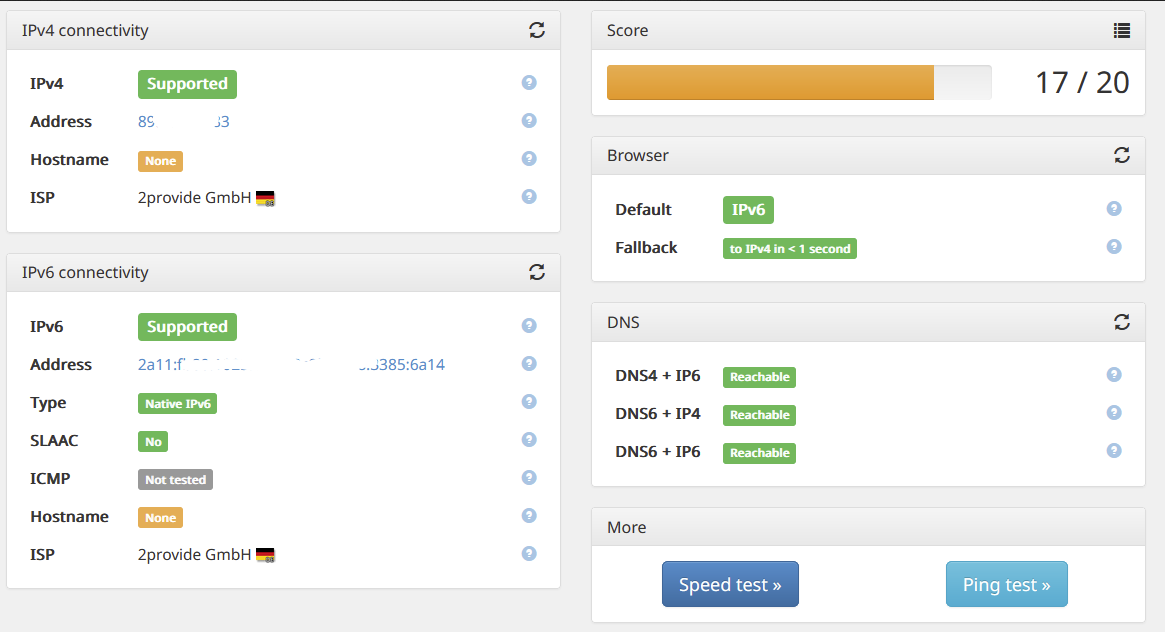
Du kannst ja am PC mal einen IPv6-Test machen. Je nach Konfiguration (SLAAC, private usw.) solltest Du da 17-20 Punkte erreichen, dann passt alles. Ansonsten siehst Du auch gleich, wo es klemmt.
Und, wie gesagt, für Dein IPv4-Netzwerk hat sich nichts geändert!Gruss, Jürgen
EDIT: Ein Hinweis noch: So, wie bisher auch, solltest Du Deine öffentlich IPv6 nicht öffentlich hier reinschreiben oder so. Und bei IPv6 erhält eben nun jedes Gerät eine eigene IPv6-Adresse. Alles was mit fe… oder fd… anfängt ist intern, das ist OK, aber alles andere enthält dann den öffentlichen Präfix, den solltest Du aus-x-en, wenn Du da was zeigen willst!
-
@myssv Es hat sich ja auch auf IPv4-Ebene nix geändert. Stell Dir das so ähnlich vor, als wenn Du jetzt zwei unabhängige Netzwerke hast, die einander nicht sehen und kennen. Geräte die sowohl IPv4 als auch IPv6 können, haben jetzt quasi zwei Netzwerkadressen. Die IPv4 macht alles wie bisher, sie kann ale IPv4-Geräte weiterhin direkt erreichen, nichts verändert. Nur, dass das Gerät eben nun auch eine IPv6-Adresse hat, die von den großen Betriebssystemen (Mac, Linux, Windows) auch bevorzugt verwendet wird. Versuchst Du, eine Website zu öffnen, wird das über IPv6 versucht. Geht das nicht erfolgt ein Fallback auf IPv4. Versuchst Du direkt in Deinem Netzwerk ein IPv4-Gerät zu erreichen, so geht das direkt über die IPv4-Adresse wie bisher auch. Du musst Dich da um nix kümmern.
Du kannst ja am PC mal einen IPv6-Test machen. Je nach Konfiguration (SLAAC, private usw.) solltest Du da 17-20 Punkte erreichen, dann passt alles. Ansonsten siehst Du auch gleich, wo es klemmt.
Und, wie gesagt, für Dein IPv4-Netzwerk hat sich nichts geändert!Gruss, Jürgen
EDIT: Ein Hinweis noch: So, wie bisher auch, solltest Du Deine öffentlich IPv6 nicht öffentlich hier reinschreiben oder so. Und bei IPv6 erhält eben nun jedes Gerät eine eigene IPv6-Adresse. Alles was mit fe… oder fd… anfängt ist intern, das ist OK, aber alles andere enthält dann den öffentlichen Präfix, den solltest Du aus-x-en, wenn Du da was zeigen willst!
-
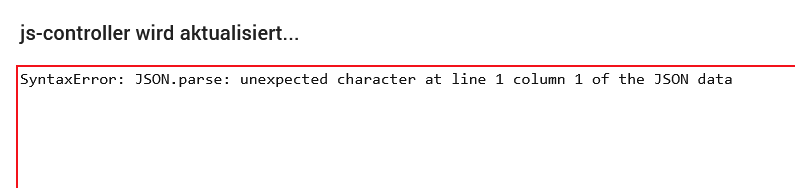
@myssv Ja, scheint zu passen. Das mit dem Hostname ist mir zwar unbekannt, warum der nicht aufgelöst wird, aber das sollte keinje Rolle spielen. Glückwunsch und willkommen in der Gegenwart. :blush:
Mein EDIT oben hast Du (fast beachtet). Lösch auch die öffentliche IPv4 aus dem Bild!Gruss, Jürgen
-
@myssv Ja, scheint zu passen. Das mit dem Hostname ist mir zwar unbekannt, warum der nicht aufgelöst wird, aber das sollte keinje Rolle spielen. Glückwunsch und willkommen in der Gegenwart. :blush:
Mein EDIT oben hast Du (fast beachtet). Lösch auch die öffentliche IPv4 aus dem Bild!Gruss, Jürgen




568
Online32.6k
Users82.3k
Topics1.3m
Posts