



Skip to content
  • Home
  • Recent
  • Tags
  • 0 Unread 0
  • Categories
  • Unreplied
  • Popular
  • GitHub
  • Docu
  • Hilfe
Skins
  • Light
  • Brite
  • Cerulean
  • Cosmo
  • Flatly
  • Journal
  • Litera
  • Lumen
  • Lux
  • Materia
  • Minty
  • Morph
  • Pulse
  • Sandstone
  • Simplex
  • Sketchy
  • Spacelab
  • United
  • Yeti
  • Zephyr
  • Dark
  • Cyborg
  • Darkly
  • Quartz
  • Slate
  • Solar
  • Superhero
  • Vapor

  • Default (No Skin)
  • No Skin
Collapse
ioBroker Logo

Community Forum

donate donate
  1. ioBroker Community Home
  2. Deutsch
  3. Error/Bug
  4. js controller update nicht möglich
NEWS

  • Neuer Blogbeitrag: Monatsrückblick - Dezember 2025 🎄
    BluefoxB
    Bluefox
    10
    1
    173

  • Weihnachtsangebot 2025! 🎄
    BluefoxB
    Bluefox
    24
    1
    1.4k

  • UPDATE 31.10.: Amazon Alexa - ioBroker Skill läuft aus ?
    apollon77A
    apollon77
    48
    3
    9.4k

js controller update nicht möglich

Scheduled Pinned Locked Moved Error/Bug
js controller
48 Posts 3 Posters 1.9k Views 3 Watching
  • Oldest to Newest
  • Newest to Oldest
  • Most Votes
Reply
  • Reply as topic
Log in to reply
This topic has been deleted. Only users with topic management privileges can see it.
  • Thomas BraunT Thomas Braun

    @spaddel sagte in js controller update nicht möglich:

    Ich versuche es aber später noch mal.

    Dann ist die Datei zu groß -> Zu viele Fehler.

    Lad eine txt-Datei mit dem Inhalt hoch.

    S Offline
    S Offline
    spaddel
    wrote on last edited by
    #16

    @thomas-braun
    Mit Chrome bekomme ich ständig Fehlermeldung. Mit Edge funktioniert es aber. Hier der Log
    Log.txt

    Gruß
    Christian

    Thomas BraunT 2 Replies Last reply
    0
    • S spaddel

      @thomas-braun
      Mit Chrome bekomme ich ständig Fehlermeldung. Mit Edge funktioniert es aber. Hier der Log
      Log.txt

      Gruß
      Christian

      Thomas BraunT Online
      Thomas BraunT Online
      Thomas Braun
      Most Active
      wrote on last edited by
      #17

      @spaddel

      Das ist nicht vollständig.

      Linux-Werkzeugkasten:
      https://forum.iobroker.net/topic/42952/der-kleine-iobroker-linux-werkzeugkasten
      NodeJS Fixer Skript:
      https://forum.iobroker.net/topic/68035/iob-node-fix-skript
      iob_diag: curl -sLf -o diag.sh https://iobroker.net/diag.sh && bash diag.sh

      S 1 Reply Last reply
      0
      • S spaddel

        @thomas-braun
        Mit Chrome bekomme ich ständig Fehlermeldung. Mit Edge funktioniert es aber. Hier der Log
        Log.txt

        Gruß
        Christian

        Thomas BraunT Online
        Thomas BraunT Online
        Thomas Braun
        Most Active
        wrote on last edited by
        #18

        @spaddel

        Die beiden sind aber schon mal krumm:

        npm ERR! invalid: iobroker.samsung_tizen@0.0.12 /opt/iobroker/node_modules/iobroker.samsung_tizen
        npm ERR! invalid: iobroker.samsung2016@0.0.2 /opt/iobroker/node_modules/iobroker.samsung2016
        

        Schmeiß die raus:

        iob del samsung_tizen
        iob del samsung2016
        iob update
        iob upgrade
        

        Linux-Werkzeugkasten:
        https://forum.iobroker.net/topic/42952/der-kleine-iobroker-linux-werkzeugkasten
        NodeJS Fixer Skript:
        https://forum.iobroker.net/topic/68035/iob-node-fix-skript
        iob_diag: curl -sLf -o diag.sh https://iobroker.net/diag.sh && bash diag.sh

        mcm1957M 1 Reply Last reply
        0
        • Thomas BraunT Thomas Braun

          @spaddel

          Das ist nicht vollständig.

          S Offline
          S Offline
          spaddel
          wrote on last edited by
          #19

          @thomas-braun
          Ich habe den kompletten Inhalt aus Putty kopiert. Mehr war da nicht. Ich starte es noch mal und poste es.
          Gruß

          Thomas BraunT 1 Reply Last reply
          0
          • S spaddel

            @thomas-braun
            Ich habe den kompletten Inhalt aus Putty kopiert. Mehr war da nicht. Ich starte es noch mal und poste es.
            Gruß

            Thomas BraunT Online
            Thomas BraunT Online
            Thomas Braun
            Most Active
            wrote on last edited by
            #20

            @spaddel

            Das log liegt auch in /home/iobroker/iob_diag.log herum.

            Linux-Werkzeugkasten:
            https://forum.iobroker.net/topic/42952/der-kleine-iobroker-linux-werkzeugkasten
            NodeJS Fixer Skript:
            https://forum.iobroker.net/topic/68035/iob-node-fix-skript
            iob_diag: curl -sLf -o diag.sh https://iobroker.net/diag.sh && bash diag.sh

            S 1 Reply Last reply
            0
            • Thomas BraunT Thomas Braun

              @spaddel

              Die beiden sind aber schon mal krumm:

              npm ERR! invalid: iobroker.samsung_tizen@0.0.12 /opt/iobroker/node_modules/iobroker.samsung_tizen
              npm ERR! invalid: iobroker.samsung2016@0.0.2 /opt/iobroker/node_modules/iobroker.samsung2016
              

              Schmeiß die raus:

              iob del samsung_tizen
              iob del samsung2016
              iob update
              iob upgrade
              
              mcm1957M Offline
              mcm1957M Offline
              mcm1957
              wrote on last edited by
              #21

              samsung_tizen ist als 1.0.0 im repo verfügbar. Diese Release ist für js-controlelr 5 auch erforderlich.

              Entwicklung u Betreuung: envertech-pv, hoymiles-ms, ns-client, pid, snmp Adapter;
              Support Repositoryverwaltung.

              Wer Danke sagen will, kann nen Kaffee spendieren: https://paypal.me/mcm1957atiobroker

              LESEN - gute Forenbeitrage

              Thomas BraunT 1 Reply Last reply
              0
              • mcm1957M mcm1957

                samsung_tizen ist als 1.0.0 im repo verfügbar. Diese Release ist für js-controlelr 5 auch erforderlich.

                Thomas BraunT Online
                Thomas BraunT Online
                Thomas Braun
                Most Active
                wrote on last edited by
                #22

                @mcm57 sagte in js controller update nicht möglich:

                samsung_tizen ist als 1.0.0 im repo verfügbar. Diese Release ist für js-controlelr 5 auch erforderlich.

                Ja, das ist aber bei weitem nicht der einzige Fehler im Tree.

                Linux-Werkzeugkasten:
                https://forum.iobroker.net/topic/42952/der-kleine-iobroker-linux-werkzeugkasten
                NodeJS Fixer Skript:
                https://forum.iobroker.net/topic/68035/iob-node-fix-skript
                iob_diag: curl -sLf -o diag.sh https://iobroker.net/diag.sh && bash diag.sh

                mcm1957M 1 Reply Last reply
                0
                • Thomas BraunT Thomas Braun

                  @mcm57 sagte in js controller update nicht möglich:

                  samsung_tizen ist als 1.0.0 im repo verfügbar. Diese Release ist für js-controlelr 5 auch erforderlich.

                  Ja, das ist aber bei weitem nicht der einzige Fehler im Tree.

                  mcm1957M Offline
                  mcm1957M Offline
                  mcm1957
                  wrote on last edited by
                  #23

                  @thomas-braun
                  Nö - wollt nur die Info gleich mal deponieren.
                  Was da alles im npm tree nicht passt - keine Ahnung. Da kannst du sicher besser helfen.

                  Entwicklung u Betreuung: envertech-pv, hoymiles-ms, ns-client, pid, snmp Adapter;
                  Support Repositoryverwaltung.

                  Wer Danke sagen will, kann nen Kaffee spendieren: https://paypal.me/mcm1957atiobroker

                  LESEN - gute Forenbeitrage

                  Thomas BraunT 1 Reply Last reply
                  0
                  • mcm1957M mcm1957

                    @thomas-braun
                    Nö - wollt nur die Info gleich mal deponieren.
                    Was da alles im npm tree nicht passt - keine Ahnung. Da kannst du sicher besser helfen.

                    Thomas BraunT Online
                    Thomas BraunT Online
                    Thomas Braun
                    Most Active
                    wrote on last edited by
                    #24

                    @mcm57 sagte in js controller update nicht möglich:

                    Da kannst du sicher besser helfen.

                    Da ist so viel... Muss mal schauen was da noch geht.

                    Linux-Werkzeugkasten:
                    https://forum.iobroker.net/topic/42952/der-kleine-iobroker-linux-werkzeugkasten
                    NodeJS Fixer Skript:
                    https://forum.iobroker.net/topic/68035/iob-node-fix-skript
                    iob_diag: curl -sLf -o diag.sh https://iobroker.net/diag.sh && bash diag.sh

                    1 Reply Last reply
                    0
                    • Thomas BraunT Thomas Braun

                      @spaddel

                      Das log liegt auch in /home/iobroker/iob_diag.log herum.

                      S Offline
                      S Offline
                      spaddel
                      wrote on last edited by
                      #25

                      @thomas-braun
                      Zweiter Versuch
                      iob_diag.log

                      Thomas BraunT 1 Reply Last reply
                      0
                      • S spaddel

                        @thomas-braun
                        Zweiter Versuch
                        iob_diag.log

                        Thomas BraunT Online
                        Thomas BraunT Online
                        Thomas Braun
                        Most Active
                        wrote on last edited by
                        #26

                        @spaddel

                        Höchste Zeit das Ding komplett neuauzusetzen.
                        Als Bookworm-64Bit-Version 'Lite'.

                        Versuch

                        find "/opt/iobroker/" -iname "*package-lock*" -exec rm -rf "{}" \;
                        

                        dann

                        iob update 
                        iob upgrade
                        

                        Linux-Werkzeugkasten:
                        https://forum.iobroker.net/topic/42952/der-kleine-iobroker-linux-werkzeugkasten
                        NodeJS Fixer Skript:
                        https://forum.iobroker.net/topic/68035/iob-node-fix-skript
                        iob_diag: curl -sLf -o diag.sh https://iobroker.net/diag.sh && bash diag.sh

                        S 1 Reply Last reply
                        0
                        • Thomas BraunT Thomas Braun

                          @spaddel

                          Höchste Zeit das Ding komplett neuauzusetzen.
                          Als Bookworm-64Bit-Version 'Lite'.

                          Versuch

                          find "/opt/iobroker/" -iname "*package-lock*" -exec rm -rf "{}" \;
                          

                          dann

                          iob update 
                          iob upgrade
                          
                          S Offline
                          S Offline
                          spaddel
                          wrote on last edited by
                          #27

                          @thomas-braun
                          Wenn ich die Kommentare lese scheint einiges im Argen zu sein. Wie kann ich das System sauber neu aufsetzen. Wenn ich mich richtig erinnere, habe ich damals eine Anleitung von verdrahtet.info auf youtube verwendet.

                          Gruß
                          CHristian

                          Thomas BraunT 1 Reply Last reply
                          0
                          • S spaddel

                            @thomas-braun
                            Wenn ich die Kommentare lese scheint einiges im Argen zu sein. Wie kann ich das System sauber neu aufsetzen. Wenn ich mich richtig erinnere, habe ich damals eine Anleitung von verdrahtet.info auf youtube verwendet.

                            Gruß
                            CHristian

                            Thomas BraunT Online
                            Thomas BraunT Online
                            Thomas Braun
                            Most Active
                            wrote on last edited by
                            #28

                            @spaddel

                            https://forum.iobroker.net/topic/51869/installation-auf-raspi-einfacher-geht-s-nicht

                            Zu allem was da sonst noch läuft musst du dir aber selber Gedanken machen.

                            Linux-Werkzeugkasten:
                            https://forum.iobroker.net/topic/42952/der-kleine-iobroker-linux-werkzeugkasten
                            NodeJS Fixer Skript:
                            https://forum.iobroker.net/topic/68035/iob-node-fix-skript
                            iob_diag: curl -sLf -o diag.sh https://iobroker.net/diag.sh && bash diag.sh

                            S 1 Reply Last reply
                            0
                            • Thomas BraunT Thomas Braun

                              @spaddel

                              https://forum.iobroker.net/topic/51869/installation-auf-raspi-einfacher-geht-s-nicht

                              Zu allem was da sonst noch läuft musst du dir aber selber Gedanken machen.

                              S Offline
                              S Offline
                              spaddel
                              wrote on last edited by
                              #29

                              @thomas-braun
                              Danke für den Link.

                              Nach dem o.g. Befehlen sind die Adapter wieder auf Stand aber der js-controller steht noch auf 4.0.24. Kann ich jetzt den vorgeschlagenen Weg gehen?
                              cd /opt/iobroker/
                              sudo iobroker stop
                              sudo iobroker update
                              sudo iobroker upgrade self
                              sudo iobroker start

                              Gruß
                              Christian

                              Thomas BraunT 1 Reply Last reply
                              0
                              • S spaddel

                                @thomas-braun
                                Danke für den Link.

                                Nach dem o.g. Befehlen sind die Adapter wieder auf Stand aber der js-controller steht noch auf 4.0.24. Kann ich jetzt den vorgeschlagenen Weg gehen?
                                cd /opt/iobroker/
                                sudo iobroker stop
                                sudo iobroker update
                                sudo iobroker upgrade self
                                sudo iobroker start

                                Gruß
                                Christian

                                Thomas BraunT Online
                                Thomas BraunT Online
                                Thomas Braun
                                Most Active
                                wrote on last edited by
                                #30

                                @spaddel

                                Zeig

                                iob update
                                

                                Linux-Werkzeugkasten:
                                https://forum.iobroker.net/topic/42952/der-kleine-iobroker-linux-werkzeugkasten
                                NodeJS Fixer Skript:
                                https://forum.iobroker.net/topic/68035/iob-node-fix-skript
                                iob_diag: curl -sLf -o diag.sh https://iobroker.net/diag.sh && bash diag.sh

                                S 1 Reply Last reply
                                0
                                • Thomas BraunT Thomas Braun

                                  @spaddel

                                  Zeig

                                  iob update
                                  
                                  S Offline
                                  S Offline
                                  spaddel
                                  wrote on last edited by
                                  #31

                                  @thomas-braun

                                  pi@raspberrypi:/ $ iob update
                                  Used repository: stable
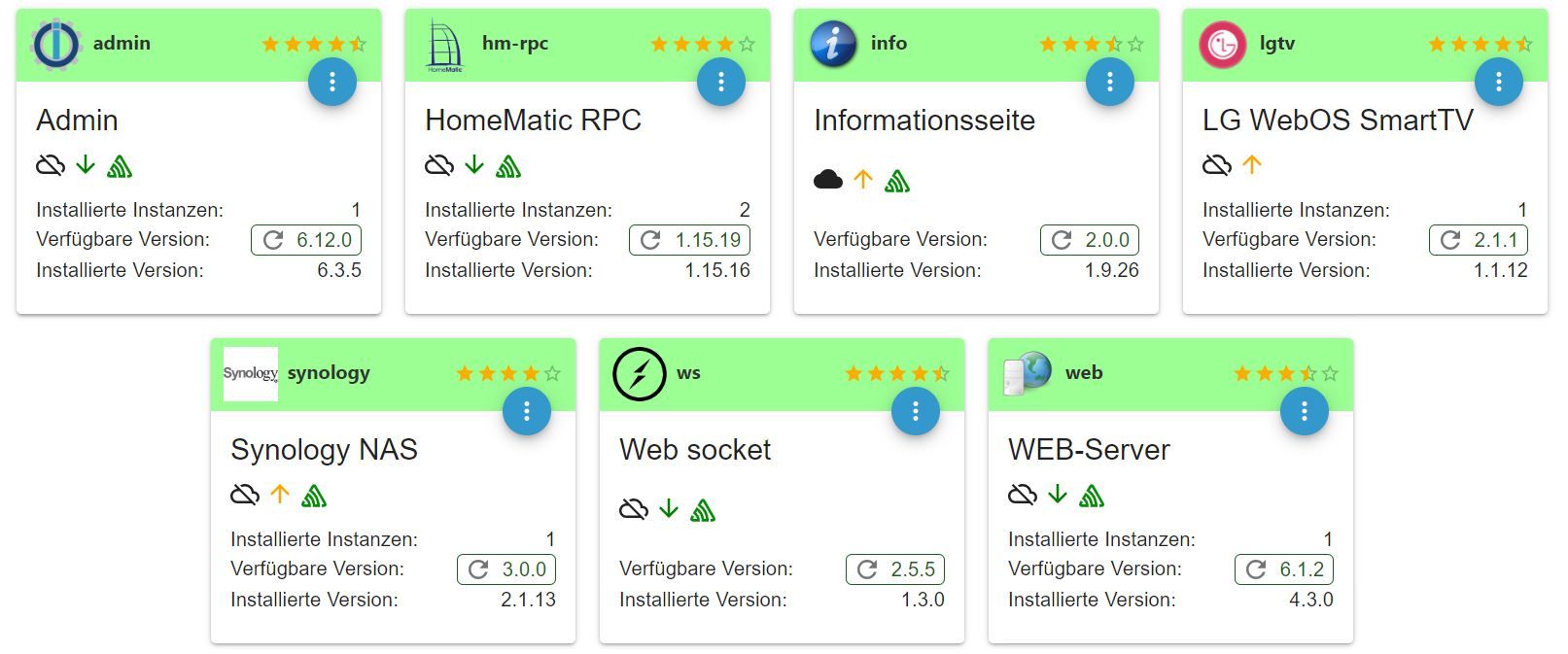
                                  Adapter    "admin"        : 6.12.0   , installed 6.12.0
                                  Adapter    "bmw"          : 2.5.7    , installed 2.5.7
                                  Adapter    "discovery"    : 3.1.0    , installed 3.1.0
                                  Adapter    "fritzbox"     : 0.5.0    , installed 0.5.0
                                  Adapter    "hm-rega"      : 3.0.47   , installed 3.0.47
                                  Adapter    "hm-rpc"       : 1.15.19  , installed 1.15.19
                                  Adapter    "info"         : 2.0.0    , installed 2.0.0
                                  Adapter    "javascript"   : 7.1.4    , installed 7.1.4
                                  Controller "js-controller": 5.0.12   , installed 4.0.24 [Updatable]
                                  Adapter    "lgtv"         : 2.1.1    , installed 2.1.1
                                  Adapter    "onkyo"        : 2.1.2    , installed 2.1.2
                                  Adapter    "parser"       : 1.3.2    , installed 1.3.2
                                  Adapter    "samsung"      : 0.5.11   , installed 0.5.11
                                  Adapter    "simple-api"   : 2.7.2    , installed 2.7.2
                                  Adapter    "socketio"     : 6.5.5    , installed 6.5.5
                                  Adapter    "sonos"        : 2.3.1    , installed 2.3.1
                                  Adapter    "synology"     : 3.0.0    , installed 3.0.0
                                  Adapter    "vis"          : 1.4.16   , installed 1.4.16
                                  Adapter    "vis-bars"     : 0.1.4    , installed 0.1.4
                                  Adapter    "vis-fancyswitch": 1.1.0  , installed 1.1.0
                                  Adapter    "vis-hqwidgets": 1.4.0    , installed 1.4.0
                                  Adapter    "vis-jqui-mfd" : 1.0.12   , installed 1.0.12
                                  Adapter    "vis-keyboard" : 0.0.2    , installed 0.0.2
                                  Adapter    "vis-metro"    : 1.2.0    , installed 1.2.0
                                  Adapter    "vis-players"  : 0.1.6    , installed 0.1.6
                                  Adapter    "web"          : 6.1.2    , installed 6.1.2
                                  Adapter    "ws"           : 2.5.5    , installed 2.5.5
                                  pi@raspberrypi:/ $
                                  
                                  
                                  Thomas BraunT 2 Replies Last reply
                                  0
                                  • S spaddel

                                    @thomas-braun

                                    pi@raspberrypi:/ $ iob update
                                    Used repository: stable
                                    Adapter    "admin"        : 6.12.0   , installed 6.12.0
                                    Adapter    "bmw"          : 2.5.7    , installed 2.5.7
                                    Adapter    "discovery"    : 3.1.0    , installed 3.1.0
                                    Adapter    "fritzbox"     : 0.5.0    , installed 0.5.0
                                    Adapter    "hm-rega"      : 3.0.47   , installed 3.0.47
                                    Adapter    "hm-rpc"       : 1.15.19  , installed 1.15.19
                                    Adapter    "info"         : 2.0.0    , installed 2.0.0
                                    Adapter    "javascript"   : 7.1.4    , installed 7.1.4
                                    Controller "js-controller": 5.0.12   , installed 4.0.24 [Updatable]
                                    Adapter    "lgtv"         : 2.1.1    , installed 2.1.1
                                    Adapter    "onkyo"        : 2.1.2    , installed 2.1.2
                                    Adapter    "parser"       : 1.3.2    , installed 1.3.2
                                    Adapter    "samsung"      : 0.5.11   , installed 0.5.11
                                    Adapter    "simple-api"   : 2.7.2    , installed 2.7.2
                                    Adapter    "socketio"     : 6.5.5    , installed 6.5.5
                                    Adapter    "sonos"        : 2.3.1    , installed 2.3.1
                                    Adapter    "synology"     : 3.0.0    , installed 3.0.0
                                    Adapter    "vis"          : 1.4.16   , installed 1.4.16
                                    Adapter    "vis-bars"     : 0.1.4    , installed 0.1.4
                                    Adapter    "vis-fancyswitch": 1.1.0  , installed 1.1.0
                                    Adapter    "vis-hqwidgets": 1.4.0    , installed 1.4.0
                                    Adapter    "vis-jqui-mfd" : 1.0.12   , installed 1.0.12
                                    Adapter    "vis-keyboard" : 0.0.2    , installed 0.0.2
                                    Adapter    "vis-metro"    : 1.2.0    , installed 1.2.0
                                    Adapter    "vis-players"  : 0.1.6    , installed 0.1.6
                                    Adapter    "web"          : 6.1.2    , installed 6.1.2
                                    Adapter    "ws"           : 2.5.5    , installed 2.5.5
                                    pi@raspberrypi:/ $
                                    
                                    
                                    Thomas BraunT Online
                                    Thomas BraunT Online
                                    Thomas Braun
                                    Most Active
                                    wrote on last edited by
                                    #32

                                    @spaddel

                                    OHNE sudo!!!

                                    iob stop
                                    iob fix
                                    iob upgrade self
                                    iob start
                                    

                                    Linux-Werkzeugkasten:
                                    https://forum.iobroker.net/topic/42952/der-kleine-iobroker-linux-werkzeugkasten
                                    NodeJS Fixer Skript:
                                    https://forum.iobroker.net/topic/68035/iob-node-fix-skript
                                    iob_diag: curl -sLf -o diag.sh https://iobroker.net/diag.sh && bash diag.sh

                                    S 1 Reply Last reply
                                    0
                                    • S spaddel

                                      @thomas-braun

                                      pi@raspberrypi:/ $ iob update
                                      Used repository: stable
                                      Adapter    "admin"        : 6.12.0   , installed 6.12.0
                                      Adapter    "bmw"          : 2.5.7    , installed 2.5.7
                                      Adapter    "discovery"    : 3.1.0    , installed 3.1.0
                                      Adapter    "fritzbox"     : 0.5.0    , installed 0.5.0
                                      Adapter    "hm-rega"      : 3.0.47   , installed 3.0.47
                                      Adapter    "hm-rpc"       : 1.15.19  , installed 1.15.19
                                      Adapter    "info"         : 2.0.0    , installed 2.0.0
                                      Adapter    "javascript"   : 7.1.4    , installed 7.1.4
                                      Controller "js-controller": 5.0.12   , installed 4.0.24 [Updatable]
                                      Adapter    "lgtv"         : 2.1.1    , installed 2.1.1
                                      Adapter    "onkyo"        : 2.1.2    , installed 2.1.2
                                      Adapter    "parser"       : 1.3.2    , installed 1.3.2
                                      Adapter    "samsung"      : 0.5.11   , installed 0.5.11
                                      Adapter    "simple-api"   : 2.7.2    , installed 2.7.2
                                      Adapter    "socketio"     : 6.5.5    , installed 6.5.5
                                      Adapter    "sonos"        : 2.3.1    , installed 2.3.1
                                      Adapter    "synology"     : 3.0.0    , installed 3.0.0
                                      Adapter    "vis"          : 1.4.16   , installed 1.4.16
                                      Adapter    "vis-bars"     : 0.1.4    , installed 0.1.4
                                      Adapter    "vis-fancyswitch": 1.1.0  , installed 1.1.0
                                      Adapter    "vis-hqwidgets": 1.4.0    , installed 1.4.0
                                      Adapter    "vis-jqui-mfd" : 1.0.12   , installed 1.0.12
                                      Adapter    "vis-keyboard" : 0.0.2    , installed 0.0.2
                                      Adapter    "vis-metro"    : 1.2.0    , installed 1.2.0
                                      Adapter    "vis-players"  : 0.1.6    , installed 0.1.6
                                      Adapter    "web"          : 6.1.2    , installed 6.1.2
                                      Adapter    "ws"           : 2.5.5    , installed 2.5.5
                                      pi@raspberrypi:/ $
                                      
                                      
                                      Thomas BraunT Online
                                      Thomas BraunT Online
                                      Thomas Braun
                                      Most Active
                                      wrote on last edited by
                                      #33

                                      @spaddel

                                      Und warum hat der arme pi kein Zuhause?

                                      cd
                                      

                                      Linux-Werkzeugkasten:
                                      https://forum.iobroker.net/topic/42952/der-kleine-iobroker-linux-werkzeugkasten
                                      NodeJS Fixer Skript:
                                      https://forum.iobroker.net/topic/68035/iob-node-fix-skript
                                      iob_diag: curl -sLf -o diag.sh https://iobroker.net/diag.sh && bash diag.sh

                                      1 Reply Last reply
                                      0
                                      • Thomas BraunT Thomas Braun

                                        @spaddel

                                        OHNE sudo!!!

                                        iob stop
                                        iob fix
                                        iob upgrade self
                                        iob start
                                        
                                        S Offline
                                        S Offline
                                        spaddel
                                        wrote on last edited by
                                        #34

                                        @thomas-braun
                                        Hi Thomas,

                                        vielen Dank für deine Hilfe. Jetzt ist zumindest alles wieder auf Stand. Allerdings habe ich noch ein paar Fragen, um zu vermeiden, dass ich beim nächsten Mal wieder so ein Chaos anstelle. Wenn ich pivccu und IObroker auf einem System laufen habe, wie kann ich dann am besten ein Update des Systems machen. Wie oben geschrieben?

                                        iob stop
                                        iob fix
                                        iob upgrade self
                                        iob start
                                        

                                        Zudem habe ich nicht kapiert, woran ihr festgemacht habt, dass das System schlecht aussieht. Und wie kann ich das in Zukunft vermeiden?

                                        Besten Dank für den super Support.
                                        Christian

                                        Thomas BraunT 1 Reply Last reply
                                        0
                                        • S spaddel

                                          @thomas-braun
                                          Hi Thomas,

                                          vielen Dank für deine Hilfe. Jetzt ist zumindest alles wieder auf Stand. Allerdings habe ich noch ein paar Fragen, um zu vermeiden, dass ich beim nächsten Mal wieder so ein Chaos anstelle. Wenn ich pivccu und IObroker auf einem System laufen habe, wie kann ich dann am besten ein Update des Systems machen. Wie oben geschrieben?

                                          iob stop
                                          iob fix
                                          iob upgrade self
                                          iob start
                                          

                                          Zudem habe ich nicht kapiert, woran ihr festgemacht habt, dass das System schlecht aussieht. Und wie kann ich das in Zukunft vermeiden?

                                          Besten Dank für den super Support.
                                          Christian

                                          Thomas BraunT Online
                                          Thomas BraunT Online
                                          Thomas Braun
                                          Most Active
                                          wrote on last edited by Thomas Braun
                                          #35

                                          @spaddel

                                          Woran man sieht, dass das Ding windschief ist?

                                          Dann ist die Datei zu groß -> Zu viele Fehler.

                                          Gib jetzt nochmal die Langfassung von

                                          iob diag
                                          

                                          zum Besten. Das müsste ja jetzt bedeutend besser direkt in's Forum passen.

                                          Linux-Werkzeugkasten:
                                          https://forum.iobroker.net/topic/42952/der-kleine-iobroker-linux-werkzeugkasten
                                          NodeJS Fixer Skript:
                                          https://forum.iobroker.net/topic/68035/iob-node-fix-skript
                                          iob_diag: curl -sLf -o diag.sh https://iobroker.net/diag.sh && bash diag.sh

                                          S 1 Reply Last reply
                                          0
                                          Reply
                                          • Reply as topic
                                          Log in to reply
                                          • Oldest to Newest
                                          • Newest to Oldest
                                          • Most Votes


                                          Support us

                                          ioBroker
                                          Community Adapters
                                          Donate

                                          379

                                          Online

                                          32.5k

                                          Users

                                          81.7k

                                          Topics

                                          1.3m

                                          Posts
                                          Community
                                          Impressum | Datenschutz-Bestimmungen | Nutzungsbedingungen | Einwilligungseinstellungen
                                          ioBroker Community 2014-2025
                                          logo
                                          • Login

                                          • Don't have an account? Register

                                          • Login or register to search.
                                          • First post
                                            Last post
                                          0
                                          • Home
                                          • Recent
                                          • Tags
                                          • Unread 0
                                          • Categories
                                          • Unreplied
                                          • Popular
                                          • GitHub
                                          • Docu
                                          • Hilfe