Skip to content
  • Home
  • Recent
  • Tags
  • 0 Unread 0
  • Categories
  • Unreplied
  • Popular
  • GitHub
  • Docu
  • Hilfe
Skins
  • Light
  • Brite
  • Cerulean
  • Cosmo
  • Flatly
  • Journal
  • Litera
  • Lumen
  • Lux
  • Materia
  • Minty
  • Morph
  • Pulse
  • Sandstone
  • Simplex
  • Sketchy
  • Spacelab
  • United
  • Yeti
  • Zephyr
  • Dark
  • Cyborg
  • Darkly
  • Quartz
  • Slate
  • Solar
  • Superhero
  • Vapor

  • Default (No Skin)
  • No Skin
Collapse
ioBroker Logo

Community Forum

donate donate
  1. ioBroker Community Home
  2. Deutsch
  3. ioBroker Allgemein
  4. Auf vis2.x umstellen
NEWS

  • Monatsrückblick Januar/Februar 2026 ist online!
    BluefoxB
    Bluefox
    18
    1
    718

  • Jahresrückblick 2025 – unser neuer Blogbeitrag ist online! ✨
    BluefoxB
    Bluefox
    18
    1
    5.9k

  • Neuer Blogbeitrag: Monatsrückblick - Dezember 2025 🎄
    BluefoxB
    Bluefox
    13
    1
    1.5k

Auf vis2.x umstellen
Scheduled Pinned Locked Moved ioBroker Allgemein
110 Posts 9 Posters 12.8k Views 7 Watching
  • Oldest to Newest
  • Newest to Oldest
  • Most Votes
Reply
  • Reply as topic
Log in to reply
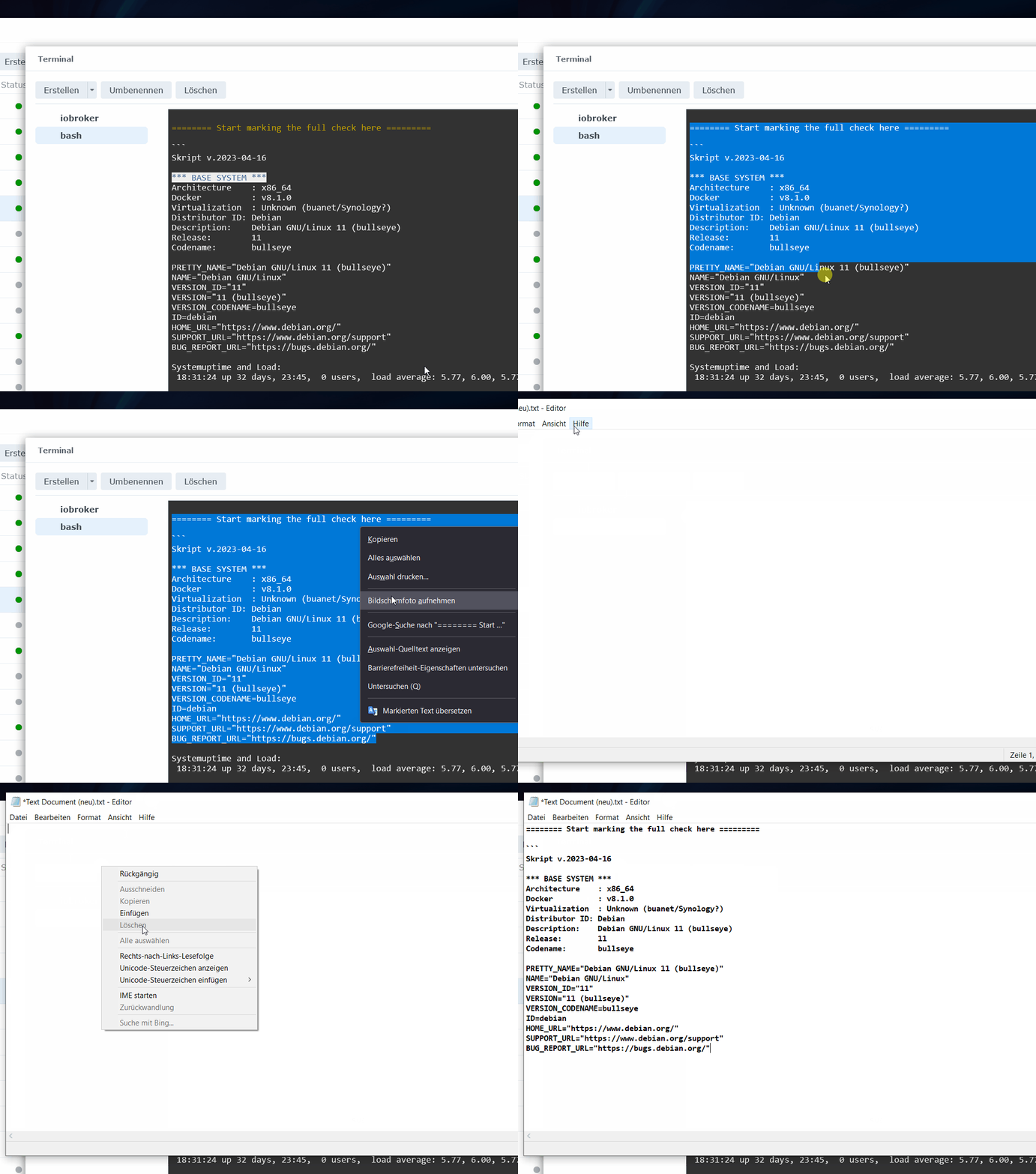
This topic has been deleted. Only users with topic management privileges can see it.
  • HomoranH Homoran

    @glasfaser sagte in Auf vis2.x umstellen:

    In dem Syn eigenem Docker Terminal vom Container ,kannst du doch auch den ioBroker Befehl ausführen !

    aber angeblich nicht den Inhalt kopieren und hier posten

    GlasfaserG Offline
    GlasfaserG Offline
    Glasfaser
    wrote on last edited by
    #59

    Bespiel :

    gerade erstellt ..

    .
    1.gif

    Synology 918+ 16GB - ioBroker in Docker v9 , VISO auf Trekstor Primebook C13 13,3" , Hikvision Domkameras mit Surveillance Station .. CCU RaspberryMatic in Synology VM .. Zigbee CC2538+CC2592 .. Sonoff .. KNX .. Modbus ..

    1 Reply Last reply
    1
    • HomoranH Homoran

      @glasfaser sagte in Auf vis2.x umstellen:

      In dem Syn eigenem Docker Terminal vom Container ,kannst du doch auch den ioBroker Befehl ausführen !

      aber angeblich nicht den Inhalt kopieren und hier posten

      GlasfaserG Offline
      GlasfaserG Offline
      Glasfaser
      wrote on last edited by
      #60

      Oder mit Portainer :

      .
      12.gif

      Synology 918+ 16GB - ioBroker in Docker v9 , VISO auf Trekstor Primebook C13 13,3" , Hikvision Domkameras mit Surveillance Station .. CCU RaspberryMatic in Synology VM .. Zigbee CC2538+CC2592 .. Sonoff .. KNX .. Modbus ..

      1 Reply Last reply
      0
      • D darkiop

        Ich gehe mal davon das Server3 dein NAS, also dein Docker Host ist. Damit ist auch klar weshalb die ioBroker Befehle da nicht ausgeführt werden können.

        Schau mal bitte ob du auf Server3 in der Shell, docker ausführen kannst:

        docker ps
        

        Mit

        docker exec -it <container-name> bash
        

        kannst du dann auf der Shell auch in den Container wechseln und dann die ioBroker Befehle ausführen.

        Dr.PieD Offline
        Dr.PieD Offline
        Dr.Pie
        wrote on last edited by
        #61

        @darkiop sagte in Auf vis2.x umstellen:

        Ich gehe mal davon das Server3 dein NAS, also dein Docker Host ist. Damit ist auch klar weshalb die ioBroker Befehle da nicht ausgeführt werden können.

        Schau mal bitte ob du auf Server3 in der Shell, docker ausführen kannst:

        docker ps
        

        Mit

        docker exec -it <container-name> bash
        

        kannst du dann auf der Shell auch in den Container wechseln und dann die ioBroker Befehle ausführen.

        Leider funktioniert copy/paste nicht darum eine Screenshot:
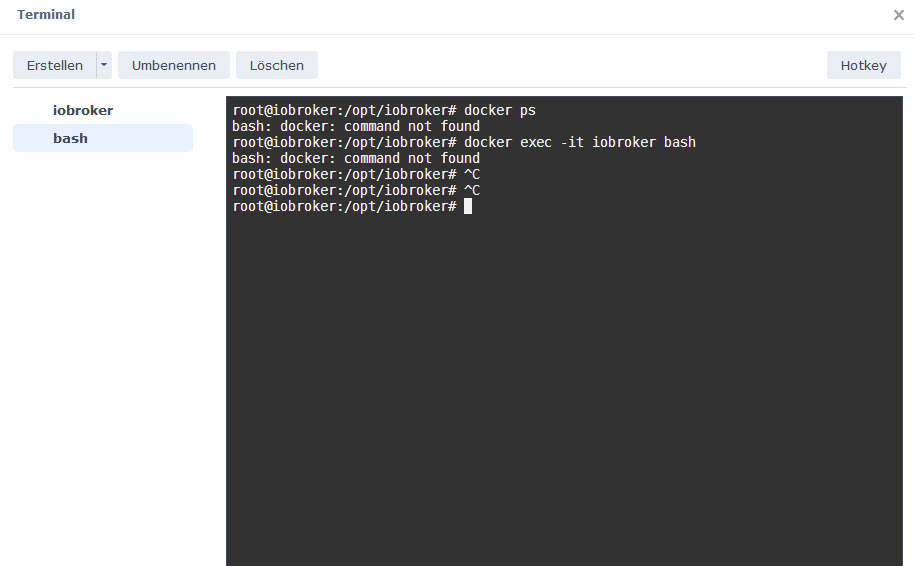
        vis2_15.png

        ? 1 Reply Last reply
        0
        • Dr.PieD Dr.Pie

          @darkiop sagte in Auf vis2.x umstellen:

          Ich gehe mal davon das Server3 dein NAS, also dein Docker Host ist. Damit ist auch klar weshalb die ioBroker Befehle da nicht ausgeführt werden können.

          Schau mal bitte ob du auf Server3 in der Shell, docker ausführen kannst:

          docker ps
          

          Mit

          docker exec -it <container-name> bash
          

          kannst du dann auf der Shell auch in den Container wechseln und dann die ioBroker Befehle ausführen.

          Leider funktioniert copy/paste nicht darum eine Screenshot:
          vis2_15.png

          ? Offline
          ? Offline
          A Former User
          wrote on last edited by
          #62

          @dr-pie sagte in Auf vis2.x umstellen:

          Leider funktioniert copy/paste nicht darum eine Screensho

          Moin,

          da hast Du etwas falsch verstanden.
          Du sollst, diese Kommandos, ausführen, wenn Du Dich mittels Putty auf der Synology eingeloggt hast, nicht wenn Du schon die Konsole des iobroker Docker aufhast.

          Wenn Du in der Docker Konsole bist, dann funktioniert auch das mit iob status usw.

          VG
          Bernd

          Dr.PieD 1 Reply Last reply
          0
          • ? A Former User

            @dr-pie sagte in Auf vis2.x umstellen:

            Leider funktioniert copy/paste nicht darum eine Screensho

            Moin,

            da hast Du etwas falsch verstanden.
            Du sollst, diese Kommandos, ausführen, wenn Du Dich mittels Putty auf der Synology eingeloggt hast, nicht wenn Du schon die Konsole des iobroker Docker aufhast.

            Wenn Du in der Docker Konsole bist, dann funktioniert auch das mit iob status usw.

            VG
            Bernd

            Dr.PieD Offline
            Dr.PieD Offline
            Dr.Pie
            wrote on last edited by
            #63

            @dp20eic bei meiner Syno ist nun das Terminal und FTP so konfiguriert wie es @haselchen geschrieben hat.
            SSH ist aktiviert auf Port 22
            FTP ist auch so eingestellt wie er es gepostet hat.

            Logge ich mich nun mit Putty ein (192.168.178.203 Port 22) und gebe iob diag ein kommt :

            Jens@Server3:~$ iob diag
            -sh: iob: command not found
            Jens@Server3:~$
            
            
            HomoranH ? 3 Replies Last reply
            0
            • Dr.PieD Dr.Pie

              @dp20eic bei meiner Syno ist nun das Terminal und FTP so konfiguriert wie es @haselchen geschrieben hat.
              SSH ist aktiviert auf Port 22
              FTP ist auch so eingestellt wie er es gepostet hat.

              Logge ich mich nun mit Putty ein (192.168.178.203 Port 22) und gebe iob diag ein kommt :

              Jens@Server3:~$ iob diag
              -sh: iob: command not found
              Jens@Server3:~$
              
              
              HomoranH Do not disturb
              HomoranH Do not disturb
              Homoran
              Global Moderator Administrators
              wrote on last edited by
              #64

              @dr-pie sagte in Auf vis2.x umstellen:

              bei meiner Syno

              ist ja auch nicht der iob Container

              kein Support per PN! - Fragen im Forum stellen -
              Benutzt das Voting rechts unten im Beitrag wenn er euch geholfen hat.
              Das Forum freut sich über eine Spende. Benutzt dazu den Spendenbutton oben rechts. Danke!
              der Installationsfixer: curl -fsL https://iobroker.net/fix.sh | bash -

              1 Reply Last reply
              0
              • Dr.PieD Dr.Pie

                @dp20eic bei meiner Syno ist nun das Terminal und FTP so konfiguriert wie es @haselchen geschrieben hat.
                SSH ist aktiviert auf Port 22
                FTP ist auch so eingestellt wie er es gepostet hat.

                Logge ich mich nun mit Putty ein (192.168.178.203 Port 22) und gebe iob diag ein kommt :

                Jens@Server3:~$ iob diag
                -sh: iob: command not found
                Jens@Server3:~$
                
                
                ? Offline
                ? Offline
                A Former User
                wrote on last edited by
                #65

                @dr-pie sagte in Auf vis2.x umstellen:

                bei meiner Syno ist nun das Terminal und FTP so konfigurier

                Moin,

                mal sehen ob Du den Unterschied siehst
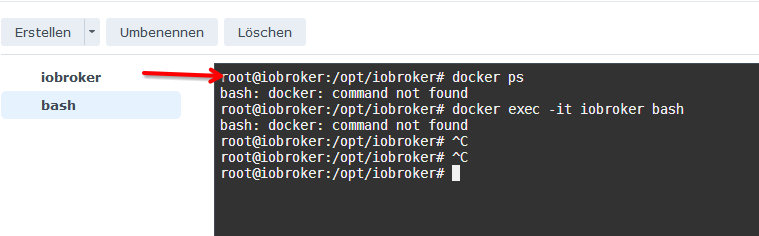
                b308296a-8686-4a00-aa6b-47cd5088b676-grafik.png
                zu

                Jens@Server3:~$ iob diag                                              <---- ??????
                -sh: iob: command not found
                Jens@Server3:~$
                

                VG
                Bernd

                1 Reply Last reply
                0
                • Dr.PieD Dr.Pie

                  @dp20eic bei meiner Syno ist nun das Terminal und FTP so konfiguriert wie es @haselchen geschrieben hat.
                  SSH ist aktiviert auf Port 22
                  FTP ist auch so eingestellt wie er es gepostet hat.

                  Logge ich mich nun mit Putty ein (192.168.178.203 Port 22) und gebe iob diag ein kommt :

                  Jens@Server3:~$ iob diag
                  -sh: iob: command not found
                  Jens@Server3:~$
                  
                  
                  ? Offline
                  ? Offline
                  A Former User
                  wrote on last edited by
                  #66

                  @dr-pie sagte in Auf vis2.x umstellen:

                  bei meiner Syno ist nun das Terminal und FTP so konfiguriert wie es @haselchen geschrieben hat.

                  Moin,

                  das waren auch nur die Einstellungen, um die Synology vorzubereiten, das hat nichts mit den Docker Containern zu tun.

                  Du musst Dir im klaren sein, dass Du zwei vollkommen unterschiedliche Systeme hast.

                  1. die Synology mit dem Betriebssystem DMS und darauf
                  2. Docker, in diesem laufen dann wieder die Container, mit ihrem Betriebssystem

                  Wenn Du jetzt per ssh auf die Synologie gehst, bei die der tolle Name Server3 dann bist Du erst auf der Ebene 1, dann kannst Du mit dem Befehl schauen was läuft

                  # docker ps
                  

                  Und dann mit dem anderen Befehl in den Docker-Container wechseln,

                  # docker exec -it iobroker bash
                  

                  erst dann bist Du auf der Ebene 2.

                  Wenn Du das so aufrufst, dann bist Du gleich auf Ebene 2
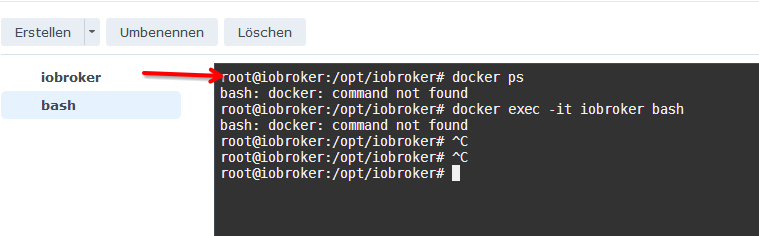
                  bfce863b-fe02-4526-b328-0d581244975c-grafik.png

                  VG
                  Bernd

                  Dr.PieD 1 Reply Last reply
                  1
                  • ? A Former User

                    @dr-pie sagte in Auf vis2.x umstellen:

                    bei meiner Syno ist nun das Terminal und FTP so konfiguriert wie es @haselchen geschrieben hat.

                    Moin,

                    das waren auch nur die Einstellungen, um die Synology vorzubereiten, das hat nichts mit den Docker Containern zu tun.

                    Du musst Dir im klaren sein, dass Du zwei vollkommen unterschiedliche Systeme hast.

                    1. die Synology mit dem Betriebssystem DMS und darauf
                    2. Docker, in diesem laufen dann wieder die Container, mit ihrem Betriebssystem

                    Wenn Du jetzt per ssh auf die Synologie gehst, bei die der tolle Name Server3 dann bist Du erst auf der Ebene 1, dann kannst Du mit dem Befehl schauen was läuft

                    # docker ps
                    

                    Und dann mit dem anderen Befehl in den Docker-Container wechseln,

                    # docker exec -it iobroker bash
                    

                    erst dann bist Du auf der Ebene 2.

                    Wenn Du das so aufrufst, dann bist Du gleich auf Ebene 2
                    bfce863b-fe02-4526-b328-0d581244975c-grafik.png

                    VG
                    Bernd

                    Dr.PieD Offline
                    Dr.PieD Offline
                    Dr.Pie
                    wrote on last edited by
                    #67

                    @dp20eic ok ...
                    mit putty sieht das so aus:

                    login as: jens
                    jens@192.168.178.203's password:
                    
                    Using terminal commands to modify system configs, execute external binary
                    files, add files, or install unauthorized third-party apps may lead to system
                    damages or unexpected behavior, or cause data loss. Make sure you are aware of
                    the consequences of each command and proceed at your own risk.
                    
                    Warning: Data should only be stored in shared folders. Data stored elsewhere
                    may be deleted when the system is updated/restarted.
                    
                    Jens@Server3:~$ docker ps
                    Got permission denied while trying to connect to the Docker daemon socket at unix:///var/run/docker.sock: Get "http://%2Fvar%2Frun%2Fdocker.sock/v1.24/containers/json": dial unix /var/run/docker.sock: connect: permission denied
                    Jens@Server3:~$ docker exec -it iobroker bash
                    Got permission denied while trying to connect to the Docker daemon socket at unix:///var/run/docker.sock: Get "http://%2Fvar%2Frun%2Fdocker.sock/v1.24/containers/iobroker/json": dial unix /var/run/docker.sock: connect: permission denied
                    Jens@Server3:~$


                    Im Docker Terminal kann ich zwar mit iob diag alles anzeigen lassen ... da läuft ne Menge durch ... ich bekomme es zwar markiert aber will ich dann mit der rechten Maustaste kopieren sind alle markierten Zeilen wieder weg ... bzw nicht markiert.

                    HomoranH DJMarc75D 2 Replies Last reply
                    0
                    • Dr.PieD Dr.Pie

                      @dp20eic ok ...
                      mit putty sieht das so aus:

                      login as: jens
                      jens@192.168.178.203's password:
                      
                      Using terminal commands to modify system configs, execute external binary
                      files, add files, or install unauthorized third-party apps may lead to system
                      damages or unexpected behavior, or cause data loss. Make sure you are aware of
                      the consequences of each command and proceed at your own risk.
                      
                      Warning: Data should only be stored in shared folders. Data stored elsewhere
                      may be deleted when the system is updated/restarted.
                      
                      Jens@Server3:~$ docker ps
                      Got permission denied while trying to connect to the Docker daemon socket at unix:///var/run/docker.sock: Get "http://%2Fvar%2Frun%2Fdocker.sock/v1.24/containers/json": dial unix /var/run/docker.sock: connect: permission denied
                      Jens@Server3:~$ docker exec -it iobroker bash
                      Got permission denied while trying to connect to the Docker daemon socket at unix:///var/run/docker.sock: Get "http://%2Fvar%2Frun%2Fdocker.sock/v1.24/containers/iobroker/json": dial unix /var/run/docker.sock: connect: permission denied
                      Jens@Server3:~$


                      Im Docker Terminal kann ich zwar mit iob diag alles anzeigen lassen ... da läuft ne Menge durch ... ich bekomme es zwar markiert aber will ich dann mit der rechten Maustaste kopieren sind alle markierten Zeilen wieder weg ... bzw nicht markiert.

                      HomoranH Do not disturb
                      HomoranH Do not disturb
                      Homoran
                      Global Moderator Administrators
                      wrote on last edited by
                      #68

                      @dr-pie sagte in Auf vis2.x umstellen:

                      sind alle markierten Zeilen wieder weg ... bzw nicht markiert.

                      was denn jetzt?

                      @dr-pie sagte in Auf vis2.x umstellen:

                      will ich dann mit der rechten Maustaste kopieren

                      klickst du auch die Markierung an?

                      kein Support per PN! - Fragen im Forum stellen -
                      Benutzt das Voting rechts unten im Beitrag wenn er euch geholfen hat.
                      Das Forum freut sich über eine Spende. Benutzt dazu den Spendenbutton oben rechts. Danke!
                      der Installationsfixer: curl -fsL https://iobroker.net/fix.sh | bash -

                      Dr.PieD 1 Reply Last reply
                      0
                      • Dr.PieD Dr.Pie

                        @dp20eic ok ...
                        mit putty sieht das so aus:

                        login as: jens
                        jens@192.168.178.203's password:
                        
                        Using terminal commands to modify system configs, execute external binary
                        files, add files, or install unauthorized third-party apps may lead to system
                        damages or unexpected behavior, or cause data loss. Make sure you are aware of
                        the consequences of each command and proceed at your own risk.
                        
                        Warning: Data should only be stored in shared folders. Data stored elsewhere
                        may be deleted when the system is updated/restarted.
                        
                        Jens@Server3:~$ docker ps
                        Got permission denied while trying to connect to the Docker daemon socket at unix:///var/run/docker.sock: Get "http://%2Fvar%2Frun%2Fdocker.sock/v1.24/containers/json": dial unix /var/run/docker.sock: connect: permission denied
                        Jens@Server3:~$ docker exec -it iobroker bash
                        Got permission denied while trying to connect to the Docker daemon socket at unix:///var/run/docker.sock: Get "http://%2Fvar%2Frun%2Fdocker.sock/v1.24/containers/iobroker/json": dial unix /var/run/docker.sock: connect: permission denied
                        Jens@Server3:~$


                        Im Docker Terminal kann ich zwar mit iob diag alles anzeigen lassen ... da läuft ne Menge durch ... ich bekomme es zwar markiert aber will ich dann mit der rechten Maustaste kopieren sind alle markierten Zeilen wieder weg ... bzw nicht markiert.

                        DJMarc75D Offline
                        DJMarc75D Offline
                        DJMarc75
                        wrote on last edited by
                        #69

                        @dr-pie mach ein PuTTY Fenster neu auf, log Dich mit

                        root@iobroker
                        

                        in Deinen Container ein und leg erstmal bevor da weiter verwurschtelt wird einen User mit Sudorechten an.

                        Lehrling seit 1975 !!!
                        Beitrag geholfen ? dann gerne ein upvote rechts unten im Beitrag klicken ;)
                        https://forum.iobroker.net/topic/51555/hinweise-f%C3%BCr-gute-forenbeitr%C3%A4ge

                        ? 1 Reply Last reply
                        1
                        • HomoranH Homoran

                          @dr-pie sagte in Auf vis2.x umstellen:

                          sind alle markierten Zeilen wieder weg ... bzw nicht markiert.

                          was denn jetzt?

                          @dr-pie sagte in Auf vis2.x umstellen:

                          will ich dann mit der rechten Maustaste kopieren

                          klickst du auch die Markierung an?

                          Dr.PieD Offline
                          Dr.PieD Offline
                          Dr.Pie
                          wrote on last edited by
                          #70

                          @homoran sagte in Auf vis2.x umstellen:

                          @dr-pie sagte in Auf vis2.x umstellen:

                          sind alle markierten Zeilen wieder weg ... bzw nicht markiert.

                          was denn jetzt?

                          @dr-pie sagte in Auf vis2.x umstellen:

                          will ich dann mit der rechten Maustaste kopieren

                          klickst du auch die Markierung an?

                          Ja klar ...
                          Ich habe festgestellt das man zwar alles markieren kann aber nicht alle kopieren kann.
                          Markiere ich NUR die Zeilen die ich gerade im Fenster sehe kann ich die auch kopieren.
                          Aber ich kann keine Zeile kopieren (auch wenn ich alle markiert habe) die ich im Fenster NICHT sehe.
                          Ich hoffe du kannst da folgen ... mir qualmt der Schädel ...

                          1 Reply Last reply
                          0
                          • DJMarc75D DJMarc75

                            @dr-pie mach ein PuTTY Fenster neu auf, log Dich mit

                            root@iobroker
                            

                            in Deinen Container ein und leg erstmal bevor da weiter verwurschtelt wird einen User mit Sudorechten an.

                            ? Offline
                            ? Offline
                            A Former User
                            wrote on last edited by
                            #71

                            @djmarc75 sagte in Auf vis2.x umstellen:

                            in Deinen Container ein und leg erstmal bevor da weiter verwurschtelt wird einen User mit Sudorechten an.

                            Moin,

                            bitte nicht, das ist Docker, Docker soll Stateless sein, also keine Abhängigkeiten zu irgendetwas haben, einzig einen persistenten Datenbereich einzurichten ist sinnvoll, damit man die ioBroker Konfiguration/Adapter nicht verliert, Docker Container werden immer komplett ausgetauscht, alles, was Du da am Environment vorbei rum mauschelst, geht Dir wieder verloren.

                            VG
                            Bernd

                            HomoranH 1 Reply Last reply
                            0
                            • ? A Former User

                              @djmarc75 sagte in Auf vis2.x umstellen:

                              in Deinen Container ein und leg erstmal bevor da weiter verwurschtelt wird einen User mit Sudorechten an.

                              Moin,

                              bitte nicht, das ist Docker, Docker soll Stateless sein, also keine Abhängigkeiten zu irgendetwas haben, einzig einen persistenten Datenbereich einzurichten ist sinnvoll, damit man die ioBroker Konfiguration/Adapter nicht verliert, Docker Container werden immer komplett ausgetauscht, alles, was Du da am Environment vorbei rum mauschelst, geht Dir wieder verloren.

                              VG
                              Bernd

                              HomoranH Do not disturb
                              HomoranH Do not disturb
                              Homoran
                              Global Moderator Administrators
                              wrote on last edited by Homoran
                              #72

                              @dp20eic Das geht jetzt zwar gewaltig ins OT, wegen dieser ganzen Regulatorien nutze ich kein Docker oder andere Container, wundere mich auch jedesmal, wenn Einsteiger es trotzdem tun und auf die Nase fallen, aber ich bilde mir ein irgendwo gelesen zu haben, dass es kein muss für root in Docker gibt, sondern auch normale user funktionieren.

                              kein Support per PN! - Fragen im Forum stellen -
                              Benutzt das Voting rechts unten im Beitrag wenn er euch geholfen hat.
                              Das Forum freut sich über eine Spende. Benutzt dazu den Spendenbutton oben rechts. Danke!
                              der Installationsfixer: curl -fsL https://iobroker.net/fix.sh | bash -

                              Dr.PieD ? 2 Replies Last reply
                              2
                              • HomoranH Homoran

                                @dp20eic Das geht jetzt zwar gewaltig ins OT, wegen dieser ganzen Regulatorien nutze ich kein Docker oder andere Container, wundere mich auch jedesmal, wenn Einsteiger es trotzdem tun und auf die Nase fallen, aber ich bilde mir ein irgendwo gelesen zu haben, dass es kein muss für root in Docker gibt, sondern auch normale user funktionieren.

                                Dr.PieD Offline
                                Dr.PieD Offline
                                Dr.Pie
                                wrote on last edited by Dr.Pie
                                #73

                                Ich mal das hier kopieren können ... Seite für Seite.

                                ======================= SUMMARY =======================                          
                                                     v.2023-04-16                                                
                                                                                                                 
                                                                                                                 
                                Operatingsystem:        Debian GNU/Linux 11 (bullseye)                           
                                Kernel:                 4.4.302+                                                 
                                Installation:           Docker                                                   
                                Timezone:               Etc/UTC                                                  
                                User-ID:                0                                                        
                                X-Server:               false                                                    
                                                                                                                 
                                                                                                                 
                                Pending OS-Updates:     6                                                        
                                Pending iob updates:    3                                                        
                                                                                                                 
                                Nodejs-Installation:    /usr/bin/nodejs         v18.17.1                         
                                                        /usr/bin/node           v18.17.1                         
                                                        /usr/bin/npm            9.6.7                            
                                                        /usr/bin/npx            9.6.7                            
                                                                                                                 
                                Recommended versions are nodejs 18.x.y and npm 9.x.y                             
                                Your nodejs installation is correct                        
                                
                                MEMORY:                                                                          
                                               total        used        free      shared  buff/cache   available 
                                Mem:            7.8G        3.6G        562M        122M        3.6G        3.8G 
                                Swap:           6.7G        9.0M        6.7G                                     
                                Total:           14G        3.6G        7.3G                                     
                                                                                                                 
                                Active iob-Instances:   25                                                       
                                Active repo(s): stable                                                           
                                                                                                                 
                                ioBroker Core:          js-controller           4.0.24                           
                                                        admin                   6.8.0                            
                                                                                                                 
                                ioBroker Status:        iobroker is running on this host.
                                
                                Objects type: jsonl                                                              
                                States  type: jsonl                                                              
                                                                                                                 
                                Status admin and web instance:                                                   
                                  system.adapter.admin.0                  : admin                 : iobroker     
                                                            -  enabled, compact enabled (group 1), port: 8081, bi
                                nd: 192.168.178.203, run as: admin                                               
                                + system.adapter.web.0                    : web                   : iobroker     
                                                            -  enabled, compact disabled, port: 8082, bind: 192.1
                                68.178.203, run as: admin                                                        
                                                                                                                 
                                Objects:                24960                                                    
                                States:                 20355                                                    
                                                                                                                 
                                Size of iob-Database:                                                            
                                                                                                                 
                                32M     /opt/iobroker/iobroker-data/objects.jsonl                                
                                6.7M    /opt/iobroker/iobroker-data/states.jsonl                                 


                                =================== END OF SUMMARY ====================                          
                                

                                Wird aber sicher zu wenig sein.

                                ? 1 Reply Last reply
                                0
                                • HomoranH Homoran

                                  @dp20eic Das geht jetzt zwar gewaltig ins OT, wegen dieser ganzen Regulatorien nutze ich kein Docker oder andere Container, wundere mich auch jedesmal, wenn Einsteiger es trotzdem tun und auf die Nase fallen, aber ich bilde mir ein irgendwo gelesen zu haben, dass es kein muss für root in Docker gibt, sondern auch normale user funktionieren.

                                  ? Offline
                                  ? Offline
                                  A Former User
                                  wrote on last edited by
                                  #74

                                  @homoran sagte in Auf vis2.x umstellen:

                                  @dp20eic Das geht jetzt zwar gewaltig ins OT, wegen dieser ganzen Regulatorien nutze ich kein Docker oder andere Container, wundere mich auch jedesmal, wenn Einsteiger es trotzdem tun und auf die Nase fallen, aber ich bilde mir ein irgendwo gelesen zu haben, dass es kein muss für root in Docker gibt, sondern auch normale user funktionieren.

                                  Moin,

                                  Off Topic On
                                  Ja, das geht, dann werden diese Sachen aber auch vom Docker Ersteller so vorgesehen und im Docker Image eingebaut, dann ist das auch ok, wenn dann das ganze Image ausgetauscht wird, passt es ja immer noch.
                                  Wenn Du mit Docker Composter :) arbeitest, und Dir Dein eigenes Image und Environment zusammen baust, kannst Du das natürlich auch alles mit berücksichtigen.

                                  Ich sehe das so wie Du, einen normalen PC oder RasPI zu betreiben, ist schon für manche eine Herausforderung, angeblich wegen Linux und Kommandozeile, aber dann ein System betreiben wollen, dass aus Betriebssystem, mit Docker Schicht und Containern besteht, Respekt ;)
                                  Off Topic Off

                                  VG
                                  Bernd

                                  1 Reply Last reply
                                  0
                                  • Dr.PieD Dr.Pie

                                    Ich mal das hier kopieren können ... Seite für Seite.

                                    ======================= SUMMARY =======================                          
                                                         v.2023-04-16                                                
                                                                                                                     
                                                                                                                     
                                    Operatingsystem:        Debian GNU/Linux 11 (bullseye)                           
                                    Kernel:                 4.4.302+                                                 
                                    Installation:           Docker                                                   
                                    Timezone:               Etc/UTC                                                  
                                    User-ID:                0                                                        
                                    X-Server:               false                                                    
                                                                                                                     
                                                                                                                     
                                    Pending OS-Updates:     6                                                        
                                    Pending iob updates:    3                                                        
                                                                                                                     
                                    Nodejs-Installation:    /usr/bin/nodejs         v18.17.1                         
                                                            /usr/bin/node           v18.17.1                         
                                                            /usr/bin/npm            9.6.7                            
                                                            /usr/bin/npx            9.6.7                            
                                                                                                                     
                                    Recommended versions are nodejs 18.x.y and npm 9.x.y                             
                                    Your nodejs installation is correct                        
                                    
                                    MEMORY:                                                                          
                                                   total        used        free      shared  buff/cache   available 
                                    Mem:            7.8G        3.6G        562M        122M        3.6G        3.8G 
                                    Swap:           6.7G        9.0M        6.7G                                     
                                    Total:           14G        3.6G        7.3G                                     
                                                                                                                     
                                    Active iob-Instances:   25                                                       
                                    Active repo(s): stable                                                           
                                                                                                                     
                                    ioBroker Core:          js-controller           4.0.24                           
                                                            admin                   6.8.0                            
                                                                                                                     
                                    ioBroker Status:        iobroker is running on this host.
                                    
                                    Objects type: jsonl                                                              
                                    States  type: jsonl                                                              
                                                                                                                     
                                    Status admin and web instance:                                                   
                                      system.adapter.admin.0                  : admin                 : iobroker     
                                                                -  enabled, compact enabled (group 1), port: 8081, bi
                                    nd: 192.168.178.203, run as: admin                                               
                                    + system.adapter.web.0                    : web                   : iobroker     
                                                                -  enabled, compact disabled, port: 8082, bind: 192.1
                                    68.178.203, run as: admin                                                        
                                                                                                                     
                                    Objects:                24960                                                    
                                    States:                 20355                                                    
                                                                                                                     
                                    Size of iob-Database:                                                            
                                                                                                                     
                                    32M     /opt/iobroker/iobroker-data/objects.jsonl                                
                                    6.7M    /opt/iobroker/iobroker-data/states.jsonl                                 


                                    =================== END OF SUMMARY ====================                          
                                    

                                    Wird aber sicher zu wenig sein.

                                    ? Offline
                                    ? Offline
                                    A Former User
                                    wrote on last edited by
                                    #75

                                    @dr-pie sagte in Auf vis2.x umstellen:

                                    Wird aber sicher zu wenig sein.

                                    Moin,

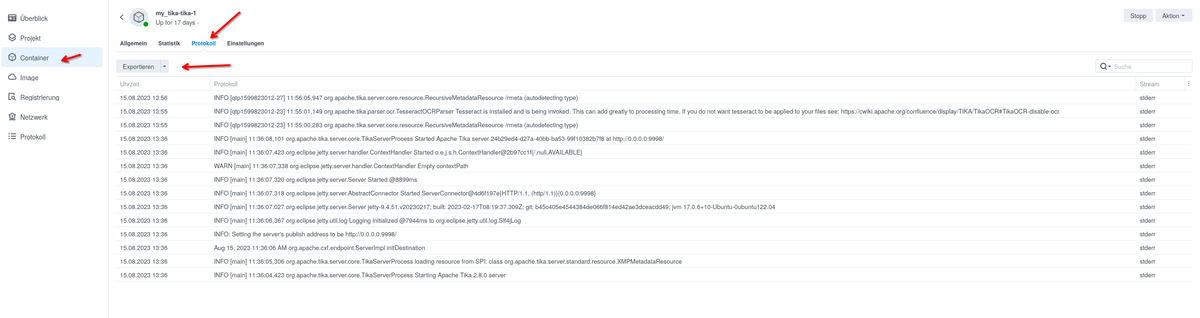
                                    schau mal, ob Du einen Eintrag Protokoll in Deinem iobroker Container findest, soweit ich mich erinner, werden die Log-Meldungen an das Protokoll durchgereicht, da sollte dann auch einiges stehen.
                                    Beispiel, ist nicht ioBroker
                                    422b68ce-cb31-40db-8209-28fd113296cb-grafik.png

                                    VG
                                    Bernd

                                    Dr.PieD 1 Reply Last reply
                                    0
                                    • ? A Former User

                                      @dr-pie sagte in Auf vis2.x umstellen:

                                      Wird aber sicher zu wenig sein.

                                      Moin,

                                      schau mal, ob Du einen Eintrag Protokoll in Deinem iobroker Container findest, soweit ich mich erinner, werden die Log-Meldungen an das Protokoll durchgereicht, da sollte dann auch einiges stehen.
                                      Beispiel, ist nicht ioBroker
                                      422b68ce-cb31-40db-8209-28fd113296cb-grafik.png

                                      VG
                                      Bernd

                                      Dr.PieD Offline
                                      Dr.PieD Offline
                                      Dr.Pie
                                      wrote on last edited by
                                      #76

                                      @dp20eic Ja das Protokoll ich gefüllt ... da ist mächtig viel drin.
                                      Mein Notepad zeigt 42353 Zeilen an ... und das nur von heute 0 Uhr an

                                      GlasfaserG 1 Reply Last reply
                                      0
                                      • Dr.PieD Dr.Pie

                                        @dp20eic Ja das Protokoll ich gefüllt ... da ist mächtig viel drin.
                                        Mein Notepad zeigt 42353 Zeilen an ... und das nur von heute 0 Uhr an

                                        GlasfaserG Offline
                                        GlasfaserG Offline
                                        Glasfaser
                                        wrote on last edited by
                                        #77

                                        @dr-pie

                                        dial unix /var/run/docker.sock: connect: permission denied

                                        Ich habe schon oben geschrieben ... da war mal was ..

                                        jetzt kann ich mich erinnern,
                                        es war auch schon bei den Containern Influx und Grafana bei dir ..

                                        https://forum.iobroker.net/search?term=dial unix %2Fvar%2Frun%2Fdocker.sock%3A connect%3A permission denied&in=titlesposts

                                        das du dich nicht per Putty in den Container einwählen konntest bzw die Docker Befehle !

                                        Ich habe keine Ahnung warum es so bei dir ist ..
                                        eventuell die Syn App Docker defekt .

                                        oder du hast mal an den Syn Rechten gespielt, innerhalb der Putty Oberfläche .
                                        deshalb immer ein

                                        permission denied

                                        Synology 918+ 16GB - ioBroker in Docker v9 , VISO auf Trekstor Primebook C13 13,3" , Hikvision Domkameras mit Surveillance Station .. CCU RaspberryMatic in Synology VM .. Zigbee CC2538+CC2592 .. Sonoff .. KNX .. Modbus ..

                                        Dr.PieD ? 2 Replies Last reply
                                        1
                                        • GlasfaserG Glasfaser

                                          @dr-pie

                                          dial unix /var/run/docker.sock: connect: permission denied

                                          Ich habe schon oben geschrieben ... da war mal was ..

                                          jetzt kann ich mich erinnern,
                                          es war auch schon bei den Containern Influx und Grafana bei dir ..

                                          https://forum.iobroker.net/search?term=dial unix %2Fvar%2Frun%2Fdocker.sock%3A connect%3A permission denied&in=titlesposts

                                          das du dich nicht per Putty in den Container einwählen konntest bzw die Docker Befehle !

                                          Ich habe keine Ahnung warum es so bei dir ist ..
                                          eventuell die Syn App Docker defekt .

                                          oder du hast mal an den Syn Rechten gespielt, innerhalb der Putty Oberfläche .
                                          deshalb immer ein

                                          permission denied

                                          Dr.PieD Offline
                                          Dr.PieD Offline
                                          Dr.Pie
                                          wrote on last edited by Dr.Pie
                                          #78

                                          @glasfaser ich hatte das nicht weiter verfolgt da ich es nicht verstehe.

                                          Aber das aktuelle Problem was ich habe begann erst NACHDEM ich die Vis2 starten/anmelde/aktivieren wollte.
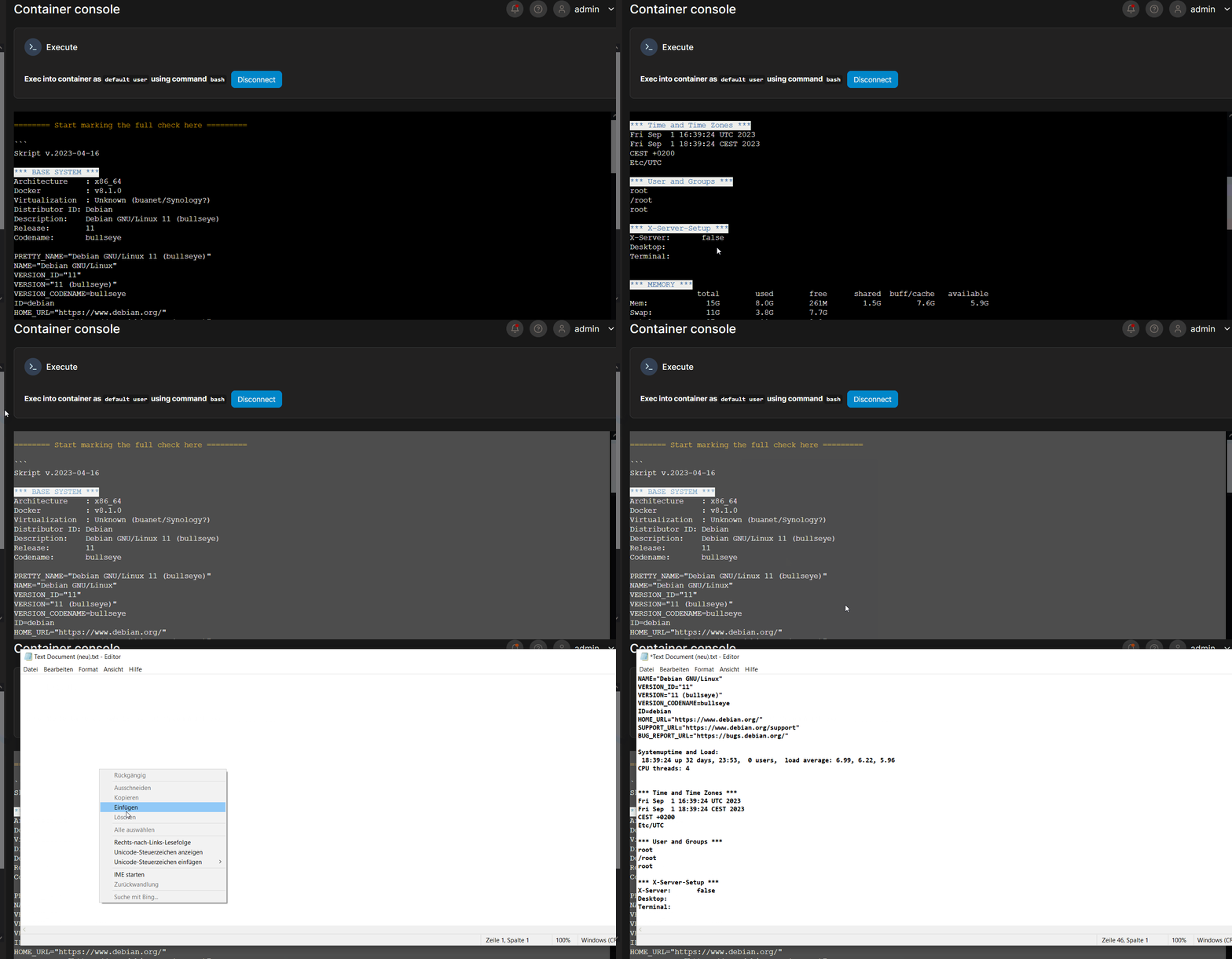
                                          Ich habe übrigens nun auch die Auswertung von iob diag hinbekommen, bzw kopiert bekommen ... das war extrem mühselig immer 5 Zeilen zu scrollen ... die zu kopieren und im Notepad einzufügen ... dann wieder 5 Zeilen scrollen dann kopieren dann in Notepad einzufügen... und das bei über 500 Zeilen ..
                                          Für Leute die sich mit derartigen Dingen beschäftigen sicher eine Leichtigkeit ... machen die Leute das denn auch so oder gibt es eine bessere Möglichkeit alles aus dem Terminal zu markieren und zu kopieren ... ach is ja wurscht.

                                          *** ioBroker Diagnosis ***                                                       
                                                                                                                           
                                          Please stretch the window of your terminal programm (puTTY) as wide as possible o
                                          r switch to full screen                                                          
                                                                                                                           
                                          The following checks may give hints to potential malconfigurations or errors, ple
                                          ase post them in our forum:                                                      
                                                                                                                           
                                          https://forum.iobroker.net                                                       
                                                                                                                           
                                          Just copy and paste the Summary Page, including the ``` characters at start and e
                                          nd.                                                                              
                                          It helps us to help you!                                                         
                                                                                                                           
                                          Press any key to continue


                                          ======== Start marking the full check here =========                             
                                                                                                                           
                                                                                                                  
                                          Skript v.2023-04-16                                                              
                                                                                                                           
                                          *** BASE SYSTEM ***                                                              
                                          Architecture    : x86_64                                                         
                                          Docker          : v8.0.1                                                         
                                          Virtualization  : Unknown (buanet/Synology?)                                     
                                          Distributor ID: Debian                                                           
                                          Description:    Debian GNU/Linux 11 (bullseye)                                   
                                          Release:        11                                                               
                                          Codename:       bullseye                                                         
                                                                                                                           
                                          PRETTY_NAME="Debian GNU/Linux 11 (bullseye)"                                     
                                          NAME="Debian GNU/Linux"                                                          
                                          VERSION_ID="11"                                                                  
                                          VERSION="11 (bullseye)"                                                          
                                          VERSION_CODENAME=bullseye                                                        
                                          ID=debian                                                                        
                                          HOME_URL="https://www.debian.org/"                                               
                                          SUPPORT_URL="https://www.debian.org/support"                                     
                                          BUG_REPORT_URL="https://bugs.debian.org/"                                        
                                                                                                                           
                                          Systemuptime and Load:                                  
                                          11:45:46 up 1 day,  2:02,  0 users,  load average: 1.23, 1.63, 1.69             
                                          CPU threads: 4                                                                   
                                                                                                                           
                                                                                                                           
                                          *** Time and Time Zones ***                                                      
                                          Sat Sep  2 09:45:46 UTC 2023                                                     
                                          Sat Sep  2 11:45:46 CEST 2023                                                    
                                          CEST +0200                                                                       
                                          Etc/UTC                                                                          
                                                                                                                           
                                          *** User and Groups ***                                                          
                                          root                                                                             
                                          /root                                                                            
                                          root                                                                             
                                                                                                                           
                                          *** X-Server-Setup ***                                                           
                                          X-Server:       false                                                            
                                          Desktop:                                                                         
                                          Terminal:                                                                        
                                                                                                                           
                                                        *** MEMORY ***                                                                   
                                                         total        used        free      shared  buff/cache   available 
                                          Mem:            7.8G        3.0G        1.1G        122M        3.7G        4.4G 
                                          Swap:           6.7G        9.0M        6.7G                                     
                                          Total:           14G        3.0G        7.8G                                     
                                                                                                                           
                                                   7802 M total memory                                                     
                                                   2956 M used memory                                                      
                                                   4307 M active memory                                                    
                                                   1602 M inactive memory                                                  
                                                   1096 M free memory                                                      
                                                     62 M buffer memory                                                    
                                                   3686 M swap cache                                                       
                                                   6731 M total swap                                                       
                                                      9 M used swap                                                        
                                                   6722 M free swap                  
                                          
                                          *** FILESYSTEM ***                                                               
                                          Filesystem             Type   Size  Used Avail Use% Mounted on                   
                                          /dev/mapper/cachedev_4 btrfs  3.5T  2.0T  1.6T  55% /                            
                                          tmpfs                  tmpfs   64M     0   64M   0% /dev                         
                                          tmpfs                  tmpfs  3.9G     0  3.9G   0% /sys/fs/cgroup               
                                          shm                    tmpfs   64M     0   64M   0% /dev/shm                     
                                          /dev/mapper/cachedev_4 btrfs  3.5T  2.0T  1.6T  55% /opt/iobroker                
                                          /dev/mapper/cachedev_4 btrfs  3.5T  2.0T  1.6T  55% /etc/hosts                   
                                          tmpfs                  tmpfs  3.9G     0  3.9G   0% /proc/acpi                   
                                          tmpfs                  tmpfs  3.9G     0  3.9G   0% /proc/scsi                   
                                          tmpfs                  tmpfs  3.9G     0  3.9G   0% /sys/firmware                
                                                                                                                           
                                          Messages concerning ext4 filesystem in dmesg:                                    
                                          sudo: unable to resolve host iobroker: Name or service not known                 
                                          [Fri Sep  1 09:43:29 2023] EXT4-fs (md0): couldn't mount as ext3 due to feature i
                                          ncompatibilities                                                                 
                                          [Fri Sep  1 09:43:29 2023] EXT4-fs (md0): mounted filesystem with ordered data mo
                                          de. Opts: (null)                                                                 
                                          [Fri Sep  1 09:43:29 2023] EXT4-fs (md0): couldn't mount as ext3 due to feature i
                                          ncompatibilities                                                                 
                                          [Fri Sep  1 09:43:29 2023] EXT4-fs (md0): mounted filesystem with ordered data mo
                                          de. Opts: (null)                                                                 
                                          [Fri Sep  1 09:43:34 2023] EXT4-fs (md0): couldn't mount as ext3 due to feature i
                                          ncompatibilities                                                                 
                                          [Fri Sep  1 09:43:34 2023] EXT4-fs (md0): mounted filesystem with ordered data mo
                                          de. Opts: (null)                                                                 
                                          [Fri Sep  1 09:43:35 2023] EXT4-fs (md0): couldn't mount as ext3 due to feature i
                                          ncompatibilities                                                                 
                                          [Fri Sep  1 09:43:35 2023] EXT4-fs (md0): mounted filesystem with ordered data mo
                                          de. Opts: barrier=1           
                                          
                                          
                                          Show mounted filesystems (real ones only):                                       
                                          TARGET             SOURCE                                                        
                                                                                                           FSTYPE OPTIONS  
                                          /                  /dev/mapper/cachedev_4[/@syno/@docker/btrfs/subvolumes/2082bc3
                                          9f93f33f788e3c7fa290317a1b738ac8cf85a4217a83d22a38aceec36]       btrfs  rw,nodev,
                                          relatime,relatime_period=30,ssd,synoacl,space_cache=v2,auto_reclaim_space,metadat
                                          a_ratio=50,syno_allocator,subvolid=724572,subvol=/@syno/@docker/btrfs/subvolumes/
                                          2082bc39f93f33f788e3c7fa290317a1b738ac8cf85a4217a83d22a38aceec36                 
                                          |-/opt/iobroker    /dev/mapper/cachedev_4[/@syno/docker/iobroker]                
                                                                                                           btrfs  rw,nodev,
                                          relatime,relatime_period=30,ssd,synoacl,space_cache=v2,auto_reclaim_space,metadat
                                          a_ratio=50,syno_allocator,subvolid=724400,subvol=/@syno/docker                   
                                          |-/etc/resolv.conf /dev/mapper/cachedev_4[/@syno/@docker/containers/0450185fc3ce5
                                          afab5101aa2eabbba0a1f80981592975fc06d13c4fc7271dbd6/resolv.conf] btrfs  rw,nodev,
                                          relatime,relatime_period=30,ssd,synoacl,space_cache=v2,auto_reclaim_space,metadat
                                          a_ratio=50,syno_allocator,subvolid=257,subvol=/@syno                             
                                          |-/etc/hostname    /dev/mapper/cachedev_4[/@syno/@docker/containers/0450185fc3ce5
                                          afab5101aa2eabbba0a1f80981592975fc06d13c4fc7271dbd6/hostname]    btrfs  rw,nodev,
                                          relatime,relatime_period=30,ssd,synoacl,space_cache=v2,auto_reclaim_space,metadat
                                          a_ratio=50,syno_allocator,subvolid=257,subvol=/@syno
                                          `-/etc/hosts       /dev/mapper/cachedev_4[/@syno/@docker/containers/0450185fc3ce5
                                          afab5101aa2eabbba0a1f80981592975fc06d13c4fc7271dbd6/hosts]       btrfs  rw,nodev,
                                          relatime,relatime_period=30,ssd,synoacl,space_cache=v2,auto_reclaim_space,metadat
                                          a_ratio=50,syno_allocator,subvolid=257,subvol=/@syno                             
                                          
                                          
                                          Files in neuralgic directories:                                                  
                                                                                                                           
                                          /var:                                                                            
                                          sudo: unable to resolve host iobroker: Name or service not known                 
                                          33M     /var/                                                                    
                                          30M     /var/lib                                                                 
                                          18M     /var/lib/apt/lists                                                       
                                          18M     /var/lib/apt                                                             
                                          13M     /var/lib/dpkg       
                                          
                                          
                                          /opt/iobroker/backups:                                                           
                                          2.0G    /opt/iobroker/backups/                                                   
                                                                                                                           
                                          /opt/iobroker/iobroker-data:                                                     
                                          378M    /opt/iobroker/iobroker-data/                                             
                                          242M    /opt/iobroker/iobroker-data/files                                        
                                          91M     /opt/iobroker/iobroker-data/backup-objects                               
                                          52M     /opt/iobroker/iobroker-data/files/javascript.admin                       
                                          48M     /opt/iobroker/iobroker-data/files/telegram.admin                         
                                                                                                                           
                                          The five largest files in iobroker-data are:                                     
                                          30M     /opt/iobroker/iobroker-data/objects.jsonl                                
                                          20M     /opt/iobroker/iobroker-data/files/web.admin/static/js/main.becd2d7c.js.ma
                                          p                                                                                
                                          15M     /opt/iobroker/iobroker-data/files/telegram.admin/rules/static/js/vendors-
                                          node_modules_iobroker_adapter-react-v5_assets_devices_parseNames_d_ts-node_module
                                          s_io-1d9f06.44fe4a3f.chunk.js.map                                                
                                          8.9M    /opt/iobroker/iobroker-data/files/scenes.admin/static/js/2.7de3299d.chunk
                                          .js.map                                                                          
                                          8.0M    /opt/iobroker/iobroker-data/files/web.admin/static/js/main.becd2d7c.js   
                                          
                                          
                                          *** NodeJS-Installation ***                                                      
                                                                                                                           
                                          /usr/bin/nodejs         v18.17.1                                                 
                                          /usr/bin/node           v18.17.1                                                 
                                          /usr/bin/npm            9.6.7                                                    
                                          /usr/bin/npx            9.6.7                                                    
                                                                                                                           
                                                                                                                           
                                          nodejs:                                                                          
                                            Installed: 18.17.1-deb-1nodesource1                                            
                                            Candidate: 18.17.1-deb-1nodesource1                                            
                                            Version table:                                                                 
                                           *** 18.17.1-deb-1nodesource1 500                                                
                                                  500 https://deb.nodesource.com/node_18.x bullseye/main amd64 Packages    
                                                  100 /var/lib/dpkg/status                                                 
                                               12.22.12~dfsg-1~deb11u4 500                                                 
                                                  500 http://deb.debian.org/debian-security bullseye-security/main amd64 Pa
                                          ckages                                                                           
                                               12.22.12~dfsg-1~deb11u3 500                                                 
                                                  500 http://deb.debian.org/debian bullseye/main amd64 Packages            
                                                                                                                           
                                          Temp directories causing npm8 problem: 0                                         
                                          No problems detected                                                        
                                          
                                          
                                          *** ioBroker-Installation ***                                                    
                                                                                                                           
                                          ioBroker Status                                                                  
                                          iobroker is running on this host.                                                
                                                                                                                           
                                                                                                                           
                                          Objects type: jsonl                                                              
                                          States  type: jsonl                                                              
                                                                                                                           
                                          MULTIHOSTSERVICE/enabled: false                                                  
                                                                                                                           
                                          Core adapters versions                                                           
                                          js-controller:  4.0.24                                                           
                                          admin:          6.8.0                                                            
                                          javascript:     7.0.3                                                            
                                                                                                                           
                                          Adapters from github:   5         
                                          
                                          
                                          Adapter State                                                                    
                                               : iobroker                                 - disabled, compact disabled     
                                          + system.adapter.sql.0                    : sql                   : iobroker     
                                                                      -  enabled, compact disabled                         
                                            system.adapter.synology.0               : synology              : iobroker     
                                                                      - disabled, compact disabled, port: 5000             
                                          + system.adapter.synology.1               : synology              : iobroker     
                                                                      -  enabled, compact disabled, port: 5002             
                                          + system.adapter.synology.2               : synology              : iobroker     
                                                                      -  enabled, compact disabled, port: 5003             
                                          + system.adapter.tankerkoenig.0           : tankerkoenig          : iobroker     
                                                                      -  enabled, compact disabled                         
                                          + system.adapter.telegram.0               : telegram              : iobroker     
                                                                      -  enabled, compact disabled, port: 8443, bind: 0.0.0
                                          .0                                                                               
                                          + system.adapter.time-switch.0            : time-switch           : iobroker     
                                                                      -  enabled, compact disabled                         
                                          + system.adapter.tr-064.0                 : tr-064                : iobroker     
                                                                      -  enabled, compact disabled                         
                                          + system.adapter.tr-064.1                 : tr-064                : iobroker     
                                                                      -  enabled, compact disabled                         
                                            system.adapter.tr-064.2                 : tr-064                : iobroker     
                                                                      - disabled, compact disabled                         
                                          + system.adapter.upnp.0                   : upnp                  : iobroker     
                                                                      -  enabled                                           
                                            system.adapter.vis-2.0                  : vis-2                 : iobroker     
                                            -  enabled, compact enabled (group 1)                
                                          + system.adapter.vis-inventwo.0           : vis-inventwo          : iobroker     
                                                                      -  enabled, compact disabled                         
                                            system.adapter.vis-lcars.0              : vis-lcars             : iobroker     
                                                                      -  enabled                                           
                                            system.adapter.vis-materialdesign.0     : vis-materialdesign    : iobroker     
                                                                      -  enabled                                           
                                            system.adapter.vis-rgraph.0             : vis-rgraph            : iobroker     
                                                                      -  enabled                                           
                                            system.adapter.vis-timeandweather.0     : vis-timeandweather    : iobroker     
                                                                      -  enabled                                           
                                            system.adapter.vis.0                    : vis                   : iobroker     
                                                                      -  enabled, compact disabled                         
                                          + system.adapter.web.0                    : web                   : iobroker     
                                                                      -  enabled, compact disabled, port: 8082, bind: 192.1
                                          68.178.203, run as: admin                                                        
                                            system.adapter.whatsapp-cmb.0           : whatsapp-cmb          : iobroker     
                                                                      - disabled, compact disabled                         
                                          + system.adapter.wled.0                   : wled                  : iobroker     
                                                                      -  enabled, compact disabled                         
                                            system.adapter.admin.0                  : admin                 : iobroker     
                                                                      -  enabled, compact enabled (group 1), port: 8081, bi
                                          nd: 192.168.178.203, run as: admin                                               
                                          + system.adapter.backitup.0               : backitup              : iobroker     
                                                                      -  enabled, compact disabled                         
                                                                       -  enabled, compact disabled                         
                                          + system.adapter.denon.0                  : denon                 : iobroker     
                                                                      -  enabled, compact disabled                         
                                            system.adapter.discovery.0              : discovery             : iobroker     
                                                                      - disabled, compact disabled                         
                                          + system.adapter.fb-checkpresence.0       : fb-checkpresence      : iobroker     
                                                                      -  enabled, compact disabled                         
                                            system.adapter.ford.0                   : ford                  : iobroker     
                                                                      - disabled, compact disabled                         
                                          + system.adapter.fullybrowser.0           : fullybrowser          : iobroker     
                                                                      -  enabled, compact disabled                         
                                          + system.adapter.harmony.0                : harmony               : iobroker     
                                                                      -  enabled, compact disabled                         
                                          + system.adapter.heos.0                   : heos                  : iobroker     
                                                                      -  enabled, compact disabled                         
                                            system.adapter.ical.0                   : ical                  : iobroker     
                                                                      -  enabled, compact disabled                         
                                            system.adapter.ical.1                   : ical                  : iobroker     
                                                                      -  enabled, compact disabled                         
                                            system.adapter.ical.2                   : ical                  : iobroker     
                                                                      -  enabled, compact disabled                         
                                            system.adapter.ical.4                   : ical                  : iobroker     
                                                                      -  enabled, compact disabled                         
                                          + system.adapter.influxdb.0               : influxdb              : iobroker     
                                                                     -  enabled, compact disabled, port: 8086             
                                          + system.adapter.shelly.0                 : shelly                : iobroker     
                                                                      -  enabled, compact disabled, port: 1882, bind: 0.0.0
                                          .0                                                                               
                                          + system.adapter.shelly.1                 : shelly                : iobroker     
                                                                      -  enabled, compact disabled, port: 1883, bind: 0.0.0
                                          .0                                                                               
                                          + system.adapter.synology.1               : synology              : iobroker     
                                                                      -  enabled, compact disabled, port: 5002             
                                          + system.adapter.synology.2               : synology              : iobroker     
                                                                      -  enabled, compact disabled, port: 5003             
                                          + system.adapter.telegram.0               : telegram              : iobroker     
                                                                      -  enabled, compact disabled, port: 8443, bind: 0.0.0
                                          .0                                                                               
                                          + system.adapter.web.0                    : web                   : iobroker     
                                                                      -  enabled, compact disabled, port: 8082, bind: 192.1
                                          68.178.203, run as: admin                                                        
                                                                                       
                                          											 
                                          											 ioBroker-Repositories                                                            
                                          stable        : http://download.iobroker.net/sources-dist.json                   
                                          beta          : http://download.iobroker.net/sources-dist-latest.json            
                                                                                                                           
                                          Active repo(s): stable                                                           
                                                                     
                                          						   
                                          						Installed ioBroker-Instances                                                     
                                          Used repository: stable                                                          
                                          Adapter    "admin"        : 6.8.0    , installed 6.8.0                           
                                          Adapter    "backitup"     : 2.6.23   , installed 2.6.23                          
                                          Adapter    "daswetter"    : 3.1.10   , installed 3.1.10                          
                                          Adapter    "denon"        : 1.15.3   , installed 1.15.3                          
                                          Adapter    "discovery"    : 3.1.0    , installed 3.1.0                           
                                          Adapter    "fb-checkpresence": 1.2.2 , installed 1.2.2                           
                                          Adapter    "ford"         : 0.0.14   , installed 0.0.14                          
                                          Adapter    "fullybrowser" : 2.1.2    , installed 2.1.2                           
                                          Adapter    "harmony"      : 1.2.2    , installed 1.2.2                           
                                          Adapter    "heos"         : 2.1.0    , installed 2.1.0                           
                                          Adapter    "ical"         : 1.13.3   , installed 1.13.3                          
                                          Adapter    "influxdb"     : 3.2.0    , installed 3.2.0                           
                                          Adapter    "javascript"   : 7.0.3    , installed 7.0.3                           
                                          Controller "js-controller": 4.0.24   , installed 4.0.24                          
                                          Adapter    "lgtv"         : 1.1.10   , installed 1.1.10                          
                                          Adapter    "mqtt"         : 4.1.1    , installed 4.1.1                           
                                          Adapter    "net-tools"    : 0.2.0    , installed 0.2.0                           
                                          Adapter    "node-red"     : 4.0.3    , installed 4.0.3                           
                                          Adapter    "ping"         : 1.6.2    , installed 1.6.2                           
                                          Adapter    "plex"         : 0.9.1    , installed 0.9.1                           
                                          Adapter    "rpi2"         : 1.3.2    , installed 1.3.2                           
                                          Adapter    "samsung"      : 0.5.11   , installed 0.5.11                          
                                          Adapter    "scenes"       : 2.3.9    , installed 2.3.9                           
                                          Adapter    "shelly"       : 6.4.1    , installed 6.4.1                           
                                          Adapter    "simple-api"   : 2.7.2    , installed 2.7.2                           
                                          Adapter    "smartthings"  : 0.0.4    , installed 0.0.4                           
                                          Adapter    "socketio"     : 6.5.2    , installed 6.3.5  [Updatable]              
                                          Adapter    "sql"          : 2.2.0    , installed 2.2.0                           
                                          Adapter    "synology"     : 2.1.13   , installed 2.1.13                          
                                          Adapter    "tankerkoenig" : 3.3.7    , installed 3.3.7                           
                                          Adapter    "telegram"     : 1.16.0   , installed 1.16.0                          
                                          Adapter    "tr-064"       : 4.2.18   , installed 4.2.18                          
                                          Adapter    "tvprogram"    : 1.1.2    , installed 1.1.2                           
                                          Adapter    "upnp"         : 1.0.21   , installed 1.0.21                          
                                          Adapter    "vis"          : 1.4.16   , installed 1.4.16                          
                                          Adapter    "vis-icontwo"  : 0.96.0   , installed 0.96.0                          
                                          Adapter    "vis-inventwo" : 3.3.3    , installed 3.3.3                           
                                          Adapter    "vis-lcars"    : 1.1.1    , installed 1.1.1                           
                                          Adapter    "vis-rgraph"   : 0.0.2    , installed 0.0.2                           
                                          Adapter    "vis-timeandweather": 1.2.2, installed 1.2.2                          
                                          Adapter    "web"          : 6.1.0    , installed 5.5.3  [Updatable]              
                                          Adapter    "whatsapp-cmb" : 0.2.3    , installed 0.2.3                           
                                          Adapter    "wled"         : 0.6.7    , installed 0.6.7                           
                                          Adapter    "ws"           : 2.5.3    , installed 2.3.6  [Updatable]              
                                                                                                                         
                                          																			   
                                          																			   Objects and States                                                               
                                          Please stand by - This may take a while                                          
                                          Objects:        24960                                                            
                                          States:         20375              
                                          
                                          *** OS-Repositories and Updates ***                                              
                                          sudo: unable to resolve host iobroker: Name or service not known                 
                                          sudo: unable to resolve host iobroker: Name or service not known                 
                                          Hit:1 http://deb.debian.org/debian bullseye InRelease                            
                                          Hit:2 http://deb.debian.org/debian-security bullseye-security InRelease          
                                          Hit:3 http://deb.debian.org/debian bullseye-updates InRelease                    
                                          Hit:4 https://deb.nodesource.com/node_18.x bullseye InRelease                    
                                          Reading package lists...                                                         
                                          Pending Updates: 6               
                                          
                                          *** Listening Ports *** 
                                          
                                          Hab ich mal ausgelassen 
                                          
                                          *** Log File - Last 25 Lines ***                                                 
                                                                                                                           
                                          2023-09-02 11:46:24.184  - error: host.iobroker Caught by controller[3]:     at O
                                          bject.writeFileSync (node:fs:2324:35)                                            
                                          2023-09-02 11:46:24.185  - error: host.iobroker Caught by controller[3]:     at g
                                          enerateConfigPage (/opt/iobroker/node_modules/iobroker.vis-2/main.js:200:12)     
                                          2023-09-02 11:46:24.186  - error: host.iobroker Caught by controller[3]:     at b
                                          uildHtmlPages (/opt/iobroker/node_modules/iobroker.vis-2/main.js:769:27)         
                                          2023-09-02 11:46:24.187  - error: host.iobroker Caught by controller[3]:     at O
                                          bject.main [as ready] (/opt/iobroker/node_modules/iobroker.vis-2/main.js:941:5)  
                                          2023-09-02 11:46:24.188  - info: host.iobroker Restart compact group controller 1
                                          2023-09-02 11:46:24.172  - error: host.iobroker Caught by controller[1]: Error: E
                                          NOENT: no such file or directory, open '/opt/iobroker/node_modules/iobroker.vis-2
                                          /www/config.js'                                                                  
                                          2023-09-02 11:46:24.173  - error: host.iobroker Caught by controller[1]:     at O
                                          bject.openSync (node:fs:603:3)                                                   
                                          2023-09-02 11:46:24.174  - error: host.iobroker Caught by controller[1]:     at O
                                          bject.writeFileSync (node:fs:2324:35)                                            
                                          2023-09-02 11:46:24.176  - error: host.iobroker Caught by controller[1]:     at g
                                          enerateConfigPage (/opt/iobroker/node_modules/iobroker.vis-2/main.js:200:12)     
                                          2023-09-02 11:46:24.177  - error: host.iobroker Caught by controller[1]:     at b
                                          uildHtmlPages (/opt/iobroker/node_modules/iobroker.vis-2/main.js:769:27)   
                                          2023-09-02 11:46:24.179  - error: host.iobroker Caught by controller[1]:     at O
                                          bject.main [as ready] (/opt/iobroker/node_modules/iobroker.vis-2/main.js:941:5)  
                                          2023-09-02 11:46:24.180  - error: host.iobroker Caught by controller[2]: This err
                                          or originated either by throwing inside of an async function without a catch bloc
                                          k, or by rejecting a promise which was not handled with .catch(). The promise rej
                                          ected with the reason:                                                           
                                          2023-09-02 11:46:24.181  - error: host.iobroker Caught by controller[3]: Error: E
                                          NOENT: no such file or directory, open '/opt/iobroker/node_modules/iobroker.vis-2
                                          /www/config.js'                                                                  
                                          2023-09-02 11:46:24.182  - error: host.iobroker Caught by controller[3]:     at O
                                          bject.openSync (node:fs:603:3)                                                   
                                          2023-09-02 11:46:24.184  - error: host.iobroker Caught by controller[3]:     at O
                                          bject.writeFileSync (node:fs:2324:35)                                            
                                          2023-09-02 11:46:24.185  - error: host.iobroker Caught by controller[3]:     at g
                                          enerateConfigPage (/opt/iobroker/node_modules/iobroker.vis-2/main.js:200:12)     
                                          2023-09-02 11:46:24.186  - error: host.iobroker Caught by controller[3]:     at b
                                          uildHtmlPages (/opt/iobroker/node_modules/iobroker.vis-2/main.js:769:27)         
                                          2023-09-02 11:46:24.187  - error: host.iobroker Caught by controller[3]:     at O
                                          bject.main [as ready] (/opt/iobroker/node_modules/iobroker.vis-2/main.js:941:5)  
                                          2023-09-02 11:46:24.188  - info: host.iobroker Restart compact group controller 1
                                          2023-09-02 11:46:34.738  - info: tr-064.0 (451) forEachConfiguredDevice: in GetSp
                                          ecificHostEntry 1(Jens-PC/FC:AA:14:1C:C3:DC) device seems offline but we never sa
                                          w it since adapter was started:Error: sendSOAPActionRequest Error action=GetSpeci
                                          ficHostEntry serviceType=urn:dslforum-org:service:Hosts:1: 500 - {"code":500}    
                                          2023-09-02 11:46:34.738  - info: tr-064.0 (451) forEachConfiguredDevice: in GetSp
                                          ecificHostEntry 1(Jens-PC/FC:AA:14:1C:C3:DC) device seems offline but we never sa
                                          w it since adapter was started:Error: sendSOAPActionRequest Error action=GetSpeci
                                          ficHostEntry serviceType=urn:dslforum-org:service:Hosts:1: 500 - {"code":500}    
                                          2023-09-02 11:46:35.998  - info: tr-064.1 (462) forEachConfiguredDevice: in GetSp
                                          ecificHostEntry 20(shelly1-8CAAB561A15A/8C:AA:B5:61:A1:5A) device seems offline b
                                          
                                          
                                          Copy text starting here:                            
                                                                                                                       
                                          ======================= SUMMARY =======================                          
                                                               v.2023-04-16                                                
                                                                                                                           
                                                                                                                           
                                          Operatingsystem:        Debian GNU/Linux 11 (bullseye)                           
                                          Kernel:                 4.4.302+                                                 
                                          Installation:           Docker                                                   
                                          Timezone:               Etc/UTC                                                  
                                          User-ID:                0                                                        
                                          X-Server:               false                                                    
                                                                                                                           
                                                                                                                           
                                          Pending OS-Updates:     6                                                        
                                          Pending iob updates:    3                                                        
                                                                                                                           
                                          Nodejs-Installation:    /usr/bin/nodejs         v18.17.1                         
                                                                  /usr/bin/node           v18.17.1                         
                                                                  /usr/bin/npm            9.6.7                            
                                                                  /usr/bin/npx            9.6.7                            
                                                                                                                           
                                          Recommended versions are nodejs 18.x.y and npm 9.x.y                             
                                          Your nodejs installation is correct                          
                                          
                                          MEMORY:                                                                          
                                                         total        used        free      shared  buff/cache   available 
                                          Mem:            7.8G        2.9G        1.2G        122M        3.7G        4.5G 
                                          Swap:           6.7G        9.0M        6.7G                                     
                                          Total:           14G        2.9G        7.9G                                     
                                                                                                                           
                                          Active iob-Instances:   24                                                       
                                          Active repo(s): stable                                                           
                                                                                                                           
                                          ioBroker Core:          js-controller           4.0.24                           
                                                                  admin                   6.8.0                            
                                                                                                                           
                                          ioBroker Status:        iobroker is running on this host.                        
                                                                                                                           
                                                                                                                           
                                          Objects type: jsonl                                                              
                                          States  type: jsonl                               
                                          
                                          Status admin and web instance:                                                   
                                          + system.adapter.admin.0                  : admin                 : iobroker     
                                                                      -  enabled, compact enabled (group 1), port: 8081, bi
                                          nd: 192.168.178.203, run as: admin                                               
                                          + system.adapter.web.0                    : web                   : iobroker     
                                                                      -  enabled, compact disabled, port: 8082, bind: 192.1
                                          68.178.203, run as: admin                                                        
                                                                                                                           
                                          Objects:                24960                                                    
                                          States:                 20375                                                    
                                                                                                                           
                                          Size of iob-Database:                                                            
                                                                                                                           
                                          30M     /opt/iobroker/iobroker-data/objects.jsonl                                
                                          4.4M    /opt/iobroker/iobroker-data/states.jsonl                                 


                                          =================== END OF SUMMARY ====================                          

                                          
                                          Thomas BraunT 1 Reply Last reply
                                          0

                                          Hello! It looks like you're interested in this conversation, but you don't have an account yet.

                                          Getting fed up of having to scroll through the same posts each visit? When you register for an account, you'll always come back to exactly where you were before, and choose to be notified of new replies (either via email, or push notification). You'll also be able to save bookmarks and upvote posts to show your appreciation to other community members.

                                          With your input, this post could be even better 💗

                                          Register Login
                                          Reply
                                          • Reply as topic
                                          Log in to reply
                                          • Oldest to Newest
                                          • Newest to Oldest
                                          • Most Votes


                                          Support us

                                          ioBroker
                                          Community Adapters
                                          Donate
                                          FAQ Cloud / IOT
                                          HowTo: Node.js-Update
                                          HowTo: Backup/Restore
                                          Downloads
                                          BLOG

                                          351

                                          Online

                                          32.7k

                                          Users

                                          82.6k

                                          Topics

                                          1.3m

                                          Posts
                                          Community
                                          Impressum | Datenschutz-Bestimmungen | Nutzungsbedingungen | Einwilligungseinstellungen
                                          ioBroker Community 2014-2025
                                          logo
                                          • Login

                                          • Don't have an account? Register

                                          • Login or register to search.
                                          • First post
                                            Last post
                                          0
                                          • Home
                                          • Recent
                                          • Tags
                                          • Unread 0
                                          • Categories
                                          • Unreplied
                                          • Popular
                                          • GitHub
                                          • Docu
                                          • Hilfe