
NEWS




Noch ein Zigbee Problem....

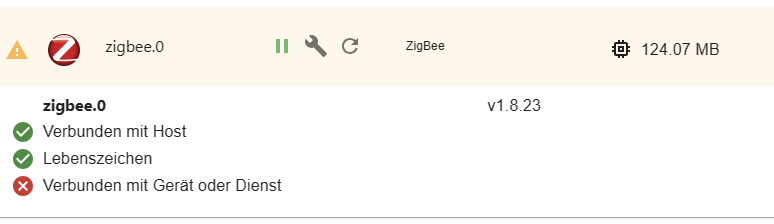
-
Der Service dürfte 'motion' heißen.
Also
sudo systemctl stop motion sudo systemctl disable motion sudo systemctl mask motion@thomas-braun said in Noch ein Zigbee Problem....:
Der Service dürfte 'motion' heißen.
Also
sudo systemctl stop motion
sudo systemctl disable motion
sudo systemctl mask motion
Admin läuft wieder :)!!!
-
@thomas-braun eingeschalten und gestartet wird aber eigentlich motioneye, somit bin ich von motioneye zum stoppen und ausschalten, ausgegangen
Der Server heißt aber 'motion'. Und der sitzt (bzw. saß) auf dem Port.
-
@thomas-braun said in Noch ein Zigbee Problem....:
Der Service dürfte 'motion' heißen.
Also
sudo systemctl stop motion
sudo systemctl disable motion
sudo systemctl mask motion
Admin läuft wieder :)!!!
Zigbee macht noch Zicken.
2023-08-17 19:31:16.406 - info: host.raspi stopInstance system.adapter.zigbee.0 (force=false, process=true) 2023-08-17 19:31:16.412 - info: host.raspi stopInstance system.adapter.zigbee.0 send kill signal 2023-08-17 19:31:16.414 - info: zigbee.0 (2106) Got terminate signal TERMINATE_YOURSELF 2023-08-17 19:31:16.418 - info: zigbee.0 (2106) cleaned everything up... 2023-08-17 19:31:17.190 - info: zigbee.0 (2106) Zigbee: disabling joining new devices. 2023-08-17 19:31:17.225 - warn: zigbee.0 (2106) Failed to stop zigbee during startup 2023-08-17 19:31:17.226 - info: zigbee.0 (2106) terminating 2023-08-17 19:31:17.228 - info: zigbee.0 (2106) Terminated (ADAPTER_REQUESTED_TERMINATION): Without reason 2023-08-17 19:31:17.229 - info: zigbee.0 (2106) terminating 2023-08-17 19:31:17.294 - info: zigbee.0 (2106) debug devices set to [] 2023-08-17 19:31:17.418 - info: host.raspi stopInstance system.adapter.zigbee.0 killing pid 2106 2023-08-17 19:31:16.418 - info: zigbee.0 (2106) cleaned everything up... 2023-08-17 19:31:17.190 - info: zigbee.0 (2106) Zigbee: disabling joining new devices. 2023-08-17 19:31:17.225 - warn: zigbee.0 (2106) Failed to stop zigbee during startup 2023-08-17 19:31:17.226 - info: zigbee.0 (2106) terminating 2023-08-17 19:31:17.228 - info: zigbee.0 (2106) Terminated (ADAPTER_REQUESTED_TERMINATION): Without reason 2023-08-17 19:31:17.229 - info: zigbee.0 (2106) terminating 2023-08-17 19:31:17.294 - info: zigbee.0 (2106) debug devices set to [] 2023-08-17 19:31:17.418 - info: host.raspi stopInstance system.adapter.zigbee.0 killing pid 2106 2023-08-17 19:31:17.968 - info: host.raspi instance system.adapter.zigbee.0 terminated with code 11 (ADAPTER_REQUESTED_TERMINATION) 2023-08-17 19:31:19.710 - info: host.raspi instance system.adapter.zigbee.0 started with pid 15172 2023-08-17 19:31:25.073 - info: zigbee.0 (15172) starting. Version 1.8.23 in /opt/iobroker/node_modules/iobroker.zigbee, node: v18.17.1, js-controller: 5.0.11 2023-08-17 19:31:25.244 - info: zigbee.0 (15172) delete old Backup files. keep only last 10 2023-08-17 19:31:25.247 - info: zigbee.0 (15172) Starting Zigbee npm ... 2023-08-17 19:31:25.073 - info: zigbee.0 (15172) starting. Version 1.8.23 in /opt/iobroker/node_modules/iobroker.zigbee, node: v18.17.1, js-controller: 5.0.11 2023-08-17 19:31:25.244 - info: zigbee.0 (15172) delete old Backup files. keep only last 10 2023-08-17 19:31:25.247 - info: zigbee.0 (15172) Starting Zigbee npm ... 2023-08-17 19:31:25.995 - error: zigbee.0 (15172) Starting zigbee-herdsman problem : "Error while opening serialport 'Error: Error: No such file or directory, cannot open /dev/serial/by-id/usb-Texas_Instruments_XDS110__03.00.00.26__Embed_with_CMSIS-DAP_L1100GB8-if00'" 2023-08-17 19:31:25.996 - error: zigbee.0 (15172) Failed to start Zigbee 2023-08-17 19:31:25.997 - error: zigbee.0 (15172) Error herdsman start 2023-08-17 19:31:25.999 - info: zigbee.0 (15172) Installed Version: iobroker.zigbee@1.8.23 2023-08-17 19:31:25.995 - error: zigbee.0 (15172) Starting zigbee-herdsman problem : "Error while opening serialport 'Error: Error: No such file or directory, cannot open /dev/serial/by-id/usb-Texas_Instruments_XDS110__03.00.00.26__Embed_with_CMSIS-DAP_L1100GB8-if00'" 2023-08-17 19:31:25.996 - error: zigbee.0 (15172) Failed to start Zigbee 2023-08-17 19:31:25.997 - error: zigbee.0 (15172) Error herdsman start 2023-08-17 19:31:25.999 - info: zigbee.0 (15172) Installed Version: iobroker.zigbee@1.8.23 2023-08-17 19:31:35.999 - info: zigbee.0 (15172) Try to reconnect. 1 attempts left 2023-08-17 19:31:36.000 - info: zigbee.0 (15172) Starting Zigbee npm ... 2023-08-17 19:31:36.030 - error: zigbee.0 (15172) Starting zigbee-herdsman problem : "Error while opening serialport 'Error: Error: No such file or directory, cannot open /dev/serial/by-id/usb-Texas_Instruments_XDS110__03.00.00.26__Embed_with_CMSIS-DAP_L1100GB8-if00'" 2023-08-17 19:31:36.032 - error: zigbee.0 (15172) Failed to start Zigbee 2023-08-17 19:31:36.034 - error: zigbee.0 (15172) Error herdsman start 2023-08-17 19:31:36.035 - info: zigbee.0 (15172) Installed Version: iobroker.zigbee@1.8.23 2023-08-17 19:31:35.999 - info: zigbee.0 (15172) Try to reconnect. 1 attempts left 2023-08-17 19:31:36.000 - info: zigbee.0 (15172) Starting Zigbee npm ... 2023-08-17 19:31:36.030 - error: zigbee.0 (15172) Starting zigbee-herdsman problem : "Error while opening serialport 'Error: Error: No such file or directory, cannot open /dev/serial/by-id/usb-Texas_Instruments_XDS110__03.00.00.26__Embed_with_CMSIS-DAP_L1100GB8-if00'" 2023-08-17 19:31:36.032 - error: zigbee.0 (15172) Failed to start Zigbee 2023-08-17 19:31:36.034 - error: zigbee.0 (15172) Error herdsman start 2023-08-17 19:31:36.035 - info: zigbee.0 (15172) Installed Version: iobroker.zigbee@1.8.23 2023-08-17 19:32:05.512 - info: javascript.0 (1204) -
Der Server heißt aber 'motion'. Und der sitzt (bzw. saß) auf dem Port.
-
Zigbee macht noch Zicken.
2023-08-17 19:31:16.406 - info: host.raspi stopInstance system.adapter.zigbee.0 (force=false, process=true) 2023-08-17 19:31:16.412 - info: host.raspi stopInstance system.adapter.zigbee.0 send kill signal 2023-08-17 19:31:16.414 - info: zigbee.0 (2106) Got terminate signal TERMINATE_YOURSELF 2023-08-17 19:31:16.418 - info: zigbee.0 (2106) cleaned everything up... 2023-08-17 19:31:17.190 - info: zigbee.0 (2106) Zigbee: disabling joining new devices. 2023-08-17 19:31:17.225 - warn: zigbee.0 (2106) Failed to stop zigbee during startup 2023-08-17 19:31:17.226 - info: zigbee.0 (2106) terminating 2023-08-17 19:31:17.228 - info: zigbee.0 (2106) Terminated (ADAPTER_REQUESTED_TERMINATION): Without reason 2023-08-17 19:31:17.229 - info: zigbee.0 (2106) terminating 2023-08-17 19:31:17.294 - info: zigbee.0 (2106) debug devices set to [] 2023-08-17 19:31:17.418 - info: host.raspi stopInstance system.adapter.zigbee.0 killing pid 2106 2023-08-17 19:31:16.418 - info: zigbee.0 (2106) cleaned everything up... 2023-08-17 19:31:17.190 - info: zigbee.0 (2106) Zigbee: disabling joining new devices. 2023-08-17 19:31:17.225 - warn: zigbee.0 (2106) Failed to stop zigbee during startup 2023-08-17 19:31:17.226 - info: zigbee.0 (2106) terminating 2023-08-17 19:31:17.228 - info: zigbee.0 (2106) Terminated (ADAPTER_REQUESTED_TERMINATION): Without reason 2023-08-17 19:31:17.229 - info: zigbee.0 (2106) terminating 2023-08-17 19:31:17.294 - info: zigbee.0 (2106) debug devices set to [] 2023-08-17 19:31:17.418 - info: host.raspi stopInstance system.adapter.zigbee.0 killing pid 2106 2023-08-17 19:31:17.968 - info: host.raspi instance system.adapter.zigbee.0 terminated with code 11 (ADAPTER_REQUESTED_TERMINATION) 2023-08-17 19:31:19.710 - info: host.raspi instance system.adapter.zigbee.0 started with pid 15172 2023-08-17 19:31:25.073 - info: zigbee.0 (15172) starting. Version 1.8.23 in /opt/iobroker/node_modules/iobroker.zigbee, node: v18.17.1, js-controller: 5.0.11 2023-08-17 19:31:25.244 - info: zigbee.0 (15172) delete old Backup files. keep only last 10 2023-08-17 19:31:25.247 - info: zigbee.0 (15172) Starting Zigbee npm ... 2023-08-17 19:31:25.073 - info: zigbee.0 (15172) starting. Version 1.8.23 in /opt/iobroker/node_modules/iobroker.zigbee, node: v18.17.1, js-controller: 5.0.11 2023-08-17 19:31:25.244 - info: zigbee.0 (15172) delete old Backup files. keep only last 10 2023-08-17 19:31:25.247 - info: zigbee.0 (15172) Starting Zigbee npm ... 2023-08-17 19:31:25.995 - error: zigbee.0 (15172) Starting zigbee-herdsman problem : "Error while opening serialport 'Error: Error: No such file or directory, cannot open /dev/serial/by-id/usb-Texas_Instruments_XDS110__03.00.00.26__Embed_with_CMSIS-DAP_L1100GB8-if00'" 2023-08-17 19:31:25.996 - error: zigbee.0 (15172) Failed to start Zigbee 2023-08-17 19:31:25.997 - error: zigbee.0 (15172) Error herdsman start 2023-08-17 19:31:25.999 - info: zigbee.0 (15172) Installed Version: iobroker.zigbee@1.8.23 2023-08-17 19:31:25.995 - error: zigbee.0 (15172) Starting zigbee-herdsman problem : "Error while opening serialport 'Error: Error: No such file or directory, cannot open /dev/serial/by-id/usb-Texas_Instruments_XDS110__03.00.00.26__Embed_with_CMSIS-DAP_L1100GB8-if00'" 2023-08-17 19:31:25.996 - error: zigbee.0 (15172) Failed to start Zigbee 2023-08-17 19:31:25.997 - error: zigbee.0 (15172) Error herdsman start 2023-08-17 19:31:25.999 - info: zigbee.0 (15172) Installed Version: iobroker.zigbee@1.8.23 2023-08-17 19:31:35.999 - info: zigbee.0 (15172) Try to reconnect. 1 attempts left 2023-08-17 19:31:36.000 - info: zigbee.0 (15172) Starting Zigbee npm ... 2023-08-17 19:31:36.030 - error: zigbee.0 (15172) Starting zigbee-herdsman problem : "Error while opening serialport 'Error: Error: No such file or directory, cannot open /dev/serial/by-id/usb-Texas_Instruments_XDS110__03.00.00.26__Embed_with_CMSIS-DAP_L1100GB8-if00'" 2023-08-17 19:31:36.032 - error: zigbee.0 (15172) Failed to start Zigbee 2023-08-17 19:31:36.034 - error: zigbee.0 (15172) Error herdsman start 2023-08-17 19:31:36.035 - info: zigbee.0 (15172) Installed Version: iobroker.zigbee@1.8.23 2023-08-17 19:31:35.999 - info: zigbee.0 (15172) Try to reconnect. 1 attempts left 2023-08-17 19:31:36.000 - info: zigbee.0 (15172) Starting Zigbee npm ... 2023-08-17 19:31:36.030 - error: zigbee.0 (15172) Starting zigbee-herdsman problem : "Error while opening serialport 'Error: Error: No such file or directory, cannot open /dev/serial/by-id/usb-Texas_Instruments_XDS110__03.00.00.26__Embed_with_CMSIS-DAP_L1100GB8-if00'" 2023-08-17 19:31:36.032 - error: zigbee.0 (15172) Failed to start Zigbee 2023-08-17 19:31:36.034 - error: zigbee.0 (15172) Error herdsman start 2023-08-17 19:31:36.035 - info: zigbee.0 (15172) Installed Version: iobroker.zigbee@1.8.23 2023-08-17 19:32:05.512 - info: javascript.0 (1204) -
pi@raspi:~ $ find /dev/serial/by-id/ -maxdepth 1 -mindepth 1
find: ‘/dev/serial/by-id/’: Datei oder Verzeichnis nicht gefunden
was ist jetzt mit dem serial port?
pi@raspi:~ $ ls -la /dev/serial/by-id/ ls: Zugriff auf '/dev/serial/by-id/' nicht möglich: Datei oder Verzeichnis nicht gefunden -
pi@raspi:~ $ find /dev/serial/by-id/ -maxdepth 1 -mindepth 1
find: ‘/dev/serial/by-id/’: Datei oder Verzeichnis nicht gefunden
was ist jetzt mit dem serial port?
pi@raspi:~ $ ls -la /dev/serial/by-id/ ls: Zugriff auf '/dev/serial/by-id/' nicht möglich: Datei oder Verzeichnis nicht gefundensudo apt update apt policy udev -
sudo apt update apt policy udevpi@raspi:~ $ sudo apt update OK:1 http://phoscon.de/apt/deconz bullseye InRelease Holen:2 http://raspbian.raspberrypi.org/raspbian bullseye InRelease [15,0 kB] OK:3 https://deb.nodesource.com/node_12.x bullseye InRelease OK:4 http://archive.raspberrypi.org/debian bullseye InRelease OK:5 https://deb.nodesource.com/node_14.x bullseye InRelease OK:6 https://deb.nodesource.com/node_16.x bullseye InRelease OK:7 https://deb.nodesource.com/node_18.x bullseye InRelease Es wurden 15,0 kB in 2 s geholt (7.010 B/s). Paketlisten werden gelesen… Fertig Abhängigkeitsbaum wird aufgebaut… Fertig Statusinformationen werden eingelesen… Fertig Alle Pakete sind aktuell. pi@raspi:~ $ apt policy udev udev: Installiert: 247.3-7+rpi1+deb11u2 Installationskandidat: 247.3-7+rpi1+deb11u2 Versionstabelle: *** 247.3-7+rpi1+deb11u2 500 500 http://raspbian.raspberrypi.org/raspbian bullseye/main armhf Packages 100 /var/lib/dpkg/status -
pi@raspi:~ $ sudo apt update OK:1 http://phoscon.de/apt/deconz bullseye InRelease Holen:2 http://raspbian.raspberrypi.org/raspbian bullseye InRelease [15,0 kB] OK:3 https://deb.nodesource.com/node_12.x bullseye InRelease OK:4 http://archive.raspberrypi.org/debian bullseye InRelease OK:5 https://deb.nodesource.com/node_14.x bullseye InRelease OK:6 https://deb.nodesource.com/node_16.x bullseye InRelease OK:7 https://deb.nodesource.com/node_18.x bullseye InRelease Es wurden 15,0 kB in 2 s geholt (7.010 B/s). Paketlisten werden gelesen… Fertig Abhängigkeitsbaum wird aufgebaut… Fertig Statusinformationen werden eingelesen… Fertig Alle Pakete sind aktuell. pi@raspi:~ $ apt policy udev udev: Installiert: 247.3-7+rpi1+deb11u2 Installationskandidat: 247.3-7+rpi1+deb11u2 Versionstabelle: *** 247.3-7+rpi1+deb11u2 500 500 http://raspbian.raspberrypi.org/raspbian bullseye/main armhf Packages 100 /var/lib/dpkg/statusDas ist der udev bug. Betrifft wohl immer noch die 32bit-Raspberry-Version, alles andere ist aktueller.
https://forum.iobroker.net/topic/65017/zigbee-conbee2-funktioniert-nach-update-nicht-mehr-udev
-
Das ist der udev bug. Betrifft wohl immer noch die 32bit-Raspberry-Version, alles andere ist aktueller.
https://forum.iobroker.net/topic/65017/zigbee-conbee2-funktioniert-nach-update-nicht-mehr-udev
@thomas-braun
:+1:pi@raspi:/ $ sudo apt update OK:1 http://phoscon.de/apt/deconz bullseye InRelease Holen:2 http://deb.debian.org/debian bullseye-proposed-updates InRelease [54,0 kB] OK:3 http://archive.raspberrypi.org/debian bullseye InRelease OK:4 http://raspbian.raspberrypi.org/raspbian bullseye InRelease OK:5 https://deb.nodesource.com/node_12.x bullseye InRelease OK:6 https://deb.nodesource.com/node_14.x bullseye InRelease OK:7 https://deb.nodesource.com/node_16.x bullseye InRelease OK:8 https://deb.nodesource.com/node_18.x bullseye InRelease Fehl:2 http://deb.debian.org/debian bullseye-proposed-updates InRelease Die folgenden Signaturen konnten nicht überprüft werden, weil ihr öffentlicher Schlüssel nicht verfügbar ist: NO_PUBKEY 0E98404D386FA1D9 NO_PUBKEY 6ED0E7B82643E131 Paketlisten werden gelesen… Fertig W: GPG-Fehler: http://deb.debian.org/debian bullseye-proposed-updates InRelease: Die folgenden Signaturen konnten nicht überprüft werden, weil ihr öffentlicher Schlüssel nicht verfügbar ist: NO_PUBKEY 0E98404D386FA1D9 NO_PUBKEY 6ED0E7B82643E131 E: Das Depot »http://deb.debian.org/debian bullseye-proposed-updates InRelease« ist nicht signiert. N: Eine Aktualisierung von solch einem Depot kann nicht auf eine sichere Art durchgeführt werden, daher ist es standardmäßig deaktiviert. N: Weitere Details zur Erzeugung von Paketdepots sowie zu deren Benutzerkonfiguration finden Sie in der Handbuchseite apt-secure(8).kann ich das übergehen?
-
@thomas-braun
:+1:pi@raspi:/ $ sudo apt update OK:1 http://phoscon.de/apt/deconz bullseye InRelease Holen:2 http://deb.debian.org/debian bullseye-proposed-updates InRelease [54,0 kB] OK:3 http://archive.raspberrypi.org/debian bullseye InRelease OK:4 http://raspbian.raspberrypi.org/raspbian bullseye InRelease OK:5 https://deb.nodesource.com/node_12.x bullseye InRelease OK:6 https://deb.nodesource.com/node_14.x bullseye InRelease OK:7 https://deb.nodesource.com/node_16.x bullseye InRelease OK:8 https://deb.nodesource.com/node_18.x bullseye InRelease Fehl:2 http://deb.debian.org/debian bullseye-proposed-updates InRelease Die folgenden Signaturen konnten nicht überprüft werden, weil ihr öffentlicher Schlüssel nicht verfügbar ist: NO_PUBKEY 0E98404D386FA1D9 NO_PUBKEY 6ED0E7B82643E131 Paketlisten werden gelesen… Fertig W: GPG-Fehler: http://deb.debian.org/debian bullseye-proposed-updates InRelease: Die folgenden Signaturen konnten nicht überprüft werden, weil ihr öffentlicher Schlüssel nicht verfügbar ist: NO_PUBKEY 0E98404D386FA1D9 NO_PUBKEY 6ED0E7B82643E131 E: Das Depot »http://deb.debian.org/debian bullseye-proposed-updates InRelease« ist nicht signiert. N: Eine Aktualisierung von solch einem Depot kann nicht auf eine sichere Art durchgeführt werden, daher ist es standardmäßig deaktiviert. N: Weitere Details zur Erzeugung von Paketdepots sowie zu deren Benutzerkonfiguration finden Sie in der Handbuchseite apt-secure(8).kann ich das übergehen?
@brokeling sagte in Noch ein Zigbee Problem....:
kann ich das übergehen?
Nein. Der Schlüssel muss rein.
-
@brokeling sagte in Noch ein Zigbee Problem....:
kann ich das übergehen?
Nein. Der Schlüssel muss rein.
-
@thomas-braun
wie kann ich ihn dazu bringen?Steht wenn ich mich recht entsinne im HowTo drin. Ggfls aber mit einer andren key-ID. Musste mal schauen.
-
Steht wenn ich mich recht entsinne im HowTo drin. Ggfls aber mit einer andren key-ID. Musste mal schauen.
@thomas-braun
ja das stimmt.
Aber da komm ich nicht mit klar. Bei den Lösungen kommen auch noch Fehlermeldungen...
Ich glaub ich spiele ein Backup zurück.
Und dann lass ich das System erstmal, wenn Zigbee mit dem Controller-update läuft! -
@thomas-braun
ja das stimmt.
Aber da komm ich nicht mit klar. Bei den Lösungen kommen auch noch Fehlermeldungen...
Ich glaub ich spiele ein Backup zurück.
Und dann lass ich das System erstmal, wenn Zigbee mit dem Controller-update läuft!@brokeling sagte in Noch ein Zigbee Problem....:
Bei den Lösungen kommen auch noch Fehlermeldungen...
Unbekannte, streng geheime?
-
@thomas-braun
ja das stimmt.
Aber da komm ich nicht mit klar. Bei den Lösungen kommen auch noch Fehlermeldungen...
Ich glaub ich spiele ein Backup zurück.
Und dann lass ich das System erstmal, wenn Zigbee mit dem Controller-update läuft!sudo apt-key adv --keyserver keyserver.ubuntu.com --recv-keys 0E98404D386FA1D9 sudo apt updatefunktioniert nicht?
-
sudo apt-key adv --keyserver keyserver.ubuntu.com --recv-keys 0E98404D386FA1D9
sudo apt update
funktioniert nicht?
@thomas-braun
will ich nicht vorenthalten:pi@raspi:/ $ sudo apt-key adv --keyserver keyserver.ubuntu.com --recv-keys 648ACFD622F3D138 Warning: apt-key is deprecated. Manage keyring files in trusted.gpg.d instead (see apt-key(8)). Executing: /tmp/apt-key-gpghome.dzFpL9t6R4/gpg.1.sh --keyserver keyserver.ubuntu.com --recv-keys 648ACFD622F3D138 gpg: Schlüssel DC30D7C23CBBABEE: Öffentlicher Schlüssel "Debian Archive Automatic Signing Key (10/buster) <ftpmaster@debian.org>" importiert gpg: Anzahl insgesamt bearbeiteter Schlüssel: 1 gpg: importiert: 1 pi@raspi:/ $ sudo apt update OK:1 http://phoscon.de/apt/deconz bullseye InRelease OK:2 http://archive.raspberrypi.org/debian bullseye InRelease Holen:3 http://deb.debian.org/debian bullseye-proposed-updates InRelease [54,0 kB] OK:4 http://raspbian.raspberrypi.org/raspbian bullseye InRelease OK:5 https://deb.nodesource.com/node_12.x bullseye InRelease OK:6 https://deb.nodesource.com/node_14.x bullseye InRelease OK:7 https://deb.nodesource.com/node_16.x bullseye InRelease OK:8 https://deb.nodesource.com/node_18.x bullseye InRelease Fehl:3 http://deb.debian.org/debian bullseye-proposed-updates InRelease Die folgenden Signaturen konnten nicht überprüft werden, weil ihr öffentlicher Schlüssel nicht verfügbar ist: NO_PUBKEY 0E98404D386FA1D9 NO_PUBKEY 6ED0E7B82643E131 Paketlisten werden gelesen… Fertig W: GPG-Fehler: http://deb.debian.org/debian bullseye-proposed-updates InRelease: Die folgenden Signaturen konnten nicht überprüft werden, weil ihr öffentlicher Schlüssel nicht verfügbar ist: NO_PUBKEY 0E98404D386FA1D9 NO_PUBKEY 6ED0E7B82643E131 E: Das Depot »http://deb.debian.org/debian bullseye-proposed-updates InRelease« ist nicht signiert. N: Eine Aktualisierung von solch einem Depot kann nicht auf eine sichere Art durchgeführt werden, daher ist es standardmäßig deaktiviert. N: Weitere Details zur Erzeugung von Paketdepots sowie zu deren Benutzerkonfiguration finden Sie in der Handbuchseite apt-secure(8). pi@raspi:/ $ sudo apt install udev=247.3-7+deb11u4 libudev1=247.3-7+deb11u4 Paketlisten werden gelesen… Fertig Abhängigkeitsbaum wird aufgebaut… Fertig Statusinformationen werden eingelesen… Fertig E: Version »247.3-7+deb11u4« für »udev« konnte nicht gefunden werden. E: Version »247.3-7+deb11u4« für »libudev1« konnte nicht gefunden werden. pi@raspi:/ $ -
@thomas-braun
will ich nicht vorenthalten:pi@raspi:/ $ sudo apt-key adv --keyserver keyserver.ubuntu.com --recv-keys 648ACFD622F3D138 Warning: apt-key is deprecated. Manage keyring files in trusted.gpg.d instead (see apt-key(8)). Executing: /tmp/apt-key-gpghome.dzFpL9t6R4/gpg.1.sh --keyserver keyserver.ubuntu.com --recv-keys 648ACFD622F3D138 gpg: Schlüssel DC30D7C23CBBABEE: Öffentlicher Schlüssel "Debian Archive Automatic Signing Key (10/buster) <ftpmaster@debian.org>" importiert gpg: Anzahl insgesamt bearbeiteter Schlüssel: 1 gpg: importiert: 1 pi@raspi:/ $ sudo apt update OK:1 http://phoscon.de/apt/deconz bullseye InRelease OK:2 http://archive.raspberrypi.org/debian bullseye InRelease Holen:3 http://deb.debian.org/debian bullseye-proposed-updates InRelease [54,0 kB] OK:4 http://raspbian.raspberrypi.org/raspbian bullseye InRelease OK:5 https://deb.nodesource.com/node_12.x bullseye InRelease OK:6 https://deb.nodesource.com/node_14.x bullseye InRelease OK:7 https://deb.nodesource.com/node_16.x bullseye InRelease OK:8 https://deb.nodesource.com/node_18.x bullseye InRelease Fehl:3 http://deb.debian.org/debian bullseye-proposed-updates InRelease Die folgenden Signaturen konnten nicht überprüft werden, weil ihr öffentlicher Schlüssel nicht verfügbar ist: NO_PUBKEY 0E98404D386FA1D9 NO_PUBKEY 6ED0E7B82643E131 Paketlisten werden gelesen… Fertig W: GPG-Fehler: http://deb.debian.org/debian bullseye-proposed-updates InRelease: Die folgenden Signaturen konnten nicht überprüft werden, weil ihr öffentlicher Schlüssel nicht verfügbar ist: NO_PUBKEY 0E98404D386FA1D9 NO_PUBKEY 6ED0E7B82643E131 E: Das Depot »http://deb.debian.org/debian bullseye-proposed-updates InRelease« ist nicht signiert. N: Eine Aktualisierung von solch einem Depot kann nicht auf eine sichere Art durchgeführt werden, daher ist es standardmäßig deaktiviert. N: Weitere Details zur Erzeugung von Paketdepots sowie zu deren Benutzerkonfiguration finden Sie in der Handbuchseite apt-secure(8). pi@raspi:/ $ sudo apt install udev=247.3-7+deb11u4 libudev1=247.3-7+deb11u4 Paketlisten werden gelesen… Fertig Abhängigkeitsbaum wird aufgebaut… Fertig Statusinformationen werden eingelesen… Fertig E: Version »247.3-7+deb11u4« für »udev« konnte nicht gefunden werden. E: Version »247.3-7+deb11u4« für »libudev1« konnte nicht gefunden werden. pi@raspi:/ $Ich muss zurückspielen.
Jetzt noch etwas Hilfe:pi@raspi:/ $ sudo raspiBackup -d /dev/sda /backup/raspi/raspi-rsync-backup-20230814-050001 --- RBK0009I: raspi: raspiBackup.sh V0.6.8 - 2023-04-15 (f600458) Do 17. Aug 21:08:19 CEST 2023 gestartet. --- RBK0116I: Konfigurationsdatei /usr/local/etc/raspiBackup.conf wird benutzt. --- RBK0031I: Prüfe ob eine neue Version von raspiBackup.sh verfügbar ist. /dev/sda2 on / type ext4 (rw,noatime,stripe=8191) /dev/sda1 on /boot type vfat (rw,relatime,fmask=0022,dmask=0022,codepage=437,iocharset=ascii,shortname=mixed,flush,errors=remount-ro) ??? RBK0274E: Das Restoregerät /dev/sda hat gemountete Partitionen. Hinweis: Ein Restore auf das aktive System ist nicht möglich. --- RBK0033I: Bitte warten bis aufgeräumt wurde. ??? RBK0077E: Restore wurde fehlerhaft beendet. Siehe vorhergehende Fehlermeldungen. --- RBK0010I: raspi: raspiBackup.sh V0.6.8 - 2023-04-15 (f600458) Do 17. Aug 21:08:42 CEST 2023 beendet mit Returncode 137. --- RBK0026I: Debug Logdatei wurde in /home/pi/raspiBackup.logr gesichert.Lautet der Befehl
sudo raspiBackup -d /dev/sda2 /backup/raspi/raspi-rsync-backup-20230814-050001 -
@thomas-braun
will ich nicht vorenthalten:pi@raspi:/ $ sudo apt-key adv --keyserver keyserver.ubuntu.com --recv-keys 648ACFD622F3D138 Warning: apt-key is deprecated. Manage keyring files in trusted.gpg.d instead (see apt-key(8)). Executing: /tmp/apt-key-gpghome.dzFpL9t6R4/gpg.1.sh --keyserver keyserver.ubuntu.com --recv-keys 648ACFD622F3D138 gpg: Schlüssel DC30D7C23CBBABEE: Öffentlicher Schlüssel "Debian Archive Automatic Signing Key (10/buster) <ftpmaster@debian.org>" importiert gpg: Anzahl insgesamt bearbeiteter Schlüssel: 1 gpg: importiert: 1 pi@raspi:/ $ sudo apt update OK:1 http://phoscon.de/apt/deconz bullseye InRelease OK:2 http://archive.raspberrypi.org/debian bullseye InRelease Holen:3 http://deb.debian.org/debian bullseye-proposed-updates InRelease [54,0 kB] OK:4 http://raspbian.raspberrypi.org/raspbian bullseye InRelease OK:5 https://deb.nodesource.com/node_12.x bullseye InRelease OK:6 https://deb.nodesource.com/node_14.x bullseye InRelease OK:7 https://deb.nodesource.com/node_16.x bullseye InRelease OK:8 https://deb.nodesource.com/node_18.x bullseye InRelease Fehl:3 http://deb.debian.org/debian bullseye-proposed-updates InRelease Die folgenden Signaturen konnten nicht überprüft werden, weil ihr öffentlicher Schlüssel nicht verfügbar ist: NO_PUBKEY 0E98404D386FA1D9 NO_PUBKEY 6ED0E7B82643E131 Paketlisten werden gelesen… Fertig W: GPG-Fehler: http://deb.debian.org/debian bullseye-proposed-updates InRelease: Die folgenden Signaturen konnten nicht überprüft werden, weil ihr öffentlicher Schlüssel nicht verfügbar ist: NO_PUBKEY 0E98404D386FA1D9 NO_PUBKEY 6ED0E7B82643E131 E: Das Depot »http://deb.debian.org/debian bullseye-proposed-updates InRelease« ist nicht signiert. N: Eine Aktualisierung von solch einem Depot kann nicht auf eine sichere Art durchgeführt werden, daher ist es standardmäßig deaktiviert. N: Weitere Details zur Erzeugung von Paketdepots sowie zu deren Benutzerkonfiguration finden Sie in der Handbuchseite apt-secure(8). pi@raspi:/ $ sudo apt install udev=247.3-7+deb11u4 libudev1=247.3-7+deb11u4 Paketlisten werden gelesen… Fertig Abhängigkeitsbaum wird aufgebaut… Fertig Statusinformationen werden eingelesen… Fertig E: Version »247.3-7+deb11u4« für »udev« konnte nicht gefunden werden. E: Version »247.3-7+deb11u4« für »libudev1« konnte nicht gefunden werden. pi@raspi:/ $Kleine Transferleistung: Die IDs der vermissten keys werden genannt. Welche ID muss man dann bei --recv-keys wohl angeben?
-
Ich muss zurückspielen.
Jetzt noch etwas Hilfe:pi@raspi:/ $ sudo raspiBackup -d /dev/sda /backup/raspi/raspi-rsync-backup-20230814-050001 --- RBK0009I: raspi: raspiBackup.sh V0.6.8 - 2023-04-15 (f600458) Do 17. Aug 21:08:19 CEST 2023 gestartet. --- RBK0116I: Konfigurationsdatei /usr/local/etc/raspiBackup.conf wird benutzt. --- RBK0031I: Prüfe ob eine neue Version von raspiBackup.sh verfügbar ist. /dev/sda2 on / type ext4 (rw,noatime,stripe=8191) /dev/sda1 on /boot type vfat (rw,relatime,fmask=0022,dmask=0022,codepage=437,iocharset=ascii,shortname=mixed,flush,errors=remount-ro) ??? RBK0274E: Das Restoregerät /dev/sda hat gemountete Partitionen. Hinweis: Ein Restore auf das aktive System ist nicht möglich. --- RBK0033I: Bitte warten bis aufgeräumt wurde. ??? RBK0077E: Restore wurde fehlerhaft beendet. Siehe vorhergehende Fehlermeldungen. --- RBK0010I: raspi: raspiBackup.sh V0.6.8 - 2023-04-15 (f600458) Do 17. Aug 21:08:42 CEST 2023 beendet mit Returncode 137. --- RBK0026I: Debug Logdatei wurde in /home/pi/raspiBackup.logr gesichert.Lautet der Befehl
sudo raspiBackup -d /dev/sda2 /backup/raspi/raspi-rsync-backup-20230814-050001@brokeling sagte in Noch ein Zigbee Problem....:
Ich muss zurückspielen.
Wegen der fehlenden keys?????


853
Online32.4k
Users81.5k
Topics1.3m
Posts