Skip to content
  • Home
  • Recent
  • Tags
  • 0 Unread 0
  • Categories
  • Unreplied
  • Popular
  • GitHub
  • Docu
  • Hilfe
Skins
  • Light
  • Brite
  • Cerulean
  • Cosmo
  • Flatly
  • Journal
  • Litera
  • Lumen
  • Lux
  • Materia
  • Minty
  • Morph
  • Pulse
  • Sandstone
  • Simplex
  • Sketchy
  • Spacelab
  • United
  • Yeti
  • Zephyr
  • Dark
  • Cyborg
  • Darkly
  • Quartz
  • Slate
  • Solar
  • Superhero
  • Vapor

  • Default (No Skin)
  • No Skin
Collapse
ioBroker Logo

Community Forum

donate donate
  1. ioBroker Community Home
  2. Deutsch
  3. ioBroker Allgemein
  4. Noch ein Zigbee Problem....

NEWS

  • UPDATE 31.10.: Amazon Alexa - ioBroker Skill läuft aus ?
    apollon77A
    apollon77
    48
    3
    8.9k

  • Monatsrückblick – September 2025
    BluefoxB
    Bluefox
    13
    1
    2.2k

  • Neues Video "KI im Smart Home" - ioBroker plus n8n
    BluefoxB
    Bluefox
    16
    1
    3.4k

Noch ein Zigbee Problem....

Scheduled Pinned Locked Moved ioBroker Allgemein
137 Posts 7 Posters 16.6k Views 5 Watching
  • Oldest to Newest
  • Newest to Oldest
  • Most Votes
Reply
  • Reply as topic
Log in to reply
This topic has been deleted. Only users with topic management privileges can see it.
  • B brokeling

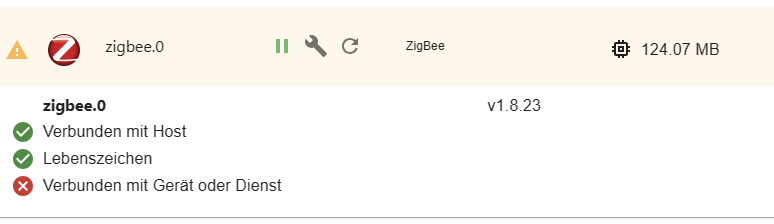
    @crunchip
    ich glaube ich habe kein motion...

    pi@raspi:~ $ sudo systemctl stop motioneye
    Failed to stop motioneye.service: Unit motioneye.service not loaded.
    pi@raspi:~ $ sudo systemctl disable motioneye
    Failed to disable unit: Unit file motioneye.service does not exist.
    
    Thomas BraunT Online
    Thomas BraunT Online
    Thomas Braun
    Most Active
    wrote on last edited by
    #73

    @brokeling

    Der Service dürfte 'motion' heißen.

    Also

    sudo systemctl stop motion
    sudo systemctl disable motion
    sudo systemctl mask motion
    

    Linux-Werkzeugkasten:
    https://forum.iobroker.net/topic/42952/der-kleine-iobroker-linux-werkzeugkasten
    NodeJS Fixer Skript:
    https://forum.iobroker.net/topic/68035/iob-node-fix-skript
    iob_diag: curl -sLf -o diag.sh https://iobroker.net/diag.sh && bash diag.sh

    crunchipC B 2 Replies Last reply
    0
    • Ro75R Offline
      Ro75R Offline
      Ro75
      wrote on last edited by
      #74

      Also wenn es ein Backup vom ioBroker gäbe, wäre dann die Kiste neu aufsetzen nicht schneller?

      Ro75.

      SERVER = Beelink U59 16GB DDR4 RAM 512GB SSD, FB 7490, FritzDect 200+301+440, ConBee II, Zigbee Aqara Sensoren + NOUS A1Z, NOUS A1T, Philips Hue ** ioBroker, REDIS, influxdb2, Grafana, PiHole, Plex-Mediaserver, paperless-ngx (Docker), MariaDB + phpmyadmin *** VIS-Runtime = Intel NUC 8GB RAM 128GB SSD + 24" Touchscreen

      B 1 Reply Last reply
      0
      • Ro75R Ro75

        Also wenn es ein Backup vom ioBroker gäbe, wäre dann die Kiste neu aufsetzen nicht schneller?

        Ro75.

        B Offline
        B Offline
        brokeling
        wrote on last edited by
        #75

        @ro75 said in Noch ein Zigbee Problem....:

        Also wenn es ein Backup vom ioBroker gäbe, wäre dann die Kiste neu aufsetzen nicht schneller?

        Ro75.

        Manno so schlecht ist doch mein System nicht, oder???
        Dachte immer das ist sauber.

        Ro75R 1 Reply Last reply
        0
        • Thomas BraunT Thomas Braun

          @brokeling

          Der Service dürfte 'motion' heißen.

          Also

          sudo systemctl stop motion
          sudo systemctl disable motion
          sudo systemctl mask motion
          
          crunchipC Offline
          crunchipC Offline
          crunchip
          Forum Testing Most Active
          wrote on last edited by
          #76

          @thomas-braun eingeschalten und gestartet wird aber eigentlich motioneye, somit bin ich von motioneye zum stoppen und ausschalten, ausgegangen

          umgestiegen von Proxmox auf Unraid

          Thomas BraunT 1 Reply Last reply
          0
          • B brokeling

            @ro75 said in Noch ein Zigbee Problem....:

            Also wenn es ein Backup vom ioBroker gäbe, wäre dann die Kiste neu aufsetzen nicht schneller?

            Ro75.

            Manno so schlecht ist doch mein System nicht, oder???
            Dachte immer das ist sauber.

            Ro75R Offline
            Ro75R Offline
            Ro75
            wrote on last edited by
            #77

            @brokeling motioneye, Ports, Beta, Hieroglyphen, nodejs, .......

            SERVER = Beelink U59 16GB DDR4 RAM 512GB SSD, FB 7490, FritzDect 200+301+440, ConBee II, Zigbee Aqara Sensoren + NOUS A1Z, NOUS A1T, Philips Hue ** ioBroker, REDIS, influxdb2, Grafana, PiHole, Plex-Mediaserver, paperless-ngx (Docker), MariaDB + phpmyadmin *** VIS-Runtime = Intel NUC 8GB RAM 128GB SSD + 24" Touchscreen

            1 Reply Last reply
            0
            • Thomas BraunT Thomas Braun

              @brokeling

              Der Service dürfte 'motion' heißen.

              Also

              sudo systemctl stop motion
              sudo systemctl disable motion
              sudo systemctl mask motion
              
              B Offline
              B Offline
              brokeling
              wrote on last edited by brokeling
              #78

              @thomas-braun said in Noch ein Zigbee Problem....:

              @brokeling

              Der Service dürfte 'motion' heißen.

              Also

              sudo systemctl stop motion
              sudo systemctl disable motion
              sudo systemctl mask motion
              

              Admin läuft wieder :)!!!

              B 1 Reply Last reply
              0
              • crunchipC crunchip

                @thomas-braun eingeschalten und gestartet wird aber eigentlich motioneye, somit bin ich von motioneye zum stoppen und ausschalten, ausgegangen

                Thomas BraunT Online
                Thomas BraunT Online
                Thomas Braun
                Most Active
                wrote on last edited by
                #79

                @crunchip

                Der Server heißt aber 'motion'. Und der sitzt (bzw. saß) auf dem Port.

                Linux-Werkzeugkasten:
                https://forum.iobroker.net/topic/42952/der-kleine-iobroker-linux-werkzeugkasten
                NodeJS Fixer Skript:
                https://forum.iobroker.net/topic/68035/iob-node-fix-skript
                iob_diag: curl -sLf -o diag.sh https://iobroker.net/diag.sh && bash diag.sh

                crunchipC 1 Reply Last reply
                0
                • B brokeling

                  @thomas-braun said in Noch ein Zigbee Problem....:

                  @brokeling

                  Der Service dürfte 'motion' heißen.

                  Also

                  sudo systemctl stop motion
                  sudo systemctl disable motion
                  sudo systemctl mask motion
                  

                  Admin läuft wieder :)!!!

                  B Offline
                  B Offline
                  brokeling
                  wrote on last edited by
                  #80

                  Zigbee macht noch Zicken.

                  2023-08-17 19:31:16.406  - info: host.raspi stopInstance system.adapter.zigbee.0 (force=false, process=true)
                  2023-08-17 19:31:16.412  - info: host.raspi stopInstance system.adapter.zigbee.0 send kill signal
                  2023-08-17 19:31:16.414  - info: zigbee.0 (2106) Got terminate signal TERMINATE_YOURSELF
                  2023-08-17 19:31:16.418  - info: zigbee.0 (2106) cleaned everything up...
                  2023-08-17 19:31:17.190  - info: zigbee.0 (2106) Zigbee: disabling joining new devices.
                  2023-08-17 19:31:17.225  - warn: zigbee.0 (2106) Failed to stop zigbee during startup
                  2023-08-17 19:31:17.226  - info: zigbee.0 (2106) terminating
                  2023-08-17 19:31:17.228  - info: zigbee.0 (2106) Terminated (ADAPTER_REQUESTED_TERMINATION): Without reason
                  2023-08-17 19:31:17.229  - info: zigbee.0 (2106) terminating
                  2023-08-17 19:31:17.294  - info: zigbee.0 (2106) debug devices set to []
                  2023-08-17 19:31:17.418  - info: host.raspi stopInstance system.adapter.zigbee.0 killing pid 2106
                  2023-08-17 19:31:16.418  - info: zigbee.0 (2106) cleaned everything up...
                  2023-08-17 19:31:17.190  - info: zigbee.0 (2106) Zigbee: disabling joining new devices.
                  2023-08-17 19:31:17.225  - warn: zigbee.0 (2106) Failed to stop zigbee during startup
                  2023-08-17 19:31:17.226  - info: zigbee.0 (2106) terminating
                  2023-08-17 19:31:17.228  - info: zigbee.0 (2106) Terminated (ADAPTER_REQUESTED_TERMINATION): Without reason
                  2023-08-17 19:31:17.229  - info: zigbee.0 (2106) terminating
                  2023-08-17 19:31:17.294  - info: zigbee.0 (2106) debug devices set to []
                  2023-08-17 19:31:17.418  - info: host.raspi stopInstance system.adapter.zigbee.0 killing pid 2106
                  2023-08-17 19:31:17.968  - info: host.raspi instance system.adapter.zigbee.0 terminated with code 11 (ADAPTER_REQUESTED_TERMINATION)
                  2023-08-17 19:31:19.710  - info: host.raspi instance system.adapter.zigbee.0 started with pid 15172
                  2023-08-17 19:31:25.073  - info: zigbee.0 (15172) starting. Version 1.8.23 in /opt/iobroker/node_modules/iobroker.zigbee, node: v18.17.1, js-controller: 5.0.11
                  2023-08-17 19:31:25.244  - info: zigbee.0 (15172) delete old Backup files. keep only last 10
                  2023-08-17 19:31:25.247  - info: zigbee.0 (15172) Starting Zigbee  npm ...
                  2023-08-17 19:31:25.073  - info: zigbee.0 (15172) starting. Version 1.8.23 in /opt/iobroker/node_modules/iobroker.zigbee, node: v18.17.1, js-controller: 5.0.11
                  2023-08-17 19:31:25.244  - info: zigbee.0 (15172) delete old Backup files. keep only last 10
                  2023-08-17 19:31:25.247  - info: zigbee.0 (15172) Starting Zigbee  npm ...
                  2023-08-17 19:31:25.995  - error: zigbee.0 (15172) Starting zigbee-herdsman problem : "Error while opening serialport 'Error: Error: No such file or directory, cannot open /dev/serial/by-id/usb-Texas_Instruments_XDS110__03.00.00.26__Embed_with_CMSIS-DAP_L1100GB8-if00'"
                  2023-08-17 19:31:25.996  - error: zigbee.0 (15172) Failed to start Zigbee
                  2023-08-17 19:31:25.997  - error: zigbee.0 (15172) Error herdsman start
                  2023-08-17 19:31:25.999  - info: zigbee.0 (15172) Installed Version: iobroker.zigbee@1.8.23
                  2023-08-17 19:31:25.995  - error: zigbee.0 (15172) Starting zigbee-herdsman problem : "Error while opening serialport 'Error: Error: No such file or directory, cannot open /dev/serial/by-id/usb-Texas_Instruments_XDS110__03.00.00.26__Embed_with_CMSIS-DAP_L1100GB8-if00'"
                  2023-08-17 19:31:25.996  - error: zigbee.0 (15172) Failed to start Zigbee
                  2023-08-17 19:31:25.997  - error: zigbee.0 (15172) Error herdsman start
                  2023-08-17 19:31:25.999  - info: zigbee.0 (15172) Installed Version: iobroker.zigbee@1.8.23
                  2023-08-17 19:31:35.999  - info: zigbee.0 (15172) Try to reconnect. 1 attempts left
                  2023-08-17 19:31:36.000  - info: zigbee.0 (15172) Starting Zigbee  npm ...
                  2023-08-17 19:31:36.030  - error: zigbee.0 (15172) Starting zigbee-herdsman problem : "Error while opening serialport 'Error: Error: No such file or directory, cannot open /dev/serial/by-id/usb-Texas_Instruments_XDS110__03.00.00.26__Embed_with_CMSIS-DAP_L1100GB8-if00'"
                  2023-08-17 19:31:36.032  - error: zigbee.0 (15172) Failed to start Zigbee
                  2023-08-17 19:31:36.034  - error: zigbee.0 (15172) Error herdsman start
                  2023-08-17 19:31:36.035  - info: zigbee.0 (15172) Installed Version: iobroker.zigbee@1.8.23
                  2023-08-17 19:31:35.999  - info: zigbee.0 (15172) Try to reconnect. 1 attempts left
                  2023-08-17 19:31:36.000  - info: zigbee.0 (15172) Starting Zigbee  npm ...
                  2023-08-17 19:31:36.030  - error: zigbee.0 (15172) Starting zigbee-herdsman problem : "Error while opening serialport 'Error: Error: No such file or directory, cannot open /dev/serial/by-id/usb-Texas_Instruments_XDS110__03.00.00.26__Embed_with_CMSIS-DAP_L1100GB8-if00'"
                  2023-08-17 19:31:36.032  - error: zigbee.0 (15172) Failed to start Zigbee
                  2023-08-17 19:31:36.034  - error: zigbee.0 (15172) Error herdsman start
                  2023-08-17 19:31:36.035  - info: zigbee.0 (15172) Installed Version: iobroker.zigbee@1.8.23
                  2023-08-17 19:32:05.512  - info: javascript.0 (1204) 
                  
                  
                  Thomas BraunT 1 Reply Last reply
                  0
                  • Thomas BraunT Thomas Braun

                    @crunchip

                    Der Server heißt aber 'motion'. Und der sitzt (bzw. saß) auf dem Port.

                    crunchipC Offline
                    crunchipC Offline
                    crunchip
                    Forum Testing Most Active
                    wrote on last edited by
                    #81

                    @thomas-braun sagte in Noch ein Zigbee Problem....:

                    auf dem Port

                    besser gesagt seine cam

                    umgestiegen von Proxmox auf Unraid

                    1 Reply Last reply
                    0
                    • B brokeling

                      Zigbee macht noch Zicken.

                      2023-08-17 19:31:16.406  - info: host.raspi stopInstance system.adapter.zigbee.0 (force=false, process=true)
                      2023-08-17 19:31:16.412  - info: host.raspi stopInstance system.adapter.zigbee.0 send kill signal
                      2023-08-17 19:31:16.414  - info: zigbee.0 (2106) Got terminate signal TERMINATE_YOURSELF
                      2023-08-17 19:31:16.418  - info: zigbee.0 (2106) cleaned everything up...
                      2023-08-17 19:31:17.190  - info: zigbee.0 (2106) Zigbee: disabling joining new devices.
                      2023-08-17 19:31:17.225  - warn: zigbee.0 (2106) Failed to stop zigbee during startup
                      2023-08-17 19:31:17.226  - info: zigbee.0 (2106) terminating
                      2023-08-17 19:31:17.228  - info: zigbee.0 (2106) Terminated (ADAPTER_REQUESTED_TERMINATION): Without reason
                      2023-08-17 19:31:17.229  - info: zigbee.0 (2106) terminating
                      2023-08-17 19:31:17.294  - info: zigbee.0 (2106) debug devices set to []
                      2023-08-17 19:31:17.418  - info: host.raspi stopInstance system.adapter.zigbee.0 killing pid 2106
                      2023-08-17 19:31:16.418  - info: zigbee.0 (2106) cleaned everything up...
                      2023-08-17 19:31:17.190  - info: zigbee.0 (2106) Zigbee: disabling joining new devices.
                      2023-08-17 19:31:17.225  - warn: zigbee.0 (2106) Failed to stop zigbee during startup
                      2023-08-17 19:31:17.226  - info: zigbee.0 (2106) terminating
                      2023-08-17 19:31:17.228  - info: zigbee.0 (2106) Terminated (ADAPTER_REQUESTED_TERMINATION): Without reason
                      2023-08-17 19:31:17.229  - info: zigbee.0 (2106) terminating
                      2023-08-17 19:31:17.294  - info: zigbee.0 (2106) debug devices set to []
                      2023-08-17 19:31:17.418  - info: host.raspi stopInstance system.adapter.zigbee.0 killing pid 2106
                      2023-08-17 19:31:17.968  - info: host.raspi instance system.adapter.zigbee.0 terminated with code 11 (ADAPTER_REQUESTED_TERMINATION)
                      2023-08-17 19:31:19.710  - info: host.raspi instance system.adapter.zigbee.0 started with pid 15172
                      2023-08-17 19:31:25.073  - info: zigbee.0 (15172) starting. Version 1.8.23 in /opt/iobroker/node_modules/iobroker.zigbee, node: v18.17.1, js-controller: 5.0.11
                      2023-08-17 19:31:25.244  - info: zigbee.0 (15172) delete old Backup files. keep only last 10
                      2023-08-17 19:31:25.247  - info: zigbee.0 (15172) Starting Zigbee  npm ...
                      2023-08-17 19:31:25.073  - info: zigbee.0 (15172) starting. Version 1.8.23 in /opt/iobroker/node_modules/iobroker.zigbee, node: v18.17.1, js-controller: 5.0.11
                      2023-08-17 19:31:25.244  - info: zigbee.0 (15172) delete old Backup files. keep only last 10
                      2023-08-17 19:31:25.247  - info: zigbee.0 (15172) Starting Zigbee  npm ...
                      2023-08-17 19:31:25.995  - error: zigbee.0 (15172) Starting zigbee-herdsman problem : "Error while opening serialport 'Error: Error: No such file or directory, cannot open /dev/serial/by-id/usb-Texas_Instruments_XDS110__03.00.00.26__Embed_with_CMSIS-DAP_L1100GB8-if00'"
                      2023-08-17 19:31:25.996  - error: zigbee.0 (15172) Failed to start Zigbee
                      2023-08-17 19:31:25.997  - error: zigbee.0 (15172) Error herdsman start
                      2023-08-17 19:31:25.999  - info: zigbee.0 (15172) Installed Version: iobroker.zigbee@1.8.23
                      2023-08-17 19:31:25.995  - error: zigbee.0 (15172) Starting zigbee-herdsman problem : "Error while opening serialport 'Error: Error: No such file or directory, cannot open /dev/serial/by-id/usb-Texas_Instruments_XDS110__03.00.00.26__Embed_with_CMSIS-DAP_L1100GB8-if00'"
                      2023-08-17 19:31:25.996  - error: zigbee.0 (15172) Failed to start Zigbee
                      2023-08-17 19:31:25.997  - error: zigbee.0 (15172) Error herdsman start
                      2023-08-17 19:31:25.999  - info: zigbee.0 (15172) Installed Version: iobroker.zigbee@1.8.23
                      2023-08-17 19:31:35.999  - info: zigbee.0 (15172) Try to reconnect. 1 attempts left
                      2023-08-17 19:31:36.000  - info: zigbee.0 (15172) Starting Zigbee  npm ...
                      2023-08-17 19:31:36.030  - error: zigbee.0 (15172) Starting zigbee-herdsman problem : "Error while opening serialport 'Error: Error: No such file or directory, cannot open /dev/serial/by-id/usb-Texas_Instruments_XDS110__03.00.00.26__Embed_with_CMSIS-DAP_L1100GB8-if00'"
                      2023-08-17 19:31:36.032  - error: zigbee.0 (15172) Failed to start Zigbee
                      2023-08-17 19:31:36.034  - error: zigbee.0 (15172) Error herdsman start
                      2023-08-17 19:31:36.035  - info: zigbee.0 (15172) Installed Version: iobroker.zigbee@1.8.23
                      2023-08-17 19:31:35.999  - info: zigbee.0 (15172) Try to reconnect. 1 attempts left
                      2023-08-17 19:31:36.000  - info: zigbee.0 (15172) Starting Zigbee  npm ...
                      2023-08-17 19:31:36.030  - error: zigbee.0 (15172) Starting zigbee-herdsman problem : "Error while opening serialport 'Error: Error: No such file or directory, cannot open /dev/serial/by-id/usb-Texas_Instruments_XDS110__03.00.00.26__Embed_with_CMSIS-DAP_L1100GB8-if00'"
                      2023-08-17 19:31:36.032  - error: zigbee.0 (15172) Failed to start Zigbee
                      2023-08-17 19:31:36.034  - error: zigbee.0 (15172) Error herdsman start
                      2023-08-17 19:31:36.035  - info: zigbee.0 (15172) Installed Version: iobroker.zigbee@1.8.23
                      2023-08-17 19:32:05.512  - info: javascript.0 (1204) 
                      
                      
                      Thomas BraunT Online
                      Thomas BraunT Online
                      Thomas Braun
                      Most Active
                      wrote on last edited by
                      #82

                      @brokeling

                      find /dev/serial/by-id/ -maxdepth 1 -mindepth 1
                      

                      sagt?

                      Linux-Werkzeugkasten:
                      https://forum.iobroker.net/topic/42952/der-kleine-iobroker-linux-werkzeugkasten
                      NodeJS Fixer Skript:
                      https://forum.iobroker.net/topic/68035/iob-node-fix-skript
                      iob_diag: curl -sLf -o diag.sh https://iobroker.net/diag.sh && bash diag.sh

                      B 1 Reply Last reply
                      0
                      • Thomas BraunT Thomas Braun

                        @brokeling

                        find /dev/serial/by-id/ -maxdepth 1 -mindepth 1
                        

                        sagt?

                        B Offline
                        B Offline
                        brokeling
                        wrote on last edited by brokeling
                        #83

                        @thomas-braun

                        pi@raspi:~ $ find /dev/serial/by-id/ -maxdepth 1 -mindepth 1
                        find: ‘/dev/serial/by-id/’: Datei oder Verzeichnis nicht gefunden


                        was ist jetzt mit dem serial port?

                        pi@raspi:~ $ ls -la /dev/serial/by-id/
                        ls: Zugriff auf '/dev/serial/by-id/' nicht möglich: Datei oder Verzeichnis nicht gefunden
                        
                        Thomas BraunT 1 Reply Last reply
                        0
                        • B brokeling

                          @thomas-braun

                          pi@raspi:~ $ find /dev/serial/by-id/ -maxdepth 1 -mindepth 1
                          find: ‘/dev/serial/by-id/’: Datei oder Verzeichnis nicht gefunden


                          was ist jetzt mit dem serial port?

                          pi@raspi:~ $ ls -la /dev/serial/by-id/
                          ls: Zugriff auf '/dev/serial/by-id/' nicht möglich: Datei oder Verzeichnis nicht gefunden
                          
                          Thomas BraunT Online
                          Thomas BraunT Online
                          Thomas Braun
                          Most Active
                          wrote on last edited by
                          #84

                          @brokeling

                          sudo apt update
                          apt policy udev
                          

                          Linux-Werkzeugkasten:
                          https://forum.iobroker.net/topic/42952/der-kleine-iobroker-linux-werkzeugkasten
                          NodeJS Fixer Skript:
                          https://forum.iobroker.net/topic/68035/iob-node-fix-skript
                          iob_diag: curl -sLf -o diag.sh https://iobroker.net/diag.sh && bash diag.sh

                          B 1 Reply Last reply
                          0
                          • Thomas BraunT Thomas Braun

                            @brokeling

                            sudo apt update
                            apt policy udev
                            
                            B Offline
                            B Offline
                            brokeling
                            wrote on last edited by
                            #85

                            @thomas-braun

                            pi@raspi:~ $ sudo apt update
                            OK:1 http://phoscon.de/apt/deconz bullseye InRelease
                            Holen:2 http://raspbian.raspberrypi.org/raspbian bullseye InRelease [15,0 kB]
                            OK:3 https://deb.nodesource.com/node_12.x bullseye InRelease
                            OK:4 http://archive.raspberrypi.org/debian bullseye InRelease
                            OK:5 https://deb.nodesource.com/node_14.x bullseye InRelease
                            OK:6 https://deb.nodesource.com/node_16.x bullseye InRelease
                            OK:7 https://deb.nodesource.com/node_18.x bullseye InRelease
                            Es wurden 15,0 kB in 2 s geholt (7.010 B/s).
                            Paketlisten werden gelesen… Fertig
                            Abhängigkeitsbaum wird aufgebaut… Fertig
                            Statusinformationen werden eingelesen… Fertig
                            Alle Pakete sind aktuell.
                            pi@raspi:~ $ apt policy udev
                            udev:
                              Installiert:           247.3-7+rpi1+deb11u2
                              Installationskandidat: 247.3-7+rpi1+deb11u2
                              Versionstabelle:
                             *** 247.3-7+rpi1+deb11u2 500
                                    500 http://raspbian.raspberrypi.org/raspbian bullseye/main armhf Packages
                                    100 /var/lib/dpkg/status
                            
                            Thomas BraunT 1 Reply Last reply
                            0
                            • B brokeling

                              @thomas-braun

                              pi@raspi:~ $ sudo apt update
                              OK:1 http://phoscon.de/apt/deconz bullseye InRelease
                              Holen:2 http://raspbian.raspberrypi.org/raspbian bullseye InRelease [15,0 kB]
                              OK:3 https://deb.nodesource.com/node_12.x bullseye InRelease
                              OK:4 http://archive.raspberrypi.org/debian bullseye InRelease
                              OK:5 https://deb.nodesource.com/node_14.x bullseye InRelease
                              OK:6 https://deb.nodesource.com/node_16.x bullseye InRelease
                              OK:7 https://deb.nodesource.com/node_18.x bullseye InRelease
                              Es wurden 15,0 kB in 2 s geholt (7.010 B/s).
                              Paketlisten werden gelesen… Fertig
                              Abhängigkeitsbaum wird aufgebaut… Fertig
                              Statusinformationen werden eingelesen… Fertig
                              Alle Pakete sind aktuell.
                              pi@raspi:~ $ apt policy udev
                              udev:
                                Installiert:           247.3-7+rpi1+deb11u2
                                Installationskandidat: 247.3-7+rpi1+deb11u2
                                Versionstabelle:
                               *** 247.3-7+rpi1+deb11u2 500
                                      500 http://raspbian.raspberrypi.org/raspbian bullseye/main armhf Packages
                                      100 /var/lib/dpkg/status
                              
                              Thomas BraunT Online
                              Thomas BraunT Online
                              Thomas Braun
                              Most Active
                              wrote on last edited by Thomas Braun
                              #86

                              @brokeling

                              Das ist der udev bug. Betrifft wohl immer noch die 32bit-Raspberry-Version, alles andere ist aktueller.

                              https://forum.iobroker.net/topic/65017/zigbee-conbee2-funktioniert-nach-update-nicht-mehr-udev

                              Linux-Werkzeugkasten:
                              https://forum.iobroker.net/topic/42952/der-kleine-iobroker-linux-werkzeugkasten
                              NodeJS Fixer Skript:
                              https://forum.iobroker.net/topic/68035/iob-node-fix-skript
                              iob_diag: curl -sLf -o diag.sh https://iobroker.net/diag.sh && bash diag.sh

                              B 1 Reply Last reply
                              1
                              • Thomas BraunT Thomas Braun

                                @brokeling

                                Das ist der udev bug. Betrifft wohl immer noch die 32bit-Raspberry-Version, alles andere ist aktueller.

                                https://forum.iobroker.net/topic/65017/zigbee-conbee2-funktioniert-nach-update-nicht-mehr-udev

                                B Offline
                                B Offline
                                brokeling
                                wrote on last edited by
                                #87

                                @thomas-braun
                                :+1:

                                pi@raspi:/ $ sudo apt update
                                OK:1 http://phoscon.de/apt/deconz bullseye InRelease
                                Holen:2 http://deb.debian.org/debian bullseye-proposed-updates InRelease [54,0 kB]
                                OK:3 http://archive.raspberrypi.org/debian bullseye InRelease
                                OK:4 http://raspbian.raspberrypi.org/raspbian bullseye InRelease
                                OK:5 https://deb.nodesource.com/node_12.x bullseye InRelease
                                OK:6 https://deb.nodesource.com/node_14.x bullseye InRelease
                                OK:7 https://deb.nodesource.com/node_16.x bullseye InRelease
                                OK:8 https://deb.nodesource.com/node_18.x bullseye InRelease
                                Fehl:2 http://deb.debian.org/debian bullseye-proposed-updates InRelease
                                  Die folgenden Signaturen konnten nicht überprüft werden, weil ihr öffentlicher Schlüssel nicht verfügbar ist: NO_PUBKEY 0E98404D386FA1D9 NO_PUBKEY 6ED0E7B82643E131
                                Paketlisten werden gelesen… Fertig
                                W: GPG-Fehler: http://deb.debian.org/debian bullseye-proposed-updates InRelease: Die folgenden Signaturen konnten nicht überprüft werden, weil ihr öffentlicher Schlüssel nicht verfügbar ist: NO_PUBKEY 0E98404D386FA1D9 NO_PUBKEY 6ED0E7B82643E131
                                E: Das Depot »http://deb.debian.org/debian bullseye-proposed-updates InRelease« ist nicht signiert.
                                N: Eine Aktualisierung von solch einem Depot kann nicht auf eine sichere Art durchgeführt werden, daher ist es standardmäßig deaktiviert.
                                N: Weitere Details zur Erzeugung von Paketdepots sowie zu deren Benutzerkonfiguration finden Sie in der Handbuchseite apt-secure(8).
                                

                                kann ich das übergehen?

                                Thomas BraunT 1 Reply Last reply
                                0
                                • B brokeling

                                  @thomas-braun
                                  :+1:

                                  pi@raspi:/ $ sudo apt update
                                  OK:1 http://phoscon.de/apt/deconz bullseye InRelease
                                  Holen:2 http://deb.debian.org/debian bullseye-proposed-updates InRelease [54,0 kB]
                                  OK:3 http://archive.raspberrypi.org/debian bullseye InRelease
                                  OK:4 http://raspbian.raspberrypi.org/raspbian bullseye InRelease
                                  OK:5 https://deb.nodesource.com/node_12.x bullseye InRelease
                                  OK:6 https://deb.nodesource.com/node_14.x bullseye InRelease
                                  OK:7 https://deb.nodesource.com/node_16.x bullseye InRelease
                                  OK:8 https://deb.nodesource.com/node_18.x bullseye InRelease
                                  Fehl:2 http://deb.debian.org/debian bullseye-proposed-updates InRelease
                                    Die folgenden Signaturen konnten nicht überprüft werden, weil ihr öffentlicher Schlüssel nicht verfügbar ist: NO_PUBKEY 0E98404D386FA1D9 NO_PUBKEY 6ED0E7B82643E131
                                  Paketlisten werden gelesen… Fertig
                                  W: GPG-Fehler: http://deb.debian.org/debian bullseye-proposed-updates InRelease: Die folgenden Signaturen konnten nicht überprüft werden, weil ihr öffentlicher Schlüssel nicht verfügbar ist: NO_PUBKEY 0E98404D386FA1D9 NO_PUBKEY 6ED0E7B82643E131
                                  E: Das Depot »http://deb.debian.org/debian bullseye-proposed-updates InRelease« ist nicht signiert.
                                  N: Eine Aktualisierung von solch einem Depot kann nicht auf eine sichere Art durchgeführt werden, daher ist es standardmäßig deaktiviert.
                                  N: Weitere Details zur Erzeugung von Paketdepots sowie zu deren Benutzerkonfiguration finden Sie in der Handbuchseite apt-secure(8).
                                  

                                  kann ich das übergehen?

                                  Thomas BraunT Online
                                  Thomas BraunT Online
                                  Thomas Braun
                                  Most Active
                                  wrote on last edited by
                                  #88

                                  @brokeling sagte in Noch ein Zigbee Problem....:

                                  kann ich das übergehen?

                                  Nein. Der Schlüssel muss rein.

                                  Linux-Werkzeugkasten:
                                  https://forum.iobroker.net/topic/42952/der-kleine-iobroker-linux-werkzeugkasten
                                  NodeJS Fixer Skript:
                                  https://forum.iobroker.net/topic/68035/iob-node-fix-skript
                                  iob_diag: curl -sLf -o diag.sh https://iobroker.net/diag.sh && bash diag.sh

                                  B 1 Reply Last reply
                                  0
                                  • Thomas BraunT Thomas Braun

                                    @brokeling sagte in Noch ein Zigbee Problem....:

                                    kann ich das übergehen?

                                    Nein. Der Schlüssel muss rein.

                                    B Offline
                                    B Offline
                                    brokeling
                                    wrote on last edited by
                                    #89

                                    @thomas-braun
                                    wie kann ich ihn dazu bringen?

                                    Thomas BraunT 1 Reply Last reply
                                    0
                                    • B brokeling

                                      @thomas-braun
                                      wie kann ich ihn dazu bringen?

                                      Thomas BraunT Online
                                      Thomas BraunT Online
                                      Thomas Braun
                                      Most Active
                                      wrote on last edited by
                                      #90

                                      @brokeling

                                      Steht wenn ich mich recht entsinne im HowTo drin. Ggfls aber mit einer andren key-ID. Musste mal schauen.

                                      Linux-Werkzeugkasten:
                                      https://forum.iobroker.net/topic/42952/der-kleine-iobroker-linux-werkzeugkasten
                                      NodeJS Fixer Skript:
                                      https://forum.iobroker.net/topic/68035/iob-node-fix-skript
                                      iob_diag: curl -sLf -o diag.sh https://iobroker.net/diag.sh && bash diag.sh

                                      B 1 Reply Last reply
                                      0
                                      • Thomas BraunT Thomas Braun

                                        @brokeling

                                        Steht wenn ich mich recht entsinne im HowTo drin. Ggfls aber mit einer andren key-ID. Musste mal schauen.

                                        B Offline
                                        B Offline
                                        brokeling
                                        wrote on last edited by
                                        #91

                                        @thomas-braun
                                        ja das stimmt.
                                        Aber da komm ich nicht mit klar. Bei den Lösungen kommen auch noch Fehlermeldungen...
                                        Ich glaub ich spiele ein Backup zurück.
                                        Und dann lass ich das System erstmal, wenn Zigbee mit dem Controller-update läuft!

                                        Thomas BraunT 2 Replies Last reply
                                        0
                                        • B brokeling

                                          @thomas-braun
                                          ja das stimmt.
                                          Aber da komm ich nicht mit klar. Bei den Lösungen kommen auch noch Fehlermeldungen...
                                          Ich glaub ich spiele ein Backup zurück.
                                          Und dann lass ich das System erstmal, wenn Zigbee mit dem Controller-update läuft!

                                          Thomas BraunT Online
                                          Thomas BraunT Online
                                          Thomas Braun
                                          Most Active
                                          wrote on last edited by
                                          #92

                                          @brokeling sagte in Noch ein Zigbee Problem....:

                                          Bei den Lösungen kommen auch noch Fehlermeldungen...

                                          Unbekannte, streng geheime?

                                          Linux-Werkzeugkasten:
                                          https://forum.iobroker.net/topic/42952/der-kleine-iobroker-linux-werkzeugkasten
                                          NodeJS Fixer Skript:
                                          https://forum.iobroker.net/topic/68035/iob-node-fix-skript
                                          iob_diag: curl -sLf -o diag.sh https://iobroker.net/diag.sh && bash diag.sh

                                          1 Reply Last reply
                                          0
                                          Reply
                                          • Reply as topic
                                          Log in to reply
                                          • Oldest to Newest
                                          • Newest to Oldest
                                          • Most Votes


                                          Support us

                                          ioBroker
                                          Community Adapters
                                          Donate
                                          FAQ Cloud / IOT
                                          HowTo: Node.js-Update
                                          HowTo: Backup/Restore
                                          Downloads
                                          BLOG

                                          722

                                          Online

                                          32.4k

                                          Users

                                          81.5k

                                          Topics

                                          1.3m

                                          Posts
                                          Community
                                          Impressum | Datenschutz-Bestimmungen | Nutzungsbedingungen | Einwilligungseinstellungen
                                          ioBroker Community 2014-2025
                                          logo
                                          • Login

                                          • Don't have an account? Register

                                          • Login or register to search.
                                          • First post
                                            Last post
                                          0
                                          • Home
                                          • Recent
                                          • Tags
                                          • Unread 0
                                          • Categories
                                          • Unreplied
                                          • Popular
                                          • GitHub
                                          • Docu
                                          • Hilfe