




Zigbee keine Verbindung zur Hardware
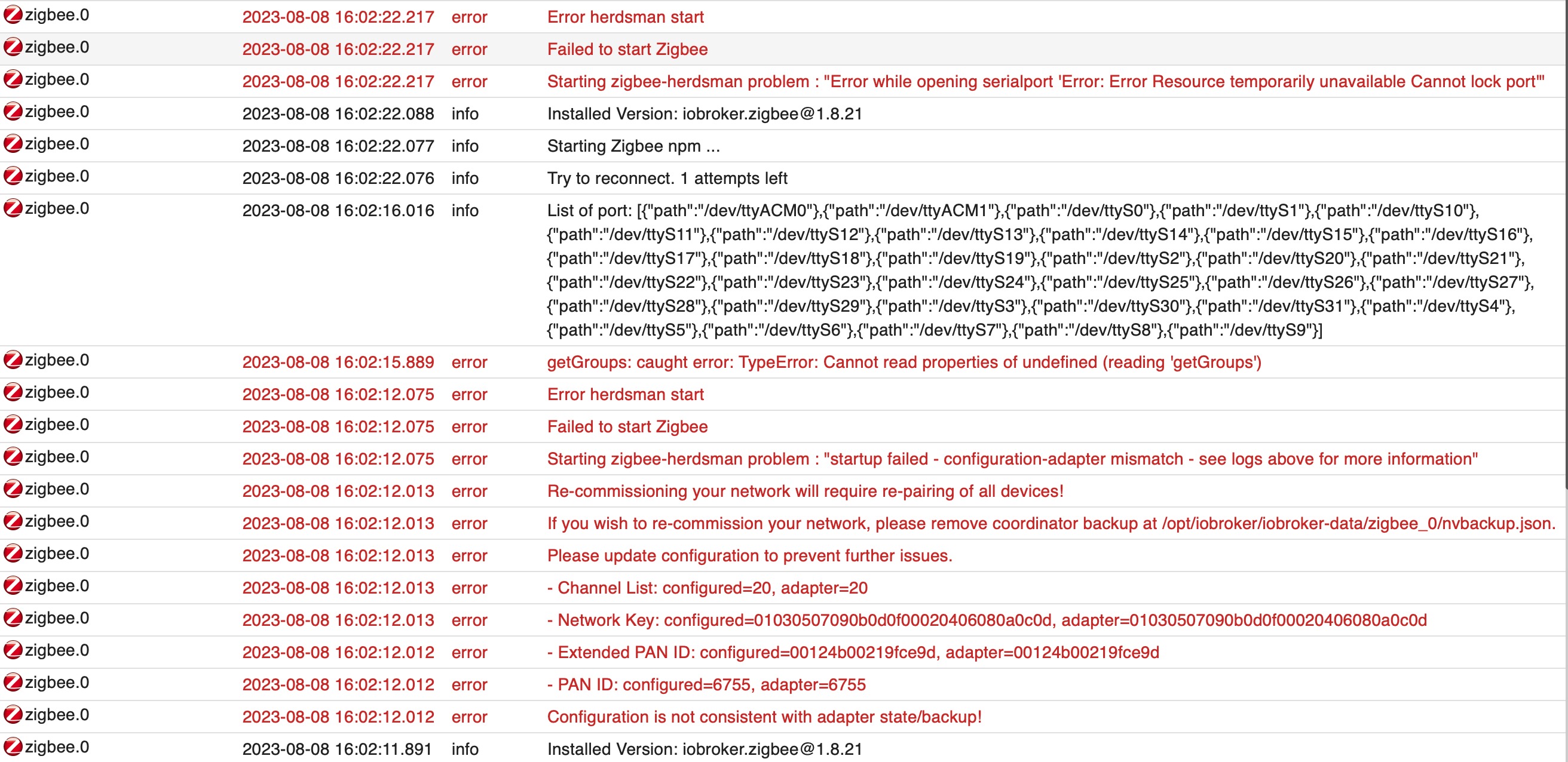
-
ich habe den lxc nun neu auf gesetzt und diesmal mit Debian als user
bekomme aber immer noch die gleiche Meldung...
-
ich habe den lxc nun neu auf gesetzt und diesmal mit Debian als user
bekomme aber immer noch die gleiche Meldung...
@michael_4358 sagte in Zigbee keine Verbindung zur Hardware:
mit Debian als user
?
@michael_4358 sagte in Zigbee keine Verbindung zur Hardware:
bekomme aber immer noch die gleiche Meldung...
zeigen bitte !
Und eine Langfassung von
iob diag -
@michael_4358 sagte in Zigbee keine Verbindung zur Hardware:
mit Debian als user
?
@michael_4358 sagte in Zigbee keine Verbindung zur Hardware:
bekomme aber immer noch die gleiche Meldung...
zeigen bitte !
Und eine Langfassung von
iob diag@djmarc75 said in Zigbee keine Verbindung zur Hardware:
iob diag
habe die abfrage mit root gemacht da der user keine Berechtigung hat..
======== Start marking the full check here ========= Skript v.2023-04-16 *** BASE SYSTEM *** Architecture : x86_64 Docker : false Virtualization : lxc Distributor ID: Debian Description: Debian GNU/Linux 11 (bullseye) Release: 11 Codename: bullseye PRETTY_NAME="Debian GNU/Linux 11 (bullseye)" NAME="Debian GNU/Linux" VERSION_ID="11" VERSION="11 (bullseye)" VERSION_CODENAME=bullseye ID=debian HOME_URL="https://www.debian.org/" SUPPORT_URL="https://www.debian.org/support" BUG_REPORT_URL="https://bugs.debian.org/" Systemuptime and Load: 19:59:46 up 10 min, 1 user, load average: 1.00, 0.84, 0.57 CPU threads: 2 *** Time and Time Zones *** Local time: Tue 2023-08-08 19:59:46 UTC Universal time: Tue 2023-08-08 19:59:46 UTC RTC time: n/a Time zone: Etc/UTC (UTC, +0000) System clock synchronized: yes NTP service: inactive RTC in local TZ: no *** User and Groups *** root /root root *** X-Server-Setup *** X-Server: false Desktop: Terminal: Boot Target: graphical.target *** MEMORY *** total used free shared buff/cache available Mem: 8.1G 2.1G 5.6G 0.0K 442M 6.1G Swap: 8.1G 0B 8.1G Total: 16G 2.1G 13G 8144 M total memory 2052 M used memory 193 M active memory 2095 M inactive memory 5649 M free memory 0 M buffer memory 442 M swap cache 8144 M total swap 0 M used swap 8144 M free swap *** FILESYSTEM *** Filesystem Type Size Used Avail Use% Mounted on /dev/mapper/terra-vm--200--disk--0 ext4 125G 3.4G 116G 3% / none tmpfs 492K 4.0K 488K 1% /dev udev devtmpfs 16G 0 16G 0% /dev/tty tmpfs tmpfs 16G 0 16G 0% /dev/shm tmpfs tmpfs 6.3G 104K 6.3G 1% /run tmpfs tmpfs 5.0M 0 5.0M 0% /run/lock Messages concerning ext4 filesystem in dmesg: dmesg: read kernel buffer failed: Operation not permitted Show mounted filesystems (real ones only): TARGET SOURCE FSTYPE OPTIONS / /dev/mapper/terra-vm--200--disk--0 ext4 rw,relatime Files in neuralgic directories: /var: 420M /var/ 251M /var/cache 246M /var/cache/apt 179M /var/cache/apt/archives 136M /var/lib Archived and active journals take up 32.0M in the file system. /opt/iobroker/backups: 23M /opt/iobroker/backups/ /opt/iobroker/iobroker-data: 251M /opt/iobroker/iobroker-data/ 226M /opt/iobroker/iobroker-data/files 52M /opt/iobroker/iobroker-data/files/javascript.admin 45M /opt/iobroker/iobroker-data/files/devices.admin/static 45M /opt/iobroker/iobroker-data/files/devices.admin The five largest files in iobroker-data are: 35M /opt/iobroker/iobroker-data/files/devices.admin/static/js/main.24f2bb56.js.map 21M /opt/iobroker/iobroker-data/objects.jsonl 19M /opt/iobroker/iobroker-data/files/iot.admin/static/js/main.2975a411.js.map 18M /opt/iobroker/iobroker-data/files/text2command.admin/static/js/main.274a4d8d.js.map 8.6M /opt/iobroker/iobroker-data/files/devices.admin/static/js/main.24f2bb56.js *** NodeJS-Installation *** /usr/bin/nodejs v18.17.0 /usr/bin/node v18.17.0 /usr/bin/npm 9.6.7 /usr/bin/npx 9.6.7 nodejs: Installed: 18.17.0-deb-1nodesource1 Candidate: 18.17.0-deb-1nodesource1 Version table: *** 18.17.0-deb-1nodesource1 100 100 /var/lib/dpkg/status 14.21.3-deb-1nodesource1 500 500 https://deb.nodesource.com/node_14.x bullseye/main amd64 Packages 12.22.12~dfsg-1~deb11u4 500 500 http://security.debian.org bullseye-security/main amd64 Packages 12.22.12~dfsg-1~deb11u3 500 500 http://deb.debian.org/debian bullseye/main amd64 Packages Temp directories causing npm8 problem: 0 No problems detected *** ioBroker-Installation *** ioBroker Status iobroker is running on this host. Objects type: jsonl States type: jsonl MULTIHOSTSERVICE/enabled: false Core adapters versions js-controller: 4.0.24 admin: 6.3.5 javascript: 7.0.3 Adapters from github: 3 Adapter State system.adapter.accuweather.0 : accuweather : broker - disabled system.adapter.adguard.0 : adguard : broker - disabled + system.adapter.admin.0 : admin : broker - enabled, port: 8081, bind: 0.0.0.0, run as: admin + system.adapter.alexa2.1 : alexa2 : broker - enabled + system.adapter.backitup.0 : backitup : broker - enabled + system.adapter.backitup.1 : backitup : raspberrypi - enabled + system.adapter.device-reminder.0 : device-reminder : broker - enabled system.adapter.devices.0 : devices : broker - disabled + system.adapter.discovery.0 : discovery : broker - enabled + system.adapter.fritzdect.0 : fritzdect : broker - enabled + system.adapter.fritzdect.1 : fritzdect : broker - enabled + system.adapter.history.0 : history : broker - enabled + system.adapter.hue.0 : hue : broker - enabled, port: 443 system.adapter.ical.0 : ical : broker - enabled system.adapter.icons-mfd-svg.0 : icons-mfd-svg : broker - disabled system.adapter.influxdb.0 : influxdb : broker - disabled, port: 8086 + system.adapter.info.0 : info : broker - enabled + system.adapter.iot.0 : iot : broker - enabled + system.adapter.javascript.0 : javascript : broker - enabled + system.adapter.kostal-piko-ba.0 : kostal-piko-ba : broker - enabled + system.adapter.lgtv.0 : lgtv : broker - enabled + system.adapter.linux-control.0 : linux-control : raspberrypi - enabled + system.adapter.lovelace.0 : lovelace : broker - enabled, port: 8091, bind: 0.0.0.0, run as: admin + system.adapter.modbus.0 : modbus : broker - enabled + system.adapter.mqtt.0 : mqtt : broker - enabled, port: 1890, bind: 0.0.0.0 + system.adapter.panasonic-viera.0 : panasonic-viera : broker - enabled + system.adapter.ping.0 : ping : broker - enabled system.adapter.proxmox.0 : proxmox : broker - disabled, port: 8006 system.adapter.repetierserver.0 : repetierserver : broker - disabled + system.adapter.sainlogic.0 : sainlogic : broker - enabled, port: 45000, bind: 0.0.0.0 system.adapter.sbfspot.0 : sbfspot : broker - disabled + system.adapter.shelly.0 : shelly : broker - enabled, port: 1885, bind: 0.0.0.0 system.adapter.shuttercontrol.0 : shuttercontrol : broker - disabled + system.adapter.simple-api.0 : simple-api : broker - enabled, port: 8087, bind: 0.0.0.0, run as: admin + system.adapter.smartmeter.0 : smartmeter : raspberrypi - enabled + system.adapter.sonoff.0 : sonoff : broker - enabled, port: 1883, bind: 0.0.0.0 + system.adapter.sourceanalytix.0 : sourceanalytix : broker - enabled + system.adapter.telegram.0 : telegram : broker - enabled, port: 8443, bind: 0.0.0.0 + system.adapter.text2command.0 : text2command : broker - enabled + system.adapter.tr-064.0 : tr-064 : broker - enabled + system.adapter.trashschedule.0 : trashschedule : broker - enabled + system.adapter.upnp.0 : upnp : broker - enabled system.adapter.vis.0 : vis : broker - disabled system.adapter.weatherunderground.0 : weatherunderground : broker - disabled + system.adapter.web.0 : web : broker - enabled, port: 8082, bind: 0.0.0.0, run as: admin + system.adapter.wled.0 : wled : broker - enabled + system.adapter.yahka.0 : yahka : broker - enabled + system.adapter.zigbee.0 : zigbee : broker - enabled, port: /dev/ttyACM0 + instance is alive Enabled adapters with bindings + system.adapter.admin.0 : admin : broker - enabled, port: 8081, bind: 0.0.0.0, run as: admin + system.adapter.hue.0 : hue : broker - enabled, port: 443 + system.adapter.lovelace.0 : lovelace : broker - enabled, port: 8091, bind: 0.0.0.0, run as: admin + system.adapter.mqtt.0 : mqtt : broker - enabled, port: 1890, bind: 0.0.0.0 + system.adapter.sainlogic.0 : sainlogic : broker - enabled, port: 45000, bind: 0.0.0.0 + system.adapter.shelly.0 : shelly : broker - enabled, port: 1885, bind: 0.0.0.0 + system.adapter.simple-api.0 : simple-api : broker - enabled, port: 8087, bind: 0.0.0.0, run as: admin + system.adapter.sonoff.0 : sonoff : broker - enabled, port: 1883, bind: 0.0.0.0 + system.adapter.telegram.0 : telegram : broker - enabled, port: 8443, bind: 0.0.0.0 + system.adapter.web.0 : web : broker - enabled, port: 8082, bind: 0.0.0.0, run as: admin + system.adapter.zigbee.0 : zigbee : broker - enabled, port: /dev/ttyACM0 ioBroker-Repositories Stable (default): http://download.iobroker.net/sources-dist.json Beta (latest) : http://download.iobroker.net/sources-dist-latest.json Active repo(s): Stable (default) Installed ioBroker-Instances Used repository: Stable (default) Adapter "accuweather" : 1.2.4 , installed 1.2.4 Adapter "adguard" : 0.0.8 , installed 0.0.8 Adapter "admin" : 6.3.5 , installed 6.3.5 Adapter "alexa2" : 3.23.2 , installed 3.23.2 Adapter "backitup" : 2.6.23 , installed 2.6.23 Adapter "device-reminder": 1.2.9 , installed 1.2.9 Adapter "devices" : 1.1.5 , installed 1.1.5 Adapter "discovery" : 3.1.0 , installed 3.1.0 Adapter "fritzdect" : 2.3.1 , installed 2.3.1 Adapter "history" : 2.2.4 , installed 2.2.4 Adapter "hue" : 3.9.3 , installed 3.9.3 Adapter "ical" : 1.13.3 , installed 1.13.3 Adapter "icons-mfd-svg": 1.1.0 , installed 1.1.0 Adapter "influxdb" : 3.2.0 , installed 3.2.0 Adapter "info" : 1.9.26 , installed 1.9.26 Adapter "iot" : 1.14.5 , installed 1.14.5 Adapter "javascript" : 7.0.3 , installed 7.0.3 Controller "js-controller": 4.0.24 , installed 4.0.24 Adapter "kostal-piko-ba": 3.0.3 , installed 3.0.1 [Updatable] Adapter "lgtv" : 1.1.10 , installed 1.1.10 Adapter "lovelace" : 3.0.1 , installed 3.0.1 Adapter "modbus" : 5.0.11 , installed 5.0.11 Adapter "mqtt" : 4.1.1 , installed 4.1.1 Adapter "panasonic-viera": 2.0.0 , installed 2.0.0 Adapter "ping" : 1.5.3 , installed 1.5.3 Adapter "proxmox" : 1.3.5 , installed 1.3.5 Adapter "sainlogic" : 0.10.5 , installed 0.10.5 Adapter "sbfspot" : 4.1.6 , installed 4.1.4 [Updatable] Adapter "shelly" : 6.4.1 , installed 6.4.1 Adapter "shuttercontrol": 1.5.0 , installed 1.5.0 Adapter "simple-api" : 2.7.2 , installed 2.7.2 Adapter "socketio" : 4.2.0 , installed 4.2.0 Adapter "sonoff" : 2.5.3 , installed 2.5.3 Adapter "telegram" : 1.16.0 , installed 1.16.0 Adapter "text2command" : 3.0.2 , installed 3.0.2 Adapter "tr-064" : 4.2.18 , installed 4.2.18 Adapter "trashschedule": 2.2.0 , installed 2.2.0 Adapter "upnp" : 1.0.21 , installed 1.0.21 Adapter "weatherunderground": 3.4.2, installed 3.4.2 Adapter "web" : 4.3.0 , installed 4.3.0 Adapter "wled" : 0.6.7 , installed 0.6.7 Adapter "ws" : 1.3.0 , installed 1.3.0 Adapter "yahka" : 0.17.0 , installed 0.17.0 Adapter "zigbee" : 1.8.21 , installed 1.8.21 Objects and States Please stand by - This may take a while Objects: 14558 States: 11472 *** OS-Repositories and Updates *** Hit:1 http://security.debian.org bullseye-security InRelease Hit:2 http://deb.debian.org/debian bullseye InRelease Hit:3 https://deb.nodesource.com/node_14.x bullseye InRelease Hit:4 http://deb.debian.org/debian bullseye-updates InRelease Reading package lists... Pending Updates: 0 *** Listening Ports *** Active Internet connections (only servers) Proto Recv-Q Send-Q Local Address Foreign Address State User Inode PID/Program name tcp 0 0 0.0.0.0:42415 0.0.0.0:* LISTEN 1000 134471 2562/io.yahka.0 tcp 0 0 0.0.0.0:9000 0.0.0.0:* LISTEN 1000 123568 1500/iobroker.js-co tcp 0 0 0.0.0.0:9001 0.0.0.0:* LISTEN 1000 123561 1500/iobroker.js-co tcp 0 0 0.0.0.0:45000 0.0.0.0:* LISTEN 1000 129949 2435/io.sainlogic.0 tcp 0 0 127.0.0.53:53 0.0.0.0:* LISTEN 104 115790 88/systemd-resolved tcp 0 0 127.0.0.1:25 0.0.0.0:* LISTEN 0 115193 310/master tcp 0 0 0.0.0.0:1883 0.0.0.0:* LISTEN 1000 125521 1881/io.sonoff.0 tcp 0 0 0.0.0.0:1885 0.0.0.0:* LISTEN 1000 127550 1865/io.shelly.0 tcp 0 0 0.0.0.0:1890 0.0.0.0:* LISTEN 1000 127410 1834/io.mqtt.0 tcp 0 0 0.0.0.0:111 0.0.0.0:* LISTEN 0 114843 1/init tcp 0 0 0.0.0.0:5355 0.0.0.0:* LISTEN 104 115783 88/systemd-resolved tcp6 0 0 ::1:25 :::* LISTEN 0 115194 310/master tcp6 0 0 :::22 :::* LISTEN 0 113629 1/init tcp6 0 0 :::111 :::* LISTEN 0 114845 1/init tcp6 0 0 :::5355 :::* LISTEN 104 115786 88/systemd-resolved tcp6 0 0 :::8091 :::* LISTEN 1000 129828 2403/io.lovelace.0 tcp6 0 0 :::8081 :::* LISTEN 1000 123673 1525/io.admin.0 tcp6 0 0 :::8082 :::* LISTEN 1000 133417 2530/io.web.0 tcp6 0 0 :::8087 :::* LISTEN 1000 130037 2451/io.simple-api. udp 0 0 127.0.0.53:53 0.0.0.0:* 104 115789 88/systemd-resolved udp 0 0 0.0.0.0:68 0.0.0.0:* 0 115112 96/dhclient udp 0 0 0.0.0.0:111 0.0.0.0:* 0 114844 1/init udp 0 0 0.0.0.0:1900 0.0.0.0:* 1000 133552 2514/io.upnp.0 udp 0 0 0.0.0.0:5353 0.0.0.0:* 1000 134468 2562/io.yahka.0 udp 0 0 0.0.0.0:5353 0.0.0.0:* 1000 133458 2547/io.wled.0 udp 0 0 192.168.1.222:5353 0.0.0.0:* 1000 125734 1897/io.tr-064.0 udp 0 0 0.0.0.0:5355 0.0.0.0:* 104 115782 88/systemd-resolved udp 0 0 0.0.0.0:43609 0.0.0.0:* 1000 134315 2514/io.upnp.0 udp6 0 0 :::111 :::* 0 114846 1/init udp6 0 0 :::5355 :::* 104 115785 88/systemd-resolved *** Log File - Last 25 Lines *** 2023-08-08 20:00:03.969 - info: javascript.0 (1613) script.js.PV_anlage.Autarkie.Eigenverbrauch: Eigenverbrauch 2023-08-08 20:00:04.911 - debug: shelly.0 (1865) [httpIoBrokerState] State change 192.168.1.125 (shellyplug-s / shellyplug-s-BB43A5 / SHPLG-S#BB43A5#1): state: SHPLG-S#BB43A5#1.uptime, value: 370958 2023-08-08 20:00:06.028 - debug: shelly.0 (1865) [httpIoBrokerState] State change 192.168.1.131 (shellyplug-s / shellyplug-s-7C87CEB4BA36 / SHPLG-S#7C87CEB4BA36#1): state: SHPLG-S#7C87CEB4BA36#1.uptime, value: 2438116 2023-08-08 20:00:07.715 - info: ical.0 (2912) Terminated (NO_ERROR): Without reason 2023-08-08 20:00:07.760 - debug: shelly.0 (1865) [httpIoBrokerState] State change 192.168.1.188 (shelly1pm / shelly1pm-E8DB84D234C9 / SHSW-PM#E8DB84D234C9#1): state: SHSW-PM#E8DB84D234C9#1.uptime, value: 8163485 2023-08-08 20:00:07.760 - debug: shelly.0 (1865) [httpIoBrokerState] State change 192.168.1.188 (shelly1pm / shelly1pm-E8DB84D234C9 / SHSW-PM#E8DB84D234C9#1): state: SHSW-PM#E8DB84D234C9#1.rssi, value: -66 2023-08-08 20:00:07.788 - debug: shelly.0 (1865) [httpIoBrokerState] State change 192.168.1.187 (shelly1 / shelly1-E8DB84A2206B / SHSW-1#E8DB84A2206B#1): state: SHSW-1#E8DB84A2206B#1.uptime, value: 8382311 2023-08-08 20:00:07.788 - debug: shelly.0 (1865) [httpIoBrokerState] State change 192.168.1.187 (shelly1 / shelly1-E8DB84A2206B / SHSW-1#E8DB84A2206B#1): state: SHSW-1#E8DB84A2206B#1.rssi, value: -53 2023-08-08 20:00:08.165 - debug: shelly.0 (1865) [httpIoBrokerState] State change 192.168.1.183 (shellyplug-s / shellyplug-s-BB8720 / SHPLG-S#BB8720#1): state: SHPLG-S#BB8720#1.uptime, value: 370962 2023-08-08 20:00:08.165 - debug: shelly.0 (1865) [httpIoBrokerState] State change 192.168.1.183 (shellyplug-s / shellyplug-s-BB8720 / SHPLG-S#BB8720#1): state: SHPLG-S#BB8720#1.rssi, value: -74 2023-08-08 20:00:08.234 - info: host.broker instance system.adapter.ical.0 terminated with code 0 (NO_ERROR) 2023-08-08 20:00:08.629 - debug: shelly.0 (1865) [httpIoBrokerState] State change 192.168.1.225 (shellyplug-s / shellyplug-s-885C36 / SHPLG-S#885C36#1): state: SHPLG-S#885C36#1.uptime, value: 7469563 2023-08-08 20:00:08.630 - debug: shelly.0 (1865) [httpIoBrokerState] State change 192.168.1.225 (shellyplug-s / shellyplug-s-885C36 / SHPLG-S#885C36#1): state: SHPLG-S#885C36#1.rssi, value: -40 2023-08-08 20:00:08.836 - debug: shelly.0 (1865) [httpIoBrokerState] State change 192.168.1.71 (shellyplug-s / shellyplug-s-87EB03 / SHPLG-S#87EB03#1): state: SHPLG-S#87EB03#1.uptime, value: 51253 2023-08-08 20:00:09.987 - debug: shelly.0 (1865) [httpIoBrokerState] State change 192.168.1.125 (shellyplug-s / shellyplug-s-BB43A5 / SHPLG-S#BB43A5#1): state: SHPLG-S#BB43A5#1.uptime, value: 370963 2023-08-08 20:00:11.121 - debug: shelly.0 (1865) [httpIoBrokerState] State change 192.168.1.131 (shellyplug-s / shellyplug-s-7C87CEB4BA36 / SHPLG-S#7C87CEB4BA36#1): state: SHPLG-S#7C87CEB4BA36#1.uptime, value: 2438121 2023-08-08 20:00:12.305 - info: tr-064.0 (1897) forEachConfiguredDevice: in GetSpecificHostEntry 1(fritz.box/CC:CE:1E:3A:D1:64) device seems offline but we never saw it since adapter was started:Error: sendSOAPActionRequest Error action=GetSpecificHostEntry serviceType=urn:dslforum-org:service:Hosts:1: 500 - {"code":500} 2023-08-08 20:00:12.984 - debug: shelly.0 (1865) [httpIoBrokerState] State change 192.168.1.188 (shelly1pm / shelly1pm-E8DB84D234C9 / SHSW-PM#E8DB84D234C9#1): state: SHSW-PM#E8DB84D234C9#1.uptime, value: 8163491 2023-08-08 20:00:12.984 - debug: shelly.0 (1865) [httpIoBrokerState] State change 192.168.1.188 (shelly1pm / shelly1pm-E8DB84D234C9 / SHSW-PM#E8DB84D234C9#1): state: SHSW-PM#E8DB84D234C9#1.rssi, value: -67 2023-08-08 20:00:13.215 - debug: shelly.0 (1865) [httpIoBrokerState] State change 192.168.1.187 (shelly1 / shelly1-E8DB84A2206B / SHSW-1#E8DB84A2206B#1): state: SHSW-1#E8DB84A2206B#1.uptime, value: 8382316 2023-08-08 20:00:13.241 - debug: shelly.0 (1865) [httpIoBrokerState] State change 192.168.1.183 (shellyplug-s / shellyplug-s-BB8720 / SHPLG-S#BB8720#1): state: SHPLG-S#BB8720#1.uptime, value: 370967 2023-08-08 20:00:13.242 - debug: shelly.0 (1865) [httpIoBrokerState] State change 192.168.1.183 (shellyplug-s / shellyplug-s-BB8720 / SHPLG-S#BB8720#1): state: SHPLG-S#BB8720#1.rssi, value: -75 2023-08-08 20:00:13.703 - debug: shelly.0 (1865) [httpIoBrokerState] State change 192.168.1.225 (shellyplug-s / shellyplug-s-885C36 / SHPLG-S#885C36#1): state: SHPLG-S#885C36#1.uptime, value: 7469568 2023-08-08 20:00:13.703 - debug: shelly.0 (1865) [httpIoBrokerState] State change 192.168.1.225 (shellyplug-s / shellyplug-s-885C36 / SHPLG-S#885C36#1): state: SHPLG-S#885C36#1.rssi, value: -41 2023-08-08 20:00:13.968 - debug: shelly.0 (1865) [httpIoBrokerState] State change 192.168.1.71 (shellyplug-s / shellyplug-s-87EB03 / SHPLG-S#87EB03#1): state: SHPLG-S#87EB03#1.uptime, value: 51258 ============ Mark until here for C&P ============= iob diag has finished. Press any key for a summary -
@djmarc75 said in Zigbee keine Verbindung zur Hardware:
iob diag
habe die abfrage mit root gemacht da der user keine Berechtigung hat..
======== Start marking the full check here ========= Skript v.2023-04-16 *** BASE SYSTEM *** Architecture : x86_64 Docker : false Virtualization : lxc Distributor ID: Debian Description: Debian GNU/Linux 11 (bullseye) Release: 11 Codename: bullseye PRETTY_NAME="Debian GNU/Linux 11 (bullseye)" NAME="Debian GNU/Linux" VERSION_ID="11" VERSION="11 (bullseye)" VERSION_CODENAME=bullseye ID=debian HOME_URL="https://www.debian.org/" SUPPORT_URL="https://www.debian.org/support" BUG_REPORT_URL="https://bugs.debian.org/" Systemuptime and Load: 19:59:46 up 10 min, 1 user, load average: 1.00, 0.84, 0.57 CPU threads: 2 *** Time and Time Zones *** Local time: Tue 2023-08-08 19:59:46 UTC Universal time: Tue 2023-08-08 19:59:46 UTC RTC time: n/a Time zone: Etc/UTC (UTC, +0000) System clock synchronized: yes NTP service: inactive RTC in local TZ: no *** User and Groups *** root /root root *** X-Server-Setup *** X-Server: false Desktop: Terminal: Boot Target: graphical.target *** MEMORY *** total used free shared buff/cache available Mem: 8.1G 2.1G 5.6G 0.0K 442M 6.1G Swap: 8.1G 0B 8.1G Total: 16G 2.1G 13G 8144 M total memory 2052 M used memory 193 M active memory 2095 M inactive memory 5649 M free memory 0 M buffer memory 442 M swap cache 8144 M total swap 0 M used swap 8144 M free swap *** FILESYSTEM *** Filesystem Type Size Used Avail Use% Mounted on /dev/mapper/terra-vm--200--disk--0 ext4 125G 3.4G 116G 3% / none tmpfs 492K 4.0K 488K 1% /dev udev devtmpfs 16G 0 16G 0% /dev/tty tmpfs tmpfs 16G 0 16G 0% /dev/shm tmpfs tmpfs 6.3G 104K 6.3G 1% /run tmpfs tmpfs 5.0M 0 5.0M 0% /run/lock Messages concerning ext4 filesystem in dmesg: dmesg: read kernel buffer failed: Operation not permitted Show mounted filesystems (real ones only): TARGET SOURCE FSTYPE OPTIONS / /dev/mapper/terra-vm--200--disk--0 ext4 rw,relatime Files in neuralgic directories: /var: 420M /var/ 251M /var/cache 246M /var/cache/apt 179M /var/cache/apt/archives 136M /var/lib Archived and active journals take up 32.0M in the file system. /opt/iobroker/backups: 23M /opt/iobroker/backups/ /opt/iobroker/iobroker-data: 251M /opt/iobroker/iobroker-data/ 226M /opt/iobroker/iobroker-data/files 52M /opt/iobroker/iobroker-data/files/javascript.admin 45M /opt/iobroker/iobroker-data/files/devices.admin/static 45M /opt/iobroker/iobroker-data/files/devices.admin The five largest files in iobroker-data are: 35M /opt/iobroker/iobroker-data/files/devices.admin/static/js/main.24f2bb56.js.map 21M /opt/iobroker/iobroker-data/objects.jsonl 19M /opt/iobroker/iobroker-data/files/iot.admin/static/js/main.2975a411.js.map 18M /opt/iobroker/iobroker-data/files/text2command.admin/static/js/main.274a4d8d.js.map 8.6M /opt/iobroker/iobroker-data/files/devices.admin/static/js/main.24f2bb56.js *** NodeJS-Installation *** /usr/bin/nodejs v18.17.0 /usr/bin/node v18.17.0 /usr/bin/npm 9.6.7 /usr/bin/npx 9.6.7 nodejs: Installed: 18.17.0-deb-1nodesource1 Candidate: 18.17.0-deb-1nodesource1 Version table: *** 18.17.0-deb-1nodesource1 100 100 /var/lib/dpkg/status 14.21.3-deb-1nodesource1 500 500 https://deb.nodesource.com/node_14.x bullseye/main amd64 Packages 12.22.12~dfsg-1~deb11u4 500 500 http://security.debian.org bullseye-security/main amd64 Packages 12.22.12~dfsg-1~deb11u3 500 500 http://deb.debian.org/debian bullseye/main amd64 Packages Temp directories causing npm8 problem: 0 No problems detected *** ioBroker-Installation *** ioBroker Status iobroker is running on this host. Objects type: jsonl States type: jsonl MULTIHOSTSERVICE/enabled: false Core adapters versions js-controller: 4.0.24 admin: 6.3.5 javascript: 7.0.3 Adapters from github: 3 Adapter State system.adapter.accuweather.0 : accuweather : broker - disabled system.adapter.adguard.0 : adguard : broker - disabled + system.adapter.admin.0 : admin : broker - enabled, port: 8081, bind: 0.0.0.0, run as: admin + system.adapter.alexa2.1 : alexa2 : broker - enabled + system.adapter.backitup.0 : backitup : broker - enabled + system.adapter.backitup.1 : backitup : raspberrypi - enabled + system.adapter.device-reminder.0 : device-reminder : broker - enabled system.adapter.devices.0 : devices : broker - disabled + system.adapter.discovery.0 : discovery : broker - enabled + system.adapter.fritzdect.0 : fritzdect : broker - enabled + system.adapter.fritzdect.1 : fritzdect : broker - enabled + system.adapter.history.0 : history : broker - enabled + system.adapter.hue.0 : hue : broker - enabled, port: 443 system.adapter.ical.0 : ical : broker - enabled system.adapter.icons-mfd-svg.0 : icons-mfd-svg : broker - disabled system.adapter.influxdb.0 : influxdb : broker - disabled, port: 8086 + system.adapter.info.0 : info : broker - enabled + system.adapter.iot.0 : iot : broker - enabled + system.adapter.javascript.0 : javascript : broker - enabled + system.adapter.kostal-piko-ba.0 : kostal-piko-ba : broker - enabled + system.adapter.lgtv.0 : lgtv : broker - enabled + system.adapter.linux-control.0 : linux-control : raspberrypi - enabled + system.adapter.lovelace.0 : lovelace : broker - enabled, port: 8091, bind: 0.0.0.0, run as: admin + system.adapter.modbus.0 : modbus : broker - enabled + system.adapter.mqtt.0 : mqtt : broker - enabled, port: 1890, bind: 0.0.0.0 + system.adapter.panasonic-viera.0 : panasonic-viera : broker - enabled + system.adapter.ping.0 : ping : broker - enabled system.adapter.proxmox.0 : proxmox : broker - disabled, port: 8006 system.adapter.repetierserver.0 : repetierserver : broker - disabled + system.adapter.sainlogic.0 : sainlogic : broker - enabled, port: 45000, bind: 0.0.0.0 system.adapter.sbfspot.0 : sbfspot : broker - disabled + system.adapter.shelly.0 : shelly : broker - enabled, port: 1885, bind: 0.0.0.0 system.adapter.shuttercontrol.0 : shuttercontrol : broker - disabled + system.adapter.simple-api.0 : simple-api : broker - enabled, port: 8087, bind: 0.0.0.0, run as: admin + system.adapter.smartmeter.0 : smartmeter : raspberrypi - enabled + system.adapter.sonoff.0 : sonoff : broker - enabled, port: 1883, bind: 0.0.0.0 + system.adapter.sourceanalytix.0 : sourceanalytix : broker - enabled + system.adapter.telegram.0 : telegram : broker - enabled, port: 8443, bind: 0.0.0.0 + system.adapter.text2command.0 : text2command : broker - enabled + system.adapter.tr-064.0 : tr-064 : broker - enabled + system.adapter.trashschedule.0 : trashschedule : broker - enabled + system.adapter.upnp.0 : upnp : broker - enabled system.adapter.vis.0 : vis : broker - disabled system.adapter.weatherunderground.0 : weatherunderground : broker - disabled + system.adapter.web.0 : web : broker - enabled, port: 8082, bind: 0.0.0.0, run as: admin + system.adapter.wled.0 : wled : broker - enabled + system.adapter.yahka.0 : yahka : broker - enabled + system.adapter.zigbee.0 : zigbee : broker - enabled, port: /dev/ttyACM0 + instance is alive Enabled adapters with bindings + system.adapter.admin.0 : admin : broker - enabled, port: 8081, bind: 0.0.0.0, run as: admin + system.adapter.hue.0 : hue : broker - enabled, port: 443 + system.adapter.lovelace.0 : lovelace : broker - enabled, port: 8091, bind: 0.0.0.0, run as: admin + system.adapter.mqtt.0 : mqtt : broker - enabled, port: 1890, bind: 0.0.0.0 + system.adapter.sainlogic.0 : sainlogic : broker - enabled, port: 45000, bind: 0.0.0.0 + system.adapter.shelly.0 : shelly : broker - enabled, port: 1885, bind: 0.0.0.0 + system.adapter.simple-api.0 : simple-api : broker - enabled, port: 8087, bind: 0.0.0.0, run as: admin + system.adapter.sonoff.0 : sonoff : broker - enabled, port: 1883, bind: 0.0.0.0 + system.adapter.telegram.0 : telegram : broker - enabled, port: 8443, bind: 0.0.0.0 + system.adapter.web.0 : web : broker - enabled, port: 8082, bind: 0.0.0.0, run as: admin + system.adapter.zigbee.0 : zigbee : broker - enabled, port: /dev/ttyACM0 ioBroker-Repositories Stable (default): http://download.iobroker.net/sources-dist.json Beta (latest) : http://download.iobroker.net/sources-dist-latest.json Active repo(s): Stable (default) Installed ioBroker-Instances Used repository: Stable (default) Adapter "accuweather" : 1.2.4 , installed 1.2.4 Adapter "adguard" : 0.0.8 , installed 0.0.8 Adapter "admin" : 6.3.5 , installed 6.3.5 Adapter "alexa2" : 3.23.2 , installed 3.23.2 Adapter "backitup" : 2.6.23 , installed 2.6.23 Adapter "device-reminder": 1.2.9 , installed 1.2.9 Adapter "devices" : 1.1.5 , installed 1.1.5 Adapter "discovery" : 3.1.0 , installed 3.1.0 Adapter "fritzdect" : 2.3.1 , installed 2.3.1 Adapter "history" : 2.2.4 , installed 2.2.4 Adapter "hue" : 3.9.3 , installed 3.9.3 Adapter "ical" : 1.13.3 , installed 1.13.3 Adapter "icons-mfd-svg": 1.1.0 , installed 1.1.0 Adapter "influxdb" : 3.2.0 , installed 3.2.0 Adapter "info" : 1.9.26 , installed 1.9.26 Adapter "iot" : 1.14.5 , installed 1.14.5 Adapter "javascript" : 7.0.3 , installed 7.0.3 Controller "js-controller": 4.0.24 , installed 4.0.24 Adapter "kostal-piko-ba": 3.0.3 , installed 3.0.1 [Updatable] Adapter "lgtv" : 1.1.10 , installed 1.1.10 Adapter "lovelace" : 3.0.1 , installed 3.0.1 Adapter "modbus" : 5.0.11 , installed 5.0.11 Adapter "mqtt" : 4.1.1 , installed 4.1.1 Adapter "panasonic-viera": 2.0.0 , installed 2.0.0 Adapter "ping" : 1.5.3 , installed 1.5.3 Adapter "proxmox" : 1.3.5 , installed 1.3.5 Adapter "sainlogic" : 0.10.5 , installed 0.10.5 Adapter "sbfspot" : 4.1.6 , installed 4.1.4 [Updatable] Adapter "shelly" : 6.4.1 , installed 6.4.1 Adapter "shuttercontrol": 1.5.0 , installed 1.5.0 Adapter "simple-api" : 2.7.2 , installed 2.7.2 Adapter "socketio" : 4.2.0 , installed 4.2.0 Adapter "sonoff" : 2.5.3 , installed 2.5.3 Adapter "telegram" : 1.16.0 , installed 1.16.0 Adapter "text2command" : 3.0.2 , installed 3.0.2 Adapter "tr-064" : 4.2.18 , installed 4.2.18 Adapter "trashschedule": 2.2.0 , installed 2.2.0 Adapter "upnp" : 1.0.21 , installed 1.0.21 Adapter "weatherunderground": 3.4.2, installed 3.4.2 Adapter "web" : 4.3.0 , installed 4.3.0 Adapter "wled" : 0.6.7 , installed 0.6.7 Adapter "ws" : 1.3.0 , installed 1.3.0 Adapter "yahka" : 0.17.0 , installed 0.17.0 Adapter "zigbee" : 1.8.21 , installed 1.8.21 Objects and States Please stand by - This may take a while Objects: 14558 States: 11472 *** OS-Repositories and Updates *** Hit:1 http://security.debian.org bullseye-security InRelease Hit:2 http://deb.debian.org/debian bullseye InRelease Hit:3 https://deb.nodesource.com/node_14.x bullseye InRelease Hit:4 http://deb.debian.org/debian bullseye-updates InRelease Reading package lists... Pending Updates: 0 *** Listening Ports *** Active Internet connections (only servers) Proto Recv-Q Send-Q Local Address Foreign Address State User Inode PID/Program name tcp 0 0 0.0.0.0:42415 0.0.0.0:* LISTEN 1000 134471 2562/io.yahka.0 tcp 0 0 0.0.0.0:9000 0.0.0.0:* LISTEN 1000 123568 1500/iobroker.js-co tcp 0 0 0.0.0.0:9001 0.0.0.0:* LISTEN 1000 123561 1500/iobroker.js-co tcp 0 0 0.0.0.0:45000 0.0.0.0:* LISTEN 1000 129949 2435/io.sainlogic.0 tcp 0 0 127.0.0.53:53 0.0.0.0:* LISTEN 104 115790 88/systemd-resolved tcp 0 0 127.0.0.1:25 0.0.0.0:* LISTEN 0 115193 310/master tcp 0 0 0.0.0.0:1883 0.0.0.0:* LISTEN 1000 125521 1881/io.sonoff.0 tcp 0 0 0.0.0.0:1885 0.0.0.0:* LISTEN 1000 127550 1865/io.shelly.0 tcp 0 0 0.0.0.0:1890 0.0.0.0:* LISTEN 1000 127410 1834/io.mqtt.0 tcp 0 0 0.0.0.0:111 0.0.0.0:* LISTEN 0 114843 1/init tcp 0 0 0.0.0.0:5355 0.0.0.0:* LISTEN 104 115783 88/systemd-resolved tcp6 0 0 ::1:25 :::* LISTEN 0 115194 310/master tcp6 0 0 :::22 :::* LISTEN 0 113629 1/init tcp6 0 0 :::111 :::* LISTEN 0 114845 1/init tcp6 0 0 :::5355 :::* LISTEN 104 115786 88/systemd-resolved tcp6 0 0 :::8091 :::* LISTEN 1000 129828 2403/io.lovelace.0 tcp6 0 0 :::8081 :::* LISTEN 1000 123673 1525/io.admin.0 tcp6 0 0 :::8082 :::* LISTEN 1000 133417 2530/io.web.0 tcp6 0 0 :::8087 :::* LISTEN 1000 130037 2451/io.simple-api. udp 0 0 127.0.0.53:53 0.0.0.0:* 104 115789 88/systemd-resolved udp 0 0 0.0.0.0:68 0.0.0.0:* 0 115112 96/dhclient udp 0 0 0.0.0.0:111 0.0.0.0:* 0 114844 1/init udp 0 0 0.0.0.0:1900 0.0.0.0:* 1000 133552 2514/io.upnp.0 udp 0 0 0.0.0.0:5353 0.0.0.0:* 1000 134468 2562/io.yahka.0 udp 0 0 0.0.0.0:5353 0.0.0.0:* 1000 133458 2547/io.wled.0 udp 0 0 192.168.1.222:5353 0.0.0.0:* 1000 125734 1897/io.tr-064.0 udp 0 0 0.0.0.0:5355 0.0.0.0:* 104 115782 88/systemd-resolved udp 0 0 0.0.0.0:43609 0.0.0.0:* 1000 134315 2514/io.upnp.0 udp6 0 0 :::111 :::* 0 114846 1/init udp6 0 0 :::5355 :::* 104 115785 88/systemd-resolved *** Log File - Last 25 Lines *** 2023-08-08 20:00:03.969 - info: javascript.0 (1613) script.js.PV_anlage.Autarkie.Eigenverbrauch: Eigenverbrauch 2023-08-08 20:00:04.911 - debug: shelly.0 (1865) [httpIoBrokerState] State change 192.168.1.125 (shellyplug-s / shellyplug-s-BB43A5 / SHPLG-S#BB43A5#1): state: SHPLG-S#BB43A5#1.uptime, value: 370958 2023-08-08 20:00:06.028 - debug: shelly.0 (1865) [httpIoBrokerState] State change 192.168.1.131 (shellyplug-s / shellyplug-s-7C87CEB4BA36 / SHPLG-S#7C87CEB4BA36#1): state: SHPLG-S#7C87CEB4BA36#1.uptime, value: 2438116 2023-08-08 20:00:07.715 - info: ical.0 (2912) Terminated (NO_ERROR): Without reason 2023-08-08 20:00:07.760 - debug: shelly.0 (1865) [httpIoBrokerState] State change 192.168.1.188 (shelly1pm / shelly1pm-E8DB84D234C9 / SHSW-PM#E8DB84D234C9#1): state: SHSW-PM#E8DB84D234C9#1.uptime, value: 8163485 2023-08-08 20:00:07.760 - debug: shelly.0 (1865) [httpIoBrokerState] State change 192.168.1.188 (shelly1pm / shelly1pm-E8DB84D234C9 / SHSW-PM#E8DB84D234C9#1): state: SHSW-PM#E8DB84D234C9#1.rssi, value: -66 2023-08-08 20:00:07.788 - debug: shelly.0 (1865) [httpIoBrokerState] State change 192.168.1.187 (shelly1 / shelly1-E8DB84A2206B / SHSW-1#E8DB84A2206B#1): state: SHSW-1#E8DB84A2206B#1.uptime, value: 8382311 2023-08-08 20:00:07.788 - debug: shelly.0 (1865) [httpIoBrokerState] State change 192.168.1.187 (shelly1 / shelly1-E8DB84A2206B / SHSW-1#E8DB84A2206B#1): state: SHSW-1#E8DB84A2206B#1.rssi, value: -53 2023-08-08 20:00:08.165 - debug: shelly.0 (1865) [httpIoBrokerState] State change 192.168.1.183 (shellyplug-s / shellyplug-s-BB8720 / SHPLG-S#BB8720#1): state: SHPLG-S#BB8720#1.uptime, value: 370962 2023-08-08 20:00:08.165 - debug: shelly.0 (1865) [httpIoBrokerState] State change 192.168.1.183 (shellyplug-s / shellyplug-s-BB8720 / SHPLG-S#BB8720#1): state: SHPLG-S#BB8720#1.rssi, value: -74 2023-08-08 20:00:08.234 - info: host.broker instance system.adapter.ical.0 terminated with code 0 (NO_ERROR) 2023-08-08 20:00:08.629 - debug: shelly.0 (1865) [httpIoBrokerState] State change 192.168.1.225 (shellyplug-s / shellyplug-s-885C36 / SHPLG-S#885C36#1): state: SHPLG-S#885C36#1.uptime, value: 7469563 2023-08-08 20:00:08.630 - debug: shelly.0 (1865) [httpIoBrokerState] State change 192.168.1.225 (shellyplug-s / shellyplug-s-885C36 / SHPLG-S#885C36#1): state: SHPLG-S#885C36#1.rssi, value: -40 2023-08-08 20:00:08.836 - debug: shelly.0 (1865) [httpIoBrokerState] State change 192.168.1.71 (shellyplug-s / shellyplug-s-87EB03 / SHPLG-S#87EB03#1): state: SHPLG-S#87EB03#1.uptime, value: 51253 2023-08-08 20:00:09.987 - debug: shelly.0 (1865) [httpIoBrokerState] State change 192.168.1.125 (shellyplug-s / shellyplug-s-BB43A5 / SHPLG-S#BB43A5#1): state: SHPLG-S#BB43A5#1.uptime, value: 370963 2023-08-08 20:00:11.121 - debug: shelly.0 (1865) [httpIoBrokerState] State change 192.168.1.131 (shellyplug-s / shellyplug-s-7C87CEB4BA36 / SHPLG-S#7C87CEB4BA36#1): state: SHPLG-S#7C87CEB4BA36#1.uptime, value: 2438121 2023-08-08 20:00:12.305 - info: tr-064.0 (1897) forEachConfiguredDevice: in GetSpecificHostEntry 1(fritz.box/CC:CE:1E:3A:D1:64) device seems offline but we never saw it since adapter was started:Error: sendSOAPActionRequest Error action=GetSpecificHostEntry serviceType=urn:dslforum-org:service:Hosts:1: 500 - {"code":500} 2023-08-08 20:00:12.984 - debug: shelly.0 (1865) [httpIoBrokerState] State change 192.168.1.188 (shelly1pm / shelly1pm-E8DB84D234C9 / SHSW-PM#E8DB84D234C9#1): state: SHSW-PM#E8DB84D234C9#1.uptime, value: 8163491 2023-08-08 20:00:12.984 - debug: shelly.0 (1865) [httpIoBrokerState] State change 192.168.1.188 (shelly1pm / shelly1pm-E8DB84D234C9 / SHSW-PM#E8DB84D234C9#1): state: SHSW-PM#E8DB84D234C9#1.rssi, value: -67 2023-08-08 20:00:13.215 - debug: shelly.0 (1865) [httpIoBrokerState] State change 192.168.1.187 (shelly1 / shelly1-E8DB84A2206B / SHSW-1#E8DB84A2206B#1): state: SHSW-1#E8DB84A2206B#1.uptime, value: 8382316 2023-08-08 20:00:13.241 - debug: shelly.0 (1865) [httpIoBrokerState] State change 192.168.1.183 (shellyplug-s / shellyplug-s-BB8720 / SHPLG-S#BB8720#1): state: SHPLG-S#BB8720#1.uptime, value: 370967 2023-08-08 20:00:13.242 - debug: shelly.0 (1865) [httpIoBrokerState] State change 192.168.1.183 (shellyplug-s / shellyplug-s-BB8720 / SHPLG-S#BB8720#1): state: SHPLG-S#BB8720#1.rssi, value: -75 2023-08-08 20:00:13.703 - debug: shelly.0 (1865) [httpIoBrokerState] State change 192.168.1.225 (shellyplug-s / shellyplug-s-885C36 / SHPLG-S#885C36#1): state: SHPLG-S#885C36#1.uptime, value: 7469568 2023-08-08 20:00:13.703 - debug: shelly.0 (1865) [httpIoBrokerState] State change 192.168.1.225 (shellyplug-s / shellyplug-s-885C36 / SHPLG-S#885C36#1): state: SHPLG-S#885C36#1.rssi, value: -41 2023-08-08 20:00:13.968 - debug: shelly.0 (1865) [httpIoBrokerState] State change 192.168.1.71 (shellyplug-s / shellyplug-s-87EB03 / SHPLG-S#87EB03#1): state: SHPLG-S#87EB03#1.uptime, value: 51258 ============ Mark until here for C&P ============= iob diag has finished. Press any key for a summary@michael_4358 sagte in Zigbee keine Verbindung zur Hardware:
habe die abfrage mit root gemacht da der user keine Berechtigung hat..
Dann ist dein user falsch angelegt. Der muss in die Gruppen 'iobroker' und 'sudo' rein, dann darf der das auch.
Was ist eigentlich an dem Satz:Der root wird NIE verwendet.
so schwer zu verstehen? Die user werden mit den entsprechenden Rechten ausgestattet, hier fehlt vermutlich die Zugehörigkeit zur Gruppe 'iobroker'.
Steht auch so in der Anleitung zur Installation von iobroker unter Proxmox drin.Die nodesource.list ist falsch bzw. unvollständig. Wie kommst du an die v18 ohne Repo-Eintrag? Dafür ist die v14 aber eingetragen. Verstehe ich nicht, eine frische Installation vom iobroker schleppt die eigentlich richtig an.
-
@michael_4358 sagte in Zigbee keine Verbindung zur Hardware:
habe die abfrage mit root gemacht da der user keine Berechtigung hat..
Dann ist dein user falsch angelegt. Der muss in die Gruppen 'iobroker' und 'sudo' rein, dann darf der das auch.
Was ist eigentlich an dem Satz:Der root wird NIE verwendet.
so schwer zu verstehen? Die user werden mit den entsprechenden Rechten ausgestattet, hier fehlt vermutlich die Zugehörigkeit zur Gruppe 'iobroker'.
Steht auch so in der Anleitung zur Installation von iobroker unter Proxmox drin.Die nodesource.list ist falsch bzw. unvollständig. Wie kommst du an die v18 ohne Repo-Eintrag? Dafür ist die v14 aber eingetragen. Verstehe ich nicht, eine frische Installation vom iobroker schleppt die eigentlich richtig an.
-
@michael_4358 sagte in Zigbee keine Verbindung zur Hardware:
habe die abfrage mit root gemacht da der user keine Berechtigung hat..
Dann ist dein user falsch angelegt. Der muss in die Gruppen 'iobroker' und 'sudo' rein, dann darf der das auch.
Was ist eigentlich an dem Satz:Der root wird NIE verwendet.
so schwer zu verstehen? Die user werden mit den entsprechenden Rechten ausgestattet, hier fehlt vermutlich die Zugehörigkeit zur Gruppe 'iobroker'.
Steht auch so in der Anleitung zur Installation von iobroker unter Proxmox drin.Die nodesource.list ist falsch bzw. unvollständig. Wie kommst du an die v18 ohne Repo-Eintrag? Dafür ist die v14 aber eingetragen. Verstehe ich nicht, eine frische Installation vom iobroker schleppt die eigentlich richtig an.
@thomas-braun sagte in Zigbee keine Verbindung zur Hardware:
Wie kommst du an die v18 ohne Repo-Eintrag?
Ganz einfach - wenn man nicht die offizielle Anleitung nimmt un den Rest an guten Tips hier auch "umgeht"


-
es ist doch die scheinbar richtige Version..
oder verstehe ich das falsch❓
-
es ist doch die scheinbar richtige Version..
oder verstehe ich das falsch❓
@michael_4358 sagte in Zigbee keine Verbindung zur Hardware:
es ist doch die scheinbar richtige Version..
Die hängt aber statisch da drin (wo auch immer die hergezaubert wurde), weil über die entsprechende Quelle nur nodejs v14 angeboten wird. Und v14 ist abgekündigt, da kommt also nix mehr. Die
/etc/apt/sources.list.d/nodesource.listauf 18 anpassen. -
@michael_4358 sagte in Zigbee keine Verbindung zur Hardware:
es ist doch die scheinbar richtige Version..
Die hängt aber statisch da drin (wo auch immer die hergezaubert wurde), weil über die entsprechende Quelle nur nodejs v14 angeboten wird. Und v14 ist abgekündigt, da kommt also nix mehr. Die
/etc/apt/sources.list.d/nodesource.listauf 18 anpassen.@thomas-braun said in Zigbee keine Verbindung zur Hardware:
/etc/apt/sources.list.d/nodesource.list
/sources.list.d/nodesource.list
deb [signed-by=/usr/share/keyrings/nodesource.gpg] https://deb.nodesource.com/node_18.x bullseye main
deb-src [signed-by=/usr/share/keyrings/nodesource.gpg] https://deb.nodesource.com/node_18.x bullseye main
das is der Inhalt...
es kann sein das der Inhalt aus dem slave ist ( mit v14)
-
@thomas-braun said in Zigbee keine Verbindung zur Hardware:
/etc/apt/sources.list.d/nodesource.list
/sources.list.d/nodesource.list
deb [signed-by=/usr/share/keyrings/nodesource.gpg] https://deb.nodesource.com/node_18.x bullseye main
deb-src [signed-by=/usr/share/keyrings/nodesource.gpg] https://deb.nodesource.com/node_18.x bullseye main
das is der Inhalt...
es kann sein das der Inhalt aus dem slave ist ( mit v14)
Das sollte natürlich alles gleich sein.
-
ich habe den lxc nun neu auf gesetzt und diesmal mit Debian als user
bekomme aber immer noch die gleiche Meldung...
@michael_4358 sagte in Zigbee keine Verbindung zur Hardware:
ich habe den lxc nun neu auf gesetzt und diesmal mit Debian als user
davon war nie die Rede!
muss man da nicht Ports Mappen?bei bullseye wirst du möglicherweise in den udev bug gelaufen sein.
kein Support per PN! - Fragen im Forum stellen -
Benutzt das Voting rechts unten im Beitrag wenn er euch geholfen hat.
Das Forum freut sich über eine Spende. Benutzt dazu den Spendenbutton oben rechts. Danke!
der Installationsfixer: curl -fsL https://iobroker.net/fix.sh | bash - -
@michael_4358 sagte in Zigbee keine Verbindung zur Hardware:
ich habe den lxc nun neu auf gesetzt und diesmal mit Debian als user
davon war nie die Rede!
muss man da nicht Ports Mappen?bei bullseye wirst du möglicherweise in den udev bug gelaufen sein.
@homoran sagte in [Zigbee keine Verbindung zur Hardware](/p ost/1027418):
bei bullseye wirst du möglicherweise in den udev bug gelaufen sein.
Nope, der ist passé, gibt ein funktionierendes Update für udev über die offiziellen Update-Repos. Nur bei einem 32bit Raspberry müsste man mal schauen, ob die da die Versionierung richtig haben.
-
@homoran sagte in [Zigbee keine Verbindung zur Hardware](/p ost/1027418):
bei bullseye wirst du möglicherweise in den udev bug gelaufen sein.
Nope, der ist passé, gibt ein funktionierendes Update für udev über die offiziellen Update-Repos. Nur bei einem 32bit Raspberry müsste man mal schauen, ob die da die Versionierung richtig haben.
@thomas-braun sagte in Zigbee keine Verbindung zur Hardware:
Nur bei einem 32bit Raspberry müsste man mal schauen, ob die da die Versionierung richtig haben.
Nö, ham se nicht.
Bei 32bit wird noch immer
libudev1 247.3-7+rpi1+deb11u2
udev 247.3-7+rpi1+deb11u2
angeboten.
Proxmox und HA ...
Ich schreibe den Code nicht mehr selbst – ich schimpfe mit der KI, bis er funktioniert. -
@thomas-braun sagte in Zigbee keine Verbindung zur Hardware:
Nur bei einem 32bit Raspberry müsste man mal schauen, ob die da die Versionierung richtig haben.
Nö, ham se nicht.
Bei 32bit wird noch immer
libudev1 247.3-7+rpi1+deb11u2
udev 247.3-7+rpi1+deb11u2
angeboten.
Kannst du mal die vollständige Ausgabe posten?



Hey! Du scheinst an dieser Unterhaltung interessiert zu sein, hast aber noch kein Konto.
Hast du es satt, bei jedem Besuch durch die gleichen Beiträge zu scrollen? Wenn du dich für ein Konto anmeldest, kommst du immer genau dorthin zurück, wo du zuvor warst, und kannst dich über neue Antworten benachrichtigen lassen (entweder per E-Mail oder Push-Benachrichtigung). Du kannst auch Lesezeichen speichern und Beiträge positiv bewerten, um anderen Community-Mitgliedern deine Wertschätzung zu zeigen.
Mit deinem Input könnte dieser Beitrag noch besser werden 💗
Registrieren Anmelden395
Online33.0k
Benutzer83.5k
Themen1.3m
Beiträge