



Skip to content
  • Home
  • Aktuell
  • Tags
  • 0 Ungelesen 0
  • Kategorien
  • Unreplied
  • Beliebt
  • GitHub
  • Docu
  • Hilfe
Skins
  • Light
  • Brite
  • Cerulean
  • Cosmo
  • Flatly
  • Journal
  • Litera
  • Lumen
  • Lux
  • Materia
  • Minty
  • Morph
  • Pulse
  • Sandstone
  • Simplex
  • Sketchy
  • Spacelab
  • United
  • Yeti
  • Zephyr
  • Dark
  • Cyborg
  • Darkly
  • Quartz
  • Slate
  • Solar
  • Superhero
  • Vapor

  • Standard: (Kein Skin)
  • Kein Skin
Einklappen
ioBroker Logo

Community Forum

donate donate
  1. ioBroker Community Home
  2. Deutsch
  3. Einsteigerfragen
  4. Worx Adapter läuft nicht "File index.html not found"
NEWS

  • Jahresrückblick 2025 – unser neuer Blogbeitrag ist online! ✨
    BluefoxB
    Bluefox
    17
    1
    4.1k

  • Neuer Blogbeitrag: Monatsrückblick - Dezember 2025 🎄
    BluefoxB
    Bluefox
    13
    1
    1.2k

  • Weihnachtsangebot 2025! 🎄
    BluefoxB
    Bluefox
    25
    1
    2.6k

Worx Adapter läuft nicht "File index.html not found"

Geplant Angeheftet Gesperrt Verschoben Einsteigerfragen
16 Beiträge 5 Kommentatoren 719 Aufrufe 4 Watching
  • Älteste zuerst
  • Neuste zuerst
  • Meiste Stimmen
Antworten
  • In einem neuen Thema antworten
Anmelden zum Antworten
Dieses Thema wurde gelöscht. Nur Nutzer mit entsprechenden Rechten können es sehen.
  • B Bill S. Preston

    ======================= SUMMARY =======================
    v.2023-04-16

    Operatingsystem: Raspbian GNU/Linux 10 (buster)
    Kernel: 5.10.103-v7l+
    Installation: Native
    Timezone: Europe/Berlin (CEST, +0200)
    User-ID: 1000
    X-Server: true
    Boot Target: graphical.target

    Pending OS-Updates: 89
    Pending iob updates: 26

    Nodejs-Installation: /usr/bin/nodejs v16.19.1
    /usr/bin/node v16.19.1
    /usr/bin/npm 8.19.3
    /usr/local/bin/npx 6.14.12

    Recommended versions are nodejs 18.x.y and npm 9.x.y
    *** nodejs is NOT correctly installed ***

    MEMORY:
    total used free shared buff/cache available
    Mem: 3.8G 2.3G 311M 265M 1.2G 1.7G
    Swap: 99M 53M 46M
    Total: 3.9G 2.4G 357M

    Active iob-Instances: 35
    Active repo(s): Stable (default)

    ioBroker Core: js-controller 4.0.24
    admin 5.1.28

    ioBroker Status: iobroker is running on this host.

    Objects type: jsonl
    States type: jsonl

    Status admin and web instance:

    • system.adapter.admin.0 : admin : iobroker - enabled, port: 7777, bind: 0.0.0.0, run as: admin
    • system.adapter.web.0 : web : iobroker - enabled, port: 8082, bind: 0.0.0.0, run as: admin

    Objects: 13650
    States: 8853

    Size of iob-Database:

    21M /opt/iobroker/iobroker-data/objects.jsonl
    9.7M /opt/iobroker/iobroker-data/objects.json.migrated
    9.7M /opt/iobroker/iobroker-data/objects.json.bak.migrated
    9.4M /opt/iobroker/iobroker-data/states.jsonl
    1.8M /opt/iobroker/iobroker-data/states.json.migrated
    1.8M /opt/iobroker/iobroker-data/states.json.bak.migrated


    Some problems detected, please run iob fix and try to have them fixed


    Nodejs ist anscheinend nicht korrekt installiert

    Thomas BraunT Online
    Thomas BraunT Online
    Thomas Braun
    Most Active
    schrieb am zuletzt editiert von
    #7

    @bill-s-preston sagte in Worx Adapter läuft nicht "File index.html not found":

    buster

    Muss auf 'Bullseye' / Debian 11 aktualisiert werden.

    X-Server: true
    Boot Target: graphical.target

    Das ganze dann ohne Desktop, nur Kommandozeile.

    Pending OS-Updates: 89
    Pending iob updates: 26

    DRINGEND alles auf Stand halten.

    *** nodejs is NOT correctly installed ***

    Richtig, npx liegt daneben.

    Some problems detected, please run 'iob fix' and try to have them fixed

    Solltest du neben den anderen Dingen auch noch machen.

    Linux-Werkzeugkasten:
    https://forum.iobroker.net/topic/42952/der-kleine-iobroker-linux-werkzeugkasten
    NodeJS Fixer Skript:
    https://forum.iobroker.net/topic/68035/iob-node-fix-skript
    iob_diag: curl -sLf -o diag.sh https://iobroker.net/diag.sh && bash diag.sh

    B 2 Antworten Letzte Antwort
    0
    • Thomas BraunT Thomas Braun

      @bill-s-preston sagte in Worx Adapter läuft nicht "File index.html not found":

      buster

      Muss auf 'Bullseye' / Debian 11 aktualisiert werden.

      X-Server: true
      Boot Target: graphical.target

      Das ganze dann ohne Desktop, nur Kommandozeile.

      Pending OS-Updates: 89
      Pending iob updates: 26

      DRINGEND alles auf Stand halten.

      *** nodejs is NOT correctly installed ***

      Richtig, npx liegt daneben.

      Some problems detected, please run 'iob fix' and try to have them fixed

      Solltest du neben den anderen Dingen auch noch machen.

      B Offline
      B Offline
      Bill S. Preston
      schrieb am zuletzt editiert von
      #8

      Scheint ja ein bisschen mehr im Argen zu sein.
      Ich werde mal anfangen aufzuräumen.

      1 Antwort Letzte Antwort
      0
      • Thomas BraunT Thomas Braun

        @bill-s-preston sagte in Worx Adapter läuft nicht "File index.html not found":

        buster

        Muss auf 'Bullseye' / Debian 11 aktualisiert werden.

        X-Server: true
        Boot Target: graphical.target

        Das ganze dann ohne Desktop, nur Kommandozeile.

        Pending OS-Updates: 89
        Pending iob updates: 26

        DRINGEND alles auf Stand halten.

        *** nodejs is NOT correctly installed ***

        Richtig, npx liegt daneben.

        Some problems detected, please run 'iob fix' and try to have them fixed

        Solltest du neben den anderen Dingen auch noch machen.

        B Offline
        B Offline
        Bill S. Preston
        schrieb am zuletzt editiert von
        #9

        @thomas-braun was meinst genau du mit "npx liegt daneben" ?

        Thomas BraunT 1 Antwort Letzte Antwort
        0
        • B Bill S. Preston

          @thomas-braun was meinst genau du mit "npx liegt daneben" ?

          Thomas BraunT Online
          Thomas BraunT Online
          Thomas Braun
          Most Active
          schrieb am zuletzt editiert von
          #10

          @bill-s-preston

          /usr/local/bin/npx 6.14.12

          ist der falsche Pfad. Das Programm landet dort nur wenn es händisch installiert wurde und bleibt dann da liegen. Eine ordentliche Installation via Paketmanager landet (wie bei den drei anderen Programmen zu sehen) in /usr/bin

          Schau in meiner Signatur nach dem nodejs-HowTo, da steht es genauer drin. Und auch wie man das fixt.

          Linux-Werkzeugkasten:
          https://forum.iobroker.net/topic/42952/der-kleine-iobroker-linux-werkzeugkasten
          NodeJS Fixer Skript:
          https://forum.iobroker.net/topic/68035/iob-node-fix-skript
          iob_diag: curl -sLf -o diag.sh https://iobroker.net/diag.sh && bash diag.sh

          1 Antwort Letzte Antwort
          0
          • B Offline
            B Offline
            Bill S. Preston
            schrieb am zuletzt editiert von
            #11

            So, npx liegt jetzt in /usr/bin/

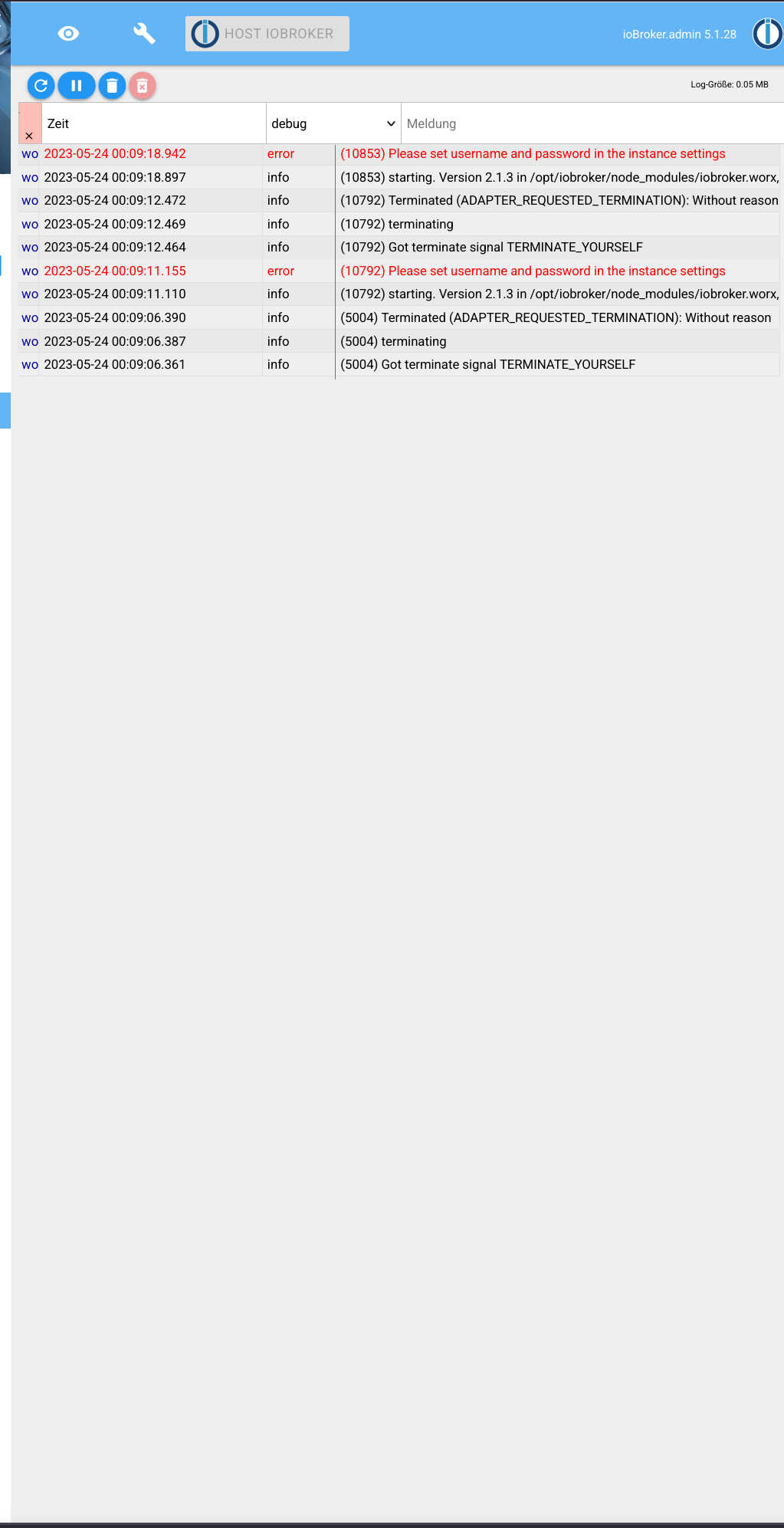
            Das Update vom Admin Adapter funktioniert nicht.
            Nachdem ich auf der Info-Seite vom iobroker admin aktualisieren gestartet habe, ist iobroker nicht mehr erreichbar uns muss erst per "iobroker start admin" wieder gestartet werden. Die Version bleibt danach aber die alte (5.1.28).

            Habe irgendwo gelesen, dass die NodeJS version zu aktuell sein kann und man erstmal downgraden muss für eine höhere admin version.

            Thomas BraunT 1 Antwort Letzte Antwort
            0
            • B Bill S. Preston

              So, npx liegt jetzt in /usr/bin/

              Das Update vom Admin Adapter funktioniert nicht.
              Nachdem ich auf der Info-Seite vom iobroker admin aktualisieren gestartet habe, ist iobroker nicht mehr erreichbar uns muss erst per "iobroker start admin" wieder gestartet werden. Die Version bleibt danach aber die alte (5.1.28).

              Habe irgendwo gelesen, dass die NodeJS version zu aktuell sein kann und man erstmal downgraden muss für eine höhere admin version.

              Thomas BraunT Online
              Thomas BraunT Online
              Thomas Braun
              Most Active
              schrieb am zuletzt editiert von
              #12

              @bill-s-preston

              Hast du die Hausaufgaben erledigt?

              iob diag
              

              sagt nun?

              Mach die Updates nicht aus der GUI heraus sondern über die Kommandozeile. Da sieht man u. U. genaueres.

              iob update
              iob upgrade admin --debug
              

              schaut wie aus?

              Linux-Werkzeugkasten:
              https://forum.iobroker.net/topic/42952/der-kleine-iobroker-linux-werkzeugkasten
              NodeJS Fixer Skript:
              https://forum.iobroker.net/topic/68035/iob-node-fix-skript
              iob_diag: curl -sLf -o diag.sh https://iobroker.net/diag.sh && bash diag.sh

              B 1 Antwort Letzte Antwort
              0
              • Thomas BraunT Thomas Braun

                @bill-s-preston

                Hast du die Hausaufgaben erledigt?

                iob diag
                

                sagt nun?

                Mach die Updates nicht aus der GUI heraus sondern über die Kommandozeile. Da sieht man u. U. genaueres.

                iob update
                iob upgrade admin --debug
                

                schaut wie aus?

                B Offline
                B Offline
                Bill S. Preston
                schrieb am zuletzt editiert von
                #13

                @thomas-braun

                "Hast du die Hausaufgaben erledigt?"
                Noch nicht ganz. Ich muss noch auf Bullseye' / Debian 11 aktualisieren.

                "Mach die Updates nicht aus der GUI heraus sondern über die Kommandozeile. Da sieht man u. U. genaueres."
                So hat es geklappt. Tausend Dank! Konnte den Admin Adapter aktualisieren und den Worx Adapter installieren.

                Wenn ich Zeit finde werde ich das komplette System updaten.
                Danke nochmal!

                Thomas BraunT 1 Antwort Letzte Antwort
                0
                • B Bill S. Preston

                  @thomas-braun

                  "Hast du die Hausaufgaben erledigt?"
                  Noch nicht ganz. Ich muss noch auf Bullseye' / Debian 11 aktualisieren.

                  "Mach die Updates nicht aus der GUI heraus sondern über die Kommandozeile. Da sieht man u. U. genaueres."
                  So hat es geklappt. Tausend Dank! Konnte den Admin Adapter aktualisieren und den Worx Adapter installieren.

                  Wenn ich Zeit finde werde ich das komplette System updaten.
                  Danke nochmal!

                  Thomas BraunT Online
                  Thomas BraunT Online
                  Thomas Braun
                  Most Active
                  schrieb am zuletzt editiert von
                  #14

                  @bill-s-preston

                  iob diag
                  

                  sagt nun?

                  Linux-Werkzeugkasten:
                  https://forum.iobroker.net/topic/42952/der-kleine-iobroker-linux-werkzeugkasten
                  NodeJS Fixer Skript:
                  https://forum.iobroker.net/topic/68035/iob-node-fix-skript
                  iob_diag: curl -sLf -o diag.sh https://iobroker.net/diag.sh && bash diag.sh

                  B 1 Antwort Letzte Antwort
                  0
                  • Thomas BraunT Thomas Braun

                    @bill-s-preston

                    iob diag
                    

                    sagt nun?

                    B Offline
                    B Offline
                    Bill S. Preston
                    schrieb am zuletzt editiert von
                    #15

                    @thomas-braun

                    ======================= SUMMARY =======================
                    v.2023-04-16

                    Operatingsystem: Raspbian GNU/Linux 10 (buster)
                    Kernel: 5.10.103-v7l+
                    Installation: Native
                    Timezone: Europe/Berlin (CEST, +0200)
                    User-ID: 1000
                    X-Server: true
                    Boot Target: graphical.target

                    Pending OS-Updates: 13
                    Pending iob updates: 22

                    Nodejs-Installation: /usr/bin/nodejs v16.20.0
                    /usr/bin/node v16.20.0
                    /usr/bin/npm 8.19.4
                    /usr/bin/npx 8.19.4

                    Recommended versions are nodejs 18.x.y and npm 9.x.y
                    Your nodejs installation is correct

                    MEMORY:
                    total used free shared buff/cache available
                    Mem: 3.8G 2.5G 168M 106M 1.2G 1.5G
                    Swap: 99M 69M 30M
                    Total: 3.9G 2.6G 198M

                    Active iob-Instances: 36
                    Active repo(s): Stable (default)

                    ioBroker Core: js-controller 4.0.24
                    admin 6.3.5

                    ioBroker Status: iobroker is running on this host.

                    Objects type: jsonl
                    States type: jsonl

                    Status admin and web instance:

                    • system.adapter.admin.0 : admin : iobroker - enabled, port: 7777, bind: 0.0.0.0, run as: admin
                    • system.adapter.web.0 : web : iobroker - enabled, port: 8082, bind: 0.0.0.0, run as: admin

                    Objects: 14252
                    States: 9379

                    Size of iob-Database:

                    22M /opt/iobroker/iobroker-data/objects.jsonl
                    9.7M /opt/iobroker/iobroker-data/objects.json.migrated
                    9.7M /opt/iobroker/iobroker-data/objects.json.bak.migrated
                    4.9M /opt/iobroker/iobroker-data/states.jsonl
                    1.8M /opt/iobroker/iobroker-data/states.json.migrated
                    1.8M /opt/iobroker/iobroker-data/states.json.bak.migrated

                    =================== END OF SUMMARY ====================

                    
                    pi@iobroker:~ $
                    Thomas BraunT 1 Antwort Letzte Antwort
                    0
                    • B Bill S. Preston

                      @thomas-braun

                      ======================= SUMMARY =======================
                      v.2023-04-16

                      Operatingsystem: Raspbian GNU/Linux 10 (buster)
                      Kernel: 5.10.103-v7l+
                      Installation: Native
                      Timezone: Europe/Berlin (CEST, +0200)
                      User-ID: 1000
                      X-Server: true
                      Boot Target: graphical.target

                      Pending OS-Updates: 13
                      Pending iob updates: 22

                      Nodejs-Installation: /usr/bin/nodejs v16.20.0
                      /usr/bin/node v16.20.0
                      /usr/bin/npm 8.19.4
                      /usr/bin/npx 8.19.4

                      Recommended versions are nodejs 18.x.y and npm 9.x.y
                      Your nodejs installation is correct

                      MEMORY:
                      total used free shared buff/cache available
                      Mem: 3.8G 2.5G 168M 106M 1.2G 1.5G
                      Swap: 99M 69M 30M
                      Total: 3.9G 2.6G 198M

                      Active iob-Instances: 36
                      Active repo(s): Stable (default)

                      ioBroker Core: js-controller 4.0.24
                      admin 6.3.5

                      ioBroker Status: iobroker is running on this host.

                      Objects type: jsonl
                      States type: jsonl

                      Status admin and web instance:

                      • system.adapter.admin.0 : admin : iobroker - enabled, port: 7777, bind: 0.0.0.0, run as: admin
                      • system.adapter.web.0 : web : iobroker - enabled, port: 8082, bind: 0.0.0.0, run as: admin

                      Objects: 14252
                      States: 9379

                      Size of iob-Database:

                      22M /opt/iobroker/iobroker-data/objects.jsonl
                      9.7M /opt/iobroker/iobroker-data/objects.json.migrated
                      9.7M /opt/iobroker/iobroker-data/objects.json.bak.migrated
                      4.9M /opt/iobroker/iobroker-data/states.jsonl
                      1.8M /opt/iobroker/iobroker-data/states.json.migrated
                      1.8M /opt/iobroker/iobroker-data/states.json.bak.migrated

                      =================== END OF SUMMARY ====================

                      
                      pi@iobroker:~ $
                      Thomas BraunT Online
                      Thomas BraunT Online
                      Thomas Braun
                      Most Active
                      schrieb am zuletzt editiert von Thomas Braun
                      #16

                      @bill-s-preston

                      Ist ja immer noch nicht aktualisiert.
                      Updates einspielen!!!

                      Warum läuft der Admin eigentlich auf einem anderem als dem vorgesehenen Port?

                      Linux-Werkzeugkasten:
                      https://forum.iobroker.net/topic/42952/der-kleine-iobroker-linux-werkzeugkasten
                      NodeJS Fixer Skript:
                      https://forum.iobroker.net/topic/68035/iob-node-fix-skript
                      iob_diag: curl -sLf -o diag.sh https://iobroker.net/diag.sh && bash diag.sh

                      1 Antwort Letzte Antwort
                      0
                      Antworten
                      • In einem neuen Thema antworten
                      Anmelden zum Antworten
                      • Älteste zuerst
                      • Neuste zuerst
                      • Meiste Stimmen


                      Support us

                      ioBroker
                      Community Adapters
                      Donate

                      594

                      Online

                      32.7k

                      Benutzer

                      82.4k

                      Themen

                      1.3m

                      Beiträge
                      Community
                      Impressum | Datenschutz-Bestimmungen | Nutzungsbedingungen | Einwilligungseinstellungen
                      ioBroker Community 2014-2025
                      logo
                      • Anmelden

                      • Du hast noch kein Konto? Registrieren

                      • Anmelden oder registrieren, um zu suchen
                      • Erster Beitrag
                        Letzter Beitrag
                      0
                      • Home
                      • Aktuell
                      • Tags
                      • Ungelesen 0
                      • Kategorien
                      • Unreplied
                      • Beliebt
                      • GitHub
                      • Docu
                      • Hilfe