




Falsche Arbeitsspeicher Warnung
-
Ich hatte ein paar Probleme mit mein Debian auf meine 3er Pi. Also hab ich eine neu SD-Karte genommen, alles neu aufgespielt, ioBroker installiert und die benötigten Adapter installiert. Noch bevor ich etwas einstellen, Testen oder gar das Backup laden konnte, hat mich der ioBroker schon mit Arbeitsspeicher Warnungen bombardiert.
Ich seh aber nicht warum.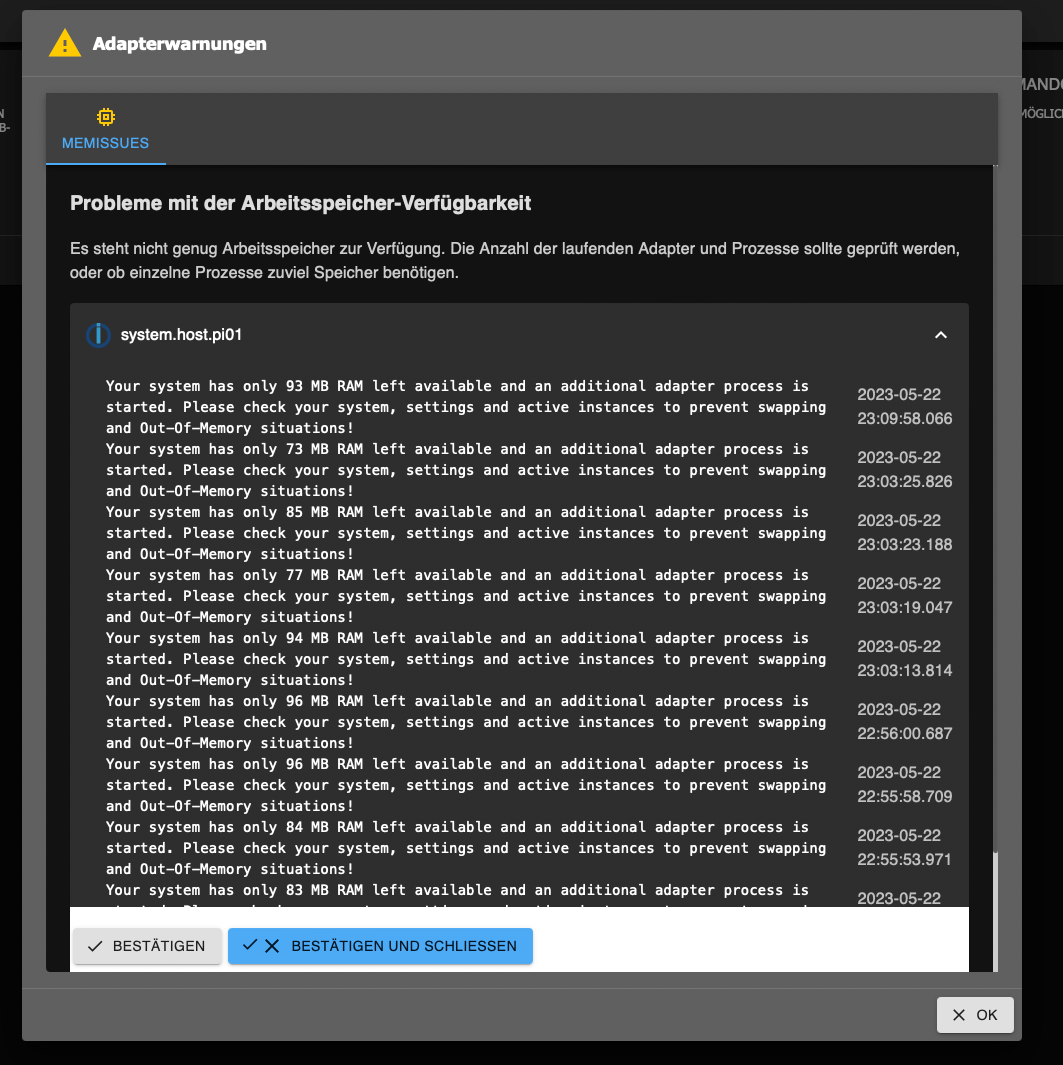
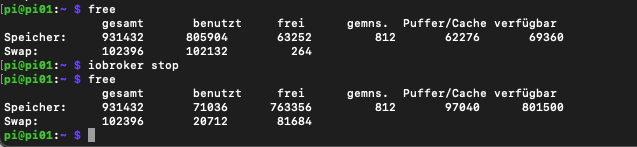
Über das Terminal bekomme ich folgende Infos:
-
Ich hatte ein paar Probleme mit mein Debian auf meine 3er Pi. Also hab ich eine neu SD-Karte genommen, alles neu aufgespielt, ioBroker installiert und die benötigten Adapter installiert. Noch bevor ich etwas einstellen, Testen oder gar das Backup laden konnte, hat mich der ioBroker schon mit Arbeitsspeicher Warnungen bombardiert.
Ich seh aber nicht warum.Über das Terminal bekomme ich folgende Infos:
-
Ich hatte ein paar Probleme mit mein Debian auf meine 3er Pi. Also hab ich eine neu SD-Karte genommen, alles neu aufgespielt, ioBroker installiert und die benötigten Adapter installiert. Noch bevor ich etwas einstellen, Testen oder gar das Backup laden konnte, hat mich der ioBroker schon mit Arbeitsspeicher Warnungen bombardiert.
Ich seh aber nicht warum.Über das Terminal bekomme ich folgende Infos:
@lj-mic sagte in Falsche Arbeitsspeicher Warnung:
Ich seh aber nicht warum.
Die Kiste ist rappeldicht. 1GB RAM ist zu wenig für mehr als eine kleine Zahl (einstellig!) an Adaptern.
-
@lj-mic sagte in Falsche Arbeitsspeicher Warnung:
Ich seh aber nicht warum.
Die Kiste ist rappeldicht. 1GB RAM ist zu wenig für mehr als eine kleine Zahl (einstellig!) an Adaptern.
-
@thomas-braun
Ausser ioBroker ist nichts oben.@lj-mic sagte in Falsche Arbeitsspeicher Warnung:
Ausser ioBroker ist nichts oben.
Ja, und? 1GB reicht halt nicht aus für mehr als eine kleine Anzahl an Instanzen.
iob diagsagt?
-
@lj-mic sagte in Falsche Arbeitsspeicher Warnung:
Ausser ioBroker ist nichts oben.
Ja, und? 1GB reicht halt nicht aus für mehr als eine kleine Anzahl an Instanzen.
iob diagsagt?
@thomas-braun sagte in Falsche Arbeitsspeicher Warnung:
1GB reicht halt nicht aus für mehr als eine kleine Anzahl an Instanzen
@lj-mic sagte in Falsche Arbeitsspeicher Warnung:
Noch bevor ich etwas einstellen, Testen oder gar das Backup laden konnte
heisst ein blanker iobroker
aber ohne diag Ausgabe kann man nicht viel dazu sagen, wahrscheinlich aber Desktop installiert
-
@thomas-braun
Den Befehl kannte ich noch garnicht 😳👍Mit ioBroker laufen dauerte es ewig und stürzt es ab. Ist nicht Fertig geworden:
======== Start marking the full check here =========

Skript v.2023-04-16

*** BASE SYSTEM ***
Model		: Raspberry Pi 3 Model B Rev 1.2
Architecture    : aarch64
Docker          : false
Virtualization  : none
Distributor ID:	Debian
Description:	Debian GNU/Linux 11 (bullseye)
Release:	11
Codename:	bullseye

PRETTY_NAME="Debian GNU/Linux 11 (bullseye)"
NAME="Debian GNU/Linux"
VERSION_ID="11"
VERSION="11 (bullseye)"
VERSION_CODENAME=bullseye
ID=debian
HOME_URL="https://www.debian.org/"
SUPPORT_URL="https://www.debian.org/support"
BUG_REPORT_URL="https://bugs.debian.org/"

Systemuptime and Load:
 23:26:59 up 0 min,  1 user,  load average: 1.46, 0.39, 0.13
CPU threads: 4

Raspberry only:
throttled=0x0
Other values than 0x0 hint to temperature/voltage problems
temp=44.5'C
volt=1.2625V

*** Time and Time Zones ***
               Local time: Mon 2023-05-22 23:26:59 CEST
           Universal time: Mon 2023-05-22 21:26:59 UTC
                 RTC time: n/a
                Time zone: Europe/Vienna (CEST, +0200)
System clock synchronized: no
              NTP service: active
          RTC in local TZ: no

*** User and Groups ***
pi
/home/pi
pi adm dialout cdrom sudo audio video plugdev games users input render netdev gpio i2c spi iobroker

*** X-Server-Setup ***
X-Server: 	false
Desktop:
Terminal: 	tty
Boot Target: 	multi-user.target

*** MEMORY ***
               total        used        free      shared  buff/cache   available
Mem:            909M        200M        479M        0.0K        229M        652M
Swap:            99M          0B         99M
Total:          1.0G        200M        579M

          909 M total memory
          201 M used memory
          285 M active memory
           69 M inactive memory
          478 M free memory
           23 M buffer memory
          206 M swap cache
           99 M total swap
            0 M used swap
           99 M free swap

Raspberry only:
oom events: 0
lifetime oom required: 0 Mbytes
total time in oom handler: 0 ms
max time spent in oom handler: 0 ms

*** FILESYSTEM ***
Filesystem     Type      Size  Used Avail Use% Mounted on
/dev/root      ext4       29G  3.5G   24G  13% /
devtmpfs       devtmpfs  325M     0  325M   0% /dev
tmpfs          tmpfs     455M     0  455M   0% /dev/shm
tmpfs          tmpfs     182M  984K  181M   1% /run
tmpfs          tmpfs     5.0M  8.0K  5.0M   1% /run/lock
/dev/mmcblk0p1 vfat      255M   32M  224M  13% /boot
tmpfs          tmpfs      91M   12K   91M   1% /run/user/1000

Messages concerning ext4 filesystem in dmesg:
[Mon May 22 23:26:19 2023] Kernel command line: coherent_pool=1M 8250.nr_uarts=0 snd_bcm2835.enable_headphones=0 snd_bcm2835.enable_headphones=1 snd_bcm2835.enable_hdmi=1 snd_bcm2835.enable_hdmi=0 video=Composite-1:720x480@60i vc_mem.mem_base=0x3ec00000 vc_mem.mem_size=0x40000000  console=ttyS0,115200 console=tty1 root=PARTUUID=117da133-02 rootfstype=ext4 fsck.repair=yes rootwait
[Mon May 22 23:26:22 2023] EXT4-fs (mmcblk0p2): INFO: recovery required on readonly filesystem
[Mon May 22 23:26:22 2023] EXT4-fs (mmcblk0p2): write access will be enabled during recovery
[Mon May 22 23:26:22 2023] EXT4-fs (mmcblk0p2): recovery complete
[Mon May 22 23:26:22 2023] EXT4-fs (mmcblk0p2): mounted filesystem with ordered data mode. Quota mode: none.
[Mon May 22 23:26:22 2023] VFS: Mounted root (ext4 filesystem) readonly on device 179:2.
[Mon May 22 23:26:25 2023] EXT4-fs (mmcblk0p2): re-mounted. Quota mode: none.

Show mounted filesystems (real ones only):
TARGET  SOURCE         FSTYPE OPTIONS
/       /dev/mmcblk0p2 ext4   rw,noatime
`-/boot /dev/mmcblk0p1 vfat   rw,relatime,fmask=0022,dmask=0022,codepage=437,iocharset=ascii,shortname=mixed,errors=remount-ro

Files in neuralgic directories:

/var:
548M	/var/
178M	/var/cache
172M	/var/cache/apt
157M	/var/lib
130M	/var/lib/apt/lists

Archived and active journals take up 112.0M in the file system.

/opt/iobroker/backups:
4.0K	/opt/iobroker/backups/

/opt/iobroker/iobroker-data:
169M	/opt/iobroker/iobroker-data/
164M	/opt/iobroker/iobroker-data/files
51M	/opt/iobroker/iobroker-data/files/javascript.admin
48M	/opt/iobroker/iobroker-data/files/telegram.admin
32M	/opt/iobroker/iobroker-data/files/javascript.admin/static/js

The five largest files in iobroker-data are:
15M	/opt/iobroker/iobroker-data/files/telegram.admin/rules/static/js/vendors-node_modules_iobroker_adapter-react-v5_assets_devices_parseNames_d_ts-node_modules_io-1d9f06.44fe4a3f.chunk.js.map
9.7M	/opt/iobroker/iobroker-data/files/text2command.admin/static/js/main.bbfeb1bf.js.map
7.2M	/opt/iobroker/iobroker-data/files/telegram.admin/rules/static/js/vendors-node_modules_iobroker_adapter-react-v5_assets_devices_parseNames_d_ts-node_modules_io-1d9f06.44fe4a3f.chunk.js
6.9M	/opt/iobroker/iobroker-data/files/telegram.admin/custom/static/js/vendors-node_modules_mui_icons-material_esm_index_js.8fdf8cb7.chunk.js.map
6.9M	/opt/iobroker/iobroker-data/files/javascript.admin/static/js/610.de0231c9.chunk.js.map

*** NodeJS-Installation ***

/usr/bin/nodejs 	v18.16.0
/usr/bin/node 		v18.16.0
/usr/bin/npm 		9.5.1
/usr/bin/npx 		9.5.1


nodejs:
  Installed: 18.16.0-deb-1nodesource1
  Candidate: 18.16.0-deb-1nodesource1
  Version table:
 *** 18.16.0-deb-1nodesource1 500
        500 https://deb.nodesource.com/node_18.x bullseye/main arm64 Packages
        100 /var/lib/dpkg/status
     12.22.12~dfsg-1~deb11u4 500
        500 http://security.debian.org/debian-security bullseye-security/main arm64 Packages
     12.22.12~dfsg-1~deb11u3 500
        500 http://deb.debian.org/debian bullseye/main arm64 Packages

Temp directories causing npm8 problem: 0
No problems detected

*** ioBroker-Installation ***

ioBroker Status
iobroker is running on this host.


Objects type: jsonl
States  type: jsonl
Versuch #2 ohne ioBroker am laufen.
======== Start marking the full check here =========

Skript v.2023-04-16

*** BASE SYSTEM ***
Model		: Raspberry Pi 3 Model B Rev 1.2
Architecture    : aarch64
Docker          : false
Virtualization  : none
Distributor ID:	Debian
Description:	Debian GNU/Linux 11 (bullseye)
Release:	11
Codename:	bullseye

PRETTY_NAME="Debian GNU/Linux 11 (bullseye)"
NAME="Debian GNU/Linux"
VERSION_ID="11"
VERSION="11 (bullseye)"
VERSION_CODENAME=bullseye
ID=debian
HOME_URL="https://www.debian.org/"
SUPPORT_URL="https://www.debian.org/support"
BUG_REPORT_URL="https://bugs.debian.org/"

Systemuptime and Load:
 11:20:05 up 4 min,  1 user,  load average: 0.65, 0.71, 0.33
CPU threads: 4

Raspberry only:
throttled=0x0
Other values than 0x0 hint to temperature/voltage problems
temp=55.3'C
volt=1.2750V

*** Time and Time Zones ***
               Local time: Wed 2023-05-24 11:20:05 CEST
           Universal time: Wed 2023-05-24 09:20:05 UTC
                 RTC time: n/a
                Time zone: Europe/Vienna (CEST, +0200)
System clock synchronized: yes
              NTP service: active
          RTC in local TZ: no

*** User and Groups ***
pi
/home/pi
pi adm dialout cdrom sudo audio video plugdev games users input render netdev gpio i2c spi iobroker

*** X-Server-Setup ***
X-Server: 	false
Desktop:
Terminal: 	tty
Boot Target: 	multi-user.target

*** MEMORY ***
               total        used        free      shared  buff/cache   available
Mem:            909M         94M        478M        0.0K        336M        749M
Swap:            99M          0B         99M
Total:          1.0G         94M        578M

          909 M total memory
           94 M used memory
          234 M active memory
           98 M inactive memory
          478 M free memory
           55 M buffer memory
          280 M swap cache
           99 M total swap
            0 M used swap
           99 M free swap

Raspberry only:
oom events: 0
lifetime oom required: 0 Mbytes
total time in oom handler: 0 ms
max time spent in oom handler: 0 ms

*** FILESYSTEM ***
Filesystem     Type      Size  Used Avail Use% Mounted on
/dev/root      ext4       29G  3.5G   24G  13% /
devtmpfs       devtmpfs  325M     0  325M   0% /dev
tmpfs          tmpfs     455M     0  455M   0% /dev/shm
tmpfs          tmpfs     182M  968K  181M   1% /run
tmpfs          tmpfs     5.0M  8.0K  5.0M   1% /run/lock
/dev/mmcblk0p1 vfat      255M   32M  224M  13% /boot
tmpfs          tmpfs      91M   12K   91M   1% /run/user/1000

Messages concerning ext4 filesystem in dmesg:
[Wed May 24 11:15:59 2023] Kernel command line: coherent_pool=1M 8250.nr_uarts=0 snd_bcm2835.enable_headphones=0 snd_bcm2835.enable_headphones=1 snd_bcm2835.enable_hdmi=1 snd_bcm2835.enable_hdmi=0 video=Composite-1:720x480@60i vc_mem.mem_base=0x3ec00000 vc_mem.mem_size=0x40000000  console=ttyS0,115200 console=tty1 root=PARTUUID=117da133-02 rootfstype=ext4 fsck.repair=yes rootwait
[Wed May 24 11:16:02 2023] EXT4-fs (mmcblk0p2): INFO: recovery required on readonly filesystem
[Wed May 24 11:16:02 2023] EXT4-fs (mmcblk0p2): write access will be enabled during recovery
[Wed May 24 11:16:02 2023] EXT4-fs (mmcblk0p2): recovery complete
[Wed May 24 11:16:02 2023] EXT4-fs (mmcblk0p2): mounted filesystem with ordered data mode. Quota mode: none.
[Wed May 24 11:16:02 2023] VFS: Mounted root (ext4 filesystem) readonly on device 179:2.
[Wed May 24 11:16:06 2023] EXT4-fs (mmcblk0p2): re-mounted. Quota mode: none.

Show mounted filesystems (real ones only):
TARGET  SOURCE         FSTYPE OPTIONS
/       /dev/mmcblk0p2 ext4   rw,noatime
`-/boot /dev/mmcblk0p1 vfat   rw,relatime,fmask=0022,dmask=0022,codepage=437,iocharset=ascii,shortname=mixed,errors=remount-ro

Files in neuralgic directories:

/var:
573M	/var/
178M	/var/cache
172M	/var/cache/apt
157M	/var/lib
139M	/var/log

Archived and active journals take up 136.0M in the file system.

/opt/iobroker/backups:
4.0K	/opt/iobroker/backups/

/opt/iobroker/iobroker-data:
168M	/opt/iobroker/iobroker-data/
164M	/opt/iobroker/iobroker-data/files
51M	/opt/iobroker/iobroker-data/files/javascript.admin
48M	/opt/iobroker/iobroker-data/files/telegram.admin
32M	/opt/iobroker/iobroker-data/files/javascript.admin/static/js

The five largest files in iobroker-data are:
15M	/opt/iobroker/iobroker-data/files/telegram.admin/rules/static/js/vendors-node_modules_iobroker_adapter-react-v5_assets_devices_parseNames_d_ts-node_modules_io-1d9f06.44fe4a3f.chunk.js.map
9.7M	/opt/iobroker/iobroker-data/files/text2command.admin/static/js/main.bbfeb1bf.js.map
7.2M	/opt/iobroker/iobroker-data/files/telegram.admin/rules/static/js/vendors-node_modules_iobroker_adapter-react-v5_assets_devices_parseNames_d_ts-node_modules_io-1d9f06.44fe4a3f.chunk.js
6.9M	/opt/iobroker/iobroker-data/files/telegram.admin/custom/static/js/vendors-node_modules_mui_icons-material_esm_index_js.8fdf8cb7.chunk.js.map
6.9M	/opt/iobroker/iobroker-data/files/javascript.admin/static/js/610.de0231c9.chunk.js.map

*** NodeJS-Installation ***

/usr/bin/nodejs 	v18.16.0
/usr/bin/node 		v18.16.0
/usr/bin/npm 		9.5.1
/usr/bin/npx 		9.5.1


nodejs:
  Installed: 18.16.0-deb-1nodesource1
  Candidate: 18.16.0-deb-1nodesource1
  Version table:
 *** 18.16.0-deb-1nodesource1 500
        500 https://deb.nodesource.com/node_18.x bullseye/main arm64 Packages
        100 /var/lib/dpkg/status
     12.22.12~dfsg-1~deb11u4 500
        500 http://security.debian.org/debian-security bullseye-security/main arm64 Packages
     12.22.12~dfsg-1~deb11u3 500
        500 http://deb.debian.org/debian bullseye/main arm64 Packages

Temp directories causing npm8 problem: 0
No problems detected

*** ioBroker-Installation ***

ioBroker Status
iobroker is not running on this host.


Objects type: jsonl
States  type: jsonl

MULTIHOSTSERVICE/enabled: false

Core adapters versions
js-controller: 	4.0.24
admin: 		6.3.5
javascript: 	6.1.4

Adapters from github: 	0

Adapter State
  system.adapter.admin.0                  : admin                 : pi01                                     -  enabled, port: 8081, bind: 0.0.0.0, run as: admin
  system.adapter.alexa2.0                 : alexa2                : pi01                                     -  enabled
  system.adapter.backitup.0               : backitup              : pi01                                     -  enabled
  system.adapter.cloud.0                  : cloud                 : pi01                                     - disabled
  system.adapter.discovery.0              : discovery             : pi01                                     -  enabled
  system.adapter.history.0                : history               : pi01                                     -  enabled
  system.adapter.info.0                   : info                  : pi01                                     -  enabled
  system.adapter.javascript.0             : javascript            : pi01                                     -  enabled
  system.adapter.mqtt.0                   : mqtt                  : pi01                                     - disabled, port: 1883, bind: 0.0.0.0
  system.adapter.net-tools.0              : net-tools             : pi01                                     - disabled
  system.adapter.node-red.0               : node-red              : pi01                                     -  enabled, port: 1880, bind: 0.0.0.0
  system.adapter.ping.0                   : ping                  : pi01                                     - disabled
  system.adapter.rpi2.0                   : rpi2                  : pi01                                     -  enabled
  system.adapter.sayit.0                  : sayit                 : pi01                                     -  enabled
  system.adapter.telegram.1               : telegram              : pi01                                     - disabled, port: 8443, bind: 0.0.0.0
  system.adapter.text2command.0           : text2command          : pi01                                     -  enabled
  system.adapter.web.0                    : web                   : pi01                                     -  enabled, port: 8082, bind: 0.0.0.0, run as: admin
  system.adapter.wifilight.0              : wifilight             : pi01                                     -  enabled
  system.adapter.yahka.0                  : yahka                 : pi01                                     -  enabled
  system.adapter.zigbee.0                 : zigbee                : pi01                                     -  enabled

+ instance is alive

Enabled adapters with bindings
  system.adapter.admin.0                  : admin                 : pi01                                     -  enabled, port: 8081, bind: 0.0.0.0, run as: admin
  system.adapter.node-red.0               : node-red              : pi01                                     -  enabled, port: 1880, bind: 0.0.0.0
  system.adapter.web.0                    : web                   : pi01                                     -  enabled, port: 8082, bind: 0.0.0.0, run as: admin

ioBroker-Repositories
stable        : http://download.iobroker.net/sources-dist.json
beta          : http://download.iobroker.net/sources-dist-latest.json

Active repo(s): stable

Installed ioBroker-Instances
Used repository: stable
Adapter    "admin"        : 6.3.5    , installed 6.3.5
Adapter    "alexa2"       : 3.23.2   , installed 3.23.2
Adapter    "backitup"     : 2.6.19   , installed 2.6.19
Adapter    "cloud"        : 4.3.0    , installed 4.3.0
Adapter    "discovery"    : 3.1.0    , installed 3.1.0
Adapter    "history"      : 2.2.4    , installed 2.2.4
Adapter    "info"         : 1.9.26   , installed 1.9.26
Adapter    "javascript"   : 6.1.4    , installed 6.1.4
Controller "js-controller": 4.0.24   , installed 4.0.24
Adapter    "mqtt"         : 4.0.7    , installed 4.0.7
Adapter    "net-tools"    : 0.2.0    , installed 0.2.0
Adapter    "node-red"     : 4.0.0    , installed 4.0.0
Adapter    "ping"         : 1.5.3    , installed 1.5.3
Adapter    "rpi2"         : 1.3.2    , installed 1.3.2
Adapter    "sayit"        : 1.12.3   , installed 1.12.3
Adapter    "simple-api"   : 2.7.2    , installed 2.7.2
Adapter    "socketio"     : 4.2.0    , installed 4.2.0
Adapter    "telegram"     : 1.15.2   , installed 1.15.2
Adapter    "text2command" : 2.3.0    , installed 2.3.0
Adapter    "web"          : 4.3.0    , installed 4.3.0
Adapter    "wifilight"    : 1.1.4    , installed 1.1.4
Adapter    "ws"           : 1.3.0    , installed 1.3.0
Adapter    "yahka"        : 0.17.0   , installed 0.17.0
Adapter    "zigbee"       : 1.8.10   , installed 1.8.10

Objects and States
Please stand by - This may take a while
Objects: 	947
States: 	660

*** OS-Repositories and Updates ***
Hit:1 http://deb.debian.org/debian bullseye InRelease
Hit:2 http://deb.debian.org/debian bullseye-updates InRelease
Hit:3 http://archive.raspberrypi.org/debian bullseye InRelease
Hit:4 https://deb.nodesource.com/node_18.x bullseye InRelease
Hit:5 http://security.debian.org/debian-security bullseye-security InRelease
Reading package lists...
Pending Updates: 0

*** Listening Ports ***
Active Internet connections (only servers)
Proto Recv-Q Send-Q Local Address           Foreign Address         State       User       Inode      PID/Program name
tcp        0      0 0.0.0.0:22              0.0.0.0:*               LISTEN      0          11762      507/sshd: /usr/sbin
tcp6       0      0 :::22                   :::*                    LISTEN      0          11764      507/sshd: /usr/sbin
tcp6       0      0 :::548                  :::*                    LISTEN      0          12784      517/afpd
tcp6       0      0 ::1:4700                :::*                    LISTEN      0          13546      518/cnid_metad
udp        0      0 0.0.0.0:33483           0.0.0.0:*                           108        12747      382/avahi-daemon: r
udp        0      0 0.0.0.0:5353            0.0.0.0:*                           108        12745      382/avahi-daemon: r
udp        0      0 0.0.0.0:68              0.0.0.0:*                           0          11769      579/dhcpcd
udp6       0      0 :::5353                 :::*                                108        12746      382/avahi-daemon: r
udp6       0      0 :::57640                :::*                                108        12748      382/avahi-daemon: r

*** Log File - Last 25 Lines ***

2023-05-24 11:09:53.413  - info: host.pi01 stopInstance system.adapter.history.0 (force=false, process=false)
2023-05-24 11:09:53.415  - info: host.pi01 stopInstance system.adapter.javascript.0 (force=false, process=true)
2023-05-24 11:09:53.416  - info: host.pi01 stopInstance system.adapter.node-red.0 (force=false, process=false)
2023-05-24 11:09:53.418  - info: host.pi01 stopInstance system.adapter.telegram.1 (force=false, process=false)
2023-05-24 11:09:53.419  - info: host.pi01 stopInstance system.adapter.alexa2.0 (force=false, process=false)
2023-05-24 11:09:53.420  - info: host.pi01 stopInstance system.adapter.mqtt.0 (force=false, process=false)
2023-05-24 11:09:53.420  - info: host.pi01 stopInstance system.adapter.ping.0 (force=false, process=false)
2023-05-24 11:09:53.421  - info: host.pi01 stopInstance system.adapter.rpi2.0 (force=false, process=false)
2023-05-24 11:09:53.422  - info: host.pi01 stopInstance system.adapter.wifilight.0 (force=false, process=false)
2023-05-24 11:09:53.423  - info: host.pi01 stopInstance system.adapter.zigbee.0 (force=false, process=false)
2023-05-24 11:09:53.424  - info: host.pi01 stopInstance system.adapter.discovery.0 (force=false, process=false)
2023-05-24 11:09:53.425  - info: host.pi01 stopInstance system.adapter.backitup.0 (force=false, process=false)
2023-05-24 11:09:53.426  - info: host.pi01 stopInstance system.adapter.web.0 (force=false, process=false)
2023-05-24 11:09:53.427  - info: host.pi01 stopInstance system.adapter.cloud.0 (force=false, process=false)
2023-05-24 11:09:53.428  - info: host.pi01 stopInstance system.adapter.info.0 (force=false, process=false)
2023-05-24 11:09:53.429  - info: host.pi01 stopInstance system.adapter.net-tools.0 (force=false, process=false)
2023-05-24 11:09:53.430  - info: host.pi01 stopInstance system.adapter.sayit.0 (force=false, process=false)
2023-05-24 11:09:53.431  - info: host.pi01 stopInstance system.adapter.text2command.0 (force=false, process=false)
2023-05-24 11:09:53.433  - info: host.pi01 stopInstance system.adapter.web.1 (force=false, process=false)
2023-05-24 11:09:53.434  - info: host.pi01 stopInstance system.adapter.yahka.0 (force=false, process=false)
2023-05-24 11:09:53.491  - warn: host.pi01 instance system.adapter.javascript.0 terminated due to SIGTERM
2023-05-24 11:09:53.492  - info: host.pi01 instance system.adapter.javascript.0 terminated with code null ()
2023-05-24 11:09:53.493  - info: host.pi01 All instances are stopped.
2023-05-24 11:09:53.499  - info: host.pi01 stopInstance system.adapter.javascript.0 send kill signal
2023-05-24 11:09:53.698  - info: host.pi01 terminated


============ Mark until here for C&P =============

iob diag has finished.


Press any key for a summary
======================= SUMMARY ======================= v.2023-04-16 Operatingsystem: Debian GNU/Linux 11 (bullseye) Kernel: 6.1.21-v8+ Installation: Native Timezone: Europe/Vienna (CEST, +0200) User-ID: 1000 X-Server: false Boot Target: multi-user.target Pending OS-Updates: 0 Pending iob updates: 0 Nodejs-Installation: /usr/bin/nodejs v18.16.0 /usr/bin/node v18.16.0 /usr/bin/npm 9.5.1 /usr/bin/npx 9.5.1 Recommended versions are nodejs 18.x.y and npm 9.x.y Your nodejs installation is correct MEMORY: total used free shared buff/cache available Mem: 909M 89M 292M 0.0K 527M 755M Swap: 99M 0B 99M Total: 1.0G 89M 392M Active iob-Instances: 1 Active repo(s): stable ioBroker Core: js-controller 4.0.24 admin 6.3.5 ioBroker Status: iobroker is not running on this host. Objects type: jsonl States type: jsonl Status admin and web instance: system.adapter.admin.0 : admin : pi01 - enabled, port: 8081, bind: 0.0.0.0, run as: admin system.adapter.web.0 : web : pi01 - enabled, port: 8082, bind: 0.0.0.0, run as: admin Objects: 947 States: 660 Size of iob-Database: 6.9M /opt/iobroker/iobroker-data/objects.jsonl 504K /opt/iobroker/iobroker-data/states.jsonl =================== END OF SUMMARY ==================== -
@thomas-braun
Den Befehl kannte ich noch garnicht 😳👍Mit ioBroker laufen dauerte es ewig und stürzt es ab. Ist nicht Fertig geworden:
======== Start marking the full check here =========

Skript v.2023-04-16

*** BASE SYSTEM ***
Model		: Raspberry Pi 3 Model B Rev 1.2
Architecture    : aarch64
Docker          : false
Virtualization  : none
Distributor ID:	Debian
Description:	Debian GNU/Linux 11 (bullseye)
Release:	11
Codename:	bullseye

PRETTY_NAME="Debian GNU/Linux 11 (bullseye)"
NAME="Debian GNU/Linux"
VERSION_ID="11"
VERSION="11 (bullseye)"
VERSION_CODENAME=bullseye
ID=debian
HOME_URL="https://www.debian.org/"
SUPPORT_URL="https://www.debian.org/support"
BUG_REPORT_URL="https://bugs.debian.org/"

Systemuptime and Load:
 23:26:59 up 0 min,  1 user,  load average: 1.46, 0.39, 0.13
CPU threads: 4

Raspberry only:
throttled=0x0
Other values than 0x0 hint to temperature/voltage problems
temp=44.5'C
volt=1.2625V

*** Time and Time Zones ***
               Local time: Mon 2023-05-22 23:26:59 CEST
           Universal time: Mon 2023-05-22 21:26:59 UTC
                 RTC time: n/a
                Time zone: Europe/Vienna (CEST, +0200)
System clock synchronized: no
              NTP service: active
          RTC in local TZ: no

*** User and Groups ***
pi
/home/pi
pi adm dialout cdrom sudo audio video plugdev games users input render netdev gpio i2c spi iobroker

*** X-Server-Setup ***
X-Server: 	false
Desktop:
Terminal: 	tty
Boot Target: 	multi-user.target

*** MEMORY ***
               total        used        free      shared  buff/cache   available
Mem:            909M        200M        479M        0.0K        229M        652M
Swap:            99M          0B         99M
Total:          1.0G        200M        579M

          909 M total memory
          201 M used memory
          285 M active memory
           69 M inactive memory
          478 M free memory
           23 M buffer memory
          206 M swap cache
           99 M total swap
            0 M used swap
           99 M free swap

Raspberry only:
oom events: 0
lifetime oom required: 0 Mbytes
total time in oom handler: 0 ms
max time spent in oom handler: 0 ms

*** FILESYSTEM ***
Filesystem     Type      Size  Used Avail Use% Mounted on
/dev/root      ext4       29G  3.5G   24G  13% /
devtmpfs       devtmpfs  325M     0  325M   0% /dev
tmpfs          tmpfs     455M     0  455M   0% /dev/shm
tmpfs          tmpfs     182M  984K  181M   1% /run
tmpfs          tmpfs     5.0M  8.0K  5.0M   1% /run/lock
/dev/mmcblk0p1 vfat      255M   32M  224M  13% /boot
tmpfs          tmpfs      91M   12K   91M   1% /run/user/1000

Messages concerning ext4 filesystem in dmesg:
[Mon May 22 23:26:19 2023] Kernel command line: coherent_pool=1M 8250.nr_uarts=0 snd_bcm2835.enable_headphones=0 snd_bcm2835.enable_headphones=1 snd_bcm2835.enable_hdmi=1 snd_bcm2835.enable_hdmi=0 video=Composite-1:720x480@60i vc_mem.mem_base=0x3ec00000 vc_mem.mem_size=0x40000000  console=ttyS0,115200 console=tty1 root=PARTUUID=117da133-02 rootfstype=ext4 fsck.repair=yes rootwait
[Mon May 22 23:26:22 2023] EXT4-fs (mmcblk0p2): INFO: recovery required on readonly filesystem
[Mon May 22 23:26:22 2023] EXT4-fs (mmcblk0p2): write access will be enabled during recovery
[Mon May 22 23:26:22 2023] EXT4-fs (mmcblk0p2): recovery complete
[Mon May 22 23:26:22 2023] EXT4-fs (mmcblk0p2): mounted filesystem with ordered data mode. Quota mode: none.
[Mon May 22 23:26:22 2023] VFS: Mounted root (ext4 filesystem) readonly on device 179:2.
[Mon May 22 23:26:25 2023] EXT4-fs (mmcblk0p2): re-mounted. Quota mode: none.

Show mounted filesystems (real ones only):
TARGET  SOURCE         FSTYPE OPTIONS
/       /dev/mmcblk0p2 ext4   rw,noatime
`-/boot /dev/mmcblk0p1 vfat   rw,relatime,fmask=0022,dmask=0022,codepage=437,iocharset=ascii,shortname=mixed,errors=remount-ro

Files in neuralgic directories:

/var:
548M	/var/
178M	/var/cache
172M	/var/cache/apt
157M	/var/lib
130M	/var/lib/apt/lists

Archived and active journals take up 112.0M in the file system.

/opt/iobroker/backups:
4.0K	/opt/iobroker/backups/

/opt/iobroker/iobroker-data:
169M	/opt/iobroker/iobroker-data/
164M	/opt/iobroker/iobroker-data/files
51M	/opt/iobroker/iobroker-data/files/javascript.admin
48M	/opt/iobroker/iobroker-data/files/telegram.admin
32M	/opt/iobroker/iobroker-data/files/javascript.admin/static/js

The five largest files in iobroker-data are:
15M	/opt/iobroker/iobroker-data/files/telegram.admin/rules/static/js/vendors-node_modules_iobroker_adapter-react-v5_assets_devices_parseNames_d_ts-node_modules_io-1d9f06.44fe4a3f.chunk.js.map
9.7M	/opt/iobroker/iobroker-data/files/text2command.admin/static/js/main.bbfeb1bf.js.map
7.2M	/opt/iobroker/iobroker-data/files/telegram.admin/rules/static/js/vendors-node_modules_iobroker_adapter-react-v5_assets_devices_parseNames_d_ts-node_modules_io-1d9f06.44fe4a3f.chunk.js
6.9M	/opt/iobroker/iobroker-data/files/telegram.admin/custom/static/js/vendors-node_modules_mui_icons-material_esm_index_js.8fdf8cb7.chunk.js.map
6.9M	/opt/iobroker/iobroker-data/files/javascript.admin/static/js/610.de0231c9.chunk.js.map

*** NodeJS-Installation ***

/usr/bin/nodejs 	v18.16.0
/usr/bin/node 		v18.16.0
/usr/bin/npm 		9.5.1
/usr/bin/npx 		9.5.1


nodejs:
  Installed: 18.16.0-deb-1nodesource1
  Candidate: 18.16.0-deb-1nodesource1
  Version table:
 *** 18.16.0-deb-1nodesource1 500
        500 https://deb.nodesource.com/node_18.x bullseye/main arm64 Packages
        100 /var/lib/dpkg/status
     12.22.12~dfsg-1~deb11u4 500
        500 http://security.debian.org/debian-security bullseye-security/main arm64 Packages
     12.22.12~dfsg-1~deb11u3 500
        500 http://deb.debian.org/debian bullseye/main arm64 Packages

Temp directories causing npm8 problem: 0
No problems detected

*** ioBroker-Installation ***

ioBroker Status
iobroker is running on this host.


Objects type: jsonl
States  type: jsonl
Versuch #2 ohne ioBroker am laufen.
======== Start marking the full check here =========

Skript v.2023-04-16

*** BASE SYSTEM ***
Model		: Raspberry Pi 3 Model B Rev 1.2
Architecture    : aarch64
Docker          : false
Virtualization  : none
Distributor ID:	Debian
Description:	Debian GNU/Linux 11 (bullseye)
Release:	11
Codename:	bullseye

PRETTY_NAME="Debian GNU/Linux 11 (bullseye)"
NAME="Debian GNU/Linux"
VERSION_ID="11"
VERSION="11 (bullseye)"
VERSION_CODENAME=bullseye
ID=debian
HOME_URL="https://www.debian.org/"
SUPPORT_URL="https://www.debian.org/support"
BUG_REPORT_URL="https://bugs.debian.org/"

Systemuptime and Load:
 11:20:05 up 4 min,  1 user,  load average: 0.65, 0.71, 0.33
CPU threads: 4

Raspberry only:
throttled=0x0
Other values than 0x0 hint to temperature/voltage problems
temp=55.3'C
volt=1.2750V

*** Time and Time Zones ***
               Local time: Wed 2023-05-24 11:20:05 CEST
           Universal time: Wed 2023-05-24 09:20:05 UTC
                 RTC time: n/a
                Time zone: Europe/Vienna (CEST, +0200)
System clock synchronized: yes
              NTP service: active
          RTC in local TZ: no

*** User and Groups ***
pi
/home/pi
pi adm dialout cdrom sudo audio video plugdev games users input render netdev gpio i2c spi iobroker

*** X-Server-Setup ***
X-Server: 	false
Desktop:
Terminal: 	tty
Boot Target: 	multi-user.target

*** MEMORY ***
               total        used        free      shared  buff/cache   available
Mem:            909M         94M        478M        0.0K        336M        749M
Swap:            99M          0B         99M
Total:          1.0G         94M        578M

          909 M total memory
           94 M used memory
          234 M active memory
           98 M inactive memory
          478 M free memory
           55 M buffer memory
          280 M swap cache
           99 M total swap
            0 M used swap
           99 M free swap

Raspberry only:
oom events: 0
lifetime oom required: 0 Mbytes
total time in oom handler: 0 ms
max time spent in oom handler: 0 ms

*** FILESYSTEM ***
Filesystem     Type      Size  Used Avail Use% Mounted on
/dev/root      ext4       29G  3.5G   24G  13% /
devtmpfs       devtmpfs  325M     0  325M   0% /dev
tmpfs          tmpfs     455M     0  455M   0% /dev/shm
tmpfs          tmpfs     182M  968K  181M   1% /run
tmpfs          tmpfs     5.0M  8.0K  5.0M   1% /run/lock
/dev/mmcblk0p1 vfat      255M   32M  224M  13% /boot
tmpfs          tmpfs      91M   12K   91M   1% /run/user/1000

Messages concerning ext4 filesystem in dmesg:
[Wed May 24 11:15:59 2023] Kernel command line: coherent_pool=1M 8250.nr_uarts=0 snd_bcm2835.enable_headphones=0 snd_bcm2835.enable_headphones=1 snd_bcm2835.enable_hdmi=1 snd_bcm2835.enable_hdmi=0 video=Composite-1:720x480@60i vc_mem.mem_base=0x3ec00000 vc_mem.mem_size=0x40000000  console=ttyS0,115200 console=tty1 root=PARTUUID=117da133-02 rootfstype=ext4 fsck.repair=yes rootwait
[Wed May 24 11:16:02 2023] EXT4-fs (mmcblk0p2): INFO: recovery required on readonly filesystem
[Wed May 24 11:16:02 2023] EXT4-fs (mmcblk0p2): write access will be enabled during recovery
[Wed May 24 11:16:02 2023] EXT4-fs (mmcblk0p2): recovery complete
[Wed May 24 11:16:02 2023] EXT4-fs (mmcblk0p2): mounted filesystem with ordered data mode. Quota mode: none.
[Wed May 24 11:16:02 2023] VFS: Mounted root (ext4 filesystem) readonly on device 179:2.
[Wed May 24 11:16:06 2023] EXT4-fs (mmcblk0p2): re-mounted. Quota mode: none.

Show mounted filesystems (real ones only):
TARGET  SOURCE         FSTYPE OPTIONS
/       /dev/mmcblk0p2 ext4   rw,noatime
`-/boot /dev/mmcblk0p1 vfat   rw,relatime,fmask=0022,dmask=0022,codepage=437,iocharset=ascii,shortname=mixed,errors=remount-ro

Files in neuralgic directories:

/var:
573M	/var/
178M	/var/cache
172M	/var/cache/apt
157M	/var/lib
139M	/var/log

Archived and active journals take up 136.0M in the file system.

/opt/iobroker/backups:
4.0K	/opt/iobroker/backups/

/opt/iobroker/iobroker-data:
168M	/opt/iobroker/iobroker-data/
164M	/opt/iobroker/iobroker-data/files
51M	/opt/iobroker/iobroker-data/files/javascript.admin
48M	/opt/iobroker/iobroker-data/files/telegram.admin
32M	/opt/iobroker/iobroker-data/files/javascript.admin/static/js

The five largest files in iobroker-data are:
15M	/opt/iobroker/iobroker-data/files/telegram.admin/rules/static/js/vendors-node_modules_iobroker_adapter-react-v5_assets_devices_parseNames_d_ts-node_modules_io-1d9f06.44fe4a3f.chunk.js.map
9.7M	/opt/iobroker/iobroker-data/files/text2command.admin/static/js/main.bbfeb1bf.js.map
7.2M	/opt/iobroker/iobroker-data/files/telegram.admin/rules/static/js/vendors-node_modules_iobroker_adapter-react-v5_assets_devices_parseNames_d_ts-node_modules_io-1d9f06.44fe4a3f.chunk.js
6.9M	/opt/iobroker/iobroker-data/files/telegram.admin/custom/static/js/vendors-node_modules_mui_icons-material_esm_index_js.8fdf8cb7.chunk.js.map
6.9M	/opt/iobroker/iobroker-data/files/javascript.admin/static/js/610.de0231c9.chunk.js.map

*** NodeJS-Installation ***

/usr/bin/nodejs 	v18.16.0
/usr/bin/node 		v18.16.0
/usr/bin/npm 		9.5.1
/usr/bin/npx 		9.5.1


nodejs:
  Installed: 18.16.0-deb-1nodesource1
  Candidate: 18.16.0-deb-1nodesource1
  Version table:
 *** 18.16.0-deb-1nodesource1 500
        500 https://deb.nodesource.com/node_18.x bullseye/main arm64 Packages
        100 /var/lib/dpkg/status
     12.22.12~dfsg-1~deb11u4 500
        500 http://security.debian.org/debian-security bullseye-security/main arm64 Packages
     12.22.12~dfsg-1~deb11u3 500
        500 http://deb.debian.org/debian bullseye/main arm64 Packages

Temp directories causing npm8 problem: 0
No problems detected

*** ioBroker-Installation ***

ioBroker Status
iobroker is not running on this host.


Objects type: jsonl
States  type: jsonl

MULTIHOSTSERVICE/enabled: false

Core adapters versions
js-controller: 	4.0.24
admin: 		6.3.5
javascript: 	6.1.4

Adapters from github: 	0

Adapter State
  system.adapter.admin.0                  : admin                 : pi01                                     -  enabled, port: 8081, bind: 0.0.0.0, run as: admin
  system.adapter.alexa2.0                 : alexa2                : pi01                                     -  enabled
  system.adapter.backitup.0               : backitup              : pi01                                     -  enabled
  system.adapter.cloud.0                  : cloud                 : pi01                                     - disabled
  system.adapter.discovery.0              : discovery             : pi01                                     -  enabled
  system.adapter.history.0                : history               : pi01                                     -  enabled
  system.adapter.info.0                   : info                  : pi01                                     -  enabled
  system.adapter.javascript.0             : javascript            : pi01                                     -  enabled
  system.adapter.mqtt.0                   : mqtt                  : pi01                                     - disabled, port: 1883, bind: 0.0.0.0
  system.adapter.net-tools.0              : net-tools             : pi01                                     - disabled
  system.adapter.node-red.0               : node-red              : pi01                                     -  enabled, port: 1880, bind: 0.0.0.0
  system.adapter.ping.0                   : ping                  : pi01                                     - disabled
  system.adapter.rpi2.0                   : rpi2                  : pi01                                     -  enabled
  system.adapter.sayit.0                  : sayit                 : pi01                                     -  enabled
  system.adapter.telegram.1               : telegram              : pi01                                     - disabled, port: 8443, bind: 0.0.0.0
  system.adapter.text2command.0           : text2command          : pi01                                     -  enabled
  system.adapter.web.0                    : web                   : pi01                                     -  enabled, port: 8082, bind: 0.0.0.0, run as: admin
  system.adapter.wifilight.0              : wifilight             : pi01                                     -  enabled
  system.adapter.yahka.0                  : yahka                 : pi01                                     -  enabled
  system.adapter.zigbee.0                 : zigbee                : pi01                                     -  enabled

+ instance is alive

Enabled adapters with bindings
  system.adapter.admin.0                  : admin                 : pi01                                     -  enabled, port: 8081, bind: 0.0.0.0, run as: admin
  system.adapter.node-red.0               : node-red              : pi01                                     -  enabled, port: 1880, bind: 0.0.0.0
  system.adapter.web.0                    : web                   : pi01                                     -  enabled, port: 8082, bind: 0.0.0.0, run as: admin

ioBroker-Repositories
stable        : http://download.iobroker.net/sources-dist.json
beta          : http://download.iobroker.net/sources-dist-latest.json

Active repo(s): stable

Installed ioBroker-Instances
Used repository: stable
Adapter    "admin"        : 6.3.5    , installed 6.3.5
Adapter    "alexa2"       : 3.23.2   , installed 3.23.2
Adapter    "backitup"     : 2.6.19   , installed 2.6.19
Adapter    "cloud"        : 4.3.0    , installed 4.3.0
Adapter    "discovery"    : 3.1.0    , installed 3.1.0
Adapter    "history"      : 2.2.4    , installed 2.2.4
Adapter    "info"         : 1.9.26   , installed 1.9.26
Adapter    "javascript"   : 6.1.4    , installed 6.1.4
Controller "js-controller": 4.0.24   , installed 4.0.24
Adapter    "mqtt"         : 4.0.7    , installed 4.0.7
Adapter    "net-tools"    : 0.2.0    , installed 0.2.0
Adapter    "node-red"     : 4.0.0    , installed 4.0.0
Adapter    "ping"         : 1.5.3    , installed 1.5.3
Adapter    "rpi2"         : 1.3.2    , installed 1.3.2
Adapter    "sayit"        : 1.12.3   , installed 1.12.3
Adapter    "simple-api"   : 2.7.2    , installed 2.7.2
Adapter    "socketio"     : 4.2.0    , installed 4.2.0
Adapter    "telegram"     : 1.15.2   , installed 1.15.2
Adapter    "text2command" : 2.3.0    , installed 2.3.0
Adapter    "web"          : 4.3.0    , installed 4.3.0
Adapter    "wifilight"    : 1.1.4    , installed 1.1.4
Adapter    "ws"           : 1.3.0    , installed 1.3.0
Adapter    "yahka"        : 0.17.0   , installed 0.17.0
Adapter    "zigbee"       : 1.8.10   , installed 1.8.10

Objects and States
Please stand by - This may take a while
Objects: 	947
States: 	660

*** OS-Repositories and Updates ***
Hit:1 http://deb.debian.org/debian bullseye InRelease
Hit:2 http://deb.debian.org/debian bullseye-updates InRelease
Hit:3 http://archive.raspberrypi.org/debian bullseye InRelease
Hit:4 https://deb.nodesource.com/node_18.x bullseye InRelease
Hit:5 http://security.debian.org/debian-security bullseye-security InRelease
Reading package lists...
Pending Updates: 0

*** Listening Ports ***
Active Internet connections (only servers)
Proto Recv-Q Send-Q Local Address           Foreign Address         State       User       Inode      PID/Program name
tcp        0      0 0.0.0.0:22              0.0.0.0:*               LISTEN      0          11762      507/sshd: /usr/sbin
tcp6       0      0 :::22                   :::*                    LISTEN      0          11764      507/sshd: /usr/sbin
tcp6       0      0 :::548                  :::*                    LISTEN      0          12784      517/afpd
tcp6       0      0 ::1:4700                :::*                    LISTEN      0          13546      518/cnid_metad
udp        0      0 0.0.0.0:33483           0.0.0.0:*                           108        12747      382/avahi-daemon: r
udp        0      0 0.0.0.0:5353            0.0.0.0:*                           108        12745      382/avahi-daemon: r
udp        0      0 0.0.0.0:68              0.0.0.0:*                           0          11769      579/dhcpcd
udp6       0      0 :::5353                 :::*                                108        12746      382/avahi-daemon: r
udp6       0      0 :::57640                :::*                                108        12748      382/avahi-daemon: r

*** Log File - Last 25 Lines ***

2023-05-24 11:09:53.413  - info: host.pi01 stopInstance system.adapter.history.0 (force=false, process=false)
2023-05-24 11:09:53.415  - info: host.pi01 stopInstance system.adapter.javascript.0 (force=false, process=true)
2023-05-24 11:09:53.416  - info: host.pi01 stopInstance system.adapter.node-red.0 (force=false, process=false)
2023-05-24 11:09:53.418  - info: host.pi01 stopInstance system.adapter.telegram.1 (force=false, process=false)
2023-05-24 11:09:53.419  - info: host.pi01 stopInstance system.adapter.alexa2.0 (force=false, process=false)
2023-05-24 11:09:53.420  - info: host.pi01 stopInstance system.adapter.mqtt.0 (force=false, process=false)
2023-05-24 11:09:53.420  - info: host.pi01 stopInstance system.adapter.ping.0 (force=false, process=false)
2023-05-24 11:09:53.421  - info: host.pi01 stopInstance system.adapter.rpi2.0 (force=false, process=false)
2023-05-24 11:09:53.422  - info: host.pi01 stopInstance system.adapter.wifilight.0 (force=false, process=false)
2023-05-24 11:09:53.423  - info: host.pi01 stopInstance system.adapter.zigbee.0 (force=false, process=false)
2023-05-24 11:09:53.424  - info: host.pi01 stopInstance system.adapter.discovery.0 (force=false, process=false)
2023-05-24 11:09:53.425  - info: host.pi01 stopInstance system.adapter.backitup.0 (force=false, process=false)
2023-05-24 11:09:53.426  - info: host.pi01 stopInstance system.adapter.web.0 (force=false, process=false)
2023-05-24 11:09:53.427  - info: host.pi01 stopInstance system.adapter.cloud.0 (force=false, process=false)
2023-05-24 11:09:53.428  - info: host.pi01 stopInstance system.adapter.info.0 (force=false, process=false)
2023-05-24 11:09:53.429  - info: host.pi01 stopInstance system.adapter.net-tools.0 (force=false, process=false)
2023-05-24 11:09:53.430  - info: host.pi01 stopInstance system.adapter.sayit.0 (force=false, process=false)
2023-05-24 11:09:53.431  - info: host.pi01 stopInstance system.adapter.text2command.0 (force=false, process=false)
2023-05-24 11:09:53.433  - info: host.pi01 stopInstance system.adapter.web.1 (force=false, process=false)
2023-05-24 11:09:53.434  - info: host.pi01 stopInstance system.adapter.yahka.0 (force=false, process=false)
2023-05-24 11:09:53.491  - warn: host.pi01 instance system.adapter.javascript.0 terminated due to SIGTERM
2023-05-24 11:09:53.492  - info: host.pi01 instance system.adapter.javascript.0 terminated with code null ()
2023-05-24 11:09:53.493  - info: host.pi01 All instances are stopped.
2023-05-24 11:09:53.499  - info: host.pi01 stopInstance system.adapter.javascript.0 send kill signal
2023-05-24 11:09:53.698  - info: host.pi01 terminated


============ Mark until here for C&P =============

iob diag has finished.


Press any key for a summary
======================= SUMMARY ======================= v.2023-04-16 Operatingsystem: Debian GNU/Linux 11 (bullseye) Kernel: 6.1.21-v8+ Installation: Native Timezone: Europe/Vienna (CEST, +0200) User-ID: 1000 X-Server: false Boot Target: multi-user.target Pending OS-Updates: 0 Pending iob updates: 0 Nodejs-Installation: /usr/bin/nodejs v18.16.0 /usr/bin/node v18.16.0 /usr/bin/npm 9.5.1 /usr/bin/npx 9.5.1 Recommended versions are nodejs 18.x.y and npm 9.x.y Your nodejs installation is correct MEMORY: total used free shared buff/cache available Mem: 909M 89M 292M 0.0K 527M 755M Swap: 99M 0B 99M Total: 1.0G 89M 392M Active iob-Instances: 1 Active repo(s): stable ioBroker Core: js-controller 4.0.24 admin 6.3.5 ioBroker Status: iobroker is not running on this host. Objects type: jsonl States type: jsonl Status admin and web instance: system.adapter.admin.0 : admin : pi01 - enabled, port: 8081, bind: 0.0.0.0, run as: admin system.adapter.web.0 : web : pi01 - enabled, port: 8082, bind: 0.0.0.0, run as: admin Objects: 947 States: 660 Size of iob-Database: 6.9M /opt/iobroker/iobroker-data/objects.jsonl 504K /opt/iobroker/iobroker-data/states.jsonl =================== END OF SUMMARY ====================@lj-mic ich dachte du hast noch kein backup eingespielt, woher kommen dann die ganzen Adapter, selbst installiert?
unter anderem, wie schon erwähnt, sind das zu viele für 1GB Ram -
@thomas-braun
Den Befehl kannte ich noch garnicht 😳👍Mit ioBroker laufen dauerte es ewig und stürzt es ab. Ist nicht Fertig geworden:
======== Start marking the full check here =========

Skript v.2023-04-16

*** BASE SYSTEM ***
Model		: Raspberry Pi 3 Model B Rev 1.2
Architecture    : aarch64
Docker          : false
Virtualization  : none
Distributor ID:	Debian
Description:	Debian GNU/Linux 11 (bullseye)
Release:	11
Codename:	bullseye

PRETTY_NAME="Debian GNU/Linux 11 (bullseye)"
NAME="Debian GNU/Linux"
VERSION_ID="11"
VERSION="11 (bullseye)"
VERSION_CODENAME=bullseye
ID=debian
HOME_URL="https://www.debian.org/"
SUPPORT_URL="https://www.debian.org/support"
BUG_REPORT_URL="https://bugs.debian.org/"

Systemuptime and Load:
 23:26:59 up 0 min,  1 user,  load average: 1.46, 0.39, 0.13
CPU threads: 4

Raspberry only:
throttled=0x0
Other values than 0x0 hint to temperature/voltage problems
temp=44.5'C
volt=1.2625V

*** Time and Time Zones ***
               Local time: Mon 2023-05-22 23:26:59 CEST
           Universal time: Mon 2023-05-22 21:26:59 UTC
                 RTC time: n/a
                Time zone: Europe/Vienna (CEST, +0200)
System clock synchronized: no
              NTP service: active
          RTC in local TZ: no

*** User and Groups ***
pi
/home/pi
pi adm dialout cdrom sudo audio video plugdev games users input render netdev gpio i2c spi iobroker

*** X-Server-Setup ***
X-Server: 	false
Desktop:
Terminal: 	tty
Boot Target: 	multi-user.target

*** MEMORY ***
               total        used        free      shared  buff/cache   available
Mem:            909M        200M        479M        0.0K        229M        652M
Swap:            99M          0B         99M
Total:          1.0G        200M        579M

          909 M total memory
          201 M used memory
          285 M active memory
           69 M inactive memory
          478 M free memory
           23 M buffer memory
          206 M swap cache
           99 M total swap
            0 M used swap
           99 M free swap

Raspberry only:
oom events: 0
lifetime oom required: 0 Mbytes
total time in oom handler: 0 ms
max time spent in oom handler: 0 ms

*** FILESYSTEM ***
Filesystem     Type      Size  Used Avail Use% Mounted on
/dev/root      ext4       29G  3.5G   24G  13% /
devtmpfs       devtmpfs  325M     0  325M   0% /dev
tmpfs          tmpfs     455M     0  455M   0% /dev/shm
tmpfs          tmpfs     182M  984K  181M   1% /run
tmpfs          tmpfs     5.0M  8.0K  5.0M   1% /run/lock
/dev/mmcblk0p1 vfat      255M   32M  224M  13% /boot
tmpfs          tmpfs      91M   12K   91M   1% /run/user/1000

Messages concerning ext4 filesystem in dmesg:
[Mon May 22 23:26:19 2023] Kernel command line: coherent_pool=1M 8250.nr_uarts=0 snd_bcm2835.enable_headphones=0 snd_bcm2835.enable_headphones=1 snd_bcm2835.enable_hdmi=1 snd_bcm2835.enable_hdmi=0 video=Composite-1:720x480@60i vc_mem.mem_base=0x3ec00000 vc_mem.mem_size=0x40000000  console=ttyS0,115200 console=tty1 root=PARTUUID=117da133-02 rootfstype=ext4 fsck.repair=yes rootwait
[Mon May 22 23:26:22 2023] EXT4-fs (mmcblk0p2): INFO: recovery required on readonly filesystem
[Mon May 22 23:26:22 2023] EXT4-fs (mmcblk0p2): write access will be enabled during recovery
[Mon May 22 23:26:22 2023] EXT4-fs (mmcblk0p2): recovery complete
[Mon May 22 23:26:22 2023] EXT4-fs (mmcblk0p2): mounted filesystem with ordered data mode. Quota mode: none.
[Mon May 22 23:26:22 2023] VFS: Mounted root (ext4 filesystem) readonly on device 179:2.
[Mon May 22 23:26:25 2023] EXT4-fs (mmcblk0p2): re-mounted. Quota mode: none.

Show mounted filesystems (real ones only):
TARGET  SOURCE         FSTYPE OPTIONS
/       /dev/mmcblk0p2 ext4   rw,noatime
`-/boot /dev/mmcblk0p1 vfat   rw,relatime,fmask=0022,dmask=0022,codepage=437,iocharset=ascii,shortname=mixed,errors=remount-ro

Files in neuralgic directories:

/var:
548M	/var/
178M	/var/cache
172M	/var/cache/apt
157M	/var/lib
130M	/var/lib/apt/lists

Archived and active journals take up 112.0M in the file system.

/opt/iobroker/backups:
4.0K	/opt/iobroker/backups/

/opt/iobroker/iobroker-data:
169M	/opt/iobroker/iobroker-data/
164M	/opt/iobroker/iobroker-data/files
51M	/opt/iobroker/iobroker-data/files/javascript.admin
48M	/opt/iobroker/iobroker-data/files/telegram.admin
32M	/opt/iobroker/iobroker-data/files/javascript.admin/static/js

The five largest files in iobroker-data are:
15M	/opt/iobroker/iobroker-data/files/telegram.admin/rules/static/js/vendors-node_modules_iobroker_adapter-react-v5_assets_devices_parseNames_d_ts-node_modules_io-1d9f06.44fe4a3f.chunk.js.map
9.7M	/opt/iobroker/iobroker-data/files/text2command.admin/static/js/main.bbfeb1bf.js.map
7.2M	/opt/iobroker/iobroker-data/files/telegram.admin/rules/static/js/vendors-node_modules_iobroker_adapter-react-v5_assets_devices_parseNames_d_ts-node_modules_io-1d9f06.44fe4a3f.chunk.js
6.9M	/opt/iobroker/iobroker-data/files/telegram.admin/custom/static/js/vendors-node_modules_mui_icons-material_esm_index_js.8fdf8cb7.chunk.js.map
6.9M	/opt/iobroker/iobroker-data/files/javascript.admin/static/js/610.de0231c9.chunk.js.map

*** NodeJS-Installation ***

/usr/bin/nodejs 	v18.16.0
/usr/bin/node 		v18.16.0
/usr/bin/npm 		9.5.1
/usr/bin/npx 		9.5.1


nodejs:
  Installed: 18.16.0-deb-1nodesource1
  Candidate: 18.16.0-deb-1nodesource1
  Version table:
 *** 18.16.0-deb-1nodesource1 500
        500 https://deb.nodesource.com/node_18.x bullseye/main arm64 Packages
        100 /var/lib/dpkg/status
     12.22.12~dfsg-1~deb11u4 500
        500 http://security.debian.org/debian-security bullseye-security/main arm64 Packages
     12.22.12~dfsg-1~deb11u3 500
        500 http://deb.debian.org/debian bullseye/main arm64 Packages

Temp directories causing npm8 problem: 0
No problems detected

*** ioBroker-Installation ***

ioBroker Status
iobroker is running on this host.


Objects type: jsonl
States  type: jsonl
Versuch #2 ohne ioBroker am laufen.
======== Start marking the full check here =========

Skript v.2023-04-16

*** BASE SYSTEM ***
Model		: Raspberry Pi 3 Model B Rev 1.2
Architecture    : aarch64
Docker          : false
Virtualization  : none
Distributor ID:	Debian
Description:	Debian GNU/Linux 11 (bullseye)
Release:	11
Codename:	bullseye

PRETTY_NAME="Debian GNU/Linux 11 (bullseye)"
NAME="Debian GNU/Linux"
VERSION_ID="11"
VERSION="11 (bullseye)"
VERSION_CODENAME=bullseye
ID=debian
HOME_URL="https://www.debian.org/"
SUPPORT_URL="https://www.debian.org/support"
BUG_REPORT_URL="https://bugs.debian.org/"

Systemuptime and Load:
 11:20:05 up 4 min,  1 user,  load average: 0.65, 0.71, 0.33
CPU threads: 4

Raspberry only:
throttled=0x0
Other values than 0x0 hint to temperature/voltage problems
temp=55.3'C
volt=1.2750V

*** Time and Time Zones ***
               Local time: Wed 2023-05-24 11:20:05 CEST
           Universal time: Wed 2023-05-24 09:20:05 UTC
                 RTC time: n/a
                Time zone: Europe/Vienna (CEST, +0200)
System clock synchronized: yes
              NTP service: active
          RTC in local TZ: no

*** User and Groups ***
pi
/home/pi
pi adm dialout cdrom sudo audio video plugdev games users input render netdev gpio i2c spi iobroker

*** X-Server-Setup ***
X-Server: 	false
Desktop:
Terminal: 	tty
Boot Target: 	multi-user.target

*** MEMORY ***
               total        used        free      shared  buff/cache   available
Mem:            909M         94M        478M        0.0K        336M        749M
Swap:            99M          0B         99M
Total:          1.0G         94M        578M

          909 M total memory
           94 M used memory
          234 M active memory
           98 M inactive memory
          478 M free memory
           55 M buffer memory
          280 M swap cache
           99 M total swap
            0 M used swap
           99 M free swap

Raspberry only:
oom events: 0
lifetime oom required: 0 Mbytes
total time in oom handler: 0 ms
max time spent in oom handler: 0 ms

*** FILESYSTEM ***
Filesystem     Type      Size  Used Avail Use% Mounted on
/dev/root      ext4       29G  3.5G   24G  13% /
devtmpfs       devtmpfs  325M     0  325M   0% /dev
tmpfs          tmpfs     455M     0  455M   0% /dev/shm
tmpfs          tmpfs     182M  968K  181M   1% /run
tmpfs          tmpfs     5.0M  8.0K  5.0M   1% /run/lock
/dev/mmcblk0p1 vfat      255M   32M  224M  13% /boot
tmpfs          tmpfs      91M   12K   91M   1% /run/user/1000

Messages concerning ext4 filesystem in dmesg:
[Wed May 24 11:15:59 2023] Kernel command line: coherent_pool=1M 8250.nr_uarts=0 snd_bcm2835.enable_headphones=0 snd_bcm2835.enable_headphones=1 snd_bcm2835.enable_hdmi=1 snd_bcm2835.enable_hdmi=0 video=Composite-1:720x480@60i vc_mem.mem_base=0x3ec00000 vc_mem.mem_size=0x40000000  console=ttyS0,115200 console=tty1 root=PARTUUID=117da133-02 rootfstype=ext4 fsck.repair=yes rootwait
[Wed May 24 11:16:02 2023] EXT4-fs (mmcblk0p2): INFO: recovery required on readonly filesystem
[Wed May 24 11:16:02 2023] EXT4-fs (mmcblk0p2): write access will be enabled during recovery
[Wed May 24 11:16:02 2023] EXT4-fs (mmcblk0p2): recovery complete
[Wed May 24 11:16:02 2023] EXT4-fs (mmcblk0p2): mounted filesystem with ordered data mode. Quota mode: none.
[Wed May 24 11:16:02 2023] VFS: Mounted root (ext4 filesystem) readonly on device 179:2.
[Wed May 24 11:16:06 2023] EXT4-fs (mmcblk0p2): re-mounted. Quota mode: none.

Show mounted filesystems (real ones only):
TARGET  SOURCE         FSTYPE OPTIONS
/       /dev/mmcblk0p2 ext4   rw,noatime
`-/boot /dev/mmcblk0p1 vfat   rw,relatime,fmask=0022,dmask=0022,codepage=437,iocharset=ascii,shortname=mixed,errors=remount-ro

Files in neuralgic directories:

/var:
573M	/var/
178M	/var/cache
172M	/var/cache/apt
157M	/var/lib
139M	/var/log

Archived and active journals take up 136.0M in the file system.

/opt/iobroker/backups:
4.0K	/opt/iobroker/backups/

/opt/iobroker/iobroker-data:
168M	/opt/iobroker/iobroker-data/
164M	/opt/iobroker/iobroker-data/files
51M	/opt/iobroker/iobroker-data/files/javascript.admin
48M	/opt/iobroker/iobroker-data/files/telegram.admin
32M	/opt/iobroker/iobroker-data/files/javascript.admin/static/js

The five largest files in iobroker-data are:
15M	/opt/iobroker/iobroker-data/files/telegram.admin/rules/static/js/vendors-node_modules_iobroker_adapter-react-v5_assets_devices_parseNames_d_ts-node_modules_io-1d9f06.44fe4a3f.chunk.js.map
9.7M	/opt/iobroker/iobroker-data/files/text2command.admin/static/js/main.bbfeb1bf.js.map
7.2M	/opt/iobroker/iobroker-data/files/telegram.admin/rules/static/js/vendors-node_modules_iobroker_adapter-react-v5_assets_devices_parseNames_d_ts-node_modules_io-1d9f06.44fe4a3f.chunk.js
6.9M	/opt/iobroker/iobroker-data/files/telegram.admin/custom/static/js/vendors-node_modules_mui_icons-material_esm_index_js.8fdf8cb7.chunk.js.map
6.9M	/opt/iobroker/iobroker-data/files/javascript.admin/static/js/610.de0231c9.chunk.js.map

*** NodeJS-Installation ***

/usr/bin/nodejs 	v18.16.0
/usr/bin/node 		v18.16.0
/usr/bin/npm 		9.5.1
/usr/bin/npx 		9.5.1


nodejs:
  Installed: 18.16.0-deb-1nodesource1
  Candidate: 18.16.0-deb-1nodesource1
  Version table:
 *** 18.16.0-deb-1nodesource1 500
        500 https://deb.nodesource.com/node_18.x bullseye/main arm64 Packages
        100 /var/lib/dpkg/status
     12.22.12~dfsg-1~deb11u4 500
        500 http://security.debian.org/debian-security bullseye-security/main arm64 Packages
     12.22.12~dfsg-1~deb11u3 500
        500 http://deb.debian.org/debian bullseye/main arm64 Packages

Temp directories causing npm8 problem: 0
No problems detected

*** ioBroker-Installation ***

ioBroker Status
iobroker is not running on this host.


Objects type: jsonl
States  type: jsonl

MULTIHOSTSERVICE/enabled: false

Core adapters versions
js-controller: 	4.0.24
admin: 		6.3.5
javascript: 	6.1.4

Adapters from github: 	0

Adapter State
  system.adapter.admin.0                  : admin                 : pi01                                     -  enabled, port: 8081, bind: 0.0.0.0, run as: admin
  system.adapter.alexa2.0                 : alexa2                : pi01                                     -  enabled
  system.adapter.backitup.0               : backitup              : pi01                                     -  enabled
  system.adapter.cloud.0                  : cloud                 : pi01                                     - disabled
  system.adapter.discovery.0              : discovery             : pi01                                     -  enabled
  system.adapter.history.0                : history               : pi01                                     -  enabled
  system.adapter.info.0                   : info                  : pi01                                     -  enabled
  system.adapter.javascript.0             : javascript            : pi01                                     -  enabled
  system.adapter.mqtt.0                   : mqtt                  : pi01                                     - disabled, port: 1883, bind: 0.0.0.0
  system.adapter.net-tools.0              : net-tools             : pi01                                     - disabled
  system.adapter.node-red.0               : node-red              : pi01                                     -  enabled, port: 1880, bind: 0.0.0.0
  system.adapter.ping.0                   : ping                  : pi01                                     - disabled
  system.adapter.rpi2.0                   : rpi2                  : pi01                                     -  enabled
  system.adapter.sayit.0                  : sayit                 : pi01                                     -  enabled
  system.adapter.telegram.1               : telegram              : pi01                                     - disabled, port: 8443, bind: 0.0.0.0
  system.adapter.text2command.0           : text2command          : pi01                                     -  enabled
  system.adapter.web.0                    : web                   : pi01                                     -  enabled, port: 8082, bind: 0.0.0.0, run as: admin
  system.adapter.wifilight.0              : wifilight             : pi01                                     -  enabled
  system.adapter.yahka.0                  : yahka                 : pi01                                     -  enabled
  system.adapter.zigbee.0                 : zigbee                : pi01                                     -  enabled

+ instance is alive

Enabled adapters with bindings
  system.adapter.admin.0                  : admin                 : pi01                                     -  enabled, port: 8081, bind: 0.0.0.0, run as: admin
  system.adapter.node-red.0               : node-red              : pi01                                     -  enabled, port: 1880, bind: 0.0.0.0
  system.adapter.web.0                    : web                   : pi01                                     -  enabled, port: 8082, bind: 0.0.0.0, run as: admin

ioBroker-Repositories
stable        : http://download.iobroker.net/sources-dist.json
beta          : http://download.iobroker.net/sources-dist-latest.json

Active repo(s): stable

Installed ioBroker-Instances
Used repository: stable
Adapter    "admin"        : 6.3.5    , installed 6.3.5
Adapter    "alexa2"       : 3.23.2   , installed 3.23.2
Adapter    "backitup"     : 2.6.19   , installed 2.6.19
Adapter    "cloud"        : 4.3.0    , installed 4.3.0
Adapter    "discovery"    : 3.1.0    , installed 3.1.0
Adapter    "history"      : 2.2.4    , installed 2.2.4
Adapter    "info"         : 1.9.26   , installed 1.9.26
Adapter    "javascript"   : 6.1.4    , installed 6.1.4
Controller "js-controller": 4.0.24   , installed 4.0.24
Adapter    "mqtt"         : 4.0.7    , installed 4.0.7
Adapter    "net-tools"    : 0.2.0    , installed 0.2.0
Adapter    "node-red"     : 4.0.0    , installed 4.0.0
Adapter    "ping"         : 1.5.3    , installed 1.5.3
Adapter    "rpi2"         : 1.3.2    , installed 1.3.2
Adapter    "sayit"        : 1.12.3   , installed 1.12.3
Adapter    "simple-api"   : 2.7.2    , installed 2.7.2
Adapter    "socketio"     : 4.2.0    , installed 4.2.0
Adapter    "telegram"     : 1.15.2   , installed 1.15.2
Adapter    "text2command" : 2.3.0    , installed 2.3.0
Adapter    "web"          : 4.3.0    , installed 4.3.0
Adapter    "wifilight"    : 1.1.4    , installed 1.1.4
Adapter    "ws"           : 1.3.0    , installed 1.3.0
Adapter    "yahka"        : 0.17.0   , installed 0.17.0
Adapter    "zigbee"       : 1.8.10   , installed 1.8.10

Objects and States
Please stand by - This may take a while
Objects: 	947
States: 	660

*** OS-Repositories and Updates ***
Hit:1 http://deb.debian.org/debian bullseye InRelease
Hit:2 http://deb.debian.org/debian bullseye-updates InRelease
Hit:3 http://archive.raspberrypi.org/debian bullseye InRelease
Hit:4 https://deb.nodesource.com/node_18.x bullseye InRelease
Hit:5 http://security.debian.org/debian-security bullseye-security InRelease
Reading package lists...
Pending Updates: 0

*** Listening Ports ***
Active Internet connections (only servers)
Proto Recv-Q Send-Q Local Address           Foreign Address         State       User       Inode      PID/Program name
tcp        0      0 0.0.0.0:22              0.0.0.0:*               LISTEN      0          11762      507/sshd: /usr/sbin
tcp6       0      0 :::22                   :::*                    LISTEN      0          11764      507/sshd: /usr/sbin
tcp6       0      0 :::548                  :::*                    LISTEN      0          12784      517/afpd
tcp6       0      0 ::1:4700                :::*                    LISTEN      0          13546      518/cnid_metad
udp        0      0 0.0.0.0:33483           0.0.0.0:*                           108        12747      382/avahi-daemon: r
udp        0      0 0.0.0.0:5353            0.0.0.0:*                           108        12745      382/avahi-daemon: r
udp        0      0 0.0.0.0:68              0.0.0.0:*                           0          11769      579/dhcpcd
udp6       0      0 :::5353                 :::*                                108        12746      382/avahi-daemon: r
udp6       0      0 :::57640                :::*                                108        12748      382/avahi-daemon: r

*** Log File - Last 25 Lines ***

2023-05-24 11:09:53.413  - info: host.pi01 stopInstance system.adapter.history.0 (force=false, process=false)
2023-05-24 11:09:53.415  - info: host.pi01 stopInstance system.adapter.javascript.0 (force=false, process=true)
2023-05-24 11:09:53.416  - info: host.pi01 stopInstance system.adapter.node-red.0 (force=false, process=false)
2023-05-24 11:09:53.418  - info: host.pi01 stopInstance system.adapter.telegram.1 (force=false, process=false)
2023-05-24 11:09:53.419  - info: host.pi01 stopInstance system.adapter.alexa2.0 (force=false, process=false)
2023-05-24 11:09:53.420  - info: host.pi01 stopInstance system.adapter.mqtt.0 (force=false, process=false)
2023-05-24 11:09:53.420  - info: host.pi01 stopInstance system.adapter.ping.0 (force=false, process=false)
2023-05-24 11:09:53.421  - info: host.pi01 stopInstance system.adapter.rpi2.0 (force=false, process=false)
2023-05-24 11:09:53.422  - info: host.pi01 stopInstance system.adapter.wifilight.0 (force=false, process=false)
2023-05-24 11:09:53.423  - info: host.pi01 stopInstance system.adapter.zigbee.0 (force=false, process=false)
2023-05-24 11:09:53.424  - info: host.pi01 stopInstance system.adapter.discovery.0 (force=false, process=false)
2023-05-24 11:09:53.425  - info: host.pi01 stopInstance system.adapter.backitup.0 (force=false, process=false)
2023-05-24 11:09:53.426  - info: host.pi01 stopInstance system.adapter.web.0 (force=false, process=false)
2023-05-24 11:09:53.427  - info: host.pi01 stopInstance system.adapter.cloud.0 (force=false, process=false)
2023-05-24 11:09:53.428  - info: host.pi01 stopInstance system.adapter.info.0 (force=false, process=false)
2023-05-24 11:09:53.429  - info: host.pi01 stopInstance system.adapter.net-tools.0 (force=false, process=false)
2023-05-24 11:09:53.430  - info: host.pi01 stopInstance system.adapter.sayit.0 (force=false, process=false)
2023-05-24 11:09:53.431  - info: host.pi01 stopInstance system.adapter.text2command.0 (force=false, process=false)
2023-05-24 11:09:53.433  - info: host.pi01 stopInstance system.adapter.web.1 (force=false, process=false)
2023-05-24 11:09:53.434  - info: host.pi01 stopInstance system.adapter.yahka.0 (force=false, process=false)
2023-05-24 11:09:53.491  - warn: host.pi01 instance system.adapter.javascript.0 terminated due to SIGTERM
2023-05-24 11:09:53.492  - info: host.pi01 instance system.adapter.javascript.0 terminated with code null ()
2023-05-24 11:09:53.493  - info: host.pi01 All instances are stopped.
2023-05-24 11:09:53.499  - info: host.pi01 stopInstance system.adapter.javascript.0 send kill signal
2023-05-24 11:09:53.698  - info: host.pi01 terminated


============ Mark until here for C&P =============

iob diag has finished.


Press any key for a summary
======================= SUMMARY ======================= v.2023-04-16 Operatingsystem: Debian GNU/Linux 11 (bullseye) Kernel: 6.1.21-v8+ Installation: Native Timezone: Europe/Vienna (CEST, +0200) User-ID: 1000 X-Server: false Boot Target: multi-user.target Pending OS-Updates: 0 Pending iob updates: 0 Nodejs-Installation: /usr/bin/nodejs v18.16.0 /usr/bin/node v18.16.0 /usr/bin/npm 9.5.1 /usr/bin/npx 9.5.1 Recommended versions are nodejs 18.x.y and npm 9.x.y Your nodejs installation is correct MEMORY: total used free shared buff/cache available Mem: 909M 89M 292M 0.0K 527M 755M Swap: 99M 0B 99M Total: 1.0G 89M 392M Active iob-Instances: 1 Active repo(s): stable ioBroker Core: js-controller 4.0.24 admin 6.3.5 ioBroker Status: iobroker is not running on this host. Objects type: jsonl States type: jsonl Status admin and web instance: system.adapter.admin.0 : admin : pi01 - enabled, port: 8081, bind: 0.0.0.0, run as: admin system.adapter.web.0 : web : pi01 - enabled, port: 8082, bind: 0.0.0.0, run as: admin Objects: 947 States: 660 Size of iob-Database: 6.9M /opt/iobroker/iobroker-data/objects.jsonl 504K /opt/iobroker/iobroker-data/states.jsonl =================== END OF SUMMARY ====================Grobe Schnitzer sind da keine zu finden, da dürften es schlicht und einfach zu viele Instanzen für 1GB sein.
-
@lj-mic ich dachte du hast noch kein backup eingespielt, woher kommen dann die ganzen Adapter, selbst installiert?
unter anderem, wie schon erwähnt, sind das zu viele für 1GB Ram@crunchip
Jo hab ich das nicht verständlich geschrieben das die Adapter auch installiert habe?
Ich hatte vorher auf dem Pi noch ein paar mehr Adapter installiert und die sind auch gelaufen, ohne Warnung. Darum versteh ich das nicht was der Pi jetzt für ein Problem mit ein paar leere Adapter hat. -
Pro Instanz kannste mit ca. 80MB Speicher rechnen, das ist dann aber auch nur im Dauerbetrieb, da kommen dann noch Spitzen dazu.
Dein System ist also mit 9-10 Instanzen dicht. Du hast aber 20 angelegt. Versuchst du die alle hochzufahren? -
@crunchip
Jo hab ich das nicht verständlich geschrieben das die Adapter auch installiert habe?
Ich hatte vorher auf dem Pi noch ein paar mehr Adapter installiert und die sind auch gelaufen, ohne Warnung. Darum versteh ich das nicht was der Pi jetzt für ein Problem mit ein paar leere Adapter hat.@lj-mic naja, man installiert ja nicht alle Adapter und spielt dann erst das backup zurück, sondern eben nur die benötigten....backitup, ggf vis und web, den Rest erledigt ja das backup.
Zu deinem Problem
Beschränk dich auf ein paar laufende Instanzen oder besorg dir was mit mehr Ram. -
@crunchip
Jo hab ich das nicht verständlich geschrieben das die Adapter auch installiert habe?
Ich hatte vorher auf dem Pi noch ein paar mehr Adapter installiert und die sind auch gelaufen, ohne Warnung. Darum versteh ich das nicht was der Pi jetzt für ein Problem mit ein paar leere Adapter hat.@lj-mic sagte: Ich hatte vorher auf dem Pi noch ein paar mehr Adapter installiert
Nur aktive Instanzen verbrauchen RAM. Wenn vorher noch ältere Adapter-Versionen installiert waren, haben diese weniger RAM verbraucht als aktuelle Versionen. Es kommen i.d.R. neue Funktionen hinzu, die den RAM-Verbrauch der neuen Versionen erhöhen.
-
Ich wollte mir e was mit mehr RAM besorgen. Aber ich versteh es nicht. Ich habe die SD Karte neu aufgesetzt, ioBroker und nur die benötigten Adapter sind neu Installiert, trotzdem ist der RAM am rauchen. Wenn 2 Tage vorher alles auf ioBroker Seite noch gelaufen ist und zusätzlich ein paar andere Dienste die ich nicht brauchte. Das Backup hab ich extra noch nicht wieder überspielt, weil ich das nicht verstanden habe warum mir der jetzt einen Aufstand macht.
-
Ich wollte mir e was mit mehr RAM besorgen. Aber ich versteh es nicht. Ich habe die SD Karte neu aufgesetzt, ioBroker und nur die benötigten Adapter sind neu Installiert, trotzdem ist der RAM am rauchen. Wenn 2 Tage vorher alles auf ioBroker Seite noch gelaufen ist und zusätzlich ein paar andere Dienste die ich nicht brauchte. Das Backup hab ich extra noch nicht wieder überspielt, weil ich das nicht verstanden habe warum mir der jetzt einen Aufstand macht.
@lj-mic naja wie Paul schon schrieb, zusätzlich, OS neu, nodejs angehoben, Afapter wurden neu gebaut, da kann das schon etwas mehr verbrauchen, bist ja jetzt nicht mehr auf dem alten Stand wie zuvor



Hey! Du scheinst an dieser Unterhaltung interessiert zu sein, hast aber noch kein Konto.
Hast du es satt, bei jedem Besuch durch die gleichen Beiträge zu scrollen? Wenn du dich für ein Konto anmeldest, kommst du immer genau dorthin zurück, wo du zuvor warst, und kannst dich über neue Antworten benachrichtigen lassen (entweder per E-Mail oder Push-Benachrichtigung). Du kannst auch Lesezeichen speichern und Beiträge positiv bewerten, um anderen Community-Mitgliedern deine Wertschätzung zu zeigen.
Mit deinem Input könnte dieser Beitrag noch besser werden 💗
Registrieren Anmelden308
Online33.0k
Benutzer83.5k
Themen1.3m
Beiträge