
NEWS




Update Node.js auf 14 klappt nicht
-
Hallo zusammen,
ich starte einen Versuche, ein Update von Node.js 12.22.12 auf Node.js 14.x.x durchzuführen. Hierzu gehe ich nach How-To [How-to] Node.js für ioBroker richtig updaten vor. Beim Befehl:curl -sL https://deb.nodesource.com/setup_10.x | sudo -E bash -bleibe ich mit folgender Rückmeldung hängen:
baumert@LinuxServer:/opt/iobroker$ curl -sL https://deb.nodesource.com/setup_14.x | sudo -E bash -

## Installing the NodeSource Node.js 14.x repo...


## Populating apt-get cache...

+ apt-get update
OK:1 http://de.archive.ubuntu.com/ubuntu focal InRelease
Holen:2 https://repos.influxdata.com/debian focal InRelease [7.028 B]
Holen:3 https://packages.grafana.com/oss/deb stable InRelease [5.984 B]
OK:4 https://deb.nodesource.com/node_12.x focal InRelease
OK:5 http://de.archive.ubuntu.com/ubuntu focal-updates InRelease
OK:6 http://de.archive.ubuntu.com/ubuntu focal-backports InRelease
Holen:7 https://archive.raspbian.org/raspbian buster InRelease [15,0 kB]
OK:8 http://security.ubuntu.com/ubuntu focal-security InRelease
Fehl:2 https://repos.influxdata.com/debian focal InRelease
  Die folgenden Signaturen konnten nicht überprüft werden, weil ihr öffentlicher Schlüssel nicht verfügbar ist: NO_PUBKEY D8FF8E1F7DF8B07E
Fehl:3 https://packages.grafana.com/oss/deb stable InRelease
  Die folgenden Signaturen konnten nicht überprüft werden, weil ihr öffentlicher Schlüssel nicht verfügbar ist: NO_PUBKEY 9E439B102CF3C0C6
Fehl:7 https://archive.raspbian.org/raspbian buster InRelease
  Die folgenden Signaturen konnten nicht überprüft werden, weil ihr öffentlicher Schlüssel nicht verfügbar ist: NO_PUBKEY 9165938D90FDDD2E
Paketlisten werden gelesen... Fertig
W: Während der Überprüfung der Signatur trat ein Fehler auf. Das Depot wurde nicht aktualisiert und die vorherigen Indexdateien werden verwendet. GPG-Fehler: https://repos.influxdata.com/debian focal InRelease: Die folgenden Signaturen konnten nicht überprüft werden, weil ihr öffentlicher Schlüssel nicht verfügbar ist: NO_PUBKEY D8FF8E1F7DF8B07E
W: Während der Überprüfung der Signatur trat ein Fehler auf. Das Depot wurde nicht aktualisiert und die vorherigen Indexdateien werden verwendet. GPG-Fehler: https://packages.grafana.com/oss/deb stable InRelease: Die folgenden Signaturen konnten nicht überprüft werden, weil ihr öffentlicher Schlüssel nicht verfügbar ist: NO_PUBKEY 9E439B102CF3C0C6
W: GPG-Fehler: https://archive.raspbian.org/raspbian buster InRelease: Die folgenden Signaturen konnten nicht überprüft werden, weil ihr öffentlicher Schlüssel nicht verfügbar ist: NO_PUBKEY 9165938D90FDDD2E
E: Das Depot »https://archive.raspbian.org/raspbian buster InRelease« ist nicht signiert.
N: Eine Aktualisierung von solch einem Depot kann nicht auf eine sichere Art durchgeführt werden, daher ist es standardmäßig deaktiviert.
N: Weitere Details zur Erzeugung von Paketdepots sowie zu deren Benutzerkonfiguration finden Sie in der Handbuchseite apt-secure(8).
Error executing command, exiting
Ich komme auch einer anderen Programmierwelt und kenne mich hier nicht gut aus, daher bin ich hier von How-To's, usw. abhängig. Ich habe bereits hier im Forum und im Internet nach Hilfe gesucht, aber bin nicht richtig fündig geworden - wahrscheinlich auch nicht die richtigen Suchbegriffe. Da ich jetzt nicht mehr weiterkommen und einige Adapter einer höhere Nodejs-Version als 12.x.x benötigen, frage ich jetzt doch hier mal nach Hilfe.
Mein System:
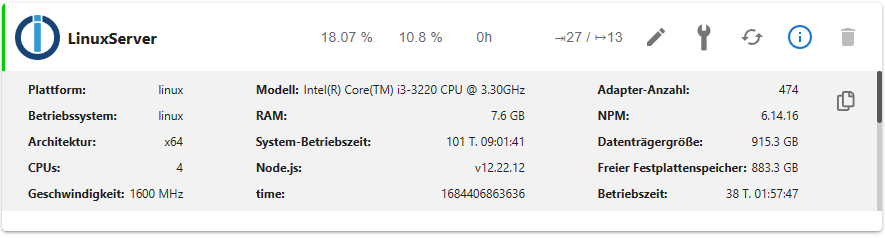
Grüße
Baumert -
Hallo zusammen,
ich starte einen Versuche, ein Update von Node.js 12.22.12 auf Node.js 14.x.x durchzuführen. Hierzu gehe ich nach How-To [How-to] Node.js für ioBroker richtig updaten vor. Beim Befehl:curl -sL https://deb.nodesource.com/setup_10.x | sudo -E bash -bleibe ich mit folgender Rückmeldung hängen:
baumert@LinuxServer:/opt/iobroker$ curl -sL https://deb.nodesource.com/setup_14.x | sudo -E bash -

## Installing the NodeSource Node.js 14.x repo...


## Populating apt-get cache...

+ apt-get update
OK:1 http://de.archive.ubuntu.com/ubuntu focal InRelease
Holen:2 https://repos.influxdata.com/debian focal InRelease [7.028 B]
Holen:3 https://packages.grafana.com/oss/deb stable InRelease [5.984 B]
OK:4 https://deb.nodesource.com/node_12.x focal InRelease
OK:5 http://de.archive.ubuntu.com/ubuntu focal-updates InRelease
OK:6 http://de.archive.ubuntu.com/ubuntu focal-backports InRelease
Holen:7 https://archive.raspbian.org/raspbian buster InRelease [15,0 kB]
OK:8 http://security.ubuntu.com/ubuntu focal-security InRelease
Fehl:2 https://repos.influxdata.com/debian focal InRelease
  Die folgenden Signaturen konnten nicht überprüft werden, weil ihr öffentlicher Schlüssel nicht verfügbar ist: NO_PUBKEY D8FF8E1F7DF8B07E
Fehl:3 https://packages.grafana.com/oss/deb stable InRelease
  Die folgenden Signaturen konnten nicht überprüft werden, weil ihr öffentlicher Schlüssel nicht verfügbar ist: NO_PUBKEY 9E439B102CF3C0C6
Fehl:7 https://archive.raspbian.org/raspbian buster InRelease
  Die folgenden Signaturen konnten nicht überprüft werden, weil ihr öffentlicher Schlüssel nicht verfügbar ist: NO_PUBKEY 9165938D90FDDD2E
Paketlisten werden gelesen... Fertig
W: Während der Überprüfung der Signatur trat ein Fehler auf. Das Depot wurde nicht aktualisiert und die vorherigen Indexdateien werden verwendet. GPG-Fehler: https://repos.influxdata.com/debian focal InRelease: Die folgenden Signaturen konnten nicht überprüft werden, weil ihr öffentlicher Schlüssel nicht verfügbar ist: NO_PUBKEY D8FF8E1F7DF8B07E
W: Während der Überprüfung der Signatur trat ein Fehler auf. Das Depot wurde nicht aktualisiert und die vorherigen Indexdateien werden verwendet. GPG-Fehler: https://packages.grafana.com/oss/deb stable InRelease: Die folgenden Signaturen konnten nicht überprüft werden, weil ihr öffentlicher Schlüssel nicht verfügbar ist: NO_PUBKEY 9E439B102CF3C0C6
W: GPG-Fehler: https://archive.raspbian.org/raspbian buster InRelease: Die folgenden Signaturen konnten nicht überprüft werden, weil ihr öffentlicher Schlüssel nicht verfügbar ist: NO_PUBKEY 9165938D90FDDD2E
E: Das Depot »https://archive.raspbian.org/raspbian buster InRelease« ist nicht signiert.
N: Eine Aktualisierung von solch einem Depot kann nicht auf eine sichere Art durchgeführt werden, daher ist es standardmäßig deaktiviert.
N: Weitere Details zur Erzeugung von Paketdepots sowie zu deren Benutzerkonfiguration finden Sie in der Handbuchseite apt-secure(8).
Error executing command, exiting
Ich komme auch einer anderen Programmierwelt und kenne mich hier nicht gut aus, daher bin ich hier von How-To's, usw. abhängig. Ich habe bereits hier im Forum und im Internet nach Hilfe gesucht, aber bin nicht richtig fündig geworden - wahrscheinlich auch nicht die richtigen Suchbegriffe. Da ich jetzt nicht mehr weiterkommen und einige Adapter einer höhere Nodejs-Version als 12.x.x benötigen, frage ich jetzt doch hier mal nach Hilfe.
Mein System:
Grüße
BaumertKomplettes Chaos in den Software-Quellen.
iob diagsagt?
Und nodejs@14 ist auch schon abgekündigt. Dein Ziel ist nodejs@18.
-
Komplettes Chaos in den Software-Quellen.
iob diagsagt?
Und nodejs@14 ist auch schon abgekündigt. Dein Ziel ist nodejs@18.
Ich interpretiere die aufgeführte Rückmeldung es auch so, dass es ein Chaos ist - kann aber nicht sagen wie dies zustande gekommen ist.
iob diagsagt:
======================= SUMMARY ======================= v.2023-04-16 Operatingsystem: Ubuntu 20.04.4 LTS Kernel: 5.15.0-58-generic Installation: Native Timezone: Europe/Berlin (CEST, +0200) User-ID: 1000 X-Server: true Boot Target: graphical.target Pending OS-Updates: 91 Pending iob updates: 4 Nodejs-Installation: /usr/bin/nodejs v12.22.12 /usr/bin/node v12.22.12 /usr/bin/npm 6.14.16 /usr/bin/npx 6.14.16 Recommended versions are nodejs 18.x.y and npm 9.x.y Your nodejs installation is correct MEMORY: total used free shared buff/cache available Mem: 7.8G 3.2G 732M 49M 3.9G 4.8G Swap: 2.0G 732M 1.3G Total: 9.9G 3.9G 2.0G Active iob-Instances: 27 Active repo(s): stable ioBroker Core: js-controller 4.0.24 admin 6.3.5 ioBroker Status: iobroker is running on this host. Objects type: jsonl States type: jsonl Status admin and web instance: + system.adapter.admin.0 : admin : LinuxServer - enabled, port: 8081, bind: 192.168.178.40, run as: admin system.adapter.admin.1 : admin : LinuxServer - disabled, port: 8081, bind: 192.168.178.40, run as: admin + system.adapter.web.0 : web : LinuxServer - enabled, port: 8082, bind: 192.168.178.40, run as: admin Objects: 13148 States: 13001 Size of iob-Database: 23M /opt/iobroker/iobroker-data/objects.jsonl 13M /opt/iobroker/iobroker-data/objects.json.migrated 13M /opt/iobroker/iobroker-data/objects.json.bak.migrated 8.2M /opt/iobroker/iobroker-data/states.jsonl 2.1M /opt/iobroker/iobroker-data/states.json.migrated 2.1M /opt/iobroker/iobroker-data/states.json.bak.migrated =================== END OF SUMMARY ==================== -
Ich interpretiere die aufgeführte Rückmeldung es auch so, dass es ein Chaos ist - kann aber nicht sagen wie dies zustande gekommen ist.
iob diagsagt:
======================= SUMMARY ======================= v.2023-04-16 Operatingsystem: Ubuntu 20.04.4 LTS Kernel: 5.15.0-58-generic Installation: Native Timezone: Europe/Berlin (CEST, +0200) User-ID: 1000 X-Server: true Boot Target: graphical.target Pending OS-Updates: 91 Pending iob updates: 4 Nodejs-Installation: /usr/bin/nodejs v12.22.12 /usr/bin/node v12.22.12 /usr/bin/npm 6.14.16 /usr/bin/npx 6.14.16 Recommended versions are nodejs 18.x.y and npm 9.x.y Your nodejs installation is correct MEMORY: total used free shared buff/cache available Mem: 7.8G 3.2G 732M 49M 3.9G 4.8G Swap: 2.0G 732M 1.3G Total: 9.9G 3.9G 2.0G Active iob-Instances: 27 Active repo(s): stable ioBroker Core: js-controller 4.0.24 admin 6.3.5 ioBroker Status: iobroker is running on this host. Objects type: jsonl States type: jsonl Status admin and web instance: + system.adapter.admin.0 : admin : LinuxServer - enabled, port: 8081, bind: 192.168.178.40, run as: admin system.adapter.admin.1 : admin : LinuxServer - disabled, port: 8081, bind: 192.168.178.40, run as: admin + system.adapter.web.0 : web : LinuxServer - enabled, port: 8082, bind: 192.168.178.40, run as: admin Objects: 13148 States: 13001 Size of iob-Database: 23M /opt/iobroker/iobroker-data/objects.jsonl 13M /opt/iobroker/iobroker-data/objects.json.migrated 13M /opt/iobroker/iobroker-data/objects.json.bak.migrated 8.2M /opt/iobroker/iobroker-data/states.jsonl 2.1M /opt/iobroker/iobroker-data/states.json.migrated 2.1M /opt/iobroker/iobroker-data/states.json.bak.migrated =================== END OF SUMMARY ====================@baumert sagte in Update Node.js auf 14 klappt nicht:
X-Server: true
Was hat da eine graphische Oberfläche zu suchen?
Und bitte die Langfassung der Ausgabe. -
@baumert sagte in Update Node.js auf 14 klappt nicht:
X-Server: true
Was hat da eine graphische Oberfläche zu suchen?
Und bitte die Langfassung der Ausgabe.Hier die Langfassung:
======== Start marking the full check here ========= Skript v.2023-04-16 *** BASE SYSTEM *** Architecture : x86_64 Docker : false Virtualization : none Distributor ID: Ubuntu Description: Ubuntu 20.04.4 LTS Release: 20.04 Codename: focal NAME="Ubuntu" VERSION="20.04.4 LTS (Focal Fossa)" ID=ubuntu ID_LIKE=debian PRETTY_NAME="Ubuntu 20.04.4 LTS" VERSION_ID="20.04" HOME_URL="https://www.ubuntu.com/" SUPPORT_URL="https://help.ubuntu.com/" BUG_REPORT_URL="https://bugs.launchpad.net/ubuntu/" PRIVACY_POLICY_URL="https://www.ubuntu.com/legal/terms-and-policies/privacy-policy" VERSION_CODENAME=focal UBUNTU_CODENAME=focal Systemuptime and Load: 13:36:22 up 101 days, 9:50, 2 users, load average: 1.57, 2.02, 1.59 CPU threads: 4 *** Time and Time Zones *** Local time: Thu 2023-05-18 13:36:22 CEST Universal time: Thu 2023-05-18 11:36:22 UTC RTC time: Thu 2023-05-18 11:36:22 Time zone: Europe/Berlin (CEST, +0200) System clock synchronized: yes NTP service: active RTC in local TZ: no *** User and Groups *** baumert /home/baumert baumert adm cdrom sudo dip plugdev lpadmin lxd sambashare iobroker *** X-Server-Setup *** X-Server: true Desktop: Terminal: tty Boot Target: graphical.target *** MEMORY *** total used free shared buff/cache available Mem: 7.8G 3.2G 657M 49M 3.9G 4.7G Swap: 2.0G 732M 1.3G Total: 9.9G 4.0G 2.0G 7823 M total memory 3221 M used memory 2993 M active memory 3579 M inactive memory 657 M free memory 943 M buffer memory 3000 M swap cache 2047 M total swap 732 M used swap 1315 M free swap *** FILESYSTEM *** Filesystem Type Size Used Avail Use% Mounted on udev devtmpfs 3.8G 0 3.8G 0% /dev tmpfs tmpfs 783M 1.8M 781M 1% /run /dev/sda2 ext4 916G 33G 837G 4% / tmpfs tmpfs 3.9G 0 3.9G 0% /dev/shm tmpfs tmpfs 5.0M 4.0K 5.0M 1% /run/lock tmpfs tmpfs 3.9G 0 3.9G 0% /sys/fs/cgroup /dev/loop0 squashfs 128K 128K 0 100% /snap/bare/5 /dev/loop12 squashfs 92M 92M 0 100% /snap/gtk-common-themes/1535 /dev/loop11 squashfs 82M 82M 0 100% /snap/gtk-common-themes/1534 /dev/loop14 squashfs 46M 46M 0 100% /snap/snap-store/638 /dev/sda1 vfat 511M 5.3M 506M 2% /boot/efi tmpfs tmpfs 783M 60K 783M 1% /run/user/1000 /dev/loop16 squashfs 56M 56M 0 100% /snap/core18/2721 /dev/loop4 squashfs 350M 350M 0 100% /snap/gnome-3-38-2004/137 /dev/loop9 squashfs 165M 165M 0 100% /snap/gnome-3-28-1804/194 /dev/loop5 squashfs 219M 219M 0 100% /snap/gnome-3-34-1804/90 /dev/loop7 squashfs 165M 165M 0 100% /snap/gnome-3-28-1804/198 /dev/loop6 squashfs 54M 54M 0 100% /snap/snapd/18933 /dev/loop3 squashfs 219M 219M 0 100% /snap/gnome-3-34-1804/93 /dev/loop8 squashfs 350M 350M 0 100% /snap/gnome-3-38-2004/140 /dev/loop18 squashfs 13M 13M 0 100% /snap/snap-store/959 /dev/loop13 squashfs 461M 461M 0 100% /snap/gnome-42-2204/99 /dev/loop20 squashfs 73M 73M 0 100% /snap/core22/617 /dev/loop21 squashfs 54M 54M 0 100% /snap/snapd/19122 /dev/loop17 squashfs 64M 64M 0 100% /snap/core20/1879 /dev/loop1 squashfs 461M 461M 0 100% /snap/gnome-42-2204/102 /dev/loop22 squashfs 56M 56M 0 100% /snap/core18/2745 /dev/loop2 squashfs 74M 74M 0 100% /snap/core22/634 /dev/loop23 squashfs 64M 64M 0 100% /snap/core20/1891 Messages concerning ext4 filesystem in dmesg: [Mon Feb 6 02:46:20 2023] EXT4-fs (sda2): mounted filesystem with ordered data mode. Opts: (null). Quota mode: none. [Mon Feb 6 02:46:30 2023] EXT4-fs (sda2): re-mounted. Opts: errors=remount-ro. Quota mode: none. Show mounted filesystems (real ones only): TARGET SOURCE FSTYPE OPTIONS / /dev/sda2 ext4 rw,relatime,errors=remount-ro |-/sys/kernel/tracing tracefs tracefs rw,nosuid,nodev,noexec,relatime |-/snap/bare/5 /dev/loop0 squashfs ro,nodev,relatime,errors=continue |-/snap/snapd/18933 /dev/loop6 squashfs ro,nodev,relatime,errors=continue |-/snap/gnome-3-38-2004/140 /dev/loop8 squashfs ro,nodev,relatime,errors=continue |-/snap/gtk-common-themes/1535 /dev/loop12 squashfs ro,nodev,relatime,errors=continue |-/snap/core20/1891 /dev/loop23 squashfs ro,nodev,relatime,errors=continue |-/snap/gtk-common-themes/1534 /dev/loop11 squashfs ro,nodev,relatime,errors=continue |-/snap/gnome-3-28-1804/194 /dev/loop9 squashfs ro,nodev,relatime,errors=continue |-/snap/core18/2721 /dev/loop16 squashfs ro,nodev,relatime,errors=continue |-/snap/gnome-3-34-1804/93 /dev/loop3 squashfs ro,nodev,relatime,errors=continue |-/snap/gnome-42-2204/102 /dev/loop1 squashfs ro,nodev,relatime,errors=continue |-/snap/core20/1879 /dev/loop17 squashfs ro,nodev,relatime,errors=continue |-/snap/snap-store/638 /dev/loop14 squashfs ro,nodev,relatime,errors=continue |-/boot/efi /dev/sda1 vfat rw,relatime,fmask=0077,dmask=0077,codepage=437,iocharset=iso8859-1,shortname=mixed,errors=remount-ro |-/snap/gnome-3-38-2004/137 /dev/loop4 squashfs ro,nodev,relatime,errors=continue |-/snap/snap-store/959 /dev/loop18 squashfs ro,nodev,relatime,errors=continue |-/snap/core18/2745 /dev/loop22 squashfs ro,nodev,relatime,errors=continue |-/snap/gnome-3-28-1804/198 /dev/loop7 squashfs ro,nodev,relatime,errors=continue |-/snap/gnome-3-34-1804/90 /dev/loop5 squashfs ro,nodev,relatime,errors=continue |-/snap/core22/617 /dev/loop20 squashfs ro,nodev,relatime,errors=continue |-/snap/gnome-42-2204/99 /dev/loop13 squashfs ro,nodev,relatime,errors=continue |-/snap/core22/634 /dev/loop2 squashfs ro,nodev,relatime,errors=continue `-/snap/snapd/19122 /dev/loop21 squashfs ro,nodev,relatime,errors=continue Files in neuralgic directories: /var: 18G /var/ 13G /var/lib 7.3G /var/lib/influxdb/data/iobroker/autogen 7.3G /var/lib/influxdb/data/iobroker 7.3G /var/lib/influxdb/data Archived and active journals take up 4.0G in the file system. /opt/iobroker/backups: 422M /opt/iobroker/backups/ /opt/iobroker/iobroker-data: 1.4G /opt/iobroker/iobroker-data/ 997M /opt/iobroker/iobroker-data/history 197M /opt/iobroker/iobroker-data/files 133M /opt/iobroker/iobroker-data/backup-objects 61M /opt/iobroker/iobroker-data/history/20211213 The five largest files in iobroker-data are: 24M /opt/iobroker/iobroker-data/objects.jsonl 13M /opt/iobroker/iobroker-data/objects.json.migrated 13M /opt/iobroker/iobroker-data/objects.json.bak.migrated 12M /opt/iobroker/iobroker-data/files/vis.0/main/vis-views.json 11M /opt/iobroker/iobroker-data/states.jsonl *** NodeJS-Installation *** /usr/bin/nodejs v12.22.12 /usr/bin/node v12.22.12 /usr/bin/npm 6.14.16 /usr/bin/npx 6.14.16 nodejs: Installed: 12.22.12-deb-1nodesource1 Candidate: 12.22.12-deb-1nodesource1 Version table: *** 12.22.12-deb-1nodesource1 500 500 https://deb.nodesource.com/node_12.x focal/main amd64 Packages 100 /var/lib/dpkg/status 10.19.0~dfsg-3ubuntu1 500 500 http://de.archive.ubuntu.com/ubuntu focal/universe amd64 Packages Temp directories causing npm8 problem: 0 No problems detected *** ioBroker-Installation *** ioBroker Status iobroker is running on this host. Objects type: jsonl States type: jsonl MULTIHOSTSERVICE/enabled: false Core adapters versions js-controller: 4.0.24 admin: 6.3.5 javascript: 6.1.4 Adapters from github: 5 Adapter State + system.adapter.admin.0 : admin : LinuxServer - enabled, port: 8081, bind: 192.168.178.40, run as: admin system.adapter.admin.1 : admin : LinuxServer - disabled, port: 8081, bind: 192.168.178.40, run as: admin + system.adapter.alexa2.0 : alexa2 : LinuxServer - enabled + system.adapter.backitup.0 : backitup : LinuxServer - enabled + system.adapter.cloud.0 : cloud : LinuxServer - enabled + system.adapter.discovery.0 : discovery : LinuxServer - enabled system.adapter.echarts.0 : echarts : LinuxServer - disabled + system.adapter.enigma2.0 : enigma2 : LinuxServer - enabled system.adapter.feiertage.0 : feiertage : LinuxServer - enabled system.adapter.flot.0 : flot : LinuxServer - disabled + system.adapter.g-homa.0 : g-homa : LinuxServer - enabled + system.adapter.harmony.0 : harmony : LinuxServer - enabled + system.adapter.hm-rega.0 : hm-rega : LinuxServer - enabled + system.adapter.hm-rpc.0 : hm-rpc : LinuxServer - enabled, port: 0 + system.adapter.hm-rpc.1 : hm-rpc : LinuxServer - enabled, port: 0 + system.adapter.hue-extended.0 : hue-extended : LinuxServer - enabled + system.adapter.influxdb.0 : influxdb : LinuxServer - enabled, port: 8086 + system.adapter.info.0 : info : LinuxServer - enabled + system.adapter.iot.3 : iot : LinuxServer - enabled + system.adapter.javascript.0 : javascript : LinuxServer - enabled system.adapter.node-red.0 : node-red : LinuxServer - disabled, port: 1880, bind: 0.0.0.0 system.adapter.openweathermap.0 : openweathermap : LinuxServer - enabled + system.adapter.ping.0 : ping : LinuxServer - enabled system.adapter.repetierserver.0 : repetierserver : LinuxServer - disabled + system.adapter.samsung.0 : samsung : LinuxServer - enabled + system.adapter.shuttercontrol.0 : shuttercontrol : LinuxServer - enabled + system.adapter.sonoff.0 : sonoff : LinuxServer - enabled, port: 1884, bind: 0.0.0.0 + system.adapter.tuya.0 : tuya : LinuxServer - enabled + system.adapter.upnp.0 : upnp : LinuxServer - enabled system.adapter.vis-canvas-gauges.0 : vis-canvas-gauges : LinuxServer - disabled system.adapter.vis-colorpicker.0 : vis-colorpicker : LinuxServer - disabled system.adapter.vis-fancyswitch.0 : vis-fancyswitch : LinuxServer - disabled system.adapter.vis-history.0 : vis-history : LinuxServer - disabled system.adapter.vis-hqwidgets.0 : vis-hqwidgets : LinuxServer - disabled system.adapter.vis-jqui-mfd.0 : vis-jqui-mfd : LinuxServer - disabled system.adapter.vis-justgage.0 : vis-justgage : LinuxServer - disabled system.adapter.vis-map.0 : vis-map : LinuxServer - disabled system.adapter.vis-rgraph.0 : vis-rgraph : LinuxServer - disabled system.adapter.vis-timeandweather.0 : vis-timeandweather : LinuxServer - disabled system.adapter.vis.0 : vis : LinuxServer - enabled + system.adapter.web.0 : web : LinuxServer - enabled, port: 8082, bind: 192.168.178.40, run as: admin + system.adapter.wled.0 : wled : LinuxServer - enabled + system.adapter.worx.0 : worx : LinuxServer - enabled + system.adapter.yahka.0 : yahka : LinuxServer - enabled + instance is alive Enabled adapters with bindings + system.adapter.admin.0 : admin : LinuxServer - enabled, port: 8081, bind: 192.168.178.40, run as: admin + system.adapter.hm-rpc.0 : hm-rpc : LinuxServer - enabled, port: 0 + system.adapter.hm-rpc.1 : hm-rpc : LinuxServer - enabled, port: 0 + system.adapter.influxdb.0 : influxdb : LinuxServer - enabled, port: 8086 + system.adapter.sonoff.0 : sonoff : LinuxServer - enabled, port: 1884, bind: 0.0.0.0 + system.adapter.web.0 : web : LinuxServer - enabled, port: 8082, bind: 192.168.178.40, run as: admin ioBroker-Repositories stable : http://download.iobroker.net/sources-dist.json beta : http://download.iobroker.net/sources-dist-latest.json Active repo(s): stable Installed ioBroker-Instances Used repository: stable Adapter "admin" : 6.3.5 , installed 6.3.5 Adapter "alexa2" : 3.23.2 , installed 3.23.2 Adapter "backitup" : 2.6.19 , installed 2.4.12 [Updatable] Adapter "cloud" : 4.3.0 , installed 4.3.0 Adapter "discovery" : 3.1.0 , installed 3.1.0 Adapter "echarts" : 1.0.12 , installed 1.0.12 Adapter "feiertage" : 1.1.0 , installed 1.1.0 Adapter "flot" : 1.11.0 , installed 1.11.0 Adapter "g-homa" : 0.5.3 , installed 0.5.3 Adapter "harmony" : 1.2.2 , installed 1.2.2 Adapter "hm-rega" : 3.0.46 , installed 3.0.46 Adapter "hm-rpc" : 1.15.16 , installed 1.15.16 Adapter "hue-extended" : 2.0.0 , installed 2.0.0 Adapter "influxdb" : 3.2.0 , installed 3.2.0 Adapter "info" : 1.9.26 , installed 1.9.26 Adapter "iot" : 1.14.2 , installed 1.11.9 [Updatable] Adapter "javascript" : 6.1.4 , installed 6.1.4 Controller "js-controller": 4.0.24 , installed 4.0.24 Adapter "node-red" : 4.0.0 , installed 3.3.1 [Updatable] Adapter "openweathermap": 0.3.3 , installed 0.3.3 Adapter "ping" : 1.5.3 , installed 1.5.3 Adapter "samsung" : 0.5.11 , installed 0.5.11 Adapter "shuttercontrol": 1.4.29 , installed 1.4.29 Adapter "simple-api" : 2.7.2 , installed 2.7.2 Adapter "socketio" : 4.2.0 , installed 4.2.0 Adapter "sonoff" : 2.5.1 , installed 2.5.1 Adapter "tuya" : 3.13.1 , installed 3.13.1 Adapter "upnp" : 1.0.21 , installed 1.0.21 Adapter "vis" : 1.4.16 , installed 1.4.16 Adapter "vis-canvas-gauges": 1.0.1, installed 1.0.1 Adapter "vis-colorpicker": 1.2.0 , installed 1.2.0 Adapter "vis-fancyswitch": 1.1.0 , installed 1.1.0 Adapter "vis-history" : 1.0.0 , installed 1.0.0 Adapter "vis-hqwidgets": 1.3.0 , installed 1.3.0 Adapter "vis-jqui-mfd" : 1.0.12 , installed 1.0.12 Adapter "vis-justgage" : 1.0.2 , installed 1.0.2 Adapter "vis-map" : 1.0.4 , installed 1.0.4 Adapter "vis-rgraph" : 0.0.2 , installed 0.0.2 Adapter "vis-timeandweather": 1.2.2, installed 1.2.2 Adapter "web" : 4.3.0 , installed 4.3.0 Adapter "wled" : 0.6.7 , installed 0.6.7 Adapter "worx" : 2.1.3 , installed 1.6.6 [Updatable] Adapter "ws" : 1.3.0 , installed 1.3.0 Adapter "yahka" : 0.17.0 , installed 0.17.0 Objects and States Please stand by - This may take a while Objects: 13148 States: 13001 *** OS-Repositories and Updates *** W: An error occurred during the signature verification. The repository is not updated and the previous index files will be used. GPG error: https://repos.influxdata.com/debian focal InRelease: The following signatures couldn't be verified because the public key is not available: NO_PUBKEY D8FF8E1F7DF8B07E W: An error occurred during the signature verification. The repository is not updated and the previous index files will be used. GPG error: https://packages.grafana.com/oss/deb stable InRelease: The following signatures couldn't be verified because the public key is not available: NO_PUBKEY 9E439B102CF3C0C6 W: GPG error: https://archive.raspbian.org/raspbian buster InRelease: The following signatures couldn't be verified because the public key is not available: NO_PUBKEY 9165938D90FDDD2E E: The repository 'https://archive.raspbian.org/raspbian buster InRelease' is not signed. Pending Updates: 91 *** Listening Ports *** Active Internet connections (only servers) Proto Recv-Q Send-Q Local Address Foreign Address State User Inode PID/Program name tcp 0 0 127.0.0.53:53 0.0.0.0:* LISTEN 101 287988055 3816980/systemd-res tcp 0 0 127.0.0.1:631 0.0.0.0:* LISTEN 0 988954628 150342/cupsd tcp 0 0 192.168.178.40:2001 0.0.0.0:* LISTEN 1001 994142181 222529/io.hm-rpc.0 tcp 0 0 192.168.178.40:2010 0.0.0.0:* LISTEN 1001 994144348 222552/io.hm-rpc.1 tcp 0 0 127.0.0.1:42821 0.0.0.0:* LISTEN 1001 994323266 223574/io.yahka.0 tcp 0 0 0.0.0.0:8080 0.0.0.0:* LISTEN 0 23192 540/mjpg_streamer tcp 0 0 127.0.0.1:42125 0.0.0.0:* LISTEN 1001 994159266 223574/io.yahka.0 tcp 0 0 0.0.0.0:9001 0.0.0.0:* LISTEN 1001 994143425 222420/iobroker.js- tcp 0 0 0.0.0.0:9000 0.0.0.0:* LISTEN 1001 994143432 222420/iobroker.js- tcp 0 0 192.168.178.40:8081 0.0.0.0:* LISTEN 1001 994140657 222439/io.admin.0 tcp 0 0 192.168.178.40:8082 0.0.0.0:* LISTEN 1001 994158628 223525/io.web.0 tcp 0 0 0.0.0.0:111 0.0.0.0:* LISTEN 0 12663 1/systemd tcp 0 0 0.0.0.0:22 0.0.0.0:* LISTEN 0 30720 818/sshd: /usr/sbin tcp 0 0 127.0.0.1:8088 0.0.0.0:* LISTEN 998 39243 1363/influxd tcp 0 0 0.0.0.0:1884 0.0.0.0:* LISTEN 1001 994144152 222617/io.sonoff.0 tcp 0 0 127.0.0.1:36265 0.0.0.0:* LISTEN 1001 994177667 223574/io.yahka.0 tcp6 0 0 :::35779 :::* LISTEN 1001 994158855 223574/io.yahka.0 tcp6 0 0 :::3000 :::* LISTEN 130 36558 879/grafana-server tcp6 0 0 :::8080 :::* LISTEN 0 23193 540/mjpg_streamer tcp6 0 0 :::8086 :::* LISTEN 998 38034 1363/influxd tcp6 0 0 :::8000 :::* LISTEN 1001 994158325 223312/io.upnp.0 tcp6 0 0 :::3344 :::* LISTEN 129 518335521 2567271/RepetierSer tcp6 0 0 :::50000 :::* LISTEN 1001 994147617 222713/io.g-homa.0 tcp6 0 0 :::61991 :::* LISTEN 1001 994146281 222730/io.harmony.0 tcp6 0 0 ::1:631 :::* LISTEN 0 988954627 150342/cupsd tcp6 0 0 :::111 :::* LISTEN 0 12667 1/systemd tcp6 0 0 :::22 :::* LISTEN 0 33794 818/sshd: /usr/sbin udp 0 0 127.0.0.53:53 0.0.0.0:* 101 287988054 3816980/systemd-res udp 0 0 0.0.0.0:111 0.0.0.0:* 0 12664 1/systemd udp 0 0 0.0.0.0:61991 0.0.0.0:* 1001 994146282 222730/io.harmony.0 udp 0 0 0.0.0.0:631 0.0.0.0:* 0 991272523 182059/cups-browsed udp 0 0 0.0.0.0:5353 0.0.0.0:* 1001 994159024 223635/io.wled.0 udp 0 0 0.0.0.0:5353 0.0.0.0:* 115 30583 660/avahi-daemon: r udp 0 0 0.0.0.0:54572 0.0.0.0:* 115 30585 660/avahi-daemon: r udp 0 0 0.0.0.0:1900 0.0.0.0:* 1001 994159802 223312/io.upnp.0 udp 0 0 0.0.0.0:6666 0.0.0.0:* 1001 994146309 222635/io.tuya.0 udp 0 0 0.0.0.0:6667 0.0.0.0:* 1001 994146310 222635/io.tuya.0 udp 0 0 0.0.0.0:44125 0.0.0.0:* 1001 994153272 223312/io.upnp.0 udp6 0 0 :::111 :::* 0 12670 1/systemd udp6 0 0 :::54162 :::* 115 30586 660/avahi-daemon: r udp6 0 0 :::5353 :::* 115 30584 660/avahi-daemon: r *** Log File - Last 25 Lines *** 2023-05-18 13:31:01.650 - info: openweathermap.0 (228857) starting. Version 0.3.3 in /opt/iobroker/node_modules/iobroker.openweathermap, node: v12.22.12, js-controller: 4.0.24 2023-05-18 13:31:16.192 - info: openweathermap.0 (228857) Terminated (NO_ERROR): Without reason 2023-05-18 13:31:16.708 - info: host.LinuxServer instance system.adapter.openweathermap.0 terminated with code 0 (NO_ERROR) 2023-05-18 13:32:00.029 - info: host.LinuxServer instance system.adapter.openweathermap.0 started with pid 228962 2023-05-18 13:32:01.195 - info: openweathermap.0 (228962) starting. Version 0.3.3 in /opt/iobroker/node_modules/iobroker.openweathermap, node: v12.22.12, js-controller: 4.0.24 2023-05-18 13:32:12.560 - info: openweathermap.0 (228962) Terminated (NO_ERROR): Without reason 2023-05-18 13:32:13.077 - info: host.LinuxServer instance system.adapter.openweathermap.0 terminated with code 0 (NO_ERROR) 2023-05-18 13:33:00.041 - info: host.LinuxServer instance system.adapter.openweathermap.0 started with pid 229283 2023-05-18 13:33:01.197 - info: openweathermap.0 (229283) starting. Version 0.3.3 in /opt/iobroker/node_modules/iobroker.openweathermap, node: v12.22.12, js-controller: 4.0.24 2023-05-18 13:33:27.442 - info: openweathermap.0 (229283) Terminated (NO_ERROR): Without reason 2023-05-18 13:33:27.959 - info: host.LinuxServer instance system.adapter.openweathermap.0 terminated with code 0 (NO_ERROR) 2023-05-18 13:34:00.034 - info: host.LinuxServer instance system.adapter.openweathermap.0 started with pid 229396 2023-05-18 13:34:01.106 - info: openweathermap.0 (229396) starting. Version 0.3.3 in /opt/iobroker/node_modules/iobroker.openweathermap, node: v12.22.12, js-controller: 4.0.24 2023-05-18 13:34:05.499 - info: openweathermap.0 (229396) Terminated (NO_ERROR): Without reason 2023-05-18 13:34:06.015 - info: host.LinuxServer instance system.adapter.openweathermap.0 terminated with code 0 (NO_ERROR) 2023-05-18 13:35:00.048 - info: host.LinuxServer instance system.adapter.openweathermap.0 started with pid 230274 2023-05-18 13:35:01.204 - info: openweathermap.0 (230274) starting. Version 0.3.3 in /opt/iobroker/node_modules/iobroker.openweathermap, node: v12.22.12, js-controller: 4.0.24 2023-05-18 13:35:23.050 - info: openweathermap.0 (230274) Terminated (NO_ERROR): Without reason 2023-05-18 13:35:23.562 - info: host.LinuxServer instance system.adapter.openweathermap.0 terminated with code 0 (NO_ERROR) 2023-05-18 13:36:00.041 - info: host.LinuxServer instance system.adapter.openweathermap.0 started with pid 230622 2023-05-18 13:36:01.146 - info: openweathermap.0 (230622) starting. Version 0.3.3 in /opt/iobroker/node_modules/iobroker.openweathermap, node: v12.22.12, js-controller: 4.0.24 2023-05-18 13:36:08.869 - info: openweathermap.0 (230622) Terminated (NO_ERROR): Without reason 2023-05-18 13:36:09.387 - info: host.LinuxServer instance system.adapter.openweathermap.0 terminated with code 0 (NO_ERROR) 2023-05-18 13:37:00.041 - info: host.LinuxServer instance system.adapter.openweathermap.0 started with pid 231543 2023-05-18 13:37:01.350 - info: openweathermap.0 (231543) starting. Version 0.3.3 in /opt/iobroker/node_modules/iobroker.openweathermap, node: v12.22.12, js-controller: 4.0.24 ============ Mark until here for C&P ============= -
Hier die Langfassung:
======== Start marking the full check here ========= Skript v.2023-04-16 *** BASE SYSTEM *** Architecture : x86_64 Docker : false Virtualization : none Distributor ID: Ubuntu Description: Ubuntu 20.04.4 LTS Release: 20.04 Codename: focal NAME="Ubuntu" VERSION="20.04.4 LTS (Focal Fossa)" ID=ubuntu ID_LIKE=debian PRETTY_NAME="Ubuntu 20.04.4 LTS" VERSION_ID="20.04" HOME_URL="https://www.ubuntu.com/" SUPPORT_URL="https://help.ubuntu.com/" BUG_REPORT_URL="https://bugs.launchpad.net/ubuntu/" PRIVACY_POLICY_URL="https://www.ubuntu.com/legal/terms-and-policies/privacy-policy" VERSION_CODENAME=focal UBUNTU_CODENAME=focal Systemuptime and Load: 13:36:22 up 101 days, 9:50, 2 users, load average: 1.57, 2.02, 1.59 CPU threads: 4 *** Time and Time Zones *** Local time: Thu 2023-05-18 13:36:22 CEST Universal time: Thu 2023-05-18 11:36:22 UTC RTC time: Thu 2023-05-18 11:36:22 Time zone: Europe/Berlin (CEST, +0200) System clock synchronized: yes NTP service: active RTC in local TZ: no *** User and Groups *** baumert /home/baumert baumert adm cdrom sudo dip plugdev lpadmin lxd sambashare iobroker *** X-Server-Setup *** X-Server: true Desktop: Terminal: tty Boot Target: graphical.target *** MEMORY *** total used free shared buff/cache available Mem: 7.8G 3.2G 657M 49M 3.9G 4.7G Swap: 2.0G 732M 1.3G Total: 9.9G 4.0G 2.0G 7823 M total memory 3221 M used memory 2993 M active memory 3579 M inactive memory 657 M free memory 943 M buffer memory 3000 M swap cache 2047 M total swap 732 M used swap 1315 M free swap *** FILESYSTEM *** Filesystem Type Size Used Avail Use% Mounted on udev devtmpfs 3.8G 0 3.8G 0% /dev tmpfs tmpfs 783M 1.8M 781M 1% /run /dev/sda2 ext4 916G 33G 837G 4% / tmpfs tmpfs 3.9G 0 3.9G 0% /dev/shm tmpfs tmpfs 5.0M 4.0K 5.0M 1% /run/lock tmpfs tmpfs 3.9G 0 3.9G 0% /sys/fs/cgroup /dev/loop0 squashfs 128K 128K 0 100% /snap/bare/5 /dev/loop12 squashfs 92M 92M 0 100% /snap/gtk-common-themes/1535 /dev/loop11 squashfs 82M 82M 0 100% /snap/gtk-common-themes/1534 /dev/loop14 squashfs 46M 46M 0 100% /snap/snap-store/638 /dev/sda1 vfat 511M 5.3M 506M 2% /boot/efi tmpfs tmpfs 783M 60K 783M 1% /run/user/1000 /dev/loop16 squashfs 56M 56M 0 100% /snap/core18/2721 /dev/loop4 squashfs 350M 350M 0 100% /snap/gnome-3-38-2004/137 /dev/loop9 squashfs 165M 165M 0 100% /snap/gnome-3-28-1804/194 /dev/loop5 squashfs 219M 219M 0 100% /snap/gnome-3-34-1804/90 /dev/loop7 squashfs 165M 165M 0 100% /snap/gnome-3-28-1804/198 /dev/loop6 squashfs 54M 54M 0 100% /snap/snapd/18933 /dev/loop3 squashfs 219M 219M 0 100% /snap/gnome-3-34-1804/93 /dev/loop8 squashfs 350M 350M 0 100% /snap/gnome-3-38-2004/140 /dev/loop18 squashfs 13M 13M 0 100% /snap/snap-store/959 /dev/loop13 squashfs 461M 461M 0 100% /snap/gnome-42-2204/99 /dev/loop20 squashfs 73M 73M 0 100% /snap/core22/617 /dev/loop21 squashfs 54M 54M 0 100% /snap/snapd/19122 /dev/loop17 squashfs 64M 64M 0 100% /snap/core20/1879 /dev/loop1 squashfs 461M 461M 0 100% /snap/gnome-42-2204/102 /dev/loop22 squashfs 56M 56M 0 100% /snap/core18/2745 /dev/loop2 squashfs 74M 74M 0 100% /snap/core22/634 /dev/loop23 squashfs 64M 64M 0 100% /snap/core20/1891 Messages concerning ext4 filesystem in dmesg: [Mon Feb 6 02:46:20 2023] EXT4-fs (sda2): mounted filesystem with ordered data mode. Opts: (null). Quota mode: none. [Mon Feb 6 02:46:30 2023] EXT4-fs (sda2): re-mounted. Opts: errors=remount-ro. Quota mode: none. Show mounted filesystems (real ones only): TARGET SOURCE FSTYPE OPTIONS / /dev/sda2 ext4 rw,relatime,errors=remount-ro |-/sys/kernel/tracing tracefs tracefs rw,nosuid,nodev,noexec,relatime |-/snap/bare/5 /dev/loop0 squashfs ro,nodev,relatime,errors=continue |-/snap/snapd/18933 /dev/loop6 squashfs ro,nodev,relatime,errors=continue |-/snap/gnome-3-38-2004/140 /dev/loop8 squashfs ro,nodev,relatime,errors=continue |-/snap/gtk-common-themes/1535 /dev/loop12 squashfs ro,nodev,relatime,errors=continue |-/snap/core20/1891 /dev/loop23 squashfs ro,nodev,relatime,errors=continue |-/snap/gtk-common-themes/1534 /dev/loop11 squashfs ro,nodev,relatime,errors=continue |-/snap/gnome-3-28-1804/194 /dev/loop9 squashfs ro,nodev,relatime,errors=continue |-/snap/core18/2721 /dev/loop16 squashfs ro,nodev,relatime,errors=continue |-/snap/gnome-3-34-1804/93 /dev/loop3 squashfs ro,nodev,relatime,errors=continue |-/snap/gnome-42-2204/102 /dev/loop1 squashfs ro,nodev,relatime,errors=continue |-/snap/core20/1879 /dev/loop17 squashfs ro,nodev,relatime,errors=continue |-/snap/snap-store/638 /dev/loop14 squashfs ro,nodev,relatime,errors=continue |-/boot/efi /dev/sda1 vfat rw,relatime,fmask=0077,dmask=0077,codepage=437,iocharset=iso8859-1,shortname=mixed,errors=remount-ro |-/snap/gnome-3-38-2004/137 /dev/loop4 squashfs ro,nodev,relatime,errors=continue |-/snap/snap-store/959 /dev/loop18 squashfs ro,nodev,relatime,errors=continue |-/snap/core18/2745 /dev/loop22 squashfs ro,nodev,relatime,errors=continue |-/snap/gnome-3-28-1804/198 /dev/loop7 squashfs ro,nodev,relatime,errors=continue |-/snap/gnome-3-34-1804/90 /dev/loop5 squashfs ro,nodev,relatime,errors=continue |-/snap/core22/617 /dev/loop20 squashfs ro,nodev,relatime,errors=continue |-/snap/gnome-42-2204/99 /dev/loop13 squashfs ro,nodev,relatime,errors=continue |-/snap/core22/634 /dev/loop2 squashfs ro,nodev,relatime,errors=continue `-/snap/snapd/19122 /dev/loop21 squashfs ro,nodev,relatime,errors=continue Files in neuralgic directories: /var: 18G /var/ 13G /var/lib 7.3G /var/lib/influxdb/data/iobroker/autogen 7.3G /var/lib/influxdb/data/iobroker 7.3G /var/lib/influxdb/data Archived and active journals take up 4.0G in the file system. /opt/iobroker/backups: 422M /opt/iobroker/backups/ /opt/iobroker/iobroker-data: 1.4G /opt/iobroker/iobroker-data/ 997M /opt/iobroker/iobroker-data/history 197M /opt/iobroker/iobroker-data/files 133M /opt/iobroker/iobroker-data/backup-objects 61M /opt/iobroker/iobroker-data/history/20211213 The five largest files in iobroker-data are: 24M /opt/iobroker/iobroker-data/objects.jsonl 13M /opt/iobroker/iobroker-data/objects.json.migrated 13M /opt/iobroker/iobroker-data/objects.json.bak.migrated 12M /opt/iobroker/iobroker-data/files/vis.0/main/vis-views.json 11M /opt/iobroker/iobroker-data/states.jsonl *** NodeJS-Installation *** /usr/bin/nodejs v12.22.12 /usr/bin/node v12.22.12 /usr/bin/npm 6.14.16 /usr/bin/npx 6.14.16 nodejs: Installed: 12.22.12-deb-1nodesource1 Candidate: 12.22.12-deb-1nodesource1 Version table: *** 12.22.12-deb-1nodesource1 500 500 https://deb.nodesource.com/node_12.x focal/main amd64 Packages 100 /var/lib/dpkg/status 10.19.0~dfsg-3ubuntu1 500 500 http://de.archive.ubuntu.com/ubuntu focal/universe amd64 Packages Temp directories causing npm8 problem: 0 No problems detected *** ioBroker-Installation *** ioBroker Status iobroker is running on this host. Objects type: jsonl States type: jsonl MULTIHOSTSERVICE/enabled: false Core adapters versions js-controller: 4.0.24 admin: 6.3.5 javascript: 6.1.4 Adapters from github: 5 Adapter State + system.adapter.admin.0 : admin : LinuxServer - enabled, port: 8081, bind: 192.168.178.40, run as: admin system.adapter.admin.1 : admin : LinuxServer - disabled, port: 8081, bind: 192.168.178.40, run as: admin + system.adapter.alexa2.0 : alexa2 : LinuxServer - enabled + system.adapter.backitup.0 : backitup : LinuxServer - enabled + system.adapter.cloud.0 : cloud : LinuxServer - enabled + system.adapter.discovery.0 : discovery : LinuxServer - enabled system.adapter.echarts.0 : echarts : LinuxServer - disabled + system.adapter.enigma2.0 : enigma2 : LinuxServer - enabled system.adapter.feiertage.0 : feiertage : LinuxServer - enabled system.adapter.flot.0 : flot : LinuxServer - disabled + system.adapter.g-homa.0 : g-homa : LinuxServer - enabled + system.adapter.harmony.0 : harmony : LinuxServer - enabled + system.adapter.hm-rega.0 : hm-rega : LinuxServer - enabled + system.adapter.hm-rpc.0 : hm-rpc : LinuxServer - enabled, port: 0 + system.adapter.hm-rpc.1 : hm-rpc : LinuxServer - enabled, port: 0 + system.adapter.hue-extended.0 : hue-extended : LinuxServer - enabled + system.adapter.influxdb.0 : influxdb : LinuxServer - enabled, port: 8086 + system.adapter.info.0 : info : LinuxServer - enabled + system.adapter.iot.3 : iot : LinuxServer - enabled + system.adapter.javascript.0 : javascript : LinuxServer - enabled system.adapter.node-red.0 : node-red : LinuxServer - disabled, port: 1880, bind: 0.0.0.0 system.adapter.openweathermap.0 : openweathermap : LinuxServer - enabled + system.adapter.ping.0 : ping : LinuxServer - enabled system.adapter.repetierserver.0 : repetierserver : LinuxServer - disabled + system.adapter.samsung.0 : samsung : LinuxServer - enabled + system.adapter.shuttercontrol.0 : shuttercontrol : LinuxServer - enabled + system.adapter.sonoff.0 : sonoff : LinuxServer - enabled, port: 1884, bind: 0.0.0.0 + system.adapter.tuya.0 : tuya : LinuxServer - enabled + system.adapter.upnp.0 : upnp : LinuxServer - enabled system.adapter.vis-canvas-gauges.0 : vis-canvas-gauges : LinuxServer - disabled system.adapter.vis-colorpicker.0 : vis-colorpicker : LinuxServer - disabled system.adapter.vis-fancyswitch.0 : vis-fancyswitch : LinuxServer - disabled system.adapter.vis-history.0 : vis-history : LinuxServer - disabled system.adapter.vis-hqwidgets.0 : vis-hqwidgets : LinuxServer - disabled system.adapter.vis-jqui-mfd.0 : vis-jqui-mfd : LinuxServer - disabled system.adapter.vis-justgage.0 : vis-justgage : LinuxServer - disabled system.adapter.vis-map.0 : vis-map : LinuxServer - disabled system.adapter.vis-rgraph.0 : vis-rgraph : LinuxServer - disabled system.adapter.vis-timeandweather.0 : vis-timeandweather : LinuxServer - disabled system.adapter.vis.0 : vis : LinuxServer - enabled + system.adapter.web.0 : web : LinuxServer - enabled, port: 8082, bind: 192.168.178.40, run as: admin + system.adapter.wled.0 : wled : LinuxServer - enabled + system.adapter.worx.0 : worx : LinuxServer - enabled + system.adapter.yahka.0 : yahka : LinuxServer - enabled + instance is alive Enabled adapters with bindings + system.adapter.admin.0 : admin : LinuxServer - enabled, port: 8081, bind: 192.168.178.40, run as: admin + system.adapter.hm-rpc.0 : hm-rpc : LinuxServer - enabled, port: 0 + system.adapter.hm-rpc.1 : hm-rpc : LinuxServer - enabled, port: 0 + system.adapter.influxdb.0 : influxdb : LinuxServer - enabled, port: 8086 + system.adapter.sonoff.0 : sonoff : LinuxServer - enabled, port: 1884, bind: 0.0.0.0 + system.adapter.web.0 : web : LinuxServer - enabled, port: 8082, bind: 192.168.178.40, run as: admin ioBroker-Repositories stable : http://download.iobroker.net/sources-dist.json beta : http://download.iobroker.net/sources-dist-latest.json Active repo(s): stable Installed ioBroker-Instances Used repository: stable Adapter "admin" : 6.3.5 , installed 6.3.5 Adapter "alexa2" : 3.23.2 , installed 3.23.2 Adapter "backitup" : 2.6.19 , installed 2.4.12 [Updatable] Adapter "cloud" : 4.3.0 , installed 4.3.0 Adapter "discovery" : 3.1.0 , installed 3.1.0 Adapter "echarts" : 1.0.12 , installed 1.0.12 Adapter "feiertage" : 1.1.0 , installed 1.1.0 Adapter "flot" : 1.11.0 , installed 1.11.0 Adapter "g-homa" : 0.5.3 , installed 0.5.3 Adapter "harmony" : 1.2.2 , installed 1.2.2 Adapter "hm-rega" : 3.0.46 , installed 3.0.46 Adapter "hm-rpc" : 1.15.16 , installed 1.15.16 Adapter "hue-extended" : 2.0.0 , installed 2.0.0 Adapter "influxdb" : 3.2.0 , installed 3.2.0 Adapter "info" : 1.9.26 , installed 1.9.26 Adapter "iot" : 1.14.2 , installed 1.11.9 [Updatable] Adapter "javascript" : 6.1.4 , installed 6.1.4 Controller "js-controller": 4.0.24 , installed 4.0.24 Adapter "node-red" : 4.0.0 , installed 3.3.1 [Updatable] Adapter "openweathermap": 0.3.3 , installed 0.3.3 Adapter "ping" : 1.5.3 , installed 1.5.3 Adapter "samsung" : 0.5.11 , installed 0.5.11 Adapter "shuttercontrol": 1.4.29 , installed 1.4.29 Adapter "simple-api" : 2.7.2 , installed 2.7.2 Adapter "socketio" : 4.2.0 , installed 4.2.0 Adapter "sonoff" : 2.5.1 , installed 2.5.1 Adapter "tuya" : 3.13.1 , installed 3.13.1 Adapter "upnp" : 1.0.21 , installed 1.0.21 Adapter "vis" : 1.4.16 , installed 1.4.16 Adapter "vis-canvas-gauges": 1.0.1, installed 1.0.1 Adapter "vis-colorpicker": 1.2.0 , installed 1.2.0 Adapter "vis-fancyswitch": 1.1.0 , installed 1.1.0 Adapter "vis-history" : 1.0.0 , installed 1.0.0 Adapter "vis-hqwidgets": 1.3.0 , installed 1.3.0 Adapter "vis-jqui-mfd" : 1.0.12 , installed 1.0.12 Adapter "vis-justgage" : 1.0.2 , installed 1.0.2 Adapter "vis-map" : 1.0.4 , installed 1.0.4 Adapter "vis-rgraph" : 0.0.2 , installed 0.0.2 Adapter "vis-timeandweather": 1.2.2, installed 1.2.2 Adapter "web" : 4.3.0 , installed 4.3.0 Adapter "wled" : 0.6.7 , installed 0.6.7 Adapter "worx" : 2.1.3 , installed 1.6.6 [Updatable] Adapter "ws" : 1.3.0 , installed 1.3.0 Adapter "yahka" : 0.17.0 , installed 0.17.0 Objects and States Please stand by - This may take a while Objects: 13148 States: 13001 *** OS-Repositories and Updates *** W: An error occurred during the signature verification. The repository is not updated and the previous index files will be used. GPG error: https://repos.influxdata.com/debian focal InRelease: The following signatures couldn't be verified because the public key is not available: NO_PUBKEY D8FF8E1F7DF8B07E W: An error occurred during the signature verification. The repository is not updated and the previous index files will be used. GPG error: https://packages.grafana.com/oss/deb stable InRelease: The following signatures couldn't be verified because the public key is not available: NO_PUBKEY 9E439B102CF3C0C6 W: GPG error: https://archive.raspbian.org/raspbian buster InRelease: The following signatures couldn't be verified because the public key is not available: NO_PUBKEY 9165938D90FDDD2E E: The repository 'https://archive.raspbian.org/raspbian buster InRelease' is not signed. Pending Updates: 91 *** Listening Ports *** Active Internet connections (only servers) Proto Recv-Q Send-Q Local Address Foreign Address State User Inode PID/Program name tcp 0 0 127.0.0.53:53 0.0.0.0:* LISTEN 101 287988055 3816980/systemd-res tcp 0 0 127.0.0.1:631 0.0.0.0:* LISTEN 0 988954628 150342/cupsd tcp 0 0 192.168.178.40:2001 0.0.0.0:* LISTEN 1001 994142181 222529/io.hm-rpc.0 tcp 0 0 192.168.178.40:2010 0.0.0.0:* LISTEN 1001 994144348 222552/io.hm-rpc.1 tcp 0 0 127.0.0.1:42821 0.0.0.0:* LISTEN 1001 994323266 223574/io.yahka.0 tcp 0 0 0.0.0.0:8080 0.0.0.0:* LISTEN 0 23192 540/mjpg_streamer tcp 0 0 127.0.0.1:42125 0.0.0.0:* LISTEN 1001 994159266 223574/io.yahka.0 tcp 0 0 0.0.0.0:9001 0.0.0.0:* LISTEN 1001 994143425 222420/iobroker.js- tcp 0 0 0.0.0.0:9000 0.0.0.0:* LISTEN 1001 994143432 222420/iobroker.js- tcp 0 0 192.168.178.40:8081 0.0.0.0:* LISTEN 1001 994140657 222439/io.admin.0 tcp 0 0 192.168.178.40:8082 0.0.0.0:* LISTEN 1001 994158628 223525/io.web.0 tcp 0 0 0.0.0.0:111 0.0.0.0:* LISTEN 0 12663 1/systemd tcp 0 0 0.0.0.0:22 0.0.0.0:* LISTEN 0 30720 818/sshd: /usr/sbin tcp 0 0 127.0.0.1:8088 0.0.0.0:* LISTEN 998 39243 1363/influxd tcp 0 0 0.0.0.0:1884 0.0.0.0:* LISTEN 1001 994144152 222617/io.sonoff.0 tcp 0 0 127.0.0.1:36265 0.0.0.0:* LISTEN 1001 994177667 223574/io.yahka.0 tcp6 0 0 :::35779 :::* LISTEN 1001 994158855 223574/io.yahka.0 tcp6 0 0 :::3000 :::* LISTEN 130 36558 879/grafana-server tcp6 0 0 :::8080 :::* LISTEN 0 23193 540/mjpg_streamer tcp6 0 0 :::8086 :::* LISTEN 998 38034 1363/influxd tcp6 0 0 :::8000 :::* LISTEN 1001 994158325 223312/io.upnp.0 tcp6 0 0 :::3344 :::* LISTEN 129 518335521 2567271/RepetierSer tcp6 0 0 :::50000 :::* LISTEN 1001 994147617 222713/io.g-homa.0 tcp6 0 0 :::61991 :::* LISTEN 1001 994146281 222730/io.harmony.0 tcp6 0 0 ::1:631 :::* LISTEN 0 988954627 150342/cupsd tcp6 0 0 :::111 :::* LISTEN 0 12667 1/systemd tcp6 0 0 :::22 :::* LISTEN 0 33794 818/sshd: /usr/sbin udp 0 0 127.0.0.53:53 0.0.0.0:* 101 287988054 3816980/systemd-res udp 0 0 0.0.0.0:111 0.0.0.0:* 0 12664 1/systemd udp 0 0 0.0.0.0:61991 0.0.0.0:* 1001 994146282 222730/io.harmony.0 udp 0 0 0.0.0.0:631 0.0.0.0:* 0 991272523 182059/cups-browsed udp 0 0 0.0.0.0:5353 0.0.0.0:* 1001 994159024 223635/io.wled.0 udp 0 0 0.0.0.0:5353 0.0.0.0:* 115 30583 660/avahi-daemon: r udp 0 0 0.0.0.0:54572 0.0.0.0:* 115 30585 660/avahi-daemon: r udp 0 0 0.0.0.0:1900 0.0.0.0:* 1001 994159802 223312/io.upnp.0 udp 0 0 0.0.0.0:6666 0.0.0.0:* 1001 994146309 222635/io.tuya.0 udp 0 0 0.0.0.0:6667 0.0.0.0:* 1001 994146310 222635/io.tuya.0 udp 0 0 0.0.0.0:44125 0.0.0.0:* 1001 994153272 223312/io.upnp.0 udp6 0 0 :::111 :::* 0 12670 1/systemd udp6 0 0 :::54162 :::* 115 30586 660/avahi-daemon: r udp6 0 0 :::5353 :::* 115 30584 660/avahi-daemon: r *** Log File - Last 25 Lines *** 2023-05-18 13:31:01.650 - info: openweathermap.0 (228857) starting. Version 0.3.3 in /opt/iobroker/node_modules/iobroker.openweathermap, node: v12.22.12, js-controller: 4.0.24 2023-05-18 13:31:16.192 - info: openweathermap.0 (228857) Terminated (NO_ERROR): Without reason 2023-05-18 13:31:16.708 - info: host.LinuxServer instance system.adapter.openweathermap.0 terminated with code 0 (NO_ERROR) 2023-05-18 13:32:00.029 - info: host.LinuxServer instance system.adapter.openweathermap.0 started with pid 228962 2023-05-18 13:32:01.195 - info: openweathermap.0 (228962) starting. Version 0.3.3 in /opt/iobroker/node_modules/iobroker.openweathermap, node: v12.22.12, js-controller: 4.0.24 2023-05-18 13:32:12.560 - info: openweathermap.0 (228962) Terminated (NO_ERROR): Without reason 2023-05-18 13:32:13.077 - info: host.LinuxServer instance system.adapter.openweathermap.0 terminated with code 0 (NO_ERROR) 2023-05-18 13:33:00.041 - info: host.LinuxServer instance system.adapter.openweathermap.0 started with pid 229283 2023-05-18 13:33:01.197 - info: openweathermap.0 (229283) starting. Version 0.3.3 in /opt/iobroker/node_modules/iobroker.openweathermap, node: v12.22.12, js-controller: 4.0.24 2023-05-18 13:33:27.442 - info: openweathermap.0 (229283) Terminated (NO_ERROR): Without reason 2023-05-18 13:33:27.959 - info: host.LinuxServer instance system.adapter.openweathermap.0 terminated with code 0 (NO_ERROR) 2023-05-18 13:34:00.034 - info: host.LinuxServer instance system.adapter.openweathermap.0 started with pid 229396 2023-05-18 13:34:01.106 - info: openweathermap.0 (229396) starting. Version 0.3.3 in /opt/iobroker/node_modules/iobroker.openweathermap, node: v12.22.12, js-controller: 4.0.24 2023-05-18 13:34:05.499 - info: openweathermap.0 (229396) Terminated (NO_ERROR): Without reason 2023-05-18 13:34:06.015 - info: host.LinuxServer instance system.adapter.openweathermap.0 terminated with code 0 (NO_ERROR) 2023-05-18 13:35:00.048 - info: host.LinuxServer instance system.adapter.openweathermap.0 started with pid 230274 2023-05-18 13:35:01.204 - info: openweathermap.0 (230274) starting. Version 0.3.3 in /opt/iobroker/node_modules/iobroker.openweathermap, node: v12.22.12, js-controller: 4.0.24 2023-05-18 13:35:23.050 - info: openweathermap.0 (230274) Terminated (NO_ERROR): Without reason 2023-05-18 13:35:23.562 - info: host.LinuxServer instance system.adapter.openweathermap.0 terminated with code 0 (NO_ERROR) 2023-05-18 13:36:00.041 - info: host.LinuxServer instance system.adapter.openweathermap.0 started with pid 230622 2023-05-18 13:36:01.146 - info: openweathermap.0 (230622) starting. Version 0.3.3 in /opt/iobroker/node_modules/iobroker.openweathermap, node: v12.22.12, js-controller: 4.0.24 2023-05-18 13:36:08.869 - info: openweathermap.0 (230622) Terminated (NO_ERROR): Without reason 2023-05-18 13:36:09.387 - info: host.LinuxServer instance system.adapter.openweathermap.0 terminated with code 0 (NO_ERROR) 2023-05-18 13:37:00.041 - info: host.LinuxServer instance system.adapter.openweathermap.0 started with pid 231543 2023-05-18 13:37:01.350 - info: openweathermap.0 (231543) starting. Version 0.3.3 in /opt/iobroker/node_modules/iobroker.openweathermap, node: v12.22.12, js-controller: 4.0.24 ============ Mark until here for C&P =============Zu grafana sowie influxdb siehe:
https://forum.iobroker.net/topic/62040/linux-debian-grafana-repo-muss-aktualisiert-werden
Dann schmeiß die Quellen zu Raspberry Buster raus. Was haben die da zu suchen? Dürften in /etc/apt/sources.list.d/ zu finden sein.
Wenn die Quellen wieder richtig ticken unbedingt das System auf Stand bringen. Zu nodejs siehe meine Signatur. Dürfte dann aber mit einfacher Anpassung der nodesource.list getan sein.
-
Zu grafana sowie influxdb siehe:
https://forum.iobroker.net/topic/62040/linux-debian-grafana-repo-muss-aktualisiert-werden
Dann schmeiß die Quellen zu Raspberry Buster raus. Was haben die da zu suchen? Dürften in /etc/apt/sources.list.d/ zu finden sein.
Wenn die Quellen wieder richtig ticken unbedingt das System auf Stand bringen. Zu nodejs siehe meine Signatur. Dürfte dann aber mit einfacher Anpassung der nodesource.list getan sein.
-
@thomas-braun
Wie die Raspberry-Quellen reingekommen sind kann ich nicht sage.
Wie kann ich die rausschmeißen? -
Ich kämpfe noch mit den Quellen
ls -lAh /etc/apt/sources.list.d/gibt zurück:
insgesamt 16K -rw-r--r-- 1 root root 53 Dez 20 2021 influxdb.list -rw-r--r-- 1 root root 53 Dez 20 2021 influxdb.list.save -rw-r--r-- 1 root root 108 Dez 20 2021 nodesource.list -rw-r--r-- 1 root root 108 Dez 20 2021 nodesource.list.save -
Ich kämpfe noch mit den Quellen
ls -lAh /etc/apt/sources.list.d/gibt zurück:
insgesamt 16K -rw-r--r-- 1 root root 53 Dez 20 2021 influxdb.list -rw-r--r-- 1 root root 53 Dez 20 2021 influxdb.list.save -rw-r--r-- 1 root root 108 Dez 20 2021 nodesource.list -rw-r--r-- 1 root root 108 Dez 20 2021 nodesource.list.save@baumert sagte in Update Node.js auf 14 klappt nicht:
.save
Die kannste schon rauskicken:
sudo rm /etc/apt/sources.list.d/*.saveDas dürften Überreste vom Herumhantieren mit einem graphischen Editor sein.
Der Eintrag zum Raspberry steht wohl woanders drin.
cat /etc/apt/sources.listsagt?
-
@baumert sagte in Update Node.js auf 14 klappt nicht:
.save
Die kannste schon rauskicken:
sudo rm /etc/apt/sources.list.d/*.saveDas dürften Überreste vom Herumhantieren mit einem graphischen Editor sein.
Der Eintrag zum Raspberry steht wohl woanders drin.
cat /etc/apt/sources.listsagt?
cat /etc/apt/sources.listsagt:
# deb cdrom:[Ubuntu 20.04.1 LTS _Focal Fossa_ - Release amd64 (20200731)]/ focal main restricted # See http://help.ubuntu.com/community/UpgradeNotes for how to upgrade to # newer versions of the distribution. deb http://de.archive.ubuntu.com/ubuntu/ focal main restricted # deb-src http://de.archive.ubuntu.com/ubuntu/ focal main restricted ## Major bug fix updates produced after the final release of the ## distribution. deb http://de.archive.ubuntu.com/ubuntu/ focal-updates main restricted # deb-src http://de.archive.ubuntu.com/ubuntu/ focal-updates main restricted ## N.B. software from this repository is ENTIRELY UNSUPPORTED by the Ubuntu ## team. Also, please note that software in universe WILL NOT receive any ## review or updates from the Ubuntu security team. deb http://de.archive.ubuntu.com/ubuntu/ focal universe # deb-src http://de.archive.ubuntu.com/ubuntu/ focal universe deb http://de.archive.ubuntu.com/ubuntu/ focal-updates universe # deb-src http://de.archive.ubuntu.com/ubuntu/ focal-updates universe ## N.B. software from this repository is ENTIRELY UNSUPPORTED by the Ubuntu ## team, and may not be under a free licence. Please satisfy yourself as to ## your rights to use the software. Also, please note that software in ## multiverse WILL NOT receive any review or updates from the Ubuntu ## security team. deb http://de.archive.ubuntu.com/ubuntu/ focal multiverse # deb-src http://de.archive.ubuntu.com/ubuntu/ focal multiverse deb http://de.archive.ubuntu.com/ubuntu/ focal-updates multiverse # deb-src http://de.archive.ubuntu.com/ubuntu/ focal-updates multiverse ## N.B. software from this repository may not have been tested as ## extensively as that contained in the main release, although it includes ## newer versions of some applications which may provide useful features. ## Also, please note that software in backports WILL NOT receive any review ## or updates from the Ubuntu security team. deb http://de.archive.ubuntu.com/ubuntu/ focal-backports main restricted universe multiverse # deb-src http://de.archive.ubuntu.com/ubuntu/ focal-backports main restricted universe multiverse ## Uncomment the following two lines to add software from Canonical's ## 'partner' repository. ## This software is not part of Ubuntu, but is offered by Canonical and the ## respective vendors as a service to Ubuntu users. # deb http://archive.canonical.com/ubuntu focal partner # deb-src http://archive.canonical.com/ubuntu focal partner deb http://security.ubuntu.com/ubuntu focal-security main restricted # deb-src http://security.ubuntu.com/ubuntu focal-security main restricted deb http://security.ubuntu.com/ubuntu focal-security universe # deb-src http://security.ubuntu.com/ubuntu focal-security universe deb http://security.ubuntu.com/ubuntu focal-security multiverse # deb-src http://security.ubuntu.com/ubuntu focal-security multiverse # This system was installed using small removable media # (e.g. netinst, live or single CD). The matching "deb cdrom" # entries were disabled at the end of the installation process. # For information about how to configure apt package sources, # see the sources.list(5) manual. deb https://archive.raspbian.org/raspbian buster main contrib non-free deb-src https://archive.raspbian.org/raspbian buster main contrib non-free deb https://packages.grafana.com/oss/deb stable main # deb-src https://packages.grafana.com/oss/deb stable main -
cat /etc/apt/sources.listsagt:
# deb cdrom:[Ubuntu 20.04.1 LTS _Focal Fossa_ - Release amd64 (20200731)]/ focal main restricted # See http://help.ubuntu.com/community/UpgradeNotes for how to upgrade to # newer versions of the distribution. deb http://de.archive.ubuntu.com/ubuntu/ focal main restricted # deb-src http://de.archive.ubuntu.com/ubuntu/ focal main restricted ## Major bug fix updates produced after the final release of the ## distribution. deb http://de.archive.ubuntu.com/ubuntu/ focal-updates main restricted # deb-src http://de.archive.ubuntu.com/ubuntu/ focal-updates main restricted ## N.B. software from this repository is ENTIRELY UNSUPPORTED by the Ubuntu ## team. Also, please note that software in universe WILL NOT receive any ## review or updates from the Ubuntu security team. deb http://de.archive.ubuntu.com/ubuntu/ focal universe # deb-src http://de.archive.ubuntu.com/ubuntu/ focal universe deb http://de.archive.ubuntu.com/ubuntu/ focal-updates universe # deb-src http://de.archive.ubuntu.com/ubuntu/ focal-updates universe ## N.B. software from this repository is ENTIRELY UNSUPPORTED by the Ubuntu ## team, and may not be under a free licence. Please satisfy yourself as to ## your rights to use the software. Also, please note that software in ## multiverse WILL NOT receive any review or updates from the Ubuntu ## security team. deb http://de.archive.ubuntu.com/ubuntu/ focal multiverse # deb-src http://de.archive.ubuntu.com/ubuntu/ focal multiverse deb http://de.archive.ubuntu.com/ubuntu/ focal-updates multiverse # deb-src http://de.archive.ubuntu.com/ubuntu/ focal-updates multiverse ## N.B. software from this repository may not have been tested as ## extensively as that contained in the main release, although it includes ## newer versions of some applications which may provide useful features. ## Also, please note that software in backports WILL NOT receive any review ## or updates from the Ubuntu security team. deb http://de.archive.ubuntu.com/ubuntu/ focal-backports main restricted universe multiverse # deb-src http://de.archive.ubuntu.com/ubuntu/ focal-backports main restricted universe multiverse ## Uncomment the following two lines to add software from Canonical's ## 'partner' repository. ## This software is not part of Ubuntu, but is offered by Canonical and the ## respective vendors as a service to Ubuntu users. # deb http://archive.canonical.com/ubuntu focal partner # deb-src http://archive.canonical.com/ubuntu focal partner deb http://security.ubuntu.com/ubuntu focal-security main restricted # deb-src http://security.ubuntu.com/ubuntu focal-security main restricted deb http://security.ubuntu.com/ubuntu focal-security universe # deb-src http://security.ubuntu.com/ubuntu focal-security universe deb http://security.ubuntu.com/ubuntu focal-security multiverse # deb-src http://security.ubuntu.com/ubuntu focal-security multiverse # This system was installed using small removable media # (e.g. netinst, live or single CD). The matching "deb cdrom" # entries were disabled at the end of the installation process. # For information about how to configure apt package sources, # see the sources.list(5) manual. deb https://archive.raspbian.org/raspbian buster main contrib non-free deb-src https://archive.raspbian.org/raspbian buster main contrib non-free deb https://packages.grafana.com/oss/deb stable main # deb-src https://packages.grafana.com/oss/deb stable mainDie Zeilen 59 - 62 sind Quatsch an der Stelle und müssen gelöscht werden.
-
cat /etc/apt/sources.listsagt:
# deb cdrom:[Ubuntu 20.04.1 LTS _Focal Fossa_ - Release amd64 (20200731)]/ focal main restricted # See http://help.ubuntu.com/community/UpgradeNotes for how to upgrade to # newer versions of the distribution. deb http://de.archive.ubuntu.com/ubuntu/ focal main restricted # deb-src http://de.archive.ubuntu.com/ubuntu/ focal main restricted ## Major bug fix updates produced after the final release of the ## distribution. deb http://de.archive.ubuntu.com/ubuntu/ focal-updates main restricted # deb-src http://de.archive.ubuntu.com/ubuntu/ focal-updates main restricted ## N.B. software from this repository is ENTIRELY UNSUPPORTED by the Ubuntu ## team. Also, please note that software in universe WILL NOT receive any ## review or updates from the Ubuntu security team. deb http://de.archive.ubuntu.com/ubuntu/ focal universe # deb-src http://de.archive.ubuntu.com/ubuntu/ focal universe deb http://de.archive.ubuntu.com/ubuntu/ focal-updates universe # deb-src http://de.archive.ubuntu.com/ubuntu/ focal-updates universe ## N.B. software from this repository is ENTIRELY UNSUPPORTED by the Ubuntu ## team, and may not be under a free licence. Please satisfy yourself as to ## your rights to use the software. Also, please note that software in ## multiverse WILL NOT receive any review or updates from the Ubuntu ## security team. deb http://de.archive.ubuntu.com/ubuntu/ focal multiverse # deb-src http://de.archive.ubuntu.com/ubuntu/ focal multiverse deb http://de.archive.ubuntu.com/ubuntu/ focal-updates multiverse # deb-src http://de.archive.ubuntu.com/ubuntu/ focal-updates multiverse ## N.B. software from this repository may not have been tested as ## extensively as that contained in the main release, although it includes ## newer versions of some applications which may provide useful features. ## Also, please note that software in backports WILL NOT receive any review ## or updates from the Ubuntu security team. deb http://de.archive.ubuntu.com/ubuntu/ focal-backports main restricted universe multiverse # deb-src http://de.archive.ubuntu.com/ubuntu/ focal-backports main restricted universe multiverse ## Uncomment the following two lines to add software from Canonical's ## 'partner' repository. ## This software is not part of Ubuntu, but is offered by Canonical and the ## respective vendors as a service to Ubuntu users. # deb http://archive.canonical.com/ubuntu focal partner # deb-src http://archive.canonical.com/ubuntu focal partner deb http://security.ubuntu.com/ubuntu focal-security main restricted # deb-src http://security.ubuntu.com/ubuntu focal-security main restricted deb http://security.ubuntu.com/ubuntu focal-security universe # deb-src http://security.ubuntu.com/ubuntu focal-security universe deb http://security.ubuntu.com/ubuntu focal-security multiverse # deb-src http://security.ubuntu.com/ubuntu focal-security multiverse # This system was installed using small removable media # (e.g. netinst, live or single CD). The matching "deb cdrom" # entries were disabled at the end of the installation process. # For information about how to configure apt package sources, # see the sources.list(5) manual. deb https://archive.raspbian.org/raspbian buster main contrib non-free deb-src https://archive.raspbian.org/raspbian buster main contrib non-free deb https://packages.grafana.com/oss/deb stable main # deb-src https://packages.grafana.com/oss/deb stable mainBiste jetzt soweit?
rm /etc/apt/sources.list.d/influxdb.list
sudo apt-get install -y apt-transport-https
sudo apt-get install -y software-properties-common wget
wget -q -O /usr/share/keyrings/grafana.key https://apt.grafana.com/gpg.key
echo "deb [signed-by=/usr/share/keyrings/grafana.key] https://apt.grafana.com stable main" | sudo tee /etc/apt/sources.list.d/grafana.list
wget -q https://repos.influxdata.com/influxdata-archive_compat.key
echo '393e8779c89ac8d958f81f942f9ad7fb82a25e133faddaf92e15b16e6ac9ce4c influxdata-archive_compat.key' | sha256sum -c && cat influxdata-archive_compat.key | gpg --dearmor | sudo tee /usr/share/keyrings/influxdata-archive_compat.gpg > /dev/null
echo 'deb [signed-by=/usr/share/keyrings/influxdata-archive_compat.gpg] https://repos.influxdata.com/debian stable main' | sudo tee /etc/apt/sources.list.d/influxdata.list
Wenn das alles drin ist:
sudo apt updateanschauen und prüfen ob es noch gemecker gibt.
Wenn sauber, die Datei
/etc/apt/sources.list.d/nodesourcelist
um einen Eintrag zu nodejs18 ergänzen.iob stop sudo apt update sudo apt full-upgrade sudo rebootFertig.
-
Biste jetzt soweit?
rm /etc/apt/sources.list.d/influxdb.list
sudo apt-get install -y apt-transport-https
sudo apt-get install -y software-properties-common wget
wget -q -O /usr/share/keyrings/grafana.key https://apt.grafana.com/gpg.key
echo "deb [signed-by=/usr/share/keyrings/grafana.key] https://apt.grafana.com stable main" | sudo tee /etc/apt/sources.list.d/grafana.list
wget -q https://repos.influxdata.com/influxdata-archive_compat.key
echo '393e8779c89ac8d958f81f942f9ad7fb82a25e133faddaf92e15b16e6ac9ce4c influxdata-archive_compat.key' | sha256sum -c && cat influxdata-archive_compat.key | gpg --dearmor | sudo tee /usr/share/keyrings/influxdata-archive_compat.gpg > /dev/null
echo 'deb [signed-by=/usr/share/keyrings/influxdata-archive_compat.gpg] https://repos.influxdata.com/debian stable main' | sudo tee /etc/apt/sources.list.d/influxdata.list
Wenn das alles drin ist:
sudo apt updateanschauen und prüfen ob es noch gemecker gibt.
Wenn sauber, die Datei
/etc/apt/sources.list.d/nodesourcelist
um einen Eintrag zu nodejs18 ergänzen.iob stop sudo apt update sudo apt full-upgrade sudo rebootFertig.
sieht bis jetzt gut aus:
sudo apt update
OK:1 http://de.archive.ubuntu.com/ubuntu focal InRelease
Holen:2 http://security.ubuntu.com/ubuntu focal-security InRelease [114 kB]
OK:3 https://dl.yarnpkg.com/debian stable InRelease
OK:4 http://de.archive.ubuntu.com/ubuntu focal-updates InRelease
OK:5 https://deb.nodesource.com/node_14.x focal InRelease
Holen:6 http://de.archive.ubuntu.com/ubuntu focal-backports InRelease [108 kB]
Es wurden 222 kB in 1 s geholt (281 kB/s).
Paketlisten werden gelesen... Fertig
Abhängigkeitsbaum wird aufgebaut.
Statusinformationen werden eingelesen.... Fertig
Alle Pakete sind aktuell.
Wie ergänze ich die Datei /etc/apt/sources.list.d/nodesource.list um den Eintrag nodejs18?
-
sieht bis jetzt gut aus:
sudo apt update
OK:1 http://de.archive.ubuntu.com/ubuntu focal InRelease
Holen:2 http://security.ubuntu.com/ubuntu focal-security InRelease [114 kB]
OK:3 https://dl.yarnpkg.com/debian stable InRelease
OK:4 http://de.archive.ubuntu.com/ubuntu focal-updates InRelease
OK:5 https://deb.nodesource.com/node_14.x focal InRelease
Holen:6 http://de.archive.ubuntu.com/ubuntu focal-backports InRelease [108 kB]
Es wurden 222 kB in 1 s geholt (281 kB/s).
Paketlisten werden gelesen... Fertig
Abhängigkeitsbaum wird aufgebaut.
Statusinformationen werden eingelesen.... Fertig
Alle Pakete sind aktuell.
Wie ergänze ich die Datei /etc/apt/sources.list.d/nodesource.list um den Eintrag nodejs18?
@baumert sagte in Update Node.js auf 14 klappt nicht:
Wie ergänze ich die Datei /etc/apt/sources.list.d/nodesource.list um den Eintrag nodejs18?
Mit einem Editor.
nanoist z. B. einer.sudo nano /etc/apt/sources.list.d/nodesource.list -
sieht bis jetzt gut aus:
sudo apt update
OK:1 http://de.archive.ubuntu.com/ubuntu focal InRelease
Holen:2 http://security.ubuntu.com/ubuntu focal-security InRelease [114 kB]
OK:3 https://dl.yarnpkg.com/debian stable InRelease
OK:4 http://de.archive.ubuntu.com/ubuntu focal-updates InRelease
OK:5 https://deb.nodesource.com/node_14.x focal InRelease
Holen:6 http://de.archive.ubuntu.com/ubuntu focal-backports InRelease [108 kB]
Es wurden 222 kB in 1 s geholt (281 kB/s).
Paketlisten werden gelesen... Fertig
Abhängigkeitsbaum wird aufgebaut.
Statusinformationen werden eingelesen.... Fertig
Alle Pakete sind aktuell.
Wie ergänze ich die Datei /etc/apt/sources.list.d/nodesource.list um den Eintrag nodejs18?
@baumert sagte in Update Node.js auf 14 klappt nicht:
Die Quellen würde ich auch noch ausschalten:https://dl.yarnpkg.com/debian stable InRelease http://de.archive.ubuntu.com/ubuntu focal-backports InReleaseBackports in der sources.list (Zeile 36) und yarnpkg musste mal suchen wo das herkommt:
grep -R "yarnpkg" /etc/apt/Und es fehlen dir nun die Quellen für grafana und influx. Wolltest du die nicht mehr?
-
@baumert sagte in Update Node.js auf 14 klappt nicht:
Die Quellen würde ich auch noch ausschalten:https://dl.yarnpkg.com/debian stable InRelease http://de.archive.ubuntu.com/ubuntu focal-backports InReleaseBackports in der sources.list (Zeile 36) und yarnpkg musste mal suchen wo das herkommt:
grep -R "yarnpkg" /etc/apt/Und es fehlen dir nun die Quellen für grafana und influx. Wolltest du die nicht mehr?
sorry, nano war klar - ich meinte was trage ich ein...
Es sieht jetzt so aus:
 sudo apt update
OK:1 http://de.archive.ubuntu.com/ubuntu focal InRelease
OK:2 http://security.ubuntu.com/ubuntu focal-security InRelease
OK:3 http://de.archive.ubuntu.com/ubuntu focal-updates InRelease
Holen:4 http://de.archive.ubuntu.com/ubuntu focal-backports InRelease [108 kB]
OK:5 https://deb.nodesource.com/node_14.x focal InRelease
Es wurden 108 kB in 5 s geholt (20,6 kB/s).
Paketlisten werden gelesen... Fertig
Abhängigkeitsbaum wird aufgebaut.
Statusinformationen werden eingelesen.... Fertig
Alle Pakete sind aktuell.
Wie bekommen ich noch diesen Eintrag weg bzw. ausgeschaltet:
http://de.archive.ubuntu.com/ubuntu focal-backports InReleaseDie Quellen für grafana und influx möchte ich gerne wieder.
Diese müssen verschwunden sein, wo ich die beiden manuelle aktualisiert habe... -
sorry, nano war klar - ich meinte was trage ich ein...
Es sieht jetzt so aus:
 sudo apt update
OK:1 http://de.archive.ubuntu.com/ubuntu focal InRelease
OK:2 http://security.ubuntu.com/ubuntu focal-security InRelease
OK:3 http://de.archive.ubuntu.com/ubuntu focal-updates InRelease
Holen:4 http://de.archive.ubuntu.com/ubuntu focal-backports InRelease [108 kB]
OK:5 https://deb.nodesource.com/node_14.x focal InRelease
Es wurden 108 kB in 5 s geholt (20,6 kB/s).
Paketlisten werden gelesen... Fertig
Abhängigkeitsbaum wird aufgebaut.
Statusinformationen werden eingelesen.... Fertig
Alle Pakete sind aktuell.
Wie bekommen ich noch diesen Eintrag weg bzw. ausgeschaltet:
http://de.archive.ubuntu.com/ubuntu focal-backports InReleaseDie Quellen für grafana und influx möchte ich gerne wieder.
Diese müssen verschwunden sein, wo ich die beiden manuelle aktualisiert habe...grep -R "focal-backports" /etc/apt/sagt
/etc/apt/sources.list:deb http://de.archive.ubuntu.com/ubuntu/ focal-backports main restricted universe multiverse /etc/apt/sources.list:# deb-src http://de.archive.ubuntu.com/ubuntu/ focal-backports main restricted universe multiverse /etc/apt/sources.list.save:deb http://de.archive.ubuntu.com/ubuntu/ focal-backports main restricted universe multiverse /etc/apt/sources.list.save:# deb-src http://de.archive.ubuntu.com/ubuntu/ focal-backports main restricted universe multiverse -
sorry, nano war klar - ich meinte was trage ich ein...
Es sieht jetzt so aus:
 sudo apt update
OK:1 http://de.archive.ubuntu.com/ubuntu focal InRelease
OK:2 http://security.ubuntu.com/ubuntu focal-security InRelease
OK:3 http://de.archive.ubuntu.com/ubuntu focal-updates InRelease
Holen:4 http://de.archive.ubuntu.com/ubuntu focal-backports InRelease [108 kB]
OK:5 https://deb.nodesource.com/node_14.x focal InRelease
Es wurden 108 kB in 5 s geholt (20,6 kB/s).
Paketlisten werden gelesen... Fertig
Abhängigkeitsbaum wird aufgebaut.
Statusinformationen werden eingelesen.... Fertig
Alle Pakete sind aktuell.
Wie bekommen ich noch diesen Eintrag weg bzw. ausgeschaltet:
http://de.archive.ubuntu.com/ubuntu focal-backports InReleaseDie Quellen für grafana und influx möchte ich gerne wieder.
Diese müssen verschwunden sein, wo ich die beiden manuelle aktualisiert habe...@baumert sagte in Update Node.js auf 14 klappt nicht:
ich meinte was trage ich ein...
Statt 14 wie im Moment eine 18.
Schaut dann halt so oder so ähnlich aus:deb-src [signed-by=/usr/share/keyrings/nodesource.gpg] https://deb.nodesource.com/node_18.x focal mainDie Backports schaltet man aus, indem man in Zeile 36 ein Kommentarzeichen setzt.
## Also, please note that software in backports WILL NOT receive any review
## or updates from the Ubuntu security team.
# deb http://de.archive.ubuntu.com/ubuntu/ focal-backports main restricted universe multiverse
# deb-src http://de.archive.ubuntu.com/ubuntu/ focal-backports main restricted universe multiverse
Und lösch die .save-Dateien.
sudo rm /etc/apt/sources.list.saveDie Quellen für grafana und influx möchte ich gerne wieder.
Hatte ich oben haarklein schon aufgeführt, wie die richtig angelegt werden.
-
@baumert sagte in Update Node.js auf 14 klappt nicht:
ich meinte was trage ich ein...
Statt 14 wie im Moment eine 18.
Schaut dann halt so oder so ähnlich aus:deb-src [signed-by=/usr/share/keyrings/nodesource.gpg] https://deb.nodesource.com/node_18.x focal mainDie Backports schaltet man aus, indem man in Zeile 36 ein Kommentarzeichen setzt.
## Also, please note that software in backports WILL NOT receive any review
## or updates from the Ubuntu security team.
# deb http://de.archive.ubuntu.com/ubuntu/ focal-backports main restricted universe multiverse
# deb-src http://de.archive.ubuntu.com/ubuntu/ focal-backports main restricted universe multiverse
Und lösch die .save-Dateien.
sudo rm /etc/apt/sources.list.saveDie Quellen für grafana und influx möchte ich gerne wieder.
Hatte ich oben haarklein schon aufgeführt, wie die richtig angelegt werden.
soweit sieht es jetzt gut aus - bin jetzt auf Node.js v18.16.0
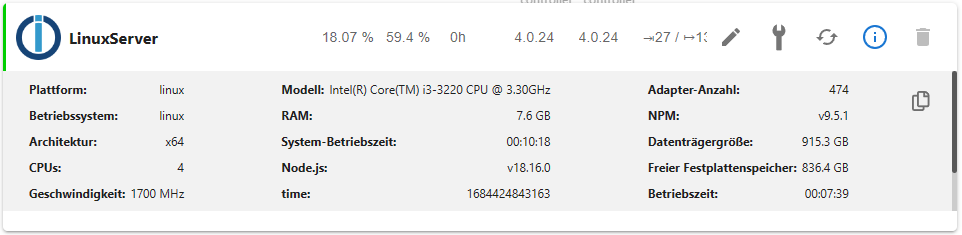
Save-Dateien wurden gelöscht und focal-backports wurde deaktiviert.
Quellen für grafana und influxdb wurde wieder eingebunden, aber jetzt habe ich folgende Meldung (Zeile 16 und 17):
sudo apt update
OK:1 http://security.ubuntu.com/ubuntu focal-security InRelease
OK:2 http://de.archive.ubuntu.com/ubuntu focal InRelease
Holen:3 http://de.archive.ubuntu.com/ubuntu focal-updates InRelease [114 kB]
OK:4 https://apt.grafana.com stable InRelease
OK:5 https://repos.influxdata.com/debian stable InRelease
OK:6 https://deb.nodesource.com/node_18.x focal InRelease
Holen:7 http://de.archive.ubuntu.com/ubuntu focal-updates/main amd64 DEP-11 Metadata [275 kB]
Holen:8 http://de.archive.ubuntu.com/ubuntu focal-updates/universe amd64 DEP-11 Metadata [410 kB]
Holen:9 http://de.archive.ubuntu.com/ubuntu focal-updates/multiverse amd64 DEP-11 Metadata [944 B]
Es wurden 799 kB in 1 s geholt (734 kB/s).
Paketlisten werden gelesen... Fertig
Abhängigkeitsbaum wird aufgebaut.
Statusinformationen werden eingelesen.... Fertig
Alle Pakete sind aktuell.
N: Datei »influxdata-archive_compat.key« in Verzeichnis »/etc/apt/sources.list.d/« wird ignoriert, da sie eine ungültige Dateinamen-Erweiterung hat.
N: Das Laden der konfigurierten Datei »main/binary-i386/Packages« wird übersprungen, da das Depot »https://apt.grafana.com stable InRelease« die Architektur »i386« nicht unterstützt.


697
Online32.6k
Benutzer82.2k
Themen1.3m
Beiträge