




Update Node.js auf 14 klappt nicht
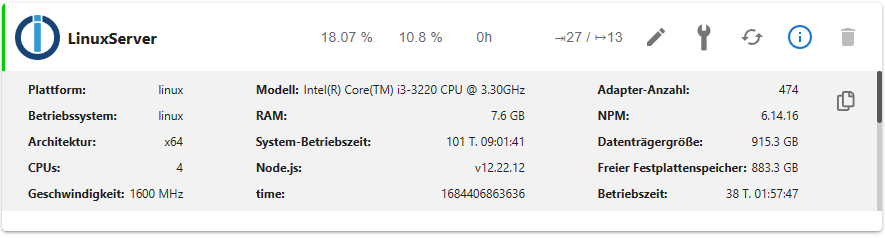
-
@thomas-braun
Wie die Raspberry-Quellen reingekommen sind kann ich nicht sage.
Wie kann ich die rausschmeißen? -
Ich kämpfe noch mit den Quellen
ls -lAh /etc/apt/sources.list.d/gibt zurück:
insgesamt 16K -rw-r--r-- 1 root root 53 Dez 20 2021 influxdb.list -rw-r--r-- 1 root root 53 Dez 20 2021 influxdb.list.save -rw-r--r-- 1 root root 108 Dez 20 2021 nodesource.list -rw-r--r-- 1 root root 108 Dez 20 2021 nodesource.list.save -
Ich kämpfe noch mit den Quellen
ls -lAh /etc/apt/sources.list.d/gibt zurück:
insgesamt 16K -rw-r--r-- 1 root root 53 Dez 20 2021 influxdb.list -rw-r--r-- 1 root root 53 Dez 20 2021 influxdb.list.save -rw-r--r-- 1 root root 108 Dez 20 2021 nodesource.list -rw-r--r-- 1 root root 108 Dez 20 2021 nodesource.list.save@baumert sagte in Update Node.js auf 14 klappt nicht:
.save
Die kannste schon rauskicken:
sudo rm /etc/apt/sources.list.d/*.saveDas dürften Überreste vom Herumhantieren mit einem graphischen Editor sein.
Der Eintrag zum Raspberry steht wohl woanders drin.
cat /etc/apt/sources.listsagt?
-
@baumert sagte in Update Node.js auf 14 klappt nicht:
.save
Die kannste schon rauskicken:
sudo rm /etc/apt/sources.list.d/*.saveDas dürften Überreste vom Herumhantieren mit einem graphischen Editor sein.
Der Eintrag zum Raspberry steht wohl woanders drin.
cat /etc/apt/sources.listsagt?
cat /etc/apt/sources.listsagt:
# deb cdrom:[Ubuntu 20.04.1 LTS _Focal Fossa_ - Release amd64 (20200731)]/ focal main restricted # See http://help.ubuntu.com/community/UpgradeNotes for how to upgrade to # newer versions of the distribution. deb http://de.archive.ubuntu.com/ubuntu/ focal main restricted # deb-src http://de.archive.ubuntu.com/ubuntu/ focal main restricted ## Major bug fix updates produced after the final release of the ## distribution. deb http://de.archive.ubuntu.com/ubuntu/ focal-updates main restricted # deb-src http://de.archive.ubuntu.com/ubuntu/ focal-updates main restricted ## N.B. software from this repository is ENTIRELY UNSUPPORTED by the Ubuntu ## team. Also, please note that software in universe WILL NOT receive any ## review or updates from the Ubuntu security team. deb http://de.archive.ubuntu.com/ubuntu/ focal universe # deb-src http://de.archive.ubuntu.com/ubuntu/ focal universe deb http://de.archive.ubuntu.com/ubuntu/ focal-updates universe # deb-src http://de.archive.ubuntu.com/ubuntu/ focal-updates universe ## N.B. software from this repository is ENTIRELY UNSUPPORTED by the Ubuntu ## team, and may not be under a free licence. Please satisfy yourself as to ## your rights to use the software. Also, please note that software in ## multiverse WILL NOT receive any review or updates from the Ubuntu ## security team. deb http://de.archive.ubuntu.com/ubuntu/ focal multiverse # deb-src http://de.archive.ubuntu.com/ubuntu/ focal multiverse deb http://de.archive.ubuntu.com/ubuntu/ focal-updates multiverse # deb-src http://de.archive.ubuntu.com/ubuntu/ focal-updates multiverse ## N.B. software from this repository may not have been tested as ## extensively as that contained in the main release, although it includes ## newer versions of some applications which may provide useful features. ## Also, please note that software in backports WILL NOT receive any review ## or updates from the Ubuntu security team. deb http://de.archive.ubuntu.com/ubuntu/ focal-backports main restricted universe multiverse # deb-src http://de.archive.ubuntu.com/ubuntu/ focal-backports main restricted universe multiverse ## Uncomment the following two lines to add software from Canonical's ## 'partner' repository. ## This software is not part of Ubuntu, but is offered by Canonical and the ## respective vendors as a service to Ubuntu users. # deb http://archive.canonical.com/ubuntu focal partner # deb-src http://archive.canonical.com/ubuntu focal partner deb http://security.ubuntu.com/ubuntu focal-security main restricted # deb-src http://security.ubuntu.com/ubuntu focal-security main restricted deb http://security.ubuntu.com/ubuntu focal-security universe # deb-src http://security.ubuntu.com/ubuntu focal-security universe deb http://security.ubuntu.com/ubuntu focal-security multiverse # deb-src http://security.ubuntu.com/ubuntu focal-security multiverse # This system was installed using small removable media # (e.g. netinst, live or single CD). The matching "deb cdrom" # entries were disabled at the end of the installation process. # For information about how to configure apt package sources, # see the sources.list(5) manual. deb https://archive.raspbian.org/raspbian buster main contrib non-free deb-src https://archive.raspbian.org/raspbian buster main contrib non-free deb https://packages.grafana.com/oss/deb stable main # deb-src https://packages.grafana.com/oss/deb stable main -
cat /etc/apt/sources.listsagt:
# deb cdrom:[Ubuntu 20.04.1 LTS _Focal Fossa_ - Release amd64 (20200731)]/ focal main restricted # See http://help.ubuntu.com/community/UpgradeNotes for how to upgrade to # newer versions of the distribution. deb http://de.archive.ubuntu.com/ubuntu/ focal main restricted # deb-src http://de.archive.ubuntu.com/ubuntu/ focal main restricted ## Major bug fix updates produced after the final release of the ## distribution. deb http://de.archive.ubuntu.com/ubuntu/ focal-updates main restricted # deb-src http://de.archive.ubuntu.com/ubuntu/ focal-updates main restricted ## N.B. software from this repository is ENTIRELY UNSUPPORTED by the Ubuntu ## team. Also, please note that software in universe WILL NOT receive any ## review or updates from the Ubuntu security team. deb http://de.archive.ubuntu.com/ubuntu/ focal universe # deb-src http://de.archive.ubuntu.com/ubuntu/ focal universe deb http://de.archive.ubuntu.com/ubuntu/ focal-updates universe # deb-src http://de.archive.ubuntu.com/ubuntu/ focal-updates universe ## N.B. software from this repository is ENTIRELY UNSUPPORTED by the Ubuntu ## team, and may not be under a free licence. Please satisfy yourself as to ## your rights to use the software. Also, please note that software in ## multiverse WILL NOT receive any review or updates from the Ubuntu ## security team. deb http://de.archive.ubuntu.com/ubuntu/ focal multiverse # deb-src http://de.archive.ubuntu.com/ubuntu/ focal multiverse deb http://de.archive.ubuntu.com/ubuntu/ focal-updates multiverse # deb-src http://de.archive.ubuntu.com/ubuntu/ focal-updates multiverse ## N.B. software from this repository may not have been tested as ## extensively as that contained in the main release, although it includes ## newer versions of some applications which may provide useful features. ## Also, please note that software in backports WILL NOT receive any review ## or updates from the Ubuntu security team. deb http://de.archive.ubuntu.com/ubuntu/ focal-backports main restricted universe multiverse # deb-src http://de.archive.ubuntu.com/ubuntu/ focal-backports main restricted universe multiverse ## Uncomment the following two lines to add software from Canonical's ## 'partner' repository. ## This software is not part of Ubuntu, but is offered by Canonical and the ## respective vendors as a service to Ubuntu users. # deb http://archive.canonical.com/ubuntu focal partner # deb-src http://archive.canonical.com/ubuntu focal partner deb http://security.ubuntu.com/ubuntu focal-security main restricted # deb-src http://security.ubuntu.com/ubuntu focal-security main restricted deb http://security.ubuntu.com/ubuntu focal-security universe # deb-src http://security.ubuntu.com/ubuntu focal-security universe deb http://security.ubuntu.com/ubuntu focal-security multiverse # deb-src http://security.ubuntu.com/ubuntu focal-security multiverse # This system was installed using small removable media # (e.g. netinst, live or single CD). The matching "deb cdrom" # entries were disabled at the end of the installation process. # For information about how to configure apt package sources, # see the sources.list(5) manual. deb https://archive.raspbian.org/raspbian buster main contrib non-free deb-src https://archive.raspbian.org/raspbian buster main contrib non-free deb https://packages.grafana.com/oss/deb stable main # deb-src https://packages.grafana.com/oss/deb stable mainDie Zeilen 59 - 62 sind Quatsch an der Stelle und müssen gelöscht werden.
-
cat /etc/apt/sources.listsagt:
# deb cdrom:[Ubuntu 20.04.1 LTS _Focal Fossa_ - Release amd64 (20200731)]/ focal main restricted # See http://help.ubuntu.com/community/UpgradeNotes for how to upgrade to # newer versions of the distribution. deb http://de.archive.ubuntu.com/ubuntu/ focal main restricted # deb-src http://de.archive.ubuntu.com/ubuntu/ focal main restricted ## Major bug fix updates produced after the final release of the ## distribution. deb http://de.archive.ubuntu.com/ubuntu/ focal-updates main restricted # deb-src http://de.archive.ubuntu.com/ubuntu/ focal-updates main restricted ## N.B. software from this repository is ENTIRELY UNSUPPORTED by the Ubuntu ## team. Also, please note that software in universe WILL NOT receive any ## review or updates from the Ubuntu security team. deb http://de.archive.ubuntu.com/ubuntu/ focal universe # deb-src http://de.archive.ubuntu.com/ubuntu/ focal universe deb http://de.archive.ubuntu.com/ubuntu/ focal-updates universe # deb-src http://de.archive.ubuntu.com/ubuntu/ focal-updates universe ## N.B. software from this repository is ENTIRELY UNSUPPORTED by the Ubuntu ## team, and may not be under a free licence. Please satisfy yourself as to ## your rights to use the software. Also, please note that software in ## multiverse WILL NOT receive any review or updates from the Ubuntu ## security team. deb http://de.archive.ubuntu.com/ubuntu/ focal multiverse # deb-src http://de.archive.ubuntu.com/ubuntu/ focal multiverse deb http://de.archive.ubuntu.com/ubuntu/ focal-updates multiverse # deb-src http://de.archive.ubuntu.com/ubuntu/ focal-updates multiverse ## N.B. software from this repository may not have been tested as ## extensively as that contained in the main release, although it includes ## newer versions of some applications which may provide useful features. ## Also, please note that software in backports WILL NOT receive any review ## or updates from the Ubuntu security team. deb http://de.archive.ubuntu.com/ubuntu/ focal-backports main restricted universe multiverse # deb-src http://de.archive.ubuntu.com/ubuntu/ focal-backports main restricted universe multiverse ## Uncomment the following two lines to add software from Canonical's ## 'partner' repository. ## This software is not part of Ubuntu, but is offered by Canonical and the ## respective vendors as a service to Ubuntu users. # deb http://archive.canonical.com/ubuntu focal partner # deb-src http://archive.canonical.com/ubuntu focal partner deb http://security.ubuntu.com/ubuntu focal-security main restricted # deb-src http://security.ubuntu.com/ubuntu focal-security main restricted deb http://security.ubuntu.com/ubuntu focal-security universe # deb-src http://security.ubuntu.com/ubuntu focal-security universe deb http://security.ubuntu.com/ubuntu focal-security multiverse # deb-src http://security.ubuntu.com/ubuntu focal-security multiverse # This system was installed using small removable media # (e.g. netinst, live or single CD). The matching "deb cdrom" # entries were disabled at the end of the installation process. # For information about how to configure apt package sources, # see the sources.list(5) manual. deb https://archive.raspbian.org/raspbian buster main contrib non-free deb-src https://archive.raspbian.org/raspbian buster main contrib non-free deb https://packages.grafana.com/oss/deb stable main # deb-src https://packages.grafana.com/oss/deb stable mainBiste jetzt soweit?
rm /etc/apt/sources.list.d/influxdb.list
sudo apt-get install -y apt-transport-https
sudo apt-get install -y software-properties-common wget
wget -q -O /usr/share/keyrings/grafana.key https://apt.grafana.com/gpg.key
echo "deb [signed-by=/usr/share/keyrings/grafana.key] https://apt.grafana.com stable main" | sudo tee /etc/apt/sources.list.d/grafana.list
wget -q https://repos.influxdata.com/influxdata-archive_compat.key
echo '393e8779c89ac8d958f81f942f9ad7fb82a25e133faddaf92e15b16e6ac9ce4c influxdata-archive_compat.key' | sha256sum -c && cat influxdata-archive_compat.key | gpg --dearmor | sudo tee /usr/share/keyrings/influxdata-archive_compat.gpg > /dev/null
echo 'deb [signed-by=/usr/share/keyrings/influxdata-archive_compat.gpg] https://repos.influxdata.com/debian stable main' | sudo tee /etc/apt/sources.list.d/influxdata.list
Wenn das alles drin ist:
sudo apt updateanschauen und prüfen ob es noch gemecker gibt.
Wenn sauber, die Datei
/etc/apt/sources.list.d/nodesourcelist
um einen Eintrag zu nodejs18 ergänzen.iob stop sudo apt update sudo apt full-upgrade sudo rebootFertig.
-
Biste jetzt soweit?
rm /etc/apt/sources.list.d/influxdb.list
sudo apt-get install -y apt-transport-https
sudo apt-get install -y software-properties-common wget
wget -q -O /usr/share/keyrings/grafana.key https://apt.grafana.com/gpg.key
echo "deb [signed-by=/usr/share/keyrings/grafana.key] https://apt.grafana.com stable main" | sudo tee /etc/apt/sources.list.d/grafana.list
wget -q https://repos.influxdata.com/influxdata-archive_compat.key
echo '393e8779c89ac8d958f81f942f9ad7fb82a25e133faddaf92e15b16e6ac9ce4c influxdata-archive_compat.key' | sha256sum -c && cat influxdata-archive_compat.key | gpg --dearmor | sudo tee /usr/share/keyrings/influxdata-archive_compat.gpg > /dev/null
echo 'deb [signed-by=/usr/share/keyrings/influxdata-archive_compat.gpg] https://repos.influxdata.com/debian stable main' | sudo tee /etc/apt/sources.list.d/influxdata.list
Wenn das alles drin ist:
sudo apt updateanschauen und prüfen ob es noch gemecker gibt.
Wenn sauber, die Datei
/etc/apt/sources.list.d/nodesourcelist
um einen Eintrag zu nodejs18 ergänzen.iob stop sudo apt update sudo apt full-upgrade sudo rebootFertig.
sieht bis jetzt gut aus:
sudo apt update
OK:1 http://de.archive.ubuntu.com/ubuntu focal InRelease
Holen:2 http://security.ubuntu.com/ubuntu focal-security InRelease [114 kB]
OK:3 https://dl.yarnpkg.com/debian stable InRelease
OK:4 http://de.archive.ubuntu.com/ubuntu focal-updates InRelease
OK:5 https://deb.nodesource.com/node_14.x focal InRelease
Holen:6 http://de.archive.ubuntu.com/ubuntu focal-backports InRelease [108 kB]
Es wurden 222 kB in 1 s geholt (281 kB/s).
Paketlisten werden gelesen... Fertig
Abhängigkeitsbaum wird aufgebaut.
Statusinformationen werden eingelesen.... Fertig
Alle Pakete sind aktuell.
Wie ergänze ich die Datei /etc/apt/sources.list.d/nodesource.list um den Eintrag nodejs18?
-
sieht bis jetzt gut aus:
sudo apt update
OK:1 http://de.archive.ubuntu.com/ubuntu focal InRelease
Holen:2 http://security.ubuntu.com/ubuntu focal-security InRelease [114 kB]
OK:3 https://dl.yarnpkg.com/debian stable InRelease
OK:4 http://de.archive.ubuntu.com/ubuntu focal-updates InRelease
OK:5 https://deb.nodesource.com/node_14.x focal InRelease
Holen:6 http://de.archive.ubuntu.com/ubuntu focal-backports InRelease [108 kB]
Es wurden 222 kB in 1 s geholt (281 kB/s).
Paketlisten werden gelesen... Fertig
Abhängigkeitsbaum wird aufgebaut.
Statusinformationen werden eingelesen.... Fertig
Alle Pakete sind aktuell.
Wie ergänze ich die Datei /etc/apt/sources.list.d/nodesource.list um den Eintrag nodejs18?
@baumert sagte in Update Node.js auf 14 klappt nicht:
Wie ergänze ich die Datei /etc/apt/sources.list.d/nodesource.list um den Eintrag nodejs18?
Mit einem Editor.
nanoist z. B. einer.sudo nano /etc/apt/sources.list.d/nodesource.list -
sieht bis jetzt gut aus:
sudo apt update
OK:1 http://de.archive.ubuntu.com/ubuntu focal InRelease
Holen:2 http://security.ubuntu.com/ubuntu focal-security InRelease [114 kB]
OK:3 https://dl.yarnpkg.com/debian stable InRelease
OK:4 http://de.archive.ubuntu.com/ubuntu focal-updates InRelease
OK:5 https://deb.nodesource.com/node_14.x focal InRelease
Holen:6 http://de.archive.ubuntu.com/ubuntu focal-backports InRelease [108 kB]
Es wurden 222 kB in 1 s geholt (281 kB/s).
Paketlisten werden gelesen... Fertig
Abhängigkeitsbaum wird aufgebaut.
Statusinformationen werden eingelesen.... Fertig
Alle Pakete sind aktuell.
Wie ergänze ich die Datei /etc/apt/sources.list.d/nodesource.list um den Eintrag nodejs18?
@baumert sagte in Update Node.js auf 14 klappt nicht:
Die Quellen würde ich auch noch ausschalten:https://dl.yarnpkg.com/debian stable InRelease http://de.archive.ubuntu.com/ubuntu focal-backports InReleaseBackports in der sources.list (Zeile 36) und yarnpkg musste mal suchen wo das herkommt:
grep -R "yarnpkg" /etc/apt/Und es fehlen dir nun die Quellen für grafana und influx. Wolltest du die nicht mehr?
-
@baumert sagte in Update Node.js auf 14 klappt nicht:
Die Quellen würde ich auch noch ausschalten:https://dl.yarnpkg.com/debian stable InRelease http://de.archive.ubuntu.com/ubuntu focal-backports InReleaseBackports in der sources.list (Zeile 36) und yarnpkg musste mal suchen wo das herkommt:
grep -R "yarnpkg" /etc/apt/Und es fehlen dir nun die Quellen für grafana und influx. Wolltest du die nicht mehr?
sorry, nano war klar - ich meinte was trage ich ein...
Es sieht jetzt so aus:
 sudo apt update
OK:1 http://de.archive.ubuntu.com/ubuntu focal InRelease
OK:2 http://security.ubuntu.com/ubuntu focal-security InRelease
OK:3 http://de.archive.ubuntu.com/ubuntu focal-updates InRelease
Holen:4 http://de.archive.ubuntu.com/ubuntu focal-backports InRelease [108 kB]
OK:5 https://deb.nodesource.com/node_14.x focal InRelease
Es wurden 108 kB in 5 s geholt (20,6 kB/s).
Paketlisten werden gelesen... Fertig
Abhängigkeitsbaum wird aufgebaut.
Statusinformationen werden eingelesen.... Fertig
Alle Pakete sind aktuell.
Wie bekommen ich noch diesen Eintrag weg bzw. ausgeschaltet:
http://de.archive.ubuntu.com/ubuntu focal-backports InReleaseDie Quellen für grafana und influx möchte ich gerne wieder.
Diese müssen verschwunden sein, wo ich die beiden manuelle aktualisiert habe... -
sorry, nano war klar - ich meinte was trage ich ein...
Es sieht jetzt so aus:
 sudo apt update
OK:1 http://de.archive.ubuntu.com/ubuntu focal InRelease
OK:2 http://security.ubuntu.com/ubuntu focal-security InRelease
OK:3 http://de.archive.ubuntu.com/ubuntu focal-updates InRelease
Holen:4 http://de.archive.ubuntu.com/ubuntu focal-backports InRelease [108 kB]
OK:5 https://deb.nodesource.com/node_14.x focal InRelease
Es wurden 108 kB in 5 s geholt (20,6 kB/s).
Paketlisten werden gelesen... Fertig
Abhängigkeitsbaum wird aufgebaut.
Statusinformationen werden eingelesen.... Fertig
Alle Pakete sind aktuell.
Wie bekommen ich noch diesen Eintrag weg bzw. ausgeschaltet:
http://de.archive.ubuntu.com/ubuntu focal-backports InReleaseDie Quellen für grafana und influx möchte ich gerne wieder.
Diese müssen verschwunden sein, wo ich die beiden manuelle aktualisiert habe...grep -R "focal-backports" /etc/apt/sagt
/etc/apt/sources.list:deb http://de.archive.ubuntu.com/ubuntu/ focal-backports main restricted universe multiverse /etc/apt/sources.list:# deb-src http://de.archive.ubuntu.com/ubuntu/ focal-backports main restricted universe multiverse /etc/apt/sources.list.save:deb http://de.archive.ubuntu.com/ubuntu/ focal-backports main restricted universe multiverse /etc/apt/sources.list.save:# deb-src http://de.archive.ubuntu.com/ubuntu/ focal-backports main restricted universe multiverse -
sorry, nano war klar - ich meinte was trage ich ein...
Es sieht jetzt so aus:
 sudo apt update
OK:1 http://de.archive.ubuntu.com/ubuntu focal InRelease
OK:2 http://security.ubuntu.com/ubuntu focal-security InRelease
OK:3 http://de.archive.ubuntu.com/ubuntu focal-updates InRelease
Holen:4 http://de.archive.ubuntu.com/ubuntu focal-backports InRelease [108 kB]
OK:5 https://deb.nodesource.com/node_14.x focal InRelease
Es wurden 108 kB in 5 s geholt (20,6 kB/s).
Paketlisten werden gelesen... Fertig
Abhängigkeitsbaum wird aufgebaut.
Statusinformationen werden eingelesen.... Fertig
Alle Pakete sind aktuell.
Wie bekommen ich noch diesen Eintrag weg bzw. ausgeschaltet:
http://de.archive.ubuntu.com/ubuntu focal-backports InReleaseDie Quellen für grafana und influx möchte ich gerne wieder.
Diese müssen verschwunden sein, wo ich die beiden manuelle aktualisiert habe...@baumert sagte in Update Node.js auf 14 klappt nicht:
ich meinte was trage ich ein...
Statt 14 wie im Moment eine 18.
Schaut dann halt so oder so ähnlich aus:deb-src [signed-by=/usr/share/keyrings/nodesource.gpg] https://deb.nodesource.com/node_18.x focal mainDie Backports schaltet man aus, indem man in Zeile 36 ein Kommentarzeichen setzt.
## Also, please note that software in backports WILL NOT receive any review
## or updates from the Ubuntu security team.
# deb http://de.archive.ubuntu.com/ubuntu/ focal-backports main restricted universe multiverse
# deb-src http://de.archive.ubuntu.com/ubuntu/ focal-backports main restricted universe multiverse
Und lösch die .save-Dateien.
sudo rm /etc/apt/sources.list.saveDie Quellen für grafana und influx möchte ich gerne wieder.
Hatte ich oben haarklein schon aufgeführt, wie die richtig angelegt werden.
-
@baumert sagte in Update Node.js auf 14 klappt nicht:
ich meinte was trage ich ein...
Statt 14 wie im Moment eine 18.
Schaut dann halt so oder so ähnlich aus:deb-src [signed-by=/usr/share/keyrings/nodesource.gpg] https://deb.nodesource.com/node_18.x focal mainDie Backports schaltet man aus, indem man in Zeile 36 ein Kommentarzeichen setzt.
## Also, please note that software in backports WILL NOT receive any review
## or updates from the Ubuntu security team.
# deb http://de.archive.ubuntu.com/ubuntu/ focal-backports main restricted universe multiverse
# deb-src http://de.archive.ubuntu.com/ubuntu/ focal-backports main restricted universe multiverse
Und lösch die .save-Dateien.
sudo rm /etc/apt/sources.list.saveDie Quellen für grafana und influx möchte ich gerne wieder.
Hatte ich oben haarklein schon aufgeführt, wie die richtig angelegt werden.
soweit sieht es jetzt gut aus - bin jetzt auf Node.js v18.16.0
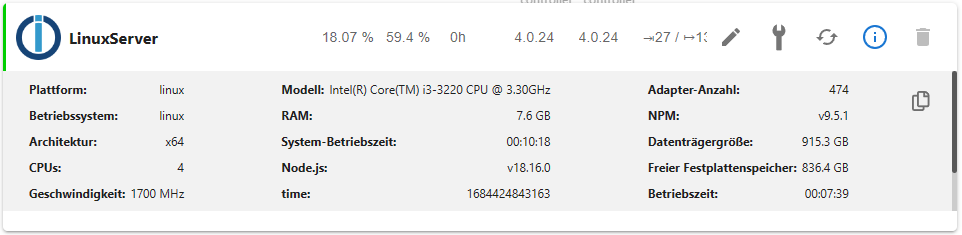
Save-Dateien wurden gelöscht und focal-backports wurde deaktiviert.
Quellen für grafana und influxdb wurde wieder eingebunden, aber jetzt habe ich folgende Meldung (Zeile 16 und 17):
sudo apt update OK:1 http://security.ubuntu.com/ubuntu focal-security InRelease OK:2 http://de.archive.ubuntu.com/ubuntu focal InRelease Holen:3 http://de.archive.ubuntu.com/ubuntu focal-updates InRelease [114 kB] OK:4 https://apt.grafana.com stable InRelease OK:5 https://repos.influxdata.com/debian stable InRelease OK:6 https://deb.nodesource.com/node_18.x focal InRelease Holen:7 http://de.archive.ubuntu.com/ubuntu focal-updates/main amd64 DEP-11 Metadata [275 kB] Holen:8 http://de.archive.ubuntu.com/ubuntu focal-updates/universe amd64 DEP-11 Metadata [410 kB] Holen:9 http://de.archive.ubuntu.com/ubuntu focal-updates/multiverse amd64 DEP-11 Metadata [944 B] Es wurden 799 kB in 1 s geholt (734 kB/s). Paketlisten werden gelesen... Fertig Abhängigkeitsbaum wird aufgebaut. Statusinformationen werden eingelesen.... Fertig Alle Pakete sind aktuell. N: Datei »influxdata-archive_compat.key« in Verzeichnis »/etc/apt/sources.list.d/« wird ignoriert, da sie eine ungültige Dateinamen-Erweiterung hat. N: Das Laden der konfigurierten Datei »main/binary-i386/Packages« wird übersprungen, da das Depot »https://apt.grafana.com stable InRelease« die Architektur »i386« nicht unterstützt. -
soweit sieht es jetzt gut aus - bin jetzt auf Node.js v18.16.0
Save-Dateien wurden gelöscht und focal-backports wurde deaktiviert.
Quellen für grafana und influxdb wurde wieder eingebunden, aber jetzt habe ich folgende Meldung (Zeile 16 und 17):
sudo apt update OK:1 http://security.ubuntu.com/ubuntu focal-security InRelease OK:2 http://de.archive.ubuntu.com/ubuntu focal InRelease Holen:3 http://de.archive.ubuntu.com/ubuntu focal-updates InRelease [114 kB] OK:4 https://apt.grafana.com stable InRelease OK:5 https://repos.influxdata.com/debian stable InRelease OK:6 https://deb.nodesource.com/node_18.x focal InRelease Holen:7 http://de.archive.ubuntu.com/ubuntu focal-updates/main amd64 DEP-11 Metadata [275 kB] Holen:8 http://de.archive.ubuntu.com/ubuntu focal-updates/universe amd64 DEP-11 Metadata [410 kB] Holen:9 http://de.archive.ubuntu.com/ubuntu focal-updates/multiverse amd64 DEP-11 Metadata [944 B] Es wurden 799 kB in 1 s geholt (734 kB/s). Paketlisten werden gelesen... Fertig Abhängigkeitsbaum wird aufgebaut. Statusinformationen werden eingelesen.... Fertig Alle Pakete sind aktuell. N: Datei »influxdata-archive_compat.key« in Verzeichnis »/etc/apt/sources.list.d/« wird ignoriert, da sie eine ungültige Dateinamen-Erweiterung hat. N: Das Laden der konfigurierten Datei »main/binary-i386/Packages« wird übersprungen, da das Depot »https://apt.grafana.com stable InRelease« die Architektur »i386« nicht unterstützt.Da hast du im falschen Verzeichnis gestanden...
sudo rm /etc/apt/sources.list.d/influxdata-archive_compat.key -
Da hast du im falschen Verzeichnis gestanden...
sudo rm /etc/apt/sources.list.d/influxdata-archive_compat.key -
OK, jetzt sieht es gut aus - vielen Dank...
-
uptime -p
up 35 minutes
sudo apt update OK:1 http://security.ubuntu.com/ubuntu focal-security InRelease OK:2 http://de.archive.ubuntu.com/ubuntu focal InRelease OK:3 https://repos.influxdata.com/debian stable InRelease OK:4 https://apt.grafana.com stable InRelease OK:5 http://de.archive.ubuntu.com/ubuntu focal-updates InRelease OK:6 https://deb.nodesource.com/node_18.x focal InRelease Paketlisten werden gelesen... Fertig Abhängigkeitsbaum wird aufgebaut. Statusinformationen werden eingelesen.... Fertig Alle Pakete sind aktuell. N: Das Laden der konfigurierten Datei »main/binary-i386/Packages« wird übersprungen, da das Depot »https://apt.grafana.com stable InRelease« die Architektur »i386« nicht unterstützt. -
@baumert sagte in Update Node.js auf 14 klappt nicht:
Das Laden der konfigurierten Datei »main/binary-i386/Packages« wird übersprungen, da das Depot...
Da ist noch was krumm.
dpkg -l | grep i386Jenachdem was da um's Eck kommt das Paket in der Fassung löschen.
sudo apt remove *:i386 sudo dpkg --remove-architecture i386 -
uptime -p
up 35 minutes
sudo apt update OK:1 http://security.ubuntu.com/ubuntu focal-security InRelease OK:2 http://de.archive.ubuntu.com/ubuntu focal InRelease OK:3 https://repos.influxdata.com/debian stable InRelease OK:4 https://apt.grafana.com stable InRelease OK:5 http://de.archive.ubuntu.com/ubuntu focal-updates InRelease OK:6 https://deb.nodesource.com/node_18.x focal InRelease Paketlisten werden gelesen... Fertig Abhängigkeitsbaum wird aufgebaut. Statusinformationen werden eingelesen.... Fertig Alle Pakete sind aktuell. N: Das Laden der konfigurierten Datei »main/binary-i386/Packages« wird übersprungen, da das Depot »https://apt.grafana.com stable InRelease« die Architektur »i386« nicht unterstützt.@baumert
Wenn das mit der Löschung der Architektur nicht funktioniert editiere die
/etc/apt/sources.list.d/grafana.listso:deb [signed-by=/usr/share/keyrings/grafana.key arch=amd64] https://apt.grafana.com stable main -
@baumert sagte in Update Node.js auf 14 klappt nicht:
Das Laden der konfigurierten Datei »main/binary-i386/Packages« wird übersprungen, da das Depot...
Da ist noch was krumm.
dpkg -l | grep i386Jenachdem was da um's Eck kommt das Paket in der Fassung löschen.
sudo apt remove *:i386 sudo dpkg --remove-architecture i386super, jetzt sieht es sehr gut aus:
sudo apt update
OK:1 http://de.archive.ubuntu.com/ubuntu focal InRelease
OK:2 https://apt.grafana.com stable InRelease
OK:3 http://de.archive.ubuntu.com/ubuntu focal-updates InRelease
OK:4 https://repos.influxdata.com/debian stable InRelease
OK:5 https://deb.nodesource.com/node_18.x focal InRelease
OK:6 http://security.ubuntu.com/ubuntu focal-security InRelease
Paketlisten werden gelesen... Fertig
Abhängigkeitsbaum wird aufgebaut.
Statusinformationen werden eingelesen.... Fertig
Alle Pakete sind aktuell.


Hey! Du scheinst an dieser Unterhaltung interessiert zu sein, hast aber noch kein Konto.
Hast du es satt, bei jedem Besuch durch die gleichen Beiträge zu scrollen? Wenn du dich für ein Konto anmeldest, kommst du immer genau dorthin zurück, wo du zuvor warst, und kannst dich über neue Antworten benachrichtigen lassen (entweder per E-Mail oder Push-Benachrichtigung). Du kannst auch Lesezeichen speichern und Beiträge positiv bewerten, um anderen Community-Mitgliedern deine Wertschätzung zu zeigen.
Mit deinem Input könnte dieser Beitrag noch besser werden 💗
Registrieren Anmelden222
Online33.0k
Benutzer83.5k
Themen1.3m
Beiträge