




Update Node.js auf 14 klappt nicht
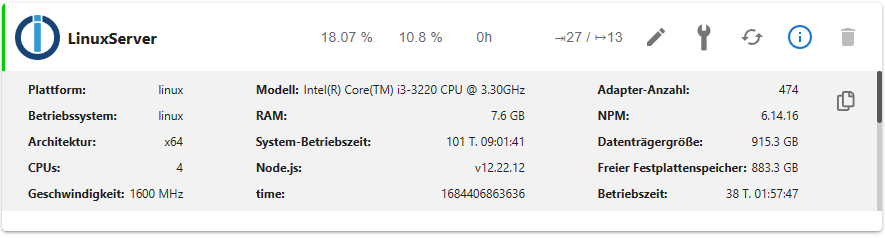
-
Hier die Langfassung:
======== Start marking the full check here ========= Skript v.2023-04-16 *** BASE SYSTEM *** Architecture : x86_64 Docker : false Virtualization : none Distributor ID: Ubuntu Description: Ubuntu 20.04.4 LTS Release: 20.04 Codename: focal NAME="Ubuntu" VERSION="20.04.4 LTS (Focal Fossa)" ID=ubuntu ID_LIKE=debian PRETTY_NAME="Ubuntu 20.04.4 LTS" VERSION_ID="20.04" HOME_URL="https://www.ubuntu.com/" SUPPORT_URL="https://help.ubuntu.com/" BUG_REPORT_URL="https://bugs.launchpad.net/ubuntu/" PRIVACY_POLICY_URL="https://www.ubuntu.com/legal/terms-and-policies/privacy-policy" VERSION_CODENAME=focal UBUNTU_CODENAME=focal Systemuptime and Load: 13:36:22 up 101 days, 9:50, 2 users, load average: 1.57, 2.02, 1.59 CPU threads: 4 *** Time and Time Zones *** Local time: Thu 2023-05-18 13:36:22 CEST Universal time: Thu 2023-05-18 11:36:22 UTC RTC time: Thu 2023-05-18 11:36:22 Time zone: Europe/Berlin (CEST, +0200) System clock synchronized: yes NTP service: active RTC in local TZ: no *** User and Groups *** baumert /home/baumert baumert adm cdrom sudo dip plugdev lpadmin lxd sambashare iobroker *** X-Server-Setup *** X-Server: true Desktop: Terminal: tty Boot Target: graphical.target *** MEMORY *** total used free shared buff/cache available Mem: 7.8G 3.2G 657M 49M 3.9G 4.7G Swap: 2.0G 732M 1.3G Total: 9.9G 4.0G 2.0G 7823 M total memory 3221 M used memory 2993 M active memory 3579 M inactive memory 657 M free memory 943 M buffer memory 3000 M swap cache 2047 M total swap 732 M used swap 1315 M free swap *** FILESYSTEM *** Filesystem Type Size Used Avail Use% Mounted on udev devtmpfs 3.8G 0 3.8G 0% /dev tmpfs tmpfs 783M 1.8M 781M 1% /run /dev/sda2 ext4 916G 33G 837G 4% / tmpfs tmpfs 3.9G 0 3.9G 0% /dev/shm tmpfs tmpfs 5.0M 4.0K 5.0M 1% /run/lock tmpfs tmpfs 3.9G 0 3.9G 0% /sys/fs/cgroup /dev/loop0 squashfs 128K 128K 0 100% /snap/bare/5 /dev/loop12 squashfs 92M 92M 0 100% /snap/gtk-common-themes/1535 /dev/loop11 squashfs 82M 82M 0 100% /snap/gtk-common-themes/1534 /dev/loop14 squashfs 46M 46M 0 100% /snap/snap-store/638 /dev/sda1 vfat 511M 5.3M 506M 2% /boot/efi tmpfs tmpfs 783M 60K 783M 1% /run/user/1000 /dev/loop16 squashfs 56M 56M 0 100% /snap/core18/2721 /dev/loop4 squashfs 350M 350M 0 100% /snap/gnome-3-38-2004/137 /dev/loop9 squashfs 165M 165M 0 100% /snap/gnome-3-28-1804/194 /dev/loop5 squashfs 219M 219M 0 100% /snap/gnome-3-34-1804/90 /dev/loop7 squashfs 165M 165M 0 100% /snap/gnome-3-28-1804/198 /dev/loop6 squashfs 54M 54M 0 100% /snap/snapd/18933 /dev/loop3 squashfs 219M 219M 0 100% /snap/gnome-3-34-1804/93 /dev/loop8 squashfs 350M 350M 0 100% /snap/gnome-3-38-2004/140 /dev/loop18 squashfs 13M 13M 0 100% /snap/snap-store/959 /dev/loop13 squashfs 461M 461M 0 100% /snap/gnome-42-2204/99 /dev/loop20 squashfs 73M 73M 0 100% /snap/core22/617 /dev/loop21 squashfs 54M 54M 0 100% /snap/snapd/19122 /dev/loop17 squashfs 64M 64M 0 100% /snap/core20/1879 /dev/loop1 squashfs 461M 461M 0 100% /snap/gnome-42-2204/102 /dev/loop22 squashfs 56M 56M 0 100% /snap/core18/2745 /dev/loop2 squashfs 74M 74M 0 100% /snap/core22/634 /dev/loop23 squashfs 64M 64M 0 100% /snap/core20/1891 Messages concerning ext4 filesystem in dmesg: [Mon Feb 6 02:46:20 2023] EXT4-fs (sda2): mounted filesystem with ordered data mode. Opts: (null). Quota mode: none. [Mon Feb 6 02:46:30 2023] EXT4-fs (sda2): re-mounted. Opts: errors=remount-ro. Quota mode: none. Show mounted filesystems (real ones only): TARGET SOURCE FSTYPE OPTIONS / /dev/sda2 ext4 rw,relatime,errors=remount-ro |-/sys/kernel/tracing tracefs tracefs rw,nosuid,nodev,noexec,relatime |-/snap/bare/5 /dev/loop0 squashfs ro,nodev,relatime,errors=continue |-/snap/snapd/18933 /dev/loop6 squashfs ro,nodev,relatime,errors=continue |-/snap/gnome-3-38-2004/140 /dev/loop8 squashfs ro,nodev,relatime,errors=continue |-/snap/gtk-common-themes/1535 /dev/loop12 squashfs ro,nodev,relatime,errors=continue |-/snap/core20/1891 /dev/loop23 squashfs ro,nodev,relatime,errors=continue |-/snap/gtk-common-themes/1534 /dev/loop11 squashfs ro,nodev,relatime,errors=continue |-/snap/gnome-3-28-1804/194 /dev/loop9 squashfs ro,nodev,relatime,errors=continue |-/snap/core18/2721 /dev/loop16 squashfs ro,nodev,relatime,errors=continue |-/snap/gnome-3-34-1804/93 /dev/loop3 squashfs ro,nodev,relatime,errors=continue |-/snap/gnome-42-2204/102 /dev/loop1 squashfs ro,nodev,relatime,errors=continue |-/snap/core20/1879 /dev/loop17 squashfs ro,nodev,relatime,errors=continue |-/snap/snap-store/638 /dev/loop14 squashfs ro,nodev,relatime,errors=continue |-/boot/efi /dev/sda1 vfat rw,relatime,fmask=0077,dmask=0077,codepage=437,iocharset=iso8859-1,shortname=mixed,errors=remount-ro |-/snap/gnome-3-38-2004/137 /dev/loop4 squashfs ro,nodev,relatime,errors=continue |-/snap/snap-store/959 /dev/loop18 squashfs ro,nodev,relatime,errors=continue |-/snap/core18/2745 /dev/loop22 squashfs ro,nodev,relatime,errors=continue |-/snap/gnome-3-28-1804/198 /dev/loop7 squashfs ro,nodev,relatime,errors=continue |-/snap/gnome-3-34-1804/90 /dev/loop5 squashfs ro,nodev,relatime,errors=continue |-/snap/core22/617 /dev/loop20 squashfs ro,nodev,relatime,errors=continue |-/snap/gnome-42-2204/99 /dev/loop13 squashfs ro,nodev,relatime,errors=continue |-/snap/core22/634 /dev/loop2 squashfs ro,nodev,relatime,errors=continue `-/snap/snapd/19122 /dev/loop21 squashfs ro,nodev,relatime,errors=continue Files in neuralgic directories: /var: 18G /var/ 13G /var/lib 7.3G /var/lib/influxdb/data/iobroker/autogen 7.3G /var/lib/influxdb/data/iobroker 7.3G /var/lib/influxdb/data Archived and active journals take up 4.0G in the file system. /opt/iobroker/backups: 422M /opt/iobroker/backups/ /opt/iobroker/iobroker-data: 1.4G /opt/iobroker/iobroker-data/ 997M /opt/iobroker/iobroker-data/history 197M /opt/iobroker/iobroker-data/files 133M /opt/iobroker/iobroker-data/backup-objects 61M /opt/iobroker/iobroker-data/history/20211213 The five largest files in iobroker-data are: 24M /opt/iobroker/iobroker-data/objects.jsonl 13M /opt/iobroker/iobroker-data/objects.json.migrated 13M /opt/iobroker/iobroker-data/objects.json.bak.migrated 12M /opt/iobroker/iobroker-data/files/vis.0/main/vis-views.json 11M /opt/iobroker/iobroker-data/states.jsonl *** NodeJS-Installation *** /usr/bin/nodejs v12.22.12 /usr/bin/node v12.22.12 /usr/bin/npm 6.14.16 /usr/bin/npx 6.14.16 nodejs: Installed: 12.22.12-deb-1nodesource1 Candidate: 12.22.12-deb-1nodesource1 Version table: *** 12.22.12-deb-1nodesource1 500 500 https://deb.nodesource.com/node_12.x focal/main amd64 Packages 100 /var/lib/dpkg/status 10.19.0~dfsg-3ubuntu1 500 500 http://de.archive.ubuntu.com/ubuntu focal/universe amd64 Packages Temp directories causing npm8 problem: 0 No problems detected *** ioBroker-Installation *** ioBroker Status iobroker is running on this host. Objects type: jsonl States type: jsonl MULTIHOSTSERVICE/enabled: false Core adapters versions js-controller: 4.0.24 admin: 6.3.5 javascript: 6.1.4 Adapters from github: 5 Adapter State + system.adapter.admin.0 : admin : LinuxServer - enabled, port: 8081, bind: 192.168.178.40, run as: admin system.adapter.admin.1 : admin : LinuxServer - disabled, port: 8081, bind: 192.168.178.40, run as: admin + system.adapter.alexa2.0 : alexa2 : LinuxServer - enabled + system.adapter.backitup.0 : backitup : LinuxServer - enabled + system.adapter.cloud.0 : cloud : LinuxServer - enabled + system.adapter.discovery.0 : discovery : LinuxServer - enabled system.adapter.echarts.0 : echarts : LinuxServer - disabled + system.adapter.enigma2.0 : enigma2 : LinuxServer - enabled system.adapter.feiertage.0 : feiertage : LinuxServer - enabled system.adapter.flot.0 : flot : LinuxServer - disabled + system.adapter.g-homa.0 : g-homa : LinuxServer - enabled + system.adapter.harmony.0 : harmony : LinuxServer - enabled + system.adapter.hm-rega.0 : hm-rega : LinuxServer - enabled + system.adapter.hm-rpc.0 : hm-rpc : LinuxServer - enabled, port: 0 + system.adapter.hm-rpc.1 : hm-rpc : LinuxServer - enabled, port: 0 + system.adapter.hue-extended.0 : hue-extended : LinuxServer - enabled + system.adapter.influxdb.0 : influxdb : LinuxServer - enabled, port: 8086 + system.adapter.info.0 : info : LinuxServer - enabled + system.adapter.iot.3 : iot : LinuxServer - enabled + system.adapter.javascript.0 : javascript : LinuxServer - enabled system.adapter.node-red.0 : node-red : LinuxServer - disabled, port: 1880, bind: 0.0.0.0 system.adapter.openweathermap.0 : openweathermap : LinuxServer - enabled + system.adapter.ping.0 : ping : LinuxServer - enabled system.adapter.repetierserver.0 : repetierserver : LinuxServer - disabled + system.adapter.samsung.0 : samsung : LinuxServer - enabled + system.adapter.shuttercontrol.0 : shuttercontrol : LinuxServer - enabled + system.adapter.sonoff.0 : sonoff : LinuxServer - enabled, port: 1884, bind: 0.0.0.0 + system.adapter.tuya.0 : tuya : LinuxServer - enabled + system.adapter.upnp.0 : upnp : LinuxServer - enabled system.adapter.vis-canvas-gauges.0 : vis-canvas-gauges : LinuxServer - disabled system.adapter.vis-colorpicker.0 : vis-colorpicker : LinuxServer - disabled system.adapter.vis-fancyswitch.0 : vis-fancyswitch : LinuxServer - disabled system.adapter.vis-history.0 : vis-history : LinuxServer - disabled system.adapter.vis-hqwidgets.0 : vis-hqwidgets : LinuxServer - disabled system.adapter.vis-jqui-mfd.0 : vis-jqui-mfd : LinuxServer - disabled system.adapter.vis-justgage.0 : vis-justgage : LinuxServer - disabled system.adapter.vis-map.0 : vis-map : LinuxServer - disabled system.adapter.vis-rgraph.0 : vis-rgraph : LinuxServer - disabled system.adapter.vis-timeandweather.0 : vis-timeandweather : LinuxServer - disabled system.adapter.vis.0 : vis : LinuxServer - enabled + system.adapter.web.0 : web : LinuxServer - enabled, port: 8082, bind: 192.168.178.40, run as: admin + system.adapter.wled.0 : wled : LinuxServer - enabled + system.adapter.worx.0 : worx : LinuxServer - enabled + system.adapter.yahka.0 : yahka : LinuxServer - enabled + instance is alive Enabled adapters with bindings + system.adapter.admin.0 : admin : LinuxServer - enabled, port: 8081, bind: 192.168.178.40, run as: admin + system.adapter.hm-rpc.0 : hm-rpc : LinuxServer - enabled, port: 0 + system.adapter.hm-rpc.1 : hm-rpc : LinuxServer - enabled, port: 0 + system.adapter.influxdb.0 : influxdb : LinuxServer - enabled, port: 8086 + system.adapter.sonoff.0 : sonoff : LinuxServer - enabled, port: 1884, bind: 0.0.0.0 + system.adapter.web.0 : web : LinuxServer - enabled, port: 8082, bind: 192.168.178.40, run as: admin ioBroker-Repositories stable : http://download.iobroker.net/sources-dist.json beta : http://download.iobroker.net/sources-dist-latest.json Active repo(s): stable Installed ioBroker-Instances Used repository: stable Adapter "admin" : 6.3.5 , installed 6.3.5 Adapter "alexa2" : 3.23.2 , installed 3.23.2 Adapter "backitup" : 2.6.19 , installed 2.4.12 [Updatable] Adapter "cloud" : 4.3.0 , installed 4.3.0 Adapter "discovery" : 3.1.0 , installed 3.1.0 Adapter "echarts" : 1.0.12 , installed 1.0.12 Adapter "feiertage" : 1.1.0 , installed 1.1.0 Adapter "flot" : 1.11.0 , installed 1.11.0 Adapter "g-homa" : 0.5.3 , installed 0.5.3 Adapter "harmony" : 1.2.2 , installed 1.2.2 Adapter "hm-rega" : 3.0.46 , installed 3.0.46 Adapter "hm-rpc" : 1.15.16 , installed 1.15.16 Adapter "hue-extended" : 2.0.0 , installed 2.0.0 Adapter "influxdb" : 3.2.0 , installed 3.2.0 Adapter "info" : 1.9.26 , installed 1.9.26 Adapter "iot" : 1.14.2 , installed 1.11.9 [Updatable] Adapter "javascript" : 6.1.4 , installed 6.1.4 Controller "js-controller": 4.0.24 , installed 4.0.24 Adapter "node-red" : 4.0.0 , installed 3.3.1 [Updatable] Adapter "openweathermap": 0.3.3 , installed 0.3.3 Adapter "ping" : 1.5.3 , installed 1.5.3 Adapter "samsung" : 0.5.11 , installed 0.5.11 Adapter "shuttercontrol": 1.4.29 , installed 1.4.29 Adapter "simple-api" : 2.7.2 , installed 2.7.2 Adapter "socketio" : 4.2.0 , installed 4.2.0 Adapter "sonoff" : 2.5.1 , installed 2.5.1 Adapter "tuya" : 3.13.1 , installed 3.13.1 Adapter "upnp" : 1.0.21 , installed 1.0.21 Adapter "vis" : 1.4.16 , installed 1.4.16 Adapter "vis-canvas-gauges": 1.0.1, installed 1.0.1 Adapter "vis-colorpicker": 1.2.0 , installed 1.2.0 Adapter "vis-fancyswitch": 1.1.0 , installed 1.1.0 Adapter "vis-history" : 1.0.0 , installed 1.0.0 Adapter "vis-hqwidgets": 1.3.0 , installed 1.3.0 Adapter "vis-jqui-mfd" : 1.0.12 , installed 1.0.12 Adapter "vis-justgage" : 1.0.2 , installed 1.0.2 Adapter "vis-map" : 1.0.4 , installed 1.0.4 Adapter "vis-rgraph" : 0.0.2 , installed 0.0.2 Adapter "vis-timeandweather": 1.2.2, installed 1.2.2 Adapter "web" : 4.3.0 , installed 4.3.0 Adapter "wled" : 0.6.7 , installed 0.6.7 Adapter "worx" : 2.1.3 , installed 1.6.6 [Updatable] Adapter "ws" : 1.3.0 , installed 1.3.0 Adapter "yahka" : 0.17.0 , installed 0.17.0 Objects and States Please stand by - This may take a while Objects: 13148 States: 13001 *** OS-Repositories and Updates *** W: An error occurred during the signature verification. The repository is not updated and the previous index files will be used. GPG error: https://repos.influxdata.com/debian focal InRelease: The following signatures couldn't be verified because the public key is not available: NO_PUBKEY D8FF8E1F7DF8B07E W: An error occurred during the signature verification. The repository is not updated and the previous index files will be used. GPG error: https://packages.grafana.com/oss/deb stable InRelease: The following signatures couldn't be verified because the public key is not available: NO_PUBKEY 9E439B102CF3C0C6 W: GPG error: https://archive.raspbian.org/raspbian buster InRelease: The following signatures couldn't be verified because the public key is not available: NO_PUBKEY 9165938D90FDDD2E E: The repository 'https://archive.raspbian.org/raspbian buster InRelease' is not signed. Pending Updates: 91 *** Listening Ports *** Active Internet connections (only servers) Proto Recv-Q Send-Q Local Address Foreign Address State User Inode PID/Program name tcp 0 0 127.0.0.53:53 0.0.0.0:* LISTEN 101 287988055 3816980/systemd-res tcp 0 0 127.0.0.1:631 0.0.0.0:* LISTEN 0 988954628 150342/cupsd tcp 0 0 192.168.178.40:2001 0.0.0.0:* LISTEN 1001 994142181 222529/io.hm-rpc.0 tcp 0 0 192.168.178.40:2010 0.0.0.0:* LISTEN 1001 994144348 222552/io.hm-rpc.1 tcp 0 0 127.0.0.1:42821 0.0.0.0:* LISTEN 1001 994323266 223574/io.yahka.0 tcp 0 0 0.0.0.0:8080 0.0.0.0:* LISTEN 0 23192 540/mjpg_streamer tcp 0 0 127.0.0.1:42125 0.0.0.0:* LISTEN 1001 994159266 223574/io.yahka.0 tcp 0 0 0.0.0.0:9001 0.0.0.0:* LISTEN 1001 994143425 222420/iobroker.js- tcp 0 0 0.0.0.0:9000 0.0.0.0:* LISTEN 1001 994143432 222420/iobroker.js- tcp 0 0 192.168.178.40:8081 0.0.0.0:* LISTEN 1001 994140657 222439/io.admin.0 tcp 0 0 192.168.178.40:8082 0.0.0.0:* LISTEN 1001 994158628 223525/io.web.0 tcp 0 0 0.0.0.0:111 0.0.0.0:* LISTEN 0 12663 1/systemd tcp 0 0 0.0.0.0:22 0.0.0.0:* LISTEN 0 30720 818/sshd: /usr/sbin tcp 0 0 127.0.0.1:8088 0.0.0.0:* LISTEN 998 39243 1363/influxd tcp 0 0 0.0.0.0:1884 0.0.0.0:* LISTEN 1001 994144152 222617/io.sonoff.0 tcp 0 0 127.0.0.1:36265 0.0.0.0:* LISTEN 1001 994177667 223574/io.yahka.0 tcp6 0 0 :::35779 :::* LISTEN 1001 994158855 223574/io.yahka.0 tcp6 0 0 :::3000 :::* LISTEN 130 36558 879/grafana-server tcp6 0 0 :::8080 :::* LISTEN 0 23193 540/mjpg_streamer tcp6 0 0 :::8086 :::* LISTEN 998 38034 1363/influxd tcp6 0 0 :::8000 :::* LISTEN 1001 994158325 223312/io.upnp.0 tcp6 0 0 :::3344 :::* LISTEN 129 518335521 2567271/RepetierSer tcp6 0 0 :::50000 :::* LISTEN 1001 994147617 222713/io.g-homa.0 tcp6 0 0 :::61991 :::* LISTEN 1001 994146281 222730/io.harmony.0 tcp6 0 0 ::1:631 :::* LISTEN 0 988954627 150342/cupsd tcp6 0 0 :::111 :::* LISTEN 0 12667 1/systemd tcp6 0 0 :::22 :::* LISTEN 0 33794 818/sshd: /usr/sbin udp 0 0 127.0.0.53:53 0.0.0.0:* 101 287988054 3816980/systemd-res udp 0 0 0.0.0.0:111 0.0.0.0:* 0 12664 1/systemd udp 0 0 0.0.0.0:61991 0.0.0.0:* 1001 994146282 222730/io.harmony.0 udp 0 0 0.0.0.0:631 0.0.0.0:* 0 991272523 182059/cups-browsed udp 0 0 0.0.0.0:5353 0.0.0.0:* 1001 994159024 223635/io.wled.0 udp 0 0 0.0.0.0:5353 0.0.0.0:* 115 30583 660/avahi-daemon: r udp 0 0 0.0.0.0:54572 0.0.0.0:* 115 30585 660/avahi-daemon: r udp 0 0 0.0.0.0:1900 0.0.0.0:* 1001 994159802 223312/io.upnp.0 udp 0 0 0.0.0.0:6666 0.0.0.0:* 1001 994146309 222635/io.tuya.0 udp 0 0 0.0.0.0:6667 0.0.0.0:* 1001 994146310 222635/io.tuya.0 udp 0 0 0.0.0.0:44125 0.0.0.0:* 1001 994153272 223312/io.upnp.0 udp6 0 0 :::111 :::* 0 12670 1/systemd udp6 0 0 :::54162 :::* 115 30586 660/avahi-daemon: r udp6 0 0 :::5353 :::* 115 30584 660/avahi-daemon: r *** Log File - Last 25 Lines *** 2023-05-18 13:31:01.650 - info: openweathermap.0 (228857) starting. Version 0.3.3 in /opt/iobroker/node_modules/iobroker.openweathermap, node: v12.22.12, js-controller: 4.0.24 2023-05-18 13:31:16.192 - info: openweathermap.0 (228857) Terminated (NO_ERROR): Without reason 2023-05-18 13:31:16.708 - info: host.LinuxServer instance system.adapter.openweathermap.0 terminated with code 0 (NO_ERROR) 2023-05-18 13:32:00.029 - info: host.LinuxServer instance system.adapter.openweathermap.0 started with pid 228962 2023-05-18 13:32:01.195 - info: openweathermap.0 (228962) starting. Version 0.3.3 in /opt/iobroker/node_modules/iobroker.openweathermap, node: v12.22.12, js-controller: 4.0.24 2023-05-18 13:32:12.560 - info: openweathermap.0 (228962) Terminated (NO_ERROR): Without reason 2023-05-18 13:32:13.077 - info: host.LinuxServer instance system.adapter.openweathermap.0 terminated with code 0 (NO_ERROR) 2023-05-18 13:33:00.041 - info: host.LinuxServer instance system.adapter.openweathermap.0 started with pid 229283 2023-05-18 13:33:01.197 - info: openweathermap.0 (229283) starting. Version 0.3.3 in /opt/iobroker/node_modules/iobroker.openweathermap, node: v12.22.12, js-controller: 4.0.24 2023-05-18 13:33:27.442 - info: openweathermap.0 (229283) Terminated (NO_ERROR): Without reason 2023-05-18 13:33:27.959 - info: host.LinuxServer instance system.adapter.openweathermap.0 terminated with code 0 (NO_ERROR) 2023-05-18 13:34:00.034 - info: host.LinuxServer instance system.adapter.openweathermap.0 started with pid 229396 2023-05-18 13:34:01.106 - info: openweathermap.0 (229396) starting. Version 0.3.3 in /opt/iobroker/node_modules/iobroker.openweathermap, node: v12.22.12, js-controller: 4.0.24 2023-05-18 13:34:05.499 - info: openweathermap.0 (229396) Terminated (NO_ERROR): Without reason 2023-05-18 13:34:06.015 - info: host.LinuxServer instance system.adapter.openweathermap.0 terminated with code 0 (NO_ERROR) 2023-05-18 13:35:00.048 - info: host.LinuxServer instance system.adapter.openweathermap.0 started with pid 230274 2023-05-18 13:35:01.204 - info: openweathermap.0 (230274) starting. Version 0.3.3 in /opt/iobroker/node_modules/iobroker.openweathermap, node: v12.22.12, js-controller: 4.0.24 2023-05-18 13:35:23.050 - info: openweathermap.0 (230274) Terminated (NO_ERROR): Without reason 2023-05-18 13:35:23.562 - info: host.LinuxServer instance system.adapter.openweathermap.0 terminated with code 0 (NO_ERROR) 2023-05-18 13:36:00.041 - info: host.LinuxServer instance system.adapter.openweathermap.0 started with pid 230622 2023-05-18 13:36:01.146 - info: openweathermap.0 (230622) starting. Version 0.3.3 in /opt/iobroker/node_modules/iobroker.openweathermap, node: v12.22.12, js-controller: 4.0.24 2023-05-18 13:36:08.869 - info: openweathermap.0 (230622) Terminated (NO_ERROR): Without reason 2023-05-18 13:36:09.387 - info: host.LinuxServer instance system.adapter.openweathermap.0 terminated with code 0 (NO_ERROR) 2023-05-18 13:37:00.041 - info: host.LinuxServer instance system.adapter.openweathermap.0 started with pid 231543 2023-05-18 13:37:01.350 - info: openweathermap.0 (231543) starting. Version 0.3.3 in /opt/iobroker/node_modules/iobroker.openweathermap, node: v12.22.12, js-controller: 4.0.24 ============ Mark until here for C&P =============Zu grafana sowie influxdb siehe:
https://forum.iobroker.net/topic/62040/linux-debian-grafana-repo-muss-aktualisiert-werden
Dann schmeiß die Quellen zu Raspberry Buster raus. Was haben die da zu suchen? Dürften in /etc/apt/sources.list.d/ zu finden sein.
Wenn die Quellen wieder richtig ticken unbedingt das System auf Stand bringen. Zu nodejs siehe meine Signatur. Dürfte dann aber mit einfacher Anpassung der nodesource.list getan sein.
-
Zu grafana sowie influxdb siehe:
https://forum.iobroker.net/topic/62040/linux-debian-grafana-repo-muss-aktualisiert-werden
Dann schmeiß die Quellen zu Raspberry Buster raus. Was haben die da zu suchen? Dürften in /etc/apt/sources.list.d/ zu finden sein.
Wenn die Quellen wieder richtig ticken unbedingt das System auf Stand bringen. Zu nodejs siehe meine Signatur. Dürfte dann aber mit einfacher Anpassung der nodesource.list getan sein.
-
@thomas-braun
Wie die Raspberry-Quellen reingekommen sind kann ich nicht sage.
Wie kann ich die rausschmeißen? -
Ich kämpfe noch mit den Quellen
ls -lAh /etc/apt/sources.list.d/gibt zurück:
insgesamt 16K -rw-r--r-- 1 root root 53 Dez 20 2021 influxdb.list -rw-r--r-- 1 root root 53 Dez 20 2021 influxdb.list.save -rw-r--r-- 1 root root 108 Dez 20 2021 nodesource.list -rw-r--r-- 1 root root 108 Dez 20 2021 nodesource.list.save -
Ich kämpfe noch mit den Quellen
ls -lAh /etc/apt/sources.list.d/gibt zurück:
insgesamt 16K -rw-r--r-- 1 root root 53 Dez 20 2021 influxdb.list -rw-r--r-- 1 root root 53 Dez 20 2021 influxdb.list.save -rw-r--r-- 1 root root 108 Dez 20 2021 nodesource.list -rw-r--r-- 1 root root 108 Dez 20 2021 nodesource.list.save@baumert sagte in Update Node.js auf 14 klappt nicht:
.save
Die kannste schon rauskicken:
sudo rm /etc/apt/sources.list.d/*.saveDas dürften Überreste vom Herumhantieren mit einem graphischen Editor sein.
Der Eintrag zum Raspberry steht wohl woanders drin.
cat /etc/apt/sources.listsagt?
-
@baumert sagte in Update Node.js auf 14 klappt nicht:
.save
Die kannste schon rauskicken:
sudo rm /etc/apt/sources.list.d/*.saveDas dürften Überreste vom Herumhantieren mit einem graphischen Editor sein.
Der Eintrag zum Raspberry steht wohl woanders drin.
cat /etc/apt/sources.listsagt?
cat /etc/apt/sources.listsagt:
# deb cdrom:[Ubuntu 20.04.1 LTS _Focal Fossa_ - Release amd64 (20200731)]/ focal main restricted # See http://help.ubuntu.com/community/UpgradeNotes for how to upgrade to # newer versions of the distribution. deb http://de.archive.ubuntu.com/ubuntu/ focal main restricted # deb-src http://de.archive.ubuntu.com/ubuntu/ focal main restricted ## Major bug fix updates produced after the final release of the ## distribution. deb http://de.archive.ubuntu.com/ubuntu/ focal-updates main restricted # deb-src http://de.archive.ubuntu.com/ubuntu/ focal-updates main restricted ## N.B. software from this repository is ENTIRELY UNSUPPORTED by the Ubuntu ## team. Also, please note that software in universe WILL NOT receive any ## review or updates from the Ubuntu security team. deb http://de.archive.ubuntu.com/ubuntu/ focal universe # deb-src http://de.archive.ubuntu.com/ubuntu/ focal universe deb http://de.archive.ubuntu.com/ubuntu/ focal-updates universe # deb-src http://de.archive.ubuntu.com/ubuntu/ focal-updates universe ## N.B. software from this repository is ENTIRELY UNSUPPORTED by the Ubuntu ## team, and may not be under a free licence. Please satisfy yourself as to ## your rights to use the software. Also, please note that software in ## multiverse WILL NOT receive any review or updates from the Ubuntu ## security team. deb http://de.archive.ubuntu.com/ubuntu/ focal multiverse # deb-src http://de.archive.ubuntu.com/ubuntu/ focal multiverse deb http://de.archive.ubuntu.com/ubuntu/ focal-updates multiverse # deb-src http://de.archive.ubuntu.com/ubuntu/ focal-updates multiverse ## N.B. software from this repository may not have been tested as ## extensively as that contained in the main release, although it includes ## newer versions of some applications which may provide useful features. ## Also, please note that software in backports WILL NOT receive any review ## or updates from the Ubuntu security team. deb http://de.archive.ubuntu.com/ubuntu/ focal-backports main restricted universe multiverse # deb-src http://de.archive.ubuntu.com/ubuntu/ focal-backports main restricted universe multiverse ## Uncomment the following two lines to add software from Canonical's ## 'partner' repository. ## This software is not part of Ubuntu, but is offered by Canonical and the ## respective vendors as a service to Ubuntu users. # deb http://archive.canonical.com/ubuntu focal partner # deb-src http://archive.canonical.com/ubuntu focal partner deb http://security.ubuntu.com/ubuntu focal-security main restricted # deb-src http://security.ubuntu.com/ubuntu focal-security main restricted deb http://security.ubuntu.com/ubuntu focal-security universe # deb-src http://security.ubuntu.com/ubuntu focal-security universe deb http://security.ubuntu.com/ubuntu focal-security multiverse # deb-src http://security.ubuntu.com/ubuntu focal-security multiverse # This system was installed using small removable media # (e.g. netinst, live or single CD). The matching "deb cdrom" # entries were disabled at the end of the installation process. # For information about how to configure apt package sources, # see the sources.list(5) manual. deb https://archive.raspbian.org/raspbian buster main contrib non-free deb-src https://archive.raspbian.org/raspbian buster main contrib non-free deb https://packages.grafana.com/oss/deb stable main # deb-src https://packages.grafana.com/oss/deb stable main -
cat /etc/apt/sources.listsagt:
# deb cdrom:[Ubuntu 20.04.1 LTS _Focal Fossa_ - Release amd64 (20200731)]/ focal main restricted # See http://help.ubuntu.com/community/UpgradeNotes for how to upgrade to # newer versions of the distribution. deb http://de.archive.ubuntu.com/ubuntu/ focal main restricted # deb-src http://de.archive.ubuntu.com/ubuntu/ focal main restricted ## Major bug fix updates produced after the final release of the ## distribution. deb http://de.archive.ubuntu.com/ubuntu/ focal-updates main restricted # deb-src http://de.archive.ubuntu.com/ubuntu/ focal-updates main restricted ## N.B. software from this repository is ENTIRELY UNSUPPORTED by the Ubuntu ## team. Also, please note that software in universe WILL NOT receive any ## review or updates from the Ubuntu security team. deb http://de.archive.ubuntu.com/ubuntu/ focal universe # deb-src http://de.archive.ubuntu.com/ubuntu/ focal universe deb http://de.archive.ubuntu.com/ubuntu/ focal-updates universe # deb-src http://de.archive.ubuntu.com/ubuntu/ focal-updates universe ## N.B. software from this repository is ENTIRELY UNSUPPORTED by the Ubuntu ## team, and may not be under a free licence. Please satisfy yourself as to ## your rights to use the software. Also, please note that software in ## multiverse WILL NOT receive any review or updates from the Ubuntu ## security team. deb http://de.archive.ubuntu.com/ubuntu/ focal multiverse # deb-src http://de.archive.ubuntu.com/ubuntu/ focal multiverse deb http://de.archive.ubuntu.com/ubuntu/ focal-updates multiverse # deb-src http://de.archive.ubuntu.com/ubuntu/ focal-updates multiverse ## N.B. software from this repository may not have been tested as ## extensively as that contained in the main release, although it includes ## newer versions of some applications which may provide useful features. ## Also, please note that software in backports WILL NOT receive any review ## or updates from the Ubuntu security team. deb http://de.archive.ubuntu.com/ubuntu/ focal-backports main restricted universe multiverse # deb-src http://de.archive.ubuntu.com/ubuntu/ focal-backports main restricted universe multiverse ## Uncomment the following two lines to add software from Canonical's ## 'partner' repository. ## This software is not part of Ubuntu, but is offered by Canonical and the ## respective vendors as a service to Ubuntu users. # deb http://archive.canonical.com/ubuntu focal partner # deb-src http://archive.canonical.com/ubuntu focal partner deb http://security.ubuntu.com/ubuntu focal-security main restricted # deb-src http://security.ubuntu.com/ubuntu focal-security main restricted deb http://security.ubuntu.com/ubuntu focal-security universe # deb-src http://security.ubuntu.com/ubuntu focal-security universe deb http://security.ubuntu.com/ubuntu focal-security multiverse # deb-src http://security.ubuntu.com/ubuntu focal-security multiverse # This system was installed using small removable media # (e.g. netinst, live or single CD). The matching "deb cdrom" # entries were disabled at the end of the installation process. # For information about how to configure apt package sources, # see the sources.list(5) manual. deb https://archive.raspbian.org/raspbian buster main contrib non-free deb-src https://archive.raspbian.org/raspbian buster main contrib non-free deb https://packages.grafana.com/oss/deb stable main # deb-src https://packages.grafana.com/oss/deb stable mainDie Zeilen 59 - 62 sind Quatsch an der Stelle und müssen gelöscht werden.
-
cat /etc/apt/sources.listsagt:
# deb cdrom:[Ubuntu 20.04.1 LTS _Focal Fossa_ - Release amd64 (20200731)]/ focal main restricted # See http://help.ubuntu.com/community/UpgradeNotes for how to upgrade to # newer versions of the distribution. deb http://de.archive.ubuntu.com/ubuntu/ focal main restricted # deb-src http://de.archive.ubuntu.com/ubuntu/ focal main restricted ## Major bug fix updates produced after the final release of the ## distribution. deb http://de.archive.ubuntu.com/ubuntu/ focal-updates main restricted # deb-src http://de.archive.ubuntu.com/ubuntu/ focal-updates main restricted ## N.B. software from this repository is ENTIRELY UNSUPPORTED by the Ubuntu ## team. Also, please note that software in universe WILL NOT receive any ## review or updates from the Ubuntu security team. deb http://de.archive.ubuntu.com/ubuntu/ focal universe # deb-src http://de.archive.ubuntu.com/ubuntu/ focal universe deb http://de.archive.ubuntu.com/ubuntu/ focal-updates universe # deb-src http://de.archive.ubuntu.com/ubuntu/ focal-updates universe ## N.B. software from this repository is ENTIRELY UNSUPPORTED by the Ubuntu ## team, and may not be under a free licence. Please satisfy yourself as to ## your rights to use the software. Also, please note that software in ## multiverse WILL NOT receive any review or updates from the Ubuntu ## security team. deb http://de.archive.ubuntu.com/ubuntu/ focal multiverse # deb-src http://de.archive.ubuntu.com/ubuntu/ focal multiverse deb http://de.archive.ubuntu.com/ubuntu/ focal-updates multiverse # deb-src http://de.archive.ubuntu.com/ubuntu/ focal-updates multiverse ## N.B. software from this repository may not have been tested as ## extensively as that contained in the main release, although it includes ## newer versions of some applications which may provide useful features. ## Also, please note that software in backports WILL NOT receive any review ## or updates from the Ubuntu security team. deb http://de.archive.ubuntu.com/ubuntu/ focal-backports main restricted universe multiverse # deb-src http://de.archive.ubuntu.com/ubuntu/ focal-backports main restricted universe multiverse ## Uncomment the following two lines to add software from Canonical's ## 'partner' repository. ## This software is not part of Ubuntu, but is offered by Canonical and the ## respective vendors as a service to Ubuntu users. # deb http://archive.canonical.com/ubuntu focal partner # deb-src http://archive.canonical.com/ubuntu focal partner deb http://security.ubuntu.com/ubuntu focal-security main restricted # deb-src http://security.ubuntu.com/ubuntu focal-security main restricted deb http://security.ubuntu.com/ubuntu focal-security universe # deb-src http://security.ubuntu.com/ubuntu focal-security universe deb http://security.ubuntu.com/ubuntu focal-security multiverse # deb-src http://security.ubuntu.com/ubuntu focal-security multiverse # This system was installed using small removable media # (e.g. netinst, live or single CD). The matching "deb cdrom" # entries were disabled at the end of the installation process. # For information about how to configure apt package sources, # see the sources.list(5) manual. deb https://archive.raspbian.org/raspbian buster main contrib non-free deb-src https://archive.raspbian.org/raspbian buster main contrib non-free deb https://packages.grafana.com/oss/deb stable main # deb-src https://packages.grafana.com/oss/deb stable mainBiste jetzt soweit?
rm /etc/apt/sources.list.d/influxdb.list
sudo apt-get install -y apt-transport-https
sudo apt-get install -y software-properties-common wget
wget -q -O /usr/share/keyrings/grafana.key https://apt.grafana.com/gpg.key
echo "deb [signed-by=/usr/share/keyrings/grafana.key] https://apt.grafana.com stable main" | sudo tee /etc/apt/sources.list.d/grafana.list
wget -q https://repos.influxdata.com/influxdata-archive_compat.key
echo '393e8779c89ac8d958f81f942f9ad7fb82a25e133faddaf92e15b16e6ac9ce4c influxdata-archive_compat.key' | sha256sum -c && cat influxdata-archive_compat.key | gpg --dearmor | sudo tee /usr/share/keyrings/influxdata-archive_compat.gpg > /dev/null
echo 'deb [signed-by=/usr/share/keyrings/influxdata-archive_compat.gpg] https://repos.influxdata.com/debian stable main' | sudo tee /etc/apt/sources.list.d/influxdata.list
Wenn das alles drin ist:
sudo apt updateanschauen und prüfen ob es noch gemecker gibt.
Wenn sauber, die Datei
/etc/apt/sources.list.d/nodesourcelist
um einen Eintrag zu nodejs18 ergänzen.iob stop sudo apt update sudo apt full-upgrade sudo rebootFertig.
-
Biste jetzt soweit?
rm /etc/apt/sources.list.d/influxdb.list
sudo apt-get install -y apt-transport-https
sudo apt-get install -y software-properties-common wget
wget -q -O /usr/share/keyrings/grafana.key https://apt.grafana.com/gpg.key
echo "deb [signed-by=/usr/share/keyrings/grafana.key] https://apt.grafana.com stable main" | sudo tee /etc/apt/sources.list.d/grafana.list
wget -q https://repos.influxdata.com/influxdata-archive_compat.key
echo '393e8779c89ac8d958f81f942f9ad7fb82a25e133faddaf92e15b16e6ac9ce4c influxdata-archive_compat.key' | sha256sum -c && cat influxdata-archive_compat.key | gpg --dearmor | sudo tee /usr/share/keyrings/influxdata-archive_compat.gpg > /dev/null
echo 'deb [signed-by=/usr/share/keyrings/influxdata-archive_compat.gpg] https://repos.influxdata.com/debian stable main' | sudo tee /etc/apt/sources.list.d/influxdata.list
Wenn das alles drin ist:
sudo apt updateanschauen und prüfen ob es noch gemecker gibt.
Wenn sauber, die Datei
/etc/apt/sources.list.d/nodesourcelist
um einen Eintrag zu nodejs18 ergänzen.iob stop sudo apt update sudo apt full-upgrade sudo rebootFertig.
sieht bis jetzt gut aus:
sudo apt update
OK:1 http://de.archive.ubuntu.com/ubuntu focal InRelease
Holen:2 http://security.ubuntu.com/ubuntu focal-security InRelease [114 kB]
OK:3 https://dl.yarnpkg.com/debian stable InRelease
OK:4 http://de.archive.ubuntu.com/ubuntu focal-updates InRelease
OK:5 https://deb.nodesource.com/node_14.x focal InRelease
Holen:6 http://de.archive.ubuntu.com/ubuntu focal-backports InRelease [108 kB]
Es wurden 222 kB in 1 s geholt (281 kB/s).
Paketlisten werden gelesen... Fertig
Abhängigkeitsbaum wird aufgebaut.
Statusinformationen werden eingelesen.... Fertig
Alle Pakete sind aktuell.
Wie ergänze ich die Datei /etc/apt/sources.list.d/nodesource.list um den Eintrag nodejs18?
-
sieht bis jetzt gut aus:
sudo apt update
OK:1 http://de.archive.ubuntu.com/ubuntu focal InRelease
Holen:2 http://security.ubuntu.com/ubuntu focal-security InRelease [114 kB]
OK:3 https://dl.yarnpkg.com/debian stable InRelease
OK:4 http://de.archive.ubuntu.com/ubuntu focal-updates InRelease
OK:5 https://deb.nodesource.com/node_14.x focal InRelease
Holen:6 http://de.archive.ubuntu.com/ubuntu focal-backports InRelease [108 kB]
Es wurden 222 kB in 1 s geholt (281 kB/s).
Paketlisten werden gelesen... Fertig
Abhängigkeitsbaum wird aufgebaut.
Statusinformationen werden eingelesen.... Fertig
Alle Pakete sind aktuell.
Wie ergänze ich die Datei /etc/apt/sources.list.d/nodesource.list um den Eintrag nodejs18?
@baumert sagte in Update Node.js auf 14 klappt nicht:
Wie ergänze ich die Datei /etc/apt/sources.list.d/nodesource.list um den Eintrag nodejs18?
Mit einem Editor.
nanoist z. B. einer.sudo nano /etc/apt/sources.list.d/nodesource.list -
sieht bis jetzt gut aus:
sudo apt update
OK:1 http://de.archive.ubuntu.com/ubuntu focal InRelease
Holen:2 http://security.ubuntu.com/ubuntu focal-security InRelease [114 kB]
OK:3 https://dl.yarnpkg.com/debian stable InRelease
OK:4 http://de.archive.ubuntu.com/ubuntu focal-updates InRelease
OK:5 https://deb.nodesource.com/node_14.x focal InRelease
Holen:6 http://de.archive.ubuntu.com/ubuntu focal-backports InRelease [108 kB]
Es wurden 222 kB in 1 s geholt (281 kB/s).
Paketlisten werden gelesen... Fertig
Abhängigkeitsbaum wird aufgebaut.
Statusinformationen werden eingelesen.... Fertig
Alle Pakete sind aktuell.
Wie ergänze ich die Datei /etc/apt/sources.list.d/nodesource.list um den Eintrag nodejs18?
@baumert sagte in Update Node.js auf 14 klappt nicht:
Die Quellen würde ich auch noch ausschalten:https://dl.yarnpkg.com/debian stable InRelease http://de.archive.ubuntu.com/ubuntu focal-backports InReleaseBackports in der sources.list (Zeile 36) und yarnpkg musste mal suchen wo das herkommt:
grep -R "yarnpkg" /etc/apt/Und es fehlen dir nun die Quellen für grafana und influx. Wolltest du die nicht mehr?
-
@baumert sagte in Update Node.js auf 14 klappt nicht:
Die Quellen würde ich auch noch ausschalten:https://dl.yarnpkg.com/debian stable InRelease http://de.archive.ubuntu.com/ubuntu focal-backports InReleaseBackports in der sources.list (Zeile 36) und yarnpkg musste mal suchen wo das herkommt:
grep -R "yarnpkg" /etc/apt/Und es fehlen dir nun die Quellen für grafana und influx. Wolltest du die nicht mehr?
sorry, nano war klar - ich meinte was trage ich ein...
Es sieht jetzt so aus:
 sudo apt update
OK:1 http://de.archive.ubuntu.com/ubuntu focal InRelease
OK:2 http://security.ubuntu.com/ubuntu focal-security InRelease
OK:3 http://de.archive.ubuntu.com/ubuntu focal-updates InRelease
Holen:4 http://de.archive.ubuntu.com/ubuntu focal-backports InRelease [108 kB]
OK:5 https://deb.nodesource.com/node_14.x focal InRelease
Es wurden 108 kB in 5 s geholt (20,6 kB/s).
Paketlisten werden gelesen... Fertig
Abhängigkeitsbaum wird aufgebaut.
Statusinformationen werden eingelesen.... Fertig
Alle Pakete sind aktuell.
Wie bekommen ich noch diesen Eintrag weg bzw. ausgeschaltet:
http://de.archive.ubuntu.com/ubuntu focal-backports InReleaseDie Quellen für grafana und influx möchte ich gerne wieder.
Diese müssen verschwunden sein, wo ich die beiden manuelle aktualisiert habe... -
sorry, nano war klar - ich meinte was trage ich ein...
Es sieht jetzt so aus:
 sudo apt update
OK:1 http://de.archive.ubuntu.com/ubuntu focal InRelease
OK:2 http://security.ubuntu.com/ubuntu focal-security InRelease
OK:3 http://de.archive.ubuntu.com/ubuntu focal-updates InRelease
Holen:4 http://de.archive.ubuntu.com/ubuntu focal-backports InRelease [108 kB]
OK:5 https://deb.nodesource.com/node_14.x focal InRelease
Es wurden 108 kB in 5 s geholt (20,6 kB/s).
Paketlisten werden gelesen... Fertig
Abhängigkeitsbaum wird aufgebaut.
Statusinformationen werden eingelesen.... Fertig
Alle Pakete sind aktuell.
Wie bekommen ich noch diesen Eintrag weg bzw. ausgeschaltet:
http://de.archive.ubuntu.com/ubuntu focal-backports InReleaseDie Quellen für grafana und influx möchte ich gerne wieder.
Diese müssen verschwunden sein, wo ich die beiden manuelle aktualisiert habe...grep -R "focal-backports" /etc/apt/sagt
/etc/apt/sources.list:deb http://de.archive.ubuntu.com/ubuntu/ focal-backports main restricted universe multiverse /etc/apt/sources.list:# deb-src http://de.archive.ubuntu.com/ubuntu/ focal-backports main restricted universe multiverse /etc/apt/sources.list.save:deb http://de.archive.ubuntu.com/ubuntu/ focal-backports main restricted universe multiverse /etc/apt/sources.list.save:# deb-src http://de.archive.ubuntu.com/ubuntu/ focal-backports main restricted universe multiverse -
sorry, nano war klar - ich meinte was trage ich ein...
Es sieht jetzt so aus:
 sudo apt update
OK:1 http://de.archive.ubuntu.com/ubuntu focal InRelease
OK:2 http://security.ubuntu.com/ubuntu focal-security InRelease
OK:3 http://de.archive.ubuntu.com/ubuntu focal-updates InRelease
Holen:4 http://de.archive.ubuntu.com/ubuntu focal-backports InRelease [108 kB]
OK:5 https://deb.nodesource.com/node_14.x focal InRelease
Es wurden 108 kB in 5 s geholt (20,6 kB/s).
Paketlisten werden gelesen... Fertig
Abhängigkeitsbaum wird aufgebaut.
Statusinformationen werden eingelesen.... Fertig
Alle Pakete sind aktuell.
Wie bekommen ich noch diesen Eintrag weg bzw. ausgeschaltet:
http://de.archive.ubuntu.com/ubuntu focal-backports InReleaseDie Quellen für grafana und influx möchte ich gerne wieder.
Diese müssen verschwunden sein, wo ich die beiden manuelle aktualisiert habe...@baumert sagte in Update Node.js auf 14 klappt nicht:
ich meinte was trage ich ein...
Statt 14 wie im Moment eine 18.
Schaut dann halt so oder so ähnlich aus:deb-src [signed-by=/usr/share/keyrings/nodesource.gpg] https://deb.nodesource.com/node_18.x focal mainDie Backports schaltet man aus, indem man in Zeile 36 ein Kommentarzeichen setzt.
## Also, please note that software in backports WILL NOT receive any review
## or updates from the Ubuntu security team.
# deb http://de.archive.ubuntu.com/ubuntu/ focal-backports main restricted universe multiverse
# deb-src http://de.archive.ubuntu.com/ubuntu/ focal-backports main restricted universe multiverse
Und lösch die .save-Dateien.
sudo rm /etc/apt/sources.list.saveDie Quellen für grafana und influx möchte ich gerne wieder.
Hatte ich oben haarklein schon aufgeführt, wie die richtig angelegt werden.
-
@baumert sagte in Update Node.js auf 14 klappt nicht:
ich meinte was trage ich ein...
Statt 14 wie im Moment eine 18.
Schaut dann halt so oder so ähnlich aus:deb-src [signed-by=/usr/share/keyrings/nodesource.gpg] https://deb.nodesource.com/node_18.x focal mainDie Backports schaltet man aus, indem man in Zeile 36 ein Kommentarzeichen setzt.
## Also, please note that software in backports WILL NOT receive any review
## or updates from the Ubuntu security team.
# deb http://de.archive.ubuntu.com/ubuntu/ focal-backports main restricted universe multiverse
# deb-src http://de.archive.ubuntu.com/ubuntu/ focal-backports main restricted universe multiverse
Und lösch die .save-Dateien.
sudo rm /etc/apt/sources.list.saveDie Quellen für grafana und influx möchte ich gerne wieder.
Hatte ich oben haarklein schon aufgeführt, wie die richtig angelegt werden.
soweit sieht es jetzt gut aus - bin jetzt auf Node.js v18.16.0
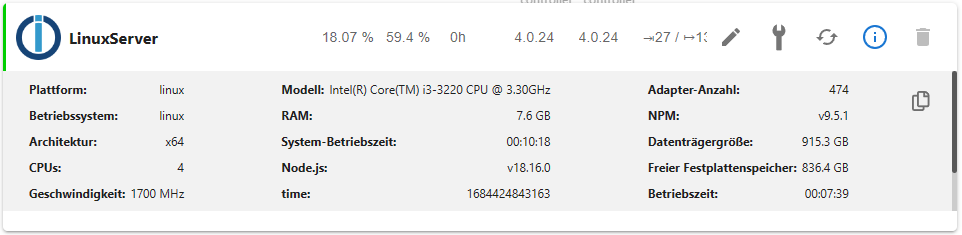
Save-Dateien wurden gelöscht und focal-backports wurde deaktiviert.
Quellen für grafana und influxdb wurde wieder eingebunden, aber jetzt habe ich folgende Meldung (Zeile 16 und 17):
sudo apt update OK:1 http://security.ubuntu.com/ubuntu focal-security InRelease OK:2 http://de.archive.ubuntu.com/ubuntu focal InRelease Holen:3 http://de.archive.ubuntu.com/ubuntu focal-updates InRelease [114 kB] OK:4 https://apt.grafana.com stable InRelease OK:5 https://repos.influxdata.com/debian stable InRelease OK:6 https://deb.nodesource.com/node_18.x focal InRelease Holen:7 http://de.archive.ubuntu.com/ubuntu focal-updates/main amd64 DEP-11 Metadata [275 kB] Holen:8 http://de.archive.ubuntu.com/ubuntu focal-updates/universe amd64 DEP-11 Metadata [410 kB] Holen:9 http://de.archive.ubuntu.com/ubuntu focal-updates/multiverse amd64 DEP-11 Metadata [944 B] Es wurden 799 kB in 1 s geholt (734 kB/s). Paketlisten werden gelesen... Fertig Abhängigkeitsbaum wird aufgebaut. Statusinformationen werden eingelesen.... Fertig Alle Pakete sind aktuell. N: Datei »influxdata-archive_compat.key« in Verzeichnis »/etc/apt/sources.list.d/« wird ignoriert, da sie eine ungültige Dateinamen-Erweiterung hat. N: Das Laden der konfigurierten Datei »main/binary-i386/Packages« wird übersprungen, da das Depot »https://apt.grafana.com stable InRelease« die Architektur »i386« nicht unterstützt. -
soweit sieht es jetzt gut aus - bin jetzt auf Node.js v18.16.0
Save-Dateien wurden gelöscht und focal-backports wurde deaktiviert.
Quellen für grafana und influxdb wurde wieder eingebunden, aber jetzt habe ich folgende Meldung (Zeile 16 und 17):
sudo apt update OK:1 http://security.ubuntu.com/ubuntu focal-security InRelease OK:2 http://de.archive.ubuntu.com/ubuntu focal InRelease Holen:3 http://de.archive.ubuntu.com/ubuntu focal-updates InRelease [114 kB] OK:4 https://apt.grafana.com stable InRelease OK:5 https://repos.influxdata.com/debian stable InRelease OK:6 https://deb.nodesource.com/node_18.x focal InRelease Holen:7 http://de.archive.ubuntu.com/ubuntu focal-updates/main amd64 DEP-11 Metadata [275 kB] Holen:8 http://de.archive.ubuntu.com/ubuntu focal-updates/universe amd64 DEP-11 Metadata [410 kB] Holen:9 http://de.archive.ubuntu.com/ubuntu focal-updates/multiverse amd64 DEP-11 Metadata [944 B] Es wurden 799 kB in 1 s geholt (734 kB/s). Paketlisten werden gelesen... Fertig Abhängigkeitsbaum wird aufgebaut. Statusinformationen werden eingelesen.... Fertig Alle Pakete sind aktuell. N: Datei »influxdata-archive_compat.key« in Verzeichnis »/etc/apt/sources.list.d/« wird ignoriert, da sie eine ungültige Dateinamen-Erweiterung hat. N: Das Laden der konfigurierten Datei »main/binary-i386/Packages« wird übersprungen, da das Depot »https://apt.grafana.com stable InRelease« die Architektur »i386« nicht unterstützt.Da hast du im falschen Verzeichnis gestanden...
sudo rm /etc/apt/sources.list.d/influxdata-archive_compat.key -
Da hast du im falschen Verzeichnis gestanden...
sudo rm /etc/apt/sources.list.d/influxdata-archive_compat.key -
OK, jetzt sieht es gut aus - vielen Dank...
-
uptime -p
up 35 minutes
sudo apt update OK:1 http://security.ubuntu.com/ubuntu focal-security InRelease OK:2 http://de.archive.ubuntu.com/ubuntu focal InRelease OK:3 https://repos.influxdata.com/debian stable InRelease OK:4 https://apt.grafana.com stable InRelease OK:5 http://de.archive.ubuntu.com/ubuntu focal-updates InRelease OK:6 https://deb.nodesource.com/node_18.x focal InRelease Paketlisten werden gelesen... Fertig Abhängigkeitsbaum wird aufgebaut. Statusinformationen werden eingelesen.... Fertig Alle Pakete sind aktuell. N: Das Laden der konfigurierten Datei »main/binary-i386/Packages« wird übersprungen, da das Depot »https://apt.grafana.com stable InRelease« die Architektur »i386« nicht unterstützt. -
@baumert sagte in Update Node.js auf 14 klappt nicht:
Das Laden der konfigurierten Datei »main/binary-i386/Packages« wird übersprungen, da das Depot...
Da ist noch was krumm.
dpkg -l | grep i386Jenachdem was da um's Eck kommt das Paket in der Fassung löschen.
sudo apt remove *:i386
sudo dpkg --remove-architecture i386


Hey! Du scheinst an dieser Unterhaltung interessiert zu sein, hast aber noch kein Konto.
Hast du es satt, bei jedem Besuch durch die gleichen Beiträge zu scrollen? Wenn du dich für ein Konto anmeldest, kommst du immer genau dorthin zurück, wo du zuvor warst, und kannst dich über neue Antworten benachrichtigen lassen (entweder per E-Mail oder Push-Benachrichtigung). Du kannst auch Lesezeichen speichern und Beiträge positiv bewerten, um anderen Community-Mitgliedern deine Wertschätzung zu zeigen.
Mit deinem Input könnte dieser Beitrag noch besser werden 💗
Registrieren Anmelden232
Online33.0k
Benutzer83.5k
Themen1.3m
Beiträge