Skip to content
  • Home
  • Recent
  • Tags
  • 0 Unread 0
  • Categories
  • Unreplied
  • Popular
  • GitHub
  • Docu
  • Hilfe
Skins
  • Light
  • Brite
  • Cerulean
  • Cosmo
  • Flatly
  • Journal
  • Litera
  • Lumen
  • Lux
  • Materia
  • Minty
  • Morph
  • Pulse
  • Sandstone
  • Simplex
  • Sketchy
  • Spacelab
  • United
  • Yeti
  • Zephyr
  • Dark
  • Cyborg
  • Darkly
  • Quartz
  • Slate
  • Solar
  • Superhero
  • Vapor

  • Default (No Skin)
  • No Skin
Collapse
ioBroker Logo

Community Forum

donate donate
  1. ioBroker Community Home
  2. Deutsch
  3. Tester
  4. Frigate Adapter für ioBroker

NEWS

  • Monatsrückblick Januar/Februar 2026 ist online!
    BluefoxB
    Bluefox
    16
    1
    292

  • Jahresrückblick 2025 – unser neuer Blogbeitrag ist online! ✨
    BluefoxB
    Bluefox
    17
    1
    4.7k

  • Neuer Blogbeitrag: Monatsrückblick - Dezember 2025 🎄
    BluefoxB
    Bluefox
    13
    1
    1.3k

Frigate Adapter für ioBroker

Scheduled Pinned Locked Moved Tester
374 Posts 47 Posters 110.5k Views 46 Watching
  • Oldest to Newest
  • Newest to Oldest
  • Most Votes
Reply
  • Reply as topic
Log in to reply
This topic has been deleted. Only users with topic management privileges can see it.
  • T tombox

    @quest was wäre denn eine korrekte topic

    Q Offline
    Q Offline
    QuesT
    wrote on last edited by
    #198

    @tombox

    Hatte nur kein standart Topic gesetzt im Adapter. Geht nun aber es wird kein Bild mitgesendet.

    cam1 person erkannt end 0.80859375

    /tmp/8d9cb83e-3f51-44b5-b704-0af816bbcabe.jpg

    T T 2 Replies Last reply
    0
    • Q QuesT

      @tombox

      Hatte nur kein standart Topic gesetzt im Adapter. Geht nun aber es wird kein Bild mitgesendet.

      cam1 person erkannt end 0.80859375

      /tmp/8d9cb83e-3f51-44b5-b704-0af816bbcabe.jpg

      T Offline
      T Offline
      Tschaeens
      wrote on last edited by
      #199

      @tombox

      Erstmal danke für das Update. Bei mir läuft alles tiptop. Ich würde gern den Wert motion weiterverarbeiten. Leider geht dieser bei jedem motion auf ON. Gibt es einen state der nur auf ON geht, wenn Frigate eine Person erkennt und der Wert über meinen eingestellten Wert ist? Also dann wenn Frigate auch einen snapshot erstellt. Danke dir.

      VG

      T 1 Reply Last reply
      0
      • Q QuesT

        @tombox

        Hatte nur kein standart Topic gesetzt im Adapter. Geht nun aber es wird kein Bild mitgesendet.

        cam1 person erkannt end 0.80859375

        /tmp/8d9cb83e-3f51-44b5-b704-0af816bbcabe.jpg

        T Offline
        T Offline
        tombox
        wrote on last edited by
        #200

        @quest kann der adapter denn Bilder verarbeiten?

        1 Reply Last reply
        0
        • T Tschaeens

          @tombox

          Erstmal danke für das Update. Bei mir läuft alles tiptop. Ich würde gern den Wert motion weiterverarbeiten. Leider geht dieser bei jedem motion auf ON. Gibt es einen state der nur auf ON geht, wenn Frigate eine Person erkennt und der Wert über meinen eingestellten Wert ist? Also dann wenn Frigate auch einen snapshot erstellt. Danke dir.

          VG

          T Offline
          T Offline
          tombox
          wrote on last edited by
          #201

          @tschaeens

          Es gib Anzahl der personen
          frigate.0.camera.person
          oder halt
          frigate.0.events.after.label = person

          T 1 Reply Last reply
          0
          • T tombox

            @tschaeens

            Es gib Anzahl der personen
            frigate.0.camera.person
            oder halt
            frigate.0.events.after.label = person

            T Offline
            T Offline
            Tschaeens
            wrote on last edited by
            #202

            @tombox
            danke! Genau danach habe ich gesucht.

            1 Reply Last reply
            0
            • P Offline
              P Offline
              PrinzEisenherz1
              wrote on last edited by
              #203

              Hi zusammen.
              Ich habe da mal ne frage. Ihr nutzt bestimmt die frigate Version 0.13?
              Für mich gäbe es da eine interessante interessante Neuerung.
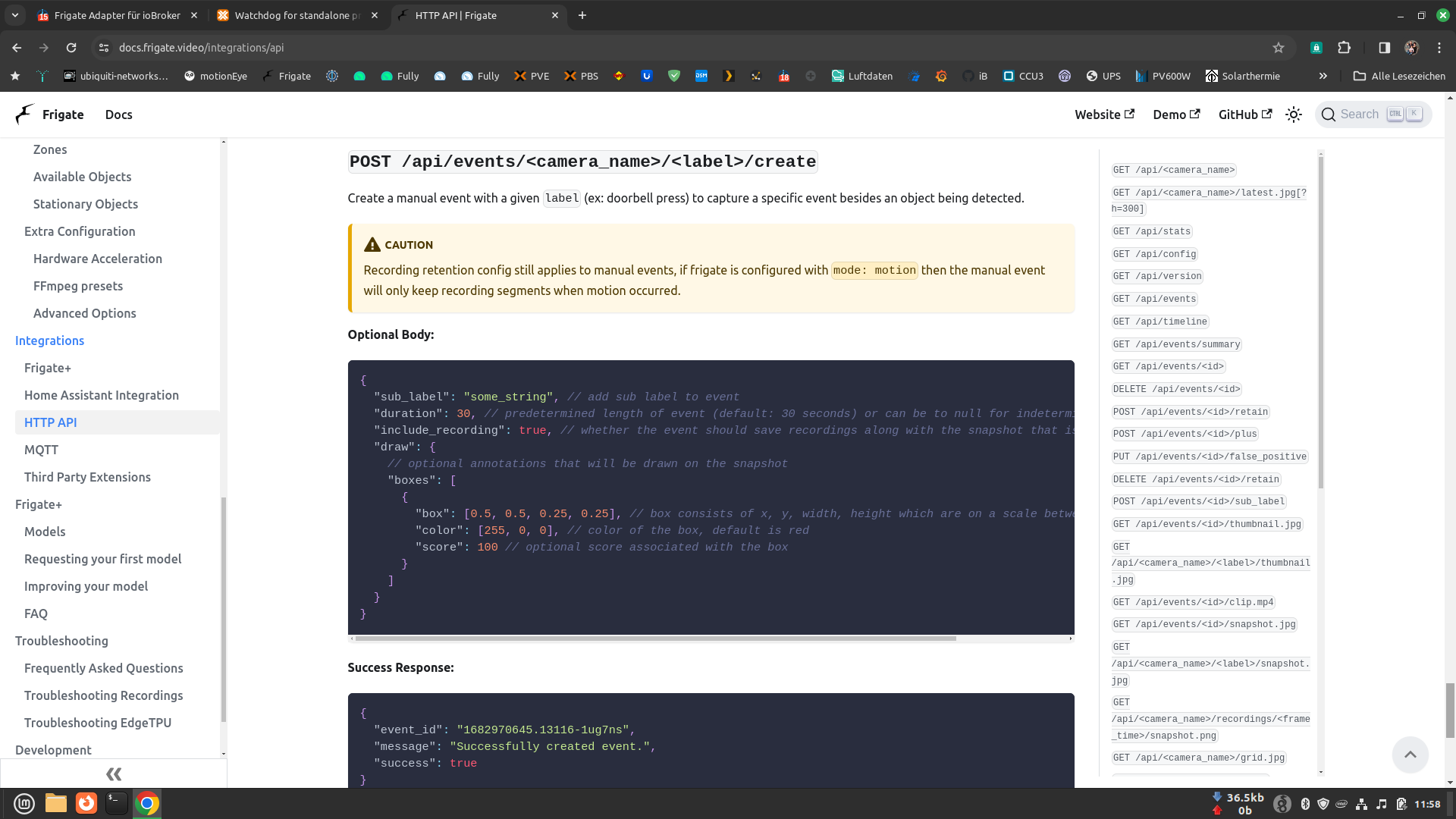
              Das manuelle Triggern von Aufnahmen.

              https://docs.frigate.video/integrations/api
              

              Bildschirmfoto vom 2024-02-12 11-58-45.png

              Hat das von euch schon mal jemand ausprobiert?
              Wird die Möglichkeit zum manuellen Auslösen einer Aufnahme im frigate-Adapter integriert?

              Gruß
              Johnny

              Intel-NUC mit ProxMox: ioBroker,SQL, logging Strom- Gas- u. Wasserzähler;10Zoll Tab im Flur für VIS; weiteres: Homematic CCU2, Homeduino, Kameras, selbstgebaute Wetterstation;

              1 Reply Last reply
              0
              • B Offline
                B Offline
                bongsao
                wrote on last edited by
                #204

                Hallo,
                zuerst mal Danke für die tolle Arbeit. Der Adapter läuft so weit und macht was er soll. Beim Erstellen einer Vis ist mir aufgefallen, das in den History-Einträgen die Timestrings start_time und end_time fehlerhaft sind. Das sind Kommazahlen. Wenn man rundet, passt es. Das ist halt nur in der Vis ein riesen Aufwand. Ich gehe davon aus, dass das auch so nicht erwünscht ist.
                Ansonsten läuft alles super stabil.

                Gruß

                T 1 Reply Last reply
                0
                • B bongsao

                  Hallo,
                  zuerst mal Danke für die tolle Arbeit. Der Adapter läuft so weit und macht was er soll. Beim Erstellen einer Vis ist mir aufgefallen, das in den History-Einträgen die Timestrings start_time und end_time fehlerhaft sind. Das sind Kommazahlen. Wenn man rundet, passt es. Das ist halt nur in der Vis ein riesen Aufwand. Ich gehe davon aus, dass das auch so nicht erwünscht ist.
                  Ansonsten läuft alles super stabil.

                  Gruß

                  T Offline
                  T Offline
                  tombox
                  wrote on last edited by tombox
                  #205

                  @bongsao In der Vis kannst du es mit dem widget Timestamp anzeigen
                  @PrinzEisenherz1 bitte GitHub version testen camera.remote.createEvent

                  B 1 Reply Last reply
                  0
                  • T tombox

                    @bongsao In der Vis kannst du es mit dem widget Timestamp anzeigen
                    @PrinzEisenherz1 bitte GitHub version testen camera.remote.createEvent

                    B Offline
                    B Offline
                    bongsao
                    wrote on last edited by bongsao
                    #206

                    @tombox
                    Danke, muss ich ne neue Version installieren. Die stable 1.02 funktioniert ja nicht.

                    1 Reply Last reply
                    0
                    • P Offline
                      P Offline
                      PrinzEisenherz1
                      wrote on last edited by
                      #207

                      Hi @tombox erstmal danke das Du das in den Adapter integriert hast und für den tollen Adapter.
                      Aber irgendwas funktioniert da bei mir nicht so richtig.
                      Das triggern einer Aufnahme erfolgt wenn ich z.B. das Label ändere, richtig?
                      Wie ist denn mit den neu erzeugten Datenpunkten für das manuelle Recording verfahren?
                      Wie befülle ich dann den Body? z.B. duration, usw
                      Wenn ich den Body wie beim Beispiel von frigate befülle

                      {
                        "sub_label": "some_string", // add sub label to event
                        "duration": 30, // predetermined length of event (default: 30 seconds) or can be to null for indeterminate length event
                        "include_recording": true, // whether the event should save recordings along with the snapshot that is taken
                        "draw": {
                          // optional annotations that will be drawn on the snapshot
                          "boxes": [
                            {
                              "box": [0.5, 0.5, 0.25, 0.25], // box consists of x, y, width, height which are on a scale between 0 - 1
                              "color": [255, 0, 0], // color of the box, default is red
                              "score": 100 // optional score associated with the box
                            }
                          ]
                        }
                      }
                      

                      dann bekomme ich in ioBroker folgende Fehlermeldung

                      frigate.0 2024-02-23 16:33:59.932	error	SyntaxError: Unexpected number in JSON at position 128
                      frigate.0 2024-02-23 16:33:59.931	error	Cannot parse createEventBody. Please use valid JSON https://docs.frigate.video/integrations/api/#post-apieventscamera_namelabelcreate
                      

                      Es wird zwar eine Aufnahme gestartet, diese ist aber fehlerhaft.
                      Die lässt sich nicht abspielen. Da kommt n weißes X.
                      Wenn ich sie herunterladen möchte dann wird ein clips.json downgeloadet.
                      Der erzeugte Snapshot wird aber richtig erstellt.
                      Muss ich da eventuell noch an meiner Config was einstellen?
                      Hier mal meine config.yml

                      database:
                          path: /db/frigate.db
                      mqtt:
                        host: 192.168.122.25
                        port: 2083
                      detectors:
                          coral:
                              type: edgetpu
                              device: usb
                      go2rtc:
                        streams:
                          haustuer_cam: 
                            - rtsp://XXXXXXXXX@192.168.122.15:88/videoMain
                            - "ffmpeg:haustuer_cam#audio=opus" # <- copy of the stream which transcodes audio to opus
                          haustuer_cam_sub:
                            - rtsp://XXXXXXXXX@192.168.122.15:88/videoSub # <- stream which supports video & aac audio. This is only supported for rtsp streams, http must use ffmpeg
                            - "ffmpeg:haustuer_cam_sub#audio=opus" # <- copy of the stream which transcodes audio to opus
                          garage_cam: 
                            - rtsp://XXXXXXXXX@192.168.122.19:554/h264Preview_01_main
                            - "ffmpeg:garage_cam#audio=opus" # <- copy of the stream which transcodes audio to opus
                          garage_cam_sub:
                            - rtsp://XXXXXXXXX@192.168.122.19:554/h264Preview_01_sub # <- stream which supports video & aac audio. This is only supported for rtsp streams, http must use ffmpeg
                            - "ffmpeg:garage_cam_sub#audio=opus" # <- copy of the stream which transcodes audio to opus
                          garten_cam: 
                            - rtsp://XXXXXXXXX@192.168.122.17:88/videoMain
                            - "ffmpeg:garten_cam#audio=opus" # <- copy of the stream which transcodes audio to opus
                          garten_cam_sub:
                            - rtsp://XXXXXXXXX@192.168.122.17:88/videoSub # <- stream which supports video & aac audio. This is only supported for rtsp streams, http must use ffmpeg
                            - "ffmpeg:garten_cam_sub#audio=opus" # <- copy of the stream which transcodes audio to opus
                          garten_links_cam: 
                            - rtsp://XXXXXXXXX@192.168.122.16/11
                            - "ffmpeg:garten_links_cam#audio=opus" # <- copy of the stream which transcodes audio to opus
                          garten_links_cam_sub:
                            - rtsp://XXXXXXXXX@192.168.122.16/12 # <- stream which supports video & aac audio. This is only supported for rtsp streams, http must use ffmpeg
                            - "ffmpeg:garten_links_cam_sub#audio=opus" # <- copy of the stream which transcodes audio to opus
                          wohnzimmer_cam: 
                            - rtsp://XXXXXXXXX@192.168.122.18:88/videoMain
                            - "ffmpeg:wohnzimmer_cam#audio=opus" # <- copy of the stream which transcodes audio to opus
                          wohnzimmer_cam_sub:
                            - rtsp://XXXXXXXXX@192.168.122.18:88/videoSub # <- stream which supports video & aac audio. This is only supported for rtsp streams, http must use ffmpeg
                            - "ffmpeg:wohnzimmer_cam_sub#audio=opus" # <- copy of the stream which transcodes audio to opus
                      ffmpeg:
                          output_args:
                              record: -f segment -segment_time 10 -segment_format mp4 -reset_timestamps 1 -strftime 1 -c copy
                          hwaccel_args: # This is the section for the H/W Accelaration, you will need to figure out what settings you need to enable - https://docs.frigate.video/configuration/hardware_acceleration
                              #- -hwaccel
                              #- qsv
                              #- -qsv_device
                              #- /dev/dri/renderD128
                              - -hwaccel
                              - vaapi 
                              - -hwaccel_device
                              - /dev/dri/renderD128 
                              #- -hwaccel_output_format
                              #- yuv420p
                              #- -hwaccel
                              #- vaapi
                              #- -hwaccel_device
                              #- /dev/dri/renderD128
                              #- -hwaccel_output_format
                              #- yuv420p
                      record: # how long to record before and after motion
                          events:
                              pre_capture: 7
                              post_capture: 10
                      cameras:
                        haustuer: # <------ Name the camera
                          ffmpeg:
                            hwaccel_args: preset-vaapi
                            output_args:
                              record: preset-record-generic-audio-copy
                            inputs:
                              - path: rtsp://127.0.0.1:8554/haustuer_cam_sub # <----- The stream you want to use for detection
                                roles:
                                  - detect
                              - path: rtsp://127.0.0.1:8554/haustuer_cam
                                roles:
                                  - record
                                  - rtmp
                          rtmp:
                            enabled: false # <-- RTMP should be disabled if your stream is not H264
                          detect:
                            enabled: True # <---- disable detection until you have a working camera feed
                            width: 1280 # <---- update for your camera's resolution
                            height: 720 # <---- update for your camera's resolution
                            fps: 5
                          objects:
                            track:
                              - person
                              - car
                              - dog
                              - cat
                            filters:
                              person:
                                # Optional: minimum width*height of the bounding box for the detected object (default: 0)
                                #min_area: 5000
                                # Optional: maximum width*height of the bounding box for the detected object (default: 24000000)
                                #max_area: 100000
                                # Optional: minimum score for the object to initiate tracking (default: shown below)
                                #min_score: 0.5
                                # Optional: minimum decimal percentage for tracked object's computed score to be considered a true positive (default: shown below)
                                threshold: 0.7
                                # Optional: mask to prevent this object type from being detected in certain areas (default: no mask)
                                # Checks based on the bottom center of the bounding box of the object
                                #mask: 0,0,1000,0,1000,200,0,200
                          record: # what you want Frigate to record
                              enabled: True
                              #retain: # uncomment this section if you want Frigate to record this camera 24/7. This can use a lot of space, you have been warned!
                                #days: 1
                                #mode: all
                              events: # this is the default recording mode where events are recorded, the number of days it saves events for is 10.
                                  retain:
                                      mode: active_objects
                                      default: 10
                          snapshots:
                            # Optional: Enable writing jpg snapshot to /media/frigate/clips (default: shown below)
                            # This value can be set via MQTT and will be updated in startup based on retained value
                            enabled: true
                            # Optional: print a timestamp on the snapshots (default: shown below)
                            timestamp: false
                            # Optional: draw bounding box on the snapshots (default: shown below)
                            bounding_box: true
                            # Optional: crop the snapshot (default: shown below)
                            crop: false
                            # Optional: height to resize the snapshot to (default: original size)
                            # height: 175
                            # Optional: Restrict snapshots to objects that entered any of the listed zones (default: no required zones)
                            required_zones: []
                            # Optional: Camera override for retention settings (default: global values)
                            retain:
                              # Required: Default retention days (default: shown below)
                              default: 10
                              # Optional: Per object retention days
                              #objects:
                                #person: 15
                          motion:
                            mask:
                              - 858,215,847,176,746,145,754,115,557,74,528,34,396,37,297,38,349,720,0,720,0,0,1280,0,1280,370
                      
                        garage: # <------ Name the camera
                          ffmpeg:
                            hwaccel_args: preset-vaapi
                            output_args:
                              record: preset-record-generic-audio-copy
                            inputs:
                              - path: rtsp://127.0.0.1:8554/garage_cam_sub # <----- The stream you want to use for detection
                                roles:
                                  - detect
                              - path: rtsp://127.0.0.1:8554/garage_cam
                                roles:
                                  - record
                                  - rtmp
                          rtmp:
                            enabled: false # <-- RTMP should be disabled if your stream is not H264
                          detect:
                            enabled: True # <---- disable detection until you have a working camera feed
                            width: 640 # <---- update for your camera's resolution
                            height: 480 # <---- update for your camera's resolution
                            fps: 5
                          objects:
                            track:
                              - person
                              - car
                              - truck
                              - bicycle
                              - motorcycle
                              - dog
                              - cat
                            filters:
                              person:
                                # Optional: minimum width*height of the bounding box for the detected object (default: 0)
                                #min_area: 5000
                                # Optional: maximum width*height of the bounding box for the detected object (default: 24000000)
                                #max_area: 100000
                                # Optional: minimum score for the object to initiate tracking (default: shown below)
                                #min_score: 0.5
                                # Optional: minimum decimal percentage for tracked object's computed score to be considered a true positive (default: shown below)
                                threshold: 0.7
                                # Optional: mask to prevent this object type from being detected in certain areas (default: no mask)
                                # Checks based on the bottom center of the bounding box of the object
                                #mask: 0,0,1000,0,1000,200,0,200
                          record: # what you want Frigate to record
                              enabled: True
                              #retain: # uncomment this section if you want Frigate to record this camera 24/7. This can use a lot of space, you have been warned!
                                #days: 1
                                #mode: all
                              events: # this is the default recording mode where events are recorded, the number of days it saves events for is 10.
                                  retain:
                                      mode: active_objects
                                      default: 10
                          snapshots:
                            # Optional: Enable writing jpg snapshot to /media/frigate/clips (default: shown below)
                            # This value can be set via MQTT and will be updated in startup based on retained value
                            enabled: true
                            # Optional: print a timestamp on the snapshots (default: shown below)
                            timestamp: false
                            # Optional: draw bounding box on the snapshots (default: shown below)
                            bounding_box: true
                            # Optional: crop the snapshot (default: shown below)
                            crop: false
                            # Optional: height to resize the snapshot to (default: original size)
                            # height: 175
                            # Optional: Restrict snapshots to objects that entered any of the listed zones (default: no required zones)
                            # required_zones: []
                            required_zones:
                              - hof
                              - einfahrt
                            # Optional: Camera override for retention settings (default: global values)
                            retain:
                              # Required: Default retention days (default: shown below)
                              default: 10
                              # Optional: Per object retention days
                              #objects:
                                #person: 15
                          motion:
                            mask:
                              #- 0,195,40,158,104,104,158,72,180,21,259,21,393,27,408,62,426,91,448,107,476,100,532,105,582,95,591,0,0,0
                              - 0,480,199,480,199,450,0,450
                          zones:
                            hof:
                              coordinates: 640,480,640,204,640,74,556,68,503,92,400,79,388,144,189,136,181,70,73,144,0,207,0,480
                              objects:
                                - car
                                - person
                            einfahrt:
                              coordinates: 204,128,389,140,383,34,231,26
                              objects:
                                - car
                                - person
                      
                        garten: # <------ Name the camera
                          ffmpeg:
                            hwaccel_args: preset-vaapi
                            output_args:
                              record: preset-record-generic-audio-copy
                            inputs:
                              - path: rtsp://127.0.0.1:8554/garten_cam_sub # <----- The stream you want to use for detection
                                roles:
                                  - detect
                              - path: rtsp://127.0.0.1:8554/garten_cam
                                roles:
                                  - record
                                  - rtmp
                          rtmp:
                            enabled: false # <-- RTMP should be disabled if your stream is not H264
                          detect:
                            enabled: True # <---- disable detection until you have a working camera feed
                            width: 1280 # <---- update for your camera's resolution
                            height: 720 # <---- update for your camera's resolution
                            fps: 5
                          objects:
                            track:
                              - person
                              #- car
                              - dog
                              - cat
                            filters:
                              person:
                                # Optional: minimum width*height of the bounding box for the detected object (default: 0)
                                #min_area: 5000
                                # Optional: maximum width*height of the bounding box for the detected object (default: 24000000)
                                #max_area: 100000
                                # Optional: minimum score for the object to initiate tracking (default: shown below)
                                #min_score: 0.5
                                # Optional: minimum decimal percentage for tracked object's computed score to be considered a true positive (default: shown below)
                                threshold: 0.7
                                # Optional: mask to prevent this object type from being detected in certain areas (default: no mask)
                                # Checks based on the bottom center of the bounding box of the object
                                #mask: 0,0,1000,0,1000,200,0,200
                          record: # what you want Frigate to record
                              enabled: True
                              #retain: # uncomment this section if you want Frigate to record this camera 24/7. This can use a lot of space, you have been warned!
                                #days: 1
                                #mode: all
                              events: # this is the default recording mode where events are recorded, the number of days it saves events for is 10.
                                  retain:
                                      mode: active_objects
                                      default: 10
                          snapshots:
                            # Optional: Enable writing jpg snapshot to /media/frigate/clips (default: shown below)
                            # This value can be set via MQTT and will be updated in startup based on retained value
                            enabled: true
                            # Optional: print a timestamp on the snapshots (default: shown below)
                            timestamp: false
                            # Optional: draw bounding box on the snapshots (default: shown below)
                            bounding_box: true
                            # Optional: crop the snapshot (default: shown below)
                            crop: false
                            # Optional: height to resize the snapshot to (default: original size)
                            # height: 175
                            # Optional: Restrict snapshots to objects that entered any of the listed zones (default: no required zones)
                            required_zones: []
                            # Optional: Camera override for retention settings (default: global values)
                            retain:
                              # Required: Default retention days (default: shown below)
                              default: 10
                              # Optional: Per object retention days
                              #objects:
                                #person: 15
                          motion:
                            mask:
                              - 487,699,485,720,1280,720,1280,373
                              - 0,80,0,0,1280,0,1280,256,958,203,953,219,786,235,738,162,687,139,654,118,602,100,552,107,515,59,449,41,350,39,257,42,121,41,129,79
                      
                        garten_links: # <------ Name the camera
                          ffmpeg:
                            hwaccel_args: preset-vaapi
                            output_args:
                              record: preset-record-generic-audio-copy
                            inputs:
                              - path: rtsp://127.0.0.1:8554/garten_links_cam_sub # <----- The stream you want to use for detection
                                roles:
                                  - detect
                              - path: rtsp://127.0.0.1:8554/garten_links_cam
                                roles:
                                  - record
                                  - rtmp
                          rtmp:
                            enabled: false # <-- RTMP should be disabled if your stream is not H264
                          detect:
                            enabled: True # <---- disable detection until you have a working camera feed
                            width: 640 # <---- update for your camera's resolution
                            height: 352 # <---- update for your camera's resolution
                            fps: 5
                          objects:
                            track:
                              - person
                              #- car
                              - dog
                              - cat
                            filters:
                              person:
                                # Optional: minimum width*height of the bounding box for the detected object (default: 0)
                                #min_area: 5000
                                # Optional: maximum width*height of the bounding box for the detected object (default: 24000000)
                                #max_area: 100000
                                # Optional: minimum score for the object to initiate tracking (default: shown below)
                                #min_score: 0.5
                                # Optional: minimum decimal percentage for tracked object's computed score to be considered a true positive (default: shown below)
                                threshold: 0.7
                                # Optional: mask to prevent this object type from being detected in certain areas (default: no mask)
                                # Checks based on the bottom center of the bounding box of the object
                                #mask: 0,0,1000,0,1000,200,0,200
                          record: # what you want Frigate to record
                              enabled: True
                              #retain: # uncomment this section if you want Frigate to record this camera 24/7. This can use a lot of space, you have been warned!
                                #days: 1
                                #mode: all
                              events: # this is the default recording mode where events are recorded, the number of days it saves events for is 10.
                                  retain:
                                      mode: active_objects
                                      default: 10
                          snapshots:
                            # Optional: Enable writing jpg snapshot to /media/frigate/clips (default: shown below)
                            # This value can be set via MQTT and will be updated in startup based on retained value
                            enabled: true
                            # Optional: print a timestamp on the snapshots (default: shown below)
                            timestamp: false
                            # Optional: draw bounding box on the snapshots (default: shown below)
                            bounding_box: true
                            # Optional: crop the snapshot (default: shown below)
                            crop: false
                            # Optional: height to resize the snapshot to (default: original size)
                            # height: 175
                            # Optional: Restrict snapshots to objects that entered any of the listed zones (default: no required zones)
                            required_zones: []
                            # Optional: Camera override for retention settings (default: global values)
                            retain:
                              # Required: Default retention days (default: shown below)
                              default: 10
                              # Optional: Per object retention days
                              #objects:
                                #person: 15
                          motion:
                            mask:
                              - 237,0,182,21,139,25,99,38,0,79,0,303,0,0
                              - 469,0,468,21,640,21,640,0
                      
                        wohnzimmer: # <------ Name the camera
                          ffmpeg:
                            hwaccel_args: preset-vaapi
                            output_args:
                              record: preset-record-generic-audio-copy
                            inputs:
                              - path: rtsp://127.0.0.1:8554/wohnzimmer_cam_sub # <----- The stream you want to use for detection
                                roles:
                                  - detect
                              - path: rtsp://127.0.0.1:8554/wohnzimmer_cam
                                roles:
                                  - record
                                  - rtmp
                          rtmp:
                            enabled: false # <-- RTMP should be disabled if your stream is not H264
                          detect:
                            enabled: True # <---- disable detection until you have a working camera feed
                            width: 1280 # <---- update for your camera's resolution
                            height: 720 # <---- update for your camera's resolution
                            fps: 5
                          objects:
                            track:
                              - person
                              - car
                              - truck
                              - bicycle
                              - motorcycle
                              - dog
                              - cat
                            filters:
                              person:
                                # Optional: minimum width*height of the bounding box for the detected object (default: 0)
                                #min_area: 5000
                                # Optional: maximum width*height of the bounding box for the detected object (default: 24000000)
                                #max_area: 100000
                                # Optional: minimum score for the object to initiate tracking (default: shown below)
                                #min_score: 0.5
                                # Optional: minimum decimal percentage for tracked object's computed score to be considered a true positive (default: shown below)
                                threshold: 0.7
                                # Optional: mask to prevent this object type from being detected in certain areas (default: no mask)
                                # Checks based on the bottom center of the bounding box of the object
                                #mask: 0,0,1000,0,1000,200,0,200
                          record: # what you want Frigate to record
                              enabled: True
                              #retain: # uncomment this section if you want Frigate to record this camera 24/7. This can use a lot of space, you have been warned!
                                #days: 1
                                #mode: all
                              events: # this is the default recording mode where events are recorded, the number of days it saves events for is 10.
                                  retain:
                                      mode: active_objects
                                      default: 10
                          snapshots:
                            # Optional: Enable writing jpg snapshot to /media/frigate/clips (default: shown below)
                            # This value can be set via MQTT and will be updated in startup based on retained value
                            enabled: true
                            # Optional: print a timestamp on the snapshots (default: shown below)
                            timestamp: false
                            # Optional: draw bounding box on the snapshots (default: shown below)
                            bounding_box: true
                            # Optional: crop the snapshot (default: shown below)
                            crop: false
                            # Optional: height to resize the snapshot to (default: original size)
                            # height: 175
                            # Optional: Restrict snapshots to objects that entered any of the listed zones (default: no required zones)
                            required_zones: []
                            # Optional: Camera override for retention settings (default: global values)
                            retain:
                              # Required: Default retention days (default: shown below)
                              default: 10
                              # Optional: Per object retention days
                              #objects:
                                #person: 15
                          motion:
                            mask:
                              - 0,720,369,720,364,120,433,121,503,129,542,147,586,184,630,241,1280,632,1280,0,0,0



                      Dann hätte ich da noch eine Frage, wo ich aber jetzt nicht weiß ob es vom Adapter kommt oder von der 0.13er Version.
                      Starte ich nämlich den frigate-Container neu, sind alle Kameras automatisch auf Motion-Erkennung.
                      Bei der Adapter-Version 0.2.8 und Frigate 0.12.x war das nicht so. Da war nach einem Neustart die Einstellung so wie vor dem Neustart.

                      Noch eine Frage hätte ich da. Besteht vielleicht die Möglichkeit das man bei der neuen Version den integrierten MQTT-Broker deaktivieren kann? Bei mir läuft schon ein anderer.

                      So, ich hoffe ich das alles einigermaßen verständlich geschrieben :-)

                      Intel-NUC mit ProxMox: ioBroker,SQL, logging Strom- Gas- u. Wasserzähler;10Zoll Tab im Flur für VIS; weiteres: Homematic CCU2, Homeduino, Kameras, selbstgebaute Wetterstation;

                      crunchipC T 2 Replies Last reply
                      0
                      • P PrinzEisenherz1

                        Hi @tombox erstmal danke das Du das in den Adapter integriert hast und für den tollen Adapter.
                        Aber irgendwas funktioniert da bei mir nicht so richtig.
                        Das triggern einer Aufnahme erfolgt wenn ich z.B. das Label ändere, richtig?
                        Wie ist denn mit den neu erzeugten Datenpunkten für das manuelle Recording verfahren?
                        Wie befülle ich dann den Body? z.B. duration, usw
                        Wenn ich den Body wie beim Beispiel von frigate befülle

                        {
                          "sub_label": "some_string", // add sub label to event
                          "duration": 30, // predetermined length of event (default: 30 seconds) or can be to null for indeterminate length event
                          "include_recording": true, // whether the event should save recordings along with the snapshot that is taken
                          "draw": {
                            // optional annotations that will be drawn on the snapshot
                            "boxes": [
                              {
                                "box": [0.5, 0.5, 0.25, 0.25], // box consists of x, y, width, height which are on a scale between 0 - 1
                                "color": [255, 0, 0], // color of the box, default is red
                                "score": 100 // optional score associated with the box
                              }
                            ]
                          }
                        }
                        

                        dann bekomme ich in ioBroker folgende Fehlermeldung

                        frigate.0 2024-02-23 16:33:59.932	error	SyntaxError: Unexpected number in JSON at position 128
                        frigate.0 2024-02-23 16:33:59.931	error	Cannot parse createEventBody. Please use valid JSON https://docs.frigate.video/integrations/api/#post-apieventscamera_namelabelcreate
                        

                        Es wird zwar eine Aufnahme gestartet, diese ist aber fehlerhaft.
                        Die lässt sich nicht abspielen. Da kommt n weißes X.
                        Wenn ich sie herunterladen möchte dann wird ein clips.json downgeloadet.
                        Der erzeugte Snapshot wird aber richtig erstellt.
                        Muss ich da eventuell noch an meiner Config was einstellen?
                        Hier mal meine config.yml

                        database:
                            path: /db/frigate.db
                        mqtt:
                          host: 192.168.122.25
                          port: 2083
                        detectors:
                            coral:
                                type: edgetpu
                                device: usb
                        go2rtc:
                          streams:
                            haustuer_cam: 
                              - rtsp://XXXXXXXXX@192.168.122.15:88/videoMain
                              - "ffmpeg:haustuer_cam#audio=opus" # <- copy of the stream which transcodes audio to opus
                            haustuer_cam_sub:
                              - rtsp://XXXXXXXXX@192.168.122.15:88/videoSub # <- stream which supports video & aac audio. This is only supported for rtsp streams, http must use ffmpeg
                              - "ffmpeg:haustuer_cam_sub#audio=opus" # <- copy of the stream which transcodes audio to opus
                            garage_cam: 
                              - rtsp://XXXXXXXXX@192.168.122.19:554/h264Preview_01_main
                              - "ffmpeg:garage_cam#audio=opus" # <- copy of the stream which transcodes audio to opus
                            garage_cam_sub:
                              - rtsp://XXXXXXXXX@192.168.122.19:554/h264Preview_01_sub # <- stream which supports video & aac audio. This is only supported for rtsp streams, http must use ffmpeg
                              - "ffmpeg:garage_cam_sub#audio=opus" # <- copy of the stream which transcodes audio to opus
                            garten_cam: 
                              - rtsp://XXXXXXXXX@192.168.122.17:88/videoMain
                              - "ffmpeg:garten_cam#audio=opus" # <- copy of the stream which transcodes audio to opus
                            garten_cam_sub:
                              - rtsp://XXXXXXXXX@192.168.122.17:88/videoSub # <- stream which supports video & aac audio. This is only supported for rtsp streams, http must use ffmpeg
                              - "ffmpeg:garten_cam_sub#audio=opus" # <- copy of the stream which transcodes audio to opus
                            garten_links_cam: 
                              - rtsp://XXXXXXXXX@192.168.122.16/11
                              - "ffmpeg:garten_links_cam#audio=opus" # <- copy of the stream which transcodes audio to opus
                            garten_links_cam_sub:
                              - rtsp://XXXXXXXXX@192.168.122.16/12 # <- stream which supports video & aac audio. This is only supported for rtsp streams, http must use ffmpeg
                              - "ffmpeg:garten_links_cam_sub#audio=opus" # <- copy of the stream which transcodes audio to opus
                            wohnzimmer_cam: 
                              - rtsp://XXXXXXXXX@192.168.122.18:88/videoMain
                              - "ffmpeg:wohnzimmer_cam#audio=opus" # <- copy of the stream which transcodes audio to opus
                            wohnzimmer_cam_sub:
                              - rtsp://XXXXXXXXX@192.168.122.18:88/videoSub # <- stream which supports video & aac audio. This is only supported for rtsp streams, http must use ffmpeg
                              - "ffmpeg:wohnzimmer_cam_sub#audio=opus" # <- copy of the stream which transcodes audio to opus
                        ffmpeg:
                            output_args:
                                record: -f segment -segment_time 10 -segment_format mp4 -reset_timestamps 1 -strftime 1 -c copy
                            hwaccel_args: # This is the section for the H/W Accelaration, you will need to figure out what settings you need to enable - https://docs.frigate.video/configuration/hardware_acceleration
                                #- -hwaccel
                                #- qsv
                                #- -qsv_device
                                #- /dev/dri/renderD128
                                - -hwaccel
                                - vaapi 
                                - -hwaccel_device
                                - /dev/dri/renderD128 
                                #- -hwaccel_output_format
                                #- yuv420p
                                #- -hwaccel
                                #- vaapi
                                #- -hwaccel_device
                                #- /dev/dri/renderD128
                                #- -hwaccel_output_format
                                #- yuv420p
                        record: # how long to record before and after motion
                            events:
                                pre_capture: 7
                                post_capture: 10
                        cameras:
                          haustuer: # <------ Name the camera
                            ffmpeg:
                              hwaccel_args: preset-vaapi
                              output_args:
                                record: preset-record-generic-audio-copy
                              inputs:
                                - path: rtsp://127.0.0.1:8554/haustuer_cam_sub # <----- The stream you want to use for detection
                                  roles:
                                    - detect
                                - path: rtsp://127.0.0.1:8554/haustuer_cam
                                  roles:
                                    - record
                                    - rtmp
                            rtmp:
                              enabled: false # <-- RTMP should be disabled if your stream is not H264
                            detect:
                              enabled: True # <---- disable detection until you have a working camera feed
                              width: 1280 # <---- update for your camera's resolution
                              height: 720 # <---- update for your camera's resolution
                              fps: 5
                            objects:
                              track:
                                - person
                                - car
                                - dog
                                - cat
                              filters:
                                person:
                                  # Optional: minimum width*height of the bounding box for the detected object (default: 0)
                                  #min_area: 5000
                                  # Optional: maximum width*height of the bounding box for the detected object (default: 24000000)
                                  #max_area: 100000
                                  # Optional: minimum score for the object to initiate tracking (default: shown below)
                                  #min_score: 0.5
                                  # Optional: minimum decimal percentage for tracked object's computed score to be considered a true positive (default: shown below)
                                  threshold: 0.7
                                  # Optional: mask to prevent this object type from being detected in certain areas (default: no mask)
                                  # Checks based on the bottom center of the bounding box of the object
                                  #mask: 0,0,1000,0,1000,200,0,200
                            record: # what you want Frigate to record
                                enabled: True
                                #retain: # uncomment this section if you want Frigate to record this camera 24/7. This can use a lot of space, you have been warned!
                                  #days: 1
                                  #mode: all
                                events: # this is the default recording mode where events are recorded, the number of days it saves events for is 10.
                                    retain:
                                        mode: active_objects
                                        default: 10
                            snapshots:
                              # Optional: Enable writing jpg snapshot to /media/frigate/clips (default: shown below)
                              # This value can be set via MQTT and will be updated in startup based on retained value
                              enabled: true
                              # Optional: print a timestamp on the snapshots (default: shown below)
                              timestamp: false
                              # Optional: draw bounding box on the snapshots (default: shown below)
                              bounding_box: true
                              # Optional: crop the snapshot (default: shown below)
                              crop: false
                              # Optional: height to resize the snapshot to (default: original size)
                              # height: 175
                              # Optional: Restrict snapshots to objects that entered any of the listed zones (default: no required zones)
                              required_zones: []
                              # Optional: Camera override for retention settings (default: global values)
                              retain:
                                # Required: Default retention days (default: shown below)
                                default: 10
                                # Optional: Per object retention days
                                #objects:
                                  #person: 15
                            motion:
                              mask:
                                - 858,215,847,176,746,145,754,115,557,74,528,34,396,37,297,38,349,720,0,720,0,0,1280,0,1280,370
                        
                          garage: # <------ Name the camera
                            ffmpeg:
                              hwaccel_args: preset-vaapi
                              output_args:
                                record: preset-record-generic-audio-copy
                              inputs:
                                - path: rtsp://127.0.0.1:8554/garage_cam_sub # <----- The stream you want to use for detection
                                  roles:
                                    - detect
                                - path: rtsp://127.0.0.1:8554/garage_cam
                                  roles:
                                    - record
                                    - rtmp
                            rtmp:
                              enabled: false # <-- RTMP should be disabled if your stream is not H264
                            detect:
                              enabled: True # <---- disable detection until you have a working camera feed
                              width: 640 # <---- update for your camera's resolution
                              height: 480 # <---- update for your camera's resolution
                              fps: 5
                            objects:
                              track:
                                - person
                                - car
                                - truck
                                - bicycle
                                - motorcycle
                                - dog
                                - cat
                              filters:
                                person:
                                  # Optional: minimum width*height of the bounding box for the detected object (default: 0)
                                  #min_area: 5000
                                  # Optional: maximum width*height of the bounding box for the detected object (default: 24000000)
                                  #max_area: 100000
                                  # Optional: minimum score for the object to initiate tracking (default: shown below)
                                  #min_score: 0.5
                                  # Optional: minimum decimal percentage for tracked object's computed score to be considered a true positive (default: shown below)
                                  threshold: 0.7
                                  # Optional: mask to prevent this object type from being detected in certain areas (default: no mask)
                                  # Checks based on the bottom center of the bounding box of the object
                                  #mask: 0,0,1000,0,1000,200,0,200
                            record: # what you want Frigate to record
                                enabled: True
                                #retain: # uncomment this section if you want Frigate to record this camera 24/7. This can use a lot of space, you have been warned!
                                  #days: 1
                                  #mode: all
                                events: # this is the default recording mode where events are recorded, the number of days it saves events for is 10.
                                    retain:
                                        mode: active_objects
                                        default: 10
                            snapshots:
                              # Optional: Enable writing jpg snapshot to /media/frigate/clips (default: shown below)
                              # This value can be set via MQTT and will be updated in startup based on retained value
                              enabled: true
                              # Optional: print a timestamp on the snapshots (default: shown below)
                              timestamp: false
                              # Optional: draw bounding box on the snapshots (default: shown below)
                              bounding_box: true
                              # Optional: crop the snapshot (default: shown below)
                              crop: false
                              # Optional: height to resize the snapshot to (default: original size)
                              # height: 175
                              # Optional: Restrict snapshots to objects that entered any of the listed zones (default: no required zones)
                              # required_zones: []
                              required_zones:
                                - hof
                                - einfahrt
                              # Optional: Camera override for retention settings (default: global values)
                              retain:
                                # Required: Default retention days (default: shown below)
                                default: 10
                                # Optional: Per object retention days
                                #objects:
                                  #person: 15
                            motion:
                              mask:
                                #- 0,195,40,158,104,104,158,72,180,21,259,21,393,27,408,62,426,91,448,107,476,100,532,105,582,95,591,0,0,0
                                - 0,480,199,480,199,450,0,450
                            zones:
                              hof:
                                coordinates: 640,480,640,204,640,74,556,68,503,92,400,79,388,144,189,136,181,70,73,144,0,207,0,480
                                objects:
                                  - car
                                  - person
                              einfahrt:
                                coordinates: 204,128,389,140,383,34,231,26
                                objects:
                                  - car
                                  - person
                        
                          garten: # <------ Name the camera
                            ffmpeg:
                              hwaccel_args: preset-vaapi
                              output_args:
                                record: preset-record-generic-audio-copy
                              inputs:
                                - path: rtsp://127.0.0.1:8554/garten_cam_sub # <----- The stream you want to use for detection
                                  roles:
                                    - detect
                                - path: rtsp://127.0.0.1:8554/garten_cam
                                  roles:
                                    - record
                                    - rtmp
                            rtmp:
                              enabled: false # <-- RTMP should be disabled if your stream is not H264
                            detect:
                              enabled: True # <---- disable detection until you have a working camera feed
                              width: 1280 # <---- update for your camera's resolution
                              height: 720 # <---- update for your camera's resolution
                              fps: 5
                            objects:
                              track:
                                - person
                                #- car
                                - dog
                                - cat
                              filters:
                                person:
                                  # Optional: minimum width*height of the bounding box for the detected object (default: 0)
                                  #min_area: 5000
                                  # Optional: maximum width*height of the bounding box for the detected object (default: 24000000)
                                  #max_area: 100000
                                  # Optional: minimum score for the object to initiate tracking (default: shown below)
                                  #min_score: 0.5
                                  # Optional: minimum decimal percentage for tracked object's computed score to be considered a true positive (default: shown below)
                                  threshold: 0.7
                                  # Optional: mask to prevent this object type from being detected in certain areas (default: no mask)
                                  # Checks based on the bottom center of the bounding box of the object
                                  #mask: 0,0,1000,0,1000,200,0,200
                            record: # what you want Frigate to record
                                enabled: True
                                #retain: # uncomment this section if you want Frigate to record this camera 24/7. This can use a lot of space, you have been warned!
                                  #days: 1
                                  #mode: all
                                events: # this is the default recording mode where events are recorded, the number of days it saves events for is 10.
                                    retain:
                                        mode: active_objects
                                        default: 10
                            snapshots:
                              # Optional: Enable writing jpg snapshot to /media/frigate/clips (default: shown below)
                              # This value can be set via MQTT and will be updated in startup based on retained value
                              enabled: true
                              # Optional: print a timestamp on the snapshots (default: shown below)
                              timestamp: false
                              # Optional: draw bounding box on the snapshots (default: shown below)
                              bounding_box: true
                              # Optional: crop the snapshot (default: shown below)
                              crop: false
                              # Optional: height to resize the snapshot to (default: original size)
                              # height: 175
                              # Optional: Restrict snapshots to objects that entered any of the listed zones (default: no required zones)
                              required_zones: []
                              # Optional: Camera override for retention settings (default: global values)
                              retain:
                                # Required: Default retention days (default: shown below)
                                default: 10
                                # Optional: Per object retention days
                                #objects:
                                  #person: 15
                            motion:
                              mask:
                                - 487,699,485,720,1280,720,1280,373
                                - 0,80,0,0,1280,0,1280,256,958,203,953,219,786,235,738,162,687,139,654,118,602,100,552,107,515,59,449,41,350,39,257,42,121,41,129,79
                        
                          garten_links: # <------ Name the camera
                            ffmpeg:
                              hwaccel_args: preset-vaapi
                              output_args:
                                record: preset-record-generic-audio-copy
                              inputs:
                                - path: rtsp://127.0.0.1:8554/garten_links_cam_sub # <----- The stream you want to use for detection
                                  roles:
                                    - detect
                                - path: rtsp://127.0.0.1:8554/garten_links_cam
                                  roles:
                                    - record
                                    - rtmp
                            rtmp:
                              enabled: false # <-- RTMP should be disabled if your stream is not H264
                            detect:
                              enabled: True # <---- disable detection until you have a working camera feed
                              width: 640 # <---- update for your camera's resolution
                              height: 352 # <---- update for your camera's resolution
                              fps: 5
                            objects:
                              track:
                                - person
                                #- car
                                - dog
                                - cat
                              filters:
                                person:
                                  # Optional: minimum width*height of the bounding box for the detected object (default: 0)
                                  #min_area: 5000
                                  # Optional: maximum width*height of the bounding box for the detected object (default: 24000000)
                                  #max_area: 100000
                                  # Optional: minimum score for the object to initiate tracking (default: shown below)
                                  #min_score: 0.5
                                  # Optional: minimum decimal percentage for tracked object's computed score to be considered a true positive (default: shown below)
                                  threshold: 0.7
                                  # Optional: mask to prevent this object type from being detected in certain areas (default: no mask)
                                  # Checks based on the bottom center of the bounding box of the object
                                  #mask: 0,0,1000,0,1000,200,0,200
                            record: # what you want Frigate to record
                                enabled: True
                                #retain: # uncomment this section if you want Frigate to record this camera 24/7. This can use a lot of space, you have been warned!
                                  #days: 1
                                  #mode: all
                                events: # this is the default recording mode where events are recorded, the number of days it saves events for is 10.
                                    retain:
                                        mode: active_objects
                                        default: 10
                            snapshots:
                              # Optional: Enable writing jpg snapshot to /media/frigate/clips (default: shown below)
                              # This value can be set via MQTT and will be updated in startup based on retained value
                              enabled: true
                              # Optional: print a timestamp on the snapshots (default: shown below)
                              timestamp: false
                              # Optional: draw bounding box on the snapshots (default: shown below)
                              bounding_box: true
                              # Optional: crop the snapshot (default: shown below)
                              crop: false
                              # Optional: height to resize the snapshot to (default: original size)
                              # height: 175
                              # Optional: Restrict snapshots to objects that entered any of the listed zones (default: no required zones)
                              required_zones: []
                              # Optional: Camera override for retention settings (default: global values)
                              retain:
                                # Required: Default retention days (default: shown below)
                                default: 10
                                # Optional: Per object retention days
                                #objects:
                                  #person: 15
                            motion:
                              mask:
                                - 237,0,182,21,139,25,99,38,0,79,0,303,0,0
                                - 469,0,468,21,640,21,640,0
                        
                          wohnzimmer: # <------ Name the camera
                            ffmpeg:
                              hwaccel_args: preset-vaapi
                              output_args:
                                record: preset-record-generic-audio-copy
                              inputs:
                                - path: rtsp://127.0.0.1:8554/wohnzimmer_cam_sub # <----- The stream you want to use for detection
                                  roles:
                                    - detect
                                - path: rtsp://127.0.0.1:8554/wohnzimmer_cam
                                  roles:
                                    - record
                                    - rtmp
                            rtmp:
                              enabled: false # <-- RTMP should be disabled if your stream is not H264
                            detect:
                              enabled: True # <---- disable detection until you have a working camera feed
                              width: 1280 # <---- update for your camera's resolution
                              height: 720 # <---- update for your camera's resolution
                              fps: 5
                            objects:
                              track:
                                - person
                                - car
                                - truck
                                - bicycle
                                - motorcycle
                                - dog
                                - cat
                              filters:
                                person:
                                  # Optional: minimum width*height of the bounding box for the detected object (default: 0)
                                  #min_area: 5000
                                  # Optional: maximum width*height of the bounding box for the detected object (default: 24000000)
                                  #max_area: 100000
                                  # Optional: minimum score for the object to initiate tracking (default: shown below)
                                  #min_score: 0.5
                                  # Optional: minimum decimal percentage for tracked object's computed score to be considered a true positive (default: shown below)
                                  threshold: 0.7
                                  # Optional: mask to prevent this object type from being detected in certain areas (default: no mask)
                                  # Checks based on the bottom center of the bounding box of the object
                                  #mask: 0,0,1000,0,1000,200,0,200
                            record: # what you want Frigate to record
                                enabled: True
                                #retain: # uncomment this section if you want Frigate to record this camera 24/7. This can use a lot of space, you have been warned!
                                  #days: 1
                                  #mode: all
                                events: # this is the default recording mode where events are recorded, the number of days it saves events for is 10.
                                    retain:
                                        mode: active_objects
                                        default: 10
                            snapshots:
                              # Optional: Enable writing jpg snapshot to /media/frigate/clips (default: shown below)
                              # This value can be set via MQTT and will be updated in startup based on retained value
                              enabled: true
                              # Optional: print a timestamp on the snapshots (default: shown below)
                              timestamp: false
                              # Optional: draw bounding box on the snapshots (default: shown below)
                              bounding_box: true
                              # Optional: crop the snapshot (default: shown below)
                              crop: false
                              # Optional: height to resize the snapshot to (default: original size)
                              # height: 175
                              # Optional: Restrict snapshots to objects that entered any of the listed zones (default: no required zones)
                              required_zones: []
                              # Optional: Camera override for retention settings (default: global values)
                              retain:
                                # Required: Default retention days (default: shown below)
                                default: 10
                                # Optional: Per object retention days
                                #objects:
                                  #person: 15
                            motion:
                              mask:
                                - 0,720,369,720,364,120,433,121,503,129,542,147,586,184,630,241,1280,632,1280,0,0,0


                        Dann hätte ich da noch eine Frage, wo ich aber jetzt nicht weiß ob es vom Adapter kommt oder von der 0.13er Version.
                        Starte ich nämlich den frigate-Container neu, sind alle Kameras automatisch auf Motion-Erkennung.
                        Bei der Adapter-Version 0.2.8 und Frigate 0.12.x war das nicht so. Da war nach einem Neustart die Einstellung so wie vor dem Neustart.

                        Noch eine Frage hätte ich da. Besteht vielleicht die Möglichkeit das man bei der neuen Version den integrierten MQTT-Broker deaktivieren kann? Bei mir läuft schon ein anderer.

                        So, ich hoffe ich das alles einigermaßen verständlich geschrieben :-)

                        crunchipC Offline
                        crunchipC Offline
                        crunchip
                        Forum Testing Most Active
                        wrote on last edited by
                        #208

                        @prinzeisenherz1 beim Sprung von 0.12 auf 0.13 sollte man ggf sämtliche Einstellungen/Parameter in der yaml löschen und neu setzen, steht so zumindest in der Beschreibung, hat also mit dem Adapter eher weniger zu tun.

                        Du gibst doch in deiner yaml ja oben den mqtt broker an

                        umgestiegen von Proxmox auf Unraid

                        1 Reply Last reply
                        0
                        • P PrinzEisenherz1

                          Hi @tombox erstmal danke das Du das in den Adapter integriert hast und für den tollen Adapter.
                          Aber irgendwas funktioniert da bei mir nicht so richtig.
                          Das triggern einer Aufnahme erfolgt wenn ich z.B. das Label ändere, richtig?
                          Wie ist denn mit den neu erzeugten Datenpunkten für das manuelle Recording verfahren?
                          Wie befülle ich dann den Body? z.B. duration, usw
                          Wenn ich den Body wie beim Beispiel von frigate befülle

                          {
                            "sub_label": "some_string", // add sub label to event
                            "duration": 30, // predetermined length of event (default: 30 seconds) or can be to null for indeterminate length event
                            "include_recording": true, // whether the event should save recordings along with the snapshot that is taken
                            "draw": {
                              // optional annotations that will be drawn on the snapshot
                              "boxes": [
                                {
                                  "box": [0.5, 0.5, 0.25, 0.25], // box consists of x, y, width, height which are on a scale between 0 - 1
                                  "color": [255, 0, 0], // color of the box, default is red
                                  "score": 100 // optional score associated with the box
                                }
                              ]
                            }
                          }
                          

                          dann bekomme ich in ioBroker folgende Fehlermeldung

                          frigate.0 2024-02-23 16:33:59.932	error	SyntaxError: Unexpected number in JSON at position 128
                          frigate.0 2024-02-23 16:33:59.931	error	Cannot parse createEventBody. Please use valid JSON https://docs.frigate.video/integrations/api/#post-apieventscamera_namelabelcreate
                          

                          Es wird zwar eine Aufnahme gestartet, diese ist aber fehlerhaft.
                          Die lässt sich nicht abspielen. Da kommt n weißes X.
                          Wenn ich sie herunterladen möchte dann wird ein clips.json downgeloadet.
                          Der erzeugte Snapshot wird aber richtig erstellt.
                          Muss ich da eventuell noch an meiner Config was einstellen?
                          Hier mal meine config.yml

                          database:
                              path: /db/frigate.db
                          mqtt:
                            host: 192.168.122.25
                            port: 2083
                          detectors:
                              coral:
                                  type: edgetpu
                                  device: usb
                          go2rtc:
                            streams:
                              haustuer_cam: 
                                - rtsp://XXXXXXXXX@192.168.122.15:88/videoMain
                                - "ffmpeg:haustuer_cam#audio=opus" # <- copy of the stream which transcodes audio to opus
                              haustuer_cam_sub:
                                - rtsp://XXXXXXXXX@192.168.122.15:88/videoSub # <- stream which supports video & aac audio. This is only supported for rtsp streams, http must use ffmpeg
                                - "ffmpeg:haustuer_cam_sub#audio=opus" # <- copy of the stream which transcodes audio to opus
                              garage_cam: 
                                - rtsp://XXXXXXXXX@192.168.122.19:554/h264Preview_01_main
                                - "ffmpeg:garage_cam#audio=opus" # <- copy of the stream which transcodes audio to opus
                              garage_cam_sub:
                                - rtsp://XXXXXXXXX@192.168.122.19:554/h264Preview_01_sub # <- stream which supports video & aac audio. This is only supported for rtsp streams, http must use ffmpeg
                                - "ffmpeg:garage_cam_sub#audio=opus" # <- copy of the stream which transcodes audio to opus
                              garten_cam: 
                                - rtsp://XXXXXXXXX@192.168.122.17:88/videoMain
                                - "ffmpeg:garten_cam#audio=opus" # <- copy of the stream which transcodes audio to opus
                              garten_cam_sub:
                                - rtsp://XXXXXXXXX@192.168.122.17:88/videoSub # <- stream which supports video & aac audio. This is only supported for rtsp streams, http must use ffmpeg
                                - "ffmpeg:garten_cam_sub#audio=opus" # <- copy of the stream which transcodes audio to opus
                              garten_links_cam: 
                                - rtsp://XXXXXXXXX@192.168.122.16/11
                                - "ffmpeg:garten_links_cam#audio=opus" # <- copy of the stream which transcodes audio to opus
                              garten_links_cam_sub:
                                - rtsp://XXXXXXXXX@192.168.122.16/12 # <- stream which supports video & aac audio. This is only supported for rtsp streams, http must use ffmpeg
                                - "ffmpeg:garten_links_cam_sub#audio=opus" # <- copy of the stream which transcodes audio to opus
                              wohnzimmer_cam: 
                                - rtsp://XXXXXXXXX@192.168.122.18:88/videoMain
                                - "ffmpeg:wohnzimmer_cam#audio=opus" # <- copy of the stream which transcodes audio to opus
                              wohnzimmer_cam_sub:
                                - rtsp://XXXXXXXXX@192.168.122.18:88/videoSub # <- stream which supports video & aac audio. This is only supported for rtsp streams, http must use ffmpeg
                                - "ffmpeg:wohnzimmer_cam_sub#audio=opus" # <- copy of the stream which transcodes audio to opus
                          ffmpeg:
                              output_args:
                                  record: -f segment -segment_time 10 -segment_format mp4 -reset_timestamps 1 -strftime 1 -c copy
                              hwaccel_args: # This is the section for the H/W Accelaration, you will need to figure out what settings you need to enable - https://docs.frigate.video/configuration/hardware_acceleration
                                  #- -hwaccel
                                  #- qsv
                                  #- -qsv_device
                                  #- /dev/dri/renderD128
                                  - -hwaccel
                                  - vaapi 
                                  - -hwaccel_device
                                  - /dev/dri/renderD128 
                                  #- -hwaccel_output_format
                                  #- yuv420p
                                  #- -hwaccel
                                  #- vaapi
                                  #- -hwaccel_device
                                  #- /dev/dri/renderD128
                                  #- -hwaccel_output_format
                                  #- yuv420p
                          record: # how long to record before and after motion
                              events:
                                  pre_capture: 7
                                  post_capture: 10
                          cameras:
                            haustuer: # <------ Name the camera
                              ffmpeg:
                                hwaccel_args: preset-vaapi
                                output_args:
                                  record: preset-record-generic-audio-copy
                                inputs:
                                  - path: rtsp://127.0.0.1:8554/haustuer_cam_sub # <----- The stream you want to use for detection
                                    roles:
                                      - detect
                                  - path: rtsp://127.0.0.1:8554/haustuer_cam
                                    roles:
                                      - record
                                      - rtmp
                              rtmp:
                                enabled: false # <-- RTMP should be disabled if your stream is not H264
                              detect:
                                enabled: True # <---- disable detection until you have a working camera feed
                                width: 1280 # <---- update for your camera's resolution
                                height: 720 # <---- update for your camera's resolution
                                fps: 5
                              objects:
                                track:
                                  - person
                                  - car
                                  - dog
                                  - cat
                                filters:
                                  person:
                                    # Optional: minimum width*height of the bounding box for the detected object (default: 0)
                                    #min_area: 5000
                                    # Optional: maximum width*height of the bounding box for the detected object (default: 24000000)
                                    #max_area: 100000
                                    # Optional: minimum score for the object to initiate tracking (default: shown below)
                                    #min_score: 0.5
                                    # Optional: minimum decimal percentage for tracked object's computed score to be considered a true positive (default: shown below)
                                    threshold: 0.7
                                    # Optional: mask to prevent this object type from being detected in certain areas (default: no mask)
                                    # Checks based on the bottom center of the bounding box of the object
                                    #mask: 0,0,1000,0,1000,200,0,200
                              record: # what you want Frigate to record
                                  enabled: True
                                  #retain: # uncomment this section if you want Frigate to record this camera 24/7. This can use a lot of space, you have been warned!
                                    #days: 1
                                    #mode: all
                                  events: # this is the default recording mode where events are recorded, the number of days it saves events for is 10.
                                      retain:
                                          mode: active_objects
                                          default: 10
                              snapshots:
                                # Optional: Enable writing jpg snapshot to /media/frigate/clips (default: shown below)
                                # This value can be set via MQTT and will be updated in startup based on retained value
                                enabled: true
                                # Optional: print a timestamp on the snapshots (default: shown below)
                                timestamp: false
                                # Optional: draw bounding box on the snapshots (default: shown below)
                                bounding_box: true
                                # Optional: crop the snapshot (default: shown below)
                                crop: false
                                # Optional: height to resize the snapshot to (default: original size)
                                # height: 175
                                # Optional: Restrict snapshots to objects that entered any of the listed zones (default: no required zones)
                                required_zones: []
                                # Optional: Camera override for retention settings (default: global values)
                                retain:
                                  # Required: Default retention days (default: shown below)
                                  default: 10
                                  # Optional: Per object retention days
                                  #objects:
                                    #person: 15
                              motion:
                                mask:
                                  - 858,215,847,176,746,145,754,115,557,74,528,34,396,37,297,38,349,720,0,720,0,0,1280,0,1280,370
                          
                            garage: # <------ Name the camera
                              ffmpeg:
                                hwaccel_args: preset-vaapi
                                output_args:
                                  record: preset-record-generic-audio-copy
                                inputs:
                                  - path: rtsp://127.0.0.1:8554/garage_cam_sub # <----- The stream you want to use for detection
                                    roles:
                                      - detect
                                  - path: rtsp://127.0.0.1:8554/garage_cam
                                    roles:
                                      - record
                                      - rtmp
                              rtmp:
                                enabled: false # <-- RTMP should be disabled if your stream is not H264
                              detect:
                                enabled: True # <---- disable detection until you have a working camera feed
                                width: 640 # <---- update for your camera's resolution
                                height: 480 # <---- update for your camera's resolution
                                fps: 5
                              objects:
                                track:
                                  - person
                                  - car
                                  - truck
                                  - bicycle
                                  - motorcycle
                                  - dog
                                  - cat
                                filters:
                                  person:
                                    # Optional: minimum width*height of the bounding box for the detected object (default: 0)
                                    #min_area: 5000
                                    # Optional: maximum width*height of the bounding box for the detected object (default: 24000000)
                                    #max_area: 100000
                                    # Optional: minimum score for the object to initiate tracking (default: shown below)
                                    #min_score: 0.5
                                    # Optional: minimum decimal percentage for tracked object's computed score to be considered a true positive (default: shown below)
                                    threshold: 0.7
                                    # Optional: mask to prevent this object type from being detected in certain areas (default: no mask)
                                    # Checks based on the bottom center of the bounding box of the object
                                    #mask: 0,0,1000,0,1000,200,0,200
                              record: # what you want Frigate to record
                                  enabled: True
                                  #retain: # uncomment this section if you want Frigate to record this camera 24/7. This can use a lot of space, you have been warned!
                                    #days: 1
                                    #mode: all
                                  events: # this is the default recording mode where events are recorded, the number of days it saves events for is 10.
                                      retain:
                                          mode: active_objects
                                          default: 10
                              snapshots:
                                # Optional: Enable writing jpg snapshot to /media/frigate/clips (default: shown below)
                                # This value can be set via MQTT and will be updated in startup based on retained value
                                enabled: true
                                # Optional: print a timestamp on the snapshots (default: shown below)
                                timestamp: false
                                # Optional: draw bounding box on the snapshots (default: shown below)
                                bounding_box: true
                                # Optional: crop the snapshot (default: shown below)
                                crop: false
                                # Optional: height to resize the snapshot to (default: original size)
                                # height: 175
                                # Optional: Restrict snapshots to objects that entered any of the listed zones (default: no required zones)
                                # required_zones: []
                                required_zones:
                                  - hof
                                  - einfahrt
                                # Optional: Camera override for retention settings (default: global values)
                                retain:
                                  # Required: Default retention days (default: shown below)
                                  default: 10
                                  # Optional: Per object retention days
                                  #objects:
                                    #person: 15
                              motion:
                                mask:
                                  #- 0,195,40,158,104,104,158,72,180,21,259,21,393,27,408,62,426,91,448,107,476,100,532,105,582,95,591,0,0,0
                                  - 0,480,199,480,199,450,0,450
                              zones:
                                hof:
                                  coordinates: 640,480,640,204,640,74,556,68,503,92,400,79,388,144,189,136,181,70,73,144,0,207,0,480
                                  objects:
                                    - car
                                    - person
                                einfahrt:
                                  coordinates: 204,128,389,140,383,34,231,26
                                  objects:
                                    - car
                                    - person
                          
                            garten: # <------ Name the camera
                              ffmpeg:
                                hwaccel_args: preset-vaapi
                                output_args:
                                  record: preset-record-generic-audio-copy
                                inputs:
                                  - path: rtsp://127.0.0.1:8554/garten_cam_sub # <----- The stream you want to use for detection
                                    roles:
                                      - detect
                                  - path: rtsp://127.0.0.1:8554/garten_cam
                                    roles:
                                      - record
                                      - rtmp
                              rtmp:
                                enabled: false # <-- RTMP should be disabled if your stream is not H264
                              detect:
                                enabled: True # <---- disable detection until you have a working camera feed
                                width: 1280 # <---- update for your camera's resolution
                                height: 720 # <---- update for your camera's resolution
                                fps: 5
                              objects:
                                track:
                                  - person
                                  #- car
                                  - dog
                                  - cat
                                filters:
                                  person:
                                    # Optional: minimum width*height of the bounding box for the detected object (default: 0)
                                    #min_area: 5000
                                    # Optional: maximum width*height of the bounding box for the detected object (default: 24000000)
                                    #max_area: 100000
                                    # Optional: minimum score for the object to initiate tracking (default: shown below)
                                    #min_score: 0.5
                                    # Optional: minimum decimal percentage for tracked object's computed score to be considered a true positive (default: shown below)
                                    threshold: 0.7
                                    # Optional: mask to prevent this object type from being detected in certain areas (default: no mask)
                                    # Checks based on the bottom center of the bounding box of the object
                                    #mask: 0,0,1000,0,1000,200,0,200
                              record: # what you want Frigate to record
                                  enabled: True
                                  #retain: # uncomment this section if you want Frigate to record this camera 24/7. This can use a lot of space, you have been warned!
                                    #days: 1
                                    #mode: all
                                  events: # this is the default recording mode where events are recorded, the number of days it saves events for is 10.
                                      retain:
                                          mode: active_objects
                                          default: 10
                              snapshots:
                                # Optional: Enable writing jpg snapshot to /media/frigate/clips (default: shown below)
                                # This value can be set via MQTT and will be updated in startup based on retained value
                                enabled: true
                                # Optional: print a timestamp on the snapshots (default: shown below)
                                timestamp: false
                                # Optional: draw bounding box on the snapshots (default: shown below)
                                bounding_box: true
                                # Optional: crop the snapshot (default: shown below)
                                crop: false
                                # Optional: height to resize the snapshot to (default: original size)
                                # height: 175
                                # Optional: Restrict snapshots to objects that entered any of the listed zones (default: no required zones)
                                required_zones: []
                                # Optional: Camera override for retention settings (default: global values)
                                retain:
                                  # Required: Default retention days (default: shown below)
                                  default: 10
                                  # Optional: Per object retention days
                                  #objects:
                                    #person: 15
                              motion:
                                mask:
                                  - 487,699,485,720,1280,720,1280,373
                                  - 0,80,0,0,1280,0,1280,256,958,203,953,219,786,235,738,162,687,139,654,118,602,100,552,107,515,59,449,41,350,39,257,42,121,41,129,79
                          
                            garten_links: # <------ Name the camera
                              ffmpeg:
                                hwaccel_args: preset-vaapi
                                output_args:
                                  record: preset-record-generic-audio-copy
                                inputs:
                                  - path: rtsp://127.0.0.1:8554/garten_links_cam_sub # <----- The stream you want to use for detection
                                    roles:
                                      - detect
                                  - path: rtsp://127.0.0.1:8554/garten_links_cam
                                    roles:
                                      - record
                                      - rtmp
                              rtmp:
                                enabled: false # <-- RTMP should be disabled if your stream is not H264
                              detect:
                                enabled: True # <---- disable detection until you have a working camera feed
                                width: 640 # <---- update for your camera's resolution
                                height: 352 # <---- update for your camera's resolution
                                fps: 5
                              objects:
                                track:
                                  - person
                                  #- car
                                  - dog
                                  - cat
                                filters:
                                  person:
                                    # Optional: minimum width*height of the bounding box for the detected object (default: 0)
                                    #min_area: 5000
                                    # Optional: maximum width*height of the bounding box for the detected object (default: 24000000)
                                    #max_area: 100000
                                    # Optional: minimum score for the object to initiate tracking (default: shown below)
                                    #min_score: 0.5
                                    # Optional: minimum decimal percentage for tracked object's computed score to be considered a true positive (default: shown below)
                                    threshold: 0.7
                                    # Optional: mask to prevent this object type from being detected in certain areas (default: no mask)
                                    # Checks based on the bottom center of the bounding box of the object
                                    #mask: 0,0,1000,0,1000,200,0,200
                              record: # what you want Frigate to record
                                  enabled: True
                                  #retain: # uncomment this section if you want Frigate to record this camera 24/7. This can use a lot of space, you have been warned!
                                    #days: 1
                                    #mode: all
                                  events: # this is the default recording mode where events are recorded, the number of days it saves events for is 10.
                                      retain:
                                          mode: active_objects
                                          default: 10
                              snapshots:
                                # Optional: Enable writing jpg snapshot to /media/frigate/clips (default: shown below)
                                # This value can be set via MQTT and will be updated in startup based on retained value
                                enabled: true
                                # Optional: print a timestamp on the snapshots (default: shown below)
                                timestamp: false
                                # Optional: draw bounding box on the snapshots (default: shown below)
                                bounding_box: true
                                # Optional: crop the snapshot (default: shown below)
                                crop: false
                                # Optional: height to resize the snapshot to (default: original size)
                                # height: 175
                                # Optional: Restrict snapshots to objects that entered any of the listed zones (default: no required zones)
                                required_zones: []
                                # Optional: Camera override for retention settings (default: global values)
                                retain:
                                  # Required: Default retention days (default: shown below)
                                  default: 10
                                  # Optional: Per object retention days
                                  #objects:
                                    #person: 15
                              motion:
                                mask:
                                  - 237,0,182,21,139,25,99,38,0,79,0,303,0,0
                                  - 469,0,468,21,640,21,640,0
                          
                            wohnzimmer: # <------ Name the camera
                              ffmpeg:
                                hwaccel_args: preset-vaapi
                                output_args:
                                  record: preset-record-generic-audio-copy
                                inputs:
                                  - path: rtsp://127.0.0.1:8554/wohnzimmer_cam_sub # <----- The stream you want to use for detection
                                    roles:
                                      - detect
                                  - path: rtsp://127.0.0.1:8554/wohnzimmer_cam
                                    roles:
                                      - record
                                      - rtmp
                              rtmp:
                                enabled: false # <-- RTMP should be disabled if your stream is not H264
                              detect:
                                enabled: True # <---- disable detection until you have a working camera feed
                                width: 1280 # <---- update for your camera's resolution
                                height: 720 # <---- update for your camera's resolution
                                fps: 5
                              objects:
                                track:
                                  - person
                                  - car
                                  - truck
                                  - bicycle
                                  - motorcycle
                                  - dog
                                  - cat
                                filters:
                                  person:
                                    # Optional: minimum width*height of the bounding box for the detected object (default: 0)
                                    #min_area: 5000
                                    # Optional: maximum width*height of the bounding box for the detected object (default: 24000000)
                                    #max_area: 100000
                                    # Optional: minimum score for the object to initiate tracking (default: shown below)
                                    #min_score: 0.5
                                    # Optional: minimum decimal percentage for tracked object's computed score to be considered a true positive (default: shown below)
                                    threshold: 0.7
                                    # Optional: mask to prevent this object type from being detected in certain areas (default: no mask)
                                    # Checks based on the bottom center of the bounding box of the object
                                    #mask: 0,0,1000,0,1000,200,0,200
                              record: # what you want Frigate to record
                                  enabled: True
                                  #retain: # uncomment this section if you want Frigate to record this camera 24/7. This can use a lot of space, you have been warned!
                                    #days: 1
                                    #mode: all
                                  events: # this is the default recording mode where events are recorded, the number of days it saves events for is 10.
                                      retain:
                                          mode: active_objects
                                          default: 10
                              snapshots:
                                # Optional: Enable writing jpg snapshot to /media/frigate/clips (default: shown below)
                                # This value can be set via MQTT and will be updated in startup based on retained value
                                enabled: true
                                # Optional: print a timestamp on the snapshots (default: shown below)
                                timestamp: false
                                # Optional: draw bounding box on the snapshots (default: shown below)
                                bounding_box: true
                                # Optional: crop the snapshot (default: shown below)
                                crop: false
                                # Optional: height to resize the snapshot to (default: original size)
                                # height: 175
                                # Optional: Restrict snapshots to objects that entered any of the listed zones (default: no required zones)
                                required_zones: []
                                # Optional: Camera override for retention settings (default: global values)
                                retain:
                                  # Required: Default retention days (default: shown below)
                                  default: 10
                                  # Optional: Per object retention days
                                  #objects:
                                    #person: 15
                              motion:
                                mask:
                                  - 0,720,369,720,364,120,433,121,503,129,542,147,586,184,630,241,1280,632,1280,0,0,0


                          Dann hätte ich da noch eine Frage, wo ich aber jetzt nicht weiß ob es vom Adapter kommt oder von der 0.13er Version.
                          Starte ich nämlich den frigate-Container neu, sind alle Kameras automatisch auf Motion-Erkennung.
                          Bei der Adapter-Version 0.2.8 und Frigate 0.12.x war das nicht so. Da war nach einem Neustart die Einstellung so wie vor dem Neustart.

                          Noch eine Frage hätte ich da. Besteht vielleicht die Möglichkeit das man bei der neuen Version den integrierten MQTT-Broker deaktivieren kann? Bei mir läuft schon ein anderer.

                          So, ich hoffe ich das alles einigermaßen verständlich geschrieben :-)

                          T Offline
                          T Offline
                          tombox
                          wrote on last edited by
                          #209

                          @prinzeisenherz1
                          Bitte mal die Kommentare aus dem json entfernen das ist nicht erlaubt
                          der adapter setzt keine einstellungen
                          ohne integrierte mqtt wird es schwieriger an die Daten zu kommen er müsste sich auf den externen mqtt server verbinden und auf die frigate topics subscriben

                          P 1 Reply Last reply
                          0
                          • T tombox

                            @prinzeisenherz1
                            Bitte mal die Kommentare aus dem json entfernen das ist nicht erlaubt
                            der adapter setzt keine einstellungen
                            ohne integrierte mqtt wird es schwieriger an die Daten zu kommen er müsste sich auf den externen mqtt server verbinden und auf die frigate topics subscriben

                            P Offline
                            P Offline
                            PrinzEisenherz1
                            wrote on last edited by
                            #210

                            @tombox wenn ich die Kommentare entferne kommt die gleiche Fehlermeldung.
                            Also wenn ich folgendes in den Datenpunkt schreibe:

                            {
                              "sub_label": "test",
                              "duration": 30,
                              "include_recording": true
                            }
                            

                            Ich bin erstmal wieder bei frigate 0.12 und Adapter auf 0.2.8.
                            Muss ich mich mal beschäftigen wenn Frau und Kidds bei Schwiegereltern sind :-)

                            Intel-NUC mit ProxMox: ioBroker,SQL, logging Strom- Gas- u. Wasserzähler;10Zoll Tab im Flur für VIS; weiteres: Homematic CCU2, Homeduino, Kameras, selbstgebaute Wetterstation;

                            T 1 Reply Last reply
                            0
                            • P PrinzEisenherz1

                              @tombox wenn ich die Kommentare entferne kommt die gleiche Fehlermeldung.
                              Also wenn ich folgendes in den Datenpunkt schreibe:

                              {
                                "sub_label": "test",
                                "duration": 30,
                                "include_recording": true
                              }
                              

                              Ich bin erstmal wieder bei frigate 0.12 und Adapter auf 0.2.8.
                              Muss ich mich mal beschäftigen wenn Frau und Kidds bei Schwiegereltern sind :-)

                              T Offline
                              T Offline
                              tombox
                              wrote on last edited by
                              #211

                              @prinzeisenherz1 das mit dem json sollte jetzt gehen

                              M 1 Reply Last reply
                              0
                              • T tombox

                                @prinzeisenherz1 das mit dem json sollte jetzt gehen

                                M Offline
                                M Offline
                                martinschm
                                wrote on last edited by
                                #212

                                Hi,

                                ich hab v 1.0.2 installiert und hab jetzt in den Logs immer wieder die Meldung "Snapshot sending active but no snapshot available for event xyz".
                                Wenn ich in meiner Frigate Installation schaue, sind dort aber Snapshots zu den Events zu sehen.

                                Woran liegt die Fehlermeldung ?

                                ciao
                                Martin

                                T 1 Reply Last reply
                                0
                                • M martinschm

                                  Hi,

                                  ich hab v 1.0.2 installiert und hab jetzt in den Logs immer wieder die Meldung "Snapshot sending active but no snapshot available for event xyz".
                                  Wenn ich in meiner Frigate Installation schaue, sind dort aber Snapshots zu den Events zu sehen.

                                  Woran liegt die Fehlermeldung ?

                                  ciao
                                  Martin

                                  T Offline
                                  T Offline
                                  tombox
                                  wrote on last edited by
                                  #213

                                  @martinschm manche new Events haben noch kein snapshot tritt das auch bei end Events auf

                                  T 1 Reply Last reply
                                  0
                                  • G Offline
                                    G Offline
                                    Globe
                                    wrote on last edited by
                                    #214

                                    Hi @tombox!
                                    Meinst du bei den Benachrichtigungen lässt sich noch der E-Mail Adapter integrieren? Ich habe zum Test die Instanz mal mit eingetragen. Es werden auch E-Mails gesendet, doch leider beinhalten sie keine Bilder und Infos zum Zeitpunkt, sondern nur den tmp-Bildpfad (bspw. so: /tmp/14356de3-36b9-46fb-83c2-2c48c9d5da17.jpg).

                                    Falls das gehen sollte wäre es top, wenn man die im Adapter hinterlegte Benachrichtigungs-Textvorlage zum Event in der E-Mail als Betreff (und evtl. zusätzlich als Nachrichtentext über dem Bild?) erhalten könnte.

                                    Danke und viele Grüße!

                                    T 1 Reply Last reply
                                    0
                                    • T tombox

                                      @martinschm manche new Events haben noch kein snapshot tritt das auch bei end Events auf

                                      T Offline
                                      T Offline
                                      Tschaeens
                                      wrote on last edited by
                                      #215

                                      @tombox
                                      Hallo tombox, wäre es vllt möglich den ptz Befehl mit in den Adapter zu integrieren?
                                      Viele Grüße

                                      1 Reply Last reply
                                      0
                                      • G Globe

                                        Hi @tombox!
                                        Meinst du bei den Benachrichtigungen lässt sich noch der E-Mail Adapter integrieren? Ich habe zum Test die Instanz mal mit eingetragen. Es werden auch E-Mails gesendet, doch leider beinhalten sie keine Bilder und Infos zum Zeitpunkt, sondern nur den tmp-Bildpfad (bspw. so: /tmp/14356de3-36b9-46fb-83c2-2c48c9d5da17.jpg).

                                        Falls das gehen sollte wäre es top, wenn man die im Adapter hinterlegte Benachrichtigungs-Textvorlage zum Event in der E-Mail als Betreff (und evtl. zusätzlich als Nachrichtentext über dem Bild?) erhalten könnte.

                                        Danke und viele Grüße!

                                        T Offline
                                        T Offline
                                        tombox
                                        wrote on last edited by
                                        #216

                                        @globe mail sollte jetzt gehen
                                        @Tschaeens den GET plz info? oder welchen wie oft soll der gerufen werden?

                                        T G 2 Replies Last reply
                                        0
                                        • T tombox

                                          @globe mail sollte jetzt gehen
                                          @Tschaeens den GET plz info? oder welchen wie oft soll der gerufen werden?

                                          T Offline
                                          T Offline
                                          Tschaeens
                                          wrote on last edited by
                                          #217

                                          @tombox
                                          geil wäre dieser Datenpunkt zum steuern der ptz Einstellungen:

                                          frigate/<camera_name>/ptz preset_<preset_name>
                                          

                                          Danke dir.

                                          T 2 Replies Last reply
                                          0
                                          Reply
                                          • Reply as topic
                                          Log in to reply
                                          • Oldest to Newest
                                          • Newest to Oldest
                                          • Most Votes


                                          Support us

                                          ioBroker
                                          Community Adapters
                                          Donate

                                          323

                                          Online

                                          32.7k

                                          Users

                                          82.5k

                                          Topics

                                          1.3m

                                          Posts
                                          Community
                                          Impressum | Datenschutz-Bestimmungen | Nutzungsbedingungen | Einwilligungseinstellungen
                                          ioBroker Community 2014-2025
                                          logo
                                          • Login

                                          • Don't have an account? Register

                                          • Login or register to search.
                                          • First post
                                            Last post
                                          0
                                          • Home
                                          • Recent
                                          • Tags
                                          • Unread 0
                                          • Categories
                                          • Unreplied
                                          • Popular
                                          • GitHub
                                          • Docu
                                          • Hilfe