




-
@wal Wie bekomme ich die Dateien denn hier eingefügt bzw. aus nano kopiert? Der Weg in Richtung nano kopieren und einfügen funktioniert ja problemlos. Nur in der Gegenrichtung mag es nicht.
@radi Ich habe die Dateien über Filezilla heruntergeladen und mit dem Notepad++ geöffnet. So geht es. Hier die config.yaml:
 detectors:

  cpu1:

    type: cpu

  coral1:

    type: edgetpu

    device: pci:0


mqtt:

  host: 192.168.69.159

  user: user

  password: PW


cameras:

  back:

    ffmpeg:

      hwaccel_args:

        - -hwaccel

        - vaapi

        - -hwaccel_device

        - /dev/dri/renderD128

      inputs:

        - path: rtsp://User:PW@192.168.69.162:554/h264Preview_01_main

          roles:

            - detect


    objects:

      track:

        - person

        - car

        - truck

        - bicycle

        - motorcycle

        - dog

        - cat

    snapshots:

      enabled: True

	  timestamp: False

      bounding_box: False

      crop: False

      height: 175

      required_zones: []

      retain:

        default: 10

        objects:

          person: 15
Und hier die frigate.yaml:
version: "3.9"

services:

  frigate:

    container_name: frigate

    privileged: true # this may not be necessary for all setups

    restart: unless-stopped

    image: ghcr.io/blakeblackshear/frigate:stable

    shm_size: "64mb" # update for your cameras based on calculation above

    devices:

      - /dev/apex_0:/dev/apex_0

     # - /dev/apex_1:/dev/apex_1

      - /dev/dri/renderD128 # for intel hwaccel, needs to be updated for your hardware

    volumes:

      - /etc/localtime:/etc/localtime:ro

      - /home/frigate/config/config.yml:/config/config.yml:ro

      - /home/frigate/frigate:/media/frigate

      - type: tmpfs # Optional: 1GB of memory, reduces SSD/SD Card wear

        target: /tmp/cache

        tmpfs:

          size: 1000000000

    ports:

      - "5000:5000"

      - "1935:1935" # RTMP feeds
Die User und Passwörter habe ich unkenntlich gemacht, auch wenn es lokale IP-Adressen sind.
-
@radi Ich habe die Dateien über Filezilla heruntergeladen und mit dem Notepad++ geöffnet. So geht es. Hier die config.yaml:
 detectors:

  cpu1:

    type: cpu

  coral1:

    type: edgetpu

    device: pci:0


mqtt:

  host: 192.168.69.159

  user: user

  password: PW


cameras:

  back:

    ffmpeg:

      hwaccel_args:

        - -hwaccel

        - vaapi

        - -hwaccel_device

        - /dev/dri/renderD128

      inputs:

        - path: rtsp://User:PW@192.168.69.162:554/h264Preview_01_main

          roles:

            - detect


    objects:

      track:

        - person

        - car

        - truck

        - bicycle

        - motorcycle

        - dog

        - cat

    snapshots:

      enabled: True

	  timestamp: False

      bounding_box: False

      crop: False

      height: 175

      required_zones: []

      retain:

        default: 10

        objects:

          person: 15
Und hier die frigate.yaml:
version: "3.9"

services:

  frigate:

    container_name: frigate

    privileged: true # this may not be necessary for all setups

    restart: unless-stopped

    image: ghcr.io/blakeblackshear/frigate:stable

    shm_size: "64mb" # update for your cameras based on calculation above

    devices:

      - /dev/apex_0:/dev/apex_0

     # - /dev/apex_1:/dev/apex_1

      - /dev/dri/renderD128 # for intel hwaccel, needs to be updated for your hardware

    volumes:

      - /etc/localtime:/etc/localtime:ro

      - /home/frigate/config/config.yml:/config/config.yml:ro

      - /home/frigate/frigate:/media/frigate

      - type: tmpfs # Optional: 1GB of memory, reduces SSD/SD Card wear

        target: /tmp/cache

        tmpfs:

          size: 1000000000

    ports:

      - "5000:5000"

      - "1935:1935" # RTMP feeds
Die User und Passwörter habe ich unkenntlich gemacht, auch wenn es lokale IP-Adressen sind.
@radi ,
das du nichts angezeigt bekommst, deutet darauf hin das die Config nicht stimmt.
nimm mal diese config, bis auf die detectors ist die gleich mit meiner:detectors: cpu1: type: cpu mqtt: host: 192.168.69.159 user: user password: Password cameras: back: ffmpeg: hwaccel_args: preset-vaapi inputs: - path: rtsp://User:PW@192.168.69.162:554/h264Preview_01_sub roles: - detect - path: rtsp://User:PW@192.168.69.162:554/h264Preview_01_main roles: - record detect: width: 640 height: 360 mqtt: enabled: False objects: track: - person - car - truck - bicycle - motorcycle - dog - cat snapshots: enabled: True timestamp: False bounding_box: False crop: False height: 175 required_zones: [] retain: default: 10 objects: person: 15 record: enabled: True retain: days: 7 mode: motion events: retain: default: 14 mode: active_objects objects: person: 14 dog: 2 car: 7 -
@radi ,
das du nichts angezeigt bekommst, deutet darauf hin das die Config nicht stimmt.
nimm mal diese config, bis auf die detectors ist die gleich mit meiner:detectors: cpu1: type: cpu mqtt: host: 192.168.69.159 user: user password: Password cameras: back: ffmpeg: hwaccel_args: preset-vaapi inputs: - path: rtsp://User:PW@192.168.69.162:554/h264Preview_01_sub roles: - detect - path: rtsp://User:PW@192.168.69.162:554/h264Preview_01_main roles: - record detect: width: 640 height: 360 mqtt: enabled: False objects: track: - person - car - truck - bicycle - motorcycle - dog - cat snapshots: enabled: True timestamp: False bounding_box: False crop: False height: 175 required_zones: [] retain: default: 10 objects: person: 15 record: enabled: True retain: days: 7 mode: motion events: retain: default: 14 mode: active_objects objects: person: 14 dog: 2 car: 7 -
@wal Danke Walter,
ich probiere diese mal aus. Macht es deiner Meinung nach Sinn, die kleine Coral in der config zu aktivieren?
Gruß Ralf
-
@radi sagte in Proxmox LXC mit Frigate:
@wal Danke Walter,
ich probiere diese mal aus. Macht es deiner Meinung nach Sinn, die kleine Coral in der config zu aktivieren?
Gruß Ralf
falls du Bewegungen auswerten möchtest dann auf jeden Fall ja
was würdet ihr empfehlen habe auch proxmox in einem um350 mit 32 gb DDR
will auch frigate auf proxmox mit docker aber die videos auf synology aufnehmen.
Ich möchte auch objekterkennung und evtl gesichterkennung was würdet iht mir vorschlagen.
Google Coral M.2 Accelerator with Dual Edge TPU oder Google Coral TPU USB-Accelarator -
was würdet ihr empfehlen habe auch proxmox in einem um350 mit 32 gb DDR
will auch frigate auf proxmox mit docker aber die videos auf synology aufnehmen.
Ich möchte auch objekterkennung und evtl gesichterkennung was würdet iht mir vorschlagen.
Google Coral M.2 Accelerator with Dual Edge TPU oder Google Coral TPU USB-Accelarator@exitus ,
ich würde jetzt auch nur noch den USB Coral kaufen, da der bei meinen 2 Cameras locker ausreichen würde und der Adapter den man für die Dual CPU braucht mit Versand und Steuern sehr viel kostet.
Ich denke bis 8 Cameras genügt ein USB, ist aber ohne Gewähr da nicht getestet.
Es kann ja auch ein zweiter dazu gesteckt werden.
Die Files auf den Fileserver ist ja auch kein Problem, du musst nur den Ordner im LXC mounten und zum Docker durchreichen. -
@exitus ,
ich würde jetzt auch nur noch den USB Coral kaufen, da der bei meinen 2 Cameras locker ausreichen würde und der Adapter den man für die Dual CPU braucht mit Versand und Steuern sehr viel kostet.
Ich denke bis 8 Cameras genügt ein USB, ist aber ohne Gewähr da nicht getestet.
Es kann ja auch ein zweiter dazu gesteckt werden.
Die Files auf den Fileserver ist ja auch kein Problem, du musst nur den Ordner im LXC mounten und zum Docker durchreichen.@wal Hallo Walter,
ich habe deine config.yaml angepasst (User und Paswörter) auf meinem System eingespielt. Das Ergebnis ist leider das selbe wie vorher. Gibt es noch irgendwelche Möglichkeiten, dem Fehler auf die Schliche zu kommen( z.B. Logfiles). Meine Kenntnisse mit Containern sind leider gleich Null, habe bis jetzt immer mit VM´s auf meinem Proxmox gearbeitet.
Grüße
Ralf -
@wal Hallo Walter,
ich habe deine config.yaml angepasst (User und Paswörter) auf meinem System eingespielt. Das Ergebnis ist leider das selbe wie vorher. Gibt es noch irgendwelche Möglichkeiten, dem Fehler auf die Schliche zu kommen( z.B. Logfiles). Meine Kenntnisse mit Containern sind leider gleich Null, habe bis jetzt immer mit VM´s auf meinem Proxmox gearbeitet.
Grüße
Ralf@radi ,
ich habe die config.yml bei mir getestet und die funktioniert. Ich selber habe mich noch nicht mit Logfiles auseinander gesetzt.
Habe ich config solange angepasst bis es funktionierte.Laut Frigate Docu ist das die minimal config:
mqtt:
  enabled: False

cameras:
  back:
    ffmpeg:
      inputs:
        - path: rtsp://User:PW@192.168.69.162:554/h264Preview_01_main
          roles:
            - detect

    detect:
      enabled: False
      width: 640
      height: 480
teste diese nochmal und falls es nicht funzt, liegt es an was anderem.
-
@wal Hallo Walter,
vielen Dank für deine Mühen. Auch mit der minimalen config ändert sich bei mir nichts. Ich setze das Ganze nochmals neu auf. Wenn es bei allen anderen geht, muss ich ja irgendwo einen Fehler gemacht haben.
Ich wünsche Dir ein angenehmes Wochenende.
Ralf -
@wal Hallo Walter,
vielen Dank für deine Mühen. Auch mit der minimalen config ändert sich bei mir nichts. Ich setze das Ganze nochmals neu auf. Wenn es bei allen anderen geht, muss ich ja irgendwo einen Fehler gemacht haben.
Ich wünsche Dir ein angenehmes Wochenende.
Ralf -
Heute habe ich auf den Kernel 5.15.107-1-pve geupdatet und was soll ich sagen, die Coral Edge TPU funktioniert nicht mehr in einem Unprivilegierten Container. :-(
Die Backups funktionieren auch nicht mehr. Ich installiere jetzt schon 5 Stunden am Proxmox und bin jetzt bei einem Privilegierten LXC gelandet.Edit: Ich habe die Rechte der Coral TPU von 660 auf 755 erhöht und da ging es dann.
-
Nachdem ich mir eine CORAL M.2 ACCELERATOR MIT DUAL EDGE TPU und ein Dual Edge TPU Adapter bestellt habe, wurde Frigate auf Proxmox installiert.
Skript von TTeck
Proxmox-Console Ubuntu Lunar installieren:bash -c "$(wget -qLO - https://github.com/tteck/Proxmox/raw/main/ct/ubuntu.sh)"- Use Default Settings? -> Advanced
- Choose Distribution: -> ubuntu
- Choose Version -> 23.04 Lunar
- Choose Type -> 1 Unprivileged
- Set Disk Size in GB -> 4GB, wenn Videos lokal abgelegt werden sollen erhöhen.
- Allocate CPU Cores -> min. 2, je mehr Kameras desto mehr Cores
- Allocate Ram in MiB -> min. 2048, je mehr Kameras desto mehr Speicher
- Set a Static IPv4 -> besser ist es
- Disable IPv6? -> besser ist es
- Enable Root SSH Access? -> nein
FrigateLXC als root:
adduser frigate
adduser frigate sudo
exit
FrigateLXC als User frigate:
sudo apt-get install ca-certificates curl gnupg
sudo install -m 0755 -d /etc/apt/keyrings
curl -fsSL https://download.docker.com/linux/ubuntu/gpg | sudo gpg --dearmor -o /etc/apt/keyrings/docker.gpg
sudo chmod a+r /etc/apt/keyrings/docker.gpg
echo "deb [arch="$(dpkg --print-architecture)" signed-by=/etc/apt/keyrings/docker.gpg] https://download.docker.com/linux/ubuntu "$(. /etc/os-release && echo "$VERSION_CODENAME")" stable" | sudo tee /etc/apt/sources.list.d/docker.list > /dev/null
sudo apt update
sudo apt install docker-ce docker-ce-cli containerd.io docker-compose-plugin
sudo adduser frigate docker
exit
FrigateLXC als User frigate neu anmelden:
docker run -d -p 9000:9000 --name portainer --restart always -v /var/run/docker.sock:/var/run/docker.sock -v portainer_data:/data portainer/portainer-ce
sudo systemctl status docker
sudo /lib/systemd/systemd-sysv-install enable docker
mkdir frigate
cd frigate
nano docker-compose.yml
docker-compose.yml:
version: "3.9"
services:
  frigate:
    container_name: frigate
    privileged: true # this may not be necessary for all setups
    restart: unless-stopped
    image: ghcr.io/blakeblackshear/frigate:stable
    shm_size: "64mb" # update for your cameras based on calculation above
    cap_add:
      - CAP_PERFMON
    devices:
      - /dev/apex_0:/dev/apex_0
      - /dev/apex_1:/dev/apex_1
      - /dev/dri/renderD128 # for intel hwaccel, needs to be updated for your hardware
    volumes:
      - /etc/localtime:/etc/localtime:ro
      - /home/frigate/frigate/config.yml:/config/config.yml
      - /media/frigate:/media/frigate
      - type: tmpfs # Optional: 1GB of memory, reduces SSD/SD Card wear
        target: /tmp/cache
        tmpfs:
          size: 1000000000
    ports:
      - "5000:5000"
      - "1935:1935" # RTMP feeds
Achtung ab Frigate 13 muss der komplette Frigate-Pfad angegeben werden nicht die config.yml:
- /home/frigate/frigate:/confignano config.ymldie minimale config.yml:
mqtt:
  enabled: False

cameras:
  back:
    ffmpeg:
      inputs:
        - path: rtsp://User:PW@192.168.69.162:554/h264Preview_01_main
          roles:
            - detect

    detect:
      enabled: False
      width: 640
      height: 480
docker starten:
docker compose up -d
exit
http://deineIP:5000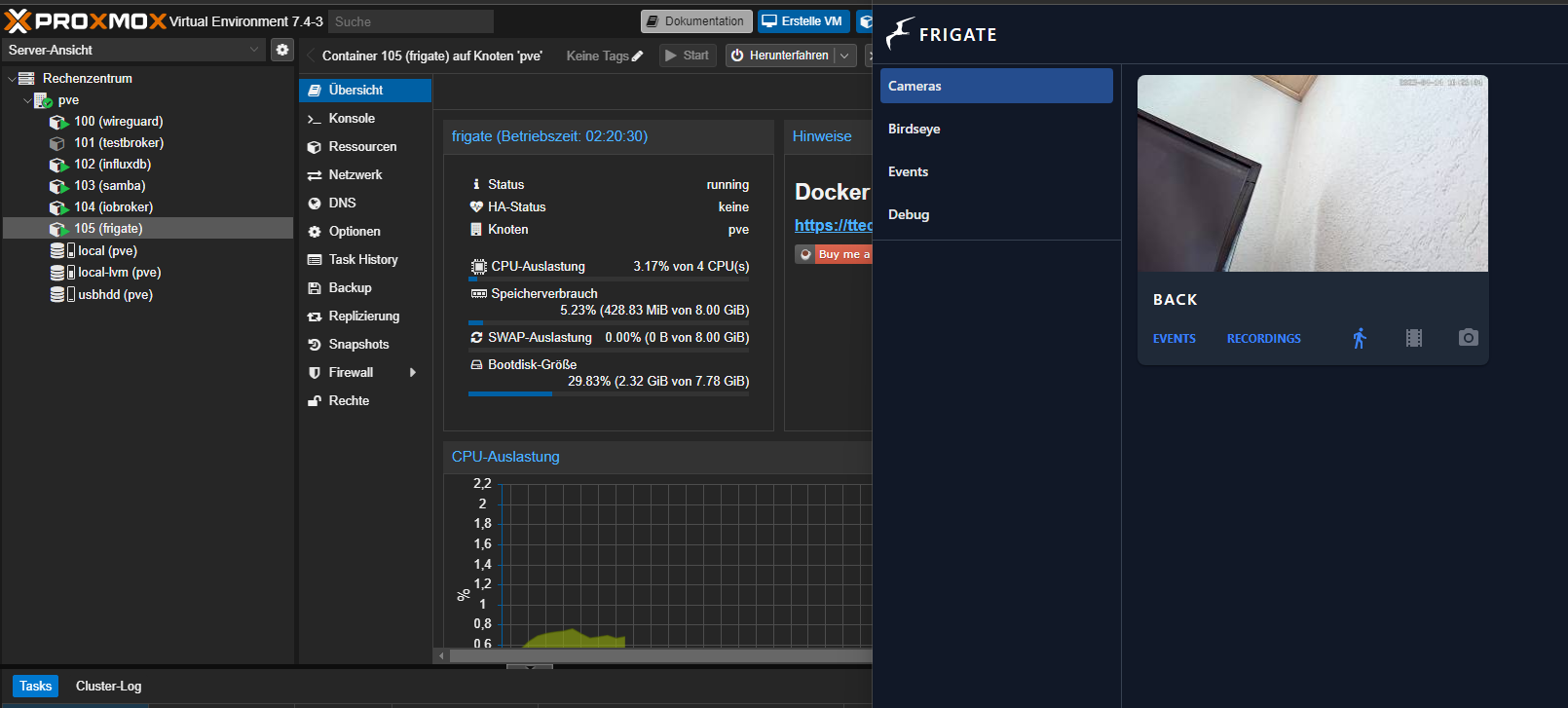
@wal hallo welche lxc hast du genommen bei mir gibt es fehler mit pfad findet config nicht frigate geht in bootschleife .
habe ubuntu 22.1detectors: ^ expected <block end>, but found '<block mapping start>' in "<unicode string>", line 9, column 2: cameras: ^ 2023-05-07 12:39:35.229716379 [INFO] The go2rtc service exited with code 1 (by signal 0) 2023-05-07 12:39:36.234223582 [INFO] Preparing go2rtc config... Traceback (most recent call last): File "/usr/local/go2rtc/create_config.py", line 27, in <module> config: dict[str, any] = yaml.safe_load(raw_config) File "/usr/local/lib/python3.9/dist-packages/yaml/__init__.py", line 125, in safe_load return load(stream, SafeLoader) File "/usr/local/lib/python3.9/dist-packages/yaml/__init__.py", line 81, in load return loader.get_single_data() File "/usr/local/lib/python3.9/dist-packages/yaml/constructor.py", line 49, in get_single_data node = self.get_single_node() File "/usr/local/lib/python3.9/dist-packages/yaml/composer.py", line 36, in get_single_node document = self.compose_document() File "/usr/local/lib/python3.9/dist-packages/yaml/composer.py", line 55, in compose_document node = self.compose_node(None, None) File "/usr/local/lib/python3.9/dist-packages/yaml/composer.py", line 84, in compose_node node = self.compose_mapping_node(anchor) File "/usr/local/lib/python3.9/dist-packages/yaml/composer.py", line 127, in compose_mapping_node while not self.check_event(MappingEndEvent): File "/usr/local/lib/python3.9/dist-packages/yaml/parser.py", line 98, in check_event self.current_event = self.state() File "/usr/local/lib/python3.9/dist-packages/yaml/parser.py", line 438, in parse_block_mapping_key raise ParserError("while parsing a block mapping", self.marks[-1], yaml.parser.ParserError: while parsing a block mapping in "<unicode string>", line 1, column 1: detectors: ^ expected <block end>, but found '<block mapping start>' in "<unicode string>", line 9, column 2: cameras: ^ 2023-05-07 12:39:36.459721903 [INFO] The go2rtc service exited with code 1 (by signal 0) 2023-05-07 12:39:37.463508621 [INFO] Preparing go2rtc config... Traceback (most recent call last): File "/usr/local/go2rtc/create_config.py", line 27, in <module> config: dict[str, any] = yaml.safe_load(raw_config) File "/usr/local/lib/python3.9/dist-packages/yaml/__init__.py", line 125, in safe_load return load(stream, SafeLoader) File "/usr/local/lib/python3.9/dist-packages/yaml/__init__.py", line 81, in load return loader.get_single_data() File "/usr/local/lib/python3.9/dist-packages/yaml/constructor.py", line 49, in get_single_data node = self.get_single_node() File "/usr/local/lib/python3.9/dist-packages/yaml/composer.py", line 36, in get_single_node document = self.compose_document() File "/usr/local/lib/python3.9/dist-packages/yaml/composer.py", line 55, in compose_document node = self.compose_node(None, None) File "/usr/local/lib/python3.9/dist-packages/yaml/composer.py", line 84, in compose_node node = self.compose_mapping_node(anchor) File "/usr/local/lib/python3.9/dist-packages/yaml/composer.py", line 127, in compose_mapping_node while not self.check_event(MappingEndEvent): File "/usr/local/lib/python3.9/dist-packages/yaml/parser.py", line 98, in check_event self.current_event = self.state() File "/usr/local/lib/python3.9/dist-packages/yaml/parser.py", line 438, in parse_block_mapping_key raise ParserError("while parsing a block mapping", self.marks[-1], yaml.parser.ParserError: while parsing a block mapping in "<unicode string>", line 1, column 1: detectors: ^ expected <block end>, but found '<block mapping start>' in "<unicode string>", line 9, column 2: cameras: ^ 2023-05-07 12:39:37.661047849 [INFO] The go2rtc service exited with code 1 (by signal 0) 2023-05-07 12:39:38.665754030 [INFO] Preparing go2rtc config... Traceback (most recent call last): File "/usr/local/go2rtc/create_config.py", line 27, in <module> config: dict[str, any] = yaml.safe_load(raw_config) File "/usr/local/lib/python3.9/dist-packages/yaml/__init__.py", line 125, in safe_load return load(stream, SafeLoader) File "/usr/local/lib/python3.9/dist-packages/yaml/__init__.py", line 81, in load return loader.get_single_data() File "/usr/local/lib/python3.9/dist-packages/yaml/constructor.py", line 49, in get_single_data node = self.get_single_node() File "/usr/local/lib/python3.9/dist-packages/yaml/composer.py", line 36, in get_single_node document = self.compose_document() File "/usr/local/lib/python3.9/dist-packages/yaml/composer.py", line 55, in compose_document node = self.compose_node(None, None) File "/usr/local/lib/python3.9/dist-packages/yaml/composer.py", line 84, in compose_node node = self.compose_mapping_node(anchor) File "/usr/local/lib/python3.9/dist-packages/yaml/composer.py", line 127, in compose_mapping_node while not self.check_event(MappingEndEvent): File "/usr/local/lib/python3.9/dist-packages/yaml/parser.py", line 98, in check_event self.current_event = self.state() File "/usr/local/lib/python3.9/dist-packages/yaml/parser.py", line 438, in parse_block_mapping_key raise ParserError("while parsing a block mapping", self.marks[-1], yaml.parser.ParserError: while parsing a block mapping in "<unicode string>", line 1, column 1: detectors: ^ expected <block end>, but found '<block mapping start>' in "<unicode string>", line 9, column 2: cameras: ^ 2023-05-07 12:39:38.884406556 [INFO] The go2rtc service exited with code 1 (by signal 0)version: "3.9" services: frigate: container_name: frigate privileged: true # this may not be necessary for all setups restart: unless-stopped image: ghcr.io/blakeblackshear/frigate:stable shm_size: "64mb" # update for your cameras based on calculation above devices: - /dev/bus/usb:/dev/bus/usb # passes the USB Coral, needs to be modified for other versions - /dev/apex_0:/dev/apex_0 # passes a PCIe Coral, follow driver instructions here https://cora> - /dev/dri/renderD128 # for intel hwaccel, needs to be updated for your hardware volumes: - /etc/localtime:/etc/localtime:ro - /frigate/config.yml:/config/config.yml:ro - /frigate:/media/frigate - type: tmpfs # Optional: 1GB of memory, reduces SSD/SD Card wear target: /tmp/cache tmpfs: size: 1000000000 ports: - "5000:5000" - "1935:1935" # RTMP feedsvolumes: - /etc/localtime:/etc/localtime:ro - /root/config/config.yml:/config/config.yml:ro - /root/frigate:/media/frigatedas klappte auch nicht
-
@wal hallo welche lxc hast du genommen bei mir gibt es fehler mit pfad findet config nicht frigate geht in bootschleife .
habe ubuntu 22.1detectors: ^ expected <block end>, but found '<block mapping start>' in "<unicode string>", line 9, column 2: cameras: ^ 2023-05-07 12:39:35.229716379 [INFO] The go2rtc service exited with code 1 (by signal 0) 2023-05-07 12:39:36.234223582 [INFO] Preparing go2rtc config... Traceback (most recent call last): File "/usr/local/go2rtc/create_config.py", line 27, in <module> config: dict[str, any] = yaml.safe_load(raw_config) File "/usr/local/lib/python3.9/dist-packages/yaml/__init__.py", line 125, in safe_load return load(stream, SafeLoader) File "/usr/local/lib/python3.9/dist-packages/yaml/__init__.py", line 81, in load return loader.get_single_data() File "/usr/local/lib/python3.9/dist-packages/yaml/constructor.py", line 49, in get_single_data node = self.get_single_node() File "/usr/local/lib/python3.9/dist-packages/yaml/composer.py", line 36, in get_single_node document = self.compose_document() File "/usr/local/lib/python3.9/dist-packages/yaml/composer.py", line 55, in compose_document node = self.compose_node(None, None) File "/usr/local/lib/python3.9/dist-packages/yaml/composer.py", line 84, in compose_node node = self.compose_mapping_node(anchor) File "/usr/local/lib/python3.9/dist-packages/yaml/composer.py", line 127, in compose_mapping_node while not self.check_event(MappingEndEvent): File "/usr/local/lib/python3.9/dist-packages/yaml/parser.py", line 98, in check_event self.current_event = self.state() File "/usr/local/lib/python3.9/dist-packages/yaml/parser.py", line 438, in parse_block_mapping_key raise ParserError("while parsing a block mapping", self.marks[-1], yaml.parser.ParserError: while parsing a block mapping in "<unicode string>", line 1, column 1: detectors: ^ expected <block end>, but found '<block mapping start>' in "<unicode string>", line 9, column 2: cameras: ^ 2023-05-07 12:39:36.459721903 [INFO] The go2rtc service exited with code 1 (by signal 0) 2023-05-07 12:39:37.463508621 [INFO] Preparing go2rtc config... Traceback (most recent call last): File "/usr/local/go2rtc/create_config.py", line 27, in <module> config: dict[str, any] = yaml.safe_load(raw_config) File "/usr/local/lib/python3.9/dist-packages/yaml/__init__.py", line 125, in safe_load return load(stream, SafeLoader) File "/usr/local/lib/python3.9/dist-packages/yaml/__init__.py", line 81, in load return loader.get_single_data() File "/usr/local/lib/python3.9/dist-packages/yaml/constructor.py", line 49, in get_single_data node = self.get_single_node() File "/usr/local/lib/python3.9/dist-packages/yaml/composer.py", line 36, in get_single_node document = self.compose_document() File "/usr/local/lib/python3.9/dist-packages/yaml/composer.py", line 55, in compose_document node = self.compose_node(None, None) File "/usr/local/lib/python3.9/dist-packages/yaml/composer.py", line 84, in compose_node node = self.compose_mapping_node(anchor) File "/usr/local/lib/python3.9/dist-packages/yaml/composer.py", line 127, in compose_mapping_node while not self.check_event(MappingEndEvent): File "/usr/local/lib/python3.9/dist-packages/yaml/parser.py", line 98, in check_event self.current_event = self.state() File "/usr/local/lib/python3.9/dist-packages/yaml/parser.py", line 438, in parse_block_mapping_key raise ParserError("while parsing a block mapping", self.marks[-1], yaml.parser.ParserError: while parsing a block mapping in "<unicode string>", line 1, column 1: detectors: ^ expected <block end>, but found '<block mapping start>' in "<unicode string>", line 9, column 2: cameras: ^ 2023-05-07 12:39:37.661047849 [INFO] The go2rtc service exited with code 1 (by signal 0) 2023-05-07 12:39:38.665754030 [INFO] Preparing go2rtc config... Traceback (most recent call last): File "/usr/local/go2rtc/create_config.py", line 27, in <module> config: dict[str, any] = yaml.safe_load(raw_config) File "/usr/local/lib/python3.9/dist-packages/yaml/__init__.py", line 125, in safe_load return load(stream, SafeLoader) File "/usr/local/lib/python3.9/dist-packages/yaml/__init__.py", line 81, in load return loader.get_single_data() File "/usr/local/lib/python3.9/dist-packages/yaml/constructor.py", line 49, in get_single_data node = self.get_single_node() File "/usr/local/lib/python3.9/dist-packages/yaml/composer.py", line 36, in get_single_node document = self.compose_document() File "/usr/local/lib/python3.9/dist-packages/yaml/composer.py", line 55, in compose_document node = self.compose_node(None, None) File "/usr/local/lib/python3.9/dist-packages/yaml/composer.py", line 84, in compose_node node = self.compose_mapping_node(anchor) File "/usr/local/lib/python3.9/dist-packages/yaml/composer.py", line 127, in compose_mapping_node while not self.check_event(MappingEndEvent): File "/usr/local/lib/python3.9/dist-packages/yaml/parser.py", line 98, in check_event self.current_event = self.state() File "/usr/local/lib/python3.9/dist-packages/yaml/parser.py", line 438, in parse_block_mapping_key raise ParserError("while parsing a block mapping", self.marks[-1], yaml.parser.ParserError: while parsing a block mapping in "<unicode string>", line 1, column 1: detectors: ^ expected <block end>, but found '<block mapping start>' in "<unicode string>", line 9, column 2: cameras: ^ 2023-05-07 12:39:38.884406556 [INFO] The go2rtc service exited with code 1 (by signal 0)version: "3.9" services: frigate: container_name: frigate privileged: true # this may not be necessary for all setups restart: unless-stopped image: ghcr.io/blakeblackshear/frigate:stable shm_size: "64mb" # update for your cameras based on calculation above devices: - /dev/bus/usb:/dev/bus/usb # passes the USB Coral, needs to be modified for other versions - /dev/apex_0:/dev/apex_0 # passes a PCIe Coral, follow driver instructions here https://cora> - /dev/dri/renderD128 # for intel hwaccel, needs to be updated for your hardware volumes: - /etc/localtime:/etc/localtime:ro - /frigate/config.yml:/config/config.yml:ro - /frigate:/media/frigate - type: tmpfs # Optional: 1GB of memory, reduces SSD/SD Card wear target: /tmp/cache tmpfs: size: 1000000000 ports: - "5000:5000" - "1935:1935" # RTMP feedsvolumes: - /etc/localtime:/etc/localtime:ro - /root/config/config.yml:/config/config.yml:ro - /root/frigate:/media/frigatedas klappte auch nicht
@exitus,
ich nutze das docker script von TTeck .
Konnte da man Ubuntu auswählen ?
Ich nutze Debian./frigate/config.ymldas kann nur funktionieren wenn im Ordner /frigate eine config.yml liegt.
Mittlerweile habe ich einen User frigate erstellt und im Userordner einen Ordner frigate, dort liegt meine config.yml.
- /home/frigate/frigate/config.yml:/config/config.yml -
@exitus,
ich nutze das docker script von TTeck .
Konnte da man Ubuntu auswählen ?
Ich nutze Debian./frigate/config.ymldas kann nur funktionieren wenn im Ordner /frigate eine config.yml liegt.
Mittlerweile habe ich einen User frigate erstellt und im Userordner einen Ordner frigate, dort liegt meine config.yml.
- /home/frigate/frigate/config.yml:/config/config.yml@wal Ja, man kann da, zumindest bei mir, aus drei verschiedenen Versionen Ubuntu oder eben Debian auswählen.
@exitus Wo findet man das Logfile. Ich komme nur über Portainer an ein nicht sonderlich aussagekräftiges Logfile, dass mir alle paar Sekunden ein "Container frigate exited with status code 1" ausspuckt.Manchmal ist es wie verhext. Ich suche ja schon eine ganze Weile, warum das bei mir nicht funktioniert.
Jetzt habe ich im Portainer auch das Logfile für den Container Frigate gefunden. Da steht:s6-rc: info: service log-prepare successfully stopped s6-rc: info: service legacy-cont-init: stopping s6-rc: info: service s6rc-fdholder successfully stopped s6-rc: info: service legacy-cont-init successfully stopped s6-rc: info: service fix-attrs: stopping s6-rc: info: service fix-attrs successfully stopped s6-rc: info: service s6rc-oneshot-runner: stopping s6-rc: info: service s6rc-oneshot-runner successfully stopped s6-rc: info: service s6rc-fdholder: starting s6-rc: info: service s6rc-oneshot-runner: starting s6-rc: info: service s6rc-oneshot-runner successfully started s6-rc: info: service fix-attrs: starting s6-rc: info: service s6rc-fdholder successfully started s6-rc: info: service fix-attrs successfully started s6-rc: info: service legacy-cont-init: starting s6-rc: info: service legacy-cont-init successfully started s6-rc: info: service log-prepare: starting s6-rc: info: service log-prepare successfully started s6-rc: info: service nginx-log: starting s6-rc: info: service go2rtc-log: starting s6-rc: info: service frigate-log: starting s6-rc: info: service nginx-log successfully started s6-rc: info: service go2rtc-log successfully started s6-rc: info: service go2rtc: starting s6-rc: info: service frigate-log successfully started s6-rc: info: service go2rtc successfully started s6-rc: info: service go2rtc-healthcheck: starting s6-rc: info: service frigate: starting s6-rc: info: service go2rtc-healthcheck successfully started s6-rc: info: service frigate successfully started s6-rc: info: service nginx: starting 2023-05-07 13:43:21.141928870 [INFO] Preparing go2rtc config... s6-rc: info: service nginx successfully started s6-rc: info: service legacy-services: starting 2023-05-07 13:43:21.143878913 [INFO] Starting NGINX... s6-rc: info: service legacy-services successfully started 2023-05-07 13:43:21.151714209 [INFO] Starting Frigate... Traceback (most recent call last): File "/usr/local/go2rtc/create_config.py", line 23, in <module> with open(config_file) as f: IsADirectoryError: [Errno 21] Is a directory: '/config/config.yml' 2023-05-07 13:43:21.323364168 [INFO] The go2rtc service exited with code 1 (by signal 0) 2023-05-07 13:43:21.841745413 ************************************************************* 2023-05-07 13:43:21.841749020 ************************************************************* 2023-05-07 13:43:21.841750573 *** Your config file is not valid! *** 2023-05-07 13:43:21.841752110 *** Please check the docs at *** 2023-05-07 13:43:21.841753273 *** https://docs.frigate.video/configuration/index *** 2023-05-07 13:43:21.841754729 ************************************************************* 2023-05-07 13:43:21.841755781 ************************************************************* 2023-05-07 13:43:21.841763459 *** Config Validation Errors *** 2023-05-07 13:43:21.841764598 ************************************************************* 2023-05-07 13:43:21.841765506 [Errno 21] Is a directory: '/config/config.yml' 2023-05-07 13:43:21.842565222 Traceback (most recent call last): 2023-05-07 13:43:21.842567276 File "/opt/frigate/frigate/app.py", line 351, in start 2023-05-07 13:43:21.842568370 self.init_config() 2023-05-07 13:43:21.842569532 File "/opt/frigate/frigate/app.py", line 80, in init_config 2023-05-07 13:43:21.842570616 user_config = FrigateConfig.parse_file(config_file) 2023-05-07 13:43:21.842571677 File "/opt/frigate/frigate/config.py", line 1064, in parse_file 2023-05-07 13:43:21.842572588 with open(config_file) as f: 2023-05-07 13:43:21.842573621 IsADirectoryError: [Errno 21] Is a directory: '/config/config.yml' 2023-05-07 13:43:21.842574440 2023-05-07 13:43:21.842575493 ************************************************************* 2023-05-07 13:43:21.842576482 *** End Config Validation Errors *** 2023-05-07 13:43:21.842577477 ************************************************************* 2023-05-07 13:43:21.842645337 [2023-05-07 13:43:21] frigate.app INFO : Starting Frigate (0.12.0-da3e197) 2023-05-07 13:43:22.326572470 [INFO] Preparing go2rtc config... Traceback (most recent call last): File "/usr/local/go2rtc/create_config.py", line 23, in <module> with open(config_file) as f: IsADirectoryError: [Errno 21] Is a directory: '/config/config.yml' 2023-05-07 13:43:22.445020382 [INFO] The go2rtc service exited with code 1 (by signal 0) 2023-05-07 13:43:22.932425363 [INFO] Service Frigate exited with code 1 (by signal 0) s6-rc: info: service legacy-services: stopping s6-rc: info: service legacy-services successfully stopped s6-rc: info: service nginx: stopping s6-rc: info: service go2rtc-healthcheck: stopping 2023-05-07 13:43:22.937461001 [INFO] The go2rtc-healthcheck service exited with code 256 (by signal 15) s6-rc: info: service go2rtc-healthcheck successfully stopped 2023-05-07 13:43:23.051822574 [INFO] Service NGINX exited with code 0 (by signal 0) s6-rc: info: service nginx successfully stopped s6-rc: info: service nginx-log: stopping s6-rc: info: service frigate: stopping s6-rc: info: service frigate successfully stopped s6-rc: info: service go2rtc: stopping s6-rc: info: service frigate-log: stopping s6-rc: info: service nginx-log successfully stopped s6-rc: info: service go2rtc successfully stopped s6-rc: info: service go2rtc-log: stopping s6-rc: info: service frigate-log successfully stopped s6-rc: info: service go2rtc-log successfully stopped s6-rc: info: service log-prepare: stopping s6-rc: info: service s6rc-fdholder: stopping s6-rc: info: service log-prepare successfully stopped s6-rc: info: service legacy-cont-init: stopping s6-rc: info: service s6rc-fdholder successfully stopped s6-rc: info: service legacy-cont-init successfully stopped s6-rc: info: service fix-attrs: stopping s6-rc: info: service fix-attrs successfully stopped s6-rc: info: service s6rc-oneshot-runner: stopping s6-rc: info: service s6rc-oneshot-runner successfully stoppedDas deutet meiner Meinung nach darauf hin, das er das config.File nicht findet.
Da muss ich nochmal Hausaufgaben machen, wieso das so ist. -
@wal Ja, man kann da, zumindest bei mir, aus drei verschiedenen Versionen Ubuntu oder eben Debian auswählen.
@exitus Wo findet man das Logfile. Ich komme nur über Portainer an ein nicht sonderlich aussagekräftiges Logfile, dass mir alle paar Sekunden ein "Container frigate exited with status code 1" ausspuckt.Manchmal ist es wie verhext. Ich suche ja schon eine ganze Weile, warum das bei mir nicht funktioniert.
Jetzt habe ich im Portainer auch das Logfile für den Container Frigate gefunden. Da steht:s6-rc: info: service log-prepare successfully stopped s6-rc: info: service legacy-cont-init: stopping s6-rc: info: service s6rc-fdholder successfully stopped s6-rc: info: service legacy-cont-init successfully stopped s6-rc: info: service fix-attrs: stopping s6-rc: info: service fix-attrs successfully stopped s6-rc: info: service s6rc-oneshot-runner: stopping s6-rc: info: service s6rc-oneshot-runner successfully stopped s6-rc: info: service s6rc-fdholder: starting s6-rc: info: service s6rc-oneshot-runner: starting s6-rc: info: service s6rc-oneshot-runner successfully started s6-rc: info: service fix-attrs: starting s6-rc: info: service s6rc-fdholder successfully started s6-rc: info: service fix-attrs successfully started s6-rc: info: service legacy-cont-init: starting s6-rc: info: service legacy-cont-init successfully started s6-rc: info: service log-prepare: starting s6-rc: info: service log-prepare successfully started s6-rc: info: service nginx-log: starting s6-rc: info: service go2rtc-log: starting s6-rc: info: service frigate-log: starting s6-rc: info: service nginx-log successfully started s6-rc: info: service go2rtc-log successfully started s6-rc: info: service go2rtc: starting s6-rc: info: service frigate-log successfully started s6-rc: info: service go2rtc successfully started s6-rc: info: service go2rtc-healthcheck: starting s6-rc: info: service frigate: starting s6-rc: info: service go2rtc-healthcheck successfully started s6-rc: info: service frigate successfully started s6-rc: info: service nginx: starting 2023-05-07 13:43:21.141928870 [INFO] Preparing go2rtc config... s6-rc: info: service nginx successfully started s6-rc: info: service legacy-services: starting 2023-05-07 13:43:21.143878913 [INFO] Starting NGINX... s6-rc: info: service legacy-services successfully started 2023-05-07 13:43:21.151714209 [INFO] Starting Frigate... Traceback (most recent call last): File "/usr/local/go2rtc/create_config.py", line 23, in <module> with open(config_file) as f: IsADirectoryError: [Errno 21] Is a directory: '/config/config.yml' 2023-05-07 13:43:21.323364168 [INFO] The go2rtc service exited with code 1 (by signal 0) 2023-05-07 13:43:21.841745413 ************************************************************* 2023-05-07 13:43:21.841749020 ************************************************************* 2023-05-07 13:43:21.841750573 *** Your config file is not valid! *** 2023-05-07 13:43:21.841752110 *** Please check the docs at *** 2023-05-07 13:43:21.841753273 *** https://docs.frigate.video/configuration/index *** 2023-05-07 13:43:21.841754729 ************************************************************* 2023-05-07 13:43:21.841755781 ************************************************************* 2023-05-07 13:43:21.841763459 *** Config Validation Errors *** 2023-05-07 13:43:21.841764598 ************************************************************* 2023-05-07 13:43:21.841765506 [Errno 21] Is a directory: '/config/config.yml' 2023-05-07 13:43:21.842565222 Traceback (most recent call last): 2023-05-07 13:43:21.842567276 File "/opt/frigate/frigate/app.py", line 351, in start 2023-05-07 13:43:21.842568370 self.init_config() 2023-05-07 13:43:21.842569532 File "/opt/frigate/frigate/app.py", line 80, in init_config 2023-05-07 13:43:21.842570616 user_config = FrigateConfig.parse_file(config_file) 2023-05-07 13:43:21.842571677 File "/opt/frigate/frigate/config.py", line 1064, in parse_file 2023-05-07 13:43:21.842572588 with open(config_file) as f: 2023-05-07 13:43:21.842573621 IsADirectoryError: [Errno 21] Is a directory: '/config/config.yml' 2023-05-07 13:43:21.842574440 2023-05-07 13:43:21.842575493 ************************************************************* 2023-05-07 13:43:21.842576482 *** End Config Validation Errors *** 2023-05-07 13:43:21.842577477 ************************************************************* 2023-05-07 13:43:21.842645337 [2023-05-07 13:43:21] frigate.app INFO : Starting Frigate (0.12.0-da3e197) 2023-05-07 13:43:22.326572470 [INFO] Preparing go2rtc config... Traceback (most recent call last): File "/usr/local/go2rtc/create_config.py", line 23, in <module> with open(config_file) as f: IsADirectoryError: [Errno 21] Is a directory: '/config/config.yml' 2023-05-07 13:43:22.445020382 [INFO] The go2rtc service exited with code 1 (by signal 0) 2023-05-07 13:43:22.932425363 [INFO] Service Frigate exited with code 1 (by signal 0) s6-rc: info: service legacy-services: stopping s6-rc: info: service legacy-services successfully stopped s6-rc: info: service nginx: stopping s6-rc: info: service go2rtc-healthcheck: stopping 2023-05-07 13:43:22.937461001 [INFO] The go2rtc-healthcheck service exited with code 256 (by signal 15) s6-rc: info: service go2rtc-healthcheck successfully stopped 2023-05-07 13:43:23.051822574 [INFO] Service NGINX exited with code 0 (by signal 0) s6-rc: info: service nginx successfully stopped s6-rc: info: service nginx-log: stopping s6-rc: info: service frigate: stopping s6-rc: info: service frigate successfully stopped s6-rc: info: service go2rtc: stopping s6-rc: info: service frigate-log: stopping s6-rc: info: service nginx-log successfully stopped s6-rc: info: service go2rtc successfully stopped s6-rc: info: service go2rtc-log: stopping s6-rc: info: service frigate-log successfully stopped s6-rc: info: service go2rtc-log successfully stopped s6-rc: info: service log-prepare: stopping s6-rc: info: service s6rc-fdholder: stopping s6-rc: info: service log-prepare successfully stopped s6-rc: info: service legacy-cont-init: stopping s6-rc: info: service s6rc-fdholder successfully stopped s6-rc: info: service legacy-cont-init successfully stopped s6-rc: info: service fix-attrs: stopping s6-rc: info: service fix-attrs successfully stopped s6-rc: info: service s6rc-oneshot-runner: stopping s6-rc: info: service s6rc-oneshot-runner successfully stoppedDas deutet meiner Meinung nach darauf hin, das er das config.File nicht findet.
Da muss ich nochmal Hausaufgaben machen, wieso das so ist.@radi sagte in Proxmox LXC mit Frigate:
Ja, man kann da, zumindest bei mir, aus drei verschiedenen Versionen Ubuntu oder eben Debian auswählen.
Ok, ist ja auch schon 4 Wochen her. ;-)
Logfiles sind was für Memmen. ;-)@exitus ,
der erste Teil der FileUrl ist der Pfad der config.yml im LXC und der zweite im Docker Container der immer gleich bleibt.
Und nutze erst die minimal Config, ich habe Tage für die endgültige config.yml gebraucht. -
@wal Ja, man kann da, zumindest bei mir, aus drei verschiedenen Versionen Ubuntu oder eben Debian auswählen.
@exitus Wo findet man das Logfile. Ich komme nur über Portainer an ein nicht sonderlich aussagekräftiges Logfile, dass mir alle paar Sekunden ein "Container frigate exited with status code 1" ausspuckt.Manchmal ist es wie verhext. Ich suche ja schon eine ganze Weile, warum das bei mir nicht funktioniert.
Jetzt habe ich im Portainer auch das Logfile für den Container Frigate gefunden. Da steht:s6-rc: info: service log-prepare successfully stopped s6-rc: info: service legacy-cont-init: stopping s6-rc: info: service s6rc-fdholder successfully stopped s6-rc: info: service legacy-cont-init successfully stopped s6-rc: info: service fix-attrs: stopping s6-rc: info: service fix-attrs successfully stopped s6-rc: info: service s6rc-oneshot-runner: stopping s6-rc: info: service s6rc-oneshot-runner successfully stopped s6-rc: info: service s6rc-fdholder: starting s6-rc: info: service s6rc-oneshot-runner: starting s6-rc: info: service s6rc-oneshot-runner successfully started s6-rc: info: service fix-attrs: starting s6-rc: info: service s6rc-fdholder successfully started s6-rc: info: service fix-attrs successfully started s6-rc: info: service legacy-cont-init: starting s6-rc: info: service legacy-cont-init successfully started s6-rc: info: service log-prepare: starting s6-rc: info: service log-prepare successfully started s6-rc: info: service nginx-log: starting s6-rc: info: service go2rtc-log: starting s6-rc: info: service frigate-log: starting s6-rc: info: service nginx-log successfully started s6-rc: info: service go2rtc-log successfully started s6-rc: info: service go2rtc: starting s6-rc: info: service frigate-log successfully started s6-rc: info: service go2rtc successfully started s6-rc: info: service go2rtc-healthcheck: starting s6-rc: info: service frigate: starting s6-rc: info: service go2rtc-healthcheck successfully started s6-rc: info: service frigate successfully started s6-rc: info: service nginx: starting 2023-05-07 13:43:21.141928870 [INFO] Preparing go2rtc config... s6-rc: info: service nginx successfully started s6-rc: info: service legacy-services: starting 2023-05-07 13:43:21.143878913 [INFO] Starting NGINX... s6-rc: info: service legacy-services successfully started 2023-05-07 13:43:21.151714209 [INFO] Starting Frigate... Traceback (most recent call last): File "/usr/local/go2rtc/create_config.py", line 23, in <module> with open(config_file) as f: IsADirectoryError: [Errno 21] Is a directory: '/config/config.yml' 2023-05-07 13:43:21.323364168 [INFO] The go2rtc service exited with code 1 (by signal 0) 2023-05-07 13:43:21.841745413 ************************************************************* 2023-05-07 13:43:21.841749020 ************************************************************* 2023-05-07 13:43:21.841750573 *** Your config file is not valid! *** 2023-05-07 13:43:21.841752110 *** Please check the docs at *** 2023-05-07 13:43:21.841753273 *** https://docs.frigate.video/configuration/index *** 2023-05-07 13:43:21.841754729 ************************************************************* 2023-05-07 13:43:21.841755781 ************************************************************* 2023-05-07 13:43:21.841763459 *** Config Validation Errors *** 2023-05-07 13:43:21.841764598 ************************************************************* 2023-05-07 13:43:21.841765506 [Errno 21] Is a directory: '/config/config.yml' 2023-05-07 13:43:21.842565222 Traceback (most recent call last): 2023-05-07 13:43:21.842567276 File "/opt/frigate/frigate/app.py", line 351, in start 2023-05-07 13:43:21.842568370 self.init_config() 2023-05-07 13:43:21.842569532 File "/opt/frigate/frigate/app.py", line 80, in init_config 2023-05-07 13:43:21.842570616 user_config = FrigateConfig.parse_file(config_file) 2023-05-07 13:43:21.842571677 File "/opt/frigate/frigate/config.py", line 1064, in parse_file 2023-05-07 13:43:21.842572588 with open(config_file) as f: 2023-05-07 13:43:21.842573621 IsADirectoryError: [Errno 21] Is a directory: '/config/config.yml' 2023-05-07 13:43:21.842574440 2023-05-07 13:43:21.842575493 ************************************************************* 2023-05-07 13:43:21.842576482 *** End Config Validation Errors *** 2023-05-07 13:43:21.842577477 ************************************************************* 2023-05-07 13:43:21.842645337 [2023-05-07 13:43:21] frigate.app INFO : Starting Frigate (0.12.0-da3e197) 2023-05-07 13:43:22.326572470 [INFO] Preparing go2rtc config... Traceback (most recent call last): File "/usr/local/go2rtc/create_config.py", line 23, in <module> with open(config_file) as f: IsADirectoryError: [Errno 21] Is a directory: '/config/config.yml' 2023-05-07 13:43:22.445020382 [INFO] The go2rtc service exited with code 1 (by signal 0) 2023-05-07 13:43:22.932425363 [INFO] Service Frigate exited with code 1 (by signal 0) s6-rc: info: service legacy-services: stopping s6-rc: info: service legacy-services successfully stopped s6-rc: info: service nginx: stopping s6-rc: info: service go2rtc-healthcheck: stopping 2023-05-07 13:43:22.937461001 [INFO] The go2rtc-healthcheck service exited with code 256 (by signal 15) s6-rc: info: service go2rtc-healthcheck successfully stopped 2023-05-07 13:43:23.051822574 [INFO] Service NGINX exited with code 0 (by signal 0) s6-rc: info: service nginx successfully stopped s6-rc: info: service nginx-log: stopping s6-rc: info: service frigate: stopping s6-rc: info: service frigate successfully stopped s6-rc: info: service go2rtc: stopping s6-rc: info: service frigate-log: stopping s6-rc: info: service nginx-log successfully stopped s6-rc: info: service go2rtc successfully stopped s6-rc: info: service go2rtc-log: stopping s6-rc: info: service frigate-log successfully stopped s6-rc: info: service go2rtc-log successfully stopped s6-rc: info: service log-prepare: stopping s6-rc: info: service s6rc-fdholder: stopping s6-rc: info: service log-prepare successfully stopped s6-rc: info: service legacy-cont-init: stopping s6-rc: info: service s6rc-fdholder successfully stopped s6-rc: info: service legacy-cont-init successfully stopped s6-rc: info: service fix-attrs: stopping s6-rc: info: service fix-attrs successfully stopped s6-rc: info: service s6rc-oneshot-runner: stopping s6-rc: info: service s6rc-oneshot-runner successfully stoppedDas deutet meiner Meinung nach darauf hin, das er das config.File nicht findet.
Da muss ich nochmal Hausaufgaben machen, wieso das so ist. -
@exitus Wie ich oben ergänzt habe, habe ich das gerade gefunden. Ich habe es inzwischen mit allen Ubuntu-Versionen wie auch mit Debian über das TTeck Script probiert und war nicht in der Lage eine lauffähige Installation hinzubekommen.
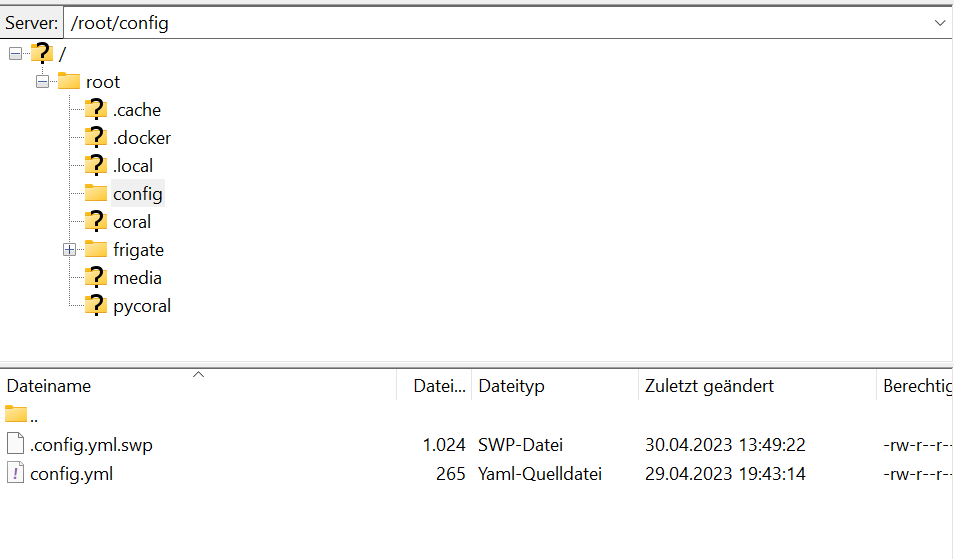
Ich bin mir sicher, ich mache da etwas Grundsätzliches, das für Containernutzer selbstverständlich ist, falsch. Leider bin ich noch nicht dahinter gekommen, was das ist.Die Odnerstruktur ist allerdings so, wie ich das erwarten würde:
[Link Text](
 Link Adresse)
 -
@exitus Wie ich oben ergänzt habe, habe ich das gerade gefunden. Ich habe es inzwischen mit allen Ubuntu-Versionen wie auch mit Debian über das TTeck Script probiert und war nicht in der Lage eine lauffähige Installation hinzubekommen.
Ich bin mir sicher, ich mache da etwas Grundsätzliches, das für Containernutzer selbstverständlich ist, falsch. Leider bin ich noch nicht dahinter gekommen, was das ist.Die Odnerstruktur ist allerdings so, wie ich das erwarten würde:
[Link Text](
Link Adresse) -
@radi ,
eben getestet.docker logs -f frigateauf dem LXC oder normalen Installation zeigt den log an
-
@Wal Da steht letztenendes dasselbe wie im Portainerlogfile drin. Ursächlich scheint wohl dies zu sein:
2023-05-07 14:44:51.033075103  *************************************************************
2023-05-07 14:44:51.033078419  *************************************************************
2023-05-07 14:44:51.033079955  ***    Your config file is not valid!                     ***
2023-05-07 14:44:51.033081414  ***    Please check the docs at                           ***
2023-05-07 14:44:51.033082613  ***    https://docs.frigate.video/configuration/index     ***
2023-05-07 14:44:51.033083997  *************************************************************
2023-05-07 14:44:51.033085013  *************************************************************
2023-05-07 14:44:51.033092726  ***    Config Validation Errors                           ***
2023-05-07 14:44:51.033093828  *************************************************************
2023-05-07 14:44:51.033094705  [Errno 21] Is a directory: '/config/config.yml'
2023-05-07 14:44:51.033656750  Traceback (most recent call last):
2023-05-07 14:44:51.033658821    File "/opt/frigate/frigate/app.py", line 351, in start
2023-05-07 14:44:51.033659876      self.init_config()
2023-05-07 14:44:51.033660984    File "/opt/frigate/frigate/app.py", line 80, in init_config
2023-05-07 14:44:51.033661995      user_config = FrigateConfig.parse_file(config_file)
2023-05-07 14:44:51.033662995    File "/opt/frigate/frigate/config.py", line 1064, in parse_file
2023-05-07 14:44:51.033663850      with open(config_file) as f:
2023-05-07 14:44:51.033664794  IsADirectoryError: [Errno 21] Is a directory: '/config/config.yml'
2023-05-07 14:44:51.033665538
2023-05-07 14:44:51.033666509  *************************************************************
2023-05-07 14:44:51.033667457  ***    End Config Validation Errors                       ***
2023-05-07 14:44:51.033668354  **********************************************************
Nur weiß ich nicht, wie man diesen "IsADirectoryError" korrigiert. Findet Frigate in dem angegebenen Pfad nichts? Oder hat dies eine andere Ursache? Den Screenshot aus dem Filezilla habe ich ja schon weiter oben gepostet. Mit meinem bescheidenen oder nicht vorhandenen Wissen würde ich annehmen, dass der Pfad zur config.yaml so passt.

Support us
302
Online32.7k
Users82.5k
Topics1.3m
Posts