



Skip to content
  • Home
  • Recent
  • Tags
  • 0 Unread 0
  • Categories
  • Unreplied
  • Popular
  • GitHub
  • Docu
  • Hilfe
Skins
  • Light
  • Brite
  • Cerulean
  • Cosmo
  • Flatly
  • Journal
  • Litera
  • Lumen
  • Lux
  • Materia
  • Minty
  • Morph
  • Pulse
  • Sandstone
  • Simplex
  • Sketchy
  • Spacelab
  • United
  • Yeti
  • Zephyr
  • Dark
  • Cyborg
  • Darkly
  • Quartz
  • Slate
  • Solar
  • Superhero
  • Vapor

  • Default (No Skin)
  • No Skin
Collapse
ioBroker Logo

Community Forum

donate donate
  1. ioBroker Community Home
  2. Deutsch
  3. Off Topic
  4. Installation influxDB, nicht erreichbar

NEWS

  • Jahresrückblick 2025 – unser neuer Blogbeitrag ist online! ✨
    BluefoxB
    Bluefox
    17
    1
    2.0k

  • Neuer Blogbeitrag: Monatsrückblick - Dezember 2025 🎄
    BluefoxB
    Bluefox
    13
    1
    927

  • Weihnachtsangebot 2025! 🎄
    BluefoxB
    Bluefox
    25
    1
    2.2k

Installation influxDB, nicht erreichbar

Scheduled Pinned Locked Moved Off Topic
22 Posts 4 Posters 1.9k Views 4 Watching
  • Oldest to Newest
  • Newest to Oldest
  • Most Votes
Reply
  • Reply as topic
Log in to reply
This topic has been deleted. Only users with topic management privileges can see it.
  • Basti GeppB Basti Gepp

    @thomas-braun okay, dann bleibt nur eine neue Installation von PI OS, oder?

    Thomas BraunT Online
    Thomas BraunT Online
    Thomas Braun
    Most Active
    wrote on last edited by
    #11

    @basti-gepp

    Ja, ein vollständiges 64bit-System bekommst du nur mit einer vollständigen Neuinstallation hin.
    Es gibt da wohl noch einen anderen Weg, das ist aber 'schwarze Magie'. Würde ich nicht empfehlen.

    Linux-Werkzeugkasten:
    https://forum.iobroker.net/topic/42952/der-kleine-iobroker-linux-werkzeugkasten
    NodeJS Fixer Skript:
    https://forum.iobroker.net/topic/68035/iob-node-fix-skript
    iob_diag: curl -sLf -o diag.sh https://iobroker.net/diag.sh && bash diag.sh

    Basti GeppB 1 Reply Last reply
    0
    • Thomas BraunT Thomas Braun

      @basti-gepp

      Ja, ein vollständiges 64bit-System bekommst du nur mit einer vollständigen Neuinstallation hin.
      Es gibt da wohl noch einen anderen Weg, das ist aber 'schwarze Magie'. Würde ich nicht empfehlen.

      Basti GeppB Offline
      Basti GeppB Offline
      Basti Gepp
      wrote on last edited by
      #12

      @thomas-braun nein nein, alles gut. Da ich sowieso noch in der Bastelphase bin ist das auch nicht so tragisch. Muss ich nur noch schauen wie ich meinen IOBroker sichern kann. Das hab ich auch noch nicht gemacht :)
      Aber danke für eure Hilfe!!

      Thomas BraunT 1 Reply Last reply
      0
      • Basti GeppB Basti Gepp

        @thomas-braun nein nein, alles gut. Da ich sowieso noch in der Bastelphase bin ist das auch nicht so tragisch. Muss ich nur noch schauen wie ich meinen IOBroker sichern kann. Das hab ich auch noch nicht gemacht :)
        Aber danke für eure Hilfe!!

        Thomas BraunT Online
        Thomas BraunT Online
        Thomas Braun
        Most Active
        wrote on last edited by
        #13

        @basti-gepp sagte in Installation influxDB, nicht erreichbar:

        Muss ich nur noch schauen wie ich meinen IOBroker sichern kann.

        Backitup-Adapter.

        Linux-Werkzeugkasten:
        https://forum.iobroker.net/topic/42952/der-kleine-iobroker-linux-werkzeugkasten
        NodeJS Fixer Skript:
        https://forum.iobroker.net/topic/68035/iob-node-fix-skript
        iob_diag: curl -sLf -o diag.sh https://iobroker.net/diag.sh && bash diag.sh

        Basti GeppB 1 Reply Last reply
        0
        • Thomas BraunT Thomas Braun

          @basti-gepp sagte in Installation influxDB, nicht erreichbar:

          Muss ich nur noch schauen wie ich meinen IOBroker sichern kann.

          Backitup-Adapter.

          Basti GeppB Offline
          Basti GeppB Offline
          Basti Gepp
          wrote on last edited by
          #14

          @thomas-braun jap den hab ich :+1:

          1 Reply Last reply
          0
          • Basti GeppB Offline
            Basti GeppB Offline
            Basti Gepp
            wrote on last edited by
            #15

            Bevor ich es dann wieder falsch mache ;) ,
            das hier ist das richtige oder?
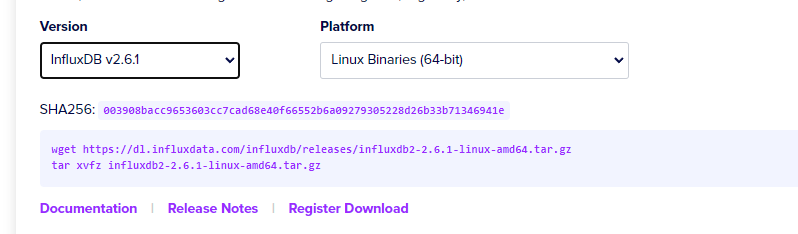
            94a58bc0-600e-4a8c-bb66-84d9ac2558b2-image.png

            Thomas BraunT 1 Reply Last reply
            0
            • Basti GeppB Basti Gepp

              Bevor ich es dann wieder falsch mache ;) ,
              das hier ist das richtige oder?

              94a58bc0-600e-4a8c-bb66-84d9ac2558b2-image.png

              Thomas BraunT Online
              Thomas BraunT Online
              Thomas Braun
              Most Active
              wrote on last edited by Thomas Braun
              #16

              @basti-gepp

              Man installiert keine Pakete 'von irgendwoher' wenn es ein schönes Repo gibt, aus dem man schöpfen kann. Oben hast du es ja auch angelegt.

              amd64 wäre auch die falsche Architektur. Der Raspberry läuft mit arm64.

              Per Paketmanager wird dann auch die richtige Version serviert:

              echad@chet:~ $ apt policy influxdb2
              influxdb2:
                Installed: (none)
                Candidate: 2.6.1-1
                Version table:
                   2.6.1-1 500
                      500 https://repos.influxdata.com/debian stable/main arm64 Packages
                   2.6.0-1 500
                      500 https://repos.influxdata.com/debian stable/main arm64 Packages
                   2.5.1-1 500
                      500 https://repos.influxdata.com/debian stable/main arm64 Packages
                   2.4.0-1 500
                      500 https://repos.influxdata.com/debian stable/main arm64 Packages
                   2.3.0-1 500
                      500 https://repos.influxdata.com/debian stable/main arm64 Packages
                   2.2.0 500
                      500 https://repos.influxdata.com/debian stable/main arm64 Packages
              

              Linux-Werkzeugkasten:
              https://forum.iobroker.net/topic/42952/der-kleine-iobroker-linux-werkzeugkasten
              NodeJS Fixer Skript:
              https://forum.iobroker.net/topic/68035/iob-node-fix-skript
              iob_diag: curl -sLf -o diag.sh https://iobroker.net/diag.sh && bash diag.sh

              Basti GeppB 1 Reply Last reply
              0
              • Thomas BraunT Thomas Braun

                @basti-gepp

                Man installiert keine Pakete 'von irgendwoher' wenn es ein schönes Repo gibt, aus dem man schöpfen kann. Oben hast du es ja auch angelegt.

                amd64 wäre auch die falsche Architektur. Der Raspberry läuft mit arm64.

                Per Paketmanager wird dann auch die richtige Version serviert:

                echad@chet:~ $ apt policy influxdb2
                influxdb2:
                  Installed: (none)
                  Candidate: 2.6.1-1
                  Version table:
                     2.6.1-1 500
                        500 https://repos.influxdata.com/debian stable/main arm64 Packages
                     2.6.0-1 500
                        500 https://repos.influxdata.com/debian stable/main arm64 Packages
                     2.5.1-1 500
                        500 https://repos.influxdata.com/debian stable/main arm64 Packages
                     2.4.0-1 500
                        500 https://repos.influxdata.com/debian stable/main arm64 Packages
                     2.3.0-1 500
                        500 https://repos.influxdata.com/debian stable/main arm64 Packages
                     2.2.0 500
                        500 https://repos.influxdata.com/debian stable/main arm64 Packages
                
                Basti GeppB Offline
                Basti GeppB Offline
                Basti Gepp
                wrote on last edited by
                #17

                @thomas-braun ich versuche mich nur an die Anleitung zu halten :) da steht das man die richtige Version dann hier eintragen soll:


                ae1fa61f-999c-4d42-a904-24a1f5a0876f-image.png
                b3f531d2-db7e-417b-bd26-f97e4bfa8a9f-image.png

                Thomas BraunT 1 Reply Last reply
                0
                • Basti GeppB Basti Gepp

                  @thomas-braun ich versuche mich nur an die Anleitung zu halten :) da steht das man die richtige Version dann hier eintragen soll:

                  ae1fa61f-999c-4d42-a904-24a1f5a0876f-image.png
                  b3f531d2-db7e-417b-bd26-f97e4bfa8a9f-image.png

                  Thomas BraunT Online
                  Thomas BraunT Online
                  Thomas Braun
                  Most Active
                  wrote on last edited by Thomas Braun
                  #18

                  @basti-gepp

                  In der Anleitung steht aber auch, wie man das influx-Repo anlegt.
                  https://docs.influxdata.com/influxdb/v1.8/introduction/install/?t=curl

                  Ist zwar für 1.8, gilt aber gleichermaßen auch für 2.x.
                  Das Repo ist komplett gleich.

                  Linux-Werkzeugkasten:
                  https://forum.iobroker.net/topic/42952/der-kleine-iobroker-linux-werkzeugkasten
                  NodeJS Fixer Skript:
                  https://forum.iobroker.net/topic/68035/iob-node-fix-skript
                  iob_diag: curl -sLf -o diag.sh https://iobroker.net/diag.sh && bash diag.sh

                  Basti GeppB 1 Reply Last reply
                  0
                  • Thomas BraunT Thomas Braun

                    @basti-gepp

                    In der Anleitung steht aber auch, wie man das influx-Repo anlegt.
                    https://docs.influxdata.com/influxdb/v1.8/introduction/install/?t=curl

                    Ist zwar für 1.8, gilt aber gleichermaßen auch für 2.x.
                    Das Repo ist komplett gleich.

                    Basti GeppB Offline
                    Basti GeppB Offline
                    Basti Gepp
                    wrote on last edited by
                    #19

                    @thomas-braun ja ich war bei der Installation "Install InfluxDB as a service with systemd"
                    das ist dann wohl falsch.

                    Ich hänge nur gerade hier :D
                    Extract the downloaded binary.
                    tar xvzf path/to/influxdb2-2.6.1-linux-arm64.tar.gz

                    verstehe ich so ganz welchen pfad ich da eintragen soll

                    Thomas BraunT 2 Replies Last reply
                    0
                    • Basti GeppB Basti Gepp

                      @thomas-braun ja ich war bei der Installation "Install InfluxDB as a service with systemd"
                      das ist dann wohl falsch.

                      Ich hänge nur gerade hier :D
                      Extract the downloaded binary.
                      tar xvzf path/to/influxdb2-2.6.1-linux-arm64.tar.gz

                      verstehe ich so ganz welchen pfad ich da eintragen soll

                      Thomas BraunT Online
                      Thomas BraunT Online
                      Thomas Braun
                      Most Active
                      wrote on last edited by
                      #20

                      @basti-gepp sagte in Installation influxDB, nicht erreichbar:

                      Extract the downloaded binary.

                      Das ist falsch. Nutze den Paketmanager.

                      Linux-Werkzeugkasten:
                      https://forum.iobroker.net/topic/42952/der-kleine-iobroker-linux-werkzeugkasten
                      NodeJS Fixer Skript:
                      https://forum.iobroker.net/topic/68035/iob-node-fix-skript
                      iob_diag: curl -sLf -o diag.sh https://iobroker.net/diag.sh && bash diag.sh

                      1 Reply Last reply
                      0
                      • Basti GeppB Basti Gepp

                        @thomas-braun ja ich war bei der Installation "Install InfluxDB as a service with systemd"
                        das ist dann wohl falsch.

                        Ich hänge nur gerade hier :D
                        Extract the downloaded binary.
                        tar xvzf path/to/influxdb2-2.6.1-linux-arm64.tar.gz

                        verstehe ich so ganz welchen pfad ich da eintragen soll

                        Thomas BraunT Online
                        Thomas BraunT Online
                        Thomas Braun
                        Most Active
                        wrote on last edited by
                        #21

                        @basti-gepp

                        curl -s https://repos.influxdata.com/influxdata-archive_compat.key > influxdata-archive_compat.key
                        echo '393e8779c89ac8d958f81f942f9ad7fb82a25e133faddaf92e15b16e6ac9ce4c influxdata-archive_compat.key' | sha256sum -c && cat influxdata-archive_compat.key | gpg --dearmor | sudo tee /etc/apt/trusted.gpg.d/influxdata-archive_compat.gpg > /dev/null
                        echo 'deb [signed-by=/etc/apt/trusted.gpg.d/influxdata-archive_compat.gpg] https://repos.influxdata.com/debian stable main' | sudo tee /etc/apt/sources.list.d/influxdata.list
                        sudo apt update
                        sudo apt install influxdb2
                        

                        Fertig.

                        Linux-Werkzeugkasten:
                        https://forum.iobroker.net/topic/42952/der-kleine-iobroker-linux-werkzeugkasten
                        NodeJS Fixer Skript:
                        https://forum.iobroker.net/topic/68035/iob-node-fix-skript
                        iob_diag: curl -sLf -o diag.sh https://iobroker.net/diag.sh && bash diag.sh

                        Basti GeppB 1 Reply Last reply
                        1
                        • Thomas BraunT Thomas Braun

                          @basti-gepp

                          curl -s https://repos.influxdata.com/influxdata-archive_compat.key > influxdata-archive_compat.key
                          echo '393e8779c89ac8d958f81f942f9ad7fb82a25e133faddaf92e15b16e6ac9ce4c influxdata-archive_compat.key' | sha256sum -c && cat influxdata-archive_compat.key | gpg --dearmor | sudo tee /etc/apt/trusted.gpg.d/influxdata-archive_compat.gpg > /dev/null
                          echo 'deb [signed-by=/etc/apt/trusted.gpg.d/influxdata-archive_compat.gpg] https://repos.influxdata.com/debian stable main' | sudo tee /etc/apt/sources.list.d/influxdata.list
                          sudo apt update
                          sudo apt install influxdb2
                          

                          Fertig.

                          Basti GeppB Offline
                          Basti GeppB Offline
                          Basti Gepp
                          wrote on last edited by
                          #22

                          @thomas-braun said in Installation influxDB, nicht erreichbar:

                          sudo apt install influxdb2

                          Danke dafür, hat dann natürlich geklappt :+1: . Vieles sind hier noch Bömische Dörfer für mich wie man bei uns sagt :)

                          1 Reply Last reply
                          0
                          Reply
                          • Reply as topic
                          Log in to reply
                          • Oldest to Newest
                          • Newest to Oldest
                          • Most Votes


                          Support us

                          ioBroker
                          Community Adapters
                          Donate

                          341

                          Online

                          32.6k

                          Users

                          82.2k

                          Topics

                          1.3m

                          Posts
                          Community
                          Impressum | Datenschutz-Bestimmungen | Nutzungsbedingungen | Einwilligungseinstellungen
                          ioBroker Community 2014-2025
                          logo
                          • Login

                          • Don't have an account? Register

                          • Login or register to search.
                          • First post
                            Last post
                          0
                          • Home
                          • Recent
                          • Tags
                          • Unread 0
                          • Categories
                          • Unreplied
                          • Popular
                          • GitHub
                          • Docu
                          • Hilfe