Skip to content
  • Home
  • Recent
  • Tags
  • 0 Unread 0
  • Categories
  • Unreplied
  • Popular
  • GitHub
  • Docu
  • Hilfe
Skins
  • Light
  • Brite
  • Cerulean
  • Cosmo
  • Flatly
  • Journal
  • Litera
  • Lumen
  • Lux
  • Materia
  • Minty
  • Morph
  • Pulse
  • Sandstone
  • Simplex
  • Sketchy
  • Spacelab
  • United
  • Yeti
  • Zephyr
  • Dark
  • Cyborg
  • Darkly
  • Quartz
  • Slate
  • Solar
  • Superhero
  • Vapor

  • Default (No Skin)
  • No Skin
Collapse
ioBroker Logo

Community Forum

donate donate
  1. ioBroker Community Home
  2. Deutsch
  3. Einsteigerfragen
  4. InfluxDB - Daten weg / Wiederherstellung [gelöst]
NEWS

  • Monatsrückblick Januar/Februar 2026 ist online!
    BluefoxB
    Bluefox
    18
    1
    661

  • Jahresrückblick 2025 – unser neuer Blogbeitrag ist online! ✨
    BluefoxB
    Bluefox
    18
    1
    5.7k

  • Neuer Blogbeitrag: Monatsrückblick - Dezember 2025 🎄
    BluefoxB
    Bluefox
    13
    1
    1.5k

InfluxDB - Daten weg / Wiederherstellung [gelöst]

Scheduled Pinned Locked Moved Einsteigerfragen
142 Posts 7 Posters 21.3k Views 4 Watching
  • Oldest to Newest
  • Newest to Oldest
  • Most Votes
Reply
  • Reply as topic
Log in to reply
This topic has been deleted. Only users with topic management privileges can see it.
  • N Naturfreund

    Heute ist die SSD angekommen die ich die Woche bestellt hab.
    Kann ich darauf parallel zum 32 Bit BS auf der SD ein 64 Bit BS aufsetzen und dadurch den Umzug vereinfachen/risikofreier machen?

    Ich bin ja willig, aber die liebe Zeit und das noch nötige Know-how...

    Thomas BraunT Online
    Thomas BraunT Online
    Thomas Braun
    Most Active
    wrote on last edited by Thomas Braun
    #111

    @naturfreund

    Kann man machen. Aber da ist dann noch die Sache mit dem KnowHow.
    Müsste ich mir selber anschauen, wie ich das machen würde. So ad hoc fällt mir da nix elegantes ein. Einen BootManager im klassischen Sinne gibt es für den Pi nicht.

    Linux-Werkzeugkasten:
    https://forum.iobroker.net/topic/42952/der-kleine-iobroker-linux-werkzeugkasten
    NodeJS Fixer Skript:
    https://forum.iobroker.net/topic/68035/iob-node-fix-skript
    iob_diag: curl -sLf -o diag.sh https://iobroker.net/diag.sh && bash diag.sh

    1 Reply Last reply
    0
    • Marc BergM Offline
      Marc BergM Offline
      Marc Berg
      Most Active
      wrote on last edited by Marc Berg
      #112

      @naturfreund sagte in InfluxDB - Daten weg / Wiederherstellung:

      Heute ist die SSD angekommen die ich die Woche bestellt hab.
      Kann ich darauf parallel zum 32 Bit BS auf der SD ein 64 Bit BS aufsetzen und dadurch den Umzug vereinfachen/risikofreier machen?

      Mit Berryboot kannst Du Dir einen Bootmanager bauen. Das sollte funktionieren, habe ich aber noch nicht gemacht. Brauch man aber sicher auch wieder Know-How ...

      NUC10I3+Ubuntu+Docker+ioBroker+influxDB2+Node Red+EMQX+Grafana

      Pi-hole, Traefik, Checkmk, Conbee II+Zigbee2MQTT, ESPSomfy-RTS, LoRaWAN, Arduino, KiCad

      Benutzt das Voting im Beitrag, wenn er euch geholfen hat.

      1 Reply Last reply
      0
      • N Offline
        N Offline
        Naturfreund
        wrote on last edited by
        #113

        Die Alternative wäre das System auf der SD neu aufzusetzen und dann das Backup von ioBroker wieder einzuspielen?

        Leider bin ich sehr unsicher, ob die Backups überhaupt den richtigen Stand enthalten oder ob es nicht auch da schon korrupte Daten gibt. Kann ich das vorher prüfen? Oder gibt's kein Zurück mehr sobald ich ein Backup geladen habe?

        Thomas BraunT 1 Reply Last reply
        0
        • N Naturfreund

          Die Alternative wäre das System auf der SD neu aufzusetzen und dann das Backup von ioBroker wieder einzuspielen?

          Leider bin ich sehr unsicher, ob die Backups überhaupt den richtigen Stand enthalten oder ob es nicht auch da schon korrupte Daten gibt. Kann ich das vorher prüfen? Oder gibt's kein Zurück mehr sobald ich ein Backup geladen habe?

          Thomas BraunT Online
          Thomas BraunT Online
          Thomas Braun
          Most Active
          wrote on last edited by
          #114

          @naturfreund

          iob update
          

          sagt?

          Linux-Werkzeugkasten:
          https://forum.iobroker.net/topic/42952/der-kleine-iobroker-linux-werkzeugkasten
          NodeJS Fixer Skript:
          https://forum.iobroker.net/topic/68035/iob-node-fix-skript
          iob_diag: curl -sLf -o diag.sh https://iobroker.net/diag.sh && bash diag.sh

          N 1 Reply Last reply
          0
          • Thomas BraunT Thomas Braun

            @naturfreund

            iob update
            

            sagt?

            N Offline
            N Offline
            Naturfreund
            wrote on last edited by
            #115

            @thomas-braun

            pi@raspberrypi:~ $ iob update
            Used repository: stable
            Adapter    "admin"        : 6.3.5    , installed 6.3.5
            Adapter    "backitup"     : 2.5.10   , installed 2.5.10
            Adapter    "discovery"    : 3.1.0    , installed 3.1.0
            Adapter    "harmony"      : 1.2.2    , installed 1.2.2
            Adapter    "history"      : 2.2.4    , installed 2.2.4
            Adapter    "influxdb"     : 3.2.0    , installed 3.2.0
            Adapter    "info"         : 1.9.19   , installed 1.9.19
            Adapter    "javascript"   : 6.1.4    , installed 6.1.4
            Controller "js-controller": 4.0.24   , installed 4.0.24
            Adapter    "lovelace"     : 3.0.1    , installed 3.0.1
            Adapter    "mobile"       : 1.0.1    , installed 1.0.1
            Adapter    "modbus"       : 5.0.11   , installed 5.0.11
            Adapter    "mqtt"         : 4.0.7    , installed 4.0.7
            Adapter    "parser"       : 1.1.8    , installed 1.1.8
            Adapter    "ping"         : 1.5.3    , installed 1.5.3
            Adapter    "rpi2"         : 1.3.2    , installed 1.3.2
            Adapter    "shelly"       : 6.0.0    , installed 6.0.0
            Adapter    "simple-api"   : 2.7.2    , installed 2.7.2
            Adapter    "smartgarden"  : 2.0.0    , installed 2.0.0
            Adapter    "socketio"     : 4.2.0    , installed 4.2.0
            Adapter    "synology"     : 2.1.13   , installed 2.1.13
            Adapter    "weatherunderground": 3.4.2, installed 3.4.2
            Adapter    "web"          : 4.3.0    , installed 4.3.0
            Adapter    "whatsapp-cmb" : 0.2.3    , installed 0.2.3
            Adapter    "ws"           : 1.3.0    , installed 1.3.0
            pi@raspberrypi:~ $ 
            
            Thomas BraunT 1 Reply Last reply
            0
            • N Naturfreund

              @thomas-braun

              pi@raspberrypi:~ $ iob update
              Used repository: stable
              Adapter    "admin"        : 6.3.5    , installed 6.3.5
              Adapter    "backitup"     : 2.5.10   , installed 2.5.10
              Adapter    "discovery"    : 3.1.0    , installed 3.1.0
              Adapter    "harmony"      : 1.2.2    , installed 1.2.2
              Adapter    "history"      : 2.2.4    , installed 2.2.4
              Adapter    "influxdb"     : 3.2.0    , installed 3.2.0
              Adapter    "info"         : 1.9.19   , installed 1.9.19
              Adapter    "javascript"   : 6.1.4    , installed 6.1.4
              Controller "js-controller": 4.0.24   , installed 4.0.24
              Adapter    "lovelace"     : 3.0.1    , installed 3.0.1
              Adapter    "mobile"       : 1.0.1    , installed 1.0.1
              Adapter    "modbus"       : 5.0.11   , installed 5.0.11
              Adapter    "mqtt"         : 4.0.7    , installed 4.0.7
              Adapter    "parser"       : 1.1.8    , installed 1.1.8
              Adapter    "ping"         : 1.5.3    , installed 1.5.3
              Adapter    "rpi2"         : 1.3.2    , installed 1.3.2
              Adapter    "shelly"       : 6.0.0    , installed 6.0.0
              Adapter    "simple-api"   : 2.7.2    , installed 2.7.2
              Adapter    "smartgarden"  : 2.0.0    , installed 2.0.0
              Adapter    "socketio"     : 4.2.0    , installed 4.2.0
              Adapter    "synology"     : 2.1.13   , installed 2.1.13
              Adapter    "weatherunderground": 3.4.2, installed 3.4.2
              Adapter    "web"          : 4.3.0    , installed 4.3.0
              Adapter    "whatsapp-cmb" : 0.2.3    , installed 0.2.3
              Adapter    "ws"           : 1.3.0    , installed 1.3.0
              pi@raspberrypi:~ $ 
              
              Thomas BraunT Online
              Thomas BraunT Online
              Thomas Braun
              Most Active
              wrote on last edited by
              #116

              @naturfreund

              Das sieht doch konsistent aus.
              Leg dir davon ein Backup an und gut ist.

              Linux-Werkzeugkasten:
              https://forum.iobroker.net/topic/42952/der-kleine-iobroker-linux-werkzeugkasten
              NodeJS Fixer Skript:
              https://forum.iobroker.net/topic/68035/iob-node-fix-skript
              iob_diag: curl -sLf -o diag.sh https://iobroker.net/diag.sh && bash diag.sh

              1 Reply Last reply
              0
              • N Offline
                N Offline
                Naturfreund
                wrote on last edited by Naturfreund
                #117

                Ich würde die SD Karte auf die SSD klonen.
                Oder gibt es andere/bessere Möglichkeiten?

                Videoanleitung z.B. https://youtu.be/WolddCfWP5I

                Thomas BraunT 1 Reply Last reply
                0
                • N Naturfreund

                  Ich würde die SD Karte auf die SSD klonen.
                  Oder gibt es andere/bessere Möglichkeiten?

                  Videoanleitung z.B. https://youtu.be/WolddCfWP5I

                  Thomas BraunT Online
                  Thomas BraunT Online
                  Thomas Braun
                  Most Active
                  wrote on last edited by
                  #118

                  @naturfreund
                  Klonen ist aus meiner Sicht Mist.
                  Installier das System flugs 'zu Fuß', iobroker installieren, Backup rein, fertig.

                  Linux-Werkzeugkasten:
                  https://forum.iobroker.net/topic/42952/der-kleine-iobroker-linux-werkzeugkasten
                  NodeJS Fixer Skript:
                  https://forum.iobroker.net/topic/68035/iob-node-fix-skript
                  iob_diag: curl -sLf -o diag.sh https://iobroker.net/diag.sh && bash diag.sh

                  N 1 Reply Last reply
                  0
                  • Thomas BraunT Thomas Braun

                    @naturfreund
                    Klonen ist aus meiner Sicht Mist.
                    Installier das System flugs 'zu Fuß', iobroker installieren, Backup rein, fertig.

                    N Offline
                    N Offline
                    Naturfreund
                    wrote on last edited by
                    #119

                    @thomas-braun
                    Kann ich dann gleich das 64 Bit OS nehmen?
                    Oder lieber auf Nummer sicher?

                    Thomas BraunT 1 Reply Last reply
                    0
                    • N Naturfreund

                      @thomas-braun
                      Kann ich dann gleich das 64 Bit OS nehmen?
                      Oder lieber auf Nummer sicher?

                      Thomas BraunT Online
                      Thomas BraunT Online
                      Thomas Braun
                      Most Active
                      wrote on last edited by
                      #120

                      @naturfreund

                      Nimm die 64bit-Version.

                      Linux-Werkzeugkasten:
                      https://forum.iobroker.net/topic/42952/der-kleine-iobroker-linux-werkzeugkasten
                      NodeJS Fixer Skript:
                      https://forum.iobroker.net/topic/68035/iob-node-fix-skript
                      iob_diag: curl -sLf -o diag.sh https://iobroker.net/diag.sh && bash diag.sh

                      1 Reply Last reply
                      0
                      • N Offline
                        N Offline
                        Naturfreund
                        wrote on last edited by Naturfreund
                        #121

                        Hatte das Image auf die SSD geflashed, aber nicht auf dem Schirm die Bootreihenfolge vorher noch zu ändern.

                        Hab die SD mit dem alten System wieder gesteckt und bin dann nach der Anleitung in folgendem Link vorgegangen"Bootreihenfolge in einem laufenden Raspberry Pi OS verändern" vorgegangen: https://u-labs.de/portal/raspberry-pi-4-von-usb-geraeten-z-b-ssd-booten-und-optional-den-bootloader-aktualisieren/

                        EDIT: Läuft jetzt. Ich installiere gerade ioB

                        EDIT2: Sobald ioB läuft, richte ich den Synology Adapter und Backitup ein und spiele das neuste Backup von heute Morgen ein.

                        1 Reply Last reply
                        0
                        • N Offline
                          N Offline
                          Naturfreund
                          wrote on last edited by Naturfreund
                          #122

                          Bei der Wiederherstellung der InfluxDB bekomme ich folgende Fehlermeldung:

                          Started restore ...
                          [DEBUG] [influxDB] - Try deleting the old InfluxDB tmp directory
                          [DEBUG] [influxDB] - InfluxDB old tmp directory was successfully deleted
                          [DEBUG] [influxDB] - Created tmp directory
                          [DEBUG] [influxDB] - Start infuxDB Restore ...
                          [DEBUG] [influxDB] - influxdb.0 is stopped
                          [ERROR] [influxDB] - Error: ENOENT: no such file or directory, utime '/opt/iobroker/backups/influxDBtmp/20230122T070121Z.s894.tar.gz'
                          [ERROR] [influxDB] - infuxDB Restore not completed
                          [EXIT] 0
                          

                          Terminal sagt folgendes:

                          pi@raspberrypi:~ $ cd /opt/iobroker/backups/
                          pi@raspberrypi:/opt/iobroker/backups $ dir
                          pi@raspberrypi:/opt/iobroker/backups $
                          

                          Verzeichnis leer.
                          Was geht hier schief? Backup-Datei liegt auf der NAS. Sollte er die nicht erst in das Verzeichnis kopieren und dann das Backup ausführen?

                          Thomas BraunT 1 Reply Last reply
                          0
                          • N Naturfreund

                            Bei der Wiederherstellung der InfluxDB bekomme ich folgende Fehlermeldung:

                            Started restore ...
                            [DEBUG] [influxDB] - Try deleting the old InfluxDB tmp directory
                            [DEBUG] [influxDB] - InfluxDB old tmp directory was successfully deleted
                            [DEBUG] [influxDB] - Created tmp directory
                            [DEBUG] [influxDB] - Start infuxDB Restore ...
                            [DEBUG] [influxDB] - influxdb.0 is stopped
                            [ERROR] [influxDB] - Error: ENOENT: no such file or directory, utime '/opt/iobroker/backups/influxDBtmp/20230122T070121Z.s894.tar.gz'
                            [ERROR] [influxDB] - infuxDB Restore not completed
                            [EXIT] 0
                            

                            Terminal sagt folgendes:

                            pi@raspberrypi:~ $ cd /opt/iobroker/backups/
                            pi@raspberrypi:/opt/iobroker/backups $ dir
                            pi@raspberrypi:/opt/iobroker/backups $
                            

                            Verzeichnis leer.
                            Was geht hier schief? Backup-Datei liegt auf der NAS. Sollte er die nicht erst in das Verzeichnis kopieren und dann das Backup ausführen?

                            Thomas BraunT Online
                            Thomas BraunT Online
                            Thomas Braun
                            Most Active
                            wrote on last edited by
                            #123

                            @naturfreund sagte in InfluxDB - Daten weg / Wiederherstellung:

                            Sollte er die nicht erst in das Verzeichnis kopieren

                            Nein, es wird nicht kopiert sondern das Dateisystem wird auf dem Mountpunkt eingehängt.

                            Linux-Werkzeugkasten:
                            https://forum.iobroker.net/topic/42952/der-kleine-iobroker-linux-werkzeugkasten
                            NodeJS Fixer Skript:
                            https://forum.iobroker.net/topic/68035/iob-node-fix-skript
                            iob_diag: curl -sLf -o diag.sh https://iobroker.net/diag.sh && bash diag.sh

                            N 1 Reply Last reply
                            0
                            • Thomas BraunT Thomas Braun

                              @naturfreund sagte in InfluxDB - Daten weg / Wiederherstellung:

                              Sollte er die nicht erst in das Verzeichnis kopieren

                              Nein, es wird nicht kopiert sondern das Dateisystem wird auf dem Mountpunkt eingehängt.

                              N Offline
                              N Offline
                              Naturfreund
                              wrote on last edited by
                              #124

                              @thomas-braun

                              Started restore ...
                              [DEBUG] [influxDB] - Try deleting the old InfluxDB tmp directory
                              [DEBUG] [influxDB] - InfluxDB old tmp directory was successfully deleted
                              [DEBUG] [influxDB] - Created tmp directory
                              [DEBUG] [influxDB] - Start infuxDB Restore ...
                              [ERROR] [influxDB] - /bin/sh: 1: influxd: not found
                              
                              [DEBUG] [influxDB] - Try deleting the InfluxDB tmp directory
                              [DEBUG] [influxDB] - InfluxDB tmp directory was successfully deleted
                              [DEBUG] [influxDB] - infuxDB Restore completed successfully
                              [EXIT] influxDB restore done
                              

                              Scheint jetzt geklappt zu haben.

                              Thomas BraunT 1 Reply Last reply
                              0
                              • N Naturfreund

                                @thomas-braun

                                Started restore ...
                                [DEBUG] [influxDB] - Try deleting the old InfluxDB tmp directory
                                [DEBUG] [influxDB] - InfluxDB old tmp directory was successfully deleted
                                [DEBUG] [influxDB] - Created tmp directory
                                [DEBUG] [influxDB] - Start infuxDB Restore ...
                                [ERROR] [influxDB] - /bin/sh: 1: influxd: not found
                                
                                [DEBUG] [influxDB] - Try deleting the InfluxDB tmp directory
                                [DEBUG] [influxDB] - InfluxDB tmp directory was successfully deleted
                                [DEBUG] [influxDB] - infuxDB Restore completed successfully
                                [EXIT] influxDB restore done
                                

                                Scheint jetzt geklappt zu haben.

                                Thomas BraunT Online
                                Thomas BraunT Online
                                Thomas Braun
                                Most Active
                                wrote on last edited by
                                #125

                                @naturfreund

                                Da ist influx wohl nicht lokal installiert.

                                Linux-Werkzeugkasten:
                                https://forum.iobroker.net/topic/42952/der-kleine-iobroker-linux-werkzeugkasten
                                NodeJS Fixer Skript:
                                https://forum.iobroker.net/topic/68035/iob-node-fix-skript
                                iob_diag: curl -sLf -o diag.sh https://iobroker.net/diag.sh && bash diag.sh

                                1 Reply Last reply
                                0
                                • N Offline
                                  N Offline
                                  Naturfreund
                                  wrote on last edited by
                                  #126

                                  @thomas-braun

                                  Da hast du recht. Das hab ich gerade nachgeholt.

                                  1 Reply Last reply
                                  0
                                  • N Offline
                                    N Offline
                                    Naturfreund
                                    wrote on last edited by
                                    #127

                                    influx ist installiert
                                    grafana ist installiert

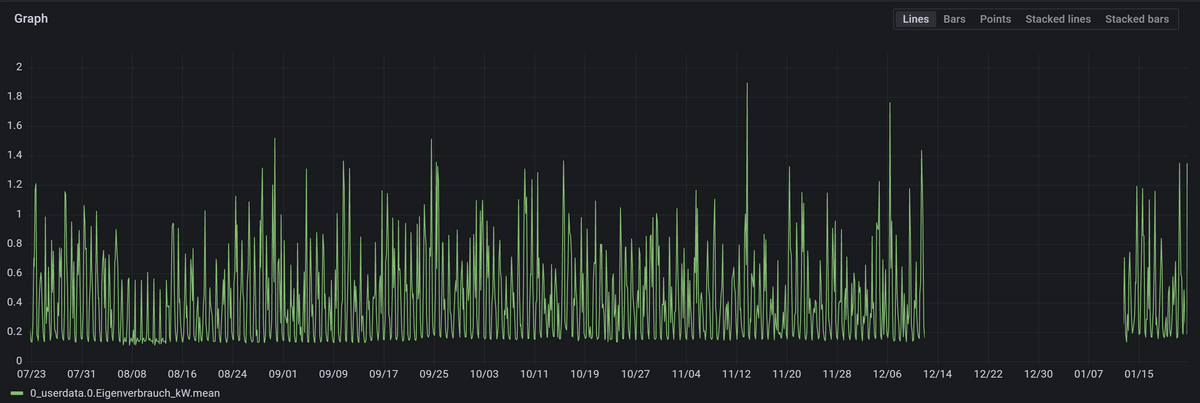
                                    influx Datenbank importiert (Scheint auch Daten zu enthalten, Stichprobe mit einem Datenpunkt)
                                    d9cfdd93-74cc-4984-b9e2-3633bb58dd12-image.png

                                    Was noch fehlt ist ein Backup von Grafana. Das muss ich mir noch von der alten SD Karte holen. Mache ich heute Abend wenn die Kinder im Bett liegen.

                                    1 Reply Last reply
                                    0
                                    • N Offline
                                      N Offline
                                      Naturfreund
                                      wrote on last edited by Naturfreund
                                      #128

                                      Habe die Dashboards wieder hergestellt. Scheint auch funktioniert zu haben.
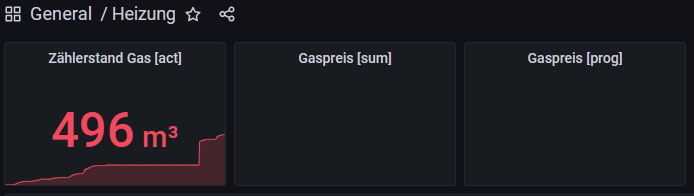
                                      Leider holt er für die eingetragenen Datenpunkte keine Daten aus der Influx Datenbank, die Dashboards bleiben leer:

                                      ed4454ed-ce14-4a12-b1c3-a4d02af41dd3-image.png

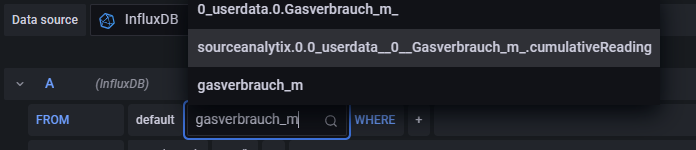
                                      Erst wenn ich den Datenpunkt mit gleichem Namen nochmal auswähle...
                                      a5ecf1b6-cdca-4a44-9599-ef38b209b084-image.png

                                      ...kommen die Daten:

                                      a8e6bf83-7a9d-4ed3-9c88-651dfddae7e1-image.png

                                      1 Reply Last reply
                                      0
                                      • N Offline
                                        N Offline
                                        Naturfreund
                                        wrote on last edited by
                                        #129

                                        Zu früh gefreut, heute kam folgender Eintrag im ioBroker Log:

                                        influxdb.0 2023-01-23 11:28:10.662	error	Error: ESOCKETTIMEDOUT
                                        influxdb.0 2023-01-23 11:28:10.661	error	getHistory: Error: ESOCKETTIMEDOUT
                                        
                                        1 Reply Last reply
                                        0
                                        • N Offline
                                          N Offline
                                          Naturfreund
                                          wrote on last edited by Naturfreund
                                          #130

                                          Hatte heute doch noch ein Netzwerkproblem gefunden. Ein Powerline Adapter machte ungewöhnlich starke Probleme (Heute ab 18 Uhr). Hatte ich so vorher noch nie gehabt.

                                          Mein Log ist voll davon (Der ESP8266 ist über WLAN mit genau diesem Adapter verbunden... oder auch nicht ;-) )

                                          2023-01-23 18:19:20.163 - info: mqtt.0 (959) Client [ESP8266Client-790e] connected with secret *
                                          2023-01-23 18:19:21.158 - info: shelly.0 (1057) [MQTT] Device 192.168.1.130 (shelly1 / shelly1-68C63AFAFEAB / SHSW-1#68C63AFAFEAB#1) connected! Polltime set to 5 sec.
                                          2023-01-23 18:19:57.677 - info: mqtt.0 (959) Client [ESP8266Client-790e] connection closed: timeout
                                          2023-01-23 18:21:26.190 - info: influxdb.0 (141035) Store 1001 buffered influxDB history points
                                          2023-01-23 18:21:27.964 - info: shelly.0 (1057) [MQTT] Device 192.168.1.110 (shellyht / shellyht-F4483E / SHHT-1#F4483E#1) connected! Polltime set to 5 sec.
                                          2023-01-23 18:22:01.574 - info: mqtt.0 (959) Client [ESP8266Client-85f6] connected with secret *
                                          2023-01-23 18:22:24.100 - info: mqtt.0 (959) Client [ESP8266Client-85f6] connection closed: timeout
                                          2023-01-23 18:23:31.491 - info: mqtt.0 (959) Client [ESP8266Client-b49f] connected with secret *
                                          2023-01-23 18:23:53.994 - info: mqtt.0 (959) Client [ESP8266Client-b49f] connection closed: timeout
                                          2023-01-23 18:24:24.048 - info: influxdb.0 (141035) Store 1001 buffered influxDB history points
                                          2023-01-23 18:24:36.669 - info: shelly.0 (1057) [MQTT] Device 192.168.1.112 (shellyht / shellyht-A4CF12F44435 / SHHT-1#A4CF12F44435#1) connected! Polltime set to 5 sec.
                                          2023-01-23 18:25:49.622 - info: mqtt.0 (959) Client [ESP8266Client-589] connected with secret *
                                          2023-01-23 18:26:12.128 - info: mqtt.0 (959) Client [ESP8266Client-589] connection closed: timeout
                                          2023-01-23 18:26:19.188 - info: mqtt.0 (959) Client [ESP8266Client-ec93] connected with secret *
                                          

                                          Ich hab jetzt alle Adapter auf die gleiche Phase geklemmt (Stromkreise im Hausanschlusskasten getauscht). Das hat immer schon mal die ständigen Netzwerkabbrüche verhindert. Die Datenrate zu dem Adapter ist trotzdem "nicht gut" bzw. nicht wie erwartet gestiegen. Support ist bereits kontaktiert.


                                          1 Reply Last reply
                                          0

                                          Hello! It looks like you're interested in this conversation, but you don't have an account yet.

                                          Getting fed up of having to scroll through the same posts each visit? When you register for an account, you'll always come back to exactly where you were before, and choose to be notified of new replies (either via email, or push notification). You'll also be able to save bookmarks and upvote posts to show your appreciation to other community members.

                                          With your input, this post could be even better 💗

                                          Register Login
                                          Reply
                                          • Reply as topic
                                          Log in to reply
                                          • Oldest to Newest
                                          • Newest to Oldest
                                          • Most Votes


                                          Support us

                                          ioBroker
                                          Community Adapters
                                          Donate

                                          352

                                          Online

                                          32.7k

                                          Users

                                          82.6k

                                          Topics

                                          1.3m

                                          Posts
                                          Community
                                          Impressum | Datenschutz-Bestimmungen | Nutzungsbedingungen | Einwilligungseinstellungen
                                          ioBroker Community 2014-2025
                                          logo
                                          • Login

                                          • Don't have an account? Register

                                          • Login or register to search.
                                          • First post
                                            Last post
                                          0
                                          • Home
                                          • Recent
                                          • Tags
                                          • Unread 0
                                          • Categories
                                          • Unreplied
                                          • Popular
                                          • GitHub
                                          • Docu
                                          • Hilfe