



Skip to content
  • Home
  • Aktuell
  • Tags
  • 0 Ungelesen 0
  • Kategorien
  • Unreplied
  • Beliebt
  • GitHub
  • Docu
  • Hilfe
Skins
  • Light
  • Brite
  • Cerulean
  • Cosmo
  • Flatly
  • Journal
  • Litera
  • Lumen
  • Lux
  • Materia
  • Minty
  • Morph
  • Pulse
  • Sandstone
  • Simplex
  • Sketchy
  • Spacelab
  • United
  • Yeti
  • Zephyr
  • Dark
  • Cyborg
  • Darkly
  • Quartz
  • Slate
  • Solar
  • Superhero
  • Vapor

  • Standard: (Kein Skin)
  • Kein Skin
Einklappen
ioBroker Logo

Community Forum

donate donate
  1. ioBroker Community Home
  2. Deutsch
  3. Einsteigerfragen
  4. IO Broker lässt sich nicht mehr aufrufen

NEWS

  • Jahresrückblick 2025 – unser neuer Blogbeitrag ist online! ✨
    BluefoxB
    Bluefox
    17
    1
    2.0k

  • Neuer Blogbeitrag: Monatsrückblick - Dezember 2025 🎄
    BluefoxB
    Bluefox
    13
    1
    927

  • Weihnachtsangebot 2025! 🎄
    BluefoxB
    Bluefox
    25
    1
    2.2k

IO Broker lässt sich nicht mehr aufrufen

Geplant Angeheftet Gesperrt Verschoben Einsteigerfragen
18 Beiträge 4 Kommentatoren 738 Aufrufe 3 Watching
  • Älteste zuerst
  • Neuste zuerst
  • Meiste Stimmen
Antworten
  • In einem neuen Thema antworten
Anmelden zum Antworten
Dieses Thema wurde gelöscht. Nur Nutzer mit entsprechenden Rechten können es sehen.
  • Thomas BraunT Thomas Braun

    @ralle

    iobroker stop
    iob fix
    iob diag
    
    ralleR Offline
    ralleR Offline
    ralle
    schrieb am zuletzt editiert von
    #3

    @thomas-braun said in IO Broker lässt sich nicht mehr aufrufen:

    iobroker stop
    iob fix
    iob diag

    du bist aber schnell, vielen Dank !!
    Habs soweit ausgeführt, jedoch wie Starte ich Io Broker wieder, nun steht bei Status "not running on this Host"

    Thomas BraunT 2 Antworten Letzte Antwort
    0
    • ralleR ralle

      @thomas-braun said in IO Broker lässt sich nicht mehr aufrufen:

      iobroker stop
      iob fix
      iob diag

      du bist aber schnell, vielen Dank !!
      Habs soweit ausgeführt, jedoch wie Starte ich Io Broker wieder, nun steht bei Status "not running on this Host"

      Thomas BraunT Online
      Thomas BraunT Online
      Thomas Braun
      Most Active
      schrieb am zuletzt editiert von
      #4

      @ralle

      iob list instances
      

      Linux-Werkzeugkasten:
      https://forum.iobroker.net/topic/42952/der-kleine-iobroker-linux-werkzeugkasten
      NodeJS Fixer Skript:
      https://forum.iobroker.net/topic/68035/iob-node-fix-skript
      iob_diag: curl -sLf -o diag.sh https://iobroker.net/diag.sh && bash diag.sh

      ralleR 1 Antwort Letzte Antwort
      0
      • ralleR ralle

        @thomas-braun said in IO Broker lässt sich nicht mehr aufrufen:

        iobroker stop
        iob fix
        iob diag

        du bist aber schnell, vielen Dank !!
        Habs soweit ausgeführt, jedoch wie Starte ich Io Broker wieder, nun steht bei Status "not running on this Host"

        Thomas BraunT Online
        Thomas BraunT Online
        Thomas Braun
        Most Active
        schrieb am zuletzt editiert von
        #5

        @ralle

        Und die Ausgabe von

        iob diag
        

        sagt?

        Linux-Werkzeugkasten:
        https://forum.iobroker.net/topic/42952/der-kleine-iobroker-linux-werkzeugkasten
        NodeJS Fixer Skript:
        https://forum.iobroker.net/topic/68035/iob-node-fix-skript
        iob_diag: curl -sLf -o diag.sh https://iobroker.net/diag.sh && bash diag.sh

        1 Antwort Letzte Antwort
        0
        • Thomas BraunT Thomas Braun

          @ralle

          iob list instances
          
          ralleR Offline
          ralleR Offline
          ralle
          schrieb am zuletzt editiert von
          #6

          @thomas-braun vielen Dank, hab ich gemacht, lässt sich aber immer noch nicht aufrufen....

          Thomas BraunT 1 Antwort Letzte Antwort
          0
          • ralleR ralle

            @thomas-braun vielen Dank, hab ich gemacht, lässt sich aber immer noch nicht aufrufen....

            Thomas BraunT Online
            Thomas BraunT Online
            Thomas Braun
            Most Active
            schrieb am zuletzt editiert von
            #7

            @ralle

            Glaskugel kaputt.
            Ausgaben geheim?

            Linux-Werkzeugkasten:
            https://forum.iobroker.net/topic/42952/der-kleine-iobroker-linux-werkzeugkasten
            NodeJS Fixer Skript:
            https://forum.iobroker.net/topic/68035/iob-node-fix-skript
            iob_diag: curl -sLf -o diag.sh https://iobroker.net/diag.sh && bash diag.sh

            ralleR 1 Antwort Letzte Antwort
            0
            • Thomas BraunT Thomas Braun

              @ralle

              Glaskugel kaputt.
              Ausgaben geheim?

              ralleR Offline
              ralleR Offline
              ralle
              schrieb am zuletzt editiert von
              #8

              @thomas-braun Sorry..... habs jetzt erst gesehen, soll ich den ganzen log posten? was ich jetzt gesehen habe steht dort auf jeden fall das er jetzt läuft......

              ======================= SUMMARY =======================
              v.2022-12-13

              Operatingsystem: Raspbian GNU/Linux 11 (bullseye)
              Installation: Native
              Timezone: Europe/Berlin
              User-ID: 1000
              X-Server: true

              Pending OS-Updates: 41

              Nodejs-Installation: /usr/bin/nodejs v16.18.1
              /usr/bin/node v16.18.1
              /usr/bin/npm 8.19.2

              ioBroker Core: js-controller 4.0.23
              admin 6.3.5

              ioBroker Status: iobroker is running on this host.

              Objects type: jsonl
              States type: jsonl

              Pending iob updates: 8

              Active repo(s): stable

              Objects: 7743
              States: 6510

              Size of iob-Database:

              14M /opt/iobroker/iobroker-data/objects.jsonl
              4.6M /opt/iobroker/iobroker-data/states.jsonl

              ====================== END OF SUMMARY ==================

              pi@raspberrypi:~ $ ^C
              pi@raspberrypi:~ $ ======================= SUMMARY =======================
                                 ^C   v.2022-12-13
              pi@raspberrypi:~ $ ====================== END OF SUMMARY ==================
              ====================== END OF SUMMARY ==================
              ====================== END OF SUMMARY ==================
              Installation:           Native
              Timezone:               Europe/Berlin
              User-ID:                1000
              X-Server:               true
              
              Pending OS-Updates:     41
              
              Nodejs-Installation:    /usr/bin/nodejs         v16.18.1
                                      /usr/bin/node           v16.18.1
                                      /usr/bin/npm            8.19.2
              
              ioBroker Core:          js-controller           4.0.23
                                      admin                   6.3.5
              
              ioBroker Status:        iobroker is running on this host.
              
              
              Objects type: jsonl
              States  type: jsonl
              
              Pending iob updates:    8
              
              Active repo(s): stable
              
              Objects:                7743
              States:                 6510
              
              Size of iob-Database:
              
              14M     /opt/iobroker/iobroker-data/objects.jsonl
              4.6M    /opt/iobroker/iobroker-data/states.jsonl
              Thomas BraunT 1 Antwort Letzte Antwort
              0
              • ralleR ralle

                @thomas-braun Sorry..... habs jetzt erst gesehen, soll ich den ganzen log posten? was ich jetzt gesehen habe steht dort auf jeden fall das er jetzt läuft......

                ======================= SUMMARY =======================
                v.2022-12-13

                Operatingsystem: Raspbian GNU/Linux 11 (bullseye)
                Installation: Native
                Timezone: Europe/Berlin
                User-ID: 1000
                X-Server: true

                Pending OS-Updates: 41

                Nodejs-Installation: /usr/bin/nodejs v16.18.1
                /usr/bin/node v16.18.1
                /usr/bin/npm 8.19.2

                ioBroker Core: js-controller 4.0.23
                admin 6.3.5

                ioBroker Status: iobroker is running on this host.

                Objects type: jsonl
                States type: jsonl

                Pending iob updates: 8

                Active repo(s): stable

                Objects: 7743
                States: 6510

                Size of iob-Database:

                14M /opt/iobroker/iobroker-data/objects.jsonl
                4.6M /opt/iobroker/iobroker-data/states.jsonl

                ====================== END OF SUMMARY ==================

                pi@raspberrypi:~ $ ^C
                pi@raspberrypi:~ $ ======================= SUMMARY =======================
                                   ^C   v.2022-12-13
                pi@raspberrypi:~ $ ====================== END OF SUMMARY ==================
                ====================== END OF SUMMARY ==================
                ====================== END OF SUMMARY ==================
                Installation:           Native
                Timezone:               Europe/Berlin
                User-ID:                1000
                X-Server:               true
                
                Pending OS-Updates:     41
                
                Nodejs-Installation:    /usr/bin/nodejs         v16.18.1
                                        /usr/bin/node           v16.18.1
                                        /usr/bin/npm            8.19.2
                
                ioBroker Core:          js-controller           4.0.23
                                        admin                   6.3.5
                
                ioBroker Status:        iobroker is running on this host.
                
                
                Objects type: jsonl
                States  type: jsonl
                
                Pending iob updates:    8
                
                Active repo(s): stable
                
                Objects:                7743
                States:                 6510
                
                Size of iob-Database:
                
                14M     /opt/iobroker/iobroker-data/objects.jsonl
                4.6M    /opt/iobroker/iobroker-data/states.jsonl
                Thomas BraunT Online
                Thomas BraunT Online
                Thomas Braun
                Most Active
                schrieb am zuletzt editiert von
                #9

                @ralle

                Kiste aktualisieren und ohne Desktop betreiben!

                Linux-Werkzeugkasten:
                https://forum.iobroker.net/topic/42952/der-kleine-iobroker-linux-werkzeugkasten
                NodeJS Fixer Skript:
                https://forum.iobroker.net/topic/68035/iob-node-fix-skript
                iob_diag: curl -sLf -o diag.sh https://iobroker.net/diag.sh && bash diag.sh

                ralleR 1 Antwort Letzte Antwort
                0
                • Thomas BraunT Thomas Braun

                  @ralle

                  Kiste aktualisieren und ohne Desktop betreiben!

                  ralleR Offline
                  ralleR Offline
                  ralle
                  schrieb am zuletzt editiert von
                  #10

                  @thomas-braun Wie aktualisiere Ich.... und Ohne Desktop betreiben ist wohl für einen unwissenden wie mich nicht möglich, leider :)

                  Thomas BraunT 1 Antwort Letzte Antwort
                  0
                  • ralleR ralle

                    @thomas-braun Wie aktualisiere Ich.... und Ohne Desktop betreiben ist wohl für einen unwissenden wie mich nicht möglich, leider :)

                    Thomas BraunT Online
                    Thomas BraunT Online
                    Thomas Braun
                    Most Active
                    schrieb am zuletzt editiert von
                    #11

                    @ralle

                    Wozu brauchst du einen Desktop?
                    Per Terminal auf die Kiste, iobroker hat ein Web-GUI. Warum also den ganzen Desktop-Kram mit schleppen?

                    sudo apt update
                    sudo apt full-upgrade 
                    sudo reboot
                    

                    Wenn die Kiste wieder da ist:

                    iob update
                    iob upgrade all
                    

                    Btw: Haben wir jetzt hier für irgendwas ein Desktop-Programm benötigt?

                    Linux-Werkzeugkasten:
                    https://forum.iobroker.net/topic/42952/der-kleine-iobroker-linux-werkzeugkasten
                    NodeJS Fixer Skript:
                    https://forum.iobroker.net/topic/68035/iob-node-fix-skript
                    iob_diag: curl -sLf -o diag.sh https://iobroker.net/diag.sh && bash diag.sh

                    ralleR 1 Antwort Letzte Antwort
                    0
                    • Thomas BraunT Thomas Braun

                      @ralle

                      Wozu brauchst du einen Desktop?
                      Per Terminal auf die Kiste, iobroker hat ein Web-GUI. Warum also den ganzen Desktop-Kram mit schleppen?

                      sudo apt update
                      sudo apt full-upgrade 
                      sudo reboot
                      

                      Wenn die Kiste wieder da ist:

                      iob update
                      iob upgrade all
                      

                      Btw: Haben wir jetzt hier für irgendwas ein Desktop-Programm benötigt?

                      ralleR Offline
                      ralleR Offline
                      ralle
                      schrieb am zuletzt editiert von
                      #12

                      @thomas-braun soweit alles gemacht, per browser noch immer keinen Zugriff auf die Oberfläche

                      Thomas BraunT 1 Antwort Letzte Antwort
                      0
                      • ralleR ralle

                        @thomas-braun soweit alles gemacht, per browser noch immer keinen Zugriff auf die Oberfläche

                        Thomas BraunT Online
                        Thomas BraunT Online
                        Thomas Braun
                        Most Active
                        schrieb am zuletzt editiert von
                        #13

                        @ralle

                        Ausgaben sind gefragt...

                        iob list instances
                        

                        z.B.

                        Linux-Werkzeugkasten:
                        https://forum.iobroker.net/topic/42952/der-kleine-iobroker-linux-werkzeugkasten
                        NodeJS Fixer Skript:
                        https://forum.iobroker.net/topic/68035/iob-node-fix-skript
                        iob_diag: curl -sLf -o diag.sh https://iobroker.net/diag.sh && bash diag.sh

                        ralleR 1 Antwort Letzte Antwort
                        0
                        • Thomas BraunT Thomas Braun

                          @ralle

                          Ausgaben sind gefragt...

                          iob list instances
                          

                          z.B.

                          ralleR Offline
                          ralleR Offline
                          ralle
                          schrieb am zuletzt editiert von Homoran
                          #14

                          @thomas-braun hier:

                            system.adapter.admin.0                  : admin                 : raspberrypi                                                                                                                                                                                           - disabled, port: 8081, bind: 0.0.0.0, run as: admi                                                                                                                                                             n
                          + system.adapter.alexa2.0                 : alexa2                : raspberrypi                                                                                                                                                                                           -  enabled
                          + system.adapter.backitup.0               : backitup              : raspberrypi                                                                                                                                                                                           -  enabled
                          + system.adapter.cloud.0                  : cloud                 : raspberrypi                                                                                                                                                                                           -  enabled
                          + system.adapter.discovery.0              : discovery             : raspberrypi                                                                                                                                                                                           -  enabled
                          + system.adapter.email.0                  : email                 : raspberrypi                                                                                                                                                                                           -  enabled
                          + system.adapter.fb-checkpresence.0       : fb-checkpresence      : raspberrypi                                                                                                                                                                                           -  enabled
                            system.adapter.flot.0                   : flot                  : raspberrypi                                                                                                                                                                                           -  enabled
                          + system.adapter.history.0                : history               : raspberrypi                                                                                                                                                                                           -  enabled
                            system.adapter.icons-fatcow-hosting.0   : icons-fatcow-hosting  : raspberrypi                                                                                                                                                                                           -  enabled
                            system.adapter.icons-material-svg.0     : icons-material-svg    : raspberrypi                                                                                                                                                                                           -  enabled
                            system.adapter.icons-open-icon-library-png.0: icons-open-icon-library-png: ras                                                                                                                                                             pberrypi                              -  enabled
                            system.adapter.icons-ultimate-png.0     : icons-ultimate-png    : raspberrypi                                                                                                                                                                                           -  enabled
                          + system.adapter.iot.0                    : iot                   : raspberrypi                                                                                                                                                                                           -  enabled
                          + system.adapter.net-tools.0              : net-tools             : raspberrypi                                                                                                                                                                                           -  enabled
                          + system.adapter.ping.0                   : ping                  : raspberrypi                                                                                                                                                                                           -  enabled
                          + system.adapter.shelly.0                 : shelly                : raspberrypi                                                                                                                                                                                           -  enabled, port: 1882, bind: 0.0.0.0
                            system.adapter.solarmanpv.0             : solarmanpv            : raspberrypi                                                                                                                                                                                           -  enabled
                          + system.adapter.sonoff.0                 : sonoff                : raspberrypi                                                                                                                                                                                           -  enabled, port: 1883, bind: 0.0.0.0
                          + system.adapter.tankerkoenig.0           : tankerkoenig          : raspberrypi                                                                                                                                                                                           -  enabled
                          + system.adapter.vaillant.0               : vaillant              : raspberrypi                                                                                                                                                                                           -  enabled
                            system.adapter.vis-bars.0               : vis-bars              : raspberrypi                                                                                                                                                                                           -  enabled
                            system.adapter.vis-fancyswitch.0        : vis-fancyswitch       : raspberrypi                                                                                                                                                                                           -  enabled
                            system.adapter.vis-hqwidgets.0          : vis-hqwidgets         : raspberrypi                                                                                                                                                                                           -  enabled
                            system.adapter.vis-icontwo.0            : vis-icontwo           : raspberrypi                                                                                                                                                                                           -  enabled
                            system.adapter.vis-justgage.0           : vis-justgage          : raspberrypi                                                                                                                                                                                           -  enabled
                            system.adapter.vis-metro.0              : vis-metro             : raspberrypi                                                                                                                                                                                           -  enabled
                            system.adapter.vis-rgraph.0             : vis-rgraph            : raspberrypi                                                                                                                                                                                           -  enabled
                            system.adapter.vis-timeandweather.0     : vis-timeandweather    : raspberrypi                                                                                                                                                                                           -  enabled
                            system.adapter.vis.0                    : vis                   : raspberrypi                                                                                                                                                                                           -  enabled
                          + system.adapter.web.0                    : web                   : raspberrypi                                                                                                                                                                                           -  enabled, port: 8082, bind: 0.0.0.0, run as: admi                                                                                                                                                             n
                          + system.adapter.ws.0                     : ws                    : raspberrypi                                                                                                                                                                                           -  enabled, port: 8084, bind: 0.0.0.0, run as: admi                                                                                                                                                             n
                          
                          + instance is alive
                          

                          MOD-EDIT: Code in code-tags gesetzt!

                          Thomas BraunT 1 Antwort Letzte Antwort
                          0
                          • ralleR ralle

                            @thomas-braun hier:

                              system.adapter.admin.0                  : admin                 : raspberrypi                                                                                                                                                                                           - disabled, port: 8081, bind: 0.0.0.0, run as: admi                                                                                                                                                             n
                            + system.adapter.alexa2.0                 : alexa2                : raspberrypi                                                                                                                                                                                           -  enabled
                            + system.adapter.backitup.0               : backitup              : raspberrypi                                                                                                                                                                                           -  enabled
                            + system.adapter.cloud.0                  : cloud                 : raspberrypi                                                                                                                                                                                           -  enabled
                            + system.adapter.discovery.0              : discovery             : raspberrypi                                                                                                                                                                                           -  enabled
                            + system.adapter.email.0                  : email                 : raspberrypi                                                                                                                                                                                           -  enabled
                            + system.adapter.fb-checkpresence.0       : fb-checkpresence      : raspberrypi                                                                                                                                                                                           -  enabled
                              system.adapter.flot.0                   : flot                  : raspberrypi                                                                                                                                                                                           -  enabled
                            + system.adapter.history.0                : history               : raspberrypi                                                                                                                                                                                           -  enabled
                              system.adapter.icons-fatcow-hosting.0   : icons-fatcow-hosting  : raspberrypi                                                                                                                                                                                           -  enabled
                              system.adapter.icons-material-svg.0     : icons-material-svg    : raspberrypi                                                                                                                                                                                           -  enabled
                              system.adapter.icons-open-icon-library-png.0: icons-open-icon-library-png: ras                                                                                                                                                             pberrypi                              -  enabled
                              system.adapter.icons-ultimate-png.0     : icons-ultimate-png    : raspberrypi                                                                                                                                                                                           -  enabled
                            + system.adapter.iot.0                    : iot                   : raspberrypi                                                                                                                                                                                           -  enabled
                            + system.adapter.net-tools.0              : net-tools             : raspberrypi                                                                                                                                                                                           -  enabled
                            + system.adapter.ping.0                   : ping                  : raspberrypi                                                                                                                                                                                           -  enabled
                            + system.adapter.shelly.0                 : shelly                : raspberrypi                                                                                                                                                                                           -  enabled, port: 1882, bind: 0.0.0.0
                              system.adapter.solarmanpv.0             : solarmanpv            : raspberrypi                                                                                                                                                                                           -  enabled
                            + system.adapter.sonoff.0                 : sonoff                : raspberrypi                                                                                                                                                                                           -  enabled, port: 1883, bind: 0.0.0.0
                            + system.adapter.tankerkoenig.0           : tankerkoenig          : raspberrypi                                                                                                                                                                                           -  enabled
                            + system.adapter.vaillant.0               : vaillant              : raspberrypi                                                                                                                                                                                           -  enabled
                              system.adapter.vis-bars.0               : vis-bars              : raspberrypi                                                                                                                                                                                           -  enabled
                              system.adapter.vis-fancyswitch.0        : vis-fancyswitch       : raspberrypi                                                                                                                                                                                           -  enabled
                              system.adapter.vis-hqwidgets.0          : vis-hqwidgets         : raspberrypi                                                                                                                                                                                           -  enabled
                              system.adapter.vis-icontwo.0            : vis-icontwo           : raspberrypi                                                                                                                                                                                           -  enabled
                              system.adapter.vis-justgage.0           : vis-justgage          : raspberrypi                                                                                                                                                                                           -  enabled
                              system.adapter.vis-metro.0              : vis-metro             : raspberrypi                                                                                                                                                                                           -  enabled
                              system.adapter.vis-rgraph.0             : vis-rgraph            : raspberrypi                                                                                                                                                                                           -  enabled
                              system.adapter.vis-timeandweather.0     : vis-timeandweather    : raspberrypi                                                                                                                                                                                           -  enabled
                              system.adapter.vis.0                    : vis                   : raspberrypi                                                                                                                                                                                           -  enabled
                            + system.adapter.web.0                    : web                   : raspberrypi                                                                                                                                                                                           -  enabled, port: 8082, bind: 0.0.0.0, run as: admi                                                                                                                                                             n
                            + system.adapter.ws.0                     : ws                    : raspberrypi                                                                                                                                                                                           -  enabled, port: 8084, bind: 0.0.0.0, run as: admi                                                                                                                                                             n
                            
                            + instance is alive
                            

                            MOD-EDIT: Code in code-tags gesetzt!

                            Thomas BraunT Online
                            Thomas BraunT Online
                            Thomas Braun
                            Most Active
                            schrieb am zuletzt editiert von
                            #15

                            @ralle

                            Bitte in CodeTags setzen.

                            iobroker start admin
                            

                            Linux-Werkzeugkasten:
                            https://forum.iobroker.net/topic/42952/der-kleine-iobroker-linux-werkzeugkasten
                            NodeJS Fixer Skript:
                            https://forum.iobroker.net/topic/68035/iob-node-fix-skript
                            iob_diag: curl -sLf -o diag.sh https://iobroker.net/diag.sh && bash diag.sh

                            ralleR 1 Antwort Letzte Antwort
                            0
                            • Thomas BraunT Thomas Braun

                              @ralle

                              Bitte in CodeTags setzen.

                              iobroker start admin
                              
                              ralleR Offline
                              ralleR Offline
                              ralle
                              schrieb am zuletzt editiert von
                              #16

                              @thomas-braun
                              vielen Dank für deine Mühe, es hat geklappt.... tausend dank!
                              Woran hast du das gesehen das dieser gestartet werden muss? und was sind CodeTags? Habe aus Putty das so raus kopiert, würde gerne fürs nächste mal wissen wie ich das richtig mache mit CodeTags

                              crunchipC HomoranH 2 Antworten Letzte Antwort
                              0
                              • ralleR ralle

                                @thomas-braun
                                vielen Dank für deine Mühe, es hat geklappt.... tausend dank!
                                Woran hast du das gesehen das dieser gestartet werden muss? und was sind CodeTags? Habe aus Putty das so raus kopiert, würde gerne fürs nächste mal wissen wie ich das richtig mache mit CodeTags

                                crunchipC Abwesend
                                crunchipC Abwesend
                                crunchip
                                Forum Testing Most Active
                                schrieb am zuletzt editiert von
                                #17

                                @ralle sagte in IO Broker lässt sich nicht mehr aufrufen:

                                Woran hast du das gesehen das dieser gestartet werden muss

                                @ralle sagte in IO Broker lässt sich nicht mehr aufrufen:

                                admin : raspberrypi - disabled

                                @ralle sagte in IO Broker lässt sich nicht mehr aufrufen:

                                was sind CodeTags
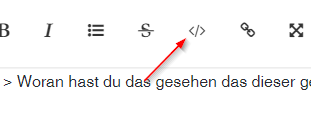
                                fe90b000-2301-49f2-8509-561b388edd69-image.png

                                siehe editor
                                https://forum.iobroker.net/help-german

                                umgestiegen von Proxmox auf Unraid

                                1 Antwort Letzte Antwort
                                0
                                • ralleR ralle

                                  @thomas-braun
                                  vielen Dank für deine Mühe, es hat geklappt.... tausend dank!
                                  Woran hast du das gesehen das dieser gestartet werden muss? und was sind CodeTags? Habe aus Putty das so raus kopiert, würde gerne fürs nächste mal wissen wie ich das richtig mache mit CodeTags

                                  HomoranH Nicht stören
                                  HomoranH Nicht stören
                                  Homoran
                                  Global Moderator Administrators
                                  schrieb am zuletzt editiert von Homoran
                                  #18

                                  @ralle sagte in IO Broker lässt sich nicht mehr aufrufen:

                                  Woran hast du das gesehen das dieser gestartet werden muss? und was sind CodeTags?

                                  wenn du es in die code-tags gepackt hättest, hättest du es auch gesehen
                                  hab das mal für dich gemacht.

                                  Tipp: sieh dir mal die erste und die letzte Zeile an.

                                  kein Support per PN! - Fragen im Forum stellen - es gibt fast nichts, was nicht auch für andere interessant ist.

                                  Benutzt das Voting rechts unten im Beitrag wenn er euch geholfen hat.

                                  der Installationsfixer: curl -fsL https://iobroker.net/fix.sh | bash -

                                  1 Antwort Letzte Antwort
                                  0
                                  Antworten
                                  • In einem neuen Thema antworten
                                  Anmelden zum Antworten
                                  • Älteste zuerst
                                  • Neuste zuerst
                                  • Meiste Stimmen


                                  Support us

                                  ioBroker
                                  Community Adapters
                                  Donate

                                  685

                                  Online

                                  32.6k

                                  Benutzer

                                  82.2k

                                  Themen

                                  1.3m

                                  Beiträge
                                  Community
                                  Impressum | Datenschutz-Bestimmungen | Nutzungsbedingungen | Einwilligungseinstellungen
                                  ioBroker Community 2014-2025
                                  logo
                                  • Anmelden

                                  • Du hast noch kein Konto? Registrieren

                                  • Anmelden oder registrieren, um zu suchen
                                  • Erster Beitrag
                                    Letzter Beitrag
                                  0
                                  • Home
                                  • Aktuell
                                  • Tags
                                  • Ungelesen 0
                                  • Kategorien
                                  • Unreplied
                                  • Beliebt
                                  • GitHub
                                  • Docu
                                  • Hilfe
